翻译: Emacs Lisp 
这是 GNU Emacs Lisp 参考手册 对应于 Emacs 版本 30.2.
版权所有 © 1990–1996, 1998–2025 自由软件基金会
本文件允许在GNU自由文档许可证 1.3 版或自由软件基金会发布的任何后续版本的条款下复制、分发和/或修改;不变部分为“GNU通用公共许可证”,封面文字为“GNU手册”,封底文字如下(a)所示。许可证副本包含在题为“GNU自由文档许可证”的部分中。
(a)自由软件基金会(FSF)的封底文字是:“您可以自由复制和修改本 GNU手册。从 FSF 购买副本将支持其开发 GNU 并促进软件自由。”
Short Table of Contents
- 1 简介
- 2 Lisp 数据类型
- 3 数值
- 4 字符串与字符
- 5 列表
- 6 序列、数组与向量
- 7 记录
- 8 哈希表
- 9 符号
- 10 Evaluation
- 11 控制结构
- 12 变量
- 13 函数
- 14 宏
- 15 自定义设置
- 16 加载
- 17 字节编译
- 18 Lisp 本地代码编译
- 19 Lisp 程序调试
- 20 Lisp 对象的读取与打印
- 21 迷你缓冲区
- 22 命令循环
- 23 按键映射
- 24 主模式与次模式
- 25 文档
- 26 文件
- 27 备份与自动保存
- 28 缓冲区
- 29 Windows
- 30 框架
- 31 位置
- 32 标记
- 33 文本
- 34 非 ASCII 字符
- 35 搜索与匹配
- 36 语法表
- 37 解析表达式文法
- 38 解析程序源代码
- 39 缩写与缩写展开
- 40 线程
- 41 进程
- 42 Emacs 显示
- 43 操作系统接口
- 44 准备用于分发的 Lisp 代码
- Appendix A Emacs 29 反向更新说明
- Appendix B GNU Free Documentation License
- Appendix C GNU General Public License
- Appendix D 技巧与规范
- Appendix E GNU Emacs 内部结构
- Appendix F 标准错误
- Appendix G 标准按键映射
- Appendix H 标准钩子
- Index
Table of Contents
- 1 简介
- 2 Lisp 数据类型
- 2.1 打印表示与读入语法
- 2.2 特殊读取语法
- 2.3 注释
- 2.4 编程类型
- 2.5 编辑类型
- 2.6 循环对象的读取语法
- 2.7 类型谓词
- 2.8 相等性谓词
- 2.9 可变性
- 2.10 Emacs Lisp 对象的类型层次
- 3 数值
- 4 字符串与字符
- 5 列表
- 6 序列、数组与向量
- 7 记录
- 8 哈希表
- 9 符号
- 10 Evaluation
- 11 控制结构
- 12 变量
- 13 函数
- 14 宏
- 15 自定义设置
- 16 加载
- 17 字节编译
- 18 Lisp 本地代码编译
- 19 Lisp 程序调试
- 19.1 Lisp 调试器
- 19.2 Edebug
- 19.3 调试无效的 Lisp 语法
- 19.4 测试覆盖
- 19.5 性能剖析
- 20 Lisp 对象的读取与打印
- 21 迷你缓冲区
- 22 命令循环
- 23 按键映射
- 24 主模式与次模式
- 25 文档
- 26 文件
- 27 备份与自动保存
- 28 缓冲区
- 29 Windows
- 29.1 Emacs 窗口的基本概念
- 29.2 窗口与框架
- 29.3 选中窗口
- 29.4 窗口尺寸
- 29.5 调整窗口大小
- 29.6 保留窗口尺寸
- 29.7 拆分窗口
- 29.8 删除窗口
- 29.9 重组窗口
- 29.10 窗口循环顺序
- 29.11 缓冲区与窗口
- 29.12 在窗口中切换到缓冲区
- 29.13 在合适窗口中显示缓冲区
- 29.14 窗口历史
- 29.15 专用窗口
- 29.16 退出窗口
- 29.17 侧边窗口
- 29.18 原子窗口
- 29.19 窗口(window)与点(Point)
- 29.20 窗口起始与结束位置
- 29.21 文本滚动
- 29.22 垂直分数滚动
- 29.23 水平滚动
- 29.24 坐标与窗口
- 29.25 鼠标窗口自动选择
- 29.26 窗口配置
- 29.27 窗口参数
- 29.28 窗口滚动与变更的钩子函数
- 30 框架
- 30.1 创建框架
- 30.2 多终端
- 30.3 框架几何属性
- 30.4 框架参数
- 30.5 终端参数
- 30.6 框架标题
- 30.7 删除框架
- 30.8 查找所有框架
- 30.9 迷你缓冲区与框架
- 30.10 输入焦点
- 30.11 框架的可见性
- 30.12 框架的置顶、置底与堆叠调整
- 30.13 框架配置
- 30.14 子框架
- 30.15 鼠标跟踪
- 30.16 鼠标位置
- 30.17 弹出菜单
- 30.18 屏幕键盘
- 30.19 对话框
- 30.20 指针形状
- 30.21 窗口系统选择
- 30.22 选择区访问
- 30.23 粘贴媒体
- 30.24 拖放
- 30.25 颜色名称
- 30.26 文本终端颜色
- 30.27 X 资源
- 30.28 显示功能检测
- 31 位置
- 32 标记
- 33 文本
- 33.1 查看光标附近的文本
- 33.2 查看缓冲区内容
- 33.3 比较文本
- 33.4 插入文本
- 33.5 用户级插入命令
- 33.6 删除文本
- 33.7 用户级删除命令
- 33.8 删除环
- 33.9 撤销
- 33.10 维护撤销列表
- 33.11 段落重排
- 33.12 填充边距
- 33.13 自适应填充模式
- 33.14 自动换行
- 33.15 文本排序
- 33.16 列数统计
- 33.17 缩进
- 33.18 大小写转换
- 33.19 文本属性
- 33.20 字符编码替换
- 33.21 寄存器
- 33.22 文本转置
- 33.23 替换缓冲区文本
- 33.24 处理压缩数据
- 33.25 Base 64 编码
- 33.26 校验和与哈希
- 33.27 可疑文本
- 33.28 GnuTLS 加密
- 33.29 数据库
- 33.30 解析 HTML 和 XML
- 33.31 解析和生成 JSON 值
- 33.32 JSONRPC 通信
- 33.33 原子变更组
- 33.34 变更钩子
- 34 非 ASCII 字符
- 35 搜索与匹配
- 36 语法表
- 37 解析表达式文法
- 38 解析程序源代码
- 39 缩写与缩写展开
- 40 线程
- 41 进程
- 42 Emacs 显示
- 42.1 刷新屏幕
- 42.2 强制重新显示
- 42.3 截断显示
- 42.4 回显区
- 42.5 报告警告
- 42.6 不可见文本
- 42.7 选择性显示
- 42.8 临时显示
- 42.9 覆盖层
- 42.10 显示文本尺寸
- 42.11 行高
- 42.12 文本的视觉样式(Faces)
- 42.13 侧边栏
- 42.14 滚动条
- 42.15 窗口分隔线
- 42.16
display属性 - 42.17 图像
- 42.18 图标
- 42.19 嵌入式原生组件
- 42.20 按钮
- 42.21 抽象显示
- 42.22 括号闪烁
- 42.23 字符显示
- 42.24 蜂鸣提示
- 42.25 窗口系统
- 42.26 工具提示
- 42.27 双向显示
- 43 操作系统接口
- 44 准备用于分发的 Lisp 代码
- Appendix A Emacs 29 反向更新说明
- Appendix B GNU Free Documentation License
- Appendix C GNU General Public License
- Appendix D 技巧与规范
- Appendix E GNU Emacs 内部结构
- Appendix F 标准错误
- Appendix G 标准按键映射
- Appendix H 标准钩子
- Index
1 简介 
GNU Emacs 文本编辑器的绝大部分代码,均由名为 Emacs Lisp 的编程语言编写而成。你可以用 Emacs Lisp 编写新代码,并将其作为编辑器扩展加载使用。不过,Emacs Lisp 并非只是一门扩展语言:它本身就是一套完整的计算机编程语言,可像其他编程语言一样通用。
由于 Emacs Lisp 专为编辑器场景设计,它自带文本扫描、解析等专用能力,同时也支持文件、缓冲区、显示、子进程等相关功能。Emacs Lisp 与编辑功能深度集成:编辑命令本身就是可在 Lisp 程序中直接调用的函数,自定义参数则是普通的 Lisp 变量。
本手册力求完整介绍 Emacs Lisp。若你是初学者,可阅读由 Bob Chassell 撰写、自由软件基金会出版的 《Emacs Lisp 编程入门》。本手册假定 你已相当熟悉 Emacs 的基本编辑操作,相关基础内容请参阅 《GNU Emacs 手册》。
一般而言,前面章节介绍 Emacs Lisp 中与多数编程语言共通的特性,后续章节则讲解 Emacs Lisp 独有的、或与编辑功能直接相关的特性。
本文档 为 GNU Emacs Lisp 参考手册,对应 Emacs 版本:30.2.
1.1 注意事项 
本手册历经多次修订,内容已近乎完整,但仍非完美无缺。部分主题尚未覆盖,原因或是我们认为其属于次要内容(如多数独立模式),或是相关章节仍待撰写。因无法完整阐述,我们有意省略了若干部分。
手册中已覆盖的内容应完全准确,因此其中任何表述 — 从具体示例、描述文字,到章节与小节的编排顺序 — 都欢迎批评指正。若某处内容令人困惑,或是你必须查阅源码、动手实验才能了解手册未提及的知识,那么手册或许需要修正。敬请告知我们。
使用本手册时,若发现错误,恳请尽快提交更正。如果你为某个函数或一组函数想到了简洁、实用的示例,请尽力整理并发送过来。评论时请注明对应的节点名、函数名或变量名,并说明你所指正的版本号。
请通过 M-x report-emacs-bug 发送意见与更正。详情,See 报告错误 in The GNU Emacs Manual.
1.2 Lisp 历史 
Lisp(表处理语言,LISt Processing language)于 20 世纪 50 年代末在麻省理工学院首次开发,用于人工智能研究。Lisp 语言的强大能力使其同样适用于其他场景,例如编写编辑命令。
多年来已经出现了数十种 Lisp 实现,每种都有其独特之处。其中许多都受 Maclisp 启发 —Maclisp 是 20 世纪 60 年代麻省理工学院 MAC 项目所开发的。最终,Maclisp 后续分支的实现者们共同制定了一套 Lisp 系统标准,称为 Common Lisp。与此同时,麻省理工学院的 Gerry Sussman 与 Guy Steele 开发了一门简洁但功能强大的 Lisp 方言,名为 Scheme。
GNU Emacs Lisp 主要受 Maclisp 启发,也少量借鉴了 Common Lisp。如果你了解 Common Lisp,会发现许多相似之处。不过,为了降低 GNU Emacs 的内存占用,Common Lisp 的很多特性被省略或简化。这些简化有时幅度很大,可能会让 Common Lisp 用户感到困惑。我们会偶尔指出 GNU Emacs Lisp 与 Common Lisp 的区别。如果你不了解 Common Lisp,也无需担心:本手册内容是自包含的。
可以通过 cl-lib 库实现一定程度的 Common Lisp 模拟,See 概述 in Common Lisp Extensions.
Emacs Lisp 完全没有受到 Scheme 的影响;但 GNU 项目有一套 Scheme 实现,名为 Guile。我们在所有需要支持扩展的新 GNU 软件中都使用它。
1.3 约定 
本节说明本手册所使用的符号约定。你可以先跳过本节,需要时再回头查阅。
1.3.1 部分术语 
在本手册中,“Lisp 读取器(the Lisp reader)” 和 “Lisp 打印器(the Lisp printer)” 分别指 Lisp 中负责将 Lisp 对象的文本表示转换为实际 Lisp 对象,以及进行反向转换的程序。更多细节,See 打印表示与读入语法。阅读本手册的你被视为程序员,文中直接以 “you(你)” 称呼。用户则是指使用 Lisp 程序(包括你编写的程序)的人。
Lisp 代码示例会像这样排版:(list 1 2 3)。表示元语法变量或所描述函数的参数名称会像这样排版:first-number。
1.3.2 nil 和 t 
在 Emacs Lisp 中,符号 nil 有三种不同含义:其一,它是名为 ‘nil’ 的符号;其二,它代表逻辑布尔值 false;其三,它表示空列表 — 即包含零个元素的列表。当 nil 作为变量使用时,其值始终为 nil。
对于 Lisp 读取器而言,‘()’ 和 ‘nil’ 完全等价:它们指向同一个对象(符号 nil)。这两种书写形式仅为方便人类阅读而设计。Lisp 读取器读取 ‘()’ 或 ‘nil’ 后,无法区分程序员实际书写的是哪一种形式。
在本手册中,若想强调 “空列表” 这一含义,我们会写作 ();若想强调布尔值 false 这一含义,则写作 nil。这种写法也适用于 Lisp 程序编写,是值得遵循的良好约定。
(cons 'foo ()) ; 强调空列表 (setq foo-flag nil) ; 强调布尔值 false
在需要布尔值的上下文环境中,任何非 nil 的值都会被视为 true。不过,t 是表示布尔值 true 的首选形式。当你需要选择一个值来代表 true 且无其他选择依据时,应使用 t。符号 t 的值始终为 t。
在 Emacs Lisp 中,nil 和 t 是特殊符号,它们的求值结果始终是自身。因此,在程序中将它们用作常量时无需加引号。若尝试修改它们的值,会触发 设置常量错误(setting-constant error)。See 永不改变的变量.
- Function: booleanp object 
若 object 是两个标准布尔值(
t或nil)之一,则返回非nil值。
1.3.3 求值表示法 
可以被求值的 Lisp 表达式称为 form (形式)。对一个 form 求值总会产生一个结果,该结果是一个 Lisp 对象。在本手册的示例中,这一过程用符号 ‘⇒’ 表示:
(car '(1 2))
⇒ 1
你可以将其读作:“(car '(1 2)) 求值结果为 1”.
当一个 form 是宏调用时,它会展开为一个新的 form 供 Lisp 求值。我们用 ‘→’ 表示展开结果。展开后 form 的求值结果可能会展示,也可能不展示。
(third '(a b c))
→ (car (cdr (cdr '(a b c))))
⇒ c
为了辅助描述某个 form形式,我们有时会展示另一个效果完全相同的形式。两个形式的严格等价关系用 ‘≡’ 表示。
(make-sparse-keymap) ≡ (list 'keymap)
1.3.4 打印表示法 
本手册中的许多示例在求值时会打印文本。如果你在 Lisp 交互缓冲区(如 *scratch* 缓冲区)中运行示例代码,只需在示例的右括号后按下 C-j,打印出的文本就会插入到缓冲区中。如果你通过其他方式(如使用 eval-region 函数求值)运行示例,打印的文本会显示在回显区(echo area)。
本手册的示例中,无论文本输出到何处,打印内容均使用符号 ‘⊣’ 标注。形式求值后返回的值则在单独一行用 ‘⇒’ 标注。
(progn (prin1 'foo) (princ "\n") (prin1 'bar))
⊣ foo
⊣ bar
⇒ bar
1.3.5 错误信息 
部分示例会触发错误。这种情况下,通常会在回显区显示一条错误信息。我们在以 ‘error→’ 开头的一行中展示错误信息。注意:‘error→’ 本身并不会出现在回显区中。
(+ 23 'x) error→ Wrong type argument: number-or-marker-p, x error→ 参数类型错误:应为数值或标记类型,实际为 x
1.3.6 缓冲区文本表示法 
有些示例会通过展示文本修改前后的状态,来描述对缓冲区内容的改动。这类示例会把对应缓冲区的内容,放在两行包含缓冲区名称的虚线之间。此外,‘∗’ 用来表示光标位置(point)。(当然,光标标记并非缓冲区里的实际文本;它只是标识出当前光标位于哪两个字符之间。)
---------- Buffer: foo ----------
This is the ∗contents of foo.
---------- Buffer: foo ----------
(insert "changed ")
⇒ nil
---------- Buffer: foo ----------
This is the changed ∗contents of foo.
---------- Buffer: foo ----------
1.3.7 描述格式 
本手册对函数(functions)、变量(variables)、宏(macros)、命令(commands)、用户选项(user options)和特殊forms 采用统一格式进行描述。描述的第一行会包含该对象的名称,其后附带其参数(如果有)。 对象的类别 — 函数、变量或其他类型 — 会出现在该行开头。 后续行是具体说明,有时会附带示例。
1.3.7.1 示例函数描述 
在函数描述中,首先出现的是被描述函数的名称,同一行紧接着是参数名列表。这些参数名也会在描述正文中使用,用来代表参数的值。
参数列表中出现关键字 &optional,表示其后的参数可以省略(省略的参数默认为 nil)。调用函数时不要写 &optional。
关键字 &rest(其后必须紧跟一个参数名)表示后面可以跟任意数量的参数。&rest 后面的这个参数名,会以列表形式接收传给函数的所有剩余参数。调用函数时不要写 &rest。
下面是一个虚构函数 foo 的描述:
- Function: foo integer1 &optional integer2 &rest integers 
函数
foo用 integer2 减去 integer1,然后将其余所有参数加到结果上。如果没有提供 integer2,则默认使用数值 19。(foo 1 5 3 9) ⇒ 16 (foo 5) ⇒ 14更普遍的,
(foo w x y...) ≡ (+ (- x w) y...)
按照约定,任何名称中包含类型名的参数(例如 integer、integer1 或 buffer),都要求属于该类型。类型的复数形式(如 buffers)通常表示该类型对象的列表。名为 object 的参数可以是任意类型。(有关 Emacs 对象类型列表,see Lisp 数据类型。)名称带有其他含义的参数(如 new-file)则是该函数专用的;如果函数有文档字符串,其中会说明参数类型(see 文档)。
关于被 &optional 和 &rest 修饰的参数更完整的说明,See Lambda 表达式。
命令、宏和特殊形式的描述格式相同,只是把开头的 ‘Function’ 分别换成‘Command’、‘Macro’ 或 ‘Special Form’。命令只是可以交互式调用的函数;宏对参数的处理方式与函数不同(参数不被求值),但描述形式一致。
宏和特殊形式的描述会使用更复杂的表示法来指定可选参数和重复参数,因为它们可以用更复杂的方式把参数列表拆分为独立参数。‘[optional-arg]’ 表示 ‘optional-arg’ 是可选参数;‘repeated-args…’ 表示零个或多个参数。当多个参数被分组为更深层的列表结构时,会使用圆括号。示例如下:
- Special Form: count-loop (var [from to [inc]]) body… 
这个虚构的特殊形式实现一个循环,每次迭代先执行 body 中的表达式,再对变量 var 递增。第一次迭代时,变量取值为 from;后续迭代每次加 1(若指定了 inc 则按 inc 递增)。如果 var 等于 to,则在执行 body 之前退出循环。示例:
(count-loop (i 0 10) (prin1 i) (princ " ") (prin1 (aref vector i)) (terpri))
如果省略 from 和 to,则循环开始前将 var 绑定为
nil,且每次迭代开始时,若 var 非-nil则退出循环。示例:(count-loop (done) (if (pending) (fixit) (setq done t)))在这个特殊形式里,参数 from 和 to 是可选的,但必须同时出现或同时省略。如果它们出现,还可以额外指定 inc。这些参数与 var 一起被放在一个列表里,以区别于 body — body 包含该形式中所有剩余元素。
1.3.7.2 示例变量描述 
变量(variable) 是一个可以被绑定(bound) (或 赋值(set))到某个对象上的名称。变量所绑定的对象称为它的值(value);我们也说该变量保存这个值。尽管几乎所有变量都可以由用户设置,但有一类变量专门供用户修改,这类变量称为用户选项(user options)。普通变量和用户选项所使用的描述格式与函数类似,只是没有参数。
下面是虚构变量 electric-future-map 的描述示例:
- Variable: electric-future-map 
该变量的值是一个完整的键盘映射表(keymap),供 ‘Electric Command Future mode’ 使用。该映射表中的函数可以让你编辑尚未打算执行的命令。
用户选项的描述格式完全相同,只是将开头的 ‘Variable’ 替换为 ‘User Option’。
1.4 版本信息 
以下这些功能可以提供当前所使用的 Emacs 版本信息。
- Command: emacs-version &optional here 
此函数返回一个字符串,描述正在运行的 Emacs 版本。在错误报告中包含该字符串会很有用。
(emacs-version) ⇒ "GNU Emacs 26.1 (build 1, x86_64-unknown-linux-gnu, GTK+ Version 3.16) of 2017-06-01"如果 here 非
nil,该函数会将文本插入到缓冲区中光标之前,并返回nil。当以交互式方式调用此函数时,它会在回显区打印相同信息;若提供前缀参数,则会使 here 为非nil。
- Variable: emacs-build-time 
该变量的值表示 Emacs 的编译时间。其格式与
current-time相同(see 时刻);如果信息不可用,则为nil。emacs-build-time ⇒ (25194 55894 8547 617000)(如果编译 Emacs 时
current-time-list为nil,则该时间戳为(1651169878008547617 . 1000000000)。)
- Variable: emacs-version 
该变量的值是正在运行的 Emacs 版本字符串,例如
"26.1"。若值包含三个数字部分(如"26.0.91"),表示这是一个未发布的测试版。(在 Emacs 26.1 之前,版本字符串末尾会多一个数字,该数字现在存放在emacs-build-number中,例如"25.1.1"。)
- Variable: emacs-major-version 
Emacs 的主版本号,为整数类型。例如 Emacs 23.1 中,该值为 23。
- Variable: emacs-minor-version 
Emacs 的次版本号,为整数类型。例如 Emacs 23.1 中,该值为 1。
- Variable: emacs-build-number 
一个整数,每次在同一目录下(不清理)编译 Emacs 时都会递增。该变量仅在开发 Emacs 时有用。
- Variable: emacs-repository-version 
字符串类型,表示编译此 Emacs 所依据的代码仓库修订号。如果 Emacs 是在版本控制系统之外编译的,该值为
nil。
- Variable: emacs-repository-branch 
字符串类型,表示编译此 Emacs 所依据的代码仓库分支。绝大多数情况下为
"master"。如果 Emacs 是在版本控制系统之外编译的,该值为nil。
1.5 致谢 
本手册最初由 Robert Krawitz、Bil Lewis、Dan LaLaiberte、Richard M. Stallman 与 Chris Welty 编写,他们是 GNU 手册小组的志愿者,这项工作历时数年完成。Robert J. Chassell 协助审阅与编辑本手册,工作得到美国国防部高级研究计划局(DARPA)ARPA 第 6082 号订单的支持,该项目由计算逻辑公司的 Warren A. Hunt, Jr. 负责协调。此后新增的章节由 Miles Bader、Lars Brinkhoff、Chong Yidong、Kenichi Handa、Lute Kamstra、Juri Linkov、Glenn Morris、Thien‑Thi Nguyen、Dan Nicolaescu、Martin Rudalics、Kim F. Storm、Luc Teirlinck、Eli Zaretskii 及其他人士撰写。
感谢以下人士提供修正意见:Drew Adams, Juanma Barranquero, Karl Berry, Jim Blandy, Bard Bloom, Stephane Boucher, David Boyes, Alan Carroll, Richard Davis, Lawrence R. Dodd, Peter Doornbosch, David A. Duff, Chris Eich, Beverly Erlebacher, David Eckelkamp, Ralf Fassel, Eirik Fuller, Stephen Gildea, Bob Glickstein, Eric Hanchrow, Jesper Harder, George Hartzell, Nathan Hess, Masayuki Ida, Dan Jacobson, Jak Kirman, Bob Knighten, Frederick M. Korz, Joe Lammens, Glenn M. Lewis, K. Richard Magill, Brian Marick, Roland McGrath, Stefan Monnier, Skip Montanaro, John Gardiner Myers, Thomas A. Peterson, Francesco Potortì, Friedrich Pukelsheim, Arnold D. Robbins, Raul Rockwell, Jason Rumney, Per Starbäck, Shinichirou Sugou, Kimmo Suominen, Edward Tharp, Bill Trost, Rickard Westman, Jean White, Eduard Wiebe, Matthew Wilding, Carl Witty, Dale Worley, Rusty Wright, and David D. Zuhn.
如需更完整的贡献者名单,请查阅 Emacs 源代码仓库中对应的变更日志条目。
2 Lisp 数据类型 
Lisp 对象(object) 是 Lisp 程序使用和操作的数据单元。对我们而言,类型(type) 或 数据类型(data type) 是一组可能的对象集合。
每个对象至少属于一种类型。同一类型的对象具有相似的结构,通常可在相同的上下文中使用。类型之间可以重叠,一个对象可以属于两种或更多类型。因此,我们可以判断一个对象是否属于某一特定类型,但不能说一个对象唯一的类型是什么。
Emacs 内置了少量基础对象类型,所有其他类型都由这些类型构造而成,它们被称为 基本类型(primitive types)。每个对象有且仅属于一种基本类型。这些类型包括:integer整数、float浮点数、cons单元、symbol符号、string字符串、vector向量、hash-table哈希表、subr子程序、byte-code function字节码函数和recor记录,此外还有若干与编辑相关的特殊类型,如buffer缓冲区等。(See 编辑类型。)
每种基本类型都有对应的 Lisp 函数,用于检查一个对象是否属于该类型。
Lisp 与许多其他语言不同之处在于它的对象是 self-typing自描述类型:每个对象的基本类型隐含在对象自身中。例如,如果一个对象是向量,任何代码都不能把它当作数字;Lisp 本身就知道它是向量而非数字。
在大多数语言中,程序员必须为每个变量声明数据类型,类型由编译器知晓,但不体现在数据中。Emacs Lisp 中不存在这类类型声明。Lisp 变量可以存放任意类型的值,并且会完整保留你存入的值及其类型。(实际上,极少数 Emacs Lisp 变量只能接受特定类型的值。See 受限值变量。)
本章介绍 GNU Emacs Lisp 中每种标准类型的用途、打印表示和读入语法。有关如何使用这些类型的详细内容将在后续章节说明。
2.1 打印表示与读入语法 
对象的 打印表示(printed representation),是 Lisp 打印器(函数 prin1)为该对象生成的输出格式。每种数据类型都有唯一的打印表示。对象的 读入语法(read syntax),是 Lisp 读取器(函数 read)对该对象所接受的输入格式。这一格式不一定唯一:很多对象都支持多种语法。See Lisp 对象的读取与打印。
在大多数情况下,一个对象的打印表示形式同时也是该对象的读取语法。不过,某些类型并没有对应的读取语法,因为在 Lisp 程序中把这类对象当作常量输入是没有意义的。这类对象会以 井号表示法(hash notation) 打印:由字符 ‘#<’ 开头,接着是一段描述性字符串(通常是类型名后跟对象名),最后以 ‘>’ 结尾。(之所以称为 “井号表示法(hash natation)”,是因为它以字符 ‘#’ 开头,该字符也叫 “井号(hash)” 或 “数字符号”。)例如:
(current-buffer)
⇒ #<buffer objects.texi>
井号表示法完全无法被读取,因此 Lisp 读取器只要遇到 ‘#<’,就会报 invalid-read-syntax(非法读入语法)错误。
在本章后续各节中,我们会在介绍每种 Lisp 数据类型时,同时说明它的读取语法与打印表示形式。例如, 参见 字符串类型 及其子小节可了解字符串的读取语法与打印表示;参见 向量类型 可获取向量的相关信息,依此类推。
在其他语言中,表达式就是文本,没有别的形态。而在 Lisp 中,表达式首先是一个 Lisp 对象,其次才是作为该对象读入语法的文本。通常不必刻意强调这一区别,但你必须心里有数,否则偶尔会非常困惑。
当你交互式求值一个表达式时,Lisp 解释器会先读取它的文本表示,构造出一个 Lisp 对象,然后再对这个对象求值(see Evaluation)。但读取与求值是两个独立的过程:读取只是根据文本返回对应的 Lisp 对象;这个对象之后可能被求值,也可能不会。关于基本读取函数 read 的说明,see 输入函数。
2.2 特殊读取语法 
Emacs Lisp 通过特殊井号表示法表示许多特殊对象和结构。
- ‘#<…>’
不具备读取语法的对象会以这种形式展示(see 打印表示与读入语法)。
- ‘##’
名称为空字符串的内部符号的打印表示形式(see 符号类型)。
- ‘#'’
这是
function的简写形式,见 匿名函数。- ‘#:’
名称为 foo 的未内部化符号,其打印表示为 ‘#:foo’(see 符号类型)。
- ‘#N’
打印循环结构时,用于表示结构自引用的位置,‘N’ 是起始列表编号:
(let ((a (list 1))) (setcdr a a)) => (1 . #0)
- ‘#N=’
- ‘#N#’
‘#N=’ 为一个对象命名,‘#N#’ 表示该对象。这样在重新读取时,它们会是同一个对象而非副本(see 循环对象的读取语法)。
- ‘#xN’
以十六进制表示 ‘N’(如 ‘#x2a’)。
- ‘#oN’
以八进制表示 ‘N’(如 ‘#o52’)。
- ‘#bN’
以二进制表示 ‘N’(如 ‘#b101010’)。
- ‘#(…)’
字符串的文本属性(see 字符串中的文本属性)。
- ‘#^’
字符表(see 字符表类型)。
- ‘#s(hash-table …)’
哈希表(see 哈希表类型)。
- ‘?C’
字符(see 基本字符语法)。
- ‘#$’
字节编译文件中的当前文件名(see 文档字符串与编译)。不建议在 Emacs Lisp 源文件中使用。
- ‘#@N’
跳过接下来的 ‘N’ 个字符(see 注释)。用于字节编译文件,不建议在 Emacs Lisp 源文件中使用。
- ‘#f’
表示后续的表达式无法被 Emacs Lisp 读取器读取。该标记仅用于显示文本(当它比其他表示不可读表达式的方式更美观时),绝不会出现在任何 Lisp 文件中。
2.3 注释 
注释(comment) 是程序中仅供阅读程序的人理解所写的文本,对程序的含义没有任何影响。在 Lisp 中,未转义的分号(‘;’) 只要不在字符串或字符常量内部,就表示开始一段注释,注释持续到本行末尾。Lisp 读取器会忽略注释,它们不会成为 Lisp 系统中表示程序的 Lisp 对象的一部分。
‘#@count’ 结构会跳过接下来的 count 个字符,常用于由程序自动生成、包含二进制数据的注释。Emacs Lisp 字节编译器会在其输出文件中使用该结构(see 字节编译),但它并不适用于源文件。
关于注释的排版规范,See 注释编写技巧。
2.4 编程类型 
Emacs Lisp 中的类型分为两大类:一类与 Lisp 编程相关,另一类与 编辑功能相关。前者以各种形式存在于众多 Lisp 实现中,而后者是 Emacs Lisp 所独有的。
- 整数类型
- 浮点类型
- 字符类型
- 符号类型
- 序列类型
- Cons 单元与列表类型
- 数组类型
- 字符串类型
- 向量类型
- 字符表类型
- 布尔向量类型
- 哈希表类型
- 函数类型
- 宏类型
- 原语函数类型
- 闭包函数类型
- 记录类型
- 类型描述符
- 类型说明符
- 自动加载类型
- 终结器类型
2.4.1 整数类型 
在底层实现中,整数分为两种:小整数(fixnum) 和大整数(bignum)。
fixnum 的取值范围取决于机器。其最小范围是 −536,870,912 到 536,870,911 (共 30 位,即 −2**29 到 2**29 − 1) 但很多机器会提供更宽的范围。
Bignum 可以拥有任意精度。会导致 fixnum 溢出的运算,将自动返回 bignum 作为结果。
所有数值都可以用 eql 或 = 比较;fixnum 还可以用 eq 比较。要判断一个整数是 fixnum 还是 bignum,你可以将它与 most-negative-fixnum 和 most-positive-fixnum 比较,也可以直接使用便捷谓词 fixnump 和 bignump 作用于任意对象。
整数的读取语法是一串(十进制)数字,开头可带符号,末尾可带一个句点。Lisp 解释器输出的打印表示不会带有前导的 ‘+’ 或末尾的 ‘.’。
-1 ; 整数 −1. 1 ; 整数 1. 1. ; 同样是整数 1. +1 ; 同样是整数 1.
更多信息,See 数值。
2.4.2 浮点类型 
浮点数是计算机中科学计数法的等价形式;你可以把浮点数看作一个分数与一个 10 的幂的组合。有效数字的精确位数和指数的取值范围与具体机器相关;Emacs 使用 C 语言的 double 数据类型来存储数值,在内部它记录的是 2 的幂而非 10 的幂。
浮点数的书写形式必须满足以下至少一项:包含小数点(且小数点后至少有一位数字),包含指数部分,或两者都有。例如,‘1500.0’、‘+15e2’、‘15.0e+2’、‘+1500000e-3’ 和 ‘.15e4’ 是表示数值 1500 的五种浮点写法,它们是等价的。
更多信息,See 数值。
2.4.3 字符类型 
Emacs Lisp 中的 字符(character) 本质上就是一个整数。换句话说,字符是通过其字符编码来表示的。例如,字符 A 用 整数 65 表示。这也是它们通常的打印形式;详见 基本字符语法。
程序中偶尔会使用单个字符,但更常见的是操作 字符串(strings)—字符串是由字符组成的序列。 See 字符串类型。
字符串和缓冲区中的字符目前限定在 0 到 4194303 范围内(共 22 位,see 字符编码)。编码 0~127 是 ASCII 编码,其余为非-ASCII 编码(see 非 ASCII 字符)。用于表示键盘输入的字符范围要大得多,以便编码 Control、Meta、Shift 等修饰键。
有专门的函数用于生成便于人类阅读的字符文本描述,以供提示信息使用。 See 帮助信息中的字符描述。
2.4.3.1 基本字符语法 
由于字符本质上是整数,字符的打印形式是一个十进制整数。这虽然也可以作为字符的读取语法,但在 Lisp 程序中这样写字符并不清晰。你应当 始终 使用 Emacs Lisp 为字符提供的专用读取语法格式,这些语法格式以问号开头。
字母与数字字符的常用读取语法是:问号后跟字符本身。例如:‘?A’ 表示字符 A,‘?B’ 表示字符 ‘B’,‘?a’ 表示字符 a。
示例:
?Q ⇒ 81 ?q ⇒ 113
标点符号也可以使用同样的语法。但是,如果该标点在 Lisp 中具有特殊语法含义,就必须用 ‘\’ 进行转义。例如,‘?\(’ 用来表示左括号字符。同理,如果字符是 ‘\’ 本身,必须用第二个 ‘\’ 转义:‘?\\’。
可以用以下写法表示控制字符:control-g:‘?\a’、退格符:‘?\b’、制表符:‘?\t’、换行符:‘?\n’、垂直制表符:‘?\v’、换页符:‘?\f’、空格符:‘?\s’、回车符:‘?\r’、删除符:‘?\d’、转义符:‘?\e’。(‘?\s’ 后面跟一个减号时含义不同 —— 它会将 Super 修饰符应用到后面的字符上。)如下所示:
?\a ⇒ 7 ; control-g, C-g ?\b ⇒ 8 ; 退格 backspace, BS, C-h ?\t ⇒ 9 ; 制表符 tab, TAB, C-i ?\n ⇒ 10 ; 换行 newline, C-j ?\v ⇒ 11 ; 垂直制表符 vertical tab, C-k ?\f ⇒ 12 ; 换页符 formfeed character, C-l ?\r ⇒ 13 ; 回车符 carriage return, RET, C-m ?\e ⇒ 27 ; 转义符 escape character, ESC, C-[ ?\s ⇒ 32 ; 空格 space character, SPC ?\\ ⇒ 92 ; 反斜杠 backslash character, \ ?\d ⇒ 127 ; 删除符 delete character, DEL
这些以反斜杠开头的序列称为 转义序列(escape sequences),因为反斜杠起到了转义字符的作用;这与 ESC 字符本身无关。‘\s’ 用于字符常量;在字符串常量中直接写空格即可。
对没有特殊转义含义的字符前面加反斜杠是允许且无害的,例如 ‘?\+’ 等价于 ‘?+’。大多数字符没有必要加反斜杠,但以下字符必须加反斜杠: ‘()[]\;"’,为避免混淆 Emacs 的 Lisp 编辑命令,以下字符建议加反斜杠:‘|'`#.,’。对于外观类似上述 ASCII 字符的 Unicode 字符,也应加反斜杠,避免阅读代码的人混淆。Emacs 会高亮一些未转义、容易混淆的字符(如‘‘’左单引号、‘’’右单引号)来提醒你。你也可以在空格、制表符等空白字符前加反斜杠。不过,更清晰的做法是使用易读的转义序列(如 ‘\t’ 或 ‘\s’),而不是直接写制表符或空格这类空白字符。(如果你确实写成「反斜杠 + 空格」的形式,应当在该字符常量后面多加一个空格,以便与后续文本分隔。)
2.4.3.2 通用转义语法 
除了用于重要特殊控制字符的专用转义序列外,Emacs 还提供了多种转义语法,可用于表示非-ASCII 文本字符。
-
你可以按 Unicode 名称指定字符(如果该字符有名称)。
?\N{NAME}表示名称为 NAME 的 Unicode 字符。例如, ‘?\N{LATIN SMALL LETTER A WITH GRAVE}’ 等价于?à,表示 Unicode 字符 U+00E0。为方便输入多行字符串,名称中的空格可以替换为任意非空空白序列(如换行)。 - 你可以按 Unicode 编码值指定字符。
?\N{U+X}表示 Unicode 码点为 X 的字符,其中 X 是十六进制数。此外,?\uxxxx和?\Uxxxxxxxx分别表示码点 xxxx 和 xxxxxxxx,每个 x 为一位十六进制数字。例如:?\N{U+E0}、?\u00e0、?\U000000E0都等价于?à与 ‘?\N{LATIN SMALL LETTER A WITH GRAVE}’。Unicode 标准只定义到码点 ‘U+10ffff’,若指定更高码点,Emacs 会报错。 - 你可以按十六进制字符编码指定字符。十六进制转义序列以反斜杠、‘x’ 、加十六进制编码组成。例如:‘?\x41’ 是字符 A,‘?\x1’ 是字符 C-a,
?\xe0是字符 à(带重音符的 a)。‘x’ 后可跟一位或多位十六进制数字,因此可表示任意字符编码。 -
你可以按八进制字符编码指定字符。八进制转义序列由反斜杠加最多三位八进制数字组成。例如:‘?\101’ 表示字符 A,‘?\001’ 表示字符 C-a,
?\002表示字符 C-b。只有八进制编码不超过 777 的字符才能用这种方式表示。
这些转义序列也可用于字符串中,See 字符串中的非-ASCII 字符。
2.4.3.3 控制字符语法 
控制字符可以使用另一种读取语法来表示。它由问号、反斜杠、脱字符 ‘^’ 以及对应的非控制字符组成,字母大小写均可。例如,‘?\^I’ 和 ‘?\^i’ 都是字符 C-i(值为 9)的合法读取语法。
你也可以用 ‘C-’ 代替 ‘^’,因此 ‘?\C-i’ 等价于 ‘?\^I’ 和 ‘?\^i’:
?\^I ⇒ 9 ?\C-I ⇒ 9
在字符串和缓冲区中,只允许使用 ASCII 中存在的控制字符;但在键盘输入场景下,你可以通过 ‘C-’ 将任意字符变成控制字符。这类非-ASCII 控制字符的编码,会在对应非控制字符编码的基础上,加上 2**26 这一位。并非所有文本终端都能生成非-ASCII 控制字符,但在 X 窗口系统及其他窗口系统下可以很方便地生成。
由于历史原因,Emacs 将 DEL 字符视为 ? 的控制等价字符:
?\^? ⇒ 127 ?\C-? ⇒ 127
因此,目前无法通过 ‘\C-’ 来表示 Control-? 这个在 X 窗口系统下有实际意义的输入字符。想要修改这一点并不容易,因为很多 Lisp 文件都以这种方式引用 DEL。
对于表示文件或字符串中的控制字符,我们推荐使用 ‘^’ 语法;对于键盘输入中的控制字符,更推荐使用 ‘C-’ 语法。使用哪种写法不会影响程序含义,但会帮助阅读代码的人更好地理解意图。
2.4.3.4 Meta 字符语法 
元字符(meta character) 是按住 META 修饰键输入的字符。表示这类字符的整数会设置 2**27 这一位。我们使用高位来表示元字符及其他修饰符,以便支持大范围的基础字符编码。
在字符串中,ASCII 字符附加 2**7 (第 7 位)即表示元字符;因此,能放进字符串里的元字符,编码范围是 128~255,它们是普通 ASCII 字符对应的元字符版本。关于字符串中 META 处理的细节,See 将键盘事件存入字符串。
元字符的读取语法使用 ‘\M-’。例如,‘?\M-A’ 表示 M-A。你可以将 ‘\M-’ 与八进制字符编码(见下文)、‘\C-’ 或其他字符语法组合使用。因此,M-A 可以写作 ‘?\M-A’ 或 ‘?\M-\101’。同理,C-M-b 可以写作 ‘?\M-\C-b’、‘?\C-\M-b’ 或 ‘?\M-\002’。
2.4.3.5 其他字符修饰符位 
图形字符的大小写由其字符编码标识;例如,ASCII 区分字符 ‘a’ 和 ‘A’。但 ASCII 无法表示控制字符是大写还是小写。Emacs 使用 2**25 这一位来标识输入控制字符时按下了 Shift 键。这种区分仅在图形显示器(如 X 窗口系统的 GUI)下可行,文本终端不会上报这类信息。表示 Shift 位的 Lisp 语法是 ‘\S-’;因此,‘?\C-\S-o’ 或 ‘?\C-\S-O’ 表示 Shift-Ctrl-o 字符。
X 窗口系统还定义了另外三种可在字符中设置的修饰符位:hyper、super 和 alt。它们对应的语法分别是 ‘\H-’、‘\s-’ 和 ‘\A-’。(这些前缀区分大小写。)例如,‘?\H-\M-\A-x’ 表示 Alt-Hyper-Meta-x。(注意:单独的 ‘\s’ 且后面不带 ‘-’ 表示空格字符。) 从数值上看:alt 对应位值:2**22、super 对应位值:2**23、hyper 对应位值:2**24。
2.4.4 符号类型 
在 GNU Emacs Lisp 中,一个 符号(symbol) 是带有名称的对象。该 符号名称充当该符号的打印表示形式。在常规 Lisp 使用中,借助单个对象数组(see 创建与编入符号), 一个符号的名称是唯一的—不存在两个名称相同的符号。
一个符号可作为变量、函数名使用,或用于存储属性列表;也可仅作为与其他所有 Lisp 对象相区分的标识,确保其在数据结构中的出现能被可靠识别。在特定上下文下,通常仅会用到上述一种用途,但你也可以独立地将同一个符号用于所有这些场景。
名称以冒号(‘:’)开头的符号称为 关键字符号(keyword symbol)。这类符号会自动充当常量,通常仅用于将未知符号与若干特定备选符号做比较。 See 永不改变的变量。
符号名称可包含任意字符。
- 大多数符号名称由字母、数字及标点符号 ‘-+=*/’ 组成,这类名称无需特殊标点 — 只要名称不形似数字,直接书写即可(若形似数字,需在名称开头加 ‘\’ 强制解析为符号);
- ‘_~!@$%^&:<>{}?’ 这类字符虽较少使用,但同样无需特殊标点;
- 其他字符若要纳入符号名称,需用反斜杠转义。但与字符串中的用法不同:符号名称中的反斜杠仅对紧随其后的单个字符进行引用。例如,字符串中的 ‘\t’ 表示制表符,而符号名称中的 ‘\t’ 仅表示字母 ‘t’;若要让符号名称包含制表符,必须实际输入一个制表符(并在其前加反斜杠),但这种用法极少出现。
Common Lisp 说明: 在 Common Lisp 中,小写字母会自动转换为大写(除非显式转义);而在 Emacs Lisp 中,大小写字母是完全不同的字符。
以下是多个符号名称示例。注意第四个示例中的 ‘+’ 需转义,避免被解析为数字;第六个示例则无需转义,因为名称的其余部分使其无法被识别为数字。
foo ; 符号名称为 ‘foo’ FOO ; 符号名称为 ‘FOO’,与 ‘foo’ 不同
1+ ; 符号名称为 ‘1+’ ; (而非 ‘+1’ — 后者是整数)。
\+1 ; 符号名称为 ‘+1’ ; (可读性较差)。
\(*\ 1\ 2\) ; 符号名称为 ‘(* 1 2)’ (更差的名称)。 +-*/_~!@$%^&=:<>{} ; 符号名称为 ‘+-*/_~!@$%^&=:<>{}’. ; 这些字符无需转义。
符号名称作为其打印表示形式的规则有两个例外:
- ‘##’ 是已录入但名称为空字符串的符号的打印表示;
- ‘#:foo’ 是未录入且名称为 foo 的符号的打印表示(通常 Lisp 读取器会录入所有符号, see 创建与编入符号)。
2.4.5 序列类型 
序列(sequence) 是一种表示有序元素集合的 Lisp 对象。Emacs Lisp 中有两类序列:列表(lists) 和 数组(arrays)。
列表是最常用的序列类型。列表可容纳任意类型的元素,且可通过添加或者删除元素轻松修改其长度。关于列表的更多内容,参见下一小节。
数组是固定长度的序列,又可进一步细分为字符串(string)、向量(vector)、字符表(char-table)和布尔向量(bool-vector)。向量可容纳任意类型的元素;字符串的元素必须是字符;布尔向量的元素只能是 t 或 nil;字符表与向量类似,但可通过任意有效字符编码进行索引。字符串中的字符可像缓冲区中的字符一样拥有文本属性(see 文本属性),而向量即便元素恰好是字符,也不支持文本属性。
列表、字符串以及其他数组类型也具有重要的共同特性。例如,它们都有一个长度 l,并且所有元素都可以从 0 到 l 减 1 进行索引。有一类被称为序列函数的函数可以接受任意类型的序列。例如,length 函数可以返回任意序列的长度。See 序列、数组与向量。
通常来说,不可能两次读取到同一个序列对象,因为序列在被读取时总会重新创建。如果你两次读取同一个序列的读取语法,会得到内容相同但并非同一个对象的两个序列。只有一个例外:空列表 () 始终表示同一个对象 — nil。
2.4.6 Cons 单元与列表类型 
Cons 单元(cons cell) 是包含两个存储位的对象,分别称为 CAR 位和 CDR 位。每个位都可以存放任意 Lisp 对象。我们也将这个 Cons 单元的 CAR 位当前存放的对象称为它的 CAR,CDR 位同理。
列表(list) 是由一系列 Cons 单元串联而成的结构:每个 Cons 单元的 CDR 位,要么存放着下一个 Cons 单元,要么存放着空列表。空列表实际上就是符号 nil。详细,See 列表。由于绝大多数 Cons 单元都用作列表的一部分,我们把由 Cons 单元构成的任何结构统称为 列表结构(list structure)。
给 C 程序员的说明:Lisp 列表相当于由 Cons 单元构成的 链表(linked list)。因为 Lisp 中的指针是隐式的,我们不区分 Cons 单元位中是 “存放值” 还是 “指向值”。
因为 Cons 单元在 Lisp 中如此核心,我们也给不是 Cons 单元的对象起了一个名字:这类对象称为 原子(atoms)。
列表的读取语法与打印表示完全一致:由左圆括号、任意数量的元素、右圆括号组成。以下是列表示例:
(A 2 "A") ; 包含三个元素的列表 () ; 不含元素的列表(空列表) nil ; 不含元素的列表(空列表) ("A ()") ; 只有一个元素的列表:字符串"A ()"(A ()) ; 包含两个元素的列表:A和空列表 (A nil) ; 与上一行等价 ((A B C)) ; 只有一个元素的列表 ; (该元素本身是一个含三个元素的列表)。
在读取时,括号内的每个对象都会成为列表的一个元素。也就是说,每个元素都会生成一个 Cons 单元。该 Cons 单元的 CAR 位存放元素本身、CDR 位指向列表中的下一个 Cons 单元。最后一个 Cons 单元的 CDR 位被设为 nil
CAR 与 CDR 这两个名称来源于 Lisp 历史。最早的 Lisp 运行在 IBM 704 计算机上,该机将字分为地址部分(address)和减量部分(decrement);CAR 是提取寄存器地址部分内容的指令,CDR 是提取寄存器减量部分内容的指令。与之相对,Cons 单元因创建它们的函数 cons 而得名,而 cons 取自其用途:构造(construction)单元。
2.4.6.1 用方框图示绘制列表 
列表可以用图示来表示:把每个 cons 单元画成一对像多米诺骨牌一样的方框。(Lisp 读取器无法理解这种图示;文本表示法既能被人也能被计算机理解,而方框图示只能被人理解。)下图表示含有三个元素的列表 (rose violet buttercup):
--- --- --- --- --- ---
| | |--> | | |--> | | |--> nil
--- --- --- --- --- ---
| | |
| | |
--> rose --> violet --> buttercup
在这个图示中,每个方框代表一个可以存放或引用任意 Lisp 对象的槽位(slot)。每一对方框代表一个 cons 单元。每一根箭头代表对一个 Lisp 对象的引用,该对象可以是原子,也可以是另一个 cons 单元。
在这个例子里:第一个方框存放第一个 cons 单元的 CAR,引用或存放着符号 rose。第二个方框存放第一个 cons 单元的 CDR,引用下一对方框,也就是第二个 cons 单元。第二个 cons 单元的 CAR 是 violet,它的 CDR 是第三个 cons 单元。第三个(也是最后一个)cons 单元的 CDR 是 nil。
下面是同一个列表 (rose violet buttercup) 的另一种画法:
--------------- ---------------- ------------------- | car | cdr | | car | cdr | | car | cdr | | rose | o-------->| violet | o-------->| buttercup | nil | | | | | | | | | | --------------- ---------------- -------------------
不含任何元素的列表就是 空列表(empty list),它和符号 nil 完全等价。换句话说:nil 既是符号,也是列表。
下面是列表 (A ())(等价于 (A nil))的方框箭头图示:
--- --- --- ---
| | |--> | | |--> nil
--- --- --- ---
| |
| |
--> A --> nil
下面是一个更复杂的例子:三元素列表 ((pine needles) oak maple),它的第一个元素本身又是一个双元素列表:
--- --- --- --- --- ---
| | |--> | | |--> | | |--> nil
--- --- --- --- --- ---
| | |
| | |
| --> oak --> maple
|
| --- --- --- ---
--> | | |--> | | |--> nil
--- --- --- ---
| |
| |
--> pine --> needles
同一个列表用第二种方框表示法画出来是这样:
-------------- -------------- --------------
| car | cdr | | car | cdr | | car | cdr |
| o | o------->| oak | o------->| maple | nil |
| | | | | | | | | |
-- | --------- -------------- --------------
|
|
| -------------- ----------------
| | car | cdr | | car | cdr |
------>| pine | o------->| needles | nil |
| | | | | |
-------------- ----------------
2.4.6.2 点对表示法 
点对表示法(Dotted pair notation) 是用于 cons 单元的通用语法,会显式表示 CAR 和 CDR。在这种语法中,(a . b) 表示一个 cons 单元,其 CAR 为对象 a,CDR 为对象 b。点对表示法比列表语法更通用,因为 CDR 不必是列表。但在列表语法适用的场景下,它会显得更繁琐。在点对表示法中,列表 ‘(1 2 3)’ 写作 ‘(1 . (2 . (3 . nil)))’。对于以 nil 结尾的常规列表,两种写法都可以使用,但列表语法通常更清晰、更方便。在打印列表时,只有当某个 cons 单元的 CDR 不是列表时,才会使用点对表示法。
下面是用方框图示说明点对表示法的例子,表示 (rose . violet):
--- ---
| | |--> violet
--- ---
|
|
--> rose
你可以将点对表示法与列表语法结合,方便地表示最终 CDR 不为 nil 的 cons 单元链。写法是:在列表最后一个元素后面加一个点,再跟上最后一个 cons 单元的 CDR。例如,(rose violet . buttercup) 等价于 (rose . (violet . buttercup))。
结构如下:
--- --- --- ---
| | |--> | | |--> buttercup
--- --- --- ---
| |
| |
--> rose --> violet
语法 (rose . violet . buttercup) 是非法的,因为它没有任何合理含义。如果强行解释,它会试图把 buttercup 放入一个 CDR 已经是 violet 的 cons 单元里。
列表 (rose violet) 等价于 (rose . (violet)),结构如下:
--- --- --- ---
| | |--> | | |--> nil
--- --- --- ---
| |
| |
--> rose --> violet
同理,三元素列表 (rose violet buttercup) 等价于 (rose . (violet . (buttercup)))。
结构如下:
--- --- --- --- --- ---
| | |--> | | |--> | | |--> nil
--- --- --- --- --- ---
| | |
| | |
--> rose --> violet --> buttercup
2.4.6.3 关联列表类型 
关联列表(association list) 简称 alist 是一种特殊构造的列表,它的元素都是 cons 单元。在每个元素中,CAR 被当作 key键,CDR 被当作 关联值(associated value)。(某些情况下,关联值会存放在 CDR 的 CAR 中。)关联列表常被当作栈来使用,因为在列表头部添加或删除关联项非常方便。
例如:
(setq alist-of-colors
'((rose . red) (lily . white) (buttercup . yellow)))
将变量 alist-of-colors 设置为一个包含三个元素的关联列表。在第一个元素中,rose 是键,red 是值。
关于关联列表的更多说明以及操作关联列表的函数,See 关联列表。关于另一种查找表(在处理大量键时速度快得多),See 哈希表。
2.4.7 数组类型 
数组(array) 由任意数量的槽位构成,用于存放或引用其他 Lisp 对象,这些槽位在内存中连续排列。访问数组中任意元素所花费的时间大致相同。与之相对,访问列表中的元素所需时间与元素在列表中的位置成正比。(列表末尾的元素比开头的元素访问耗时更长。)
Emacs 定义了四种数组:strings字符串、vectors向量、bool-vectors布尔向量和 char-tables字符表。
字符串是字符构成的数组,向量是可存放任意对象的数组。布尔向量只能存放 t 或 nil。这类数组的长度上限为最大定长整数,具体受系统架构限制和可用内存影响。字符表是稀疏数组,使用任意有效字符编码作为索引;它们可以存放任意对象。
数组的第一个元素下标为 0,第二个元素下标为 1,依此类推。这称为 从零开始(zero-origin) 索引。例如,一个包含四个元素的数组,下标为 0、1、2、3。最大可用下标值为数组长度减一。数组一旦创建,其长度就固定不变。
所有 Emacs Lisp 数组都是一维的。(大多数其他编程语言支持多维数组,但这并非必需;你可以用嵌套的一维数组达到同样效果。)每种数组都有自己的读取语法;详情见后续小节。
数组类型是序列类型的子集,它包含字符串类型、向量类型、布尔向量类型和字符表类型。
2.4.8 字符串类型 
字符串(string) 是字符构成的数组。作为一款文本编辑器,Emacs 中字符串的用途非常广泛;例如用作 Lisp 符号的名称、展示给用户的提示信息,以及表示从缓冲区中提取的文本。Lisp 中的字符串是常量:对字符串求值,返回的仍是该字符串本身。
有关操作字符串的函数,See 字符串与字符。
2.4.8.1 字符串语法 
字符串的读取语法是一对双引号,中间包含任意数量的字符,例如 "like this"。要在字符串中包含双引号,需在其前面加反斜杠;因此,"\"" 是一个只包含单个双引号的字符串。同理,要在字符串中包含反斜杠本身,需在前面再加一个反斜杠,例如:"this \\ is a single embedded backslash"。
由于字符串是字符数组,你可以使用字符的读取语法来指定字符串中的字符,但去掉开头的问号。这在字符串常量中包含那些不能表示自身的字符时非常有用。
因此,控制字符可以用以反斜杠开头的转义序列来表示;例如,"foo\r" 表示 ‘foo’ 后面跟一个回车符。其他控制字符的转义序列,See 基本字符语法。同样,你也可以使用控制字符的专用读取语法(see 控制字符语法),例如 "foo\^Ibar",它会在字符串中嵌入一个制表符。你还可以使用 通用转义语法 中描述的非-ASCII 字符转义序列,例如 "\N{LATIN SMALL LETTER A WITH GRAVE}" 和 "\u00e0"(但请注意 字符串中的非-ASCII 字符 一节中关于非-ASCII 字符的注意事项)。
换行符在字符串的读取语法中并不特殊:如果你在双引号之间直接换行,它会成为字符串中的一个字符。但转义换行符— 即前面带 ‘\’ 的换行 —不会成为字符串的一部分;也就是说,Lisp 读取器在读取字符串时会忽略转义换行。转义空格 ‘\ ’ 同样会被忽略。
"It is useful to include newlines
in documentation strings,
but the newline is \
ignored if escaped."
⇒ "It is useful to include newlines
in documentation strings,
but the newline is ignored if escaped."
2.4.8.2 字符串中的非-ASCII 字符 
在 Emacs 字符串中,非-ASCII 字符有两种文本表示方式:多字节(multibyte)和单字节(unibyte)(see 文本表示方式)。简单来说,单字节字符串存储原始字节,而多字节字符串存储人类可读的文本。单字节字符串中的每个字符都是一个字节,即其值在 0~255 之间。与之相对,多字节字符串中的每个字符值可以在 0~4194303 之间(see 字符类型)。在这两种表示中,大于 127 的字符都是非-ASCII 字符。
你可以在字符串常量中直接书写非-ASCII 字符。如果字符串常量从多字节源读取(例如多字节缓冲区或字符串、以多字节模式打开的文件),Emacs 会将每个非-ASCII 字符按多字节字符读取,并自动将该字符串设为多字节字符串。如果字符串常量从单字节源读取,Emacs 会将非-ASCII 字符按单字节读取,并将字符串设为单字节。
除了在多字节字符串中直接写字符,你也可以使用转义序列按字符编码来书写。关于转义序列的详情,See 通用转义语法。
如果在字符串常量中使用任何 Unicode 风格的转义序列 ‘\uNNNN’ 或 ‘\U00NNNNNN’ (即使是 ASCII 字符),Emacs 会自动将其视为多字节字符串。
你也可以在字符串常量中使用十六进制转义序列(‘\xn’)和八进制转义序列(‘\n’)。但请注意:如果字符串常量只包含八进制转义序列,或一两位的十六进制转义序列,且这些转义都表示单字节字符(即码点小于 256),同时字符串中没有其他直接书写的非-ASCII 字符或 Unicode 风格转义,Emacs 会自动将其视为单字节字符串。也就是说,它会把字符串中所有非-ASCII 字符都当作 8 位原始字节。
在十六进制和八进制转义序列中,转义的字符编码可以包含可变数量的数字,因此后续第一个不是有效十六进制 / 八进制数字的字符会终止转义。如果字符串的下一个字符可能被解析为十六进制或八进制数字,可以写 ‘\ ’ (反斜杠加空格)来终止转义序列。例如,‘\xe0\ ’ 表示一个字符:带重音的字母 ‘a’。字符串常量中的 ‘\ ’ 与反斜杠换行类似;它不会向字符串添加任何字符,但会终止前面的十六进制转义。
2.4.8.3 字符串中的不可打印字符 
你可以在字符串常量中使用与字符字面量中相同的反斜杠转义序列(但不要使用字符常量开头的问号)。例如,你可以编写一个包含制表符和 C-a 这两个不可打印字符的字符串,它们之间用逗号和空格分隔,写法如下:"\t, \C-a"。有关字符的各种读取语法说明,See 字符类型 及其小节。
但是,并非所有能用反斜杠转义序列写出的字符在字符串中都合法。字符串只能容纳 ASCII 控制字符,并且字符串不区分 ASCII 控制字符的大小写。
严格来说,字符串不能存放元字符(meta 字符);但当字符串用作按键序列时,有一个特殊约定,可以在字符串中表示 ASCII 字符的元字符版本。如果你在字符串常量中使用 ‘\M-’ 语法表示元字符,会将该字符的
2**7
位(第 7 位) 置 1。如果该字符串用于 define-key 或 lookup-key,这个数值编码会被转换成对应的元字符。See 字符类型。
字符串不能存放带有 hyper、super 或 alt 修饰符的字符。
2.4.8.4 字符串中的文本属性 
字符串除了存储其包含的字符本身,还可以为这些字符保存文本属性。这使得在字符串与缓冲区之间复制文本的程序,可以无需额外处理就同步复制文本的属性。关于文本属性的含义,See 文本属性。带有文本属性的字符串使用一种特殊的读取与打印语法:
#("characters" property-data...)
其中 property-data(属性数据) 由零个或多个元素组成,每三个为一组,格式如下:
beg end plist
beg 和 end 都是整数,它们共同指定字符串中的一段下标区间;plist 是该区间对应的属性列表。例如:
#("foo bar" 0 3 (face bold) 3 4 nil 4 7 (face italic))
表示一个文本内容为 ‘foo bar’ 的字符串,其中:前三个字符拥有 face 属性,值为 bold(粗体);最后三个字符拥有 face 属性,值为 italic(斜体)。(第四个字符没有任何文本属性,因此它的属性列表为 nil。实际上,属性列表为 nil 的区间不必显式写出,因为任何没有在任何区间中声明的字符,默认都不带属性。)
2.4.9 向量类型 
向量(vector) 是由任意类型元素构成的一维数组。访问向量中任意元素的时间是常数时间。(而在列表中,元素的访问时间与该元素到列表开头的距离成正比。)
向量的打印表示形式为:左方括号、元素、右方括号。这同时也是它的读取语法。与数字和字符串一样,向量在求值时被视为常量。
[1 "two" (three)] ; 包含三个元素的向量
⇒ [1 "two" (three)]
有关操作向量的函数,see 向量。
2.4.10 字符表类型 
字符表(char-table) 是一种一维数组,其元素可以是任意类型,以字符编码作为下标索引。字符表具备一些额外特性,使其在需要为字符编码关联信息的场景中更加实用—例如,字符表可以拥有一个父表以继承属性、设置默认值,以及少量用于特殊用途的额外槽位。字符表还可以为整个字符集指定统一的取值。
字符表的打印表示形式与向量类似,只是在开头多了一个 ‘#^’ 标记。1
有关操作字符表的专用函数,see 字符表。字符表的用途包括:
2.4.11 布尔向量类型 
布尔向量(bool-vector) 是一种一维数组,其元素只能是 t(真)或 nil(假)。
布尔向量的打印表示形式与字符串类似,但开头会以 ‘#&’ 后跟长度值。紧随其后的字符串常量实际上以位图形式指定布尔向量的内容 — 字符串中的每个字符包含 8 个比特位,对应布尔向量中接下来的 8 个元素(1 代表 t,0 代表 nil)。字符的最低有效位对应布尔向量中最小的索引位置。
(make-bool-vector 3 t)
⇒ #&3"^G"
(make-bool-vector 3 nil)
⇒ #&3"^@"
上述结果是合理的,因为 ‘C-g’ 二进制编码是 111,而 ‘C-@’ 是编码为 0 的字符。
如果布尔向量的长度不是 8 的整数倍,其打印表示会显示额外的元素,但这些额外元素实际上无任何意义。例如,在下面的示例中,两个布尔向量是相等的,因为仅前 3 个比特位会被实际使用:
(equal #&3"\377" #&3"\007")
⇒ t
2.4.12 哈希表类型 
哈希表是一种查找速度极快的查找表,在将键映射到对应的值这一点上,它有点类似关联列表(alist),但速度要快得多。哈希表的打印表示形式会标明它的属性和内容,如下所示:
(make-hash-table)
⇒ #s(hash-table)
有关哈希表的更多信息,see 哈希表。
2.4.13 函数类型 
Lisp 函数是可执行代码,与其他编程语言中的函数一样。与大多数语言不同,在 Lisp 中,函数本身也是 Lisp 对象。Lisp 中的非编译函数是一个 lambda 表达式:也就是一个列表,其第一个元素是符号 lambda(see Lambda 表达式)。
在大多数编程语言中,函数都必须有名字。而在 Lisp 中,函数本身并没有固有的名字。一个 lambda 表达式即使没有名字,也可以作为函数被调用;为强调这一点,我们也称其为匿名函数(anonymous function)(see 匿名函数)。Lisp 中的具名函数,只是一个在其函数槽中存有有效函数的符号(see 定义函数)。
大多数情况下,在 Lisp 程序的表达式里写下函数名,就会调用该函数。不过,你也可以在运行时构造或获取一个函数对象,然后使用原始函数 funcall 和 apply 来调用它。See 调用函数。
2.4.14 宏类型 
Lisp macro 是一种用户自定义的语法结构,用于扩展 Lisp 语言。它的表示形式与函数对象非常相似,但参数传递语义不同。Lisp 宏表现为一个列表,其第一个元素是符号 macro,CDR 部分是一个 Lisp 函数对象(包含 lambda 符号)。
Lisp 宏对象通常使用内置的 defmacro 宏来定义,但在 Emacs 看来,任何以 macro 开头的列表都是宏。有关如何编写宏的说明,see 宏。
警告:Lisp 宏与键盘宏(Lisp macros and keyboard macros)(see 键盘宏)是完全不同的概念。当我们不加限定地使用 “宏(macro)" 一词时,指的都是 Lisp 宏,而非键盘宏。
2.4.15 原语函数类型 
原语函数(primitive function) 是可以从 Lisp 中调用,但由 C 语言编写的函数。原语函数也被称为 子程序(subrs) 或 内置函数(built-in functions)。(“subr” 一词来源于 “subroutine”,即子程序。)大多数原语函数在调用时会对所有参数求值。不对全部参数求值的原语函数称为 特殊形式(special form)(see 特殊形式)。
对于函数调用者来说,该函数是否为原语函数并不重要。但如果你尝试用 Lisp 函数重定义一个原语函数,情况就不一样了。原因在于:原语函数可能会被 C 代码直接调用。从 Lisp 中调用重定义后的函数会使用新定义,但从 C 代码中的调用仍可能使用内置的原定义。因此,我们不建议重定义原语函数。
术语 函数(function) 泛指所有 Emacs 函数,无论它是用 Lisp 还是 C 编写的。关于 Lisp 编写的函数,see 函数类型。
原语函数没有可读语法,打印时会以井号尖括号形式显示子程序名称。
(symbol-function 'car) ; 访问符号的函数单元。即获取符号绑定的函数 ⇒ #<subr car> ; 输出:#<subr car> (subrp (symbol-function 'car)) ; 这是一个原始函数吗? ⇒ t ; 是。
2.4.16 闭包函数类型 
闭包(Closures) 是将函数定义转化为函数值时生成的函数对象。闭包既用于字节编译的 Lisp 函数,也用于解释执行的 Lisp 函数。闭包可以通过对 Lisp 代码进行字节编译(see 字节编译)产生,也可以直接对未编译的 lambda 表达式求值得到,后者会成为一个解释型函数。在内部实现上,闭包与向量非常相似;但在函数调用中,求值器会对这种数据类型做特殊处理。See 闭包函数对象。
字节码函数对象的打印表示和可读语法与向量类似,只是在左方括号 ‘[’ 前多一个 ‘#’。为方便人类阅读时,它会以一种特殊列表形式打印,在左括号 ‘(’ 前多一个 ‘#f’。
2.4.17 记录类型 
记录(record) 与 vector 非常相似。不过,第一个元素用于存放其类型,即 type-of 函数返回的类型。记录的作用是让程序员可以创建不属于 Emacs 内置类型的自定义类型对象。
有关操作记录的函数,see 记录。
2.4.18 类型描述符 
类型描述符(type descriptor) 是一种用于存放类型相关信息的记录。该记录的第一个槽位必须是表示该类型名称的符号,type-of 正是依靠这一点来返回 record 对象的类型。Emacs 本身不会使用类型描述符的其他槽位,这些槽位可自由用于 Lisp 扩展。
cl-structure-class 的任意实例都是类型描述符的一个例子。
2.4.19 类型说明符 
类型说明符(type specifier) 是表示一种类型的表达式。类型代表一组可能的取值。类型说明符可分为基本类型与复合类型。
类型说明符有多种用途,包括:通过声明来为函数接口提供文档(see declare 形式)、指定结构体槽位类型(see Structures in Common Lisp Extensions for GNU Emacs Lisp)、使用 cl-the 进行类型检查(see Declarations in Common Lisp Extensions for GNU Emacs Lisp),以及帮助本地编译器(see Lisp 本地代码编译)优化代码生成和推断函数签名。
- 基本类型说明符
基本类型说明符是基础类型(即不由其他类型说明符组合而成)。
内置的基本类型(如
integer整数、float浮点数、string字符串等)列于 Emacs Lisp 对象的类型层次 中。- 复合类型说明符
复合类型用于通过组合或修改简单类型,定义更复杂或更精确的类型规范。
复合类型说明符列表:
(or type-1 … type-n)or类型说明符表示一个类型,它满足给定类型中的至少一种。(and type-1 … type-n)类似地,
and类型说明符表示一个类型,它满足所有给定类型。(not type)not类型说明符表示除指定类型外的任意类型。(member value-1 … value-n)member类型说明符用于定义一个只包含显式列出的值的类型。(function (arg-1-type … arg-n-type) return-type)¶function类型说明符用于描述函数的参数类型和返回值类型。参数类型中可以穿插&optional和&rest符号,以匹配函数的参数形式(see 参数列表的特性)。下面的类型说明符表示一个函数:第一个参数为
symbol符号类型,第二个为可选float浮点数类型,返回值为integer整数类型:(function (symbol &optional float) integer)
(integer lower-bound upper-bound)integer整数类型说明符也可以作为复合类型说明符,通过指定范围来定义整数的子集。这可以精确控制哪些整数对给定类型有效。lower-bound 是范围中的最小整数,upper-bound 是最大整数。你可以用
*代替下界或上界,表示无限制。下面表示从 -10 到 10 的所有整数:
(integer -10 10)
下面表示单个值 10:
(integer 10 10)
下面表示从负无穷到 10 的所有整数:
(integer * 10)
2.4.20 自动加载类型 
自动加载对象(autoload object) 是一个以符号 autoload 为第一个元素的列表。它作为符号的函数定义被存储,充当真实函数定义的占位符。自动加载对象表明:真正的定义位于某个 Lisp 代码文件中,应在需要时加载该文件。它包含文件名,以及关于真实定义的其他一些信息。
文件加载完成后,该符号会拥有一个不再是自动加载对象的新函数定义。之后调用新定义,就像它一开始就存在一样。从用户角度看,函数调用正常工作,使用的是加载后文件中的函数定义。
自动加载对象通常由函数 autoload 创建,并将该对象存入符号的函数槽中。更多细节 see 自动加载。
2.4.21 终结器类型 
终结器对象(finalizer object) 用于帮助 Lisp 代码在不再需要某些对象时进行清理工作。一个终结器会持有一个 Lisp 函数对象。当某次垃圾回收完成后,若该终结器对象变为不可达,Emacs 就会调用与该终结器关联的函数。 在判断一个终结器是否可达时,Emacs 不计入来自其他终结器自身的引用,这让你在使用终结器时不必担心意外持有对被终结对象的引用。
终结器中出现的错误会被打印到 *Messages* 缓冲区。对于同一个终结器对象,其关联函数只会被执行一次,即便该函数执行失败。
- Function: make-finalizer function 
创建一个会运行 function 的终结器。当返回的终结器对象在垃圾回收后变为不可达时,function 将会被调用。 如果该终结器对象仅通过其他终结器的引用才可达,那么在判断是否运行 function 时,它将被视为不可达。每个终结器对象只会执行一次对应的 funtion。
2.5 编辑类型 
上一节介绍的类型用于通用编程,其中大多数在各 Lisp 方言中都很常见。Emacs Lisp 还提供了若干专门用于编辑操作的额外数据类型。
2.5.1 缓冲区类型 
缓冲区(buffer) 是一个用于存放可编辑文本的对象(see 缓冲区)。大多数缓冲区用来存放磁盘文件的内容以便编辑(see 文件),但也有一部分缓冲区用于其他用途。大多数缓冲区会展示给用户,并在某个时刻显示在窗口中(see Windows),但缓冲区并非必须显示在任何窗口里。 每个缓冲区都有一个指定位置,称为 光标位置(point)(see 位置);大多数编辑命令都作用于当前缓冲区中光标附近的内容。在任意时刻,都有且仅有一个 当前缓冲区(current buffer)。
缓冲区的内容与字符串很像,但在 Emacs Lisp 中,缓冲区和字符串的用法不同,可用的操作也不一样。例如,你可以高效地向已有缓冲区插入文本,直接修改缓冲区内容;而向字符串插入文本则需要拼接子串,结果会生成一个全新的字符串对象。
许多标准 Emacs 函数都会操作或检测当前缓冲区中的字符;本手册有专门一章用来描述这些函数(see 文本)。
每个缓冲区还关联着若干其他数据结构:
- 局部语法表 (see 语法表);
- 局部按键映射 (see 按键映射); 和,
- 缓冲区局部变量绑定列表 (see 缓冲区局部变量)。
- 覆盖层 (see 覆盖层)。
- 缓冲区中文本的文本属性 (see 文本属性)。
局部按键映射和变量列表中的项会分别覆盖全局的绑定或取值。它们用于在不同缓冲区中定制程序行为,而无需真正修改程序本身。
缓冲区可以是 间接缓冲区(indirect),即它与另一个缓冲区共享文本,但展示方式不同。See 间接缓冲区。
缓冲区没有可读语法。打印时会以井号尖括号形式显示缓冲区名称。
(current-buffer)
⇒ #<buffer objects.texi>
2.5.2 标记类型 
标记(marker) 用于标识特定缓冲区中的一个位置。因此,标记包含两个部分:一个指向缓冲区,一个指向位置。 当缓冲区中的文本发生变化时,标记对应的位置值会自动调整,以保证标记始终指向缓冲区中相同的两个字符之间。
标记没有可读语法。打印时会以井号尖括号形式显示当前字符位置和缓冲区名称。
(point-marker)
⇒ #<marker at 10779 in objects.texi>
有关如何检测、创建、复制和移动标记的信息,see 标记。
2.5.3 窗口类型 
窗口(window) 描述了 Emacs 用来显示缓冲区的屏幕区域。每个活动窗口(see Emacs 窗口的基本概念)都关联一个缓冲区,缓冲区的内容会显示在该窗口中。与之相对,同一个缓冲区可以显示在一个窗口、不显示在任何窗口,或同时显示在多个窗口中。窗口在屏幕上被组织到各个框架内;每个窗口有且只属于一个框架。See 框架类型。
尽管可以同时存在多个窗口,但在任意时刻都有一个窗口被指定为 选中窗口(selected window)(see 选中窗口)。当 Emacs 等待输入命令时,光标(通常)就显示在这个窗口里。选中窗口一般会显示当前缓冲区(see 当前缓冲区),但并非一定如此。
窗口没有可读语法。打印时会以井号尖括号形式显示窗口编号和所显示的缓冲区名称。窗口编号的作用是唯一标识窗口,因为同一个窗口显示的缓冲区可能会频繁变化。
(selected-window)
⇒ #<window 1 on objects.texi>
有关操作窗口的函数说明,see Windows。
2.5.4 框架类型 
框架(fram) 是一块包含一个或多个 Emacs 窗口的屏幕区域;我们也用 “frame(框架)” 一词表示 Emacs 用来指代这块屏幕区域的 Lisp 对象。
框架没有可读语法。打印时会以井号尖括号形式显示框架标题及其内存地址(用于唯一标识该框架)。
(selected-frame)
⇒ #<frame [email protected] 0xdac80>
有关操作框架的函数说明,see 框架。
2.5.5 终端类型 
终端(terminal) 是一种能够显示一个或多个 Emacs 框架的设备(see 框架类型)。
终端没有可读语法。打印时会以井号尖括号形式显示终端序号及其 TTY 设备文件名。
(get-device-terminal nil)
⇒ #<terminal 1 on /dev/tty>
2.5.6 窗口配置类型 
窗口配置(window configuration) 用于保存一个框架内所有窗口的位置、大小和显示内容等信息,以便之后恢复出相同的窗口布局。
窗口配置没有可读语法,其打印形式为 ‘#<window-configuration>’。有关窗口配置的相关函数说明,see 窗口配置。
2.5.7 框架配置类型 
框架配置(frame configuration) 用于保存所有框架中窗口的位置、大小和内容等信息。它不是基本类型,实际上是一个列表:其 CAR 为 frame-configuration,CDR 为一个关联列表(alist)。关联列表中的每个元素描述一个框架,该框架作为元素的 CAR 存在。
有关框架配置的相关函数说明,see 框架配置。
2.5.8 进程类型 
process 一词通常指正在运行的程序。Emacs 自身就在这样一个进程中运行。但在 Emacs Lisp 中,进程是一个 Lisp 对象,用来表示由 Emacs 进程创建的子进程。 诸如 shell、GDB、ftp、编译器等程序,在 Emacs 的子进程中运行,可以扩展 Emacs 的功能。Emacs 子进程从 Emacs 接收文本输入,并将文本输出返回给 Emacs 做进一步处理。Emacs 还可以向子进程发送信号。
进程对象没有可读语法。打印时会以井号尖括号形式显示进程名:
(process-list)
⇒ (#<process shell>)
有关创建、删除、查询进程、向进程发送输入或信号、接收进程输出等函数的信息,see 进程。
2.5.9 线程类型 
Emacs 中的 线程(thread) 代表一条独立的 Emacs Lisp 执行流。它运行自己的 Lisp 程序,拥有独立的当前缓冲区,并且可以绑定专属子进程 — 即输出只能由该线程接收的子进程。See 线程。
线程对象没有可读语法,打印时以井号尖括号形式显示线程名(若已命名)或内存地址:
(all-threads)
⇒ (#<thread 0176fc40>)
2.5.10 互斥锁类型 
互斥锁(mutex) 是一种独占锁,线程可以获取和释放它,以实现线程间的同步。See 互斥锁。
互斥锁对象没有可读语法。它们以井号尖括号形式打印,显示互斥锁名称(如果已命名)或其内存地址:
(make-mutex "my-mutex")
⇒ #<mutex my-mutex>
(make-mutex)
⇒ #<mutex 01c7e4e0>
2.5.11 条件变量类型 
条件变量(condition variable) 是一种用于比互斥锁更复杂的线程同步机制。一个线程可以在某个条件变量上等待,直到其他线程对该条件发出通知后才被唤醒。
条件变量对象没有可读语法。它们以井号尖括号形式打印,显示条件变量名称(如果已命名)或其内存地址:
(make-condition-variable (make-mutex))
⇒ #<condvar 01c45ae8>
2.5.12 流类型 
流(stream) 是一种可用作字符源或字符接收端的对象 — 既可以提供字符用于输入,也可以接收字符用于输出。许多不同类型都可以这样使用:标记、缓冲区、字符串和函数。最常见的情况是,输入流(字符源)从键盘、缓冲区或文件中获取字符,输出流(字符接收端)将字符发送到缓冲区(如 *Help* 缓冲区)或回显区。
对象 nil 除了其他含义外,也可以用作流。它代表变量 standard-input 或 standard-output 的值。此外,对象 t 作为流时,表示使用迷你缓冲区(see 迷你缓冲区)进行输入,或在回显区(see 回显区)进行输出。
流没有专门的打印表示或可读语法,会按照其所属的基本类型进行打印。
有关流相关函数(包括解析和打印函数)的说明,see Lisp 对象的读取与打印。
2.5.13 按键映射类型 
按键映射(keymap) 将用户输入的按键映射到对应的命令。这种映射控制着用户命令输入的执行方式。按键映射实际上是一个列表,其 CAR 为符号 keymap。
有关创建按键映射、处理前缀键、局部与全局按键映射,以及修改按键绑定的信息,see 按键映射。
2.5.14 覆盖层类型 
覆盖层(overlay) 用于指定应用于缓冲区某一部分的属性。每个覆盖层作用于缓冲区中一个指定的区间,并包含一个属性列表(元素为属性名与属性值交替出现的列表)。覆盖层属性用于临时以不同的显示样式展示缓冲区的部分内容。覆盖层没有可读语法,打印时以井号尖括号形式显示缓冲区名称和位置区间。
有关如何创建和使用覆盖层的信息,see 覆盖层。
2.6 循环对象的读取语法 
要在一组 Lisp 对象中表示共享或循环结构,你可以使用读取器构造符 ‘#n=’ 和 ‘#n#’。
在一个对象前使用 #n= 可为其添加标签,以便后续引用;之后,你可以在其他位置使用 #n# 来引用同一个对象。其中 n 是某个整数。例如,以下写法可创建一个列表,使其第一个元素同时作为第三个元素出现:
(#1=(a) b #1#)
这与如下普通语法不同:
((a) b (a))
后者生成的列表中,第一个和第三个元素看起来相同,但并非同一个 Lisp 对象。以下代码可体现这种差异:
(prog1 nil
(setq x '(#1=(a) b #1#)))
(eq (nth 0 x) (nth 2 x))
⇒ t
(setq x '((a) b (a)))
(eq (nth 0 x) (nth 2 x))
⇒ nil
你也可以使用相同的语法创建循环结构(即对象自身包含自身作为元素)。示例如下:
#1=(a #1#)
这会创建一个列表,其第二个元素就是该列表本身。可通过以下方式验证其效果:
(prog1 nil
(setq x '#1=(a #1#)))
(eq x (cadr x))
⇒ t
若将变量 print-circle 绑定为非-nil 值,Lisp 打印器会生成此类语法,以记录 Lisp 对象中的循环和共享结构。See 影响输出的变量。
2.7 类型谓词 
Emacs Lisp 解释器本身不会在函数调用时,对传递给函数的实际参数执行类型检查。这是因为 Lisp 中的函数参数不像其他编程语言那样有声明的数据类型,因此解释器无法完成这类检查。故而,需要由各个函数自行检验每个实际参数是否属于该函数可处理的类型。
所有内置函数都会在适当时机检查其实际参数的类型;若参数类型错误,会触发 wrong-type-argument 错误。例如,向 + 函数传入其无法处理的参数时,会出现如下情况:
(+ 2 'a)
error→ Wrong type argument: number-or-marker-p, a
若希望程序根据不同类型执行不同逻辑,必须显式进行类型检查。检查对象类型最常用的方式是调用 type predicate类型谓词 函数。Emacs 为每种类型都提供了对应的类型谓词,同时也包含一些针对类型组合的谓词。
类型谓词函数接收一个参数:若该参数属于对应类型,则返回 t,否则返回 nil。遵循 Lisp 谓词函数的通用约定,大多数类型谓词的名称以 ‘p’ 结尾。
以下示例使用谓词 listp 检查列表类型、symbolp 检查符号类型:
(defun add-on (x)
(cond ((symbolp x)
;; If X is a symbol, put it on LIST.
(setq list (cons x list)))
((listp x)
;; If X is a list, add its elements to LIST.
(setq list (append x list)))
(t
;; We handle only symbols and lists.
(error "Invalid argument %s in add-on" x))))
下表按字母顺序列出了预定义的类型谓词,并标注了进一步说明的引用位置:
atomSee atom.
arraypSee arrayp.
bignumpSee bignump.
bool-vector-pSee bool-vector-p.
booleanpSee booleanp.
bufferpSee bufferp.
byte-code-function-pSee byte-code-function-p.
case-table-pSee case-table-p.
char-or-string-pSee char-or-string-p.
char-table-pSee char-table-p.
closurepSee closurep.
commandpSee commandp.
compiled-function-pSee compiled-function-p.
condition-variable-pSee condition-variable-p.
conspSee consp.
custom-variable-pSee custom-variable-p.
fixnumpSee fixnump.
floatpSee floatp.
fontpSee 底层字体表示.
frame-configuration-pframe-live-pSee frame-live-p.
framepSee framep.
functionpSee functionp.
hash-table-pSee hash-table-p.
integer-or-marker-pSee integer-or-marker-p.
integerpSee integerp.
interpreted-function-pkeymappSee keymapp.
keywordpSee 永不改变的变量.
listpSee listp.
markerpSee markerp.
mutexpSee mutexp.
nlistpSee nlistp.
number-or-marker-pSee number-or-marker-p.
numberpSee numberp.
obarraypSee obarrayp.
overlaypSee overlayp.
processpSee processp.
recordpSee recordp.
sequencepSee sequencep.
string-or-null-pSee string-or-null-p.
stringpSee stringp.
subrpSee subrp.
symbolpSee symbolp.
syntax-table-pSee syntax-table-p.
threadpSee threadp.
vectorpSee vectorp.
wholenumpSee wholenump.
window-configuration-pwindow-live-pSee window-live-p.
windowpSee windowp.
检查对象类型最通用的方式是调用 type-of 函数。需注意,每个对象仅属于一种原始类型; type-of 会返回该对象所属的原始类型(see Lisp 数据类型)。但 type-of 无法识别非原始类型,因此在大多数情况下,使用类型谓词比 type-of 更合适。
- Function: type-of object 
该函数返回一个符号,代表 object 的原始类型。返回值为以下符号之一:
bool-vector,buffer,char-table,compiled-function,condition-variable,cons,finalizer,float,font-entity,font-object,font-spec,frame,hash-table,integer,marker,mutex,obarray,overlay,process,string,subr,symbol,thread,vector,window, orwindow-configuration。 但如果 object 是记录(record),则返回其第一个槽位指定的类型;记录。(type-of 1) ⇒ integer(type-of 'nil) ⇒ symbol (type-of '()) ;()isnil. ⇒ symbol (type-of '(x)) ⇒ cons (type-of (record 'foo)) ⇒ foo
- Function: cl-type-of object 
该函数返回一个符号,代表 object 的类型。其行为通常与
type-of一致,但会保证返回尽可能精确的类型 — 这也意味着,它返回的具体类型可能随 Emacs 版本变化。因此,原则上不应将其返回值与固定的类型集合做比较。(cl-type-of 1) ⇒ fixnum(cl-type-of 'nil) ⇒ null (cl-type-of (record 'foo)) ⇒ foo
2.8 相等性谓词 
本节介绍用于检验两个对象是否相等的函数。另有一些函数用于检验特定类型对象(如strings字符串)的内容是否相等,相关谓词可参见对应数据类型的说明章节。
- Function: eq object1 object2 
若 object1 和 object2 是同一个对象,该函数返回
t,否则返回nil。如果 object1 和 object2 是名称相同的符号,它们通常是同一个对象 — 但存在例外情况(创建与编入符号)。对于其他非数值类型(如列表、向量、字符串),即便内容或元素完全相同,它们也不一定满足
eq相等:只有当它们是同一个对象时才会eq相等,这意味着修改其中一个的内容,另一个的内容也会同步发生相同的变化。如果 object1 和 object2 是类型或数值不同的数字,那么它们不可能是同一个对象,
eq返回nil。如果它们是值相同的定点数(fixnum),那么它们是同一个对象,eq返回t。如果它们是分别计算得到,但恰好值相同且属于非定点数类型,那么它们可能是同一个对象,也可能不是;eq会返回t或nil,取决于 Lisp 解释器创建的是一个对象还是两个对象。如果 object1 或 object2 是带位置信息的符号,当
symbols-with-pos-enabled为非-nil 时,eq会将其视为无附加信息的原始符号(see 带位置信息的符号)。(eq 'foo 'foo) ⇒ t(eq ?A ?A) ⇒ t(eq 3.0 3.0) ⇒ t or nil ;; 数值相等的浮点数可能是、也可能不是同一个对象(eq (make-string 3 ?A) (make-string 3 ?A)) ⇒ nil(eq "asdf" "asdf") ⇒ t or nil ;; 内容相等的字符串常量可能是、也可能不是同一个对象(eq '(1 (2 (3))) '(1 (2 (3)))) ⇒ nil(setq foo '(1 (2 (3)))) ⇒ (1 (2 (3))) (eq foo foo) ⇒ t (eq foo '(1 (2 (3)))) ⇒ nil(eq [(1 2) 3] [(1 2) 3]) ⇒ nil(eq (point-marker) (point-marker)) ⇒ nilmake-symbol函数会返回一个未存入(uninterned)的符号,它与直接书写符号名得到的符号是不同的对象。即便名称相同,不同的符号也不会是eq的。See 创建与编入符号。(eq (make-symbol "foo") 'foo) ⇒ nilEmacs Lisp 字节编译器可能会把完全相同的字面量对象(比如字面字符串)合并成指向同一个对象的引用。这会导致一个结果:经过字节编译的代码里这些对象用
eq比较会相等,而同样代码在解释执行时却不相等。 因此,你的代码永远不应该依赖“内容相同的字面量对象用eq比较是否相等” 这一点,而应该使用下文介绍的、用于比较对象内容的函数,例如equal。 同理,你的代码不应该修改字面量对象(比如给字面字符串添加文本属性),因为如果字节编译器把它们合并了,这样的修改可能会影响到其他内容相同的字面量对象。
- Function: equal object1 object2 
如果 object1 和 object2 的组成部分相等,该函数返回
t,否则返回nil。eq用于判断参数是否为同一个对象,而equal会深入不同对象的内部,检查它们的元素或内容是否相同。 因此:如果两个对象满足eq,则一定满足equal;但反过来不一定成立。(equal 'foo 'foo) ⇒ t(equal 456 456) ⇒ t(equal "asdf" "asdf") ⇒ t(eq "asdf" "asdf") ⇒ nil(equal '(1 (2 (3))) '(1 (2 (3)))) ⇒ t(eq '(1 (2 (3))) '(1 (2 (3)))) ⇒ nil(equal [(1 2) 3] [(1 2) 3]) ⇒ t(eq [(1 2) 3] [(1 2) 3]) ⇒ nil(equal (point-marker) (point-marker)) ⇒ t(eq (point-marker) (point-marker)) ⇒ nilequal函数按值比较字符串和布尔向量。数值则使用eql,同时比较类型和数值。list(列表)、cons 单元、vector(向量)、record(记录)、marker(标记)、char-table(字符表)、font object(字体对象)以及function object(函数对象)(闭包)2 会通过对其组成部分递归调用equal来进行比较。字符串的比较区分大小写,但不考虑文本属性 — 它只比较字符串里的字符。See 文本属性。若要同时比较文本属性,请使用
equal-including-properties。出于技术原因,单字节字符串与多字节字符串equal相等的充要条件是:它们包含完全相同的字符编码序列,并且所有编码都在 0~127(ASCII)范围内。(equal "asdf" "ASDF") ⇒ nil如果
object1或object2包含带位置信息的符号,当symbols-with-pos-enabled为非-nil时,equal会将它们当作普通裸符号处理。否则,equal会通过比较各个组成部分来判断两个带位置信息的符号是否相等。See 带位置信息的符号。其他对象只有在满足
eq时,才会被认为是equal。例如,两个不同的缓冲区(buffer)即使文本内容相同,也永远不会被视为相等。
equal 的相等性是递归定义的;例如,给定两个 cons 单元 x 和 y,(equal x y) 返回 t,当且仅当下面两个表达式都返回 t:
(equal (car x) (car y)) (equal (cdr x) (cdr y))
因此,比较循环列表可能会引发深层递归并导致报错,还可能出现违反直觉的行为 — 例如 (equal a b) 返回 t,而 (equal b a) 却触发错误。
- Function: equal-including-properties object1 object2 
该函数在所有场景下的行为均与
equal一致,但额外要求:若两个字符串要判定为相等,必须具备完全相同的文本属性。(equal "asdf" (propertize "asdf" 'asdf t)) ⇒ t(equal-including-properties "asdf" (propertize "asdf" 'asdf t)) ⇒ nil
2.9 可变性 
有些 Lisp 对象永远不应该被修改。例如,Lisp 表达式 "aaa" 会生成一个字符串,但你不应该修改它的内容。还有一些对象本身就无法被修改;例如,虽然你可以通过计算得到一个新的数字,但 Lisp 不提供任何操作来修改一个已存在数字的值。
另一些 Lisp 对象是 可变的(mutable):通过带有副作用的破坏性操作来修改它们的值是安全的。例如,一个已存在的标记(marker)可以通过移动到其他位置来被修改
虽然数字永远不可变、所有标记都是可变的,但某些类型既有可变成员,也有不可变成员。这些类型包括:点对(cons)、向量和字符串。例如:尽管 "cons" 和 (symbol-name 'cons) 都生成不应该被修改的字符串,但 (copy-sequence "cons") 和 (make-string 3 ?a) 都会生成可变字符串,后续可以通过 aset 来修改。
如果一个可变对象成为了被 eval 求值的表达式的一部分,它就不再是可变的。示例:
(let* ((x (list 0.5))
(y (eval (list 'quote x))))
(setcar x 1.5) ;; 程序不应该这么做
y)
虽然列表 (0.5) 在创建时是可变的,但因为它被传给了 eval,就不应该再用 setcar 修改。反向情况不会发生:本就不应该被修改的对象,之后永远不会变成可变对象。
如果程序试图修改不应该被修改的对象,其行为是未定义的:Lisp 解释器可能会抛出错误,也可能崩溃,或以其他不可预测的方式运行。3
当相似的常量作为程序的一部分出现时,Lisp 解释器可能会为了节省时间或空间,复用已有的常量或其组成部分。例如:(eq "abc" "abc") 在解释器只创建一个字符串字面量 "abc" 实例时返回 t,创建两个实例时返回 nil。编写 Lisp 程序时,应保证无论是否启用这类优化,程序都能正常运行。
2.10 Emacs Lisp 对象的类型层次 
Lisp 对象类型按层次结构组织,这意味着类型可以从其他类型派生而来。派生自类型 A 的类型 B 的对象,会继承类型 A 的所有特性。这也表示:每个类型 B 的对象,同时也是它所派生自的类型 A 的对象。
所有类型都派生自类型 t。
用户可以通过 defclass 或 cl-defstruct 定义新类型。
原始类型的 Lisp 类型层次结构可表示如下:
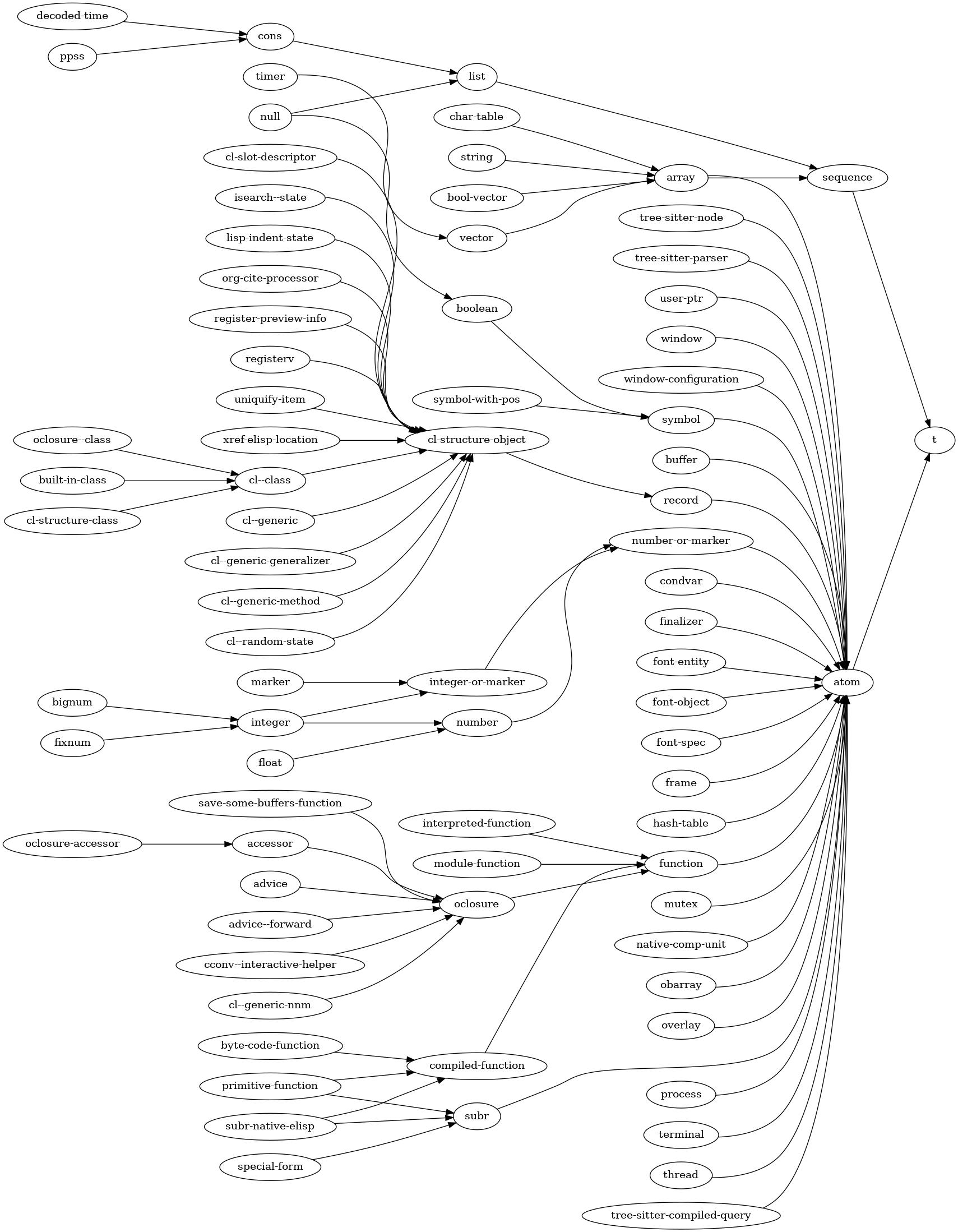
例如,list列表 类型派生自 sequence序列 类型,而序列类型本身又派生自 t。
3 数值 
GNU Emacs 支持两种数值数据类型:整数(integers) 和 浮点数(floating-point numbers)。整数是没有小数部分的数,例如 −3、0、7、13 和 511。浮点数是带有小数部分的数,例如 −4.5、0.0 和 2.71828。它们也可以用指数形式表示:‘1.5e2’ 等价于 ‘150.0’;其中 ‘e2’ 表示 10 的 2 次方,再与 1.5 相乘。 整数运算结果是精确的。浮点数运算通常会包含舍入误差,因为数值的精度是固定有限的。
3.1 整数基础 
Lisp 读取器将整数解析为非空十进制数字序列,可带可选的正负号,以及可选的末尾句点。
1 ; The integer 1. 1. ; The integer 1. +1 ; Also the integer 1. -1 ; The integer −1. 0 ; The integer 0. -0 ; The integer 0.
非十进制进制的整数语法为:以 ‘#’ 开头,后跟进制标识,再跟一位或多位数字。进制标识:‘b’ 为二进制、‘o’ 为八进制、‘x’ 为十六进制、‘radixr’ 为自定义 radix 进制。因此,‘#binteger’ 按二进制读取 integer,‘#radixrinteger’ 按 radix 进制读取 integer。radix 的值合法进制范围:2~36。合法数字:从 ‘0’–‘9’、‘A’–‘Z’ 中取前 radix 个字符。字母大小写不敏感,不能带符号或末尾句点。 示例:
#b101100 ⇒ 44 #o54 ⇒ 44 #x2c ⇒ 44 #24r1k ⇒ 44
要理解各类整数相关函数,尤其是按位运算符(see 整数的按位运算),通常需要以二进制形式看待数值。
十进制整数 5 的二进制形式:
...000101
(省略号 ‘…’ 表示理论上无限多的前导相同位,这里是无限个 0。后续示例也会使用此 ‘…’ 写法。)
整数 −1 的二进制形式:
...111111
−1 表示为全 1,这称为 two’s complement二进制补码 表示法。
从 −1 减去 4 得到负整数 −5。十进制 4 的二进制是 100,因此 −5 的二进制为:
...111011
本章介绍的许多函数可以接受标记(marker) 代替数值作为参数。(See 标记。)由于这类函数的实参可以是数值或标记,我们常将参数命名为 number-or-marker。当参数是标记时,使用其位置值,忽略其所在缓冲区。
在 Emacs Lisp 中,文本字符用整数表示。0 到 (max-char)(包含)之间的任意整数都可作为合法字符。See 字符编码。
Emacs Lisp 的整数不受机器字长限制。但底层实现上,整数分为两类:较小的整数为 fixnums定长数、较大的整数为 bignum大数。
通常 Emacs Lisp 代码不应依赖整数是 fixnum 还是 bignum。但旧版 Emacs 只支持 fixnum,部分函数仍只接受 fixnum,旧代码在使用 bignum 时可能出错。例如:旧代码可用 eq 判断整数相等;但引入 bignum 后,应使用 eql 或 = 比较整数。
bignum 的取值范围受以下因素限制:主存大小、机器特性(如表示 bignum 指数的字长)、integer-width 变量。
其限制通常比 fixnum 宽松得多。bignum 与 fixnum 不会数值相等:在 fixnum 范围内的整数,Emacs 永远用 fixnum 表示,而非 bignum。
fixnum 的范围取决于机器。最小范围:−536,870,912 ~ 536,870,911(30 位,即 −2**29 到 2**29 − 1), 但很多机器支持更宽范围。
- Variable: most-positive-fixnum 
该变量的值是 Emacs Lisp 能处理的最大 “samll(小整数)”。典型值: 32 位平台为 2**29 − 1 和64 位平台为 2**61 − 1
- Variable: most-negative-fixnum 
该变量的值是 Emacs Lisp 能处理的最小 “samll(小整数)”,为负数。典型值: 32 位平台为 −2**29 和64 位平台为 −2**61
- Variable: integer-width 
该变量为非负整数,用于控制:当计算出超大整数时,Emacs 是否抛出范围错误。绝对值小于 2**n, (n 为该变量值)的整数不会抛出范围错误。尝试创建更大的整数时通常会报错,除非能低成本生成。将此变量设得很大,在生成超大整数时可能代价很高。
3.2 浮点数基础 
浮点数适用于表示非整数数值。其取值范围与你所用机器上 C 语言的 double 数据类型一致。在几乎所有 Emacs 支持的计算机上,浮点数均采用 IEEE binary64(双精度)浮点格式—— 该格式由 IEEE Std
754-2019 标准化,David Goldberg 的论文 “What Every Computer Scientist Should Know About Floating-Point Arithmetic” 也对其有深入探讨。现代平台上的浮点运算基本遵循 IEEE-754 标准,但部分系统(尤其是 32 位 x86 架构)的运算结果可能无法保证正确舍入。
在某些老旧计算机系统上,Emacs 可能不使用 IEEE 浮点数。我们已知有一个这样的系统:运行 NetBSD 并使用 GCC 10.4.0 的 VAX 计算机,Emacs 可以正常运行,但不遵循 IEEE-754,而是改用 VAX 的 ‘D_Floating’ 格式。基于 IBM System/370 的大型机及其 XL/C 编译器也支持十六进制浮点数格式,但 Emacs 尚未在这类配置下编译构建过。
浮点数的读取语法要求必须包含小数点、指数,或两者同时具备。数值及其指数前可添加可选符号(‘+’ 或 ‘-’)。例如,‘1500.0’、‘+15e2’、‘15.0e+2’、‘+1500000e-3’ 和 ‘.15e4’ 是表示数值 1500 的五种浮点数写法,它们完全等价。与 Common Lisp 一致,Emacs Lisp 规定:对于不含指数的浮点数,小数点后必须至少有一位数字;因此 ‘1500.’ 会被解析为整数,而非浮点数。
在 = 等数值比较操作中,Emacs Lisp 将 -0.0 视为与普通零在数值上相等。这一行为遵循 IEEE 浮点标准 —— 该标准规定,即便其他操作可区分 -0.0 和 0.0,二者在数值层面仍相等。
IEEE 浮点标准支持将正无穷和负无穷作为浮点值,还定义了一类名为 NaN (即 “not a number非数值”)的值;当数值函数无合法计算结果时,会返回此类值。例如,(/ 0.0 0.0) 会返回 NaN。NaN 在数值上永不等于任何值,甚至不等于其自身。NaN 包含符号和尾数,若两个 NaN 的符号与尾数均一致,非数值函数会将它们判定为相等。NaN 的尾数及其字符串表示形式均依赖于具体机器。
当涉及 NaN 和带符号零(0.0 或 −0.0)时,eql、equal、sxhash-eql、sxhash-equal 和 gethash 这类非数值函数判断的是值是否不可区分,而非数值上是否相等。例如:当 x 和 y 是同一个 NaN 时,(equal x y) 返回 t,而 (= x y) 进行数值比较,返回 nil;反之,(equal 0.0 -0.0) 返回 nil,而 (= 0.0 -0.0) 返回 t。
以下是这些特殊浮点值的读取语法:
- infinity
无穷大:‘1.0e+INF’ 和 ‘-1.0e+INF’
- not-a-number
非数值(NaN):‘0.0e+NaN’ 和 ‘-0.0e+NaN’
在不支持 IEEE 浮点运算的老旧系统中,无穷大和 NaN 不可用。例如在 1980 年左右的 VAX 机器上,Lisp 会将 ‘1.0e+INF’ 解析为一个很大但有限的浮点数,将 ‘0.0e+NaN’ 解析为其他非数值型 Lisp 对象,若将其用于数值运算会触发错误。
以下是专门用于处理浮点数的函数:
- Function: isnan x 
该谓词函数的返回值规则:若浮点类型参数 x 是 NaN,返回
t;否则返回nil。
- Function: frexp x 
该函数返回一个 cons 单元格
(s . e),其中 s 和 e 分别是浮点数 x 的尾数(significand)和指数(exponent)。若 x 是有限值:s 是介于 0.5(包含)和 1.0(不包含)之间的浮点数,e 是整数,且满足 x = s * 2**e。 若 x 是 0 或无穷大:s 与 x 相等。 若 x 是 NaN:s 也为 NaN。 若 x 是 0,e 为 0。
- Function: ldexp s e 
给定数值型尾数 s 和整数型指数 e,该函数返回浮点数结果为 s * 2**e。
- Function: copysign x1 x2 
该函数将 x2 的符号复制到 x1 的数值上,并返回结果。x1 和 x2 必须均为浮点类型。
- Function: logb x 
该函数返回 x 的二进制指数。更精确地说: 若 x 是有限非零值,返回值为 \(|x|\) 以 2 为底的对数,向下取整为整数; 若 x 是 0 或无穷大,返回值为无穷大; 若 x 是 NaN,返回值为 NaN。
(logb 10) ⇒ 3 (logb 10.0e20) ⇒ 69 (logb 0) ⇒ -1.0e+INF
3.3 数值类型谓词 
本节中的函数用于检测一个对象是否为数值,或是某一特定类型的数值。函数 integerp 和 floatp 可以接受任意类型的 Lisp 对象作为参数(否则它们就没太大用处了),但谓词 zerop 要求参数必须是数值。另见 标记判断函数 一节中的 integer-or-marker-p 和 number-or-marker-p。
- Function: bignump object 
该谓词检测参数是否为大数(大整数),是则返回
t,否则返回nil。 与小整数不同,大数即使不满足eq相等,也可能满足=或eql相等。
- Function: fixnump object 
该谓词检测参数是否为定长数(小整数),是则返回
t,否则返回nil。小整数可以用eq进行比较。
- Function: floatp object 
该谓词检测参数是否为浮点数,是则返回
t,否则返回nil。
- Function: integerp object 
该谓词检测参数是否为整数(包含大数与定长数),是则返回
t,否则返回nil。
- Function: numberp object 
该谓词检测参数是否为数值(整数或浮点数均可),是则返回
t,否则返回nil。
- Function: natnump object 
-
该谓词(名称来自 “natural number自然数”)检测参数是否为非负整数,是则返回
t,否则返回nil。0 被视为非负整数。wholenump是natnump的同义词。
- Function: zerop number 
该谓词检测参数是否为零,是则返回
t,否则返回nil。参数必须是数值。(zerop x)等价于(= x 0)。
3.4 数值比较 
要判断数值是否相等,通常应使用 =,而不是 eq、eql、equal 这类非数值比较谓词。不同的浮点数对象或大整数对象,在数值上可能相等。如果用 eq 比较,判断的是它们是否为同一个 对象;如果用 eql 或 equal,判断的是它们的值是否 indistinguishable不可区分;而 = 采用纯数值比较,有时会在非数值比较返回 nil 时返回 t,反之亦然。See 浮点数基础。
在 Emacs Lisp 中,如果两个定长数(fixnum)数值相等,它们就是同一个 Lisp 对象。也就是说,对定长数而言,eq 等价于 =。有时用 eq 把未知值与定长数比较会更方便,因为即使未知值不是数字,eq 也不会报错 —— 它接受任意类型的参数。相比之下,如果参数不是数字或标记(marker),= 会抛出错误。不过,只要可以,即使是比较整数,更好的编程习惯仍是使用 =。
有时用 eql 或 equal 比较数字会很有用:只有当两个数类型相同(同为整数或同为浮点数)且值相同时,它们才被视为相等。而 = 可以把一个整数和一个浮点数视为相等。See 相等性谓词。
还有一个细节:由于浮点数运算不精确,直接判断浮点数是否相等通常是不合适的。一般更好的做法是判断近似相等。下面是实现这一功能的函数:
(defvar fuzz-factor 1.0e-6)
(defun approx-equal (x y)
(or (= x y)
(< (/ (abs (- x y))
(max (abs x) (abs y)))
fuzz-factor)))
- Function: = number-or-marker &rest number-or-markers 
该函数判断所有参数是否数值上都相等,是则返回
t,否则返回nil。
- Function: eql value1 value2 
该函数行为与
eq基本一致,仅当两个参数都是数字时例外。它会同时按类型和数值比较数字:(eql 1.0 1)返回nil,但(eql 1.0 1.0)和(eql 1 1)都返回t。 它可用于比较小整数和大整数。符号、指数、尾数都相同的浮点数才满足eql。这与数值比较不同:(eql 0.0 -0.0)返回nil,(eql 0.0e+NaN 0.0e+NaN)返回t,而=的结果正好相反。
- Function: /= number-or-marker1 number-or-marker2 
该函数判断两个参数是否数值不相等,不相等返回
t,相等返回nil。
- Function: < number-or-marker &rest number-or-markers 
判断每个参数是否严格小于后一个参数,是则返回
t,否则返回nil。
- Function: <= number-or-marker &rest number-or-markers 
判断每个参数是否小于等于后一个参数,是则返回
t,否则返回nil。
- Function: > number-or-marker &rest number-or-markers 
判断每个参数是否严格大于后一个参数,是则返回
t,否则返回nil。
- Function: >= number-or-marker &rest number-or-markers 
判断每个参数是否大于等于后一个参数,是则返回
t,否则返回nil。
- Function: max number-or-marker &rest numbers-or-markers 
返回所有参数中的最大值。
(max 20) ⇒ 20 (max 1 2.5) ⇒ 2.5 (max 1 3 2.5) ⇒ 3
- Function: min number-or-marker &rest numbers-or-markers 
返回所有参数中的最小值。
(min -4 1) ⇒ -4
- Function: abs number 
返回 number 的绝对值。
3.5 数值转换 
要将整数转换为浮点数,使用函数 float。
- Function: float number 
返回将
number转换为浮点数后的结果。如果 number 已经是浮点数,float原样返回。
有四个函数可将浮点数转换为整数,它们的舍入方式不同。所有这些函数都接受参数 number 和可选参数 divisor。两个参数都可以是整数或浮点数,divisor 也可以是 nil。
如果 divisor 为 nil 或被省略,这些函数将 number 转换为整数;若已是整数则直接返回。
如果 divisor 非-nil,它们会将 number 除以 divisor,再把结果转为整数。
如果 divisor 为 0(整数或浮点数),Emacs 会抛出 arith-error 错误。
- Function: truncate number &optional divisor 
通过向零舍入,将 number 转换为整数并返回。
(truncate 1.2) ⇒ 1 (truncate 1.7) ⇒ 1 (truncate -1.2) ⇒ -1 (truncate -1.7) ⇒ -1
- Function: floor number &optional divisor 
通过向下舍入(向负无穷方向),将 number 转换为整数并返回。
如果指定了 divisor,该函数使用与
mod对应的除法方式,向下舍入。(floor 1.2) ⇒ 1 (floor 1.7) ⇒ 1 (floor -1.2) ⇒ -2 (floor -1.7) ⇒ -2 (floor 5.99 3) ⇒ 1
- Function: ceiling number &optional divisor 
通过向上舍入(向正无穷方向),将 number 转换为整数并返回。
(ceiling 1.2) ⇒ 2 (ceiling 1.7) ⇒ 2 (ceiling -1.2) ⇒ -1 (ceiling -1.7) ⇒ -1
- Function: round number &optional divisor 
通过四舍五入到最近整数,将 number 转换为整数并返回。若数值恰好处于两个整数中间,会舍入到偶数。
(round 1.2) ⇒ 1 (round 1.7) ⇒ 2 (round -1.2) ⇒ -1 (round -1.7) ⇒ -2
3.6 算术运算 
Emacs Lisp 提供传统的四种算术运算(addition加、subtraction减、multiplication乘、division除),以及取余、取模、自增 1 和自减 1 函数。除 % 外,这些函数均接受整数和浮点数参数,只要任意一个参数是浮点数,就返回浮点数。
- Function: 1+ number-or-marker 
返回 number-or-marker 加 1。 示例:
(setq foo 4) ⇒ 4 (1+ foo) ⇒ 5该函数不等价于 C 语言的
++— 它不会修改变量,只做加法计算。因此继续执行:foo ⇒ 4若要真正修改变量,必须配合
setq,如下:(setq foo (1+ foo)) ⇒ 5
- Function: 1- number-or-marker 
返回 number-or-marker 减 1。
- Function: + &rest numbers-or-markers 
对所有参数求和。无参数时返回 0。
(+) ⇒ 0 (+ 1) ⇒ 1 (+ 1 2 3 4) ⇒ 10
- Function: - &optional number-or-marker &rest more-numbers-or-markers 
-有两个作用:取负、减法。 单个参数:返回其相反数; 多个参数:从第一个数 number-or-marker 中依次减去后面所有数 more-numbers-or-markers; 无参数:返回 0。(- 10 1 2 3 4) ⇒ 0 (- 10) ⇒ -10 (-) ⇒ 0
- Function: * &rest numbers-or-markers 
对所有参数求积。无参数时返回 1。
(*) ⇒ 1 (* 1) ⇒ 1 (* 1 2 3 4) ⇒ 24
- Function: / number &rest divisors 
有一个或多个 divisors除数:将 number 依次除以每个 divisors除数,返回商; 无除数:返回 1/number(即倒数)。每个参数都可以是数值或标记(marker)
若所有参数均为整数,结果为整数,每次除法后向零取整。
(/ 6 2) ⇒ 3(/ 5 2) ⇒ 2(/ 5.0 2) ⇒ 2.5(/ 5 2.0) ⇒ 2.5(/ 5.0 2.0) ⇒ 2.5(/ 4.0) ⇒ 0.25(/ 4) ⇒ 0(/ 25 3 2) ⇒ 4(/ -17 6) ⇒ -2如果将整数除以整数 0,Emacs 会抛出
arith-error错误(see 错误)。 在使用 IEEE-754 浮点数的系统上,非零浮点数除以 0 会得到正无穷或负无穷(see 浮点数基础);否则,会照常抛出arith-error错误。
- Function: % dividend divisor 
-
该函数返回 dividend被除数除以 divisor除数 后的整数余数。参数必须是整数或标记(marker)。
对于任意两个整数 dividend被除数 和 divisor除数,当除数非零时:
(+ (% dividend divisor) (* (/ dividend divisor) divisor))
在 divisor除数 不为零时,结果恒等于 dividend被除数。
(% 9 4) ⇒ 1 (% -9 4) ⇒ -1 (% 9 -4) ⇒ 1 (% -9 -4) ⇒ -1
- Function: mod dividend divisor 
-
该函数返回 dividend被除数 对 divisor除数 取模的结果;换句话说,是 dividend被除数 除以 divisor除数 的余数,但符号与除数相同。参数必须是数值或标记。
与
%不同,mod允许浮点数参数;它会将商向下取整(向负无穷方向),再用该商计算余数。若 divisor除数 为 0,如果两个参数都是整数,
mod抛出arith-error错误,否则返回 NaN。(mod 9 4) ⇒ 1(mod -9 4) ⇒ 3(mod 9 -4) ⇒ -3(mod -9 -4) ⇒ -1(mod 5.5 2.5) ⇒ .5对于任意两个数值 dividend被除数 和 divisor除数,
(+ (mod dividend divisor) (* (floor dividend divisor) divisor))
恒等于 dividend被除数;若任一参数为浮点数,则可能存在舍入误差;若 dividend被除数 是整数且 divisor除数 为 0,则抛出
arith-error。关于floor,见 数值转换。
3.7 舍入运算 
函数 ffloor、fceiling、fround 和 ftruncate 接收一个浮点型参数,并返回一个值为邻近整数的浮点型结果。ffloor 返回不大于参数的最接近整数;fceiling 返回不小于参数的最接近整数;ftruncate 向零方向取最接近的整数;fround 返回最接近的整数。
- Function: ffloor float 
该函数将 float 向下取整至紧邻的更小整数,并以浮点数形式返回该值。
- Function: fceiling float 
该函数将 float 向上取整至紧邻的更大整数,并以浮点数形式返回该值。
- Function: ftruncate float 
该函数将 float 向零方向取整为整数,并以浮点数形式返回该值。
- Function: fround float 
该函数将 float 取整至最接近的整数,并以浮点数形式返回该值。若数值恰好处于两个整数的正中间,则返回偶数。
3.8 整数的按位运算 
在计算机中,整数以二进制数表示,即由若干 bits位(取值为 0 或 1 的数字)组成的序列。从概念上讲,该位序列在左侧是无限延伸的,最高位全为 0 或全为 1。按位运算会对该序列中的每一位单独操作。例如, shifting移位 操作会将整个序列向左或向右移动一位或多位,并保持原有模式。 Emacs Lisp 中的按位运算仅适用于整数。
- Function: ash integer count 
-
ash(arithmetic shift算术移位)将整数 integer 的二进制位向左移动 count 位;若 count 为负数,则向右移动。左移会在右侧补 0;右移会丢弃最右侧的位。从整数运算角度看,ash等价于将 integer 乘以 2**count, 然后向下取整(向负无穷方向)得到整数结果。下面是
ash分别左移、右移一位的示例。示例只展示低位二进制位,高位均与所示最高位保持一致。可以看到,左移一位等价于乘以 2,右移一位等价于除以 2 并向负无穷取整。(ash 7 1) ⇒ 14 ;; Decimal 7 becomes decimal 14. ...000111 ⇒ ...001110(ash 7 -1) ⇒ 3 ...000111 ⇒ ...000011(ash -7 1) ⇒ -14 ...111001 ⇒ ...110010(ash -7 -1) ⇒ -4 ...111001 ⇒ ...111100左移或右移两位的示例:
; binary values (ash 5 2) ; 5 = ...000101 ⇒ 20 ; = ...010100 (ash -5 2) ; -5 = ...111011 ⇒ -20 ; = ...101100
(ash 5 -2) ⇒ 1 ; = ...000001(ash -5 -2) ⇒ -2 ; = ...111110
- Function: lsh integer count 
-
lsh是 logical shift逻辑移位的缩写,将整数 integer 向左移动 count 位;若 count 为负数,则向右移动,空出的位一律补 0。若 count 为负,则 integer 必须是定长数(fixnum)或正的大数(bignum),且lsh会将负定长数视为无符号数处理:先减去两倍的most-negative-fixnum再移位,结果非负。这种特殊行为源于早期 Emacs 仅支持定长数的时代;现在更推荐使用ash。除了 integer 与 count 同时为负的情况外,
lsh与ash行为一致。下面示例聚焦这些例外情况,并假设使用 30 位定长数。; binary values (ash -7 -1) ; -7 = ...111111111111111111111111111001 ⇒ -4 ; = ...111111111111111111111111111100 (lsh -7 -1) ⇒ 536870908 ; = ...011111111111111111111111111100
(ash -5 -2) ; -5 = ...111111111111111111111111111011 ⇒ -2 ; = ...111111111111111111111111111110 (lsh -5 -2) ⇒ 268435454 ; = ...001111111111111111111111111110
- Function: logand &rest ints-or-markers 
该函数返回所有参数的按位与结果:当且仅当所有参数的第 n 位都为 1 时,结果的第 n 位为 1。
例如,用 4 位二进制数表示,13 与 12 的按位与结果是 12:1101 与 1100 运算得到 1100。两个数最左侧两位都为 1,因此结果最左侧两位为 1;而最右侧两位至少有一个参数为 0,因此结果最右侧两位为 0。
所以,
(logand 13 12) ⇒ 12若
logand无参数,返回 −1。该logand数是按位与的单位元,因为其二进制全为 1。若logand只传入一个参数,直接返回该参数。; binary values (logand 14 13) ; 14 = ...001110 ; 13 = ...001101 ⇒ 12 ; 12 = ...001100
(logand 14 13 4) ; 14 = ...001110 ; 13 = ...001101 ; 4 = ...000100 ⇒ 4 ; 4 = ...000100
(logand) ⇒ -1 ; -1 = ...111111
- Function: logior &rest ints-or-markers 
该函数返回所有参数的按位或结果:当且仅当至少一个参数的第 n 位为 1时,结果的第 n 位为 1。无参数时返回 0,是该运算的单位元。
logior只传入一个参数时,直接返回该参数。; binary values (logior 12 5) ; 12 = ...001100 ; 5 = ...000101 ⇒ 13 ; 13 = ...001101
(logior 12 5 7) ; 12 = ...001100 ; 5 = ...000101 ; 7 = ...000111 ⇒ 15 ; 15 = ...001111
- Function: logxor &rest ints-or-markers 
该函数返回所有参数的按位异或结果:当且仅当该位为 1 的参数个数是奇数时,结果的第 n 位为 1。无参数时返回 0,是该运算的单位元。
logxor只传入一个参数时,直接返回该参数。; binary values (logxor 12 5) ; 12 = ...001100 ; 5 = ...000101 ⇒ 9 ; 9 = ...001001
(logxor 12 5 7) ; 12 = ...001100 ; 5 = ...000101 ; 7 = ...000111 ⇒ 14 ; 14 = ...001110
- Function: lognot integer 
该函数返回参数的按位取反结果:当且仅当 integer 的第 n 位为 0时,结果的第 n 位为 1,反之亦然。结果等于:−1 − integer。
(lognot 5) ⇒ -6 ;; 5 = ...000101 ;; becomes ;; -6 = ...111010
- Function: logcount integer 
该函数返回 integer整数 的 Hamming weight汉明重量:即 integer 二进制表示中 1 的个数。若 integer 为负数,则返回其二进制补码表示中 0 的个数。结果始终非负。
(logcount 43) ; 43 = ...000101011 ⇒ 4 (logcount -43) ; -43 = ...111010101 ⇒ 3
3.9 标准数学函数 
这些数学函数允许整数和浮点数作为参数。
- Function: asin arg 
(asin arg)的返回值是介于 −pi/2 和 pi/2 (包含边界)之间的数值,其正弦值等于 arg。若 arg 超出范围(不在 [−1, 1] 区间内),asin返回 NaN(非数值)。
- Function: acos arg 
(acos arg)的返回值是介于 0 到 pi (包含边界)之间的数值,其余弦值等于 arg。若 arg 超出范围(不在 [−1, 1] 区间内),acos返回 NaN。
- Function: atan y &optional x 
(atan y)的返回值是介于 −pi/2 到 pi/2 (不含边界)之间的数值,其正切值等于 y。若传入可选的第二个参数 x,则(atan y x)返回向量[x, y]与X轴之间的夹角(单位:弧度)。
- Function: exp arg 
这是指数函数,返回自然常数 \(e\) 的 arg 次幂(即 \(e^{arg}\))。
- Function: log arg &optional base 
该函数返回 arg 以 base 为底的对数值。若未指定 base,则使用自然底数 \(e\)。若 arg 或 base 为负数,
log返回 NaN。
- Function: expt x y 
该函数返回 x 的 y 次幂(即 \(x^y\))。 若两个参数均为整数且 y 非负,结果为整数;此场景下若发生溢出会触发错误,需注意。 若 x 是有限负数且 y 是有限非整数,
expt返回 NaN。
- Function: sqrt arg 
该函数返回 arg 的平方根。若 arg 是有限数且小于 0,
sqrt返回 NaN。
此外,Emacs 还定义了以下常用数学常量:
- Variable: float-e 
数学常量 \(e\)(值为 2.71828…)。
- Variable: float-pi 
数学常量 \(pi\)(值为 3.14159…)。
3.10 随机数 
确定性的计算机程序无法生成真正意义上的随机数。对绝大多数用途而言 pseudo-random numbers伪随机数 已经足够。伪随机数序列以确定性方式生成:这些数并非真正随机,但具备模仿随机序列的若干特性。例如,所有可能的取值在伪随机序列中出现的频率大致均等。
伪随机数由 seed value种子值 生成。从任意给定种子出发,random 函数总会生成相同的数值序列。默认情况下,Emacs 会在启动时初始化随机种子,使得每次运行 Emacs 得到的 random 序列(极大概率)互不相同。随机种子通常从系统熵源初始化;但在缺少熵池的旧平台上,种子会取自随机性较弱的易变数据(如当前时间)。
有时你希望随机数序列可复现。例如,调试行为依赖随机序列的程序时,让程序每次运行行为一致会很有帮助。要让序列可复现,执行 (random "")。这会将种子设为当前 Emacs 可执行文件对应的固定值(不同编译版本可能不同)。你也可以使用其他字符串来指定不同的种子。
- Function: random &optional limit 
该函数返回一个伪随机整数。重复调用会生成一系列伪随机整数。
如果 limit 是正整数:返回非负且小于 limit 的整数。否则:返回值可以是任意定长整数(fixnum),即从
most-negative-fixnum到most-positive-fixnum之间的任意整数(see 整数基础)。如果 limit 是字符串:根据字符串内容设置新种子,后续
random调用将返回可复现的结果序列。如果 limit 是
t:按 Emacs 重启的方式重新选取种子,后续random调用将返回不可预测的结果序列。
如果你需要用于密码学场景的随机数(nonce),通常不建议使用 random,原因如下:
- 即便可以用
(random t)读取系统熵,这也可能影响程序中依赖结果可复现性的其他部分。 random使用的、与系统相关的伪随机数生成器(PRNG)不一定适合密码学安全场景。(random t)不会直接访问系统熵,熵会经过系统相关的 PRNG 处理,可能导致结果存在偏差。- 常见平台上随机种子仅为 32 位,通常窄于 Emacs 定长整数,远不足以满足密码学安全要求。
(random t)会将相关信息散布在 Emacs 内部状态中,扩大内部攻击面。- 在缺少熵池的旧平台上,
(random t)的种子来自密码学强度较弱的数据源。
4 字符串与字符 
Emacs Lisp 中的字符串是一个包含有序字符序列的数组。字符串可用作符号、缓冲区和文件的名称;用于向用户发送消息;保存缓冲区之间复制的文本;以及用于许多其他用途。由于字符串非常重要,Emacs Lisp 提供了大量专门用于操作字符串的函数。在 Emacs Lisp 程序中,使用字符串的频率远高于单独的字符。
有关键盘字符事件字符串的特殊注意事项,see 将键盘事件存入字符串。
4.1 字符串与字符基础 
字符是一种 Lisp 对象,用于表示文本中的单个字符。在 Emacs Lisp 中,字符本质上就是整数;一个整数是否被当作字符,仅取决于它的使用方式。关于 Emacs 中字符的具体表示,see 字符编码。
字符串是固定长度的字符序列。它属于 array数组 类型的序列,意味着其长度在创建后就固定不可修改(see 序列、数组与向量)。与 C 语言不同,Emacs Lisp 字符串 不以 特殊字符码作为结束标志。
因为字符串是数组,同时也是序列,所以你可以使用《序列、数组与向量》中介绍的通用数组与序列函数来操作它们。例如,可以使用 aref 函数访问字符串中的单个字符(see 操作数组的函数)。
在 Emacs 字符串(以及缓冲区)中,非-ASCII 字符有两种文本表示方式:单字节(unibyte) 和多字节(multibyte)。对于大多数 Lisp 编程场景,你无需关心这两种表示方式的区别。详情 see 文本表示方式。
有时按键序列会用单字节字符串表示。当单字节字符串用作按键序列时,取值在 128~255 范围内的字符串元素代表元字符(meta 字符)(本身是大整数),而非 128~255 范围内的字符编码。字符串无法存储带有 hyper、super 或 alt 修饰键的字符;可以保存 ASCII 控制字符,但不支持其他控制字符,且不区分 ASCII 控制字符的大小写。如果你需要存储这类字符(比如按键序列),必须使用向量而非字符串。有关键盘输入字符的更多信息,see 字符类型。
字符串很适合用来存放正则表达式。你还可以用 string-match 将正则表达式与字符串进行匹配(see 正则表达式搜索)。match-string(see 简单匹配数据访问)和 replace-match(see 替换匹配的文本)这两个函数,常用于在正则匹配后对字符串进行拆分与修改。
与缓冲区类似,字符串除了保存字符本身,还可以为其中的字符附加文本属性。See 文本属性。所有将文本从字符串复制到缓冲区或其他字符串的 Lisp 原语,都会同时复制对应字符的文本属性。
有关显示字符串或将字符串复制到缓冲区的函数,see 文本。有关字符和字符串语法的说明,分别见 《字符类型》和《字符串类型》。有关文本表示方式转换、字符编码和解码的函数,see 非 ASCII 字符。另外注意:不应使用 length 计算字符串在屏幕上的显示宽度,应改用 string-width(see 显示文本尺寸)。
4.2 字符串判断函数 
关于通用序列与数组判断函数的更多信息,参见《序列、数组与向量》和《数组》。
- Function: stringp object 
如果 object 是字符串,该函数返回
t,否则返回nil。
- Function: string-or-null-p object 
如果 object 是字符串或
nil,该函数返回t,否则返回nil。
- Function: char-or-string-p object 
如果 object 是字符串或字符(即整数),该函数返回
t,否则返回nil。
4.3 创建字符串 
下面这些函数用于创建字符串:可以从零新建、拼接字符串,或是拆分字符串。(有关基于其他字符串修改内容来创建新字符串的函数,如 string-replace 和 replace-regexp-in-string,请参见 “搜索与替换”。)
- Function: make-string count character &optional multibyte 
本函数返回一个由 character 重复 count 次构成的字符串。如果 count 为负数,会抛出错误。
(make-string 5 ?x) ⇒ "xxxxx" (make-string 0 ?x) ⇒ ""通常情况下,如果 character 是 ASCII 字符,结果为单字节字符串。但如果可选参数 multibyte 非 nil,函数会生成多字节字符串。这在后续需要与非-ASCII 字符串拼接,或将部分字符替换为非-ASCII 字符时很有用。
可与此函数对比的其他函数包括
make-vector(see 向量)和make-list(see 构建 cons 单元与列表)。
- Function: string &rest characters 
返回由给定字符 characters 组成的字符串。
(string ?a ?b ?c) ⇒ "abc"
- Function: substring string &optional start end 
该函数返回一个新字符串,由原字符串 string 中从索引 start(包含)到 end(不包含)之间的字符组成。第一个字符的索引是 0。只传一个参数时,该函数会直接复制整个 string。
(substring "abcdefg" 0 3) ⇒ "abc"上例中,‘a’ 的索引是 0,‘b’ 是 1,‘c’ 是 2。索引 3(字符串中第四个字符)标记截取的结束位置。因此从
"abcdefg"中复制出 ‘abc’。负数表示从字符串末尾算起,−1 代表最后一个字符的索引。例如:
(substring "abcdefg" -3 -1) ⇒ "ef"本例中 ‘e’ 的索引是 −3,‘f’ 是 −2,‘g’ 是 −1。因此包含 ‘e’ 和 ‘f’,不包含 ‘g’。
如果 end 为
nil,则代表字符串长度。因此:(substring "abcdefg" -3 nil) ⇒ "efg"省略参数 end 等价于传入
nil。由此可知(substring string 0)会返回整个 string 的副本。(substring "abcdefg" 0) ⇒ "abcdefg"但我们推荐使用
copy-sequence来完成此操作(see 序列)。如果从原 string 复制的字符带有文本属性,这些属性也会被复制到新字符串中。See 文本属性。
substring也接受将向量作为第一个参数。例如:(substring [a b (c) "d"] 1 3) ⇒ [b (c)]如果 start 不是整数,或 end 既不是整数也不是
nil,会抛出wrong-type-argument错误。如果 start 位置在 end 之后,或任一索引超出字符串范围,会抛出args-out-of-range错误。将此函数与
buffer-substring(see 查看缓冲区内容)对比:后者返回当前缓冲区中一段文本构成的字符串。字符串的起始索引是 0,而缓冲区的起始索引是 1。
- Function: substring-no-properties string &optional start end 
功能与
substring相同,但会丢弃结果中的所有文本属性。此外,start 可以省略或为nil,等价于 0。因此(substring-no-properties string)会返回移除了所有文本属性的 string 副本。
- Function: concat &rest sequences 
-
该函数返回一个字符串,由所有参数中的字符(及其文本属性,如果有)组成。参数可以是字符串、数字列表或数字向量;参数本身不会被修改。如果
concat没有参数,则返回空字符串。(concat "abc" "-def") ⇒ "abc-def" (concat "abc" (list 120 121) [122]) ⇒ "abcxyz" ;;nilis an empty sequence. (concat "abc" nil "-def") ⇒ "abc-def" (concat "The " "quick brown " "fox.") ⇒ "The quick brown fox." (concat) ⇒ ""该函数不保证总会分配新字符串。调用者不应依赖结果是新字符串,或与某个已有字符串是
eq关系。特别注意:修改返回值可能会意外改变另一个字符串、修改程序中的常量字符串,甚至直接报错。若要得到可以安全修改的字符串,请对结果使用
copy-sequence。有关其他拼接函数,可参见 “映射函数” 中的
mapconcat、“向量相关函数” 中的vconcat,以及 “构建 cons 单元与列表” 中的append。若要将多个命令行参数拼接成可作为 Shell 命令的字符串,见 combine-and-quote-strings。
- Function: split-string string &optional separators omit-nulls trim 
该函数根据正则表达式 separators(see 正则表达式)将 string 切分为子串。每一次 separators 的匹配位置都是分割点;分割点之间的子串构成列表返回。
如果 separators 为
nil(或省略),则使用默认值split-string-default-separators,且函数行为相当于 omit-nulls 为t。如果 omit-nulls 为 nil(或省略),当存在连续的 separators 匹配,或分隔符匹配出现在 string 开头 / 结尾时,结果中会包含空字符串。若 omit-nulls 为
t,这些空串会被忽略。如果可选参数 trim 非-
nil,它应为一个正则表达式,用于去掉每个子串开头和结尾的匹配内容。如果修剪后子串为空,则视为空串。若你需要将字符串拆分为适合
call-process或start-process使用的命令行参数列表,见 split-string-and-unquote。Examples:
(split-string " two words ") ⇒ ("two" "words")结果不是
("" "two" "words" ""),这种情况通常没什么用。如果需要这样的结果,可以显式指定 separators:(split-string " two words " split-string-default-separators) ⇒ ("" "two" "words" "")(split-string "Soup is good food" "o") ⇒ ("S" "up is g" "" "d f" "" "d") (split-string "Soup is good food" "o" t) ⇒ ("S" "up is g" "d f" "d") (split-string "Soup is good food" "o+") ⇒ ("S" "up is g" "d f" "d")空匹配是有效的,除非
split-string已经通过非空匹配到达字符串末尾,或 string 本身为空,此时不会再寻找末尾的空匹配:(split-string "aooob" "o*") ⇒ ("" "a" "" "b" "") (split-string "ooaboo" "o*") ⇒ ("" "" "a" "b" "") (split-string "" "") ⇒ ("")不过,当 separators 可以匹配空串时,omit-nulls 通常设为
t,因此上面几个例子中的细节很少实际用到:(split-string "Soup is good food" "o*" t) ⇒ ("S" "u" "p" " " "i" "s" " " "g" "d" " " "f" "d") (split-string "Nice doggy!" "" t) ⇒ ("N" "i" "c" "e" " " "d" "o" "g" "g" "y" "!") (split-string "" "" t) ⇒ nil某些 “non-greedy非贪婪” 的 separators 可能优先选择空匹配而非非空匹配,会出现有些奇怪但可预期的行为。这类值在实际中同样很少出现:
(split-string "ooo" "o*" t) ⇒ nil (split-string "ooo" "\\|o+" t) ⇒ ("o" "o" "o")
- Variable: split-string-default-separators 
split-string中 separators 的默认值。 通常取值为"[ \f\t\n\r\v]+"。
- Function: string-clean-whitespace string 
清理 string 中的空白:将连续空白压缩为单个空格,并去掉 string 首尾所有空白。
- Function: string-trim-left string &optional regexp 
删除 string 开头匹配 regexp 的内容。 regexp 默认为 ‘[ \t\n\r]+’。
- Function: string-trim-right string &optional regexp 
删除 string 结尾匹配 regexp 的内容。 regexp 默认为 ‘[ \t\n\r]+’。
- Function: string-trim string &optional trim-left trim-right 
同时删除 string 开头匹配 trim-left 与结尾匹配 trim-right 的内容。两个正则表达式默认均为 ‘[ \t\n\r]+’。
- Function: string-fill string width 
尝试对 string 自动换行,使每行显示宽度不超过 width。仅在空白处换行。如果存在单个单词长度超过 width,不会截断单词,因此最终 string 显示行可能会比 width 宽。
- Function: string-limit string length &optional end coding-system 
如果 string 字符数小于 length,直接返回原串。否则返回由前 length 个字符组成的子串。如果提供了可选参数 end,则返回最后 length 个字符组成的字符串。
如果 coding-system 非-
nil,会先对 string 编码,再按字节限制长度,结果为不超过length字节的单字节字符串。如果 string 包含多字节编码字符(如utf-8),结果字符串绝不会在字符编码中间被截断。该函数按字符数或字节数计算长度,因此通常不适合用于显示场景的字符串缩短;此时应使用
truncate-string-to-width、window-text-pixel-size或string-glyph-split(see 显示文本尺寸)。
- Function: string-lines string &optional omit-nulls keep-newlines 
按换行符边界将 string 拆分为字符串列表。如果可选参数 omit-nulls 非-
nil,结果中去掉空行。如果 keep-newlines 非-nil,则保留结果字符串末尾的换行符。
- Function: string-pad string length &optional padding start 
使用 padding 作为填充字符,将 string 填充到长度 length。padding 默认为空格。如果 string 本身比 length 长,则不填充。如果 start 为
nil或省略,填充在 string 尾部;若非-nil,则填充在头部。
- Function: string-chop-newline string 
移除 string 末尾可能存在的最后一个换行符。
4.4 修改字符串 
你可以通过本节描述的操作来修改可变字符串的内容。See 可变性。
修改已有字符串内容最基本的方式是使用 aset(see 操作数组的函数)。(aset string idx char) 将字符 char 存入字符串 string 的字符索引 idx 处。如果需要,它会自动将纯 ASCII string 转换为多字节字符串(see 文本表示方式);但如果 char 是非-ASCII 字符(而非原始字节),我们建议你始终确保 string 是多字节类型(例如使用 string-to-multibyte, see 文本表示形式转换)。
若要清空存放密码的字符串,可使用 clear-string:
- Function: clear-string string 
该函数将 string 变为单字节字符串,并将其内容清空为空字符。它还可能改变 string 的长度。
4.5 字符与字符串的比较 
- Function: char-equal character1 character2 
如果参数表示同一个字符,返回
t,否则返回nil。如果case-fold-search非-nil,此函数会忽略大小写差异。(char-equal ?x ?x) ⇒ t (let ((case-fold-search nil)) (char-equal ?x ?X)) ⇒ nil
- Function: string-equal string1 string2 
如果两个字符串的字符完全匹配,返回
t。参数也可以是符号,此时会使用符号名进行比较。比较始终区分大小写,与case-fold-search无关。比较两个字符串时,该函数等价于
equal(see 相等性谓词)。特别地,它会忽略字符串的文本属性;如果需要区分仅属性不同的字符串,使用equal-including-properties。但与equal不同,只要任一参数不是字符串或符号,string-equal就会报错。(string-equal "abc" "abc") ⇒ t (string-equal "abc" "ABC") ⇒ nil (string-equal "ab" "ABC") ⇒ nil当且仅当单字节字符串与多字节字符串包含的所有字符编码都在 0–127(ASCII)范围内时,
string-equal会认为它们相等。See 文本表示方式。
- Function: string= string1 string2 
string=是string-equal的别名。
- Function: string-equal-ignore-case string1 string2 
string-equal-ignore-case比较字符串时忽略大小写,类似于case-fold-search为t时的char-equal。
- Function: string-collate-equalp string1 string2 &optional locale ignore-case 
该函数会根据指定 locale区域 的排序规则比较两个字符串,若二者相等则返回
t;若未指定区域,默认使用当前系统的区域设置。排序规则的判定不仅基于字符串 string1 和 string2 中字符的字典序,还包含字符间关联关系的额外规则。这类规则通常由 Emacs 运行时的区域环境,以及编译 Emacs 时链接的标准 C 库共同定义4。例如,部分编码点不同但语义相同的字符(如不同的重音符 Unicode 字符),在某些区域设置下会被判定为相等:
(string-collate-equalp (string ?\uFF40) (string ?\u1FEF)) ⇒ t可选参数 locale(字符串类型)会覆盖当前用于排序的区域设置标识符。该参数的值依赖于操作系统:POSIX 系统可使用 locale 设置值
"en_US.UTF-8",而在 MS-Windows 系统上则需使用例如"enu_USA.1252"这样的值。若 ignore-case 参数非-
nil,字符会先转换为小写形式,再进行大小写不敏感的比较。但如果底层系统库未提供特定区域的排序规则,此函数会降级使用string-equal进行比较 —— 这种情况下 ignore-case 参数会被忽略,比较始终是大小写敏感的。要在 MS-Windows 系统上模拟符合 Unicode 标准的排序规则,需将
w32-collate-ignore-punctuation绑定为非-nil,因为 MS-Windows 系统的区域设置中,字符集部分无法设置为"UTF-8"。如果系统不支持区域设置环境,此函数的行为将等同于
string-equal。请勿使用此函数比较文件名是否相等,因为文件系统通常不遵循排序功能所实现的字符串语言等效规则。
- Function: string-lessp string1 string2 
该函数逐个字符比较两个字符串。它会同时扫描两个字符串,找到第一对不匹配的对应字符: 若这两个字符中较小的字符来自 string1,则判定 string1 更小,函数返回
t; 若较小的字符来自 string2,则判定 string1 更大,函数返回nil; 若两个字符串完全匹配,返回值为nil。字符对的比较基于其字符编码值: 需注意,在 ASCII 字符集中,小写字母的数值大于对应的大写字母; 数字和多数标点符号的数值小于大写字母; 任意 ASCII 字符小于非-ASCII 字符; 单字节非-ASCII 字符始终小于多字节非-ASCII 字符(see 文本表示方式)。
(string-lessp "abc" "abd") ⇒ t (string-lessp "abd" "abc") ⇒ nil (string-lessp "123" "abc") ⇒ t当两个字符串长度不同时: 若匹配到 string1 的长度仍未发现差异,则返回
t; 若匹配到 string2 的长度仍未发现差异,则返回nil; 空字符串小于任何非空字符串。(string-lessp "" "abc") ⇒ t (string-lessp "ab" "abc") ⇒ t (string-lessp "abc" "") ⇒ nil (string-lessp "abc" "ab") ⇒ nil (string-lessp "" "") ⇒ nil参数也可传入符号(symbol),此时会比较其打印名称(print name)。
- Function: string< string1 string2 
string<是string-lessp的别名。
- Function: string-greaterp string1 string2 
该函数按相反顺序比较 string1 和 string2,等效于调用
(string-lessp string2 string1)。
- Function: string> string1 string2 
string>是string-greaterp的别名。
- Function: string-collate-lessp string1 string2 &optional locale ignore-case 
若在指定 locale 设置的排序规则中 string1 小于 string2,该函数返回
t(locale区域 设置默认使用当前系统值)。排序规则不仅取决于字符串中字符的词典顺序,还遵循字符间关系的额外规则 —— 通常由 Emacs 运行时的区域设置环境,以及编译 Emacs 所链接的标准 C 库决定。例如,排序时可能忽略标点和空白字符(see 序列):
(sort '("11" "12" "1 1" "1 2" "1.1" "1.2") :lessp #'string-collate-lessp) ⇒ ("11" "1 1" "1.1" "12" "1 2" "1.2")此行为依赖于操作系统:例如在 Cygwin 系统中,无论区域设置如何,标点和空白字符永远不会被忽略。
可选参数 locale(字符串类型)会覆盖当前用于排序的区域设置标识符。该值依赖于操作系统:POSIX 系统可使用
"en_US.UTF-8",而 MS-Windows 系统需使用例如"enu_USA.1252"。若将 locale 设置为"POSIX"或"C",string-collate-lessp的行为将等同于string-lessp:(sort '("11" "12" "1 1" "1 2" "1.1" "1.2") :lessp (lambda (s1 s2) (string-collate-lessp s1 s2 "POSIX"))) ⇒ ("1 1" "1 2" "1.1" "1.2" "11" "12")若 ignore-case 非-
nil,字符会转换为小写后进行大小写不敏感比较。但如果底层系统库未提供特定区域的排序规则,函数会降级使用string-lessp,此时 ignore-case 参数被忽略,比较始终大小写敏感。要在 MS-Windows 系统上模拟符合 Unicode 标准的排序,需将
w32-collate-ignore-punctuation绑定为非-nil(因 MS-Windows 不支持将区域设置的字符集设为"UTF-8")。若系统不支持区域设置环境,此函数行为等同于
string-lessp。
- Function: string-version-lessp string1 string 
该函数按词典顺序比较字符串,但会将连续的数字字符视为十进制数进行比较。因此根据该判定规则,‘foo2.png’ 会被判定为 “samller小于” ‘foo12.png’ —— 即便从纯词典顺序看,‘12’ “smaller小于” ‘2’。
- Function: string-prefix-p string1 string2 &optional ignore-case 
若 string1 是 string2 的前缀(即 string2 以 string1 开头),函数返回非-
nil。若可选参数 ignore-case 非-nil,比较时会忽略大小写差异。
- Function: string-suffix-p suffix string &optional ignore-case 
若 suffix 是 string 的后缀(即 string 以 suffix 结尾),函数返回非-
nil。若可选参数 ignore-case 非-nil,比较时会忽略大小写差异。
- Function: string-search needle haystack &optional start-pos 
返回子串 needle 在字符串 haystack 中首次出现的位置。若指定 start-pos 非-
nil,则从 haystack 的该位置开始搜索;未找到匹配时返回nil。该函数仅比较字符串的字符本身,忽略文本属性,且匹配始终是大小写敏感的。
- Function: compare-strings string1 start1 end1 string2 start2 end2 &optional ignore-case 
该函数比较 string1 和 string2 的指定子串: string1 的比较范围为从 start1(包含)到 end1(不包含);start1 为
nil表示字符串起始位置,end1为nil表示字符串长度; string2 的比较范围同理(start2 到 end2)。字符串比较基于字符的数值。如果两个字符串第一个不同的字符中,str1 对应的字符数值更小,那么 str1 就被认为小于 str2。若 ignore-case 非-
nil,字符会先通过当前缓冲区的大小写表(see 大小写转换表)转换为大写,再进行比较。单字节字符串会转换为多字节形式参与比较(see 文本表示方式),因此单字节字符串与其多字节转换版本始终被判定为相等。若两个字符串的指定部分完全匹配,函数返回值为
t。否则返回一个整数,该整数会指明两个字符串开头连续匹配的字符数量,以及哪个字符串更小: 整数的绝对值等于两个字符串开头匹配的字符数加 1;若 string1(或其指定部分)更小,该整数为负数。
- Function: string-distance string1 string2 &optional bytecompare 
该函数返回源字符串 string1 与目标字符串 string2 之间的 Levenshtein distance莱文斯坦距离。Levenshtein distanc 指将源字符串转换为目标字符串所需的单字符修改操作(删除、插入或替换)次数;它是字符串间 edit distance 的一种定义方式。
字符串的大小写会影响计算出的距离值,但字符串的文本属性会被忽略。若可选参数 bytecompare 非-
nil,该函数会基于字节(而非字符)计算距离。基于字节的比较使用 Emacs 内部的字符表示方式,因此对于包含原始字节的多字节字符串,此方式会产生不准确的结果(see 文本表示方式);若需要对原始字节获得准确结果,可通过编码将字符串转换为单字节形式(see 显式编码与解码)。
- Function: assoc-string key alist &optional case-fold 
该函数的作用与
assoc类似,但要求 key 必须是字符串或符号,且比较过程通过compare-strings完成。符号会在比对前被转换为字符串。若可选参数 case-fold 非-nil,key 与 alist 中的元素会先转换为大写形式再进行比较。与assoc不同的是,该函数还能匹配 alist 中为字符串或符号的元素(而非仅 cons 类型元素)。具体而言,alist 可以是一个由字符串或符号组成的列表,而非严格意义上的关联列表(alist)。See 关联列表。
另可参考 比较文本 中的 compare-buffer-substrings 函数,该函数用于比较缓冲区中的文本。而 string-match 函数可将正则表达式与字符串进行匹配,也可用于某种形式的字符串比较;参见 正则表达式搜索。
See also the function compare-buffer-substrings in
4.6 字符与字符串的转换 
本节介绍用于在字符、字符串和整数之间进行转换的函数。format(see 格式化字符串)和 prin1-to-string(see 输出函数)也可将 Lisp 对象转换为字符串。read-from-string(see 输入函数)能够将 Lisp 对象的字符串表示形式转换为对象。string-to-multibyte 和 string-to-unibyte 函数用于转换字符串的文本编码形式(see 文本表示形式转换)。
有关生成文本字符和通用输入事件的文本描述的函数,see 文档(single-key-description 和 text-char-description)。这些函数主要用于生成帮助信息。
- Function: number-to-string number 
-
该函数返回一个字符串,内容为数字 number 的十进制打印形式。若参数为负数,返回值以负号开头。
(number-to-string 256) ⇒ "256"(number-to-string -23) ⇒ "-23"(number-to-string -23.5) ⇒ "-23.5"int-to-string是该函数的半废弃别名。另请参见《格式化字符串》章节中的
format函数。
- Function: string-to-number string &optional base 
-
该函数返回字符串 string 中字符对应的数值。若 base 非-
nil,则其必须是 2 到 16(包含边界)之间的整数,此时将按该进制转换整数。若 base 为nil,则使用十进制。浮点数值转换仅支持十进制;我们未实现其他进制的浮点数转换,因为这需要大量额外工作,且实用性不高。解析过程会跳过 string 开头的空格和制表符,然后读取 string 中能被解释为指定进制数字的最长部分。(在部分系统中,会忽略开头的其他空白字符,而非仅空格和制表符。)若 string 无法被解释为数字,该函数返回 0。
(string-to-number "256") ⇒ 256 (string-to-number "25 is a perfect square.") ⇒ 25 (string-to-number "X256") ⇒ 0 (string-to-number "-4.5") ⇒ -4.5 (string-to-number "1e5") ⇒ 100000.0
- Function: char-to-string character 
-
该函数返回一个新字符串,其中包含单个字符 character。由于
string函数的功能更通用,此函数已半废弃。See 创建字符串。
- Function: string-to-char string 
该函数返回字符串 string 的第一个字符。其功能基本等同于
(aref string 0),区别在于若字符串为空,该函数返回 0(当 string 首个字符为空字符(ASCII 码 0)时,返回值同样为 0)。若该函数的实用性不足以保留,未来可能会被移除。
以下是其他可用于字符串转换的函数:
concat将向量或列表转换为字符串。 See 创建字符串。
vconcat将字符串转换为向量。 See 向量相关函数。
append将字符串转换为列表。 See 构建 cons 单元与列表。
byte-to-string将一个字节的字符数据转换为单字节字符串。 See 文本表示形式转换。
4.7 格式化字符串 
Formatting格式化 指的是在一个常量字符串的不同位置代入计算所得的值,从而构造出一个新字符串。这个常量字符串控制着其他值的打印方式和显示位置,它被称为 format string格式字符串。
格式化常用于生成需要显示的消息。实际上,message 和 error 函数也提供了本节所描述的格式化功能;它们与 format-message 的区别仅在于对格式化结果的使用方式不同。
- Function: format string &rest objects 
该函数返回一个与 string 等效的字符串,其中所有 format specifications格式说明符 都会被替换为对应 objects 的编码形式。参数 objects 是待格式化的计算结果值。
string 中除格式说明符外的其他字符,会直接复制到输出结果中(包括其文本属性,如果有的话)。格式说明符本身的所有文本属性,都会复制到参数 objects 生成的字符串表示上。
输出字符串不一定是新分配的。例如,若
x是字符串"foo",表达式(eq x (format x))和(eq x (format "%s" x))都可能返回t。
- Function: format-message string &rest objects 
-
该函数的行为与
format类似,区别在于它还会根据text-quoting-style的值,转换字符串 string 中的重音符 (`) 和撇号 (')。通常,格式字符串中的重音符和撇号会转换为配对的弯引号,例如
"Missing `%s'"可能会生成"Missing ‘foo’"。有关如何影响或禁止此转换的说明,see 文本引用样式。
格式说明符是以 ‘%’ 开头的字符序列。因此,如果字符串 string 中包含 ‘%d’,format 函数会将其替换为待格式化值(参数 objects 中的一个)的打印形式。例如:
(format "The value of fill-column is %d." fill-column)
⇒ "The value of fill-column is 72."
由于 format 会将 ‘%’ 字符解析为格式说明符,因此 切勿 将任意字符串作为第一个参数传入。当该字符串由某些 Lisp 代码生成时,这一点尤为重要。除非确定字符串中绝不会包含任何 ‘%’ 字符,否则应将下文所述的 ‘"%s"’ 作为第一个参数,待传入的字符串作为第二个参数,示例如下:
(format "%s" arbitrary-string)
某些格式说明符要求值为特定类型。如果传入的值不符合要求,会触发错误。
以下是有效的格式说明符对照表:
- ‘%s’
将说明符替换为对象的无引号打印表示形式(即使用
princ而非prin1— see 输出函数)。因此,字符串仅以其内容表示,不带 ‘"’ 字符;符号也不会显示 ‘\’ 字符。若对象是字符串,其文本属性会复制到输出结果中。‘%s’ 本身的文本属性也会被复制,但对象的文本属性优先级更高。
- ‘%S’
将说明符替换为对象的带引号打印表示形式(即使用
prin1— see 输出函数)。因此,字符串会被 ‘"’ 字符包裹,特殊字符前会按需显示 ‘\’ 字符。- ‘%o’ 
将说明符替换为整数的八进制表示形式。负整数的格式化方式依赖于具体平台。该对象也可以是浮点数,此时会被格式化为整数(舍弃小数部分)。
- ‘%d’
将说明符替换为有符号整数的十进制表示形式。该对象也可以是浮点数,此时会被格式化为整数(舍弃小数部分)。
- ‘%x’ 
- ‘%X’
将说明符替换为整数的十六进制表示形式。负整数的格式化方式依赖于具体平台。‘%x’ 使用小写字母,‘%X’ 使用大写字母。该对象也可以是浮点数,此时会被格式化为整数(舍弃小数部分)。
- ‘%c’
将说明符替换为对应值的字符。
- ‘%e’
将说明符替换为浮点数的指数表示形式。
- ‘%f’
将说明符替换为浮点数的小数点表示形式。
- ‘%g’
将说明符替换为浮点数的表示形式(指数表示或小数点表示二选一)。若指数小于 −4 或大于等于精度值(默认值:6),则使用指数表示。默认情况下,结果的小数部分会去除末尾的零,且仅当小数点后有数字时才显示小数点。
- ‘%%’
将说明符替换为单个 ‘%’。该格式说明符较为特殊:仅支持 ‘%%’ 这一种形式,且不使用任何值。例如,
(format "%% %d" 30)会返回"% 30"。
任何其他格式字符都会触发 ‘Invalid format operation无效的格式操作’ 错误。
以下是若干示例(假设使用默认的 text-quoting-style 设置):
(format "The octal value of %d is %o,
and the hex value is %x." 18 18 18)
⇒ "The octal value of 18 is 22,
and the hex value is 12."
(format-message
"The name of this buffer is ‘%s’." (buffer-name))
⇒ "The name of this buffer is ‘strings.texi’."
(format-message
"The buffer object prints as `%s'." (current-buffer))
⇒ "The buffer object prints as ‘strings.texi’."
默认情况下,格式说明符按顺序对应 objects 中的各个值。因此,字符串 string 中的第一个格式说明符使用第一个值,第二个格式说明符使用第二个值,依此类推。多余的格式说明符(无对应值的说明符)会触发错误,而多余的待格式化值则会被忽略。
格式说明符可包含 field number字段编号:即在起始的 ‘%’ 后紧跟一个十进制数字,再加上一个字面美元符号 ‘$’。此字段编号会让格式说明符使用指定编号的参数,而非下一个参数。字段编号从 1 开始。一个格式字符串中只能包含编号格式说明符或无编号格式说明符二者之一,例外情况是 ‘%%’ 可与编号格式说明符混用。
(format "%2$s, %3$s, %%, %1$s" "x" "y" "z")
⇒ "y, z, %, x"
在 ‘%’ 和 field number字段编号(如有)之后,可添加特定的 flag characters标志字符。
标志 ‘+’ 会在非负数前添加一个加号,使其始终带有符号。 将空格作为标志时,会在非负数前插入一个空格。(否则,非负数会直接以第一位数字开头。) 这些标志用于保证非负数与负数占用相同的列宽。它们仅对 ‘%d’、‘%e’、‘%f’、‘%g’ 生效,在其他格式中会被忽略;如果同时使用这两个标志,‘+’ 优先。
标志 ‘#’ 指定一种备用输出形式,具体行为取决于所用格式:
- 对于 ‘%o’,确保结果以 ‘0’ 开头;
- 对于 ‘%x’ 和 ‘%X’,为非零结果添加前缀 ‘0x’ 或 ‘0X’;
- 对于 ‘%e’ 和 ‘%f’,‘#’ 标志表示即使精度为 0,也保留小数点;
- 对于 ‘%g’,始终显示小数点,并且强制保留小数点后原本会被去掉的末尾 0。
标志 ‘0’ 会确保填充字符为 ‘0’,而不是空格。该标志对 ‘%s’、‘%S’、‘%c’ 等非数值说明符无效(这些说明符虽接受 ‘0’ 标志,但仍用 空格 填充)。
标志 ‘-’,若指定了宽度,填充字符会添加在右侧而非左侧。若 ‘-’ 和 ‘0’ 同时出现,‘0’ 标志会被忽略。
(format "%06d is padded on the left with zeros" 123)
⇒ "000123 is padded on the left with zeros"
(format "'%-6d' is padded on the right" 123)
⇒ "'123 ' is padded on the right"
(format "The word '%-7s' actually has %d letters in it."
"foo" (length "foo"))
⇒ "The word 'foo ' actually has 3 letters in it."
格式说明符可指定 width宽度,宽度是一个十进制数字,位于 field number字段编号 和 flag characters标志字符 之后。如果对象的打印表示形式长度小于该宽度, format 会填充字符将其补齐。宽度引入的填充字符默认是左侧的空格:
(format "%5d is padded on the left with spaces" 123)
⇒ " 123 is padded on the left with spaces"
若宽度过小,format 不会截断对象的打印表示形式。因此,可通过宽度指定列之间的最小间距,且无需担心信息丢失。以下两个示例中,‘%7s’ 指定最小宽度为 7:第一个示例中,替换 ‘%7s’ 的字符串仅 3 个字符,需填充 4 个空格;第二个示例中,字符串 "specification" 长度为 13,但不会被截断。
(format "The word '%7s' has %d letters in it."
"foo" (length "foo"))
⇒ "The word ' foo' has 3 letters in it."
(format "The word '%7s' has %d letters in it."
"specification" (length "specification"))
⇒ "The word 'specification' has 13 letters in it."
所有格式说明符均可在 field number字段编号、flag标志和 width宽度(如果存在)之后,都允许使用一个可选的 precision精度。精度由一个小数点 ‘.’ 后跟数字串组成。
对于浮点型格式说明符(‘%e’ 和 ‘%f’ ),精度指定小数点后显示的位数;若精度为 0,小数点也会省略。
对于 ‘%g’,精度指定显示多少位有效数字(有效数字包括小数点前第一位和小数点后所有数字);若精度为 0 或未指定,则按 1 处理。
对于 ‘%s’ 和 ‘%S’,精度将字符串截断至指定长度,因此 ‘%.3s’ 仅显示 object对象 表示形式的前 3 个字符。
对于其他说明符:精度的效果与本地 printf 系列库函数的行为一致。
如果你打算稍后在格式化后的字符串上使用 read 函数来取回格式化值的副本,请使用能让 read 重建该值的格式说明符。
要以这种可还原的方式格式化数字,你可以w使用 ‘%s’ 和 ‘%S’;仅格式化整数时,你还可使用 ‘%d’;仅格式化非负整数时,你还可以使用 ‘#x%x’ 和 ‘#o%o’。
其他格式可能存在问题;例如,‘%d’ 和 ‘%g’ 可能会错误处理 NaN 并丢失精度与类型信息,而 ‘#x%x’ 和 ‘#o%o’ 可能会错误处理负整数)。See 输入函数。
本节描述的函数仅支持固定的一组格式说明符。下一节将介绍函数 format-spec,该函数可支持自定义格式说明符,例如 ‘%a’ 或 ‘%z’。
4.8 自定义格式字符串 
有时,让用户和 Lisp 程序都能通过自定义格式控制字符串来控制特定文本的生成方式会很实用。例如,一个格式字符串可以定义如何显示某人的名、姓和电子邮箱地址。使用上一节介绍的 format 函数,该格式字符串可能形如 "%s %s <%s>"。但这种方式很快会变得不实用 — 因为无法直观区分每个格式说明符对应哪一项信息。
针对这类场景,更方便的格式字符串可以写成类似 "%f %l <%e>" 这样的形式,其中每个格式字符都带有更明确的语义信息,并且可以很方便地与其他格式字符重新排列,让用户更容易自定义这类格式字符串。
本节介绍的 format-spec 函数实现了与 format 类似的功能,区别在于它可以处理使用任意格式字符的格式控制字符串。
- Function: format-spec template spec-alist &optional ignore-missing split 
该函数根据 spec-alist 中指定的转换规则,从格式字符串 template 生成并返回一个字符串。spec-alist 是一个关联列表(alist,see 关联列表),其形式为
(letter . replacement)。格式化最终字符串时,template 中每个形如%letter的格式说明符都会被对应的 replacement 替换。template 中除格式说明符外的其他字符(包括其可能附带的文本属性)会直接复制到输出结果中;格式说明符自身的任何文本属性也会复制到其对应的替换内容上。
使用 alist关联列表 指定转换规则具备以下实用特性:
- 若 spec-alist 中唯一 letter 键的数量多于 template 中唯一格式说明符字符的数量,未被用到的键会被直接忽略;
- 若 spec-alist 中包含多个同一 letter 的关联项,将使用列表中最靠前的那一项;
- 如果 template 中同一个格式说明符字符出现多次,那么在 spec‑alist 中找到的同一个 replacement,会作为该字符所有替换操作的依据。
- template 中格式说明符的顺序无需与 spec-alist 中关联项的顺序对应。
替换内容(REPLACEMENT) 也可以是一个无参函数,该函数返回用于替换的字符串。仅当 TEMPLATE 中使用了对应的 字母(LETTER) 时,这个函数才会被调用。例如,这一特性可用于避免在不需要时触发输入提示。
可选参数 ignore-missing 用于指定如何处理 template 中存在但 spec-alist 中未找到的格式说明符字符: 若为
nil或省略该参数,函数会抛出错误; 若为ignore,这些格式说明符会原样保留在输出中(包括其可能的文本属性); 若为delete,这些格式说明符会从输出中移除; 其他非-nil值的处理方式与ignore相同,但所有 ‘%%’ 也会原样保留在输出中。若可选参数 split 为非-
nil,format-spec不会返回单个字符串,而是根据替换操作的执行位置,将结果拆分为字符串列表。例如:(format-spec "foo %b bar" '((?b . "zot")) nil t) ⇒ ("foo " "zot" " bar")
format-spec 接受的格式说明符语法与 format 类似,但并非完全相同。两种函数中,格式说明符均是以 ‘%’ 开头、以字母(如 ‘s’)结尾的字符序列。
与 format 不同(format 会为固定的格式说明符字符集赋予特定含义),format-spec 接受任意格式说明符字符,且对所有字符一视同仁。例如:
(setq my-site-info
(list (cons ?s system-name)
(cons ?t (symbol-name system-type))
(cons ?c system-configuration)
(cons ?v emacs-version)
(cons ?e invocation-name)
(cons ?p (number-to-string (emacs-pid)))
(cons ?a user-mail-address)
(cons ?n user-full-name)))
(format-spec "%e %v (%c)" my-site-info)
⇒ "emacs 27.1 (x86_64-pc-linux-gnu)"
(format-spec "%n <%a>" my-site-info)
⇒ "Emacs Developers <[email protected]>"
格式说明符中,‘%’ 后可紧跟任意数量的以下标志字符,用于修改替换行为的相关特性。
- ‘0’
该标志会使宽度指定的填充字符从空格变为 ‘0’;
- ‘-’
该标志会使宽度指定的填充字符插入在右侧而非左侧;
- ‘<’
若指定了宽度和精度,该标志会将替换内容从左侧截断至指定的宽度和精度;
- ‘>’
若指定了宽度和精度,该标志会将替换内容从右侧截断至指定的宽度和精度;
- ‘^’
该标志会将替换后的文本转换为大写(see Lisp 中的大小写转换);
- ‘_ (underscore)’
该标志会将替换后的文本转换为小写(see Lisp 中的大小写转换)。
使用相互矛盾的标志(例如同时指定大小写转换)的结果是未定义的。
与 format 一致,格式说明符中可包含:
宽度:紧跟在所有标志后的十进制数字;
精度:紧跟在所有标志和宽度后的、以小数点 ‘.’ 开头的十进制数字。
若替换内容的字符数少于指定宽度,会在左侧填充字符:
(format-spec "%8a is padded on the left with spaces"
'((?a . "alpha")))
⇒ " alpha is padded on the left with spaces"
若替换内容的字符数多于指定精度,会从右侧截断:
(format-spec "%.2a is truncated on the right"
'((?a . "alpha")))
⇒ "al is truncated on the right"
以下是一个结合了上述多个特性的复杂示例:
(setq my-battery-info
(list (cons ?p "73") ; Percentage
(cons ?L "Battery") ; Status
(cons ?t "2:23") ; Remaining time
(cons ?c "24330") ; Capacity
(cons ?r "10.6"))) ; Rate of discharge
(format-spec "%>^-3L : %3p%% (%05t left)" my-battery-info)
⇒ "BAT : 73% (02:23 left)"
(format-spec "%>^-3L : %3p%% (%05t left)"
(cons (cons ?L "AC")
my-battery-info))
⇒ "AC : 73% (02:23 left)"
如本节示例所示,format-spec 常用于选择性格式化各类不同信息。这一特性在支持用户自定义格式字符串的程序中尤为实用 —— 用户可通过常规语法,按任意期望的顺序,仅格式化程序提供的部分信息。
4.9 Lisp 中的大小写转换 
大小写转换函数用于更改单个字符或字符串内容的大小写形式。这些函数通常仅转换字母字符(即从 ‘A’ 到 ‘Z’、从 ‘a’ 到 ‘z’ 的字母,以及非-ASCII 字母);其他字符保持不变。你可以通过指定一个大小写转换表来自定义大小写转换的映射规则(see 大小写转换表)。
这些函数不会修改作为参数传入的字符串本身。
以下示例使用字符 ‘X’ 和 ‘x’,它们的 ASCII 码分别为 88 和 120。
- Function: downcase string-or-char 
该函数将 string-or-char(可以是单个字符或字符串)转换为小写形式。
当 string-or-char 是字符串时,函数返回一个新字符串,其中参数里所有大写字母均被转换为小写;当 string-or-char 是单个字符时,函数返回对应的小写字符(以整数形式表示);若原字符已是小写,或并非字母,则返回值与原字符相同。
(downcase "The cat in the hat") ⇒ "the cat in the hat" (downcase ?X) ⇒ 120
- Function: upcase string-or-char 
该函数将 string-or-char(可以是单个字符或字符串)转换为大写形式。
当 string-or-char 是字符串时,函数返回一个新字符串,其中参数里所有小写字母均被转换为大写;当 string-or-char 是单个字符时,函数返回对应的大写字符(以整数形式表示);若原字符已是大写,或并非字母,则返回值与原字符相同。
(upcase "The cat in the hat") ⇒ "THE CAT IN THE HAT" (upcase ?x) ⇒ 88
- Function: capitalize string-or-char 
-
该函数对字符串或字符进行首字母大写格式化。如果 string-or-char 是字符串,函数会返回一个新字符串,其内容是 string-or-char原字符串 的副本,且其中每个单词都被首字母大写。这意味着:每个单词的第一个字符转为大写,其余字符均转为小写。
单词的定义是:在当前语法表中被归类为单词组成符语法类的连续字符序列(see 语法类别表);如果
case-symbols-as-words非-nil,那么被归类为符号组成符语法类的字符也会被视为单词组成符。当 string-or-char 是单个字符时,该函数的作用与
upcase完全相同。(capitalize "The cat in the hat") ⇒ "The Cat In The Hat"(capitalize "THE 77TH-HATTED CAT") ⇒ "The 77th-Hatted Cat"(capitalize ?x) ⇒ 88
- Function: upcase-initials string-or-char 
如果 string-or-char 是字符串,此函数会将 string-or-char 中每个单词的首字母大写,不修改首字母以外的任何字母。它返回一个新字符串,内容是 string-or-char 的副本,其中每个单词的首字母被转换为大写。
此函数对 “单词” 的定义与上文
capitalize中描述的一致,并且case-symbols-as-words对单词组成字符的作用也相同。当
upcase-initials的参数是一个字符时,其效果与upcase相同。(upcase-initials "The CAT in the hAt") ⇒ "The CAT In The HAt"
注意:大小写转换并非码点的一一映射,结果的长度可能与参数长度不同。此外,由于传入字符会强制返回类型为字符,函数无法执行正确的替换,因此结果可能与处理单字符字符串时不同。例如:
(upcase "fi") ; note: single character, ligature "fi"
⇒ "FI"
(upcase ?fi)
⇒ 64257 ; i.e. ?fi
为避免这种情况,在将字符传入任一大小写转换函数之前,必须先使用 string 函数将其转换为字符串。当然,不能对结果的长度做任何假设。
其他字符也可能具有特殊的大小写转换规则。这些字符都拥有由 Unicode 标准定义的非-nil 字符属性 special-uppercase、special-lowercase 或 special-titlecase(see 字符属性)。这些属性定义的特殊大小写转换规则会覆盖当前的大小写转换表(see 大小写转换表)。
有关字符串比较的函数,see 字符与字符串的比较;其中部分函数会忽略大小写差异,或可选择忽略大小写差异。
4.10 大小写转换表 
你可以通过安装专门的 case table大小写转换表 来自定义大小写转换行为。大小写转换表规定了大写字母与小写字母之间的映射关系,它既影响作用于 Lisp 对象的大小写转换函数(见上一节),也影响作用于缓冲区文本的相关函数(see 大小写转换)。每个缓冲区都拥有一个大小写转换表,同时还存在一个标准大小写转换表,用于初始化新建缓冲区的大小写转换表。
大小写转换表是一个字符表(char-table,see 字符表),其子类型为 case-table。该字符表将每个字符映射到对应的小写字符。它额外包含三个槽位,用于存放相关映射表:
- upcase
大写表:将每个字符映射为对应的大写字符。
- canonicalize
规范化表:将一组大小写相关的字符全部映射为该组中的某个特定成员。
- equivalences
等价表:将一组大小写相关的字符中的每个字符,映射为该组中的下一个字符。
在简单场景下,你只需要指定到小写的映射即可,另外三张相关表会由该表自动计算生成。
对于某些语言,大写与小写字母并非一一对应。可能存在两个不同的小写字母对应同一个大写字母。这类情况下,你必须同时指定小写与大写的映射。
部分字符拥有预定义的特殊大小写转换规则,默认情况下会覆盖当前的大小写转换表。这些字符拥有由 Unicode 标准定义的非-nil 字符属性:special-uppercase、special-lowercase 或 special-titlecase(see 字符属性)。典型例子是 U+00DF 拉丁小写字母尖 S ß,默认情况下会被转为大写字符串 "SS",而非 U+1E9E 拉丁大写字母尖 S。若要强制这些字符遵循大小写转换表的转换规则,可将对应 Unicode 属性设为 nil:
(upcase "ß") => "SS" (put-char-code-property ?ß 'special-uppercase nil) (upcase "ß") => "ẞ"
大小写转换表中的 canonicalize 额外槽位,将每个字符映射到一个规范等价字符;任何两个通过大小写转换关联的字符,都拥有相同的规范等价字符。例如,‘a’ 与 ‘A’ 因大小写转换相关,它们应当拥有相同的规范等价字符(可以统一为 ‘a’,也可以统一为 ‘A’)。
equivalences 额外槽位是一张映射表,它对每个等价类(拥有相同规范等价字符的字符集合)进行循环置换。(对于普通 ASCII,它会将 ‘a’ 映射到 ‘A’,‘A’ 映射到 ‘a’,其他等价字符组同理。)
构建大小写转换表时,你可以为 canonicalize 传入 nil,Emacs 会根据小写与大写映射自动填充该槽位。你也可以为 equivalences 传入 nil,Emacs 会根据 canonicalize 自动填充该槽位。在实际使用中的大小写转换表里,这两个组成部分都不为 nil。不要在未指定 canonicalize 的情况下尝试手动指定 equivalences。
以下是用于操作大小写转换表的函数:
- Function: case-table-p object 
若 object 是合法的大小写转换表,该谓词函数返回非-
nil。
- Function: set-standard-case-table table 
将 table 设置为标准大小写转换表,后续新建的缓冲区都会使用它。
- Function: standard-case-table 
返回当前的标准大小写转换表。
- Function: current-case-table 
返回当前缓冲区的大小写转换表。
- Function: set-case-table table 
将当前缓冲区的大小写转换表设为 table。
- Macro: with-case-table table body… 
with-case-table宏会保存当前大小写转换表,将 table 设为当前表,执行 body 中的表达式,最后恢复原大小写转换表。返回值为 body 中最后一个表达式的值。即使通过throw或错误发生异常退出(see 非局部退出),也会恢复原大小写转换表。
部分语言环境会修改 ASCII 字符的大小写转换规则;例如在土耳其语环境中,ASCII 大写字母 I 会被转为土耳其语无点 i (‘ı’)。这会干扰需要标准 ASCII 大小写转换的代码,比如基于 ASCII 的网络协议实现。这种情况下,可以使用 with-case-table 宏并搭配变量 ascii-case-table,它保存了未被修改的 ASCII 字符集大小写转换表。
- Variable: ascii-case-table 
ASCII 字符集专用的大小写转换表。任何语言环境设置都不应修改它。
下面三个函数是用于定义非-ASCII 字符集包的便利子例程。它们会修改指定的大小写转换表 case-table,同时也会修改标准语法表。See 语法表。通常你会用这些函数来修改标准大小写转换表。
- Function: set-case-syntax-pair uc lc case-table 
该函数指定一对对应的字母,一个大写字母和一个小写字母。
- Function: set-case-syntax-delims l r case-table 
将字符 l 和 r 设为一对匹配的、大小写无关的分隔符。
- Function: set-case-syntax char syntax case-table 
将字符 char 设为大小写不变字符,并指定其语法为 syntax。
- Command: describe-buffer-case-table 
显示当前缓冲区的大小写转换表内容的描述信息。
5 列表 
list列表 表示由零个或多个元素组成的序列(元素可以是任意 Lisp 对象)。列表与向量的重要区别在于:两个或多个列表可以共享部分结构;此外,你可以在列表中插入或删除元素,而无需复制整个列表。
5.1 列表与 Cons 单元 
Lisp 中的列表并非基本数据类型,它们由 cons cells 构建而成(see Cons 单元与列表类型)。Cons 单元是表示有序对的数据对象。它有两个槽位(slot),每个槽位 holds存储 或 refers to引用 某个 Lisp 对象。一个槽位称为 CAR,另一个槽位称为 CDR。(这些是传统名称;详见 Cons 单元与列表类型。)CDR 读作 “could-er”。
我们说 “这个 cons 单元的 CAR 是” 其 CAR 槽位当前存储的对象,CDR 同理。
列表是一连串链式相连的 cons 单元,每个单元指向下一个。列表中的每个元素对应一个 cons 单元。按照惯例,cons 单元的 CAR 存放列表元素,CDR 用于将列表串联起来 (CAR 与 CDR 之间的这种不对称完全是约定俗成;在 cons 单元层面,两个槽位的性质是相似的。)因此,列表中每个 cons 单元的 CDR 槽位都指向其后的下一个 cons 单元。
同样按照惯例,列表最后一个 cons 单元的 CDR 为 nil。我们把这种以 nil 结尾的结构称为 proper list正规列表5。在 Emacs Lisp 中,符号 nil 既是一个符号,也是空列表。为方便起见,符号 nil 被视为其 CAR 和 CDR 均为 nil。
因此,正规列表的 CDR 永远是正规列表。非空正规列表的 CDR 是一个去掉第一个元素后、剩余所有元素组成的正规列表。
如果列表最后一个 cons 单元的 CDR 不是 nil,我们称这种结构为 dotted list点列表,因为它的打印表示会使用点对表示法(see 点对表示法)。
还有一种可能,某个 cons 单元的 CDR 指向列表中之前的某个 cons 单元,我们称这种结构为 circular list循环列表。
在某些用途中,列表是正规、循环还是点列表并不重要。如果程序不会遍历到最后一个 cons 单元的 CDR,它就不会关心这些区别。但是,许多操作列表的函数要求输入必须是正规列表,若传入点列表会报错。大多数试图查找列表末尾的函数,在传入循环列表时会进入无限循环。你可以使用下一节介绍的函数 proper-list-p(see proper-list-p)来判断一个列表是否为正规列表。
由于绝大多数 cons 单元都用作列表的一部分,我们把所有由 cons 单元构成的结构统称为 list structure列表结构。
5.3 访问列表元素 
- Function: car cons-cell 
该函数返回 cons 单元 cons-cell 第一个槽位所引用的值。换句话说,它返回 cons-cell 的 CAR。
作为特例,若 cons-cell 为
nil,该函数返回nil。因此,任何列表都是合法参数。若参数既非 cons 单元也非nil,则会触发错误。(car '(a b c)) ⇒ a(car '()) ⇒ nil
- Function: cdr cons-cell 
该函数返回 cons 单元 cons-cell 第二个槽位所引用的值。换句话说,它返回 cons-cell 的 CDR。
作为特例,若 cons-cell 为
nil,该函数返回nil;因此,任何列表都是合法参数。若参数既非 cons 单元也非nil,则会触发错误。(cdr '(a b c)) ⇒ (b c)(cdr '()) ⇒ nil
- Function: car-safe object 
该函数允许你获取 cons 单元的 CAR 值,同时避免因传入其他数据类型而触发错误。若 object 是 cons 单元,则返回其 CAR 值;否则返回
nil。这与car函数形成对比,car函数在 object 非列表时会触发错误。(car-safe object) ≡ (let ((x object)) (if (consp x) (car x) nil))
- Function: cdr-safe object 
该函数允许你获取 cons 单元的 CDR 值,同时避免因传入其他数据类型而触发错误。若 object 是 cons 单元,则返回其 CDR 值;否则返回
nil。这与cdr函数形成对比,cdr函数在 object 非列表时会触发错误。(cdr-safe object) ≡ (let ((x object)) (if (consp x) (cdr x) nil))
- Macro: pop listname 
该宏提供了一种便捷方式,可一次性查看列表的 CAR 元素并将其从列表中移除。它作用于存储在 listname 中的列表。该宏会移除列表首个元素,将 CDR 部分保存回 listname,然后返回被移除的元素。
在最简单的情况下,listname 是一个未加引号、指代列表的符号;此时该宏等价于
(prog1 (car listname) (setq listname (cdr listname)))。x ⇒ (a b c) (pop x) ⇒ a x ⇒ (b c)更通用的情况是,listname 可以是广义变量(Generalized Variable)。此时该宏会通过
setf将值保存到 listname 中。See 广义变量。关于向列表中添加元素的
push宏,see 修改列表变量。
- Function: nth n list 
该函数返回列表 list 的第 n 个元素。元素编号从 0 开始,因此列表的 CAR 是第 0 号元素。若 list 长度小于等于 n,则返回
nil。(nth 2 '(1 2 3 4)) ⇒ 3(nth 10 '(1 2 3 4)) ⇒ nil (nth n x) ≡ (car (nthcdr n x))函数
elt与之类似,但适用于任意类型的序列。出于历史原因,其参数顺序与nth相反。See 序列。
- Function: nthcdr n list 
该函数返回列表 list 的第 n 个 CDR。换句话说,它跳过 list 的前 n 个链接,返回剩余部分。
若 n 为 0,
nthcdr返回整个 list;若 list 长度小于等于 n,nthcdr返回nil。nthcdr的别名是drop。(nthcdr 1 '(1 2 3 4)) ⇒ (2 3 4)(nthcdr 10 '(1 2 3 4)) ⇒ nil(nthcdr 0 '(1 2 3 4)) ⇒ (1 2 3 4)
- Function: take n list 
该函数返回列表 list 的前 n 个元素。本质上,它返回
nthcdr函数会跳过的那部分 list 内容。若列表长度小于 n,
take返回原列表 list;若 n 为 0 或负数,take返回nil。通常,
(append (take n list) (drop n list))会返回一个与原列表 list 完全相等的列表。(take 3 '(a b c d)) ⇒ (a b c)(take 10 '(a b c d)) ⇒ (a b c d)(take 0 '(a b c d)) ⇒ nil
- Function: ntake n list 
这是
take的 “破坏性” 版本,通过修改参数的列表结构实现功能。这使其速度更快,但列表 list 的原始值可能丢失。若列表长度小于 n,
ntake原样返回列表 list;若 n 为 0 或负数,ntake返回nil;否则返回截断为前 n 个元素的列表 list。这意味着,除非确定 n 为正数,否则通常应使用其返回值,而非仅依赖截断效果。
- Function: last list &optional n 
该函数返回列表 list 的最后一个链接(link),该链接的
car即为列表的最后一个元素。若 list 为空(null),返回nil。若 n 非-nil,则返回倒数第 n 个链接;若 n 大于列表 list 长度,则返回整个列表 list。
- Function: safe-length list 
该函数返回列表 list 的长度,且无触发错误或无限循环的风险。它通常返回列表中不同 cons 单元的数量;但对于循环列表,返回值仅为上限(往往偏大)。
若 list 既非
nil也非 cons 单元,safe-length返回 0。
当无需担心列表是循环列表时,计算列表长度最常用的方式是使用 length 函数。See 序列。
- Function: caar cons-cell 
等价于
(car (car cons-cell))。
- Function: cadr cons-cell 
等价于
(car (cdr cons-cell))或(nth 1 cons-cell)。
- Function: cdar cons-cell 
等价于
(cdr (car cons-cell))。
- Function: cddr cons-cell 
等价于
(cdr (cdr cons-cell))或(nthcdr 2 cons-cell)。
除上述函数外,还定义了 24 个由 car 和 cdr 组合而成的函数,命名形式为 cxxxr 和 cxxxxr(每个 x 为 a 或 d)。其中 cadr、caddr、cadddr 分别用于取出列表的第二个、第三个、第四个元素。
cl-lib 库也提供了对应的函数,命名为 cl-second、cl-third、cl-fourth。
See List Functions in Common Lisp Extensions。
- Function: butlast x &optional n 
该函数返回移除了最后一个(或最后 n 个)元素的列表 x。若 n 大于 0,函数会复制列表以避免破坏原列表。 通常,
(append (butlast x n) (last x n))会返回与原列表 x 相等的列表。
- Function: nbutlast x &optional n 
这是
butlast的 “破坏性” 版本,通过修改对应元素的cdr实现功能,而非复制列表。
5.4 构建 cons 单元与列表 
列表是 Lisp 语言的核心,因此有许多函数用于构建列表。cons 是最基础的列表构建函数;但值得注意的是,在 Emacs 源代码中,list 的使用次数比 cons 更多。
- Function: cons object1 object2 
该函数是构建新列表结构最基础的函数。它会创建一个新的 cons 单元,将 object1 设为 CAR,object2 设为 CDR,然后返回这个新的 cons 单元。参数 object1 和 object2 可以是任意 Lisp 对象,但 object2 通常是一个列表。
(cons 1 '(2)) ⇒ (1 2)(cons 1 '()) ⇒ (1)(cons 1 2) ⇒ (1 . 2)cons常用来向列表头部添加单个元素。这一操作被称为 consing the element onto the list将元素 cons 到列表上6。 例如:(setq list (cons newelt list))
注意:本例中名为
list的变量与下文描述的list函数之间无冲突 —— 任何符号都可同时作为变量和函数名使用。
- Function: list &rest objects 
该函数创建一个以 objects 为元素的列表,生成的列表始终以
nil结尾。若未传入任何 objects,则返回空列表。(list 1 2 3 4 5) ⇒ (1 2 3 4 5)(list 1 2 '(3 4 5) 'foo) ⇒ (1 2 (3 4 5) foo)(list) ⇒ nil
- Function: make-list length object 
该函数创建一个长度为 length 的列表,其中每个元素都是 object。可将
make-list与make-string对比(see 创建字符串)。(make-list 3 'pigs) ⇒ (pigs pigs pigs)(make-list 0 'pigs) ⇒ nil(setq l (make-list 3 '(a b))) ⇒ ((a b) (a b) (a b)) (eq (car l) (cadr l)) ⇒ t
- Function: append &rest sequences 
-
该函数返回一个包含所有 sequences 元素的列表。sequences 可以是列表、向量、布尔向量或字符串,但最后一个参数通常应为列表。除最后一个参数外,其余所有参数都会被复制,因此不会修改任何传入的参数。(若需无复制地拼接列表,可参见 “重排列表的函数” 中的
nconc。)更普通地,
append的最后一个参数可以是任意 Lisp 对象。该参数不会被复制或转换,而是成为新列表最后一个 cons 单元的 CDR。若最后一个参数本身是列表,则其元素会成为结果列表的元素;若最后一个参数不是列表,结果会是一个点对列表(因为其最终 CDR 不符合规范列表要求的nil,see 列表与 Cons 单元)。
以下是 append 的使用示例:
(setq trees '(pine oak))
⇒ (pine oak)
(setq more-trees (append '(maple birch) trees))
⇒ (maple birch pine oak)
trees
⇒ (pine oak)
more-trees
⇒ (maple birch pine oak)
(eq trees (cdr (cdr more-trees)))
⇒ t
可通过框图理解 append 的工作原理。变量 trees 指向列表 (pine oak),变量 more-trees 指向列表 (maple birch pine oak)。但 trees 仍指向原始列表:
more-trees trees
| |
| --- --- --- --- -> --- --- --- ---
--> | | |--> | | |--> | | |--> | | |--> nil
--- --- --- --- --- --- --- ---
| | | |
| | | |
--> maple -->birch --> pine --> oak
空序列不会对 append 的返回值产生任何影响。因此,若最后一个参数为 nil,会强制复制前一个参数:
trees
⇒ (pine oak)
(setq wood (append trees nil))
⇒ (pine oak)
wood
⇒ (pine oak)
(eq wood trees)
⇒ nil
在 copy-sequence 函数被发明前,这曾是复制列表的常用方式。See 序列、数组与向量。
以下示例展示向量和字符串作为 append 参数的用法:
(append [a b] "cd" nil)
⇒ (a b 99 100)
将字符串转换为字符列表的方法:
(append "abcd" nil)
⇒ (97 98 99 100)
string-to-list 函数是上述操作的便捷简写。
借助 apply(see 调用函数),我们可以将一个 “列表的列表” 中的所有列表 append拼接 起来:
(apply 'append '((a b c) nil (x y z) nil))
⇒ (a b c x y z)
若未传入 sequences,返回 nil:
(append)
⇒ nil
以下示例展示最后一个参数非列表的情况:
(append '(x y) 'z)
⇒ (x y . z)
(append '(x y) [z])
⇒ (x y . [z])
第二个示例表明:若最后一个参数是序列但非列表,其元素不会成为结果列表的元素。而是像其他非列表参数一样,直接作为最终 CDR。
例外情况:若除最后一个参数外其余均为 nil,且最后一个参数非列表,则返回值为该最后一个参数本身(即此时返回值不是列表):
(append nil nil "abcd")
⇒ "abcd"
- Function: copy-tree tree &optional vectors-and-records 
该函数返回 tree 的副本。若 tree 是 cons 单元,则创建一个新的 cons 单元(CAR 和 CDR 与原单元相同),再递归地以同样方式复制其 CAR 和 CDR。
默认情况下,若 tree 不是 cons 单元,
copy-tree直接返回 tree;但若 vectors-and-records 为非-nil,则同时复制向量和记录(并递归处理其元素)。注意 tree 参数不能包含循环引用。
- Function: flatten-tree tree 
该函数返回 tree 的 “flattened扁平化” 副本,即一个包含以 tree 为根的 cons 单元树中所有非-
nil终端节点(叶子节点)的列表,且叶子节点顺序与原树 tree 中一致。
(flatten-tree '(1 (2 . 3) nil (4 5 (6)) 7))
⇒(1 2 3 4 5 6 7)
- Function: ensure-list object 
该函数将 object 转换为列表返回。若 object 已是列表,则直接返回;否则返回一个包含 object 的单元素列表。
此函数常用于处理 “可能是列表、也可能不是列表” 的变量,例如:
(dolist (elem (ensure-list foo)) (princ elem))
- Function: number-sequence from &optional to separatio 
该函数返回一个数字列表,起始值为 from,步长为 separation,终止于 to 或 to 之前。separation 可正可负,默认值为 1。 若 to 为
nil或与 from 数值相等,返回单元素列表(from); 若 separation 为正但 to 小于 from,或 separation 为负但 to 大于 from,返回nil(因参数指定了空序列);若 separation 为 0,且 to 非-
nil且与 from 数值不等,number-sequence则触发错误(因参数指定了无限序列)。所有参数均为数字。浮点参数需注意:浮点运算存在精度问题。例如,不同机器上
(number-sequence 0.4 0.6 0.2)可能返回单元素列表(0.4),而(number-sequence 0.4 0.8 0.2)可能返回三个元素的列表。列表的第 n 个元素通过精确公式(+ from (* n separation))计算。因此若需确保 to 被包含在列表中,可将符合该精确公式的表达式作为 to 的值传入;或者,也可将 to 替换为一个略大的值(若步长 separation 为负数,则替换为一个略小的负值)。示例:
(number-sequence 4 9) ⇒ (4 5 6 7 8 9) (number-sequence 9 4 -1) ⇒ (9 8 7 6 5 4) (number-sequence 9 4 -2) ⇒ (9 7 5) (number-sequence 8) ⇒ (8) (number-sequence 8 5) ⇒ nil (number-sequence 5 8 -1) ⇒ nil (number-sequence 1.5 6 2) ⇒ (1.5 3.5 5.5)
5.5 修改列表变量 
这些函数以及一个宏提供了便捷的方式来修改存储在变量中的列表。
- Macro: push element listname 
该宏会创建一个新列表,其 CAR 为 element,CDR 为 listname 所指定的列表,并将这个新列表保存到 listname 中。在最简单的情况下,listname 是一个未加引号、指向列表的符号,此时该宏等价于
(setq listname (cons element listname))。(setq l '(a b)) ⇒ (a b) (push 'c l) ⇒ (c a b) l ⇒ (c a b)更一般地,
listname可以是一个广义变量(Generalized Variable)。这种情况下,该宏等价于(setf listname (cons element listname))。 See 广义变量。关于从列表中移除首个元素的
pop宏,see 访问列表元素。
有两个函数可修改作为变量值的列表。
- Function: add-to-list symbol element &optional append compare-fn 
如果元素 element 尚未是变量 symbol 原有值中的成员,此函数会将 element 加到该值的前面,从而设置变量 symbol。 无论是否更新,函数都会返回最终的列表。调用此函数前,symbol 的值最好已经是一个列表。
add-to-list使用 compare-fn 比较 element 与列表中已有的元素;如果 compare-fn 为nil,则使用equal进行比较。通常情况下,如果添加 element,会将其加到 symbol 列表的头部;但如果可选参数 append 非空,则会加到尾部。
参数 symbol 不会被自动加引号;
add-to-list是一个普通函数,类似set,而与setq不同。如果你需要,需自行给参数加引号。此函数用于向配置变量添加元素,例如
load-path(see 库搜索)、image-load-path(see 定义图像)等。其代码中包含大量针对这类用途的特殊检查,并会输出相应警告。因此,我们不建议在 Lisp 程序中用它来构造任意列表;这种情况下请改用push。See 修改列表变量。当 symbol 指向词法变量时,不要使用此函数。
以下示例展示 add-to-list 的用法:
(setq foo '(a b))
⇒ (a b)
(add-to-list 'foo 'c) ;; Add c.
⇒ (c a b)
(add-to-list 'foo 'b) ;; No effect.
⇒ (c a b)
foo ;; foo was changed.
⇒ (c a b)
与 (add-to-list 'var value) 等价的表达式如下:
(if (member value var)
var
(setq var (cons value var)))
- Function: add-to-ordered-list symbol element &optional order 
该函数会将元素 element 插入到符号 symbol 对应变量的原有值(必须是一个列表)中由 order 指定的位置,以此更新该变量的值。若 element 已是列表的成员,则会根据 order 调整它在列表中的位置。成员关系通过
eq函数进行检测。无论变量值是否被更新,该函数都会返回最终的列表。参数 order 通常为数字(整数或浮点数),列表元素会按照非递减的数值顺序排序。
order 也可以被省略或设为
nil: 若 element 已有对应的数值排序序号,则其序号保持不变; 若 element 无数值排序序号,则不会为其分配序号。 没有数值排序序号的元素会被放置在列表末尾,且无特定排列顺序。若 order 为其他任意值: 若 element 已有数值排序序号,则会移除该序号; 若 element 无数值排序序号,则效果等同于 order 设为
nil。参数 symbol 不会被隐式引用(quoted) :
add-to-ordered-list是普通函数,行为与set一致,而非setq。必要时请自行为该参数添加引用符号。排序信息存储在符号 symbol 的
list-order属性对应的哈希表中。symbol 不能指向词法变量。
以下是展示 add-to-ordered-list 用法的示例场景:
(setq foo '()) ;; 初始化foo为空列表 ⇒ nil (add-to-ordered-list 'foo 'a 1) ;; 把a. 插入位置 1 ⇒ (a) (add-to-ordered-list 'foo 'c 3) ;; 把c插入位置 3(列表只有 1 个元素,位置 3 等价于末尾) ⇒ (a c) (add-to-ordered-list 'foo 'b 2) ;; 把b插入位置 2 ⇒ (a b c) (add-to-ordered-list 'foo 'b 4) ;; 把已存在的b移动到位置 4(末尾) ⇒ (a c b) (add-to-ordered-list 'foo 'd) ;; 无 position,把d追加到末尾 ⇒ (a c b d) (add-to-ordered-list 'foo 'e) ;; 无 position,把 e 追加到末尾。 ⇒ (a c b e d) ;; 因为d无明确位置,最大的已定义位置是 4(b),因此e被插入到位置 5 foo ;;foowas changed. ⇒ (a c b e d)
5.6 修改已有列表结构 
你可以通过原语(primitive)setcar 和 setcdr 修改 cons 单元的 CAR 与 CDR 内容。这些属于破坏性操作(destructive operation),因为它们会改变已有的列表结构。破坏性操作仅应作用于可变列表(mutable list)—— 即通过 cons、list 或类似操作构造的列表。通过引用(quoting)创建的列表属于程序的一部分,不应通过破坏性操作修改。See 可变性。
Common Lisp 说明: Common Lisp 使用
rplaca和rplacd函数修改列表结构;它们改变结构的方式与setcar、setcdr完全相同,但 Common Lisp 的这两个函数返回被修改的 cons 单元,而setcar和setcdr返回新的 CAR 或 CDR 值。
5.6.1 使用 setcar 修改列表元素 
修改一个 cons 单元的 CAR 可以使用 setcar。当作用于列表时,setcar 会用另一个元素替换列表中的某个元素。
- Function: setcar cons object 
本函数将 object 存为 cons 的新 CAR,替换掉它之前的 CAR。换句话说,它修改 cons 的 CAR 槽,使其指向 object。函数返回值为 object。 示例:
(setq x (list 1 2)) ⇒ (1 2)(setcar x 4) ⇒ 4x ⇒ (4 2)
当一个 cons 单元是多个列表共享结构的一部分时,给该 cons 设置新的 CAR 会同时改变这些列表的对应元素。示例如下:
;; 创建两个存在部分共享的列表
(setq x1 (list 'a 'b 'c))
⇒ (a b c)
(setq x2 (cons 'z (cdr x1)))
⇒ (z b c)
;; 替换共享节点的 CAR (setcar (cdr x1) 'foo) ⇒ foo x1 ; 两个列表都被改变 ⇒ (a foo c) x2 ⇒ (z foo c)
;; 替换非共享节点的 CAR (setcar x1 'baz) ⇒ baz x1 ; 只有一个列表被改变 ⇒ (baz foo c) x2 ⇒ (z foo c)
下面是变量 x1 和 x2 中两个列表共享结构的图示,这也解释了为什么替换 b 会同时改变两个列表:
--- --- --- --- --- ---
x1---> | | |----> | | |--> | | |--> nil
--- --- --- --- --- ---
| --> | |
| | | |
--> a | --> b --> c
|
--- --- |
x2--> | | |--
--- ---
|
|
--> z
下面是另一种方框图示形式,表示同样的关系:
x1:
-------------- -------------- --------------
| car | cdr | | car | cdr | | car | cdr |
| a | o------->| b | o------->| c | nil |
| | | -->| | | | | |
-------------- | -------------- --------------
|
x2: |
-------------- |
| car | cdr | |
| z | o----
| | |
--------------
5.6.2 修改列表的 CDR 
修改 CDR 最底层的原语是 setcdr:
- Function: setcdr cons object 
该函数将 object 存为 cons 的新 CDR,替换掉它原先的 CDR。换句话说,它修改 cons 的 CDR 槽位,使其指向 object。函数返回值为 object。
下面是一个用另一个列表替换列表 CDR 的示例。列表中除第一个元素外的所有元素都被移除,替换为另一组元素。第一个元素保持不变,因为它存放在列表的 CDR 中,不会通过 CDR 被访问到。
(setq x (list 1 2 3))
⇒ (1 2 3)
(setcdr x '(4))
⇒ (4)
x
⇒ (1 4)
通过修改列表中 cons 单元的 CDR,可以从列表中间删除元素。例如,我们通过修改第一个 cons 单元的 CDR,从列表 (a b c) 中删除第二个元素 b:
(setq x1 (list 'a 'b 'c))
⇒ (a b c)
(setcdr x1 (cdr (cdr x1)))
⇒ (c)
x1
⇒ (a c)
这是方框表示法下的结果:
--------------------
| |
-------------- | -------------- | --------------
| car | cdr | | | car | cdr | -->| car | cdr |
| a | o----- | b | o-------->| c | nil |
| | | | | | | | |
-------------- -------------- --------------
原先存放元素 b 的第二个 cons 单元仍然存在,它的 CDR 仍然是 b,但它不再属于这个列表。
通过修改 CDR 来插入新元素同样简单:
(setq x1 (list 'a 'b 'c))
⇒ (a b c)
(setcdr x1 (cons 'd (cdr x1)))
⇒ (d b c)
x1
⇒ (a d b c)
这是方框表示法下的结果:
-------------- ------------- -------------
| car | cdr | | car | cdr | | car | cdr |
| a | o | -->| b | o------->| c | nil |
| | | | | | | | | | |
--------- | -- | ------------- -------------
| |
----- --------
| |
| --------------- |
| | car | cdr | |
-->| d | o------
| | |
---------------
5.6.3 重排列表的函数 
以下是一些通过修改组成列表的 cons 单元的 CDR,以破坏性方式重排列表的函数。这些函数之所以具有破坏性,是因为它们会 “拆解” 传入的原始列表参数,重新链接其 cons 单元,形成一个新列表并将其作为返回值。
另一个修改 cons 单元的函数可参见《将列表用作集合》章节中的 delq。
- Function: nconc &rest lists 
-
该函数返回一个包含所有 lists 中元素的列表。与
append(see 构建 cons 单元与列表)不同,nconc不会复制这些列表;相反,它会修改每个列表的最后一个 CDR,使其指向后一个列表。lists 的最后一个不会被修改。示例如下:(setq x (list 1 2 3)) ⇒ (1 2 3)(nconc x '(4 5)) ⇒ (1 2 3 4 5)x ⇒ (1 2 3 4 5)由于
nconc的最后一个参数本身不会被修改,因此像上面的示例一样使用 constant list常量列表 (如'(4 5))是合理的。同理,最后一个参数也不必是列表:(setq x (list 1 2 3)) ⇒ (1 2 3)(nconc x 'z) ⇒ (1 2 3 . z)x ⇒ (1 2 3 . z)但其他参数(除最后一个外)应当是可变列表。它们也可以是点列表(dotted list),此时其最后一个 CDR 会被替换为下一个参数:
(nconc (cons 1 2) (cons 3 (cons 4 5)) 'z) ⇒ (1 3 4 . z)一个常见的陷阱是将常量列表用作
nconc的非最后一个参数。如果这样做,程序的行为将是未定义的(see 自求值形式)—— 甚至可能每次运行程序时得到的结果都不同!以下是可能出现的情况(但不保证一定会发生):(defun add-foo (x) ; 期望该函数在参数开头添加foo(nconc '(foo) x))(symbol-function 'add-foo) ; 访问符号的函数单元。即获取符号绑定的函数 ⇒ #f(lambda (x) [t] (nconc '(foo) x))(setq xx (add-foo '(1 2))) ; 看起来运行正常 ⇒ (foo 1 2)(setq xy (add-foo '(3 4))) ; 出了什么问题? ⇒ (foo 1 2 3 4)(eq xx xy) ⇒ t(symbol-function 'add-foo) ⇒ #f(lambda (x) [t] (nconc '(foo 1 2 3 4) x))
5.7 将列表用作集合 
列表可以表示数学意义上的无序集合 — 只要某个值出现在列表中,就视其为集合的元素,而忽略列表中的顺序。
求两个集合的并集可以使用 append (只要你不介意结果中出现重复元素)。
可以使用 delete-dups 或 seq-uniq 移除通过 equal 判断的重复元素。其他适用于集合的常用函数包括 memq、delq,以及基于 equal 比较的版本 member 和 delete。
Common Lisp 说明: Common Lisp 提供用于集合操作的
union(自动去重)和intersection函数。在 Emacs Lisp 中,这些功能的变体由 cl-lib 库提供。See Lists as Sets in Common Lisp Extensions。
- Function: memq object list 
-
该函数检测 object 是否为 list 的成员。如果是,
memq返回从 object 第一次出现位置开始的子列表。否则返回nil。memq中的字母 ‘q’ 表示它使用eq比较 object 与列表元素。示例:(memq 'b '(a b c b a)) ⇒ (b c b a)(memq '(2) '((1) (2))) ; The two
(2)s need not beeq. ⇒ Unspecified; might benilor((2)).
- Function: delq object list 
-
该函数破坏性地从 list 中删除所有与 object 满足
eq的元素,并返回结果列表。delq中的字母 ‘q’ 表示它使用eq比较元素,与memq、remq一致。通常调用
delq时,你应当使用其返回值,并赋值给保存原列表的变量,原因见下文说明。
delq 删除列表头部元素时,只是向后遍历列表并返回从后续位置开始的子列表。例如:
(delq 'a '(a b c)) ≡ (cdr '(a b c))
当待删元素出现在列表中间时,删除操作会修改 CDR(see 修改列表的 CDR)。
(setq sample-list (list 'a 'b 'c '(4)))
⇒ (a b c (4))
(delq 'a sample-list)
⇒ (b c (4))
sample-list
⇒ (a b c (4))
(delq 'c sample-list)
⇒ (a b (4))
sample-list
⇒ (a b (4))
请注意,(delq 'c sample-list) 会修改 sample-list,将其中第三个元素移除(拼接剔除);但 (delq 'a sample-list) 并不会剔除任何元素 —— 它仅返回一个更短的列表。切勿想当然地认为:原本存储参数 list 的变量,其元素数量会减少,或是该变量仍指向原始列表!正确的做法是:保存 delq 的返回结果,并使用这个结果。最常见的用法是将返回结果重新存回原本存储原始列表的那个变量中:
(setq flowers (delq 'rose flowers))
下面例子中,delq 试图匹配的 (list 4) 和 sample-list 里的 (4) 满足 equal 但不满足 eq:
(delq (list 4) sample-list)
⇒ (a c (4))
如果你想删除满足 equal 的元素,请使用下面的 delete。
- Function: remq object list 
该函数返回 list 的副本,并移除所有与 object 满足
eq的元素。remq中的字母 ‘q’ 表示它使用eq比较对象与列表 list 中的元素。(setq sample-list (list 'a 'b 'c 'a 'b 'c)) ⇒ (a b c a b c)(remq 'a sample-list) ⇒ (b c b c)sample-list ⇒ (a b c a b c)
- Function: memql object list 
该函数
memql用于检测 object 是否为列表 list 的成员,其通过eql函数比较列表成员与 object,因此浮点型元素会按值进行比较。若 object 是列表成员,memql会返回从该元素在列表 list 中首次出现位置开始的子列表;否则返回nil。对比
memq函数的行为:(memql 1.2 '(1.1 1.2 1.3)) ;1.2and1.2areeql. ⇒ (1.2 1.3)(memq 1.2 '(1.1 1.2 1.3)) ; The two
1.2s need not beeq. ⇒ Unspecified; might benilor(1.2 1.3).
以下三个函数的行为分别类似于 memq、delq 和 remq,但它们使用 equal 而非 eq 来比较元素。See 相等性谓词。
- Function: member object list 
该函数
member用于检测 object 是否为列表 list 的成员,其通过equal函数比较列表成员与 object。若 object 是列表成员,member会返回从该元素在列表 list 中首次出现位置开始的子列表;否则返回nil。对比
memq函数的行为:(member '(2) '((1) (2))) ;(2)and(2)areequal. ⇒ ((2))(memq '(2) '((1) (2))) ; The two
(2)s need not beeq. ⇒ Unspecified; might benilor(2).;; Two strings with the same contents areequal. (member "foo" '("foo" "bar")) ⇒ ("foo" "bar")
- Function: delete object sequence 
该函数从序列 sequence 中移除所有与 object 满足
equal相等判定的元素,并返回处理后的序列。若 sequence 是列表,
delete与delq的关系,等同于member与memq的关系:它会像member一样,使用equal来比较元素与 object;当找到匹配的元素时,它会如同delq那样将该元素从列表中剔除。与delq相同,你通常应将返回值赋值给原本存储原始列表的变量,以此来使用该返回值。若
sequence是向量或字符串,delete会返回sequence的一个副本,其中所有与object满足equal相等判定的元素均被移除。示例:
(setq l (list '(2) '(1) '(2))) ; 定义变量l为包含三个列表的列表 (delete '(2) l) ; 从列表l中删除元素
'(2)⇒ ((1)) ; 返回值为((1))l ⇒ ((2) (1)) ; 变量l的值变为((2) (1));; 若想可靠地修改变量l的值, ;; 应写成(setq l (delete '(2) l))。(setq l (list '(2) '(1) '(2))) ; 重新定义变量
l为初始列表 (delete '(1) l) ; 从列表l中删除元素'(1)⇒ ((2) (2)) ; 返回值为((2) (2))l ⇒ ((2) (2)) ; 变量l的值变为((2) (2));; 此场景下,是否重新赋值l没有区别, ;; 但为了兼容其他场景,仍建议显式赋值。(delete '(2) [(2) (1) (2)]) ; 从向量中删除元素
'(2)⇒ [(1)] ; 返回值为[(1)]
- Function: remove object sequence 
该函数是
delete的非破坏性版本,返回序列sequence(列表、向量或字符串)的副本,其中所有与objectequal相等的元素均被移除。示例:(remove '(2) '((2) (1) (2))) ⇒ ((1))(remove '(2) [(2) (1) (2)]) ⇒ [(1)]
Common Lisp 说明: GNU Emacs Lisp 中的
member、delete和remove函数源自 Maclisp,而非 Common Lisp;Common Lisp 版本的这些函数不会使用equal比较元素。
- Function: member-ignore-case object list 
该函数的行为与
member类似,但要求 object 是字符串,且比较时忽略字母大小写和文本编码形式的差异:大写与小写字母被视为相等,单字节字符串会先转换为多字节字符串再进行比较。
- Function: delete-dups list 
该函数会破坏性地从 list 中移除所有
equal相等的重复元素,将结果存入 list 并返回它。 对于 list 中多个equal相等的同一元素,delete-dups会保留第一个出现的元素。非破坏性的去重操作请参见seq-uniq(see 序列)。
另可参考 “修改列表变量” 章节中的 add-to-list 函数,该函数可向存储在变量中、用作集合的列表添加元素。
5.8 关联列表 
association list关联列表(简称 alist)用于记录键到值的映射。它是由称为 associations关联项 的 cons 单元构成的列表:每个 cons 单元的 CAR 是 key键,CDR 是 associated value关键值。7
下面是一个关联列表(alist) 示例:键 pine 对应值 cones;键 oak 对应值 acorns;键 maple 对应值 seeds。
((pine . cones) (oak . acorns) (maple . seeds))
关联列表中的键和值都可以是任意 Lisp 对象。
例如下面这个 alist关联列表 里,符号 a 对应数值 1,字符串 "b" 对应 列表 (2 3)(作为该关联列表元素的 CDR):
((a . 1) ("b" 2 3))
有时候,把关联列表设计成将关联值存放在元素的 CDR 的 CAR 位置会更合适。下面是这类关联列表的一个示例:
((rose red) (lily white) (buttercup yellow))
这里我们将 red 视为与 rose 关联的值。这种关联列表的一个优点是,你可以在 CDR 的 CDR 中存储其他相关信息 —— 甚至是其他元素构成的列表。缺点是,你无法使用 rassq(见下文)来查找包含给定值的元素。如果这两点都不重要,那么只要在同一个关联列表中保持风格一致,选择哪种方式只是个人偏好问题。
上面同一个关联列表也可以被理解为:关联值存储在元素的 CDR 中;此时与 rose 关联的值就是列表 (red)。
关联列表常用来记录那些原本可能存放在栈中的信息,因为新的关联项可以很方便地添加到列表头部。 在关联列表中根据指定键搜索关联项时,如果存在多个匹配项,会返回第一个找到的项。
在 Emacs Lisp 中,即使关联列表中的某个元素不是 cons 单元,也 不会 报错。关联列表的搜索函数会直接忽略这类元素。而在其他许多 Lisp 方言中,这种情况会抛出错误。
注意:属性列表在多个方面与关联列表相似。属性列表的行为类似于每个键只能出现一次的关联列表。有关属性列表与关联列表的对比,see 属性列表。
- Function: assoc key alist &optional testfn 
该函数返回 alist 中键为 key 的第一个关联项。 若 testfn 是函数,则使用它来比较 key 与关联列表中的元素,否则使用
equal进行比较(see 相等性谓词)。 若 testfn 是函数,它会接收两个参数:alist 中某个元素的 CAR 与 key。若经 testfn 检测后,alist 中没有任何关联项的 CAR 与 key 相等,函数返回nil。示例:(setq trees '((pine . cones) (oak . acorns) (maple . seeds))) ⇒ ((pine . cones) (oak . acorns) (maple . seeds)) (assoc 'oak trees) ⇒ (oak . acorns) (cdr (assoc 'oak trees)) ⇒ acorns (assoc 'birch trees) ⇒ nil下面是另一个示例,其中键和值都不是符号:
(setq needles-per-cluster '((2 "Austrian Pine" "Red Pine") (3 "Pitch Pine") (5 "White Pine"))) (cdr (assoc 3 needles-per-cluster)) ⇒ ("Pitch Pine") (cdr (assoc 2 needles-per-cluster)) ⇒ ("Austrian Pine" "Red Pine")
函数 assoc-string 与 assoc 非常相似,区别在于它会忽略字符串之间的某些差异。See 字符与字符串的比较。
- Function: rassoc value alist 
该函数返回 alist 中值为 value 的第一个关联项。如果 alist 中没有任何关联项的 CDR 与 value 满足
equal相等,则返回nil。rassoc与assoc类似,区别在于它比较的是每个 alist 关联项的 CDR,而非 CAR。你可以将其看作反向的assoc,即根据给定的值查找对应的键。
- Function: assq key alist 
该函数与
assoc类似,会返回 alist 中键为 key 的第一个关联项,但它使用eq进行比较。如果 alist 中没有任何关联项的 CAR 与 key 满足eq相等,assq就返回nil。这个函数比assoc更常用,因为eq比equal更快,并且大多数关联列表都使用符号作为键。See 相等性谓词。(setq trees '((pine . cones) (oak . acorns) (maple . seeds))) ⇒ ((pine . cones) (oak . acorns) (maple . seeds)) (assq 'pine trees) ⇒ (pine . cones)另一方面,在键并非符号的关联列表中,
assq通常并不适用:(setq leaves '(("simple leaves" . oak) ("compound leaves" . horsechestnut))) (assq "simple leaves" leaves) ⇒ Unspecified; might benilor("simple leaves" . oak). (assoc "simple leaves" leaves) ⇒ ("simple leaves" . oak)
- Function: alist-get key alist &optional default remove testfn 
该函数与
assq类似。它通过将 key 与 alist 中的元素进行比较,找到第一个关联(key . value);如果找到,则返回该关联的 value。如果未找到任何关联,函数返回 default。将 key 与 alist 元素进行比较时,使用由 testfn 指定的函数,默认为eq。这是一个广义变量(see 广义变量),可通过
setf用来修改值。当用它来设置值时,若可选参数 remove 为非nil,则表示当新值与 default 满足eql相等时,从 alist 中移除 key 对应的关联。
- Function: rassq value alist 
该函数返回 alist 中值为 value 的第一个关联项。如果 alist 中没有任何关联项的 CDR 与 value 满足
eq相等,则返回nil。rassq与assq类似,区别在于它比较的是每个 alist 关联项的 CDR,而非 CAR。你可以将其看作反向的assq,即根据给定的值查找对应的键。示例:
(setq trees '((pine . cones) (oak . acorns) (maple . seeds))) (rassq 'acorns trees) ⇒ (oak . acorns) (rassq 'spores trees) ⇒ nilrassq函数无法查找存储在元素的 CAR 部分的 CDR 位置的值:(setq colors '((rose red) (lily white) (buttercup yellow))) (rassq 'white colors) ⇒ nil在这种情况下,关联项
(lily white)的 CDR 并不是符号white,而是列表(white)。如果将该关联项写成 点对(dotted pair) 形式,这一点会更加清晰:(lily white) ≡ (lily . (white))
- Function: assoc-default key alist &optional test default 
该函数在 alist 中搜索与 key 匹配的项。对于 alist 的每个元素: 若该元素是原子(atom),则直接将其与 key 比较; 若该元素是 cons 单元,则将其 CAR 与 key 比较。 比较方式为调用 test 函数并传入两个参数:第一个参数是元素本身(原子时)或元素的 CAR(cons 单元时),第二个参数是 key。参数按此顺序传递,目的是当你在包含正则表达式的关联列表中使用
string-match时,能得到有效的结果(see 正则表达式搜索)。若省略 test 或其值为nil,则使用equal进行比较。如果关联列表(alist)中的某个元素按此条件与键 key 匹配,那么
assoc-default会基于该元素返回一个值。 若该元素是一个点对单元(cons),则返回值为该元素的 CDR; 如果不是 cons 单元,返回值为 default, default 默认为nil。若关联列表中没有元素匹配 key,
assoc-default返回nil。;; 原子元素 vs cons 单元元素的直观对比 ;; 原子元素的常见类型: ;; 符号(admin)、字符串("default")、数字(100)、nil 等,都是不可拆分的对象; (setq mix-alist '( apple ; 原子(符号) (banana . 5) ; cons 单元(点对) "cherry" ; 原子(字符串) (date . 10) ; cons 单元(点对) 20 ; 原子(数字) )) ;; 匹配原子元素"cherry" (assoc-default "cherry" mix-alist) ⇒ nil ; 原子匹配成功,返回 default(nil) ;; 匹配 cons 单元的CAR"banana" (assoc-default 'banana mix-alist) ⇒ 5 ; cons 单元匹配成功,返回 CDR
- Function: copy-alist alist 
-
该函数返回 alist 的二级深拷贝:它会为每个关联项创建一份新副本,这样你就可以修改新关联列表中的关联项,而不会改变原有的关联列表。
(setq needles-per-cluster '((2 . ("Austrian Pine" "Red Pine")) (3 . ("Pitch Pine"))(5 . ("White Pine")))) ⇒ ((2 "Austrian Pine" "Red Pine") (3 "Pitch Pine") (5 "White Pine")) (setq copy (copy-alist needles-per-cluster)) ⇒ ((2 "Austrian Pine" "Red Pine") (3 "Pitch Pine") (5 "White Pine")) (eq needles-per-cluster copy) ⇒ nil (equal needles-per-cluster copy) ⇒ t (eq (car needles-per-cluster) (car copy)) ⇒ nil (cdr (car (cdr needles-per-cluster))) ⇒ ("Pitch Pine")(eq (cdr (car (cdr needles-per-cluster))) (cdr (car (cdr copy)))) ⇒ t此示例展示了
copy-alist如何使得修改一份副本的关联关系而不影响另一份成为可能:(setcdr (assq 3 copy) '("Martian Vacuum Pine")) (cdr (assq 3 needles-per-cluster)) ⇒ ("Pitch Pine")
- Function: assq-delete-all key alist 
该函数会从 alist 中删除所有 CAR 与 key 满足
eq相等 的元素,其效果大致等同于逐个使用delq删除这类元素。函数返回缩短后的关联列表,且通常会修改 alist 原有的列表结构。为确保结果正确,应使用assq-delete-all的返回值,而非直接查看 alist 保存的原始值。(setq alist (list '(foo 1) '(bar 2) '(foo 3) '(lose 4))) ⇒ ((foo 1) (bar 2) (foo 3) (lose 4)) (assq-delete-all 'foo alist) ⇒ ((bar 2) (lose 4)) alist ⇒ ((foo 1) (bar 2) (lose 4))
- Function: assoc-delete-all key alist &optional test 
该函数与
assq-delete-all类似,区别在于它接受一个可选参数 test,这是一个用于比较 alist 中键的谓词函数。若省略该参数或其值为nil,test 默认为equal。与assq-delete-all一样,该函数通常会修改 alist 原本的列表结构。
- Function: rassq-delete-all value alist 
该函数从 alist 中删除所有 CDR 与 value 满足
eq相等 的元素。它返回缩短后的关联列表,并且通常会修改 alist 原有的列表结构。rassq-delete-all与assq-delete-all类似,区别在于它比较的是 alist 中每个关联项的 CDR,而非 CAR。
- Macro: let-alist alist body 
为关联列表 alist 中用作键的每个符号创建绑定,名称以点号 ‘.’ 为前缀。在需要访问同一关联列表中的多个项时,这会很有用;通过一个简单的示例就能很好地理解:
(setq colors '((rose . red) (lily . white) (buttercup . yellow))) (let-alist colors (if (eq .rose 'red) .lily)) ⇒ white编译器会在编译期检查 body 部分,且仅会为那些在 body 中出现、符号名首个字符为 ‘.’(点号) 的符号创建绑定。查找这些键(keys)的操作通过
assq完成,该assq调用返回值的cdr部分会被赋值为对应绑定的取值。本功能支持嵌套关联列表:
(setq colors '((rose . red) (lily (belladonna . yellow) (brindisi . pink)))) (let-alist colors (if (eq .rose 'red) .lily.belladonna)) ⇒ yellow允许将
let-alist嵌套使用,但内层let-alist中的代码无法访问外层let-alist所绑定的变量。
5.9 属性列表 
property list属性列表(简写为 plist)是由成对元素构成的列表。每一对都将一个属性名(通常是一个符号)与一个属性或值关联起来。下面是一个属性列表的示例:
(pine cones numbers (1 2 3) color "blue")
这份属性表将 pine 与 cones 关联,numbers 与 (1 2 3) 关联,color 与 "blue" 关联。属性名和属性值可以是任意 Lisp 对象,但属性名通常是符号(如本例所示)。
属性表在多种场景中使用。例如,函数 put-text-property 接受一个属性表作为参数,用于指定要应用到字符串或缓冲区中文本的文本属性及其对应值。See 文本属性。
属性表另一个重要用途是存储符号属性。每个符号都拥有一个属性列表,用于记录与该符号相关的各类信息;这些属性以属性表的形式保存。See 符号属性。
- Function: plistp object 
该谓词函数会在 object 是有效的属性列表时返回非-
nil值。
5.9.1 属性表与关联表 
关联表(see 关联列表)与属性表非常相似。与关联表不同的是,属性表中键值对的顺序并不重要,因为属性名必须互不相同。
在为各种 Lisp 函数名或变量附加信息时,属性表要优于关联表。如果你的程序把所有这类信息都存放在一个关联表里,那么每次查找某个特定 Lisp 函数名或变量的关联信息时,通常都需要遍历整个列表,这可能会很慢。相比之下,如果你把同样的信息存放在函数名或变量自身的属性表中,那么每次搜索只需扫描单个属性表的长度,而这个长度通常很短。这也是变量的文档信息会被记录在名为 variable-documentation 的属性中的原因。字节编译器同样使用属性来记录那些需要特殊处理的函数。
不过,关联表也有自己的优势。根据应用场景不同,往关联表的头部添加一个关联项,可能会比更新一个属性更快。一个符号的所有属性都存放在同一个属性表里,因此不同用途之间可能出现属性名冲突。(出于这个原因,最好选择具有唯一性的属性名,例如用程序自身的变量与函数命名前缀作为属性名的开头。)关联表可以像栈一样使用:把关联项压入表的头部,之后再丢弃;这一点是属性表做不到的。
5.9.2 符号之外的属性表 
可以使用下列函数来操作属性表。它们在比较属性名时,默认都使用 eq。
- Function: plist-get plist property &optional predicate 
该函数返回存储在属性列表 plist 中 property 属性对应的值。属性名的比较通过 predicate 完成(该参数默认值为
eq)。函数允许传入格式不规范的 plist 参数;若在 plist 中未找到 property,则返回nil。例如:(plist-get '(foo 4) 'foo) ⇒ 4 (plist-get '(foo 4 bad) 'foo) ⇒ 4 (plist-get '(foo 4 bad) 'bad) ⇒ nil (plist-get '(foo 4 bad) 'bar) ⇒ nil
- Function: plist-put plist property value &optional predicate 
该函数将 value 作为属性 property 的值,存储到属性列表 plist 中。属性名的比较通过 predicate 完成(该参数默认值为
eq)。此函数可能会破坏性修改 plist,也可能构建新的列表结构而不改动原列表。函数返回修改后的属性列表,因此你可以将返回值存回原本获取 plist 的位置。例如:(setq my-plist (list 'bar t 'foo 4)) ⇒ (bar t foo 4) (setq my-plist (plist-put my-plist 'foo 69)) ⇒ (bar t foo 69) (setq my-plist (plist-put my-plist 'quux '(a))) ⇒ (bar t foo 69 quux (a))
- Function: lax-plist-get plist property 
该废弃函数的功能与
plist-get类似,区别在于它使用equal而非eq来比较属性名。
- Function: lax-plist-put plist property value 
该废弃函数的功能与
plist-put类似,区别在于它使用equal而非eq来比较属性名。
- Function: plist-member plist property &optional predicate 
若 plist 中包含指定的 property,该函数返回非-
nil值。属性名的比较通过 predicate 完成(该参数默认值为eq)。与plist-get不同,此函数可区分「属性不存在」和「属性值为nil」两种情况。函数的返回值实际是 plist 中以 property 为car(首部元素)的那个子列表(即 plist 的尾部)。
6 序列、数组与向量 
sequence(序列) 类型是另外两种 Lisp 类型的并集:列表(lists)和数组(arrays)。换句话说,任何列表都是序列,任何数组也都是序列。所有序列的共同特征是:每个序列都是元素的有序集合。
array(数组) 是一种固定长度的对象,其每个元素都对应一个存储槽位。所有元素都可在常量时间内访问。数组包含四种类型:字符串(strings)、向量(vectors)、字符表(char-tables)和布尔向量(bool-vectors)。
列表(list)是元素的序列,但它并非单一的原始对象;它由点对单元(cons cells)构成,每个元素对应一个点对单元。查找第 n 个元素需要遍历 n 个点对单元,因此离列表开头越远的元素,访问耗时越长。但列表支持动态添加或移除元素。
下图展示了这些类型之间的关系:
_____________________________________________
| |
| Sequence |
| ______ ________________________________ |
| | | | | |
| | List | | Array | |
| | | | ________ ________ | |
| |______| | | | | | | |
| | | Vector | | String | | |
| | |________| |________| | |
| | ____________ _____________ | |
| | | | | | | |
| | | Char-table | | Bool-vector | | |
| | |____________| |_____________| | |
| |________________________________| |
|_____________________________________________|
6.1 序列 
本节描述可以接受任意类型序列的函数。
- Function: sequencep object 
如果 object 是列表、向量、字符串、布尔向量或字符表,该函数返回
t,否则返回nil。另见下面的seqp。
- Function: length sequence 
-
该函数返回 sequence 中的元素个数。如果参数不是序列或者是点列表(dotted list),函数会抛出
wrong-type-argument错误;如果参数是循环列表(circular list),则抛出circular-list错误。对于字符表(char-table),返回的值总是比 Emacs 最大字符码大 1。相关函数
safe-length,see Definition of safe-length。(length '(1 2 3)) ⇒ 3(length ()) ⇒ 0(length "foobar") ⇒ 6(length [1 2 3]) ⇒ 3(length (make-bool-vector 5 nil)) ⇒ 5
另见 string-bytes,位于 文本表示方式 中。
如果你需要计算字符串在显示时的宽度,应当使用 string-width(see 显示文本尺寸),而非 length。因为 length 只统计字符个数,不会考虑每个字符的实际显示宽度。
- Function: length< sequence length 
若 sequence 的长度小于 length,返回非
nil值。如果 sequence 是一个很长的列表,使用该函数会比先计算列表长度再比较更高效。
- Function: length> sequence length 
若 sequence 的长度大于 length,返回非
nil值。
- Function: length= sequence length 
若 sequence 的长度等于 length,返回非
nil值。
- Function: elt sequence index 
-
该函数返回 sequence 中由 index 索引的元素。index 的合法取值是从 0 到序列长度减一的整数。若 sequence 是列表,超出范围的索引行为与
nth一致,See Definition of nth。其他情况下,超出范围的索引会触发args-out-of-range错误。(elt [1 2 3 4] 2) ⇒ 3(elt '(1 2 3 4) 2) ⇒ 3;; We usestringto show clearly which charactereltreturns. (string (elt "1234" 2)) ⇒ "3"(elt [1 2 3 4] 4) error→ Args out of range: [1 2 3 4], 4(elt [1 2 3 4] -1) error→ Args out of range: [1 2 3 4], -1该函数是对
aref(see 操作数组的函数)和nth(see Definition of nth)的通用化。
- Function: copy-sequence seqr 
-
该函数返回 seqr 的副本,seqr 应当是一个序列(sequence)或记录(record)。副本与原对象的类型完全相同,且包含与原对象顺序一致的相同元素。但如果 seqr 为空(例如长度为 0 的字符串或向量),该函数返回的值可能并非副本,而是与 seqr 类型相同、内容完全一致的空对象。
向副本中存入新元素不会影响原始的 seqr,反之亦然。但副本中的元素并非复制而来;它们与原对象的元素是完全相同的(通过
eq判断为真)。因此,通过副本修改这些元素的内部内容时,对应的修改也会体现在原对象中。若参数是带有文本属性(text properties)的字符串,则副本中的属性列表本身会被复制,不会与原字符串的属性列表共享。但属性的实际值仍为共享状态。See 文本属性。
该函数不适用于点列表(dotted lists)。尝试复制循环列表(circular list)可能会导致无限循环。
有关复制序列的其他方法,另请参见 构建 cons 单元与列表 中的
append函数、创建字符串 中的concat函数,以及 向量相关函数 中的vconcat函数。(setq bar (list 1 2)) ⇒ (1 2)(setq x (vector 'foo bar)) ⇒ [foo (1 2)](setq y (copy-sequence x)) ⇒ [foo (1 2)](eq x y) ⇒ nil(equal x y) ⇒ t(eq (elt x 1) (elt y 1)) ⇒ t;; Replacing an element of one sequence. (aset x 0 'quux) x ⇒ [quux (1 2)] y ⇒ [foo (1 2)];; Modifying the inside of a shared element. (setcar (aref x 1) 69) x ⇒ [quux (69 2)] y ⇒ [foo (69 2)]
- Function: reverse sequence 
-
该函数会创建一个新的序列,其元素为 sequence 的元素,但排列顺序完全反转。原始参数 sequence 不会 被修改。请注意,字符表(char-tables)无法被反转。
(setq x '(1 2 3 4)) ⇒ (1 2 3 4)(reverse x) ⇒ (4 3 2 1) x ⇒ (1 2 3 4)(setq x [1 2 3 4]) ⇒ [1 2 3 4](reverse x) ⇒ [4 3 2 1] x ⇒ [1 2 3 4](setq x "xyzzy") ⇒ "xyzzy"(reverse x) ⇒ "yzzyx" x ⇒ "xyzzy"
- Function: nreverse sequence 
-
该函数会反转 sequence 中元素的排列顺序。与
reverse函数不同的是,原始的 sequence 可能会被修改。示例如下:
(setq x (list 'a 'b 'c)) ⇒ (a b c)x ⇒ (a b c) (nreverse x) ⇒ (c b a);; The cons cell that was first is now last. x ⇒ (a)为避免产生混淆,我们通常会将
nreverse函数的返回值重新存储到原本存放原始列表的同一个变量中:(setq x (nreverse x))
以下是我们常用的示例
(a b c)经nreverse函数处理后的结果,附带图形化展示:Original list head: Reversed list: ------------- ------------- ------------ | car | cdr | | car | cdr | | car | cdr | | a | nil |<-- | b | o |<-- | c | o | | | | | | | | | | | | | | ------------- | --------- | - | -------- | - | | | | ------------- ------------
对于向量来说,操作更简单,因为你不需要使用 setq。
(setq x (copy-sequence [1 2 3 4])) ⇒ [1 2 3 4] (nreverse x) ⇒ [4 3 2 1] x ⇒ [4 3 2 1]请注意,与
reverse函数不同,本函数无法作用于字符串。尽管你可以通过aset函数修改字符串数据,但我们仍强烈建议你将字符串视为不可变对象 —— 即便它们本身具备可变特性。See 可变性。
- Function: sort sequence &rest keyword-args 
-
该函数对 sequence 进行排序,该参数必须是列表或向量,并返回同类型的已排序序列。 该排序是稳定排序,即排序键相等的元素会保持它们原本的相对顺序。它接受下列可选关键字参数:
:key keyfunc使用 keyfunc 生成用于比较的键值。keyfunc 是一个函数,接收 sequence 中的单个元素并返回其键值。如果未提供此参数,或 keyfunc 为
nil,则默认使用identity;即直接将元素本身作为排序键。:lessp predicate使用 predicate 对键进行排序。predicate 是一个接收两个排序键作为参数的函数,若第一个键应排在第二个之前,则返回非
nil。如果未提供此参数,或 predicate 为nil,则使用value<。该函数适用于多种 Lisp 类型,通常按升序排序(see definition of value<,见下文)。为保证一致性,所有谓词必须遵守以下规则:
- 必须具有 antisymmetric反对称性:不能同时将 a 排在 b 之前且将 b 排在 a 之前。
- 必须具有 传递性:如果将 a 排在 b 之前、b 排在 c 之前,则必须同样将 a 排在 c 之前。
:reverse flag如果 flag 为非
nil,则反转排序顺序。在默认:lessp谓词下,这表示按降序排序。:in-place flag如果 flag 为非
nil,则对 sequence 进行原地排序(破坏性排序)并返回该序列。如果为nil或未提供此参数,则返回输入序列的排序副本,sequence 本身保持不变。原地排序速度稍快,但会丢失原序列。
如果默认行为不符合你的需求,通常提供一个新的
:key函数,会比改用另一个:lessp谓词更简单、更高效。例如,考虑对这些字符串进行排序:(setq numbers '("one" "two" "three" "four" "five" "six")) (sort numbers) ⇒ ("five" "four" "one" "six" "three" "two")你可以通过提供一个不同的键函数,转而按长度对这些字符串进行排序:
(sort numbers :key #'length) ⇒ ("one" "two" "six" "four" "five" "three")请注意,得益于排序的稳定性,长度相同的字符串会保留其原始顺序。现在假设你想要按长度排序,但在长度相同时(出现并列时),再根据字符串内容来打破平局。最简单的方法是指定一个键函数,该函数能将元素转换为可按此规则排序的值。由于
value<会按字典序对复合对象(点对、列表、向量和记录)进行排序,你可以这样做:(sort numbers :key (lambda (x) (cons (length x) x))) ⇒ ("one" "six" "two" "five" "four" "three")这是因为
(3 . "six")排在(3 . "two")之前,依此类推。为兼容旧版本 Emacs,
sort函数也支持以固定的双参数形式调用:(
sortsequence predicate)其中 predicate 对应前述
:lessp参数。使用该形式调用时,排序始终以原地方式执行。
有关更多执行排序操作的函数,see 文本排序。关于 sort 函数的实用示例,可参见 访问文档字符串 中对 documentation 函数的说明。
- Function: value< a b 
该函数会在 a 按标准排序规则应排在 b 之前时返回非
nil值;这意味着,若 b 排在 a 之前、二者相等或无排序关系,函数会返回nil。参数 a 和 b 必须为同一类型。具体规则如下:
- 数字通过
<进行比较(see definition of <)。 - 字符串通过
string-lessp进行比较(see definition of string-lessp),符号则通过将其名称作为字符串比较来排序。 - 点对、列表、向量和记录按字典序比较。具体来说,会从左到右逐元素比较两个序列,直至找到首个不同的元素对,最终结果即为该元素对经
value<比较后的结果。若其中一个序列先遍历完所有元素,则较短的序列排在较长的序列之前。 - 标记(marker)先按所属缓冲区(buffer)比较,再按位置(position)比较。
- 缓冲区(buffer)和进程(process)通过将其名称作为字符串比较来排序。已失效的缓冲区(名称为
nil)会排在所有有效缓冲区之前。 - 其他类型被视为无排序关系,函数返回值为
nil。
Examples:
(value< -4 3.5) ⇒ t (value< "dog" "cat") ⇒ nil (value< 'yip 'yip) ⇒ nil (value< '(3 2) '(3 2 0)) ⇒ t (value< [3 2 "a"] [3 2 "b"]) ⇒ t
需要注意的是,
nil的处理方式取决于其比较对象:它会被视作符号(symbol)或空列表(empty list)二者其一:(value< nil '(0)) ⇒ t (value< 'nib nil) ⇒ t
可比较的序列(列表、向量等)长度没有限制,但如果使用
value<比较循环结构或深度嵌套的数据结构,该函数可能会报错并失败。- 数字通过
seq.el 库提供了以下额外的序列操作宏和函数,均以 seq- 为前缀。
本库中定义的所有函数都无副作用;也就是说,它们不会修改你传入的任何序列(列表、向量或字符串)。除非另有说明,返回结果的类型与输入序列的类型相同。对于接收判定函数(predicate)的那些函数,该判定函数应是只接受一个参数的函数。
seq.el 库可以进行扩展,以支持更多类型的序列式数据结构。为此,所有函数均通过 cl-defgeneric 定义。有关如何使用 cl-defgeneric 进行扩展的更多细节,see 泛型函数。
- Function: seq-elt sequence index 
该函数返回 sequence 中指定 index 位置的元素。index 为整数,其有效值范围是从 0 到 sequence 长度减 1。对于内置序列类型,若传入超出范围的索引值,
seq-elt的行为与elt一致。详细说明参见 Definition of elt。(seq-elt [1 2 3 4] 2) ⇒ 3
seq-elt返回的位置可通过setf进行赋值(seesetf宏)。(setq vec [1 2 3 4]) (setf (seq-elt vec 2) 5) vec ⇒ [1 2 5 4]
- Function: seq-length sequence 
该函数返回 sequence 中包含的元素个数。对于内置序列类型,
seq-length的行为与length一致。See Definition of length。
- Function: seqp object 
若 object 是序列(列表或数组),或是通过 seq.el 通用函数定义的其他序列类型,则该函数返回非
nil值。这是sequencep的可扩展变体。(seqp [1 2]) ⇒ t
(seqp 2) ⇒ nil
- Function: seq-drop sequence n 
该函数返回 sequence 中除前 n 个(n 为整数)元素之外的所有元素。若 n 为负数或零,则返回结果为 sequence 本身。
(seq-drop [1 2 3 4 5 6] 3) ⇒ [4 5 6]
(seq-drop "hello world" -4) ⇒ "hello world"
- Function: seq-take sequence n 
该函数返回 sequence 的前 n 个(n 为整数)元素。若 n 为负数或零,则返回结果为
nil。(seq-take '(1 2 3 4) 3) ⇒ (1 2 3)
(seq-take [1 2 3 4] 0) ⇒ []
- Function: seq-take-while predicate sequence 
该函数按顺序返回 sequence 中的元素,在第一个使 predicate 返回
nil的元素处停止截取(即不包含该元素)。(seq-take-while (lambda (elt) (> elt 0)) '(1 2 3 -1 -2)) ⇒ (1 2 3)
(seq-take-while (lambda (elt) (> elt 0)) [-1 4 6]) ⇒ []
- Function: seq-drop-while predicate sequence 
该函数按顺序返回 sequence 中的元素,从第一个使 predicate 返回
nil的元素开始截取(包含该元素)。(seq-drop-while (lambda (elt) (> elt 0)) '(1 2 3 -1 -2)) ⇒ (-1 -2)
(seq-drop-while (lambda (elt) (< elt 0)) [1 4 6]) ⇒ [1 4 6]
- Function: seq-split sequence length 
该函数返回一个列表,其中包含 sequence 被拆分后的若干子序列,每个子序列的长度最多为 length。(若 sequence 的长度并非 length 的整数倍,则最后一个子序列的长度可能小于 length。)
(seq-split [0 1 2 3 4] 2) ⇒ ([0 1] [2 3] [4])
- Function: seq-do function sequence 
该函数依次将 function 作用于 sequence 中的每个元素(此举通常是为了利用其副作用),并返回 sequence 本身。
- Function: seq-map function sequence 
该函数返回将 function 作用于 sequence 中每个元素后得到的结果,返回值为一个列表。
(seq-map #'1+ '(2 4 6)) ⇒ (3 5 7)
(seq-map #'symbol-name [foo bar]) ⇒ ("foo" "bar")
- Function: seq-map-indexed function sequence 
该函数会将 function 应用于 sequence 的每个元素及其在 seq 中的索引,并返回应用后的结果。返回值为一个列表。
(seq-map-indexed (lambda (elt idx) (list idx elt)) '(a b c)) ⇒ ((0 a) (1 b) (2 c))
- Function: seq-mapn function &rest sequences 
该函数会将 function 应用于 sequences 中的每组对应元素,并返回应用后的结果。function 的参数个数(参见 see subr-arity)必须与序列的数量相匹配。映射过程会在最短的序列遍历完毕时终止,返回值为一个列表。
(seq-mapn #'+ '(2 4 6) '(20 40 60)) ⇒ (22 44 66)
(seq-mapn #'concat '("moskito" "bite") ["bee" "sting"]) ⇒ ("moskitobee" "bitesting")
- Function: seq-filter predicate sequence 
-
该函数返回 sequence 中所有使 predicate 返回非
nil值的元素组成的列表。(seq-filter (lambda (elt) (> elt 0)) [1 -1 3 -3 5]) ⇒ (1 3 5)
(seq-filter (lambda (elt) (> elt 0)) '(-1 -3 -5)) ⇒ nil
- Function: seq-remove predicate sequence 
-
该函数返回 sequence 中所有使 predicate 返回
nil值的元素组成的列表。(seq-remove (lambda (elt) (> elt 0)) [1 -1 3 -3 5]) ⇒ (-1 -3)
(seq-remove (lambda (elt) (< elt 0)) '(-1 -3 -5)) ⇒ nil
- Function: seq-remove-at-position sequence n 
-
该函数返回 sequence 的一个副本,其中位于(从零开始计数的)索引 n 处的元素已被移除。返回结果的序列类型与 sequence 保持一致。
(seq-remove-at-position [1 -1 3 -3 5] 0) ⇒ [-1 3 -3 5]
(seq-remove-at-position [1 -1 3 -3 5] 3) ⇒ [1 -1 3 5]
- Function: seq-keep function sequence 
该函数返回一个列表,包含对 sequence 中的每个元素调用 function 后得到的所有非
nil结果。(seq-keep #'cl-digit-char-p '(?6 ?a ?7)) ⇒ (6 7)
- Function: seq-reduce function sequence initial-value 
-
该函数的执行逻辑为:首先以 initial-value 和 sequence 的第一个元素为参数调用 function,接着以上一次调用的结果和 sequence 的第二个元素为参数调用 function,然后再以上一轮结果和 sequence 的第三个元素为参数调用 function,依此类推,最终返回最后一次调用 function 的结果。function 需为接收两个参数的函数。
调用 function 时会传入两个参数:initial-value(后续则为累计值)作为第一个参数,sequence 中的元素依次作为第二个参数。
若 sequence 为空序列,则不会调用 function,直接返回 initial-value。
(seq-reduce #'+ [1 2 3 4] 0) ⇒ 10
(seq-reduce #'+ '(1 2 3 4) 5) ⇒ 15
(seq-reduce #'+ '() 3) ⇒ 3
- Function: seq-some predicate sequence 
该函数会依次将 predicate 应用于 sequence 的每个元素,并返回第一个由该断言函数返回的非
nil值。(seq-some #'numberp ["abc" 1 nil]) ⇒ t
(seq-some #'numberp ["abc" "def"]) ⇒ nil
(seq-some #'null ["abc" 1 nil]) ⇒ t
(seq-some #'1+ [2 4 6]) ⇒ 3
- Function: seq-find predicate sequence &optional default 
该函数返回 sequence 中首个使 predicate 返回非
nil值的元素。若没有元素匹配该断言函数,则返回 default。需注意,若找到的元素与 default 的值完全相同,此函数会存在二义性 —— 这种情况下无法判断究竟是找到了匹配元素,还是根本没有找到任何匹配元素。
(seq-find #'numberp ["abc" 1 nil]) ⇒ 1
(seq-find #'numberp ["abc" "def"]) ⇒ nil
- Function: seq-every-p predicate sequence 
若将 predicate 应用于 sequence 的每一个元素后,返回结果均为非
nil值,则该函数返回非nil值。(seq-every-p #'numberp [2 4 6]) ⇒ t
(seq-every-p #'numberp [2 4 "6"]) ⇒ nil
- Function: seq-empty-p sequence 
若 sequence 为空序列,则该函数返回非
nil值。(seq-empty-p "not empty") ⇒ nil
(seq-empty-p "") ⇒ t
- Function: seq-count predicate sequence 
该函数返回 sequence 中使 predicate 返回非
nil值的元素数量。(seq-count (lambda (elt) (> elt 0)) [-1 2 0 3 -2]) ⇒ 2
- Function: seq-sort function sequence 
该函数返回 sequence 的一个副本,该副本会根据 function 进行排序。其中 function 是一个接收两个参数的函数:若第一个参数应排在第二个参数之前,该函数需返回非
nil值。
- Function: seq-sort-by function predicate sequence 
该函数与
seq-sort功能类似,但在排序前,会先对 sequence 中的每个元素应用 function 进行转换。function 是一个接收单个参数的函数。(seq-sort-by #'seq-length #'> ["a" "ab" "abc"]) ⇒ ["abc" "ab" "a"]
- Function: seq-contains-p sequence elt &optional function 
若 sequence 中至少有一个元素与 elt 相等,则该函数返回非
nil值。若可选参数 function 的值为非nil,则会使用这个接收两个参数的函数来替代默认的equal函数进行比较。(seq-contains-p '(symbol1 symbol2) 'symbol1) ⇒ t
(seq-contains-p '(symbol1 symbol2) 'symbol3) ⇒ nil
- Function: seq-set-equal-p sequence1 sequence2 &optional testfn 
该函数用于检查 sequence1 和 sequence2 是否包含完全相同的元素(元素顺序不影响判断结果)。若可选参数 testfn 的值为非
nil,则会使用这个接收两个参数的函数,替代默认的equal函数进行元素比较。(seq-set-equal-p '(a b c) '(c b a)) ⇒ t
(seq-set-equal-p '(a b c) '(c b)) ⇒ nil
(seq-set-equal-p '("a" "b" "c") '("c" "b" "a")) ⇒ t(seq-set-equal-p '("a" "b" "c") '("c" "b" "a") #'eq) ⇒ nil
- Function: seq-position sequence elt &optional function 
该函数返回 sequence 中首个与 elt 相等的元素的(从零开始计数的)索引值。若可选参数 function 的值为非
nil,则会使用这个接收两个参数的函数,替代默认的equal函数进行元素比较。(seq-position '(a b c) 'b) ⇒ 1
(seq-position '(a b c) 'd) ⇒ nil
- Function: seq-positions sequence elt &optional testfn 
该函数返回一个列表,其中包含 sequence 中满足以下条件的所有元素的(从零开始计数的)索引:将元素与 elt 作为参数传入 testfn 时,该函数返回非
nil值。testfn 的默认值为equal函数。(seq-positions '(a b c a d) 'a) ⇒ (0 3)
(seq-positions '(a b c a d) 'z) ⇒ nil
(seq-positions '(11 5 7 12 9 15) 10 #'>=) ⇒ (0 3 5)
- Function: seq-uniq sequence &optional function 
该函数返回 sequence 去除重复元素后的元素组成的列表。若可选参数 function 的值为非
nil,则会使用这个接收两个参数的函数,替代默认的equal函数来判定元素是否重复。(seq-uniq '(1 2 2 1 3)) ⇒ (1 2 3)
(seq-uniq '(1 2 2.0 1.0) #'=) ⇒ (1 2)
- Function: seq-subseq sequence start &optional end 
-
该函数返回 sequence 中从 start 到 end(均为整数)的子序列(end 的默认值为序列最后一个元素的位置)。若 start 或 end 为负数,则从 sequence 的末尾开始计数。
(seq-subseq '(1 2 3 4 5) 1) ⇒ (2 3 4 5)
(seq-subseq '[1 2 3 4 5] 1 3) ⇒ [2 3]
(seq-subseq '[1 2 3 4 5] -3 -1) ⇒ [3 4]
- Function: seq-concatenate type &rest sequences 
该函数返回一个类型为 type 的序列,该序列由 sequences 中的所有序列拼接而成。type 的可选值为:
vector(向量)、list(列表)或string(字符串)。(seq-concatenate 'list '(1 2) '(3 4) [5 6]) ⇒ (1 2 3 4 5 6)
(seq-concatenate 'string "Hello " "world") ⇒ "Hello world"
- Function: seq-mapcat function sequence &optional type 
该函数的执行逻辑为:先将 function 应用于 sequence 的每个元素并得到结果,再对该结果调用
seq-concatenate函数,最终返回此次调用的结果。返回值为类型为 type 的序列;若 type 的值为nil,则返回列表。(seq-mapcat #'seq-reverse '((3 2 1) (6 5 4))) ⇒ (1 2 3 4 5 6)
- Function: seq-partition sequence n 
该函数返回一个列表,其中包含将 sequence 的元素按长度 n 分组后得到的子序列。最后一个子序列包含的元素数量可能少于 n。n 必须为整数;若 n 为负整数或 0,则返回值为
nil。(seq-partition '(0 1 2 3 4 5 6 7) 3) ⇒ ((0 1 2) (3 4 5) (6 7))
- Function: seq-union sequence1 sequence2 &optional function 
-
该函数返回一个列表,其中包含所有出现在 sequence1 或 sequence2 中的元素。返回列表中的所有元素均为唯一值(即列表中任意两个元素经比较后都不会判定为相等)。若可选参数 function 的值为非
nil,则应使用这个接收两个参数的函数来比较元素,以替代默认的equal函数。(seq-union [1 2 3] [3 5]) ⇒ (1 2 3 5)
- Function: seq-intersection sequence1 sequence2 &optional function 
-
该函数返回一个列表,其中包含所有同时出现在 sequence1 和 sequence2 中的元素。若可选参数 function 的值为非
nil,则会使用这个接收两个参数的函数来比较元素,以替代默认的equal函数。(seq-intersection [2 3 4 5] [1 3 5 6 7]) ⇒ (3 5)
- Function: seq-difference sequence1 sequence2 &optional function 
该函数返回一个列表,其中包含所有出现在 sequence1 中但未出现在 sequence2 中的元素。若可选参数 function 的值为非
nil,则会使用这个接收两个参数的函数来比较元素,以替代默认的equal函数。(seq-difference '(2 3 4 5) [1 3 5 6 7]) ⇒ (2 4)
- Function: seq-group-by function sequence 
该函数将 sequence 中的元素分组为一个关联列表(alist),该列表的键(key)是对 sequence 中的每个元素应用 function 后得到的结果。键的比较采用
equal函数进行。(seq-group-by #'integerp '(1 2.1 3 2 3.2)) ⇒ ((t 1 3 2) (nil 2.1 3.2))
(seq-group-by #'car '((a 1) (b 2) (a 3) (c 4))) ⇒ ((b (b 2)) (a (a 1) (a 3)) (c (c 4)))
- Function: seq-into sequence type 
-
该函数将序列 sequence 转换为类型为 type 的序列。type 可以是以下符号之一:
vector(向量)、string(字符串)或list(列表)。(seq-into [1 2 3] 'list) ⇒ (1 2 3)
(seq-into nil 'vector) ⇒ []
(seq-into "hello" 'vector) ⇒ [104 101 108 108 111]
- Function: seq-min sequence 
-
该函数返回 sequence(序列)中的最小元素。sequence 中的元素必须为数字或标记(marker,see 标记 )。 This function returns the smallest element of sequence. The elements of sequence must be numbers or markers (see 标记).
(seq-min [3 1 2]) ⇒ 1
(seq-min "Hello") ⇒ 72
- Function: seq-max sequence 
-
该函数返回 sequence(序列)中的最大元素。sequence 中的元素必须为数字或标记(marker)。
(seq-max [1 3 2]) ⇒ 3
(seq-max "Hello") ⇒ 111
- Macro: seq-doseq (var sequence) body… 
-
该宏与
dolist(详见 dolist 章节)的功能类似,不同之处在于 sequence(序列)可以是列表(list)、向量(vector)或字符串(string)类型。该宏主要用于产生副作用(side-effects)场景。
- Macro: seq-let var-sequence val-sequence body… 
-
该宏会将 var-sequence(变量序列)中定义的变量,绑定到 val-sequence(值序列)中对应的元素值上。这种操作被称为 解构绑定(destructuring binding)。var-sequence 中的元素本身也可以包含序列,从而支持嵌套解构。
var-sequence 序列中还可以包含
&rest标记,其后紧跟一个变量名 —— 该变量会被绑定到 val-sequence 中剩余的所有元素上。(seq-let [first second] [1 2 3 4] (list first second)) ⇒ (1 2)
(seq-let (_ a _ b) '(1 2 3 4) (list a b)) ⇒ (2 4)
(seq-let [a [b [c]]] [1 [2 [3]]] (list a b c)) ⇒ (1 2 3)
(seq-let [a b &rest others] [1 2 3 4] others)
⇒ [3 4]
pcase模式提供了另一种实现解构绑定的机制,详见 使用pcase模式进行解构 章节。
- Macro: seq-setq var-sequence val-sequence 
-
该宏的功能与
seq-let类似,不同之处在于:它会以setq的方式为变量赋值,而非像let那样进行变量绑定。(let ((a nil) (b nil)) (seq-setq (_ a _ b) '(1 2 3 4)) (list a b)) ⇒ (2 4)
- Function: seq-random-elt sequence 
该函数随机返回 sequence(序列)中的一个元素。
(seq-random-elt [1 2 3 4]) ⇒ 3 (seq-random-elt [1 2 3 4]) ⇒ 2 (seq-random-elt [1 2 3 4]) ⇒ 4 (seq-random-elt [1 2 3 4]) ⇒ 2 (seq-random-elt [1 2 3 4]) ⇒ 1
若 sequence(序列)为空,则该函数会触发一个错误。
6.2 数组 
数组(array) 对象包含若干用于存放其他 Lisp 对象的槽位(slots),这些对象被称为数组的元素。访问数组中任意一个元素的时间都是常数时间。与之相对,访问列表中某个元素所需的时间与该元素在列表中的位置成正比。
Emacs 定义了四种一维数组类型:字符串(strings)(see 字符串类型)、向量(vectors)( see 向量类型)、布尔向量(bool-vectors)(see 布尔向量类型)以及 字符表(char-tables)(see 字符表类型)。
向量和字符表可以存放任意类型的元素;但字符串只能存放字符,布尔向量只能存放 t 和 nil。
这四类数组共同具备以下特性:
- 数组的第一个元素索引为 0,第二个元素索引为 1,依此类推。这称为 从零开始(zero-origin) 索引。例如,包含 4 个元素的数组,其索引为 0、1、2 和 3。
- 数组一旦创建,其长度就是固定的;你无法修改已有数组的长度。
- 从求值的角度来看,数组是一个常量 —— 也就是说,它求值为自身。
- 数组的元素可以分别使用函数
aref和aset进行读取或修改( see 操作数组的函数)。
创建数组时,除字符表(char‑table)外,必须指定数组长度。你不能指定字符表的长度,因为其长度由字符码的范围决定。
理论上,如果你需要一个存放文本字符的数组,既可以使用字符串,也可以使用向量。但在实际使用中,我们总是选择字符串,原因有四点:
- 它们占用的空间是存放相同元素的向量的四分之一。
- 字符串的打印方式能更清晰地以文本形式展示内容。
- 字符串可以保存文本属性。See 文本属性。
- Emacs 中许多专用的编辑与 I/O 工具只接受字符串。例如,你无法像插入字符串那样把字符向量插入到缓冲区中。See 字符串与字符。
与之相对,对于键盘输入字符组成的数组(如按键序列),可能需要使用向量,因为许多键盘输入字符超出了字符串所能容纳的范围。See 读取按键序列。
6.3 操作数组的函数 
本节介绍可适用于所有数组类型的函数。
- Function: arrayp object 
如果 object 是一个数组(即向量、字符串、布尔向量或字符表),该函数返回
t。(arrayp [a]) ⇒ t (arrayp "asdf") ⇒ t (arrayp (syntax-table)) ;; A char-table. ⇒ t
- Function: aref arr index 
-
该函数返回数组或记录 arr 中索引为 index 的元素。第一个元素的索引为 0。
(setq primes [2 3 5 7 11 13]) ⇒ [2 3 5 7 11 13] (aref primes 4) ⇒ 11(aref "abcdefg" 1) ⇒ 98 ; ‘b’ is ASCII code 98.另请参见 序列 章节中介绍的
elt函数。
- Function: aset array index object 
该函数将数组 array 中索引为 index 的元素设置为 object,并返回 object。
(setq w (vector 'foo 'bar 'baz)) ⇒ [foo bar baz] (aset w 0 'fu) ⇒ fu w ⇒ [fu bar baz];;copy-sequencecopies the string to be modified later. (setq x (copy-sequence "asdfasfd")) ⇒ "asdfasfd" (aset x 3 ?Z) ⇒ 90 x ⇒ "asdZasfd"array 必须是可变的。See 可变性。
若 array 是字符串,而 object 不是字符,则会抛出
wrong-type-argument错误。如有必要,该函数会将单字节字符串转换为多字节字符串,以便插入字符。
- Function: fillarray array object 
该函数将数组 array 的所有元素填充为 object,即 array 的每一个元素都会被设置为 object。该函数返回 array。
(setq a (copy-sequence [a b c d e f g])) ⇒ [a b c d e f g] (fillarray a 0) ⇒ [0 0 0 0 0 0 0] a ⇒ [0 0 0 0 0 0 0](setq s (copy-sequence "When in the course")) ⇒ "When in the course" (fillarray s ?-) ⇒ "------------------"若 array 为字符串且 object 并非字符,则会触发
wrong-type-argument错误。
通用序列函数 copy-sequence(复制序列)和 length(获取长度)通常也适用于已知为数组类型的对象。See 序列。
6.4 向量 
向量(vector) 是一种通用数组,其元素可以是任意 Lisp 对象。(与之相对,字符串的元素只能是字符。See 字符串与字符。)向量在 Emacs 中有多种用途:用作按键序列(see 按键序列)、用作符号查找表(see 创建与编入符号)、作为字节编译函数表示形式的一部分(see 字节编译)等。
与其他数组一样,向量使用从零开始的索引:第一个元素的索引为 0。
向量在打印时会用方括号把元素括起来。因此,元素为符号 a、b、a 的向量会被打印为 [a b a]。你在 Lisp 输入中也可以用同样的方式书写向量。
向量与字符串、数字一样,在求值时被视为常量:对它求值的结果就是向量本身。这一过程不会对向量的元素进行求值,甚至不会检查。See 自求值形式。
用方括号书写的向量不应该通过 aset 或其他破坏性操作进行修改。See 可变性。
以下示例说明了这些规则:
(setq avector [1 two '(three) "four" [five]])
⇒ [1 two '(three) "four" [five]]
(eval avector)
⇒ [1 two '(three) "four" [five]]
(eq avector (eval avector))
⇒ t
6.5 向量相关函数 
下面是一些与向量相关的函数:
- Function: vectorp object 
如果 object 是向量,该函数返回
t。(vectorp [a]) ⇒ t (vectorp "asdf") ⇒ nil
- Function: vector &rest objects 
该函数创建并返回一个向量,其元素为参数 objects。
(vector 'foo 23 [bar baz] "rats") ⇒ [foo 23 [bar baz] "rats"] (vector) ⇒ []
- Function: make-vector length object 
该函数返回一个新的向量,该向量包含 length 个元素,且每个元素都初始化为 object。
(setq sleepy (make-vector 9 'Z)) ⇒ [Z Z Z Z Z Z Z Z Z]
- Function: vconcat &rest sequences 
-
该函数返回一个新向量,其中包含 sequences 的所有元素。参数 sequences 可以是合法列表、向量、字符串或布尔向量。若未传入任何 sequences 参数,则返回空向量。
返回值要么是空向量,要么是一个新创建的非空向量 —— 该向量与任何已存在的向量都不满足
eq相等性判断。(setq a (vconcat '(A B C) '(D E F))) ⇒ [A B C D E F] (eq a (vconcat a)) ⇒ nil(vconcat) ⇒ [] (vconcat [A B C] "aa" '(foo (6 7))) ⇒ [A B C 97 97 foo (6 7)]vconcat函数也允许将字节码函数对象作为参数。这是一项特殊功能,用于方便地访问字节码函数对象的全部内容。See 闭包函数对象。关于其他拼接函数,可参见:映射函数 中的
mapconcat、创建字符串 中的concat,以及 构建 cons 单元与列表 中的append。
函数 append 还提供了一种将向量转换成包含相同元素的列表的方法:
(setq avector [1 two (quote (three)) "four" [five]])
⇒ [1 two '(three) "four" [five]]
(append avector nil)
⇒ (1 two '(three) "four" [five])
6.6 字符表 
字符表与向量非常相似,区别在于它的索引是字符编码。任何不带修饰符的合法字符编码,都可以作为字符表的索引。你可以像操作普通数组一样,使用 aref 和 aset 访问字符表的元素。
此外,字符表还可以拥有 额外槽位(extra slot),用于存储与特定字符编码无关的附加数据。和向量一样,字符表在求值时是常量,并且可以存放任意类型的元素。
每个字符表都有一个 子类型(subtype),它是一个符号,主要有两个作用:
- 子类型(subtype)提供了一种简便方式,用于表明该字符表的用途。例如,显示表(display table)是子类型为
display-table的字符表,语法表(syntax table)则是子类型为syntax-table的字符表。可以使用下文描述的char-table-subtype函数查询子类型。 - 子类型决定了字符表中 额外槽位(extra slots) 的数量。该数量由子类型的
char-table-extra-slots符号属性指定(see 符号属性),其值应为 0 到 10 之间的整数。如果子类型没有该符号属性,则字符表不包含额外槽位。
字符表可以拥有一个 父表(parent),即另一个字符表。如果存在父表,那么当该字符表对某个特定字符 c 的取值为 nil 时,就会继承父表中对应字符的值。换句话说,当 char-table 自身对 c 的取值为 nil 时,(aref char-table c) 会返回其父表中的值。
字符表还可以拥有一个 默认值(default value)。如果设置了默认值,那么当字符表未为某字符指定任何非 nil 值时,(aref char-table c) 就会返回该默认值。
- Function: make-char-table subtype &optional init 
创建并返回一个新的字符表(char-table),其子类型为 subtype(一个符号)。表中每个元素都会初始化为 init,该参数默认值为
nil。字符表创建完成后,你无法修改其子类型。该函数没有用于指定字符表长度的参数,因为所有字符表都预留了空间,可将任意有效的字符编码作为索引使用。
如果 subtype 拥有
char-table-extra-slots符号属性,该属性的值会指定字符表中额外槽位(extra slots)的数量。该值必须是 0 到 10 之间的整数;否则make-char-table会抛出错误。若 subtype 没有char-table-extra-slots符号属性(see 属性列表),则该字符表不包含任何额外槽位。
- Function: char-table-p object 
如果 object 是字符表,该函数返回
t,否则返回nil。
- Function: char-table-subtype char-table 
该函数返回 char-table 的子类型符号。
没有专门用于访问字符表中默认值的函数。要获取默认值,请使用 char-table-range(见下文)。
- Function: char-table-parent char-table 
该函数返回 char-table 的父表。父表只能是
nil或者另一个字符表。
- Function: set-char-table-parent char-table new-parent 
该函数将 char-table 的父表设置为 new-parent。
- Function: char-table-extra-slot char-table n 
该函数返回 char-table 的第 n 个额外槽位的内容(从 0 开始编号)。字符表的额外槽位数量由其子类型决定。
- Function: set-char-table-extra-slot char-table n value 
该函数将 value 存入 char-table 的第 n 个额外槽位(从 0 开始编号)。
字符表既可以为单个字符编码指定元素值,也可以为整个字符集指定一个值。
- Function: char-table-range char-table range 
该函数返回 char-table 中为字符范围 range 指定的值。range 的取值有以下几种情况:
nil指代默认值。
- char
指代字符 char 对应的元素(前提是 char 为有效的字符编码)。
(from . to)一个点对(cons cell)指代闭区间 ‘[from..to]’ 内的所有字符。此种情况下,函数会返回 from 所指定字符对应的值。
- Function: set-char-table-range char-table range value 
该函数用于在 char-table 中为字符范围 range 设置值。range 可以取以下几种值:
nil表示默认值。
t表示全部字符编码范围。
- char
表示字符 char 对应的元素(前提是 char 为有效的字符编码)。
(from . to)一个点对单元,表示闭区间 ‘[from..to]’ 内的所有字符。
- Function: map-char-table function char-table 
该函数会为 char-table 中每个值为非
nil的元素调用参数 function。调用 function 时会传入两个参数:一个键(key)和一个值(value)。其中,键是可传给char-table-range的合法 range 参数 — 既可以是一个有效的字符,也可以是一个点对(from . to)(用于指定一组共享同一值的字符范围);而值则是(char-table-range char-table key)函数的返回结果。总体而言,传给 function 的键值对完整描述了 char-table 中存储的所有值。
该函数的返回值始终为
nil;若要让map-char-table的调用产生实际作用,function 需包含副作用逻辑。例如,以下是检查语法表元素的方法:(let (accumulator) (map-char-table (lambda (key value) (setq accumulator (cons (list (if (consp key) (list (car key) (cdr key)) key) value) accumulator))) (syntax-table)) accumulator) ⇒ (((2597602 4194303) (2)) ((2597523 2597601) (3)) ... (65379 (5 . 65378)) (65378 (4 . 65379)) (65377 (1)) ... (12 (0)) (11 (3)) (10 (12)) (9 (0)) ((0 8) (3)))
6.7 布尔向量 
布尔向量(bool-vector)与普通向量(vector)非常相似,区别仅在于它仅存储 t 和 nil 两种值。如果你尝试将任何非 nil 的值存入布尔向量的某个元素中,其效果等同于在该位置存入 t。与所有数组一样,布尔向量的索引从 0 开始,且一旦创建完成,其长度便无法修改。布尔向量在求值时会被视为常量。
有若干函数是专门用于操作布尔向量的;除此之外,你也可以使用操作其他类型数组的通用函数来处理布尔向量。
- Function: make-bool-vector length initial 
创建并返回一个新的布尔向量,该向量包含 length 个元素,每个元素都会初始化为 initial 的值。
- Function: bool-vector &rest objects 
该函数创建并返回一个布尔向量,其元素为传入的参数 objects(可传入多个)。
- Function: bool-vector-p object 
若 object 是布尔向量,该函数返回
t;否则返回nil。
此外,还有若干布尔向量集合操作函数,具体说明如下:
- Function: bool-vector-exclusive-or a b &optional c 
返回布尔向量 a 和 b 的 按位异或(bitwise exclusive or) 结果。若传入可选参数 c,该操作的结果会存入 c 中。所有参数都必须是长度相同的布尔向量。
- Function: bool-vector-union a b &optional c 
返回布尔向量 a 和 b 的 按位或(bitwise or) 结果。若传入可选参数 c,该操作的结果会存入 c 中。所有参数都必须是长度相同的布尔向量。
- Function: bool-vector-intersection a b &optional c 
返回布尔向量 a 和 b 的 按位与(bitwise and) 结果。若传入可选参数 c,该操作的结果会存入 c 中。所有参数都必须是长度相同的布尔向量。 Return bitwise and of bool vectors a and b. If optional argument c is given, the result of this operation is stored into c. All arguments should be bool vectors of the same length.
- Function: bool-vector-set-difference a b &optional c 
返回布尔向量 a 相对于 b 的 集合差(set difference) 结果。若传入可选参数 c,该操作的结果会存入 c 中。所有参数都必须是长度相同的布尔向量。
- Function: bool-vector-not a &optional b 
返回布尔向量 a 的 集合补(set complement) 结果。若传入可选参数 b,该操作的结果会存入 b 中。所有参数都必须是长度相同的布尔向量。
- Function: bool-vector-subsetp a b 
若 a 中所有值为
t的位置在 b 中对应位置的值也为t,则返回t;否则返回nil。所有参数都必须是长度相同的布尔向量。
- Function: bool-vector-count-consecutive a b i 
返回布尔向量 a 中从索引 i 开始、连续等于 b 的元素个数。其中
a是布尔向量,b 的值为t或nil,i 是a的有效索引。
- Function: bool-vector-count-population a 
返回布尔向量 a 中值为
t的元素总数。
其打印形式会将最多 8 个布尔值合并表示为一个字符:
(bool-vector t nil t nil)
⇒ #&4"^E"
(bool-vector)
⇒ #&0""
你可以使用 vconcat 函数像打印其他向量一样打印布尔向量:
(vconcat (bool-vector nil t nil t))
⇒ [nil t nil t]
下面是另一个创建、查看和更新布尔向量的示例:
(setq bv (make-bool-vector 5 t))
⇒ #&5"^_"
(aref bv 1)
⇒ t
(aset bv 3 nil)
⇒ nil
bv
⇒ #&5"^W"
这些结果是合理的,因为控制键 control-_ 和 control-W 对应的二进制码分别是 11111 和 10111。
6.8 管理固定大小的对象环形结构 
环形结构(ring) 是一种固定大小的数据结构,支持插入、删除、旋转操作,以及基于模运算的索引引用和遍历。ring 包实现了高效的环形数据结构,并提供本节所列的相关函数。
注意:Emacs 中的若干环形结构(如 kill ring(删除环)和mark ring(标记环))实际上是通过简单列表实现的,并未 使用 ring 包;因此以下函数无法作用于这些环形结构。
- Function: make-ring size 
该函数返回一个新的环形结构,可容纳 size 个对象。 size 应为整数。
- Function: ring-p object 
若 object 是环形结构,该函数返回
t,否则返回nil。
- Function: ring-size ring 
该函数返回 ring 环形结构的最大容量。
- Function: ring-length ring 
该函数返回 ring 环形结构当前包含的对象数量。该值绝不会超过
ring-size函数的返回值。
- Function: ring-elements ring 
该函数返回 ring 环形结构中所有对象组成的列表,按顺序排列,最新的对象排在首位。
- Function: ring-copy ring 
该函数返回一个新的环形结构,是 ring 的副本。新环形结构包含与 ring 完全相同(通过
eq判断)的对象。
- Function: ring-empty-p ring 
若 ring 环形结构为空,该函数返回
t,否则返回nil。
环形结构中最新的元素索引始终为 0。索引值越大,对应的元素越旧。索引值按环形结构的长度取模计算。索引 −1 对应最旧的元素,−2 对应第二旧的元素,依此类推。
- Function: ring-ref ring index 
该函数返回 ring 环形结构中索引 index 处的对象。index 可以是负数,也可以大于环形结构的长度。若 ring 为空,
ring-ref会触发错误。
- Function: ring-insert ring object 
该函数将 object 插入 ring 环形结构,使其成为最新的元素,并返回 object。
若环形结构已满,插入操作会移除最旧的元素,为新元素腾出空间。
- Function: ring-remove ring &optional index 
从 ring 环形结构中移除一个对象,并返回该对象。参数 index指定要移除的元素;若该参数为
nil,则表示移除最旧的元素。若 ring 为空,ring-remove会触发错误。
- Function: ring-insert-at-beginning ring object 
该函数将 object 插入 ring 环形结构,并将其视作最旧的元素。此函数的返回值无实际意义。
若环形结构已满,该函数会移除最新的元素,为插入的元素腾出空间。
- Function: ring-resize ring size 
将 ring 环形结构的容量设置为 size。若新容量更小,则环形结构中最旧的元素会被舍弃。
只要你注意不超出环形结构的容量,就可以把它当作先进先出队列(FIFO) 来使用。例如:
(let ((fifo (make-ring 5)))
(mapc (lambda (obj) (ring-insert fifo obj))
'(0 one "two"))
(list (ring-remove fifo) t
(ring-remove fifo) t
(ring-remove fifo)))
⇒ (0 t one t "two")
7 记录 
记录的作用是让程序员能够创建 Emacs 本身并未内置的新类型对象。它被用作 cl-defstruct 和 defclass 实例的底层表示形式。
在内部,记录对象与向量非常相似:可以用 aref 访问其槽位,用 copy-sequence 对其进行复制。但记录的第一个槽位用于存放由 type-of 返回的类型信息。此外,在当前实现中,记录最多只能有 4096 个槽位,而向量可以大得多。与数组一样,记录使用从零开始的索引:第一个槽位的下标为 0。
类型槽位应当是一个符号或类型描述符。如果是类型描述符,则会返回表示其类型的符号;详见 类型描述符。其他类型的对象则会原样返回。
记录的打印表示形式以 ‘#s’ 开头,后面跟一个表示其内容的列表。列表的第一个元素必须是记录的类型,后续元素为记录的各个槽位。
为避免与其他类型名冲突,定义新记录类型的 Lisp 程序通常应遵循所在包的命名规范来命名类型。注意:可能产生冲突的类型名,在定义该记录类型的包加载时未必已知,它们可能在之后才被加载。
记录在求值时被视为常量:对它求值的结果就是该记录本身。这一过程不会对槽位进行求值,甚至不会检查槽位。See 自求值形式。
7.1 记录相关函数 
- Function: recordp object 
该函数会在 object 是记录(record)类型时返回
t。(recordp #s(a)) ⇒ t
- Function: record type &rest objects 
该函数用于创建并返回一个记录(record),其类型由参数 type 指定,剩余的槽位(slot)则由其余参数 objects 填充。
(record 'foo 23 [bar baz] "rats") ⇒ #s(foo 23 [bar baz] "rats")
- Function: make-record type length object 
该函数返回一个新的记录(record),其类型为 type,并包含 length 个额外的槽位(slot),且每个槽位都会初始化为 object。
(setq sleepy (make-record 'foo 9 'Z)) ⇒ #s(foo Z Z Z Z Z Z Z Z Z)
要复制由记录、向量和 cons 单元(列表)构成的树形结构,请使用 copy-tree 并将其可选的第二个参数设为非 nil。See copy-tree.
8 哈希表 
哈希表是一种查找速度极快的查找表,在 “将键映射到对应值” 这一点上,有点类似于关联表(alist)(see 关联列表)。它与关联表的区别如下:
- 对于大型表,哈希表的查找速度极快—— 实际上,所需时间基本 不依赖 表中存储的元素数量。而对于小型表(几十个元素以内),关联表可能反而更快,因为哈希表存在一定的固定开销。
- 哈希表中的键值对应关系没有特定顺序。
- 哈希表无法像两个关联表那样共享公共尾部,两个哈希表之间无法共享结构。
Emacs Lisp 提供了通用的哈希表(hash table)数据类型,以及一系列用于操作哈希表的函数。哈希表有专门的打印表示形式,由 ‘#s’ 开头,后面跟着一个列表,用于指定哈希表的属性与内容。See 创建哈希表。 (哈希记法,即那些没有可读表示的对象在打印时开头使用的 ‘#’ 字符,与哈希表无关。See 打印表示与读入语法。)
对象数组(obarray)也属于一类哈希表,但它们是不同类型的对象,仅用于记录已内化符号(interned symbols)。see 创建与编入符号。
8.1 创建哈希表 
创建哈希表的主要函数是 make-hash-table。
- Function: make-hash-table &rest keyword-args 
该函数根据指定的参数创建一个新的哈希表。参数应由关键字(专门识别的特定符号)与对应的值交替组成。
make-hash-table支持多个关键字,但你真正需要了解的只有两个::test和:weakness。:test test指定该哈希表的键查找比较方式。默认值为
eql,其他可选值为eq和equal:eql如果键是数字,当它们满足
equal时视为相同,即数值相等,且同为整数或同为浮点数;否则,两个不同的对象永远不相同。eq任意两个不同的 Lisp 对象,作为键时都视为不同。
equal如果两个 Lisp 对象按照
equal函数判定为相等,则它们作为键时视为相同。
你可以使用
define-hash-table-test(see 定义哈希表比较方式)为 test 定义更多可选的比较方式。:weakness weak哈希表的 “弱引用(weakness)” 属性用于指定:哈希表中键(key)或值(value)的存在,是否会阻止它们被垃圾回收(garbage collection)。
参数 weak 的取值必须是
nil、key、value、key-or-value、key-and-value之一,其中t是key-and-value的别名。若 weak 设为key,则哈希表不会阻止其键被垃圾回收(前提是这些键在其他地方无引用);当某个键被回收时,对应的键值对会从哈希表中移除。若 weak 设为
value,则哈希表不会阻止其值被垃圾回收(前提是这些值在其他地方无引用);当某个值被回收时,对应的键值对会从哈希表中移除。若 weak 设为
key-and-value或t,则只有当键和值都处于 “存活” 状态时,对应的键值对才会被保留。因此,哈希表既不会保护键、也不会保护值免于垃圾回收;只要键或值任意一方被回收,该键值对就会被移除。如果 weak 为
key-or-value,那么键或值其中任意一个存活,就能保留该键值对。因此,只有当键和值都将被垃圾回收时(若非因为弱哈希表的引用),对应的键值对才会从哈希表中移除。weak 的默认值为
nil,此时哈希表中的所有键和值都会被保护,不会被垃圾回收。:size size该参数用于提示你计划在哈希表中存放多少个键值对。如果你知道大致数量,通过该参数指定可以略微提升效率;但由于哈希表内存是自动管理的,这种速度提升通常并不显著。
你还可以使用哈希表的打印表示形式来创建哈希表。只要指定哈希表中的每个元素都有合法的读取语法(see 打印表示与读入语法),Lisp 读取器就能解析这种打印表示。
例如,下面的表达式定义了一个哈希表,其中包含键 key1 和 key2(均为符号),分别对应值 val1(符号)和 300(数字)。
#s(hash-table data (key1 val1 key2 300))
需要注意的是,在 Emacs Lisp 代码中使用这种方式时,是否会创建新的哈希表是未定义行为。如果你希望创建新的哈希表,应当始终使用 make-hash-table 函数(see 自求值形式)。
哈希表的打印表示形式以 ‘#s’ 开头,其后紧跟一个以 ‘hash-table’ 为首元素的列表。列表的其余部分由零个或多个 “属性 - 值” 对组成,用于指定哈希表的属性和初始内容。这些属性与值会按字面量读取。合法的属性名包括 test、weakness 和 data:其中 data 属性应是一个包含键值对的列表,用于设定哈希表的初始内容;其余属性的含义与上文所述 make-hash-table 函数的对应关键字(:test 和 :weakness)完全一致。
注意:你不能直接指定初始内容中包含无读取语法的对象(例如缓冲区、窗口框架)的哈希表。这类对象可以在哈希表创建之后再添加进去。
8.2 哈希表访问 
本节介绍用于在哈希表中访问和存储键值对的函数。一般情况下,任意 Lisp 对象都可以作为哈希表的键,除非比较方法本身有限制;任意 Lisp 对象也都可以作为值。
- Function: gethash key table &optional default 
该函数在 table 中查找 key,并返回其关联的 value;如果 key 在 table 中不存在,则返回 default。
- Function: puthash key value table 
该函数在 table 中为 key 建立关联,值为 value。如果 key 已存在于 table 中,则 value 会替换掉旧的值。本函数总是返回 value。
- Function: remhash key table 
该函数从 table 中移除 key 对应的键值对(如果存在)。如果 key 不存在,
remhash不做任何操作。Common Lisp 注意事项: 在 Common Lisp 中,若
remhash实际移除了一个键值对,则返回非nil值;否则返回nil。而在 Emacs Lisp 中,remhash始终返回nil。
- Function: clrhash table 
该函数会移除哈希表 table 中的所有键值对,使其变为空表。这一操作也被称为 清空(clearing) 哈希表。
clrhash返回清空后的 table。
- Function: maphash function table 
该函数会对 table 中的每一个键值对调用一次 function。函数 function 需接收两个参数 — table 中的一个 key(键),以及其对应的 value(值)。
maphash的返回值为nil。允许 function 调用
puthash为当前 key 设置新值,或调用remhash移除当前 key;但不允许在 function 中向 table 添加、移除或修改其他键值对。
8.3 定义哈希表比较方式 
你可以通过 define-hash-table-test 定义新的键查找方法。要使用该功能,你需要理解哈希表的工作原理,以及 哈希码(hash code) 的含义。
可以从概念上把哈希表看作一个拥有很多位置的大型数组,每个位置都能存放一个键值对。查找键时,gethash 首先根据键计算出一个整数,即哈希码。它会将该整数对数组长度取模,得到数组中的下标。然后在该位置查找,必要时再检查附近的位置,判断是否找到了目标键。
因此,要定义一种新的键查找方式,你需要同时指定两个函数:一个根据键计算哈希码的函数;一个直接比较两个键是否相等的函数。这两个函数必须保持一致:也就是说,如果两个键比较结果相等,那么它们的哈希码也必须相同。此外,由于这两个函数可能在任意时刻被调用(例如被垃圾回收器调用),它们应当无副作用、执行迅速,并且行为只依赖于键不会改变的属性。
- Function: define-hash-table-test name test-fn hash-fn 
该函数定义一个名为 name 的新哈希表比较规则。
用这种方式定义好 name 之后,你就可以在
make-hash-table中把它用作 test 参数。这样一来,该哈希表就会使用 test-fn 来比较键,并用 hash-fn 从键计算哈希码。函数 test-fn 应接收两个参数(两个键),如果认为它们相同,则返回非
nil。函数 hash-fn 应接收一个参数(一个键),并返回一个整数作为该键的哈希码。为了达到较好的效果,该函数应使用完整的定长整数范围来生成哈希码,包括负整数。
指定的这两个函数会被存放在 name 的属性列表中,属性名为
hash-table-test;属性值的形式为(test-fn hash-fn)。函数 test-fn 应接受两个参数(两个键),如果认为这两个键相同,则返回非
nil。函数 hash-fn 应接受一个参数(一个键),并返回一个整数作为该键的哈希码。为了获得良好效果,该函数应使用完整的 fixnum(定长整数)范围来生成哈希码,包括负整数。
指定的这两个函数会被存放在 name 的属性列表中,属性名为
hash-table-test;属性值的格式为(test-fn hash-fn)。
- Function: sxhash-equal obj 
该函数为 Lisp 对象 obj 返回一个哈希码。这是一个反映 obj 内容及其指向的其他 Lisp 对象的整数。
如果两个对象 obj1 和 obj2 满足
equal,那么(sxhash-equal obj1)和(sxhash-equal obj2)是相同的整数。如果两个对象不满足
equal,sxhash-equal返回的值通常不同,但并非绝对。sxhash-equal被设计为速度适中(因为它用于哈希表索引),因此不会深度递归遍历嵌套结构。此外,极少数情况下,你可能会遇到两个看起来不同的简单对象,却被sxhash-equal算出相同的哈希码。因此,通常不能用sxhash-equal来检测一个对象是否发生了变化。Common Lisp 注意: 在 Common Lisp 中,类似的函数名为
sxhash。Emacs 提供了这个名字,作为sxhash-equal的兼容别名。
- Function: sxhash-eq obj 
该函数为 Lisp 对象 obj 返回一个哈希码。其返回结果反映的是 obj 的标识(identity),而非其内容。
如果两个对象 obj1 和 obj2 满足
eq(标识相等),那么(sxhash-eq obj1)和(sxhash-eq obj2)会返回相同的整数。
- Function: sxhash-eql obj 
该函数为 Lisp 对象 obj 返回一个适用于
eql比较的哈希码。换句话说,它反映的是 obj 的标识,但有一个例外:当对象是大整数(bignum)或浮点数时,哈希码会根据其数值生成。如果两个对象 obj1 和 obj2 满足
eql,那么(sxhash-eql obj1)和(sxhash-eql obj2)会返回相同的整数。
以下示例创建了一个哈希表,其键为字符串,且字符串的比较是大小写不敏感的。
(defun string-hash-ignore-case (a) (sxhash-equal (upcase a))) (define-hash-table-test 'ignore-case 'string-equal-ignore-case 'string-hash-ignore-case) (make-hash-table :test 'ignore-case)
下面是你可以如何定义一个与预定义比较规则 equal 等价的哈希表比较方式。键可以是任意 Lisp 对象,看起来内容相等的对象会被视为同一个键。
(define-hash-table-test 'contents-hash 'equal 'sxhash-equal) (make-hash-table :test 'contents-hash)
Lisp 程序 不应该 依赖哈希码在不同 Emacs 会话之间保持不变,因为哈希函数的实现会使用对象存储的某些细节,这些细节在不同会话、不同架构之间可能发生变化。
8.4 其他哈希表函数 
以下是一些用于操作哈希表的其他函数。
- Function: hash-table-p table 
若 table 是哈希表对象,则返回非
nil值。
- Function: copy-hash-table table 
该函数创建并返回 table 的一个副本。仅哈希表本身会被复制 — 键和值均为共享引用。
- Function: hash-table-count table 
该函数返回 table 中实际存在的条目数量。
- Function: hash-table-test table 
该函数返回创建 table 时指定的 test 参数值(该参数用于定义哈希计算和键比较的方式)。参见
make-hash-table(see 创建哈希表)。
- Function: hash-table-weakness table 
该函数返回为哈希表 table 指定的 weak 参数值(弱引用属性)。
- Function: hash-table-size table 
该函数返回 table 当前的内存分配大小。由于哈希表的内存分配是自动管理的,该值通常无需关注。
9 符号 
一个 符号(symbol) 是一个具有唯一名称的对象。本章介绍符号、符号的组成部分、符号的属性列表,以及符号的创建和编入符号表(intern)方式。其他独立章节会介绍符号作为变量和函数名的使用场景;参见 变量 和函数。关于符号的精确读取语法,参见符号类型。
你可以使用 symbolp 函数检测任意一个 Lisp 对象是否为符号:
- Function: symbolp object 
若 object 为符号,该函数返回
t,否则返回nil。
9.1 符号的组成 
每个符号都有四个组成部分(或称 “单元(cells)”),每个部分都引用另一个对象:
- Print name 
符号的名称。
- Value 
符号作为变量时的当前值。
- Function 
符号的函数定义。它也可以存放一个符号、一个键盘映射表或一个键盘宏。
- Property list 
符号的属性列表。
打印名单元始终存放一个字符串,且不可修改。其他三个单元则可以被设置为任意 Lisp 对象。
打印名单元存放的是作为符号名称的字符串。由于符号是通过名称来文本表示的,因此不能存在两个同名符号。Lisp 读取器会保证这一点:每次读取一个符号时,它都会先查找是否已存在指定名称的符号,再决定是否新建。要获取符号的名称,可以使用函数 symbol-name(see 创建与编入符号)。不过,尽管每个符号都只有唯一的 打印名(print name),但仍然可以通过名为「简写 “shorthands”)」的不同别名来引用同一个符号(see 简写符号)。
值单元存放符号作为变量的值,也就是当符号本身被当作 Lisp 表达式求值时得到的结果。关于值如何被设置与获取,包括 局部绑定(local bindings) 和 作用域规则(scoping rules) 等复杂细节,See 变量。大多数符号的值可以是任意 Lisp 对象,但某些特殊符号的值不可修改,包括 nil 和 t,以及所有以 ‘:’ 开头的符号(这类符号称为 关键字(keywords))。See 永不改变的变量。
函数单元存放符号的函数定义。我们常说 “foo 函数”,实际指的是存放在 foo 的函数单元中的函数;仅在必要时我们才会明确区分这两者。通常,函数单元用于存放函数(see 函数)或宏(see 宏)。不过,它也可以用来存放符号(see 符号函数间接引用)、键盘宏(see 键盘宏)、键盘映射表(see 按键映射)或自动加载对象(see 自动加载)。要获取符号的函数单元内容,可使用函数 symbol-function(see 访问函数单元内容)。
属性列表单元通常应存放格式正确的属性列表。要获取符号的属性列表,可使用函数 symbol-plist。see 符号属性。
值单元可以是 未绑定(void) 状态,意味着该单元没有引用任何对象。(这既不等同于存放符号 void,也不等同于存放符号 nil。)访问一个处于未绑定状态的值单元会触发错误,例如 ‘Symbol's value as variable is void’(符号作为变量的值未绑定)。
由于每个符号都拥有独立的值单元和函数单元,因此变量名与函数名不会冲突。例如,符号 buffer-file-name 既拥有一个值(当前缓冲区正在访问的文件名),同时也拥有一个函数定义(一个返回该文件名的原语函数):
buffer-file-name
⇒ "/gnu/elisp/symbols.texi"
(symbol-function 'buffer-file-name)
⇒ #<subr buffer-file-name>
9.2 定义符号 
定义(definition) 是一类特殊的 Lisp 表达式,用于表明你打算以某种特定方式使用一个符号。它通常会为符号指定一种用途下的值或含义,同时附带该用法的文档说明。因此,当你将一个符号定义为变量时,可以为该变量提供初始值以及对应的文档说明。
defvar 和 defconst 是用于将符号定义为 全局变量(global variable) 的特殊形式 —— 全局变量可在 Lisp 程序的任意位置访问。关于变量的详细说明,See 变量,可使用 defcustom 宏,它内部会调用 defvar 来完成工作(see 自定义设置)。
理论上,你可以使用 setq 为任意符号赋予变量值,无论该符号是否事先被定义为变量。但是,对于你要使用的每个全局变量,都应当编写对应的变量定义;否则,当在启用词法作用域的环境中运行时,你的 Lisp 程序可能无法正常执行(see Scoping 变量绑定的作用域规则)。
defun 将符号定义为函数 —— 它会创建一个 lambda 表达式,并将其存储到该符号的函数单元中。这个 lambda 表达式也就成为了该符号的函数定义。(“函数定义(function definition)” 这一术语指代函数单元中存储的内容,其由来正是 defun 为符号赋予了作为函数的定义。)defsubst 和 defalias 是另外两种定义函数的方式。See 函数。
defmacro 将符号定义为宏。它会创建一个宏对象,并将其存储到该符号的函数单元中。请注意,一个符号可以是宏或函数,但不能同时兼具两者身份—— 因为宏定义和函数定义都存储在函数单元中,而该单元在任意时刻只能存放一个 Lisp 对象。参见 See 宏。
如前所述,Emacs Lisp 允许同一个符号既被定义为变量(例如通过 defvar),又被定义为函数或宏(例如通过 defun)。这类定义不会产生冲突。
这些定义同时也为编程工具提供指引。例如,C-h f 和 C-h v 命令会生成帮助缓冲区,其中包含指向对应变量、函数或宏定义的链接。See Name Help in The GNU Emacs Manual。
9.3 创建与编入符号 
要理解 GNU Emacs Lisp 中符号是如何创建的,你必须了解 Lisp 是如何读取它们的。Lisp 必须保证:在同一上下文里,每次读取相同字符序列时,都能得到同一个符号。如果做不到这一点,就会造成彻底的混乱。
表当 Lisp 读取器在代码中遇到一个引用符号的名称时,它会在一张名为 obarray(符号表) 的表中查找该名称,以找到程序员所指的符号。符号表是一个以名称为索引、存放符号的无序容器。
Lisp 读取器还会处理 “简写(shorthands)”。如果程序员提供了简写,即便源代码中没有写出符号的完整名称,读取器也能找到对应的符号。See 简写符号。
如果找到了具有目标名称的符号,读取器就会使用该符号。如果符号表中不存在该名称的符号,读取器会创建一个新符号并将其添加到符号表中。查找或添加某个名称的符号这一过程称为 编入(intern) 该符号,经过这一过程的符号称为 已编入符号(interned symbol)。
编入操作保证了每个符号表中,任意名称只对应唯一的一个符号。其他同名符号可以存在,但不会出现在同一个符号表里。因此,只要使用同一个符号表进行读取,相同的名称就总会得到相同的符号。
编入操作通常在读取器中自动完成,但有时其他程序也需要主动执行。例如,M-x 命令通过小缓冲区以字符串形式获取命令名后,会将该字符串编入,从而得到对应名称的已编入符号。再举一个例子,一个假想的电话簿程序可以将每个查询到的人名作为符号编入,即便该符号表中原本不存在,这样就可以把信息附加到这个新符号上,比如上次被查询的时间。
没有任何一个符号表包含所有符号;事实上,有些符号不属于任何符号表。它们被称为 未编入符号(uninterned symbols)。未编入符号同样拥有其他符号所具备的四个单元;但是,访问它的唯一途径是:在其他对象中找到它,或是通过某个变量的值获取它。未编入符号在生成 Lisp 代码时有时很有用,详见下文。
Common Lisp 注意: 与 Common Lisp 不同,Emacs Lisp 不支持将同一个名称在多个不同的 “包(package)” 中编入,从而创建同名但属于不同包的多个符号。Emacs Lisp 提供了一套名为 “简写(shorthands)” see 简写符号 的命名空间机制。
- Function: obarray-make &optional size 
该函数创建并返回一个新的符号表(obarray)。可选参数 size 可用于指定该符号表预计容纳的符号数量,但由于符号表会根据需要自动扩容,因此这个参数几乎不会带来任何实际收益。
- Function: obarrayp object 
如果 object 是一个符号表(obarray),该函数返回
t,否则返回nil。
下述大部分函数会接收一个名称(字符串)作为参数,有时还会接收一个符号表作为参数。若传入的名称不是字符串,或传入的符号表并非合法的符号表对象,将触发 wrong-type-argument(参数类型错误)异常。
- Function: symbol-name symbol 
该函数返回作为 symbol 名称的字符串。例如:
(symbol-name 'foo) ⇒ "foo"警告: 切勿修改该函数返回的字符串。这样做可能会导致 Emacs 功能异常,甚至使 Emacs 崩溃。
创建一个未注册符号(uninterned symbol)在生成 Lisp 代码时十分实用,因为在你生成的代码中,将未注册符号用作变量时,不会与其他 Lisp 程序中使用的任何变量产生命名冲突。
- Function: make-symbol name 
该函数返回一个新分配的未注册符号,其名称为name(参数必须是字符串类型)。该符号的变量值和函数定义均为未定义(void)状态,其属性列表为
nil。在下方示例中,sym的值与foo并非eq(全等),因为前者是一个独立的未注册符号,只是名称同样为 ‘foo’ 而已。(setq sym (make-symbol "foo")) ⇒ foo (eq sym 'foo) ⇒ nil
- Function: gensym &optional prefix 
该函数通过
make-symbol创建并返回一个符号,其名称的生成规则为:将gensym-counter(gensym 计数器)的值追加到 prefix(前缀)之后,并将该计数器自增。这一机制能保证对该函数的任意两次调用,都不会生成同名符号。若未指定前缀,默认使用"g"。
为避免因意外注册(intern)生成代码的打印表示形式而引发问题(see 打印表示与读入语法),建议使用 gensym 而非 make-symbol。
- Function: intern name &optional obarray 
该函数返回名称为 name 的已注册符号。若符号表 obarray 中不存在该符号,
intern会创建一个新符号,将其加入该符号表后返回。若省略 obarray 参数,则使用全局变量obarray的值作为默认符号表。(setq sym (intern "foo")) ⇒ foo (eq sym 'foo) ⇒ t (setq sym1 (intern "foo" other-obarray)) ⇒ foo (eq sym1 'foo) ⇒ nil
Common Lisp 注: 在 Common Lisp 中,你可以将一个已存在的符号注册到符号表(obarray)中。而在 Emacs Lisp 中无法这样做,因为
intern的参数必须是字符串,而不能是符号。
- Function: intern-soft name &optional obarray 
该函数返回符号表 obarray 中名称为 name 的符号;若 obarray 中不存在该名称的符号,则返回
nil。因此,你可以使用intern-soft来检测指定名称的符号是否已被注册(intern)。若省略 obarray 参数,则使用全局变量obarray的值作为默认符号表。参数 name 也可以是一个符号;这种情况下,如果该符号已注册在指定的符号表中,函数会返回该符号(name),否则返回
nil。(intern-soft "frazzle") ; No such symbol exists. ⇒ nil (make-symbol "frazzle") ; Create an uninterned one. ⇒ frazzle
(intern-soft "frazzle") ; That one cannot be found. ⇒ nil(setq sym (intern "frazzle")) ; Create an interned one. ⇒ frazzle(intern-soft "frazzle") ; That one can be found! ⇒ frazzle(eq sym 'frazzle) ; And it is the same one. ⇒ t
- Variable: obarray 
该变量是供
intern和read函数使用的标准符号表(obarray)。
- Function: mapatoms function &optional obarray 
该函数会对符号表 obarray 中的每一个符号调用一次 function 函数,执行完成后返回
nil。若省略 obarray 参数,则默认使用全局变量obarray的值(即存储普通符号的标准符号表)。(setq count 0) ⇒ 0 (defun count-syms (s) (setq count (1+ count))) ⇒ count-syms (mapatoms 'count-syms) ⇒ nil count ⇒ 1871可参见 访问文档字符串(访问文档)章节中关于
documentation函数的说明,其中包含另一个使用mapatoms函数的示例。
- Function: unintern symbol obarray 
该函数将符号 symbol 从符号表 obarray 中移除。若
symbol并未实际存在于该符号表中,unintern不会执行任何操作。若 obarray 为nil,则使用当前的符号表。如果你传入的不是符号,而是一个字符串作为 symbol 参数,该字符串会被视作符号名称。此时
unintern会删除符号表中名称为此字符串的符号(若存在);若不存在该名称的符号,unintern不会执行任何操作。若
unintern成功删除了符号,返回t;否则返回nil。
- Function: obarray-clear obarray 
该函数会将符号表 obarray 中的所有符号全部移除。
9.4 符号属性 
一个符号可以拥有任意数量的 符号属性(symbol properties),这些属性可用于记录与该符号相关的各类附加信息。例如,当一个符号拥有一个值为非 nil 的 risky-local-variable 属性时,表示该符号所命名的变量是一个有风险的文件局部变量(see 文件局部变量)。
每个符号的属性及其属性值,都存储在该符号的属性列表单元(property list cell)中(see 符号的组成), 以属性列表(property list)的形式保存(see 属性列表)。
9.4.1 访问符号属性 
以下函数可用于访问符号的属性。
- Function: get symbol property 
该函数返回 symbol(符号)的属性列表中,名为 property(属性名)的属性对应的值。若不存在该属性,则返回
nil。因此,属性值为nil与属性不存在这两种情况无法区分。属性名 property 会通过
eq函数与已有的属性名进行比较,因此任意对象都可以作为合法的属性名。可参见
put函数的说明以查看示例。
- Function: put symbol property value 
该函数将值 value 存入 symbol(符号)的属性列表中,并关联到属性名 property 之下;若该属性名已存在,则覆盖其原有值。
put函数的返回值为 value。(put 'fly 'verb 'transitive) ⇒'transitive (put 'fly 'noun '(a buzzing little bug)) ⇒ (a buzzing little bug) (get 'fly 'verb) ⇒ transitive (symbol-plist 'fly) ⇒ (verb transitive noun (a buzzing little bug))
- Function: symbol-plist symbol 
该函数返回 symbol(符号)的属性列表。
- Function: setplist symbol plist 
该函数将 symbol(符号)的属性列表设置为 plist。通常情况下,plist 应当是格式规范的属性列表,但这一要求不会被强制校验。该函数的返回值为 plist。
(setplist 'foo '(a 1 b (2 3) c nil)) ⇒ (a 1 b (2 3) c nil) (symbol-plist 'foo) ⇒ (a 1 b (2 3) c nil)对于专用符号表(special obarrays)中的符号(并非用于普通用途),以非标准方式使用其属性列表单元是合理的;事实上,*缩写机制(abbrev mechanism) 正是这么做的(see 缩写与缩写展开)。
你可以通过
setplist和plist-put来定义put,示例如下:(defun put (symbol prop value) (setplist symbol (plist-put (symbol-plist symbol) prop value)))
- Function: function-get symbol property &optional autoload 
该函数与
get完全相同,区别在于:如果 symbol 是某个函数别名,它会去查找实际函数对应符号的属性列表。See 定义函数。 如果可选参数 autoload 为非nil,且 symbol 是自动加载函数,该函数会尝试自动加载它,因为自动加载可能会设置该符号的 property。如果 autoload 为符号macro,则仅当 symbol 是自动加载宏时,才尝试自动加载。
- Function: function-put function property value 
该函数将 function 的 property 属性设为 value。function 应当是一个符号。 在设置函数属性时,推荐使用此函数,而非直接调用
put,因为未来它可以支持将旧属性自动映射到新属性。
9.4.2 标准符号属性 
下面列出在 Emacs 中用于特殊用途的标准符号属性。在下表中,凡是提到 “指定函数(the named function)”,均指名称为对应符号的函数;“指定变量(the named variable)” 等表述同理。
:advertised-binding该属性的值用于指定:在显示文档时,指定函数所推荐使用的按键绑定。 See 文档中的按键绑定替换。
char-table-extra-slots若该属性的值非
nil,则表示指定的字符表类型中额外槽位的数量。See 字符表。customized-faceface-defface-specsaved-facetheme-face这些属性用于记录一个外观(face) 的标准、已保存、已自定义和主题面规格。请勿直接设置它们;它们由
defface及相关函数管理。See 定义文本视觉样式。customized-valuesaved-valuestandard-valuetheme-value这些属性用于记录可自定义变量的标准值、已保存值、已自定义但未保存值以及主题值。请勿直接设置它们;它们由
defcustom及相关函数管理。See 定义自定义变量。definition-name该属性用于在无法通过源码文本搜索找到符号定义时,定位该符号在源代码中的定义。例如,
define-derived-mode(see 定义派生模式)可能会隐式定义某个模式专用的函数或变量;或者你的 Lisp 程序会在运行时通过调用defun来动态定义函数(see 定义函数)。 在这些及类似场景中,符号的definition-name属性应当指向另一个符号:该符号的定义可以通过文本搜索找到,并且其代码负责定义原始符号。在define-derived-mode的例子中,由它定义的函数和变量的此属性值,应当设为对应的模式符号。 Emacs 的帮助命令(如 C-h f,see Help in The GNU Emacs Manual)会利用该属性,在 *Help* 缓冲区的文档里通过按钮直接跳转到符号的定义位置。disabled若该属性的值为非
nil,则指定的函数作为命令时是被禁用的。see 禁用命令。face-documentation该属性的值存储指定外观(face)的文档字符串。它由
defface自动设置。see 定义文本视觉样式。history-length若该属性值非
nil,则指定对应历史列表变量的小缓冲区(minibuffer)历史最大长度。 See 迷你缓冲历史。interactive-form该属性值为对应函数的交互式代码(interactive form)。通常不应直接设置此属性;请改用
interactive特殊表达式。See 交互式调用。menu-enable该属性值是一个表达式,用于判断对应菜单项在菜单中是否应处于启用状态。See 简单菜单项。
mode-class若值为
special,则对应主模式为特殊主模式。See 主模式编码规范。permanent-local若值非
nil,则对应变量为缓冲区局部变量,且在切换主模式时其值不会被重置。 See 创建与删除缓冲区局部绑定。permanent-local-hookIf the value is non-
nil, the named function should not be deleted from the local value of a hook variable when changing major modes. See 设置钩子.pure¶若属性值非
nil,则表示该函数被视为纯函数(see 什么是函数?)。使用常量参数的调用可在编译期执行求值,这可能会将运行时错误提前到编译时出现。不要与纯存储(pure storage)混淆(see 纯净存储)。risky-local-variable若属性值非
nil,则表示该变量作为文件局部变量时被视为有风险。see 文件局部变量。safe-function若属性值非
nil,则表示该函数通常可安全执行求值。see 判断一个函数是否可以安全调用。safe-local-eval-function若属性值非
nil,则表示该函数可以在文件局部求值表达式中安全调用。see 文件局部变量。safe-local-variable该属性的值指定一个函数,用于判断指定变量的文件局部值是否安全。See 文件局部变量。由于加载文件时会用到该值,因此这个函数应当高效,且最好不会为了判断安全性而触发加载其他库(例如不应是自动加载函数)。
side-effect-free¶非
nil的值表示该函数无副作用(see 什么是函数?),因此字节编译器可以忽略不使用返回值的调用。如果该属性的值为error-free,字节编译器甚至可以直接删除这类未使用的调用。除了字节编译器优化,该属性还用于判断函数安全性(see 判断一个函数是否可以安全调用)。important-return-value¶非
nil的值会让字节编译器对调用该函数但不使用其返回值的代码发出警告。这对于那些忽略返回值很可能是错误的函数非常有用。undo-inhibit-region若值非
nil,则在该函数执行后立即调用undo时,撤销操作不会被限制在当前激活区域内。See 撤销。variable-documentation若值非
nil,该属性用于指定对应变量的文档字符串。它由defvar及相关函数自动设置。See 定义文本视觉样式。
9.5 简写符号 
符号 简写符号(shorthands),有时也被称作 “重命名符号(renamed symbols)”,是出现在 Lisp 源码中的符号形式。它们与普通符号形式完全一样,唯一的区别是:当 Lisp 读取器遇到它们时,会生成具有不同且通常更长的 打印名(print name) 的符号(see 符号的组成)。
可以把简写符号理解为对目标符号完整名称的 缩写,这一理解很有用。尽管如此,不要将简写符号与缩写(Abbrev)系统混淆(see 缩写与缩写展开)。
简写符号让 Emacs Lisp 的 命名空间规范(namespacing etiquette) 更易落地使用。由于所有符号都存储在同一个符号表中(see 创建与编入符号),程序员通常会在每个符号名前加上其所属库的名称作为前缀。例如,函数 text-property-search-forward 和 text-property-search-backward 都隶属于 text-property-search.el 库(see 加载)。通过为符号名添加规范的前缀,能够有效避免不同库中名称相似但功能不同的符号产生命名冲突。然而这种做法往往会导致符号名变得非常长,时间一长,输入和阅读都会十分不便。简写符号则以一种简洁优雅的方式解决了这些问题。
- Variable: read-symbol-shorthands 
该变量的值是一个关联列表(alist),其元素格式为
(shorthand-prefix . longhand-prefix)。列表中的每个元素都会指示 Lisp 读取器:将所有以 shorthand-prefix 开头的符号形式,视作以 longhand-prefix 开头的符号形式来解析。该变量仅允许在文件局部变量中设置(see Local Variables in Files in The GNU Emacs Manual)。
下面是一个在假想的字符串操作库 some-nice-string-utils.el 中使用简写符号的示例。
(defun some-nice-string-utils-split (separator s &optional omit-nulls) "A match-data saving variant of `split-string'." (save-match-data (split-string s separator omit-nulls))) (defun some-nice-string-utils-lines (s) "Split string S at newline characters into a list of strings." (some-nice-string-utils-split "\\(\r\n\\|[\n\r]\\)" s))
可以看到,由于需要输入的符号名太长,编写和阅读这段代码都会相当繁琐。我们可以使用简写符号来缓解这一问题。
(defun snu-split (separator s &optional omit-nulls)
"A match-data saving variation on `split-string'."
(save-match-data (split-string s separator omit-nulls)))
(defun snu-lines (s)
"Split string S into a list of strings on newline characters."
(snu-split "\\(\r\n\\|[\n\r]\\)" s))
;; Local Variables:
;; read-symbol-shorthands: (("snu-" . "some-nice-string-utils-"))
;; End:
尽管这两段代码片段看起来不同,但经过 Lisp 读取器处理后,二者会变得完全一致。两种写法最终都会将完全相同的符号注册到符号表中(see 创建与编入符号)。因此,加载或字节编译这两个文件中的任意一个,得到的结果都是等效的。
第二个版本中使用的简写符号 snu-split 和 snu-lines,并不会被注册到符号表中。要验证这一点很简单:将光标移到使用这些简写符号的位置,稍作等待,ElDoc 功能(see Local Variables in Files in The GNU Emacs Manual)就会在回显区提示光标所在位置符号的真实完整名称。
由于 read-symbol-shorthands 是文件局部变量,因此多个依赖some-nice-string-utils-lines.el 库的代码,可能会用不同的简写前缀引用同一个符号,甚至完全不使用简写符号。在下一个示例中,my-tricks.el 库就使用 sns- 前缀(而非 snu-)来引用some-nice-string-utils-lines 这个符号。
(defun t-reverse-lines (s) (string-join (reverse (sns-lines s)) "\n")
;; Local Variables:
;; read-symbol-shorthands: (("t-" . "my-tricks-")
;; ("sns-" . "some-nice-string-utils-"))
;; End:
注意:如果在同一个文件中有两个简写符号,且其中一个是另一个的前缀,那么更长的简写前缀会优先匹配。无论你在文件的局部变量段中以何种顺序定义这些简写,都会按此规则执行。
'(
t//foo ; reads to 'my-tricks--foo', not 'my-tricks-/foo'
t/foo ; reads to 'my-tricks-foo'
)
;; Local Variables:
;; read-symbol-shorthands: (("t/" . "my-tricks-")
;; ("t//" . "my-tricks--")
;; End:
9.6 带位置信息的符号 
带位置信息的符号(symbol with position) 由一个被称为 原始符号(bare symbol) 的符号,加上一个非负的定长整数( 称为 位置(position))组成。 尽管带位置信息的符号在多数行为上与原始符号一致,但它本身并不是符号:它是一种同时包含原始符号和位置信息的对象。因为带位置信息的符号并非真正的符号,所以它们不在符号表(obarray)中登记,不过它们对应的原始符号通常会登记(see 创建与编入符号)。
字节编译器会使用带位置信息的符号,在其中记录每个符号出现的位置,并在警告和错误信息中使用这些位置。正常情况下不应该在其他场景使用它们,否则在使用 eq、equal 等 Emacs 基础函数时可能会产生意料之外的结果。
带位置信息的符号的打印形式采用 打印表示与读入语法 中描述的井号标记格式,形如 ‘#<symbol foo at 12345>’。它没有对应的读取语法。如果你希望在打印时只输出原始符号,可以在打印操作周围将变量 print-symbols-bare 绑定为非 nil。字节编译器在将输出写入编译后的 Lisp 文件之前会执行这一操作。
当标志变量 symbols-with-pos-enabled 的值为非 nil 时,带位置信息的符号在常规情况下的行为等同于其原始符号。例如,表达式 ‘(eq (position-symbol 'foo 12345) 'foo)’ 的返回值为 t,而 equal 函数也会将带位置信息的符号视作其原始符号来处理。
当 symbols-with-pos-enabled 的值为 nil 时,带位置信息的符号会以自身的身份(而非符号身份)表现行为。例如,表达式 ‘(eq (position-symbol 'foo 12345) 'foo)’ 的返回值为 nil,equal 函数也会判定带位置信息的符号与其原始符号不相等。
在 Emacs 中,绝大多数情况下 symbols-with-pos-enabled 的值都是 nil;但字节编译器和原生编译器在运行时会将其绑定为 t,这种情况下 Emacs 的运行速度会略微变慢。
通常,带位置信息的符号是由字节编译器调用读取器函数 read-positioning-symbols 创建的(see 输入函数)。也可以通过函数 position-symbol 来创建带位置信息的符号。
- Variable: symbols-with-pos-enabled 
该变量会影响带位置信息的符号在非打印状态下、且并非本节后续定义函数的参数时的行为。当该变量值为非
nil时,此类带位置信息的符号表现得与其原始符号一致;否则,它会以自身的身份(而非符号身份)表现行为。
- Variable: print-symbols-bare 
当该变量被绑定为非
nil时,Lisp 打印器仅打印带位置信息的符号的原始符号,忽略其位置信息。反之,带位置信息的符号会按自身形式打印,而非以符号形式打印。
- Function: symbol-with-pos-p object 
若 object 是带位置信息的符号,该函数返回
t,否则返回nil。与symbolp不同,该函数不受symbols-with-pos-enabled变量的影响。
- Function: bare-symbol sym 
该函数返回带位置信息的符号 sym 对应的原始符号;若 sym 本身已是普通符号,则直接返回其自身。如果传入的是其他类型的对象,该函数会触发错误。此函数不受
symbols-with-pos-enabled变量的影响。
- Function: symbol-with-pos-pos sympos 
该函数从带位置信息的符号 sympos 中提取位置信息(一个非负的定长整数)并返回。如果传入的是其他类型的对象,该函数会触发错误。此函数不受
symbols-with-pos-enabled变量的影响。
- Function: position-symbol sym pos 
创建一个新的带位置信息的符号。新对象的原始符号取自 sym: 若 sym 是普通符号,则直接使用该符号; 若 sym 是带位置信息的符号,则使用其对应的原始符号。
新对象的位置信息取自 pos: 若 pos 是一个非负的定长整数,则直接使用该数值; 若 pos 是带位置信息的符号,则使用其对应的位置信息。
如果任一参数无效,Emacs 会触发错误。此函数不受
symbols-with-pos-enabled变量的影响。
10 Evaluation 
在 Emacs Lisp 中,表达式的 求值(evaluation) 由 Lisp 解释器(Lisp interpreter) 完成 —— 这是一个以 Lisp 对象为输入、并计算其作为 表达式的值(value as an expression) 的程序。具体如何求值取决于该对象的数据类型,相关规则将在本章详细说明。解释器会自动运行,以对程序的各个部分进行求值;同时也可以通过 Lisp 原语函数 eval 显式调用。
10.1 求值简介 
Lisp 解释器(或称求值器)是 Emacs 中负责计算给定表达式的值的部分。当调用一个用 Lisp 编写的函数时,求值器会通过对函数体中的表达式依次求值,来计算该函数的返回值。因此,运行任何 Lisp 程序,本质上都是在运行 Lisp 解释器。
用于求值的 Lisp 对象被称为 形式(form) 或 表达式(expression) 8。形式是数据对象而非单纯的文本,这是类 Lisp 语言与常规编程语言的核心区别之一。任何对象都可被求值,但实际应用中,数字、符号、列表和字符串是最常被求值的类型。
在后续章节中,我们将详细说明对各类形式进行求值的具体含义。
读取一个 Lisp 形式并对其求值是极为常见的操作,但读取与求值是相互独立的行为,二者均可单独执行。读取操作本身不会对任何内容进行求值;它仅将 Lisp 对象的打印表示形式转换为对象本身。至于该对象是待求值的形式,还是承担完全不同的用途,则由 read 函数的调用者决定。See 输入函数。
求值是一个递归过程,对一个形式求值通常需要先对该形式内部的各个部分求值。例如,当你对一个 函数调用(function call) 形式(如 (car x))求值时,Emacs 会先对参数(子形式 x)求值。参数求值完成后,Emacs 会执行该函数(car);如果该函数是用 Lisp 编写的,执行过程就是对 函数体(body of the function) 进行求值(不过在本例中,car 并非 Lisp 函数,而是用 C 语言实现的原语函数)。See 函数,了解更多关于函数与函数调用的内容。
求值在一个被称为 环境(environment) 的上下文中进行,环境由所有 Lisp 变量的当前值和绑定构成(see 变量)。9 当一个形式引用某个变量但并未为其创建新绑定时,该变量会求值为当前环境所给出的值。对一个形式求值也可能通过绑定变量来临时改变环境(see 局部变量)。
对一个形式进行求值,还可能产生会持续存在的修改,这类修改称为 副作用(side effect)。产生副作用的一个典型例子是形式 (setq foo 1)。
不要把求值与按键解释混为一谈。编辑器的命令循环通过当前激活的键映射,将键盘输入转换为一条命令(一个可交互调用的函数),然后使用 call-interactively 执行该命令。如果该命令是用 Lisp 编写的,执行命令时通常会涉及求值;但这一步不属于按键解释的范畴。See 命令循环。
10.2 形式的种类 
用于被求值的 Lisp 对象称为 形式(form),或称 表达式(expression)。Emacs 如何对一个形式求值,取决于它的数据类型。Emacs 有三种不同的形式,求值方式各不相同:符号、列表,以及所有其他类型。本节将逐一介绍这三类形式,首先介绍属于自求值形式的其他类型。
10.2.1 自求值形式 
自求值形式(self-evaluating form) 是指非列表、非符号的任意形式。自求值形式求值结果就是它自身:求值后的对象与原对象完全相同。因此,数字 25 求值结果为 25,字符串 "foo" 求值结果仍为字符串 "foo"。同样,对向量求值时,并不会对向量内部的元素进行求值 —— 而是直接返回内容不变的原向量。
'123 ; A number, shown without evaluation.
⇒ 123
123 ; Evaluated as usual—result is the same.
⇒ 123
(eval '123) ; Evaluated "by hand"—result is the same.
⇒ 123
(eval (eval '123)) ; Evaluating twice changes nothing.
⇒ 123
自求值形式产生的值会成为程序的一部分,你不应该尝试通过 setcar、aset 或类似操作去修改它。Lisp 解释器可能会对程序中自求值形式产生的常量进行统一化处理,使得这些常量共享结构。See 可变性。
在 Lisp 代码中编写数字、字符、字符串甚至向量是很常见的做法,这正是利用了它们自求值的特性。不过,对于没有读取语法的类型,很少会这样直接书写,因为无法用文本形式表示它们。但可以通过 Lisp 程序构造出包含这些类型的 Lisp 表达式,示例如下:
;; Build an expression containing a buffer object.
(setq print-exp (list 'print (current-buffer)))
⇒ (print #<buffer eval.texi>)
;; Evaluate it.
(eval print-exp)
⊣ #<buffer eval.texi>
⇒ #<buffer eval.texi>
10.2.2 符号形式 
对符号求值时,它会被当作一个变量。如果该符号有值,结果就是这个变量的值;如果该符号作为变量没有值,Lisp 解释器就会报错。关于变量使用的更多信息,参见 变量。
在下面的例子中,我们用 setq 为一个符号赋值。然后对该符号求值,就会得到 setq 所存储的值。
(setq a 123)
⇒ 123
(eval 'a)
⇒ 123
a
⇒ 123
符号 nil 和 t 会被特殊对待:nil 的值永远是 nil,t 的值永远是 t;你不能对它们赋值或绑定为其他值。因此,这两个符号的行为类似于自求值形式,尽管 eval 把它们当作普通符号处理。名称以 ‘:’ 开头的符号同样会自求值;通常它们的值也不能被修改。See 永不改变的变量。
10.2.3 列表形式的分类 
非空列表形式根据其第一个元素,可以是函数调用、宏调用或特殊形式。这三类形式的求值方式各不相同,下文会分别说明。列表中其余的元素构成该函数、宏或特殊形式的 实参(arguments)。
对非空列表进行求值的第一步,是检查它的第一个元素。仅由这个元素就能决定该列表属于哪类形式,以及列表的其余部分该如何处理。第一个元素 不会 被求值,这一点与 Scheme 等其他一些 Lisp 方言不同。
10.2.4 符号函数间接引用 
如果列表的第一个元素是一个符号,那么在求值时会检查该符号的函数单元格,并使用其中的内容替代原来的符号。如果该内容仍然是另一个符号,这个被称为 符号函数间接引用(symbol function indirection) 的过程会被重复执行,直到得到一个非符号对象为止。See 函数命名,了解更多关于符号函数间接引用的信息。 我们最终会得到一个非符号对象,它应当是一个函数或其他合适的对象。
更精确地说,此时我们应该得到以下对象之一:Lisp 函数(lambda 表达式)、字节码函数、原语函数、Lisp 宏、特殊形式,或是自动加载对象。这些类型将在后续章节中分别介绍。如果该对象不属于上述任何一种类型,Emacs 将会抛出一个 invalid-function(无效函数)错误。
下面的例子演示了符号间接引用的过程。我们使用 fset 来设置符号的函数单元格,并用 symbol-function 获取函数单元格的内容(see 访问函数单元内容)。具体来说:我们将符号 car 存入符号 first 的函数单元格,再将符号 first 存入符号 erste 的函数单元格。
;; Build this function cell linkage:
;; ------------- ----- ------- -------
;; | #<subr car> | <-- | car | <-- | first | <-- | erste |
;; ------------- ----- ------- -------
(symbol-function 'car)
⇒ #<subr car>
(fset 'first 'car)
⇒ car
(fset 'erste 'first)
⇒ first
(erste '(1 2 3)) ; Call the function referenced by erste.
⇒ 1
与之相反,下面这个示例在调用函数时不会发生任何符号函数间接引用,因为列表的第一个元素是一个匿名 Lisp 函数,而不是符号。
((lambda (arg) (erste arg))
'(1 2 3))
⇒ 1
执行函数本身会对其函数体进行求值;在调用 erste 时,这一过程仍然会触发符号函数间接引用。
这种写法很少使用,现已被废弃。你应当改用下面的写法:
(funcall (lambda (arg) (erste arg))
'(1 2 3))
or just
(let ((arg '(1 2 3))) (erste arg))
内置函数 indirect-function 提供了一种便捷的方式,可显式地执行符号函数间接引用操作。
- Function: indirect-function function 
该函数返回 function 作为函数的实际指向(语义)。若 function 是一个符号,则函数会先查找该符号的函数定义,并以该定义值为起点重新执行上述查找过程;若 function 不是符号,则直接返回 function 本身。
如果最终查找的符号未绑定函数(unbound),该函数会返回
nil。该函数还有第二个可选参数,但此参数已被废弃(obsolete),且无任何实际作用。
以下是如何用 Lisp 语言自定义实现
indirect-function的示例:(defun indirect-function (function) (if (and function (symbolp function)) (indirect-function (symbol-function function)) function))
10.2.5 Evaluation of Function Forms 
如果正在被求值的列表的第一个元素是 Lisp 函数对象、字节码对象或原语函数对象,那么该列表就是一个 函数调用(function call)。例如,下面是对函数 + 的一次调用:
(+ 1 x)
对函数调用进行求值的第一步,是从左到右依次对列表中除第一个元素外的其余部分进行求值。得到的结果就是实际参数值,列表中的每个元素对应一个值。
下一步是使用这组参数列表去调用该函数,其效果等价于使用函数 apply(see 调用函数)。如果该函数是用 Lisp 编写的,这些实参会用来绑定函数的形参变量(see Lambda 表达式);随后函数体中的各个表达式会按顺序求值,最后一个表达式的值就是本次函数调用的返回值。
10.2.6 Lisp 宏求值 
如果正在被求值的列表的第一个元素是宏对象,那么该列表就是一个 宏调用(macro call)。对宏调用进行求值时,列表中其余元素一开始并 不会 被求值。相反,这些元素本身会直接作为宏的参数使用。宏的定义会计算出一个替换形式,称为该宏的 展开(expansion) 式,用来替代原来的形式并进行求值。展开式可以是任意形式:自求值常量、符号或列表。如果展开式本身又是一个宏调用,这个展开过程会重复进行,直到得到其他类型的形式为止。
宏调用的常规求值,最终就是对展开式进行求值。不过,宏展开式不一定会被立即求值,甚至可能完全不求值 —— 因为其他程序也会对宏调用进行展开,它们可能会对展开式求值,也可能不会。
通常情况下,参数表达式不会在计算宏展开的过程中被求值,而是作为展开式的一部分出现,等到展开式被求值时才会被计算。
例如,给定如下定义的一个宏:
(defmacro cadr (x) (list 'car (list 'cdr x)))
像 (cadr (assq 'handler list)) 这样的表达式就是一个宏调用,它的展开式为:
(car (cdr (assq 'handler list)))
注意参数 (assq 'handler list) 会出现在展开式中。
关于 Emacs Lisp 宏的完整说明,See 宏。
10.2.7 特殊形式 
特殊形式(special form) 是一种被特别标记的原语,使其参数不会被全部求值。大多数特殊形式用于定义控制结构或执行变量绑定 —— 这些都是普通函数无法完成的功能。
每种特殊形式都有自己的规则,规定哪些参数需要求值、哪些参数直接使用而不求值。某个参数是否会被求值,可能取决于其他参数的求值结果。
如果一个表达式的第一个符号是某种特殊形式,该表达式必须遵循该特殊形式的语法规则;否则,Emacs 的行为是未定义的(尽管程序不会崩溃)。例如,((lambda (x) x . 3) 4) 包含一个以 lambda 开头、但格式不合法的子表达式,因此 Emacs 可能会报错,也可能返回 3、4、nil,或出现其他不确定行为。
- Function: special-form-p object 
该谓词函数用于检查其参数是否为特殊形式:若是,则返回
t;否则返回nil。
以下是 Emacs Lisp 中所有特殊形式的列表(按字母顺序排列),并附带各特殊形式的说明文档引用位置。
andsee 条件组合结构
catchcondsee 条件判断
condition-casesee 编写处理错误的代码
defconstsee 定义全局变量
defvarsee 定义全局变量
functionsee 匿名函数
ifsee 条件判断
interactivesee 交互式调用
lambdasee Lambda 表达式
letlet*see 局部变量
orsee 条件组合结构
prog1prog2prognsee 顺序执行
quotesee 引用
save-current-buffersee 当前缓冲区
save-excursionsee 临时移动
save-restrictionsee 范围限制
setqsee 修改变量值
setq-defaultsee 创建与删除缓冲区局部绑定
unwind-protectsee 非局部退出
whilesee 迭代
Common Lisp 注: 下面是 GNU Emacs Lisp 与 Common Lisp 中特殊形式的一些对比。
setq、if和catch在 Emacs Lisp 与 Common Lisp 中都是特殊形式。save-excursion是 Emacs Lisp 中的特殊形式,但 Common Lisp 中不存在。throw在 Common Lisp 中是特殊形式(因为它必须能抛出多个值),但在 Emacs Lisp 中是函数(后者不支持多值)。
10.3 引用 
特殊形式 quote 会原样返回它唯一的参数,不对其进行求值。这提供了一种在程序中使用常量符号和列表的方式(符号与列表本身并非自求值对象)。(数字、字符串、向量这类自求值对象不需要加 quote。)
由于 quote 在程序中使用频率极高,Lisp 为此提供了一种便捷的读取语法。一个撇号字符(‘'’)后跟一个 Lisp 对象(采用读取语法格式),会展开为一个列表:该列表的第一个元素是 quote,第二个元素则是这个对象。因此,读取语法 'x 是 (quote x) 的简写形式。
以下是一些使用 quote 的表达式示例:
(quote (+ 1 2))
⇒ (+ 1 2)
(quote foo)
⇒ foo
'foo
⇒ foo
''foo
⇒ 'foo
'(quote foo)
⇒ 'foo
['foo]
⇒ ['foo]
尽管表达式 (list '+ 1 2) 和 '(+ 1 2) 都会生成与 (+ 1 2) 相等的列表,但前者生成的是全新创建的可变列表,而后者生成的列表由可能被共享的 cons 单元构成,不应被修改。
See 自求值形式。
其他引用类构造包括 function(see 匿名函数)—— 它会对以 Lisp 编写的匿名 lambda 表达式进行编译;以及 ‘`’(see 反引号)—— 该符号用于仅引用列表的部分内容,同时计算并替换列表的其他部分。
10.4 反引号 
反引号构造(Backquote constructs) 允许你对一个列表进行引用,同时有选择地对列表中的部分元素求值。在最简单的情况下,它和特殊形式
quote
的作用完全相同(上一节已介绍;see 引用。
例如,下面这两种形式会产生完全相同的结果:
`(a list of (+ 2 3) elements)
⇒ (a list of (+ 2 3) elements)
'(a list of (+ 2 3) elements)
⇒ (a list of (+ 2 3) elements)
反引号参数内部的特殊标记 ‘,’ 用来表示非常量的值。Emacs Lisp 求值器会对 ‘,’ 后面的表达式进行求值,并将结果放入列表结构中。
`(a list of ,(+ 2 3) elements)
⇒ (a list of 5 elements)
使用 ‘,’ 进行替换,在列表结构更深层的嵌套中同样允许。例如:
`(1 2 (3 ,(+ 4 5)))
⇒ (1 2 (3 9))
你也可以使用特殊标记 ‘,@’,将一个已求值的结果 拼接(splice) 到最终生成的列表中。被拼接列表的元素会成为最终列表中与其他元素同一层级的元素。如果不使用 ‘`’,实现同等功能的代码往往难以阅读。以下是一些示例:
(setq some-list '(2 3))
⇒ (2 3)
(cons 1 (append some-list '(4) some-list))
⇒ (1 2 3 4 2 3)
`(1 ,@some-list 4 ,@some-list)
⇒ (1 2 3 4 2 3)
(setq list '(hack foo bar))
⇒ (hack foo bar)
(cons 'use
(cons 'the
(cons 'words (append (cdr list) '(as elements)))))
⇒ (use the words foo bar as elements)
`(use the words ,@(cdr list) as elements)
⇒ (use the words foo bar as elements)
如果反引号构造中的某个子表达式不包含替换或拼接,它的行为就等价于 quote:生成的 cons 单元、向量和字符串可能会被共享,因此不应该被修改。
See 自求值形式。
10.5 求值 
通常情况下,表达式会因为出现在运行中的程序里而自动被求值。只有在少数场景下,你才需要编写代码,对运行时才计算出来的表达式进行求值 ——比如从正在编辑的文本中读取一个表达式,或是从属性列表中获取一个表达式。这时就可以使用 eval 函数。
很多时候其实并不需要使用 eval,应该改用其他方式:例如,要获取变量的值,虽然 eval 也能用,但更推荐用 symbol-value;与其把表达式存在属性列表里,之后再用 eval 求值,不如直接存储函数,再通过 funcall 调用。
本节介绍的函数和变量,可用于对表达式求值、为求值过程设定限制,或记录最近的返回值。加载文件本身也会执行求值(see 加载)。
通常来说,更清晰、更灵活的做法是:把函数存放到数据结构中,再用 funcall 或 apply 调用,而不是把表达式存进去再用 eval 求值。使用函数可以方便地以参数形式向其传递信息。
- Function: eval form &optional lexical 
这是用于对表达式进行求值的基础函数。它会在当前环境中对 form 进行求值,并返回求值结果。form 对象的类型决定了它的求值方式。See 形式的种类。
参数 lexical 用于指定局部变量的作用域规则(see Scoping 变量绑定的作用域规则): 若值为
t,表示使用词法作用域对 form 求值(这是推荐使用的值); 若省略该参数或值为nil,则使用旧的「仅动态作用域」规则。lexical 的值也可以是一个非空列表,用于为词法绑定指定特定的 词法环境(lexical environment);不过该特性仅适用于特殊场景(例如 Emacs Lisp 调试器)。列表中的每个成员要么是一个表示「词法符号 - 值对」的 cons 单元,要么是一个符号(代表某个特殊变量,该变量若被绑定则会使用动态作用域)。
由于
eval本身是一个函数,因此调用eval时传入的参数表达式会被求值两次:第一次是在调用eval之前的参数准备阶段,第二次则是eval函数自身对该表达式的求值。示例如下:(setq foo 'bar) ⇒ bar(setq bar 'baz) ⇒ baz ;; Hereevalreceives argumentfoo(eval 'foo) ⇒ bar ;; Hereevalreceives argumentbar, which is the value offoo(eval foo) ⇒ baz当前对
eval的活跃调用层数被限制为max-lisp-eval-depth(见下文)。
- Command: eval-region start end &optional stream read-function 
该函数会对当前缓冲区中,由位置 start 和 end 界定的区域内的表达式进行求值。它会从该区域中读取表达式,并逐个调用
eval对其求值,直至到达区域末尾,或触发未被处理的错误为止。默认情况下,
eval-region不会产生任何输出。但如果 stream 参数的值非nil,那么输出函数(see 输出函数)产生的所有输出,以及对该区域内表达式求值得到的结果,都会通过 stream 进行打印。See 输出流。若 read-function 参数的值非
nil,则它必须是一个函数 ——该函数会替代read,用于逐个读取表达式。调用此函数时会传入一个参数(即用于读取输入的流)。你也可以通过变量load-read-function(see 程序的加载方式)来指定这个读取函数,但使用 read-function 参数的方式更健壮。eval-region不会移动光标位置(point),该函数始终返回nil。
- Command: eval-buffer &optional buffer-or-name stream filename unibyte print 
该函数与
eval-region功能类似,但参数提供了不同的可选特性。eval-buffer会对缓冲区 buffer-or-name 的整个可访问区域进行操作(see Narrowing in The GNU Emacs Manual)。buffer-or-name 可以是一个缓冲区对象、缓冲区名称(字符串类型),也可以是nil(或省略该参数)—— 这种情况下会使用当前缓冲区。stream 参数的用法与
eval-region中一致,除非 stream 为nil且 print 非nil:此时,表达式求值产生的结果仍会被丢弃,但输出函数的输出内容会打印在回显区中。 filename 是用于load-history的文件名(see 卸载),默认值为buffer-file-name(see 缓冲区文件名)。若 unibyte 非nil,则read函数会尽可能将字符串转换为单字节编码。
- User Option: max-lisp-eval-depth 
该变量用于定义对
eval、apply和funcall的调用所允许的最大嵌套深度,超出则会抛出错误(错误信息为"Lisp nesting exceeds max-lisp-eval-depth")。设置这一限制并在超限时抛出错误,是 Emacs Lisp 用于避免因函数定义不当而导致无限递归的机制。如果把
max-lisp-eval-depth的值调得过大,这类代码反而可能引发栈溢出。在部分系统上,这种溢出可以被处理:此时正常的 Lisp 求值会被中断,控制流返回到顶层命令循环(top-level)。注意:这种情况下无法进入 Emacs Lisp 调试器。See 发生错误时进入调试器。深度计数包含
eval、apply、funcall的内部使用(例如调用 Lisp 表达式中提到的函数、递归求值函数参数与函数体),也包含 Lisp 代码中显式的直接调用。该变量的默认值为 1600。如果将其设为小于 100 的值,当达到该值时 Lisp 会自动将其重置为 100。
- User Option: lisp-eval-depth-reserve 
为了能够调试无限递归错误,在进入 Lisp 调试器时,如果剩余深度空间很小,Emacs 会临时增大
max-lisp-eval-depth的值,以确保调试器自身有足够的空间运行。在运行handler-bind的异常处理器时也会执行同样的操作。See 编写处理错误的代码。变量
lisp-eval-depth-reserve限制了 Emacs 在这些特殊场景下,可以给max-lisp-eval-depth额外增加的深度上限。该变量的默认值为 200。
- Variable: values 
该变量的值是一个列表,保存了由 Emacs 标准命令从缓冲区(包括小缓冲区)中读取、求值并打印的所有表达式的返回值。(注意:这 不包括 在 *ielm* 缓冲区中的求值,也不包括在
lisp-interaction-mode下使用 C-j、C-x C-e 等类似求值命令的求值结果。)该变量已被废弃,会在未来版本中移除,因为它会持续增大 Emacs 进程的内存占用。因此我们不建议使用它。
values中的元素按最新返回的在前排列。(setq x 1) ⇒ 1(list 'A (1+ 2) auto-save-default) ⇒ (A 3 t)values ⇒ ((A 3 t) 1 ...)这个变量可用于回溯最近求值过的表达式的结果。 通常不建议直接打印
values本身,因为它可能非常长。你应该像下面这样,只查看其中特定的元素:;; Refer to the most recent evaluation result. (nth 0 values) ⇒ (A 3 t);; That put a new element on, ;; so all elements move back one. (nth 1 values) ⇒ (A 3 t)
;; This gets the element that was next-to-most-recent ;; before this example. (nth 3 values) ⇒ 1
10.6 延迟求值与惰性求值 
有时候,推迟表达式的求值是很有用的。例如:如果后续程序中可能根本用不到某个结果,你就可以避免执行一次耗时的计算。 thunk 库提供了下面这些函数和宏,来支持这种 延迟求值(deferred evaluation):
- Macro: thunk-delay forms… 
返回一个用于对 forms 进行求值的 惰性计算对象(thunk)。thunk 是一个闭包(see 闭包),它会继承
thunk-delay调用处的词法环境。使用该宏需要开启lexical-binding(词法绑定)。
- Function: thunk-force thunk 
强制执行 thunk,对创建该 thunk 的
thunk-delay中指定的表达式进行求值。函数会返回最后一个表达式的求值结果。该 thunk 还会 “记住(remembers)”自己已被执行:后续对同一个 thunk 调用thunk-force时,只会直接返回相同结果,而不会再次求值这些表达式。
- Macro: thunk-let (bindings…) forms… 
该宏与
let类似,但会创建 “惰性(lazy)” 变量绑定。每个绑定的形式为(symbol value-form)。与let不同的是:value-form 的求值会被推迟,直到在对 forms 求值时,第一次使用对应符号 symbol 的绑定才会触发求值。每个 value-form 最多只会被求值一次。使用该宏需要开启lexical-binding。
示例:
(defun f (number)
(thunk-let ((derived-number
(progn (message "Calculating 1 plus 2 times %d" number)
(1+ (* 2 number)))))
(if (> number 10)
derived-number
number)))
(f 5) ⇒ 5
(f 12) ⊣ Calculating 1 plus 2 times 12 ⇒ 25
由于惰性绑定变量的特殊性质,对它们进行赋值(例如使用 setq)会报错。
- Macro: thunk-let* (bindings…) forms… 
该宏与
thunk-let类似,但允许 bindings 中的表达式引用当前thunk-let*中前面已经定义的绑定。使用该宏需要开启lexical-binding。
(thunk-let* ((x (prog2 (message "Calculating x...")
(+ 1 1)
(message "Finished calculating x")))
(y (prog2 (message "Calculating y...")
(+ x 1)
(message "Finished calculating y")))
(z (prog2 (message "Calculating z...")
(+ y 1)
(message "Finished calculating z")))
(a (prog2 (message "Calculating a...")
(+ z 1)
(message "Finished calculating a"))))
(* z x))
⊣ Calculating z...
⊣ Calculating y...
⊣ Calculating x...
⊣ Finished calculating x
⊣ Finished calculating y
⊣ Finished calculating z
⇒ 8
thunk-let 和 thunk-let* 会隐式使用 thunk:它们在展开时会创建辅助符号,并将这些符号绑定到包裹了绑定表达式的 thunk 上。函数体 forms 中对原变量的所有引用,都会被替换成以对应辅助变量为参数调用 thunk-force 的表达式。
因此,任何使用 thunk-let 或 thunk-let* 的代码都可以改写成直接使用 thunk,但在很多场景下,使用这些宏写出的代码比显式使用 thunk 更简洁优雅。
11 控制结构 
Lisp 程序由一组 表达式(expression) 或称 形式(form) 构成(see 形式的种类)。我们通过将这些形式放入 控制结构(control structures) 中来控制它们的执行顺序。控制结构是一类特殊形式,用于控制其所包含的形式何时执行、是否执行、执行多少次。
最简单的执行顺序是顺序执行:先执行形式 a,再执行形式 b,依此类推。当你在函数体或 Lisp 代码文件的顶层连续写下多个形式时,就会发生这种情况 ——形式会按照书写顺序执行。我们称之为 文本顺序(textual order)。例如,如果一个函数体由 a 和 b 两个形式组成,那么对该函数的求值会先计算 a,再计算 b,而 b 的求值结果将成为该函数的返回值。
显式的控制结构使得实现非顺序的执行顺序成为可能。
以下是这段 Emacs Lisp 文档的精准简体中文翻译,严格遵循技术文档的专业性和可读性: Emacs Lisp 提供了多种类型的控制结构,包括其他形式的顺序执行、条件判断、循环迭代以及(受控的)跳转 — 所有这些都会在下文展开讨论。内置的控制结构属于特殊形式,因为其包含的子形式并非一定会被求值,也不会按顺序求值。你可以使用宏来定义自定义的控制结构语法(see 宏)。
11.1 顺序执行 
按照形式出现的顺序对其求值,是控制流程从一个形式传递到另一个形式最常用的方式。在某些上下文(例如函数体)中,这一过程会自动发生。在其他场景下,你则必须使用一种控制结构语法来实现这一点:progn—— 这是 Lisp 中最简单的控制结构。
progn 特殊形式的语法如下:
(progn a b c ...)
它的作用是按顺序执行形式 a、b、c 等。这些形式被称为 progn 形式的 主体(body)。主体中最后一个形式的求值结果会成为整个 progn 的返回值。(progn)(无参数调用时)返回 nil。
在 Lisp 发展早期,progn 是唯一能连续执行两个或多个形式、并取用最后一个形式求值结果的方式。但程序员们发现,他们经常需要在函数体中使用 progn—— 因为当时的函数体只允许包含一个形式。因此,函数体被设计为隐式的 progn:就像真正的 progn 主体一样,函数体中可以包含多个形式。许多其他控制结构也同样内置了隐式的 progn。这使得 progn 的使用频率远不如多年前那么高。如今它最常用的场景是在 unwind-protect、and、or 内部,或是 if 的 then 分支中。
- Special Form: progn forms… 
该特殊形式会按照文本顺序对所有 forms 依次求值,并返回最后一个形式的求值结果。
(progn (print "The first form") (print "The second form") (print "The third form")) ⊣ "The first form" ⊣ "The second form" ⊣ "The third form" ⇒ "The third form"
另外两个结构同样会对一系列形式进行求值,但返回的值不同:
- Special Form: prog1 form1 forms… 
该特殊形式按照文本顺序对 form1 以及所有 forms 依次求值,并返回 form1 的结果。
(prog1 (print "The first form") (print "The second form") (print "The third form")) ⊣ "The first form" ⊣ "The second form" ⊣ "The third form" ⇒ "The first form"有一种方法可以移除变量
x所指向列表中的第一个元素,并返回这个被移除的元素的值:(prog1 (car x) (setq x (cdr x)))
- Special Form: prog2 form1 form2 forms… 
该特殊形式会按照文本顺序依次对 form1、form2 以及后续所有 forms 进行求值,并返回 form2 的求值结果。
(prog2 (print "The first form") (print "The second form") (print "The third form")) ⊣ "The first form" ⊣ "The second form" ⊣ "The third form" ⇒ "The second form"
11.2 条件判断 
条件控制结构用于在多个备选逻辑中做出选择。Emacs Lisp 提供五种条件形式:if(其用法与其他编程语言基本一致)、when 和 unless(均为 if 的变体)、cond(通用化的分支语句)以及 pcase(cond 的进一步通用化形式,see 模式匹配条件)。
- Special Form: if condition then-form else-forms… 
if会根据 condition(条件)的求值结果,在 then-form(then 分支形式)和 else-forms(else 分支形式)之间选择执行逻辑:若 condition 求值结果为非nil,则执行 then-form 并返回其结果;否则按文本顺序执行所有 else-forms,并返回最后一个形式的求值结果。(if的else部分是隐式progn的典型示例。See 顺序执行。)若 condition 的求值结果为
nil,且未指定任何 else-forms,则if返回nil。if属于特殊形式,原因在于未被选中的分支永远不会被求值 —— 会被直接忽略。因此在以下示例中,true不会被打印出来,因为print函数根本不会被调用:(if nil (print 'true) 'very-false) ⇒ very-false
- Macro: when condition then-forms… 
这是
if的一个变体形式,它不含 else-forms(else 分支形式),且可以包含多个 then-forms(then 分支形式)。具体来说,(when condition a b c)
完全等价于
(if condition (progn a b c) nil)
- Macro: unless condition forms… 
这是
if的一个变体形式,它不含 then-form(then 分支形式):(unless condition a b c)
完全等价于
(if condition nil a b c)
- Special Form: cond clause… 
cond可在任意数量的备选逻辑中做选择。cond中的每个 clause(分支子句)都必须是一个列表:该列表的 CAR(首部元素)为 condition(条件);若列表还有剩余元素,则这些元素为 body-forms(主体形式)。因此,一个分支子句的结构如下:(condition body-forms...)
cond会按照文本顺序依次尝试各个分支子句:先对每个子句的 condition(条件)进行求值。若 condition 的求值结果为非nil,则该子句判定为「成功」;此时cond会执行该子句的 body-forms(主体形式),并返回最后一个 body-forms 的求值结果。后续所有剩余子句都会被忽略。若 condition 的求值结果为
nil,则该子句判定为「失败」,cond会继续处理下一个子句,对其 condition 进行求值判断。分支子句也可以采用如下形式:
(condition)
此时,若检测到 condition(条件)的求值结果为非
nil,则该cond形式会返回 condition 的值。若所有 condition 的求值结果均为
nil(即所有分支子句都判定为失败),则cond返回nil。以下示例包含四个分支子句,分别用于检测
x的值是否为数字、字符串、缓冲区和符号:(cond ((numberp x) x) ((stringp x) x) ((bufferp x) (setq temporary-hack x) ; multiple body-forms (buffer-name x)) ; in one clause ((symbolp x) (symbol-value x)))我们经常需要在前面所有分支都不匹配时,执行最后一个分支。为此,我们可以把
t用作最后一个分支的 condition(条件),形如:(t body-forms)。形式t的求值结果是t,它永远不会是nil,因此只要cond执行到这个分支,它就一定会成功。例如:(setq a 5) (cond ((eq a 'hack) 'foo) (t "default")) ⇒ "default"这个
cond表达式在a的值为hack时返回foo,否则返回字符串"default"。
所有条件结构都可以用 cond 或 if 来表示。因此,二者之间的选择只是风格问题。例如:
(if a b c) ≡ (cond (a b) (t c))
在使用条件判断的同时绑定变量往往会很方便。常见的场景是:你先计算出一个值,然后在该值非 nil 时对它做一些处理。直接的写法可以像下面这样,例如:
(let ((result1 (do-computation)))
(when result1
(let ((result2 (do-more result1)))
(when result2
(do-something result2)))))
由于这是一种非常常见的模式,Emacs 提供了许多宏来让这一写法更简便、更易读。上面的代码也可以改用下面这种方式来写:
(when-let* ((result1 (do-computation))
(result2 (do-more result1)))
(do-something result2))
围绕这种模式有许多变体,下面会对它们做简要说明。
- Macro: if-let* varlist then-form else-forms... 
依次对 varlist 中的每个绑定进行求值,若某个绑定的值为
nil则停止。如果所有绑定的值都非nil,则返回 then-form 的值;否则返回 else-forms 中最后一个形式的值。varlist中的每个元素都具有格式(symbol value-form):对 value-form 求值,并将 symbol 局部绑定到该结果。绑定是顺序进行的,与let*类似(see 局部变量)。作为一种特殊情况:如果只关心 value-form 的判断结果,可以省略 symbol:此时会对 value-form 求值并检查是否为nil,但不会绑定它的值。
- Macro: when-let* varlist then-forms... 
依次对 varlist 中的每个绑定求值,若某个绑定的值为
nil则停止。如果所有绑定都非nil,则返回 then-forms 中最后一个形式的值。varlist 的格式与
if-let*相同:varlist中的每个元素格式为(symbol value-form),其中对 value-form 求值,并将 symbol 局部绑定到该结果。绑定按顺序进行,与let*一致(see 局部变量)。作为一种特殊情况:如果只关心 value-form 的判断结果,可以省略 symbol:此时会对 value-form 求值并检查是否为nil,但不会绑定其值。
- Macro: and-let* varlist then-forms... 
依次对 varlist 中的每个绑定求值,若某个绑定的值为
nil则停止。如果所有绑定都非nil,则返回 then-forms 中最后一个形式的值;如果没有 then-forms,则返回最后一个绑定的值。varlist 的格式与
if-let*相同:varlist中的每个元素格式为(symbol value-form),其中对 value-form 求值,并将 symbol 局部绑定到该结果。绑定按顺序进行,与let*一致(see 局部变量)。作为一种特殊情况:如果只关心 value-form 的判断结果,可以省略 symbol:此时会对 value-form 求值并检查是否为nil,但不会绑定其值。
部分 Lisp 程序员遵循这样的惯例:and 和 and-let* 用于关注返回值的形式求值,而 when 和 when-let* 用于关注副作用、忽略返回值的形式求值。
Emacs 还提供了类似的宏,用于循环执行直到某个绑定求值为 nil:
- Macro: while-let spec then-forms... 
依次对 spec 中的每个绑定求值,若某个绑定的值为
nil则停止。如果所有绑定都非nil,则执行 then-forms,然后重复循环。注意:循环重复时,spec 中的 value-form 会被重新求值,绑定也会重新建立。varlist 的格式与
if-let*相同:varlist中的每个元素格式为(symbol value-form),其中对 value-form 求值,并将 symbol 局部绑定到该结果。绑定按顺序进行,与let*一致(see 局部变量)。作为一种特殊情况:如果只关心 value-form 的判断结果,可以省略 symbol:此时会对 value-form 求值并检查是否为nil,但不会绑定其值。while-let的返回值永远是nil。
11.3 条件组合结构 
本节介绍常与 if、cond 配合使用、用于表达复杂条件的结构。and 和 or 本身也可单独作为多条件判断结构使用。
- Function: not condition 
该函数用于判断 condition 是否为假。如果 condition 为
nil,则返回t;否则返回nil。函数not与null完全等价。如果你是在判断空列表或nil值,我们推荐使用null。
- Special Form: and conditions… 
and特殊形式用于判断所有 conditions(条件)是否都为真。它会按照书写顺序逐个对 conditions 进行求值。若任意一个 conditions 的求值结果为
nil,则无论剩余 conditions 的值如何,and的结果都必然是nil;因此and会立即返回nil,并忽略剩余的 conditions。若所有 conditions 的求值结果均为非
nil,则最后一个条件的值会成为整个and形式的返回值。单独的(and)(无任何 conditions)会返回t,这是合理的 ——因为所有条件(空集)都满足非nil的要求。(不妨思考一下:哪一个条件不满足呢?)以下是一个示例:第一个条件返回整数 1(非
nil),第二个条件同样返回整数 2(非nil),第三个条件为nil,因此后续的条件永远不会被求值。(and (print 1) (print 2) nil (print 3)) ⊣ 1 ⊣ 2 ⇒ nil下面是一个更贴近实际使用的
and示例:(if (and (consp foo) (eq (car foo) 'x)) (message "foo is a list starting with x"))注意:若
(consp foo)返回nil,则(car foo)不会被执行,从而避免产生错误。and表达式也可以用if或cond来改写,写法如下:(and arg1 arg2 arg3) ≡ (if arg1 (if arg2 arg3)) ≡ (cond (arg1 (cond (arg2 arg3))))
- Special Form: or conditions… 
or是一种特殊形式,用于判断所有 conditions(条件)中至少有一个为真。它会按照书写顺序逐个对所有条件进行求值。如果任意一个 conditions 求值结果为非
nil,那么or的结果必然为非nil;因此or会立即返回,并忽略剩余的条件。返回的值就是刚刚求值成功的那个条件的非nil值。如果所有 conditions 最终都为
nil,则or表达式返回nil。单独的(or)(不带任何条件)返回nil,这是合理的 —— 因为所有条件(空集)都为nil。(不妨想一想:哪一个不是呢?)例如,下面这个表达式用于判断
x是nil还是整数 0:(or (eq x nil) (eq x 0))
与
and结构一样,or也可以用cond来实现。例如:(or arg1 arg2 arg3) ≡ (cond (arg1) (arg2) (arg3))你几乎可以用
if来实现or,但并不完全等价:(if arg1 arg1 (if arg2 arg2 arg3))这种写法并非完全等价,因为它可能会对 arg1 或 arg2 进行两次求值。相比之下,
(or arg1 arg2 arg3)绝不会对任何参数求值超过一次。
- Function: xor condition1 condition2 
该函数返回 condition1 和 condition2 的异或(互斥或) 布尔结果。具体来说:如果两个参数同为
nil,或同为非nil,则xor返回nil;否则,返回那个值为非nil的参数本身。注意:与
or不同,该函数总会对两个参数都进行求值(无短路特性)。
11.4 模式匹配条件 
除了四种基本的条件形式之外,Emacs Lisp 还提供了一种模式匹配条件形式——pcase 宏。它是 cond 与 cl-case 的混合体(see Conditionals in Common Lisp Extensions),克服了二者的局限,并引入了模式匹配编程风格。
pcase 所解决的局限包括:
cond形式通过对每个分支的 condition(条件)谓词进行求值,来在多个选项中做出选择(see 条件判断)。它的主要局限是:在 condition 中通过 let 绑定的变量,在该分支的 body-forms(主体形式)中不可用。另一个麻烦点(与其说是局限,不如说是不便之处)是:当一系列 condition 谓词都是做相等性判断时,会出现大量重复代码。(
cl-case解决了这一不便。)cl-case宏通过将其第一个参数与一组特定值进行相等性比较,来在多个选项中选择。它的局限体现在两个方面:
- 相等性判断使用的是
eql函数。 - 待比较的值必须是预先确定并编写好的。
这些特性导致
cl-case不适用于字符串或复合数据结构(例如列表或向量)。 (cond没有这些局限,但它存在其他局限,详见上文。)- 相等性判断使用的是
从概念上讲,pcase 宏借鉴了 cl-case 以第一个参数为中心的特点,以及 cond 的分支处理流程;它用一种泛化的相等性判断(属于 模式匹配(patern matching) 的一种变体)替代了 condition,并增加了相应机制,让你可以简洁地表达分支的判断条件,同时在分支的判断条件与 body-forms 之间共享 let 绑定。
这种对判断条件的简洁表达形式被称为 模式(pattern)。当作用于第一个参数值的判断条件返回非 nil 时,我们称 “模式与该值匹配(the pattern matches the value)”(有时也说 “该值与模式匹配(the value matches the pattern)”)。
11.4.1 pcase 宏 
相关背景知识,See 模式匹配条件。
- Macro: pcase expression &rest clauses 
clauses 中的每个分支格式为:
(pattern body-forms…)。首先对 expression 求值得到其结果 expval;然后在 clauses 中找到第一个 pattern(模式)与 expval 匹配的分支,并将程序控制权转移到该分支的 body-forms(主体形式)。
如果存在匹配的分支,
pcase的返回值为匹配成功的分支中最后一个 body-forms 的求值结果;若没有任何分支匹配,则pcase求值结果为nil。
每个 pattern 必须是一个 pcase 模式,它既可以使用下面定义的核心模式之一,也可以使用通过 pcase-defmacro 定义的模式(see 扩展 pcase)。
本小节的后续部分会介绍不同形式的核心模式,给出一些示例,并对某些模式提供的变量绑定功能给出重要的使用注意事项。核心模式可以是以下几种形式:
_ (underscore)匹配任意 expval。 也被称为 忽略匹配(don’t care)或 通配符(wildcard)。
'val当 expval 等于 val 时匹配。比较方式等价于
equal(see 相等性谓词)。keywordintegerstring当 expval 等于该字面量对象时匹配。这是上文
'val模式的一种特殊情况,之所以可行,是因为这类类型的字面量对象是自引用(self-quoting) 的。symbol匹配任意 expval,同时会将 symbol 局部绑定(let-bind) 到 expval,使得该绑定在 body-forms 中可用(see 动态绑定)。
若 symbol 是序列模式 seqpat 的一部分(例如通过下文的
and构建),则该绑定在 seqpat 中 symbol 出现位置之后的部分也可用。这种用法存在一些注意事项,详见 注意事项。有两个符号需要避免使用:
t的行为与上文的_相同(已废弃),nil会触发错误。同理,绑定关键字符号(see 永不改变的变量)也无实际意义。`qpat反引号风格的模式。See 反引号风格模式。
(cl-type type)当 expval 的类型为 type 时匹配。type 是
cl-typep所接受的类型描述符(see Type Predicates in Common Lisp Extensions)。例如:(cl-type integer) (cl-type (integer 0 10))
(pred function)当谓词 function 作用于 expval 时返回非
nil值,则匹配成功。可通过(pred (not function))语法对该判断结果取反。 谓词 function 可以是以下形式之一:- function name (a symbol)
以 expval 作为唯一参数调用该命名函数。
示例:
integerp- lambda expression
以 expval 作为唯一参数调用该匿名函数(see Lambda 表达式)。
示例:
(lambda (n) (= 42 n))- function call with n args
调用该函数(函数调用形式的第一个元素)时,传入 n 个指定参数(函数调用形式的其余元素),并额外增加第 n+1 个参数,其值为 expval。
示例:
(= 42)
此示例中,函数为=,n 的值为 1,实际执行的函数调用为:(= 42 expval)。- function call with an
_arg 调用该函数(函数调用形式的第一个元素)时, 传入指定的参数(函数调用形式的其余元素), 并将其中的
_替换为 expval。示例:
(gethash _ memo-table)此示例中,函数为gethash,实际执行的函数调用为:(gethash expval memo-table)。
(app function pattern)当 function 作用于 expval 后返回的值能匹配 pattern 时,该模式匹配成功。function 可以采用上文为
pred模式描述的任意一种形式。但与pred不同的是,app会将函数返回结果与 pattern 进行匹配,而非判断其是否为布尔真值。(guard boolean-expression)当 boolean-expression(布尔表达式)求值结果为非
nil时,该模式匹配成功。(let pattern expr)先对 expr 求值得到 exprval,若 exprval 能匹配 pattern,则该模式匹配成功。 (之所以命名为
let,是因为 pattern 可通过 symbol 形式将符号绑定到对应值。)
序列模式(sequencing pattern),也叫 seqpat,是一种按顺序处理其子模式参数的模式。
pcase 提供了两种序列模式:and 和 or。它们的行为与同名的特殊形式类似(see 条件组合结构),但它们处理的是子模式,而非数据值。
(and pattern1…)按顺序依次尝试匹配 pattern1… 直到其中一个匹配失败。一旦某个子模式不匹配,整个
and模式就匹配失败,剩余的子模式不再继续测试。如果所有子模式都匹配成功,则and模式匹配成功。(or pattern1 pattern2…)按顺序依次尝试匹配 pattern1、pattern2、…,直到其中一个匹配成功。一旦某个子模式匹配成功,整个
or模式即匹配成功,剩余的子模式不再继续测试。为了提供一致的变量环境 To present a consistent environment (see 求值简介) 给 body-forms (从而避免匹配后出现求值错误),该模式所绑定的变量集合是所有子模式绑定变量的并集。如果某个变量并非由最终匹配成功的那个子模式绑定,则它会被绑定为
nil。(rx rx-expr…)使用
rx正则表达式表示法(seerx结构化正则表达式表示法),将字符串与正则表达式 rx-expr… 进行匹配,效果等价于string-match。除了常规的
rx语法之外,rx-expr… 中还可以包含以下结构:(let ref rx-expr…)将符号 ref 绑定到匹配 rx-expr... 的子匹配结果上。在 body-forms 中,ref 会被绑定为该子匹配对应的字符串(若无匹配则为
nil),同时该符号也可在backref中使用。(backref ref)行为与标准的
backref结构类似,但此处的 ref 还可以是由前面(let ref …)结构定义的命名符号。
示例:相比 cl-case 的优势 
下面这个示例会突出展示 pcase 相比 cl-case 所具备的一些优势(see Conditionals in Common Lisp Extensions)。
(pcase (get-return-code x) ;; string ((and (pred stringp) msg) (message "%s" msg))
;; symbol
('success (message "Done!"))
('would-block (message "Sorry, can't do it now"))
('read-only (message "The schmilblick is read-only"))
('access-denied (message "You do not have the needed rights"))
;; default (code (message "Unknown return code %S" code)))
使用 cl-case 时,你需要显式声明一个局部变量 code 来存储 get-return-code 的返回值。此外,由于 cl-case 使用 eql 进行比较,它很难用于字符串的匹配场景。
示例:使用 and 模式 
一种常见的写法是编写以 and 开头的模式,通过一个或多个 symbol(符号)子模式,为后续的子模式(以及分支体)提供变量绑定。例如,以下模式可匹配一位数的整数。
(and
(pred integerp)
n ; bind n to expval
(guard (<= -9 n 9)))
首先,当 (integerp expval) 求值结果为非 nil 时,pred 模式匹配成功。其次,n 是一个 symbol(符号)模式,它能匹配任意值,并将 n 绑定到 expval。最后,当布尔表达式 (<= -9 n 9) (注意此处对 n 的引用)求值结果为非 nil 时,guard 模式匹配成功。只有当所有这些子模式都匹配成功时,整个 and 模式才会匹配成功。
示例:用 pcase 重构代码 
以下示例展示了如何将一个简单匹配任务的传统实现方式(函数 grok/traditional)重构为使用 pcase 的实现方式(函数 grok/pcase)。这两个函数的文档字符串均为:“如果 OBJ 是形如 "key:NUMBER" 的字符串,则返回 NUMBER(字符串类型);否则,返回列表 ("149" default)。”
首先给出传统实现方式(see 正则表达式):
(defun grok/traditional (obj)
(if (and (stringp obj)
(string-match "^key:\\([[:digit:]]+\\)$" obj))
(match-string 1 obj)
(list "149" 'default)))
(grok/traditional "key:0") ⇒ "0"
(grok/traditional "key:149") ⇒ "149"
(grok/traditional 'monolith) ⇒ ("149" default)
该重构示例展示了符号绑定,以及 or、and、pred、app 和 let 等模式的用法。
(defun grok/pcase (obj)
(pcase obj
((or ; line 1
(and ; line 2
(pred stringp) ; line 3
(pred (string-match ; line 4
"^key:\\([[:digit:]]+\\)$")) ; line 5
(app (match-string 1) ; line 6
val)) ; line 7
(let val (list "149" 'default))) ; line 8
val))) ; line 9
(grok/pcase "key:0") ⇒ "0"
(grok/pcase "key:149") ⇒ "149"
(grok/pcase 'monolith) ⇒ ("149" default)
grok/pcase 的主体是 pcase 形式里的单个分支:模式部分在第 1–8 行,(唯一的)主体代码在第 9 行。
整个模式是 or,它会依次尝试匹配它的各个子模式:先匹配 and(第 2–7 行),再匹配 let(第 8 行),直到其中一个匹配成功。
与上一个示例(see 示例 1)类似,and 以一个 pred 子模式开头,用于确保后续子模式作用于正确类型的对象(本例中是字符串)。如果 (stringp expval) 返回 nil,则 pred 匹配失败,从而整个 and 也匹配失败。
下一个 pred(第 4–5 行)会求值
(string-match RX expval),
若结果非 nil 则匹配成功,这表示 expval 符合期望的格式:key:NUMBER。同样,一旦此处失败,pred 与整个 and 都会匹配失败。
最后(在这组 and 子模式中),app 会对 (match-string 1 expval)(第 6 行)求值,得到一个临时值 tmp(即 “NUMBER” 对应的子字符串),并尝试用 tmp 去匹配模式 val(第 7 行)。由于 val 是一个 symbol(符号)模式,它会无条件匹配,同时还会将 val 绑定到 tmp。
此时 app 匹配成功,所有 and 子模式都匹配完成,因此整个 and 模式匹配成功。同理,一旦 and 匹配成功,or 模式也随之匹配成功,并且不会继续尝试子模式 let(第 8 行)。
我们再考虑另一种情况:如果 obj 不是字符串,或者虽是字符串但格式不符合要求。这种情况下,其中一个 pred 模式(第 3-5 行)会匹配失败,进而导致 and 模式(第 2 行)匹配失败,最终 or 模式(第 1 行)会继续尝试子模式 let(第 8 行)。
首先,let 模式会对 (list "149" 'default) 求值,得到 ("149" default) (即 exprval),随后尝试用 exprval 去匹配模式 val。由于 val 是一个 symbol(符号)模式,它会无条件匹配,同时还会将 val 绑定到 exprval。此时 let 模式匹配成功,整个 or 模式也随之匹配成功。
注意观察:and 和 let 这两个子模式的结束方式完全一致 ——都是尝试(且总能成功)匹配 symbol 模式 val,并在这个过程中完成对 val 的绑定。因此,or 模式总能匹配成功,程序控制权也总会转移到分支的主体代码(第 9 行)。由于这行代码是 pcase 匹配成功的分支中最后一个主体形式,它的求值结果会成为 pcase 的返回值,同时也是 grok/pcase 函数的返回值(see 什么是函数?)。
序列模式中符号 symbol 的使用注意事项 
前面的示例都用到了序列模式,并且都以某种方式包含了符号子模式 symbol。 下面是关于这种用法的一些重要细节。
- 当符号 symbol 在序列模式 seqpat 中多次出现时,
第二次及之后的出现不会重新绑定,而是会被展开为使用
eq进行相等性判断。下面的示例展示了一个
pcase结构,包含两个分支与两个序列模式 A 和 B。A 和 B 都会先检查 expval 是否为序对(使用pred),然后分别将符号绑定到 expval 的car和cdr(各使用一个app)。对于模式 A,由于符号
st被提及两次,第二次出现会变成用eq进行相等判断。而模式 B 使用了两个不同的符号s1和s2,它们都会成为独立的绑定。(defun grok (object) (pcase object ((and (pred consp) ; seqpat A (app car st) ; first mention: st (app cdr st)) ; second mention: st (list 'eq st))((and (pred consp) ; seqpat B (app car s1) ; first mention: s1 (app cdr s2)) ; first mention: s2 (list 'not-eq s1 s2))))(let ((s "yow!")) (grok (cons s s))) ⇒ (eq "yow!") (grok (cons "yo!" "yo!")) ⇒ (not-eq "yo!" "yo!") (grok '(4 2)) ⇒ (not-eq 4 (2))
- 引用符号 symbol 且带有副作用的代码,其行为是未定义的。
请避免这样做。
例如,以下是两个结构相似的函数。它们都使用了
and、符号模式 symbol 和guard:(defun square-double-digit-p/CLEAN (integer) (pcase (* integer integer) ((and n (guard (< 9 n 100))) (list 'yes n)) (sorry (list 'no sorry)))) (square-double-digit-p/CLEAN 9) ⇒ (yes 81) (square-double-digit-p/CLEAN 3) ⇒ (no 9)(defun square-double-digit-p/MAYBE (integer) (pcase (* integer integer) ((and n (guard (< 9 (incf n) 100))) (list 'yes n)) (sorry (list 'no sorry)))) (square-double-digit-p/MAYBE 9) ⇒ (yes 81) (square-double-digit-p/MAYBE 3) ⇒ (yes 9) ; WRONG!二者的区别在于
guard中的布尔表达式 boolean-expression:CLEAN对n的引用简洁且直接,而MAYBE在表达式(incf n)中引用n时带有副作用。 当integer的值为 3 时,会发生以下过程:- 第一个
n会将其绑定到 expval(即对(* 3 3)求值的结果,也就是 9)。 - 布尔表达式 boolean-expression 被求值:
start: (< 9 (incf n) 100) becomes: (< 9 (setq n (1+ n)) 100) becomes: (< 9 (setq n (1+ 9)) 100)
becomes: (< 9 (setq n 10) 100) ; side-effect here! becomes: (< 9 n 100) ;nnow bound to 10 becomes: (< 9 10 100) becomes: t - 由于该表达式的求值结果为非
nil, 因此guard匹配成功,and也匹配成功,程序流程进入该分支的主体代码。
且不说从数学上判定 9 是两位数本身就是错误的,
MAYBE还存在另一个问题。主体代码再次引用了n,但我们完全看不到更新后的值 — 10。这到底是怎么回事?总而言之,最好完全避免对 symbol 模式进行带副作用的引用,不仅是在 boolean-expression(在
guard中),也包括在 expr(在let中)和 function(在pred和app中)里。 - 第一个
- 匹配成功时,分支的主体代码可以引用模式中通过 let 绑定的符号集合。
当序列模式 seqpat 为
and时,该集合是其所有子模式各自绑定符号的并集。这是合理的,因为and要匹配成功,所有子模式都必须匹配。当序列模式 seqpat 为
or时,情况则不同:or会在第一个匹配成功的子模式处停止,其余子模式会被忽略。如果每个子模式绑定不同的符号集合,这是没有意义的,因为主体代码无法区分究竟是哪个子模式匹配成功,从而无法选择对应的符号集合。 例如,下面的写法是不合法的:(require 'cl-lib) (pcase (read-number "Enter an integer: ") ((or (and (pred cl-evenp) e-num) ; binde-numto expval o-num) ; bindo-numto expval (list e-num o-num)))Enter an integer: 42 error→ Symbol’s value as variable is void: o-num
Enter an integer: 149 error→ Symbol’s value as variable is void: e-num
对主体代码
(list e-num o-num)进行求值会触发错误。若要区分不同子模式,你可以使用另一个符号 ——该符号在所有子模式中的名称完全相同,但绑定的值不同。重构上述示例如下:(require 'cl-lib) (pcase (read-number "Enter an integer: ") ((and num ; line 1 (or (and (pred cl-evenp) ; line 2 (let spin 'even)) ; line 3 (let spin 'odd))) ; line 4 (list spin num))) ; line 5
Enter an integer: 42 ⇒ (even 42)
Enter an integer: 149 ⇒ (odd 149)
第 1 行通过
and和符号模式 symbol(本例中为num)将 expval 的绑定 “抽离出来(factors out)”。第 2 行的or开头部分与之前一致,但它没有绑定不同的符号,而是两次使用let(第 3-4 行),在两个子模式中绑定了同一个符号spin。spin的值可用于区分不同的子模式。分支的主体代码会引用这两个符号(第 5 行)。
11.4.2 扩展 pcase 
pcase 宏支持多种模式(see 模式匹配条件)。你可以通过 pcase-defmacro 宏为其添加对其他模式类型的支持。
- Macro: pcase-defmacro name args [doc] &rest body 
为
pcase定义一种新的模式类型,该模式可通过(name actual-args)的形式调用。pcase宏会将该调用展开为一个函数调用,并在这个函数调用中执行 body 的求值逻辑;而 body 的核心作用是:在 args 绑定到 actual-args 的环境中,将被调用的这个新模式重写为其他已有的模式。此外,该宏还会把 doc 文档信息整合到
pcase的文档字符串中一并展示。按照惯例,doc 中应使用EXPVAL来指代对 expression(pcase的第一个参数)求值后的结果。
通常情况下,body 会将被调用的模式重写为更基础的模式。尽管所有模式最终都会被归约为核心模式,但 body 不必直接使用核心模式。
下面的示例定义了两个模式,分别名为 less-than 和 integer-less-than。
(pcase-defmacro less-than (n) "Matches if EXPVAL is a number less than N." `(pred (> ,n)))
(pcase-defmacro integer-less-than (n)
"Matches if EXPVAL is an integer less than N."
`(and (pred integerp)
(less-than ,n)))
注意,这些文档字符串以常规方式提及了 args(在本例中只有一个:n),并且按照惯例也提及了 EXPVAL。
第一次重写(即 less-than 对应的 body)使用了一种核心模式:pred。
第二次重写使用了两种核心模式:and 和 pred,以及刚刚定义的新模式 less-than。
两者都使用了单个反引号结构(see 反引号)。
11.4.3 反引号风格模式 
本小节介绍 反引号风格模式(backquote-style patterns),这是一组内置模式,能够简化结构化匹配。相关背景知识见 see 模式匹配条件。
反引号风格模式是 pcase 中一组功能强大的模式扩展(通过 pcase-defmacro 实现),可以方便地根据 结构 对 expval 进行匹配。
例如,要匹配必须是含两个元素的列表、第一个元素是指定字符串、第二个元素可以是任意值的 expval,可以用核心模式这样写:
(and (pred listp)
ls
(guard (= 2 (length ls)))
(guard (string= "first" (car ls)))
(let second-elem (cadr ls)))
或者你也可以编写等价的反引号风格模式:
`("first" ,second-elem)
反引号风格模式更加简洁,与 expval 的结构相似,并且无需绑定 ls。
反引号风格模式的形式为 `qpat,其中 qpat 可以是以下几种形式:
(qpat1 . qpat2)当 expval 是一个序对(cons cell),并且其
car匹配 qpat1、cdr匹配 qpat2 时,匹配成功。这种形式可以很自然地推广到列表,如(qpat1 qpat2 …)。[qpat1 qpat2 … qpatm]当 expval 是一个长度为 m 的向量(vector),并且其第
0到第(m-1)个元素分别匹配 qpat1、qpat2、…、qpatm 时,匹配成功。symbolkeywordnumberstring当 expval 的对应元素与指定的字面量对象(literal object)满足
equal相等性时,匹配成功。,pattern当 expval 的对应元素匹配 pattern 时,匹配成功。注意,pattern 可以是
pcase支持的任意类型的模式。(在上面的示例中,second-elem是一个核心 symbol 模式;因此它能匹配任意值,并通过 let 绑定second-elem。)
对应元素(corresponding element) 指的是:expval 中,与反引号风格模式里 qpat 所处结构位置完全相同的那一部分。(在上面的示例中,second-elem 的对应元素就是 expval 的第二个元素。)
以下是一个使用 pcase 为简易表达式语言实现解释器的示例(注意:这要求 fn 分支中的 lambda 表达式启用词法绑定(lexical binding),才能正确捕获 body 和 arg(see 词法绑定):
(defun evaluate (form env)
(pcase form
(`(add ,x ,y) (+ (evaluate x env)
(evaluate y env)))
(`(call ,fun ,arg) (funcall (evaluate fun env)
(evaluate arg env)))
(`(fn ,arg ,body) (lambda (val)
(evaluate body (cons (cons arg val)
env))))
((pred numberp) form)
((pred symbolp) (cdr (assq form env)))
(_ (error "Syntax error: %S" form))))
前三个分支使用了反引号风格模式。
`(add ,x ,y) 这个模式会检查 form 是否为一个以符号 add 开头的三元素列表,然后提取第二个和第三个元素,并将它们分别绑定到符号 x 和 y。这一过程称为解构(destructuring),详见 使用 pcase 模式进行解构。分支主体会对 x 和 y 求值并将结果相加。
类似地,call 分支实现了函数调用,fn 分支实现了匿名函数定义。
剩下的分支使用核心模式。
(pred numberp) 在 form 为数字时匹配成功,匹配成功后,主体会对其直接求值。
(pred symbolp) 在 form 为符号时匹配成功,匹配成功后,主体会在 env 中查找该符号并返回其绑定值。
最后,_ 是通配模式,可以匹配任何内容,因此适合用来报告语法错误。
下面是这个小型语言中的几个示例程序,以及它们的求值结果:
(evaluate '(add 1 2) nil) ⇒ 3 (evaluate '(add x y) '((x . 1) (y . 2))) ⇒ 3 (evaluate '(call (fn x (add 1 x)) 2) nil) ⇒ 3 (evaluate '(sub 1 2) nil) ⇒ error
11.4.4 使用 pcase 模式进行解构 
Pcase 模式不仅能对可匹配对象的结构表达条件,还能提取这些对象的子字段。例如,我们可以通过下面的代码,从变量 my-list 对应的列表中提取 2 个元素:
(pcase my-list
(`(add ,x ,y) (message "Contains %S and %S" x y)))
这段文本的精准简体中文翻译如下(贴合编程技术文档风格,术语统一且语义完整):
这一操作不仅会提取出 x 和 y,还会额外验证 my-list 是否为恰好包含 3 个元素且第一个元素是符号 add 的列表。如果这些验证中有任意一项失败,pcase 会立即返回 nil,且不会调用 message 函数。
从一个对象中提取其存储的多个值的操作被称为 解构(destructuring)。使用 pcase 模式可以实现 解构绑定(destructuring binding)—— 这种绑定方式与局部绑定(see 局部变量)类似,但它并非简单赋值,而是通过从结构匹配的对象中提取值,为一个变量的多个元素分别赋予对应值。
本节所描述的宏会借助 pcase 模式来执行解构绑定。“对象需具备兼容结构” 这一条件,意味着该对象必须匹配对应的模式—— 只有满足这一条件,才能提取出对象的子字段。例如:
(pcase-let ((`(add ,x ,y) my-list))
(message "Contains %S and %S" x y))
其作用与前面的示例相同,区别在于:它会直接尝试从 my-list 中提取 x 和 y,而不会先检查 my-list 是否为列表、元素数量是否正确,以及首元素是否为 add。
当对象实际并不匹配模式时,具体行为取决于数据类型,但主体代码不会被静默跳过:要么会抛出错误,要么会执行主体,但部分变量会被绑定到 nil 之类的任意值。
例如,上面的模式会通过 car 或 nth 这类操作提取 x 和 y,因此当 my-list 长度不足时,它们会得到 nil。与之相对,如果使用类似 `[add ,x ,y] 这样的模式,这些变量会通过 aref 提取,一旦 my-list 不是数组或长度不足,就会抛出错误。
适用于解构绑定的 pcase 模式通常就是 反引号风格模式 中介绍的那些,因为它们明确描述了待匹配对象的结构规范。
如需了解解构绑定的另一种实现方式,可参见 seq-let。
- Macro: pcase-let bindings body… 
根据 bindings 对变量执行解构绑定,随后对 body 进行求值。
bindings 是一个绑定列表,其中每个绑定项的形式为
(pattern exp)— exp 是待求值的表达式,pattern 是一个pcase模式。所有 exp 会先被求值,之后将其与各自对应的 pattern 进行匹配;匹配完成后会生成新的变量绑定,这些变量可在 body 中使用。变量绑定的生成逻辑是:将 pattern 中的元素解构绑定到已求值的 exp 对应元素的值上。
以下是一个简单示例:
(pcase-let ((`(,major ,minor) (split-string "image/png" "/"))) minor) ⇒ "png"
- Macro: pcase-let* bindings body… 
根据 bindings 对变量执行解构绑定,随后对 body 进行求值。
bindings 是一个绑定列表,其中每个绑定项的形式为
(pattern exp)— exp 是待求值的表达式,pattern 是一个pcase模式。变量绑定的生成逻辑为:将 pattern 中的元素解构绑定到已求值的 exp 对应元素的值上。与
pcase-let不同(但与let*类似),在处理 bindings 的下一个元素之前,会先将每个 exp 与其对应的 pattern 完成匹配。因此,bindings 中前序绑定项所生成的变量,不仅可在 body 中使用,还能在后续绑定项的 exp 表达式中使用。
- Macro: pcase-dolist (pattern list) body… 
针对 list 中的每个元素执行一次 body;在每次迭代时,会将 pattern 中的变量解构绑定到 list 当前元素对应子字段的值上。这些绑定的执行逻辑与
pcase-let一致。当 pattern 是一个简单变量时,该宏的效果等价于dolist(see 迭代)。
- Macro: pcase-setq pattern value… 
以
setq的形式为变量赋值,同时会根据每个 pattern(各自对应的模式)对 value 执行解构操作。
- Macro: pcase-lambda lambda-list &rest body 
该宏的作用与
lambda类似,但允许每个参数都作为一个模式使用。例如,以下是一个接收序对(cons cell)作为参数的简单函数:(setq fun (pcase-lambda (`(,key . ,val)) (vector key (* val 10)))) (funcall fun '(foo . 2)) ⇒ [foo 20]
11.5 迭代 
迭代是指重复执行程序的某一部分。例如,你可能想对列表中的每个元素执行一次计算,或者对从 0 到 n 的每个整数各执行一次。在 Emacs Lisp 中,可以使用特殊形式 while 来实现:
- Special Form: while condition forms… 
while首先对 condition(条件)求值。如果结果为非nil,则按文本顺序依次执行 forms(语句体)。然后它会再次对条件求值,如果结果仍为非nil,则再次执行语句体。这一过程会不断重复,直到 condition 求值结果为nil。迭代次数没有限制。循环会一直执行,直到条件求值为
nil,或者发生错误、或通过throw跳出循环为止(see 非局部退出)。while形式的返回值永远是nil。(setq num 0) ⇒ 0(while (< num 4) (princ (format "Iteration %d." num)) (setq num (1+ num))) ⊣ Iteration 0. ⊣ Iteration 1. ⊣ Iteration 2. ⊣ Iteration 3. ⇒ nil要编写先执行循环体、后判断条件的 repeat-until 循环,可以将循环体 + 结束判断放在一个
progn里,并作为while的第一个参数,如下所示:(while (progn (forward-line 1) (not (looking-at "^$"))))该代码会向下移动一行,并持续按行移动,直到抵达空行。这段代码的特殊之处在于:
while没有独立的循环体,仅包含结束判断(而该判断同时完成了移动光标(point)的实际操作)。
dolist 和 dotimes 宏为两种常见循环类型提供了简洁的实现方式。
- Macro: dolist (var list [result]) body… 
该结构会针对 list 中的每个元素执行一次 body,并将变量 var 局部绑定为当前遍历到的元素。执行完成后,它会返回 result 的求值结果;若省略 result,则返回
nil。例如,以下是使用dolist定义reverse函数的方式:(defun reverse (list) (let (value) (dolist (elt list value) (setq value (cons elt value)))))
- Macro: dotimes (var count [result]) body… 
该结构会针对从 0(包含)到 count(不包含)的每个整数执行一次 body,并将变量 var 绑定为当前迭代对应的整数。执行完成后,它会返回 result 的求值结果;若省略 result,则返回
nil。不建议使用 result 参数。以下是使用dotimes执行某操作 100 次的示例:(dotimes (i 100) (insert "I will not obey absurd orders\n"))
11.6 生成器 
生成器(generator) 是一种能够生成潜在无限值序列的函数。该函数每生成一个值后,会暂停自身执行,等待调用方请求下一个值。
- Macro: iter-defun name args [doc] [declare] [interactive] body… 
iter-defun用于定义一个生成器函数。生成器函数的签名与普通函数一致,但执行逻辑不同:调用生成器函数时,并不会立即执行 body(函数体),而是返回一个迭代器对象。这个迭代器会运行 body 来生成值 —— 每当执行到iter-yield或iter-yield-from处,迭代器会输出一个值并暂停执行。当 body 正常返回时,iter-next会触发iter-end-of-sequence信号,并将 body 的返回结果作为该信号的条件数据。body 中可以编写任意合法的 Lisp 代码,但
iter-yield和iter-yield-from不能出现在unwind-protect形式内部。
- Macro: iter-lambda args [doc] [interactive] body… 
iter-lambda用于创建一个匿名生成器函数,其工作方式与通过iter-defun创建的生成器函数完全一致。
- Macro: iter-yield value 
当
iter-yield出现在生成器函数内部时,它会指示当前迭代器暂停执行,并将 value 作为iter-next的返回值。而iter-yield本身的求值结果,则是下一次调用iter-next时传入的value参数。
- Macro: iter-yield-from iterator 
iter-yield-from会产出 iterator(迭代器)生成的所有值,其自身的求值结果为 iterator 对应的生成器函数正常返回的值。在iter-yield-from掌控执行流程期间,iterator 会接收所有通过iter-next发送给该迭代器的值。
使用生成器函数的步骤:首先以常规方式调用生成器函数,得到一个 迭代器(iterator) 对象(迭代器是生成器的一个具体实例);然后通过 iter-next 从该迭代器中获取值。当迭代器中没有更多值可供获取时,iter-next 会抛出 iter-end-of-sequence 条件异常,并将迭代器的最终值作为该异常的附加数据。
需要特别注意的是,生成器函数体仅会在调用 iter-next 时执行。调用通过 iter-defun 定义的函数会生成一个迭代器;只有通过 iter-next 驱动这个迭代器,才会触发有实际意义的执行逻辑。
每次调用生成器函数,都会生成一个 独立 的迭代器,且每个迭代器都拥有自身的状态。
- Function: iter-next iterator &optional value 
从 iterator(迭代器)中获取下一个值。若已无更多可生成的值(即迭代器对应的生成器函数已返回),
iter-next会触发iter-end-of-sequence条件异常;该异常关联的附加数据,即为迭代器 iterator 对应的生成器函数的返回值。value 会被传入迭代器,并成为
iter-yield的求值结果。对于某个迭代器的第一次iter-next调用,value 会被忽略 ——因为在迭代器对应的生成器函数启动之初,生成器函数尚未执行到任何iter-yield形式。
- Function: iter-close iterator 
若 iterator(迭代器)暂停于
unwind-protect的bodyform(主体代码)内部,且变得无法被访问,Emacs 会在一次垃圾回收过程后最终执行 unwind 处理函数。(注意:iter-yield在unwind-protect的unwindforms(清理代码)内部是不合法的。)如需确保这些处理函数在此之前执行,可调用iter-close。
Emacs 提供了一些便捷函数来简化迭代器的使用:
- Macro: iter-do (var iterator) body … 
依次将 var 绑定为 iterator 生成的每个值,并执行 body(代码体)。
Common Lisp 循环工具也包含用于操作迭代器的特性,see Loop Facility in Common Lisp Extensions。
以下代码片段演示了使用迭代器的一些核心原则。
(require 'generator)
(iter-defun my-iter (x)
(iter-yield (1+ (iter-yield (1+ x))))
;; Return normally
-1)
(let* ((iter (my-iter 5))
(iter2 (my-iter 0)))
;; Prints 6
(print (iter-next iter))
;; Prints 9
(print (iter-next iter 8))
;; Prints 1; iter and iter2 have distinct states
(print (iter-next iter2 nil))
;; We expect the iter sequence to end now
(condition-case x
(iter-next iter)
(iter-end-of-sequence
;; Prints -1, which my-iter returned normally
(print (cdr x)))))
11.7 非局部退出 
非局部退出(nonlocal exit) 是指将程序的控制流从一个位置直接转移到另一个较远的位置。在 Emacs Lisp 中,非局部退出可能因错误而触发,你也可以显式地使用它们。非局部退出会解除被退出结构所建立的所有变量绑定。
11.7.1 显式非局部退出:catch 和 throw 
大多数控制结构仅影响自身内部的控制流。而函数 throw 是常规程序执行规则中的一个例外:它可以根据请求执行非局部退出。(也存在其他例外,但它们仅用于错误处理。)throw 必须在 catch 内部使用,并会跳转回对应的 catch 处。例如:
(defun foo-outer ()
(catch 'foo
(foo-inner)))
(defun foo-inner ()
...
(if x
(throw 'foo t))
...)
若 throw 结构被执行,它会将控制流直接转移回对应的 catch 处,该 catch 会立即返回。throw 之后的代码不会被执行。throw 的第二个参数会被用作 catch 的返回值。
函数 throw 会根据第一个参数查找匹配的 catch:它会搜索第一个参数与 throw 中指定参数满足 eq 相等性的 catch。若存在多个符合条件的 catch,则最内层的那个优先生效。因此,在上述示例中,throw 指定了 foo,而 foo-outer 中的 catch 也指定了同一个符号,所以该 catch 就是匹配的目标(假设两者之间没有其他匹配的 catch)。
执行 throw 会退出直至匹配 catch 为止的所有 Lisp 结构,包括函数调用。当 let 等绑定结构或函数调用以这种方式退出时,其建立的绑定会被解除 ——这与这些结构正常退出时的行为完全一致(see 局部变量)。同理,throw 会恢复由 save-excursion 保存的缓冲区和光标位置(see 临时移动),以及由 save-restriction 保存的缓冲区缩窄状态。此外,当 throw 退出 unwind-protect 特殊形式时,还会执行该形式所设置的所有清理操作(see 非局部退出的清理工作)。
throw 并不需要在词法上出现在它所跳转的 catch 内部。它同样可以从 catch 内部调用的另一个函数中被执行。只要 throw 的执行时机,在时间顺序上处于进入 catch 之后、退出 catch 之前,它就能够找到并跳转到该 catch。这也是为什么 throw 可以用在诸如 exit-recursive-edit 这类命令中,用于跳转回编辑器命令循环(see 递归编辑)。
Common Lisp 注意: 大多数其他 Lisp 方言(包括 Common Lisp)提供了多种非顺序控制转移的方式,例如
return、return-from和go。而 Emacs Lisp 只提供了throw。cl-lib 库提供了其中一部分的实现。See Blocks and Exits in Common Lisp Extensions。
- Special Form: catch tag body… 
-
catch会为throw函数建立一个返回点。该返回点通过 tag(标记)与其他返回点区分开,tag 可以是除nil之外的任意 Lisp 对象。在建立返回点之前,参数 tag 会先被正常求值。当返回点生效后,
catch会按文本顺序对 body(代码体)中的形式依次求值。如果这些形式正常执行(无错误、无非局部退出),则catch会返回 body 中最后一个形式的求值结果。若在 body 执行期间触发了
throw,且该throw指定的标记值与 tag 相同,则catch形式会立即退出;其返回值为throw的第二个参数所指定的值。
- Function: throw tag value 
throw的作用是从先前通过catch建立的返回点中返回。参数 tag(标记)用于从多个已存在的返回点中选择匹配的目标;它必须与catch中指定的标记值满足eq相等性。若有多个返回点匹配该 tag,则使用最内层的那个返回点。参数 value 会被用作对应
catch的返回值。如果当前不存在标记为 tag 且生效的返回点,Emacs 会触发
no-catch错误,并将(tag value)作为该错误的附加数据。
11.7.2 catch 和 throw 的示例 
使用 catch 和 throw 的一种场景是退出双层嵌套循环。(在大多数编程语言中,这类需求会通过 goto 实现。)以下示例中,我们会计算当 i 和 j 从 0 遍历到 9 时 (foo i j) 的值:
(defun search-foo ()
(catch 'loop
(let ((i 0))
(while (< i 10)
(let ((j 0))
(while (< j 10)
(if (foo i j)
(throw 'loop (list i j)))
(setq j (1+ j))))
(setq i (1+ i))))))
若 foo 某次返回值为非 nil,则会立即终止执行,并返回一个包含 i 和 j 的列表。若 foo 始终返回 nil,则 catch 会正常返回,其返回值为 nil—— 因为这正是 while 结构的执行结果。
以下是两个稍有差异的进阶示例,展示了同时存在两个返回点的场景。首先是两个返回点使用相同标记 hack 的情况:
(defun catch2 (tag)
(catch tag
(throw 'hack 'yes)))
⇒ catch2
(catch 'hack (print (catch2 'hack)) 'no) ⊣ yes ⇒ no
由于两个返回点的标记均与该 throw 匹配,因此 throw 会跳转到内层的那个返回点 —— 也就是在 catch2 中建立的返回点。因此,catch2 会正常返回,返回值为 yes,且该值会被打印输出。最后,外层 catch 代码体中的第二个形式(即 'no)会被求值,并作为外层 catch 的返回值。
接下来我们修改传给 catch2 的参数:
(catch 'hack (print (catch2 'quux)) 'no) ⇒ yes
我们仍然有两个返回点,但这一次只有外层返回点的标记是 hack;内层返回点的标记改为了 quux。因此,throw 会让外层的 catch 直接返回 yes。函数 print 不会被调用,代码体 'no 也不会被求值。
11.7.3 错误 
当 Emacs Lisp 试图对某个因某种原因无法被求值的形式进行求值时,它会 发出(signal) 一个 错误(error)。
当错误被发出时,Emacs 的默认处理方式是:打印错误信息,并终止当前命令的执行。在大多数情况下这都是正确的行为,例如你在缓冲区末尾按下 C-f 时。
在复杂的程序中,简单地终止执行往往不是你想要的结果。例如,程序可能已经对数据结构做了临时修改,或是创建了临时缓冲区,这些都需要在程序结束前清理掉。这时,你可以使用 unwind-protect 来设置 清理表达式(cleanup expressions),以便在发生错误时执行。(See 非局部退出的清理工作。)偶尔,你可能希望即使子程序出错,程序仍能继续运行。在这些情况下,可以使用 condition-case 来设置 错误处理函数(error handlers),以便在出错时重新获得程序控制权。
如果你只想报告问题,而不终止当前命令的执行,可以考虑发出一条警告。See 报告警告。
请不要使用错误处理机制来在程序的不同部分之间转移控制;这种场景应当使用 catch 和 throw。See 显式非局部退出:catch 和 throw。
11.7.3.1 如何发出错误信号 
发出(signaling) 错误,指的是启动错误处理流程。错误处理通常会中止正在运行的程序的全部或部分,并返回到预先设置好用于处理错误的位置(see 如何处理错误)。这里我们介绍如何主动发出错误。
大多数错误是在你调用的 Lisp 基本函数内部自动发出的,比如你试图对一个整数取 CAR,或者在缓冲区末尾尝试向前移动字符时。你也可以使用函数 error 和 signal 显式地发出错误。
当用户按下 C-g 时触发的退出(Quitting),不算作错误,但其处理方式与错误几乎相同。See 退出。
所有错误都会以这样或那样的方式指定一条错误消息。消息应当说明哪里出了问题(例如 “File does not exist”),而非事情 “应该是怎样的”(例如 “File must exist”)。Emacs Lisp 中的约定是:错误消息应以大写字母开头,但不应以任何形式的标点符号结尾。
- Function: error format-string &rest args 
该函数会触发一个错误,其错误消息是通过将
format-message(see 格式化字符串)作用于 format-string(格式字符串)和 args(参数列表)构建而成。以下示例展示了
error的典型用法:(error "That is an error -- try something else") error→ That is an error -- try something else(error "Invalid name `%s'" "A%%B") error→ Invalid name ‘A%%B’error函数的实现逻辑是调用signal并传入两个参数:错误符号error,以及一个包含format-message返回字符串的列表。格式字符串中的重音符和撇号,通常会被转换为配对的弯引号,例如
"Missing `%s'"可能会被转换为"Missing ‘foo’".。关于如何调整或禁止这种转换方式,详见 See 文本引用样式。警告: 如果你希望原封不动地使用自定义字符串作为错误消息,不要直接编写
(error string)。若 string 中包含 ‘%’、‘`’ 或 ‘'’,该字符串可能会被重新格式化,从而产生不符合预期的结果。正确的写法是使用(error "% s" string)。当
noninteractive的值为非nil时(see 批处理模式),若触发的错误没有对应的处理函数,该函数会终止 Emacs 进程。
- Function: signal error-symbol data 
该函数会触发一个以 error-symbol(错误符号)命名的错误。参数 data 是一个列表,包含与该错误场景相关的其他 Lisp 对象。
参数 error-symbol 必须是一个 错误符号(error symbol) — 即通过
define-error定义的符号。Emacs Lisp 正是通过这种方式对不同类型的错误进行分类。关于错误符号、错误条件及条件名的详细说明,see 错误符号与条件名称。若该错误未被处理,则这两个参数会被用于打印错误消息。通常情况下,错误消息由 error-symbol 的
error-message属性提供。若 data 为非nil值,则消息末尾会追加一个冒号,并跟上 data 中未经求值的元素组成的逗号分隔列表。对于error类型的错误,其错误消息为 data 的 CAR 部分(该部分必须是字符串)。file-error的子类别会被特殊处理。data 列表中对象的数量和含义由 error-symbol 决定。例如,对于
wrong-type-argument错误,列表中应包含两个对象:一个用于描述期望类型的断言(谓词),以及一个不符合该类型的对象。error-symbol(错误符号)和 data(附加数据)均可被处理该错误的所有错误处理函数访问:
condition-case会将一个局部变量绑定为形如(error-symbol . data)的列表(see 编写处理错误的代码)。signal函数永远不会返回。 若 error-symbol 对应的错误没有处理函数,且noninteractive的值为非nil(see 批处理模式),该函数最终会终止 Emacs 进程。(signal 'wrong-number-of-arguments '(x y)) error→ Wrong number of arguments: x, y(signal 'no-such-error '("My unknown error condition")) error→ peculiar error: "My unknown error condition"
- Function: user-error format-string &rest args 
该函数的行为与
error完全一致,唯一区别是它使用错误符号user-error而非error。顾名思义,该函数用于报告用户操作引发的错误,而非代码本身的错误。例如,若你尝试使用Info-history-back命令(快捷键 l)回退到 Info 浏览历史的起始位置之前,Emacs 会触发一个user-error错误。这类错误不会触发调试器,即便debug-on-error的值为非nil也是如此。 See 发生错误时进入调试器。
Common Lisp 注意: Emacs Lisp 中没有类似于 Common Lisp 里可继续错误的概念。
11.7.3.2 如何处理错误 
当发出一个错误时,signal 会为该错误寻找一个当前有效的 处理程序(handler)。处理程序是一段 Lisp 表达式,用于在程序的某一部分发生错误时执行。
如果该错误存在可用的处理程序,就会执行该处理程序,然后控制流在处理程序之后继续执行。处理程序在建立它的 condition-case 所在的环境中执行;在该 condition-case 内部调用过的所有函数都已经退出,处理程序无法返回到这些函数中。
如果该错误没有可用的处理程序,则会终止当前命令,并将控制权交还给编辑器命令循环。(命令循环内置了一个可处理所有类型错误的隐式处理程序。)命令循环的处理程序会利用错误符号及关联数据来打印错误消息。你可以通过变量 command-error-function 来控制这一处理过程:
- Variable: command-error-function 
若该变量的值为非
nil,则指定了一个用于处理 “将控制权交还 Emacs 命令循环” 类错误的函数。该函数需接收三个参数: data:格式与condition-case绑定到其变量的列表相同; context:描述错误发生场景的字符串,(更常见的情况是)值为nil; caller:调用了触发该错误的基本函数的那个 Lisp 函数。
无显式处理程序的错误可能会调用 Lisp 调试器(see 调用调试器)。当变量 debug-on-error(see 发生错误时进入调试器)的值为非 nil 时,调试器会被启用。与错误处理程序不同,调试器会在错误发生的环境中运行,因此你可以精准查看错误发生时各变量的取值。在批处理模式下(see 批处理模式),Emacs 进程通常会以非零退出状态终止。
11.7.3.3 编写处理错误的代码 
发出错误的通常效果是终止正在运行的命令,并立即返回到 Emacs 编辑器的命令循环。你可以通过使用特殊形式 condition-case 建立错误处理程序,来捕获程序某一部分中发生的错误。
一个简单的示例如下:
(condition-case nil
(delete-file filename)
(error nil))
这段代码会删除名为 filename 的文件,并捕获所有可能出现的错误;若发生错误,则返回 nil。(对于这类简单场景,你可以使用宏 ignore-errors 来实现;详见下文。)
condition-case 结构常被用于捕获可预见的错误,例如调用 insert-file-contents 时打开文件失败的情况。它也可用于捕获完全不可预见的错误,比如程序对从用户处读取的表达式进行求值时产生的错误。
condition-case 的第二个参数被称为受保护形式(protected form)。(在上述示例中,受保护形式是对 delete-file 的调用。)当该形式开始执行时,错误处理程序即刻生效;当该形式执行完毕返回时,错误处理程序便会失效。在这期间的所有时刻,错误处理程序均保持生效状态。具体来说,在该形式调用的函数、这些函数的子例程等的执行过程中,错误处理程序都处于生效状态。这是一个很实用的特性,因为严格来讲,错误只能由受保护形式调用的 Lisp 基本函数(包括 signal 和 error)触发,而非受保护形式本身。
受保护形式之后的参数均为处理程序。每个处理程序会列出一个或多个 条件名(condition names)(即符号),用于指定它能处理的错误类型。触发错误时指定的错误符号也会定义一个条件名列表。只要处理程序与错误有任一共同的条件名,该处理程序就适用于此错误。在上述示例中,仅有一个处理程序,它指定了一个条件名 error,该条件名可覆盖所有类型的错误。
查找可用处理程序时,会从最近建立的处理程序开始,检查所有已建立的处理程序。因此,若两个嵌套的 condition-case 结构都声明要处理同一错误,则内层的那个会优先处理该错误。
若某个错误被某一 condition-case 结构处理,通常会阻止调试器运行 —— 即便 debug-on-error 配置要求该错误触发调试器也是如此。
若你希望能够调试被 condition-case 捕获的错误,可将变量 debug-on-signal 设置为非 nil 值。你也可以为特定处理程序指定先运行调试器,只需在条件列表中写入 debug 即可,示例如下:
(condition-case nil
(delete-file filename)
((debug error) nil))
此处 debug 的作用仅为阻止 condition-case 抑制对调试器的调用。任何给定的错误是否会触发调试器,仍取决于 debug-on-error 及其他常规过滤机制的设置。See 发生错误时进入调试器。
- Macro: condition-case-unless-debug var protected-form handlers… 
宏
condition-case-unless-debug提供了另一种对这类表达式进行调试的方式。它的行为与condition-case完全一致,除非变量debug-on-error不为nil,此时它将完全不处理任何错误。
一旦 Emacs 判定某个处理函数负责处理该错误,就会将控制权转交给该处理函数。为此,Emacs 会解除所有在退出过程中由绑定结构创建的变量绑定,并执行所有正在退出的 unwind-protect 表达式的清理操作。当控制权到达处理函数时,处理函数的主体将正常执行。
处理函数主体执行完毕后,执行流程从 condition-case 表达式返回。由于受保护表达式在处理函数执行前已完全退出,处理函数无法在错误发生点恢复执行,也无法访问受保护表达式内部建立的变量绑定。它只能完成清理工作并继续执行。
错误的抛出与处理和 throw 与 catch 有几分相似(see 显式非局部退出:catch 和 throw),但它们是完全独立的两套机制。错误无法被 catch 捕获,而 throw 也无法被错误处理函数处理(尽管在没有匹配 catch 的情况下执行 throw 会抛出一个可以被处理的错误)。
- Special Form: condition-case var protected-form handlers… 
这个特殊形式会在 protected-form 执行期间,建立起错误处理函数 handlers。如果 protected-form 执行时没有发生错误,它的返回值就会成为
condition-case形式的值(在没有成功处理函数的情况下;见下文)。在这种情况下,condition-case不会产生任何效果。只有当 protected-form 执行过程中发生错误时,condition-case才会发挥作用。每个 handlers 都是形如
(conditions body…)的列表。其中 conditions 是要处理的错误条件名,或是一个条件名列表(可以包含debug,以便在处理函数执行前先运行调试器)。条件名t可以匹配任意条件。body 是当该处理函数捕获到错误时要执行的一条或多条 Lisp 表达式。下面是处理函数的示例:(error nil) (arith-error (message "Division by zero")) ((arith-error file-error) (message "Either division by zero or failure to open a file"))
发生的每个错误都带有一个 错误符号(error symbol),用于描述错误类型,同时也对应一组条件名称列表(see 错误符号与条件名称)。Emacs 会在所有生效的
condition-case形式中,查找指定了这些条件名称之一的处理函数;最内层匹配的condition-case负责处理该错误。在这个condition-case内部,第一个匹配的处理函数处理该错误。执行完处理函数的主体后,
condition-case会正常返回,并以处理函数主体中最后一个表达式的值作为整体返回值。参数 var 是一个变量。
condition-case在执行 protected-form 时不会绑定该变量,只有在处理错误时才会绑定。此时,它会将 var 局部绑定到一个 错误描述(error description) 上,这是一个包含错误具体信息的列表。错误描述的格式为(error-symbol . data)。处理函数可以引用这个列表来决定后续操作。例如,如果错误是打开文件失败,那么文件名就是 data 的第二个元素 — 也就是错误描述的第三个元素。如果 var 为
nil,则表示不绑定任何变量。此时处理函数无法获取错误符号及其相关数据。作为一种特殊情况,handlers 中可以包含一个格式为
(:success body…)的处理项。当 protected-form 无错误正常结束时,会执行这里的 body,并且(如果 var 非空)会把 var 绑定到 protected-form 的返回值上。有时需要将被
condition-case捕获的信号重新抛出,以便让更外层的处理函数捕获。做法如下:(signal (car err) (cdr err))
其中
err是错误描述变量,即condition-case的第一个参数,你希望重新抛出该参数对应的错误条件。 See Definition of signal。
- Function: error-message-string error-descriptor 
该函数返回给定错误描述符对应的错误消息字符串。如果你希望通过打印该错误对应的常规错误消息来处理错误,这个函数会非常有用。See Definition of signal。
以下是一个使用 condition-case 处理除以零导致的错误的示例。该处理函数会显示错误消息(但不发出提示音),然后返回一个极大的数值。
(defun safe-divide (dividend divisor)
(condition-case err
;; Protected form.
(/ dividend divisor)
;; The handler. (arith-error ; Condition. ;; Display the usual message for this error. (message "%s" (error-message-string err)) 1000000))) ⇒ safe-divide
(safe-divide 5 0)
⊣ Arithmetic error: (arith-error)
⇒ 1000000
该处理函数指定了条件名 arith-error,因此它只处理除以零的错误。其他类型的错误不会被(这个 condition-case)捕获处理。因此:
(safe-divide nil 3)
error→ Wrong type argument: number-or-marker-p, nil
这里是一个能够捕获所有类型错误(包括来自 error 的错误)的 condition-case 示例:
(setq baz 34)
⇒ 34
(condition-case err
(if (eq baz 35)
t
;; This is a call to the function error.
(error "Rats! The variable %s was %s, not 35" 'baz baz))
;; This is the handler; it is not a form.
(error (princ (format "The error was: %s" err))
2))
⊣ The error was: (error "Rats! The variable baz was 34, not 35")
⇒ 2
- Macro: ignore-errors body… 
该结构执行 body,并忽略其执行过程中发生的所有错误。如果执行过程中未出现错误,
ignore-errors返回 body 中最后一个表达式的值;若发生错误,则返回nil。以下是将本节开头的示例改用
ignore-errors后的写法:(ignore-error end-of-file (read ""))condition 也可以是一个错误条件列表。
- Macro: with-demoted-errors format body… 
该宏类似于
ignore-errors的「温和版」。它不会完全抑制错误,而是将错误转换为提示消息。该宏会使用字符串 format 来格式化这条消息。format 中应包含且仅包含一个 ‘%’ 格式序列(例如"Error: % S")。在那些不预期会抛出错误、但出错时需保证鲁棒性的代码外层,可使用with-demoted-errors。注意,该宏使用的是condition-case-unless-debug,而非condition-case。
有时我们希望捕获部分错误,并记录错误发生时的上下文信息 —— 例如完整的调用栈回溯(backtrace)、当前缓冲区(buffer)等。遗憾的是,这类信息无法在 condition-case 的处理函数中获取:因为在运行处理函数之前,调用栈已被展开(unwound),所以处理函数的执行上下文是 condition-case 所在的动态环境,而非错误抛出的位置。针对这类场景,你可以使用以下形式:
- Macro: handler-bind handlers body… 
该特殊形式执行 body;若 body 执行过程中未发生错误,其返回值将作为
handler-bind形式的返回值。这种情况下,handler-bind不会产生任何作用。handlers 应为一个列表,其元素格式为
(conditions handler):其中 conditions 是待处理的错误条件名(或条件名列表),handler 则是一个经求值后应返回函数的表达式。与condition-case一致,条件名均为符号类型。在执行 body 之前,
handler-bind会对所有 handler 表达式求值,并将这些处理函数注册为「在 body 求值期间生效」的处理逻辑。当错误被抛出时,Emacs 会遍历所有生效的condition-case和handler-bind形式,查找指定了该错误对应条件名的处理函数;若最内层匹配的处理函数是由handler-bind注册的,则会调用该 handler 函数,并将错误描述作为唯一参数传入。与
condition-case的行为相反,handler 是在错误发生的动态上下文中被调用的。这意味着它执行时不会解除任何变量绑定,也不会执行unwind-protect的任何清理操作,因此所有这些动态绑定仍然有效。 但有一个例外:在运行 handler 函数期间,从抛出错误的代码到当前handler-bind之间的所有错误处理函数都会被临时挂起。这意味着当再次抛出错误时,Emacs 只会查找位于 handler 函数内部,或当前handler-bind外部的那些生效的condition-case和handler-bind。 另外请注意,词法绑定变量(see 词法绑定)不受影响,因为它们不具有动态作用域。与任何普通函数一样,handler 可以非局部退出(通常通过
throw),也可以正常返回。如果 handler 正常返回,则表示该处理函数拒绝处理此错误,系统会从刚才中断的位置继续查找其他错误处理函数。例如,如果我们想要记录某段代码执行过程中发生的所有错误,以及错误抛出时的当前缓冲区,同时又不影响这段代码原本的行为,就可以使用:
(handler-bind ((error (lambda (err) (push (cons err (current-buffer)) my-log-of-errors)))) body-forms...)这样只会记录那些没有在 body-forms… 内部被捕获、而是从其中 “逃逸(escape)” 出来的错误。并且它不会阻止这些错误继续传递给外层的
condition-case处理函数(或handler-bind处理函数),因为上面的处理函数是正常返回的。我们还可以使用
handler-bind将一种错误替换成另一种。例如下面的代码,会把在 body-forms… 执行期间发生的所有user-error类型错误,都转换成普通的error:(handler-bind ((user-error (lambda (err) (signal 'error (cdr err))))) body-forms...)我们可以使用
condition-case达到几乎相同的效果:(condition-case err (progn body-forms...) (user-error (signal 'error (cdr err))))但区别在于:当我们在
handler-bind中(重新)抛出新错误时,原错误发生时的动态环境依然保持有效。 这意味着,例如如果此时进入调试器,它会显示完整的调用栈回溯,其中包含原始错误被抛出的位置:Debugger entered--Lisp error: (error "Oops") signal(error ("Oops")) #f(lambda (err) [t] (signal 'error (cdr err)))((user-error "Oops")) user-error("Oops") ... eval((handler-bind ((user-error (lambda (err) ...
11.7.3.4 错误符号与条件名称 
当你抛出一个错误时,需要指定一个 错误符号(error symbol),用来表明你所指的错误类型。每个错误有且仅有一个错误符号对其进行分类,这是 Emacs Lisp 语言中最精细的错误分类方式。
这些精细的分类又被归入范围更广的 错误条件(error conditions) 层级体系中,由 条件名称(condition names) 标识。其中最精细的分类就是错误符号本身:每个错误符号同时也是一个条件名称。同时也存在覆盖范围更广的条件名称,最顶层的条件名称是 error,它包含所有类型的错误(但不包括 quit)。
因此,每个错误都拥有一个或多个条件名称:error、该错误自身的符号(如果它与 error 不同),以及可能存在的一些中间分类名称。
- Function: define-error name message &optional parent 
若要将一个符号定义为错误符号,必须通过
define-error函数来完成定义 —— 该函数需指定一个父条件(默认值为error)。这个父条件决定了此类错误所属的条件范畴。父条件的传递闭包集合始终包含错误符号本身,以及符号error。由于「退出(quitting)」不被视作错误,因此quit的父条件集合仅为(quit)。
除父条件外,错误符号还关联有一个 message(消息字符串):当该错误被抛出但未被处理时,此字符串会被打印。若该消息无效,则会使用错误提示语 ‘peculiar error’(异常错误)。See Definition of signal。
在内部实现中,父条件集合被存储在错误符号的 error-conditions 属性中,而错误消息则存储在错误符号的 error-message 属性中。
以下是定义新错误符号 new-error 的方式:
(define-error 'new-error "A new error" 'my-own-errors)
该错误拥有多个条件名称:最细分的类型 new-error;我们假定的范围更广的分类 my-own-errors;以及 my-own-errors 所继承的所有条件,其中应当包含范围最广的 error。
错误字符串应以大写字母开头,但不应以句号结尾。这是为了与 Emacs 其他部分保持一致。
显然,Emacs 自身永远不会主动抛出 new-error;只有在你的代码中显式调用 signal(see Definition of signal)才能触发该错误:
(signal 'new-error '(x y))
error→ A new error: x, y
可以通过该错误的任意一个条件名称来捕获它。
下面这个示例会处理 new-error 以及属于 my-own-errors 类别的其他所有错误:
(condition-case foo
(bar nil t)
(my-own-errors nil))
错误的主要分类方式是通过条件名称(condition names) — 也就是用于将错误与处理函数匹配的名称。错误符号仅作为一种便捷方式,用来指定对应的错误消息和条件名称列表。如果给 signal 传入一长串条件名称,而不是一个错误符号,会非常繁琐。
相反,如果只使用错误符号、不使用条件名称,会严重削弱 condition-case 的能力。条件名称让你在编写错误处理函数时,可以按不同粒度对错误进行分类。如果只使用错误符号,就只能使用最细粒度的分类,无法进行更粗粒度的归类。
有关主要错误符号及其条件的列表,see 标准错误。
11.7.4 非局部退出的清理工作 
当你临时将数据结构置于不一致状态时,unwind-protect 结构是必不可少的;它能确保在发生错误或 throw 时,将数据恢复到一致状态。(另一个仅用于缓冲区内容修改的专用清理结构是原子修改组;原子变更组。)
- Special Form: unwind-protect body-form cleanup-forms… 
-
unwind-protect执行 body-form,并保证:无论以何种方式退出 body-form,都会执行 cleanup-forms。body-form 可能正常结束、通过throw跳出unwind-protect,或触发错误;在所有情况下,cleanup-forms 都会被执行。如果 body-form 正常结束,
unwind-protect会在执行完 cleanup-forms 后,返回 body-form 的值。如果 body-form 未正常结束,unwind-protect就不会按正常方式返回任何值。只有 body-form 受到
unwind-protect的保护。如果某个 cleanup-forms 自身发生了非局部退出(通过throw或错误),unwind-protect并 不保证 会执行剩下的清理代码。 如果某个 cleanup-forms 执行失败可能导致问题,可以在该表达式外层再用一个unwind-protect对其进行保护。
例如,下面我们创建一个不可见的缓冲区用于临时操作,并确保在结束前将其杀死:
(let ((buffer (get-buffer-create " *temp*")))
(with-current-buffer buffer
(unwind-protect
body-form
(kill-buffer buffer))))
你可能会觉得,我们完全可以写成 (kill-buffer (current-buffer)),从而省去变量 buffer。但上面这种写法更安全,可以避免 body-form 在切换到其他缓冲区后发生错误的情况!(另一种方案是在 body-form 外层使用 save-current-buffer,确保临时缓冲区能重新成为当前缓冲区,以便正常关闭。)
Emacs 提供了一个名为 with-temp-buffer 的标准宏,它展开后的代码大致就和上面展示的一样(see Current Buffer)。本手册中定义的多个宏都以这种方式使用了 unwind-protect。
下面是一个来自某 FTP 包的真实示例。它会创建一个进程(see 进程),尝试与远程机器建立连接。由于 ftp-login 函数很容易遇到各种编写者无法预料的问题,因此用一个特殊形式对其加以保护,确保在出错时能删除该进程。否则,Emacs 中可能会堆积大量无用的子进程。
(let ((win nil))
(unwind-protect
(progn
(setq process (ftp-setup-buffer host file))
(if (setq win (ftp-login process host user password))
(message "Logged in")
(error "Ftp login failed")))
(or win (and process (delete-process process)))))
这个示例存在一个小 bug:如果用户按下 C-g 退出,且退出恰好发生在函数 ftp-setup-buffer 返回之后、变量 process 赋值之前,那么该进程将不会被销毁。修复这个 bug 没有简单的办法,但至少这种情况发生的概率极低。
11.8 条件编译 
有时你希望只在满足特定条件时才编译某段代码。在维护 Emacs 扩展包时这种需求尤为常见:为了让扩展包兼容旧版 Emacs,你可能需要使用某些在当前 Emacs 版本中已被标记为废弃的函数或变量。
你可以在运行时使用条件表达式来选择新版或旧版代码,但这样做往往会产生关于废弃函数 / 变量的烦人警告。针对这类场景,宏 static-if 就非常实用。它的用法模仿了特殊形式 if(see 条件判断)。
如果要在旧版 Emacs 中使用该功能,可以将 static-if 的源码从 Emacs 源文件 lisp/subr.el 复制到你的扩展包中。
- Macro: static-if condition then-form else-forms... 
在宏展开阶段测试 condition。如果其值为非
nil,则将宏展开为 then-form;否则将宏展开为被progn包裹的 else-forms。else-forms 可以为空。下面是来自 CC Mode 的一个使用示例,它用于避免在新版 Emacs 中编译
defadvice结构:(static-if (boundp 'comment-line-break-function) (progn) (defvar c-inside-line-break-advice nil) (defadvice indent-new-comment-line (around c-line-break-advice activate preactivate) "Call `c-indent-new-comment-line' if in CC Mode." (if (or c-inside-line-break-advice (not c-buffer-is-cc-mode)) ad-do-it (let ((c-inside-line-break-advice t)) (c-indent-new-comment-line (ad-get-arg 0))))))
12 变量 
变量(variable) 是程序中用来表示一个值的名称。在 Lisp 中,每个变量都由一个 Lisp 符号表示(see 符号)。变量名就是符号的名称,而变量的值则存储在该符号的值单元(value cell)中 10。See 符号的组成。在 Emacs Lisp 中,一个符号作为变量使用,与其作为函数名使用是相互独立的。
如本手册前面所述,Lisp 程序首先由 Lisp 对象表示,其次才表现为文本形式。Lisp 程序的文本形式,由构成该程序的 Lisp 对象的读取语法(read syntax)决定。因此,Lisp 程序中变量的文本写法,就是使用表示该变量的符号的读取语法。
- 全局变量
- 永不改变的变量
- 局部变量
- 变量为空的情况
- 定义全局变量
- 稳健定义变量的技巧
- 访问变量值
- 修改变量值
- 变量改变时运行函数
- Scoping 变量绑定的作用域规则
- 缓冲区局部变量
- 文件局部变量
- 目录局部变量
- 连接局部变量
- 变量别名
- 受限值变量
- 广义变量
- 多会话变量
12.1 全局变量 
使用变量最简单的方式是 全局(globally) 使用。这意味着一个变量同一时刻只有一个值,并且该值在整个 Lisp 系统中都生效(至少当前是如此)。这个值会一直有效,直到你为它指定新的值。当新值替换旧值后,变量中就不再保留旧值的痕迹。
你可以使用 setq 为一个符号指定值。例如:
(setq x '(a b))
将变量 x 的值设为 (a b)。注意,setq 是一个特殊形式(see 特殊形式):它不对第一个参数(即变量名)求值,但会对第二个参数(即新值)求值。
一旦变量拥有了值,你就可以直接将符号本身作为表达式来引用该变量。因此,
x ⇒ (a b)
假设上文所示的 setq 表达式已执行完毕。
若你再次为同一个变量赋值,新值会覆盖掉旧值:
x
⇒ (a b)
(setq x 4)
⇒ 4
x
⇒ 4
12.2 永不改变的变量 
在 Emacs Lisp 中,某些符号求值时会得到自身。这包括 nil 和 t,以及所有名称以 ‘:’ 开头的符号(这类符号称为 关键字(keywords))。这些符号不能被重新绑定,其值也不能被修改。
任何试图对 nil 或 t 进行赋值或绑定的操作,都会触发 setting-constant 错误。对于关键字(名称以 ‘:’ 开头的符号)也是如此 —— 前提是它已被存入标准的对象数组(obarray)中;但将这类符号赋值为它自身不会报错。
nil ≡ 'nil
⇒ nil
(setq nil 500) error→ Attempt to set constant symbol: nil
- Function: keywordp object 
若 object 是一个名称以 ‘:’ 开头、且已存入标准对象数组(obarray)的符号,该函数返回
t;否则返回nil。
这些常量与使用 defconst 特殊形式定义的常量有着本质区别(see 定义全局变量)。defconst 仅用于告知开发者「你不打算修改该变量的值」,但即便你实际修改了它,Emacs 也不会抛出错误。
出于各类实际需求,还有少量额外的符号被设为只读状态。这包括 enable-multibyte-characters、most-positive-fixnum、most-negative-fixnum 以及其他一些符号。任何试图对这些符号进行赋值或绑定的操作,同样会触发 setting-constant 错误。
12.3 局部变量 
全局变量的值会一直保留,直到被新值显式替换为止。有时,给变量赋予一个 局部值(local value) 会非常有用 — 这种值只在 Lisp 程序的特定范围内生效。 当变量拥有局部值时,我们称该变量被 局部绑定(locally bound) 到这个值上,并称它为 局部变量(local variable)。
例如,当一个函数被调用时,其参数变量会接收局部值,这些值就是调用该函数时传入的实际参数;这些局部绑定在函数体内部生效。再比如,let 特殊形式会为指定的变量显式建立局部绑定,这些绑定仅在 let 形式的函数体内部有效。
我们也将(概念上)保存全局值的地方称为 全局绑定(global binding)。
建立一个局部绑定会保存变量之前的值(或无值状态)。我们说,之前的值 被遮蔽(shadowed) 了。
全局值和局部值都可能被遮蔽。
如果一个局部绑定正处于生效状态,对该局部变量使用 setq 会将指定的值存储到这个局部绑定中。
当该局部绑定不再生效时,之前被遮蔽的值(或无值状态)会恢复。
一个变量同一时刻可以拥有多个局部绑定(例如在嵌套的 let 表达式中对同一个变量进行绑定)。 当前绑定(current binding) 指的是实际生效的那个局部绑定,它决定了对该变量符号求值时返回的值,也是 setq 所操作的绑定。
在大多数情况下,你可以把当前绑定理解为:最内层的局部绑定;如果不存在局部绑定,则是全局绑定。更精确地说,有一条名为 作用域规则(scoping rule) 的规则,决定了局部绑定在程序中的生效位置。 Emacs Lisp 默认的作用域规则叫做 动态作用域(dynamic scoping),它的含义很简单:程序执行到任意位置时,某个变量的当前绑定,就是最近创建且仍然存在的那个绑定。 关于动态作用域的细节,以及另一种作用域规则 —— 词法作用域(lexical scoping),see Scoping 变量绑定的作用域规则。 最近,Emacs 正越来越多地使用词法绑定,目标是最终将其设为默认规则。特别地,所有 Emacs Lisp 源文件以及 *scratch* 缓冲区都已使用词法作用域。
用于创建局部绑定的特殊形式是 let 和 let*:
- Special Form: let (bindings…) forms… 
这个特殊形式会根据 bindings 为一组变量建立局部绑定,然后按文本顺序执行所有的 forms。它的返回值是 forms 中最后一个表达式的值。由
let创建的局部绑定只在 forms 主体内部生效。每个 bindings 元素有两种形式:(i) a 一个符号,此时该符号会被局部绑定到
nil;(ii) a 形如(symbol value-form)的列表,此时 symbol 会被局部绑定到 value-form 的求值结果。如果省略 value-form,则使用nil。bindings 里的所有 value-form,都会在对任何符号进行绑定 之前 按顺序求值。举个例子:
z会被绑定到y的旧值 2,而不是y的新值 1。(setq y 2) ⇒ 2(let ((y 1) (z y)) (list y z)) ⇒ (1 2)另一方面, 绑定 的执行顺序并未明确规定:在下面的示例中,最终输出的结果可能是 1,也可能是 2。
(let ((x 1) (x 2)) (print x))因此,避免在同一个
let形式中对同一个变量进行多次绑定。
- Special Form: let* (bindings…) forms… 
该特殊形式与
let类似,但它会在计算完一个变量的局部值后立即绑定该变量,再去计算下一个变量的局部值。因此,bindings 中的表达式可以引用在这个let*形式中前面已绑定的符号。 请将下面这个示例与前文let的示例对比查看。(setq y 2) ⇒ 2(let* ((y 1) (z y)) ; Use the just-established value ofy. (list y z)) ⇒ (1 1)简单来说,上一个例子中
let*对x和y的绑定,等价于使用嵌套的let绑定:(let ((y 1)) (let ((z y)) (list y z)))
- Special Form: letrec (bindings…) forms… 
这个特殊形式与
let*类似,但它会先绑定所有变量,再计算任何局部值。然后再将计算好的值赋给这些已被局部绑定的变量。这一形式只在词法绑定生效时有用,适用于你需要创建闭包,且该闭包需要引用那些在使用let*时尚未生效的绑定的场景。例如,下面是一个运行一次后就将自身从钩子中移除的闭包:
(letrec ((hookfun (lambda () (message "Run once") (remove-hook 'post-command-hook hookfun)))) (add-hook 'post-command-hook hookfun))
- Special Form: dlet (bindings…) forms… 
该特殊形式与
let类似,但它会对所有变量进行动态绑定。这一用法很少见 —— 通常你希望对普通变量使用词法绑定,对特殊变量(即用defvar定义的变量)使用动态绑定,而这正是let的默认行为。dlet适用于与旧代码交互的场景:这些代码假定某些变量是动态绑定的(see 动态绑定),但又不方便用defvar去定义这些变量。dlet会临时将被绑定的变量设为特殊变量,执行表达式,然后再把这些变量恢复为非特殊变量。
- Special Form: named-let name bindings &rest body 
该特殊形式是受 Scheme 语言启发设计的循环结构。它与
let类似:会为 bindings 中的变量建立绑定,然后对 body 进行求值。但除此之外,named-let还会将 name 绑定到一个局部函数上 —— 这个函数的形参是 bindings 中的变量,函数体则是 body。这使得 body 可以通过调用 name 实现递归调用自身,调用 name 时传入的参数会作为递归调用中被绑定变量的新值。以下是一个对数字列表求和的循环示例:
(named-let sum ((numbers '(1 2 3 4)) (running-sum 0)) (if numbers (sum (cdr numbers) (+ running-sum (car numbers))) running-sum)) ⇒ 10在 body 中 尾部位置(tail positions) 发生的对 name 的递归调用,会被优化为 尾部调用(tail calls)。这意味着,无论递归深度如何,它们都不会消耗额外的栈空间。此类递归调用实际上会带着变量的新值,跳转到循环的起始处重新执行。
一个函数调用处于尾部位置,是指它是整个执行过程中最后一步操作,且其返回值就是 body 的返回值。上文对
sum的递归调用就是如此。named-let仅在启用词法绑定时可用。See 词法绑定。
下面是创建局部绑定的其他所有功能的完整列表:
变量还可以拥有缓冲区局部绑定(see 缓冲区局部变量);少数变量拥有终端局部绑定(see 多终端)。 这类绑定在行为上与普通局部绑定有些相似,但它们的局部化效果取决于你在 Emacs 中的当前位置。
12.4 变量为空的情况 
如果一个符号的值单元(value cell)未被赋值,我们就称这个变量是空(void)的(see 符号的组成)。
在 Emacs Lisp 默认的动态作用域规则下(see Scoping 变量绑定的作用域规则),值单元存放的是变量当前的值(局部值或全局值)。注意:值单元未被赋值, 不等于 值单元里是 nil。符号 nil 本身是一个 Lisp 对象,它可以像其他对象一样成为变量的值,它仍然是一个有效值。
如果一个变量为空,那么对它进行求值时会触发 void-variable 错误,而不是返回某个值。
在可选的词法作用域规则下,值单元仅保存变量的全局值 — 即所有词法绑定结构之外的值。当变量被词法绑定时,其局部值由词法环境决定;因此,即使符号的值单元未被赋值,变量也可以拥有局部值。
- Function: makunbound symbol 
该函数会清空 symbol 的值单元(value cell),使对应的变量变为空(void)状态。函数的返回值是 symbol。
若 symbol 存在动态局部绑定,
makunbound会将当前绑定置为空;且这种空状态仅在该局部绑定生效期间有效。当该局部绑定失效后,之前被遮蔽的局部绑定或全局绑定会重新生效;此时变量将不再为空,除非重新生效的绑定本身也是空的。以下是一些示例(假设动态绑定规则已生效):
(setq x 1) ; Put a value in the global binding. ⇒ 1 (let ((x 2)) ; Locally bind it. (makunbound 'x) ; Void the local binding. x) error→ Symbol's value as variable is void: x
x ; The global binding is unchanged. ⇒ 1 (let ((x 2)) ; Locally bind it. (let ((x 3)) ; And again. (makunbound 'x) ; Void the innermost-local binding. x)) ; And refer: it’s void. error→ Symbol's value as variable is void: x
(let ((x 2)) (let ((x 3)) (makunbound 'x)) ; Void inner binding, then remove it. x) ; Now outerletbinding is visible. ⇒ 2
- Function: boundp variable 
如果变量 variable(一个符号)不是空(void)的,该函数返回
t;如果变量为空,则返回nil。以下是一些示例(假设当前使用动态绑定):
(boundp 'abracadabra) ; Starts out void. ⇒ nil(let ((abracadabra 5)) ; Locally bind it. (boundp 'abracadabra)) ⇒ t(boundp 'abracadabra) ; Still globally void. ⇒ nil(setq abracadabra 5) ; Make it globally nonvoid. ⇒ 5(boundp 'abracadabra) ⇒ t
12.5 定义全局变量 
变量定义(variable definition) 是一种语法结构,用于声明你打算将一个符号用作全局变量。它使用特殊形式 defvar 或 defconst,这两者的说明见下文。
变量定义有三个作用:第一,它告诉阅读代码的人,这个符号 被设计 以某种方式(作为变量)使用;第二,它将这一信息告知 Lisp 系统,并可选择性地提供初始值与文档字符串;第三,它为诸如 etags 之类的编程工具提供信息,使这些工具能够找到该变量的定义位置。
defconst 与 defvar 的区别主要在于意图,用于告诉阅读代码的人该变量的值是否应该被修改。Emacs Lisp 实际上并不会阻止你修改由 defconst 定义的变量。两者一个明显的区别是:defconst 会无条件初始化变量,而 defvar 只在变量原本为空(void)时才进行初始化。
若要定义一个可自定义变量,你应当使用 defcustom(它会在内部调用 defvar)。See 定义自定义变量。
- Special Form: defvar symbol [value [doc-string]] 
该特殊形式将 symbol 定义为变量,并可选择性地对其进行初始化和文档注释。注意,它不会对 symbol 进行求值;待定义的符号需显式出现在
defvar形式中。defvar还会将 symbol 标记为 特殊(special),这意味着该符号的绑定应始终为动态绑定(see Scoping 变量绑定的作用域规则)。若指定了 value,且 symbol 处于空(void)状态(即无动态绑定值;see 变量为空的情况),则
defvar会对 value 求值,并将求值结果赋值给 symbol 以完成初始化。但如果 symbol 非空,defvar不会对 value 求值,且保留 symbol 的原有值不变。若省略 value,则defvar在任何情况下都不会改变 symbol 的值。需注意,只要指定了 value(即便值为
nil),该变量就会被永久标记为特殊变量;而若省略 value,defvar仅会将该变量局部标记为特殊变量(即:在当前词法作用域内,或若defvar出现在顶层,则在当前文件内)。这一特性可用于抑制字节编译警告,详见 编译器错误。若 symbol 在当前缓冲区中存在缓冲区局部绑定,且此时指定了 value,则
defvar会修改 symbol 的默认值(该值与缓冲区无关),而非修改其缓冲区局部绑定。仅当默认值为空时,它才会设置该默认值。See 缓冲区局部变量。若 symbol 已被
let绑定(例如defvar形式出现在let形式内部),则defvar会设置 symbol 的顶层默认值,行为与set-default-toplevel-value类似。该let绑定会一直生效,直到其所属的绑定结构执行完毕。See Scoping 变量绑定的作用域规则。在 Emacs Lisp 模式下,当你使用 C-M-x(对应函数
eval-defun)或 C-x C-e(对应函数eval-last-sexp)对顶层的defvar形式求值时,这两个命令有一个特殊机制:它们会无条件地设置该变量的值,而不会先检查变量是否为空(void)。若提供了 doc-string 参数,该参数会为变量指定文档字符串(文档字符串会存储在符号的
variable-documentation属性中)。See 文档。以下是一些示例。这个形式定义了
foo,但并未对其进行初始化:(defvar foo) ⇒ foo本例将
bar的值初始化为23,并为其提供了文档字符串:(defvar bar 23 "The normal weight of a bar.") ⇒ bardefvar形式的返回值是 symbol,但它通常用在文件的顶层位置,此时其返回值并不重要。若想查看更详细的「无值使用
defvar」示例,请参见 Local defvar example。
- Special Form: defconst symbol value [doc-string] 
该特殊形式将 symbol 定义为变量并对其初始化。它告知阅读代码的人:symbol 拥有在此处定义的标准全局值,用户或其他程序不应该修改它。注意:symbol 不会被求值;要定义的符号必须显式写在
defconst中。与
defvar一样,defconst会将该变量标记为特殊(special),表示它始终使用动态绑定(see Scoping 变量绑定的作用域规则)。此外,它还会将变量标记为风险变量(risky)(see 文件局部变量)。defconst总会对 value 求值,并将结果设为 symbol 的值。如果 symbol 在当前缓冲区中有缓冲区局部绑定,defconst只会设置默认值,而不是缓冲区局部值。(但你不应该为用defconst定义的符号建立缓冲区局部绑定。)defconst的一个使用例子是 Emacs 里对float-pi的定义 — 数学常量 \(pi\),任何人都不应该修改它(尽管印第安纳州议会曾试图这么做)。不过,正如后一段代码所展示的,defconst只起到提示作用,并非强制不可修改。(defconst float-pi 3.141592653589793 "The value of Pi.") ⇒ float-pi(setq float-pi 3) ⇒ float-pifloat-pi ⇒ 3
12.6 稳健定义变量的技巧 
当你定义的值为函数或函数列表的变量时,应分别使用以 ‘-function’ 或 ‘-functions’ 结尾的名称。
还有一些其他的变量命名规范,完整列表如下:
- ‘…-hook’
该变量是普通钩子(hook)(see 钩子)。
- ‘…-function’
变量的值是一个函数。
- ‘…-functions’
变量的值是一个函数列表。
- ‘…-form’
变量的值是一个形式(表达式)。
- ‘…-forms’
变量的值是一个形式列表(表达式列表)。
- ‘…-predicate’
值是一个谓词 — 即单参数函数,执行成功返回非
nil,失败返回nil。- ‘…-flag’
值的意义仅在于是否为
nil。 由于这类变量后续往往会被扩展使用更多取值,因此不强烈推荐该命名规范。- ‘…-program’
值是一个程序名。
- ‘…-command’
值是一条完整的 Shell 命令。
- ‘…-switches’
值用于指定命令的选项参数。
- ‘prefix--…’
该变量为内部使用,定义在文件 prefix.el 中。 (2018 年之前贡献的 Emacs 代码可能遵循其他已逐步淘汰的规范。)
- ‘…-internal’
该变量供内部使用,且是在 C 代码中定义的。 (2018 年之前贡献的 Emacs 代码可能遵循其他规范,这些规范正在逐步淘汰。)
定义变量时,务必考虑是否应将其标记为安全(safe)或风险(risky),详见 文件局部变量。
当定义并初始化一个持有复杂值的变量时(例如主模式对应的语法表),最好将值的整个计算逻辑都写进 defvar 中,示例如下:
(defvar my-major-mode-syntax-table
(let ((table (make-syntax-table)))
(modify-syntax-entry ?# "<" table)
...
table)
docstring)
这种方法有多个优点。首先,如果用户在加载文件的过程中退出,该变量要么仍未初始化,要么已正确完成初始化,绝不会处于中间状态。若变量仍未初始化,重新加载文件即可完成正确的初始化。其次,变量初始化完成后重新加载文件,其值不会被改变 —— 这一点在用户已修改过变量值的情况下尤为重要。第三,使用 C-M-x 对 defvar 形式求值时,会对该变量进行完全的重新初始化。
12.7 访问变量值 
引用变量的常规方式是书写其对应的符号名称。See 符号形式。
偶尔你可能需要引用一个仅在运行时才能确定的变量,这种情况下无法在程序代码中直接指定变量名,此时可以使用 symbol-value 函数来获取其值。
- Function: symbol-value symbol 
该函数返回存储在 symbol 值域(value cell)中的值,变量当前的(动态)值就存储在这里。如果该变量没有局部绑定,返回的就是其全局值;如果变量为空(void),则会触发
void-variable错误。如果变量是词法绑定的,那么
symbol-value返回的值不一定等于该变量的词法值。词法值由词法环境决定,而非由符号的值域(value cell)决定。See Scoping 变量绑定的作用域规则。(setq abracadabra 5) ⇒ 5(setq foo 9) ⇒ 9;; Here the symbol
abracadabra;; is the symbol whose value is examined. (let ((abracadabra 'foo)) (symbol-value 'abracadabra)) ⇒ foo;; Here, the value of
abracadabra, ;; which isfoo, ;; is the symbol whose value is examined. (let ((abracadabra 'foo)) (symbol-value abracadabra)) ⇒ 9(symbol-value 'abracadabra) ⇒ 5
12.8 修改变量值 
修改变量值的常规方式是使用特殊形式 setq。如果你需要在运行时动态计算要操作的变量,则使用函数 set。
- Special Form: setq [symbol form]… 
该特殊形式是最常用的变量赋值方式。每个 symbol 会被赋予一个新值,该值为对应 form 表达式的求值结果。符号的当前绑定会被修改。
setq不会对 symbol 求值,而是直接设置你写出的符号。我们称这个参数是 自动引用(automatically quoted) 的。setq中的 ‘q’ 代表 “quoted(引用)”。setq形式的值,等于最后一个 form 表达式的值。(setq x (1+ 2)) ⇒ 3x ;xnow has a global value. ⇒ 3(let ((x 5)) (setq x 6) ; The local binding ofxis set. x) ⇒ 6x ; The global value is unchanged. ⇒ 3需要注意的是,第一个 form 会先被求值,随后第一个 symbol 被赋值;接着第二个 form 被求值,然后第二个 symbol 被赋值,依此类推:
(setq x 10 ; Notice that
xis set before y (1+ x)) ; the value ofyis computed. ⇒ 11
- Function: set symbol value 
该函数会将 value 存入 symbol 的值单元(value cell)中。由于它是一个函数而非特殊形式,程序会对 symbol 对应的表达式求值,以确定要赋值的符号。函数的返回值为 value。
当动态变量绑定生效时(默认行为),除了「
set会对其 symbol 参数求值,而setq不会」这一点外,set与setq的作用效果完全相同。但当变量为词法绑定时,set会修改该变量的 动态(dynamic) 值,而setq会修改其当前的(词法)值。See Scoping 变量绑定的作用域规则。(set one 1) error→ Symbol's value as variable is void: one
(set 'one 1) ⇒ 1(set 'two 'one) ⇒ one(set two 2) ;twoevaluates to symbolone. ⇒ 2one ; So it is
onethat was set. ⇒ 2 (let ((one 1)) ; This binding ofoneis set, (set 'one 3) ; not the global value. one) ⇒ 3one ⇒ 2若 symbol 实际上并非符号,则会触发
wrong-type-argument错误。(set '(x y) 'z) error→ Wrong type argument: symbolp, (x y)
- Macro: setopt [symbol form]… 
该宏的作用与
setq类似(见上文),但专用于用户可配置项(user options)。此宏会调用自定义机制(Customize machinery)来设置变量(可指定多个)(see 定义自定义变量)。值得注意的是,setopt会执行与该变量关联的设置函数(setter function)。例如,若你编写了如下代码:(defcustom my-var 1 "My var." :type 'number :set (lambda (var val) (set-default var val) (message "We set %s to %s" var val)))那么下面的代码除了会把
my-var设置为 ‘2’ 之外,还会输出一条提示信息:(setopt my-var 2)
setopt还会检查该值是否对这个用户可配置项有效。例如,若使用setopt将一个定义为number类型的用户可配置项设置为字符串,会触发错误。与
defcustom及相关的自定义命令(如customize-variable)不同,setopt适用于非交互式场景,尤其常用于用户的初始化文件(init file)中。因此,它不会记录变量的标准值、保存值和用户设定值,也不会将该变量标记为可保存到自定义文件(custom file)的候选项。setopt宏也可用于普通的非用户可配置项变量,但效率远低于setq。该宏的主要使用场景是在用户的初始化文件中设置用户可配置项。
12.9 变量改变时运行函数 
有时在变量的值发生改变时执行某些操作会很有用。变量监视点(variable watchpoint) 机制就提供了这样的功能。该特性的常见用途包括:让显示内容与变量设置保持同步,以及调用调试器追踪变量的意外修改(see 修改变量时进入调试器)。
以下函数可用于管理和查询变量的监视函数。
- Function: add-variable-watcher symbol watch-function 
该函数会设定:每当 symbol 被修改时,就调用 watch-function。通过变量别名进行的修改也会触发同样效果(see 变量别名)。
watch-function 会在即将修改 symbol 的值之前被调用,并传入 4 个参数:symbol、newval、operation 和 where。 symbol 是正在被修改的变量。newval 是变量即将被设置成的新值。(旧值此时仍然可以通过 symbol 本身获取,因为它还没有被更新为 newval。) operation 是一个符号,表示修改的类型,为下列之一:
set、let、unlet、makunbound或defvaralias。 如果修改的是变量的缓冲区局部值,where 为对应的缓冲区;否则为nil。
- Function: remove-variable-watcher symbol watch-function 
该函数会将 watch-function 从 symbol 的监视函数列表中移除。
- Function: get-variable-watchers symbol 
该函数返回 symbol 已激活的监视函数列表。
12.9.1 Limitations 
有几种方式可以修改变量(或至少看起来被修改),但不会触发监视点。
由于监视点是附加在符号上的,因此对变量内部包含的对象进行修改(例如通过列表修改函数,see 修改已有列表结构)不会被该机制捕获。
此外,C 代码可以直接修改变量的值,绕过监视点机制。
该功能的一个小局限同样源于它基于符号:只有动态作用域的变量可以被监视。这通常不会带来太大问题,因为对词法变量的修改可以很容易地通过检查变量作用域内的代码来发现(而动态变量则可能被任意代码修改,see Scoping 变量绑定的作用域规则)。
12.10 Scoping 变量绑定的作用域规则 
当你为变量创建局部绑定时,该绑定仅在程序的有限区域内生效(see 局部变量)。本节将精确说明其含义。
每个局部绑定都有确定的 作用域(scope) 和 存在期(extent)。作用域(scope) 指的是该绑定在源代码文本中 哪些 位置可以被访问。存在期(Extent) 指的是在程序执行过程中,该绑定在哪些时刻存在。
由于历史原因,Emacs Lisp 存在两种方言,通过缓冲区局部变量 lexical-binding 进行选择。在现代 Emacs Lisp 方言中,局部绑定默认是词法绑定。
词法绑定(lexical binding) 具有 词法作用域(lexical scope),意味着对该变量的任何引用都必须在文本上位于绑定结构内部11。它同时具有 无限存在期(indefinite extent),意味着在某些情况下,通过名为 闭包(closures) 的对象,即使绑定结构已执行完毕,该绑定仍然可以继续存在。词法作用域通常也被称为 静态作用域(static scoping)。
局部绑定也可以是动态绑定:在旧版 Emacs Lisp 方言中一律如此,在现代方言中则作为可选方式。动态绑定(dynamic binding) 具有 动态作用域(dynamic scope),意味着程序的任何部分都有可能访问该变量绑定。它同时具有 动态存在期(dynamic extent),意味着该绑定仅在绑定结构(如 let 表达式的体)正在执行时才有效。
旧的仅支持动态绑定的 Emacs Lisp 方言,在缺少方言声明的 Lisp 文件中被加载或求值时,仍然是默认方言。最终,现代方言将会被设为默认。 所有 Lisp 文件都应当声明所使用的方言,以确保它们在未来仍能正常运行。
下面的小节将更详细地介绍词法绑定和动态绑定,以及如何在 Emacs Lisp 程序中启用词法绑定。
12.10.1 词法绑定 
词法绑定仅在现代版 Emacs Lisp 方言中可用。(See 选择 Lisp 方言.) 使用词法绑定的变量具有 词法作用域(lexical scope),意思是:对该变量的任何引用,在文本上都必须位于该绑定结构内部。下面是一个示例:
(let ((x 1)) ;xis lexically bound. (+ x 3)) ⇒ 4 (defun getx () x) ;xis used free in this function. (let ((x 1)) ;xis lexically bound. (getx)) error→ Symbol's value as variable is void: x
在此示例中,变量 x 没有全局值。当它在 let 表达式内被词法绑定时,仅能在该 let 表达式的文本范围内使用。但从 let 表达式中调用 getx 函数时,却 无法 在该函数内部使用这个变量 — 因为 getx 的函数定义出现在 let 表达式本身的外部。
词法绑定的工作机制如下:每个绑定结构都会定义一个 词法环境(lexical environment),该环境会指定在这个结构内被绑定的变量及其局部值。当 Lisp 求值器需要获取变量的当前值时,会首先在词法环境中查找;如果变量未在词法环境中定义,则会去符号的值单元(value cell)中查找(动态值即存储于此)。
词法绑定具有无限存在期。即便绑定结构执行完毕,其词法环境仍可通过名为 闭包(closures) 的 Lisp 对象 “留存(kept around)” 下来。当你在启用词法绑定的情况下定义命名函数或匿名函数时,就会创建闭包。See 闭包。
当闭包作为函数被调用时,其定义内的所有词法变量引用都会使用留存的词法环境。以下是一个示例:
(defvar my-ticker nil) ; We will use this dynamically bound ; variable to store a closure. (let ((x 0)) ;xis lexically bound. (setq my-ticker (lambda () (setq x (1+ x))))) ⇒ #f(lambda () [(x 0)] (setq x (1+ x))) (funcall my-ticker) ⇒ 1 (funcall my-ticker) ⇒ 2 (funcall my-ticker) ⇒ 3 x ; Note thatxhas no global value. error→ Symbol's value as variable is void: x
在这里,let 绑定定义了一个词法环境,其中变量 x 被局部绑定为 0。在这个绑定结构内部,我们定义了一个 lambda 表达式,它将 x 加 1 并返回递增后的值。这个 lambda 表达式会自动变成闭包,其中的词法环境即使在 let 绑定结构退出后依然会继续存在。每次我们对这个闭包求值时,它都会使用那个词法环境里的 x 绑定,并对 x 进行加 1。
注意:与动态变量直接绑定到符号对象本身不同,词法变量与符号之间的关系只存在于解释器(或编译器)内部。因此,接收符号作为参数的函数(如 symbol-value、boundp 和 set)只能获取或修改变量的动态绑定(即符号的值单元里的内容)。
还要注意:变量可以被声明为 special,此时即使是新的绑定(例如 let 绑定)也会使用动态绑定。根据变量声明方式的不同,它可以是全局特殊、单个文件内特殊,或文件中某一段代码内特殊。See 动态绑定。
12.10.2 动态绑定 
在现代 Lisp 方言中,特殊变量(见下文)的局部变量绑定是动态的;而在旧版 Lisp 方言中,所有变量的绑定都是动态的。(See 选择 Lisp 方言。) 动态变量绑定有其适用场景,但总体来说比词法绑定更容易出错、效率更低,并且编译器也更难发现使用动态绑定的代码中的错误。
当一个变量是动态绑定时,在 Lisp 程序执行的任意时刻,它的当前绑定就是该符号最近创建的动态局部绑定;如果不存在这样的局部绑定,则使用全局绑定。
动态绑定具有动态作用域和动态存在期,如下例所示:
(defvar x -99) ;xreceives an initial value of −99. (defun getx () x) ;xis used free in this function. (let ((x 1)) ;xis dynamically bound. (getx)) ⇒ 1 ;; After theletform finishes,xreverts to its ;; previous value, which is −99. (getx) ⇒ -99
函数 getx 引用了 x。这是一种自由引用(free reference)—— 也就是说,在 defun 这个绑定结构内部,并没有为 x 建立任何绑定。当我们在一个将 x(以动态方式)绑定的 let 表达式内部调用 getx 时,它会获取到这个局部值(即 1);但当我们在 let 表达式外部调用 getx 时,它会获取到全局值(即 −99)。
再看另一个示例,该示例展示了如何使用 setq 设置动态绑定的变量:
(defvar x -99) ;xreceives an initial value of −99. (defun addx () (setq x (1+ x))) ; Add 1 toxand return its new value. (let ((x 1)) (addx) (addx)) ⇒ 3 ; The twoaddxcalls add toxtwice. ;; After theletform finishes,xreverts to its ;; previous value, which is −99. (addx) ⇒ -98
即使启用了词法绑定,某些变量仍然会使用动态绑定。这些变量被称为 特殊变量(special variables)。所有通过 defvar、defcustom 或 defconst 定义的变量都是特殊变量(see 定义全局变量)。其余所有变量则采用词法绑定。
使用不带初始值的 defvar,可以只在单个文件内,或文件的某一部分代码中将变量设为动态绑定,而在其他地方仍然使用词法绑定。例如:
(let (_) (defvar x) ; Let-bindings ofxwill be dynamic within this let. (let ((x -99)) ; This is a dynamic binding ofx. (defun get-dynamic-x () x))) (let ((x 'lexical)) ; This is a lexical binding ofx. (defun get-lexical-x () x)) (let (_) (defvar x) (let ((x 'dynamic)) (list (get-lexical-x) (get-dynamic-x)))) ⇒ (lexical dynamic)
- Function: special-variable-p symbol 
该函数会检查 symbol 是否为特殊变量:如果是(即该变量通过
defvar、defcustom或defconst完成了变量定义),则返回非nil值;否则返回nil。需要注意的是,由于这是一个函数,它仅会对永久特殊的变量返回非
nil值,而对于仅在当前词法作用域内特殊的变量,不会返回非nil值。
不支持将特殊变量用作函数的形式参数。
Emacs Lisp 以一种简单的方式实现动态绑定:每个符号都有一个值单元(value cell),用于存储该符号当前的动态值(或标记无值状态)(See 符号的组成)。当为一个符号创建动态局部绑定时,Emacs 会先将值单元中的原有内容(或无值状态)记录到栈中,再把新的局部值存入值单元;当绑定结构执行完毕后,Emacs 会将栈中保存的旧值弹出,并重新写入值单元。
12.10.3 动态绑定的正确使用 
动态绑定是一项强大的特性,因为它允许程序引用不在自身局部文本作用域内定义的变量。但是,如果不加节制地使用,也会让程序难以理解。
首先,要谨慎选择变量名,避免命名冲突(see Emacs Lisp 编码规范)。
- 如果该变量仅在被局部绑定时才使用,请使用不带初始值的
defvar表达式将其声明为特殊变量,并且永远只在它已被绑定时才对其赋值。这样一来,任何在未绑定时引用该变量的操作都会触发void-variable错误。 - 除此之外的情况,请使用
defvar、defconst(see 定义全局变量)或defcustom(see 定义自定义变量)来定义变量。通常,定义应放在 Emacs Lisp 文件的顶层。定义中应尽可能包含文档字符串,说明变量的含义与用途。这样你就可以在程序的任意位置对该变量进行绑定,并且能确切预知绑定的效果。无论在何处遇到该变量,都可以很方便地回溯到它的定义,例如通过 C-h v 命令(前提是变量定义已被加载到 Emacs 中)。See Name Help in The GNU Emacs Manual。
例如,对于像
case-fold-search这类可自定义变量,使用局部绑定是很常见的做法:(defun search-for-abc () "Search for the string \"abc\", ignoring case differences." (let ((case-fold-search t)) (re-search-forward "abc")))
12.10.4 选择 Lisp 方言 
在加载 Emacs Lisp 文件或对 Lisp 缓冲区进行求值时,Lisp 方言由缓冲区局部变量 lexical-binding 决定。
- Variable: lexical-binding 
如果这个缓冲区局部变量的值为非
nil,Emacs Lisp 文件和缓冲区将使用现代 Lisp 方言进行解析,该方言默认使用词法绑定而非动态绑定。如果为nil,则使用旧方言,即对所有局部变量都采用动态绑定。 该变量通常作为文件局部变量为整个 Emacs Lisp 文件设置(see 文件局部变量)。注意:与其他此类变量不同,该变量必须写在文件的第一行。
在实际使用中,选择方言意味着 Emacs Lisp 文件的第一行通常形如:
;;; ... -*- lexical-binding: t -*-
for the modern lexical-binding dialect, and
;;; ... -*- lexical-binding: nil -*-
上述写法适用于仅支持动态绑定的旧方言。若未声明方言类型,默认会使用旧方言,但这一行为可能在未来版本中变更。如果未声明方言类型,编译器会发出警告。
当通过 eval 调用直接求值 Emacs Lisp 代码时,若传给 eval 的 lexical 参数为非 nil 值,则会启用词法绑定。See 求值。
词法绑定同样会在以下场景中启用:
Lisp Interaction 模式和 IELM 模式(分别用于 *scratch* 和 *ielm* 缓冲区);
通过 M-:(对应 eval-expression 函数)求值表达式时;
处理 Emacs 的 --eval 命令行选项(see Action Arguments in The GNU Emacs Manual)和 emacsclient 的 --eval 命令行选项时(see emacsclient Options in The GNU Emacs Manual)。
12.10.5 迁移至词法绑定 
将 Emacs Lisp 程序迁移为词法绑定的过程很简单:
首先,在 Emacs Lisp 源文件的头部行中,添加文件局部变量设置,将 lexical-binding 设为 t(see 文件局部变量);
其次,检查程序中所有需要动态绑定的变量:确保这些变量都有对应的变量定义,避免被意外地词法绑定。
判断哪些变量需要定义的一种简单方法,是对源文件进行字节编译。See 字节编译。如果一个非特殊变量在 let 表达式之外被使用,字节编译器会警告:对自由变量的引用或赋值。如果一个非特殊变量在 let 表达式中被绑定但未被使用,字节编译器会警告:存在未使用的词法变量。如果你将特殊变量用作函数参数,字节编译器同样会发出警告。
出现对自由变量的引用或赋值这类警告,通常明确说明:该变量应当被标记为动态作用域,因此你需要在变量第一次使用之前,添加合适的 defvar 声明。
未使用变量的警告,可能是一个很好的提示:该变量本意是要使用动态作用域(因为它确实在其他函数中被使用),但也可能只是说明:该变量确实完全没用,可以直接删除。
所以你需要判断属于哪种情况,然后据此要么添加 defvar,要么彻底删除该变量。如果无法或不希望删除(通常因为它是形式参数,而你不能或不想修改所有调用处),也可以在变量名前加一个下划线,用来告诉编译器:这个变量是故意不使用的。
Cross-file variable checking 
警告: 这是一项实验性特性,可能会在未经预先通知的情况下发生变更或被移除。
字节编译器还可以对在其他 Emacs Lisp 文件中被声明为特殊变量的词法变量发出警告,这种情况通常意味着缺少了 defvar 声明。这项实用但较为专业的检查需要三个步骤:
- 将环境变量
EMACS_GENERATE_DYNVARS设置为非空字符串,然后对所有你关心其特殊变量声明的文件进行字节编译。这些文件通常是同一个软件包、相关软件包或 Emacs 子系统中的所有文件。此过程会为每个被编译的 Emacs Lisp 文件生成一个以 .dynvars 结尾的文件。 - 将所有 .dynvars 文件合并为一个单独的文件。
- 对需要检查的文件再次进行字节编译,这次将环境变量
EMACS_DYNVARS_FILE设置为步骤 2 中生成的合并文件的文件名。
下面是一个示例,演示具体如何操作,假设使用 Unix Shell 和 make 工具进行字节编译:
$ rm *.elc # force recompilation $ EMACS_GENERATE_DYNVARS=1 make # generate .dynvars $ cat *.dynvars > ~/my-dynvars # combine .dynvars $ rm *.elc # force recompilation $ EMACS_DYNVARS_FILE=~/my-dynvars make # perform checks
12.11 缓冲区局部变量 
全局变量和局部变量绑定在大多数编程语言中都以各种形式存在。而 Emacs 还额外支持一些特殊的变量绑定方式,例如 缓冲区局部(buffer‑local) 绑定,它只在单个缓冲区中生效。 让同一个变量在不同缓冲区中拥有不同的值,是一种重要的定制手段。(变量也可以拥有对每个终端都局部的绑定。See 多终端。)
12.11.1 缓冲区局部变量简介 
缓冲区局部变量拥有与特定缓冲区关联的缓冲区局部绑定。当该缓冲区成为当前缓冲区时,该绑定生效;否则不生效。如果你在缓冲区局部绑定生效时修改变量,新值只会存入该绑定,其他绑定保持不变。也就是说,修改只在你执行操作的这个缓冲区中可见。
变量不与任何特定缓冲区关联的普通绑定,称为 默认绑定(default binding)。大多数情况下,默认绑定就是全局绑定。
一个变量可以在部分缓冲区中拥有缓冲区局部绑定,在其他缓冲区中则没有。所有没有为该变量建立自身绑定的缓冲区(包括所有新建的缓冲区),都会共享默认绑定。如果你在一个没有为该变量建立缓冲区局部绑定的缓冲区中修改它,修改的是默认绑定,因此新值会在所有使用默认绑定的缓冲区中生效。
缓冲区局部绑定最常见的用途,是让主模式修改控制命令行为的相关变量。例如,C 模式和 Lisp 模式都会修改变量 paragraph-start,用来规定只有空行才能分隔段落。它们的实现方式是:在切换到 C 模式或 Lisp 模式的缓冲区中,将该变量设为缓冲区局部变量,然后为该模式设置新值。See 主模式。
创建缓冲区局部绑定的常规方式是使用 make-local-variable 函数,这也是主模式命令最常采用的方式。该操作仅作用于当前缓冲区;所有其他缓冲区(包括尚未创建的缓冲区)会继续共享默认值,除非显式为它们创建专属的缓冲区局部绑定。
一种功能更强的操作是调用 make-variable-buffer-local,将变量标记为 自动缓冲区局部(automatically buffer-local) 变量。你可以理解为:这会让该变量在所有缓冲区(甚至尚未创建的缓冲区)中都成为局部变量。更准确地说,其效果是:当修改变量时,如果该变量尚未成为当前缓冲区的局部变量,会自动将其设为当前缓冲区的局部变量。
所有缓冲区初始时都会像往常一样共享该变量的默认值,但对变量的赋值操作会为当前缓冲区创建缓冲区局部绑定。新值会存入这个缓冲区局部绑定中,而默认绑定保持不变。这意味着:无法通过 setq 在任何缓冲区中修改默认值;修改默认值的唯一方式是使用 setq-default。
警告: 当一个变量在一个或多个缓冲区中存在缓冲区局部绑定时,let 会对当前生效的绑定进行临时重绑定。例如:如果当前缓冲区有缓冲区局部值,let 会临时重绑定这个局部值;如果没有生效的缓冲区局部绑定,let 会重绑定默认值。
若在 let 块内切换到另一个当前缓冲区(该缓冲区中生效的是另一套绑定),你将无法再看到 let 创建的临时绑定。而如果在切换后的缓冲区中退出 let 块,你不会看到解绑操作的直观效果(尽管解绑会正常执行)。以下示例可说明这一点:
(setq foo 'g) (set-buffer "a") (make-local-variable 'foo)
(setq foo 'a) (let ((foo 'temp)) ;; foo ⇒ 'temp ; let binding in buffer ‘a’ (set-buffer "b") ;; foo ⇒ 'g ; the global value since foo is not local in ‘b’ body...)
foo ⇒ 'g ; exiting restored the local value in buffer ‘a’, ; but we don’t see that in buffer ‘b’
(set-buffer "a") ; verify the local value was restored
foo ⇒ 'a
注意,在 body 中对 foo 的引用会访问缓冲区 ‘b’ 的缓冲区局部绑定。
当文件指定了局部变量值时,在你打开该文件时,这些值会成为缓冲区局部值。See File Variables in The GNU Emacs Manual。
终端局部变量无法被设为缓冲区局部变量(see 多终端)。
12.11.2 创建与删除缓冲区局部绑定 
- Command: make-local-variable variable 
该函数在当前缓冲区中为 variable(一个符号)创建缓冲区局部绑定。其他缓冲区不受影响。返回值为 variable。
variable 的缓冲区局部值初始时与其原先的值相同。如果 variable 原本未定义,则它保持未定义状态。
;; In buffer ‘b1’: (setq foo 5) ; Affects all buffers. ⇒ 5
(make-local-variable 'foo) ; Now it is local in ‘b1’. ⇒ foofoo ; That did not change ⇒ 5 ; the value.
(setq foo 6) ; Change the value ⇒ 6 ; in ‘b1’.
foo ⇒ 6;; In buffer ‘b2’, the value hasn’t changed. (with-current-buffer "b2" foo) ⇒ 5在变量的
let绑定范围内为该变量创建缓冲区局部绑定的做法无法保证可靠性,除非执行此操作的缓冲区在进入或退出let时均非当前缓冲区。这是因为let不会区分不同类型的绑定 —— 它仅记录该绑定对应的变量名称。为常量或只读变量创建缓冲区局部绑定属于错误操作。See 永不改变的变量。
若该变量是终端局部变量(see 多终端),此函数会抛出错误。这类变量无法同时拥有缓冲区局部绑定。
警告: 切勿对钩子变量使用
make-local-variable。如果你在调用add-hook或remove-hook时传入 local 参数,钩子变量会在需要时自动成为缓冲区局部变量。
- Macro: setq-local &rest pairs 
pairs 是一组 “变量 - 值” 配对列表。该宏会为列表中的每个变量在当前缓冲区创建缓冲区局部绑定,并为其赋予缓冲区局部值。这等效于对每个变量依次调用
make-local-variable后再调用setq。这些变量应为未加引号的符号。(setq-local var1 "value1" var2 "value2")
- Command: make-variable-buffer-local variable 
该函数将 variable(一个符号)标记为自动缓冲区局部变量,此后任何对它的赋值操作,都会使其在当前缓冲区中变为局部。它常与
make-local-variable混淆,但与之不同的是:此操作无法撤销,并且会影响所有缓冲区中该变量的行为。该特性有一个特殊之处:使用
let或其他绑定结构对变量进行绑定,并不会为其创建缓冲区局部绑定。只有在变量没有在当前缓冲区中建立过let风格绑定的前提下,通过set或setq对变量赋值,才会建立缓冲区局部绑定。如果 variable 原本没有默认值,调用此命令会为其赋予默认值
nil。如果 variable 已有默认值,则该值保持不变。后续对 variable 调用makunbound,只会使其缓冲区局部值变为未定义,而不会影响其默认值。返回值为 variable。
为常量或只读变量设置为缓冲区局部属于错误操作。See 永不改变的变量。
警告: 不要仅仅因为用户 可能 希望在不同缓冲区中对用户选项变量进行不同定制,就想当然地使用
make-variable-buffer-local。用户在需要时,可以自行将任意变量设为局部。将选择权交给用户会是更好的做法。使用
make-variable-buffer-local的场景是:必须确保任意两个缓冲区绝不会共享同一个绑定。例如,当某个变量被 Lisp 程序用于内部逻辑,且该程序依赖于「不同缓冲区中该变量拥有独立值」的特性时,使用make-variable-buffer-local会是最佳解决方案。
- Macro: defvar-local variable value &optional docstring 
该宏将 variable 定义为一个变量,为其设置初始值 value 和文档字符串 docstring,并将其标记为自动缓冲区局部变量。这等效于先调用
defvar,再调用make-variable-buffer-local。variable 应为未加引号的符号。
- Function: local-variable-p variable &optional buffer 
若 variable 在缓冲区 buffer(默认值为当前缓冲区)中是缓冲区局部变量,则返回
t;否则返回nil。
- Function: local-variable-if-set-p variable &optional buffer 
若 variable 满足以下任一条件,返回
t: 在缓冲区 buffer 中拥有缓冲区局部值; 或被标记为自动缓冲区局部变量。 若不满足上述条件,则返回nil。若 buffer 参数被省略或传入nil,则默认使用当前缓冲区。
- Function: buffer-local-value variable buffer 
该函数返回缓冲区 buffer 中 variable(一个符号)的缓冲区局部绑定值。若 variable 在缓冲区 buffer 中无缓冲区局部绑定,则返回该变量的默认值(see 缓冲区局部变量的默认值)。
- Function: buffer-local-boundp variable buffer 
若满足以下任一条件,该函数返回非
nil值: 缓冲区 buffer 中存在 variable(一个符号)的缓冲区局部绑定; 或 variable 拥有全局绑定。
- Function: buffer-local-variables &optional buffer 
该函数返回一个列表,描述缓冲区 buffer 中的所有缓冲区局部变量。(若省略 buffer 参数,则使用当前缓冲区。)通常,列表中的每个元素格式为
(sym . val):其中 sym 是缓冲区局部变量(符号),val 是其对应的缓冲区局部值。但如果某个变量在 buffer 中的缓冲区局部绑定为「未定义(void)」状态,则其在列表中仅以 sym 单个符号的形式存在。(make-local-variable 'foobar) (makunbound 'foobar) (make-local-variable 'bind-me) (setq bind-me 69)
(setq lcl (buffer-local-variables)) ;; First, built-in variables local in all buffers: ⇒ ((mark-active . nil) (buffer-undo-list . nil) (mode-name . "Fundamental") ...;; Next, non-built-in buffer-local variables. ;; This one is buffer-local and void: foobar ;; This one is buffer-local and nonvoid: (bind-me . 69))
注意,向此列表中cons 单元的 CDR 部分存入新值,并 不会 改变这些变量的缓冲区局部值。
- Command: kill-local-variable variable 
该函数删除当前缓冲区中 variable(一个符号)的缓冲区局部绑定(如果存在)。执行后,variable 的默认绑定会在此缓冲区中生效。这通常会导致 variable 的值发生变化,因为默认值通常与刚刚删除的缓冲区局部值不同。
如果你删除了一个被赋值后自动变为缓冲区局部的变量的局部绑定,这会使默认值在当前缓冲区中生效。但是,如果你再次对该变量赋值,将会重新为它创建缓冲区局部绑定。
kill-local-variable返回 variable。该函数是一个交互式命令,因为有时在交互使用中删除某个缓冲区局部变量是很有用的,就像交互式创建缓冲区局部变量一样有用。
- Function: kill-all-local-variables &optional kill-permanent 
该函数清除当前缓冲区的所有缓冲区局部变量绑定。执行后,该缓冲区将使用绝大多数变量的默认值。默认情况下,被标记为「永久(permanent)」的变量、以及拥有非
nil类型permanent-local-hook属性的局部钩子函数(see 设置钩子)不会被清除;但如果可选参数 kill-permanent 为非nil值,这些变量也会被清除。该函数还会重置缓冲区的若干其他相关信息:将局部按键映射设为
nil,将语法表设为(standard-syntax-table)的值,将大小写转换表设为(standard-case-table),并将缩写表设为fundamental-mode-abbrev-table的值。该函数执行的第一个操作是运行普通钩子
change-major-mode-hook(见下文)。每个主模式命令都会先调用此函数 —— 这一操作等效于切换到基本模式(Fundamental mode),并清除上一个主模式产生的大部分效果。为确保该函数能正常工作,主模式所设置的变量不应被标记为「永久」。
kill-all-local-variables返回nil。
- Variable: change-major-mode-hook 
函数
kill-all-local-variables会在执行任何其他操作之前运行这个普通钩子。这为主模式提供了一种机制:当用户切换到另一个主模式时,可通过该钩子执行特定的自定义操作。对于「缓冲区专属的次要模式」而言,该钩子也很有用 —— 若用户切换主模式,这类次要模式应被清除,可通过此钩子实现。为达到最佳效果,应将此变量设为缓冲区局部变量:这样它在完成自身使命后便会消失,且不会干扰后续切换的主模式。See 钩子。
若某个缓冲区局部变量的名称(符号)拥有非 nil 的 permanent-local 属性,则该变量被称为 永久(permanent) 缓冲区局部变量。此类变量不受 kill-all-local-variables 影响,因此切换主模式时,其局部绑定不会被清除。永久局部变量适合存储与「文件来源」「文件保存方式」相关的数据,而非与「内容编辑方式」相关的数据。
12.11.3 缓冲区局部变量的默认值 
拥有缓冲区局部绑定的变量,其全局值也被称为 默认值(default)——这是因为当当前缓冲区没有该变量的专属绑定(局部值)时,生效的就是这个默认值。
函数 default-value 和 setq-default 用于访问和修改变量的默认值,不受当前缓冲区是否存在该变量的缓冲区局部绑定影响。例如,你可以使用 setq-default 修改 paragraph-start 的默认设置(该设置会作用于绝大多数缓冲区);即便你正处于 C 模式或 Lisp 模式缓冲区(这类缓冲区通常为该变量设置了缓冲区局部值),此操作依然有效。
特殊形式 defvar 和 defconst 同样只会设置变量的默认值(如果它们确实对变量进行了赋值),而非任何缓冲区局部值。
- Function: default-value symbol 
该函数返回 symbol 的默认值。这是那些未为该变量设置专属值的缓冲区和框架(frame)所使用的值。若 symbol 并非缓冲区局部变量,则该函数等效于
symbol-value(see 访问变量值)。
- Function: default-boundp symbol 
函数
default-boundp用于判断 symbol 的默认值是否为非未定义(nonvoid)状态。若(default-boundp 'foo)返回nil,则调用(default-value 'foo)会触发错误。default-boundp与default-value的关系,等同于boundp与symbol-value的关系。
- Special Form: setq-default [symbol form]… 
该特殊形式为每个 symbol(符号)赋予新的默认值,新值为对应 form(表达式)的求值结果。此操作不会对 symbol 进行求值,但会对 form 求值。整个
setq-default形式的返回值为最后一个 form 的求值结果。若某个 symbol 对当前缓冲区而言非缓冲区局部变量,且未被标记为自动缓冲区局部变量,则
setq-default的效果与setq完全相同。若 symbol 是当前缓冲区的缓冲区局部变量,则此操作会修改「其他缓冲区将看到的值」(前提是这些缓冲区没有该变量的缓冲区局部值),但不会改变当前缓冲区所看到的该变量值。;; In buffer ‘foo’: (make-local-variable 'buffer-local) ⇒ buffer-local(setq buffer-local 'value-in-foo) ⇒ value-in-foo(setq-default buffer-local 'new-default) ⇒ new-defaultbuffer-local ⇒ value-in-foo(default-value 'buffer-local) ⇒ new-default;; In (the new) buffer ‘bar’: buffer-local ⇒ new-default(default-value 'buffer-local) ⇒ new-default(setq buffer-local 'another-default) ⇒ another-default(default-value 'buffer-local) ⇒ another-default;; Back in buffer ‘foo’: buffer-local ⇒ value-in-foo (default-value 'buffer-local) ⇒ another-default
- Function: set-default symbol value 
This function is like
setq-default, except that symbol is an ordinary evaluated argument.(set-default (car '(a b c)) 23) ⇒ 23(default-value 'a) ⇒ 23
变量可通过 let 绑定(see 局部变量)赋予某个值。此操作会让该变量的全局值被这个绑定遮蔽;此时 default-value 将返回该绑定中的值(而非全局值),且 set-default 会被阻止修改全局值(转而修改这个 let 绑定的值)。以下两个函数可在全局值被 let 绑定遮蔽时,依然能引用到全局值。
- Function: default-toplevel-value symbol 
该函数返回 symbol 的 顶层(top-level) 默认值,即该变量在所有 let 绑定之外的取值。
(defvar variable 'global-value)
⇒ variable
(let ((variable 'let-binding))
(default-value 'variable))
⇒ let-binding
(let ((variable 'let-binding))
(default-toplevel-value 'variable))
⇒ global-value
- Function: set-default-toplevel-value symbol value 
该函数将 symbol 的顶层默认值设置为指定的 value。当你希望无视代码是否运行在 symbol 的 let 绑定上下文中,直接修改该符号的全局值时,这个函数会非常实用。
12.12 文件局部变量 
文件可以指定局部变量值;Emacs 会利用这些值,在访问该文件的缓冲区中为这些变量创建缓冲区局部绑定。关于文件局部变量的基础信息,可参考 See Local Variables in Files in The GNU Emacs Manual. 本节将介绍影响文件局部变量处理逻辑的函数与变量。
若文件局部变量能够指定任意函数或 Lisp 表达式(且这些代码会在后续被调用),那么访问该文件可能会导致你的 Emacs 被恶意控制。为防范此类风险,Emacs 仅会自动设置那些「指定值被判定为安全」的文件局部变量;其余文件局部变量仅会在用户明确同意后才会被设置。
为进一步提升安全性,当 Emacs 读取文件局部变量时,会将 read-circle 临时绑定为 nil(see 输入函数)。这一操作可阻止 Lisp 读取器识别循环型和共享型 Lisp 结构(see 循环对象的读取语法)。
- User Option: enable-local-variables 
该变量用于控制是否处理文件局部变量。其可选值如下:
t(the default)设置所有安全变量,并针对所有不安全变量发起一次确认询问。
:safe仅设置安全变量,且不发起任何询问。
:all设置所有变量,且不发起任何询问。
nil不设置任何变量。
- anything else
针对所有变量发起一次确认询问。
- Variable: inhibit-local-variables-regexps 
该变量是一个正则表达式列表。若某个文件的名称匹配此列表中的任意一项,则 Emacs 不会扫描该文件中任何形式的文件局部变量。关于使用该变量的场景示例,可参考 see Emacs 如何选择主模式。
- Variable: permanently-enabled-local-variables 
部分局部变量设置,即便在
enable-local-variables设为nil的情况下,默认仍会生效。默认情况下,仅lexical-binding这一项局部变量设置符合此规则;但可通过该变量(一个符号列表)来控制哪些局部变量设置拥有此特性。
- Variable: safe-local-variable-directories 
该变量是一个目录列表,在这些目录下局部变量会始终启用。从这些目录加载的目录局部变量(例如 .dir-locals.el 文件中的变量),即便存在风险(risky)也会被启用。此列表中的目录必须是完全展开的绝对文件名;若变量
enable-remote-dir-locals设为非nil值,列表中也可包含远程目录。
- Function: hack-local-variables &optional handle-mode 
该函数会解析当前缓冲区内容中指定的所有局部变量,并根据变量类型进行绑定或求值(以合适的方式)。变量
enable-local-variables在此处会发挥作用。但该函数不会在 ‘-*-’ 行中查找 ‘mode:’ 类型的局部变量 —— 这项工作由set-auto-mode完成,且该函数同样会考虑enable-local-variables的取值(see Emacs 如何选择主模式)。此函数还会使 .dir-locals.el 文件中指定的目录局部变量生效。若该缓冲区未关联任何文件,则生效的目录局部变量为那些适用于
default-directory目录下文件的变量(see 目录局部变量)。该函数的工作机制为:遍历存储在
file-local-variables-alist和dir-local-variables-alist中的关联列表(alist),并依次处理每个局部变量。它会在处理变量之前调用钩子before-hack-local-variables-hook,在处理变量之后调用钩子hack-local-variables-hook。仅当file-local-variables-alist为非nil值时,才会调用前一个钩子;而后一个钩子则始终会被调用。若某个 ‘mode’ 元素指定的主模式与缓冲区当前已启用的主模式一致,该函数会忽略此元素。这是严格保留 Texinfo 格式、术语统一、可直接用于编译的简体中文翻译: 如果可选参数 handle-mode 为
t,那么该函数所做的全部工作就是:若 ‘-*-’ 行或局部变量列表指定了主模式,则返回一个表示该主模式的符号,否则返回nil。它不会设置模式或任何其他文件局部变量。 如果 handle-mode 的值既不是nil也不是t,则会忽略 ‘-*-’ 行或局部变量列表中所有 ‘mode’ 设置,但会应用其他设置。如果 handle-mode 为nil,则会设置所有文件局部变量。
- Variable: file-local-variables-alist 
这个缓冲区局部变量保存着文件局部变量设置的关联列表(alist)。列表中每个元素的格式为
(var . value),其中 var 是局部变量的符号,value 是它的值。 当 Emacs 打开一个文件时,会先将所有文件局部变量收集到这个关联列表中,然后由hack-local-variables函数逐一应用这些变量。
- Variable: before-hack-local-variables-hook 
Emacs 在即将应用保存在
file-local-variables-alist中的文件局部变量之前,会立刻调用这个钩子。
- Variable: hack-local-variables-hook 
Emacs 在应用完保存在
file-local-variables-alist中的文件局部变量之后,会立刻调用这个钩子。
你可以通过为变量设置 safe-local-variable 属性来指定其安全值。该属性的值必须是一个单参数函数;当传入某个值时,若该函数返回非 nil,则此值即为安全值。许多常见的文件变量都带有 safe-local-variable 属性,包括 fill-column、fill-prefix 和 indent-tabs-mode。对于「值为布尔类型且本身安全」的变量,可将 booleanp 设为此属性的值。
若你希望为在 C 源代码中定义的变量设置 safe-local-variable 属性,需将这些变量的名称及对应的属性添加到 files.el 文件中 “Safe local variables(安全局部变量)” 章节的列表里。
使用 defcustom 定义用户选项时,可通过向 defcustom 添加 :safe function 参数来设置其 safe-local-variable 属性(see 定义自定义变量)。但需注意:通过 :safe 定义的安全谓词,仅在包含该 defcustom 定义的包被加载后才会生效 —— 这往往为时已晚。作为替代方案,你可以使用自动加载标记(see 自动加载)为该选项分配安全谓词,示例如下:
;;;###autoload (put 'var 'safe-local-variable 'pred)
通过 autoload 指定的安全值定义会被复制到包的自动加载文件中(对于 Emacs 自带的大多数包,是 loaddefs.el),并且从会话一开始就对 Emacs 生效。
- User Option: safe-local-variable-values 
该变量提供了另一种将某些变量值标记为安全的方式。它是一个由 cons 单元
(var . val)组成的列表,其中 var 是变量名,val 是对该变量而言安全的值。当 Emacs 询问用户是否采纳一组文件局部变量设置时,用户可以选择将它们标记为安全。这样做会把这些「变量 / 值」对添加到
safe-local-variable-values中,并保存到用户的自定义文件里。
- User Option: ignored-local-variable-values 
如果你希望始终完全忽略某些特定局部变量的某些值,可以使用该变量。它的格式与
safe-local-variable-values相同;在处理文件指定的局部变量时,与列表中出现的值相匹配的文件局部变量设置将始终被忽略。 与上面那个变量一样,当 Emacs 询问用户是否采纳文件局部变量时,用户可以选择永久忽略它们的特定值,这会修改此变量并保存到用户的自定义文件中。出现在本变量中的「变量‑值」对,优先级高于safe-local-variable-values中的相同配对。
- Function: safe-local-variable-p sym val 
基于上述判定标准,若为 sym 赋予值 val 是安全的,则该函数返回非
nil值。
部分变量会被认定为 高风险(risky) 变量。若一个变量属于高风险类型,它绝不会被自动加入 safe-local-variable-values;除非用户通过直接自定义 safe-local-variable-values 明确允许某个值,否则 Emacs 在设置高风险变量前总会发起询问。
满足以下任一条件的变量会被判定为高风险变量:
- 变量名拥有非
nil的risky-local-variable属性; 使用defcustom定义用户选项时,可通过向defcustom添加:risky value参数来设置该属性(see 定义自定义变量)。 - 变量名以以下任一后缀结尾: ‘-command’、‘-frame-alist’、‘-function’、‘-functions’、‘-hook’、‘-hooks’、‘-form’、‘-forms’、‘-map’、‘-map-alist’、‘-mode-alist’、‘-program’ 或 ‘-predicate’;
- 变量名为 ‘font-lock-keywords’、‘font-lock-keywords’ 后接数字(如 font-lock-keywords1),或 ‘font-lock-syntactic-keywords’。
- Function: risky-local-variable-p sym 
如果依据上述判定标准,sym 是一个「有风险的变量」(risky variable), 该函数会返回非
nil的值
- Variable: ignored-local-variables 
该变量存储一个变量列表,这些变量不应由文件赋予局部值。 为其中任一变量指定的任何值都会被完全忽略。
‘Eval:’ “伪变量(variable)” 同样是一个潜在的安全漏洞, 因此 Emacs 在处理它之前通常会要求用户确认。
- User Option: enable-local-eval 
该变量控制在被访问文件的 ‘-*-’ 行或局部变量列表中, 对 ‘Eval:’ 的处理行为。值为
t表示无条件处理; 值为nil表示忽略;其他任何值表示针对每个文件询问用户如何处理。 默认值为maybe。
- User Option: safe-local-eval-forms 
该变量存储一个表达式列表,当在文件局部变量列表的 ‘Eval:’ “伪变量(variable)” 中 发现这些表达式时,对其求值是安全的。
如果该表达式是一个函数调用,且该函数具有
safe-local-eval-function 属性,那么该属性的值
将决定这个表达式是否可以安全求值。该属性的值可以是:
一个用于测试表达式的断言函数(predicate)、一组此类断言函数的列表
(只要任一断言函数判定成功即视为安全),或 t
(只要参数为常量则始终安全)。
文本属性(text properties)同样是潜在的安全漏洞,因为其值 可能包含待调用的函数。因此 Emacs 会丢弃文件局部变量中指定的 字符串值所附带的所有文本属性。
12.13 目录局部变量 
某个目录可以为其下所有文件指定通用的局部变量值;Emacs 会利用这些值, 在访问该目录下任意文件的缓冲区中,为这些变量创建缓冲区局部绑定 (buffer-local bindings)。当目录中的文件归属于某个 项目(project)、因此需要共享相同的局部变量时,这一功能非常实用。
指定目录局部变量有两种不同方法:一是将其写入一个特殊文件, 二是为该目录定义一个项目类(project class)。
- Constant: dir-locals-file 
该常量定义了 Emacs 用于查找目录局部变量的文件名。 此文件的默认名称为 .dir-locals.el12。若某个目录下存在该名称的文件,Emacs 会将其中的配置应用到 该目录及其所有子目录下的任意文件(你也可以选择排除子目录,详见下文)。 如果部分子目录自身也包含 .dir-locals.el 文件,Emacs 会从当前文件所在目录开始, 向上遍历目录树,采用找到的最深层文件中的配置。 该常量也用于派生第二个目录局部变量文件 .dir-locals-2.el 的名称。 若此第二个文件与 .dir-locals.el 位于同一目录, 则 Emacs 会在加载 .dir-locals.el 的同时加载该文件。 这一机制的实用场景是:当 .dir-locals.el 被纳入共享代码仓库的版本控制、 无法用于个人自定义配置时,可通过第二个文件实现个性化设置。 该文件以特殊格式的列表指定局部变量;更多细节可参见 按目录配置的局部变量 in GNU Emacs 手册。
- Function: hack-dir-local-variables 
该函数会读取
.dir-locals.el文件,并将目录局部变量存储到 访问该目录下任意文件的缓冲区所专属的file-local-variables-alist中, 但 不会 立即应用这些变量。它还会将目录局部配置存储到dir-locals-class-alist中,并在该列表里为找到 .dir-locals.el 文件 的目录定义一个特殊的类。此函数的实现逻辑是调用下文所述的dir-locals-set-class-variables和dir-locals-set-directory-class两个函数。
- Function: hack-dir-local-variables-non-file-buffer 
该函数会查找目录局部变量,并立即将其应用到当前缓冲区中。 它设计用于在非文件缓冲区(如 Dired 缓冲区)的模式命令中调用, 使这类缓冲区也能遵循目录局部变量的配置。对于非文件缓冲区, Emacs 会在
default-directory(默认目录)及其上级目录中 查找目录局部变量。
- Function: dir-locals-set-class-variables class variables 
该函数为指定的 class(一个符号)定义一组变量配置。你可在后续将该类 分配给一个或多个目录,Emacs 会将这些变量配置应用到这些目录下的所有文件。 variables 中的列表可以是以下两种形式之一:
(major-mode . alist)或(directory . list)。对于第一种形式:若文件对应的缓冲区启用了从 major-mode 派生的模式, 则关联的 alist 中的所有变量都会被应用;alist 应采用
(name . value)的格式。当 major-mode 取特殊值nil时,表示这些配置适用于任意模式。在 alist 中,你可使用一个 特殊的 name:subdirs。若其关联值为nil,则该关联列表仅 应用于对应目录下的文件,而不作用于其子目录中的文件。对于 variables 的第二种形式:若 directory 是文件所在目录的 初始子串,则会按照上述规则递归应用 list;list 应符合该函数 对 variables 所接受的两种形式之一。
- Function: dir-locals-set-directory-class directory class &optional mtime 
该函数将 class(类)分配给
directory(目录)及其所有子目录下的所有文件。 此后,为 class 指定的所有变量配置都会应用到 directory 及其子目录下 被访问的任意文件。class 必须已通过dir-locals-set-class-variables函数完成定义。Emacs 从
.dir-locals.el文件加载目录变量时,会在内部调用此函数。 这种情况下,可选参数 mtime 存储的是文件修改时间(由file-attributes函数返回)。Emacs 会通过该时间检查已存储的局部变量是否仍有效。 若你是直接分配类(而非通过文件),则该参数应设为nil。
- Variable: dir-locals-class-alist 
该关联列表(alist)存储类符号及其对应的变量配置。 它会由
dir-locals-set-class-variables函数更新。
- Variable: dir-locals-directory-cache 
该关联列表(alist)存储目录名称、其分配的类名,以及对应的目录局部变量文件的 修改时间(若存在该文件)。
dir-locals-set-directory-class函数会更新此列表。
- Variable: dir-local-variables-alist 
该缓冲区局部变量存储目录局部变量配置的关联列表(alist)。 该关联列表的每个元素格式为
(var . value),其中 var 是 局部变量的符号,value 是其对应值(此结构与file-local-variables-alist完全一致,see 文件局部变量)。当 Emacs 访问文件时, 会将所有目录局部变量收集到该列表中,随后hack-local-variables函数会逐个 应用这些变量(相关细节同样可参见 文件局部变量)。
- Variable: hack-dir-local-get-variables-functions 
这个特殊钩子(hook)存储的函数用于为指定缓冲区收集待使用的目录局部变量。 默认情况下,该钩子仅包含一个函数,即遵循本节所述其他配置规则的函数。 但可通过该钩子扩展对更多目录局部变量来源的支持,例如适配其他文本编辑器 所使用的目录局部变量机制。
该钩子上的函数会在以下时机被调用:无参数调用,且执行上下文为待应用目录局部变量 的目标缓冲区;调用时机为缓冲区的主模式(major-mode)函数运行完毕后。 因此这些函数可借助
major-mode(主模式)或buffer-file-name(缓冲区文件名) 等信息来源,确定应应用的变量。它应返回一个格式为
(directory . alist)的点对单元(cons cell), 或一组此类点对单元组成的列表。返回值为nil表示未找到任何目录局部变量。 directory 应为字符串类型:即这些变量所适用的目录名称。 alist 是适用于当前缓冲区的变量及其值的列表,其中每个元素的格式均为(varname . value)。这些函数返回的多个 alist 会被合并;若出现配置冲突,目录层级中 更深层目录的配置优先级高于更上层目录的配置。最后需要注意的是, 由于该钩子会在每次访问文件时运行,务必保证这些函数的执行效率, 这通常需要借助某种缓存机制来实现。
- Variable: enable-dir-local-variables 
若该变量值为
nil,则目录局部变量会被忽略。对于那些希望忽略目录局部变量、 但仍遵守文件局部变量的模式而言,此变量十分实用(详见see 文件局部变量)。
12.14 连接局部变量 
连接局部变量提供了一种通用机制,用于在具有远程连接的缓冲区中使用不同的变量设置(see 远程文件 in GNU Emacs 手册)。这些变量会根据缓冲区所对应的远程连接进行绑定与设置。
12.14.1 连接局部配置文件 
Emacs 使用连接局部配置文件(connection-local profiles)来保存要应用到特定连接的变量配置。
之后你可以通过 connection-local-set-profiles 定义生效条件,将这些配置文件与远程连接关联起来。
- Function: connection-local-set-profile-variables profile variables 
该函数为连接配置文件 profile(一个符号)定义一组变量配置。 你可以在后续将该连接配置文件分配给一个或多个远程连接, Emacs 会将这些变量配置应用到这些连接对应的所有进程缓冲区。 variables 列表是一个格式为
(name . value)的关联列表。 示例:(connection-local-set-profile-variables 'remote-bash '((shell-file-name . "/bin/bash") (shell-command-switch . "-c") (shell-interactive-switch . "-i") (shell-login-switch . "-l")))(connection-local-set-profile-variables 'remote-ksh '((shell-file-name . "/bin/ksh") (shell-command-switch . "-c") (shell-interactive-switch . "-i") (shell-login-switch . "-l")))(connection-local-set-profile-variables 'remote-null-device '((null-device . "/dev/null")))
若你希望向已有配置文件追加变量配置,可调用函数
connection-local-get-profile-variables来获取该配置文件中已有的配置,示例如下:(connection-local-set-profile-variables 'remote-bash (append (connection-local-get-profile-variables 'remote-bash) '((shell-command-dont-erase-buffer . t))))
- User Option: connection-local-profile-alist 
该关联列表(alist)存储连接配置文件符号及其对应的变量配置。 它会由
connection-local-set-profile-variables函数更新。
- Function: connection-local-set-profiles criteria &rest profiles 
该函数将符号类型的 profiles(配置文件)分配给所有由 criteria(判定条件) 标识的远程连接。criteria 是一个属性列表(plist),用于标识某一连接 以及使用该连接的应用程序。其属性名可能包括
:application(应用程序)、:protocol(协议)、:user(用户)和:machine(主机)。 其中:application的属性值为符号类型,其余属性的值均为字符串类型。 所有属性均为可选;若 criteria 为nil,则该配置始终生效。示例:(connection-local-set-profiles '(:application tramp :protocol "ssh" :machine "localhost") 'remote-bash 'remote-null-device)
(connection-local-set-profiles '(:application tramp :protocol "sudo" :user "root" :machine "localhost") 'remote-ksh 'remote-null-device)如果 criteria 为
nil,则该配置对所有远程连接都生效。因此,上面的示例等价于:(connection-local-set-profiles '(:application tramp :protocol "ssh" :machine "localhost") 'remote-bash)
(connection-local-set-profiles '(:application tramp :protocol "sudo" :user "root" :machine "localhost") 'remote-ksh)(connection-local-set-profiles nil 'remote-null-device)
profiles 中的任意一个连接配置文件,都必须已通过
connection-local-set-profile-variables函数完成定义。
- User Option: connection-local-criteria-alist 
该关联列表(alist)包含连接判定条件及其分配的配置文件名。
connection-local-set-profiles函数会更新此列表。
12.14.2 应用连接局部变量 
在编写感知连接状态的代码时,你需要收集(并可能需要应用)所有相关的连接局部变量。 具体有多种实现方式,下文将逐一说明。
- Function: hack-connection-local-variables criteria 
该函数会收集与 criteria(判定条件)相关的、可生效的连接局部变量, 并将其存入
connection-local-variables-alist,但不会立即应用这些变量。 示例:(hack-connection-local-variables '(:application tramp :protocol "ssh" :machine "localhost"))
connection-local-variables-alist ⇒ ((null-device . "/dev/null") (shell-login-switch . "-l") (shell-interactive-switch . "-i") (shell-command-switch . "-c") (shell-file-name . "/bin/bash"))
- Function: hack-connection-local-variables-apply criteria 
该函数会根据 criteria(判定条件)查找对应的连接局部变量,并立即将其应用到当前缓冲区中。
- Macro: with-connection-local-application-variables application &rest body 
为
application(应用程序)应用所有关联的连接局部变量,这些变量由default-directory(默认目录)指定。完成变量应用后,执行 body(代码体)中的内容,执行结束后撤销已应用的连接局部变量。示例:
(connection-local-set-profile-variables 'my-remote-perl '((perl-command-name . "/usr/local/bin/perl5") (perl-command-switch . "-e %s")))(connection-local-set-profiles '(:application my-app :protocol "ssh" :machine "remotehost") 'my-remote-perl)
(let ((default-directory "/ssh:remotehost:/working/dir/")) (with-connection-local-application-variables 'my-app do something useful))
- Variable: connection-local-default-application 
该变量定义了默认应用程序(一个符号),会在
with-connection-local-variables、connection-local-p以及connection-local-value这些宏/函数中生效。其默认值为tramp, 你可通过 let 绑定的方式临时修改该应用程序(详见see 局部变量)。该变量禁止全局修改。
- Macro: with-connection-local-variables &rest body 
该宏的功能与
with-connection-local-application-variables完全等价, 区别在于它会将connection-local-default-application作为默认应用程序使用。
- Macro: setq-connection-local [symbol form]… 
该宏会将每个 symbol(符号)以 连接局部 的方式设置为对应 form(表达式) 求值后的结果,具体使用的连接局部配置文件由
connection-local-profile-name-for-setq指定; 若该配置文件名的值为nil,则此宏会像setq一样正常设置变量(详见see 修改变量值)。例如,你可将该宏与
with-connection-local-variables或with-connection-local-application-variables结合使用, 实现连接局部配置的延迟初始化:(defvar my-app-variable nil) (connection-local-set-profile-variables 'my-app-connection-default-profile '((my-app-variable . nil))) (connection-local-set-profiles '(:application my-app) 'my-app-connection-default-profile)
(defun my-app-get-variable () (with-connection-local-application-variables 'my-app (or my-app-variable (setq-connection-local my-app-variable do something useful))))
- Variable: connection-local-profile-name-for-setq 
该变量指定了通过
setq-connection-local设置变量时要使用的连接局部配置文件名(一个符号)。 在with-connection-local-variables的代码体中会对该变量进行 let 绑定, 但如果你希望为其他配置文件设置变量,也可自行对该变量进行 let 绑定。该变量禁止全局修改。
- Macro: connection-local-p symbol &optional application 
若 symbol(符号)针对 application(应用程序)存在连接局部绑定, 该宏会返回非
nil的值。若 application 为nil, 则使用connection-local-default-application的值。
- Macro: connection-local-value symbol &optional application 
该宏返回 symbol(符号)针对 application(应用程序)的连接局部值。 若 application 为
nil,则使用connection-local-default-application的值。若 symbol 不存在对应的连接局部绑定,该宏会返回该变量的默认绑定值。
- Variable: enable-connection-local-variables 
若该变量值为
nil,则连接局部变量会被忽略。此变量仅允许在特殊模式下临时修改。
12.15 变量别名 
有时将两个变量设为同义词会很实用——这意味着两个变量始终拥有相同的值,
修改其中任意一个也会同步修改另一个。当你需要修改某个变量的名称时(无论是因为发现旧名称命名不当,
还是因为变量的语义发生了部分变化),为了保证兼容性,可将旧名称保留为新名称的 别名。
你可以通过 defvaralias 函数实现这一功能。
- Function: defvaralias new-alias base-variable &optional docstring 
该函数将符号 new-alias 定义为符号 base-variable 的变量别名。 这意味着:获取 new-alias 的值时,会返回 base-variable 的值; 修改 new-alias 的值时,也会同步修改 base-variable 的值。 这两个互为别名的变量名始终共享相同的值和相同的绑定关系。
若 docstring(文档字符串)参数的值为非
nil,则该参数会为 new-alias(新别名)指定文档说明; 若该参数为nil,则这个别名会继承 base-variable(基准变量)的文档说明(如果基准变量有文档说明的话); 但如果 base-variable 本身也是一个别名,那么 new-alias 会继承别名链末端那个变量的文档说明。该函数的返回值为 base-variable(基准变量)。
若最终形成的变量定义链出现循环引用,Emacs 会抛出
cyclic-variable-indirection(循环变量间接引用)错误。
变量别名可便捷地实现「用新名称替换变量旧名称」的需求。
make-obsolete-variable 函数会标记某个变量的旧名称为「已过时」,
这意味着该旧名称可能会在未来的某个版本中被移除。
- Function: make-obsolete-variable obsolete-name current-name when &optional access-type 
该函数会让字节编译器发出警告,提示变量 obsolete-name(过时名称)已过时。 若 current-name 是一个符号,则代表该变量的新名称;此时警告信息会提示应使用 current-name 替代 obsolete-name。若 current-name 是一个字符串, 则该字符串会直接作为警告信息,且表示无替代变量。when 参数应为一个字符串, 用于说明该变量首次被标记为过时的时间(通常是版本号字符串)。
可选参数 access-type 若为非
nil值,需指定触发过时警告的变量访问类型; 其取值可以是get(读取)或set(赋值)。
你可通过宏 define-obsolete-variable-alias 同时实现两个变量的同义绑定,
并将其中一个标记为过时。
- Macro: define-obsolete-variable-alias obsolete-name current-name when &optional docstring 
该宏会将变量 obsolete-name 标记为过时,同时将其设为变量 current-name 的别名。 它等价于以下代码:
(defvaralias obsolete-name current-name docstring) (make-obsolete-variable obsolete-name current-name when)
该宏会对其所有参数进行求值,且 obsolete-name(过时名称)和 current-name(新名称)都必须是符号类型,因此典型用法如下:
(define-obsolete-variable-alias 'foo-thing 'bar-thing "27.1")
- Function: indirect-variable variable 
该函数会返回 variable(变量)的别名链末端对应的变量。 若 variable 不是符号类型,或未被定义为别名,则该函数直接返回 variable 本身。
(defvaralias 'foo 'bar)
(indirect-variable 'foo)
⇒ bar
(indirect-variable 'bar)
⇒ bar
(setq bar 2)
bar
⇒ 2
foo
⇒ 2
(setq foo 0)
bar
⇒ 0
foo
⇒ 0
12.16 受限值变量 
普通的 Lisp 变量可被赋值为任意有效的 Lisp 对象。但部分 Lisp 变量并非由 Lisp 定义,
而是由 C 语言定义。这类变量中,绝大多数是 C 代码通过 DEFVAR_LISP 定义的——
和 Lisp 中定义的变量一样,它们可以接收任意值。不过,还有一些变量是通过
DEFVAR_INT 或 DEFVAR_BOOL 定义的。关于 C 语言层面的实现细节,
see 编写 Emacs 原语,
尤其是对 syms_of_filename 类型函数的说明。
DEFVAR_BOOL 类型的变量仅能取 nil 或 t 两个值。
若尝试为其赋值其他值,该变量会被自动设为 t:
(let ((display-hourglass 5))
display-hourglass)
⇒ t
- Variable: byte-boolean-vars 
该变量存储所有
DEFVAR_BOOL类型变量组成的列表。
DEFVAR_INT 类型的变量仅能接收整数值。若尝试为其赋值其他类型的值,
会直接触发错误:
(setq undo-limit 1000.0) error→ Wrong type argument: integerp, 1000.0
12.17 广义变量 
广义变量(generalized variable)或 位置形式(place form),
指的是Lisp内存中可通过 setf 宏存储值的任意位置(see setf 宏)。
最简单的位置形式是普通的Lisp变量,但列表的 CAR 和 CDR 部分、数组的元素、
符号的属性,以及许多其他内存位置,也都属于可存储Lisp值的位置。
广义变量类似于 C 语言中的左值(lvalue)。在 C 语言里, ‘x = a[i]’ 是从数组中取出一个元素,而 ‘a[i] = x’ 则是用同样的写法往数组里存入一个元素。就像在 C 语言中 a[i] 这类表达式可以作为左值一样,在 Lisp 中也有一类表达式可以作为广义变量。
12.17.1 setf 宏 
setf 宏是操作广义变量最基础的方式。setf 表达式与 setq 类似,
不同之处在于:它允许每一对参数的第一个(左侧)参数是任意合法的位置形式,而非仅能使用符号。
例如,(setf (car a) b) 会将 a 的 car 部分设为 b,其执行效果与
(setcar a b) 完全一致,但无需为这类位置的赋值和读取操作分别使用两个不同的函数。
- Macro: setf [place form]… 
该宏会对 form(表达式)进行求值,并将求值结果存储到 place(位置)中, 其中 place 必须是合法的广义变量形式。若传入多组 place 和 form 配对参数, 赋值操作会像
setq一样按顺序执行。setf的返回值为最后一个 form 的求值结果。
以下 Lisp 表达式是 Emacs 中可作为广义变量使用的形式,因此可出现在 setf 的 place 参数中:
- 符号。换句话说,
(setf x y)与(setq x y)完全等价;严格来讲, 既然有了setf,setq本身已属冗余。不过出于风格和历史原因, 大多数程序员仍倾向于使用setq来设置普通变量。宏(setf x y)实际上会展开为(setq x y),因此在编译后的代码中使用它不会产生性能损耗。 - 对以下任意标准 Lisp 函数的调用:
aref cddr symbol-function car elt symbol-plist caar get symbol-value cadr gethash cdr nth cdar nthcdr
- 对以下任意 Emacs 专属函数的调用:
alist-get overlay-start default-value overlay-get face-background process-buffer face-font process-filter face-foreground process-get face-stipple process-sentinel face-underline-p terminal-parameter file-modes window-buffer frame-parameter window-dedicated-p frame-parameters window-display-table get-register window-hscroll getenv window-parameter keymap-parent window-point match-data window-start overlay-end
- 格式为
(substring subplace n [m])的调用——其中 subplace 本身是一个合法的广义变量,且其当前值为字符串类型,同时待存储的值也必须是字符串。 新字符串会被拼接至目标字符串的指定位置。例如:(setq a (list "hello" "world")) ⇒ ("hello" "world") (cadr a) ⇒ "world" (substring (cadr a) 2 4) ⇒ "rl" (setf (substring (cadr a) 2 4) "o") ⇒ "o" (cadr a) ⇒ "wood" a ⇒ ("hello" "wood") - 条件表达式
if和cond也可作为广义变量使用。例如,以下代码会将foo或bar变量赋值为zot:(setf (if (zerop (random 2)) foo bar) 'zot)
若传入的 place(位置)形式是 setf 无法处理的类型,setf 会触发错误。
需要注意的是,对于 nthcdr 而言,该函数的列表参数本身必须是合法的 place(位置)形式。
例如,(setf (nthcdr 0 foo) 7) 会将 foo 本身赋值为 7。
宏 push(see 修改列表变量)和 pop(see 访问列表元素)
可操作广义变量,而非仅能操作列表。(pop place) 会移除并返回存储在 place 中的列表的第一个元素,
其功能类似于 (prog1 (car place) (setf place (cdr place))),
区别在于它会确保所有子表达式仅求值一次。
(push x place) 会将 x 插入到存储在 place 中的列表的头部,
其功能类似于 (setf place (cons x place)),差异同样体现在子表达式的求值逻辑上。
需注意,在 nthcdr 类型的位置上使用 push 和 pop,
可实现在列表任意位置插入或删除元素。
cl-lib 库为广义变量定义了多种扩展功能,包括新增的 setf 位置形式。
See Generalized Variables in Common Lisp Extensions, Common Lisp 扩展。
12.17.2 定义新的 setf 形式 
本节介绍如何定义可供 setf 操作的新形式。
- Macro: gv-define-simple-setter name setter &optional fix-return 
该宏可让你轻松为简单场景定义
setf方法。name 为函数、宏或特殊形式的名称。 只要 name 存在与其直接对应的、用于更新它的 setter(赋值函数), 你就可以使用该宏,例如:(gv-define-simple-setter car setcar)。该宏会将如下形式的调用
(setf (name args...) value)
转换为
(setter args... value)
这类
setf调用在文档中规定需返回 value(值)。对于car和setcar这类场景,这一点不会有问题,因为setcar本身就会返回它所设置的值。如果你的 setter(赋值函数)不会返回 value,请为gv-define-simple-setter的 fix-return 参数传入非nil值。此时该宏会展开为等价于以下代码的形式:(let ((temp value)) (setter args... temp) temp)
以此确保最终返回正确的结果。
- Macro: gv-define-setter name arglist &rest body 
该宏支持定义比前文形式更复杂的
setf展开逻辑。例如,当不存在可直接调用的简单赋值函数时, 或者虽存在赋值函数但该函数所需参数与位置形式的参数不一致时,你可能需要使用该宏。该宏对
(setf (name args…) value)形式的表达式进行展开时, 会先根据 arglist(参数列表)绑定setf的参数形式(value args…), 随后执行 body(代码体)。body 应返回一个完成赋值操作的 Lisp 表达式, 且最终需返回被设置的值。以下是该宏的使用示例:(gv-define-setter caar (val x) `(setcar (car ,x) ,val))
- Macro: gv-define-expander name handler 
若需要对展开过程进行更精细的控制,可使用
gv-define-expander宏。例如,可读写的substring就可通过如下方式实现:(gv-define-expander substring (lambda (do place from &optional to) (gv-letplace (getter setter) place (macroexp-let2* (from to) (funcall do `(substring ,getter ,from ,to) (lambda (v) (macroexp-let2* (v) `(progn ,(funcall setter `(cl--set-substring ,getter ,from ,to ,v)) ,v))))))))
- Macro: gv-letplace (getter setter) place &rest body 
gv-letplace宏可用于定义行为类似setf的宏;例如,Common Lisp 中的incf宏就可通过如下方式实现:(defmacro incf (place &optional n) (gv-letplace (getter setter) place (macroexp-let2* ((v (or n 1))) (funcall setter `(+ ,v ,getter)))))getter 会被绑定为一个可复制的表达式,该表达式返回 place(位置)的值。 setter 会被绑定为一个函数,该函数接收一个表达式 v,并返回一个将 place 设为 v 的新表达式。 body(代码体)应返回一个通过 getter 和 setter 操作 place 的 Emacs Lisp 表达式。
更多细节可参考源码文件 gv.el。
- Function: make-obsolete-generalized-variable obsolete-name current-name when 
该函数会让字节编译器发出警告,提示广义变量 obsolete-name(过时名称)已过时。 若 current-name 是符号类型,则警告信息会提示应使用 current-name 替代 obsolete-name; 若 current-name 是字符串类型,则该字符串会直接作为警告信息。 when 参数应为字符串类型,用于说明该变量首次被标记为过时的时间(通常为版本号字符串)。
Common Lisp 注意事项: Common Lisp 定义了另一种指定函数
setf行为的方式, 即setf函数 — 这类函数的名称是列表形式(setf name),而非符号。 例如,(defun (setf foo) …)会定义一个函数,当setf作用于foo时会调用该函数。 Emacs 不支持这种方式:若对某个尚未定义对应展开逻辑的表达式使用setf,会触发编译时错误。 而在 Common Lisp 中这并不会报错,因为(setf func)形式的函数可能在后续代码中被定义。
12.18 多会话变量 
如果你给某个变量赋值,然后关闭 Emacs 再重新启动, 之前赋的值不会自动恢复。 用户通常会在启动文件里设置普通变量,或是使用 Customize(see 自定义设置) 来永久保存用户选项;不同的包也会用各自的文件存储数据 (例如 Gnus 存在 .newsrc.eld,URL 库把 Cookie 存在 ~/.emacs.d/url/cookies)。
在这两种极端做法之间——也就是既要写在启动文件里的配置, 又要单独文件存放的大量应用状态——Emacs 提供了一种 在多次会话之间自动持久化数据的机制,称为 多会话变量(multisession variable)。 (该功能并非在所有系统上都可用。) 下面用一个简单示例说明这类变量的设计用途:
(define-multisession-variable foo 0)
(defun my-adder (num)
(interactive "nAdd number: ")
(setf (multisession-value foo)
(+ (multisession-value foo) num))
(message "The new number is: %s" (multisession-value foo)))
这段代码定义了变量 foo,并将其绑定到一个特殊的多会话对象上——
该对象会以值 ‘0’ 完成初始化(若该变量在前一次会话中尚未存在)。
my-adder 命令会向用户请求输入一个数字,将其与旧值(可能是已保存的值)相加,
随后保存计算后的新值。
该机制并非设计用于存储超大的数据结构, 但对于绝大多数常规值而言,性能表现是可靠的。
- Macro: define-multisession-variable name initial-value &optional doc &rest args 
该宏将 name 定义为多会话变量; 若该变量此前未被赋值,则为其设置初始值 initial-value。 doc 为文档字符串,args 中可传入多个关键字参数,包括:
:package package-symbol该关键字用于指定多会话变量所属的包,包由 package-symbol(包符号)定义。 package-symbol 与 name(变量名)的组合必须是唯一的。 若未指定 package-symbol,则默认使用 name 符号名称的第一个「分段」—— 即名称中第一个 ‘-’(连字符)之前的部分(不包含该连字符)。 例如,若 name 为
foo且未指定 package-symbol, 则 package-symbol 会默认设为foo。:synchronized bool¶若 bool 为非
nil值,多会话变量可被设置为 同步(synchronized) 状态。 这意味着:当有两个并发运行的 Emacs 实例时,若另一个 Emacs 实例修改了多会话变量foo, 当前 Emacs 实例在访问该变量值时,会自动获取这个已修改的数据。 若 synchronized 设为nil或未指定该参数,则不会触发同步—— 所有使用该变量的 Emacs 会话中,变量值彼此独立、互不影响。:storage storage使用指定的 storage(存储)方式。可选值为
sqlite(仅在编译时启用 SQLite 支持的 Emacs 中可用) 或files(文件存储)。若未指定该参数, 则默认使用下文所述multisession-storage变量的取值。
- Function: multisession-value variable 
该函数返回 variable(变量)的当前值。 若该变量在本次 Emacs 会话中从未被访问过,或其值已被外部修改, 函数会从外部存储中重新读取最新值;否则,直接返回本次会话中的当前值。 若传入的 variable 并非多会话变量,调用该函数会触发错误。
通过
multisession-value获取的值,彼此之间不一定满足eq相等, 但始终满足equal相等。该函数是一个广义变量(详见see 广义变量), 因此更新这类变量的方式示例如下:
(setf (multisession-value foo-bar) 'zot)
只有具备可读打印语法(see 打印表示与读入语法)的 Emacs Lisp 值, 才能通过这种方式保存。
若该多会话变量开启了同步功能,对其赋值时可能会先更新变量值。例如:
(cl-incf (multisession-value foo-bar))
这段代码会先检查该值是否已在另一个 Emacs 实例中被修改: 若有修改则获取该最新值,随后为其加 1 并存储新值。 但需注意,此操作未加锁——因此当多个实例同时更新该值时, 最终哪个实例的修改会 “生效(wins)” 是无法预测的。
- Function: multisession-delete object 
该函数会将 object(对象)及其对应的值从持久化存储中删除。
- Function: make-multisession 
你也可以创建不绑定到特定变量、而是显式绑定到指定包和键的持久化值。
(setq foo (make-multisession :package "mail" :key "friends")) (setf (multisession-value foo) 'everybody)该函数支持与
define-multisession-variable相同的关键字, 同时新增了:initial-value关键字,用于指定默认值。
- User Option: multisession-storage 
该变量用于控制多会话变量的存储方式。其默认值为
files, 表示变量值会以「一个变量对应一个文件」的结构,存储在multisession-directory指定的目录下。若该变量值设为sqlite,则变量值会存储在 SQLite 数据库中; 此模式仅在 Emacs 编译时启用了 SQLite 支持的情况下可用。
- User Option: multisession-directory 
多会话变量会存储在该目录下,其默认值为
user-emacs-directory目录的 multisession/ 子目录,通常路径为 ~/.emacs.d/multisession/。
- Command: list-multisession-values 
该命令会弹出一个缓冲区,列出所有多会话变量, 并进入一个特殊模式
multisession-edit-mode— 你可在此模式下删除这些变量,或编辑它们的值。
13 函数 
Lisp 程序主要由 Lisp 函数构成。本章讲解什么是函数、函数如何接收参数,以及如何定义函数。
- 什么是函数?
- Lambda 表达式
- 函数命名
- 定义函数
- 调用函数
- 映射函数
- 匿名函数
- 泛型函数
- 访问函数单元内容
- 闭包
- 开放式闭包
- 为 Emacs Lisp 函数添加建议
- 声明函数为废弃状态
- 内联函数
declare形式- 告知编译器某个函数已被定义
- 判断一个函数是否可以安全调用
- 与函数相关的其他主题
13.1 什么是函数? 
从一般意义上讲,函数是一种根据被称为 参数(arguments) 的输入值来执行计算的规则。计算的结果称为该函数的 值(value) 或 返回值(return value)。计算过程也可能产生副作用,例如永久更改变量的值或数据结构的内容(see Definition of side effect)。纯函数(pure function) 是指这样一类函数:它不仅没有副作用,而且对于相同的参数组合,无论外部因素(如机器类型、系统状态)如何,始终返回相同的值。
在大多数编程语言中,每个函数都有名称。但在 Lisp 中,严格意义上的函数本身是没有名字的:它是一个对象,可以可选地与一个符号(如 car)关联,由该符号充当函数名。See 函数命名。当一个函数被赋予名称后,我们通常也将该符号直接称作 “函数(function)” (例如我们说 “car 函数”)。在本手册中,函数名与函数对象本身之间的区别通常并不重要,但在必要时我们会明确区分。
某些类似函数的对象,称为 特殊形式(special forms) 和 宏(macros), 它们也接受参数来执行计算。 但正如后文所述,在 Emacs Lisp 中它们不被视为函数。
以下是函数及类函数对象的重要术语:
- lambda expression
用 Lisp 语言编写的函数(严格意义上的函数,即函数对象)。 下一节将会介绍这些内容。 See Lambda 表达式.
- primitive 
可以从 Lisp 中调用,但实际是用 C 语言编写的函数。原语也被称为 内置函数(built-in functions) 或 subr(子例程)。例如
car、append这类函数都属于原语。此外,所有特殊形式(见下文)也都被视为原语。一个函数之所以被实现为原语,通常是因为它是 Lisp 的核心基础(如
car),或是需要为操作系统服务提供底层接口,又或是需要具备很高的运行效率。与用 Lisp 定义的函数不同,原语只能通过修改 C 语言源码并重新编译 Emacs 来修改或添加。参见 编写 Emacs 原语。- special form
一种类似函数的原语,但不会按常规方式对所有参数求值。它可能只对部分参数求值,或以非常规顺序求值,或是对参数多次求值。例如
if、and、while。See 特殊形式。- macro 
一种在 Lisp 中定义的语法结构,它与函数的区别在于:宏会将一个 Lisp 表达式转换为另一个表达式,然后对新表达式求值,而非对原表达式直接求值。宏让 Lisp 程序员能够实现特殊形式才能做到的各类功能。See 宏。
- command 
可以通过
command-execute原语调用的对象,通常是因为用户键入了 绑定(bound) 到该命令的按键序列。See 交互式调用。命令通常是函数;如果该函数是用 Lisp 编写的,可在函数定义中通过interactive形式将其变为命令 (see 定义命令)。作为函数的命令同样可以在 Lisp 表达式中调用,与普通函数无异。键盘宏(字符串和向量)虽然不是函数,也属于命令。See 键盘宏。如果一个符号的函数单元中存放着命令,我们就称该符号为命令(see 符号的组成)。这类 命名命令(named command) 可以通过 M-x 调用。
- closure
一种与 lambda 表达式十分相似的函数对象,区别在于它还封装了词法变量绑定的环境。 See 闭包。
- byte-code function
经过字节编译器编译后的函数。 See 闭包函数类型。
- autoload object 
作为真实函数的占位符。当调用该自动加载对象时, Emacs 会先加载包含真实函数定义的文件,随后调用这个真实函数。 See 自动加载。
你可以使用 functionp 函数来检测一个对象是否为函数:
- Function: functionp object 
若 object(对象)是任意类型的函数(即可以传递给
funcall函数调用), 该函数返回t。需注意:对于作为函数名的符号,functionp返回t; 对于作为宏或特殊形式的符号,functionp返回nil。若 object 不是函数,该函数通常返回
nil。 但函数对象的表示形式较为复杂,出于效率考量,在极少数情况下, 即便 object 并非函数,该函数也可能返回t。
你也可以获取任意函数预期接收的参数数量:
- Function: func-arity function 
该函数提供指定 function(函数)的参数列表相关信息。 返回值为一个点对(cons cell),格式为
(min . max): 其中 min 是参数的最小数量; max 则为参数的最大数量——若函数包含&rest参数,max 为符号many; 若 function 是特殊形式,max 为符号unevalled。需注意,该函数在部分场景下可能返回不准确的结果,例如以下情况:
- 使用
apply-partially定义的函数(see apply-partially)。 - 通过
advice-add为其添加了建议的函数(see 为命名函数添加建议)。 - 在代码逻辑中动态确定参数列表的函数。
- 使用
与 functionp 不同,后续这些函数 不会 将符号视为其对应的函数定义。
- Function: subrp object 
若 object(对象)是内置函数(即 Lisp 原语),该函数返回
t。(subrp 'message) ;
messageis a symbol, ⇒ nil ; not a subr object.(subrp (symbol-function 'message)) ⇒ t
- Function: byte-code-function-p object 
若 object(对象)是字节码函数,该函数返回
t。示例如下:(byte-code-function-p (symbol-function 'next-line)) ⇒ t
- Function: compiled-function-p object 
若 object 是非 ELisp 源码形式的函数对象(而是类似机器码或字节码的形式), 该函数返回
t。更具体地说,当函数满足以下任一条件时,该函数返回t: 内置函数(也称为 “原语(primitive)” ,see 什么是函数?)、 字节编译函数(see 字节编译)、 原生编译函数(see Lisp 本地代码编译), 或从动态模块加载的函数(see Emacs 动态模块)。
- Function: interpreted-function-p object 
若 object(对象)是解释型函数,该函数返回
t。
- Function: closurep object 
若 object 是闭包(一种特定类型的函数对象),该函数返回
t。 目前,所有字节码函数和所有解释型函数均以闭包形式实现。
- Function: subr-arity subr 
该函数的功能与
func-arity类似,但仅适用于内置函数, 且不会进行符号间接解析。若传入非内置函数,该函数会触发错误。 我们建议优先使用func-arity而非此函数。
- Function: cl-functionp object 
该函数与
functionp功能类似,区别在于: 对于列表和符号类型的对象,该函数会返回nil。
- Function: primitive-function-p object 
若 object(对象)是用 C 语言编写的内置原语(see 原语函数类型), 该函数返回
t。需注意:特殊形式会被明确排除在外,因为它们并非函数。 若你需要同时识别特殊形式,请使用subr-primitive-p函数。
13.2 Lambda 表达式 
Lambda 表达式是用 Lisp 编写的函数对象。以下是一个示例:
(lambda (x) "Return the hyperbolic cosine of X." (* 0.5 (+ (exp x) (exp (- x)))))
在 Emacs Lisp 中,这类列表是合法的表达式,求值后会得到一个函数对象。
Lambda 表达式本身没有名称,它是一种匿名函数(anonymous function)。 尽管 Lambda 表达式可以以这种方式使用(see 匿名函数), 但更常见的用法是将其与符号关联,从而创建命名函数(named functions)(see 函数命名)。 在深入讲解这些细节之前,以下小节会介绍 Lambda 表达式的组成部分及其作用。
13.2.1 Lambda 表达式的组成部分 
Lambda 表达式是一种具有如下结构的列表:
(lambda (arg-variables...) [documentation-string] [interactive-declaration] body-forms...)
Lambda 表达式的第一个元素始终是符号 lambda。
这一设计表明该列表表示一个函数。函数定义以 lambda 开头的原因是:
避免其他用途的列表被误判为合法的函数。
第二个元素是一个符号列表——即参数变量名(see 参数列表的特性), 这部分被称为lambda 列表。当调用一个 Lisp 函数时, 参数值会与 lambda 列表中的变量进行匹配,这些变量会被赋予由传入值构成的局部绑定。 See 局部变量。
文档字符串是置于函数定义内的一个 Lisp 字符串对象,用于为 Emacs 帮助功能描述该函数。 See 函数的文档字符串。
交互式声明是形如 (interactive code-string) 的列表。
该声明用于指定:若函数以交互方式调用,应如何提供参数。
包含此类声明的函数被称为命令(commands);它们可通过 M-x 调用,或绑定到某个按键上。
不打算以这种方式调用的函数不应包含交互式声明。
关于如何编写交互式声明,see 定义命令。
剩余的元素构成函数 体(body):即实现函数功能的 Lisp 代码(或者用 Lisp 程序员的话来说, “一组待求值的 Lisp 形式”)。函数的返回值为函数体最后一个元素的求值结果。
13.2.2 简单的 Lambda 表达式示例 
请看以下示例:
(lambda (a b c) (+ a b c))
我们可以将该函数传递给 funcall 来调用它,示例如下:
(funcall (lambda (a b c) (+ a b c))
1 2 3)
此次调用会对 lambda 表达式的函数体进行求值,其中变量
a 绑定为 1、b 绑定为 2、c 绑定为 3。
函数体的求值过程会将这三个数字相加,得到结果 6;
因此,该函数调用返回的值为 6。
需注意,参数也可以是其他函数调用的结果,例如以下示例:
(funcall (lambda (a b c) (+ a b c))
1 (* 2 3) (- 5 4))
该调用会从左到右对参数 1、(* 2 3) 和 (- 5 4) 进行求值。
随后将 lambda 表达式作用于参数值 1、6 和 1,最终得到结果 8。
这些示例表明,你可以使用以 lambda 表达式作为其CAR 部分的形式,
来创建局部变量并为其赋值。在早期的 Lisp 版本中,这是绑定并初始化局部变量的唯一方式。
但如今,使用特殊形式 let 来实现此目的会更清晰(see 局部变量)。
Lambda 表达式如今主要用作匿名函数:既可作为参数传递给其他函数(see 匿名函数),
也可作为符号的函数定义存储,从而生成命名函数(see 函数命名)。
13.2.3 参数列表的特性 
我们这个简单的示例函数 (lambda (a b c) (+ a b c))
指定了三个参数变量,因此调用时必须传入三个参数:
若尝试仅传入两个或四个参数,会触发 wrong-number-of-arguments 错误
(see 错误)。
编写支持省略特定参数的函数往往会带来便利。例如函数 substring
接受三个参数——一个字符串、起始索引和结束索引——但如果省略第三个参数,
其默认值会设为该字符串的 长度。此外,让某些函数支持接收数量不定的参数
也很实用,就像 list 和 + 函数那样。
若要指定函数调用时可省略的可选参数,只需在这些可选参数前加入关键字 &optional 即可。
若要接收零个或多个额外参数(形成参数列表),则在最后一个参数前加入关键字 &rest。
因此,参数列表的完整语法格式如下:
(required-vars... [&optional [optional-vars...]] [&rest rest-var])
方括号表示 &optional 和 &rest 子句及其后续的变量均为可选内容。
调用函数时,每个 required-vars 都需要对应一个实际参数。
零个或多个 optional-vars 可附带实际参数;除非 lambda 列表使用了 &rest,
否则不允许传入超出该范围的实际参数。若使用了 &rest,则可传入任意数量的额外实际参数。
若省略可选变量和剩余变量对应的实际参数,这些变量会默认取值为 nil。
函数无法区分「显式传入的 nil 参数」和「省略的参数」。
不过函数体可自行将 nil 视为其他有意义值的简写形式。
substring 函数正是如此:向其第三个参数传入 nil,
等价于使用所传入字符串的长度作为该参数值。
通用Lisp说明: 通用Lisp允许函数指定可选参数省略时使用的默认值; 而Emacs Lisp始终将
nil作为默认值。Emacs Lisp不支持通过supplied-p变量判断参数是否被显式传入。
例如,形如下面这样的参数列表:
(a b &optional c d &rest e)
该参数列表会将 a 和 b 绑定到前两个实际参数(这两个参数为必传项)。
若传入更多的一个或两个参数,则 c 和 d 会分别绑定到这些参数;
前四个参数之后的所有参数会被收集为一个列表,e 则绑定到该列表。
因此:若仅传入两个参数,c、d 和 e 的值均为 nil;
若传入两个或三个参数,d 和 e 的值为 nil;
若传入四个及以下参数,e 的值为 nil。
需注意:若恰好传入五个参数,且为 e 显式传入 nil 作为参数,
该 nil 参数会以包含一个元素的列表(即 (nil))形式传递给 e——
这与为 e 传入任何其他单一值的处理方式一致。
必选参数不能出现在可选参数之后——这种写法在逻辑上毫无意义。
要理解为何必须遵循此规则,不妨假设示例中的 c 为可选参数、d 为必选参数:
若传入三个实际参数,第三个参数应绑定到哪个变量?是绑定给 c,还是 d?
两种解读都能找到理由。同理,在 &rest 参数之后也不能再出现任何参数
(无论是必选参数还是可选参数),这同样不符合逻辑。
以下是一些参数列表及合法调用的示例:
(funcall (lambda (n) (1+ n)) ; One required: 1) ; requires exactly one argument. ⇒ 2 (funcall (lambda (n &optional n1) ; One required and one optional: (if n1 (+ n n1) (1+ n))) ; 1 or 2 arguments. 1 2) ⇒ 3 (funcall (lambda (n &rest ns) ; One required and one rest: (+ n (apply '+ ns))) ; 1 or more arguments. 1 2 3 4 5) ⇒ 15
13.2.4 函数的文档字符串 
Lambda 表达式可以在形参列表之后可选地包含一段 文档字符串(documentation string)。这段字符串不会影响函数的执行;它类似一种注释,但属于结构化注释,真实存在于 Lisp 环境中,并可被 Emacs 的帮助系统使用。See 文档 章节介绍了如何访问文档字符串。
为程序中的所有函数提供文档字符串是一个好习惯,即便是那些只在程序内部被调用的函数也应如此。文档字符串与普通注释类似,区别在于它们更容易被访问。
文档字符串的第一行应当独立成意,因为 apropos 只会显示这一行。它应该由一到两句完整的句子组成,概括函数的用途。
文档字符串在源文件中通常会有缩进,但由于这些空格位于起始双引号之前,它们不属于字符串本身。有些人会习惯将字符串里后续的行也做缩进,让源码里看起来对齐。这是错误的做法。后续行的缩进会被包含在字符串内部;在源码里看起来整齐的格式,在帮助命令显示时会变得杂乱难看。
文档字符串后面必须至少跟随一个 Lisp 表达式;否则,它根本不算文档字符串,而会被当作函数体里的单个表达式,并作为返回值使用。
当函数没有有意义的值需要返回时,标准做法是在文档字符串后添加 nil 并将其返回。
文档字符串的最后一行可以用来指定与实际函数参数不同的调用规范。可以像这样书写文本:
\(fn arglist)
在一个空行之后、行首位置书写该行,并且在文档字符串内部该行之后不能换行。(其中的 ‘\’ 用于避免干扰 Emacs 的移动命令。)以这种方式指定的调用规范会出现在帮助信息中,替代从函数实际参数推导出来的调用格式。
该特性对宏定义特别有用,因为宏定义中书写的参数往往不符合用户对宏调用各部分的直观理解。
如果你希望弃用旧的调用规范,并推荐使用上述方式声明的规范,请不要使用该特性。
请改用 advertised-calling-convention 声明(see declare 形式)或 set-advertised-calling-convention(see 声明函数为废弃状态)。因为当字节编译器编译使用了被弃用调用规范的 Lisp 程序时,这两种方式会使其生成警告信息。
(fn) 特性通常用于以下场景:
- 在宏或函数中清晰列出参数及其用途。例如:
(defmacro lambda (&rest cdr) "... \(fn ARGS [DOCSTRING] [INTERACTIVE] BODY)"...)
- 为参数提供更详细的说明与更友好的参数名。例如:
(defmacro macroexp--accumulate (var+list &rest body) "... \(fn (VAR LIST) BODY...)" (declare (indent 1)) (let ((var (car var+list)) (list (cadr var+list)) ...)))
- 用于更好地说明
defalias的用途。示例:(defalias 'abbrev-get 'get "... \(fn ABBREV PROP)")
文档字符串通常是静态的,但有时需要动态生成。在某些情况下,你可以编写一个宏,在编译时生成包含所需文档字符串的函数代码。不过,你也可以用 (:documentation form) 代替文档字符串,来动态生成它。这会在函数定义时运行时求值 form,并将其作为文档字符串 13。你还可以在文档字符串被查询时即时计算它:只需将函数符号的function-documentation 属性设置为一个求值结果为字符串的 Lisp 表达式。
示例:
(defun adder (x)
(lambda (y)
(:documentation (format "Add %S to the argument Y." x))
(+ x y)))
(defalias 'adder5 (adder 5))
(documentation 'adder5)
⇒ "Add 5 to the argument Y."
(put 'adder5 'function-documentation
'(concat (documentation (symbol-function 'adder5) 'raw)
" Consulted at " (format-time-string "%H:%M:%S")))
(documentation 'adder5)
⇒ "Add 5 to the argument Y. Consulted at 15:52:13"
(documentation 'adder5)
⇒ "Add 5 to the argument Y. Consulted at 15:52:18"
13.3 函数命名 
一个符号可以作为函数的名称。当符号的 函数单元(function cell)(see 符号的组成)中存放了一个函数对象(例如 lambda 表达式)时,就会形成这种情况。此时,符号本身就成为一个合法、可调用的函数,等价于其函数单元中的函数对象。
函数单元里的内容也被称为该符号的 函数定义(function definition)。使用符号的函数定义来代替符号本身的过程,称为 符号函数间接解析(symbol function indirection);参见 符号函数间接引用。 如果你没有为某个符号设置函数定义,它的函数单元就被称为 无效(void),该符号也就不能用作函数。
在实际使用中,几乎所有函数都有名称,并且通过名称来引用。你可以通过定义一个 lambda 表达式并将其放入函数单元来创建一个命名的 Lisp 函数(see 访问函数单元内容)。不过,更常见的做法是使用下一节介绍的 defun 宏。
See 定义函数.
我们为函数命名,是因为在 Lisp 表达式中通过名称引用函数会很方便。此外,命名函数可以轻松地引用自身 —— 即可以是递归的。更进一步说,原语只能通过名称以文本形式引用,因为原语函数对象(see 原语函数类型)没有可读语法。
一个函数不必拥有唯一的名称。一个给定的函数对象 通常 只出现在一个符号的函数单元中,但这只是一种约定。使用 fset 可以很容易地将它存入多个符号,这样每个符号都成为同一个函数的有效名称。
注意:用作函数名的符号,也可以同时用作变量;符号的这两种用途是相互独立、互不冲突的。(这一点在某些 Lisp 方言中并不成立,比如 Scheme。)
按照约定,如果一个函数的符号由 ‘--’ 分隔的两部分组成,说明该函数是内部使用的,且第一部分对应定义该函数的文件名。例如,名为 vc-git--rev-parse 的函数,就是定义在 vc-git.el 中的内部函数。用 C 语言编写的内部函数,名称以 ‘-internal’ 结尾,例如 bury-buffer-internal。2018 年之前提交的 Emacs 代码可能遵循其他内部命名约定,这些约定正在逐步淘汰。
13.4 定义函数 
我们通常在创建函数时为其命名。这一过程称为 定义函数(defining a function),一般通过 defun 宏来完成。本节还会介绍其他定义函数的方式。
- Macro: defun name args [doc] [declare] [interactive] body… 
defun是定义新 Lisp 函数的常用方式。它将符号 name 定义为一个函数,参数列表为 args(see 参数列表的特性),函数体为 body 中的表达式。name 和 args 都不需要加引号。doc(若存在)应为字符串,用作函数的文档字符串(see 函数的文档字符串)。declare(若存在)应为
declare形式,用于指定函数元数据(seedeclare形式)。interactive(若存在)应为interactive形式,用于指定函数的交互式调用方式(see 交互式调用)。defun的返回值未定义。以下是一些示例:
(defun foo () 5) (foo) ⇒ 5(defun bar (a &optional b &rest c) (list a b c)) (bar 1 2 3 4 5) ⇒ (1 2 (3 4 5))(bar 1) ⇒ (1 nil nil)(bar) error→ Wrong number of arguments.
(defun capitalize-backwards () "Upcase the last letter of the word at point." (interactive) (backward-word 1) (forward-word 1) (backward-char 1) (capitalize-word 1))
大多数 Emacs 函数都是 Lisp 程序源代码的一部分,在 Emacs Lisp 读取器执行程序之前读取源码时就已定义。不过,你也可以在运行时动态定义函数,例如:在程序代码执行时生成
defun调用。 如果这样做,需要注意:Emacs 的帮助命令(如 C-h f)会在 *Help* 缓冲区中提供一个跳转到函数定义的按钮,但这类命令可能无法找到动态生成函数的源代码。因为动态生成函数的写法,与通常静态调用defun的形式差异很大。 你可以使用definition-name属性,让帮助系统更容易找到生成这类函数的代码,详见 see 标准符号属性。请注意不要无意地重定义已存在的函数。
defun甚至会毫无提示、毫无顾忌地重定义car这类原语函数。Emacs 不会阻止你这样做,因为有时候重定义是故意为之,而系统无法区分有意与无意的重定义。
- Function: defalias name definition &optional doc 
该函数将符号 name 定义为一个函数,其函数定义为 definition。definition 可以是任意合法的 Lisp 函数、宏、特殊形式(see 特殊形式)、键映射(see 按键映射),也可以是向量或字符串(表示键盘宏)。
defalias的返回值未定义。若 doc 不为
nil,则其会成为 name 对应的函数文档。否则,将使用 definition 自身携带的任何文档(如果有)。在内部实现上,
defalias通常使用fset来设置函数定义。但如果 name 拥有defalias-fset-function属性,则会调用该属性关联的值(一个函数),以替代fset完成设置。defalias的适用场景是:定义特定的函数 / 宏名称时 ——尤其是在被加载的源码文件中显式出现该名称的场景。这是因为defalias会记录函数的定义文件(与defun行为一致,see 卸载)。与之相反,在以其他目的操作函数定义的程序中,更适合使用
fset(该函数不会保留这类文件记录)。详见 see 访问函数单元内容。如果最终形成的函数定义链出现循环,那么Emacs 会抛出一个
cyclic-function-indirection错误。
- Function: function-alias-p object 
检查 object 是否为函数别名。若是,则返回一个由符号组成的列表,代表该函数别名链;否则返回
nil。例如,若a是b的别名,且b是c的别名:(function-alias-p 'a) ⇒ (b c)该函数还有第二个可选参数,但此参数已废弃(obsolete)且无任何实际作用。
你无法使用 defun 或 defalias 创建新的原语函数(primitive function),但可以通过它们修改任意符号的函数定义 —— 即便是 car 或 x-popup-menu 这类默认定义为原语的符号也不例外。不过这种操作存在风险:例如,重新定义 car 几乎必然会导致整个 Lisp 语言彻底无法正常工作。重新定义 x-popup-menu 这类不常用的函数风险相对较低,但仍可能无法达到你预期的效果。如果有 C 代码直接调用该原语函数,这些调用会直接执行原语的 C 语言定义,因此修改符号的函数定义不会对其产生任何影响。
另请参见 defsubst,它与 defun 类似,用于定义函数,同时会告知 Lisp 编译器对该函数执行内联展开。See 内联函数。
若要取消定义某个函数名,可使用 fmakunbound。See 访问函数单元内容。
13.5 调用函数 
定义函数只是完成了一半工作。函数在被你 调用(call)(即指令其运行)之前不会执行任何操作。调用函数也被称为 启用(invocation)。
调用函数最常见的方式是对列表进行求值。例如,对列表 (concat "a" "b") 求值时,会调用函数 concat,并传入参数 "a" 和 "b"。有关求值的详细说明,see Evaluation。
当你在程序中将列表编写为表达式时,会在程序文本中明确指定要调用的函数,以及要传入的参数数量。通常情况下,这正是你所需要的。但偶尔你需要在运行时计算确定要调用的函数 —— 此时可使用函数 funcall。如果还需要在运行时确定要传递的参数数量,则使用 apply。
- Function: funcall function &rest arguments 
funcall会调用 function 并传入 arguments 参数,最终返回 function 的执行结果。由于
funcall本身是一个函数,其所有参数(包括 function)都会在funcall被调用之前完成求值。这意味着你可以通过任意表达式来获取待调用的函数;同时也意味着funcall不会直接处理你为 arguments 编写的表达式,只会处理这些表达式的值。在调用 function 的过程中,这些值不会被二次求值 ——funcall的执行逻辑与普通函数调用的流程一致,区别仅在于它的参数已提前完成求值。参数 function 必须是一个 Lisp 函数或原语函数(primitive function)。特殊形式(special forms)和宏(macros)不被允许作为该参数 —— 因为它们只有在接收未求值的参数表达式时才有意义。而
funcall无法满足这一要求,正如我们上文所述,它从一开始就无法获取这些未求值的表达式。如果你需要使用
funcall调用一个命令,并使其表现得如同以交互方式被调用,可使用funcall-interactively(see 交互式调用)。(setq f 'list) ⇒ list(funcall f 'x 'y 'z) ⇒ (x y z)(funcall f 'x 'y '(z)) ⇒ (x y (z))(funcall 'and t nil) error→ Invalid function: #<subr and>
将这些示例与
apply的示例进行对比。
- Function: apply function &rest arguments 
apply调用 function 并传入 arguments 参数,其行为与funcall基本一致,仅存在一处差异:arguments 中的最后一项需为一个对象列表,该列表内的元素会作为独立参数传递给 function,而非将整个列表作为单个参数传入。我们称apply会 展开(spreads) 这个列表,使列表中的每个独立元素都成为一个参数。仅传入单个参数的
apply属于特殊情况:该参数必须是非空列表,列表的第一个元素会被当作函数调用,剩余元素则作为独立参数传入该函数。传入两个或更多参数时,apply的执行效率会更高。apply返回调用 function 后的结果。与funcall相同,function 必须是 Lisp 函数或原语函数(primitive function);特殊形式(special forms)和宏(macros)在apply中无法正常生效。(setq f 'list) ⇒ list(apply f 'x 'y 'z) error→ Wrong type argument: listp, z
(apply '+ 1 2 '(3 4)) ⇒ 10(apply '+ '(1 2 3 4)) ⇒ 10(apply 'append '((a b c) nil (x y z) nil)) ⇒ (a b c x y z)(apply '(+ 3 4)) ⇒ 7关于使用
apply的一个实用示例,可参见 Definition of mapcar。
有时,将函数的部分参数固定为特定值,仅保留剩余参数待函数实际调用时传入,会非常实用。这种固定函数部分参数的操作被称为函数的 部分应用(partial application)14。 该操作的结果是生成一个新函数 —— 它接收剩余的参数,并将所有参数(固定参数 + 新传入参数)合并后调用原函数。
以下是在 Emacs Lisp 中实现函数部分应用的方法:
- Function: apply-partially func &rest args 
该函数会返回一个新函数;当这个新函数被调用时,它会将 args 中的参数与调用新函数时传入的额外参数合并为参数列表,再调用 func。若 func 接收 n 个参数,那么以
m <= n个参数调用apply-partially时,会生成一个接收n - m个参数的新函数 15。假设内置函数
1+不存在,我们可以通过apply-partially和另一个内置函数+来定义它,示例如下 16:(defalias '1+ (apply-partially '+ 1) "Increment argument by one.")
(1+ 10) ⇒ 11
Lisp 函数常接收其他函数作为参数,或从数据结构(尤其钩子变量(hook variables)和属性列表(property lists))中查找函数,并通过 funcall 或 apply 调用它们。这类接收函数作为参数的函数通常被称为 函数式函数(functionals)。
有时调用函数式函数时,传入一个空操作(no-op)函数作为参数会很实用。以下是三种不同类型的空操作函数:
- Function: identity argument 
该函数返回 argument,且无任何副作用(side effects)。
- Function: ignore &rest arguments 
该函数忽略所有 arguments,并返回
nil。
- Function: always &rest arguments 
该函数忽略所有 arguments,并返回
t。
部分函数是用户可见的 命令(commands),可通过交互方式调用(通常通过按键序列)。使用 call-interactively 函数,能够完全模拟交互式调用的方式来执行这类命令。See 交互式调用。
13.6 映射函数 
映射函数(mapping function) 会将指定函数(注意:不能是 特殊形式或宏)应用于序列(如列表、向量或字符串)的每个元素(see 序列、数组与向量)。Emacs Lisp 提供了多个此类函数;本节介绍 mapcar、mapc、mapconcat 和 mapcan—— 这些函数用于遍历序列并执行映射操作。关于遍历符号表(obarray)中所有符号的 mapatoms 函数,See Definition of mapatoms;关于遍历哈希表中键值对的 maphash 函数,see Definition of maphash。
这些映射函数无法作用于字符表(char-table)—— 因为字符表是一种稀疏数组,其标称索引范围极大。若要适配字符表的稀疏特性进行遍历映射,需使用 map-char-table 函数(see 字符表)。
- Function: mapcar function sequence 
mapcar会依次将 function 应用于 sequence 的每个元素,并返回由所有执行结果组成的列表。参数 sequence 可以是除字符表(char-table)之外的任意类型序列;具体包括列表(list)、向量(vector)、布尔向量(bool-vector)或字符串(string)。返回结果始终为一个列表,且结果的长度与 sequence 的长度完全一致。例如:
(mapcar #'car '((a b) (c d) (e f))) ⇒ (a c e) (mapcar #'1+ [1 2 3]) ⇒ (2 3 4) (mapcar #'string "abc") ⇒ ("a" "b" "c");; Call each function inmy-hooks. (mapcar 'funcall my-hooks)(defun mapcar* (function &rest args) "Apply FUNCTION to successive cars of all ARGS. Return the list of results." ;; If no list is exhausted, (if (not (memq nil args)) ;; apply function to CARs. (cons (apply function (mapcar #'car args)) (apply #'mapcar* function ;; Recurse for rest of elements. (mapcar #'cdr args)))))
(mapcar* #'cons '(a b c) '(1 2 3 4)) ⇒ ((a . 1) (b . 2) (c . 3))
- Function: mapcan function sequence 
该函数会将 function 应用于 sequence 的每个元素,行为与
mapcar类似;但与mapcar收集结果到列表中不同的是,它会通过修改(借助nconc函数;see 重排列表的函数)这些结果(要求结果必须是列表),最终返回一个包含所有结果元素的单一列表。和mapcar一样,sequence 可以是除字符表(char-table)之外的任意类型序列。;; Contrast this: (mapcar #'list '(a b c d)) ⇒ ((a) (b) (c) (d)) ;; with this: (mapcan #'list '(a b c d)) ⇒ (a b c d)
- Function: mapc function sequence 
mapc的行为与mapcar类似,区别在于 function 仅用于产生副作用 — 其返回值会被忽略,不会被收集到列表中。mapc的返回值始终是 sequence 本身。
- Function: mapconcat function sequence &optional separator 
mapconcat会将 function 应用于 sequence 的每个元素;函数执行结果(必须是字符序列,如字符串、向量或列表)会被拼接为一个单一字符串作为返回值。在每两个结果序列之间,mapconcat会插入 separator 中的字符 ——separator 也必须是字符串、字符向量或字符列表;若 separator 为nil,则会被视作空字符串。See 序列、数组与向量。参数 function 必须是一个可接收单个参数、且返回字符序列(字符串、向量或列表)的函数。参数 sequence 可以是除字符表(char-table)之外的任意类型序列;具体包括列表、向量、布尔向量(bool-vector)或字符串。
(mapconcat #'symbol-name '(The cat in the hat) " ") ⇒ "The cat in the hat"(mapconcat (lambda (x) (format "%c" (1+ x))) "HAL-8000") ⇒ "IBM.9111"
13.7 匿名函数 
尽管函数通常通过 defun 定义并同时赋予名称,但有时使用显式的 lambda 表达式 —— 即 匿名函数(anonymous function) 会更为便捷。匿名函数可在任何能使用函数名的场景下生效,常被赋值给变量,或作为函数的参数使用;例如,你可以将一个匿名函数作为 function 参数传递给 mapcar,由 mapcar 将该函数应用到列表的每个元素上(see 映射函数)。相关实际应用示例,see describe-symbols example。
若要定义用作匿名函数的 lambda 表达式,应使用 lambda 宏、function 特殊形式,或 #' 读取语法:
- Macro: lambda args [doc] [interactive] body… 
该宏会返回一个匿名函数,其参数列表为 args、文档字符串为 doc(若有)、交互式规范为 interactive(若有),函数体由 body 给出的若干形式构成。
例如,这个宏使得
lambda形式几乎自引用:对一个首元素(CAR)为lambda的表达式进行求值,得到的值与该表达式本身几乎一样:(lambda (x) (* x x)) ⇒ #f(lambda (x) :dynbind (* x x))在词法绑定下求值时,结果是一个类似的闭包对象,其中
:dynbind标记会被捕获的变量所替换(see 闭包)。lambda表达式还有一个作用:它通过将function作为子程序使用(见下文),告知 Emacs 求值器与字节编译器其参数是一个函数。
- Special Form: function function-object 
-
这个特殊形式会返回 function-object 的函数值。在很多方面,它与
quote类似(see 引用)。但与 quote 不同的是,它同时还向 Emacs 求值器和字节编译器标记:function-object 是 “intended to be used as a function(意图作为函数使用)”。 假设 function-object 是合法的 lambda 表达式,这会产生两个效果:当 function-object 是一个符号且代码被字节编译时,若该函数未定义或在运行时可能无法被识别,字节编译器会发出警告。
读取语法 #' 是使用 function 的简写形式。以下形式完全等效:
(lambda (x) (* x x)) (function (lambda (x) (* x x))) #'(lambda (x) (* x x))
在下面的示例中,我们定义了一个 change-property 函数,该函数接受一个函数作为第三个参数;随后定义了 double-property 函数,它通过向 change-property 传入一个匿名函数来使用该函数:
(defun change-property (symbol prop function)
(let ((value (get symbol prop)))
(put symbol prop (funcall function value))))
(defun double-property (symbol prop) (change-property symbol prop (lambda (x) (* 2 x))))
请注意,我们并未对 lambda 表达式进行引用(quote)。
如果你编译上述代码,这个匿名函数也会被编译。但假如你是通过将匿名函数作为列表进行引用(quote)的方式来构造它,情况就不同了:
(defun double-property (symbol prop) (change-property symbol prop '(lambda (x) (* 2 x))))
在这种情况下,该匿名函数会以 lambda 表达式的形式保留在编译后的代码中。即便这个列表看起来像一个函数,字节编译器也无法认定它就是函数 —— 因为编译器并不知道 change-property 意图将其用作函数。
13.8 泛型函数 
使用 defun 定义的函数,对其参数的类型和预期取值有着固定的预设。例如,一个设计用来处理数字或数字列表的函数,如果传入其他类型的值(如向量或字符串),就会运行失败或抛出错误。这是因为函数的实现并没有准备好处理设计时预设之外的类型。
与之相对,面向对象程序使用 多态函数(polymorphic functions):一组同名的专用函数,每一个都针对某一组特定的参数类型编写。实际调用哪一个函数,会在运行时根据实际参数的类型来决定。
Emacs 提供了对多态的支持。与其他 Lisp 环境(尤其是 Common Lisp 及其公共 Lisp 对象系统 CLOS)类似,这一支持基于 泛型函数(generic functions)。Emacs 的泛型函数高度遵循 CLOS 规范,包括使用相似的命名。因此,如果你有 CLOS 使用经验,本节后续内容会让你感到非常熟悉。
泛型函数通过定义其名称与参数列表来指定一个抽象操作,但(通常)不提供实现。针对若干特定类参数的实际实现由 方法(methods) 提供,这些方法需要单独定义。实现某个泛型函数的每个方法都与该泛型函数同名,但方法的定义会通过对泛型函数所定义的参数进行 特化(specializing),来表明它可以处理哪些类型的参数。这些 参数特化符(argument specializers) 可以更具体或更一般;例如,string 类型就比更一般的类型(如 sequence)更加具体。
注意,与基于消息的面向对象语言(如 C++ 和 Simula)不同,实现泛型函数的方法并不属于某个类,而是属于它们所实现的泛型函数。
当调用一个泛型函数时,它会将调用者传入的实际参数与每个方法的参数特化符进行比较,从而选出适用的方法。如果调用的实际参数与某个方法的特化符兼容,则该方法是适用的。如果有多个方法适用,则会按照后面描述的特定规则将它们组合起来,由组合后的结果处理此次调用。
- Macro: cl-defgeneric name arguments [documentation] [options-and-methods…] &rest body 
该宏用于定义一个泛型函数,指定其 name(名称)和 arguments(参数列表)。若提供了 body(函数体),则该部分会作为泛型函数的默认实现;若提供了 documentation(文档说明,建议始终提供),则需以
(:documentation docstring)的形式指定泛型函数的文档字符串。可选的 options-and-methods 参数可采用以下形式之一:(declare declarations)声明形式(declare form),具体说明参见
declare形式。(:argument-precedence-order &rest args)该形式会影响适用方法组合时的排序规则。默认情况下,组合过程中比较两个方法时,会从左到右检查方法参数,第一个参数特化符更具体的方法会排在前面;而该形式定义的顺序会覆盖这一默认规则 —— 参数检查顺序将按照此形式中 args 的排列顺序执行,而非从左到右。
(:method [qualifiers…] args &rest body)该形式定义一个方法,功能与
cl-defmethod一致。
- Macro: cl-defmethod name [extra] [qualifier] arguments [&context (expr spec)…] &rest [docstring] body 
该宏为名为 name 的泛型函数定义一个具体实现。实现代码由 body(函数体)提供;若存在 docstring,则其为该方法的文档字符串。 arguments(参数列表)需满足两个要求:一是实现同一泛型函数的所有方法,其参数列表必须完全一致;二是必须与该泛型函数的参数列表匹配。该参数列表以
(arg spec)的形式提供参数特化符—— 其中 arg 是cl-defgeneric调用中指定的参数名,spec 可为以下特化符形式之一:type此特化符要求参数必须是指定的 type(类型),即下文所述类型层级中的某一种类型。
(eql object)此特化符要求参数必须与指定的 object(对象)满足
eql相等性。(head object)参数必须是一个 cons 单元,且其
car部分与 object 满足eql相等性。struct-type参数必须是通过
cl-defstruct定义的、名为 struct-type 的类的实例(see Structures in Common Lisp Extensions for GNU Emacs Lisp),或该类任一子类的实例。
方法定义中可以使用一个新的参数列表关键字
&context,它用于引入额外的环境特化符,在方法运行时对当前环境进行检测。该关键字应出现在必选参数列表之后,但在任何&rest或&optional关键字之前。&context特化符的写法与普通参数特化符非常相似 — 形式为 (expr spec) — 区别在于:expr 是要在当前上下文中求值的表达式,而 spec 是用于比较的值。例如,&context (overwrite-mode (eql t))会让该方法仅在overwrite-mode开启时才适用。&context关键字后可以跟随任意数量的环境特化符。由于环境特化符不属于泛型函数的参数签名,不需要它们的方法中可以省略。类型特化符
(arg type)可以指定下表中的一种 系统类型(system types)。当指定了一个父类型时,任何属于其更具体的子类型、孙类型、重孙类型等的参数,都将视为兼容。integerParent type:
number.numbernullParent type:
symbolsymbolstringParent type:
array.arrayParent type:
sequence.consParent type:
list.listParent type:
sequence.markeroverlayfloatParent type:
number.window-configurationprocesswindowsubrcompiled-functionbufferchar-tableParent type:
array.bool-vectorParent type:
array.vectorParent type:
array.framehash-tablefont-specfont-entityfont-object
可选的 extra 部分以 ‘:extra string’ 的形式书写,它允许你为相同的特化符与限定符添加更多方法,这些方法通过 string 加以区分。
可选的 qualifier(限定符)用于对多个适用方法进行组合。如果不指定该参数,则定义的方法为 主方法(primary method),负责为经过特化的参数提供泛型函数的主要实现。你也可以将以下值之一用作 qualifier,以定义 辅助方法(auxiliary methods):
:before该辅助方法会在主方法之前执行。更准确地说,所有
:before方法都会按最具体优先的顺序在主方法之前运行。:after该辅助方法会在主方法之后执行。更准确地说,所有此类方法都会按最具体最后的顺序在主方法之后运行。
:around该辅助方法会 替代 主方法执行。此类方法中最具体的那个会先于其他所有方法执行。这类方法通常会使用下文介绍的
cl-call-next-method来调用其他辅助方法或主方法。
使用
cl-defmethod定义的函数无法通过添加interactive形式变为交互式函数(即命令,see 定义命令)。若你需要一个多态命令,建议先定义一个普通命令,再让该命令调用通过cl-defgeneric和cl-defmethod定义的多态函数。
每次调用泛型函数时,它都会构建一个 有效方法(effective method)—— 该方法通过组合为当前函数定义的所有适用方法,来处理此次调用。查找适用方法并生成有效方法的过程被称为 分派(dispatch)。 适用方法指的是:其所有特化符均与调用时传入的实际参数兼容的方法。由于所有参数都必须与特化符兼容,因此所有参数都会共同决定某个方法是否适用。显式对多个参数进行特化的方法被称为 多分派方法(multiple-dispatch methods)。
适用的方法会按照其组合执行的顺序进行排序。最左侧参数特化器(argument specializer) 最为具体的方法会排在该顺序的首位。(如上文所述,在 cl-defmethod 中指定 :argument-precedence-order 会覆盖这一默认排序规则。)若方法体调用了 cl-call-next-method,则会执行下一个次具体的方法。如果存在适用的 :around方法,其中最具体的 :around 方法会最先执行;该方法应调用 cl-call-next-method 以执行其余较不具体的 :around 方法。接下来, :before 方法会按其具体程度从高到低执行,随后执行主方法(primary method),最后 :after 方法会按其具体程度从低到高(即反向)执行。
- Function: cl-call-next-method &rest args 
当在主方法或
:around辅助方法的词法作用域内调用此函数时,它会为同一个泛型函数调用下一个适用的方法。通常情况下,调用时不传入任何参数,这意味着会使用调用当前方法的同一组参数来调用下一个适用的方法。若传入了参数,则会改用指定的参数执行。
- Function: cl-next-method-p 
此函数在主方法或
:around辅助方法的词法作用域内被调用时,若存在可调用的下一个方法,则返回非nil值;否则返回nil。
13.9 访问函数单元内容 
符号的 函数定义(function definition) 是存储在该符号函数单元(function cell)中的对象。本节描述的函数用于访问、检测和设置符号的函数单元。
另请参见函数 indirect-function。See Definition of indirect-function。
- Function: symbol-function symbol 
-
返回 symbol(符号)的函数单元中存放的对象。本函数不检查返回的对象是否为合法函数。如果该函数无效(void),返回值为
nil。(defun bar (n) (+ n 2)) (symbol-function 'bar) ⇒ #f(lambda (n) [t] (+ n 2))(fset 'baz 'bar) ⇒ bar(symbol-function 'baz) ⇒ bar
如果您从未为某个符号定义过任何函数,那么该符号的函数单元会包含默认值 nil,此时我们称这个函数为 空函数(void)。若您尝试将该符号当作函数调用,Emacs 会抛出 void-function(空函数)错误。
与空变量不同(see 变量为空的情况),符号的函数单元中存储 nil,和该函数处于 “空” 状态这两种情况是无法区分的。请注意,“空(void)”并非等同于符号 void:只要您通过 defun 为 void定义函数体,它就可以成为一个有效的函数。
您可以使用 fboundp 函数检测符号的函数定义是否为空。当您为符号定义函数后,若想再次将其置为空函数,可调用 fmakunbound 函数。
- Function: fboundp symbol 
该函数的作用是:如果符号的函数单元中存储的是非
nil对象,则返回t;否则返回nil。此函数不会检查该对象是否为合法的函数。
- Function: fmakunbound symbol 
该函数会将 symbol 的函数单元设为
nil,后续若尝试访问该函数单元,会触发void-function错误。函数的返回值为 symbol。(另见 变量为空的情况 中介绍的makunbound函数。)(defun foo (x) x) (foo 1) ⇒1(fmakunbound 'foo) ⇒ foo(foo 1) error→ Symbol's function definition is void: foo
- Function: fset symbol definition 
该函数会将 definition(定义内容)存入 symbol(符号)的函数单元中,返回值为 definition。通常情况下,definition 应当是一个函数或函数名,但该函数并不会对此做检查。参数 symbol 是一个普通的求值参数(即会先计算参数值再使用)。
此函数的主要用途是作为「定义或修改函数的语法结构」的底层子程序,例如
defun(定义函数)或advice-add(see 为 Emacs Lisp 函数添加建议)。您也可以通过它为符号赋予「非函数类型」的函数定义,比如键盘宏(see 键盘宏):;; Define a named keyboard macro. (fset 'kill-two-lines "\^u2\^k") ⇒ "\^u2\^k"如果您想通过
fset为某个函数创建别名,建议改用defalias函数。See Definition of defalias。若操作后形成的函数定义链出现循环引用,Emacs 会抛出
cyclic-function-indirection(函数间接引用循环)错误。
13.10 闭包 
正如 Scoping 变量绑定的作用域规则 中所说明的,Emacs 可以选择性地启用变量的词法绑定。当开启词法绑定时,你创建的任何命名函数(例如通过 defun),以及通过 lambda 宏、function 特殊形式或 #' 语法创建的任意匿名函数(see 匿名函数),都会被自动转换成一个 闭包(closure)。
闭包是一种携带了其定义时所处词法环境记录的函数。当它被调用时,其定义内部对词法变量的所有引用,都会使用这份被保留下来的词法环境。在其他所有方面,闭包的行为都与普通函数非常相似;特别地,它们可以用与普通函数完全相同的方式被调用。
关于闭包的使用示例,see 词法绑定。
目前,一个 Emacs Lisp 闭包对象以列表形式表示:符号 closure 作为第一个元素,表示词法环境的列表作为第二个元素,剩下的元素则是参数列表与函数体形式:
;; lexical binding is enabled.
(lambda (x) (* x x))
⇒ #f(lambda (x) [t] (* x x))
但是,闭包的内部结构对 Lisp 环境暴露这一事实,仅被视为内部实现细节。因此,我们不建议直接查看或修改闭包对象的结构。
13.11 开放式闭包 
传统上,函数是不透明对象,除了被调用之外,不提供其他功能。(Emacs Lisp 函数并非完全不透明,因为你可以从中提取一些信息,例如文档字符串、参数列表或交互规范,但它们在很大程度上仍然是不透明的。)这通常是我们所需要的,但偶尔我们需要函数对外暴露更多关于自身的信息。
开放式闭包(Open closures),简称 OClosures,是一类携带额外类型信息、并以槽位(slots)形式暴露自身部分信息的函数对象,你可以通过访问器函数来读取这些槽位。
开放式闭包的定义分为两步:首先使用 oclosure-define,通过指定该类型开放式闭包所包含的槽位,来定义一种新的 OClosure 类型;然后使用 oclosure-lambda 创建指定类型的 OClosure 对象。
假设我们想要定义键盘宏 —— 即能重新执行一系列按键事件的交互式函数(see 键盘宏)。你可以通过普通函数实现,示例如下:
(defun kbd-macro (key-sequence)
(lambda (&optional arg)
(interactive "P")
(execute-kbd-macro key-sequence arg)))
但通过这种方式定义的函数,你无法便捷地从中提取出 key-sequence(按键序列)—— 比如要打印这个序列时就会遇到困难。
我们可以通过开放式闭包解决这个问题,具体步骤如下。首先定义我们的键盘宏类型(同时我们决定为该类型新增一个 counter 槽位):
(oclosure-define kbd-macro "Keyboard macro." keys (counter :mutable t))
完成类型定义后,我们即可重写 kbd-macro 函数:
(defun kbd-macro (key-sequence)
(oclosure-lambda (kbd-macro (keys key-sequence) (counter 0))
(&optional arg)
(interactive "P")
(execute-kbd-macro keys arg)
(setq counter (1+ counter))))
可以看到,开放式闭包的 keys 和 counter 槽位,能作为局部变量在该开放式闭包的函数体内部访问。同时,我们现在也能从函数体外部访问这些槽位 —— 例如,用于描述一个键盘宏:
(defun describe-kbd-macro (km)
(if (not (eq 'kbd-macro (oclosure-type km)))
(message "Not a keyboard macro")
(let ((keys (kbd-macro--keys km))
(counter (kbd-macro--counter km)))
(message "Keys=%S, called %d times" keys counter))))
其中 kbd-macro--keys 和 kbd-macro--counter 是oclosure-define 宏为类型为 kbd-macro 的开放式闭包自动生成的访问器函数。
- Macro: oclosure-define oname &optional docstring &rest slots 
该宏用于定义一种新的开放式闭包(OClosure)类型,同时为其slots(槽位)生成对应的访问器函数。oname 可以是一个符号(即该新类型的名称),也可以是形如
(oname . type-props)的列表 —— 这种情况下,type-props 是该开放式闭包类型的额外属性列表。slots 是一组槽位描述的列表,其中每个槽位可以是一个符号(即槽位名称),也可以是形如(slot-name . slot-props)的结构,其中 slot-props 是对应槽位 slot-name 的属性列表。 由 type-props 指定的开放式闭包类型属性可包含以下内容:(:predicate pred-name)该属性要求创建一个名为 pred-name 的断言函数(predicate function)。此函数将用于识别类型为 oname 的开放式闭包(OClosure)。若未指定该类型属性,
oclosure-define会为这个断言函数生成一个默认名称。(:parent otype)该属性将开放式闭包类型 otype 设置为类型 oname 的父类型。类型为 oname 的开放式闭包会继承其父类型定义的所有 slots(槽位)。
(:copier copier-name copier-args)该属性会触发一个「函数式更新函数」的定义(这类函数也被称为 复制器(copier))。该函数接收一个类型为 oname 的开放式闭包作为第一个参数,返回该闭包的副本 —— 副本中名为 copier-args 的槽位会被修改,取值为调用 copier-name 时传入的对应参数值。
对于 slots 中的每一个槽位,
oclosure-define宏都会创建一个名为oname--slot-name的访问器函数;这些函数可用于读取对应槽位的值。slots 中的槽位定义可指定该槽位的以下属性::mutable val默认情况下,槽位是不可变的;但如果为
:mutable属性指定非nil的值,该槽位将变为可修改状态,例如可通过setf函数修改(seesetf宏)。:type val-type该属性用于指定槽位中预期存储的值的类型。
- Macro: oclosure-lambda (type . slots) arglist &rest body 
该宏用于创建一个类型为 type 的匿名开放式闭包(OClosure),且该类型必须已通过
oclosure-define定义完成。slots 应为一个列表,其元素格式为(slot-name expr)。运行时,每个 expr(表达式)会按顺序求值,随后创建开放式闭包,并将这些求值结果初始化到对应的槽位中。当该宏创建的开放式闭包以函数形式被调用时(see 调用函数),它会按照 arglist(参数列表)接收参数,并执行 body(函数体)中的代码。body 内可直接引用任意槽位的值,就像引用通过静态作用域捕获的局部变量一样。
- Function: oclosure-type object 
若 object 是一个开放式闭包(OClosure),该函数会返回其开放式闭包类型(一个符号);否则返回
nil。
另一个与开放式闭包相关的函数是 oclosure-interactive-form,它允许部分类型的开放式闭包动态计算其交互形式(interactive form)。See oclosure-interactive-form.
13.12 为 Emacs Lisp 函数添加建议 
当你需要修改其他库中定义的函数,或需要修改类似 foo-function 这样的钩子、进程过滤器(process filter),抑或是任何存储函数值的变量 / 对象字段时,你可以使用对应的设置函数:例如,对命名函数使用 fset 或 defun,对钩子变量使用 setq,对进程过滤器使用 set-process-filter——但这些方式通常过于「粗暴」,会直接丢弃原有值。
建议(advice) 特性允许你通过 为函数添加建议(advising the function) 的方式,在函数现有定义的基础上进行扩展。相比重新定义整个函数,这是一种更优雅的方法。
Emacs 的建议(advice)系统为此提供了两套原语:一套核心原语,用于处理存储在变量和对象字段中的函数值(对应的核心原语为 add-function 和 remove-function);另一套构建在核心原语之上的扩展原语,专门用于命名函数(主要原语为 advice-add 和 advice-remove)。
举一个简单的例子,以下代码展示了如何添加一段建议,让某个函数每次被调用时,其返回值都会被修改:
(defun my-double (x) (* x 2)) (defun my-increase (x) (+ x 1)) (advice-add 'my-double :filter-return #'my-increase)
添加这段建议后,若你调用 my-double 并传入参数 ‘3’,函数的返回值将变为 ‘7’。要移除这段建议,只需执行:
(advice-remove 'my-double #'my-increase)
一个更进阶的示例是追踪进程 proc 的进程过滤器调用情况:
(defun my-tracing-function (proc string) (message "Proc %S received %S" proc string)) (add-function :before (process-filter proc) #'my-tracing-function)
这会让该进程的输出在传递给原始进程过滤器之前,先传递给 my-tracing-function。my-tracing-function 会接收与原始函数完全相同的参数。当你不再需要追踪时,可通过以下代码恢复到无追踪的状态:
(remove-function (process-filter proc) #'my-tracing-function)
类似地,如果你想追踪名为 display-buffer 的函数的执行过程,可以使用:
(defun his-tracing-function (orig-fun &rest args)
(message "display-buffer called with args %S" args)
(let ((res (apply orig-fun args)))
(message "display-buffer returned %S" res)
res))
(advice-add 'display-buffer :around #'his-tracing-function)
此时,his-tracing-function 会替代原始函数被调用;该函数除了接收原始函数的参数外,还会将原始函数本身作为参数接收 ——因此它可以在需要时调用原始函数。当你不想再看到这些输出信息时,可通过以下代码恢复到无追踪的状态:
(advice-remove 'display-buffer #'his-tracing-function)
上述示例中使用的参数 :before 和 :around,用于指定两个函数的组合方式(因为函数组合的实现方式有很多种)。这个被添加的函数也被称为一段 建议(advice)。
13.12.1 操作建议的原语 
- Macro: add-function where place function &optional props 
该宏用于便捷地将建议函数 function 添加到存储在 place 中的函数上(see 广义变量)。
where 用于指定 function 与已有函数的组合方式,例如是在原函数之前执行,还是之后执行。两种函数的可用组合方式列表,see 建议的组合方式。
当修改一个变量(变量名通常以
-function结尾)时,你可以指定 function 是全局生效,还是仅在当前缓冲区生效: 如果 place 只是一个符号,那么 function 会被添加到 place 的全局值上。 如果 place 是(local symbol)形式(其中 symbol 是返回变量名的表达式), 则 function 仅在当前缓冲区生效。 最后,如果你要修改词法变量,则需要使用(var variable)。通过
add-function添加的每个函数,都可以附带一个属性关联列表 props。目前其中只有两个属性具有特殊含义:name为这段建议(advice)指定一个名称,
remove-function可通过该名称识别要移除的函数。通常在 function 是匿名函数时使用。depth用于指定当存在多段建议时,这些建议的执行顺序。默认深度为 0。深度为 100 表示这段建议应尽量放在最内层;深度为 −100 表示它应放在最外层。如果两段建议的深度相同,后添加的那段会位于外层。
对于
:before类型的建议: 位于最外层表示它会最先执行,在其他所有建议之前; 位于最内层表示它刚好在原函数之前执行,与原函数之间没有其他建议。 对于:after类型的建议: 位于最内层表示它刚好在原函数之后执行,中间无其他建议; 位于最外层表示它会在最后执行,在所有其他建议之后。 对于:override类型的建议: 最内层的建议只会覆盖原函数,其他建议仍会对它生效; 最外层的建议不仅会覆盖原函数,还会覆盖所有其他已应用的建议。
若 function 非交互式函数,则组合后的函数会继承原函数的交互式规范(若原函数有定义);反之,组合后的函数会成为交互式函数,并使用 function 的交互式规范。有一个例外情况:如果 function 的交互式规范是一个函数(即
lambda表达式或已定义的符号(fbound),而非普通表达式或字符串),那么组合函数的交互式规范会表现为调用该函数,并将原函数的交互式规范作为唯一参数传入。如需解析作为参数接收的这份规范,可使用advice-eval-interactive-spec函数。注意:function 的交互式规范会作用于组合后的函数,因此它应遵循组合函数的调用约定,而非 function 自身的调用约定。在多数场景下这两者并无差异(因为调用约定完全相同),但对于
:around、:filter-args和:filter-return类型的建议而言,这一点至关重要 —— 因为这些场景下 function 接收的参数,与存储在 place 中的原函数参数并不相同。
- Macro: remove-function place function 
该宏用于将 function 从存储在 place 中的函数上移除。此操作仅在 function 是通过
add-function添加到 place 时有效。function 会通过
equal函数与添加到 place 中的函数进行比较,以确保该逻辑对 lambda 表达式也能生效。此外,还会与添加到 place 的函数的name属性做比对 —— 这种方式比用equal比较 lambda 表达式更可靠。
- Function: advice-function-member-p advice function-def 
若 advice 已存在于 function-def 中,则返回非
nil值。与上文的remove-function类似,这里的 advice 不必是实际的函数,也可以是该段建议(advice)的name名称。
- Function: advice-function-mapc f function-def 
对所有添加到 function-def 中的建议片段,依次调用函数 f。调用 f 时会传入两个参数:建议函数本身,以及该建议的属性列表。
- Function: advice-eval-interactive-spec spec 
按照「带有该交互式规范的函数被交互式调用」的规则来解析 spec,并返回由此构建的参数列表。例如,
(advice-eval-interactive-spec "r\nP")会返回一个包含三个元素的列表,其中包含选区的边界值和当前的前缀参数。例如,如果你想让 C-x m(
compose-mail)命令提示输入 ‘From:’ 邮件头,可以这样写:(defun my-compose-mail-advice (orig &rest args) "Read From: address interactively." (interactive (lambda (spec) (let* ((user-mail-address (completing-read "From: " '("[email protected]" "[email protected]"))) (from (message-make-from user-full-name user-mail-address)) (spec (advice-eval-interactive-spec spec))) ;; Put the From header into the OTHER-HEADERS argument. (push (cons 'From from) (nth 2 spec)) spec))) (apply orig args)) (advice-add 'compose-mail :around #'my-compose-mail-advice)
13.12.2 为命名函数添加建议 
建议(advice)的一个常见用途是作用于命名函数与宏。你可以直接像下面这样使用 add-function:
(add-function :around (symbol-function 'fun) #'his-tracing-function)
但对此你应该改用 advice-add 和 advice-remove。这套专门用于操作命名函数上附加建议的函数,相比 add-function 提供了以下额外特性:它们能正确处理宏和自动加载函数,能让 describe-function 保留原始文档字符串并同时记录附加的建议,还允许你在函数尚未定义时就提前添加或移除建议。
advice-add 适用于在不重新定义整个函数的前提下,修改现有函数被调用时的行为。但它也可能成为 bug 的来源,因为调用该函数的原有代码可能会假设函数保持旧有行为,一旦行为被建议修改,就可能运行出错。如果调试者没有注意到或忘记该函数已被建议修改,建议机制还会给调试带来困惑。
需要注意的是,这些问题并非源于建议机制本身,而是源于修改命名函数这一行为。如果通过 fset、defalias 或 cl-letf 这类底层原语来修改命名函数,问题会更加严重。从这个角度来看,使用建议是修改命名函数的更好方式,因为它会记录所有修改,便于查看与撤销。
修改命名函数应当只用于没有其他办法改变 Emacs 行为的场景。如果可以通过钩子(hook)实现相同效果,优先使用钩子(see 钩子)。如果你只是想修改某个按键的功能,更好的做法通常是:编写一个新命令,并将旧命令的按键绑定重映射到新命令上(see 命令重映射)。
如果你在编写供他人使用的发布代码,请尽量避免在其中使用建议。如果你想添加建议的函数没有对应的钩子来完成需求,请与 Emacs 开发者沟通,添加合适的钩子。特别注意:Emacs 自身的源码不应对内置函数添加建议。(这一惯例目前存在少数例外,但我们计划逐步修正。)通常来说,更清晰的做法是:在 foo 中创建一个新钩子,然后让 bar 使用这个钩子,而不是让 bar 为 foo 添加建议。
特殊形式(see 特殊形式)无法被添加建议,但宏可以像函数一样被添加建议。当然,这不会影响已经完成宏展开的代码,因此你需要确保建议在宏展开之前就已安装。
尽管可以为原语(see 什么是函数?)添加建议,但通常不建议这样做,原因有二:其一,部分原语会被建议机制自身调用,为它们添加建议可能导致无限递归;其二,许多原语会被 C 代码直接调用,而这类调用会忽略建议 —— 最终会出现一种混乱的情况:有些调用(来自 Lisp 代码)会遵循建议,而另一些调用(来自 C 代码)则不会。
- Macro: define-advice symbol (where lambda-list &optional name depth) &rest body 
该宏用于定义一段建议,并将其添加到名为 symbol 的函数上。若 name 为非
nil值,这段建议会被命名为symbol@name,且会以 name 作为标识安装;否则,该建议为匿名建议。其他参数的说明参见advice-add。
- Function: advice-add symbol where function &optional props 
将建议函数 function 添加到命名函数 symbol 上。其中 where 和 props 的含义与
add-function中一致(see 操作建议的原语)。
- Command: advice-remove symbol function 
从命名函数 symbol 中移除建议函数 function。function 也可以是某段建议的
name(名称)。交互式调用时,会分别提示输入已添加建议的函数 function 以及要移除的建议。
- Function: advice-member-p function symbol 
如果建议函数 function 已经存在于命名函数 symbol 中,则返回非
nil。function 也可以是某段建议的name(名称)。
- Function: advice-mapc function symbol 
对添加到命名函数 symbol 上的每一段建议,都调用一次 function。调用 function 时会传入两个参数:建议函数本身及其属性列表。
13.12.3 建议的组合方式 
以下是 add-function 和 advice-add 中参数 where 可使用的各种取值,用于指定建议函数与原函数的组合方式。
:before在原函数执行之前调用 function。两个函数接收相同的参数,组合后的函数返回值为原函数的返回值。更具体地说,这两个函数的组合行为等价于:
(lambda (&rest r) (apply function r) (apply oldfun r))
对于「单函数钩子」场景,
(add-function :before funvar function)的效果类似于普通钩子中(add-hook 'hookvar function)的效果。:after在原函数执行之后调用 function。两个函数接收相同的参数,组合后的函数返回值为原函数的返回值。更具体地说,这两个函数的组合行为等价于:
(lambda (&rest r) (prog1 (apply oldfun r) (apply function r)))
对于「单函数钩子」场景,
(add-function :after funvar function)的效果类似于普通钩子中(add-hook 'hookvar function 'append)的效果。:overrideThis completely replaces the old function with the new one. The old function can of course be recovered if you later call
remove-function.:around调用 function 以替代原函数执行,但会将原函数作为额外参数传入 function。这是灵活性最高的组合方式:例如,你可以让原函数接收不同的参数、多次调用原函数、在 let 绑定环境中调用原函数,也可以选择有时将任务委托给原函数执行,有时则完全覆盖原函数的逻辑。更具体地说,这两个函数的组合行为等价于:
(lambda (&rest r) (apply function oldfun r))
:before-while在原函数执行前调用 function;若 function 返回
nil,则不再调用原函数。两个函数接收相同的参数,组合后的函数返回值为原函数的返回值(若原函数未执行,则返回nil)。更具体地说,这两个函数的组合行为等价于:(lambda (&rest r) (and (apply function r) (apply oldfun r)))
对于单函数钩子场景,
(add-function :before-while funvar function)的效果,等同于当 hookvar 通过run-hook-with-args-until-failure执行时,调用(add-hook 'hookvar function)的效果。:before-until在原函数之前调用 function,并且只有当 function 返回
nil时,才调用原函数。更具体地说,这两个函数的组合行为等价于:(lambda (&rest r) (or (apply function r) (apply oldfun r)))
对于单函数钩子,
(add-function :before-until funvar function)等价于在 hookvar 通过run-hook-with-args-until-success运行时,使用(add-hook 'hookvar function)的效果。:after-while在原函数之后调用 function,并且只有当原函数返回非
nil时才调用。两个函数接收相同的参数,组合后的返回值是 function 的返回值。更具体地说,这两个函数的组合行为等价于:(lambda (&rest r) (and (apply oldfun r) (apply function r)))
对于单函数钩子,
(add-function :after-while funvar function)等价于在 hookvar 通过run-hook-with-args-until-failure运行时,使用(add-hook 'hookvar function 'append)的效果。:after-until在原函数之后调用 function,并且只有当原函数返回
nil时才调用。更具体地说,这两个函数的组合行为等价于:(lambda (&rest r) (or (apply oldfun r) (apply function r)))
(add-function :after-until funvar function)对于单函数钩子场景,其效果等同于:当 hookvar 通过run-hook-with-args-until-success执行时,调用(add-hook 'hookvar function 'append)的效果。:filter-args先调用 function,并将其返回结果(需为列表类型)作为新参数传递给原函数。更具体地说,这两个函数的组合行为等价于:
(lambda (&rest r) (apply oldfun (funcall function r)))
:filter-return先调用原函数,再将其返回结果传递给 function。更具体地说,这两个函数的组合行为等价于:
(lambda (&rest r) (funcall function (apply oldfun r)))
13.12.4 适配使用旧版 defadvice 的代码 
大量代码使用旧版的 defadvice 机制,而该机制已被新的 advice-add 废弃。新接口的实现与语义都要简单得多。
一段旧版 advice 示例如下:
(defadvice previous-line (before next-line-at-end
(&optional arg try-vscroll))
"Insert an empty line when moving up from the top line."
(if (and next-line-add-newlines (= arg 1)
(save-excursion (beginning-of-line) (bobp)))
(progn
(beginning-of-line)
(newline))))
可以将其在新版 advice 机制中转换为一个普通函数:
(defun previous-line--next-line-at-end (&optional arg try-vscroll)
"Insert an empty line when moving up from the top line."
(if (and next-line-add-newlines (= arg 1)
(save-excursion (beginning-of-line) (bobp)))
(progn
(beginning-of-line)
(newline))))
显然,这并不会实际修改 previous-line 函数。要实现修改,旧版 advice 还需要执行以下操作:
(ad-activate 'previous-line)
whereas the new advice mechanism needs:
(advice-add 'previous-line :before #'previous-line--next-line-at-end)
需要注意的是,ad-activate 具有全局作用:它会激活为指定函数启用的所有 advice 片段。如果你只想激活或停用某一个特定的片段,就需要通过 ad-enable-advice 和 ad-disable-advice 来 启用(enable) 或 停用(disable) 该片段。而新版机制则取消了这种区分。
如下所示的环绕型(Around)advice:
(defadvice foo (around foo-around)
"Ignore case in `foo'."
(let ((case-fold-search t))
ad-do-it))
(ad-activate 'foo)
可转换为:
(defun foo--foo-around (orig-fun &rest args)
"Ignore case in `foo'."
(let ((case-fold-search t))
(apply orig-fun args)))
(advice-add 'foo :around #'foo--foo-around)
关于 advice 的 类型(class),需要注意:新版的 :before 与旧版的 before 并不完全等价。因为在旧版 advice 中,你可以修改函数的参数(例如通过 ad-set-arg),这会影响原函数看到的参数值;而在新版 :before 中,在 advice 里通过 setq 修改参数,不会对原函数看到的参数产生任何影响。
在移植依赖这种行为的 before advice 时,你需要将其改为新版的 :around 或 :filter-args advice。
同样,旧版的 after advice 可以通过修改 ad-return-value 来改变返回值,而新版的 :after advice 无法做到这一点。因此在移植这类旧版 after advice 时,你需要将其改为新版的 :around 或 :filter-return advice。
13.12.5 Advice 和字节码 
并非所有函数都能被可靠地增强(advice)。字节编译器可能会选择将某个函数调用替换为一串指令序列,而不再调用你想要修改的那个函数。
这通常由以下三种机制之一造成:
byte-compile属性如果一个函数的符号具有
byte-compile属性,字节编译器会使用该属性,而不是符号本身的函数定义。See 字节编译函数。byte-optimize属性如果一个函数的符号具有
byte-optimize属性,字节编译器可能会重写函数参数,或者直接选择使用另一个完全不同的函数。compiler-macro声明形式一个函数可以在其定义中包含特殊的
compiler-macrodeclare声明形式(seedeclare形式),它会定义一个 展开器(expander),在编译该函数时被调用。该展开器可能会导致最终生成的字节码不再调用原函数。
13.13 声明函数为废弃状态 
你可以将一个具名函数标记为 废弃(obsolete) 状态,这意味着该函数可能会在未来的某个版本中被移除。当 Emacs 对包含该函数的代码进行字节编译时,或是在显示该函数的文档时,都会发出该函数已废弃的警告。除此之外,废弃函数的其他行为与普通函数完全一致。
将函数标记为废弃最简便的方式,是在函数的 defun 定义中加入 (declare (obsolete …)) 形式的声明。See declare 形式。你也可以使用下文所述的 make-obsolete 函数来实现该功能。
宏(see 宏)也可通过 make-obsolete 标记为废弃状态,其效果与标记函数废弃完全相同。函数或宏的别名同样可以被标记为废弃;这种情况下,被标记为废弃的是别名本身,而非该别名指向的函数或宏。
- Function: make-obsolete obsolete-name current-name when 
该函数将 obsolete-name 标记为废弃状态。obsolete-name 应为一个符号,代表某个函数、宏,或是函数 / 宏的别名。
若 current-name 为符号,则警告信息会提示使用 current-name 替代 obsolete-name。current-name 无需是 obsolete-name 的别名,也可以是功能相近的另一个函数。current-name 也可为字符串,此时该字符串将直接作为警告信息使用。该信息应以小写字母开头,并以句点结尾;它也可以设为
nil,这种情况下警告信息不会包含任何额外说明。参数 when 应为字符串类型,用于指明该函数首次被标记为废弃的时间 —— 例如某个日期或版本号。
- Macro: define-obsolete-function-alias obsolete-name current-name when &optional doc 
这个便捷宏会将函数 obsolete-name 标记为废弃状态,同时将其定义为函数 current-name 的别名。该宏等价于以下代码:
(defalias obsolete-name current-name doc) (make-obsolete obsolete-name current-name when)
此外,你还可以将某个函数特定的调用方式标记为废弃:
- Function: set-advertised-calling-convention function signature when 
该函数将参数列表 signature 声明为调用 function 的正确形式。这样一来,只要 Emacs 字节编译器遇到以其他方式调用 function 的 Emacs Lisp 代码,就会发出警告(但仍然允许这段代码完成字节编译)。when 应为字符串,用于指明该调用方式首次被标记为废弃的时间(通常是版本号字符串)。
例如,在旧版 Emacs 中,
sit-for函数接受三个参数,形式如下:(sit-for seconds milliseconds nodisp)
在过渡阶段,该函数仍然支持这三个参数,但会像下面这样将旧的调用方式声明为已弃用:
(set-advertised-calling-convention 'sit-for '(seconds &optional nodisp) "22.1")
该函数的替代方案是使用
advertised-calling-convention类型的declare声明规范,详见declare形式。
13.14 内联函数 
内联函数(inline function) 的行为与普通函数完全一致,仅存在一处差异:当你对该函数的调用进行字节编译时(see 字节编译),函数的定义会被直接展开到调用处。
定义内联函数的简便方式,是将定义时的 defun 替换为 defsubst。定义的其余部分保持不变,而使用 defsubst 会指定该函数在字节编译时以内联方式处理。
- Macro: defsubst name args [doc] [declare] [interactive] body… 
该宏用于定义内联函数。其语法与
defun完全相同(see 定义函数)。
将函数设为内联通常能提升函数调用的执行速度,但也存在缺点。其一,它会降低灵活性:如果你修改了函数的定义,已被内联的调用仍会使用旧定义,除非重新编译这些调用代码。
另一个缺点是,将大型函数设为内联会增大编译后代码在文件和内存中的体积。由于内联函数的速度优势在小型函数上体现得最为明显,因此通常不应该将大型函数设为内联。
此外,内联函数在调试、跟踪和 advice 增强(see 为 Emacs Lisp 函数添加建议)方面表现不佳。由于便于调试和可灵活重定义函数是 Emacs 的重要特性,因此即使函数很小,你也不应该将其设为内联,除非其执行速度确实至关重要,并且你已经通过计时测试确认使用 defun 确实存在性能问题。
内联函数定义之后,可以在同一个文件的后续位置对其执行内联展开,就像宏一样。
可以使用 defmacro 定义一个宏,使其展开为与内联函数执行时完全相同的代码(see 宏)。但宏只能在表达式中直接使用 —— 宏不能通过 apply、mapcar 等方式调用。此外,将普通函数转换为宏需要一定的工作量。而将其转换为内联函数则很简单:只需把 defun 替换成 defsubst。由于内联函数的每个参数都只会被精确求值一次,你不必像使用宏那样担心函数体中会多次使用参数。
作为另一种方案,你可以通过提供一段代码来定义函数,让字节编译器将其作为编译器宏进行内联展开(see declare 形式)。下面这些宏可以实现这一点。
- Macro: define-inline name args [doc] [declare] body… 
该宏通过提供一段实现内联展开的代码(作为编译器宏)来定义函数 name。该函数将接受参数列表 args,并执行指定的函数体 body。
若提供了 doc,则其应为该函数的文档字符串(see 函数的文档字符串);若提供了 declare,则其应为一个
declare形式的声明(seedeclare形式),用于指定函数的元数据。
通过 define-inline 定义的函数,相比通过 defsubst 或 defmacro 定义的宏,具有以下多个优势:
- 可将其传递给
mapcar使用(see 映射函数)。 - 执行效率更高。
- 可作为 位置形式(place form) 用于存储值(see 广义变量)。
- 行为比
cl-defsubst更可预测(see Argument Lists in Common Lisp Extensions for GNU Emacs Lisp)。
与 defmacro 类似,使用 define-inline 定义的内联函数,其作用域规则(动态作用域或词法作用域)继承自调用位置。See Scoping 变量绑定的作用域规则。
下面这些宏应当在由 define-inline 定义的函数体中使用。
- Macro: inline-quote expression 
为
define-inline引用 expression。其作用类似于反引号(see 反引号),但只用于引用代码,且只接受,,不接受,@。
- Macro: inline-letevals (bindings…) body… 
该宏提供了一种便捷方式,用于确保内联函数的参数只被精确求值一次,同时也用于创建局部变量。
它与
let类似(see 局部变量):按照 bindings 的指定创建局部变量,然后在这些绑定生效的情况下执行 body。bindings 中的每个元素可以是一个符号,或是形如
(var expr)的列表;效果是对 expr 求值,并将 var 绑定到该结果。但当 bindings 中的元素只是一个符号 var 时,会将对 var 求值后的结果重新绑定给 var 自身(这与let的行为截然不同)。bindings 的末尾部分可以是
nil,也可以是一个用于存放参数列表的符号;若是后者,则会对每个参数求值,并将该符号绑定到求值后的参数列表。
- Macro: inline-const-p expression 
若 expression 的值已是已知状态,则返回非
nil值。
- Macro: inline-const-val expression 
返回 expression 的值。
- Macro: inline-error format &rest args 
触发错误,并根据 format 格式化 args 参数列表。
以下是使用 define-inline 的示例:
(define-inline myaccessor (obj)
(inline-letevals (obj)
(inline-quote (if (foo-p ,obj) (aref (cdr ,obj) 3) (aref ,obj 2)))))
这段代码等价于
(defsubst myaccessor (obj) (if (foo-p obj) (aref (cdr obj) 3) (aref obj 2)))
13.15 declare 形式 
declare 是一个特殊宏,可用于为函数或宏添加元属性:例如,将其标记为废弃,或在 Emacs Lisp 模式中为其形式指定特殊的 TAB 缩进规则。
- Macro: declare specs… 
该宏会忽略参数并求值为
nil,它没有运行时效果。但是,当declare形式出现在defun、defsubst函数定义(see 定义函数)或defmacro宏定义(see 定义宏)的 declare 参数中时,它会将 specs 指定的属性附加到该函数或宏上。这项工作由defun、defsubst和defmacro专门完成。specs 中的每个元素都应具有形式
(property args…),且不应该被引用。它们具有如下作用:(advertised-calling-convention signature when)¶其效果等价于调用
set-advertised-calling-convention(see 声明函数为废弃状态)。signature 指定调用该函数或宏的正确参数列表,when 应为一个字符串,指明旧参数列表从何时起被标记为废弃。(debug edebug-form-spec)仅对宏有效。使用 Edebug 单步执行宏时,将使用 edebug-form-spec。See 宏调用插桩。
(doc-string n)用于定义那些自身会用来定义函数、宏、变量等实体的函数或宏。它指明第 n 个参数(如果存在)应被视为文档字符串。
(indent indent-spec)按照 indent-spec 对该函数或宏的调用进行缩进。通常用于宏,但也适用于函数。See 宏的缩进。
(interactive-only value)将函数的
interactive-only属性设为 value。See The interactive-only property。(obsolete current-name when)¶将函数或宏标记为废弃,效果类似于调用
make-obsolete(see 声明函数为废弃状态)。current-name 可以是: 一个符号(此时警告信息会提示改用该符号); 一个字符串(直接作为警告信息); 或nil(此时警告信息不提供额外说明)。 when 应为字符串,指明该函数或宏首次被标记为废弃的时间。(compiler-macro expander)¶仅可用于函数,告知编译器将 expander 用作优化函数。当遇到形如
(function args…)的函数调用时,宏展开器会以该表达式以及 args… 为参数调用 expander。expander 可以返回一个新表达式以替换原函数调用,也可以直接返回原表达式,表示不修改该函数调用。当 expander 是 lambda 形式时,它应当只带一个参数(即形如
(lambda (arg) body)),因为该函数的形式参数会由系统自动添加到 lambda 的参数列表中。(gv-expander expander)声明 expander 为用于将该宏(或函数)的调用作为广义变量处理的函数,作用与
gv-define-expander类似。expander 可以是一个符号,也可以是形如(lambda (arg) body)的形式,此时该函数还能访问宏(或函数)的参数。(gv-setter setter)声明 setter 为用于将该宏(或函数)的调用作为广义变量处理的设置函数。若 setter 是符号,则会被传给
gv-define-simple-setter;它也可以是形如(lambda (arg) body)的形式,此时该函数能访问宏(或函数)的参数,并会被传给gv-define-setter。(completion completion-predicate)声明 completion-predicate 为一个判断函数,用于决定在 M-x 补全时,是否将某个函数的符号加入函数列表。该判断函数仅当
read-extended-command-predicate被自定义为command-completion-default-include-p时才会被调用;默认情况下read-extended-command-predicate的值为nil(see execute-extended-command)。判断函数 completion-predicate 会被传入两个参数:函数的符号与当前缓冲区。(modes modes)指明该命令仅适用于指定的 modes(主模式)。See 为命令指定适用模式。
(interactive-args arg ...)指定需要为
repeat-command保存的参数。每个 arg 的形式为argument-name form。(pure val)若 val 为非
nil,则该函数为 纯函数(pure)(see 什么是函数?)。这与函数符号的pure属性作用相同(see 标准符号属性)。(side-effect-free val)若 val 为非
nil,则该函数无副作用,因此字节编译器可以忽略那些不使用返回值的调用。这与函数符号的side-effect-free属性作用相同,see 标准符号属性。(important-return-value val)若 val 为非
nil,字节编译器会对不使用该函数返回值的调用发出警告。这与函数符号的important-return-value属性作用相同,see 标准符号属性。(speed n)指定该函数在本地编译时生效的
native-comp-speed值(see 本地编译变量)。这允许在函数级别控制为该函数生成本地代码时使用的优化级别。特别地,如果 n 为 −1,该函数的本地编译将只生成字节码,而非本地机器码。(safety n)指定该函数生效的
compilation-safety值。这允许在函数级别控制为该函数生成代码时使用的安全级别(see 本地编译变量)。-
(ftype type &optional function)¶ 将 type 声明为该函数的类型。该类型会被
describe-function用于文档展示,并被本地编译器(see Lisp 本地代码编译)用于代码优化与类型推导。错误的类型声明可能导致本地编译后的代码崩溃(见下文)。带有类型声明的函数在 C-h C-f 中会显示为拥有 声明类型(declared type),与之相对,无声明的函数则显示 推导类型(inferred type)。type 是一个 类型说明符(type specifier)(see 类型说明符),形式为:
(function (arg-1-type … arg-n-type) RETURN-TYPE)。参数类型中可以穿插&optional和&rest,以反映函数的调用规范(see 参数列表的特性)。如果存在 function,它应当是正在定义的函数的名称。
下面是在
declare中使用ftype定义函数positive-p的示例:该函数接受一个 number 类型的参数,并返回一个 boolean 类型的值。(defun positive-p (x) (declare (ftype (function (number) boolean))) (when (> x 0) t))类似地,下面定义了一个函数
cons-or-number:它的第一个参数类型为 cons 或 number,第二个是 string 类型的可选参数,并返回符号is-cons或is-number中的一个:(defun cons-or-number (x &optional err-msg) (declare (ftype (function ((or cons number) &optional string) (member is-cons is-number)))) (if (consp x) 'is-cons (if (numberp x) 'is-number (error (or err-msg "Unexpected input")))))有关更多类型的说明,参见 Lisp 数据类型。
使用错误的类型声明函数会导致未定义行为。如果这样的函数在本地编译时将
compilation-safety设置为 0(see compilation-safety),则可能在加载编译后的代码时出现执行错误,甚至导致 Emacs 崩溃。对已声明类型的函数进行重定义或 advice 增强时,必须保留原有的签名,以避免此类问题。no-font-lock-keyword仅对宏有效。带有该声明的宏在字体高亮(see Font Lock Mode)下会像普通函数一样高亮,而不会被特殊标记为宏。
13.16 告知编译器某个函数已被定义 
对文件进行字节编译时,经常会产生关于编译器未知函数的警告(see 编译器错误)。有时这确实代表一个问题,但更多时候,相关函数是定义在其他文件中,代码运行时会被加载。例如,编译 simple.el 时曾经会出现这样的警告:
simple.el:8727:1:Warning: the function ‘shell-mode’ is not known to be
defined.
实际上,shell-mode 仅在一个函数中被使用,该函数会在调用 shell-mode 之前执行 (require 'shell),因此 shell-mode 在运行时会被正确定义。当你确定这类警告并非真正的问题时,最好将其抑制 —— 这能让那些可能代表真实问题的新警告更容易被发现。你可以通过 declare-function 来实现这一点。
只需在相关函数的第一次使用之前添加一条 declare-function 语句即可:
(declare-function shell-mode "shell" ())
该语句表明 shell-mode 定义在 shell.el 文件中(后缀 ‘.el’ 可省略)。编译器会默认该文件确实定义了这个函数,而不会进行检查。
可选的第三个参数用于指定 shell-mode 的参数列表。本例中,该函数不接受任何参数(注意 nil 与不指定值是不同的)。在其他情况下,参数列表可能形如 (file &optional overwrite)。你并非必须指定参数列表,但如果指定了,字节编译器就能检查函数调用是否与声明的参数列表匹配。
- Macro: declare-function function file &optional arglist fileonly 
告知字节编译器,假定 function 定义在文件 file 中。可选的第三个参数 arglist 有两种取值: 若为
t,表示未指定该函数的参数列表; 若为列表,则是与defun风格一致的形式参数列表(需包含外层括号)。 若省略 arglist,其默认值为t而非nil—— 这是省略参数时的特殊行为,意味着如果要传入第四个参数但不传入第三个,必须将第三个参数占位符指定为t(而非通常使用的nil)。可选的第四个参数 fileonly 若为非nil值,则仅检查 file 文件是否存在,不验证该文件中是否实际定义了 function。
若要验证这些函数是否确实声明在 declare-function 所指定的位置,可使用 check-declare-file 检查单个源码文件中所有 declare-function 调用的有效性,或使用 check-declare-directory 检查指定目录及其子目录下所有文件的相关声明。
这些命令会通过 locate-library 查找理应包含函数定义的文件;若该函数未找到对应文件,则会以包含 declare-function 调用的文件所在目录为基准,展开函数定义文件的路径。
你也可以通过指定后缀为 ‘.c’ 或 ‘.m’ 的文件名,声明某个函数为原生函数(primitive)。这种用法仅适用于调用那些仅在特定系统中定义的原生函数场景 —— 大多数原生函数是全局定义的,因此不会触发此类警告。
有时某个文件会可选地使用来自外部包的函数。如果你在 declare-function 语句中的文件名前加上前缀 ‘ext:’,那么工具会在文件存在时进行检查,若不存在则直接跳过,不报错。
有一些函数定义是 ‘check-declare’ 无法识别的(例如 defstruct 以及其他一些宏)。在这种情况下,你可以给 declare-function 传入一个非 nil 的 fileonly 参数,表示只检查文件是否存在,不验证它是否真的定义了该函数。注意,如果你想这样做又不必指定参数列表,应当把 arglist 参数设为 t(因为 nil 表示空参数列表,而非 “未指定”)。
13.17 判断一个函数是否可以安全调用 
某些主模式(例如 SES)会调用存储在用户文件中的函数。(关于 SES 的更多信息,see Simple Emacs Spreadsheet。)用户文件的来源往往不可靠 —— 你可能从刚认识的人那里得到一个表格文件,或是通过邮件从陌生人手中获取。因此,在确认安全之前,直接调用源代码保存在用户文件中的函数是有风险的。
- Function: unsafep form &optional unsafep-vars 
若 form 是一个 安全的(safe) Lisp 表达式,则返回
nil;若表达式可能存在安全风险,则返回一个描述风险原因的列表。参数 unsafep-vars 是一个符号列表,代表当前上下文已知的、拥有临时绑定的符号;该参数主要用于函数内部的递归调用。当前缓冲区是一个隐式参数,会提供缓冲区本地绑定的列表。
unsafep 函数的设计原则是快速且简洁,因此仅会执行非常浅层的分析,这导致它会判定许多实际安全的 Lisp 表达式为 “不安全”。目前尚未发现 unsafep 对不安全表达式返回 nil 的情况。但需要注意:一个本身安全的 Lisp 表达式,可能返回带有 display 属性的字符串 ——该属性中可包含关联的 Lisp 表达式,且这部分表达式会在字符串插入缓冲区后执行。这类关联表达式可能具有恶意。为保证安全,你必须在将用户代码计算得到的所有字符串插入缓冲区之前,删除其中的所有属性。
13.18 与函数相关的其他主题 
这里列出了一些与函数调用和函数定义相关的函数一览表。它们的详细说明在其他章节,我们在此提供交叉引用。
applySee 调用函数.
autoloadSee 自动加载.
call-interactivelySee 交互式调用.
called-interactively-pSee 区分交互式调用.
commandpSee 交互式调用.
documentationSee 访问文档字符串.
evalSee 求值.
funcallSee 调用函数.
functionSee 匿名函数.
ignoreSee 调用函数.
indirect-functionSee 符号函数间接引用.
interactiveSee 使用
interactive.interactive-pSee 区分交互式调用.
mapatomsSee 创建与编入符号.
mapcarSee 映射函数.
map-char-tableSee 字符表.
mapconcatSee 映射函数.
undefinedSee 按键查找函数.
14 宏 
宏(Macros) 让你可以定义新的控制结构以及其他语言特性。宏的定义方式与函数非常相似,但它并非说明如何计算一个值,而是说明如何生成另一段 Lisp 表达式,再由这段表达式去计算出最终的值。我们把这段生成的表达式称为宏的 展开式(expansion)。
宏之所以能做到这一点,是因为它作用于未求值的参数表达式,而不像函数那样直接处理参数的值。因此,宏可以用这些参数表达式(或其中一部分)来构造展开式。
如果你只是为了提升运行速度,想用宏去实现普通函数就能完成的功能,建议改用内联函数。See 内联函数。
14.1 宏的简单示例 
假设我们想要定义一个 Lisp 结构来递增变量的值,效果类似于 C 语言中的 ++ 运算符。我们希望编写 (inc x) 就能实现 (setq x (1+ x)) 的效果。以下是实现该功能的宏定义:
(defmacro inc (var) (list 'setq var (list '1+ var)))
当以 (inc x) 调用该宏时,参数 var 是符号 x——而非 函数调用时那样取 x 的值。宏的体部利用这个符号构造出展开式,也就是 (setq x (1+ x))。宏定义返回这个展开式后,Lisp 会接着对其求值,从而完成 x 的递增操作。
- Function: macrop object 
这个谓词函数用于检测其参数是否为宏:如果是,返回
t;否则返回nil。
14.2 宏调用的展开 
宏调用在形式上与函数调用完全相同:都是以宏的名称开头的列表,列表中的其余元素即为宏的参数。
宏调用的求值过程与函数调用类似,但有一个关键区别:宏的参数就是宏调用中直接写出的表达式本身,在传递给宏定义之前不会被求值。与之相对,函数的参数是函数调用列表中各元素求值后的结果。
获取参数后,Lisp 会像调用函数一样执行宏定义。宏的参数变量会绑定到宏调用中的参数(若是 &rest 参数,则绑定到参数列表),宏体的执行与返回值的方式也与函数体一致。
宏与函数的第二个关键区别在于:宏体返回的值是另一段 Lisp 表达式,也就是该宏的 展开式(expansion)。Lisp 解释器在从宏得到这段展开式后,会立刻对其进行正常求值。
由于展开式会按常规方式被求值,因此它内部可以包含对其他宏的调用,甚至可以是对同一个宏的递归调用(尽管这种情况并不常见)。
需要说明的是,Emacs 在加载未编译的Lisp 文件时会尝试展开宏。这一操作并非总能实现,但如果成功,会提升后续代码的执行速度。See 程序的加载方式。
你可以通过调用 macroexpand 函数来查看指定宏调用的展开式。
- Function: macroexpand form &optional environment 
-
若 form 是一个宏调用,该函数会对其进行展开。如果展开结果仍是另一个宏调用,则会继续展开,直到得到一个非宏调用的表达式为止。这个最终表达式即为
macroexpand的返回值。若 form本身并非宏调用,则会按原样返回。需要注意的是,
macroexpand不会处理 form 的子表达式(不过部分宏定义可能会主动处理)。即便这些子表达式本身是宏调用,macroexpand也不会对其展开。macroexpand函数不会展开对内联函数的调用。通常也无需这么做,因为内联函数调用的可读性与普通函数调用无异。若提供了 environment 参数,它会指定一个宏定义关联列表(alist),该列表中的宏定义会覆盖当前已定义的宏。字节编译功能会用到这一特性。
(defmacro inc (var) (list 'setq var (list '1+ var)))(macroexpand '(inc r)) ⇒ (setq r (1+ r))(defmacro inc2 (var1 var2) (list 'progn (list 'inc var1) (list 'inc var2)))(macroexpand '(inc2 r s)) ⇒ (progn (inc r) (inc s)) ;incnot expanded here.
- Function: macroexpand-all form &optional environment 
macroexpand-all与macroexpand一样会展开宏,但它会查找并展开 form 中所有的宏(而非仅展开顶层宏)。如果没有任何宏被展开,返回值会与 form 满足eq相等性。沿用前文
macroexpand的示例,改用macroexpand-all执行时可以看到:macroexpand-all确实会展开内嵌的inc调用:(macroexpand-all '(inc2 r s)) ⇒ (progn (setq r (1+ r)) (setq s (1+ s)))
- Function: macroexpand-1 form &optional environment 
该函数与
macroexpand一样会展开宏,但仅执行一步展开操作:若展开结果仍是另一个宏调用,macroexpand-1不会继续展开它。
14.3 宏与字节编译 
你可能会问:为何我们要大费周章地先为宏计算出展开式,再对展开式求值?为何不让宏体直接生成期望的结果?这背后的原因与编译机制有关。
当待编译的 Lisp 程序中出现宏调用时,Lisp 编译器会像解释器一样调用该宏的定义,并得到对应的展开式。但编译器并不会直接求值这个展开式,而是将其当作直接写在程序里的代码来编译。最终,编译后的代码既能实现宏预期的返回值和副作用,又能以编译代码的完整速度执行。如果让宏体自身直接计算返回值和副作用,这一机制就无法生效 —— 因为这些计算会在编译阶段完成,而这通常没有实际意义。
要让宏调用的编译正常工作,在编译这些宏调用时,对应的宏必须已在 Lisp 中完成定义。编译器提供了一项特殊功能来协助实现这一点:若待编译的文件中包含 defmacro 形式,该宏会被临时定义,并在该文件后续的编译过程中生效。
对文件进行字节编译时,还会执行文件中顶层的所有 require 调用。因此,你可以通过加载(require)定义宏的文件,确保编译期间能获取到必要的宏定义(see 功能)。为了避免他人运行编译后的程序时加载这些宏定义文件,可将 require 调用包裹在 eval-when-compile 中(see 编译时求值)。
14.4 定义宏 
Lisp 宏对象是一个列表:其 CAR 部分为符号 macro,CDR 部分是一个函数。宏的展开过程,本质是将该函数(通过 apply 调用)作用于宏调用中 未求值 的参数列表。
我们可以像使用匿名函数一样使用匿名 Lisp 宏,但这种做法从未被实际采用—— 因为将匿名宏传递给 mapcar 这类函数式工具毫无意义。在实际应用中,所有 Lisp 宏都有名称,且几乎总是通过 defmacro 宏来定义。
- Macro: defmacro name args [doc] [declare] body… 
defmacro会将符号 name(无需加引号)定义为如下形式的宏:(macro lambda args . body)
(注意:该列表的 CDR 部分是一个 lambda 表达式。)这个宏对象会被存储到 name 的函数单元(function cell)中。args 的含义与函数参数完全一致,且可使用
&rest和&optional关键字(see 参数列表的特性)。name 和 args 均无需加引号。defmacro的返回值未定义。若存在 doc 参数,其值应为一个字符串,用于指定该宏的文档字符串(documentation string)。若存在 declare 参数,其值应为一个
declare形式,用于指定宏的元数据(seedeclare形式)。需注意,宏不支持交互式声明(interactive declarations),因为宏无法以交互方式调用。
宏常常需要结合常量和非常量部分来构造复杂的列表结构。为简化这一操作,可使用 ‘`’ 语法(see 反引号)。例如:
(defmacro t-becomes-nil (variable)
`(if (eq ,variable t)
(setq ,variable nil)))
(t-becomes-nil foo)
≡ (if (eq foo t) (setq foo nil))
14.5 使用宏的常见问题 
宏展开可能会产生违背直觉的结果。本节将介绍一些可能引发问题的重要情况,以及避免这些问题需遵循的规则。
14.5.1 时机错误 
编写宏时最常见的问题,就是过早执行了实际工作 — 在宏展开阶段就执行,而不是把执行逻辑放在展开后的代码里。例如,某个实际的软件包曾有这样一个错误的宏定义:
(defmacro my-set-buffer-multibyte (arg)
(if (fboundp 'set-buffer-multibyte)
(set-buffer-multibyte arg)))
使用这个错误的宏定义,程序在解释执行时正常,但编译后就会出错。原因是:这个宏会在编译期间调用 set-buffer-multibyte,这是错误的;而编译后的程序在运行时,这段代码却什么都不做。
程序员真正想要的定义应该是这样:
(defmacro my-set-buffer-multibyte (arg)
(if (fboundp 'set-buffer-multibyte)
`(set-buffer-multibyte ,arg)))
在条件满足时,这个宏会展开成对 set-buffer-multibyte 的调用,而这个调用会在编译后的程序实际运行时才执行。
14.5.2 宏参数的重复求值问题 
定义宏时,必须留意参数在展开代码执行时会被求值多少次。下面这个用于简化循环的宏示例,就展示了这类问题。该宏可以让我们写出类似 for 循环的结构。
(defmacro for (var from init to final do &rest body)
"Execute a simple \"for\" loop.
For example, (for i from 1 to 10 do (print i))."
(list 'let (list (list var init))
(cons 'while
(cons (list '<= var final)
(append body (list (list 'inc var)))))))
(for i from 1 to 3 do (setq square (* i i)) (princ (format "\n%d %d" i square))) →
(let ((i 1))
(while (<= i 3)
(setq square (* i i))
(princ (format "\n%d %d" i square))
(inc i)))
⊣1 1
⊣2 4
⊣3 9
⇒ nil
该宏中的 from、to 和 do 参数仅作为语法糖(syntactic sugar) 存在 —— 它们会被完全忽略。设计思路是让你在宏调用的这些位置写入这类 “无实际作用的辅助词”(例如 from、to、do),仅用于提升代码可读性。
以下是使用反引号简化后的等效定义:
(defmacro for (var from init to final do &rest body)
"Execute a simple \"for\" loop.
For example, (for i from 1 to 10 do (print i))."
`(let ((,var ,init))
(while (<= ,var ,final)
,@body
(inc ,var))))
该定义的两种写法(使用反引号和不使用反引号)都存在一个缺陷:final 会在每次循环迭代时都被求值。若 final 是常量,这不会有问题;但如果它是更复杂的表达式(例如 (long-complex-calculation x)),则会显著降低执行速度;若 final 带有副作用,多次执行它很可能导致逻辑错误。
一个设计良好的宏定义会主动规避这类问题:生成的展开式会确保参数表达式仅被求值一次(除非重复求值是该宏的设计意图)。以下是 for 宏的正确展开版本:
(let ((i 1)
(max 3))
(while (<= i max)
(setq square (* i i))
(princ (format "%d %d" i square))
(inc i)))
以下是能生成该展开式的宏定义:
(defmacro for (var from init to final do &rest body)
"Execute a simple for loop: (for i from 1 to 10 do (print i))."
`(let ((,var ,init)
(max ,final))
(while (<= ,var max)
,@body
(inc ,var))))
遗憾的是,这一修复方案引入了另一个问题,具体将在下一节说明。
14.5.3 Local Variables in Macro Expansions 
在上一节中,我们对 for 的定义做了如下修正,以确保展开式对宏参数的求值次数符合预期:
(defmacro for (var from init to final do &rest body) "Execute a simple for loop: (for i from 1 to 10 do (print i))."
`(let ((,var ,init)
(max ,final))
(while (<= ,var max)
,@body
(inc ,var))))
for 宏的新定义引入了一个新问题:它创建了一个名为 max 的局部变量,而这是用户完全没有预料到的。这会导致如下示例中的异常行为:
(let ((max 0))
(for x from 0 to 10 do
(let ((this (frob x)))
(if (< max this)
(setq max this)))))
for 宏体内部对 max 的引用,本应指向用户定义的 max 绑定,实际却访问到了 for 宏创建的 max 绑定。
修正该问题的方法是使用未注册符号(uninterned symbol) 替代 max(see 创建与编入符号)。未注册符号的绑定和引用方式与普通符号完全一致,但由于它是由 for 宏动态创建的,我们可以确定它不会出现在用户的代码中。同时,因为未注册符号未被录入符号表,用户后续也无法在代码中手动使用它 —— 除了 for 宏主动插入的位置外,该符号不会出现在任何其他地方。以下是采用该方案的 for 宏定义:
(defmacro for (var from init to final do &rest body)
"Execute a simple for loop: (for i from 1 to 10 do (print i))."
(let ((tempvar (make-symbol "max")))
`(let ((,var ,init)
(,tempvar ,final))
(while (<= ,var ,tempvar)
,@body
(inc ,var)))))
这样会创建一个名为 max 的未注册符号,并将其用于展开式中,而不是使用普通表达式里那种已注册的符号 max。
14.5.4 在展开过程中求值宏参数 
如果宏定义本身会对宏参数表达式进行求值(例如调用 eval),就可能引发另一个问题(see 求值)。你必须考虑到:宏展开可能远早于代码实际运行,而调用者的上下文(宏展开式最终会在其中运行)此时还不可用。
此外,如果你的宏定义没有使用 lexical-binding(词法绑定),它的形参可能会遮蔽用户代码中的同名变量。在宏体内部,宏参数的绑定是该变量最内层的局部绑定,因此被求值表达式内部对该名称的任何引用,都会指向这个宏参数。示例如下:
(defmacro foo (a) (list 'setq (eval a) t))
(setq x 'b)
(foo x) → (setq b t)
⇒ t ; and b has been set.
;; but
(setq a 'c)
(foo a) → (setq a t)
⇒ t ; but this set a, not c.
用户代码中的变量是叫 a 还是 x,结果会完全不同,因为 a 会与宏的参数变量 a 发生冲突。
另外,上面的 (foo x) 在代码被编译时,展开结果会不一样,甚至直接报错。原因是:编译时 (foo x) 就会被展开,而 (setq x 'b) 要等到程序真正运行时才会执行。
要避免这类问题,不要在计算宏展开的过程中对参数表达式求值。正确的做法是:把表达式代入到宏展开式中,让它的值在执行展开后代码时才计算。本章的其他示例都是这么做的。
14.5.5 宏会被展开多少次? 
有时候会出现这样的问题:在解释执行的函数里,宏调用每次被求值时都会重新展开;而在编译后的函数里,宏只会在编译阶段展开一次。如果宏定义本身带有副作用,执行效果就会因为展开次数不同而不一致。 因此,你应该避免在计算宏展开的过程中产生副作用,除非你非常清楚自己在做什么。
有一种特殊的 “副作用” 是无法避免的:构造 Lisp 对象。几乎所有宏展开都会构造列表,这也是大多数宏存在的意义。这通常是安全的,只有一种情况需要格外小心:当你构造的对象会成为宏展开式中被引用常量(quoted constant) 的一部分时。
如果宏只在编译时被展开一次,那么对应的对象也只会在编译期间被构造一次。但在解释执行时,宏每次被调用都会重新展开,这意味着每次都会构造一个新对象。
在大多数规范的 Lisp 代码中,这种差异并不会产生影响。只有当你对宏构造出来的对象执行副作用操作时,才会引发问题。因此,为避免麻烦,请避免对宏定义所构造的对象施加副作用。下面这个例子展示了这类副作用是如何引发问题的:
(defmacro empty-object () (list 'quote (cons nil nil)))
(defun initialize (condition)
(let ((object (empty-object)))
(if condition
(setcar object condition))
object))
如果 initialize 是解释执行的,那么每次调用它时,都会新建一个列表 (nil)。因此,多次调用之间不会保留副作用。如果 initialize 是编译执行的,那么宏 empty-object 会在编译时就展开,生成一个常量 (nil);之后每次调用 initialize,都会复用并修改这个同一个对象。
避免出现这类极端问题的一种思路是:把 empty-object 看成一种特殊常量,而不是用来分配内存的结构。你不会对 '(nil) 这样的常量使用 setcar,自然也不应该对 (empty-object) 使用它。
14.6 宏的缩进 
在宏定义中,你可以使用 declare 形式(see 定义宏)来指定按下 TAB 时,该宏的调用该如何缩进。缩进说明的写法如下:
(declare (indent indent-spec))
这样做会在宏名上设置 lisp-indent-function 属性。
indent-spec 可以取以下几种值:
nil此值等同于未设置该属性 — 使用标准缩进格式。
defun将该宏当作 ‘def’ 类结构处理:把第二行视为体部(body) 的起始位置。
- an integer, number
宏的前 number 个参数为 特殊(distinguished) 参数;其余参数被视作表达式的体部。表达式内某行的缩进方式,取决于该行第一个参数是否为特殊参数: 若该参数属于体部,该行缩进比包含此表达式的左括号多
lisp-body-indent列; 若该参数是特殊参数,且为第一个或第二个参数,则该行缩进比左括号多 两倍 的lisp-body-indent列; 若该参数是特殊参数,但非第一个 / 第二个参数,则使用标准缩进格式。- a symbol, symbol
symbol 需为一个函数名;缩进时会调用该函数计算表达式内对应行的缩进值。 该函数接收两个参数:
- pos
待缩进行的起始位置。
- state
parse-partial-sexp(用于计算缩进和嵌套层级的 Lisp 原语函数)解析至该行起始位置时返回的值。
该函数应当返回以下两种结果之一: 一个数字,表示当前行的缩进列数; 或者一个列表,其 car 部分为上述数字。 返回数字与返回列表的区别在于:返回数字表示同一嵌套层级下后续所有行都应按此行的方式缩进;返回列表则表示后续行可能需要不同的缩进。 这在由 C-M-q 计算缩进时会产生影响:如果返回值是数字,C-M-q 在到达列表末尾之前,无需重新计算后续行的缩进。
15 自定义设置 
Emacs 用户可以使用自定义(Customize)界面来定制变量和面孔,无需编写 Lisp 代码。See Easy Customization in The GNU Emacs Manual。本章介绍如何 定义自定义项(customization items),用户可通过自定义界面对这些项目进行交互设置。
自定义项包括:可定制变量,使用
defcustom 宏;
可定制外观,使用 defface 定义(在 定义文本视觉样式 中单独说明);
以及 自定义组(customization groups),使用
defgroup,
它们充当相关自定义项的分组容器。
15.1 通用项关键字 
接下来几节将要介绍的自定义声明 — defcustom、defgroup 等 — 都接受关键字参数(see 永不改变的变量),用于指定各类信息。本节描述适用于所有类型自定义声明的关键字。
除 :tag 外,所有这些关键字在同一个项中都可以多次使用,每次使用效果相互独立。:tag 是个例外,因为同一个项只能显示一个名称。
:tag label¶在自定义菜单和缓冲区中,使用字符串 label(而非项本身的名称)作为该项的标签。不要使用与项的真实名称差异过大的标签,否则会造成混淆。
:group group¶将该自定义项加入到组 group 中。如果自定义项缺少此关键字,则会被放入当前文件中最后定义的组。
在
defgroup中使用:group时,会将新组设为 group 的子组。如果多次使用该关键字,可以将同一个项放入多个组。显示其中任意一个组时都会出现该项。请不要过度使用此功能,否则会造成使用上的困扰。
:link link-data¶在该项的文档字符串后添加一个外部链接。这是一段带有按钮的文字,可跳转至其他相关文档。
link-data 支持以下几种写法:
(custom-manual info-node)链接到某个 Info 节点;info-node 是一个字符串,用于指定节点名称,例如
"(emacs)Top"。该链接在自定义缓冲区中显示为 ‘[Manual]’,点击后会打开内置的 Info 阅读器并跳转到对应节点。(info-link info-node)作用与
custom-manual相同,区别是该链接在自定义缓冲区中直接显示 Info 节点名称。(url-link url)链接到某个网页;url 是表示网址的字符串 URL。该链接在自定义缓冲区中显示为 url,点击后会调用由
browse-url-browser-function指定的网页浏览器打开。(emacs-commentary-link library)链接到某个库的注释说明部分;library 是表示库名的字符串。See Emacs 库的标准文件头。
(emacs-library-link library)链接到某个 Emacs Lisp 库文件;library 是表示库名的字符串。
(file-link file)链接到某个文件;file 是表示文件名的字符串。用户激活该链接时,会通过
find-file打开对应文件。(function-link function)链接到函数的文档;function 是一个字符串,指定函数名。用户点击该链接时,会通过
describe-function显示该函数的说明。(variable-link variable)链接到变量的文档;variable 是一个字符串,指定变量名。用户点击该链接时,会通过
describe-variable显示该变量的说明。(face-link face)链接到外观(face)的文档;face 是一个字符串,指定外观名称。用户点击该链接时,会通过
describe-face显示该外观的说明。(custom-group-link group)链接到另一个自定义组。激活该链接会为 group 创建一个新的自定义缓冲区。
你可以在 link-data 的第一个元素后面添加
:tag name,来指定在自定义缓冲区中显示的文字。例如:(info-link :tag "foo" "(emacs)Top")会生成一个指向 Emacs 手册的链接,在缓冲区中显示为 ‘foo’。你可以多次使用该关键字,以添加多个链接。
:load file¶在显示该自定义项之前,加载文件 file(字符串)(see 加载)。加载通过
load完成,且仅在文件尚未加载时执行。:require feature¶当你保存的自定义设置设置该项的值时,执行
(require 'feature)。feature 应为一个符号。使用
:require最常见的场景是:某个变量用于启用某个功能(如次要模式),而如果未加载实现该模式的代码,仅仅设置变量不会产生任何效果。:version version¶该关键字用于指定:该项是在 Emacs 版本 version 中首次引入的,或其默认值在该版本中被修改。version 必须为字符串。
:package-version '(package . version)¶该关键字用于指定:该项是在 package 的 version 版本中首次引入的,或其含义、默认值在该版本中被修改。该关键字的优先级高于
:version。package 应为软件包的官方名称(符号形式,例如
MH-E)。version 应为字符串。如果软件包 package 是作为 Emacs 的一部分发布的,那么 package 和 version必须出现在customize-package-emacs-version-alist的值中。
作为 Emacs 一部分分发、且使用了 :package-version 关键字的软件包,必须同时更新 customize-package-emacs-version-alist 变量。
- Variable: customize-package-emacs-version-alist 
这个关联列表(alist)提供了 Emacs 版本 与
:package-version关键字中记录的软件包版本之间的映射关系。其元素格式如下:(package (pversion . eversion)...)
每个作为符号的 package,都对应一个或多个子元素,每个子元素包含一个软件包版本 pversion 以及与之关联的 Emacs 版本 eversion。这些版本均为字符串。例如,MH-E 软件包通过以下形式更新该关联列表:
(add-to-list 'customize-package-emacs-version-alist '(MH-E ("6.0" . "22.1") ("6.1" . "22.1") ("7.0" . "22.1") ("7.1" . "22.1") ("7.2" . "22.1") ("7.3" . "22.1") ("7.4" . "22.1") ("8.0" . "22.1")))package 的值必须唯一,并且需要与
:package-version关键字中的 package 值保持一致。由于用户可能在错误信息中看到该值,因此建议使用软件包的官方名称,例如 MH-E 或 Gnus。
15.2 定义自定义组 
每个 Emacs Lisp 软件包都应拥有一个主自定义组,用于包含该包中的所有选项、面孔和其他子组。如果软件包的选项和面孔数量较少,只需创建一个组并将所有内容放入其中即可。当选项和面孔数量超过二十个左右时,应当将它们组织为多个子组,并把这些子组放在软件包的主自定义组下。也可以将部分选项和面孔与子组并列,直接放在主组中。
软件包的主组(或唯一组)应当隶属于一个或多个标准自定义组。(如需查看完整列表,可使用 M-x customize。)选择其中一个或多个(但不要过多),并通过 :group 关键字将你定义的组加入这些标准组中。
声明新自定义组的方式是使用 defgroup。
- Macro: defgroup group members doc [keyword value]… 
将 group 声明为包含 members 的自定义组。符号 group 不需要加引号。参数 doc 为该组指定文档字符串。
参数 members 是一个列表,用于指定一组初始的自定义项作为该组的成员。但在绝大多数情况下,members 会设为
nil,你可以在定义各个成员时,通过:group关键字将它们加入该组。如果你希望通过 members 直接指定组成员,那么每个元素的格式应为
(name widget)。其中 name 是一个符号,widget 是用于编辑该符号的组件类型。常用的组件有:变量使用custom-variable,面孔使用custom-face,组使用custom-group。当你在 Emacs 中新增一个组时,只需在
defgroup中使用:version关键字即可,该组下的各个成员无需再单独使用它。除了通用关键字(see 通用项关键字)之外,你还可以在
defgroup中使用以下关键字::prefix prefix¶如果组中某个项的名称以 prefix 开头,并且可定制变量
custom-unlispify-remove-prefixes的值为非nil,那么该项的显示标签将会省略 prefix。一个组可以设置任意多个前缀。
一个组所包含的变量、面孔和子组,都存储在该组符号的
custom-group属性中。See 访问符号属性。该属性的值是一个点对列表,每个元素的car是变量、面孔或子组的符号,cdr是对应的类型符号:custom-variable、custom-face或custom-group。
- User Option: custom-unlispify-remove-prefixes 
如果该变量的值为非
nil,那么当用户在自定义界面中设置该组时,由组的:prefix关键字指定的前缀将会从标签名称中省略。该变量的默认值为
nil,即省略前缀的功能是关闭的。这是因为省略前缀常常会导致选项和面孔的名称变得令人困惑。
15.3 定义自定义变量 
可自定义变量(Customizable variables)(也称为 用户选项(user options))是可以通过自定义界面设置值的全局 Lisp 变量。与使用 defvar 定义的普通全局变量不同(see 定义全局变量),可自定义变量使用 defcustom 宏定义。除了内部会调用 defvar 之外,defcustom 还会声明该变量在自定义界面中如何显示、允许取哪些值等信息。
- Macro: defcustom option standard doc [keyword value]… 
该宏将 option 声明为用户选项(即可自定义变量)。不要给 option 加引号。
参数 standard 是一个表达式,用于指定 option 的标准默认值。执行
defcustom时会对 standard 求值,但不一定会立即将选项绑定为该值: 如果 option 已有默认值,则保持不变; 如果用户已保存过该选项的自定义设置,则以用户自定义值作为默认值; 否则,将 standard 求值后的结果作为默认值。与
defvar类似,该宏会将 option 标记为特殊变量,表示它始终使用动态绑定。如果 option 已处于词法绑定中,该词法绑定会持续到绑定结构结束为止。See Scoping 变量绑定的作用域规则。standard 表达式还可能在其他时刻被求值 — 只要自定义系统需要知道 option 的标准默认值就会执行。因此请确保使用一个随时重复求值都不会产生副作用的表达式。
参数 doc 为该变量指定文档字符串。
如果某个
defcustom未指定:group,则会使用同一文件中最后一个用defgroup定义的组。这样一来,大多数defcustom都不需要显式写明:group。在 Emacs Lisp 模式下,当你使用快捷键 C-M-x(即
eval-defun)对一个defcustom形式进行求值时,eval-defun的一项特殊机制会无条件地设置该变量,而不会检查变量的值是否为空。(该机制同样适用于defvar,see 定义全局变量。)对已定义过的 defcustom 使用eval-defun,如果存在:set函数(见下文),则会调用该函数。如果你将
defcustom写在 Emacs 预加载的 Elisp 文件中(see 构建 Emacs),在转储(dump)阶段设置的标准值可能不正确 —— 例如,因为它所依赖的其他变量尚未被赋予正确的值。这种情况下,可以使用下文介绍的custom-reevaluate-setting,在 Emacs 启动完成后重新计算标准值。
除了 通用项关键字 中列出的通用关键字外,本宏还支持以下关键字:
:type type将 type 作为该选项的数据类型。它规定了哪些值是合法的,以及如何显示该值(see 定制类型)。每个
defcustom都应当为此关键字指定一个值。:options value-list¶指定该选项常用的合理值列表。用户并不受限于只能使用这些值,但这些值会作为便捷选项提供给用户。
该关键字仅对部分类型有效,目前包括
hook、plist和alist。有关如何使用:options的说明,请查看对应类型的定义。使用不同的
:options值重新求值defcustom形式时,不会清除之前求值所添加的值,也不会清除通过custom-add-frequent-value(见下文)添加的值。:set setfunction¶指定 setfunction 作为在使用 Customize 界面时修改此选项值的方式。函数 setfunction 应接收两个参数:一个符号(选项名称)和新值,并且需要执行 为该选项正确更新值所需的所有操作(这未必意味着简单地将该选项设为 Lisp 变量); 不过,最好不要以破坏性方式修改其值参数。setfunction 的默认值为
set-default-toplevel-value。若 setfunction 已定义,那么在 Emacs Lisp 模式下使用 C-M-x 求值
defcustom形式时,以及通过setopt宏修改 option 的值时 (see setopt),该函数也会被调用。如果指定了此关键字,该变量的文档字符串应说明如何在手写的 Lisp 代码中完成相同 操作——既可直接调用 setfunction,也可使用
setopt。:get getfunction¶指定 getfunction 作为提取此选项值的方式。函数 getfunction 应接收 一个参数(一个符号),并返回 Custom 应当用作该符号当前值的内容(该内容未必是 该符号的 Lisp 值)。其默认值为
default-toplevel-value。要正确使用
:get,你必须真正理解 Custom 的工作机制。它适用于那些在 Custom 中被当作变量处理、但实际上并未存储在 Lisp 变量中的值。如果为一个 确实存储在 Lisp 变量中的值指定 getfunction,几乎可以肯定是错误的。:initialize function¶function 应当是一个在
defcustom被求值时用于初始化变量的函数。它应接收两个参数:选项名称(一个符号)和值。下面是一些供此用途使用的预定义函数:custom-initialize-set使用该变量的
:set函数初始化变量,但如果变量已经非空,则不再重新初始化。custom-initialize-default与
custom-initialize-set类似,但使用set-default-toplevel-value来设置变量,而非该变量自身的:set函数。这通常是那些:set函数用于启用或禁用次要模式(minor mode)的变量的常用选择;使用此选项时,定义变量不会调用次要模式函数,但通过 Customize 定制变量时会调用。custom-initialize-reset始终使用
:set函数初始化变量。如果变量已经非空,则通过:get方法获取当前值,再调用:set函数将其重置。这是:initialize的默认函数。custom-initialize-changed如果变量已经被设置或被定制过,则使用
:set函数初始化变量;否则,直接使用set-default-toplevel-value。custom-initialize-delay行为与
custom-initialize-set类似,但会将实际初始化延迟到下一次 Emacs 启动时。此函数应在预加载的文件中(或用于自动加载的变量)使用,以便初始化在运行时上下文而非构建时上下文中完成。它还有一个副作用:延迟后的初始化会通过:set函数执行。See 构建 Emacs。
:local value¶若 value 为
t,则将 option 标记为自动缓冲区局部变量;若值为permanent,则同时将 option 的permanent-local属性设为t。See 创建与删除缓冲区局部绑定。:risky value¶将该变量的
risky-local-variable属性设为 value。See 文件局部变量。:safe function¶将该变量的
safe-local-variable属性设为 function。See 文件局部变量。:set-after variables¶在根据保存的定制设置变量时,确保先设置 variables 列出的变量,再设置本变量;即,延迟设置本变量,直到其他变量处理完毕。如果本变量必须依赖其他变量已设置为预期值才能正常工作,可使用
:set-after。
为用于开启某项功能的选项指定 :require 关键字会很有用。这会使得每当该选项被设置时,若对应功能尚未加载,Emacs 就会加载它。See 通用项关键字。示例如下:
(defcustom frobnicate-automatically nil "Non-nil means automatically frobnicate all buffers." :type 'boolean :require 'frobnicate-mode :group 'frobnicate)
若某个定制项的类型(如 hook(钩子)或 alist(关联列表))支持 :options 关键字,则你可以通过调用 custom-add-frequent-value,在 defcustom 声明外部为该类型的取值列表添加额外值。例如,如果你定义了一个函数 my-lisp-mode-initialization,打算从 emacs-lisp-mode-hook 中调用它,你可能希望将该函数添加到 emacs-lisp-mode-hook 的合理取值列表中,但又不想编辑其原始定义。你可以这样做:
(custom-add-frequent-value 'emacs-lisp-mode-hook 'my-lisp-mode-initialization)
- Function: custom-add-frequent-value symbol value 
针对定制选项 symbol(符号),将 value(值)添加到其合理取值列表中。
添加值的具体效果取决于 symbol 的定制类型。
由于求值
defcustom形式时不会清除之前添加的值,因此 Lisp 程序可通过该函数,为尚未定义的用户选项添加取值。
在内部实现中,defcustom 会使用以下符号属性:standard-value 用于记录标准值对应的表达式,saved-value 用于记录用户通过定制缓冲区保存的值,customized-value 用于记录用户通过定制缓冲区设置、但未保存的值。See 符号属性。此外,还有 themed-value,用于记录由主题设置的值(see 自定义主题)。这些属性均为列表类型,其首个元素(car)是一个可求值为对应值的表达式。
- Function: custom-reevaluate-setting symbol 
该函数会重新求 symbol(符号)的标准值 ——symbol 应为通过
defcustom声明的用户选项。若该变量已被定制过,则此函数会改为重新求其已保存值(saved value)。随后,函数会将该用户选项设置为这个重新求得的值(若选项定义了:set属性,则会使用该属性对应的函数完成设置)。此函数适用于那些「在其值能被正确计算之前就已定义」的可定制选项。例如,Emacs 启动过程中,会对部分在预加载 Emacs Lisp 文件中定义、但初始值依赖仅在运行时可用信息的用户选项,调用该函数。
- Function: custom-variable-p arg 
若 arg 是可定制变量,该函数返回非
nil值。可定制变量需满足以下任一条件: 拥有standard-value或custom-autoload属性的变量 (通常意味着该变量由defcustom声明);或是另一个可定制变量的别名。
15.4 定制类型 
使用 defcustom 定义用户选项时,必须指定其 定制类型(customization type)。定制类型是一个 Lisp 对象,它描述了两点:(1) 该选项的合法取值范围;(2) 在定制缓冲区中如何显示并编辑该选项的值。
在 defcustom 中,通过 :type 关键字指定定制类型。:type 的参数会被求值,但仅在 defcustom 执行时求值一次,因此让该值动态变化并无实际意义。通常我们会使用带引用的常量,例如:
(defcustom diff-command "diff" "The command to use to run diff." :type '(string) :group 'diff)
一般来说,定制类型是一个列表,其第一个元素是一个符号,即后续章节中定义的某一个定制类型名称。在该符号之后,可以根据符号的含义跟随若干个参数。在类型符号与其参数之间,你还可以可选地写入「关键字‑值」对(see 类型关键字)。
有些类型符号不使用任何参数,这类符号被称为 简单类型(simple types)。对于简单类型,如果你不使用任何「关键字‑值」对,可以省略包围类型符号的括号。例如,直接将 string 作为定制类型,等价于 (string)。
所有定制类型均以部件(widget)的形式实现;更多参见 Introduction in The Emacs Widget Library
15.4.1 简单类型 
本节描述所有简单的自定义类型。对于其中的几种自定义类型,自定义界面会提供 输入完成功能,对应的快捷键为 C-M-i 或 M-TAB。
sexp该值可以是任何可以打印并读回的 Lisp 对象。如果你不想花时间去定义一个更具体 的类型,就可以将
sexp作为任何选项的备用类型。integer值必须为整数。
natnum值必须为非负整数。
number值必须为数字(浮点型或整型)。
float值必须为浮点型。
string值必须为字符串。自定义界面会在缓冲区中显示该字符串,且不会显示分隔用的 ‘"’ 字符或反斜杠 ‘\’ 转义符。
regexp与
string类似,不同之处在于该字符串必须是有效的正则表达式。character值必须为字符码。字符码实际上是一个整数,但此类型会通过在缓冲区中插入字符 来显示该值,而非直接显示其数字。
file值必须为文件名。界面会提供输入完成功能。
(file :must-match t)值必须为一个现有文件的文件名。界面会提供输入完成功能。
directory值必须是一个目录。界面组件提供补全功能。
hook值必须是一个函数列表。该自定义类型用于钩子变量。 你可以在钩子变量的
defcustom中使用:options关键字, 指定推荐用于该钩子的函数列表;See 定义自定义变量。symbol值必须是一个符号。它会以符号名的形式显示在自定义缓冲区中。 界面组件提供补全功能。
function值必须是 lambda 表达式或函数名。界面组件为函数名提供补全。
variable值必须是一个变量名。界面组件提供补全功能。
face值必须是一个代表 face 名称的符号。界面组件提供补全功能。
boolean值为布尔类型 — 即
nil或t。 注意,通过同时使用choice和const(见下一节), 你不仅可以指定值必须为nil或t, 还可以为每个值指定描述文本,使其贴合该选项的具体含义。key值是符合 key-valid-p 检查的有效按键, 适用于例如
keymap-set等函数。key-sequence值是一个按键序列。自定义缓冲区使用与 kbd 函数相同的语法显示按键序列。 详见 See 按键序列。这是旧类型;请改用
key。coding-system值必须是一个编码系统名称,可通过 M-TAB 进行补全。
color值必须是有效的颜色名称。界面组件会为颜色名称提供补全功能,同时还会显示颜色示例, 并提供一个按钮,可从 *Colors* 缓冲区中显示的颜色名称列表里选择颜色名。
fringe-bitmap值必须是有效的边缘位图(fringe bitmap)名称。界面组件提供补全功能。
15.4.2 复合类型 
当所有简单类型都不适用时,你可以使用复合类型——这类类型基于其他类型或指定数据 构建新类型。被指定的类型或数据称为复合类型的参数(arguments)。复合类型的标准格式如下:
(constructor arguments...)
你也可以在参数前添加“关键字-值”对,格式如下:
(constructor {keyword value}... arguments...)
下表列出了各类构造器,以及如何使用它们定义复合类型:
(cons car-type cdr-type)值必须是一个 cons 单元(cons cell),其 CAR 部分需符合 car-type 类型, CDR 部分需符合 cdr-type 类型。例如,
(cons string symbol)是一种自定义类型,可匹配("foo" . foo)这类值。在自定义缓冲区中,CAR 和 CDR 会分别显示和编辑, 各自按照其指定的类型进行处理。
(list element-types…)值必须是一个列表,其元素个数与给出的 element-types 数量完全一致; 并且每个元素必须符合对应的 element-type 类型。
例如,
(list integer string function)描述了一个包含三个元素的列表; 第一个元素必须是整数,第二个是字符串,第三个是函数。在自定义缓冲区中,每个元素会根据为其指定的类型分别显示和编辑。 The value must be a list with exactly as many elements as the
(group element-types…)用法与
list类似,区别仅在于自定义缓冲区中文本的显示格式。list会为每个元素值加上标签;而group不会。(vector element-types…)与
list类似,区别是值必须是向量(vector)而不是列表。 元素的用法与list中相同。(alist :key-type key-type :value-type value-type)值必须是一个由 cons 单元组成的列表,每个单元的 CAR 表示一个键, 其自定义类型为 key-type;同一个单元的 CDR 表示一个值, 其自定义类型为 value-type。 用户可以添加和删除键/值对,并编辑每一对的键和值。
如果省略,key-type 和 value-type 默认均为
sexp。用户可以添加任何符合指定键类型的键,但你可以通过
:options关键字指定某些键,使其得到优先显示(see 定义自定义变量)。 这些指定的键会始终显示在自定义缓冲区中(并附带合适的值), 并带有一个复选框,用于在关联列表中启用、禁用或排除该键/值对。 用户无法编辑由:options关键字参数指定的键。:options关键字的参数应该是一个列表, 列出关联列表中合理的键的说明。通常它们只是原子(atom),表示自身。例如::options '("foo" "bar" "baz")该写法指定了三个已知的键,即
"foo"、"bar"和"baz", 这些键会始终优先显示。你可能希望为特定键限制值类型,例如,与
"bar"键关联的值只能是整数。 要实现这一点,可将列表中的原子替换为子列表:第一个元素仍像之前一样指定键, 第二个元素则指定该键对应的值类型。例如::options '("foo" ("bar" integer) "baz")最后,你可能希望修改键的展示方式。默认情况下, 由于用户无法修改通过
:options关键字指定的特殊键, 这些键会以const类型直接显示。但你可以为键指定更专用的展示类型—— 比如若已知该键是绑定了函数的符号,可使用function-item类型。 实现方式是将键的符号替换为自定义类型规范::options '("foo" ((function-item some-function) integer) "baz")许多关联列表(alist)会使用双元素列表而非 cons 单元。例如:
(defcustom list-alist '(("foo" 1) ("bar" 2) ("baz" 3)) "Each element is a list of the form (KEY VALUE).")而非:
(defcustom cons-alist '(("foo" . 1) ("bar" . 2) ("baz" . 3)) "Each element is a cons-cell (KEY . VALUE).")由于列表是基于 cons 单元实现的,你可以将上述示例中的
list-alist视作 cons 单元形式的关联列表(alist)——其中值类型是仅包含一个元素的列表, 该元素存储实际值。(defcustom list-alist '(("foo" 1) ("bar" 2) ("baz" 3)) "Each element is a list of the form (KEY VALUE)." :type '(alist :value-type (group integer)))此处使用
group界面组件而非list,仅因为其显示格式更贴合该场景的需求。同理,你可以通过这一技巧的变体,实现一个键关联多个值的关联列表:
(defcustom person-data '(("brian" 50 t) ("dorith" 55 nil) ("ken" 52 t)) "Alist of basic info about people. Each element has the form (NAME AGE MALE-FLAG)." :type '(alist :value-type (group integer boolean)))(plist :key-type key-type :value-type value-type)该自定义类型与
alist(见上文)类似,但存在两点区别: (i) 信息以属性列表(property list)的形式存储(see 属性列表); (ii) 若省略 key-type,其默认值为symbol而非sexp。(choice alternative-types…)值必须符合 alternative-types 中的某一种类型。例如,
(choice integer string)允许值为整数或字符串。在自定义缓冲区中,用户可通过菜单选择其中一种类型, 随后按照该类型的常规方式编辑对应的值。
通常,此菜单中的字符串由选项自动决定;但你可以在备选类型中使用
:tag关键字, 为菜单指定不同的显示文字。例如,若一个整数表示空格数量,而字符串表示直接使用的文本, 你可以这样编写自定义类型:(choice (integer :tag "Number of spaces") (string :tag "Literal text"))这样菜单就会显示 ‘Number of spaces(空格数量)’ 和 ‘Literal text(原文文本)’。
对于
nil不是有效值、且不是const类型的备选选项, 你应当使用:value关键字为其指定一个有效的默认值。See 类型关键字。如果某个值可以匹配多个备选类型,自定义系统会选择第一个能匹配该值的类型。 这意味着你应当将最具体的类型放在前面,最通用的类型放在最后。 下面是正确用法示例:
(choice (const :tag "Off" nil) symbol (sexp :tag "Other"))这样一来,特殊值
nil就不会被当作普通符号处理, 符号也不会被当作普通 Lisp 表达式处理。(radio element-types…)¶与
choice类似,区别在于选项以**单选按钮**而非菜单显示。 这样做的好处是,在适用时可以显示选项的说明文档, 因此常用于在多个常量函数(function-item自定义类型)之间选择。(const value)值必须是 value — 不允许其他任何值。
const的主要用途是用在choice内部。例如,(choice integer (const nil))允许值为整数或nil。:tag经常与const配合,用在choice内部。 例如:(choice (const :tag "Yes" t) (const :tag "No" nil) (const :tag "Ask" foo))这段代码描述了一个变量:
t表示“是”,nil表示“否”,foo表示 “询问(ask)”。(other value)该备选选项可以匹配任意 Lisp 值,但如果用户选择此选项, 就会选用值 value。
other的主要用途是作为choice的最后一个元素。 例如:(choice (const :tag "Yes" t) (const :tag "No" nil) (other :tag "Ask" foo))这段代码描述了一个变量:
t表示“是”,nil表示“否”, 其他任何值都表示 “询问(ask)”。 如果用户从选项菜单中选择 ‘询问Ask’,就会设定值为foo; 而任何其他值(非t、非nil、非foo) 都会像foo一样显示为 ‘询问Ask’。(function-item function)与
const类似,但专用于表示函数类型的值。 它会同时显示函数名和文档字符串。 文档字符串可以是通过:doc指定的内容, 也可以是 function 自身自带的文档字符串。(variable-item variable)与
const类似,但专用于表示变量名类型的值。 它会同时显示变量名和文档字符串。 文档字符串可以是通过:doc指定的内容, 也可以是 variable 自身自带的文档字符串。(set types…)值必须是一个列表,且列表中的每个元素必须匹配指定的 types 中的某一个。
它在自定义缓冲区中以复选清单的形式显示, 因此每个 types 最多只能对应一个元素,也可以没有。 不允许出现匹配同一类型的多个不同元素。 例如,
(set integer symbol)只允许列表中包含一个整数和/或一个符号; 不允许多个整数或多个符号。因此,在set中很少使用integer这类不具体的类型。set中的 types 绝大多数情况下都是const类型,如下例:(set (const :bold) (const :italic))
有时它们用于描述关联列表(alist)中的可选元素:
(set (cons :tag "Height" (const height) integer) (cons :tag "Width" (const width) integer))这样就可以让用户 可选地 指定高度值和宽度值。
(repeat element-type)值必须是一个列表,且列表中的每个元素都必须符合 element-type 类型。 它在自定义缓冲区中显示为元素列表,带有 ‘[INS]’ 和 ‘[DEL]’ 按钮, 用于添加或删除元素。
(restricted-sexp :match-alternatives criteria)¶这是最通用的复合类型构造器。 值可以是任何满足 criteria 中任一条件的 Lisp 对象。 criteria 必须是一个列表,其中每个元素可以是以下形式之一:
- 谓词(predicate) — 即单参数函数,
其根据参数返回
nil或非nil。 在列表中使用谓词意味着, 谓词返回非nil的对象都是可接受的值。 - 引用常量(quoted constant) — 即
'object。 列表中的此类元素表示,object 本身就是可接受的值。
例如:
(restricted-sexp :match-alternatives (integerp 't 'nil))该写法允许整数、
t和nil作为合法值。在自定义缓冲区中,所有合法值都会使用其读取语法(read syntax)显示, 用户可以通过文本方式编辑它们。
- 谓词(predicate) — 即单参数函数,
其根据参数返回
下面是复合类型中可用于关键字-值对的关键字列表:
:tag tag将 tag 用作此备选选项的名称,用于与用户交互。 对于出现在
choice内部的类型,此关键字非常有用。:match-alternatives criteria¶使用 criteria 匹配可能的值。 该关键字仅在
restricted-sexp中使用。:args argument-list¶将 argument-list 的元素用作该类型构造器的参数。 例如,
(const :args (foo))等价于(const foo)。 你很少需要显式编写:args, 因为通常参数会被自动识别为最后一个关键字-值对之后的内容。
15.4.3 列表内拼接 
:inline 特性允许你将**可变数量**的元素**拼接**到 list 或 vector
自定义类型的中间。使用方法是:在包含于 list 或 vector 内部的
某个类型规范中添加 :inline t。
通常,list 或 vector 类型规范中的每一项都描述**单个**元素类型。
但当某一项包含 :inline t 时,它所匹配的值会**直接合并**到外层序列中。
例如,如果该项匹配一个包含三个元素的列表,这三个元素会直接成为整个序列的三个元素。
这类似于反引用结构中的 ‘,@’(see 反引号)。
例如,要指定一个列表,其第一个元素必须是 baz,
剩余参数可以是零个或多个 foo 和 bar,可使用如下自定义类型:
(list (const baz) (set :inline t (const foo) (const bar)))
它可以匹配如 (baz)、(baz foo)、(baz bar)
和 (baz foo bar) 这样的值。
当元素类型为 choice 时,:inline 不应写在 choice 本身,
而应写在 choice 的(部分)备选选项中。
例如,要匹配一个以文件名开头,后面紧跟符号 t 或两个字符串的列表,可使用:
(list file
(choice (const t)
(list :inline t string string)))
如果用户选择 choice 中的第一个备选项,则整个列表有两个元素,第二个元素是 t。
如果用户选择第二个备选项,则整个列表有三个元素,第二个和第三个必须是字符串。
界面组件可以通过 :match-inline 指定谓词,
用于判断一个内联值是否匹配该组件。
15.4.4 类型关键字 
你可以在自定义类型的类型名符号之后,指定关键字—参数对。 下面是可用的关键字及其含义:
:value default提供默认值。
如果某个备选项中
nil不是有效值, 那么必须使用:value指定一个合法的默认值。如果你将它用于出现在
choice内部的备选项类型, 它会指定:当用户在自定义缓冲区的菜单中选中该备选项时, 最初使用的默认值。当然,如果选项的实际值匹配该备选项, 则会显示实际值,而非 default。
:format format-string¶该字符串会被插入到缓冲区中,用来表示对应类型的值。 在 format-string 中可以使用以下 ‘%’ 转义符:
- ‘%[button%]’
显示标记为按钮的文本 button。
:action属性指定用户点击该按钮时执行的操作; 其值是一个接受两个参数的函数——按钮所在的界面组件,以及事件。无法指定两个拥有不同操作的独立按钮。
- ‘%{sample%}’
使用
:sample-face指定的特殊 face 显示 sample。- ‘%v’
替换为该项的值。值的显示方式取决于项的类型, (对于变量而言)还取决于其自定义类型。
- ‘%d’
替换为该项的文档字符串。
- ‘%h’
与 ‘%d’ 类似,但如果文档字符串超过一行, 会添加一个按钮,用于控制显示全部内容还是只显示第一行。
- ‘%t’
在此处替换为标签。标签通过
:tag关键字指定。- ‘%%’
显示一个字面量 ‘%’。
:action action¶用户点击按钮时执行 action。
:button-face face¶将 face(一个 face 名或 face 名列表) 用于 ‘%[…%]’ 显示的按钮文本。
-
:button-prefix prefix¶ :button-suffix suffix用于指定按钮之前和之后显示的文本。 每一项可以是:
nil不插入任何文本。
- a string
直接插入该字符串。
- a symbol
使用该符号的值。
:tag tag使用字符串 tag 作为对应类型的值(或值的一部分)的标签。 为自定义界面提供清晰易懂的标签非常重要, 尤其是在使用
restricted-sexp类型或定义新类型时。 See 定义新类型。:doc doc¶使用 doc 作为该类型对应值(或值的一部分)的文档字符串。 要使其生效,必须为
:format指定值, 并在其中使用 ‘%d’ 或 ‘%h’。通常为某个类型指定文档字符串, 是为了提供更多关于
choice类型内部备选项 或其他复合类型各部分含义的信息。:help-echo motion-doc¶当你通过
widget-forward或widget-backward移动到该项时,会在回显区显示字符串 motion-doc。 此外,motion-doc 还会用作鼠标的help-echo字符串, 它实际上可以是一个函数或表达式,求值后得到帮助字符串。 如果是函数,会以该界面组件为唯一参数调用它。:match function¶指定如何判断一个值是否匹配该类型。 对应的值 function 应该是一个接受两个参数的函数: 一个组件和一个值;如果值合法则返回非
nil。:match-inline function¶指定如何判断一个内联值是否匹配该类型。 对应的值 function 应该是一个接受两个参数的函数: 一个组件和一个内联值;如果值合法则返回非
nil。 关于内联值的更多信息,参见 列表内拼接。:validate function为输入指定校验函数。function 接受一个组件作为参数, 如果组件当前值合法则返回
nil。 否则返回包含非法数据的组件, 并将该组件的:error属性设为描述错误的字符串。:type-error string¶string 用于描述一个值为何不匹配该类型, 由
:match函数判断。 当:match函数返回nil时, 组件的:error属性会被设为 string。
15.4.5 定义新类型 
在前面的章节中,我们介绍了如何为 defcustom 构造复杂的类型规范。
某些情况下,你可能希望给这样的类型规范赋予一个名称。
最典型的场景是:当你为多个用户选项使用 相同类型 时——
不必在每个选项中重复书写类型规范,你可以为类型规范命名,
然后在每个 defcustom 中直接使用该名称。
另一种场景是:用户选项的值是 递归数据结构。
为了让数据类型能够引用自身,它必须拥有名称。
由于自定义类型是通过界面组件(widget)实现的, 定义新自定义类型的方式就是定义一个新组件。 我们不会在这里详细描述组件接口,相关内容请参见 Introduction in The Emacs Widget Library。 我们将通过一个简单示例,演示定义新自定义类型所需的**最小功能集**。
(define-widget 'binary-tree-of-string 'lazy
"A binary tree made of cons-cells and strings."
:offset 4
:tag "Node"
:type '(choice (string :tag "Leaf" :value "")
(cons :tag "Interior"
:value ("" . "")
binary-tree-of-string
binary-tree-of-string)))
(defcustom foo-bar ""
"Sample variable holding a binary tree of strings."
:type 'binary-tree-of-string)
用于定义新组件的函数名为 define-widget。
第一个参数是我们要作为新组件类型的符号;
第二个参数是代表已有组件的符号,新组件将基于与该现有组件的差异来定义。
对于定义新自定义类型的用途来说,lazy 组件非常合适,
因为它接受一个 :type 关键字参数,其语法与同名的 defcustom 关键字参数一致。
第三个参数是新组件的文档字符串,
你可以通过命令 M-x widget-browse RET binary-tree-of-string RET
查看该字符串。
在这些必选参数之后是关键字参数。
其中最重要的是 :type,它描述此组件要匹配的数据类型。
在本例中,binary-tree-of-string 被定义为:
要么是一个字符串,要么是一个 cons 单元,
且其 car 和 cdr 本身又都是 binary-tree-of-string。
注意这里对**正在定义中的组件类型**的引用。
:tag 是另一个重要的关键字参数,因为我们的新组件使用了 lazy 组件。
默认情况下,lazy 组件没有标签,
如果缺少标签,自定义缓冲区会显示整个组件的值(即正在自定义的用户选项的值)。
这通常不是合适的做法,因此我们为 binary-tree-of-string 组件提供了一个名称字符串。
:offset 参数用于确保子节点相对于父节点缩进 4 个空格,
让树结构在自定义缓冲区中清晰可见。
后面的 defcustom 展示了如何将新组件当作普通自定义类型使用。
lazy 这个名字的由来是:
其他复合组件在缓冲区中实例化时,会将其下层组件转换为内部形式。
这种转换是递归的,下层组件会继续转换 它们 的下层组件。
如果数据结构本身是递归的,这种转换就会造成**无限递归**。
lazy 组件可以避免这种递归:它只在需要时才转换其 :type 参数。
15.5 应用自定义设置 
下面的函数分别负责应用用户对变量和 face 的自定义设置。
当用户在自定义界面中执行 ‘Save for future sessions’(保存为后续会话使用)时,
系统会将一个 custom-set-variables 和/或 custom-set-faces 表达式
写入自定义文件,以便在 Emacs 下次启动时求值。
- Function: custom-set-variables &rest args 
该函数应用由 args 指定的变量自定义设置。 args 中的每个参数格式应为:
(var expression [now [request [comment]]])
var 是变量名(一个符号),expression 是求值后得到目标自定义值的表达式。
如果变量 var 对应的
defcustom形式 在本次custom-set-variables调用之前已经被求值, 那么 expression 会被立即求值,并将变量的值设为结果。 否则,expression 会被存入变量的saved-value属性中, 等到相关defcustom被调用时再求值(通常是在定义该变量的库被加载到 Emacs 时)。now、request 和 comment 仅供内部使用,可以省略。 now 若非
nil,表示**立即**设置变量的值, 即使该变量的defcustom形式尚未被求值。 request 是需要立即加载的特性列表(see 功能)。 comment 是描述该自定义项的字符串。
- Function: custom-set-faces &rest args 
该函数应用由 args 指定的 face 自定义设置。 args 中的每个参数格式应为:
(face spec [now [comment]])
face 是 face 名(一个符号),spec 是该 face 的自定义规格(see 定义文本视觉样式)。
now 和 comment 仅供内部使用,可以省略。 now 若非
nil,表示**立即**应用该 face 规格, 即使defface形式尚未被求值。 comment 是描述该自定义项的字符串。
15.6 自定义主题 
自定义主题(Custom themes)是可以**整体启用或禁用**的一组设置集合。 See Custom Themes in The GNU Emacs Manual。 每个自定义主题都由一个 Emacs Lisp 源文件定义,该文件应遵循本节描述的规范。 (你不必手动编写自定义主题,也可以使用类似自定义界面的工具创建; See Creating Custom Themes in The GNU Emacs Manual。)
自定义主题文件应命名为 foo-theme.el,
其中 foo 是主题名称。
文件中的第一个 Lisp 表达式应为调用 deftheme,
最后一个表达式应为调用 provide-theme。
- Macro: deftheme theme &optional doc &rest properties 
该宏将 theme(一个符号)声明为自定义主题的名称。 可选参数 doc 应为描述该主题的字符串; 当用户调用
describe-theme命令, 或在 ‘*Custom Themes*’ 缓冲区中按下 ? 时,会显示这段描述。 剩余参数 properties 用于传递包含主题属性的属性列表。支持以下属性:
:family一个符号,用于标识主题所属的 “family(系列)”。 主题的 系列(family) 是一组在细节上有所不同的相似主题, 例如分别适用于框架浅色、深色背景的 face 颜色。
:kind一个符号。如果某个主题已启用,且该属性值为
color-scheme, 则theme-choose-variant命令会查找同一系列下的其他可用主题, 以便进行主题切换。其他值目前未定义,不应使用。:background-mode一个符号,为
light(浅色)或dark(深色)。 该属性目前暂未使用,但仍建议写明。
有两个特殊主题名称禁止使用(使用会报错):
user是存储用户直接自定义设置的虚拟主题,changed是存储在自定义系统之外所做修改的虚拟主题。
- Macro: provide-theme theme 
该宏声明名为 theme 的主题已完整定义。
在 deftheme 和 provide-theme 之间是用于指定主题设置的 Lisp 表达式:
通常是调用 custom-theme-set-variables 和/或
调用 custom-theme-set-faces。
- Function: custom-theme-set-variables theme &rest args 
该函数指定自定义主题 theme 的变量设置。 theme 应为符号。args 中的每个参数格式为:
(var expression [now [request [comment]]])
列表中各项含义与
custom-set-variables一致。See 应用自定义设置。
- Function: custom-theme-set-faces theme &rest args 
该函数指定自定义主题 theme 的 face 设置。 theme 应为符号。args 中的每个参数格式为:
(face spec [now [comment]])
列表中各项含义与
custom-set-faces一致。See 应用自定义设置。
理论上,主题文件也可以包含其他 Lisp 表达式,这些表达式会在加载主题时执行, 但这属于不良写法。 为防止加载包含恶意代码的主题,Emacs 在首次加载任何非内置主题前, 都会显示源文件并请求用户确认。 因此,主题通常不会被字节编译, 且 Emacs 在加载主题时,通常优先读取源文件。
以下函数可用于以编程方式启用和禁用主题:
- Function: custom-theme-p theme 
如果 theme(符号)是一个已加载到 Emacs 中的自定义主题名称 (无论是否启用),该函数返回非
nil;否则返回nil。
- Variable: custom-known-themes 
该变量的值是已加载到 Emacs 中的主题列表。 每个主题由一个 Lisp 符号(主题名)表示。 该变量的默认值包含两个虚拟主题:
(user changed)。changed主题存储应用任何自定义主题之前的设置 (例如在自定义系统外设置的变量)。user主题存储用户自定义并保存的设置。 通过deftheme宏声明的其他主题会被添加到该列表头部。
- Command: load-theme theme &optional no-confirm no-enable 
该函数从源文件中加载名为 theme 的自定义主题, 在变量
custom-theme-load-path指定的目录中查找源文件。 See Custom Themes in The GNU Emacs Manual。 它还会启用该主题(除非可选参数 no-enable 非nil), 使其变量与 face 设置生效。 除非可选参数 no-confirm 非nil, 否则加载主题前会提示用户确认。
- Function: require-theme feature &optional noerror 
该函数在
custom-theme-load-path中搜索并加载提供 feature 的文件。 它类似于函数require(see 功能), 区别在于它搜索custom-theme-load-path而非load-path(see 库搜索)。 在某些自定义主题需要加载辅助 Lisp 文件,而require不适用时,该函数很有用。如果根据
featurep判断,符号 feature 尚未存在于当前 Emacs 会话中, 则require-theme会在custom-theme-load-path指定的目录中, 依次查找后缀为 ‘.elc’ 或 ‘.el’ 的 feature 文件。若成功找到并加载了提供 feature 的文件,
require-theme返回 feature。 可选参数 noerror 决定搜索或加载失败时的行为: 若为nil,函数会报错;否则返回nil。 如果文件加载成功但未提供 feature,require-theme仍然会报错,且无法抑制。
- Command: enable-theme theme 
启用名为 theme 的自定义主题。 如果该主题未加载,则报错。
- Command: disable-theme theme 
禁用名为 theme 的自定义主题。 主题仍保持加载状态,后续调用
enable-theme可重新启用。
16 加载 
加载 Lisp 代码文件,就是将其内容以 Lisp 对象的形式载入 Lisp 环境。 Emacs 会查找并打开该文件,读取文本,对每个表达式求值,然后关闭文件。 这样的文件也被称为 Lisp library。
加载函数会对文件中的所有表达式求值,这与 eval-buffer
函数对缓冲区中所有表达式求值的方式类似。
区别在于:加载函数读取并求值的是磁盘上的文件文本,
而非 Emacs 缓冲区中的文本。
被加载的文件必须包含 Lisp 表达式,可以是源代码,也可以是字节编译后的代码。 文件中的每个表达式都称为 顶层表达式(top-level form)。 可加载文件中的表达式没有特殊格式; 文件中的任意表达式都可以直接输入到缓冲区中并在那里求值。 (事实上,绝大多数代码都是这样测试的。) 这些表达式通常是函数定义和变量定义。
Emacs 还可以加载编译后的动态模块:这类共享库可为 Emacs Lisp 程序 提供额外功能,就像用 Emacs Lisp 编写的软件包一样。 加载动态模块时,Emacs 会调用一个特定名称的初始化函数, 该函数必须由模块实现,并将新增的函数和变量暴露给 Emacs Lisp 程序。
如需了解某些 Emacs 原语预先需要的外部库的按需加载方式,see 动态加载库。
16.1 程序的加载方式 
Emacs Lisp 提供了多种加载接口。例如,
autoload 会为文件中定义的函数创建一个占位对象;
调用这个自动加载函数时,会加载对应文件以获取函数的实际定义(see 自动加载)。
require 会在文件尚未加载时加载它(see 功能)。
最终,这些功能都会调用 load 函数来完成实际加载工作。
- Function: load filename &optional missing-ok nomessage nosuffix must-suffix 
该函数查找并打开指定的 Lisp 代码文件,对其中所有表达式求值,然后关闭文件。
查找文件时,
load首先寻找名为 filename.elc 的文件(即文件名是 filename 附加扩展名 ‘.elc’)。 若该文件存在,且 Emacs 编译时启用了原生编译支持(see Lisp 本地代码编译),load会尝试查找对应的 ‘.eln’ 文件; 若找到,则加载该文件而非 filename.elc。 否则,加载 filename.elc(并在后台启动原生编译以生成缺失的 ‘.eln’ 文件, 编译完成后再加载该文件)。 若不存在 filename.elc,load会查找名为 filename.el 的文件, 若存在则加载。 若 Emacs 编译时支持动态模块(see Emacs 动态模块),load接下来会查找名为 filename.ext 的文件, 其中 ext 是系统相关的共享库扩展名(GNU 和 Unix 系统上为 ‘.so’)。 最后,若以上文件名均未找到,load会查找无任何后缀的 filename 文件, 若存在则加载。 (load函数对 filename 的处理逻辑较为简单: 极端情况下,若存在名为 foo.el.el 的文件,执行(load "foo.el")确实会找到它。)如果自动压缩模式(默认启用)处于开启状态, 当
load找不到文件时,会先搜索该文件的压缩版本,再尝试其他文件名。 若找到压缩版本,则解压缩并加载。 它会通过将jka-compr-load-suffixes中的每个后缀附加到文件名后, 来查找压缩版本。 该变量的值必须是字符串列表,其标准值为(".gz")。若可选参数 nosuffix 非
nil, 则load不会尝试 ‘.elc’ 和 ‘.el’ 后缀。 此时你必须指定精确的文件名,但如果自动压缩模式开启,load仍会使用jka-compr-load-suffixes查找压缩版本。 通过指定精确文件名并将 nosuffix 设为t, 可避免尝试 foo.el.el 这类文件名。若可选参数 must-suffix 非
nil, 则load要求所用文件名必须以 ‘.el’、‘.elc’(可附加压缩后缀) 或共享库扩展名结尾,除非文件名中包含显式的目录名。若选项
load-prefer-newer非nil, 则在搜索后缀时,load会选择修改时间最新的文件版本(‘.elc’、‘.el’ 等)。 这种情况下,即使存在 ‘.eln’ 原生编译文件,load也不会加载它。若 filename 是相对文件名(如 foo 或 baz/foo.bar),
load会通过变量load-path搜索文件。 它将 filename 附加到load-path列出的每个目录后, 加载第一个找到的匹配文件。 仅当当前默认目录在load-path中指定时(nil代表默认目录), 才会尝试该目录。load会先在load-path的第一个目录中尝试所有三种可能的后缀, 再在第二个目录中尝试所有三种后缀,依此类推。See 库搜索。无论最终找到的文件名和所在目录是什么, Emacs 都会将变量
load-file-name的值设为该文件的完整名称。若收到警告提示 foo.elc 比 foo.el 旧, 说明你应考虑重新编译 foo.el。See 字节编译。
加载源文件(未编译)时,
load会执行字符集转换, 与 Emacs 访问该文件时的行为一致。See 编码系统。加载未编译文件时,Emacs 会尝试展开文件中包含的所有宏(see 宏)。 我们将此称为 立即宏展开(eager macro expansion)。 这种做法(而非延迟到相关代码运行时再展开) 能显著提升未编译代码的执行速度。 有时,由于循环依赖,宏展开无法完成。 最简单的例子是:你正在加载的文件引用了另一个文件中定义的宏, 而该文件又依赖于你正在加载的文件。 此时 Emacs 会抛出错误(提示 ‘因循环依赖跳过立即宏展开…’), 并给出问题详情。 你需要重构代码以避免这种情况。 加载编译文件不会触发宏展开,因为这一过程应已在编译时完成。See 宏与字节编译。
加载过程中,除非 nomessage 非
nil, 否则回显区会显示 ‘Loading foo...’ 和 ‘Loading foo...done’ 这类提示。 若加载的是原生编译的 ‘.eln’ 文件,提示信息会明确说明。加载文件时出现的未处理错误会终止加载过程。 如果此次加载是因
autoload触发, 加载过程中创建的所有函数定义都会被撤销。若
load找不到要加载的文件,通常会抛出file-error错误 (提示 ‘无法打开加载文件 filename’)。 但如果 missing-ok 非nil,则load仅返回nil。你可以通过变量
load-read-function指定一个函数, 让load用该函数替代read来读取表达式。 详见下文。若文件加载成功,
load返回t。
- Command: load-file filename 
该命令加载文件 filename。 若 filename 是相对文件名,则使用当前默认目录。 该命令不使用
load-path,也不会附加后缀, 但会查找压缩版本(若自动压缩模式启用)。 如果你需要精确指定要加载的文件名,可使用此命令。
- Command: load-library library 
该命令加载名为 library 的库。 除了交互式读取参数的方式不同外,其功能与
load等效。 See Lisp Libraries in The GNU Emacs Manual。
- Variable: load-in-progress 
当 Emacs 正在加载文件时,该变量值为非
nil;否则为nil。
- Variable: load-file-name 
当 Emacs 正在加载文件时,该变量的值是本节前文所述搜索过程中找到的文件名。
- Variable: load-read-function 
该变量为
load和eval-region指定替代read的表达式读取函数。 该函数应像read一样接受一个参数。默认情况下,该变量的值为
read。See 输入函数。相比使用该变量,更规范的方式是使用一个更新的特性: 将该函数作为 read-function 参数传递给
eval-region。 See Eval.
关于 load 在 Emacs 构建过程中的使用方式,详见
构建 Emacs。
16.2 加载后缀 
本节说明 load 函数尝试的具体后缀相关技术细节。
- Variable: load-suffixes 
该变量是一个后缀列表,用于标识 Emacs Lisp 文件(编译版或源码版)。 列表中不应包含空字符串。当
load为指定文件名附加 Lisp 后缀时, 会按顺序使用这些后缀。其标准值为(".elc" ".el"), 对应上一节所述的行为逻辑。
- Variable: load-file-rep-suffixes 
该变量是一个后缀列表,用于标识同一文件的不同存储形式。 此列表通常应以空字符串开头。当
load搜索文件时, 会先按顺序将该列表中的后缀附加到文件名后进行查找, 再尝试其他文件名。启用自动压缩模式时,会将
jka-compr-load-suffixes中的后缀添加到该列表; 禁用自动压缩模式时,则会移除这些后缀。 若禁用自动压缩模式,load-file-rep-suffixes的标准值为(""); 鉴于jka-compr-load-suffixes的标准值是(".gz"), 启用自动压缩模式时,load-file-rep-suffixes的标准值为("" ".gz")。
- Function: get-load-suffixes 
当
load函数的 must-suffix 参数非nil时, 该函数返回load应按顺序尝试的所有后缀列表。 此函数会同时考虑load-suffixes和load-file-rep-suffixes的值。 若load-suffixes、jka-compr-load-suffixes和load-file-rep-suffixes均为标准值:启用自动压缩模式时,返回(".elc" ".elc.gz" ".el" ".el.gz"); 禁用自动压缩模式时,返回(".elc" ".el")。
综上,load 通常先尝试 (get-load-suffixes) 返回值中的后缀,
再尝试 load-file-rep-suffixes 中的后缀。
若 nosuffix 非 nil,则跳过前一组后缀;
若 must-suffix 非 nil,则跳过后一组后缀。
- User Option: load-prefer-newer 
若该选项非
nil,load不会在找到第一个存在的后缀时停止, 而是测试所有后缀,并使用修改时间最新的文件。
16.3 库搜索 
Emacs 加载 Lisp 库时,会在变量 load-path 指定的目录列表中搜索该库。
- Variable: load-path 
该变量的值是一个目录列表,使用
load加载文件时会搜索这些目录。 列表中的每个元素要么是字符串(必须为目录路径),要么是nil(代表当前工作目录)。
Emacs 启动时,会通过多个步骤初始化 load-path 的值:
首先,它会根据编译时设置的默认路径,查找自身 Lisp 文件所在的目录,
并将该目录保存到 lisp-directory 中。
通常,该目录是安装 *.elc 文件的路径,格式类似:
"/usr/local/share/emacs/version/lisp"
其中 version 为 Emacs 的版本号。 (在本节及后续示例中,请将 /usr/local 替换为你系统中 Emacs 的实际安装前缀。) 该目录及其子目录包含 Emacs 自带的标准 Lisp 文件; 若 Emacs 无法找到自身的 Lisp 文件,将无法正常启动。
若你从编译目录运行 Emacs(即未安装的可执行文件),
则 Emacs 会改用编译源码所在目录的 lisp 子目录来初始化 lisp-directory。
随后,Emacs 会以该 lisp-directory 初始化 load-path。
若你在源码目录外的独立目录编译 Emacs,
它还会将编译目录的 lisp 子目录添加到 load-path。
上述所有目录均以绝对文件名形式存储在上述两个变量中。
除非你使用 --no-site-lisp 选项启动 Emacs,
否则它会在 load-path 的前端额外添加两个 site-lisp 目录。
这些目录用于存放本地安装的 Lisp 文件,格式通常为:
"/usr/local/share/emacs/version/site-lisp"
和
"/usr/local/share/emacs/site-lisp"
第一个目录用于当前 Emacs version 版本的本地安装文件; 第二个目录用于所有已安装 Emacs 版本共享的本地文件。 (若 Emacs 以未安装状态运行,还会添加源码目录和编译目录下的 site-lisp 子目录(若存在); 但通常源码目录和编译目录不含 site-lisp 子目录。)
若设置了环境变量 EMACSLOADPATH,它会修改上述初始化流程,
Emacs 会基于该环境变量的值初始化 load-path。
EMACSLOADPATH 的语法与 PATH 相同:
目录之间用 ‘:’ 分隔(部分操作系统为 ‘;’)。
以下是设置 EMACSLOADPATH 变量的示例(基于 sh 风格的 shell):
export EMACSLOADPATH=/home/foo/.emacs.d/lisp:
该环境变量值中的空元素(无论是末尾空元素(如上述示例中末尾的 ‘:’)、
开头空元素还是中间嵌入的空元素),都会被标准初始化流程生成的 load-path 默认值替换。
若不存在此类空元素,则 EMACSLOADPATH 会完全指定 load-path 的内容。
你必须要么包含空元素,要么显式指定标准 Lisp 文件所在目录的路径,
否则 Emacs 将无法正常运行。
(修改 load-path 的另一种方式是启动 Emacs 时使用 -L 命令行选项,详见下文。)
对于 load-path 中的每个目录,Emacs 会检查是否存在 subdirs.el 文件,
若存在则加载该文件。subdirs.el 文件在 Emacs 编译/安装时生成,
其中包含的代码会让 Emacs 将这些目录的所有子目录添加到 load-path 中——
包括直接子目录和多级嵌套子目录。
但会排除以下子目录:名称非以字母/数字开头的、名为 RCS 或 CVS 的、
以及包含 .nosearch 文件的子目录。
接下来,Emacs 会添加你通过 -L 命令行选项指定的额外加载目录 (see Action Arguments in The GNU Emacs Manual); 若存在已安装的可选软件包,还会添加这些软件包的安装目录(see 软件包基础)。
常见做法是在初始化文件中添加代码(see 初始化文件),
将一个或多个目录添加到 load-path。例如:
(push "~/.emacs.d/lisp" load-path)
See push, 查看 push 的说明。
转储 Emacs 时会使用 load-path 的一个特殊值。
如果你使用 site-load.el 或 site-init.el 文件来定制转储后的 Emacs(see 构建 Emacs),
这些文件对 load-path 所做的任何修改在转储后都会丢失。
- Variable: lisp-directory 
该变量保存一个字符串,指明存放 Emacs 自身 *.el 和 *.elc 文件的目录。 通常这是 Emacs 安装目录结构中这些文件所在的位置; 如果是从编译目录直接运行 Emacs,则指向编译所用源码目录中的 lisp 子目录。
- Command: locate-library library &optional nosuffix path interactive-call 
该命令查找库 library 对应的精确文件名。 它搜索库的方式与
load相同,参数 nosuffix 的含义也与load中一致: 不向指定的 library 名称添加 ‘.elc’ 或 ‘.el’ 后缀。若 path 非
nil,则使用该目录列表而非load-path。当
locate-library被程序调用时,以字符串形式返回文件名。 当用户交互式运行locate-library时,参数 interactive-call 为t, 指示locate-library在回显区显示文件名。
- Command: list-load-path-shadows &optional stringp 
该命令显示被 遮蔽(shadowed) 的 Emacs Lisp 文件列表。 被遮蔽的文件是指:虽然位于
load-path的某个目录中, 但由于load-path中靠前的目录里存在同名文件, 导致其通常不会被加载的文件。例如,假设
load-path设置为:("/opt/emacs/site-lisp" "/usr/share/emacs/29.1/lisp")且两个目录中都有名为 foo.el 的文件。 那么
(require 'foo)永远不会加载第二个目录中的文件。 这种情况可能表明 Emacs 的安装存在问题。当从 Lisp 中调用此函数时,会打印被遮蔽文件的信息,而非在缓冲区中显示。 若可选参数
stringp非nil,则以字符串形式返回这些被遮蔽文件。
如果 Emacs 编译时启用了原生编译支持(see Lisp 本地代码编译),
当通过 load-path 搜索到 ‘.elc’ 字节编译文件时,
Emacs 会尝试查找对应的存放原生编译代码的 ‘.eln’ 文件。
原生编译文件的搜索目录由 native-comp-eln-load-path 指定。
- Variable: native-comp-eln-load-path 
该变量保存一个目录列表,Emacs 会在其中搜索原生编译的 ‘.eln’ 文件。 列表中非绝对路径的文件名会被解释为相对于
invocation-directory的路径(see 操作系统环境)。 列表中的最后一个目录为系统目录,即 Emacs 编译安装过程中安装 ‘.eln’ 文件的目录。 在列表中的每个目录下,Emacs 会在一个子目录中查找 ‘.eln’ 文件, 该子目录名由 Emacs 版本和一个依赖当前原生编译 ABI 的 8 位哈希值构成; 此子目录名保存在变量comp-native-version-dir中。
16.4 加载非 ASCII 字符 
当 Emacs Lisp 程序中包含带有非 ASCII 字符的字符串常量时, 这些字符在 Emacs 内部可以表示为单字节字符串或多字节字符串(see 文本表示方式)。 具体使用哪种表示方式,取决于文件被读入 Emacs 的方式。 如果读取时经过解码并转为多字节表示,Lisp 程序的文本就是多字节文本, 其字符串常量也将是多字节字符串。 如果包含 Latin-1 字符(举例)的文件在读取时**未经过解码**, 程序文本将是单字节文本,其字符串常量也将是单字节字符串。 See 编码系统。
在大多数 Emacs Lisp 程序中,非ASCII 字符串是多字节字符串这一点通常不会被察觉,
因为将它们插入到单字节缓冲区时会自动转换为单字节。
但是,如果这确实会带来影响,你可以通过在局部变量区中写入
‘coding: raw-text’,强制某个 Lisp 文件被按单字节解析。
使用该标记后,文件将无条件地被当作单字节处理。
在为写成 ?vliteral 形式的非 ASCII 字符设置按键绑定时,这一点可能很重要。
16.5 自动加载 
自动加载(autoload) 机制允许你先登记一个函数或宏的存在, 但推迟加载定义它的文件。 第一次调用该函数时,会自动加载对应的库,以安装真正的定义及其他相关代码, 然后运行真正的定义,就像它早已被加载一样。 自动加载也可以通过查看函数或宏的文档(see 文档基础) 以及变量和函数名的补全触发(见下文 see 按前缀自动加载)。
配置自动加载函数有两种方式:一是调用
autoload 函数,二是在源码中真正的定义之前编写一条「魔法注释」。
autoload 是实现自动加载的底层原语,任何 Lisp 程序都可在任意时机调用它。
对于随 Emacs 一同安装的软件包而言,魔法注释是让函数支持自动加载最便捷的方式。
这些注释本身不执行任何操作,但会作为 loaddefs-generate 命令的指引——
该命令会构造对 autoload 的调用,并安排在 Emacs 构建时执行这些调用。
- Function: autoload function filename &optional docstring interactive type 
该函数定义名为 function 的函数(或宏),使其从 filename 自动加载。 字符串 filename 指定要加载的文件,以获取 function 的实际定义。
若 filename 既不包含目录名,也无
.el或.elc后缀, 此函数会强制添加其中一个后缀,且不会加载仅为 filename 无附加后缀的文件。 (变量load-suffixes规定了具体要求的后缀。)参数 docstring 是该函数的文档字符串。 在调用
autoload时指定文档字符串,可在不加载函数实际定义的情况下查看文档。 通常,此处的文档字符串应与函数定义本身的文档字符串完全一致; 若不一致,函数定义中的文档字符串会在加载时生效。若 interactive 非
nil,表示 function 可被交互式调用。 这使得 M-x 中的补全功能无需加载 function 的实际定义即可工作。 此处无需给出完整的交互式规范——除非用户实际调用 function, 而此时正是加载实际定义的时机。若 interactive 是一个列表,则会被解析为该命令适用的模式列表。
除普通函数外,你也可以为宏和按键映射表设置自动加载: 若 function 实际是宏,需将 type 指定为
macro; 若 function 实际是按键映射表,需将 type 指定为keymap。 Emacs 的多个功能模块需要在不加载实际定义的情况下知晓这些信息。当前缀键的绑定为符号 function 时, 自动加载的按键映射表会在按键查找过程中自动加载。 而以其他方式访问该按键映射表时,不会触发自动加载—— 尤其是当 Lisp 程序从某个变量的值中获取该映射表并调用
keymap-set时, 即便变量名与符号 function 相同,也不会触发自动加载。若 function 已有非空的函数定义(且该定义并非自动加载对象), 此函数不执行任何操作并返回
nil。 否则,它会构造一个自动加载对象(see 自动加载类型), 并将其存储为 function 的函数定义。 自动加载对象的格式如下:(autoload filename docstring interactive type)
For example,
(symbol-function 'run-prolog) ⇒ (autoload "prolog" 169681 t nil)在这个例子中,
"prolog"是待加载文件的名称, 169681 指向 emacs/etc/DOC 文件中的文档字符串(see 文档基础),t表示该函数可交互式调用,nil表示它既非宏也非按键映射表。
- Function: autoloadp object 
如果 object 是一个自动加载对象(autoload object),该函数返回非
nil值。例如,要检查run-prolog是否被定义为自动加载函数,可执行以下代码:(autoloadp (symbol-function 'run-prolog))
自动加载文件通常包含其他定义,且可能会引入(require)或提供(provide)一个或多个功能特性(feature)。如果文件未完全加载(因执行其内容时出错),加载过程中产生的所有函数定义或 provide 调用都会被撤销。这样做是为了确保下次调用任何从该文件自动加载的函数时,会重新尝试加载该文件。若不执行此操作,文件中的部分函数可能会因加载中断而被定义,但由于文件后续未成功加载的某些子例程缺失,这些函数将无法正常工作。
如果自动加载文件未能定义所需的 Lisp 函数或宏,则会触发错误,错误数据为 "Autoloading failed to define function function-name"。
自动加载魔术注释(通常称为 自动加载标记(autoload cookie))由 ‘;;;###autoload’ 组成,需单独写在一行,且紧跟在其可自动加载的源文件中函数的实际定义之前。函数 loaddefs-generate 会将对应的 autoload 调用写入 loaddefs.el 文件。
(用作自动加载标记的字符串以及 loaddefs-generate 生成的文件名可修改,默认值如上,详见下文。)
构建 Emacs 时会加载 loaddefs.el,从而调用 autoload 函数。
相同的魔术注释可将任意类型的表单(form)复制到 loaddefs.el 中。紧跟魔术注释的表单会被原样复制,但 例外情况 是:若该表单属于自动加载机制会特殊处理的类型(例如转换为 autoload 调用),则不会原样复制。不会原样复制的表单类型如下:
- 函数或类函数对象的定义:
defun和defmacro;还包括cl-defun和cl-defmacro(see Argument Lists in Common Lisp Extensions), 以及define-overloadable-function(参见 mode-local.el 中的注释)。- 主模式或次模式的定义:
define-minor-mode、define-globalized-minor-mode、define-generic-mode、define-derived-mode、define-compilation-mode和define-global-minor-mode。- 其他定义类型:
defcustom、defgroup、deftheme、defclass(see EIEIO in EIEIO),以及define-skeleton(see Autotyping in Autotyping)。
你也可以使用魔术注释,让某个表单仅在构建阶段执行,而 不 在加载文件本身时执行。要实现此效果,需将该表单与魔术注释写在 同一行。由于该表单位于注释中,加载源文件时不会执行任何操作;但 loaddefs-generate 会将其复制到 loaddefs.el 中,在构建 Emacs 时执行该表单。
以下示例展示如何通过魔术注释为 doctor 函数配置自动加载:
;;;###autoload (defun doctor () "Switch to *doctor* buffer and start giving psychotherapy." (interactive) (switch-to-buffer "*doctor*") (doctor-mode))
这是在 loaddefs.el 中生成的内容:
(autoload 'doctor "doctor" "\ Switch to *doctor* buffer and start giving psychotherapy. \(fn)" t nil)
虽然 loaddefs.el 并非用于编辑,但我们仍尽量使其对用户具有一定可读性。例如,对 defvar 值中的控制字符进行转义,并在文档字符串的双引号后面立即插入反斜杠与换行符,以控制行长度。
各种帮助函数(see 帮助函数)在显示时,会将文档字符串用法部分中的 ‘(fn)’ 替换为函数名。
如果你使用非常规宏(不属于已知并被识别的函数定义方式)来编写函数定义,普通的自动加载魔术注释会将整个定义复制到 loaddefs.el。这并不可取。你可以改用下面的写法,将所需的 autoload 调用写入 loaddefs.el:
;;;###autoload (autoload 'foo "myfile") (mydefunmacro foo ...)
你可以使用非默认字符串作为自动加载标记,并将对应的自动加载调用写入文件名不同于默认 loaddefs.el 的文件中。 Emacs 提供了两个变量来控制这一点:
- Variable: lisp-mode-autoload-regexp 
该常量的值是一个匹配自动加载标记的正则表达式。
loaddefs-generate会将标记后面的 Lisp 表单复制到它生成的自动加载文件中。 它可以匹配类似 ‘;;;###autoload’ 和 ‘;;;###calc-autoload’ 这样的注释。
- Variable: generated-autoload-file 
该变量的值指定存放自动加载调用的 Emacs Lisp 文件名。 默认值为 loaddefs.el,但你可以覆盖它,例如在 .el 文件的局部变量区段中设置(see 文件局部变量)。 自动加载文件被假定包含以换页符开头的尾部内容。
下面的函数可用于显式加载自动加载对象所指定的库:
- Function: autoload-do-load autoload &optional name macro-only 
该函数执行由 autoload 指定的加载操作,autoload 必须是自动加载对象。 可选参数 name 若非
nil,则应为一个符号,其函数值为 autoload; 此时该函数的返回值是该符号新的函数值。 如果可选参数 macro-only 的值为macro,则该函数只加载宏,不加载普通函数。
16.5.1 按前缀自动加载 
在对 describe-variable 和 describe-function 命令进行补全时,Emacs 会尝试加载可能包含与补全前缀匹配的定义的文件。变量 definition-prefixes 保存一个哈希表,它将前缀映射到需要为此加载的对应文件列表。该映射的条目由 register-definition-prefixes 调用添加,而这些调用由 loaddefs-generate 生成(see 自动加载)。
不包含任何值得加载的定义的文件(例如测试文件),应当将 autoload-compute-prefixes 作为文件局部变量设为 nil。
16.5.2 何时使用自动加载 
除非确实必要,否则不要添加自动加载注释。自动加载的代码会始终全局可见。一旦某个对象被自动加载,在用户已经习惯无需显式加载(即可使用之后,就无法以兼容方式退回到非自动加载状态)。
- 最适合自动加载的对象是库的交互式入口点。例如,如果 python.el 是一个为编辑 Python 代码定义主模式的库,就自动加载
python-mode函数的定义,这样用户只需通过 M-x python-mode 即可加载该库。 - 变量通常不需要自动加载。例外情况是:该变量本身在不加载整个定义库的情况下也具有普遍用途。(例如
find-exec-terminator这类变量。) - 不要仅仅为了让用户能够设置某个用户选项就将其自动加载。
- 绝对不要为了消除另一个文件中的编译器警告而添加自动加载 注释。在产生警告的文件中,使用
(defvar foo)消除未定义变量的警告,使用declare-function(see 告知编译器某个函数已被定义)消除未定义函数的警告;或者使用 require 引入相关库;亦或使用显式的自动加载 语句。
16.6 重复加载 
你可以在一个 Emacs 会话中多次加载同一个文件。例如,当你在缓冲区中编辑并重写并重新安装了某个函数定义后,若想恢复到原始版本,可以通过重新加载该函数所在的源文件来实现。
加载或重新加载文件时,请记住:load 和 load-library 函数会自动加载字节编译后的文件,而非同名的未编译文件。如果你重写了某个文件并打算保存与重新安装,就需要对新版本进行字节编译;否则 Emacs 会加载旧的字节编译文件,而不是你新修改的未编译文件!
如果发生这种情况,加载时显示的信息会包含 ‘(compiled; note, source is newer)’,以提醒你重新编译。
在 Lisp 库文件中编写表单时,要考虑到该文件可能会被多次加载。例如,思考每个变量在库被重新加载时是否应当被重新初始化;如果变量已经初始化,defvar 不会改变其值。(See 定义全局变量。)
向关联列表(alist)添加元素的最简单写法如下:
(push '(leif-mode " Leif") minor-mode-alist)
但如果库被重新加载,这会导致添加多个重复元素。要避免该问题,请使用 add-to-list(see 修改列表变量):
(add-to-list 'minor-mode-alist '(leif-mode " Leif"))
有时你需要显式判断某个库是否已经加载。如果该库使用 provide 提供了命名功能(feature),你可以在文件中更早的位置使用 featurep 来判断 provide 调用是否已经执行过(see 功能)。
或者,你也可以使用类似下面的代码:
(defvar foo-was-loaded nil) (unless foo-was-loaded execute-first-time-only (setq foo-was-loaded t))
16.7 功能 
provide 和 require 是 autoload 之外的另一种自动加载文件的方式。它们基于命名的 功能(feature) 工作。自动加载由调用特定函数触发,而功能则是在其他程序首次按名称请求时被加载。
功能名是一个符号,代表一组函数、变量等的集合。定义它们的文件应当 提供(provide) 该功能。使用这些功能的其他程序可以通过 需求(require) 该功能来确保其已被定义。如果文件尚未加载,这会加载对应的定义文件。
要需求某个功能存在,以功能名作为参数调用 require。
require 会检查全局变量 features,判断所需功能是否已经提供。
如果没有,它会从对应的文件加载该功能。
该文件应当在顶层调用 provide,将该功能加入 features;
如果没有这样做,require 会发出错误信号。
例如,在 idlwave.el 中,idlwave-complete-filename 的定义包含如下代码:
(defun idlwave-complete-filename ()
"Use the comint stuff to complete a file name."
(require 'comint)
(let* ((comint-file-name-chars "~/A-Za-z0-9+@:_.$#%={}\\-")
(comint-completion-addsuffix nil)
...)
(comint-dynamic-complete-filename)))
表达式 (require 'comint) 会在尚未加载时加载 comint.el 文件,确保 comint-dynamic-complete-filename 已被定义。
功能通常以提供它的文件命名,因此 require 不需要指定文件名。
(注意,require 语句必须放在 let 体之外,这一点很重要。
在变量被 let 绑定期间加载库可能产生意外后果,即变量在 let 退出后会变为未绑定。)
comint.el 文件包含如下顶层表达式:
(provide 'comint)
这会将 comint 加入全局的 features 列表,此后 (require 'comint) 就知道无需执行任何操作。
当 require 在文件顶层使用时,它不仅在加载时生效,在对该文件进行字节编译时也会生效(see 字节编译)。
这是为了应对被需求的包中包含字节编译器必须知晓的宏的情况。
这也可以避免字节编译器对由 require 加载的文件中定义的函数和变量发出警告。
虽然顶层的 require 调用会在字节编译期间执行,但 provide 调用不会。
因此,你可以通过先写 provide、再对同一功能写 require,确保定义文件在字节编译前已被加载,如下例所示。
(provide 'my-feature) ; Ignored by byte compiler,
; evaluated by load.
(require 'my-feature) ; Evaluated by byte compiler.
编译器忽略 provide,然后通过加载对应文件来处理 require。
加载文件时会执行 provide 调用,因此后续的 require 在文件加载时不执行任何操作。
- Function: provide feature &optional subfeatures 
该函数宣告 feature 已加载或正在加载到当前 Emacs 会话中。 这意味着与 feature 相关的功能已经或将要可供其他 Lisp 程序使用。
调用
provide的直接效果是:如果 feature 不在features列表中,则将其添加到列表前端,并执行所有等待该功能的eval-after-load代码(see 加载相关钩子)。 参数 feature 必须是一个符号。provide返回 feature。如果提供了 subfeatures,它应当是一个符号列表,表示此版本 feature 提供的一组特定子功能。 你可以使用
featurep检查某个子功能是否存在。 子功能的设计意图是:当一个包(对应一个 feature)足够复杂,需要为其不同部分或功能分别命名时使用,这些部分可能加载或未加载,可能存在或不存在于某个版本中。 see 网络功能可用性测试 提供了一个示例。features ⇒ (bar bish) (provide 'foo) ⇒ foo features ⇒ (foo bar bish)当加载文件以满足自动加载需求,且因执行文件内容出错而中断时,加载过程中产生的所有函数定义或
provide调用都会被撤销。See 自动加载。
- Function: require feature &optional filename noerror 
该函数检查 feature 是否已存在于当前 Emacs 会话中(通过
(featurep feature)实现;详见下文)。参数 feature 必须是一个符号。如果该功能不存在,则
require会通过load加载 filename 文件。若未提供 filename,则将符号 feature 的名称作为要加载的基础文件名。 但在此情况下,require要求文件必须带有 ‘.el’ 或 ‘.elc’ 后缀(可附加压缩后缀);仅以 feature 为名的文件不会被使用。 (变量load-suffixes规定了确切的 Lisp 文件后缀要求。)如果 noerror 为非
nil值,则会抑制文件实际加载过程中产生的错误。此时若文件加载失败,require返回nil。 默认情况下,require返回 feature。如果文件加载成功但未提供 feature,
require会针对缺失的功能发出错误信号。
- Function: require-with-check feature &optional filename noerror 
该函数的行为与
require类似,但存在一个例外情况:当 feature 已加载时(即已存在于features列表中;详见下文)。 若 feature 已加载,该函数会检查提供此功能的文件是否与 filename 不同;若不同,默认会发出错误信号。 如果可选参数 noerror 的值为reload,函数不会报错,而是强制重新加载 filename; 若 noerror 为其他非nil值,函数会发出警告,提示 feature 已由另一个文件提供。
- Function: featurep feature &optional subfeature 
如果 feature 已在当前 Emacs 会话中被提供(即 feature 是
features的成员),该函数返回t。 若 subfeature 为非nil值,则仅当该子功能也被提供时(即 subfeature 是 feature 符号的subfeature属性的成员),函数才返回t。
- Variable: features 
该变量的值是一个符号列表,代表当前 Emacs 会话中已加载的功能。列表中的每个符号都是通过调用
provide加入的。features列表中元素的顺序无实际意义。
use-package 宏提供了一种便捷的方式来加载功能并配置其使用方式。
它既能像 require 一样需求某个功能,又能指定功能实际加载时要运行的代码(类似加载时钩子;see 加载相关钩子)。
use-package 的声明式语法使其在用户初始化文件中使用起来格外简便。
- Macro: use-package feature &rest args 
该宏指定如何加载命名为 feature 的功能,以及如何配置和自定义其使用方式。参数 args 为若干键值对。 其中重要的关键字及其取值如下:
:init forms指定在加载 feature 之前要执行的 forms(表单)。
:config forms指定在加载 feature 之后要执行的 forms(表单)。
:defer condition若 condition 为非
nil值,表示延迟加载 feature,直到首次使用该功能的任意自动加载命令或变量时才加载。 若 condition 为数字 n,表示在空闲 n 秒后加载 feature。:commands commands…指定要为 feature 自动加载的命令。
:bind keybindings…指定 feature 相关命令的 keybindings(按键绑定)。每个绑定的格式为:
(key-sequence . command)
or
(:map keymap (key-sequence . command))
其中 key-sequence(按键序列)的格式需符合
kbd宏的要求(see 按键序列)。
关于
use-package的更多细节,参见 use-package 用户手册。
16.8 符号的定义位置 
- Function: symbol-file symbol &optional type native-p 
该函数返回定义 symbol(符号)的文件名。 若 type 为
nil,则接受任意类型的定义; 若 type 为defun、defvar或defface,则仅分别匹配函数定义、变量定义或面孔(face)定义。返回值通常为绝对文件名;若该定义未关联任何文件,返回值可为
nil; 若 symbol 指向一个自动加载函数,返回值可为无扩展名的相对文件名。如果可选的第三个参数 native-p 为非
nil值,且 Emacs 编译时启用了原生编译支持(see Lisp 本地代码编译), 该函数会尝试查找定义 symbol 的 .eln 文件,而非 .elc 或 .el 文件。 若找到对应的 .eln 文件且该文件未过期,则返回其绝对文件名;否则返回源码文件或字节编译文件的名称。
symbol-file 的实现基于变量 load-history 中的数据。
- Variable: load-history 
该变量的值是一个关联列表(alist),将已加载库文件的名称与它们定义的函数、变量,以及提供或需求的功能(feature)关联起来。
该关联列表中的每个元素描述一个已加载的库(包括启动时预加载的库),其结构为一个列表: CAR 部分是库的绝对文件名(字符串),其余元素的格式如下:
var符号 var 被定义为变量。
(defun . fun)函数 fun 被定义。(
(defun . fun)该形式表示将 fun 定义为函数)。(defface . face)面孔 face 被定义。
(require . feature)功能 feature 被需求(require)。
(provide . feature)功能 feature 被提供(provide)。
(cl-defmethod method specializers)通过
cl-defmethod定义了名为 method 的方法,specializers 为其特殊化参数。(define-type . type)类型 type 被定义。
load-history的值中可能包含一个 CAR 为nil的元素,该元素描述通过eval-buffer在未关联文件的缓冲区中完成的定义。
命令 eval-region 会更新 load-history,但更新方式是将定义的符号添加到当前访问文件对应的元素中,而非替换该元素。See 求值。
除 load-history 外,每个函数还会在其符号属性 function-history 中记录自身的历史。
函数在此处被特殊处理的原因是:函数通常会分两步在两个不同文件中定义(其中一个通常是自动加载文件),
因此为了能够正确地 卸载(unload) 文件,需要更精确地知晓该文件对函数定义所做的修改。
符号属性 function-history 保存一个格式为 (file1 def2 file2 def3 ...) 的列表:
其中 file1 是最后修改该函数定义的文件,def2 是 file1 修改前的定义(由 file2 设置),依此类推。
逻辑上该列表应终止于首次定义该函数的文件名,但为节省空间,这最后一个元素通常会被省略。
16.9 卸载 
你可以丢弃由某个库加载的函数和变量,以回收内存供其他 Lisp 对象使用。
为此,请使用函数 unload-feature:
- Command: unload-feature feature &optional force 
该命令卸载提供了 feature 功能的库。 它会取消定义该库中通过
defun、defalias、subst、defmacro、defconst、defvar和defcustom定义的所有函数、宏和变量。 然后恢复这些符号原先关联的自动加载定义。 (加载时会将这些定义保存在符号的function-history属性中。)在恢复之前的定义之前,
unload-feature会运行remove-hook, 从某些钩子中移除由该库定义的函数。 这些钩子包括名称以 ‘-hook’ 结尾的变量(或已废弃的后缀 ‘-hooks’), 以及unload-feature-special-hooks中列出的变量,还有auto-mode-alist。 这样做是为了防止 Emacs 因重要钩子引用了已不再定义的函数而无法正常运行。标准卸载操作还会取消对该库中函数的 ELP 性能分析, 取消该库所提供的所有功能,并取消存放在该库定义的变量中的定时器。
如果这些措施仍不足以防止功能异常,库可以定义一个显式的卸载函数, 名为
feature-unload-function。 如果该符号被定义为函数,unload-feature会在执行其他操作之前 无参数调用它。 该函数可以执行任何适合卸载该库的操作。 如果它返回nil,unload-feature会继续执行常规卸载动作; 否则认为卸载工作已完成。通常情况下,
unload-feature拒绝卸载被其他已加载库依赖的库。 (如果库 a 中包含对 b 的require,则 a 依赖于库 b。) 如果可选参数 force 为非nil,则忽略依赖关系,可以卸载任意库。
unload-feature 函数由 Lisp 编写,其行为基于变量 load-history。
- Variable: unload-feature-special-hooks 
该变量保存一个钩子列表,在卸载库时会扫描这些钩子,以移除库中定义的函数。
16.10 加载相关钩子 
你可以通过变量 after-load-functions,让 Emacs 在每次加载库时执行指定代码:
- Variable: after-load-functions 
这个非常规钩子会在加载文件之后运行。钩子中的每个函数都会被传入一个参数,即刚刚加载的文件的绝对文件名。
如果你希望在加载 某个特定 库时执行代码,请使用宏 with-eval-after-load:
- Macro: with-eval-after-load library body… 
该宏会安排在每次加载 library 文件的末尾执行 body。如果 library 已经加载,则立即执行 body。
你不需要在文件名 library 中指定目录或扩展名。通常只需给出裸文件名,例如:
(with-eval-after-load "js" (keymap-set js-mode-map "C-c C-c" 'js-eval))
若要限制哪些文件能触发执行,可以在 library 中加入目录、扩展名或两者都加。只有其绝对真实名称(已展开所有符号链接的名称)完全匹配给定名称各部分的文件才会触发。 在下例中,位于
..../foo/bar目录下的 my_inst.elc 或 my_inst.elc.gz 会触发执行,但 my_inst.el 不会:(with-eval-after-load "foo/bar/my_inst.elc" ...)
library 也可以是一个功能(即符号),此时 body 会在任何调用了
(provide library)的文件末尾执行。body 中出现的错误不会撤销加载操作,但会阻止 body 中后续代码的执行。
通常,设计良好的 Lisp 程序不应使用 with-eval-after-load。
如果你需要读取或设置其他库中定义的变量(那些供外部使用的变量),可以直接操作,无需等到库加载完成。
如果你需要调用该库定义的函数,你应该先加载该库,推荐使用 require(see 功能)。
16.11 Emacs 动态模块 
Emacs 动态模块(dynamic Emacs module) 是一种共享库,可为 Emacs Lisp 程序提供额外功能,与使用 Emacs Lisp 编写的包类似。
用于加载 Emacs Lisp 包的函数同样可以加载动态模块。系统通过文件名扩展名(也称 “后缀(suffix)”)识别动态模块,该后缀与平台相关。
- Variable: module-file-suffix 
该变量保存模块文件的文件名扩展名,其值与系统相关。 在 POSIX 系统上为 .so,macOS 上为 .dylib,MS-Windows 上为 .dll。
在 macOS 上,动态模块除了 .dylib 之外,也可以使用后缀 .so。
每个动态模块都应导出一个名为 emacs_module_init 的 C 可调用函数,Emacs 会在通过 load 或 require 加载模块时调用它。
模块还应导出一个名为 plugin_is_GPL_compatible 的符号,表明其代码基于 GPL 或兼容协议发布;
如果程序尝试加载未导出该符号的模块,Emacs 会报错。
如果模块需要调用 Emacs 函数,应通过 Emacs 发行版中附带的头文件 emacs-module.h 所定义并说明的 API(应用程序编程接口)实现。 See 编写可动态加载的模块 查看编写模块时使用该 API 的详细信息。
模块可以创建 user-ptr 类型的 Lisp 对象,用于存放指向模块所定义的 C 结构体的指针。
这便于保存模块创建的复杂数据结构,并将其传回给模块的函数使用。
user-ptr 对象还可以关联 终结函数(finalizer)——在对象被垃圾回收(GC)时执行的函数,
可用于释放底层数据结构占用的资源,如内存、打开的文件描述符等。See Lisp 与模块值之间的转换。
- Function: user-ptrp object 
如果参数是
user-ptr对象,该函数返回t。
- Function: module-load file 
Emacs 使用这个底层原语从指定的 file 加载模块并完成必要的初始化。 该原语会检查模块是否导出了
plugin_is_GPL_compatible符号,调用模块的emacs_module_init函数, 若该函数返回错误或初始化期间用户按下 C-g,则报错。 若初始化成功,module-load返回t。 注意:file 必须已经带有正确的扩展名,因为与load不同,该函数不会自动尝试已知后缀的文件。与
load不同,module-load不会将模块记入load-history,不打印任何信息,也不防止递归加载。 因此大多数用户应使用load、load-file、load-library或require,而非直接使用module-load。
Emacs 中的可加载模块需要在 configure 时使用 --with-modules 选项启用。
17 字节编译 
Emacs Lisp 拥有一个 编译器(compiler),它可以将用 Lisp 编写的函数 转换为一种称为 字节码(byte-code) 的特殊表示形式,这种形式可以 更高效地执行。编译器会用字节码替换 Lisp 函数 定义。当调用字节码函数时,其定义 由 字节码解释器(byte-code interpreter) 求值。
由于字节编译后的代码由字节码解释器求值, 而非由机器硬件直接执行(真正的编译代码如此), 因此字节码可以在不同机器之间完全移植,无需重新编译。 但它的速度不如真正的编译代码。
一般来说,任何版本的 Emacs 都可以运行由较新版本之前
如果你永远不希望某个 Lisp 文件被编译,可以在其中
加入针对 no-byte-compile 的文件局部变量绑定,如下所示:
;; -*-no-byte-compile: t; -*-
17.1 字节编译代码的性能 
字节编译函数的效率不如用 C 编写的原语函数, 但比用纯 Lisp 编写的版本快得多。下面是一个示例:
(defun silly-loop (n)
"Return the time, in seconds, to run N iterations of a loop."
(let ((t1 (float-time)))
(while (> (setq n (1- n)) 0))
(- (float-time) t1)))
⇒ silly-loop
(silly-loop 50000000) ⇒ 5.200886011123657
(byte-compile 'silly-loop)
⇒ [Compiled code not shown]
(silly-loop 50000000) ⇒ 0.6239290237426758
在此示例中,解释执行的代码需要 5 秒以上才能运行完毕, 而字节编译后的代码耗时不到 1 秒。 这些结果具有代表性,但实际数值可能有所不同。
17.2 字节编译函数 
你可以使用 byte-compile 函数对单个函数或宏定义进行字节编译。
使用 byte-compile-file 可以编译整个文件,
使用 byte-recompile-directory 或 batch-byte-compile
可以编译多个文件。
有时,字节编译器会产生警告和/或错误信息
(详情参见see 编译器错误)。这些信息通常
记录在名为 *Compile-Log* 的缓冲区中,
该缓冲区使用编译模式。
See Compilation Mode in The GNU Emacs Manual。
但是,如果变量 byte-compile-debug 非nil,
错误信息会以 Lisp 错误的形式抛出
(see 错误)。
在打算进行字节编译的文件中编写宏调用时要格外小心。
由于宏调用在编译时展开,因此宏必须已经加载到 Emacs 中,
否则字节编译器无法正确处理。
通常的处理方式是使用 require 表达式,
指定包含所需宏定义的文件(参见see 功能)。
一般情况下,字节编译器不会对正在编译的代码求值,
但它会特殊处理 require 表达式,加载指定的库。
为了避免在用户 运行 编译后的程序时加载宏定义文件,
可以在 require 调用外层使用 eval-when-compile
(参见see 编译时求值)。
更多细节参见see 宏与字节编译。
内联(defsubst)函数则问题较少;
如果你在尚未知晓其定义时就编译对该函数的调用,
调用仍然可以正常工作,只是运行速度会慢一些。
- Function: byte-compile symbol 
该函数对 symbol 的函数定义进行字节编译, 并用编译后的定义替换原有定义。 symbol 的函数定义必须是函数的实际代码;
byte-compile不处理函数间接引用。 返回值是字节码函数对象,即 symbol 编译后的定义 (see 闭包函数对象)。(defun factorial (integer) "Compute factorial of INTEGER." (if (= 1 integer) 1 (* integer (factorial (1- integer))))) ⇒ factorial(byte-compile 'factorial) ⇒ #[257 "\211\300U\203^H^@\300\207\211\301^BS!_\207" [1 factorial] 4 "Compute factorial of INTEGER.\n\n(fn INTEGER)"]
如果 symbol 的定义已经是字节码函数对象,
byte-compile不做任何操作并返回nil。 它不会再次编译该符号的定义,因为原始 (未编译)代码已经被字节编译代码替换到符号的函数单元中。byte-compile的参数也可以是lambda表达式。 此时函数返回对应的编译代码,但不会将其保存到任何地方。
- Command: compile-defun &optional arg 
该命令读取光标所在的 defun 形式,对其编译,并对结果求值。 如果你对实际是函数定义的 defun 使用该命令, 效果是安装该函数的编译版本。
compile-defun通常在回显区显示求值结果, 但如果 arg 非nil,它会将结果 插入到当前缓冲区中被编译形式的后面。
- Command: byte-compile-file filename 
该函数将名为 filename 的 Lisp 代码文件编译为 字节码文件。输出文件名通过将后缀 ‘.el’ 改为 ‘.elc’ 得到; 如果 filename 不以 ‘.el’ 结尾, 则在末尾添加 ‘.elc’。
编译过程是每次读取输入文件中的一个形式。 如果是函数或宏定义,则写入编译后的函数或宏定义。 其他形式会被分批处理,然后每一批被编译并写入, 使得编译后的代码在文件被加载时执行。 读取输入文件时所有注释都会被丢弃。
如果没有错误,该命令返回
t,否则返回nil。 交互调用时,它会提示输入文件名。$ ls -l push* -rw-r--r-- 1 lewis lewis 791 Oct 5 20:31 push.el
(byte-compile-file "~/emacs/push.el") ⇒ t$ ls -l push* -rw-r--r-- 1 lewis lewis 791 Oct 5 20:31 push.el -rw-rw-rw- 1 lewis lewis 638 Oct 8 20:25 push.elc
- Command: byte-recompile-directory directory &optional flag force follow-symlinks 
-
该命令重新编译 directory(或其子目录)中 所有需要重新编译的 ‘.el’ 文件。 如果存在 ‘.elc’ 文件但比对应的 ‘.el’ 文件旧, 则该文件需要重新编译。
当某个 ‘.el’ 文件没有对应的 ‘.elc’ 文件时, flag 决定如何处理。 如果为
nil,该命令忽略这些文件。 如果为 0,则编译它们。 如果既不是nil也不是 0, 则询问用户是否编译每个此类文件, 并对每个子目录也进行询问。交互使用时,
byte-recompile-directory会提示输入目录, flag 为前缀参数。如果 force 非
nil, 该命令会重新编译所有存在 ‘.elc’ 文件的 ‘.el’ 文件。该命令通常不会编译符号链接指向的 ‘.el’ 文件。 如果可选参数 follow-symlinks 非
nil, 则符号链接的 ‘.el’ 文件也会被编译。返回值不可预测。
- Function: batch-byte-compile &optional noforc 
该函数对命令行指定的文件运行
byte-compile-file。 该函数只能在 Emacs 的批处理执行中使用, 因为它在完成后会退出 Emacs。 某个文件中的错误不会阻止后续文件的处理, 但该文件不会生成输出文件, 且 Emacs 进程会以非零状态码退出。如果 noforce 非
nil, 该函数不会重新编译那些 ‘.elc’ 文件已是最新的文件。$ emacs -batch -f batch-byte-compile *.el
17.3 文档字符串与编译 
当 Emacs 从字节编译文件中加载函数和变量时, 通常不会将它们的文档字符串加载到内存中。 每个文档字符串仅在需要时才从 字节编译文件中动态加载。这样可以节省内存, 并且通过跳过文档字符串的处理加快加载速度。
该特性有一个缺点:如果你删除、移动或修改 编译后的文件(例如编译新版本),Emacs 可能 无法再访问已加载函数或变量的文档字符串。 这类问题通常只在你自行构建 Emacs, 并且恰好编辑和/或重新编译 Lisp 源文件时出现。 要解决此问题,只需在重新编译后重新加载对应文件即可。
对字节编译文件的文档字符串动态加载,
是在编译时为每个字节编译文件确定的。
可以通过选项 byte-compile-dynamic-docstrings 禁用该功能。
- User Option: byte-compile-dynamic-docstrings 
如果该变量非
nil,字节编译器会生成 支持文档字符串动态加载的编译文件。要为特定文件禁用动态加载功能, 请在文件的头部行中将此选项设为
nil(see Local Variables in Files in The GNU Emacs Manual),示例如下:-*-byte-compile-dynamic-docstrings: nil;-*-
这主要适用于你预计会修改该文件, 并且希望已加载该文件的 Emacs 会话在文件变更后仍能正常工作的场景。
在内部,文档字符串的动态加载是通过 在编译文件中写入一种特殊的 Lisp 读取构造 ‘#@count’ 实现的。该构造会跳过接下来 count 个字符。它还会使用 ‘#$’ 构造, 该构造表示当前文件的名字(字符串形式)。 不要在 Lisp 源文件中使用这些构造; 它们并非为方便人类阅读而设计。
17.4 编译时求值 
这些特性允许你编写在程序编译阶段执行的代码。
- Macro: eval-and-compile body… 
该形式标记 body 部分,使其在编译包含此代码的文件时执行, 且在运行该代码(无论是否已编译)时也会执行。
你也可以将 body 放入独立文件,再通过
require引用该文件, 达到类似效果。当 body 内容较多时,推荐使用这种方式。 实际上require本身就等效于自动应用了eval-and-compile, 对应的包会在编译和执行阶段均被加载。autoload同样等效于隐式的eval-and-compile。 编译器在编译时会识别autoload定义, 因此调用这类函数不会产生「未定义」警告。eval-and-compile的大多数用法都具有较强的专业性:若某个宏依赖辅助函数构建结果,且该宏既在包内部使用、也对外暴露, 则需通过
eval-and-compile确保辅助函数在编译和运行阶段均可用;若函数是通过编程方式定义的(例如使用
fset),eval-and-compile可让定义逻辑在编译和运行阶段都执行, 从而使编译器能检查这些函数的调用(并抑制 “未定义(not known to be defined)” 警告)。
- Macro: eval-when-compile body… 
该形式标记 body 部分,使其仅在编译阶段执行, 而在加载编译后的程序时不执行。编译器对 body 求值的结果 会作为常量嵌入编译后的程序中。若直接加载源文件(而非编译后文件), 则 body 会按正常流程求值。
若某个常量需要通过计算生成,可使用
eval-when-compile在编译阶段完成计算。例如:(defvar gauss-schoolboy-problem (eval-when-compile (apply #'+ (number-sequence 1 100))))
若你使用其他包但仅需其中的宏(字节编译器会展开这些宏), 可通过
eval-when-compile仅在编译阶段加载该包, 而运行阶段不加载。例如:(eval-when-compile (require 'my-macro-package))
对于文件内本地定义、且仅在文件内部使用的宏和
defsubst函数, 也适用此方式:编译文件时需要这些定义,但编译后的文件运行时 通常无需保留。例如:(eval-when-compile (unless (fboundp 'some-new-thing) (defmacro some-new-thing () (compatibility code))))这种写法常用于仅作为兼容性回退的代码,适配不同版本的 Emacs。
Common Lisp 说明: 在顶层作用域中,
eval-when-compile等效于 Common Lisp 中的惯用写法(eval-when (compile eval) …)。 在其他位置,Common Lisp 的 ‘#.’ 读取宏(解释执行时除外) 更接近eval-when-compile的行为。
17.5 编译器错误 
来自字节编译的错误和警告信息会输出到名为 *Compile-Log* 的缓冲区中。 这些信息包含文件名和行号,用于定位问题所在。 通常用于处理编译器输出的 Emacs 命令也可用于这些信息。
当错误是由程序中非法的语法导致时,字节编译器 可能无法准确判断错误的具体位置。 一种排查方法是切换到缓冲区 *Compiler Input*。 (该缓冲区名以空格开头,因此不会出现在缓冲区菜单中。) 该缓冲区包含正在编译的程序,光标位置 表示字节编译器成功读到的位置; 错误原因通常就在附近。 See 调试无效的 Lisp 语法,了解定位语法错误的一些技巧。
字节编译器最常见的一类警告是针对 被使用但未定义的函数和变量。 这类警告报告的行号是文件末尾, 而非缺失的函数或变量实际被使用的位置; 要找到这些位置,你必须手动搜索文件。
如果你确信某条关于缺失函数或变量的警告是不合理的, 有多种方法可以抑制它:
- 对于特定的函数 func 调用,
可以通过
fboundp进行条件判断来抑制警告,例如:(if (fboundp 'func) ...(func ...)...)
对 func 的调用必须位于
if的 then-form 中, 并且 func 在fboundp中必须带引号。 (该特性对cond同样有效。) - 同样地,对于特定的变量 variable 使用,
可以通过
boundp进行条件判断来抑制警告:(if (boundp 'variable) ...variable...)
对 variable 的引用必须位于
if的 then-form 中, 并且 variable 在boundp中必须带引号。 - 你可以使用
declare-function告知编译器某个函数已定义。 See 告知编译器某个函数已被定义。 - 同样地,你可以使用不带初始值的
defvar告知编译器某个变量已定义。 (注意这会将该变量标记为特殊变量, 即动态绑定,但仅在当前词法作用域内有效, 如果在顶层则是整个文件。) See 定义全局变量。
你还可以使用 with-suppressed-warnings 宏
在指定表达式内抑制编译器警告:
- Special Form: with-suppressed-warnings warnings body… 
执行时,它等价于
(progn body...), 但编译器不会对 body 中指定的条件发出警告。 warnings 是一个关联列表, 元素为警告符号及其作用的函数/变量符号。 例如,如果你希望调用名为foo的废弃函数, 但又想抑制编译警告,可以这样写:(with-suppressed-warnings ((obsolete foo)) (foo ...))
若要更粗粒度地抑制编译器警告,
可以使用 with-no-warnings 结构:
- Special Form: with-no-warnings body… 
执行时,它等价于
(progn body...), 但编译器不会对 body 内部的任何内容发出警告。我们推荐你优先使用
with-suppressed-warnings, 如果确实要使用本结构,请将它包裹在尽可能小的代码片段周围, 以免遗漏除目标警告外的其他有用警告。
通过设置变量 byte-compile-warnings,
可以更精细地控制字节编译器的警告。
详情参见其文档字符串。
有时你可能希望字节编译器将警告以 error 形式报告。
如果需要,将 byte-compile-error-on-warn 设置为非nil。
17.6 闭包函数对象 
字节编译函数使用一种特殊的数据类型:闭包。 闭包既用于字节编译的 Lisp 函数,也用于解释执行的 Lisp 函数。 当此类对象作为待调用的函数出现时,Emacs 会使用相应的解释器 来执行字节码或未编译的 Lisp 代码。
在内部实现上,闭包与向量非常相似;
可以使用 aref 访问其元素。
它的打印表示形式也与向量类似,但在左方括号 ‘[’ 前多了一个 ‘#’。
闭包至少包含三个元素,无最大数量限制,但仅有前六个元素有常规用途:
- argdesc
参数描述符。它可以是参数列表(详见 参数列表的特性), 也可以是对所需参数数量进行编码的整数。 若为整数形式: 第 0~6 位表示参数的最小数量; 第 8~14 位表示参数的最大数量; 若参数列表使用
&rest,则第 7 位设为 1;否则为 0。当闭包是字节码函数时: 若 argdesc 是列表,执行字节码前会对参数进行动态绑定; 若 argdesc 是整数,执行代码前会将参数压入字节码解释器的栈中。
- code
对于解释执行的函数,该元素是构成函数体的(非空)Lisp 形式列表; 对于字节编译的函数,该元素是包含字节码指令的字符串。
- constants
对于字节编译的函数,该元素存储字节码引用的 Lisp 对象向量, 包括用作函数名和变量名的符号。 对于解释执行的函数: 若函数使用旧版 Emacs Lisp 的动态作用域方言,该元素为
nil; 否则,该元素存储函数的词法环境。- stacksize
该函数所需的最大栈空间。此元素对解释执行的函数无实际作用。
- docstring
文档字符串(若有);否则为
nil。 若文档字符串存储在文件中,该值也可能是数字或列表。 可使用documentation函数获取真实的文档字符串(see 访问文档字符串)。- interactive
交互规范(若有)。可以是字符串或 Lisp 表达式; 非交互式函数的该元素值为
nil。
以下是字节码函数对象的打印表示示例,对应命令 backward-sexp 的定义:
#[256 "\211\204^G^@\300\262^A\301^A[!\207" [1 forward-sexp] 3 1793299 "^p"]
创建字节码对象的原生方法是使用 make-byte-code:
- Function: make-byte-code &rest elements 
该函数构造并返回一个闭包,作为以 elements 为元素的字节码函数对象。
请勿自行构造字节码函数的元素——若元素内容不一致, 调用该函数时可能导致 Emacs 崩溃。 应始终交由字节编译器创建这些对象(编译器会保证元素的一致性)。
创建解释执行函数的原生方法是使用 make-interpreted-closure:
- Function: make-interpreted-closure args body env &optional docstring iform 
该函数构造并返回表示解释执行函数的闭包: args:函数的参数列表; body:函数体(必须是非
nil的 Lisp 形式列表); env:词法环境(格式与eval所用一致,see 求值); docstring(可选):文档字符串(非nil时应为字符串); iform(可选):交互形式(非nil时应为(interactive arg-descriptor)格式,see 使用interactive)。
17.7 反汇编字节码 
字节码并非由人工编写,而是交由字节编译器生成。 但我们提供了反汇编器以满足大家的好奇心—— 它能将字节编译后的代码转换为人类可读的形式。
字节码解释器的实现本质是一个简单的栈式虚拟机: 它先将值压入专属栈中,执行计算时再弹出这些值, 计算结果会重新压回栈内。 当字节码函数返回时,会从栈中弹出一个值作为函数的返回值。
除栈外,字节码函数还可通过在变量与栈之间传输值, 来使用、绑定和设置普通的 Lisp 变量。
- Command: disassemble object &optional buffer-or-name 
该命令展示 object 的反汇编代码: 交互调用时,或 buffer-or-name 为
nil/省略时,输出至名为 *Disassemble* 的缓冲区; 若 buffer-or-name 非nil,则必须是缓冲区或已有缓冲区的名称,此时输出会插入到该缓冲区的光标位置,且光标停留在输出内容前方。参数 object 可以是:函数名、lambda 表达式(see Lambda 表达式)、字节码对象(see 闭包函数对象) 若为 lambda 表达式,
disassemble会先编译该表达式,再对编译后的代码进行反汇编。
以下是两个使用 disassemble 函数的示例。
我们添加了注释来帮助你关联字节码与 Lisp 源码(这些注释不会出现在 disassemble 的实际输出中):
(defun factorial (integer)
"Compute factorial of an integer."
(if (= 1 integer) 1
(* integer (factorial (1- integer)))))
⇒ factorial
(factorial 4)
⇒ 24
(disassemble 'factorial)
⊣ byte-code for factorial:
doc: Compute factorial of an integer.
args: (arg1)
0 dup ; 获取 integer 的值并
; 压入栈中。
1 constant 1 ; 将 1 压入栈。
2 eqlsign ; 弹出栈顶两个值进行比较, ; 并将比较结果压入栈。
3 goto-if-nil 1 ; 弹出栈顶值并测试;
; 若为 nil,跳转到标号 1,否则继续执行。
6 constant 1 ; 将 1 压入栈顶。
7 return ; 返回栈顶元素。
8:1 dup ; 将integer的值压入栈。 9 constant factorial ; Pushfactorialonto stack. 10 stack-ref 2 ; Push value ofintegeronto stack. 11 sub1 ; 弹出integer,将其值减 1, ; 并将新值压入栈。 12 call 1 ; 调用函数factorial,以栈顶元素为参数; ; 将返回值压入栈。.
13 mult ; 弹出栈顶两个值相乘, ; 并将乘积压入栈。 14 return ; 返回栈顶元素。
silly-loop 函数的反汇编结果稍复杂:
(defun silly-loop (n)
"Return time before and after N iterations of a loop."
(let ((t1 (current-time-string)))
(while (> (setq n (1- n))
0))
(list t1 (current-time-string))))
⇒ silly-loop
(disassemble 'silly-loop)
⊣ byte-code for silly-loop:
doc: Return time before and after N iterations of a loop.
args: (arg1)
0 constant current-time-string ; Push current-time-string
; onto top of stack.
1 call 0 ; Callcurrent-time-stringwith no ; argument, push result onto stack ast1.
2:1 stack-ref 1 ; Get value of the argument n
; and push the value on the stack.
3 sub1 ; Subtract 1 from top of stack.
4 dup ; Duplicate top of stack; i.e., copy the top ; of the stack and push copy onto stack. 5 stack-set 3 ; Pop the top of the stack, ; and setnto the value. ;; (In effect, the sequencedup stack-setcopies the top of ;; the stack into the value ofnwithout popping it.)
7 constant 0 ; Push 0 onto stack. 8 gtr ; Pop top two values off stack, ; test if n is greater than 0 ; and push result onto stack.
9 goto-if-not-nil 1 ; Goto 1 if n > 0
; (this continues the while loop)
; else continue.
12 dup ; Push value oft1onto stack. 13 constant current-time-string ; Pushcurrent-time-string; onto the top of the stack. 14 call 0 ; Callcurrent-time-stringagain.
15 list2 ; Pop top two elements off stack, create a ; list of them, and push it onto stack. 16 return ; Return value of the top of stack.
18 Lisp 本地代码编译 
除了上一章字节编译介绍的字节编译外, Emacs 还可选择性地将 Lisp 函数定义编译为真正的编译代码, 称为本地代码(native code)。该特性依赖 libgccjit 库(属于 GCC 套件), 且要求构建 Emacs 时启用该库支持。 要对 Lisp 代码进行本地编译,系统还必须安装 GCC 和 Binutils(汇编器与链接器)。
要判断当前 Emacs 进程能否生成并加载本地编译的 Lisp 代码,
可调用 native-comp-available-p(see 本地编译函数)。
与字节编译代码不同,本地编译的 Lisp 代码由机器硬件直接执行, 因此能以宿主 CPU 的全速运行。 加速效果通常取决于 Lisp 代码的具体功能, 一般比对应字节编译代码快 **2.5~5 倍**。
由于本地代码在不同系统间通常不兼容, 本地编译代码**无法**在不同机器之间移植, 只能在生成它的同一台机器或高度相似的机器(相同 CPU 与运行时库)上使用。 本地编译代码的可移植性与共享库(.so 或 .dll 文件)一致。
本地编译代码库对 Emacs Lisp 原语(see 什么是函数?) 及其调用约定存在关键依赖, 因此 Emacs 通常无法加载由其他版本 Emacs 生成的本地编译代码。 同一 Lisp 代码经不同版本 Emacs 本地编译后, 通常会生成文件名唯一的本地编译库,仅对应版本 Emacs 可加载。 不过,唯一文件名机制允许同一 Lisp 库经多个 Emacs 版本编译后的库文件共存于同一目录。
文件局部变量 no-byte-compile(see 字节编译)设为非nil 时,
也会同时禁用该文件的本地编译。
此外,类似变量 no-native-compile 可仅禁用本地编译。
若同时指定 no-byte-compile 和 no-native-compile,以前者为准。
有时需要阻止本地编译将结果(*.eln 文件)写入
user-emacs-directory 的子目录(see 初始化文件)。
可通过修改 native-comp-eln-load-path(see 本地编译变量)
或临时将 HOME 环境变量指向不存在的目录实现。
注意:若 Emacs 需要生成跳板函数(trampolines),后一种方法仍可能产生少量 *.eln 文件——
跳板函数用于本地编译代码中对 Lisp 原语进行 advising 或重定义的场景。
see trampolines。
或者,可使用 startup-redirect-eln-cache 函数
将 *.eln 文件写入非默认目录;see 本地编译函数。
18.1 本地编译函数 
本地编译是作为字节编译的副作用实现的(see 字节编译)。 因此,对 Lisp 代码进行本地编译总是会同时生成其字节码, 所有为字节编译准备 Lisp 代码的规则与注意事项(see 字节编译函数) 对本地编译同样有效。
你可以使用 native-compile 函数
对单个函数或宏定义,或是整个 Lisp 代码文件进行本地编译。
对文件进行本地编译会生成包含本地代码的 .eln 文件。
本地编译可能产生警告或错误信息;
这些信息通常记录在名为 *Native-compile-Log* 的缓冲区中。
在交互式会话中,它使用专用的 LIMPLE 模式(native-comp-limple-mode),
该模式会为此类日志配置合适的 font-lock,其他方面与基本模式一致。
本地编译产生的信息日志可由变量 native-comp-verbose 控制(see 本地编译变量)。
当 Emacs 非交互式运行时,本地编译产生的信息
通过调用 message 输出(see 在回显区显示信息),
通常显示在启动 Emacs 的终端的标准错误流中。
- Function: native-compile function-or-file &optional output 
该函数将 function-or-file 编译为本地代码。 参数 function-or-file 可以是函数符号、Lisp 形式, 或是包含待编译 Emacs Lisp 源代码的文件名(字符串)。 如果提供可选参数 output,它必须是字符串, 指定用于写入编译代码的文件名。 否则,如果 function-or-file 是函数或 Lisp 形式, 该函数返回编译后的对象; 如果 function-or-file 是文件名, 函数返回为编译代码创建的文件的完整绝对路径。 输出文件默认使用 .eln 扩展名。
该函数会在独立子进程中运行本地编译的最后阶段, 通过 libgccjit 调用 GCC, 子进程使用与调用该函数的 Emacs 相同的可执行文件。
- Function: batch-native-compile &optional for-tarball 
该函数在批处理模式下对 Emacs 命令行指定的文件执行本地编译。 它只能用于 Emacs 的批处理执行,因为编译完成后会退出 Emacs。 如果一个或多个文件编译失败,Emacs 进程会尝试编译所有其他文件, 并以非零状态码退出。 可选参数 for-tarball 非
nil时, 告知函数将生成的 .eln 文件放入native-comp-eln-load-path的最后一个目录中(see 库搜索); 这主要用于首次构建 Emacs 源码压缩包的场景, 此时源码压缩包中缺失的本地编译文件应生成在构建目录中,而非用户缓存目录。
本地编译可以完全异步运行,在主 Emacs 进程的子进程中执行。
这使得编译在后台运行时,主 Emacs 进程可正常使用。
当某个 Lisp 文件或字节编译文件没有对应的本地编译版本时,
Emacs 会使用此方法对其进行本地编译。
注意:由于使用子进程,本地编译可能产生字节编译不会出现的警告和错误,
因此 Lisp 代码可能需要修改才能正常工作。
更多细节参见 see 本地编译变量 中的 native-comp-async-report-warnings-errors。
- Function: native-compile-async files &optional recursively load selector 
该函数异步编译指定的 files。 参数 files 应为单个文件名(字符串)或一个包含多个文件/目录名的列表。 如果列表中包含目录,可选参数 recursively 应设为非
nil, 使编译递归进入这些目录。 如果 load 非nil,Emacs 会加载每个成功编译的文件。 可选参数 selector 用于控制编译哪些 files,可以是以下值之一:nil或省略选择 files 中的所有文件和目录。
- 正则表达式字符串
选择名称匹配该正则表达式的文件和目录。
- 函数
谓词函数,对 files 中的每个文件和目录调用, 应返回非
nil表示该文件或目录需要被选中编译。
在拥有多个 CPU 执行单元的系统上,当 files 包含多个文件时, 该函数通常会并行启动多个编译子进程, 数量由
native-comp-async-jobs-number控制(see 本地编译变量)。
- Command: emacs-lisp-native-compile 
此命令将当前缓冲区访问的文件编译为本地代码, 前提是该文件自上次本地编译后已被修改。
- Command: emacs-lisp-native-compile-and-load 
此命令与
emacs-lisp-native-compile类似, 将当前缓冲区访问的文件编译为本地代码, 但编译完成后还会加载该本地代码。
以下函数允许 Lisp 程序在运行时检测本地编译是否可用。
- Function: native-comp-available-p 
如果运行中的 Emacs 进程内置了本地编译支持,该函数返回非
nil。 在动态加载 libgccjit 的系统上,它还会确保该库可用并能被加载。 需要提前知道本地编译是否可用的 Lisp 程序应使用此谓词函数。
默认情况下,异步本地编译将生成的 *.eln 文件
写入 native-comp-eln-load-path 变量指定的第一个可写目录的子目录中(see 本地编译变量)。
你可以在启动文件中使用以下函数修改此行为:
- Function: startup-redirect-eln-cache cache-directory 
该函数设置异步本地编译将生成的 *.eln 文件写入 cache-directory, 它必须是单个目录(字符串)。 它还会破坏性修改
native-comp-eln-load-path, 使其第一个元素为 cache-directory。 如果 cache-directory 不是绝对路径, 则相对于user-emacs-directory解析(see 初始化文件)。
18.2 本地编译变量 
本节记录控制本地编译行为的变量。
- User Option: native-comp-speed 
该变量指定本地编译的优化级别。 取值应为 −1 到 3 之间的数字。 0 到 3 之间的值对应编译器命令行选项 -O0、-O1 等的优化级别。 值为 −1 表示禁用本地编译:函数和文件仅进行字节编译; 但仍然会生成 *.eln 文件,只是其中只包含字节码形式的编译代码。 (可以在函数粒度通过
(declare (speed -1))形式实现,seedeclare形式。) 默认值为 2。
- User Option: compilation-safety 
该变量指定生成的本地代码所使用的安全级别。 取值应为数字 0 或 1,含义如下:
- 0
如果函数声明与实际功能或调用方式不匹配,且该函数被本地编译, 生成的代码可能行为异常(甚至导致 Emacs 崩溃)。
- 1
即使函数声明错误,生成的代码也必须以安全方式生成。
也可以在函数粒度通过
safety的declare形式控制,seedeclare形式。
- User Option: native-comp-debug 
该变量指定本地编译生成的调试信息级别。 取值应为 0~3 的数字,含义如下:
- 0
不生成调试输出。默认值。
- 1
为本地代码生成调试符号。便于使用
gdb等调试器调试本地代码。- 2
同 1,并额外输出伪 C 代码。
- 3
同 2,并额外输出 GCC 中间过程与 libgccjit 日志文件。
生成的伪 C 代码会存放在对应 .eln 文件所在的同一目录。
- User Option: native-comp-verbose 
该变量通过屏蔽部分或全部日志信息控制本地编译的输出详略。 值为 0(默认)时屏蔽所有日志。 设为 1~3 时,会记录级别高于该值的信息。各值含义:
- 0
不记录日志。默认值。
- 1
记录代码的最终 LIMPLE 表示。
- 2
记录 LAP、最终 LIMPLE 及部分额外过程信息。
- 3
最详细模式:记录所有信息。
- User Option: native-comp-async-jobs-number 
该变量决定同时启动的本地编译子进程最大数量。 应为非负数。默认值 0,表示使用 CPU 执行单元数量的一半; 若 CPU 只有一个执行单元,则使用 1。
- User Option: native-comp-async-report-warnings-errors 
若该变量非
nil,异步本地编译子进程产生的警告与错误 会在主 Emacs 会话的 *Warnings* 缓冲区中报告。 默认值t表示显示该缓冲区。 若只需记录警告但不弹出 *Warnings*,可将此变量设为silent。异步本地编译产生警告的常见原因是: 被编译的文件缺少对某些必需特性的
require。 这些特性可能已加载到主 Emacs 中, 但由于本地编译总是从环境干净的子进程启动,子进程中并不一定存在。
- User Option: native-comp-async-query-on-exit 
若该变量非
nil,退出 Emacs 时会询问是否退出并终止仍在运行的异步本地编译子进程, 避免对应的 .eln 文件写入失败。 若为nil(默认),Emacs 会直接终止这些子进程而不询问。
变量 native-comp-eln-load-path 保存 Emacs 查找 *.eln 文件的目录列表(see 库搜索);
在这一作用上,它等价于查找 *.el 和 *.elc 文件的 load-path。
该列表中的目录也用于写入异步本地编译生成的 *.eln 文件;
具体来说,Emacs 会将这些文件写入列表中第一个可写目录。
因此,你可以通过修改该变量控制本地编译结果的存放位置。
- Variable: native-comp-jit-compilation 
若该变量非
nil,则对 Emacs 加载的、但尚无对应 *.eln 文件的 *.elc 文件 启用异步(也称为即时编译(just-in-time),JIT)本地编译。 该 JIT 编译根据native-comp-async-jobs-number的值, 使用批处理模式运行的独立 Emacs 子进程。 当某个 Lisp 文件的 JIT 编译成功完成后,生成的 .eln 文件会被加载, 其代码会替换 .elc 文件提供的函数定义。
将 native-comp-jit-compilation 设为 nil 会禁用 JIT 本地编译。
但即使禁用 JIT 本地编译,Emacs 仍可能需要启动异步本地编译子进程来生成跳板函数(trampolines)。
控制这一行为请使用下面的独立变量。
- Variable: native-comp-enable-subr-trampolines 
该变量控制跳板函数的生成。 跳板函数是一小段本地代码,用于在
native-comp-speed设为 2 或更高时, 让本地编译的 Lisp 代码能够调用被 advising 或重定义的 Lisp 原语。 Emacs 将生成的跳板函数存放在独立的 *.eln 文件中。 默认情况下,该变量值为t,允许生成跳板文件; 设为nil则禁用生成。 注意:如果某个原语所需的跳板函数不存在且无法生成, 从本地编译 Lisp 代码对该原语的调用会忽略重定义与 advising, 行为如同直接从 C 调用原语。 因此,不建议禁用跳板函数生成,除非你确信所有 Lisp 程序所需的跳板函数 都已编译并对 Emacs 可访问。该变量的值也可以是字符串,此时它指定一个目录名, 用于存放生成的跳板函数 *.eln 文件, 覆盖
native-comp-eln-load-path中的目录。 这在你希望按需生成跳板函数、但又不想将其存放在用户HOME或其他公共 *.eln 目录时非常有用。 但与native-comp-eln-load-path中的目录不同, 跳板函数会直接存放在该变量指定的目录中,而非其版本子目录。 若该目录名不是绝对路径,则相对于invocation-directory解析(see 操作系统环境)。若该变量非
nil,且 Emacs 需要生成跳板函数但找不到可写目录, 则会将其存放在temporary-file-directory中(see 生成唯一文件名)。在找不到可写目录或该变量为字符串时生成的跳板函数, 仅在当前 Emacs 会话期间有效,因为 Emacs 不会在这些位置搜索跳板函数。
19 Lisp 程序调试 
有多种方法可以查找和分析 Emacs Lisp 程序中的问题。
- 如果程序运行时出现问题,可以使用 Emacs 内置的 Lisp 调试器(see Lisp 调试器) 暂停 Lisp 求值器,检查和/或修改其内部状态。
- 可以使用 Edebug,这是 Emacs Lisp 的源码级调试器。 See Edebug。
-
可以使用 trace.el 包提供的跟踪功能,
对问题相关的函数执行过程进行跟踪。
该包提供了用于跟踪函数调用的
trace-function-foreground和trace-function-background,以及用于将指定变量的值加入跟踪的trace-values。详细信息请查看 trace.el 中这些功能的文档。 - 如果语法问题导致 Lisp 甚至无法读取程序, 可以使用 Lisp 编辑命令定位问题。
- 可以查看字节编译器在编译程序时产生的错误和警告信息。 See 编译器错误。
- 可以使用 Testcover 包对程序进行覆盖度测试。
- 可以使用 ERT 包为程序编写回归测试。 See the ERT manual in ERT: Emacs Lisp Regression Testing.
- 可以对程序进行性能剖析,获取优化效率的线索。 See 性能剖析。
用于调试输入输出问题的其他实用工具包括日志文件(see 终端输入)
和 open-termscript 函数(see 终端输出)。
19.1 Lisp 调试器 
标准的Lisp 调试器(Lisp debugger)可以暂停表达式的求值。 在求值暂停状态(通常称为断点(break))下,你可以查看运行时栈、 检查局部或全局变量的值,也可以修改这些值。 由于断点属于递归编辑,Emacs 的所有常规编辑功能都可用; 你甚至可以运行会递归进入调试器的程序。See 递归编辑。
19.1.1 发生错误时进入调试器 
进入调试器最重要的时机是在 Lisp 错误发生时。 这让你可以调查错误的直接原因。
但是,进入调试器并不是错误的常规处理方式。
很多命令在被不当调用时会触发 Lisp 错误,
在普通编辑中,每次都进入调试器会非常不便。
因此,如果你希望错误触发调试器,请将变量 debug-on-error
设为非nil。
(命令 toggle-debug-on-error 提供了简便的切换方式。)
注意,由于技术原因,本节定义的功能无法用于调试 重绘代码所调用的 Lisp 中的错误。 相关帮助请见 See 调试重绘错误。
- User Option: debug-on-error 
该变量决定在错误被触发且未被处理时是否调用调试器。 如果
debug-on-error为t, 除了debug-ignored-errors(见下文)中列出的错误外, 所有类型的错误都会调用调试器。 如果为nil,则所有错误都不会进入调试器。该值也可以是一个错误条件列表(see 如何发出错误信号)。 此时只有列表中的错误条件才会调用调试器 (同样排除
debug-ignored-errors中的错误)。 例如,将debug-on-error设置为列表(void-variable), 则调试器只会在变量无值的错误时被调用。注意,在某些情况下
eval-expression-debug-on-error会覆盖本变量;见下文。当该变量为非
nil时,Emacs 不会在进程过滤函数和哨兵函数 外围创建错误处理器。因此这些函数中的错误也会触发调试器。See 进程。
- User Option: debug-ignored-errors 
该变量指定无论
debug-on-error取何值 都**不**进入调试器的错误。 其值为错误条件符号和/或正则表达式的列表。 如果错误具有其中任一条件符号,或错误信息匹配任一正则表达式, 则该错误不会进入调试器。该变量的默认值包含
user-error, 以及一些编辑中经常出现但很少由 Lisp 程序漏洞导致的错误。 但“很少”不等于“从不”; 如果你的程序触发了匹配此列表的错误, 你可以尝试修改此列表来调试该错误。 最简单的方法通常是将debug-ignored-errors设为nil。
- User Option: eval-expression-debug-on-error 
如果该变量为非
nil(默认值), 运行命令eval-expression时会临时将debug-on-error绑定为t。 See Evaluating Emacs Lisp Expressions in The GNU Emacs Manual.如果
eval-expression-debug-on-error为nil, 则在eval-expression执行期间不会改变debug-on-error的值。
- User Option: debug-on-signal 
通常情况下,被
condition-case捕获的错误永远不会触发调试器。condition-case会在调试器之前获得处理错误的机会。如果你将
debug-on-signal设为非nil, 则无论是否存在condition-case, 调试器都会优先获得所有错误的处理机会。 (要触发调试器,错误仍需满足debug-on-error和debug-ignored-errors指定的条件。)例如,设置该变量有助于从 emacsclient 的 --eval 选项 所执行的代码中获取调用栈。 如果该变量为非
nil,emacsclient 执行的 Lisp 代码触发错误时, 调用栈会在运行中的 Emacs 中弹出。警告: 将该变量设为非
nil可能产生烦人的效果。 Emacs 的很多部分在正常运行时会捕获错误, 你甚至可能意识不到那里发生了错误。 如果你需要调试被condition-case包裹的代码, 可以考虑使用condition-case-unless-debug(see 编写处理错误的代码)。
- User Option: debug-on-event 
如果你将
debug-on-event设置为某个特殊事件(see 特殊事件), Emacs 会在收到该事件时立即尝试进入调试器, 绕过special-event-map。 目前仅支持对应信号SIGUSR1和SIGUSR2的值(这是默认值)。 当inhibit-quit被设置且 Emacs 无其他响应时,该功能很有用。
- Variable: debug-on-message 
如果你将
debug-on-message设置为正则表达式, 当 Emacs 在回显区显示匹配该表达式的消息时,会进入调试器。 例如,在查找某条消息的产生原因时很有用。
- Variable: debug-allow-recursive-debug 
你可以在 ‘*Backtrace*’ 缓冲区中使用 e 命令 对当前栈帧中的表达式求值,在使用 Edebug 时 也可以用 e 和 C-x C-e 做类似操作。 默认情况下,这些命令会抑制调试器(因为此时重新进入调试器 通常会让你脱离当前调试上下文)。 将
debug-allow-recursive-debug设为非nil可以允许这些命令递归进入调试器。
要调试启动文件加载过程中发生的错误,
请使用选项 ‘--debug-init’。
它会在加载启动文件期间将 debug-on-error 绑定为 t,
并绕过通常会捕获启动文件错误的 condition-case。
19.1.2 调试重绘错误 
由于技术原因,当重绘过程调用的 Lisp 代码发生错误时, Emacs 常规的调试机制无法使用。 本节介绍如何从这类错误中获取调用栈,这对调试此类错误有帮助。
这些方法适用于以下场景中使用的 Lisp 形式:
例如 :eval 模式行结构(see 模式行的数据结构),
以及所有从重绘过程调用的钩子,包括:
fontification-functions(see 自动分配文本视觉样式).window-scroll-functions(see 窗口滚动与变更的钩子函数).
注意:如果重绘调用的钩子函数中发生错误,
错误处理机制可能会将该函数从钩子中移除。
因此你需要以某种方式重新初始化该钩子(例如使用 add-hook),
才能重现该问题。
要在此类场景下生成调用栈,需将变量 backtrace-on-redisplay-error
设为非nil。错误发生时,Emacs 会将调用栈输出到
*Redisplay-trace* 缓冲区,但不会自动在窗口中显示该缓冲区。
这样做是为了避免不必要地破坏你正在调试的重绘过程。
你需要手动显示该缓冲区,例如使用命令
switch-to-buffer-other-frame(C-x 5 b)。
- Variable: backtrace-on-redisplay-error 
将该变量设为非
nil,可在重绘调用的任意 Lisp 代码发生错误时 生成调用栈。
19.1.3 调试无限循环 
当程序陷入无限循环且无法返回时,首先需要停止该循环。 在大多数操作系统中,你可以使用 C-g 触发退出(quit)。 See 退出。
常规的退出操作无法提供程序陷入循环的原因。
要获取更多信息,可将变量 debug-on-quit 设为非nil。
当调试器在无限循环中启动后,你可以使用单步命令继续调试。
如果逐步执行完整个循环,你可能会获得足够的信息来解决问题。
使用 C-g 退出不被视为错误,
debug-on-error 对 C-g 的处理无影响。
同理,debug-on-quit 对错误也无影响。
- User Option: debug-on-quit 
该变量决定在
quit信号被触发且未被处理时是否调用调试器。 如果debug-on-quit为非nil, 则每次退出(即按下 C-g)都会调用调试器。 如果debug-on-quit为nil(默认值), 退出时不会调用调试器。
19.1.4 调用函数时进入调试器 
要排查程序执行过程中出现的问题,一种实用技巧是: 当某个特定函数被调用时自动进入调试器。 你可以为发生问题的函数设置该断点,然后单步执行该函数; 也可以为问题发生前不久调用的函数设置断点, 快速跳过该函数调用后,再单步执行其调用者。
- Command: debug-on-entry function-name 
该函数设置 function-name 每次被调用时都触发调试器。
任何以 Lisp 代码定义的函数或宏(无论解释执行还是编译执行) 都可设置入口断点。如果该函数是命令, 则无论是从 Lisp 调用还是交互式调用(读取参数后),都会进入调试器。 你也可以为原语函数(即 C 语言编写的函数)设置入口断点, 但仅当原语函数被 Lisp 代码调用时生效。 特殊形式不允许设置入口断点。
以交互方式调用
debug-on-entry时, 会在迷你缓冲区中提示输入 function-name。 如果该函数已设置入口断点,debug-on-entry不执行任何操作。 该函数始终返回 function-name。以下示例演示该函数的用法:
(defun fact (n) (if (zerop n) 1 (* n (fact (1- n))))) ⇒ fact(debug-on-entry 'fact) ⇒ fact(fact 3)
------ Buffer: *Backtrace* ------ Debugger entered--entering a function: * fact(3) eval((fact 3)) eval-last-sexp-1(nil) eval-last-sexp(nil) call-interactively(eval-last-sexp) ------ Buffer: *Backtrace* ------
- Command: cancel-debug-on-entry &optional function-name 
该函数取消 function-name 上由
debug-on-entry设置的断点。 以交互方式调用时,会在迷你缓冲区中提示输入 function-name。 如果省略 function-name 或设为nil, 则取消所有函数的入口断点。 如果指定函数未设置入口断点,调用该函数无任何效果。
19.1.5 修改变量时进入调试器 
有时函数出现问题是因为变量被错误赋值。 设置为每当变量被修改时就触发调试器,是快速找到赋值源头的方法。
- Command: debug-on-variable-change variable 
该函数设置每当 variable 被修改时就调用调试器。
它基于观察点(watchpoint)机制实现,因此继承相同特性与限制: 变量的所有别名会被一同观察,仅能观察动态变量, 且无法检测变量所引用对象内部的修改。 详情见 变量改变时运行函数。
- Command: cancel-debug-on-variable-change &optional variable 
该函数取消 variable 上由
debug-on-variable-change设置的断点。 交互调用时,会在迷你缓冲区提示输入变量名。 若 variable 被省略或为nil,则取消所有变量的修改断点。 对未设置修改断点的变量,该函数无任何效果。
19.1.6 显式进入调试器 
你可以在程序的指定位置写入表达式 (debug),使调试器在该处被调用。
操作方法:打开源文件,在合适位置插入 ‘(debug)’,
然后按 C-M-x(eval-defun,Lisp 模式下的按键绑定)。
警告: 若仅为临时调试,请务必在保存文件前撤销此次插入!
插入 ‘(debug)’ 的位置必须是可以额外求值且可忽略其值的地方。
(如果 (debug) 的值没有被忽略,将会改变程序的执行流程!)
最常见的合适位置是在 progn 或隐式 progn 内部。see 顺序执行。
如果你不确定要在源码的哪个位置插入调试语句,
但希望在显示某条特定消息时展示调用栈,
可以将 debug-on-message 设置为匹配该消息的正则表达式。
19.1.7 使用调试器 
进入调试器时,它会在一个窗口显示之前选中的缓冲区, 在另一个窗口显示名为 *Backtrace* 的缓冲区。 调用栈缓冲区的每一行对应当前正在执行的一层 Lisp 函数。 缓冲区开头会有一条消息,说明调试器被触发的原因 (若是因错误触发,则包含错误信息与相关数据)。
调用栈缓冲区为只读,并使用专用主模式——调试器模式(Debugger mode),
其中字母按键被定义为调试器命令。
常规的 Emacs 编辑命令仍然可用;
因此你可以切换窗口,查看出错时正在编辑的缓冲区、切换缓冲区、访问文件或进行其他编辑操作。
但调试器属于递归编辑层级(see 递归编辑),
建议使用完毕后回到调用栈缓冲区并退出调试器(使用 q 命令)。
退出调试器会离开递归编辑状态,并隐藏调用栈缓冲区。
(你可以通过设置变量 debugger-bury-or-kill 自定义 q 对调用栈缓冲区的行为。
例如,将其设为 kill 以直接杀死缓冲区而非隐藏。更多选项请查阅该变量文档。)
进入调试器后,debug-on-error 会根据 eval-expression-debug-on-error 被临时设置。
若后者为非 nil,则 debug-on-error 会被临时设为 t。
但调试期间发生的后续错误(默认)不会再次触发调试器,
因为 inhibit-debugger 也会被绑定为非 nil。
调试器本身必须以字节编译形式运行,因为它对 Lisp 解释器的状态有特定假设。 若调试器以解释形式运行,这些假设将不成立。
19.1.8 调用栈 
调试器模式派生自调用栈模式(Backtrace mode), 该模式也被 Edebug 和 ERT 用于显示调用栈。see Edebug,the ERT manual in ERT: Emacs Lisp Regression Testing。
调用栈缓冲区展示正在执行的函数及其参数值。 创建时,每个栈帧占一行(可能很长)。 (栈帧是 Lisp 解释器记录某一次函数调用信息的位置。) 最近调用的函数位于最上方。
在调用栈中,你可以将光标移到某行以指定对应栈帧。 光标所在行的栈帧称为当前栈帧(current frame)。
如果函数名带有下划线,表示 Emacs 知道其源码位置。
你可以用鼠标点击该名称,或将光标移到该处按 RET 访问源码。
即使名称没有下划线,你也可以按 RET,
若存在帮助信息,则会在帮助缓冲区中显示该符号的说明。
绑定到 M-. 的 xref-find-definitions 命令
也可用于调用栈中的任意标识符。see Looking Up Identifiers in The GNU Emacs Manual。
在调用栈中,长列表、长字符串、长向量、长结构体的尾部,
以及深度嵌套的对象会显示为带下划线的 “...”。
你可以用鼠标点击 “...”,或将光标移到该处按 RET 以显示被隐藏的部分。
可通过自定义 backtrace-line-length 控制缩写程度。
以下是用于导航和查看调用栈的命令列表:
- v
切换显示当前栈帧的局部变量。
- p
跳转到当前栈帧开头,或上一栈帧开头。
- n
跳转到下一栈帧开头。
- +
为光标处的顶层 Lisp 表达式添加换行与缩进,提高可读性。
- -
将光标处的顶层 Lisp 表达式折叠为单行。
- #
切换光标所在栈帧的
print-circle。- :
切换光标所在栈帧的
print-gensym。- .
展开光标所在栈帧中所有被缩写为 “...” 的表达式。
19.1.9 调试器命令 
调试器缓冲区(处于调试器模式下)除了提供常规的 Emacs 命令 以及上一节介绍的调用栈模式命令外,还提供专用命令。 调试器命令最重要的用途是单步执行代码,以便观察控制流如何流转。 调试器可以单步执行**解释型函数**的控制结构,但无法对字节编译函数执行此操作。 如果你希望单步调试字节编译函数,请将其替换为同一函数的解释版定义。 (操作方法:打开该函数的源码,在其定义上按 C-M-x。) 你无法使用 Lisp 调试器单步执行原语函数。
部分调试器命令作用于**当前栈帧**。 如果某个栈帧以星号开头,表示退出该栈帧时会再次进入调试器。 这对查看函数的返回值非常有用。
以下是调试器模式的命令列表:
- c
退出调试器并继续执行。 这将恢复程序执行,仿佛从未进入过调试器(不包括你在调试器内部修改变量值或数据结构带来的副作用)。
- d
继续执行,但在下一次调用任意 Lisp 函数时进入调试器。 这使你可以单步执行表达式的子表达式,查看子表达式计算出的值以及它们的其他行为。
以这种方式触发调试器的函数调用所创建的栈帧会被自动标记, 以便退出该栈帧时再次调用调试器。 你可以使用 u 命令取消此标记。
- b
标记当前栈帧,使退出该栈帧时进入调试器。 以这种方式标记的栈帧在调用栈缓冲区中会显示星号。
- u
退出当前栈帧时不进入调试器。 这会取消对该栈帧执行的 b 命令。 直观效果是调用栈缓冲区中对应行的星号消失。
- j
像 b 一样标记当前栈帧, 然后像 c 一样继续执行,但临时禁用所有通过
debug-on-entry设置了入口断点的函数的断点。- e 
在迷你缓冲区读取一个 Lisp 表达式, 在相关词法环境中(如适用)对其求值,并在回显区打印结果。 调试器在运行时会修改某些重要变量与当前缓冲区; e 会临时恢复它们在调试器外部的值,以便你检查和修改。 这让调试器更加透明。 相比之下,M-: 在调试器中无特殊处理,直接显示调试器内部的变量值。 默认情况下,该命令在求值期间会抑制调试器,避免被求值表达式中的错误在原有错误之上叠加新错误。 将用户选项
debug-allow-recursive-debug设为非nil可覆盖此行为。- R
与 e 类似,但同时将求值结果保存到 *Debugger-record* 缓冲区。
- q
终止正在调试的程序,返回到顶层 Emacs 命令执行。
如果调试器是因 C-g 进入,但你只想退出而非调试,请使用 q 命令。
- r
从调试器返回一个值。 该值通过在迷你缓冲区读取表达式并求值得到。
当调试器因退出 Lisp 调用栈帧(通过 b 请求或用 d 进入该帧)而被调用时, r 命令非常有用;此时 r 命令指定的值会作为该栈帧的返回值。 如果你调用了
debug并使用其返回值,该命令也很有用。 其他情况下,r 与 c 效果相同,指定的返回值无效。调试器因错误进入时,无法使用 r。
- l
显示设置了调用时触发调试器的函数列表。 即通过
debug-on-entry设置了入口断点的函数。
19.1.10 调用调试器 
本节详细介绍用于调用调试器的 debug 函数。
- Command: debug &rest debugger-args 
该函数进入调试器。 在交互式会话中,它会切换到名为 *Backtrace* 的缓冲区 (如果是递归进入调试器的第二次调用,则为 *Backtrace*<2>,依此类推), 并填充 Lisp 函数调用栈的相关信息。 随后进入递归编辑状态,以调试器模式显示调用栈缓冲区。 在批处理模式下(更一般地,当
noninteractive为非nil时,see 批处理模式), 该函数会在标准错误流中显示 Lisp 调用栈, 然后终止 Emacs 并使其以非零退出码退出(see 终止 Emacs)。 将backtrace-on-error-noninteractive绑定为nil可抑制批处理模式下的调用栈输出,详见下文。调试器模式的 c、d、j 和 r 命令会退出递归编辑; 之后
debug切换回之前的缓冲区,并返回到调用debug的位置。 这是debug函数唯一能返回给调用者的方式。debugger-args 参数的作用是:
debug会将剩余参数显示在 *Backtrace* 缓冲区顶部,供用户查看。 除下文所述情况外,这是这些参数的**唯一**用途。但
debug的第一个参数若为特定值,则具有特殊含义。 (通常这些值仅由 Emacs 内部使用,而非程序员调用debug时使用。) 以下是这些特殊值的说明:lambda¶第一个参数为
lambda表示: 因debug-on-next-call为非nil,在进入某个函数时调用了debug。 调试器会在缓冲区顶部显示一行文本:‘调试器进入--进入函数:(Debugger entered--entering a function:)’。debug第一个参数为
debug表示: 因进入了设置了入口断点的函数,调用了debug。 调试器会像lambda情况一样显示字符串 ‘调试器进入--进入函数:(Debugger entered--entering a function:)’, 同时标记该函数的栈帧,使其在退出时触发调试器。t第一个参数为
t表示: 因debug-on-next-call为非nil,在求值某个函数调用表达式时调用了debug。 调试器会在缓冲区顶部显示:‘调试器进入--开始求值函数调用表达式:(Debugger entered--beginning evaluation of function call form:)’。exit第一个参数为
exit表示: 退出之前标记为“退出时触发调试器”的栈帧时调用了debug。 此时debug的第二个参数是该栈帧要返回的值。 调试器会在缓冲区顶部显示 ‘调试器进入--返回值:(Debugger entered--returning value:)’,后跟要返回的值。-
error¶ 第一个参数为
error表示: 因错误或quit信号被触发且未被处理,进入调试器。 调试器会显示 ‘调试器进入--Lisp 错误:(Debugger entered--Lisp error:)’, 后跟触发的错误及signal的所有参数。例如:(let ((debug-on-error t)) (/ 1 0))
------ Buffer: *Backtrace* ------ Debugger entered--Lisp error: (arith-error) /(1 0) ... ------ Buffer: *Backtrace* ------
若触发的是错误信号,通常
debug-on-error为非nil; 若触发的是quit信号,通常debug-on-quit为非nil。nil当你希望显式进入调试器时,可将 debugger-args 的第一个参数设为
nil。 剩余的 debugger-args 会打印在缓冲区首行。 你可利用此特性显示自定义消息——例如,提醒自己调用debug的触发条件。
- Variable: backtrace-on-error-noninteractive 
该变量默认值为非
nil,表示批处理模式下进入调试器时会显示 Lisp 函数调用栈。 将该变量绑定为nil会抑制调用栈输出,仅显示错误消息。
19.1.11 调试器的内部实现 
本节介绍调试器内部使用的函数和变量。
- Variable: debugger 
该变量的值是用于调用调试器的函数。 其值必须是接受任意数量参数的函数,或更常见的是函数名。 该函数应触发某种调试器。变量的默认值为
debug。Lisp 传递给该函数的第一个参数表示调用原因。 参数的约定在
debug的说明中有详细描述(see 调用调试器)。
- Function: backtrace 
-
该函数打印当前活跃的 Lisp 函数调用跟踪信息。 输出的跟踪信息与
debug在 *Backtrace* 缓冲区中显示的内容完全相同。 函数的返回值始终为nil。以下示例中,Lisp 表达式显式调用
backtrace。 这会将调用栈打印到流standard-output, 本示例中该流对应缓冲区 ‘backtrace-output’。调用栈的每一行代表一次函数调用。 如果函数的所有参数值均已确定,该行会显示函数名及参数值列表; 如果参数仍在计算中,该行则显示包含函数及其未求值参数的列表。 长列表或深度嵌套的结构可能会被省略。
(with-output-to-temp-buffer "backtrace-output" (let ((var 1)) (save-excursion (setq var (eval '(progn (1+ var) (list 'testing (backtrace)))))))) ⇒ (testing nil)----------- Buffer: backtrace-output ------------ backtrace() (list 'testing (backtrace))
(progn ...) eval((progn (1+ var) (list 'testing (backtrace)))) (setq ...) (save-excursion ...) (let ...) (with-output-to-temp-buffer ...) eval((with-output-to-temp-buffer ...)) eval-last-sexp-1(nil)
eval-last-sexp(nil) call-interactively(eval-last-sexp) ----------- Buffer: backtrace-output ------------
- User Option: debugger-stack-frame-as-list 
若该变量为非
nil,调用栈中的每个栈帧都会以列表形式显示。 此举旨在提升调用栈的可读性,但代价是特殊形式与常规函数调用在视觉上不再有区别。当
debugger-stack-frame-as-list为非nil时,上述示例的输出如下:----------- Buffer: backtrace-output ------------ (backtrace) (list 'testing (backtrace))
(progn ...) (eval (progn (1+ var) (list 'testing (backtrace)))) (setq ...) (save-excursion ...) (let ...) (with-output-to-temp-buffer ...) (eval (with-output-to-temp-buffer ...)) (eval-last-sexp-1 nil)
(eval-last-sexp nil) (call-interactively eval-last-sexp) ----------- Buffer: backtrace-output ------------
- Variable: debug-on-next-call 
-
若该变量为非
nil,表示在下一次调用eval、apply或funcall前调用调试器。 进入调试器后,该变量debug-on-next-call会被设为nil。调试器中的 d 命令正是通过设置该变量实现功能。
- Function: backtrace-debug level flag 
该函数设置调用栈中向下数 level 层的栈帧的“退出时调试”标志,将其值设为 flag。 若 flag 为非
nil,该栈帧后续退出时会触发调试器。 即使通过该栈帧进行非本地退出,也会进入调试器。该函数仅由调试器内部使用。
- Variable: command-debug-status 
该变量记录当前交互式命令的调试状态。 每次交互式调用命令时,该变量会被绑定为
nil。 调试器可设置该变量,为同一命令调用期间后续的调试器触发留存信息。使用该变量而非普通全局变量的优势在于: 其数据不会延续到后续的命令调用中。
该变量已废弃,将在未来版本中移除。
- Function: backtrace-frame frame-number &optional base 
函数
backtrace-frame专为 Lisp 调试器设计使用。 它返回调用栈中向下数 frame-number 层的栈帧的计算状态信息。如果该栈帧尚未求参数值,或属于特殊形式,返回值为
(nil function arg-forms…)。如果该栈帧已完成参数求值并调用了函数,返回值为
(t function arg-values…)。返回值中,function 是被求值列表的 CAR 部分, 若是宏调用则为
lambda表达式。 如果函数包含&rest参数,该参数会表示为 arg-values 列表的尾部。若指定了 base,则 frame-number 相对于 function 为 base 的最顶层栈帧计数。
若 frame-number 超出范围,
backtrace-frame返回nil。
- Function: mapbacktrace function &optional base 
函数
mapbacktrace会为调用栈中的每个栈帧调用一次 function, 起始位置为 function 等于 base 的第一个栈帧 (若省略 base 或其值为nil,则从栈顶开始)。调用 function 时传入四个参数:evald、func、args 和 flags。
如果栈帧尚未求参数值或属于特殊形式,evald 为
nil,args 为表达式列表。如果栈帧已完成参数求值并调用了函数,evald 为
t,args 为值列表。 flags 是当前栈帧属性的属性列表(plist): 目前仅支持:debug-on-exit属性, 若栈帧的“退出时调试”标志已设置,则该属性值为t。
19.2 Edebug 
Edebug 是适用于 Emacs Lisp 程序的源码级调试器,使用它你可以:
- 单步执行求值过程,在每个表达式执行前后暂停。
- 设置条件断点或无条件断点。
- 在指定条件成立时暂停(全局中断事件)。
- 慢速或快速跟踪,在每个暂停点或断点处短暂停留。
- 显示表达式结果,并如同在 Edebug 外部一样求值表达式。
- 自动重新求值一组表达式,并在 Edebug 每次刷新显示时展示它们的结果。
- 输出函数调用与返回的跟踪信息。
- 发生错误时自动暂停。
- 显示调用栈,并自动忽略 Edebug 自身的栈帧。
- 为宏和定义表达式指定参数求值方式。
- 获得基础的覆盖度测试与执行次数统计功能。
下面前三节内容足以让你开始使用 Edebug。
- 使用 Edebug
- Edebug 的代码插桩
- Edebug 运行模式
- 跳转
- Edebug 其他命令
- 断点
- 错误捕获
- Edebug 视图
- 表达式求值
- 求值列表缓冲区
- Edebug 中的打印
- 跟踪缓冲区
- 覆盖度测试
- 外部环境
- Edebug 和 宏
- Edebug 选项
19.2.1 使用 Edebug 
要使用 Edebug 调试 Lisp 程序,必须先对需要调试的 Lisp 代码进行 插桩(instrument)。
一种简单的方法是:将光标移到函数或宏的定义内部,然后按 C-u C-M-x(带前缀参数的 eval-defun)。
其他插桩方式见 Edebug 的代码插桩。
函数被插桩后,任何对该函数的调用都会激活 Edebug。 根据你选择的 Edebug 运行模式,激活 Edebug 可能会暂停执行并允许单步调试, 也可能只刷新显示并继续执行,同时监听调试命令。 默认运行模式为单步模式(step),会暂停执行。See Edebug 运行模式。
在 Edebug 中,你通常会看到一个显示正在调试的 Lisp 源码的 Emacs 缓冲区, 称为 源码缓冲区(source code buffer),它暂时为只读状态。
左侧边缘的箭头指示函数当前正在执行的行。 光标初始时指向该行内函数正在执行的具体位置,但如果你手动移动光标,这一对应关系就不再成立。
如果你对下面的 fac 函数定义进行插桩,然后执行 (fac 3),
通常会看到如下显示。光标位于 if 前面的左括号处:
(defun fac (n)
=>∗(if (< 0 n)
(* n (fac (1- n)))
1))
函数内部 Edebug 可以暂停执行的位置称为 暂停点(stop points)。
每个列表子表达式的前后,以及每个变量引用之后,都会设置暂停点。
下面用点号标出 fac 函数中的暂停点:
(defun fac (n)
.(if .(< 0 n.).
.(* n. .(fac .(1- n.).).).
1).)
源码缓冲区中除了 Emacs Lisp 模式的命令外,还可以使用 Edebug 的专用命令。
例如,输入 Edebug 命令 SPC 可以执行到下一个暂停点。
进入 fac 后按一次 SPC,显示如下:
(defun fac (n)
=>(if ∗(< 0 n)
(* n (fac (1- n)))
1))
当 Edebug 在某个表达式执行后暂停时,会在回显区显示该表达式的值。
其他常用命令:b 在暂停点设置断点,g 执行到断点处, q 退出 Edebug 并返回顶层命令循环。 输入 ? 可显示所有 Edebug 命令列表。
19.2.2 Edebug 的代码插桩 
要使用 Edebug 调试 Lisp 代码,必须先对代码 插桩(instrument)。 插桩会在代码中插入额外逻辑,以便在合适位置调用 Edebug。
在函数定义上使用前缀参数执行 C-M-x(eval-defun),
会在求值前先对定义进行插桩。(这不会修改源码本身。)
如果变量 edebug-all-defs 为非nil,则反转前缀参数的含义:
此时 C-M-x 默认会插桩, 除非 带有前缀参数。
edebug-all-defs 默认值为 nil。
命令 M-x edebug-all-defs 可切换该变量的值。
如果 edebug-all-defs 为非nil,
则 eval-region 和 eval-buffer 在求值时也会对定义插桩。
类似地,edebug-all-forms 控制 eval-region 是否对 所有 表达式插桩,包括非定义表达式。
这不适用于加载或迷你缓冲区中的求值。
命令 M-x edebug-all-forms 可切换该选项。
另一个命令 M-x edebug-eval-top-level-form
可对任意顶层表达式插桩,不受 edebug-all-defs 和 edebug-all-forms 影响。
edebug-defun 是 edebug-eval-top-level-form 的别名。
当 Edebug 处于激活状态时,命令 I(edebug-instrument-callee)
可对光标所在列表表达式调用的函数或宏进行插桩(如果尚未插桩)。
这仅在 Edebug 能找到该函数源码时有效;
因此,加载 Edebug 后,eval-region 会记录它所求值的每个定义的位置,即使没有插桩。
另见命令 i(see 跳转),它会在插桩后直接进入该调用。
Edebug 知道如何对所有标准特殊形式、带表达式参数的 interactive 形式、
匿名 lambda 表达式以及其他定义形式进行插桩。
但 Edebug 无法自行判断用户定义宏会如何处理宏调用的参数,
因此你必须通过 Edebug 规范提供相关信息;详情见 see Edebug 和 宏。
当 Edebug 在会话中第一次准备插桩代码时,会运行钩子 edebug-setup-hook,
然后将其设为 nil。
你可以用它来加载与你正在使用的包相关的 Edebug 规范,且只在使用 Edebug 时加载。
如果 Edebug 在插桩时检测到语法错误,会将光标停在出错代码处并抛出 invalid-read-syntax 错误。
例如:
error→ Invalid read syntax: "Expected lambda expression"
插桩失败的一个可能原因是:某些宏定义 Emacs 尚未加载。 解决方法是先加载定义了待插桩函数的文件。
要移除定义上的插桩,只需以**不插桩**的方式重新求值该定义。
有两种求值方式永远不会插桩:
使用 load 从文件加载,以及使用迷你缓冲区的 eval-expression(M-:)。
另一种移除插桩的方法是使用命令 edebug-remove-instrumentation。
它也可以移除所有已插桩代码的插桩状态。
更多 Edebug 内部可用的求值函数见 See 表达式求值。
19.2.3 Edebug 运行模式 
Edebug 支持多种运行被调试程序的方式,这些方式称为 Edebug 运行模式(Edebug execution modes),不要与主模式或次要模式混淆。 当前 Edebug 运行模式决定了 Edebug 在暂停前会连续执行多少代码(例如,是在每个暂停点都停下,还是直接运行到下一个断点),以及在暂停前显示多少求值进度。
通常,你通过输入命令以指定模式继续运行程序,从而选择 Edebug 运行模式。 下表列出这些命令,除 S 外,其余都会恢复程序执行(至少会向前执行一段)。
- S
停止:不再继续执行程序,等待更多 Edebug 命令(
edebug-stop)。- SPC
单步:在下一个遇到的暂停点停止(
edebug-step-mode)。- n
下一步:在某个表达式之后的下一个暂停点停止(
edebug-next-mode)。 另见 跳转 中的edebug-forward-sexp。- t
跟踪:在每个 Edebug 暂停点短暂暂停(默认为 1 秒,
edebug-trace-mode)。- T
快速跟踪:在每个暂停点刷新显示,但不实际暂停(
edebug-Trace-fast-mode)。- g
运行:一直执行到下一个断点(
edebug-go-mode)。See Edebug 断点。- c
持续:在每个断点处暂停 1 秒,然后继续(
edebug-continue-mode)。- C
快速持续:将光标跳转到每个断点,但不暂停(
edebug-Continue-fast-mode)。- G
无间断运行:忽略所有断点(
edebug-Go-nonstop-mode)。 你仍可以通过输入 S 或任意编辑命令停止程序。
一般来说,表中靠前的运行模式会让程序执行更慢、暂停更早,靠后的模式则执行更快、暂停更晚。
当进入新的 Edebug 层级时,Edebug 通常会在遇到第一个被插桩的函数时暂停。
如果你希望只在断点处暂停,或完全不暂停(例如收集覆盖度数据时),
可以将 edebug-initial-mode 从默认的 step 改为 go、Go-nonstop 或其他可选值(see Edebug 选项)。
可以直接使用 C-x C-a C-m(edebug-set-initial-mode)进行设置:
- Command: edebug-set-initial-mode 
-
该命令绑定在 C-x C-a C-m,用于设置
edebug-initial-mode。 它会提示你输入一个按键以指定模式,输入上表中的 8 个按键之一即可设置对应模式。
注意,同一个 Edebug 层级可能被多次重新进入,例如某个被插桩的函数被同一条命令多次调用时。
在执行或跟踪过程中,你可以输入任意 Edebug 命令中断执行。 Edebug 会在下一个暂停点停止程序,然后执行你输入的命令。 例如,在执行期间输入 t 会在下一个暂停点切换到跟踪模式。 可以用 S 直接停止执行,不做其他操作。
如果你的函数恰好需要读取输入,你原本想用来中断执行的字符可能会被函数当作输入读取。 留意程序何时需要输入,可以避免这类意外情况。
包含本节命令的键盘宏无法完全正常工作:退出 Edebug 恢复程序时,会丢失键盘宏的状态。这一问题不易修复。
此外,在 Edebug 外部定义或执行键盘宏不会影响 Edebug 内部的命令,这通常是有益的。
另见 Edebug 选项 中的 edebug-continue-kbd-macro 选项。
- User Option: edebug-sit-for-seconds 
该选项指定在跟踪模式或持续模式下,每步执行之间等待的秒数。默认值为 1 秒。
19.2.4 跳转 
本节介绍的命令会一直执行,直到到达指定位置才暂停。 除 i 外,这些命令都会先创建一个临时断点,确定暂停位置,然后切换到运行模式。 在到达目标暂停点之前遇到的任何其他断点,同样会使程序暂停。 关于断点的详细说明,见 See Edebug 断点。
如果发生非本地退出,这些命令可能无法按预期工作,因为非本地退出会跳过你期望程序暂停的临时断点。
- h
执行到光标附近的暂停点(
edebug-goto-here)。- f
执行一个表达式后暂停(
edebug-forward-sexp)。- o
执行到当前所在表达式的末尾(
edebug-step-out)。- i
单步进入光标所在列表表达式调用的函数或宏(
edebug-step-in)。
h 命令通过临时断点,执行到光标当前位置或之后的暂停点。
f 命令让程序向前执行一个表达式。
更精确地说,它在 forward-sexp 会到达的位置设置一个临时断点,然后以运行模式执行,使程序在断点处暂停。
如果使用前缀参数 n,临时断点会被设置在光标之后第 n 个表达式处。 如果当前所在列表在到达 n 个元素前就结束,则暂停位置为当前所在表达式之后。
你必须确认 forward-sexp 找到的位置是程序真正会执行到的位置。
例如在 cond 表达式中,情况可能并非如此。
为了更灵活,f 命令从光标位置而非当前暂停点开始执行 forward-sexp。
如果你希望 从当前暂停点 执行一个表达式,先输入 w(edebug-where)将光标移到暂停点,再输入 f。
o 命令会执行出当前表达式。它在包含光标的表达式末尾设置临时断点。 如果当前所在表达式本身是函数定义,o 会执行到定义中最后一个表达式之前。 如果当前位置就在那里,它会从函数返回后暂停。 换句话说,除非你位于最后一个表达式之后,否则该命令不会退出当前正在执行的函数。
通常,h、f 和 o 命令会显示“Break”,并在显示刚求值的表达式结果前暂停 edebug-sit-for-seconds 秒。
将 edebug-sit-on-break 设置为 nil 可以取消该暂停。See Edebug 选项。
i 命令单步进入光标所在列表表达式调用的函数或宏,并在其第一个暂停点暂停。 注意,该表达式不一定是即将被求值的表达式。 但如果该表达式是即将被求值的函数调用,记得在参数被求值前使用该命令,否则就来不及了。
i 命令会对即将进入的函数或宏进行插桩(如果尚未插桩)。 这很方便,但要注意:除非你显式移除插桩,否则该函数或宏会一直保持插桩状态。
19.2.5 Edebug 其他命令 
本节介绍 Edebug 的其他一些命令。
- ?
显示 Edebug 帮助信息(
edebug-help)。- a
- C-]
退出一层递归编辑,返回上一层命令(
abort-recursive-edit)。- q
返回顶层编辑器命令循环(
top-level)。 这会退出所有递归编辑层级,包括所有层级的 Edebug。 但是,被unwind-protect或condition-case保护的插桩代码可能会恢复调试。- Q
与 q 类似,但即使是被保护的代码也不再暂停(
edebug-top-level-nonstop)。- r
在回显区重新显示最近一次的表达式结果(
edebug-previous-result)。- d
显示调用栈,为清晰起见排除 Edebug 自身的函数(
edebug-pop-to-backtrace)。关于调用栈及其操作命令,见 See 调用栈。
如果希望在调用栈中显示 Edebug 自身的函数, 使用 M-x edebug-backtrace-show-instrumentation。 再次隐藏则使用 M-x edebug-backtrace-hide-instrumentation。
如果调用栈帧以 ‘>’ 开头,表示 Edebug 知道该栈帧对应的源码位置。 使用 s 跳转到当前栈帧对应的源码。
当你继续执行时,调用栈缓冲区会被自动关闭。
你可以在 Edebug 中调用命令,从而递归地再次激活 Edebug。 只要 Edebug 处于激活状态,你就可以用 q 退出到顶层,或用 C-] 退出一层递归编辑。 你可以用 d 显示所有待求值的调用栈。
19.2.6 断点 
Edebug 的单步模式会在到达下一个暂停点时暂停执行。 一旦开始执行,还有三种方式可以暂停 Edebug: 断点、全局中断条件和源码断点。
19.2.6.1 Edebug 断点 
在使用 Edebug 时,你可以在测试程序中指定 断点(breakpoints):即执行时应当暂停的位置。 你可以在任意暂停点设置断点,暂停点的定义见 使用 Edebug。 设置与取消断点时,受影响的暂停点是源码缓冲区中光标所在位置或之后的第一个暂停点。 以下是 Edebug 中用于断点操作的命令:
- b
在光标所在位置或之后的暂停点设置断点(
edebug-set-breakpoint)。 若使用前缀参数,则为临时断点 — 第一次使程序暂停后便自动失效。 断点处会显示带有edebug-enabled-breakpoint或edebug-disabled-breakpoint外观的覆盖层。- u
取消光标所在位置或之后的暂停点的断点(如果有)(
edebug-unset-breakpoint)。- U
取消当前表达式中的所有断点(
edebug-unset-breakpoints)。- D
切换光标附近断点的启用/禁用状态(
edebug-toggle-disable-breakpoint)。 该命令主要用于条件断点,避免重新设置条件的麻烦。- x condition RET
设置条件断点,仅当 condition 表达式求值结果为非
nil时才暂停程序(edebug-set-conditional-breakpoint)。 使用前缀参数则为临时断点。- B
将光标移动到当前定义中的下一个断点(
edebug-next-breakpoint)。
在 Edebug 中,你可以用 b 设置断点,用 u 取消断点。 先将光标移到目标 Edebug 暂停点,再按 b 或 u 即可在该处设置或取消断点。 在未设置断点的位置执行取消操作无效果。
重新求值或重新插桩一个定义会清除该定义上之前的所有断点。
条件断点(conditional breakpoint) 会在程序每次到达时检测一个条件。
条件求值过程中发生的任何错误都会被忽略,视为结果为 nil。
设置条件断点请使用 x,并在迷你缓冲区中指定条件表达式。
如果在已存在条件断点的暂停点再次设置,迷你缓冲区会显示之前的表达式供你编辑。
使用带前缀参数的设置命令,可以将条件断点或无条件断点设为 临时断点(temporary)。 当临时断点触发暂停后,会自动被取消。
除了在“无间断运行”模式下,Edebug 总会在断点处停止或暂停。 在该模式下,断点会被完全忽略。
使用 B 命令可以查看断点位置:它会将光标移到同一函数内光标之后的下一个断点; 如果后面没有断点,则回到第一个断点。该命令不会继续执行,仅在缓冲区中移动光标。
19.2.6.2 全局中断条件 
全局中断条件(global break condition) 会在指定条件满足时暂停执行,无论发生在何处。
Edebug 会在每个暂停点对全局中断条件求值;
若结果为非nil,程序会根据运行模式停止或暂停,如同触发了断点。
若条件求值发生错误,则不会暂停。
条件表达式保存在 edebug-global-break-condition 中。
当 Edebug 激活时,可在源码缓冲区使用 X 命令指定新表达式;
只要 Edebug 已加载,任何缓冲区随时都可使用 C-x X X(edebug-set-global-break-condition)。
全局中断条件是查找代码中某事件发生位置最简单的方法,但会显著降低运行速度。
因此不使用时应将条件重置为 nil。
19.2.6.3 源码断点 
每次重新插桩一个定义时,其中的所有断点都会被清除。
如果你希望设置不会被清除的断点,可以编写**源码断点**:
即在源码中直接调用函数 edebug。
当然你可以将该调用写成条件形式。
例如在 fac 函数中,可以插入下面一行,使参数为 0 时暂停:
(defun fac (n)
(if (= n 0) (edebug))
(if (< 0 n)
(* n (fac (1- n)))
1))
当 fac 定义被插桩且函数被调用时,对 edebug 的调用就相当于一个断点。
根据运行模式,Edebug 会在该处停止或暂停。
如果调用 edebug 时没有正在执行被插桩的代码,该函数会转而调用 debug。
19.2.7 错误捕获 
当 Emacs 触发错误且未通过 condition-case 处理时,通常会显示错误信息。
当 Edebug 处于激活状态并执行插桩代码时,它会默认响应所有未处理的错误。
你可以通过选项 edebug-on-error 和 edebug-on-quit 自定义这一行为,见 Edebug 选项。
当 Edebug 响应错误时,会定位到错误发生前最后一个暂停点。 该位置可能是某个未插桩函数的调用点,而错误实际发生在该函数内部。 对于未绑定变量错误,最后一个已知暂停点可能距离出错的变量引用很远。 这种情况下,你可能需要显示完整调用栈(see Edebug 其他命令)。
如果在 Edebug 激活期间修改了 debug-on-error 或 debug-on-quit,
这些修改会在 Edebug 退出后失效。
此外,在 Edebug 的递归编辑期间,这些变量会被绑定为进入 Edebug 之前的值。
19.2.8 Edebug 视图 
下列 Edebug 命令可以查看进入 Edebug 之前的缓冲区和窗口状态。 外部窗口配置是指 Edebug 外部生效的窗口布局及内容。
- P
- v
切换到查看外部窗口配置(
edebug-view-outside)。 按 C-x X w 返回 Edebug。- p
临时显示外部当前缓冲区,并将光标定位到外部位置(
edebug-bounce-point), 暂停 1 秒后返回 Edebug。 使用前缀参数 n 则暂停 n 秒。- w
将光标移回源码缓冲区中当前暂停点(
edebug-where)。如果你在显示同一缓冲区的其他窗口中使用该命令, 后续显示当前定义时将优先使用该窗口。
- W
切换 Edebug 是否保存并恢复外部窗口配置(
edebug-toggle-save-windows)。使用前缀参数时,W 仅切换是否保存和恢复选中窗口。 若要指定不显示源码缓冲区的窗口,必须使用全局键映射中的 C-x X W。
你可以使用 v 查看外部窗口配置,或仅用 p 临时跳转到当前缓冲区的外部光标位置,即使它通常不显示。
移动光标后,你可能希望跳回暂停点。 在源码缓冲区中可以用 w 实现; 从任意缓冲区跳回源码缓冲区的暂停点可使用 C-x X w。
每次使用 W 关闭保存功能时,Edebug 会清除已保存的外部窗口配置; 因此即使重新打开保存功能,下次退出 Edebug(继续执行程序)时当前窗口布局也不会改变。 但是,除非打开足够多的窗口,否则 *edebug* 和 *edebug-trace* 的自动刷新可能会覆盖你希望查看的缓冲区。
19.2.9 表达式求值 
在 Edebug 内部,你可以像 Edebug 未运行时一样求值表达式。 Edebug 会尽量对表达式的求值和打印保持“不可见”。 会产生副作用的表达式将按预期执行,除非修改的是 Edebug 显式保存和恢复的数据。 关于该过程的细节,See 外部环境。
- e exp RET
在 Edebug 外部的上下文中求值表达式 exp(
edebug-eval-expression)。 也就是说,Edebug 会尽量减少对求值过程的干扰。 结果会显示在回显区;如果该命令带前缀参数,则会弹出新缓冲区并对结果进行美观打印。默认情况下,该命令在求值期间会抑制调试器,避免被求值表达式中的错误在现有错误之上再叠加一层。 将用户选项
debug-allow-recursive-debug设置为非nil可以取消这一行为。- M-: exp RET
在 Edebug 自身的上下文中求值表达式 exp(
eval-expression)。- C-x C-e
在 Edebug 外部的上下文中求值光标前的表达式(
edebug-eval-last-sexp)。 使用前缀参数 0(C-u 0 C-x C-e)时,不截断长内容(如字符串和列表)。 其他前缀参数会将值在独立缓冲区中美观打印。
Edebug 支持对包含词法绑定符号的表达式求值,这些符号由 cl.el 中的以下结构创建:
lexical-let、macrolet 和 symbol-macrolet。
19.2.10 求值列表缓冲区 
你可以使用名为 *edebug* 的**求值列表缓冲区 交互式求值表达式(evaluation list buffer)。 你还可以设置一组 求值列表(evaluation list),让这些表达式在 Edebug 每次刷新显示时自动求值。
- E
切换到求值列表缓冲区 *edebug*(
edebug-visit-eval-list)。
在 *edebug* 缓冲区中,你可以使用 Lisp Interaction 模式的命令(see Lisp Interaction in The GNU Emacs Manual)以及以下专用命令:
- C-j
在外部上下文中求值光标前的表达式,并将值插入缓冲区(
edebug-eval-print-last-sexp)。 使用前缀参数 0(C-u 0 C-j)时,不截断长内容(如字符串和列表)。- C-x C-e
在 Edebug 外部的上下文中求值光标前的表达式(
edebug-eval-last-sexp)。- C-c C-u
根据缓冲区内容重建新的求值列表(
edebug-update-eval-list)。- C-c D
删除光标所在的求值列表组(
edebug-delete-eval-item)。- C-c C-w
切回源码缓冲区并定位到当前暂停点(
edebug-where)。
你可以在求值列表窗口中用 C-j 或 C-x C-e 求值表达式,就像在 *scratch* 中一样; 但它们是在 Edebug 外部的上下文中求值的。
你交互式输入的表达式(及其结果)会在继续执行时丢失; 但你可以设置一个 求值列表(evaluation list),让其中的表达式在每次执行暂停时都被求值。
要实现这一点,请在求值列表缓冲区中写入一个或多个 求值列表组(evaluation list groups)。 一个求值列表组由一个或多个 Lisp 表达式组成,组与组之间用注释行分隔。
命令 C-c C-u(edebug-update-eval-list)会重建求值列表,扫描缓冲区并使用每个组的第一个表达式。
(设计思路是:组内第二个表达式是之前计算并显示的结果。)
每次进入 Edebug 时,都会重新显示求值列表:将每个表达式插入缓冲区,后面跟上其当前值。 它还会插入注释行,使每个表达式自成一组。 因此,如果你在不修改缓冲区内容的情况下再次输入 C-c C-u,求值列表实际上不会改变。
如果从求值列表中求值时发生错误,错误信息会以字符串形式显示,就像它是结果一样。 因此,使用当前无效变量的表达式不会中断你的调试过程。
下面是求值列表窗口在添加多个表达式后的示例:
(current-buffer) #<buffer *scratch*> ;--------------------------------------------------------------- (selected-window) #<window 16 on *scratch*> ;--------------------------------------------------------------- (point) 196 ;--------------------------------------------------------------- bad-var "Symbol's value as variable is void: bad-var" ;--------------------------------------------------------------- (recursion-depth) 0 ;--------------------------------------------------------------- this-command eval-last-sexp ;---------------------------------------------------------------
要删除一个组,将光标移入其中并输入 C-c C-d, 或者直接删除该组的文本,再用 C-c C-u 更新求值列表。 要向求值列表添加新表达式,将表达式插入合适位置,新建一行注释,然后输入 C-c C-u。 你不必在注释行中输入横线——其内容无关紧要。
选中 *edebug* 后,你可以用 C-c C-w 返回源码缓冲区。 *edebug* 缓冲区会在你继续执行时被关闭,并在下次需要时重新创建。
19.2.11 Edebug 中的打印 
如果程序中的表达式生成的值包含循环列表结构,Edebug 尝试打印该值时可能会报错。
处理循环结构的一种方法是设置 print-length 或 print-level 来截断打印内容。
Edebug 会自动帮你完成这一操作:
它会将 print-length 和 print-level 绑定为变量 edebug-print-length 和 edebug-print-level 的值(只要这些值为非nil)。
详见 See 影响输出的变量。
- User Option: edebug-print-length 
若值为非
nil,Edebug 在打印结果时会将print-length绑定为此值。默认值为50。
- User Option: edebug-print-level 
若值为非
nil,Edebug 在打印结果时会将print-level绑定为此值。默认值为50。
你也可以将 print-circle 绑定为非nil 值,
从而更清晰地打印循环结构和包含共享元素的结构。
以下是创建循环结构的代码示例:
(setq a (list 'x 'y)) (setcar a a)
如果 print-circle 为非nil,打印函数(如 prin1)会将 a 打印为 ‘#1=(#1# y)’。
其中 ‘#1=’ 标记其后的结构为标签 ‘1’,而 ‘#1#’ 则引用此前标记的该结构。
这种标记法也适用于列表或向量中所有共享的元素。
- User Option: edebug-print-circle 
若值为非
nil,Edebug 在打印结果时会将print-circle绑定为此值。默认值为t。
关于如何自定义打印行为的更多细节,见 see 输出函数。
19.2.12 跟踪缓冲区 
Edebug 可以记录执行跟踪信息,并将其存储在名为 *edebug-trace* 的缓冲区中。
该缓冲区是函数调用与返回的日志,包含函数名、参数及返回值。
将 edebug-trace 设置为非nil 值即可启用跟踪记录。
创建跟踪缓冲区与使用跟踪执行模式(see Edebug 运行模式)并非同一概念。
启用跟踪记录后,每次函数进入和退出都会向跟踪缓冲区添加行。 函数进入记录以 ‘::::{’ 开头,后跟函数名和参数值; 函数退出记录以 ‘::::}’ 开头,后跟函数名和函数返回结果。
记录中 ‘:’ 的数量表示递归深度。 你可以通过跟踪缓冲区中的大括号找到函数调用对应的开始和结束位置。
你可以通过重新定义函数 edebug-print-trace-before 和 edebug-print-trace-after,
自定义函数进入和退出时的跟踪记录行为。
- Macro: edebug-tracing string body… 
该宏请求在 body 表达式执行前后记录额外的跟踪信息。 参数 string 指定要添加到跟踪缓冲区中 ‘{’ 或 ‘}’ 后的文本。 所有参数都会被求值,
edebug-tracing返回 body 中最后一个表达式的值。
- Function: edebug-trace format-string &rest format-args 
该函数向跟踪缓冲区插入文本。 文本内容通过
(apply 'format format-string format-args)计算得出, 并自动追加换行符以分隔不同记录。
无论 Edebug 是否激活,调用 edebug-tracing 和 edebug-trace 时都会向跟踪缓冲区插入行。
向跟踪缓冲区添加文本时,其对应的窗口也会自动滚动以显示最新插入的行。
19.2.13 覆盖度测试 
Edebug 提供基础的覆盖度测试与执行次数统计显示功能。
覆盖度测试通过对比每个表达式的当前结果与上一次结果来工作: 在当前 Emacs 会话中开始覆盖度测试后,如果某个表达式返回过两种不同的值,就认为该表达式已被覆盖。 因此,要对你的程序进行覆盖度测试,需要在多种条件下运行它,并观察行为是否正确; 当你尝试了足够多的不同条件,使得每个表达式都返回过两种不同的值时,Edebug 会提示你。
覆盖度测试会降低执行速度,因此只有在 edebug-test-coverage 为非nil 时才会启用。
无论是否启用覆盖度测试,也无论运行模式是否为无间断运行,被插桩函数的所有执行过程都会进行执行次数统计。
使用 C-x X =(edebug-display-freq-count)显示当前定义的覆盖信息与执行次数统计。
直接按 =(edebug-temp-display-freq-count)则临时显示相同信息,直到按下下一个按键。
- Command: edebug-display-freq-count 
该命令显示当前定义中每一行代码的执行次数统计数据。
它会在每行代码后以注释行形式插入执行次数。你可以用一次
undo撤销所有插入。 次数会显示在表达式前的左括号 ‘(’、表达式后的右括号 ‘)’ 下方,或变量的最后一个字符下方。 为简化显示,如果某表达式的次数与同一行上更早表达式的次数相同,则不重复显示。表达式次数后面的字符 ‘=’ 表示:该表达式每次求值都返回相同的值。 换句话说,从覆盖度测试角度看,它尚未被覆盖。
要清除某个定义的执行次数与覆盖度数据,只需使用
eval-defun重新插桩即可。
例如,在设置源码断点并执行 (fac 5),且将 edebug-test-coverage 设置为 t 后,
当断点触发时,执行次数数据如下所示:
(defun fac (n)
(if (= n 0) (edebug))
;#6 1 = =5
(if (< 0 n)
;#5 =
(* n (fac (1- n)))
;# 5 0
1))
;# 0
这些注释行表明 fac 被调用了 6 次。
第一个 if 语句返回了 5 次,且每次结果都相同;
第二个 if 的判断条件也是如此。
对 fac 的递归调用则完全没有返回。
19.2.14 外部环境 
Edebug 尽量对被调试程序保持透明,但无法完全做到。 当你使用 e 或求值列表缓冲区求值表达式时,Edebug 也会通过临时恢复外部环境来保持透明。 本节精确说明 Edebug 恢复哪些环境,以及在哪些方面无法做到完全透明。
19.2.14.1 暂停判断逻辑 
每当进入 Edebug 时,在决定是否生成跟踪信息或暂停程序之前,都需要先保存并恢复某些数据。
-
max-lisp-eval-depth(see 求值)会被增大,以降低 Edebug 对栈的影响。 但在使用 Edebug 时,你仍然可能出现栈空间不足的情况。 如果 Edebug 在对包含非常大引用列表的代码进行插桩时达到递归深度限制,你也可以增大edebug-max-depth的值。 - 键盘宏的执行状态会被保存和恢复。
当 Edebug 处于激活状态时,除非
edebug-continue-kbd-macro为非nil,否则executing-kbd-macro会被绑定为nil。
19.2.14.2 Edebug 显示更新机制 
当 Edebug 需要显示内容时(例如在跟踪模式下),会保存来自 Edebug 外部的当前窗口配置(see 窗口配置)。 退出 Edebug 时,会恢复之前的窗口配置。
Emacs 仅在暂停时才会刷新显示。通常,当你继续执行后,程序会在断点处或单步后重新进入 Edebug,期间不会暂停或读取输入。 在这种情况下,Emacs 没有机会刷新外部窗口配置。 因此,你看到的将与上一次 Edebug 激活时相同的窗口配置,不会被打断。
为显示内容而进入 Edebug 时,还会保存并恢复以下数据(但如果发生错误或退出信号,其中部分数据会被故意不恢复)。
- 当前缓冲区、当前缓冲区中光标与标记的位置会被保存和恢复。
-
如果
edebug-save-windows为非nil,外部窗口配置会被保存和恢复(see Edebug 选项)。 如果edebug-save-windows的值是一个列表,则只保存和恢复列表中的窗口。窗口配置在出错或退出时不会被恢复, 但即使出错或退出,外部选中窗口仍会被重新选中,以防
save-excursion处于激活状态。不过,源码缓冲区的窗口起始位置与水平滚动状态不会被恢复,以保证 Edebug 内部显示的一致性。
保存和恢复外部窗口配置有时会改变你正在调试的 Lisp 程序所操作的缓冲区中的光标位置,尤其是当你的程序会移动光标时。 如果这种情况影响了调试,建议将
edebug-save-windows设置为nil(see Edebug 选项)。 - 如果
edebug-save-displayed-buffer-points为非nil,每个已显示缓冲区中的光标位置会被保存和恢复。 - 变量
overlay-arrow-position和overlay-arrow-string会被保存和恢复, 因此你可以在同一缓冲区的其他位置的递归编辑中安全地调用 Edebug。 cursor-in-echo-area被局部绑定为nil,使光标显示在窗口中。
19.2.14.3 Edebug 递归编辑状态 
当 Edebug 被进入并真正从用户读取命令时,会保存(并在之后恢复)这些额外数据:
- 当前的匹配数据。See 匹配数据。
- 变量
last-command、this-command、last-command-event、last-input-event、last-event-frame、last-nonmenu-event以及track-mouse。 Edebug 内部的命令不会影响这些变量在 Edebug 外部的值。在 Edebug 内部执行命令可能会改变
this-command-keys将要返回的按键序列, 而无法从 Lisp 中重置该按键序列。Edebug 无法保存和恢复
unread-command-events的值。 在该变量拥有非空值时进入 Edebug,可能会干扰被调试程序的执行。 - 在 Edebug 中执行的复杂命令会被添加到变量
command-history中。 极少数情况下,这可能会改变执行行为。 - 在 Edebug 内部,递归深度看起来比外部深一层。 自动更新的求值列表窗口不受此影响。
standard-output和standard-input会被recursive-edit绑定为nil, 但 Edebug 在求值期间会临时恢复它们。- 键盘宏定义状态会被保存和恢复。
当 Edebug 处于激活状态时,
defining-kbd-macro被绑定为edebug-continue-kbd-macro。
19.2.15 Edebug 和 宏 
要让 Edebug 正确地对调用宏的表达式进行插桩,需要额外的处理。本小节将详细说明相关细节。
19.2.15.1 宏调用插桩 
当 Edebug 对调用 Lisp 宏的表达式进行插桩时,需要该宏的额外信息才能正确完成工作。 这是因为无法仅凭宏调用本身判断其哪些子表达式是需要求值的形式(求值可能发生在宏体内部、宏展开结果求值时,或后续任意时机)。
因此,你必须为 Edebug 可能遇到的每个宏定义 Edebug 规范,以说明该宏调用的格式。
实现方式是在宏定义中添加 debug 声明。以下是为 for 示例宏指定规范的简单例子(see 宏参数的重复求值问题):
(defmacro for (var from init to final do &rest body) "Execute a simple \"for\" loop. For example, (for i from 1 to 10 do (print i))." (declare (debug (symbolp "from" form "to" form "do" &rest form))) ...)
Edebug 规范用于标识宏调用中哪些部分是需要求值的表达式。
对于简单宏,规范通常与宏定义的形参列表非常相似,但规范的表达能力远强于宏参数。
关于 declare 形式的更多说明见 See 定义宏。
请注意确保在插桩代码时,Edebug 能够识别对应的规范。
如果要插桩的函数使用了定义在其他文件中的宏,你可能需要先求值该函数所在文件中的 require 形式,
或显式加载包含该宏的文件。如果宏定义被 eval-when-compile 包裹,你可能需要手动求值该定义。
你也可以通过 def-edebug-spec 为宏单独定义 Edebug 规范,而不依赖宏定义本身。
对于 Lisp 编写的宏定义,添加 debug 声明是更推荐、更便捷的方式;
但 def-edebug-spec 使得为 C 实现的特殊形式定义 Edebug 规范成为可能。
- Macro: def-edebug-spec macro specification 
指定宏 macro 调用中的哪些表达式是需要求值的形式。 specification 应为 Edebug 规范,两个参数均不求值。
参数 macro 实际上可以是任意符号,不限于宏名。
以下表格列出 specification 的可选类型,以及每种类型对参数处理方式的说明:
t所有参数均被插桩以支持求值。这是
(body)的简写形式。- 符号
该符号必须具有 Edebug 规范,Edebug 会使用该规范替代当前符号。 这种间接引用会持续到找到其他类型的规范为止,允许你从其他宏继承规范。
- 列表
列表元素描述调用形式中各参数的类型。规范列表的可选元素将在后续章节说明。
如果一个宏既没有通过 debug 声明,也没有通过 def-edebug-spec 调用定义 Edebug 规范,
则变量 edebug-eval-macro-args 将生效:
- User Option: edebug-eval-macro-args 
该变量控制 Edebug 处理无显式规范的宏参数的方式。 若值为
nil(默认),则不对任何参数进行求值插桩;否则,所有参数都会被插桩。
19.2.15.2 规范列表 
如果宏调用的部分参数会被求值,而另一部分不会,则 Edebug 规范必须使用 规范列表(specification list)。
规范列表中的某些元素匹配一个或多个参数,另一些则会修改其后所有元素的处理方式。
后者被称为 规范关键字(specification keywords),是以 ‘&’ 开头的符号(例如 &optional)。
规范列表可以包含子列表,用于匹配本身就是列表的参数;也可以包含用于分组的向量。 子列表和分组将规范列表划分为多层级结构。规范关键字仅对其所在子列表或分组中的剩余元素生效。
当规范列表包含多选或重复结构时,与实际宏调用进行匹配可能需要**回溯**。 更多细节见 see 规范中的回溯。
Edebug 规范具备正则表达式匹配的能力,外加一些上下文无关文法结构: 匹配括号平衡的子列表、对表达式的递归处理,以及通过间接规范实现的递归。
下表是规范列表中可使用的元素及其含义(相关示例见 see 规范示例):
sexp单个不求值的 Lisp 对象,不进行插桩。 如果宏在宏展开时对某个参数求值,应当为该参数使用
sexp而非form。form单个会被求值的表达式,会被插桩。 如果你的宏在表达式求值前用
lambda包裹它,请改用def-form。见下方def-form。place广义变量。See 广义变量。
body&rest form的简写。见下方&rest。 如果你的宏在代码体求值前用lambda包裹它,请改用def-body。见下方def-body。lambda-expr未被引用的 lambda 表达式。
&optional规范列表中此后的所有元素均为可选;一旦某个元素不匹配,Edebug 就在当前层级停止匹配。
若只需让部分元素可选,后面跟随必选元素,可使用
[&optional specs…]。 若要指定多个元素要么全部匹配、要么全都不匹配,可使用&optional [specs…]。 参见defun示例。&rest规范列表中此后的所有元素可以重复零次或多次。 但在最后一次重复时,即使表达式提前结束而未能匹配所有元素,也不算错误。
若只需让部分元素重复,可使用
[&rest specs…]。 若要指定每次重复时多个元素都必须全部匹配,可使用&rest [specs…]。&or规范列表中此后的每个元素都是一个候选项。 必须匹配其中一个,否则
&or规范失败。&or后的每个列表元素都是一个独立候选项。 若要将多个列表元素作为一个候选项,可用[…]包裹。¬此后的每个元素都按类似
&or的方式作为候选项匹配, 但只要有一个匹配,规范就失败; 如果全都不匹配,则虽不匹配任何内容,但¬规范成功。&define表明该规范用于定义型表达式。 Edebug 对定义型表达式的定义是:包含一个或多个代码表达式, 这些代码会被保存并在定义型表达式执行之后才运行。
定义型表达式本身不会被插桩(即 Edebug 不会在其前后暂停), 但其内部的表达式通常会被插桩。
&define关键字应当作为列表规范的第一个元素。nil在当前参数列表层级没有更多参数可匹配时成功,否则失败。 参见子列表规范和反引号示例。
gate¶不匹配任何参数,但在匹配当前层级剩余规范时,禁止通过 gate 回溯。 主要用于生成更精确的语法错误信息。 详情见 规范中的回溯,另见
let示例。&error&error后需跟随一个字符串作为错误信息; 它会中止插桩,并在迷你缓冲区显示该信息。&interpose由一个函数控制剩余代码的解析。 形式为
&interpose spec fun args..., 表示 Edebug 先用 spec 匹配代码, 然后以匹配到的代码、解析函数 pf 以及 args... 为参数调用 fun。 解析函数接受一个参数,指定用于解析剩余代码的规范列表,必须被精确调用一次, 并返回 fun 应当返回的插桩后代码。 例如(&interpose symbolp pcase--match-pat-args)匹配首元素为符号的表达式, 然后由pcase--match-pat-args根据该头部符号查找对应的规范, 并传给它收到的解析函数 pf。other-symbol¶规范列表中的其他符号可以是谓词或间接规范。
如果该符号已有 Edebug 规范,这个**间接规范**可以是一个列表规范(用于替换该符号), 或是一个用于处理参数的函数。 该规范可用
def-edebug-elem-spec定义:- Function: def-edebug-elem-spec element specification 
定义用于替换符号 element 的规范 specification, specification 必须是列表。
否则,该符号应当是一个谓词。 谓词会以当前参数为参数被调用,若返回
nil,则规范失败,该参数不插桩。常用谓词包括
symbolp、integerp、stringp、vectorp和atom。[elements…]¶由元素组成的向量将这些元素归为一个 分组规范(group specification)。 其含义与向量本身无关。
"string"参数必须是名为 string 的符号。 等价于引号符号
'symbol(符号名为 string),但推荐使用字符串形式。(vector elements…)参数必须是向量,且其元素匹配规范中的 elements。 参见反引号示例。
(elements…)其他普通列表为 子列表规范(sublist specification),参数必须是列表,且其元素匹配规范 elements。
子列表规范可以是点分列表,对应的参数列表也可以是点分列表。 或者,点分列表规范的最后一个 CDR 可以是另一个子列表规范 (通过分组或间接规范,例如
(spec . [(more specs…)])), 其元素匹配非点分列表的参数。 这在递归规范中非常有用,如反引号示例。 关于终止此类递归,参见上面nil规范的说明。注意,写成
(specs . nil)的子列表规范等价于(specs), 而(specs . (sublist-elements…))等价于(specs sublist-elements…)。
下面是仅可出现在 &define 之后的附加规范列表。参见 defun 示例。
&name从代码中提取当前定义型表达式的名称。 形式为
&name [prestring] spec [poststring] fun args..., 表示 Edebug 先用 spec 匹配代码, 然后以当前名称、args...、prestring、匹配到的代码和 poststring 拼接后的结果为参数调用 fun。 若 fun 省略,则默认使用拼接函数(在旧名称与新名称之间用@连接)。name参数是一个符号,作为定义型表达式的名称。 是
[&name symbolp]的简写。定义型表达式不要求必须有名称字段,也可以有多个名称字段。
arg参数是一个符号,作为定义型表达式的参数名。 但 lambda 列表关键字(以 ‘&’ 开头的符号)不允许使用。
lambda-list¶匹配一个 lambda 列表,即 lambda 表达式的参数列表。
def-body参数是定义中的代码体。 与上面的
body类似,但定义体必须用另一个 Edebug 调用进行插桩, 以查找与该定义关联的信息。 对定义中最高层级的表达式列表使用def-body。def-form参数是定义中单个最高层级的表达式。 与
def-body类似,但用于匹配单个表达式而非表达式列表。 作为特殊情况,def-form还表示该表达式执行时不输出跟踪信息。 参见interactive示例。
19.2.15.3 规范中的回溯 
如果规范在某一处匹配失败,并不一定意味着会报语法错误; 相反,会发生 回溯(backtracking),直到所有候选项都尝试完毕。 最终,参数列表中的每一个元素都必须被规范中的某个元素匹配, 且规范中所有必选元素都必须匹配到某个参数。
当检测到语法错误时,可能要等到很久之后才会报告——
即在更上层的候选项都耗尽之后,此时光标位置也已经远离真正的错误位置。
但如果在错误发生时禁用回溯,就可以立即报告错误。
注意,在以下几种情况下回溯会被自动重新启用:
当通过 &optional、&rest 或 &or 建立新的候选项时,
或是开始处理子列表、分组、间接规范时。
启用或禁用回溯的效果,仅限于当前正在处理的层级的剩余部分以及更低层级。
在匹配任何表达式类规范(即 form、body、def-form 和 def-body)时,回溯会被禁用。
这些规范可以匹配任意表达式,因此任何错误一定出在表达式本身,而不在更高层级。
在成功匹配带引号的符号、字符串规范或 &define 关键字之后,回溯也会被禁用,
因为这通常表示已经匹配到一个可识别的结构。
但如果你有多组候选项结构都以同一个符号开头,
通常可以将该符号从候选项中提取出来以绕过这一限制,例如:
["foo" &or [first case] [second case] ...]。
这两种自动禁用回溯的方式可以满足大多数需求,
但偶尔使用 gate 规范显式禁用回溯会很有用。
当你确定更高层不会再有其他候选项可以匹配时,这就非常实用。
参见 let 规范的示例。
19.2.15.4 规范示例 
通过研究下面的示例,能更容易理解 Edebug 规范。
假设有一个宏 my-test-generator,用于对提供的数据列表执行测试。
虽然由 edebug-eval-macro-args 控制(see 宏调用插桩),
Edebug 默认不会将参数当作代码插桩,但显式说明这些参数是数据会更清晰:
(def-edebug-spec my-test-generator (&rest sexp))
特殊形式 let 包含一系列绑定和一个代码体。
每个绑定可以是一个符号,或是一个包含符号与可选表达式的子列表。
在下面的规范中,注意子列表内部的 gate,用于在找到子列表后禁止回溯。
(def-edebug-spec let
((&rest
&or symbolp (gate symbolp &optional form))
body))
Edebug 为 defun 及其关联的参数列表和 interactive 规范使用下面的定义。
必须特殊处理 interactive 形式,因为它的表达式参数实际在函数体之外求值。
(defmacro 的规范与 defun 非常相似,只是多支持 declare 语句。)
(def-edebug-spec defun
(&define name lambda-list
[&optional stringp] ; Match the doc string, if present.
[&optional ("interactive" interactive)]
def-body))
(def-edebug-elem-spec 'lambda-list
'(([&rest arg]
[&optional ["&optional" arg &rest arg]]
&optional ["&rest" arg]
)))
(def-edebug-elem-spec 'interactive
'(&optional &or stringp def-form)) ; Notice: def-form
下面的反引号规范展示了如何匹配点分列表,以及如何用 nil 终止递归。
它还展示了如何匹配向量的各个成分。
(Edebug 实际定义的规范略有不同,并不支持点分列表,因为那样会导致可能失败的深层递归。)
(def-edebug-spec \` (backquote-form)) ; Alias just for clarity.
(def-edebug-elem-spec 'backquote-form
'(&or ([&or "," ",@"] &or ("quote" backquote-form) form)
(backquote-form . [&or nil backquote-form])
(vector &rest backquote-form)
sexp))
19.2.16 Edebug 选项 
这些选项会影响 Edebug 的行为:
- User Option: edebug-setup-hook 
在使用 Edebug 之前调用的函数。 每次设置为新值时,Edebug 会调用这些函数一次,然后将
edebug-setup-hook重置为nil。 你可以用它来加载与某个包相关的 Edebug 规范,但仅在同时使用 Edebug 时才加载。 See Edebug 的代码插桩.
- User Option: edebug-all-defs 
若为非
nil,则对defun、defmacro等定义形式的常规求值都会为 Edebug 进行插桩。 这适用于eval-defun、eval-region和eval-buffer。使用命令 M-x edebug-all-defs 可切换该选项的值。See Edebug 的代码插桩.
- User Option: edebug-all-forms 
若为非
nil,则命令eval-defun、eval-region和eval-buffer会对所有表达式插桩,即使那些不定义任何东西的表达式。 这不适用于加载或迷你缓冲区中的求值。使用命令 M-x edebug-all-forms 可切换该选项的值。See Edebug 的代码插桩.
- User Option: edebug-eval-macro-args 
若为非
nil,则所有宏参数都会在生成的代码中被插桩。 对任何宏而言,debug声明都会覆盖此选项。 因此,要为部分参数求值、部分不求值的宏指定例外情况, 请使用debug声明指定 Edebug 表达式规范。
- User Option: edebug-save-windows 
若为非
nil,Edebug 会保存并恢复窗口配置。 这会消耗一些时间,因此如果你的程序不关心窗口配置的变化,最好将此变量设为nil。 如果默认值导致 Edebug 在保存/恢复窗口配置时, 覆盖了你正在调试的程序所涉及缓冲区中的光标位置(例如程序会移动光标),我们也建议设为nil。 这种情况下另一个可以尝试自定义的选项是下面的edebug-save-displayed-buffer-points。如果
edebug-save-windows的值是一个列表,则只保存和恢复列表中的窗口。你可以在 Edebug 中使用 W 命令交互式修改此变量。See Edebug 显示更新机制.
- User Option: edebug-save-displayed-buffer-points 
若为非
nil,Edebug 会保存并恢复所有已显示缓冲区中的光标位置。如果你正在调试的代码会修改在非选中窗口中显示的缓冲区的光标, 那么保存并恢复其他缓冲区的光标就很有必要。 如果之后 Edebug 或用户选中了该窗口,缓冲区中的光标会跳转到窗口的光标位置。
保存并恢复所有缓冲区的光标开销较大,因为需要两次选中每个窗口,因此只在需要时开启。 See Edebug 显示更新机制.
- User Option: edebug-initial-mode 
若该变量非
nil,它指定 Edebug 首次激活时的初始执行模式。 可选值有:step、next、go、Go-nonstop、trace、Trace-fast、continue、Continue-fast。默认值为
step。 可以用 C-x C-a C-m(edebug-set-initial-mode)交互式设置该变量。 See Edebug 运行模式.
- User Option: edebug-trace 
若为非
nil,则跟踪每个函数的进入与退出。 跟踪输出显示在名为 *edebug-trace* 的缓冲区中,每行一个函数进入或退出记录, 按递归深度缩进。另见 跟踪缓冲区 中的
edebug-tracing。
- User Option: edebug-continue-kbd-macro 
若为非
nil,则在 Edebug 外部继续定义或执行正在运行的键盘宏。 请谨慎使用,因为该功能未经过调试测试。 See Edebug 运行模式.
- User Option: edebug-unwrap-results 
若为非
nil,Edebug 在显示表达式结果时会尝试移除自身添加的插桩代码。 这在调试宏时非常有用,因为宏中表达式的结果本身可能也是被插桩的表达式。 举一个人为例子:假设函数fac已被插桩,考虑如下形式的宏:(defmacro test () "Edebug example." (if (symbol-function 'fac) ...))如果你对
test宏插桩并单步执行,默认情况下symbol-function调用的结果 会包含大量edebug-after和edebug-before形式,导致难以看清实际结果。 如果edebug-unwrap-results为非nil,Edebug 会尝试从结果中移除这些形式。
如果你在 Edebug 激活期间修改了 edebug-on-error 或 edebug-on-quit,
它们的值要等到 下一次 通过新命令触发 Edebug 时才会生效。
- User Option: edebug-global-break-condition 
若为非
nil,则是一个在每个暂停点都会检测的表达式。 若结果为非nil,则中断。错误会被忽略。 See 全局中断条件.
- User Option: edebug-sit-for-seconds 
当到达断点且执行模式为跟踪或继续时,暂停的秒数。 See Edebug 运行模式.
- User Option: edebug-sit-on-break 
到达断点时是否暂停
edebug-sit-for-seconds秒。 设为nil禁止暂停,非nil允许暂停。
- User Option: edebug-behavior-alist 
默认情况下,该关联列表包含一个键为
edebug的条目, 以及由三个函数组成的列表,它们是插桩代码中调用的默认实现:edebug-enter、edebug-before和edebug-after。 要全局修改 Edebug 的行为,可修改默认条目。也可以按单个定义修改 Edebug 行为:向此 alist 添加一个自定义键和三个函数, 然后将被插桩定义的
edebug-behavior符号属性设为新条目的键, Edebug 就会为该定义调用新函数,而不是自身的函数。
- User Option: edebug-new-definition-function 
Edebug 在包装完一个定义或闭包的代码体之后运行的函数。 在 Edebug 初始化完自身数据后,会以一个参数调用该函数: 即与该定义关联的符号,可以是实际定义的符号,也可以是 Edebug 生成的符号。 该函数可用于为每个被 Edebug 插桩的定义设置
edebug-behavior符号属性。
- User Option: edebug-after-instrumentation-function 
要在插桩生效前检查或修改 Edebug 的插桩结果,可将此变量设为一个函数: 它接受一个参数(被插桩的顶层表达式),返回原表达式或替换后的表达式, Edebug 会将其作为最终的插桩结果使用。
19.3 调试无效的 Lisp 语法 
Lisp 读取器会报告无效语法,但无法指出问题真正所在。 例如,在对表达式求值时出现错误 ‘解析时遇到文件结束(End of file during parsing)’, 通常表示左括号(或方括号)过多。 读取器在文件末尾检测到括号不匹配,但无法确定应该在哪里补全右括号。 同样,‘无效读取语法:")"’ 表示右括号过多或缺少左括号, 但不会指出缺失的括号位置。 那么,该如何找到需要修改的地方?
如果问题不只是括号不匹配,一种实用技巧是:
在每个 defun 开头尝试按 C-M-e(end-of-defun,see Moving by Defuns in The GNU Emacs Manual),
观察光标是否移动到该 defun 理论上应该结束的位置。
如果不是,说明该 defun 内部存在问题。
然而,括号不匹配是 Lisp 中最常见的语法错误, 我们可以针对这类情况提供更具体的建议。 (此外,在开启 Show Paren 模式的情况下, 只需将光标在代码中移动,就可能发现不匹配的括号。)
19.3.1 左括号过多 
第一步是找到括号不匹配的 defun。
如果左括号过多,方法是:
跳转到文件末尾,按 C-u C-M-u(backward-up-list,see Moving by Parens in The GNU Emacs Manual)。
这会将光标移动到第一个括号不匹配的 defun 开头。
第二步是精确定位问题。
除了仔细阅读程序,没有绝对可靠的方法,
但现有的缩进通常能提示括号应该在的位置。
利用这一线索最简单的方法是:
用 C-M-q(indent-pp-sexp,see Multi-line Indent in The GNU Emacs Manual)重新缩进,观察哪些行发生了移动。
但先不要这样做! 请继续往下看
在重新缩进之前,确保该 defun 有足够的右括号。
否则,C-M-q 会报错,或者将文件剩余部分全部错误缩进。
因此,先移动到该 defun 末尾,并插入一个右括号。
不要用 C-M-e(end-of-defun)移动到那里,
因为在括号匹配之前,该命令也无法正常工作。
现在你可以回到该 defun 开头,按 C-M-q。
通常从某一位置到函数末尾的所有行会整体右移。
在该位置附近,很可能缺少一个右括号,或者多了一个左括号。
(但不要想当然;请仔细阅读代码确认。)
找到问题后,用 C-_(undo)撤销 C-M-q 的缩进,
因为原来的缩进通常更符合你期望的括号结构。
当你认为已经修复问题后,再次使用 C-M-q。 如果原来的缩进确实符合你期望的括号嵌套结构, 并且你已经补全了对应的括号,那么 C-M-q 不会做任何修改。
19.3.2 右括号过多 
处理右括号过多的问题时,首先跳转到文件开头,
然后按 C-u -1 C-M-u(带参数 -1 的 backward-up-list),
找到第一个括号不匹配的 defun 的结束位置。
接着,在该 defun 开头按 C-M-f(forward-sexp,see Expressions in The GNU Emacs Manual),
找到实际匹配的右括号位置。
此时光标会停在 defun 本应结束位置之前的某处,
在该位置附近很可能存在多余的右括号。
如果在该位置未发现问题,下一步是在 defun 开头按 C-M-q(indent-pp-sexp)。
某一段代码行可能会整体左移;
若出现此情况,缺失的左括号或多余的右括号大概率出现在这些行的起始位置附近。
(但不要想当然;请仔细阅读代码确认。)
找到问题后,用 C-_(undo)撤销 C-M-q 的缩进,
因为原来的缩进通常更符合你期望的括号结构。
当你认为已经修复问题后,再次使用 C-M-q。 如果原来的缩进确实符合你期望的括号嵌套结构, 并且你已经补全了对应的括号,那么 C-M-q 不会做任何修改。
19.4 测试覆盖 
你可以对 Lisp 代码文件进行覆盖度测试:
先加载 testcover 库,
然后执行命令 M-x testcover-start RET file RET 为代码插桩。
接着调用一次或多次待测试代码。
之后执行命令 M-x testcover-mark-all,
代码会显示彩色高亮,标记出覆盖度不足的位置。
命令 M-x testcover-next-mark 会将光标向前移动到下一个高亮位置。
默认情况下:
红色高亮表示该表达式从未被完整求值;
棕色高亮表示该表达式求值结果始终相同(说明对结果的后续处理测试不足)。
但对于不可能完成求值的表达式(如 error),会跳过红色高亮;
对于预期求值结果始终相同的表达式(如 (setq x 14)),会跳过棕色高亮。
对于复杂场景,你可以在代码中添加空操作宏,为测试覆盖工具提供提示。
- Macro: 1value form 
对 form 求值并返回其结果,同时告知覆盖度测试工具:该表达式的求值结果应始终相同。
- Macro: noreturn form 
对 form 求值,同时告知覆盖度测试工具:该表达式应永不返回。 若该表达式实际返回了值,会触发运行时错误。
Edebug 也提供覆盖度测试功能(see 覆盖度测试)。 这些功能存在部分重叠,将其整合会更合理。
19.5 性能剖析 
如果程序运行正确但速度不够快,你希望让它运行得更快、更高效, 首先要做的就是对你的代码进行性能剖析(profile), 从而知道代码在哪些地方消耗了最多执行时间。 如果你发现某个特定函数占用了很大比例的执行时间, 就可以开始寻找优化该部分的方法。
Emacs 内置了对此的支持。
要开始剖析,输入 M-x profiler-start。
你可以选择定期采样 CPU 使用情况(cpu)、
内存分配时采样(memory),或两者同时进行。
然后运行你想要优化的代码。
之后,输入 M-x profiler-report,
为你选择剖析的每种类型(CPU 和内存)显示一个汇总缓冲区。
报告缓冲区的名称包含报告生成的时间,
因此你可以稍后生成另一份报告而不会覆盖之前的结果。
剖析完成后,输入 M-x profiler-stop
(剖析会带来少量开销,因此不建议在不实际运行待分析代码时保持开启)。
性能剖析报告缓冲区的每一行显示一个被调用的函数, 前面是自剖析开始以来该函数使用的 CPU 资源的绝对值和百分比。 如果某一行函数名左侧有 ‘+’ 符号, 你可以按 RET 展开该行,查看上层函数调用的子函数。 使用前缀参数(C-u RET)可以查看该函数下的完整调用树。 再次按 RET 会折叠回原来的状态。
按 j(profiler-report-find-entry)
或 mouse-2 跳转到光标处函数的定义。
按 d(profiler-report-describe-entry)查看函数的文档。
你可以用 C-x C-w(profiler-report-write-profile)
将剖析结果保存到文件,并用
M-x profiler-find-profile 或
M-x profiler-find-profile-other-window
读取已保存的剖析结果。
使用 =(profiler-report-compare-profile)可以对比两份剖析结果。
elp 库提供了另一种方式,
适用于你预先知道要剖析哪些 Lisp 函数的场景。
使用该库时,首先将 elp-function-list 设置为你要剖析的函数符号列表。
然后输入 M-x elp-instrument-list RET nil RET
开始对这些函数进行剖析。
运行待剖析代码后,调用 M-x elp-results 显示当前结果。
更详细的说明见文件 elp.el。
该方式仅限于剖析用 Lisp 编写的函数,不能剖析 Emacs 原语函数。
你可以使用 benchmark 库对单个 Emacs Lisp 表达式的求值耗时进行测量。
参见 benchmark.el 中的函数 benchmark-call
以及宏 benchmark-run、benchmark-run-compiled
和 benchmark-progn。
你也可以交互式使用 benchmark 命令对表达式计时。
要在 C 代码层面剖析 Emacs,可以在构建时使用
configure 的 --enable-profiling 选项。
当 Emacs 退出时,会生成文件 gmon.out,
你可以用 gprof 工具分析它。
该功能主要用于调试 Emacs 本身。
它会使上面介绍的 Lisp 层面 M-x profiler-… 命令失效。
20 Lisp 对象的读取与打印 
打印(Printing)与 读取(reading) 是将 Lisp 对象与文本形式相互转换的操作。 它们使用的文本表示与读取语法已在 Lisp 数据类型 中说明。
本章介绍用于读取和打印的 Lisp 函数,同时也介绍 流(streams) —— 用于指定从哪里获取文本(读取时)或向哪里输出文本(打印时)。
20.1 读取与打印简介 
读取(reading) 一个 Lisp 对象,是指将文本形式的 Lisp 表达式解析为对应的 Lisp 对象。
Lisp 程序正是通过这种方式从代码文件加载到 Lisp 环境中的。
我们把这段文本称为该对象的 读取语法(read syntax)。
例如,文本 ‘(a . 5)’ 是一个 cons 单元的读取语法,其 CAR 为 a,CDR 为数字 5。
打印(printing) 一个 Lisp 对象,是指生成表示该对象的文本—— 将对象转换为它的 打印表示(printed representation) (see 打印表示与读入语法)。 打印上面所说的 cons 单元会得到文本 ‘(a . 5)’。
读取与打印大致互为逆操作:
打印一段文本读取后得到的对象,通常会得到相同的文本;
读取一个对象打印后得到的文本,通常会得到外观相似的对象。
例如,打印符号 foo 得到文本 ‘foo’,读取该文本会返回符号 foo。
打印元素为 a 和 b 的列表得到文本 ‘(a b)’,
读取该文本会得到一个元素为 a 和 b 的列表(但不是同一个列表对象)。
不过,这两种操作并非严格互逆,主要有三类例外:
- 打印可能生成无法被读取的文本。 例如,缓冲区、窗口、帧、子进程、标记等对象打印后会以 ‘#’ 开头; 如果你尝试读取这段文本,会报错。这些数据类型没有对应的可读形式。
- 同一个对象可以有多种文本表示。 例如,‘1’ 和 ‘01’ 表示同一个整数, ‘(a b)’ 和 ‘(a . (b))’ 表示同一个列表。 读取可以接受任意一种写法,但打印必须选择其中一种。
- 注释可以出现在对象读取序列中间的某些位置,且不影响读取结果。
20.2 输入流 
大部分用于读取文本的 Lisp 函数都会接受一个 输入流(input stream) 作为参数。 输入流指定从何处、以何种方式获取待读取的字符。 输入流可以是以下类型:
- buffer 
从缓冲区 buffer 中读取字符,起始位置为光标后一位。 随着字符被读取,光标会向后移动。
- marker 
从标记 marker 所在的缓冲区读取字符,起始位置为标记后一位。 随着字符被读取,标记位置会向后移动。 当流是标记时,缓冲区中的光标位置不产生影响。
- string 
从字符串 string 中获取输入字符,从字符串第一个字符开始,按需读取。
- function 
输入字符由函数 function 生成,该函数必须支持两种调用方式:
- 无参数调用时,返回下一个字符。
- 带一个参数(总是一个字符)调用时, 函数应保存该参数,并在下一次调用时返回它。 这被称为 回退字符(unreading the character); 通常发生在 Lisp 读取器多读了一个字符并希望将其放回时。 这种情况下函数 funtion 返回什么值并不重要。
t¶t作为流表示从迷你缓冲区读取输入。 实际上,迷你缓冲区会被激活一次,用户输入的文本会被构造成字符串并作为输入流使用。 如果 Emacs 以批处理模式运行(see 批处理模式),则使用标准输入而非迷你缓冲区。 例如:(message "%s" (read t))
在批处理模式下会从标准输入读取一个 Lisp 表达式,并将结果打印到标准输出。
nil¶nil作为输入流表示使用变量standard-input的值; 该值是 默认输入流(default input stream),必须是一个非nil的输入流。- symbol
符号作为输入流等价于使用该符号的函数定义(如果存在)。
下面是从缓冲区流中读取的例子,展示读取前后光标的位置:
---------- Buffer: foo ---------- This∗ is the contents of foo. ---------- Buffer: foo ----------
(read (get-buffer "foo"))
⇒ is
(read (get-buffer "foo"))
⇒ the
---------- Buffer: foo ---------- This is the∗ contents of foo. ---------- Buffer: foo ----------
注意第一次读取会跳过一个空格。读取会自动跳过有效文本前的任意空白。
下面是从标记流读取的例子,标记初始位于缓冲区开头。
读取到的值是符号 This。
---------- Buffer: foo ---------- This is the contents of foo. ---------- Buffer: foo ----------
(setq m (set-marker (make-marker) 1 (get-buffer "foo")))
⇒ #<marker at 1 in foo>
(read m)
⇒ This
m
⇒ #<marker at 5 in foo> ;; Before the first space.
下面从字符串内容中读取:
(read "(When in) the course")
⇒ (When in)
下面的例子从迷你缓冲区读取。提示语为:‘Lisp expression: ’。
(使用流 t 读取时总是使用该提示。)
提示后的内容为用户输入。
(read t)
⇒ 23
---------- Buffer: Minibuffer ----------
Lisp expression: 23 RET
---------- Buffer: Minibuffer ----------
最后是一个函数流的例子,函数名为 useless-stream。
在使用该流之前,我们先将变量 useless-list 初始化为一个字符列表。
之后每次调用 useless-stream 会从列表中取下一个字符,
或通过将字符添加到列表头部来回退字符。
(setq useless-list (append "XY()" nil))
⇒ (88 89 40 41)
(defun useless-stream (&optional unread)
(if unread
(setq useless-list (cons unread useless-list))
(prog1 (car useless-list)
(setq useless-list (cdr useless-list)))))
⇒ useless-stream
现在用构造出的流进行读取:
(read 'useless-stream)
⇒ XY
useless-list
⇒ (40 41)
注意左右括号仍然留在列表中。
Lisp 读取器遇到左括号后判定输入结束,并将其回退。
此时再次从该流读取会读到 ‘()’ 并返回 nil。
20.3 输入函数 
本节描述与读取操作相关的 Lisp 函数和变量。
在以下函数中,stream(stream)代表输入流(参见
上一节)。如果 stream 为 nil 或被省略,则默认使用
standard-input 的值。
若读取操作遇到未终止的列表、向量或字符串,会触发 end-of-file 错误。
- Function: read &optional stream 
该函数从 stream 读取一个文本形式的 Lisp 表达式,并将其作为 Lisp 对象返回。 这是基础的 Lisp 输入函数。
- Function: read-from-string string &optional start end 
-
该函数从 string 中的文本读取第一个文本形式的 Lisp 表达式。 它返回一个 cons 单元,其 CAR 是该表达式,CDR 是一个整数, 表示字符串中剩余下一个字符的位置(即第一个未被读取的字符)。
若提供了 start 参数,则从字符串的索引 start 处开始读取 (第一个字符的索引为 0)。若指定了 end 参数,则读取操作会强制在该索引之前停止, 如同字符串的剩余部分不存在一样。
例如:
(read-from-string "(setq x 55) (setq y 5)") ⇒ ((setq x 55) . 11)(read-from-string "\"A short string\"") ⇒ ("A short string" . 16);; Read starting at the first character. (read-from-string "(list 112)" 0) ⇒ ((list 112) . 10);; Read starting at the second character. (read-from-string "(list 112)" 1) ⇒ (list . 5);; Read starting at the seventh character, ;; and stopping at the ninth. (read-from-string "(list 112)" 6 8) ⇒ (11 . 8)
- Function: read-positioning-symbols &optional stream 
该函数像
read一样从 stream 读取一个文本表达式, 但会额外将读取到的符号定位到其在 stream 中出现的位置。 出于效率考虑,仅符号nil不会被定位。 See 带位置信息的符号。 该函数由字节编译器(byte compiler)使用。
- Variable: standard-input 
该变量保存默认输入流——当 stream 参数为
nil时,read函数会使用此流。其默认值为t,表示使用迷你缓冲区(minibuffer)。
- Variable: read-circle 
若该变量值非
nil,则启用对循环结构(circular structures) 和共享结构(shared structures)的读取功能。See 循环对象的读取语法。 其默认值为t。
在批处理模式下对 Emacs 进程的标准输入/输出流进行读写时, 有时需要确保任意二进制数据都能被原样读写,且/或不执行换行符与 CR-LF 对之间的转换。 此问题仅存在于 MS-Windows 和 MS-DOS 系统,POSIX 主机无此问题。 以下函数允许你控制 Emacs 进程任意标准流的 I/O 模式。
- Function: set-binary-mode stream mode 
将 stream 切换为二进制或文本 I/O 模式。 若 mode 非
nil,则切换为二进制模式,否则切换为文本模式。 stream 的取值可以是stdin、stdout或stderr。 该函数会作为副作用刷新 stream 中所有待输出的数据, 并返回 stream 之前的 I/O 模式值。 在 POSIX 主机上,该函数始终返回非nil值,且除了刷新待输出数据外不执行任何操作。
- Function: readablep object 
-
该谓词用于判断 object 是否具有 可读语法(readable syntax), 即能否被 Emacs Lisp 读取器(reader)写出后再读回。 若不能,该函数返回
nil;若可以, 该函数返回 object 的打印表示形式(通过prin1函数生成,see 输出函数)。
20.4 输出流 
输出流用于指定如何处理打印产生的字符。 大多数打印函数接受一个输出流作为可选参数。 输出流的可能类型如下:
- buffer 
输出字符会插入到 buffer 的光标位置(point)处。 随着字符插入,光标位置会向前移动。
- marker 
输出字符会插入到 marker 所指向的缓冲区中,且位于标记的位置处。 标记位置会随字符插入向前移动。 当流为标记类型时,缓冲区中的光标位置值对打印无影响, 且此类打印操作不会移动光标(除非标记指向光标位置或其之前, 此时光标会像往常一样随周围文本向前移动)。
- function 
输出字符会传递给 function,由该函数负责存储这些字符。 该函数会以单个字符为参数被调用(输出多少字符就调用多少次), 并负责将字符存储到你指定的任意位置。
t¶输出字符会显示在回显区(echo area)中。 若 Emacs 以批处理模式运行(see 批处理模式), 则输出会写入标准输出描述符(standard output descriptor)。
nil¶指定
nil作为输出流表示使用standard-output变量的值; 该值为 默认输出流(default output stream),且不能为nil。- symbol
作为输出流的符号等价于该符号的函数定义(若存在)。
许多有效的输出流同时也可作为输入流使用。 因此,输入流与输出流的区别更多在于如何使用 Lisp 对象,而非对象类型的不同。
以下是将缓冲区用作输出流的示例。 初始时光标位于 ‘the’ 中 ‘h’ 之前的位置。 最终光标仍位于该 ‘h’ 之前的位置。
---------- Buffer: foo ---------- This is t∗he contents of foo. ---------- Buffer: foo ----------
(print "This is the output" (get-buffer "foo"))
⇒ "This is the output"
---------- Buffer: foo ---------- This is t "This is the output" ∗he contents of foo. ---------- Buffer: foo ----------
接下来展示将标记用作输出流的用法。
初始时,标记位于缓冲区 foo 中单词 ‘the’ 的 ‘t’ 和 ‘h’ 之间。
最终,标记会越过插入的文本向前移动,使其仍位于原 ‘h’ 之前。
注意,光标位置(按常规方式显示)对此无影响。
---------- Buffer: foo ---------- This is the ∗output ---------- Buffer: foo ----------
(setq m (copy-marker 10))
⇒ #<marker at 10 in foo>
(print "More output for foo." m)
⇒ "More output for foo."
---------- Buffer: foo ---------- This is t "More output for foo." he ∗output ---------- Buffer: foo ----------
m
⇒ #<marker at 34 in foo>
以下示例展示输出到回显区的用法:
(print "Echo Area output" t)
⇒ "Echo Area output"
---------- Echo Area ----------
"Echo Area output"
---------- Echo Area ----------
最后展示将函数用作输出流的用法。
函数 eat-output 接收传入的每个字符,并将其 cons 到列表 last-output 的前端(see 构建 cons 单元与列表)。
最终,该列表包含所有输出的字符,但顺序为逆序。
(setq last-output nil)
⇒ nil
(defun eat-output (c)
(setq last-output (cons c last-output)))
⇒ eat-output
(print "This is the output" #'eat-output)
⇒ "This is the output"
last-output
⇒ (10 34 116 117 112 116 117 111 32 101 104
116 32 115 105 32 115 105 104 84 34 10)
我们可通过反转列表将输出恢复为正确顺序:
(concat (nreverse last-output))
⇒ "
\"This is the output\"
"
调用 concat 可将列表转换为字符串,便于清晰查看其内容。
- Function: external-debugging-output character 
该函数在调试时可用作输出流,它会将 character 写入标准错误流(standard error stream)。
例如:
(print "This is the output" #'external-debugging-output) ⊣ This is the output ⇒ "This is the output"
20.5 输出函数 
本节描述用于打印 Lisp 对象的 Lisp 函数 — 即将对象转换为其打印表示形式。
部分 Emacs 打印函数会在必要时为输出添加引用字符,以确保其能被正确读取。 使用的引用字符为 ‘"’ 和 ‘\’;这些字符用于区分字符串(string)与符号(symbol),并防止字符串和符号中的标点字符在读取时被当作分隔符。 See 打印表示与读入语法。 你可以通过选择不同的打印函数来指定是否添加引用字符。
如果文本需要重新读入 Lisp 中,则应使用引用字符进行打印以避免歧义。 同理,如果目的是为 Lisp 程序员清晰描述一个 Lisp 对象,也应如此。 但如果输出的目的是为了让人类阅读时更美观,通常最好不使用引用字符打印。
Lisp 对象可以引用自身。以常规方式打印自引用对象会需要无限量的文本, 且尝试这样做可能导致无限递归。Emacs 会检测此类递归,并打印 ‘#level’ 而非递归打印已在打印过程中的对象。例如,此处 ‘#0’ 表示对当前打印操作 第 0 层对象的递归引用:
(setq foo (list nil))
⇒ (nil)
(setcar foo foo)
⇒ (#0)
以下函数中,stream 代表输出流(output stream)。
(输出流的相关描述参见上一节,另可参见 See external-debugging-output,
这是一个用于调试的实用流值。)
如果 stream 为 nil 或被省略,则默认使用 standard-output 的值。
- Function: print object &optional stream 
-
print函数是一种便捷的打印方式。它会将 object 的打印表示形式输出到 stream, 并在 object 之前额外打印一个换行符,之后再打印一个换行符。 该函数会使用引用字符,并返回 object。例如:(progn (print 'The\ cat\ in) (print "the hat") (print " came back")) ⊣ ⊣ The\ cat\ in ⊣ ⊣ "the hat" ⊣ ⊣ " came back" ⇒ " came back"
- Function: prin1 object &optional stream overrides 
该函数将 object 的打印表示形式输出到 stream。 它不会像
print那样打印换行符来分隔输出,但会和print一样使用引用字符。 该函数返回 object。.(progn (prin1 'The\ cat\ in) (prin1 "the hat") (prin1 " came back")) ⊣ The\ cat\ in"the hat"" came back" ⇒ " came back"如果 overrides 非
nil,则其值应为t(表示让prin1使用所有打印相关变量的默认值)或一个设置列表。See 覆盖输出变量。
- Function: princ object &optional stream 
该函数将 object 的打印表示形式输出到 stream,并返回 object。
此函数旨在生成人类可读的输出,而非供
read函数读取的输出, 因此它不会插入引用字符,也不会在字符串内容两侧添加双引号。 多次调用该函数时,函数之间不会添加任何空格。(progn (princ 'The\ cat) (princ " in the \"hat\"")) ⊣ The cat in the "hat" ⇒ " in the \"hat\""
- Function: terpri &optional stream ensure 
-
该函数向 stream 输出一个换行符。函数名是 “terminate print” 的缩写。 如果 ensure 非
nil,且 stream 已处于行首,则不会打印换行符。 请注意,此种情况下 stream 不能是函数,否则会触发错误。 如果打印了换行符,该函数返回t。
- Function: write-char character &optional stream 
该函数将 character 输出到 stream,并返回 character。
- Function: flush-standard-output 
如果你编写了基于 Emacs 的批处理脚本并向终端发送输出, 那么每当你向
standard-output写入换行符时,Emacs 会自动显示输出内容。 该函数允许你无需先发送换行符即可刷新standard-output, 从而能够显示不完整的行。
- Function: prin1-to-string object &optional noescape overrides 
-
该函数返回一个字符串,其中包含
prin1函数对相同参数本应打印的文本内容。(prin1-to-string 'foo) ⇒ "foo"(prin1-to-string (mark-marker)) ⇒ "#<marker at 2773 in strings.texi>"如果 overrides 非
nil,则其值应为t(表示让prin1使用所有打印相关变量的默认值)或一个设置列表。详情请参见 See 覆盖输出变量。如果 noescape 非
nil,则会禁止在输出中使用引用字符。 (Emacs 19 及更高版本支持该参数。)(prin1-to-string "foo") ⇒ "\"foo\""(prin1-to-string "foo" t) ⇒ "foo"如需通过其他方式获取 Lisp 对象的打印表示形式并转换为字符串, 请参见 格式化字符串 中的
format函数。
- Macro: with-output-to-string body… 
该宏会执行 body 形式,并将
standard-output配置为将输出写入字符串。 执行完成后,宏会返回该字符串。例如,如果当前缓冲区(buffer)名称为 ‘foo’:
(with-output-to-string (princ "The buffer is ") (princ (buffer-name)))
上述代码会返回
"The buffer is foo"。
- Function: pp object &optional stream 
该函数将 object 输出到 stream,行为与
prin1类似, 但输出格式更美观。具体来说,它会对对象进行缩进和填充,使其更易于人类阅读。
如果你需要在批处理模式下使用二进制 I/O(例如,使用本节描述的函数写入任意二进制数据, 或在非 POSIX 主机上避免换行符转换),请参见 set-binary-mode。
20.6 影响输出的变量 
- Variable: standard-output 
该变量的值为默认输出流——即当 stream 参数为
nil时,打印函数所使用的输出流。 默认值为t,表示在回显区(echo area)中显示。
- Variable: print-quoted 
若该变量值非
nil,则表示使用简化的读取器语法(reader syntax)打印带引号的形式,例如(quote foo)会打印为'foo,而(function foo)会打印为#'foo。默认值为t。
- Variable: print-escape-newlines 
-
若该变量值非
nil,则字符串中的换行符会被打印为 ‘\n’,换页符会被打印为 ‘\f’。 默认情况下,这些字符会被打印为实际的换行符和换页符。该变量会影响带引号打印的函数
prin1和print,但不会影响princ。以下是使用prin1的示例:(prin1 "a\nb") ⊣ "a ⊣ b" ⇒ "a b"(let ((print-escape-newlines t)) (prin1 "a\nb")) ⊣ "a\nb" ⇒ "a b"在第二个表达式中,
prin1调用期间print-escape-newlines的局部绑定生效,但在打印结果时不生效。
- Variable: print-escape-control-characters 
若该变量值非
nil,则带引号打印的函数prin1和print会将字符串中的控制字符打印为反斜杠序列。 若该变量与print-escape-newlines均非nil,则后者对换行符和换页符优先生效。
- Variable: print-escape-nonascii 
若该变量值非
nil,则带引号打印的函数prin1和print会将字符串中的单字节非 ASCII 字符 无条件打印为反斜杠序列。当输出流为多字节缓冲区或指向多字节缓冲区的标记时,无论该变量取值如何,上述函数都会将单字节非 ASCII 字符 打印为反斜杠序列。
- Variable: print-escape-multibyte 
若该变量值非
nil,则带引号打印的函数prin1和print会将字符串中的多字节非 ASCII 字符 无条件打印为反斜杠序列。当输出流为单字节缓冲区或指向单字节缓冲区的标记时,无论该变量取值如何,上述函数都会将多字节非 ASCII 字符 打印为反斜杠序列。
- Variable: print-charset-text-property 
该变量控制打印字符串时 ‘charset‘ 文本属性的输出行为。其取值应为
nil、t或default。若取值为
nil,则从不打印charset文本属性;若为t,则始终打印该属性。若取值为
default,则仅当存在 “非预期(unexpected)” 的charset属性时才打印该属性。对于 ASCII 字符,所有字符集均被视为 “预期的(expected)”;其他情况下,字符的预期charset属性由char-charset函数给出。
- Variable: print-length 
-
该变量的值为打印任意列表、向量或布尔向量时的最大元素数量。若待打印对象的元素数量超过该值,则会使用省略号缩写输出。
若取值为
nil(默认值),则无元素数量限制。(setq print-length 2) ⇒ 2(print '(1 2 3 4 5)) ⊣ (1 2 ...) ⇒ (1 2 ...)
- Variable: print-level 
该变量的值为打印时括号和方括号的最大嵌套深度。任何嵌套深度超过该限制的列表或向量都会使用省略号缩写输出。 取值为
nil(默认值)时表示无嵌套深度限制。
- User Option: eval-expression-print-length 
- User Option: eval-expression-print-level 
这两个变量分别为
eval-expression函数所使用的print-length和print-level值, 因此也间接作用于许多交互式求值命令(see Evaluating Emacs Lisp Expressions in The GNU Emacs Manual)。
以下变量用于检测并报告循环结构和共享结构:
- Variable: print-unreadable-function 
默认情况下,Emacs 会将不可读对象打印为 ‘#<...>’。例如:
(prin1-to-string (make-marker)) ⇒ "#<marker in no buffer>"若该变量值非
nil,则其应为一个函数,用于处理这些不可读对象的打印逻辑。该函数会接收两个参数:待打印对象,以及 打印函数使用的 noescape 标志(see 输出函数)。该函数的返回值可以是:
nil(按默认方式打印对象)、字符串(直接打印该字符串),或其他任意对象(不打印该对象)。例如:(let ((print-unreadable-function (lambda (object escape) "hello"))) (prin1-to-string (make-marker))) ⇒ "hello"
- Variable: print-gensym 
若取值非
nil,则该变量启用打印时对未注册符号(see 创建与编入符号)的检测功能。启用该功能后, 未注册符号会以 ‘#:’ 为前缀打印,该前缀会告知 Lisp 读取器生成一个未注册符号。
- Variable: print-continuous-numbering 
若取值非
nil,则表示在多次打印调用间使用连续编号。这会影响 ‘#n=’ 标签和 ‘#m#’ 引用的打印编号。 请勿使用setq设置该变量;应仅通过let将其临时绑定为t。绑定该变量时,还应将print-number-table绑定为nil。
- Variable: print-number-table 
该变量持有一个向量,供打印功能内部用于实现
print-circle特性。除非在绑定print-continuous-numbering时将其绑定为nil,否则不应直接使用该变量。
- Variable: float-output-format 
该变量指定浮点数的打印格式。默认值为
nil,表示使用能无信息丢失表示该数字的最短输出形式。若要更精确地控制输出格式,可将该变量设为一个字符串。该字符串应包含 C 函数
sprintf所用的 ‘%’ 格式说明符。 关于格式说明符的使用限制,详见该变量的文档字符串。
- Variable: print-integers-as-characters 
当该变量值非
nil时,代表可打印图形基础字符的整数会使用 Lisp 字符语法打印(see 基本字符语法), 其他数字则按常规方式打印。例如,列表(4 65 -1 10)会被打印为 ‘(4 ?A -1 ?\n)’。更精确地说,以下值会以字符语法打印:属于 Unicode 通用类别(Letter、Number、Punctuation、Symbol、Private-use)的字符 (see 字符属性),以及拥有专属转义语法的控制字符(如换行符)。
- User Option: pp-default-function 
该用户变量指定
pp函数用于美化输出的底层函数。默认使用pp-fill,该函数会在速度与生成自然易读且适配fill-column宽度的输出之间取得平衡。此前的默认值为pp-28,该函数速度更快,但生成的输出可读性较差且不够紧凑。
20.7 覆盖输出变量 
上一节(see 影响输出的变量)列出了大量控制 Emacs Lisp 打印器如何格式化输出数据的变量。
这些变量通常允许用户修改,但有时你希望以默认格式输出数据,或以其他方式覆盖用户设置。
例如,当你将 Emacs Lisp 数据保存到文件中时,不希望数据被 print-length 设置截断。
因此,prin1 和 prin1-to-string 函数提供了一个可选的 overrides 参数。
该参数可以是 t(表示将所有打印变量重置为默认值),也可以是一个包含部分变量设置的列表。
列表中的每个元素可以是 t(表示 “重置为默认值(reset to defaults)”,通常作为列表的第一个元素),
或是一个点对,其 car 为代表输出变量的符号,cdr 为该变量要设置的值。
例如,以下代码仅使用默认设置进行打印:
(prin1 object nil t)
这会使用当前打印设置来打印 object,但会将 print-length 的值覆盖为 5:
(prin1 object nil '((length . 5)))
最后,这段代码仅使用默认设置打印 object,但将 print-length 绑定为 5:
(prin1 object nil '(t (length . 5)))
下面列出了可以使用的符号及其对应的变量:
length覆盖
print-length。level覆盖
print-level。circle覆盖
print-circle。quoted覆盖
print-quoted。escape-newlines覆盖
print-escape-newlines。escape-control-characters覆盖
print-escape-control-characters。escape-nonascii覆盖
print-escape-nonascii。escape-multibyte覆盖
print-escape-multibyte。charset-text-property覆盖
print-charset-text-property。unreadeable-function覆盖
print-unreadable-function。gensym覆盖
print-gensym。continuous-numbering覆盖
print-continuous-numbering。number-table覆盖
print-number-table。float-format覆盖
float-output-format。integers-as-characters覆盖
print-integers-as-characters。
未来可能会提供更多覆盖选项,这些选项不会直接对应到某个变量,只能通过此参数使用。
21 迷你缓冲区 
迷你缓冲区(minibuffer)是 Emacs 命令用于读取参数的特殊缓冲区,适用于比单个数值前缀参数更复杂的输入。这些参数包括文件名、缓冲区名和命令名(如 M-x)。迷你缓冲区显示在框架的最底行,与回显区位于同一位置(see 回显区),但仅在用于读取参数时才会出现。
- 迷你缓冲区简介
- 使用迷你缓冲区读取文本字符串
- 使用迷你缓冲读取 Lisp 对象
- 迷你缓冲历史
- 初始输入
- 补全
- Yes-or-No 查询
- 提出多选问题
- 读取密码
- Minibuffer 命令
- Minibuffer 窗口
- Minibuffer 内容
- 递归 Minibuffers
- 禁止交互
- Minibuffer 杂项
21.1 迷你缓冲区简介 
在大多数方面,迷你缓冲区都是普通的 Emacs 缓冲区。大多数在缓冲区 内部 的操作(如编辑命令)在迷你缓冲区中都能正常工作。不过,许多管理缓冲区的操作并不适用于迷你缓冲区。迷你缓冲区的名称始终形如 ‘ *Minibuf-number*’,且无法修改。迷你缓冲区只显示在专门用于迷你缓冲区的特殊窗口中;这些窗口总是出现在框架底部。(有些框架没有迷你缓冲区窗口,而某些特殊框架只包含迷你缓冲区窗口;参见 迷你缓冲区与框架。)
迷你缓冲区中的文本总是以 提示字符串(prompt string) 开头,该文本由使用迷你缓冲区的程序指定,用于告知用户需要输入何种内容。这段文本被标记为只读,以防意外删除或修改。它同时被标记为字段(see 定义与使用域),因此 beginning-of-line、forward-word、forward-sentence 和 forward-paragraph 等移动函数会在提示与实际文本的边界处停止。
迷你缓冲区的窗口通常只有一行;如果内容需要更多空间,它会自动扩展。迷你缓冲区处于激活状态时,你可以使用窗口尺寸命令临时调整其大小;退出迷你缓冲区后,窗口会恢复为默认尺寸。迷你缓冲区未激活时,你可以在框架的其他窗口中使用尺寸命令,或用鼠标拖动模式行来永久调整迷你缓冲区窗口的大小。(受当前实现细节影响,此功能要求 resize-mini-windows 为 nil。)如果框架只包含迷你缓冲区窗口,则可通过调整框架尺寸来改变其大小。
使用迷你缓冲区读取输入事件会改变 this-command 和 last-command 等变量的值(see 来自命令循环的信息)。如果你不希望这些变量被修改,应在使用迷你缓冲区的代码外围对其进行绑定。
在某些情况下,即使已有激活的迷你缓冲区,命令仍可使用新的迷你缓冲区;这样的迷你缓冲区称为 递归迷你缓冲区(recursive minibuffer)。第一个迷你缓冲区名为 ‘ *Minibuf-1*’。递归迷你缓冲区通过名称末尾数字递增来命名。(名称以空格开头,因此不会出现在普通缓冲区列表中。)在多个递归迷你缓冲区中,最内层(或最近进入的)为 激活迷你缓冲区(active minibuffer) – 可通过在其中输入 RET(exit-minibuffer)结束。我们通常直接称其为 迷你缓冲区。你可以通过设置变量 enable-recursive-minibuffers 或在命令符号上添加同名属性来允许或禁止递归迷你缓冲区(See 递归 Minibuffers)。
与其他缓冲区一样,迷你缓冲区使用局部键映射(see 按键映射)指定特殊按键绑定。调用迷你缓冲区的函数会根据任务设置其局部键映射。See 使用迷你缓冲区读取文本字符串,了解非补全类迷你缓冲区局部映射。See 执行补全的小缓冲命令,了解用于补全的迷你缓冲区局部映射。
激活的迷你缓冲区通常使用主模式 minibuffer-mode。这是 Emacs 内部模式,没有特殊功能。若要定制迷你缓冲区的设置,建议使用 minibuffer-setup-hook(see Minibuffer 杂项)而非 minibuffer-mode-hook,因为前者在迷你缓冲区完全初始化后才会运行。
迷你缓冲区未激活时,其主模式为 minibuffer-inactive-mode,键映射为 minibuffer-inactive-mode-map。这仅在迷你缓冲区位于独立框架中时真正有用。See 迷你缓冲区与框架。
Emacs 在批处理模式下运行时,任何从迷你缓冲区读取的请求实际上都会从启动 Emacs 时提供的标准输入描述符读取一行。该模式仅支持基础输入:迷你缓冲区的特殊功能(历史、补全等)在批处理模式下均不可用。
21.2 使用迷你缓冲区读取文本字符串 
迷你缓冲区输入最基础的原语是 read-from-minibuffer,可用于读取字符串或文本形式的 Lisp 对象。函数 read-regexp 用于读取正则表达式(see 正则表达式),它是一类特殊的字符串。还有用于读取命令、变量、文件名等的专用函数(see 补全)。
大多数情况下,不应在 Lisp 函数中间调用迷你缓冲区输入函数。而应在 interactive 声明中,将所有迷你缓冲区输入作为读取命令参数的一部分。See 定义命令。
- Function: read-from-minibuffer prompt &optional initial keymap read history default inherit-input-method 
该函数是从迷你缓冲区获取输入的最通用方式。默认情况下,它接受任意文本并以字符串形式返回;但如果 read 非
nil,则会使用read将文本转换为 Lisp 对象(see 输入函数)。该函数首先激活迷你缓冲区,并以 prompt(必须是字符串)作为提示显示。随后用户可在迷你缓冲区中编辑文本。
当用户输入命令退出迷你缓冲区时,
read-from-minibuffer根据迷你缓冲区中的文本构造返回值。通常返回包含该文本的字符串。但如果 read 非nil,read-from-minibuffer会读取文本并返回未经求值的 Lisp 对象。(See 输入函数,了解读取相关信息。)参数 default 指定可通过历史命令使用的默认值。它应为字符串、字符串列表或
nil。该字符串或多个字符串成为迷你缓冲区的 “未来历史(future history)”,用户可通过 M-n 使用。此外,如果调用提供了补全(例如通过 keymap 参数),当 default 中的值被 M-n 遍历完毕后,补全候选会被添加到“未来历史”中;参见 minibuffer-default-add-function。如果 read 非
nil,则当用户输入为空时,default 也会用作read的输入。如果 default 是字符串列表,则使用第一个字符串作为输入。如果 default 为nil,空输入会导致end-of-file错误。 但在通常情况下(read为nil),当用户输入为空时,read-from-minibuffer会忽略 default 并返回空字符串""。在这一点上,它与本章中所有其他迷你缓冲区输入函数不同。如果 keymap 非
nil,该键映射即为迷你缓冲区中使用的局部键映射。如果 keymap 省略或为nil,则使用minibuffer-local-map作为键映射。指定键映射是为补全等各类应用定制迷你缓冲区的最重要方式。参数 history 指定用于保存输入及迷你缓冲区中历史命令的历史列表变量。默认为
minibuffer-history。如果 history 为符号t,则不记录历史。你还可以可选地指定历史列表中的起始位置。See 迷你缓冲历史。如果变量
minibuffer-allow-text-properties非nil(无论是在迷你缓冲区中通过 let 绑定还是缓冲区局部绑定),则返回的字符串会保留迷你缓冲区中的所有文本属性。否则返回值会去除所有文本属性。(默认情况下该变量为nil。)‘minibuffer-prompt-properties中的文本属性会应用到提示上。默认情况下,该属性列表定义了用于提示的 face。该 face(如果存在)会被添加到 face 列表末尾,并在显示前合并。如果用户希望完全控制提示的外观,最方便的方式是在所有 face 列表末尾指定
defaultface。例如:(read-from-minibuffer (concat (propertize "Bold" 'face '(bold default)) (propertize " and normal: " 'face '(default))))
如果参数 inherit-input-method 非
nil,迷你缓冲区会从进入迷你缓冲区前的当前缓冲区继承当前输入法(see 输入法)和enable-multibyte-characters设置(see 文本表示方式)。initial 的使用已基本不推荐;我们建议仅在为 history 指定 cons 单元时才使用非
nil值。See 初始输入。
- Function: read-string prompt &optional initial history default inherit-input-method 
该函数从迷你缓冲区读取字符串并返回。参数 prompt、initial、history 和 inherit-input-method 的用法与
read-from-minibuffer相同。使用的键映射为minibuffer-local-map。可选参数 default 的用法与
read-from-minibuffer类似,区别在于:如果非nil‘,它还指定了用户输入空内容时返回的默认值。与read-from-minibuffer中一样,它应为字符串、字符串列表或nil(等价于空字符串)。当 default 为字符串时,该字符串即为默认值。当为字符串列表时,第一个字符串为默认值。(所有这些字符串都会出现在用户的 “迷你缓冲区未来历史(future minibuffer history)” 中。)该函数通过调用
read-from-minibuffer实现:(read-string prompt initial history default inherit) ≡ (let ((value (read-from-minibuffer prompt initial nil nil history default inherit))) (if (and (equal value "") default) (if (consp default) (car default) default) value))如果你希望编辑较长的字符串(例如跨多行),使用
read-string可能不太理想。这种情况下,跳转到新的普通缓冲区让用户编辑会更方便,可使用read-string-from-buffer函数实现。
- Function: read-regexp prompt &optional defaults history 
该函数从迷你缓冲区以字符串形式读取正则表达式并返回。如果迷你缓冲区提示字符串 prompt 不以 ‘:’(后接可选空白)结尾,函数会在末尾添加 ‘: ’,并在前面附上默认返回值(非空时)。
可选参数 defaults 控制用户输入空内容时返回的默认值,应为以下之一:字符串;
nil(等价于空字符串);字符串列表;或符号。如果 defaults 是符号,
read-regexp会参考变量read-regexp-defaults-function的值(见下文),如果该值非nil,则优先使用它而非 defaults。此时该值应为:regexp-history-last,表示使用对应小缓冲历史列表的第一个元素(见下文)。- 一个无参数函数,其返回值(应为
nil、字符串或字符串列表)将作为 defaults 的值。
read-regexp现在会确保处理 defaults 后的结果是一个列表(即,如果值为nil或字符串,会将其转换为单元素列表)。在此列表基础上,read-regexp会追加若干可能有用的输入候选,包括:- 光标处的单词或符号。
- 增量搜索中最近使用的正则表达式。
- 增量搜索中最近使用的字符串。
- 查询替换命令中最近使用的字符串或模式。
该函数最终得到一个正则表达式列表,并将其传给
read-from-minibuffer以获取用户输入。列表的第一个元素是空输入时的默认值。列表中所有元素都会作为“未来小缓冲历史”提供给用户(see future list in The GNU Emacs Manual)。可选参数 history 若非
nil,则是一个符号,指定要使用的小缓冲历史列表(see 迷你缓冲历史)。若省略或为nil,历史列表默认为regexp-history。用户可以使用 M-s c 命令指定是否开启大小写忽略。若用户使用过该命令,返回的字符串会被设置文本属性
case-fold,取值为fold或inhibit-fold。是否实际使用该值由read-regexp的调用者决定,为此提供了便利函数read-regexp-case-fold-search。典型用法示例:(let* ((regexp (read-regexp "Search for: ")) (case-fold-search (read-regexp-case-fold-search regexp))) (re-search-forward regexp))
- User Option: read-regexp-defaults-function 
函数
read-regexp可使用此变量的值来确定默认正则表达式列表。若非nil,此变量的值应为以下之一:- 符号
regexp-history-last。 - 一个无参数函数,返回
nil、字符串或字符串列表。
这些值的具体用法见上文
read-regexp。- 符号
- Variable: minibuffer-allow-text-properties 
若此变量为
nil(默认值),则read-from-minibuffer及所有执行迷你缓冲输入的函数在返回结果前,会移除迷你缓冲输入中的所有文本属性。但
read-minibuffer及相关函数(see Reading Lisp Objects With the Minibuffer)会无条件移除文本属性,不受此变量影响。若此变量非
nil(无论是在迷你缓冲中动态绑定还是缓冲区局部绑定),则read-from-minibuffer、read-string及相关函数会保留文本属性。但使用补全的迷你缓冲输入函数会移除face属性,同时保留其他文本属性。(minibuffer-with-setup-hook (lambda () (setq-local minibuffer-allow-text-properties t)) (completing-read "String: " (list (propertize "foobar" 'face 'baz 'data 'zot)))) => #("foobar" 0 6 (data zot))本例中用户输入 ‘foo’ 后按 TAB,除
face属性外,所有文本属性均被保留。
- Variable: minibuffer-local-map 
这是 迷你缓冲读取的默认局部键映射。默认情况下,它绑定如下按键:
- C-j
exit-minibuffer- RET
exit-minibuffer- M-<
minibuffer-beginning-of-buffer- C-g
abort-recursive-edit- M-n
- DOWN
next-history-element- M-p
- UP
previous-history-element- M-s
next-matching-history-element- M-r
previous-matching-history-element
变量
minibuffer-mode-map是此变量的别名。
- Function: read-no-blanks-input prompt &optional initial inherit-input-method 
该函数从迷你缓冲读取字符串,但不允许空白字符作为输入的一部分:空白字符会直接终止输入。参数 prompt、initial 和 inherit-input-method 的用法与
read-from-minibuffer相同。这是对
read-from-minibuffer的简化接口,它会将键映射minibuffer-local-ns-map作为 keymap 参数传给该函数。由于键映射minibuffer-local-ns-map未重新绑定 C-q,因此可以通过引用方式输入空格。
- Variable: minibuffer-local-ns-map 
该内置变量是函数
read-no-blanks-input中使用的迷你缓冲局部键映射。除继承minibuffer-local-map的绑定外,默认还绑定:
- Function: format-prompt prompt default &rest format-args 
根据变量
minibuffer-default-prompt-format,将提示字符串 prompt 与默认值 default 格式化。minibuffer-default-prompt-format是一个格式字符串(默认为 ‘" (default %s)"’),用于控制类似 ‘"Local filename (default somefile): "’ 中默认值部分的显示格式。为允许用户自定义显示方式,需要提示输入并带有默认值的代码应使用类似如下片段:
(read-file-name (format-prompt "Local filename" file) nil file)
若 format-args 为
nil,则 prompt 作为字面字符串使用。若非nil,则 prompt 作为格式控制串,与 format-args 一起传给format(see 格式化字符串)。minibuffer-default-prompt-format可设为 ‘""’,此时不显示默认值。若 default 为
nil,则无默认值,结果中不包含 “默认值(default value)” 字符串。若 default 为非nil的列表,则使用列表第一个元素作为提示中的默认值。prompt 和
minibuffer-default-prompt-format都会经过substitute-command-keys处理(see 文档中的按键绑定替换)。
- Variable: read-minibuffer-restore-windows 
若此选项非
nil(默认值),则从迷你缓冲获取输入并退出时,会恢复进入迷你缓冲所在框架的窗口配置;若与迷你缓冲窗口所属框架不同,也会恢复后者。例如,用户在同一框架使用迷你缓冲时拆分窗口,退出迷你缓冲后该拆分会被撤销。若此选项为
nil,则不进行恢复,上述窗口拆分在退出迷你缓冲后会保留。
21.3 使用迷你缓冲读取 Lisp 对象 
本节描述用于通过迷你缓冲读取 Lisp 对象的函数。
- Function: read-minibuffer prompt &optional initial 
该函数使用迷你缓冲读取一个 Lisp 对象,不进行求值直接返回。参数 prompt 和 initial 的用法与
read-from-minibuffer相同。这是对
read-from-minibuffer的简化接口:(read-minibuffer prompt initial) ≡ (let (minibuffer-allow-text-properties) (read-from-minibuffer prompt initial nil t))
下面示例中,我们提供字符串
"(testing)"作为初始输入:(read-minibuffer "Enter an expression: " (format "%s" '(testing))) ;; Here is how the minibuffer is displayed:---------- Buffer: Minibuffer ---------- Enter an expression: (testing)∗ ---------- Buffer: Minibuffer ----------
用户可直接按 RET 使用初始输入作为默认值,也可编辑后再输入。
- Function: eval-minibuffer prompt &optional initial 
该函数使用迷你缓冲读取一个 Lisp 表达式,对其求值并返回结果。参数 prompt 和 initial 的用法与
read-from-minibuffer相同。该函数仅对
read-minibuffer的调用结果进行求值:(eval-minibuffer prompt initial) ≡ (eval (read-minibuffer prompt initial))
- Function: edit-and-eval-command prompt form 
该函数在迷你缓冲中读取 Lisp 表达式,求值并返回结果。它与
eval-minibuffer的区别在于:初始 form 不是可选参数,且被当作 Lisp 对象转换为打印表示,而非文本字符串。它使用prin1打印,因此如果是字符串,初始文本中会出现双引号(‘"’)。See 输出函数。下面示例中,我们向用户提供一个初始内容已是合法表达式的输入:
(edit-and-eval-command "Please edit: " '(forward-word 1)) ;; After evaluation of the preceding expression, ;; the following appears in the minibuffer:
---------- Buffer: Minibuffer ---------- Please edit: (forward-word 1)∗ ---------- Buffer: Minibuffer ----------
直接按 RET 会退出小缓冲并求值该表达式,从而将光标向前移动一个单词。
21.4 迷你缓冲历史 
迷你缓冲历史列表(minibuffer history list) 用于记录之前的迷你缓冲输入,方便用户重复使用。它是一个变量,值为字符串列表(之前的输入),最近输入排在最前。
Emacs 提供多个独立的迷你缓冲历史列表,用于不同类型的输入。Lisp 程序员需要为每次迷你缓冲使用指定正确的历史列表。
可以通过 read-from-minibuffer 或 completing-read 的可选参数 history 指定低迷缓冲历史列表,可选值如下:
- variable
使用变量 variable(符号)作为历史列表。
- (variable . startpos)
使用变量 variable(符号)作为历史列表,并指定初始历史位置为 startpos(非负整数)。
startpos 为 0 等价于只指定符号 variable。
previous-history-element会在小缓冲中显示历史列表最近的元素。若指定正整数 startpos,小缓冲历史函数的行为如同当前小缓冲显示的是历史元素(elt variable (1- startpos))。为保持一致,应同时通过小缓冲输入函数的 initial 参数,将该历史元素设为小缓冲初始内容(see 初始输入)。
若不指定 history,则使用默认历史列表 minibuffer-history。其他标准历史列表见下文。你也可以创建自定义历史列表变量,只需在首次使用前将其初始化为 nil。若该变量是缓冲区局部变量,则每个缓冲区拥有独立的输入历史列表。
read-from-minibuffer 和 completing-read 都会自动向历史列表添加新元素,并提供命令让用户重复使用列表中的条目(see Minibuffer 命令)。程序使用历史列表只需完成初始化,并在需要时将其名称传给输入函数即可。在小缓冲输入函数未使用时,手动修改历史列表也是安全的。
默认情况下,当 M-n(next-history-element,see next-history-element)到达发起小缓冲输入的命令所提供的默认值列表末尾时,M-n 会将 minibuffer-completion-table 指定的所有补全候选(see 执行补全的小缓冲命令)添加到默认值列表,使这些候选作为 “未来历史(future history)” 可用。程序可通过变量 minibuffer-default-add-function 控制这一行为:若其值不是函数,则禁用自动添加;也可将该变量设为自定义函数,只添加部分候选或其他值到 “未来历史(future history)”。
向历史列表添加新元素的 Emacs 函数会在列表过长时删除旧元素。变量 history-length 指定大多数历史列表的最大长度。若要为特定历史列表指定不同最大长度,可将长度存入该历史列表符号的 history-length 属性中。变量 history-delete-duplicates 指定是否删除历史中的重复项。
- Function: add-to-history history-var newelt &optional maxelt keep-all 
若新元素 newelt 非空字符串,此函数将其添加到变量 history-var 存储的历史列表,并返回更新后的历史列表。列表长度会被限制为 maxelt(若非
nil)或history-length(见下文)。maxelt 的取值含义与history-length相同。 history-var 不能指向词法变量。通常,若
history-delete-duplicates非nil,add-to-history会删除历史列表中的重复成员。但若 keep-all 非nil,则不删除重复项,即使 newelt 为空也会添加到列表。
- Variable: history-add-new-input 
若此变量值为
nil,从小缓冲读取的标准函数不会向历史列表添加新元素。这允许 Lisp 程序通过add-to-history显式管理输入历史。默认值为t。
- User Option: history-length 
此变量的值指定所有未自行设置最大长度的历史列表的最大长度。若值为
t,表示无长度限制(不删除旧元素)。若某历史列表变量的符号拥有非nil的history-length属性,则该属性会覆盖此变量对该历史列表的作用。
- User Option: history-delete-duplicates 
若此变量值为
t,则添加新历史元素时,会删除所有之前相同的元素。
以下是部分标准小缓冲历史列表变量:
- Variable: minibuffer-history 
小缓冲历史输入的默认历史列表。
- Variable: query-replace-history 
query-replace参数(及其他命令类似参数)的历史列表。
- Variable: file-name-history 
文件名参数的历史列表。
- Variable: buffer-name-history 
缓冲区名参数的历史列表。
- Variable: regexp-history 
正则表达式参数的历史列表。
- Variable: extended-command-history 
扩展命令名参数的历史列表。
- Variable: shell-command-history 
Shell 命令参数的历史列表。
- Variable: read-expression-history 
待求值 Lisp 表达式参数的历史列表。
- Variable: face-name-history 
面孔参数的历史列表。
- Variable: custom-variable-history 
read-variable读取的变量名参数的历史列表。
- Variable: read-number-history 
read-number读取的数字的历史列表。
- Variable: goto-line-history 
goto-line参数的历史列表。通过自定义用户选项goto-line-history-local,可使该变量在每个缓冲区中局部化。
21.5 初始输入 
多个小缓冲输入函数都有一个名为 initial 的参数。这是一个基本已不推荐使用的特性,用于指定小缓冲启动时带有预设文本,而非通常的空内容。
若 initial 是字符串,用户开始编辑文本时,小缓冲初始包含该字符串内容,光标位于末尾。如果用户直接按 RET 退出小缓冲,将使用初始输入字符串作为返回值。
我们不建议为 initial 使用非 nil 的值,因为初始输入是一种侵入式接口。历史列表和默认值为用户提供有用默认输入的方式更加便捷。
只有一种情况应当为 initial 参数指定字符串:即为 history 参数指定了一个 cons 单元时。See 迷你缓冲历史。
initial 也可以是格式为 (string . position) 的 cons 单元。这表示在小缓冲中插入 string,但将光标置于字符串内的 position 位置。
由于历史原因,position 在不同函数中的实现不一致。在 completing-read 中,position 从 0 开始计数:0 表示字符串开头,1 表示第一个字符之后,依此类推。在 read-minibuffer 以及其他支持该参数的非补全小缓冲输入函数中,1 表示字符串开头,2 表示第一个字符之后,依此类推。
将 cons 单元用作 initial 参数的值已不推荐使用。
21.6 补全 
补全(Completion)是一项根据名称缩写自动填充剩余部分的功能。补全通过将用户输入与合法名称列表对比,确定用户已输入内容能唯一确定名称的多少部分来工作。例如,当你输入 C-x b(switch-to-buffer),然后
输入目标缓冲区名称的前几个字母,再按 TAB(minibuffer-complete),Emacs 会尽可能补全名称。
Emacs 标准命令为符号、文件、缓冲区、进程等名称提供补全;使用本节中的函数,你可以为其他类型名称实现补全功能。
函数 try-completion 是补全的基础原语:它根据给定的初始字符串和匹配字符串集合,返回最长可确定的补全结果。
函数 completing-read 提供更高级的补全接口。调用 completing-read 时指定如何确定合法名称列表,该函数会激活小缓冲并使用局部键映射,将若干按键绑定到补全相关命令。其他函数为读取特定类型名称并使用补全提供便捷简化接口。
21.6.1 基础补全函数 
下列补全函数本身与小缓冲无关。在此介绍是为了与使用小缓冲的高级补全功能放在一起。
- Function: try-completion string collection &optional predicate 
该函数返回 collection 中所有可补全项与 string 的最长公共前缀子串。
collection 称为 补全表(completion table)。其值必须是字符串或 cons 单元列表、obarray、哈希表或补全函数。
try-completion将 string 与补全表指定的所有合法补全项对比。若无匹配项,返回nil。若仅有一个精确匹配项,返回t。否则返回所有可能匹配项的最长公共初始序列。若 collection 是列表,合法补全项由列表元素指定:每个元素应为字符串,或 CAR 为字符串或符号的 cons 单元(符号通过
symbol-name转为字符串)。列表中其他类型元素会被忽略。若 collection 是 obarray(see 创建与编入符号),则 obarray 中所有符号的名称构成合法补全集合。
若 collection 是哈希表,则字符串或符号类型的键为可补全项,其他键被忽略。
也可使用函数作为 collection。此时补全完全由该函数负责;
try-completion直接返回该函数的结果。函数被调用时传入三个参数:string、predicate 和nil(第三个参数使同一函数可同时用于all-completions并区分行为)。See 可编程补全。若参数 predicate 非
nil,则必须是单参数函数(若 collection 是哈希表,则为双参数函数)。它用于测试每个可能匹配,仅当 predicate 返回非nil时匹配有效。传给 predicate 的参数可以是 alist 中的字符串或 cons 单元(其 CAR 为字符串),或 obarray 中的符号( 不是 符号名)。若 collection 是哈希表,predicate 接收两个参数:字符串键与对应值。此外,可接受的补全项还必须匹配
completion-regexp-list中的所有正则表达式(除非 collection 是函数,此时需由该函数自行处理completion-regexp-list)。下面第一个例子中,字符串 ‘foo’ 与 alist 中的三个 CAR 匹配。所有匹配均以 ‘fooba’ 开头,因此结果为该字符串。第二个例子中仅有一个精确匹配,返回值为
t。(try-completion "foo" '(("foobar1" 1) ("barfoo" 2) ("foobaz" 3) ("foobar2" 4))) ⇒ "fooba"(try-completion "foo" '(("barfoo" 2) ("foo" 3))) ⇒ t下例中,许多符号以 ‘forw’ 开头,且全部以 ‘forward’ 开头。多数符号后接 ‘-’,但并非全部,因此最多只能补全到 ‘forward’。
(try-completion "forw" obarray) ⇒ "forward"最后一例中,三个可能匹配里只有两个通过谓词
test(字符串 ‘foobaz’ 太短)。两者均以 ‘foobar’ 开头。(defun test (s) (> (length (car s)) 6)) ⇒ test(try-completion "foo" '(("foobar1" 1) ("barfoo" 2) ("foobaz" 3) ("foobar2" 4)) 'test) ⇒ "foobar"
- Function: all-completions string collection &optional predicate 
该函数返回 string 的所有可能补全项组成的列表。参数 与
try-completion相同,且以相同方式使用completion-regexp-list。若 collection 是函数,会以三个参数调用:string、predicate 和
t;然后all-completions返回该函数的结果。See 可编程补全。以下示例使用
try-completion示例中的函数test:(defun test (s) (> (length (car s)) 6)) ⇒ test(all-completions "foo" '(("foobar1" 1) ("barfoo" 2) ("foobaz" 3) ("foobar2" 4)) 'test) ⇒ ("foobar1" "foobar2")
- Function: test-completion string collection &optional predicate 
若 string 是 collection 和 predicate 指定的合法补全选项,该函数返回非
nil。参数与try-completion相同。例如,若 collection 是字符串列表,则当 string 出现在列表中且满足 predicate 时返回真。该函数以与
try-completion相同的方式使用completion-regexp-list。若 predicate 非
nil,且 collection 包含多个由compare-strings(按completion-ignore-case)判定为相等的字符串,则 predicate 应要么全部接受要么全部拒绝。否则test-completion的返回值本质上不可预测。若 collection 是函数,会以三个参数调用:string、predicate 和
lambda;test-completion直接返回该函数结果。
- Function: completion-boundaries string collection predicate suffix 
该函数假设 string 保存光标前文本、suffix 保存光标后文本,返回 collection 操作字段的边界。
通常补全作用于整个字符串,因此对所有常规集合,它始终返回
(0 . (length suffix))。但更复杂的补全(如文件补全)会逐字段处理。例如,"/usr/sh"的补全会包含"/usr/share/",但不包含"/usr/share/doc"(即使存在)。同样,对"/usr/sh"的all-completions不会返回"/usr/share/",只返回"share/"。因此若 string 为"/usr/sh"、suffix 为"e/doc",completion-boundaries会返回(5 . 1),表示集合只返回"/usr/"之后、"/doc"之前区域的补全信息。try-completion不受非平凡边界影响;例如对"/usr/sh"仍可能返回"/usr/share/"而非"share/"。
若将补全 alist 存入变量,应通过为其设置非 nil 的 risky-local-variable 属性将变量标记为风险变量。See 文件局部变量。
- Variable: completion-ignore-case 
若此变量值非
nil,补全时不区分大小写。在read-file-name中,该变量会被read-file-name-completion-ignore-case覆盖(see 读取文件名);在read-buffer中,会被read-buffer-completion-ignore-case覆盖(see 高级补全函数)。
- Variable: completion-regexp-list 
这是一个正则表达式列表。补全函数仅接受匹配列表中所有正则表达式的补全项,匹配时
case-fold-search(see 搜索与大小写)绑定为completion-ignore-case的值。不要全局将此变量设为非
nil,这不安全且可能导致补全命令出错。此变量只应在调用基础补全函数(try-completion、test-completion、all-completions)时局部绑定为非nil。
- Macro: lazy-completion-table var fun 
该宏以惰性方式将变量 var 初始化为补全集合,直到首次使用时才计算实际内容。使用此宏生成一个值并存入 var。首次使用 var 执行补全时,通过无参数调用 fun 完成实际计算,fun 返回的值成为 var 的永久值。
示例:
(defvar foo (lazy-completion-table foo make-my-alist))
存在多个接收现有补全表并返回修改版本的函数。completion-table-case-fold 返回不区分大小写的表。completion-table-in-turn 和 completion-table-merge 以不同方式合并多个输入表。completion-table-subvert 修改表以使用不同初始前缀。completion-table-with-quoting 返回适合处理带引号文本的表。completion-table-with-predicate 使用谓词函数过滤表。completion-table-with-terminator 添加终止字符串。
21.6.2 补全与小缓冲 
本节描述用于带补全功能从小缓冲读取输入的基础接口。
- Function: completing-read prompt collection &optional predicate require-match initial history default inherit-input-method 
该函数在小缓冲中读取字符串,并通过提供补全辅助用户输入。它使用提示字符串 prompt(必须为字符串)激活小缓冲。
实际补全通过将补全表 collection 和补全谓词 predicate 传给函数
try-completion完成(see 基础补全函数)。这一过程在补全所使用的局部键映射中绑定的特定命令里执行。其中部分命令也会调用test-completion。因此,若 predicate 非nil,它必须与 collection 及completion-ignore-case兼容。See Definition of test-completion。关于 collection 为函数时的详细要求,参见 see 可编程补全。
可选参数 require-match 的值决定用户如何退出小缓冲:
- 若为
nil,常规小缓冲退出命令无论小缓冲中输入内容如何均可生效。 - 若为
t,常规小缓冲退出命令仅在输入可补全为 collection 中元素时才允许退出。 - 若为
confirm,用户可使用任意输入退出,但如果输入不是 collection 中的元素,则会要求确认。 - 若为
confirm-after-completion,用户可使用任意输入退出,但如果前一条命令是补全命令(即minibuffer-confirm-exit-commands中的命令之一)且结果输入不是 collection 中的元素,则会要求确认。See 执行补全的小缓冲命令。 - 若为函数,则以输入作为唯一参数调用该函数。若输入可接受,函数应返回非
nil。 - require-match 的其他值均按
t处理,区别在于如果执行了补全操作,退出命令不会直接退出。
但无论 require-match 取值如何,空输入始终允许;此时若 default 为列表,
completing-read返回 default 的第一个元素;若 default 为nil,返回"";否则返回 default。default 中的字符串也可通过历史命令供用户使用(see Minibuffer 命令)。此外,当用户通过 M-n 遍历完 default 中的值后,补全候选会被添加到 “未来历史(future history)” 中;参见 minibuffer-default-add-function。若 require-match 为
nil,函数completing-read使用minibuffer-local-completion-map作为键映射;若非nil,则使用minibuffer-local-must-match-map。See 执行补全的小缓冲命令。参数 history 指定用于保存输入和小缓冲历史命令的历史列表变量,默认为
minibuffer-history。若 history 为符号t,则不记录历史。See 迷你缓冲历史。参数 initial 基本已不推荐使用;我们建议仅在为 history 指定 cons 单元时才使用非
nil值。See 初始输入。默认输入请使用 default。若参数 inherit-input-method 非
nil,则小缓冲从进入小缓冲前的当前缓冲区继承当前输入法(see 输入法)和enable-multibyte-characters设置(see 文本表示方式)。若变量
completion-ignore-case非nil,补全时将输入与可能匹配项对比不区分大小写。See 基础补全函数。在此模式下,predicate 也必须不区分大小写,否则会出现意外结果。使用
completing-read的示例:(completing-read "Complete a foo: " '(("foobar1" 1) ("barfoo" 2) ("foobaz" 3) ("foobar2" 4)) nil t "fo");; After evaluation of the preceding expression, ;; the following appears in the minibuffer: ---------- Buffer: Minibuffer ---------- Complete a foo: fo∗ ---------- Buffer: Minibuffer ----------
若用户随后输入 DEL DEL b RET,
completing-read返回barfoo。completing-read会绑定若干变量,用于向实际执行补全的命令传递信息。这些变量将在下一节描述。- 若为
- Variable: completing-read-function 
此变量的值必须是一个函数,由
completing-read调用以实际执行工作。它应接收与completing-read相同的参数。可将其绑定到其他函数,以完全覆盖completing-read的常规行为。
若需要提示用户输入多个字符串,例如列表的多个元素或连接的多个参数(如用户、主机、端口),可使用 completing-read-multiple。它允许输入由分隔符字符串分隔的多个字符串(默认为制表符和逗号;可自定义 crm-separator 修改),并为用户输入的每个单独字符串提供补全。返回读取到的字符串列表。
21.6.3 执行补全的小缓冲命令 
本节描述在小缓冲中执行补全所使用的键映射、命令和用户选项。
- Variable: minibuffer-completion-table 
此变量的值是小缓冲中用于补全的补全表(see 基础补全函数)。这是一个缓冲区局部变量,保存
completing-read传递给try-completion的内容。由minibuffer-complete等小缓冲补全命令使用。
- Variable: minibuffer-completion-predicate 
此变量的值是
completing-read传递给try-completion的谓词。该变量也被其他小缓冲补全函数使用。
- Variable: minibuffer-completion-confirm 
此变量决定 Emacs 在退出小缓冲前是否要求确认;
completing-read设置此变量,函数minibuffer-complete-and-exit在退出前检查其值。若值为nil,无需确认。若值为confirm,用户可使用非有效补全的输入退出,但 Emacs 会要求确认。若值为confirm-after-completion,用户可使用非有效补全的输入退出,但如果用户在执行minibuffer-confirm-exit-commands中的任意补全命令后立即提交输入,Emacs 会要求确认。
- Variable: minibuffer-confirm-exit-commands 
此变量保存一个命令列表。当
completing-read的 require-match 参数为confirm-after-completion时,如果用户在调用此列表中的任意命令后立即尝试退出小缓冲,Emacs 会要求确认。
- Command: minibuffer-complete-word 
此函数至多以单个单词为单位补全小缓冲内容。即使小缓冲内容只有唯一补全项,
minibuffer-complete-word也不会补全超出第一个非单词构成字符的内容。See 语法表。
- Command: minibuffer-complete 
此函数尽可能补全小缓冲内容。
- Command: minibuffer-complete-and-exit 
此函数补全小缓冲内容,若无需确认(即
minibuffer-completion-confirm为nil)则退出。若 需要 确认,可通过立即重复执行此命令完成确认 — 该命令被设计为连续执行两次时无需确认。
- Command: minibuffer-completion-help 
此函数生成当前小缓冲内容的所有可能补全项列表。它通过调用
all-completions实现,使用变量minibuffer-completion-table的值作为 collection 参数,使用变量minibuffer-completion-predicate的值作为 predicate 参数。补全列表会在名为 *Completions* 的缓冲区中显示。
- Function: display-completion-list completions 
此函数将 completions 显示到
standard-output流,通常是一个缓冲区。(有关流的更多信息,参见 see Lisp 对象的读取与打印。)参数 completions 通常是刚由all-completions返回的补全列表,但并非必须如此。每个元素可以是符号或字符串,直接打印即可。也可以是包含两个字符串的列表,打印效果如同字符串拼接。两个字符串中,第一个是实际补全内容,第二个作为注释。此函数由
minibuffer-completion-help调用。常见用法是与with-output-to-temp-buffer配合使用,示例:(with-output-to-temp-buffer "*Completions*" (display-completion-list (all-completions (buffer-string) my-alist)))
- User Option: completion-auto-help 
若此变量非
nil,当无法继续补全(下一个字符无法唯一确定)时,补全命令会自动显示可能的补全项列表。
- Variable: minibuffer-local-completion-map 
当不要求必须精确匹配某个补全项时,
completing-read使用此值作为局部键映射。默认情况下,该键映射绑定如下:- ?
minibuffer-completion-help- SPC
minibuffer-complete-word- TAB
minibuffer-complete
并以
minibuffer-local-map作为父键映射(see Definition of minibuffer-local-map)。
- Variable: minibuffer-local-must-match-map 
当要求必须精确匹配某个补全项时,
completing-read使用此值作为局部键映射。因此,没有按键绑定到无条件退出小缓冲的命令exit-minibuffer。默认情况下,该键映射绑定如下:- C-j
minibuffer-complete-and-exit- RET
minibuffer-complete-and-exit
并以
minibuffer-local-completion-map作为父键映射。
- Variable: minibuffer-local-filename-completion-map 
这是一个精简键映射,仅取消绑定 SPC;因为文件名可以包含空格。函数
read-file-name将此键映射与minibuffer-local-completion-map或minibuffer-local-must-match-map结合使用。
- Variable: minibuffer-beginning-of-buffer-movement 
若非
nil,命令 M-< 在光标位于提示结尾之后时会跳转到提示结尾;若光标位于提示结尾处或之前,则跳转到缓冲区开头。若此变量为nil,该命令行为与beginning-of-buffer一致。
21.6.4 高级补全函数 
本节描述用于通过补全读取特定类型名称的更高级、更便捷的函数。
大多数情况下,你不应在 Lisp 函数的中间调用这些函数。尽可能将所有小缓冲区输入
作为读取命令参数的一部分,放在 interactive 声明中完成。See 定义命令。
- Function: read-buffer prompt &optional default require-match predicate 
该函数读取一个缓冲区的名称并以字符串形式返回。 它使用 prompt 作为提示信息。参数 default 是默认名称, 即当用户以空小缓冲区退出时返回的值。如果非
nil,它可以是字符串、 字符串列表或缓冲区对象。如果是列表,则默认值为列表的第一个元素。 该值会显示在提示中,但不会作为初始内容插入小缓冲区。参数 prompt 应当是以冒号和空格结尾的字符串。 如果 default 非
nil,函数会将其插入到 prompt 的冒号之前, 以遵循带默认值的小缓冲区读取约定(see Emacs 编程技巧)。可选参数 require-match 的含义与
completing-read中相同。 See 补全与小缓冲。可选参数 predicate 若非
nil,指定一个用于过滤待考虑缓冲区的函数: 该函数会以每个候选缓冲区为参数被调用,返回nil表示拒绝该候选, 返回非nil表示接受。在下例中,用户输入 ‘minibuffer.t’,然后按下 RET。 参数 require-match 为
t,且唯一以该输入开头的缓冲区名为 ‘minibuffer.texi’,因此返回该名称。(read-buffer "Buffer name: " "foo" t)
;; After evaluation of the preceding expression, ;; the following prompt appears, ;; with an empty minibuffer:
---------- Buffer: Minibuffer ---------- Buffer name (default foo): ∗ ---------- Buffer: Minibuffer ----------
;; The user types minibuffer.t RET. ⇒ "minibuffer.texi"
- User Option: read-buffer-function 
如果该变量非
nil,则指定一个用于读取缓冲区名称的函数。read-buffer会调用该函数而非执行自身的常规逻辑, 并将传入read-buffer的相同参数传递给它。
- User Option: read-buffer-completion-ignore-case 
如果该变量非
nil,read-buffer在读取缓冲区名称并执行补全时忽略大小写。
- Function: read-command prompt &optional default 
该函数读取一个命令的名称并以 Lisp 符号形式返回。 参数 prompt 的用法与
read-from-minibuffer中相同。 回忆一下:命令是指commandp返回t的任何对象, 命令名是指commandp返回t的符号。See 交互式调用。参数 default 指定用户输入空内容时返回的值。 它可以是符号、字符串或字符串列表。 如果是字符串,
read-command会在返回前将其 intern。 如果是列表,read-command会将列表第一个元素 intern。 如果 default 为nil,表示未指定默认值; 此时若用户输入空内容,返回值为(intern ""), 即一个名称为空字符串的符号,其打印形式为##(see 符号类型)。(read-command "Command name? ")
;; After evaluation of the preceding expression, ;; the following prompt appears with an empty minibuffer:
---------- Buffer: Minibuffer ---------- Command name? ---------- Buffer: Minibuffer ----------
如果用户输入 forward-c RET,该函数返回
forward-char。read-command是completing-read的简化接口。 它使用变量obarray在当前所有 Lisp 符号中进行补全, 并使用commandp作为谓词,只接受命令名:(read-command prompt) ≡ (intern (completing-read prompt obarray 'commandp t nil))
- Function: read-variable prompt &optional default 
该函数读取一个可自定义变量的名称并以符号形式返回。 其参数形式与
read-command相同。 行为也与read-command类似,区别仅在于它使用谓词custom-variable-p而非commandp。
- Command: read-color &optional prompt convert allow-empty display foreground face 
该函数读取一个表示颜色规格的字符串,可以是颜色名或类似
#RRRGGGBBB的 RGB 十六进制值。 它以 prompt 作为提示(默认:"Color (name or #RGB triplet):"), 并为颜色名提供补全,但不为 RGB 十六进制值提供补全。 除标准颜色名外,补全候选还包括光标处的前景色和背景色。合法的 RGB 值格式见 颜色名称。
函数返回值是用户在小缓冲区中输入的字符串。 但是,当交互式调用或可选参数 convert 非
nil时, 它会将输入的颜色名转换为对应的 RGB 值字符串并返回该值。 该函数要求输入合法的颜色规格。 当 allow-empty 非nil且用户输入空内容时,允许空颜色名。交互式调用或 display 非
nil时,返回值也会在回显区显示。可选参数 foreground 和 face 控制 *Completions* 缓冲区中 补全候选的显示外观。候选以指定的 face 显示,但颜色不同: 如果 foreground 非
nil,前景色设为候选对应的颜色, 否则将背景色设为候选对应的颜色。
另请参见 用户选择的编码系统s 中的 read-coding-system
和 read-non-nil-coding-system,以及 输入法 中的
read-input-method-name。
21.6.5 读取文件名 
高级补全函数 read-file-name、read-directory-name
和 read-shell-command 分别用于读取文件名、目录名和 Shell 命令。
它们提供了专门的功能,包括自动插入默认目录。
- Function: read-file-name prompt &optional directory default require-match initial predicate 
该函数读取一个文件名,使用 prompt 作为提示并提供补全。
作为一种例外情况,如果以下所有条件均成立, 该函数将使用图形文件对话框而非小缓冲区读取文件名:
- 它是通过鼠标命令调用的。
- 当前选中的帧位于支持此类对话框的图形显示器上。
- 变量
use-dialog-box非nil。 See Dialog Boxes in The GNU Emacs Manual. - 下面描述的参数 directory 没有指定远程文件。 See Remote Files in The GNU Emacs Manual.
使用图形文件对话框时的确切行为与平台相关。 这里我们只说明使用小缓冲区时的行为。
read-file-name不会自动展开返回的文件名。 如果需要绝对文件名,你可以自行调用expand-file-name。可选参数 require-match 的含义与
completing-read中相同。 See 补全与小缓冲。参数 directory 指定用于补全相对文件名的目录。 它应当是一个绝对目录名。 如果变量
insert-default-directory非nil, directory 也会作为初始内容插入到小缓冲区中。 它的默认值为当前缓冲区的default-directory。如果你指定了 initial,它是要插入到缓冲区中的初始文件名 (如果插入了 directory,则在其后面)。 在这种情况下,光标位于 initial 的开头。 initial 的默认值为
nil——不插入任何文件名。 要了解 initial 的作用,可以在访问文件的缓冲区中试用命令 C-x C-v。请注意:在大多数情况下,我们建议使用 default 而非 initial。如果 default 非
nil,那么当用户以read-file-name最初插入的非空内容退出小缓冲区时, 函数将返回 default。 如果insert-default-directory非nil(默认如此), 小缓冲区的初始内容始终非空。 无论 require-match 的值如何,都不会检查 default 的有效性。 但是,如果 require-match 非nil, 小缓冲区的初始内容应当是一个合法的文件(或目录)名。 否则,如果用户未做任何编辑就退出,read-file-name会尝试补全, 并且不会返回 default。 default 也可以通过历史命令访问。如果 default 为
nil,read-file-name会尝试寻找一个替代默认值,其处理方式与显式指定完全相同。 如果 default 为nil但 initial 非nil, 则默认值为由 directory 和 initial 得到的绝对文件名。 如果 default 和 initial 均为nil且缓冲区正在访问某个文件,read-file-name会使用该文件的绝对文件名作为默认值。 如果缓冲区未访问任何文件,则没有默认值。 在这种情况下,如果用户不做任何编辑直接按 RET,read-file-name只返回小缓冲区预先插入的内容。如果用户在空的小缓冲区中按 RET, 无论 require-match 的值如何,该函数都返回空字符串。 例如,用户可以通过 M-x set-visited-file-name 使当前缓冲区不访问任何文件。
如果 predicate 非
nil,它指定一个单参数函数, 用于判断哪些文件名是可接受的补全候选项。 如果 predicate 对某个文件名返回非nil, 则该文件名是可接受的值。下面是使用
read-file-name的示例:如果用户在空的小缓冲区中按 RET, 无论 require-match 的值如何,该函数都返回空字符串。 例如,用户可以通过 M-x set-visited-file-name 使当前缓冲区不访问任何文件。如果 predicate 非
nil,它指定一个单参数函数, 用于判断哪些文件名是可接受的补全候选项。 如果 predicate 对某个文件名返回非nil, 则该文件名是可接受的值。下面是使用
read-file-name的示例:(read-file-name "The file is ") ;; After evaluation of the preceding expression, ;; the following appears in the minibuffer:
---------- Buffer: Minibuffer ---------- The file is /gp/gnu/elisp/∗ ---------- Buffer: Minibuffer ----------
输入 manual TAB 会得到如下结果:
---------- Buffer: Minibuffer ---------- The file is /gp/gnu/elisp/manual.texi∗ ---------- Buffer: Minibuffer ----------
如果用户按 RET,
read-file-name会将文件名以字符串"/gp/gnu/elisp/manual.texi"形式返回。
- Variable: read-file-name-function 
如果非
nil,它应当是一个与read-file-name接受相同参数的函数。当调用read-file-name时, 它会使用传入的参数调用该函数,而不执行自身的常规逻辑。
- User Option: read-file-name-completion-ignore-case 
如果该变量非
nil,read-file-name在执行补全时忽略大小写。
- Function: read-directory-name prompt &optional directory default require-match initial 
该函数与
read-file-name类似,但只允许将目录名作为补全候选项。如果 default 为
nil且 initial 非nil,read-directory-name会通过组合 directory (如果 directory 为nil,则使用当前缓冲区的默认目录) 和 initial 构造一个替代默认值。 如果 default 和 initial 均为nil, 该函数使用 directory 作为替代默认值, 如果 directory 为nil,则使用当前缓冲区的默认目录。
- User Option: insert-default-directory 
该变量由
read-file-name使用, 因此也间接地被大多数读取文件名的命令使用。 (这包括所有在交互式形式中使用代码字符 ‘f’ 或 ‘F’ 的命令。 See Code Characters for interactive.) 它的值控制read-file-name是否在开始时 将默认目录名(以及可能的初始文件名)放入小缓冲区。 如果该变量的值为nil, 则read-file-name不会在小缓冲区中放入任何初始输入 (除非你通过 initial 参数指定初始输入)。 在这种情况下,默认目录仍会用于相对文件名的补全,但不会显示出来。如果该变量为
nil且小缓冲区初始内容为空, 用户可能需要显式获取下一个历史元素才能访问默认值。 如果该变量非nil,小缓冲区初始内容始终非空, 用户只需在未编辑的小缓冲区中直接按 RET 即可获取默认值。(见上文。)例如:
;; Here the minibuffer starts out with the default directory. (let ((insert-default-directory t)) (read-file-name "The file is "))---------- Buffer: Minibuffer ---------- The file is ~lewis/manual/∗ ---------- Buffer: Minibuffer ----------
;; Here the minibuffer is empty and only the prompt ;; appears on its line. (let ((insert-default-directory nil)) (read-file-name "The file is "))
---------- Buffer: Minibuffer ---------- The file is ∗ ---------- Buffer: Minibuffer ----------
- Function: read-shell-command prompt &optional initial history &rest args 
该函数从小缓冲区读取一条 Shell 命令, 使用 prompt 作为提示并提供智能补全。 它会对命令的第一个单词使用适合命令名的候选项进行补全, 对命令的其余单词则按照文件名进行补全。
该函数使用
minibuffer-local-shell-command-map作为小缓冲区输入的键盘映射。 参数 history 指定要使用的历史列表; 如果省略或为nil,则默认为shell-command-history(see shell-command-history)。 可选参数 initial 指定小缓冲区的初始内容 (see 初始输入)。 如果存在,args 的其余部分将作为read-from-minibuffer中的 default 和 inherit-input-method 参数使用 (see 使用迷你缓冲区读取文本字符串)。
- Variable: minibuffer-local-shell-command-map 
该键盘映射由
read-shell-command使用, 用于补全作为 Shell 命令一部分的命令名和文件名。 它以minibuffer-local-map作为父键盘映射, 并将 TAB 绑定到completion-at-point。
21.6.6 补全相关变量 
下面是一些可用于改变默认补全行为的变量。
- User Option: completion-styles 
该变量的值是一个补全风格(符号)列表,用于执行补全操作。 补全风格(completion style)是一组用于生成补全项的规则。 列表中的每个符号都必须在
completion-styles-alist中有对应的条目。
- Variable: completion-styles-alist 
该变量存储可用的补全风格列表。 列表中的每个元素具有以下形式:
(style try-completion all-completions doc)
其中,style 是补全风格的名称(一个符号), 可在
completion-styles变量中使用以指代该风格; try-completion 是执行补全的函数; all-completions 是列出补全项的函数; doc 是描述该补全风格的字符串。try-completion 和 all-completions 函数 均应接受四个参数:string、collection、 predicate 和 point。 参数 string、collection 和 predicate 的含义与
try-completion中相同(see 基础补全函数), 参数 point 是光标在 string 中的位置。 每个函数在完成自身工作时应返回非nil值, 无法完成时返回nil(例如,按照该补全风格无法对 string 进行补全)。当用户调用诸如
minibuffer-complete之类的补全命令时(see 执行补全的小缓冲命令), Emacs 会查找completion-styles中列出的第一个风格,并调用其 try-completion 函数。 如果该函数返回nil,Emacs 会转向列表中的下一个补全风格并调用其 try-completion 函数, 依此类推,直到某个 try-completion 函数成功执行补全并返回非nil值。 列出补全项时也会通过 all-completions 函数采用类似流程。有关可用补全风格的说明,参见 Completion Styles in The GNU Emacs Manual。
- User Option: completion-category-overrides 
该变量指定在对特定类型文本进行补全时所使用的特殊补全风格及其他补全行为。 其值应为一个 alist,元素形式为
(category . alist)。 category 是一个符号,描述正在补全的内容类型; 目前已定义的类别有buffer、file和unicode-name, 但也可以通过专用补全函数定义其他类别(see 可编程补全)。 alist 是一个关联列表,描述对应类别下补全应如何行为。 支持的 alist 键如下:styles值应为一个补全风格(符号)列表。
cycle值应为该类别对应的
completion-cycle-threshold值 (see Completion Options in The GNU Emacs Manual)。cycle-sort-function循环补全时用于排序条目的函数。
display-sort-function在 *Completions* 缓冲区中对条目排序的函数。 可选值包括:
nil,表示使用元数据中的排序函数, 若元数据中为nil则回退到completions-sort;identity,表示完全不排序,保留原始顺序; 或completions-sort中使用的其他值 (see Completion Options in The GNU Emacs Manual)。group-function对补全项进行分组的函数。
annotation-function为补全项添加注释的函数。
affixation-function为补全项添加前缀和后缀的函数。
完整的元数据条目列表参见 可编程补全。
- Variable: completion-extra-properties 
该变量用于指定当前补全命令的额外属性。 它旨在由专用补全命令通过 let 绑定使用。 其值应为属性与值成对组成的列表。支持以下属性:
:category值应为一个符号,描述补全函数试图补全的文本类型。 如果该符号与上述
completion-category-overrides中的某个键匹配, 则覆盖常规的补全行为。:annotation-function值应为一个在补全缓冲区中添加注释的函数。 该函数必须接受一个参数(补全项), 并返回
nil或一个显示在补全项旁边的字符串。 除非该函数自行对注释后缀字符串设置 face, 否则默认会为该字符串应用completions-annotationsface。:affixation-function值应为一个为补全项添加前缀和后缀的函数。 该函数必须接受一个参数(补全项列表), 并返回一个带注释的补全项列表。 返回列表中的每个元素必须是一个三元素列表: 补全项、前缀字符串、后缀字符串。 该函数优先级高于
:annotation-function。:group-function对补全项进行分组的函数。
:display-sort-function在 *Completions* 缓冲区中对条目排序的函数。
:cycle-sort-function循环补全时用于排序条目的函数。
:exit-function值应为执行补全后运行的函数。 该函数应接受两个参数:string 和 status。 其中 string 是字段补全后的文本, status 表示所发生的操作类型:
finished表示文本已补全完成;sole表示文本无法进一步补全但补全过程尚未结束;exact表示文本是合法补全项但仍可继续补全。
21.6.7 可编程补全 
有时无法或不方便预先创建包含所有预期补全项的 alist 或 obarray。 在这种情况下,你可以提供自己的函数来计算给定字符串的补全。 这被称为 可编程补全。 Emacs 在补全文件名(see 文件名补全)等许多场景中都会使用可编程补全。
要使用此功能,需将一个函数作为 collection 参数传递给 completing-read。
completing-read 会将你的补全函数传递给 try-completion、
all-completions 以及其他基础补全函数,由你的函数完成全部工作。
补全函数应当接受三个参数:
- 待补全的字符串。
- 用于过滤可能匹配项的谓词函数,若无则为
nil。 该函数应当对每个可能的匹配项调用谓词, 若谓词返回nil则忽略该匹配项。 - 一个标志,指定要执行的补全操作类型;
这些操作的详细说明参见 基础补全函数。
该标志可以是下列值之一:
nil指定执行
try-completion操作。 若无匹配项,函数应返回nil; 若指定字符串是唯一且精确的匹配,返回t; 否则返回所有匹配项的最长公共前缀子串。t指定执行
all-completions操作。 函数应返回指定字符串的所有可能补全项列表。lambda指定执行
test-completion操作。 若指定字符串是某个补全候选项的精确匹配,函数应返回t,否则返回nil。(boundaries . suffix)指定执行
completion-boundaries操作。 函数应返回(boundaries start . end), 其中 start 是指定字符串中起始边界的位置, end 是 suffix 中结束边界的位置。如果 Lisp 程序返回了非平凡边界, 必须确保
all-completions操作与其保持一致。all-completions返回的补全项应只对应补全边界所覆盖的前缀与后缀部分。 补全边界的确切预期语义参见 See 基础补全函数。metadata¶请求获取当前补全状态的相关信息。 返回值应具有形式
(metadata . alist), 其中 alist 是一个关联列表,其元素在下面说明。
如果标志是其他值,补全函数应返回
nil。
下面是补全函数在响应 metadata 标志时可以返回的元数据条目列表:
-
category¶ 值应为一个符号,描述补全函数试图补全的文本类型。 如果该符号与
completion-category-overrides中的某个键匹配, 则覆盖常规补全行为。See 补全相关变量。annotation-function¶值应为一个用于对补全项进行 注释(annotating) 的函数。 该函数接受一个参数 string,即一个可能的补全项, 并返回一个字符串,显示在 *Completions* 缓冲区中补全字符串的后面。 除非该函数自行对注释后缀字符串设置 face, 否则默认会为该字符串应用
completions-annotationsface。affixation-function¶值应为一个用于为补全项添加前缀和后缀的函数。 该函数接受一个参数 completions,即补全项列表, 并返回同样格式的补全项列表,其中每个元素是一个三元素列表: 补全项、在 *Completions* 缓冲区中显示在补全字符串前的前缀、 以及显示在补全字符串后的后缀。 该函数优先级高于
annotation-function。group-function¶值应为一个用于对补全候选项分组的函数。 该函数必须接受两个参数:completion(补全候选项) 和 transform(布尔标志)。 若 transform 为
nil,函数必须返回该候选项所属分组的标题, 返回的标题也可以是nil。 否则函数必须返回转换后的候选项。 转换操作可以例如去掉冗余前缀,该前缀会显示在分组标题中。display-sort-function¶值应为一个用于对补全项排序的函数。 该函数接受一个参数(补全字符串列表),并返回排序后的补全字符串列表。 允许破坏性地修改输入列表。
cycle-sort-function¶当
completion-cycle-threshold非nil且用户正在循环切换补全候选项时,用于对补全项排序的函数。 See Completion Options in The GNU Emacs Manual。 其参数列表与返回值和display-sort-function相同。
- Function: completion-table-dynamic function &optional switch-buffer 
该函数是编写可编程补全函数的便捷方式。 参数 function 应是一个单参数函数,参数为字符串, 返回包含所有可能补全项的补全表(see 基础补全函数)。 function 返回的表中也可以包含与参数字符串不匹配的元素, 它们会被
completion-table-dynamic自动过滤掉。 特别地,function 可以忽略其参数并返回所有可能补全项的完整列表。 你可以将completion-table-dynamic看作 function 与可编程补全函数接口之间的转换器。如果可选参数 switch-buffer 非
nil, 且补全在小缓冲区中执行, 调用 function 时会将当前缓冲区设为进入小缓冲区的源缓冲区。completion-table-dynamic的返回值是一个函数, 可用作try-completion和all-completions的第二个参数。 注意,该函数总是返回空元数据和平凡边界。
- Function: completion-table-with-cache function &optional ignore-case 
这是
completion-table-dynamic的包装器, 会保存上一次的参数与结果对。 这意味着使用相同参数的多次查找只需调用一次 function。 当涉及较慢操作(如调用外部进程)时,这会很有用。
21.6.8 普通缓冲区中的补全 
虽然补全通常在小缓冲区中完成,但补全机制也可用于普通 Emacs 缓冲区中的文本。
在许多主模式中,缓冲区内补全由命令 C-M-i 或 M-TAB 执行,
该命令绑定到 completion-at-point。See Symbol Completion in The GNU Emacs Manual。
该命令使用异常钩子变量 completion-at-point-functions:
- Variable: completion-at-point-functions 
该异常钩子的值应为一个函数列表,用于计算补全表(see 基础补全函数), 以对光标处的文本进行补全。主模式可使用它提供特定于模式的补全表(see 主模式编码规范)。
当命令
completion-at-point运行时,它会逐个调用列表中的函数,不带参数。 每个函数应返回nil,除非它能够且希望负责光标处文本的补全数据。 否则应返回如下形式的列表:(start end collection . props)
start 和 end 界定待补全的文本(必须包含光标)。 collection 是用于补全该文本的补全表,其形式适合作为
try-completion的第二个参数传入(see 基础补全函数); 补全候选项将按照completion-styles中定义的补全风格以常规方式从该补全表生成(see 补全相关变量)。 props 是附加信息的属性列表;completion-extra-properties中的所有属性均被识别(see 补全相关变量), 此外还支持以下属性::predicate值应为一个谓词,补全候选项必须满足该谓词。
:exclusive若值为
no,则当补全表无法匹配光标处文本时,completion-at-point会继续尝试completion-at-point-functions中的下一个函数, 而不是报告补全失败。
该钩子上的函数通常应快速返回,因为它们可能被频繁调用(例如从
post-command-hook)。 如果生成补全列表是开销较大的操作,强烈建议为 collection 提供一个函数。 Emacs 内部可能会多次调用completion-at-point-functions中的函数, 但仅在部分调用中关心 collection 的值。 通过为 collection 提供函数,Emacs 可以将补全生成推迟到必要时。 你可以使用completion-table-dynamic创建包装函数:;; Avoid this pattern. (let ((beg ...) (end ...) (my-completions (my-make-completions))) (list beg end my-completions)) ;; Use this instead. (let ((beg ...) (end ...)) (list beg end (completion-table-dynamic (lambda (_) (my-make-completions)))))此外,collection 通常不应基于 start 到 end 之间的当前文本进行预先过滤, 因为根据其决定使用的补全风格来执行过滤是
completion-at-point-functions调用者的职责。completion-at-point-functions中的函数也可以返回一个函数, 而不是上面描述的列表。在这种情况下,会调用该返回的函数(无参数), 由它完全负责执行补全。我们不鼓励这种用法; 它仅用于帮助将旧代码迁移到使用completion-at-point。completion-at-point会使用completion-at-point-functions中 第一个返回非nil值的函数,其余函数不会被调用。 上述:exclusive说明的情况除外。
下面的函数提供了一种便捷方式,对 Emacs 缓冲区中任意一段文本执行补全:
- Function: completion-in-region start end collection &optional predicate 
该函数使用 collection 对当前缓冲区中 start 到 end 位置之间的文本进行补全。 参数 collection 的含义与
try-completion中相同(see 基础补全函数)。该函数直接将补全文本插入当前缓冲区。 与
completing-read不同(see 补全与小缓冲),它不会激活小缓冲区。要使该函数正常工作,光标必须位于 start 和 end 之间。
21.7 Yes-or-No 查询 
本节描述用于向用户提出是/否问题的函数。
函数 y-or-n-p 只需单个字符即可回答;
适用于误操作不会造成严重后果的问题。
yes-or-no-p 适用于更重要的问题,因为它需要三到四个字符才能回答。
如果这两个函数中的任何一个在通过鼠标或其他窗口系统操作调用的命令中,
或者在通过菜单调用的命令中被调用,那么在支持对话框的情况下,
它们会使用对话框或弹出菜单提问。否则使用键盘输入。
你可以在调用周围将 last-nonmenu-event 绑定到合适的值,
强制使用鼠标或键盘输入——绑定为 t 强制键盘交互,
绑定为列表则强制使用对话框。
yes-or-no-p 和 y-or-n-p 均使用小缓冲区。
- Function: y-or-n-p prompt 
该函数向用户提出问题,期望在小缓冲区中输入。 如果用户输入 y,返回
t; 如果输入 n,返回nil。 该函数还接受 SPC 表示是,DEL 表示否。 它接受 C-] 和 C-g 退出, 因为问题使用小缓冲区,因此用户可能会尝试用 C-] 退出。 答案是单个字符,无需按 RET 结束。大小写等效。“提出问题”是指在小缓冲区中打印 prompt, 后跟字符串 ‘(y or n) ’。 如果输入不是预期答案之一(y、n、SPC、 DEL 或可退出的按键),函数会提示 ‘Please answer y or n.’ 并重复请求。
如果 prompt 是非空字符串,且以非空格字符结尾, 则会向其追加一个 ‘SPC’ 字符。
该函数实际使用小缓冲区,但不允许编辑答案。 提问时光标会移至小缓冲区。
答案及其含义(即使是 ‘y’ 和 ‘n’)并非固定, 而是由键盘映射
query-replace-map指定(see 搜索与替换)。 特别地,如果用户输入特殊响应recenter、scroll-up、scroll-down、scroll-other-window或scroll-other-window-down(在query-replace-map中 分别绑定到 C-l、C-v、M-v、C-M-v 和 C-M-S-v), 该函数会执行指定的窗口居中或滚动操作,然后重新提问。如果在调用
y-or-n-p时将help-form(see 帮助函数) 绑定到非nil值,那么按下help-char会使其求值help-form并显示结果。help-char会自动添加到 prompt 中。
- Function: y-or-n-p-with-timeout prompt seconds default 
与
y-or-n-p类似,区别在于如果用户在 seconds 秒内未回答, 该函数停止等待并返回 default。 它通过设置定时器工作;参见 用于延迟执行的定时器。 参数 seconds 应为数字。
- Function: yes-or-no-p prompt 
该函数向用户提出问题,期望在小缓冲区中输入。 如果用户输入 ‘yes’,返回
t; 如果输入 ‘no’,返回nil。 用户必须按 RET 确认回答。大小写等效。yes-or-no-p首先在小缓冲区显示 prompt, 后跟yes-or-no-prompt的值 (默认 ‘(yes or no) ’)。 用户必须输入预期回答之一;否则函数提示 ‘Please answer yes or no.’, 等待约两秒后重复请求。如果 prompt 是非空字符串,且以非空格字符结尾, 则会向其追加一个 ‘SPC’ 字符。
yes-or-no-p比y-or-n-p要求用户更多操作, 适用于更关键的决策。示例:
(yes-or-no-p "Do you really want to remove everything? ") ;; After evaluation of the preceding expression, ;; the following prompt appears, ;; with an empty minibuffer:
---------- Buffer: minibuffer ---------- Do you really want to remove everything? (yes or no) ---------- Buffer: minibuffer ----------
如果用户先输入 y RET,这是无效的, 因为该函数要求完整单词 ‘yes’,它会显示以下提示,中间短暂停顿:
---------- Buffer: minibuffer ---------- Please answer yes or no. Do you really want to remove everything? (yes or no) ---------- Buffer: minibuffer ----------
21.8 提出多选问题 
本节描述用于向用户提出更复杂问题或多个同类问题的功能接口。
当你需要连续提出一系列相似问题时(例如逐个询问“是否保存此缓冲区?”),
应当使用 map-y-or-n-p 批量处理这些问题,而非逐个单独提问。
这能为用户提供便捷操作,比如一次性答复所有问题。
- Function: map-y-or-n-p prompter actor list &optional help action-alist no-cursor-in-echo-area 
该函数向用户发起一系列提问,针对每个问题在回显区读取单个字符作为答复。
参数 list 指定要提问的对象集合,可为对象列表或生成器函数: 若为列表,则依次遍历列表中的对象; 若为函数,则无参调用该函数,返回下一个待提问对象;返回
nil时终止提问。参数 prompter 定义单个问题的生成方式: 若为字符串,问题文本通过格式化生成:
(format prompter object)
其中 object 是从 list 获取的当前待提问对象(
format用法见 See 格式化字符串)。若为函数(单参数,参数为待提问对象),返回值规则: 返回字符串:作为向用户显示的问题文本; 返回
t:无需询问用户,直接处理该对象; 返回nil:静默忽略该对象。参数 actor 定义用户答复“是”时的处理逻辑,为单参数函数, 会以 list 中每个用户确认处理的对象为参数调用。
可选参数 help 若提供,需为如下格式的列表:
(singular plural action)
其中: singular:描述单个待处理对象的单数名词字符串; plural:对应的复数名词字符串; action:描述 actor 操作行为的及物动词。
若未指定 help,默认值为
("object" "objects" "act on").。每次提问时,用户可输入以下答复:
- y、Y 或 SPC
处理当前对象
- n、N 或 DEL
跳过当前对象
- !
处理剩余所有对象
- ESC 或 q
退出(跳过剩余所有对象)
- .(句点)
处理当前对象后退出
- C-h
获取帮助信息
上述答复与
query-replace兼容,其语义由键盘映射query-replace-map定义 (同时适用于map-y-or-n-p和query-replace,详见 搜索与替换)。可选参数 action-alist 用于扩展自定义答复,格式为 alist,元素结构:
(char function help)。 char:自定义答复字符; function:单参数处理函数(参数为当前对象); 返回非nil:视为处理完成,继续下一个对象; 返回nil:重复当前对象的提问; help:该答复的帮助说明文本(用户请求帮助时显示)。默认情况下,该函数在提问时会绑定
cursor-in-echo-area变量; 若 no-cursor-in-echo-area 非nil,则不执行此绑定。调用场景适配规则: 若在鼠标操作/菜单触发的命令中调用,且系统支持对话框,则使用对话框/弹出菜单提问。 可通过绑定
last-nonmenu-event强制交互方式: 绑定为t:强制键盘交互; 绑定为列表:强制对话框交互。函数
map-y-or-n-p返回值为实际处理的对象数量。
若需提出超过两个选项的问题,应使用 read-answer 函数。
- Function: read-answer question answers 
-
该函数会使用 question 中的文本提示用户,其中 question 应以 ‘SPC’(空格)字符结尾。函数会将 answers 中的可选响应追加到 question 末尾,从而在提示信息中包含这些选项。 answers 中的可选响应以关联列表(alist)形式提供,其元素格式如下:
(long-answer short-answer help-message)
其中:long-answer 是用户响应的完整文本(字符串类型); short-answer 是该响应的简写形式(单个字符或功能键); help-message 是描述该答案含义的文本。 若变量
read-answer-short的值非nil,则提示信息会显示可选答案的简写形式, 且期望用户输入提示中显示的单个字符/按键;否则提示信息会显示答案的完整形式, 且期望用户输入其中一个答案的完整文本并按下 RET(回车键)确认。 若use-dialog-box的值非nil,且该函数由鼠标事件触发调用, 则问题和答案会显示在图形界面(GUI)对话框中。无论提示信息中显示的是完整答案还是简写答案,也无论用户输入的是哪种形式, 该函数最终都会返回用户所选答案对应的 long-answer 文本。
以下是该函数的使用示例:
(let ((read-answer-short t)) (read-answer "Foo " '(("yes" ?y "perform the action") ("no" ?n "skip to the next") ("all" ?! "perform for the rest without more questions") ("help" ?h "show help") ("quit" ?q "exit"))))
- Function: read-char-from-minibuffer prompt &optional chars history 
该函数使用迷你缓冲区(minibuffer)读取并返回单个 字符。可选地,它会忽略所有不属于 chars 的输入(chars 是一个包含所有可接受字符的列表)。 history 参数指定要使用的历史列表符号;若省略该参数或其值为
nil,则该函数不会使用历史记录功能。在调用
read-char-from-minibuffer时,若将help-form(see 帮助函数)绑定为非nil的值, 则按下help-char会触发对help-form的求值,并显示求值结果。
21.9 读取密码 
若要读取密码并传递给其他程序,可以使用
函数 read-passwd。
- Function: read-passwd prompt &optional confirm default 
该函数读取密码,使用 prompt 作为提示信息。用户输入时 不会回显密码本身;而是对密码中的每个字符回显 ‘*’。如果希望使用其他字符来隐藏密码, 可以将变量
read-hide-char临时绑定为该字符。可选参数 confirm 若非
nil,则表示需要读取两次密码 并要求两次输入必须一致。如果不一致,用户必须反复输入, 直到最后两次匹配为止。可选参数 default 指定当用户输入为空时返回的默认密码。 如果 default 为
nil,则此时read-passwd返回空字符串。该函数使用一个次要模式
read-passwd-mode。它在迷你缓冲区中 绑定了两个按键:C-u(delete-minibuffer-contents) 用于删除密码,TAB(read-passwd--toggle-visibility) 用于切换密码的可见性。在模式行的global-mode-string中还会显示一个额外图标。使用 mouse-1 点击该图标同样可以 切换密码的可见性。
21.10 Minibuffer 命令 
本节描述一些用于迷你缓冲区中的命令。
- Command: exit-minibuffer 
该命令退出当前激活的迷你缓冲区。它通常绑定在 迷你缓冲区本地按键映射中。如果当前缓冲区是迷你缓冲区 但并非激活的迷你缓冲区,该命令会抛出错误。
- Command: self-insert-and-exit 
该命令插入键盘上最后输入的字符(保存在
last-command-event中; see 来自命令循环的信息),然后退出激活的迷你缓冲区。
- Command: previous-history-element n 
该命令将迷你缓冲区内容替换为第 n 个更早的历史条目。
- Command: next-history-element n 
该命令将迷你缓冲区内容替换为第 n 个更新的历史条目。 历史位置可以超出当前位置,并触发“未来历史” (see 使用迷你缓冲区读取文本字符串)。
- Command: previous-matching-history-element pattern n 
该命令将迷你缓冲区内容替换为第 n 个更早、且匹配 pattern (正则表达式)的历史条目。
- Command: next-matching-history-element pattern n 
该命令将迷你缓冲区内容替换为第 n 个更新、且匹配 pattern (正则表达式)的历史条目。
- Command: previous-complete-history-element n 
该命令将迷你缓冲区内容替换为第 n 个更早、 且能补全光标前迷你缓冲区当前内容的历史条目。
- Command: next-complete-history-element n 
该命令将迷你缓冲区内容替换为第 n 个更新、 且能补全光标前迷你缓冲区当前内容的历史条目。
- Command: goto-history-element nabs 
该函数将迷你缓冲区历史中的条目放入迷你缓冲区。 参数 nabs 以降序指定绝对历史位置,其中 0 表示当前条目, 正数 n 表示第 n 个更早的条目。 若 NABS 为负数 -n,则表示“未来历史”中的第 n 项。 当该函数到达由
read-from-minibuffer(see 使用迷你缓冲区读取文本字符串) 和completing-read(see 补全与小缓冲) 提供的默认值末尾时,会将补全候选项加入“未来历史”, 参见 minibuffer-default-add-function。
21.11 Minibuffer 窗口 
这些函数用于访问和选中迷你缓冲区窗口、判断它们是否处于激活状态, 以及控制它们的自动调整大小行为。
- Function: minibuffer-window &optional frame 
该函数返回用于框架 frame 的迷你缓冲区窗口。 如果 frame 为
nil,则表示当前选中的框架。注意,某个框架所使用的迷你缓冲区窗口不一定属于该框架本身—— 一个没有自身迷你缓冲区的框架,必然会使用其他框架的迷你缓冲区窗口。 无迷你缓冲区框架所使用的迷你缓冲区窗口,可以通过设置该框架的
minibuffer框架参数来更改(see 缓冲区参数)。
- Function: set-minibuffer-window window 
该函数将 window 指定为要使用的迷你缓冲区窗口。 这会影响在不调用常规迷你缓冲区命令的情况下向其中放入文本时, 迷你缓冲区的显示位置。它对常规的迷你缓冲区输入函数没有影响, 因为这些函数都会先根据当前选中框架选择对应的迷你缓冲区窗口。
- Function: window-minibuffer-p &optional window 
如果 window 是迷你缓冲区窗口,该函数返回
t。 window 的默认值为当前选中窗口。
下面的函数返回显示当前激活迷你缓冲区的窗口。
- Function: active-minibuffer-window 
该函数返回当前激活迷你缓冲区所在的窗口; 如果没有激活的迷你缓冲区,则返回
nil。
仅通过将某个窗口与 (minibuffer-window) 的结果比较,
不足以判断该窗口是否显示当前激活的迷你缓冲区,
因为当存在多个框架时,可能会有多个迷你缓冲区窗口。
- Function: minibuffer-window-active-p window 
如果 window 显示的是当前激活的迷你缓冲区, 该函数返回非
nil。
下面两个选项控制迷你缓冲区窗口是否自动调整大小, 以及调整过程中的最大高度。
- User Option: resize-mini-windows 
该选项指定迷你缓冲区窗口是否自动调整大小。默认值为
grow-only, 表示迷你缓冲区窗口默认会自动扩展以适应所显示的文本, 并在迷你缓冲区清空后立即收缩回一行高度。 如果值为t,Emacs 会始终尝试让迷你缓冲区窗口的高度 适配其显示的文本(最小高度为一行)。 如果值为nil,迷你缓冲区窗口不会自动改变大小。 这种情况下可以使用窗口大小调整命令(see 调整窗口大小) 来手动调整其高度。
- User Option: max-mini-window-height 
该选项为迷你缓冲区窗口的自动调整大小设置最大高度限制。 浮点数指定的最大高度为框架高度的比例; 整数指定的最大高度以框架的标准字符高度为单位(see 框架字体)。 默认值为 0.25。
注意,上述两个变量的值只在显示时生效,
因此在产生回显区消息的代码周围对它们进行临时绑定不会起作用。
如果希望在显示长消息时阻止迷你缓冲区窗口调整大小,
请改为绑定变量 message-truncate-lines(see 回显区自定义)。
选项 resize-mini-windows 不影响仅迷你缓冲区框架的行为(see 框架布局)。
下面的选项同样支持对这类框架进行自动调整大小。
- User Option: resize-mini-frames 
如果该选项为
nil,仅迷你缓冲区框架不会被自动调整大小。如果该选项是一个函数,则会以需要调整大小的仅迷你缓冲区框架 作为唯一参数调用该函数。调用该函数时, 该框架的迷你缓冲区窗口所对应的缓冲区, 是该窗口下次重新刷新时将要显示内容的缓冲区。 该函数应以合适的方式让框架适配缓冲区内容。
任何其他非
nil值表示通过调用fit-mini-frame-to-buffer来自动调整仅迷你缓冲区框架的大小。该函数行为类似fit-frame-to-buffer(see 调整窗口大小), 但不会从缓冲区文本中去除开头或结尾的空行。
21.12 Minibuffer 内容 
这些函数用于获取迷你缓冲区的提示字符串和可编辑内容。
- Function: minibuffer-prompt 
该函数返回当前激活迷你缓冲区的提示字符串。 如果没有激活的迷你缓冲区,则返回
nil。
- Function: minibuffer-prompt-end 
如果当前处于迷你缓冲区中,该函数返回迷你缓冲区提示字符串的结束位置。 否则返回当前缓冲区的最小有效位置。
- Function: minibuffer-prompt-width 
如果当前处于迷你缓冲区中,该函数返回迷你缓冲区提示字符串 在当前显示下的宽度。否则返回 0。
- Function: minibuffer-contents 
如果当前处于迷你缓冲区中,该函数以字符串形式返回 迷你缓冲区的可编辑内容(即除去提示部分的所有内容)。 否则返回当前缓冲区的全部内容。
- Function: minibuffer-contents-no-properties 
该函数与
minibuffer-contents类似, 区别是它只复制字符本身,不复制文本属性。See 文本属性。
- Command: delete-minibuffer-contents 
如果当前处于迷你缓冲区中,该命令清除迷你缓冲区的可编辑内容 (即除去提示部分的所有内容)。 否则清除当前缓冲区的全部内容。
21.13 递归 Minibuffers 
这些函数和变量用于处理递归迷你缓冲区(see 递归编辑):
- Function: minibuffer-depth 
该函数返回当前迷你缓冲区的激活深度,为一个非负整数。 如果没有迷你缓冲区处于激活状态,则返回 0。
- User Option: enable-recursive-minibuffers 
如果该变量非
nil,那么即使迷你缓冲区已激活, 你仍然可以调用使用迷你缓冲区的命令(如find-file)。 这种调用会为新的迷你缓冲区产生一个递归编辑层级。 默认情况下,编辑内层迷你缓冲区时,外层迷你缓冲区不可见。 如果将minibuffer-follows-selected-frame设置为nil, 则可以在多个框架上同时显示迷你缓冲区。 See (emacs)Basic Minibuffer。如果该变量为
nil,则当迷你缓冲区激活时, 你无法调用迷你缓冲区相关命令,即使切换到其他窗口也不行。
如果某个命令名具有非 nil 的
enable-recursive-minibuffers 属性,
那么即使从迷你缓冲区中调用该命令,它仍然可以使用迷你缓冲区读取参数。
命令也可以在 interactive 声明中
将 enable-recursive-minibuffers 绑定为 t
来实现这一点(see 使用 interactive)。
迷你缓冲区命令 next-matching-history-element
(在迷你缓冲区中通常绑定为 M-s)就是采用后一种方式。
21.14 禁止交互 
有时将 Emacs 作为无头服务器进程运行、 通过网络连接响应命令会很有用。 然而,Emacs 主要是一个交互式使用平台, 因此许多命令在异常情况下会向用户提示以获取反馈。 这会让这种使用场景变得困难,因为服务器进程会挂起等待用户输入。
将变量 inhibit-interaction 绑定为非 nil 值,
会让 Emacs 触发一个 inhibited-interaction 错误,
而不是弹出提示,服务器进程可以利用这一点来处理这些情况。
典型使用示例:
(let ((inhibit-interaction t))
(respond-to-client
(condition-case err
(my-client-handling-function)
(inhibited-interaction err))))
如果 my-client-handling-function 最终调用了
需要向用户询问信息的函数(通过 y-or-n-p 或
read-from-minibuffer 等),
则会触发 inhibited-interaction 错误。
服务器代码可以捕获该错误并将其报告给客户端。
21.15 Minibuffer 杂项 
- Function: minibufferp &optional buffer-or-name live 
如果 buffer-or-name 是迷你缓冲区, 该函数返回非
nil。 如果省略 buffer-or-name 或其为nil, 则测试当前缓冲区。 当 live 非nil时, 仅当 buffer-or-name 是**激活的**迷你缓冲区时才返回非nil。
- Macro: minibuffer-with-setup-hook function &rest body 
该宏会先将指定的 function 加入
minibuffer-setup-hook,然后执行 body。 默认情况下,function 在minibuffer-setup-hook列表中的其他函数**之前**调用; 但如果 function 形式为(:append func),则 func 会在其他钩子函数 之后 调用。body 中的代码不应多次使用迷你缓冲区。 如果迷你缓冲区被递归重入, function 只会对 最外层 的迷你缓冲区调用一次。
- Variable: minibuffer-scroll-window 
如果该变量的值非
nil,则它应该是一个窗口对象。 当在迷你缓冲区中调用函数scroll-other-window时, 会滚动该窗口(see 文本滚动)。
- Function: minibuffer-selected-window 
该函数返回迷你缓冲区窗口被选中之前刚刚被选中的窗口。 如果当前选中窗口不是迷你缓冲区窗口,则返回
nil。
- Function: minibuffer-message string &rest args 
该函数与
message类似(see 在回显区显示信息), 但当用户在迷你缓冲区中输入时(通常是 Emacs 提示用户输入时), 它会以特殊方式显示消息。 当迷你缓冲区为当前缓冲区时,该函数会将 string 指定的消息 临时显示在迷你缓冲区文本末尾, 从而避免回显区的消息显示覆盖迷你缓冲区内容。 它会将消息显示几秒钟,或直到下一个输入事件到达,以先到者为准。 变量minibuffer-message-timeout指定无输入时的等待秒数, 默认为 2。 如果 args 非nil,则实际消息通过 将 string 和 args 传入format-message得到。 See 格式化字符串。如果在迷你缓冲区不是当前缓冲区时调用, 该函数只会调用
message, 因此 string 会显示在回显区。
- Command: minibuffer-inactive-mode 
这是未激活迷你缓冲区所使用的主模式。 它使用按键映射
minibuffer-inactive-mode-map。 当迷你缓冲区位于单独框架中时,该模式会很有用。 See 迷你缓冲区与框架。
- Command: minibuffer-regexp-mode 
该次要模式让在迷你缓冲区中编辑正则表达式更加方便。 它通过
show-paren-mode和blink-matching-paren以友好方式高亮括号,避免报告虚假括号不匹配, 并让 S 表达式导航更直观。
默认情况下,只有特定的迷你缓冲区提示在迷你缓冲区激活时
会自动启用 minibuffer-regexp-mode 的便捷功能。
可以通过 minibuffer-regexp-prompts 自定义这个提示列表。
- User Option: minibuffer-regexp-prompts 
该变量保存一组正则表达式, 用于在迷你缓冲区中激活
minibuffer-regexp-mode的功能。 仅当迷你缓冲区提示匹配列表中的某一正则表达式时, 才会启用该模式的功能。
22 命令循环 
当你运行 Emacs 时,它几乎会立即进入 编辑器命令循环(editor command loop)。 该循环读取按键序列,执行其定义,并显示结果。 本章将描述这些过程的实现方式,以及允许 Lisp 程序完成这些操作的子例程。
- 命令循环概述
- 定义命令
- 交互式调用
- 区分交互式调用
- 来自命令循环的信息
- 命令执行后的光标位置调整
- 输入事件
- 读取输入
- 特殊事件
- 等待时间流逝或输入
- 退出
- 前缀命令参数
- 递归编辑
- 禁用命令
- 命令历史
- 键盘宏
22.1 命令循环概述 
命令循环首先必须读取按键序列,它是一组可转换为命令的输入事件。
这一过程通过调用函数 read-key-sequence 完成。
Lisp 程序也可以调用该函数(see 读取按键序列)。
它们还可以使用 read-key 或 read-event 在更低层级读取输入(see 读取单个事件),
或使用 discard-input 丢弃待处理输入(see 事件输入的杂项功能)。
按键序列通过当前生效的按键映射转换为命令。
关于转换方式的说明,参见 See 按键查找。
结果应为键盘宏或可交互式调用的函数。
如果按键是 M-x,则读取另一个命令的名称并执行。
这由命令 execute-extended-command 完成(see 交互式调用)。
在执行命令之前,Emacs 会运行 undo-boundary 以创建撤销边界。
参见 See 维护撤销列表。
为执行命令,Emacs 首先通过调用 command-execute 读取其参数(see 交互式调用)。
对于用 Lisp 编写的命令,interactive 声明指明如何读取参数。
这可能会使用前缀参数(see 前缀命令参数),
或在小缓冲中通过提示读取(see 迷你缓冲区)。
例如,命令 find-file 的 interactive 声明指明使用小缓冲读取文件名。
find-file 的函数体本身不使用小缓冲,
因此如果你从 Lisp 代码中以函数形式调用 find-file,
必须将文件名字符串作为普通 Lisp 函数参数提供。
如果命令是键盘宏(即字符串或向量),
Emacs 使用 execute-kbd-macro 执行它(see 键盘宏)。
- Variable: pre-command-hook 
这个常规钩子由编辑器命令循环在执行每个命令之前运行。 此时,
this-command包含即将运行的命令,last-command描述上一个命令。 参见 See 来自命令循环的信息。
- Variable: post-command-hook 
这个常规钩子由编辑器命令循环在执行每个命令之后运行(包括因退出或错误提前终止的命令)。 此时,
this-command指向刚刚运行的命令,last-command指向前一个命令。当 Emacs 首次进入命令循环时也会运行该钩子 (此时
this-command和last-command均为nil)。
运行 pre-command-hook 和 post-command-hook 期间会禁止退出操作。
如果执行这些钩子时发生错误,不会终止钩子的执行;
相反,错误会被静默处理,发生错误的函数会从钩子中移除。
进入 Emacs 服务器的请求(see Emacs Server in The GNU Emacs Manual) 与键盘命令一样,会运行这两个钩子。
注意,当缓冲区文本包含极长行时,
这两个钩子的调用方式如同在 with-restriction 形式中(see 范围限制),
带有 long-line-optimizations-in-command-hooks 标签,
并且缓冲区被缩小到光标附近的一段区域。
22.2 定义命令 
特殊形式 interactive 将 Lisp 函数转变为命令。
interactive 形式必须位于函数体的顶层,通常作为函数体中的第一个形式;
这对 lambda 表达式(see Lambda 表达式)和 defun 形式(see 定义函数)均适用。
该形式在函数实际执行期间不做任何操作;它的存在只是一个标记,
告诉 Emacs 命令循环该函数可以被交互式调用。
interactive 形式的参数指定交互式调用时应如何读取参数。
另外,也可以在函数符号的 interactive-form 属性中指定 interactive 形式。
该属性的非 nil 值优先级高于函数体本身中的任何 interactive 形式。
此特性很少使用。
有时,某个函数仅用于交互式调用,从不从 Lisp 中直接调用。
在这种情况下,可以直接或通过 declare(see declare 形式)
为函数设置非 nil 的 interactive-only 属性。
如果该命令从 Lisp 中被调用,字节编译器会发出警告。
describe-function 的输出也会包含类似信息。
该属性的值可以是:
一个字符串,字节编译器会直接在警告中使用它(应以句号结尾,且不以大写字母开头,
例如 "use (system-name) instead.");
t;
或任何其他符号,该符号应是可在 Lisp 代码中使用的替代函数。
泛型函数(see 泛型函数)无法通过添加 interactive 形式转变为命令。
22.2.1 使用 interactive 
本节介绍如何编写 interactive 形式,使 Lisp 函数成为可交互式调用的命令,
以及如何检查命令的 interactive 形式。
- Special Form: interactive &optional arg-descriptor &rest modes 
该特殊形式声明一个函数是命令,因此可以被交互式调用(通过 M-x 或输入绑定到它的按键序列)。 参数 arg-descriptor 声明命令在交互式调用时如何计算参数。
命令可以像其他函数一样从 Lisp 程序中调用, 但此时由调用者提供参数,arg-descriptor 不起作用。
interactive形式必须位于函数体的顶层, 或在函数符号的interactive-form属性中(see 符号属性)。 它之所以有效,是因为命令循环在调用函数之前会查找它(see 交互式调用)。 一旦函数被调用,其所有体形式都会被执行; 此时,如果interactive形式出现在函数体内, 该形式仅返回nil,甚至不计算其参数。modes 列表用于指定命令适用于哪些模式。 关于指定 modes 的效果及使用时机,详见 为命令指定适用模式。
按照惯例,应将
interactive形式放在函数体中,作为第一个顶层形式。 如果符号的interactive-form属性和函数体中同时存在interactive形式, 前者优先级更高。interactive-form符号属性可用于为已有函数添加交互式形式, 或在不重新定义函数的情况下修改其交互式参数处理方式。
参数 arg-descriptor 有三种可能:
- 可以省略或为
nil;此时命令不带参数调用。 如果命令需要一个或多个参数,这会迅速导致错误。 - 可以是字符串;其内容是由换行符分隔的元素序列,每个参数对应一个元素17。
每个元素由一个代码字符(see
interactive的代码字符)和可选的提示字符串组成 (某些代码字符会使用提示,有些则忽略)。示例:(interactive "P\nbFrobnicate buffer: ")
代码字符 ‘P’ 将命令的第一个参数设为原始命令前缀(see 前缀命令参数)。 ‘bFrobnicate buffer: ’ 以 ‘Frobnicate buffer: ’ 提示用户输入已有缓冲区的名称, 该名称成为第二个也是最后一个参数。
提示字符串中可以使用 ‘%’ 将之前的参数值(从第一个参数开始)包含到提示中。 这通过
format-message实现(see 格式化字符串)。 例如,下面可以读取一个已有缓冲区的名称,再读取要赋予该缓冲区的新名称:(interactive "bBuffer to rename: \nsRename buffer %s to: ")
如果字符串以 ‘*’ 开头,则当缓冲区为只读时会发出错误信号。
如果字符串以 ‘@’ 开头,并且用于调用命令的按键序列包含任意鼠标事件, 则在运行命令前会选中与这些事件中的第一个相关联的窗口。
如果字符串以 ‘^’ 开头,并且命令是通过shift 转换调用的, 则在运行命令前设置标记并临时激活区域,或扩展已激活的区域。 如果命令不是通过 shift 转换调用,且区域处于临时激活状态, 则在运行命令前取消激活区域。 shift 转换在用户层面由
shift-select-mode控制; 详见 Shift Selection in The GNU Emacs Manual。可以同时使用 ‘*’、‘@’ 和 ‘^’,顺序无关紧要。 实际的参数读取由提示字符串的剩余部分(从第一个不是 ‘*’、‘@’ 或 ‘^’ 的字符开始)控制。
- 可以是非字符串的 Lisp 表达式;此时它应是一个可被求值得到参数列表并传递给命令的形式。
通常该形式会调用各种函数从用户读取输入,
大多通过小缓冲(see 迷你缓冲区)或直接从键盘(see 读取输入)读取。
将光标位置或标记作为参数值也很常见, 但如果这样做**并且**读取输入(无论是否使用小缓冲), 务必在读取后获取光标或标记的整数值。 当前缓冲区可能接收子进程输出; 如果命令在等待输入时子进程输出到达,可能会改变光标和标记的位置。
下面是 不应 这样做的示例:
(interactive (list (region-beginning) (region-end) (read-string "Foo: " nil 'my-history)))下面是正确做法,在读取键盘输入后再获取光标和标记:
(interactive (let ((string (read-string "Foo: " nil 'my-history))) (list (region-beginning) (region-end) string)))
警告:参数值不应包含任何无法被打印和读取的数据类型。 某些工具会将
command-history保存到文件中,以便在后续会话中读取; 如果命令的参数包含以 ‘#<…>’ 语法打印的数据类型,这些工具将无法工作。不过也有少数例外:可以使用有限的表达式, 如
(point)、(mark)、(region-beginning)和(region-end), 因为 Emacs 会特殊识别它们,并将表达式(而非其值)存入命令历史。 要判断你写的表达式是否属于这些例外,运行命令后查看(car command-history)。
- Function: interactive-form function 
该函数返回 function 的
interactive形式。 如果 function 是可交互式调用的函数(see 交互式调用), 返回值是命令的interactive形式(interactive spec), 它指定如何计算参数。否则返回nil。 如果 function 是符号,则使用其函数定义。当作用于 OClosure 时,工作会委托给泛型函数
oclosure-interactive-form。
- Function: oclosure-interactive-form function 
与
interactive-form类似,该函数接收命令并返回其交互式形式。 区别在于它是泛型函数,且仅在 function 是 OClosure 时被调用(see 开放式闭包)。 其目的是让某些 OClosure 类型可以动态计算它们的交互式形式, 而不是在某个槽位中保存它。例如,该函数用于
kmacro函数以减少内存占用, 因为它们共享同一个交互式形式。 它也用于advice函数,其中交互式形式从其组件的交互式形式计算而来, 从而使计算更惰性,并在某个组件被重新定义时正确调整交互式形式。
22.2.2 interactive 的代码字符 
下面的代码字符说明中包含若干关键词,其定义如下:
- 补全(Completion) 
提供补全功能。TAB、SPC 和 RET 执行名称补全, 因为参数是通过
completing-read读取的(see 补全)。 ? 显示可能的补全列表。- 已存在(Existing)
要求输入已有对象的名称。不接受无效名称; 如果当前输入不合法,退出小缓冲的命令不会生效。
- 默认值(Default) 
如果用户在小缓冲中未输入任何内容,则使用某种默认值。 默认值取决于代码字符。
- 无输入输出(No I/O)
该代码字符不读取任何输入即可计算出参数。 因此,它不使用提示字符串,你提供的任何提示字符串都会被忽略。
即使该代码字符不使用提示字符串,如果它不是字符串中的最后一个代码字符, 你仍必须在其后跟随一个换行符。
- 提示(Prompt)
代码字符后紧跟提示信息。提示在字符串结束或换行符处结束。
- 特殊(Special)
该代码字符仅在交互式字符串开头有意义,且不寻找提示或换行符。 它是一个单独的、独立的字符。
以下是可用于 interactive 的代码字符说明:
- ‘*’
如果当前缓冲区为只读,则发出错误信号。特殊。
- ‘@’
选中调用该命令的按键序列中第一个鼠标事件所对应的窗口。特殊。
- ‘^’
如果命令是通过 Shift 转换调用的,则在运行命令前设置标记并临时激活区域, 或扩展已激活的区域。 如果命令不是通过 Shift 转换调用,且区域处于临时激活状态, 则在运行命令前取消激活区域。特殊。
- ‘a’
函数名(即满足
fboundp的符号)。已存在、补全、提示。- ‘b’
已有缓冲区的名称。默认使用当前缓冲区的名称(see 缓冲区)。 已存在、补全、默认值、提示。
- ‘B’
缓冲区名称。缓冲区不必存在。默认使用当前缓冲区以外最近使用的缓冲区名称。 补全、默认值、提示。
- ‘c’
字符。光标不会移入回显区。提示。
- ‘C’
命令名(即满足
commandp的符号)。已存在、补全、提示。- ‘d’ 
光标位置,以整数表示(see 光标位置)。无输入输出(No I/O)。
- ‘D’
目录。默认值为当前缓冲区的当前默认目录
default-directory(see 文件名展开相关函数)。 已存在、补全、默认值、提示。- ‘e’
调用该命令的按键序列中的第一个或下一个非键盘事件。 更精确地说,‘e’ 获取列表形式的事件,因此你可以查看列表中的数据。 See 输入事件。无输入输出。
‘e’ 用于鼠标事件和特殊系统事件(see 其他系统事件)。 命令接收的事件列表取决于具体事件。 See 输入事件 在对应小节中描述了每种事件的列表形式。
你可以在单个命令的交互式声明中多次使用 ‘e’。 如果调用该命令的按键序列中有 n 个列表形式的事件, 则第 n 个 ‘e’ 提供第 n 个此类事件。 非列表形式的事件(如功能键和 ASCII 字符)不计入 ‘e’ 所关注的事件。
- ‘f’
- ‘F’
文件名。文件不必存在。补全、默认值、提示。
- ‘G’
文件名。文件不必存在。如果用户只输入目录名,则返回值就是该目录名, 不会在目录后附加文件名。补全、默认值、提示。
- ‘i’
无关参数。该代码总是提供
nil作为参数值。无输入输出。- ‘k’
按键序列(see 按键序列)。 它会持续读取事件,直到在当前按键映射中找到一个命令(或未定义命令)。 按键序列参数以字符串或向量表示。光标不会移入回显区。提示。
如果 ‘k’ 读取的按键序列以按下事件结束, 它还会读取并丢弃随后的释放事件。 你可以使用 ‘U’ 代码字符获取该释放事件。
这类输入用于
describe-key和keymap-global-set等命令。- ‘K’
可用于
keymap-set等函数的按键序列形式。 工作方式与 ‘k’ 类似,区别在于它会对按键序列中的最后一个输入事件 禁止通常用于(必要时)将未定义按键转换为已定义按键的转换(see 读取按键序列)。 因此该形式通常用于提示输入要绑定到命令的新按键序列。- ‘m’ 
标记位置,以整数表示。无输入输出。
- ‘M’
任意文本,在小缓冲中使用当前缓冲区的输入法读取,并以字符串返回(see Input Methods in The GNU Emacs Manual)。提示。
- ‘n’
数字,在小缓冲中读取。如果输入不是数字,用户必须重新输入。 ‘n’ 从不使用前缀参数。提示。
- ‘N’
数字前缀参数;但如果没有前缀参数,则像 n 一样读取数字。 值始终为数字。See 前缀命令参数。提示。
- ‘p’ 
数字前缀参数。(注意此 ‘p’ 为小写。)无输入输出。
- ‘P’ 
原始前缀参数。(注意此 ‘P’ 为大写。)无输入输出。
- ‘r’ 
光标和标记,作为两个数值参数,较小者在前。 这是唯一指定连续两个参数而非一个参数的代码字母。 如果调用命令时当前缓冲区未设置标记,将会发出错误信号。 如果临时标记模式已开启(see 标记点) — 默认即为开启 — 且用户选项
mark-even-if-inactive为nil, 即使标记已设置但未激活,Emacs 也会发出错误信号。无输入输出。- ‘s’
任意文本,在小缓冲中读取并以字符串返回(see 使用迷你缓冲区读取文本字符串)。 使用 C-j 或 RET 结束输入。 (可使用 C-q 将这两个字符之一包含到输入中。)提示。
- ‘S’
名称在小缓冲中读取的已 intern 符号。 使用 C-j 或 RET 结束输入。 其他通常用于结束符号的字符(如空白、圆括号和方括号)在此处不结束输入。提示。
- ‘U’
按键序列或
nil。 可在 ‘k’ 或 ‘K’ 参数之后使用, 以获取 ‘k’ 或 ‘K’ 读取按下事件后被丢弃的释放事件(如果有)。 如果没有丢弃释放事件,‘U’ 提供nil作为参数。无输入输出。- ‘v’
声明为用户选项的变量(即满足谓词
custom-variable-p)。 通过read-variable读取该变量。See Definition of read-variable。 已存在、补全、提示。- ‘x’
Lisp 对象,以其读取语法指定,以 C-j 或 RET 结束。 该对象不会被求值。See 使用迷你缓冲读取 Lisp 对象。提示。
- ‘X’ 
Lisp 形式的值。‘X’ 读取方式与 ‘x’ 相同, 然后对该形式求值,使其值成为命令的参数。提示。
- ‘z’
编码系统名称(符号)。如果用户输入空内容,参数值为
nil。 See 编码系统。补全、已存在、提示。- ‘Z’
编码系统名称(符号)——但仅当该命令有前缀参数时有效。 如果没有前缀参数,‘Z’ 提供
nil作为参数值。 补全、已存在、提示。
22.2.3 interactive 使用示例 
这里是一些 interactive 的示例:
(defun foo1 () ; foo1 不带参数,
(interactive) ; 仅向前移动两个单词。
(forward-word 2))
⇒ foo1
(defun foo2 (n) ;foo2接受一个参数, (interactive "^p") ; 该参数为数字前缀参数。 ; 在shift-select-mode下, ; 会激活或扩展区域。 (forward-word (* 2 n))) ⇒ foo2
(defun foo3 (n) ; foo3 接受一个参数,
(interactive "nCount:") ; 通过迷你缓冲读取该参数。
(forward-word (* 2 n)))
⇒ foo3
(defun three-b (b1 b2 b3) "选择三个已存在的缓冲区。 将它们放入三个窗口,并选中最后一个。"
(interactive "bBuffer1:\nbBuffer2:\nbBuffer3:")
(delete-other-windows)
(split-window (selected-window) 8)
(switch-to-buffer b1)
(other-window 1)
(split-window (selected-window) 8)
(switch-to-buffer b2)
(other-window 1)
(switch-to-buffer b3))
⇒ three-b
(three-b "*scratch*" "declarations.texi" "*mail*")
⇒ nil
22.2.4 为命令指定适用模式 
Emacs 中的很多命令是通用的,不与任何特定模式绑定。 例如,M-x kill-region 几乎可以在任何可编辑文本的模式中使用, 而显示信息的命令(如 M-x list-buffers)几乎可以在任何上下文使用。
但另一些命令则与特定模式紧密绑定,在该上下文之外没有意义。
例如,在 Dired 缓冲区之外使用 M-x dired-diff 只会报错。
因此 Emacs 提供了一种机制,用于指定命令 “属于(belongs)” 哪个(哪些)模式:
(defun dired-diff (...) ... (interactive "p" dired-mode) ...)
这会将该命令标记为仅适用于 dired-mode(或从 dired-mode 派生的任何模式)。
可以在 interactive 形式中指定任意数量的模式。
This will mark the command as applicable to dired-mode only (or
any modes that are derived from dired-mode). Any number of
modes can be added to the interactive form.
指定模式会影响 M-S-x(execute-extended-command-for-buffer,see 交互式调用)中的命令补全。
根据 read-extended-command-predicate 的值,它也可能影响 M-x 中的补全。
例如,当将 command-completion-default-include-p 谓词作为
read-extended-command-predicate 的值时,
M-x 不会列出被标记为特定模式专用的命令(当然,除非你正在使用该模式的缓冲区中)。
这对主模式和次要模式都生效。
(相比之下,M-S-x 总是从不适用的命令中排除补全候选。)
默认情况下,read-extended-command-predicate 为 nil,
M-x 的补全会列出所有与用户输入匹配的命令,
无论这些命令是否被标记为适用于当前缓冲区的模式。
将命令标记为适用于某个模式,还会让 C-h m 列出这些命令(如果它们未绑定到任何按键)。
如果使用这种扩展的 interactive 形式不方便
(因为代码需要在不支持扩展 interactive 形式的旧版 Emacs 中运行),
可以使用下面等价的声明(see declare 形式)代替:
(declare (modes dired-mode))
哪些命令需要标记模式在一定程度上取决于个人习惯, 但 明显只能在该模式内使用 的命令应当被标记。 这包括在其他地方调用会报错的命令, 也包括在意外模式下调用会产生破坏性效果的命令。 (这通常包括为特殊(即非编辑)模式编写的大多数命令。)
有些命令在其他模式下调用可能无害且能 “正常运行(work)”,
但如果在其他地方使用实际上没有意义,仍然应该标记模式。
例如,许多特殊模式都有绑定到 q 的退出缓冲区命令,
它们可能只输出类似 “从此模式再见(Goodbye from this mode)” 的信息,然后调用 kill-buffer。
该命令在任何模式下都能 “运行(work)”,
但几乎没有人会想在该特殊模式之外使用它。
许多模式都有一组以不同方式启动该模式的命令(例如 eww-open-in-new-buffer 和 eww-open-file)。
这类命令 绝不应该 被标记为模式专用,
因为用户几乎可以在任何上下文执行它们。
22.2.5 选择命令备选实现 
有时定义一个充当「通用调度器」的命令会很有用,
它能够根据用户需求调用一组命令中的某一个。
例如,你可能想定义一个名为 ‘open’ 的命令,
用于「打开」并显示多种不同类型的对象。
或者你可以有一个名为 ‘mua’(邮件用户代理 Mail User Agent 的缩写)的命令,
它可以通过多种邮件后端(如 Rmail、Gnus 或 MH-E)读取和发送邮件。
宏 define-alternatives 可用于定义此类 通用命令(generic commands)。
通用命令是一种交互式函数,其具体实现可根据用户偏好从多个备选方案中选择。
- Macro: define-alternatives command &rest customizations 
该宏定义新的通用命令 command,该命令可拥有多个备选实现。 参数 command 应为未加引号的符号。
调用该宏时,会创建一个交互式 Lisp 闭包(see 闭包)。 当用户首次运行 M-x command RET 时, Emacs 会要求用户从 command 的多个备选实现中选择一个, 并为这些备选方案的名称提供补全功能。 这些名称来自宏创建的用户选项
command-alternatives(如果该选项不存在)。 为保证可用性,该变量的值应为一个关联列表(alist), 其元素格式为(alt-name . alt-func), 其中 alt-name 是备选方案的名称, alt-func 是选中该备选方案时要调用的交互式函数。 当用户选择某个备选方案后,Emacs 会记住该选择; 此后用户再次调用 M-x command 时, 会自动调用该选中的备选方案,无需再次提示。 若要选择不同的备选方案,可键入 C-u M-x command RET—— 此时 Emacs 会再次提示选择备选方案,且新选择会覆盖之前的设置。变量
command-alternatives可在调用define-alternatives之前创建并设置合适的值; 若未提前创建,该宏会创建值为nil的该变量, 之后需填充描述备选方案的关联项。 希望为已有通用命令提供自定义实现的包, 可使用autoload标记(see 自动加载)向该关联列表中添加内容,例如:;;;###autoload (push '("My name" . my-foo-symbol) foo-alternatives若可选参数 customizations 非
nil, 则应由交替出现的defcustom关键字(通常为:group和:version) 以及要添加到defcustomcommand-alternatives定义中的值组成。以下是一个简单的通用调度器命令示例, 命令名为
open,包含 3 个备选实现:(define-alternatives open :group 'files :version "42.1")
(setq open-alternatives '(("file" . find-file) ("directory" . dired) ("hexl" . hexl-find-file)))
22.3 交互式调用 
命令循环将按键序列转换为命令后,会使用函数 command-execute 调用该命令。
如果命令是一个函数,command-execute 会调用 call-interactively,
由它读取参数并执行命令。你也可以自行调用这些函数。
注意,在此上下文中,术语“命令”指可交互式调用的函数(或类函数对象)或键盘宏。 它并不指代用于调用命令的按键序列(see 按键映射)。
- Function: commandp object &optional for-call-interactively 
如果 object 是命令,此函数返回
t,否则返回nil。命令包括字符串和向量(被当作键盘宏)、 包含顶层
interactive形式的 lambda 表达式(see 使用interactive)、 由这类 lambda 表达式生成的字节码函数对象、 声明为交互式的自动加载对象(autoload的第四个参数为非nil), 以及一些原语函数。 此外,如果一个符号拥有非nil的interactive-form属性, 或者其函数定义满足commandp,则该符号也被视为命令。如果 for-call-interactively 为非
nil, 则commandp仅对call-interactively能够调用的对象返回t—— 因此不包括键盘宏。关于使用
commandp的实际示例,参见 访问文档字符串 中的documentation。
- Function: call-interactively command &optional record-flag keys 
此函数调用可交互式函数 command,并根据其交互式调用规范提供参数。 它返回 command 的返回值。
例如,如果你有一个如下签名的函数:
(defun foo (begin end) (interactive "r") ...)
那么执行:
(call-interactively 'foo)
会以区域(
point和mark)作为参数调用foo。如果 command 不是函数或无法被交互式调用(即不是命令),则会发出错误信号。 注意,键盘宏(字符串和向量)虽然被视为命令,但不被接受,因为它们不是函数。 如果 command 是符号,
call-interactively会使用其函数定义。如果 record-flag 为非
nil, 则此命令及其参数会被无条件加入command-history列表。 否则,仅当命令使用小缓冲读取参数时才会被加入。see 命令历史。参数 keys 如果给出,应为一个向量, 用于指定当命令询问调用它的事件序列时所返回的事件。 如果 keys 被省略或为
nil, 默认使用this-command-keys-vector的返回值。 See Definition of this-command-keys-vector。
- Function: funcall-interactively function &rest arguments 
此函数的工作方式类似
funcall(see 调用函数), 但会让调用看起来像是交互式调用: 在 function 内部调用called-interactively-p会返回t。 如果 function 不是命令,也会直接调用而不报错。
- Function: command-execute command &optional record-flag keys special 
-
此函数执行 command。参数 command 必须满足
commandp谓词; 即必须是可交互式调用的函数或键盘宏。如果 command 是字符串或向量,则用
execute-kbd-macro执行。 如果是函数,则连同 record-flag 和 keys 参数一起传给call-interactively(见上文)。如果 command 是符号,则使用其函数定义。 带有
autoload定义的符号,如果被声明代表可交互式函数,则算作命令。 这类定义会通过加载指定库并重新检查符号定义来处理。参数 special 如果给出,表示忽略前缀参数且不清除它。 这用于执行特殊事件(see 特殊事件)。
- Command: execute-extended-command prefix-argument 
-
此函数使用
completing-read(see 补全)从小缓冲读取命令名, 然后使用command-execute调用指定命令。 该命令的返回值即为execute-extended-command的返回值。如果命令需要前缀参数,它会接收到 prefix-argument 的值。 如果
execute-extended-command被交互式调用, 则当前原始前缀参数会被用作 prefix-argument, 并传递给所运行的任何命令。execute-extended-commandis the normal definition of M-x, 因此它使用字符串 ‘M-x ’ 作为提示。 (更好的方式是从调用execute-extended-command的事件中获取提示, 但实现起来较为麻烦。) 前缀参数的值(如果有)的描述也会成为提示的一部分。(execute-extended-command 3) ---------- Buffer: Minibuffer ---------- 3 M-x forward-word RET ---------- Buffer: Minibuffer ---------- ⇒ t此命令遵守
read-extended-command-predicate变量, 该变量可过滤掉不适用于当前主模式(或已启用的次要模式)的命令。 默认情况下,该变量的值为nil,不会过滤任何命令。 但是,将其自定义为调用函数command-completion-default-include-p将会执行依赖于模式的过滤。read-extended-command-predicate可以是任意谓词函数; 它会被传入两个参数:命令的符号和当前缓冲区。 如果该命令应在该缓冲区的补全中出现,则应返回非nil。
- Command: execute-extended-command-for-buffer prefix-argument 
此命令类似
execute-extended-command, 但会将补全提供的命令限制为与当前主模式(及已启用的次要模式)特别相关的命令。 这包括被标记为对应模式的命令(see 使用interactive), 以及绑定到本地活跃按键映射的命令。 此命令是 M-S-x(即 “meta+shift+x”)的默认绑定。
这两个命令都会提示输入命令名,但使用不同的补全规则。 你可以在提示时使用 M-S-x 命令在这两种模式之间切换。
22.4 区分交互式调用 
有时某个命令应当仅对交互式调用显示额外的视觉反馈(例如
回显区中的提示信息)。实现此需求有三种方式。检测函数是否通过
call-interactively 调用的推荐方式是:为函数添加可选参数
print-message,并通过 interactive 规范使其在交互式
调用时为非 nil 值。示例如下:
(defun foo (&optional print-message)
(interactive "p")
(when print-message
(message "foo")))
我们使用 "p" 是因为数字前缀参数永远不会是
nil。通过这种方式定义的函数,在从键盘宏中调用时也会显示该
消息。
上述使用额外参数的方法通常是最佳选择,因为它允许调用方
明确指定「将本次调用视为交互式调用」。不过你也可以通过检测
called-interactively-p 函数来实现该功能。
- Function: called-interactively-p kind 
当调用此函数的上层函数是通过
call-interactively调用时, 该函数返回t。参数 kind 应是符号
interactive或符号any。 若为interactive,则仅当调用是由用户直接发起时(例如用户 按下绑定到该函数的按键序列),called-interactively-p才返回t——但用户运行调用该函数的键盘宏时除外(see 键盘宏)。 若 kind 为any,则called-interactively-p会对任 何类型的交互式调用(包括键盘宏)返回t。若存在疑问,请使用
any;已知唯一适合使用interactive的场景是:需要决定函数运行期间是否显示帮助 信息时。如果函数是通过 Lisp 求值(或通过
apply/funcall) 调用的,则永远不会被视为交互式调用。
以下是使用 called-interactively-p 的示例:
(defun foo ()
(interactive)
(when (called-interactively-p 'any)
(message "Interactive!")
'foo-called-interactively))
;; Type M-x foo.
⊣ Interactive!
(foo)
⇒ nil
以下示例对比了 called-interactively-p 的直接调用与间接调用:
(defun bar () (interactive) (message "%s" (list (foo) (called-interactively-p 'any))))
;; Type M-x bar.
⊣ (nil t)
22.5 来自命令循环的信息 
编辑器命令循环会设置若干 Lisp 变量,用于记录自身及所运行命令的
状态。除 this-command 和 last-command 外,在 Lisp
程序中修改这些变量通常是不推荐的做法。
- Variable: last-command 
该变量记录命令循环执行的上一个命令(当前命令的前一个)的名称。 其值通常是带有函数定义的符号,但不保证一定如此。
当一个命令返回命令循环时,该变量的值会从
this-command复制, 除非该命令为后续命令指定了前缀参数。此变量始终是当前终端的局部变量,且不能是缓冲区局部变量。 See 多终端。
- Variable: real-last-command 
Emacs 会像设置
last-command一样初始化该变量, 但 Lisp 程序不会修改它。
- Variable: last-repeatable-command 
该变量存储最近执行的、不属于输入事件的命令。这是
repeat函数会尝试重复执行的命令(See Repeating in The GNU Emacs Manual)。
- Variable: this-command 
-
该变量记录编辑器命令循环正在执行的命令名称。与
last-command类似,其值通常是带有函数定义的符号。命令循环会在运行命令前设置该变量,并在命令结束时将其值复制到
last-command(除非该命令为后续命令指定了前缀参数)。部分命令会在执行期间设置该变量,作为后续运行命令的标志。 特别是文本删除类函数会将
this-command设置为kill-region,以便紧随其后的删除命令知晓应将新删除的文本 追加到上一次删除的内容之后。
如果不希望某个命令在出错时被识别为上一个命令,你必须在该命令中
编写相应逻辑来防止这种情况。一种方法是在命令开始时将
this-command 设置为 t,并在结束时恢复其原始值:
(defun foo (args...)
(interactive ...)
(let ((old-this-command this-command))
(setq this-command t)
...do the work...
(setq this-command old-this-command)))
我们不使用 let 绑定 this-command,因为 let
在出错时会恢复旧值 — 而这正是我们要避免的行为。
- Variable: this-original-command 
除命令重映射发生时(see 命令重映射),该变量的值与
this-command相同。发生重映射时,this-command表示 实际运行的命令(重映射的结果),而this-original-command表示原本指定要运行但被重映射为其他命令的原命令。
- Variable: current-minibuffer-command 
该变量的值与
this-command相同,但在进入迷你缓冲区时会被递归绑定。 迷你缓冲区钩子等场景可通过该变量确定启动当前迷你缓冲区会话的命令。
- Function: this-command-keys 
该函数返回包含触发当前命令的按键序列的字符串或向量。 命令通过
read-event(无超时)读取的所有事件都会追加到末尾。但若命令调用了
read-key-sequence,则该函数返回最后读取的按键序列 (See 读取按键序列)。如果序列中的所有事件都是可存储在字符串中的字符, 则返回值为字符串(See 输入事件)。(this-command-keys) ;; Now use C-u C-x C-e to evaluate that. ⇒ "^X^E"
- Function: this-command-keys-vector 
与
this-command-keys类似,但始终以向量形式返回事件, 因此无需处理将输入事件存储在字符串中的复杂问题(see 将键盘事件存入字符串)。
- Function: clear-this-command-keys &optional keep-record 
该函数清空
this-command-keys用于返回的事件表。 除非 keep-record 为非nil,否则还会清空recent-keys函数后续要返回的记录(see 记录输入)。 读取密码后使用此函数非常有用,可防止密码在某些情况下作为下一个命令的一部分意外回显。
该变量保存作为按键序列一部分读取的最后一个输入事件(不计入鼠标菜单产生的事件)。
该变量的一个用途是告知
x-popup-menu在哪里弹出菜单, 也被y-or-n-p内部使用(see Yes-or-No 查询)。
- Variable: last-command-event 
该变量被设置为命令循环读取的、作为命令一部分的最后一个输入事件。 该变量的主要用途是在
self-insert-command中(用于决定插入哪个字符), 以及在post-self-insert-hook中(see 用户级插入命令, 用于获取刚插入的字符)。last-command-event ;; Now use C-u C-x C-e to evaluate that. ⇒ 5值为 5 是因为这是 C-e 的 ASCII 编码。
- Variable: last-event-frame 
该变量记录最后一个输入事件发往的框架。通常是事件生成时被选中的框架, 但如果该框架已将输入焦点重定向到另一框架,则值为事件被重定向到的框架。 See 输入焦点。
如果最后一个事件来自键盘宏,则值为
macro。
输入事件一定有来源;有时是键盘宏、信号或
unread-command-events,但通常是来自用户操作的、连接到
计算机的物理输入设备。这些设备被称为 输入设备(input devices),Emacs 会
将每个输入事件与其来源的输入设备关联起来。它们用对每个输入
设备唯一的名称来标识。
能否确定具体使用的输入设备取决于各个系统的细节。当无法获取 该信息时,Emacs 会将键盘事件报告为来自 ‘"Virtual core keyboard"’,其他事件报告为来自 ‘"Virtual core pointer"’。(这些值在所有平台上都使用, 因为当无法获取详细设备信息时,X 服务会报告这些值。)
- Variable: last-event-device 
该变量记录最后读取的输入事件所来自的输入设备名称。 如果不存在这样的设备(即最后一个输入事件来自
unread-command-events或来自键盘宏),则为nil。在 X Windows 上使用 X Input 扩展时,设备名称是一个字符串, 唯一标识连接到 X 服务的每个物理键盘、定位设备和触摸屏。 否则,根据事件是由定位设备(如鼠标)还是键盘生成, 它的值为字符串 ‘"Virtual core pointer"’ 或 ‘"Virtual core keyboard"’。
- Function: device-class frame name 
设备有多种不同类型,可以从它们的名称判断。该函数可用于判断 来自 frame 框架的事件所对应设备 name 的正确类型。
返回值是下列符号之一(“设备类别(device classes)”):
core-keyboard核心键盘;表示该设备是类键盘设备,但其他特性未知。
core-pointer核心指针;表示该设备是定位设备,但其他特性未知。
mouse计算机鼠标。
trackpoint指点杆或游戏杆(或其他类似控制装置)。
eraser绘图板手写笔的另一端,或独立橡皮擦。
pen绘图板上的笔尖、手写笔或其他类似设备。
puck外观类似鼠标,但报告相对于某个表面的绝对坐标的设备。
power-button电源按钮或音量按钮(或其他类似控制装置)。
keyboard计算机键盘。
touchscreen触摸屏。
pad通常位于绘图板周围的一组感应按钮、圆环和触控条。
touchpad间接触摸设备,如触控板。
piano电子琴等乐器。
testXTEST 扩展用于上报输入的测试设备。
22.6 命令执行后的光标位置调整 
当一段文本具有 display 或 composition
属性,或者是不可见文本时,可能会有多个缓冲区位置
在屏幕上显示为同一个光标位置。
因此,当命令执行完毕并返回到命令循环时,
如果光标位于这样的文本段内,命令循环通常会移动光标,
使这段文本在效果上成为不可触摸区域。
这种 光标位置调整(point adjustment) 遵循以下通用规则: 第一,调整不应改变命令的整体方向; 第二,如果命令移动了光标,调整会尽量确保光标也随之移动; 第三,Emacs 会优先选择不可触摸区域的边缘, 并在这些边缘中优先选择非粘性边缘, 从而保证新插入的文本是可见的。
命令可以通过设置变量 disable-point-adjustment
来禁止该功能:
- Variable: disable-point-adjustment 
如果命令返回到命令循环时该变量为非
nil, 则命令循环不会检查这些文本属性, 也不会将光标移出具有这些属性的文本段。命令循环在每个命令执行前都会将该变量设为
nil, 因此如果某个命令设置了它,效果仅作用于该命令本身。
- Variable: global-disable-point-adjustment 
如果将该变量设为非
nil, 则将光标移出这些文本段的功能会被完全关闭。
22.7 输入事件 
Emacs 命令循环读取一系列 输入事件(input events), 这些事件表示键盘或鼠标操作,或是发送给 Emacs 的系统事件。 键盘操作对应的事件是字符或符号;其他事件始终是列表。 本节详细描述输入事件的表示方式与含义。
- Function: eventp object 
如果 object 是输入事件或事件类型, 该函数返回非
nil。注意:任何非
nil符号都可能被用作事件或事件类型;eventp无法判断某个符号是否被 Lisp 代码用作事件。
- 键盘事件
- 功能键
- 鼠标事件
- 点击事件
- 拖拽事件
- 按键按下事件
- 重复事件
- 移动事件
- 触摸屏事件
- 焦点事件
- Xwidget 事件
- 其他系统事件
- 事件示例
- 事件分类
- 访问鼠标事件
- 访问滚动条事件
- 将键盘事件存入字符串
22.7.1 键盘事件 
从键盘可以获取两种输入:普通按键和功能键。 普通按键对应(可能带修饰的)字符;它们产生的事件在 Lisp 中以字符表示。 字符事件(character event) 的事件类型就是字符本身(一个整数),其中可能设置了某些修饰位; 参见 事件分类。
输入字符事件由一个介于 0 到 524287 之间的 基础编码(basic code), 以及下列任意或全部 修饰位(modifier bits) 组成:
- meta
字符编码中的 2**27 位表示输入字符时按住了 Meta 键。
- control
字符编码中的 2**26 位表示非 ASCII 控制字符。
ASCII 控制字符(如 C-a)有自己专用的基础编码, 因此 Emacs 不需要用特殊位来表示它们。 于是,C-a 的编码就是 1。
但如果你输入 ASCII 中没有的控制组合, 比如按住 Control 键再按 %, 得到的数值就是 % 的编码加上 2**26 (前提是终端支持非 ASCII 控制字符), 也就是第 27 位被置位。
- shift
字符事件编码中的 2**25 位(第 26 位)表示输入 ASCII 控制字符时按住了 Shift 键。
对于字母,基础编码本身就区分大小写; 对于数字和标点,Shift 键会选择具有不同基础编码的完全不同字符。 为了尽可能保持在 ASCII 字符集内, Emacs 对这类字符事件避免使用 2**25 位。
但是 ASCII 无法区分 C-A 和 C-a, 因此 Emacs 在 C-A 中使用 2**25 位,而在 C-a 中不使用。
- hyper
字符事件编码中的 2**24 位表示输入字符时按住了 Hyper 键。
- super
字符事件编码中的 2**23 位表示输入字符时按住了 Super 键。
- alt
字符事件编码中的 2**22 位表示输入字符时按住了 Alt 键。 (大多数键盘上标为 Alt 的按键实际上被当作 Meta 键,而非此键。)
程序中最好避免提及具体的位编号。
要检测字符的修饰位,请使用函数 event-modifiers(see 事件分类)。
使用 keymap-set 设置按键绑定时,
你可以改用类似 ‘C-H-x’ 这样的字符串来指定这些事件(表示“Control+Hyper+x”)
(see 修改按键绑定)。
22.7.2 功能键 
大多数键盘还带有 功能键(function keys)—这些按键的名称或符号并非字符。
在 Emacs Lisp 中,功能键以符号表示;符号的名称即为功能键的标签,采用小写形式。
例如,按下标签为 F1 的按键会产生一个由符号 f1 表示的输入事件。
功能键事件的事件类型就是事件符号本身。 See 事件分类。
以下是功能键符号命名约定中的几个特殊情况:
backspace,tab,newline,return,delete这些按键对应常见的 ASCII 控制字符,大多数键盘上都设有专用按键。
在 ASCII 中,C-i 与 TAB 是同一个字符。 如果终端能够区分二者,Emacs 会将前者表示为整数 9,后者表示为符号
tab, 从而向 Lisp 程序传递这一区别。大多数情况下,区分这两者并无实际意义。因此通常会设置
local-function-key-map(see 事件序列翻译键盘映射), 将tab映射为 9。于是,针对字符编码 9(即字符 C-i)的按键绑定 同样适用于tab。该组中的其他符号也是同理。 函数read-char同样会将这些事件转换为字符。在 ASCII 中,BS 实际上是 C-h。 但
backspace会转换为字符编码 127(DEL),而非编码 8(BS)。 这符合大多数用户的习惯。left,up,right,down光标方向键
kp-add,kp-decimal,kp-divide, …小键盘按键(位于主键盘右侧)。
kp-0,kp-1, …带数字的小键盘按键。
kp-f1,kp-f2,kp-f3,kp-f4小键盘 PF 键。
kp-home,kp-left,kp-up,kp-right,kp-down小键盘方向键。Emacs 通常会将它们转换为对应的普通按键
home、left、…kp-prior,kp-next,kp-end,kp-begin,kp-insert,kp-delete小键盘上对其他位置常用按键的重复映射。 Emacs 通常会将它们转换为同名的普通按键。
你可以将修饰键 ALT、CTRL、HYPER、 META、SHIFT 和 SUPER 与功能键组合使用。 表示方式是在符号名称中添加前缀:
- ‘A-’
Alt 修饰键。
- ‘C-’
Ctrl 修饰键。
- ‘H-’
Hyper 修饰键。
- ‘M-’
Meta 修饰键。
- ‘S-’
Shift 修饰键。
- ‘s-’
Super 修饰键。
因此,同时按下 META 和 F3 所对应的符号为 M-f3。
当使用多个前缀时,建议按字母顺序书写;
但在按键绑定查找与修改函数的参数中,顺序并不影响结果。
22.7.3 鼠标事件 
Emacs 支持四种鼠标事件:点击事件、拖拽事件、 按键按下事件和移动事件。所有鼠标事件都以 列表表示。列表的 CAR 是事件类型;它表明 涉及哪个鼠标按键,以及与该按键一起使用的修饰键。 事件类型还可以区分双击或三击(see 重复事件)。 列表的其余元素提供位置和时间信息。
对于按键查找,只有事件类型是重要的:两个同类型的事件
必然会运行同一个命令。命令可以使用 ‘e’ 交互式代码
访问这些事件的完整值。
See interactive 的代码字符。
以鼠标事件开头的按键序列,是根据鼠标所在窗口的缓冲区 的按键映射读取的,而不是当前缓冲区。这并不意味着 在某个窗口中点击就会选中该窗口或其缓冲区— 这完全由该按键序列绑定的命令控制。
22.7.4 点击事件 
当用户按下鼠标按键并在同一位置释放时, 会产生一个 点击(click) 事件。根据窗口系统报告 鼠标滚轮事件的方式,转动鼠标滚轮可能产生 鼠标点击事件或鼠标滚轮事件。所有鼠标事件 都使用相同的格式:
(event-type position click-count)
- event-type
这是一个符号,表示使用了哪个鼠标按键。它是 符号
mouse-1、mouse-2、… 之一, 按键从左到右编号。对于鼠标滚轮事件,它可以是wheel-up或wheel-down。你也可以使用前缀 ‘A-’、‘C-’、‘H-’、‘M-’、 ‘S-’ 和 ‘s-’ 分别表示 Alt、Control、Hyper、Meta、Shift 和 Super 修饰键,用法与功能键相同。
该符号同时也作为事件的事件类型。按键绑定通过类型 描述事件;因此,如果存在针对
mouse-1的按键绑定, 该绑定将应用于所有 event-type 为mouse-1的事件。- position 
这是一个 鼠标位置列表(mouse position list),指定鼠标事件发生的位置; 详细说明见下文。
- click-count
这是同一鼠标按键到目前为止快速重复按下的次数, 或滚轮重复转动的次数。See 重复事件。
要访问鼠标事件的 position 字段中 鼠标位置列表的内容,通常应使用 访问鼠标事件 中描述的函数。
该列表的显式格式取决于事件发生的位置。 对于在文本区域、模式行、标题行、标签行、 或边栏与边缘区域中的点击,鼠标位置列表的格式为:
(window pos-or-area (x . y) timestamp object text-pos (col . row) image (dx . dy) (width . height))
这些列表元素的含义如下:
- window
发生鼠标事件的窗口。
- pos-or-area
在文本区域中被点击的字符对应的缓冲区位置; 或者,如果事件发生在文本区域之外,则为事件发生的窗口区域。 它是符号
mode-line、header-line、tab-line、vertical-line、left-margin、right-margin、left-fringe或right-fringe之一。有一种特殊情况:pos-or-area 是一个包含符号 (上述符号之一)的列表,而不只是符号本身。 这种情况发生在 Emacs 注册了事件的虚拟前缀键之后。 See 读取按键序列。
- x, y
事件的相对像素坐标。对于窗口文本区域中的事件, 坐标原点
(0 . 0)取为文本区域的左上角。 See 窗口尺寸。对于模式行、标题行或标签行中的事件, 坐标原点是窗口本身的左上角。对于边栏、边缘区域 和垂直边框,x 没有有效数据。 对于边栏和边缘区域,y 相对于标题行的下边缘。 在所有情况下,x 和 y 坐标分别向右和向下递增。- timestamp
事件发生的时间,以从系统相关的初始时间开始 计算的毫秒整数表示。
- object
可以是
nil(表示事件发生在缓冲区文本上), 或者是格式为 (string . string-pos) 的 cons 单元 (如果事件位置存在来自文本属性或覆盖层的字符串)。- string
被点击的字符串,包含所有属性。
- string-pos
点击发生在字符串中的位置。
- text-pos
对于在边缘区域或边栏上的点击,这是窗口中对应行 第一个可见字符的缓冲区位置。对于在模式行、标题行 或标签行上的点击,该值为
nil。对于其他事件, 它是距离点击位置最近的缓冲区位置。- col, row
这是 x、y 位置下方字形的实际列号和行号。 如果 x 超出所在行实际文本的最后一列, col 会通过添加具有默认字符宽度的虚拟额外列来计算。 如果窗口有标题行,则第 0 行为标题行; 如果窗口还有标签行,则第 1 行为标题行; 否则为文本区域的最顶行。 对于窗口文本区域上的点击,第 0 列为文本区域的最左列; 对于模式行或标题行上的点击,则为对应区域的最左列。 对于边栏或垂直边框上的点击,这些值无有效数据。 对于边缘区域上的点击,col 从边缘区域左边缘开始计算, row 从边缘区域顶部开始计算。
- image
如果点击位置有图像,则为
find-image返回的图像对象 (see 定义图像);否则为nil。- dx, dy
点击位置相对于距离最近的 object 字形 左上角的像素偏移。相关的 object 可以是缓冲区、 字符串或图像,见上文。如果 object 为
nil或字符串, 坐标相对于被点击字符字形的左上角。 注意,在文本模式框架中,当 object 为nil时, 偏移始终为 0,因为那里每个字形都被视为恰好 1×1 像素大小。- width, height
如果点击在某个字符上(来自缓冲区文本、覆盖层或显示字符串), 则为该字符字形的像素宽度和高度;否则为被点击的 object 的尺寸。
对于在滚动条上的点击,position 具有以下格式:
(window area (portion . whole) timestamp part)
- window
被点击滚动条所属的窗口。
- area
该值为符号
vertical-scroll-bar。- portion
从滚动条顶部到点击位置的像素数。 在某些工具包(包括 GTK+)中,Emacs 无法提取此数据, 因此该值始终为
0。- whole
滚动条的总长度(以像素为单位)。 在某些工具包(包括 GTK+)中,Emacs 无法提取此数据, 因此该值始终为
0。- timestamp
事件发生的时间,以毫秒为单位。 在某些工具包(包括 GTK+)中,Emacs 无法提取此数据, 因此该值始终为
0。- part
点击发生在滚动条的哪个部分。 它是以下符号之一:
handle(滚动条滑块)、above-handle(滑块上方区域)、below-handle(滑块下方区域)、up(滚动条一端的上箭头)或down(滚动条一端的下箭头)。
对于在框架内部边框(see 框架布局)、 框架工具栏(see 工具栏)、标签栏或菜单栏上的点击, position 具有以下格式:
(frame part (X . Y) timestamp object)
- frame
被点击的内部边框、工具栏、标签栏或菜单栏所属的框架。
- part
被点击的框架部分。可以是以下之一:
tool-bar¶框架有工具栏,且事件发生在工具栏区域。
tab-bar¶框架有标签栏,且事件发生在标签栏区域。
menu-bar¶事件发生在框架的菜单栏区域。此类点击事件 仅在纯文本框架或非工具包编译的 X 框架上发生。 (在工具包编译的 Emacs 中,菜单栏点击由工具包处理, 不会以点击事件形式暴露给 Emacs。)
left-edgetop-edgeright-edgebottom-edge点击发生在对应边框上,且距离边框最近角点 至少一个标准字符的偏移量。
top-left-cornertop-right-cornerbottom-right-cornerbottom-left-corner点击发生在内部边框的对应角点。
nil框架没有内部边框,且事件不在标签栏或工具栏上。 这通常发生在文本模式框架。 在带有内部边框的 GUI 框架上,如果框架的
drag-internal-border参数(see 鼠标拖动参数) 未设置为非nil值,也可能出现此情况。
- object
该成员仅在标签栏上的点击时存在, 它是包含被点击按钮信息的带属性字符串。
22.7.5 拖拽事件 
在 Emacs 中,你无需改变任何操作就能产生拖拽事件。 每当用户按下鼠标按键,并在释放按键前将鼠标移动到不同的字符位置时, 就会产生一个 拖拽事件(drag event)。与所有鼠标事件一样,拖拽事件在 Lisp 中以列表表示。 这些列表会同时记录鼠标的起始位置和结束位置,格式如下:
(event-type start-position end-position)
对于拖拽事件,符号 event-type 的名称包含前缀 ‘drag-’。
例如,按住鼠标按键 2 并拖动鼠标会产生 drag-mouse-2 事件。
事件的第二个和第三个元素,即上例中的 start-position 和 end-position,
会被设置为拖拽的起始和结束位置(以鼠标位置列表的形式,see 点击事件)。
你可以用同样的方式访问任何鼠标事件的第二个元素。
但是,拖拽事件可能在最初选中的框架边界之外结束。
在这种情况下,第三个元素的位置列表会使用该框架代替窗口。
‘drag-’ 前缀位于修饰键前缀(如 ‘C-’ 和 ‘M-’)之后。
如果 read-key-sequence 接收到一个没有按键绑定的拖拽事件,
而对应的点击事件存在绑定,它会将该拖拽事件转换为拖拽起始位置处的点击事件。
这意味着除非你需要,否则不必区分点击事件和拖拽事件。
22.7.6 按键按下事件 
点击和拖拽事件在用户释放鼠标按键时才会发生。 它们不会提前发生,因为在按键释放之前无法区分点击和拖拽。
如果你希望在按键一按下时就执行操作,就需要处理 button-down(按键按下)事件。18 这类事件在按键按下时立即发生。 它们的列表形式与点击事件完全相同(see 点击事件), 区别仅在于 event-type 符号名称包含前缀 ‘down-’。 ‘down-’ 前缀位于修饰键前缀(如 ‘C-’ 和 ‘M-’)之后。
函数 read-key-sequence 会忽略所有没有命令绑定的按键按下事件;
因此,Emacs 命令循环也会忽略它们。
这意味着除非你希望它们执行某些操作,否则无需定义按键按下事件。
定义按键按下事件的常见用途是:在按键释放前跟踪鼠标移动(通过读取移动事件)。
See 移动事件。
22.7.7 重复事件 
如果你在不移动鼠标的情况下快速连续按下同一鼠标按键多次, Emacs 会为第二次及后续的按下操作生成特殊的 重复(repeat)鼠标事件。
最常见的重复事件是 双击(double-click)事件。 当你快速点击某一按键两次时,Emacs 会产生双击事件; 该事件在你释放按键时触发(与所有点击事件的规则一致)。
双击事件的事件类型包含前缀 ‘double-’。
因此,按住 meta 键对鼠标按键 2 进行双击,
在 Lisp 程序中会表现为 M-double-mouse-2。
如果双击事件没有绑定,Emacs 会使用对应普通点击事件的绑定来执行。
因此,除非你确实需要,否则不必关注双击功能。
当用户执行双击时,Emacs 先生成一个普通点击事件,然后生成双击事件。 因此,你在设计双击事件的命令绑定时,必须假定单击命令已经运行。 它必须在单击结果的基础上,产生双击所需的效果。
如果双击的含义建立在单击含义之上,这种设计会非常方便— 这也是推荐的双击用户界面设计实践。
如果你点击一次按键,再次按下并按住拖动鼠标, 最终释放按键时会得到一个 双击拖拽(double-drag)事件。 其事件类型包含 ‘double-drag’,而非仅仅 ‘drag’。 如果双击拖拽事件没有绑定,Emacs 会寻找对应普通拖拽事件的绑定。
在双击或双击拖拽事件之前,当用户第二次按下按键时, Emacs 会生成一个 双击按下(double-down)事件。 其事件类型包含 ‘double-down’,而非仅仅 ‘down’。 如果双击按下事件没有绑定,Emacs 会寻找对应普通按键按下事件的绑定。 如果仍然找不到绑定,该双击按下事件会被忽略。
总而言之,当你点击一个按键并立即再次按下时, Emacs 会为第一次点击生成按下事件和点击事件, 在你再次按下时生成双击按下事件, 最后生成双击事件或双击拖拽事件。
如果你连续快速点击按键两次后再次按下, Emacs 会生成 三击按下(triple-down)事件, 随后是 三击(triple-click)事件或 三击拖拽(triple-drag)事件。 这些事件的类型包含 ‘triple’,而非 ‘double’。 如果任何三击事件没有绑定,Emacs 会使用对应双击事件的绑定。
如果你点击按键三次或更多次后再次按下, 超过三次的按下操作所产生的事件均为三击事件。 Emacs 不为四击、五击等事件提供单独的事件类型。 不过,你可以查看事件列表来精确获知按键被按下的次数。
- Function: event-click-count event 
该函数返回触发 event 的连续按键按下次数。 如果 event 是双击按下、双击或双击拖拽事件,返回值为 2。 如果 event 是三击事件,返回值为 3 或更大。 如果 event 是普通鼠标事件(非重复事件),返回值为 1。
- User Option: double-click-fuzz 
要生成重复事件,连续的鼠标按键按下必须位于大致相同的屏幕位置。
double-click-fuzz的值指定了两次连续点击之间 鼠标允许移动的最大像素数(水平或垂直),超出则不视为双击。该变量同时也是判断鼠标移动是否算作拖拽的阈值。
- User Option: double-click-time 
要生成重复事件,连续按键按下之间的毫秒间隔必须小于
double-click-time的值。 将double-click-time设置为nil会完全禁用多击检测。 将其设置为t则移除时间限制;Emacs 仅通过位置判断多击。
22.7.8 移动事件 
Emacs 有时会生成 鼠标移动(mouse motion) 事件,用于描述 鼠标在没有任何按键操作时的移动。鼠标移动事件以如下列表表示:
(mouse-movement POSITION)
position 是一个鼠标位置列表(see 点击事件), 指定鼠标光标的当前位置。与拖拽事件的结束位置一样, 该位置列表可能表示位于最初选中框架边界之外的位置, 在这种情况下,列表将使用该框架代替窗口。
track-mouse 宏会在其体内启用移动事件的生成。
在 track-mouse 体之外,Emacs 不会为单纯的鼠标移动生成事件,
这些事件也不会出现。See 鼠标跟踪。
- Variable: mouse-fine-grained-tracking 
当该变量为非
nil时,即使非常微小的移动也会生成鼠标移动事件。 否则,只要鼠标光标仍然指向文本中的同一个字形,就不会生成移动事件。
22.7.9 触摸屏事件 
部分窗口系统支持响应用户触摸屏幕以及在触摸屏幕时移动手指的输入设备。 这些输入设备被称为触摸屏,Emacs 将它们产生的事件报告为 触摸屏事件(touchscreen events)。
触摸屏产生的大多数单个事件只有作为其他事件组成的更大序列的一部分才有意义: 例如,轻触触摸屏的简单操作涉及用户将手指放在触摸屏上并抬起, 而滑动屏幕以滚动则涉及放置手指、多次向上或向下移动手指,然后抬起手指。
对于轻触和滚动来说,由单根手指构成的简单模型已经足够, 但更复杂的手势需要支持跟踪多根手指, 其中每根手指的位置由一个 触摸点(touch point) 表示。 例如,“捏合缩放”手势可能由用户放置两根手指并分别向相反方向移动构成, 它们各自点位置之间的距离决定显示画面的缩放幅度, 而这些位置之间假想线的中心点决定缩放后显示画面的平移位置。
下面描述的底层触摸屏事件可用于实现上述所有触摸序列。 在这些事件中,每个点由一个标识该点的任意数字和一个鼠标位置列表(see 点击事件) 组成的 cons 单元表示,该列表指定事件发生时手指的位置。
(touchscreen-begin point)¶当用户将手指按在触摸屏上创建 point 时,发送该事件。
当这些事件发生在框架或窗口的特殊部分上方时, 虚拟前缀键也会附加到这些事件与
read-key-sequence上。 See 读取按键序列。(touchscreen-update points)¶当触摸屏上的某个点改变位置时,发送该事件。 points 是一个触摸点列表,包含当前触摸屏上每个触摸点的最新位置。
(touchscreen-end point canceled)¶当 point 不再出现在显示屏上时发送该事件, 原因可能是其他程序接管了捕获,或是用户将手指从触摸屏上抬起。
如果触摸序列被其他程序(如窗口管理器)拦截, canceled 为非
nil,此时 Emacs 应撤销或避免执行 原本由该触摸序列触发的任何编辑命令。当这些事件发生在框架或窗口的特殊部分上方时, 虚拟前缀键也会附加到这些事件与
read-key-sequence上。
如果触摸点按在菜单栏上,Emacs 不会生成任何对应的
touchscreen-begin 或 touchscreen-end 事件;
相反,菜单栏可能会在原本应发送 touchscreen-end 事件之后显示。
当没有命令绑定到 touchscreen-begin、
touchscreen-end 或 touchscreen-update 时,
Emacs 会调用“按键转换函数”(see 事件序列翻译键盘映射)
将包含触摸屏事件的按键序列转换为普通鼠标事件(see 鼠标事件)。
由于 Emacs 不支持区分来自不同鼠标设备的事件,
它假设在转换过程中最多有两个触摸点处于活动状态,
当超出该限制时,不保证事件转换的结果。
Emacs 采用两种不同策略将触摸事件转换为鼠标事件,
具体取决于在 touchscreen-begin 事件所在位置
处于活动状态的按键映射所绑定的命令等因素。
如果该位置有命令绑定到 down-mouse-1,
初始转换会生成一个 down-mouse-1 事件,
后续的 touchscreen-update 事件转换为鼠标移动事件(see 移动事件),
最终的 touchscreen-end 事件转换为 mouse-1
或 drag-mouse-1 事件(除非 touchscreen-end 事件
表明触摸序列已被其他程序拦截)。这被称为“简单转换”,
在触摸点移动与鼠标移动之间建立简单对应关系。
但是,某些绑定到 down-mouse-1 的命令——例如 mouse-drag-region——
要么与已定义的触摸屏手势(如“长按拖拽”)冲突,
要么不符合用户对触摸输入的预期,
不应对触摸序列进行简单转换。
如果遇到名称包含属性(see 符号属性)
ignored-mouse-command 的命令,
或者 down-mouse-1 没有绑定任何命令,
则会进行一种更特殊的转换:
此时 Emacs 会先处理触摸屏手势(see Touchscreens in The GNU Emacs Manual),
如果在结束 touchscreen-end 事件(与简单转换一样,其 canceled 参数为 nil)
之前未检测到任何手势,
且该事件位置有命令绑定到 mouse-1,
最后才尝试将触摸屏事件转换为鼠标事件。
在生成 mouse-1 事件之前,
点会被设置为 touchscreen-end 事件的位置,
并且包含该事件位置的窗口会被选中,
这是对那些假定 mouse-drag-region
已经将点设置为任意鼠标点击位置并选中发生点击窗口的包的兼容方案。
为了避免在鼠标菜单关闭后(see 菜单与鼠标)出现多余的 mouse-1 事件,
如果 down-mouse-1 绑定到一个按键映射使其成为前缀键,
Emacs 也会避免简单转换。
作为简单转换的替代,它会将结束的 touchscreen-end
转换为带有触摸序列起始位置的 down-mouse-1 事件,
从而显示鼠标菜单。
由于某些命令也绑定到 down-mouse-1 用于显示弹出菜单,
如果 down-mouse-1 绑定到名称具有 mouse-1-menu-command 属性的命令,
Emacs 会按照上一段所述的方式额外处理。
当一个触摸点已经在转换过程中,又注册了第二个触摸点时,
手势转换会终止,并测量第二个触摸点(辅助工具)
到第一个触摸点的距离。
随后这两个触摸点中任意一个的移动都会产生
touchscreen-pinch 事件,
其中包含它们新位置之间的距离与最初测量距离形成的比例,
如下表所示。
如果在转换过程中检测到触摸手势, 可能会生成以下输入事件之一:
(touchscreen-scroll window dx dy)¶如果在转换过程中检测到 “滚动(scrolling)” 手势, 每个后续的
touchscreen-update事件会被转换为touchscreen-scroll事件, 其中 dx 和 dy 以像素为单位指定 触摸点相对于启动序列的touchscreen-begin事件位置 或上一个touchscreen-scroll事件位置的相对移动, 以较晚者为准。(touchscreen-hold posn)¶如果在生成
touchscreen-begin事件后, 单个活动触摸点保持静止超过touch-screen-delay秒, 转换过程中会检测到 “长按(long-press)” 手势, 并发送touchscreen-hold事件, 其中 posn 设置为包含touchscreen-begin事件位置的鼠标位置列表。(touchscreen-drag posn)¶如果在转换当前触摸序列时检测到 “长按(long-press)” 手势, 或者由于
touch-screen-extend-selection用户选项 恢复 “拖拽选择(drag-to-select)”, 则在每个后续的touchscreen-update事件时发送touchscreen-drag事件, 其中 posn 设置为触摸点的新位置。(touchscreen-restart-drag posn)¶该事件在触摸序列开始时发送, 表示继续 “拖拽选择(drag-to-select)” 手势(取决于上述用户选项), 其中 posn 设置为该触摸序列中初始
touchscreen-begin事件的位置列表。(touchscreen-pinch posn ratio pan-x pan-y ratio-diff)¶当辅助工具处于活动状态时, 任一活动触摸点的位置发生显著变化时发送该事件。
posn 是从辅助工具到另一个被观察触摸点连线中点的鼠标位置列表。
ratio 是被观察的两个触摸点之间的距离 除以辅助点最初注册时的距离; 也就是 “捏合(pinch)” 手势的缩放比例。
pan-x 和 pan-y 是 posn 的像素位置 与属于该系列触摸事件的上一个事件中此位置之间的差值, 如果不存在这样的事件,则为辅助工具最初注册时 两个触摸点之间的中心点。
ratio-diff 是当前事件的比例与上一个事件中 ratio 的差值; 如果不存在这样的事件,则为 ratio。
当这些事件所表示的变化幅度会导致 ratio 与上一个事件中的值相差超过 0.2 时, 或者 pan-x 与 pan-y 之和超过框架字符宽度(以像素为单位)的一半时(see 框架字体), 会发送此类事件。
为处理触摸屏事件的 Lisp 程序提供了多个函数。
下面描述的前两个函数旨在用于直接绑定到
touchscreen-begin 事件的命令;
它们允许独立于鼠标事件转换响应常用的触摸屏手势。
- Function: touch-screen-track-tap event &optional update data threshold 
该函数用于跟踪源自
touchscreen-begin事件 event 的单个 “轻触(tap)” 手势, 通常用于设置点或激活按钮。 它等待具有相同触摸标识符的touchscreen-end事件到达, 此时返回t,表示手势结束。如果在此期间到达
touchscreen-update事件, 并且包含至少一个与 event 中标识符相同的触摸点, 则使用两个参数调用函数 update: 该touchscreen-update事件中的触摸点列表和 data。如果 threshold 为非
nil, 并且此类事件表明 event 所代表的触摸点 已经超出 threshold 阈值(如果不是数字则为 10 像素) 相对于 event 位置的移动, 则返回nil并为该触摸点恢复鼠标事件转换, 以免妨碍识别来自其序列的任何后续触摸屏手势。如果在此期间到达任何其他事件,返回
nil。 在这种情况下,调用者不应执行任何操作。
- Function: touch-screen-track-drag event update &optional data 
该函数用于跟踪源自
touchscreen-begin事件 event 的单个“拖拽”手势。其行为类似于
touch-screen-track-tap, 不同之处在于,如果 event 中的触摸点 没有移动足够距离(默认情况下,相对于其在 event 中的位置移动 5 像素) 以符合实际拖拽的条件, 则返回no-drag并避免调用 update。
除这两个函数外,还提供了一个函数, 用于绑定到通过鼠标事件转换生成的某些类型事件的命令, 以防止在调用后生成多余事件。
- Function: touch-screen-inhibit-drag 
调用该函数后,在转换当前触摸序列期间, 会禁止在鼠标事件转换过程中生成
touchscreen-drag事件。 它必须从绑定到touchscreen-hold或touchscreen-drag事件的命令中调用, 否则会发出错误信号。由于该函数只能在鼠标事件转换过程中 已经识别出手势后调用, 调用后,构成前述触摸序列的触摸事件将不会生成任何鼠标事件。
22.7.10 焦点事件 
本节同时讨论窗口系统和 Emacs 框架。 当仅提及 “框架(frame)” 或 “窗口(windows)” 时,指的是 Emacs 框架和 Emacs 窗口。 当提及窗口系统窗口(同时也是 Emacs 框架)时,本节始终使用 “窗口系统窗口(windwos system window)”。
窗口系统为用户提供了通用方式,以控制哪个窗口系统窗口(即 Emacs 框架)接收键盘输入。 这种对窗口系统窗口的选择称为 焦点(focus)。 当用户执行操作在 Emacs 框架之间切换时,会产生 焦点事件(focus event)。 当使用 mouse-autoselect-window 在 Emacs 框架内的窗口之间切换时,Emacs 也会产生焦点事件。
在按键序列中间产生焦点事件会打乱序列。 因此 Emacs 从不在按键序列中间产生焦点事件。 如果用户在按键序列中间(即前缀键之后)改变焦点,Emacs 会重新排列事件, 使焦点事件出现在多事件按键序列之前或之后,而不会插入其中。
Focus events for frames 
全局按键映射中,用于切换框架的焦点事件的默认定义是: 按照用户预期,在 Emacs 内选中该新框架。 See 输入焦点,该节点也描述了与框架焦点事件相关的钩子。 框架的焦点事件在 Lisp 中以如下列表表示:
(switch-frame new-frame)
其中 new-frame 是切换到的框架。
某些 X 窗口管理器设置为:只需将鼠标移入框架即可设置焦点。 通常,Lisp 程序无需知晓这种焦点变化,直到其他类型的输入到达。 仅当用户在新框架中实际敲击键盘按键或按下鼠标按键时,Emacs 才产生焦点事件; 仅仅在框架之间移动鼠标不会产生焦点事件。
Focus events for windows 
当设置了 mouse-autoselect-window 时, 将鼠标移到框架内的新窗口上也可以切换选中窗口。 See 鼠标窗口自动选择,该节点描述了不同取值的行为。 当鼠标移到新窗口上时,会产生用于切换窗口的焦点事件。 窗口的焦点事件在 Lisp 中以如下列表表示:
(select-window new-window)
其中 new-window 是切换到的窗口。
22.7.11 Xwidget 事件 
Xwidget(see 嵌入式原生组件)可以发送事件,以向 Lisp 程序更新其状态。
这些事件称为 xwidget-event,包含描述变更性质的各种数据。
(xwidget-event kind xwidget arg)¶每当 xwidget 中发生某种更新时,都会发送该事件。 更新有多种类型,由 kind 标识。
这是一种特殊事件(see 特殊事件), 应通过为 xwidget 添加回调函数来处理, 每当接收到针对 xwidget 的 xwidget 事件时都会调用该回调。
你可以通过设置 xwidget 属性列表中的
callback来添加回调, 该回调应为接受 xwidget 和 kind 作为参数的函数。load-changed¶该 xwidget 事件表示 xwidget 已到达页面加载过程的特定阶段。 发送这些事件时,arg 包含一个字符串,进一步描述组件的状态:
download-callback¶该事件表示某种下载已完成。
在上述事件中,arg 之后可以有更多参数: arg 本身表示下载文件的来源 URL; arg 后的第一个参数表示下载的 MIME 类型(字符串); 第二个参数包含下载文件的完整文件名。
(xwidget-display-event xwidget source)¶每当某个 xwidget 请求显示另一个 xwidget 时,发送该事件。 xwidget 是应被显示的 xwidget, source 是请求显示 xwidget 的 xwidget。
它也是一种特殊事件,应通过回调处理。 你可以通过设置 source 属性列表中的
display-callback来添加此类回调, 该回调应为接受 xwidget 和 source 作为参数的函数。xwidget 的缓冲区会被设置为临时缓冲区。 显示组件时,应注意使用
set-xwidget-buffer将缓冲区替换为将要显示该 xwidget 的缓冲区(see 嵌入式原生组件)。
22.7.12 其他系统事件 
还有一些其他事件类型表示系统内部发生的状况。
text-conversion¶这类事件在系统级输入法对一个或多个缓冲区执行编辑 之后 发送。
事件发送后,输入法可能已经在多个不同框架内的多个缓冲区中做出了修改。 要确定哪些缓冲区被修改以及进行了哪些编辑,可以使用变量
text-conversion-edits,该变量在每次text-conversion事件发送之前被设置;它是一个如下形式的列表:((buffer beg end ephemeral) ...)其中 buffer 是被修改的缓冲区,beg 和 end 是在编辑完成时设置到编辑位置的标记, 而 ephemeral 可以是:一个字符串,包含插入的任何文本(或光标前被删除的文本);
t,表示该编辑是由输入法进行的临时编辑; 或nil,表示光标之后的某些文本被删除。是否发送此事件取决于缓冲区局部变量
text-conversion-style的值, 该变量决定希望修改缓冲区内容的输入法将如何表现。该变量可以取以下四个值之一:
nil表示输入法将被完全禁用,转而发送按键事件而非文本转换事件。
action表示输入法将被启用,但每当输入法想要插入新行时都会发送 RET。
password与
action基本相同,但还会要求输入法能够插入 ASCII 字符, 并指示它不要将输入保存在无法处理敏感信息的输入法功能 (如文本建议)可能后续获取的位置。t此值或任何其他值表示输入法将被启用,并在执行编辑后发送
text-conversion事件。
对该变量值的修改只会在缓冲区成为框架的选中缓冲区后的下一次重绘时生效。 如果你需要立即禁用文本转换,请改用函数
set-text-conversion-style。 这有可能会在相当长的时间内锁定输入法,因此应谨慎使用。此外,在命令循环或
read-key-sequence读取前缀键之后, 文本转换会被自动禁用。 可以通过将变量disable-inhibit-text-conversion设置或绑定为非nil值来禁用此行为。(delete-frame (frame))¶这类事件表示用户向窗口管理器发出删除某个特定窗口的命令, 而该窗口恰好是一个 Emacs 框架。
delete-frame事件的标准定义是删除 frame。(iconify-frame (frame))¶这类事件表示用户通过窗口管理器将 frame 最小化。 其标准定义为
ignore;由于框架已经被最小化,Emacs 无需执行任何操作。 设置此事件类型的目的是,如果你愿意,可以跟踪此类事件。(make-frame-visible (frame))¶这类事件表示用户通过窗口管理器将 frame 恢复显示。 其标准定义为
ignore;由于框架已经可见,Emacs 无需执行任何操作。(touch-end (position))¶这类事件表示用户的手指离开鼠标滚轮或触控板。 position 是一个鼠标位置列表(see 点击事件), 指定手指离开滚轮时鼠标光标的位置。
-
(wheel-up position clicks lines pixel-delta)¶ (wheel-down position clicks lines pixel-delta)这些事件由滚动鼠标滚轮产生。 position 是一个鼠标位置列表(see 点击事件), 指定事件发生时鼠标光标的位置。
clicks(如果存在)是滚轮快速连续滚动的次数。See 重复事件。 lines(如果存在且非
nil)是应滚动的屏幕行数(正数): 事件为wheel-up时向上滚动,wheel-down时向下滚动。 pixel-delta(如果存在)是格式为(x . y)的 cons 单元, 其中 x 和 y 是各轴上应滚动的像素数,即 像素级增量(pixelwise deltas)。 通常两者中只有一个非零,另一个为零或接近零; 数值较大的那个轴即为窗口滚动轴。 当变量mwheel-coalesce-scroll-events为nil时, 滚动命令会忽略 lines 元素(即使非nil),转而使用 pixel-delta 数据; 此时滚动方向由像素增量的符号决定,忽略事件类型隐含的方向(上或下)。你可以使用这些 x 和 y 像素增量来精确判断鼠标滚轮实际移动了多少像素。 例如,像素增量可用于根据用户滚轮转动情况精确地以像素级滚动显示内容。 这种像素级滚动仅在
mwheel-coalesce-scroll-events为nil时可用; 通常当该变量非nil时不会生成 pixel-delta 数据。wheel-up和wheel-down事件仅在某些类型的系统上生成。 在其他系统上,会改用mouse-4和mouse-5等事件。 可移植代码应同时处理wheel-up、wheel-down事件 以及 mwheel.el 中定义的变量mouse-wheel-up-event和mouse-wheel-down-event所指定的事件。 注意:由于历史原因,mouse-wheel-up-event变量中保存的是 应与wheel-down类似处理的事件,反之亦然。水平滚轮移动通常由
wheel-left和wheel-right事件表示, 但可移植代码同样应遵循 mwheel.el 中定义的变量mouse-wheel-left-event和mouse-wheel-right-event。 不过,某些鼠标在生成这些滚动事件的同时还会产生其他可能造成干扰的事件。 解决方法通常是取消绑定这些事件(例如mouse-6或mouse-7), 但这高度依赖于硬件和操作系统。(pinch position dx dy scale angle)¶这类事件由用户在触控板上放置两根手指并相向或相离移动(“捏合(pinch)” 手势)产生。 position 是事件发生时鼠标指针位置的鼠标位置列表(see 点击事件); dx 是自同一序列中上一事件以来手指间水平距离的变化; dy 是自同一序列中上一事件以来手指的垂直移动; scale 是手指当前间距与序列开始时间距的比值; angle 是本次事件中连接手指的线段方向与同一序列中上一事件方向的角度差(以度为单位)。
由于捏合事件仅在捏合序列开始或期间发送, 它们不会报告用户在触控板上双指旋转但不捏合的手势。
position 之后的所有参数均为浮点数。
该事件通常作为序列的一部分发送: 以用户将双指放在触控板上开始,以用户抬起手指结束。 在序列的第一个事件中,dx、dy 和 angle 为
0.0; 后续事件会报告这些结构成员的非零值。dx 和 dy 以虚拟相对单位报告, 其中
1.0分别对应触控板的宽度和高度。 它们通常被解释为相对于手势下方对象(图像、窗口等)的大小。(preedit-text arg)¶当系统输入法通知 Emacs 显示某些文本以向用户提示将要插入的内容时,发送此事件。 arg 的内容取决于所使用的窗口系统。
在 X 中,arg 是一个字符串,描述要放置在光标后的文本。 它可以是
nil,表示清除之前显示的任何文本。在 PGTK 框架中(see 框架),arg 是一个字符串列表, 包含它们的颜色和下划线属性信息,格式如下:
((string1 (ul . underline-color) (bg . background-color) (fg . foreground-color)) (string2 (ul . underline-color) (bg . background-color) (fg . foreground-color)) ... )可以省略颜色信息,只保留字符串文本。 underline-color 可以是
t,表示使用默认下划线颜色的下划线文本; 也可以是一个字符串,即绘制下划线所用颜色的名称。这是一个特殊事件(see 特殊事件), 通常不应由用户绑定到任何命令。 Emacs 收到后通常会在光标后的覆盖层中显示事件包含的文本。
(drag-n-drop position files)¶当在 Emacs 外部的应用程序中选中一组文件, 然后将其拖拽并放置到 Emacs 框架上时,生成此类事件。
position 是描述事件位置的列表,格式与鼠标点击事件相同(see 点击事件); files 是被拖拽文件的文件名列表。 处理此事件的通常方式是打开这些文件。
目前此类事件仅在某些类型的系统上生成。
help-echo¶当鼠标指针移动到具有
help-echo文本属性的缓冲区文本部分时,生成此类事件。 生成的事件格式如下:(help-echo frame help window object pos)
事件参数的确切含义以及使用这些参数显示帮助提示文本的方式 在 Text help-echo 中描述。
-
sigusr1¶ sigusr2当 Emacs 进程收到信号
SIGUSR1和SIGUSR2时生成这些事件。 它们不包含额外数据,因为信号不携带附加信息。 它们可用于调试(see 发生错误时进入调试器)。要捕获用户信号,请在
special-event-map中将对应的事件绑定到交互式命令(see 控制活跃按键映射表)。 该命令不带参数调用,具体的信号事件可在last-input-event中获取(see 事件输入的杂项功能)。 例如:(defun sigusr-handler () (interactive) (message "Caught signal %S" last-input-event)) (keymap-set special-event-map "<sigusr1>" 'sigusr-handler)
要测试信号处理程序,可以让 Emacs 向自身发送信号:
(signal-process (emacs-pid) 'sigusr1)
language-change¶在 MS-Windows 上,当输入语言发生变化时生成此类事件。 这通常意味着键盘按键将向 Emacs 发送来自其他语言的字符。 生成的事件格式如下:
(language-change frame codepage language-id)
其中 frame 是输入语言改变时的当前框架; codepage 是新的代码页编号; language-id 是新输入语言的数字 ID。 与 codepage 对应的编码系统(see 编码系统) 是
cpcodepage或windows-codepage。 要将 language-id 转换为字符串(例如用于各种语言相关功能,如set-language-environment), 可以使用w32-get-locale-info函数,如下所示:;; Get the abbreviated language name, such as "ENU" for English (w32-get-locale-info language-id) ;; Get the full English name of the language, ;; such as "English (United States)" (w32-get-locale-info language-id 4097) ;; Get the full localized name of the language (w32-get-locale-info language-id t)
end-session¶在 MS-Windows 上,当操作系统通知 Emacs 用户终止了交互会话或系统正在关机时,生成此事件。 该事件的标准定义是调用
kill-emacs命令(see 终止 Emacs), 以便有序关闭 Emacs;如果存在未保存更改,将生成自动保存文件(see 自动保存), 用户可在重启会话后使用这些文件恢复未保存的编辑。
如果这些事件中的某一个在按键序列中间到达—即在前缀键之后— 那么 Emacs 会重新排列事件顺序,使该事件出现在多事件按键序列之前或之后,而不会插入其中。
其中一些特殊事件(如 delete-frame)默认会调用 Emacs 命令;
另一些则未绑定。
如果你想安排某个特殊事件调用命令,可以通过 special-event-map 实现。
你在该映射中绑定到功能键的命令可以在 last-input-event 中查看触发它的完整事件。
See 特殊事件.
22.7.13 事件示例 
如果用户在同一位置按下并释放鼠标左键,将会生成如下的事件序列:
(down-mouse-1 (#<window 18 on NEWS> 2613 (0 . 38) -864320)) (mouse-1 (#<window 18 on NEWS> 2613 (0 . 38) -864180))
当按住控制键(Control)时,用户可能按住鼠标第二个按键,并将鼠标从一行拖动到下一行。 这会产生两个事件,如下所示:
(C-down-mouse-2 (#<window 18 on NEWS> 3440 (0 . 27) -731219))
(C-drag-mouse-2 (#<window 18 on NEWS> 3440 (0 . 27) -731219)
(#<window 18 on NEWS> 3510 (0 . 28) -729648))
当按住元键(Meta)和上档键(Shift)时,用户可能在窗口的模式行上按下鼠标第二个按键, 然后将鼠标拖动到另一个窗口中。这会产生如下的一对事件:
(M-S-down-mouse-2 (#<window 18 on NEWS> mode-line (33 . 31) -457844))
(M-S-drag-mouse-2 (#<window 18 on NEWS> mode-line (33 . 31) -457844)
(#<window 20 on carlton-sanskrit.tex> 161 (33 . 3)
-453816))
拥有输入焦点的框架可能并未占据整个屏幕,用户可能将鼠标移动到该框架的范围之外。
在 track-mouse 宏内部,这会生成如下的事件:
(mouse-movement (#<frame *ielm* 0x102849a30> nil (563 . 205) 532301936))
22.7.14 事件分类 
每个事件都有一个 事件类型(event type),该类型用于按键绑定目的对事件进行分类。 对于键盘事件,事件类型等于事件值;因此,字符的事件类型就是该字符, 功能键符号的事件类型就是符号本身。对于列表形式的事件,事件类型是列表 CAR 位置的符号。因此,事件类型始终是一个符号或一个字符。
就按键绑定而言,同一类型的两个事件是等价的;因此,它们总是执行相同的命令。 但这并不意味着它们做同样的事情,因为某些命令会查看整个事件来决定行为。 例如,某些命令会使用鼠标事件的位置来决定在缓冲区中的操作位置。
有时,更宽泛的事件分类会很有用。例如,你可能想知道某个事件是否使用了 META 键,而不管同时使用了哪个其他按键或鼠标按钮。
Emacs 提供了 event-modifiers 和 event-basic-type 函数
来方便地获取这类信息。
- Function: event-modifiers event 
此函数返回 event 所带有的修饰符列表。修饰符是符号, 包括
shift、control、meta、alt、hyper和super。此外,鼠标事件符号的修饰符列表总会包含click、drag、down中的一个。 对于双击或三击事件,还会包含double或triple。参数 event 可以是完整的事件对象,也可以只是事件类型。 如果 event 是一个在当前 Emacs 会话中从未作为输入事件被读取过的符号, 那么即使 event 实际上带有修饰符,
event-modifiers也可能返回nil。以下是一些示例:
(event-modifiers ?a) ⇒ nil (event-modifiers ?A) ⇒ (shift) (event-modifiers ?\C-a) ⇒ (control) (event-modifiers ?\C-%) ⇒ (control) (event-modifiers ?\C-\S-a) ⇒ (control shift) (event-modifiers 'f5) ⇒ nil (event-modifiers 's-f5) ⇒ (super) (event-modifiers 'M-S-f5) ⇒ (meta shift) (event-modifiers 'mouse-1) ⇒ (click) (event-modifiers 'down-mouse-1) ⇒ (down)点击事件的修饰符列表会显式包含
click,但事件符号名本身 并不包含 ‘click’。类似地,ASCII 控制字符 (如 ‘C-a’)的修饰符列表包含control, 即使通过read-char读取这类事件会返回已去掉控制修饰符位的数值 1。
- Function: event-basic-type event 
此函数返回 event 所描述的按键或鼠标按钮,已去掉所有修饰符。 参数 event 与
event-modifiers中的用法相同。例如:(event-basic-type ?a) ⇒ 97 (event-basic-type ?A) ⇒ 97 (event-basic-type ?\C-a) ⇒ 97 (event-basic-type ?\C-\S-a) ⇒ 97 (event-basic-type 'f5) ⇒ f5 (event-basic-type 's-f5) ⇒ f5 (event-basic-type 'M-S-f5) ⇒ f5 (event-basic-type 'down-mouse-1) ⇒ mouse-1
22.7.15 访问鼠标事件 
本节描述用于访问鼠标按键或移动事件中数据的便捷函数。键盘事件数据也可通过
相同函数访问,但不适用于键盘事件的数据元素将返回 0 或 nil。
以下两个函数返回鼠标位置列表(see 点击事件),用于指定鼠标事件 的位置。
- Function: event-start event 
该函数返回 event 的起始位置。
若 event 是点击或按键按下事件,返回该事件的发生位置;若 event 是拖拽事件,返回拖拽的起始位置。
- Function: event-end event 
该函数返回 event 的结束位置。
若 event 是拖拽事件,返回用户释放鼠标按键的位置;若 event 是点击或按键按下事件,返回值实际为起始位置(此类事件仅包含该位置信息)。
以下函数接收鼠标位置列表作为参数,并返回其各个组成部分:
- Function: posn-window position 
返回 position 所在的窗口。若 position 表示的位置位于触发事件 的框架之外,则返回该框架。
- Function: posn-area position 
返回 position 中记录的窗口区域。当事件发生在窗口的文本区域时,返回
nil;否则返回一个标识事件发生区域的符号。
- Function: posn-point position 
返回 position 对应的缓冲区位置。当事件发生在窗口的文本区域、边距区域 或边缘区域(fringe)时,返回一个表示缓冲区位置的整数;否则返回值未定义。
- Function: posn-x-y position 
以 cons 单元
(x . y)的形式返回 position 中基于像素的 x 和 y 坐标。这些坐标相对于posn-window返回的窗口。以下示例展示如何将窗口文本区域中相对于窗口的坐标转换为相对于框架的坐标:
(defun frame-relative-coordinates (position) "Return frame-relative coordinates from POSITION. POSITION is assumed to lie in a window text area." (let* ((x-y (posn-x-y position)) (window (posn-window position)) (edges (window-inside-pixel-edges window))) (cons (+ (car x-y) (car edges)) (+ (cdr x-y) (cadr edges)))))
- Function: posn-col-row position &optional use-window 
该函数返回一个 cons 单元
(col . row),包含 position 所描述的缓冲区位置对应的估算列号和行号。返回值以框架的默认 字符宽度和默认行高(含间距)为单位,由 position 对应的 x 和 y 值计算得出。(因此,若实际字符尺寸非默认值,实际行号和列号可能与 这些计算值不同。)若可选参数 use-window 为非nil,则使用 position 所指窗口的默认字符宽度(而非框架的)进行计算。(例如,当该 窗口显示的缓冲区使用非默认缩放级别时,此参数会影响计算结果。)注意,row 从文本区域顶部开始计数。若 position 所指窗口包含 标题行(see 窗口标题栏)或标签行,这些行**不**计入 row 计数。
- Function: posn-actual-col-row position 
以 cons 单元
(col . row)的形式返回 position 中的实际行号和列号。返回值为 position 所指窗口中的实际行列数。 详情参见 See 点击事件。若 position 未包含实际位置值,该函数 返回nil;此时可使用posn-col-row获取近似值。注意,该函数未考虑显示字符的视觉宽度(如制表符或图片占用的视觉列数)。若需 获取规范字符单位的坐标,请改用
posn-col-row。
- Function: posn-string position 
返回 position 所描述的字符串对象:若 position 描述缓冲区文本, 返回
nil;否则返回 cons 单元(string . string-pos)。
- Function: posn-image position 
返回 position 中的图片对象:若 position 位置无图片,返回
nil;否则返回图片规格(image …)。
- Function: posn-object position 
返回 position 所描述的图片或字符串对象:若 position 描述缓冲区 文本,返回
nil;否则返回图片(image …)或 cons 单元(string . string-pos)。
- Function: posn-object-x-y position 
以 cons 单元
(dx . dy)的形式返回相对于 position 所描述对象左上角的、基于像素的 x 和 y 坐标。若 position 描述缓冲区文本,则返回距离该位置最近的缓冲区文本字符的相对坐标。
- Function: posn-object-width-height position 
以 cons 单元
(width . height)的形式返回 position 所描述对象的像素宽度和高度。若 position 描述缓冲区位置, 则返回该位置字符的尺寸。
- Function: posn-timestamp position 
返回 position 中的时间戳。该值为事件发生的时间(以毫秒为单位),其基准 时间点取决于所使用的窗口系统(无固定基准)。例如,在 X Window System 中,该值 表示自 X 服务器启动以来经过的毫秒数。
以下函数可根据指定的缓冲区位置或屏幕位置计算出位置列表,你可通过上文描述的 函数访问该位置列表中的数据。
- Function: posn-at-point &optional pos window 
该函数返回 window 中位置 pos 对应的位置列表。pos 默认值为 window 中的当前点(point);window 默认值为选中的窗口。
若 pos 未在 window 中显示,
posn-at-point返回nil。
- Function: posn-at-x-y x y &optional frame-or-window whole 
该函数返回指定框架/窗口 frame-or-window 中像素坐标 x 和 y 对应的位置信息,frame-or-window 默认值为选中的窗口。坐标 x 和 y 相对于选中窗口的文本区域。若可选参数 whole 为非
nil, 则 x 坐标相对于整个窗口区域(含滚动条、边距和边缘区域)。
- User Option: mouse-prefer-closest-glyph 
若该变量为非
nil,鼠标位置列表的posn-point将被设置为“最左侧边缘 距离鼠标点击位置最近”的字形(glyph)位置,而非鼠标指针正下方的字形位置。例如, 若调用posn-at-x-y时 x 设为9(该位置落在显示于第 0 列、 宽度为 10 的字符范围内),则鼠标位置列表中保存的点(point)将位于该字符 之后, 而非该字符 之前。
22.7.16 访问滚动条事件 
这些函数可用于解析滚动条事件。
- Function: scroll-bar-event-ratio event 
该函数返回滚动条事件在滚动条内的垂直位置占比(以分数形式表示)。返回值为一个 cons 单元
(portion . whole),其中包含两个整数,二者的比值即为该分数形式的位置。
- Function: scroll-bar-scale ratio total 
该函数实际上是将 ratio 乘以 total,并将结果四舍五入为整数。参数 ratio 并非 数值类型,而是一个序对
(num . denom)—通常是scroll-bar-event-ratio函数返回的值。此函数便于将滚动条上的位置换算为缓冲区位置,具体用法如下:
(+ (point-min) (scroll-bar-scale (posn-x-y (event-start event)) (- (point-max) (point-min))))需注意,滚动条事件使用两个构成比值的整数,而非一对 x、y 坐标。
22.7.17 将键盘事件存入字符串 
在字符串的大多数使用场景中,我们将字符串理解为包含文本字符—即与缓冲区或文件中 相同类型的字符。但 Lisp 程序偶尔会使用在概念上包含键盘字符的字符串;例如,这些字符串 可能是按键序列或键盘宏定义。然而,出于历史兼容性考量,将键盘字符存储到字符串中是一个 复杂的问题,且并非总能实现。
我们建议新程序避免处理此类复杂性:不要将键盘事件存储在包含控制字符等内容的字符串中,
而是按照 key-valid-p 所识别的标准 Emacs 格式存储。
若你通过 read-key-sequence-vector(或 read-key-sequence)读取按键序列,
或通过 this-command-keys-vector(或 this-command-keys)访问按键序列,
可使用 key-description 将其转换为推荐格式。
这些复杂性源于键盘输入字符可能包含的修饰位。除 Meta 修饰符外,其余所有修饰位均无法 包含在字符串中,且仅在特殊情况下允许使用 Meta 修饰符。
最早的 GNU Emacs 版本将元字符表示为 128 至 255 范围内的编码。彼时,基础字符编码范围为
0 至 127,因此所有键盘字符编码均可存入字符串。许多 Lisp 程序在字符串常量中使用 ‘\M-’
表示元字符,尤其是在 define-key 及类似函数的参数中,且按键序列和事件序列始终
以字符串形式表示。
当我们增加对 127 以上更大基础字符编码及额外修饰位的支持时,不得不修改元字符的表示方式。 如今,用于表示字符中 Meta 修饰符的标志位为: 2**27 而此类数值无法包含在字符串中。
为支持在字符串常量中使用 ‘\M-’ 的程序,对于在字符串中包含特定元字符制定了 特殊规则。以下是将字符串解析为输入字符序列的规则:
- 若键盘字符值在 0 至 127 范围内,可直接存入字符串,无需修改。
- 这些字符的元变体(编码范围为 2**27 至 2**27+127, )也可存入字符串,但必须修改其数值。需将 2**7 位设为 1,而非 2**27 位,最终得到 128 至 255 范围内的值。仅单字节字符串(unibyte string)可包含此类编码。
- 256 以上的非 ASCII 字符可包含在多字节字符串(multibyte string)中。
- 其他键盘字符事件无法存入字符串,包括 128 至 255 范围内的键盘事件。
read-key-sequence 等构造键盘输入字符字符串的函数会遵循上述规则:当事件无法存入
字符串时,会构造向量(vector)而非字符串。
当你在字符串中使用 ‘\M-’ 读取语法时,会生成 128 至 255 范围内的编码—与修改对应 键盘事件以存入字符串时得到的编码相同。因此,无论元事件以何种方式进入字符串,其在字符串中的 表现都是一致的。
不过,大多数程序最好遵循本节开头的建议,避开这些问题。
22.8 读取输入 
编辑器命令循环通过函数 read-key-sequence 读取按键序列,该函数内部会调用
read-event。这些事件输入相关函数也可在 Lisp 程序中直接使用。另请参见
临时显示 中的 momentary-string-display,以及 等待时间流逝或输入 中的
sit-for。关于控制终端输入模式和调试终端输入的函数与变量,详见 终端输入。
更高层级的输入功能可参见 迷你缓冲区。
22.8.1 读取按键序列 
命令循环通过调用 read-key-sequence 每次读取一个按键序列。Lisp 程序也可调用此函数;
例如,describe-key 会使用它读取需要描述的按键。
- Function: read-key-sequence prompt &optional continue-echo dont-downcase-last switch-frame-ok command-loop disable-text-conversion 
该函数读取一个按键序列,并以字符串或向量形式返回。它会持续读取事件,直到收集到一个完整的 按键序列—即足以通过当前激活的按键映射表指定非前缀命令的序列。(请注意,以鼠标事件开头 的按键序列会使用鼠标所在窗口的缓冲区按键映射表读取,而非当前缓冲区的。)
若所有事件均为字符且均可存入字符串,则
read-key-sequence返回字符串(see 将键盘事件存入字符串)。 否则返回向量,因为向量可存储各类事件—字符、符号和列表。 字符串或向量的元素即为按键序列中的事件。读取按键序列的过程包含对事件进行多种方式的转换,See 事件序列翻译键盘映射。
参数 prompt 可为字符串(会显示在回显区作为提示),或
nil(表示不显示提示)。 参数 continue-echo 若非nil,表示将此按键作为前一按键的延续进行回显。默认情况下,若某个大写事件未定义绑定,但其小写等效事件已定义,则会将该事件转换为小写。 参数 dont-downcase-last 若非
nil,表示不将最后一个事件转换为小写。此参数适用于 读取待定义的按键序列场景。参数 switch-frame-ok 若非
nil,表示若用户在输入任何内容前切换框架,则此函数应 处理switch-frame事件。若用户在按键序列输入过程中切换框架,或在序列起始时切换但 switch-frame-ok 为nil,则该事件会延迟至当前按键序列读取完成后处理。参数 command-loop 若非
nil,表示此按键序列由需要连续读取命令的程序读取。若调用方 仅读取单个按键序列,则应设为nil。参数 disable-text-conversion 若非
nil,表示读取此按键序列期间,系统输入法不会 直接编辑缓冲区文本;用户输入始终只会生成独立的按键事件。关于文本转换的更多信息,See 其他系统事件。以下示例中,Emacs 会在回显区显示提示 ‘?’,随后用户按下 C-x C-f:
(read-key-sequence "?")
---------- Echo Area ---------- ?C-x C-f ---------- Echo Area ---------- ⇒ "^X^F"函数
read-key-sequence会抑制退出操作:在此函数读取输入时按下 C-g,其行为与其他 字符无异,不会设置quit-flag。See 退出。
- Function: read-key-sequence-vector prompt &optional continue-echo dont-downcase-last switch-frame-ok command-loop disable-text-conversion 
此函数与
read-key-sequence功能相同,区别在于它始终以向量形式返回按键序列, 从不以字符串形式返回。See 将键盘事件存入字符串。
若输入字符为大写(或带有 Shift 修饰符)且无按键绑定,但其小写等效字符有绑定,则
read-key-sequence 会将该字符转换为小写。(可通过将用户选项
translate-upper-case-key-bindings 设置为 nil 禁用此行为。)请注意,
lookup-key 不会以这种方式执行大小写转换。
当读取输入时发生此类 Shift 转换(shift-translation),Emacs 会将变量
this-command-keys-shift-translated 设置为非 nil 值。Lisp 程序若需在被
Shift 转换后的按键调用时修改行为,可检查此变量。例如,函数 handle-shift-selection
会检查此变量的值,以确定如何激活或取消激活区域(see handle-shift-selection)。
函数 read-key-sequence 还会转换部分鼠标事件:将未绑定的拖动事件转换为点击事件,
并完全丢弃未绑定的按下按钮事件。它还会重新整理焦点事件和各类窗口事件,使其不会与其他
事件一同出现在按键序列中。
当鼠标事件或 touchscreen-begin、touchscreen-end 事件发生在窗口或框架的特殊区域
(如模式行、滚动条)时,事件类型无特殊标识—使用的符号与通常表示该鼠标按键和修饰键组合的
符号相同。关于窗口区域的信息存储在事件的其他位置—坐标中。但 read-key-sequence 会将
此信息转换为虚拟前缀按键(均为符号):tab-line、header-line、
horizontal-scroll-bar、menu-bar、tab-bar、mode-line、
vertical-line、vertical-scroll-bar、left-margin、right-margin、
left-fringe、right-fringe、right-divider 和 bottom-divider。
你可通过使用这些虚拟前缀按键定义按键序列,来为窗口特殊区域的鼠标点击定义功能。
例如,若调用 read-key-sequence 后点击窗口的模式行,会得到两个事件,如下所示:
(read-key-sequence "Click on the mode line: ")
⇒ [mode-line
(mouse-1
(#<window 6 on NEWS> mode-line
(40 . 63) 5959987))]
- Variable: num-input-keys 
此变量的值为当前 Emacs 会话中已处理的按键序列总数,包括从终端读取的按键序列和执行键盘宏 时读取的按键序列。
22.8.2 读取单个事件 
命令输入的最低层级函数为 read-event、read-char 和 read-char-exclusive。
若需使用迷你缓冲区读取字符,可使用 read-char-from-minibuffer(see 提出多选问题)。
- Function: read-event &optional prompt inherit-input-method seconds 
该函数读取并返回下一个命令输入事件,必要时会等待直至有事件可用。
返回的事件可能直接来自用户,也可能来自键盘宏。它不会经过键盘输入编码系统解码(详见 see 终端 I/O 编码)。
若可选参数 prompt 非
nil,则应为字符串,会显示在回显区作为提示。若 prompt 为nil或字符串 ‘""’,read-event不会显示任何提示信息表明正在等待输入; 而是通过回显方式提示:显示导致当前命令执行或被当前命令读取的事件描述。See 回显区。若 inherit-input-method 非
nil,则会启用当前输入法(若有),允许输入非 ASCII 字符。否则,读取此事件时禁用输入法处理。若
cursor-in-echo-area非nil,则read-event会将光标临时移至回显区, 置于已显示消息的末尾。否则read-event不会移动光标。若 seconds 非
nil,则应为数字,指定等待输入的最长时间(以秒为单位)。若在该时间内 无输入到达,read-event会停止等待并返回nil。浮点数类型的 seconds 表示等待 小数秒数。部分系统仅支持整数秒数,此类系统会将 seconds 向下取整。若 seconds 为nil,read-event会一直等待直至有输入到达。若 seconds 为
nil,则 Emacs 在等待用户输入期间会被视为空闲状态。空闲计时器——即 通过run-with-idle-timer创建的计时器(see 空闲计时器)——可在此期间运行。 但如果 seconds 非nil,则空闲状态保持不变:若调用read-event时 Emacs 处于 非空闲状态,则在read-event执行期间始终保持非空闲;若 Emacs 处于空闲状态(例如调用发生 在空闲计时器内部),则始终保持空闲。若
read-event接收到被定义为帮助字符的事件,则在某些情况下会直接处理该事件而不返回。 See 帮助函数。某些其他事件(称为 特殊事件(special events))也会在read-event内部 直接处理(see 特殊事件)。以下示例展示调用
read-event后按下右箭头功能键的结果:(read-event) ⇒ right
- Function: read-char &optional prompt inherit-input-method seconds 
该函数读取并返回一个字符输入事件。若用户生成的事件非字符(如鼠标点击或功能键事件),
read-char会抛出错误。参数用法与read-event相同。若事件带有修饰符,Emacs 会尝试解析并返回对应字符的编码。例如,用户按下 C-a 时,函数返回 1, 即 ‘C-a’ 字符的 ASCII 编码。若部分修饰符无法体现在字符编码中,
read-char会 在返回的事件中保留未解析的修饰位。例如,用户按下 C-M-a 时,函数返回 134217729(十六进制 为 8000001)——即带有 Meta 修饰位的 ‘C-a’。此值并非有效的字符编码:无法通过characterp测试(see 字符编码)。可使用event-basic-type(see 事件分类)提取去除修饰位后的字符编码;使用event-modifiers测试read-char返回的字符事件中的修饰符。以下第一个示例中,用户按下字符 1(ASCII 编码 49)。第二个示例展示一个键盘宏定义, 该宏通过
eval-expression从迷你缓冲区调用read-char。read-char读取键盘宏 的下一个字符(即 1),随后eval-expression在回显区显示其返回值。(read-char) ⇒ 49;; 假设此处使用 M-: 执行这段代码。 (symbol-function 'foo) ⇒ "^[:(read-char)^M1"(execute-kbd-macro 'foo) ⊣ 49 ⇒ nil
- Function: read-char-exclusive &optional prompt inherit-input-method seconds 
该函数读取并返回一个字符输入事件。若用户生成的事件非字符事件,
read-char-exclusive会 忽略该事件并继续读取下一个事件,直至获取到字符。参数用法与read-event相同。返回值可能 包含修饰位,与read-char一致。
上述函数均不抑制退出操作。
- Variable: num-nonmacro-input-events 
此变量存储从终端接收的输入事件总数——不计入键盘宏生成的事件。
需要强调的是,与 read-key-sequence 不同,read-event、read-char 和
read-char-exclusive 不会执行 事件序列翻译键盘映射 中描述的转换操作。若你希望读取
单个按键并考虑这些转换(例如,在终端中读取 功能键,或从 xterm-mouse-mode
读取 鼠标事件),可使用函数 read-key:
- Function: read-key &optional prompt disable-fallbacks 
该函数读取单个按键。它介于
read-key-sequence和read-event之间:与前者不同, 它仅读取单个按键而非按键序列;与后者不同,它不会返回原始事件,而是根据input-decode-map、local-function-key-map和key-translation-map(see 事件序列翻译键盘映射)对用户输入进行解码和转换。参数 prompt 可为字符串(会显示在回显区作为提示),或
nil(表示不显示提示)。若参数 disable-fallbacks 非
nil,则不应用read-key-sequence中针对未绑定 按键的常规回退逻辑。这意味着不会丢弃鼠标按下按钮事件和多点击事件,且不会应用local-function-key-map和key-translation-map。若为nil或未指定, 仅禁用最后一个事件的小写转换这一回退逻辑。
- Function: read-char-choice prompt chars &optional inhibit-quit 
该函数使用
read-from-minibuffer读取并返回 chars 中的单个字符(chars 应为 单个字符组成的列表)。它会丢弃所有非 chars 成员的输入字符,并显示相应提示信息。可选参数 inhibit-quit 默认被忽略,但如果变量
read-char-choice-use-read-key非nil,此函数会使用read-key而非read-from-minibuffer,此时若 inhibit-quit 非nil,表示在等待有效输入期间忽略键盘退出事件。此外,若read-char-choice-use-read-key非nil,调用此函数时将help-form(see 帮助函数)绑定为非nil值,会在用户按下help-char时计算help-form并显示结果;随后继续等待有效输入字符或键盘退出事件。
- Function: read-multiple-choice prompt choices &optional help-string show-help long-form 
向用户提出一道多项选择题。prompt 应为字符串,作为提示显示。
choices 为关联列表(alist),每个条目包含:第一个元素为需输入的字符,第二个元素为提示时 显示的条目短名称(若空间不足可能被缩短),第三个可选元素为详细说明(用户请求更多帮助时会 显示在帮助缓冲区中)。
若可选参数 help-string 非
nil,则应为字符串,包含所有选项的详细描述。用户按下 ? 时,会在帮助缓冲区显示此字符串,而非默认自动生成的描述。若可选参数 show-help 非
nil,则会立即显示帮助缓冲区(在用户输入前)。若为字符串, 则将其用作帮助缓冲区的名称。若可选参数 long-form 非
nil,用户需输入长格式答案(使用completing-read), 而非按下单个按键。答案必须是 choices 列表中条目的第二个元素。返回值为 choices 中匹配的条目。
(read-multiple-choice "Continue connecting?" '((?a "always" "Accept certificate for this and future sessions.") (?s "session only" "Accept certificate this session only.") (?n "no" "Refuse to use certificate, close connection.")))
在图形终端中,
read-multiple-choice-face面(face)用于高亮名称字符串中的匹配字符。
22.8.3 输入事件的修改与转换 
Emacs 在从 read-event 返回事件之前,会先根据 extra-keyboard-modifiers
修改它读取的每个事件,然后通过 keyboard-translate-table 进行转换(如适用)。
- Variable: extra-keyboard-modifiers 
该变量允许 Lisp 程序在键盘上“虚拟按下”修饰键。其值是一个字符,只有字符的修饰位有效。 每当用户按下一个键盘按键时,该按键会被修改,如同那些修饰键被按住一样。 例如,如果你将
extra-keyboard-modifiers绑定为?\C-\M-a, 那么在该绑定作用域内输入的所有键盘字符都会被附加 Control 和 Meta 修饰。 字符?\C-@(等价于整数 0)在此处不算作控制字符,而是视为不带任何修饰的字符。 因此,将extra-keyboard-modifiers设置为 0 会取消所有修饰。在窗口系统下,程序可以通过这种方式虚拟按下任意修饰键。 否则,只能虚拟按下 CTL 和 META 键。
注意,该变量仅对真正来自键盘的事件生效,对鼠标事件或其他任何事件没有影响。
- Variable: keyboard-translate-table 
这个终端局部变量是键盘字符的转换表。它允许你在不修改任何命令绑定的情况下重新映射键盘按键。 其值通常是一个字符表(char-table),否则为
nil。 (它也可以是字符串或向量,但这已被视为过时用法。)如果
keyboard-translate-table是一个字符表(see 字符表), 那么从键盘读取的每个字符都会在此字符表中查找。 如果查找到的值非nil,则使用该值代替实际输入的字符。注意,这种转换是字符从终端读取后发生的第一件事。 像
recent-keys和日志文件这类记录功能会保存转换之后的字符。还要注意,该转换发生在字符被交给输入法处理之前(see 输入法)。 如果你希望在输入法处理之后再转换字符,请使用
translation-table-for-input(详见 see 字符转换)。
- Function: key-translate from to 
该函数修改
keyboard-translate-table,将字符编码 from 转换为字符编码 to。 如有必要,它会创建键盘转换表。from 和 to 都应该是满足key-valid-p的字符串(see 按键序列)。如果 to 为nil, 该函数会删除 from 已有的任何转换。
下面是一个使用 keyboard-translate-table 让 C-x、C-c 和 C-v
执行剪切、复制和粘贴操作的示例:
(key-translate "C-x" "<control-x>") (key-translate "C-c" "<control-c>") (key-translate "C-v" "<control-v>") (keymap-global-set "<control-x>" 'kill-region) (keymap-global-set "<control-c>" 'kill-ring-save) (keymap-global-set "<control-v>" 'yank)
在支持扩展 ASCII 输入的图形终端上,你仍然可以通过按住 Shift 键来输入这些字符, 以获得它们标准的 Emacs 含义。就键盘转换而言,这样得到的是不同的字符, 但通常具有相同的原有含义。
关于在 read-key-sequence 层面转换事件序列的机制,see 事件序列翻译键盘映射。
如果你需要转换非字符的输入事件(即对其调用 characterp 返回 nil),
必须使用那里描述的事件转换机制。
22.8.4 调用输入法 
事件读取函数会调用当前输入法(如果有)(see 输入法)。
如果 input-method-function 的值非 nil,它应当是一个函数;
当 read-event 读取到不带任何修饰位的可打印字符(包括 SPC)时,
会调用该函数,并将该字符作为参数传入。
- Variable: input-method-function 
如果该变量非
nil,其值指定当前输入法函数。警告: 不要使用
let绑定此变量。它通常是缓冲区局部的, 如果你在读取输入时绑定它(这也正是你 会 去绑定它的时机), 那么当 Emacs 处于等待状态时异步切换缓冲区,会导致该变量的值在错误的缓冲区中被恢复。
输入法函数应当返回一个事件列表,这些事件将被用作输入。
(如果列表为 nil,表示没有输入,因此 read-event 会等待下一个事件。)
这些事件会在 unread-command-events 中的事件之前被处理(see 事件输入的杂项功能)。
由输入法函数返回的事件不会再次被传给输入法函数,即使它们是不带修饰位的可打印字符。
如果输入法函数调用了 read-event 或 read-key-sequence,
它应当先将 input-method-function 绑定为 nil,以避免递归。
读取按键序列的第二个及后续事件时,不会调用输入法函数。
因此,这些字符不会经过输入法处理。
输入法函数应当检查 overriding-local-map 和
overriding-terminal-local-map 的值;
如果其中任一变量非 nil,输入法应将其参数放入列表并直接返回该列表,不再做其他处理。
22.8.5 引用字符输入 
你可以使用函数 read-quoted-char 要求用户指定一个字符,
并允许用户方便地指定控制字符或元字符,既可以直接输入,也可以用八进制字符码输入。
命令 quoted-insert 使用此函数。
- Function: read-quoted-char &optional prompt 
-
该函数类似于
read-char,区别在于:如果读取的第一个字符是八进制数字(0–7), 它会继续读取任意数量的八进制数字(遇到非八进制数字时停止), 并返回该数字字符码所代表的字符。 如果终止八进制序列的字符是 RET,该字符会被忽略。 其他任何终止字符会在此函数返回后继续作为输入使用。读取第一个字符时会抑制退出操作,以便用户可以输入 C-g。See 退出。
如果提供了 prompt,它指定用于提示用户的字符串。 提示字符串总是显示在回显区,后面紧跟一个 ‘-’。
下面的例子中,用户输入八进制数 177(十进制为 127)。
(read-quoted-char "What character")
---------- Echo Area ---------- What character 1 7 7- ---------- Echo Area ---------- ⇒ 127
22.8.6 事件输入的杂项功能 
本节介绍如何预读事件而不消耗它们、如何检查待处理输入,以及如何丢弃待处理输入。
另请参见函数 read-passwd(see 读取密码)。
- Variable: unread-command-events 
-
该变量存储等待作为命令输入被读取的事件列表。事件按其在列表中的顺序被使用, 且在使用时逐个从列表中移除。
该变量的存在是因为某些情况下,函数读取一个事件后可能决定不使用它。 将事件存入此变量后,命令循环或读取命令输入的函数会正常处理该事件。
例如,实现数字前缀参数的函数会读取任意数量的数字字符。当它遇到非数字事件时, 必须将该事件回退(unread),以便命令循环能够正常读取它。 同样,增量搜索功能会使用此特性来回退那些在搜索中无特殊含义的事件, 因为这些事件应当退出搜索并正常执行。
从按键序列中提取事件并放入
unread-command-events的可靠且简便的方法, 是使用listify-key-sequence(见下文)。通常你需要将事件添加到该列表的头部,这样最近回退的事件会被优先重新读取。
从该列表中读取的事件,通常不会被添加到当前命令的按键序列中(例如
this-command-keys的返回值),因为这些事件在首次被读取时已经被添加过一次。 形式为(t . event)的元素会强制将 event 添加到当前命令的按键序列中。从该列表中读取的元素,通常会被记录功能(see 记录输入) 和键盘宏定义过程(see 键盘宏)所记录。 但形式为
(no-record . event)的元素,会让 event 被正常处理但不被记录。
- Function: listify-key-sequence key 
该函数将字符串或向量类型的 key 转换为单个事件组成的列表, 你可以将此列表放入
unread-command-events中。
- Function: input-pending-p &optional check-timers 
-
该函数判断当前是否有可读取的命令输入。它会立即返回: 若有可用输入则返回
t,否则返回nil。 极少数情况下,即使无可用输入,它也可能返回t。若可选参数 check-timers 非
nil,则当无可用输入时,Emacs 会运行所有就绪的计时器。 See 用于延迟执行的定时器。
- Variable: last-input-event 
该变量记录最后一个从终端读取的输入事件,无论该事件是作为命令的一部分读取, 还是由 Lisp 程序显式读取。
在以下示例中,Lisp 程序读取字符 1(ASCII 编码 49), 该值会成为
last-input-event的值; 而 C-e(假设使用 C-x C-e 命令执行该表达式)仍为last-command-event的值。(progn (print (read-char)) (print last-command-event) last-input-event) ⊣ 49 ⊣ 5 ⇒ 49
- Macro: while-no-input body… 
该结构执行 body 中的表达式,并返回最后一个表达式的值——但仅在无输入到达时生效。 若在执行 body 表达式期间有任何输入到达,会终止这些表达式的执行(行为与退出操作类似)。 如果被真正的退出操作中止,
while-no-input返回nil; 如果被其他输入的到达中止,则返回t。若 body 中的某部分将
inhibit-quit绑定为非nil, 则在该部分执行期间到达的输入,要等到该部分执行结束后才会触发中止。如果你希望能够区分 body 计算出的所有可能值与两种中止情况, 可以按如下方式编写代码:
(while-no-input (list (progn . body)))
- Function: discard-input 
-
该函数丢弃终端输入缓冲区中的所有内容,并取消任何可能正在定义过程中的键盘宏。 它返回
nil。在以下示例中,用户可能在开始执行该表达式后立即输入多个字符。 当
sleep-for休眠结束后,discard-input会丢弃休眠期间输入的所有字符。(progn (sleep-for 2) (discard-input)) ⇒ nil
22.9 特殊事件 
某些 特殊事件(special events) 会在极低层级被处理——一旦被读取就立即处理。
read-event 函数会自行处理这些事件,永远不会将它们返回。
相反,它会持续等待第一个非特殊事件,并返回该事件。
特殊事件不会回显,不会被组合成按键序列,也不会出现在 last-command-event
或 (this-command-keys) 的值中。它们不会丢弃数值参数,不能通过
unread-command-events 回退,不能出现在键盘宏中,在定义键盘宏时也不会被记录。
但是,特殊事件在被读取后会立即出现在 last-input-event 中,
事件的处理函数可以通过该变量获取实际的事件。
事件类型 iconify-frame、make-frame-visible、delete-frame、
drag-n-drop、language-change 以及用户信号如 sigusr1
通常都以这种方式处理。
用于定义如何处理特殊事件(以及哪些事件是特殊事件)的按键映射表存放在变量
special-event-map 中(see 控制活跃按键映射表)。
22.10 等待时间流逝或输入 
等待函数用于等待指定时长,或等待输入到来。例如,你可能希望在计算过程中暂停,
让用户有时间查看显示内容。sit-for 会暂停并刷新屏幕,有输入时立即返回;
而 sleep-for 只会暂停,不刷新屏幕。
- Function: sit-for seconds &optional nodisp 
该函数执行刷新显示(前提是没有来自用户的待处理输入),然后等待 seconds 秒, 或直到有输入可用。
sit-for的通常用途是让用户有时间阅读你显示的文本。 如果sit-for完整等待了指定时间且没有输入到达,则返回t(see 事件输入的杂项功能)。否则返回nil。参数 seconds 不必是整数。如果是浮点数,
sit-for会等待小数秒。 部分系统只支持整数秒,在这些系统上 seconds 会向下取整。表达式
(sit-for 0)等价于(redisplay), 即在没有待处理输入时,立即请求刷新显示,无延迟。 See 强制重新显示。如果 nodisp 非
nil,则sit-for不刷新显示, 但仍会在有输入(或超时)时立即返回。在批处理模式下(详见 see 批处理模式),
sit-for无法被中断, 即使是来自标准输入描述符的输入也不行。此时它等价于下面介绍的sleep-for。
- Function: sleep-for seconds 
该函数仅暂停 seconds 秒,不刷新显示,也不关注是否有输入可用。返回
nil。参数 seconds 不必是整数。如果是浮点数,
sleep-for会等待小数秒。也可以用两个参数调用
sleep-for,即(sleep-for seconds millisec), 但这已被视为过时用法,未来会被移除。当你需要确保产生一段延迟时,使用
sleep-for。
用于获取当前时间的函数,See 时刻。
22.11 退出 
在 Lisp 函数运行时键入 C-g 会使 Emacs 退出(quit) 当前正在执行的任何操作。这意味着控制权会返回到 最内层的活动命令循环。
在命令循环等待键盘输入时键入 C-g 不会触发退出;它会作为普通输入字符处理。
在最简单的情况下,你无法区分二者的差异,因为 C-g
通常会运行 keyboard-quit 命令,其作用就是退出。
但当 C-g 跟在前缀键之后时,二者会组合成一个未定义的按键。
其效果是取消前缀键以及任何前缀参数。
在迷你缓冲区中,C-g 有不同的定义:它会中止迷你缓冲区操作。 实际上,这意味着它会退出迷你缓冲区,然后执行退出操作。 (单纯的退出只会返回到迷你缓冲区 内部 的命令循环。) 命令读取器在读取输入时 C-g 不直接触发退出的原因, 是为了能以这种方式在迷你缓冲区中重新定义它的含义。 迷你缓冲区中不会重新定义跟在前缀键后的 C-g, 它仍会执行取消前缀键和前缀参数的常规操作。 如果 C-g 总是直接触发退出,这一行为也无法实现。
当 C-g 直接触发退出时,其原理是将变量
quit-flag 设置为 t。Emacs 会在合适的时机检查该变量,
若其值非 nil 则执行退出操作。因此,无论以何种方式将
quit-flag 设置为非 nil 值,都会触发退出。
在 C 代码层面,退出操作并非在任意位置都能触发;仅会在
检查 quit-flag 的特殊位置触发。这样设计的原因是,
在其他位置退出可能导致 Emacs 内部状态出现不一致。
由于退出操作会延迟到安全位置才执行,因此退出不会导致 Emacs 崩溃。
某些函数(如 read-key-sequence 或
read-quoted-char)即使在等待输入时,也会完全阻止退出操作。
此时 C-g 不会触发退出,而是作为请求的输入。
对于 read-key-sequence,这一设计是为了实现
命令循环中 C-g 的特殊行为。对于 read-quoted-char,
这一设计则是为了让 C-q 能够引用 C-g。
你可以通过将变量 inhibit-quit 绑定为非 nil 值,
来阻止 Lisp 函数某一部分执行退出操作。此时,
尽管 C-g 仍会照常将 quit-flag 设置为 t,
但会阻止其常规结果—退出操作的执行。
最终,inhibit-quit 会恢复为 nil(例如在
let 形式结束时,其绑定被解除)。若此时
quit-flag 仍为非 nil,则会立即执行请求的退出操作。
当你希望确保程序的关键段不会触发退出时,这种行为非常理想。
在部分函数(如 read-quoted-char)中,C-g
会以不涉及退出的特殊方式处理。实现方式是:在绑定
inhibit-quit 为 t 的状态下读取输入,
并在 inhibit-quit 恢复为 nil 之前将
quit-flag 设置为 nil。以下是
read-quoted-char 定义的节选,展示了具体实现方式;
同时也表明,输入第一个字符后允许执行常规退出操作。
(defun read-quoted-char (&optional prompt)
"...documentation..."
(let ((message-log-max nil) done (first t) (code 0) char)
(while (not done)
(let ((inhibit-quit first)
...)
(and prompt (message "%s-" prompt))
(setq char (read-event))
(if inhibit-quit (setq quit-flag nil)))
...set the variable code...)
code))
- Variable: quit-flag 
若该变量值非
nil,则 Emacs 会立即执行退出操作(除非inhibit-quit为非nil)。无论inhibit-quit取值如何,键入 C-g 通常都会将quit-flag设置为非nil。
- Variable: inhibit-quit 
该变量决定了当
quit-flag被设置为非nil值时, Emacs 是否应执行退出操作。若inhibit-quit为 非nil,则quit-flag不会产生任何特殊效果。
- Macro: with-local-quit body… 
该宏会依次执行 body 形式,但即便在该结构外部
inhibit-quit为非nil,也允许在 body 内部(至少本地)执行退出操作。它会返回 body 中最后一个形式的值;若因退出而终止执行,则返回nil。若进入
with-local-quit时inhibit-quit为nil,则仅执行 body,且设置quit-flag会触发 常规退出。但如果inhibit-quit为非nil(导致常规退出被延迟), 非nil的quit-flag会触发一种特殊的本地退出。 这会终止 body 的执行,并在quit-flag仍为非nil的状态下退出with-local-quit体, 因此一旦允许,就会立即执行另一次(常规)退出。 若在 body 开始时quit-flag已为非nil, 则会立即触发本地退出,且完全不执行体内容。该宏主要适用于从定时器、进程过滤器、进程哨兵、
pre-command-hook、post-command-hook以及其他inhibit-quit通常被绑定为t的位置调用的函数。
若希望退出但不中止键盘宏的定义或执行,你可以触发
minibuffer-quit 条件。其效果与 quit 条件几乎完全相同,
区别在于命令循环中的错误处理会处理该条件,且不会退出键盘宏的定义或执行。
你可以指定除 C-g 之外的其他字符作为退出键。
参见 输入模式 中的 set-input-mode 函数。
22.12 前缀命令参数 
大多数 Emacs 命令均可使用 前缀参数(prefix argument),即在命令执行前
指定的一个数值。(请勿将前缀参数与前缀键混淆。)前缀参数
始终由一个值表示,该值可以是 nil,表示当前无
前缀参数。每个命令可选择使用或忽略前缀参数。
前缀参数有两种表示形式:原始(raw) 形式与 数字(numeric) 形式。编辑器命令循环内部使用原始形式, 存储该信息的 Lisp 变量同样如此,但命令可请求 使用任意一种形式。
原始前缀参数的可能取值如下:
nil,表示无前缀参数。其数字值为 1, 但许多命令会区分nil与整数 1。- 整数,代表其本身。
- 单元素列表,元素为整数。该形式由一次或多次 不带数字的 C-u 产生。其数字值为列表中的 整数,但部分命令会区分该列表形式与纯整数形式。
- 符号
-。表示键入了 M-- 或 C-u - 且未跟随数字。等效数字值为 −1, 但部分命令会区分整数 −1 与符号-。
我们通过对下述函数使用不同前缀调用, 演示这些取值情况:
(defun display-prefix (arg) "Display the value of the raw prefix arg." (interactive "P") (message "%s" arg))
以下为使用不同原始前缀参数调用 display-prefix 的结果:
M-x display-prefix ⊣ nil C-u M-x display-prefix ⊣ (4) C-u C-u M-x display-prefix ⊣ (16) C-u 3 M-x display-prefix ⊣ 3 M-3 M-x display-prefix ⊣ 3 ; (Same asC-u 3.) C-u - M-x display-prefix ⊣ - M-- M-x display-prefix ⊣ - ; (Same asC-u -.) C-u - 7 M-x display-prefix ⊣ -7 M-- 7 M-x display-prefix ⊣ -7 ; (Same asC-u -7.)
Emacs 使用两个变量存储前缀参数:
prefix-arg 与 current-prefix-arg。
诸如 universal-argument 这类为其他命令
设置前缀参数的命令,会将参数存入 prefix-arg。
与之相对,current-prefix-arg 用于将前缀参数
传递给当前命令,因此修改它不会影响后续命令的前缀参数。
通常,命令会在 interactive 声明中
指定使用数字形式还是原始形式的前缀参数。
(参见 使用 interactive。)函数也可直接
通过变量 current-prefix-arg 查看前缀参数,
但这种方式不够规范。
- Function: prefix-numeric-value arg 
该函数返回合法原始前缀参数 arg 对应的数字含义。 参数可为符号、数字或列表。若为
nil,返回 1; 若为-,返回 −1;若为数字,返回该数字; 若为列表,返回列表的 CAR(应为数字)。
- Variable: current-prefix-arg 
该变量保存 当前 命令的原始前缀参数。 命令可直接检查它,但常规获取方式为
(interactive "P")。
- Variable: prefix-arg 
该变量的值为 下一条 编辑命令的原始前缀参数。 诸如
universal-argument这类为后续命令 指定前缀参数的命令,通过设置该变量工作。
- Variable: last-prefix-arg 
上一条命令所使用的原始前缀参数值。
下列命令用于为后续命令设置前缀参数。 请勿出于其他目的调用它们。
- Command: universal-argument 
该命令读取输入并为后续命令指定前缀参数。 除非你明确操作目的,否则请勿自行调用该命令。
- Command: digit-argument arg 
该命令为后续命令追加前缀参数。参数 arg 为该命令执行前已有的原始前缀参数,用于计算 更新后的前缀参数。除非你明确操作目的, 否则请勿自行调用该命令。
- Command: negative-argument arg 
该命令为下一条命令添加数字参数。参数 arg 为该命令执行前已有的原始前缀参数, 其值取反后形成新的前缀参数。除非你明确 操作目的,否则请勿自行调用该命令。
22.13 递归编辑 
Emacs 启动时会自动进入命令循环。 这一顶层命令循环调用永不退出;只要 Emacs 运行, 它就会持续运行。Lisp 程序也可调用命令循环。 由于这会导致命令循环被多次激活,我们称之为 递归编辑(recursive editing)。递归编辑层级的作用是挂起调用它的 任意命令,并允许用户在恢复该命令前执行任意编辑操作。
递归编辑期间可用的命令与顶层编辑循环中 可用的命令相同,且均在按键映射中定义。 仅有少数特殊命令能退出递归编辑层级; 其他命令执行完毕后会返回递归编辑层级。 (退出用的特殊命令始终可用,但无递归编辑 进行时它们不执行任何操作。)
所有命令循环(包括递归循环)均会设置通用错误 处理程序,因此命令循环中运行的命令若出错, 不会导致循环退出。
迷你缓冲区输入是一种特殊的递归编辑。 它有一些特殊处理,例如启用迷你缓冲区和 迷你缓冲区窗口的显示,但数量比你预想的少。 部分按键在迷你缓冲区中的行为不同,但这仅因 迷你缓冲区的本地映射;若切换窗口,仍会获得 常规的 Emacs 命令。
调用 recursive-edit 函数可进入递归编辑层级。
该函数包含命令循环;同时会调用带 exit 标签的
catch,因此可通过向 exit 抛出值
退出递归编辑层级(see 显式非局部退出:catch 和 throw)。
抛出 t 值会使 recursive-edit 退出,
控制权返回上一层命令循环。这一操作称为
中止(aborting),可通过 C-](abort-recursive-edit)
完成。类似地,抛出字符串值会使 recursive-edit
触发错误,并打印该字符串作为提示信息。
若抛出函数,recursive-edit 会在返回前无参调用该函数。
抛出其他任意值会使 recursive-edit 正常返回至
调用它的函数。命令 C-M-c(exit-recursive-edit)
即实现此功能。
除使用迷你缓冲区的场景外,大多数应用不应使用 递归编辑。通常,临时将当前缓冲区的主模式切换为 专用主模式(并定义返回原模式的命令)会更便于用户操作。 (Rmail 中的 e 命令即采用此技术。) 或者,若需让用户递归编辑不同文本,可创建并选中 一个专用模式的新缓冲区。在该模式中定义完成处理 并返回原缓冲区的命令。(Rmail 中的 m 命令 即采用此方式。)
递归编辑在调试中十分有用。你可在函数定义中插入
debug 调用作为断点,以便函数执行到此处时
查看运行环境。debug 会调用递归编辑,
同时提供调试器的其他功能。
递归编辑层级也用于 query-replace 中键入
C-r 或使用 C-x q(kbd-macro-query)时。
- Command: recursive-edit 
-
该函数调用编辑器命令循环。Emacs 初始化时会自动 调用它,让用户开始编辑。从 Lisp 程序中调用时, 它会进入递归编辑层级。
若当前缓冲区与选中窗口的缓冲区不同,
recursive-edit会保存并恢复当前缓冲区。 否则,若切换缓冲区,recursive-edit返回后, 切换后的缓冲区将成为当前缓冲区。以下示例中,函数
simple-rec先将光标前移一个单词, 再进入递归编辑,并在回显区打印提示信息。 用户可执行任意编辑操作,然后键入 C-M-c 退出并继续执行simple-rec。(defun simple-rec () (forward-word 1) (message "Recursive edit in progress") (recursive-edit) (forward-word 1)) ⇒ simple-rec (simple-rec) ⇒ nil
- Command: exit-recursive-edit 
该函数退出最内层的递归编辑(包括迷你缓冲区输入)。 其实现等效于
(throw 'exit nil)。
- Command: abort-recursive-edit 
该函数在退出递归编辑后触发
quit,从而中止 请求最内层递归编辑的命令(包括迷你缓冲区输入)。 其实现等效于(throw 'exit t)。 See 退出。
- Command: top-level 
该函数退出所有递归编辑层级;它无返回值, 会直接跳出所有计算过程,返回至主命令循环。
- Function: recursion-depth 
该函数返回当前递归编辑的深度。无递归编辑激活时, 返回 0。
22.14 禁用命令 
禁用命令(Disabling a command)是将该命令标记为执行前需要 用户确认。禁用机制用于对新手可能造成困扰 的命令,防止其误操作使用。
禁用命令的底层机制是为该命令对应的 Lisp 符号
设置一个非 nil 的 disabled 属性。
这些属性通常由用户的初始化文件
(see 初始化文件)通过如下 Lisp 表达式设置:
(put 'upcase-region 'disabled t)
部分命令默认带有该属性(如需可在初始化文件中移除)。
若 disabled 属性的值为字符串,
提示命令被禁用的信息会包含该字符串。例如:
(put 'delete-region 'disabled
"Text deleted this way cannot be yanked back!\n")
关于调用被禁用命令时的具体行为, 参见 See Disabling in The GNU Emacs Manual。 禁用命令对从 Lisp 程序中以函数形式调用该命令无影响。
disabled 属性的值也可以是一个列表,
其首个元素为符号 query。这种情况下会询问
用户是否执行该命令。列表第二个元素为 nil
或非 nil,分别对应使用 y-or-n-p
或 yes-or-no-p,第三个元素为询问内容。
应使用便捷函数 command-query
为命令启用询问功能。
- Command: enable-command command 
从现在起允许 command(一个符号)无需特殊确认 即可执行,并修改用户初始化文件(参见 see 初始化文件) 使该设置在后续会话中生效。
- Command: disable-command command 
从现在起执行 command 时需要特殊确认, 并修改用户初始化文件使该设置在后续会话中生效。
- Variable: disabled-command-function 
该变量的值应为一个函数。当用户交互调用被禁用命令时, 会调用该函数而非被禁用命令本身。它可通过
this-command-keys获取用户输入按键, 从而确定具体命令。该变量值也可为
nil,此时所有命令 (包括禁用命令)均正常执行。默认值为一个询问用户是否继续的函数。
22.15 命令历史 
命令循环会保存已执行的复杂命令历史,
方便重复执行这些命令。复杂命令(complex command)
是指交互参数读取使用迷你缓冲区的命令。
包括所有 M-x 命令、M-: 命令,
以及 interactive 声明从迷你缓冲区
读取参数的命令。命令执行过程中显式使用
迷你缓冲区不会使其被视为复杂命令。
- Variable: command-history 
该变量的值为最近复杂命令列表,每个元素为 待求值的表达式。编辑会话期间会持续累积 所有复杂命令,达到最大长度后 (see 迷你缓冲历史) 新增元素时会删除最旧元素。
command-history ⇒ ((switch-to-buffer "chistory.texi") (describe-key "^X^[") (visit-tags-table "~/emacs/src/") (find-tag "repeat-complex-command"))
该历史列表实际是迷你缓冲区历史的特例 (see 迷你缓冲历史), 特殊之处在于元素是表达式而非字符串。
有若干命令用于编辑和调用历史命令。
repeat-complex-command 与
list-command-history 在用户手册中说明
(see Repetition in The GNU Emacs Manual)。
在迷你缓冲区中可使用常规历史命令。
22.16 键盘宏 
A 键盘宏(keyboard macro)是一套预设的输入事件序列, 可被视为一条命令,并可作为某个键的定义。键盘宏的 Lisp 表述形式是 一个包含事件的字符串或向量。请不要将键盘宏与 Lisp 宏混淆 (see 宏)。
- Function: execute-kbd-macro kbdmacro &optional count loopfunc 
该函数将 kbdmacro 作为事件序列来执行。 如果 kbdmacro 是一个字符串或向量,那么其中的事件会被 完全如同由用户输入那样地执行。该序列 不 要求是单一的键序列; 通常,一个键盘宏的定义由多个键序列拼接而成。
如果 kbdmacro 是一个符号(symbol),则其函数定义将被用作 kbdmacro。如果该定义又是另一个符号,则此过程会重复进行。 最终的结果应当是一个字符串或向量。如果结果既不是符号、字符串也不是向量, 则会发出错误信号。
参数 count 是重复次数(repeat count); kbdmacro 将被执行相应的次数。 如果省略 count 或其值为
nil, 则 kbdmacro 仅执行一次。 如果其值为 0,则 kbdmacro 将反复执行, 直到遇到错误或搜索失败为止。如果 loopfunc 非
nil,它是一个无参函数, 会在宏的每次迭代执行之前被调用。 若 loopfunc 返回nil,则宏的执行将停止。关于使用
execute-kbd-macro的示例, see 读取单个事件。
- Variable: executing-kbd-macro 
该变量包含当前正在执行的键盘宏的定义字符串或向量。 若当前没有执行任何宏,其值为
nil。 一个命令可以通过检测此变量, 使其在由正在执行的宏调用时表现出不同的行为。 请勿手动设置此变量。
- Variable: defining-kbd-macro 
当且仅当正在定义一个键盘宏时,该变量的值为非
nil。 一个命令可以通过检测此变量, 使其在宏定义过程中表现出不同的行为。 当向现有宏的定义中追加内容时,该变量的值为append。 命令start-kbd-macro、kmacro-start-macro和end-kbd-macro会设置该变量—请勿手动设置它。该变量始终是当前终端(terminal)的本地变量,不能成为缓冲区本地(buffer-local)的。 See 多终端。
- Variable: kbd-macro-termination-hook 
该普通钩子会在键盘宏终止时运行,无论终止原因是什么(执行到宏末尾,或因错误提前结束宏)。
23 按键映射 
输入事件的命令绑定记录在名为 按键映射(keymaps) 的数据结构中。按键映射中的每一项会将单个事件类型关联(或称 绑定(binds))到另一个按键映射或某个命令。当某个事件类型被绑定到一个按键映射时,该按键映射会被用于查找下一个输入事件;这一过程会持续进行,直到找到对应的命令。整个过程被称为 按键查找(key lookup)。
- 按键映射基础
- 修改按键绑定
- 按键映射的格式
- 创建按键映射
- 继承与按键映射表
- 前缀键
- 活跃按键映射表
- 搜索活跃按键映射表
- 控制活跃按键映射表
- 按键查找
- 按键查找函数
- 按键序列
- 底层按键绑定
- 命令重映射
- 事件序列翻译键盘映射
- 按键绑定相关命令
- 遍历按键映射
- 菜单按键映射
23.1 按键映射基础 
按键映射(keymap)是一种 Lisp 数据结构,用于为各类按键序列指定 按键绑定 (key binding)。
单个按键映射会直接为独立的事件定义绑定规则。当一个按键序列仅包含单个事件时, 其在该按键映射中的绑定关系,就是此按键映射针对该事件的定义。更长按键序列的绑定 关系则通过迭代过程查找:首先查找第一个事件的定义(该定义本身必须是一个按键映射); 接着在这个按键映射中查找第二个事件的定义,以此类推,直至处理完该按键序列中的所有事件。
若某个按键序列的绑定对象是一个按键映射,我们便称该按键序列为 前缀键
(prefix key)。反之,则称其为 完整键(complete key)(因为无法再为其添加更多事件)。
若绑定值为 nil,则称该按键为 未定义键(undefined key)。前缀键的示例有
C-c、C-x 和 C-x 4。已定义的完整键示例有 X、RET 和 C-x 4 C-f。
未定义的完整键示例有 C-x C-g 和 C-c 3。See 前缀键。
查找按键序列绑定关系的规则有一个前提:中间绑定(为最后一个事件之前的所有事件找到的绑定) 必须均为按键映射;若该前提不成立,则该事件序列无法构成一个独立单元——它并非真正意义上的 单个按键序列。换言之,从任意合法按键序列的末尾移除一个或多个事件后,得到的结果必须始终是 一个前缀键。例如,C-f C-n 并非合法按键序列;因为 C-f 不是前缀键,所以以 C-f 开头的更长序列也无法成为合法按键序列。
可用的多事件按键序列集合取决于前缀键的绑定关系;因此,不同按键映射对应的可用序列可能不同, 且当绑定关系发生变更时,该集合也会随之改变。但单事件序列始终是合法按键序列,因为其有效性 不依赖任何前缀键。
在任意时刻,都会有若干个主按键映射处于 激活(active)状态——即正用于查找按键绑定的状态。 这些映射包括:全局映射(global map),由所有缓冲区共享;局部按键映射(local keymap), 通常与特定的主模式关联;以及零个或多个 次要模式按键映射(minor mode keymaps), 归属于当前启用的次要模式(并非所有次要模式都有对应的按键映射)。局部按键映射的绑定会遮蔽 (即优先级高于)对应的全局绑定,而次要模式按键映射则会同时遮蔽局部和全局按键映射。 See 活跃按键映射表。
23.2 修改按键绑定 
重新绑定按键的方式是修改其在按键映射中的条目。如果你在全局按键映射中修改了某个绑定,
该修改会在所有缓冲区生效(尽管在那些使用局部映射遮蔽全局绑定的缓冲区中,不会产生直接效果)。
如果你修改当前缓冲区的局部映射,这通常会影响所有使用同一主模式的缓冲区。
keymap-global-set 和 keymap-local-set 函数是执行这些操作的便捷接口
(see 按键绑定相关命令)。你也可以使用更通用的函数 keymap-set,
此时必须显式指定要修改的映射。
在为 Lisp 程序选择需要重新绑定的按键序列时,请遵循 Emacs 中各类按键的使用规范 (see 按键绑定规范)。
如果 keymap 不是合法的按键映射,或 key 不是有效按键, 下述函数都会抛出错误。
key 是表示单个按键或一系列按键的字符串,且必须满足 key-valid-p。
按键之间以单个空格分隔。
每个按键可以是单个字符,或是用尖括号包裹的事件名称。 此外,任意按键前均可添加一个或多个修饰键。 最后,少数字符拥有专用的简写语法。以下是一些按键序列示例:
- f
按键 f。
- S o m
由 S、o、m 组成的三键序列。
- C-c o
先按带 Control 修饰的 c,再按 o 的两键序列。
- H-<left>
带 Hyper 修饰的方向左键 left。
- M-RET
带 Meta 修饰的回车键 return。
- C-M-<space>
同时带 Control 与 Meta 修饰的空格键 space。
拥有专用简写语法的按键仅有:NUL、RET、TAB、LFD、 ESC、SPC 和 DEL。
修饰键必须按字母顺序指定: ‘A-C-H-M-S-s’,对应顺序为 ‘Alt-Control-Hyper-Meta-Shift-super’。
- Function: keymap-set keymap key binding 
该函数在 keymap 中为 key 设置绑定。 (若 key 长度超过一个事件,修改实际上会作用于从 keymap 可达的另一按键映射。) 参数 binding 可以是任意 Lisp 对象,但只有特定类型具有实际意义。 (有效类型列表参见 按键查找。)
keymap-set返回的值为 binding。若 key 为 <t>,则会设置 keymap 中的默认绑定。 当某个事件自身无绑定时,Emacs 命令循环会使用该按键映射的默认绑定(若存在)。
key 的每一级前缀都必须是前缀键(即绑定到一个按键映射)或未定义, 否则会抛出错误。若 key 的某一级前缀未定义,
keymap-set会将其定义为前缀键,从而使 key 的后续部分可按指定方式定义。若 keymap 中此前不存在 key 的绑定,新绑定会添加到 keymap 开头。 按键映射中绑定的顺序对键盘输入无影响,但对菜单按键映射至关重要(see 菜单按键映射)。
- Function: keymap-unset keymap key &optional remove 
该函数是
keymap-set的逆操作,它会取消 keymap 中 key 的绑定, 效果等同于将绑定设为nil。若要彻底删除该绑定,可将 remove 指定为非nil。 这仅在 keymap 存在父映射时存在区别:若仅在子映射中取消按键绑定, 该按键仍会遮蔽父映射中的同名按键;而使用 remove 则可使父映射中的对应按键生效。
注意:在 init 文件中,用户可以使用带非 nil 参数 remove 的 keymap-unset;
Emacs 扩展包应尽量避免使用该用法,因为扩展包本就完全掌控自身的按键映射,
不应修改其他包的按键映射。
下面的示例创建一个稀疏按键映射并在其中添加若干绑定:
(setq map (make-sparse-keymap))
⇒ (keymap)
(keymap-set map "C-f" 'forward-char)
⇒ forward-char
map
⇒ (keymap (6 . forward-char))
;; Build sparse submap for C-x and bind f in that.
(keymap-set map "C-x f" 'forward-word)
⇒ forward-word
map
⇒ (keymap
(24 keymap ; C-x
(102 . forward-word)) ; f
(6 . forward-char)) ; C-f
;; Bind C-p to thectl-x-map. (keymap-set map "C-p" ctl-x-map) ;;ctl-x-map⇒ [nil ... find-file ... backward-kill-sentence]
;; Bind C-f to foo in the ctl-x-map.
(keymap-set map "C-p C-f" 'foo)
⇒ 'foo
map
⇒ (keymap ; Note foo in ctl-x-map.
(16 keymap [nil ... foo ... backward-kill-sentence])
(24 keymap
(102 . forward-word))
(6 . forward-char))
可以看到,为 C-p C-f 设置新绑定实际上是修改了 ctl-x-map 中的条目,
这会同时改变默认全局映射中 C-p C-f 与 C-x C-f 的绑定。
keymap-set 是在按键映射中定义按键的通用工具。
但在编写模式时,常常需要一次性绑定大量按键,逐个使用 keymap-set 会繁琐且易出错。
此时可以使用 define-keymap,它会创建按键映射并批量绑定多个按键。
See 创建按键映射。
函数 substitute-key-definition 会遍历按键映射,
查找绑定到某一命令的按键并将其重新绑定到另一命令。
另一种更简洁且通常能达到相同效果的方式是将一个命令重映射为另一个命令
(see 命令重映射)。
- Function: substitute-key-definition olddef newdef keymap &optional oldmap 
-
该函数会将 keymap 中所有绑定到 olddef 的按键, 替换为绑定到 newdef。也就是说,olddef 出现的所有位置都会被替换为 newdef。 函数返回
nil。例如,在使用默认绑定的 Emacs 中,以下代码会重新定义 C-x C-f:
(substitute-key-definition 'find-file 'find-file-read-only (current-global-map))
若 oldmap 非
nil,会改变substitute-key-definition的行为: 由 oldmap 中的绑定决定需要重新绑定哪些按键,而重绑定操作仍发生在 keymap 中, 而非 oldmap。这样你可以依据另一映射的绑定规则来修改当前映射。例如:(substitute-key-definition 'delete-backward-char 'my-funny-delete my-map global-map)
这段代码会在
my-map中,为所有全局绑定到标准删除命令的按键设置自定义删除命令。以下示例展示了替换前后的按键映射:
(setq map (list 'keymap (cons ?1 olddef-1) (cons ?2 olddef-2) (cons ?3 olddef-1))) ⇒ (keymap (49 . olddef-1) (50 . olddef-2) (51 . olddef-1))(substitute-key-definition 'olddef-1 'newdef map) ⇒ nil
map ⇒ (keymap (49 . newdef) (50 . olddef-2) (51 . newdef))
- Function: suppress-keymap keymap &optional nodigits 
-
该函数通过将
self-insert-command重映射为undefined命令 (see 命令重映射),修改完整按键映射 keymap 的内容。 其效果是取消所有可打印字符的绑定,从而禁止普通文本插入操作。suppress-keymap返回nil。若 nodigits 为
nil,则suppress-keymap会将数字键定义为执行digit-argument,- 定义为执行negative-argument; 否则会将它们与其他可打印字符一样设为未定义。suppress-keymap并不会完全禁止修改缓冲区, 因为它不会禁用yank、quoted-insert等命令。 若要完全禁止修改缓冲区,应将其设为只读(see 只读缓冲区)。由于该函数会修改 keymap,通常只应在新建的按键映射上使用。 对已用于其他用途的现有映射进行操作可能引发问题; 例如,对
global-map执行该操作会导致大部分 Emacs 功能无法使用。该函数可用于初始化不希望插入文本的主模式的局部按键映射。 但这类模式通常应继承自
special-mode(see 基础主模式), 其按键映射会自动继承已被禁用的special-mode-map。special-mode-map的定义方式如下:(defvar special-mode-map (let ((map (make-sparse-keymap))) (suppress-keymap map) (keymap-set map "q" 'quit-window) ... map))
23.3 按键映射的格式 
每个按键映射都是一个列表,其首个元素(CAR)为符号 keymap。
列表的其余元素定义了该按键映射的按键绑定。函数定义为按键映射的符号本身也属于按键映射。
可使用函数 keymapp(见下文)检测一个对象是否为按键映射。
在按键映射开头的 keymap 符号之后,可出现以下几种类型的元素:
(type . binding)该元素为 type 类型的事件指定一个绑定。每个普通绑定都适用于特定事件类型(event type)的事件, 事件类型始终是一个字符或符号(See 事件分类)。在此类绑定中,binding 是一个命令。
(type item-name . binding)该元素指定的绑定同时也是一个简单菜单项,会在菜单中显示为 item-name(See 简单菜单项)。
(type item-name help-string . binding)这是一个带有帮助字符串 help-string 的简单菜单项。
(type menu-item . details)该元素指定的绑定同时也是一个扩展菜单项,支持更多功能特性(See 扩展菜单项)。
(t . binding)¶该元素指定默认按键绑定(default key binding):所有未被按键映射中其他元素绑定的事件,都会使用 binding 作为其绑定。 默认绑定允许按键映射无需枚举所有可能的事件类型,即可为所有事件类型设置绑定。 带有默认绑定的按键映射会完全遮蔽所有低优先级的按键映射,但显式绑定为
nil的事件除外(见下文)。char-table若按键映射的某个元素是字符表(char-table),则它会为所有无修饰位的字符事件提供绑定 (see modifier bits):索引为 c 的元素即为字符 c 的绑定。 这是一种紧凑记录大量绑定的方式。包含此类字符表的按键映射被称为完整按键映射(full keymap), 其他按键映射则称为稀疏按键映射(sparse keymap)。
vector此类元素与字符表类似:索引为 c 的元素即为字符 c 的绑定。 但由于这种方式能绑定的字符范围受向量大小限制,且创建向量时会为从 0 开始的所有字符码分配空间, 因此除创建菜单按键映射(see 菜单按键映射,其绑定本身无实际意义)外,不应使用该格式。
-
string¶ 除指定按键绑定的元素外,按键映射还可包含字符串类型的元素。该字符串被称为整体提示字符串 (overall prompt string),使按键映射可被用作菜单(See 定义菜单)。
(keymap …)若按键映射的某个元素本身也是一个按键映射,则等效于将该内部按键映射内联到外部按键映射中。 这一机制用于实现多重继承,例如
make-composed-keymap函数即采用此方式。
当绑定值为 nil 时,该元素不构成有效定义,但会优先于默认绑定或父映射中的绑定生效。
另一方面,值为 nil 的绑定不会覆盖低优先级的按键映射;
因此,若局部映射中某按键的绑定为 nil,Emacs 会使用全局映射中的对应绑定。
按键映射不会直接记录元字符(meta characters)的绑定。
在按键查找时,元字符会被视为两个字符组成的序列,第一个字符为 ESC
(或当前 meta-prefix-char 的值)。因此,按键 M-a 在内部会被表示为 ESC a,
其全局绑定可在 esc-map 中 a 对应的位置找到(See 前缀键)。
这种转换仅适用于字符,不适用于功能键或其他输入事件; 因此,M-end 与 ESC end 毫无关联。
以下是 Lisp 模式的局部按键映射示例(属于稀疏按键映射)。 它为 DEL、C-c C-z、C-M-q 和 C-M-x 定义了绑定 (实际值还包含一个菜单绑定,为简洁起见此处省略)。
lisp-mode-map ⇒
(keymap
(3 keymap
;; C-c C-z
(26 . run-lisp))
(27 keymap
;; C-M-x, treated as ESC C-x
(24 . lisp-send-defun))
;; This part is inherited from lisp-mode-shared-map.
keymap
;; DEL
(127 . backward-delete-char-untabify)
(27 keymap
;; C-M-q, treated as ESC C-q
(17 . indent-sexp)))
- Function: keymapp object 
该函数在 object 为按键映射时返回
t,否则返回nil。 更准确地说,该函数会检测对象是否为首个元素是keymap的列表, 或函数定义满足keymapp的符号。(keymapp '(keymap)) ⇒ t(fset 'foo '(keymap)) (keymapp 'foo) ⇒ t(keymapp (current-global-map)) ⇒ t
23.4 创建按键映射 
本节介绍用于创建按键映射的函数。
- Function: make-sparse-keymap &optional prompt 
该函数创建并返回一个新的空稀疏按键映射(稀疏按键映射是日常使用中最常用的类型)。 与
make-keymap不同,新创建的按键映射不包含字符表(char-table),且未绑定任何事件。(make-sparse-keymap) ⇒ (keymap)若指定了 prompt 参数,该值会成为按键映射的整体提示字符串。 此参数仅应在创建菜单按键映射时指定(see 定义菜单)。 带有整体提示字符串的按键映射在激活并用于查找下一个输入事件时, 总会弹出鼠标菜单或键盘菜单。不要为主模式或次要模式的主映射指定整体提示字符串, 否则命令循环会在每次执行时都弹出键盘菜单。
- Function: make-keymap &optional prompt 
该函数创建并返回一个新的完整按键映射。 该按键映射包含一个字符表(see 字符表), 为所有无修饰符的字符分配了绑定槽位。新按键映射初始时将所有这些字符绑定为
nil, 且未绑定任何其他类型的事件。参数 prompt 的作用与make-sparse-keymap中相同, 用于指定提示字符串。(make-keymap) ⇒ (keymap #^[nil nil keymap nil nil nil ...])当需要存储大量绑定时,完整按键映射比稀疏按键映射效率更高; 而仅需少量绑定时,稀疏按键映射则更为合适。
- Function: define-keymap &key options... &rest pairs... 
你可以使用上述函数创建按键映射, 再通过
keymap-set(see 修改按键绑定)为该映射指定按键绑定。 但在编写模式时,常常需要一次性绑定大量按键, 逐个使用keymap-set会繁琐且易出错。 此时可使用define-keymap,它能一次性完成按键映射的创建与多组按键的绑定。 以下是一个基础示例:(define-keymap "n" #'forward-line "f" #'previous-line "C-c C-c" #'quit-window)
该函数会创建一个新的稀疏按键映射,在其中定义 pairs 中的按键绑定, 并返回这个新映射。若 pairs 中存在重复的按键绑定,函数会抛出错误。
pairs 是由按键绑定与按键定义交替组成的列表,格式与
keymap-set接受的参数一致。 此外,按键可以是特殊符号:menu,此时对应的定义应为easy-menu-define可接受的菜单定义 (see 简易菜单)。以下是该用法的简短示例:(define-keymap :full t "g" #'eww-reload :menu '("Eww" ["Exit" quit-window t] ["Reload" eww-reload t]))在按键/定义对之前,可使用若干关键字来修改新按键映射的特性。 若
define-keymap调用中未指定某特性关键字,则该特性的默认值为nil。 可用的特性关键字如下::full若值为非
nil,则创建字符表类型的按键映射(等效于make-keymap), 而非稀疏按键映射(等效于make-sparse-keymap,see 创建按键映射)。 默认创建稀疏按键映射。:parent若值为非
nil,则其值应为一个按键映射,将被用作新映射的父映射(see 继承与按键映射表)。:keymap若值为非
nil,则其值应为一个已存在的按键映射。此时函数不会创建新映射, 而是修改指定的现有映射。:suppress若值为非
nil,则会通过suppress-keymap禁用该按键映射 (see 修改按键绑定)。默认情况下,数字键和减号键不会被禁用; 若该值为nodigits,则数字键和减号键会与其他字符一样被禁用。:name若值为非
nil,则其值应为一个字符串。当通过x-popup-menu将该映射用作菜单时, 该字符串会作为菜单名称(see 弹出菜单)。:prefix若值为非
nil,则其值应为一个符号,将被用作前缀命令(see 前缀键)。 此时define-keymap返回该符号而非映射本身。
- Macro: defvar-keymap name &key options... &rest pairs... 
在实际使用中,按键映射最常见的用法是将其绑定到变量上。 几乎所有模式都会这么做——名为
foo的模式通常会有一个名为foo-mode-map的变量。该宏将 name 定义为变量,把 options 和 pairs 传递给
define-keymap, 并将返回结果设为该变量的默认值。若 pairs 中存在重复的按键绑定,宏会抛出错误。options 的格式与
define-keymap中的关键字一致, 但新增了:doc关键字,用于为定义的变量提供文档字符串。示例如下:
(defvar-keymap eww-textarea-map :parent text-mode-map :doc "Keymap for the eww text area." "RET" #'forward-line "TAB" #'shr-next-link)
可通过为按键映射中的命令设置
repeat-map属性, 将其标记为 ‘可重复执行’ (即可在repeat-mode中使用),示例如下:(put 'undo 'repeat-map 'undo-repeat-map)
其中该属性的值为
repeat-mode要使用的映射。为避免重复调用
put函数,defvar-keymap还提供了:repeat关键字, 可用于指定映射中哪些命令可在repeat-mode中使用。 该关键字支持以下取值:t表示映射中所有命令均可重复执行,这是最常用的用法。
(:enter (commands ...) :exit (commands ...) :hints ((command . "hint") ...))指定
:enter列表中的命令会进入repeat-mode,:exit列表中的命令会退出重复模式。若
:enter列表为空,则映射中所有命令都会进入repeat-mode。 若需要为当前定义的映射中不存在、但需设置repeat-map属性的命令配置该特性, 可在该列表中指定这些命令。若
:exit列表为空,则映射中无命令会退出repeat-mode。 若当前定义的映射中包含不应设置repeat-map属性的命令, 可在该列表中指定这些命令。:hints列表可包含 cons 对,其中首个元素(CAR)为命令, 第二个元素(CDR)为字符串,会在回显区中与可重复执行的按键一同显示。
例如,要让 u 重复执行
undo命令,以下两段代码等效:(defvar-keymap undo-repeat-map "u" #'undo) (put 'undo 'repeat-map 'undo-repeat-map)
和
(defvar-keymap undo-repeat-map :repeat t "u" #'undo)
当映射中有多个命令且均需设为可重复执行时,推荐使用后一种写法。
- Function: copy-keymap keymap 
该函数返回 keymap 的副本。此函数几乎很少用到。 若你需要一个基于现有映射、仅做少量修改的新映射, 应使用映射继承而非复制,例如:
(let ((map (make-sparse-keymap))) (set-keymap-parent map <theirmap>) (keymap-set map ...) ...)
执行
copy-keymap时, 直接作为 keymap 中绑定存在的所有按键映射都会被递归复制, 且递归层级无限制。但当某个字符的定义是一个函数定义为按键映射的符号时, 不会发生递归复制——该符号会直接出现在新副本中。(setq map (copy-keymap (current-local-map))) ⇒ (keymap
;; (This implements meta characters.) (27 keymap (83 . center-paragraph) (115 . center-line)) (9 . tab-to-tab-stop))(eq map (current-local-map)) ⇒ nil(equal map (current-local-map)) ⇒ t
23.5 继承与按键映射表 
一个按键映射表(keymap)可以继承另一个按键映射表的绑定关系,我们将后者称为 父按键映射表(parent keymap)。这类按键映射表的结构如下:
(keymap elements... . parent-keymap)
其作用是,该按键映射表会继承 parent-keymap 的所有绑定关系(无论按键查询时 这些绑定关系具体是什么),同时可通过 elements 新增绑定关系或覆盖原有绑定。
若你使用 keymap-set 或其他按键绑定函数修改 parent-keymap 中的绑定关系,
这些修改后的绑定会在继承该映射表的子映射表中生效——除非被 elements 定义的绑定
关系覆盖。反之则不成立:若使用 keymap-set 修改继承方按键映射表的绑定关系,
这些变更仅会记录在 elements 中,不会对 parent-keymap 产生任何影响。
构建带父映射表的按键映射表的规范方式是使用 set-keymap-parent;若你的代码中
存在直接构造带父映射表的按键映射表的逻辑,请将程序修改为使用 set-keymap-parent
实现。
- Function: keymap-parent keymap 
该函数返回 keymap 的父按键映射表。若 keymap 无父映射表,
keymap-parent返回nil。
- Function: set-keymap-parent keymap parent 
该函数将 keymap 的父按键映射表设置为 parent,并返回 parent。 若 parent 为
nil,则该函数会移除 keymap 的所有父映射表。若 keymap 包含子映射表(即前缀键的绑定关系),这些子映射表也会获得新的父按键映射表, 且新父映射表会遵循 parent 为这些前缀键指定的配置。
以下示例展示如何创建一个继承自 text-mode-map 的按键映射表:
(let ((map (make-sparse-keymap))) (set-keymap-parent map text-mode-map) map)
非稀疏按键映射表(non-sparse keymap)也可拥有父映射表,但这一用法实用价值不高。
非稀疏按键映射表会为所有无修饰位的数字字符编码显式指定绑定关系(即便绑定值为 nil),
因此这些字符的绑定关系永远不会从父按键映射表继承。
有时你需要创建一个从多个映射表继承的按键映射表,可通过函数 make-composed-keymap
实现这一需求。
- Function: make-composed-keymap maps &optional parent 
该函数返回一个由已有按键映射表(一个或多个)maps 组合而成的新映射表, 该新映射表可选择性地从父按键映射表 parent 继承绑定关系。maps 可以是单个 按键映射表,也可以是包含多个映射表的列表。在新映射表中查询按键时,Emacs 会依次遍历 maps 中的每个映射表,再查询 parent,并在找到第一个匹配项时停止。 若 maps 中任意一个映射表对某按键的绑定值为
nil,该值会覆盖 parent 中对应的绑定关系,但不会覆盖 maps 中其他映射表的非nil绑定。
例如,以下代码展示了 Emacs 如何设置 help-mode-map 的父映射表,
使其同时从 button-buffer-map 和 special-mode-map 继承:
(defvar-keymap help-mode-map
:parent (make-composed-keymap button-buffer-map
special-mode-map)
...)
23.6 前缀键 
前缀键(prefix key)是一种按键序列,其绑定对象为一个按键映射表。
该映射表定义了在前缀键基础上继续输入的按键序列所对应的行为。
例如,C-x 是一个前缀键,它使用一个同样保存在变量 ctl-x-map
中的按键映射表。该映射表定义了所有以 C-x 开头的按键序列的绑定。
部分标准 Emacs 前缀键所使用的映射表同样可以通过 Lisp 变量访问:
-
esc-map是 ESC 前缀键的全局按键映射表。因此, 所有元字符(meta character)的全局定义实际上都存放在这里。 该映射表同时也是函数ESC-prefix的函数定义。 -
help-map是 C-h 前缀键的全局按键映射表。 -
mode-specific-map是前缀键 C-c 的全局按键映射表。 该映射表实际是全局有效的,而非与具体主模式相关,但其名称能在 C-h b(display-bindings)的输出中为 C-c 提供有用的提示信息,因为该前缀键主要用于主模式专属绑定。 -
ctl-x-map是 C-x 前缀键的全局按键映射表。 该映射表可通过符号Control-X-prefix的函数单元访问。 -
mule-keymap是 C-x RET 前缀键的全局按键映射表。 -
ctl-x-4-map是 C-x 4 前缀键的全局按键映射表。 -
ctl-x-5-map是 C-x 5 前缀键的全局按键映射表。 -
2C-mode-map是 C-x 6 前缀键的全局按键映射表。 -
tab-prefix-map是 C-x t 前缀键的全局按键映射表。 -
vc-prefix-map是 C-x v 前缀键的全局按键映射表。 -
goto-map是 M-g 前缀键的全局按键映射表。 -
search-map是 M-s 前缀键的全局按键映射表。 - 其他 Emacs 前缀键包括 C-x @、C-x a i、C-x ESC 和 ESC ESC。它们使用的按键映射表没有专门命名。
前缀键所绑定的按键映射表用于查找前缀键之后的输入事件。
(该绑定也可以是一个符号,其函数定义为一个按键映射表。效果相同,
只是该符号可作为此前缀键的名称。)因此,C-x 的绑定是符号
Control-X-prefix,其函数单元中保存着 C-x 系列命令的按键映射表。
(该映射表同时也是变量 ctl-x-map 的值。)
前缀键定义可以出现在任意活跃按键映射表中。 C-c、C-x、C-h 和 ESC 作为前缀键的定义 出现在全局映射表中,因此这些前缀键始终可用。 主模式和次模式可以在局部映射表或次模式映射表中为某个按键设置前缀键定义, 从而将其重新定义为前缀键。See 活跃按键映射表。
若一个按键在多个活跃映射表中均被定义为前缀键,则这些定义实际上会被合并: 次模式按键映射表中的定义优先级最高,其次是局部映射表中的前缀定义, 最后是全局映射表中的定义。
在下例中,我们在局部按键映射表中将 C-p 设置为前缀键,
使其行为与 C-x 完全一致。于是 C-p C-f 的绑定为函数
find-file,与 C-x C-f 相同。与之相对,按键序列
C-p 9 在任何活跃映射表中都不存在绑定。
(use-local-map (make-sparse-keymap))
⇒ nil
(keymap-local-set "C-p" ctl-x-map)
⇒ (keymap #^[nil nil keymap ...
(keymap-lookup nil "C-p C-f")
⇒ find-file
(keymap-lookup nil "C-p 9")
⇒ nil
- Function: define-prefix-command symbol &optional mapvar prompt 
-
该函数为 symbol 做好充当前缀键绑定的准备: 它会创建一个稀疏按键映射表,并将其设为 symbol 的函数定义。 之后将某按键序列绑定到 symbol 即可使该按键序列成为前缀键。 函数返回值为
symbol。该函数同时会将 symbol 设置为变量,其值为上述按键映射表。 但若 mapvar 非
nil,则会将 mapvar 设为该映射表的变量名。若 prompt 非
nil,则将其设为该按键映射表的整体提示字符串。 菜单按键映射表通常需要指定提示字符串(see 定义菜单)。
23.7 活跃按键映射表 
Emacs 内部包含大量按键映射表,但在任意时刻只有少数映射表处于 活跃(active)状态。当 Emacs 接收用户输入时,会先对输入事件进行转换 (see 事件序列翻译键盘映射),然后在活跃按键映射表中查找对应的按键绑定。
通常情况下,活跃按键映射表按优先级顺序为:
(i) 由 keymap 属性指定的映射表,
(ii) 已启用的次模式的映射表,
(iii) 当前缓冲区的局部按键映射表,
(iv) 全局按键映射表。
Emacs 会在所有这些映射表中依次查找每个输入按键序列。
在上述常见映射表中,优先级最高的是光标位置处文本或覆盖层
的 keymap 属性指定的映射表(若存在)。
(对于鼠标输入事件,Emacs 使用事件位置而非光标位置;
see 搜索活跃按键映射表.)
次高优先级的是已启用次模式指定的按键映射表。
这些映射表(若存在)由变量
emulation-mode-map-alists、
minor-mode-overriding-map-alist
和 minor-mode-map-alist 指定。
See 控制活跃按键映射表。
再下一优先级是缓冲区的局部按键映射表(local keymap),
其中包含该缓冲区专属的按键绑定。小缓冲区同样拥有局部按键映射表
(see 迷你缓冲区简介)。
若光标位置存在 local-map 文本或覆盖层属性,
则该属性指定的映射表将替代缓冲区默认的局部映射表生效。
局部按键映射表通常由缓冲区的主模式设置,
同一主模式下的所有缓冲区共享同一份局部映射表。
因此,若在某个缓冲区中调用 keymap-local-set
(see 按键绑定相关命令)修改局部映射表,
会同时影响其他同主模式缓冲区的局部映射表。
最后,全局按键映射表(global keymap)包含与当前缓冲区无关的通用按键绑定,
例如 C-f。它始终处于活跃状态,并绑定到变量 global-map。
除上述常见映射表外,Emacs 还为程序提供了使其他映射表活跃的特殊方式。
其一,变量 overriding-local-map 指定一个映射表,
用于替换除全局映射表外的所有常规活跃映射表。
其二,终端局部变量 overriding-terminal-local-map
指定一个优先级高于所有其他映射表(包括 overriding-local-map)
的映射表;该变量通常用于模态/临时按键绑定(函数 set-transient-map
为此提供了便捷接口)。See 控制活跃按键映射表。
使映射表活跃并非使用它们的唯一方式。
按键映射表还可用于其他场景,例如在 read-key-sequence
内部对事件进行转换。See 事件序列翻译键盘映射。
部分标准按键映射表列表参见 See 标准按键映射。
- Function: current-active-maps &optional olp position 
该函数返回当前环境下命令循环用于查找按键序列的活跃映射表列表。 通常它会忽略
overriding-local-map和overriding-terminal-local-map, 但若 olp 非nil,则会将其纳入考虑。 position 可选为event-start返回的事件位置 或缓冲区位置,其作用与keymap-lookup(see keymap-lookup)中所述一致, 可能会改变所使用的映射表。
23.8 搜索活跃按键映射表 
以下是一段伪 Lisp 代码,概括了 Emacs 搜索活跃按键映射表的流程:
(or (if overriding-terminal-local-map
(find-in overriding-terminal-local-map))
(if overriding-local-map
(find-in overriding-local-map)
(or (find-in (get-char-property (point) 'keymap))
(find-in-any emulation-mode-map-alists)
(find-in-any minor-mode-overriding-map-alist)
(find-in-any minor-mode-map-alist)
(if (get-char-property (point) 'local-map)
(find-in (get-char-property (point) 'local-map))
(find-in (current-local-map)))))
(find-in (current-global-map)))
其中 find-in 和 find-in-any 是伪函数,分别表示在单个按键映射表
和在关联列表(alist)形式的一组映射表中进行查找。
注意 set-transient-map 函数正是通过设置 overriding-terminal-local-map
来实现其功能的(see 控制活跃按键映射表)。
在上述伪代码中,如果按键序列以鼠标事件开头(see 鼠标事件),
则会使用该事件所在位置而非光标位置,并使用事件所在缓冲区而非当前缓冲区。
这尤其会影响 keymap 和 local-map 属性的查找方式。
如果鼠标事件发生在带有 display、before-string 或
after-string 属性的内嵌字符串上(see 具有特殊含义的文本属性),
且该字符串的 keymap 或 local-map 属性非 nil,
则该属性会覆盖底层缓冲区文本对应的属性(即底层文本的属性会被忽略)。
当在某个活跃映射表中找到按键绑定,且该绑定是一个命令时,搜索结束并执行该命令。 但如果该绑定是一个带有值的符号或字符串,Emacs 会用该变量值或字符串替换输入按键序列, 并重新开始在活跃映射表中搜索。See 按键查找。
最终找到的命令还可能被重映射。See 命令重映射。
23.9 控制活跃按键映射表 
- Variable: global-map 
该变量保存默认的全局按键映射表,负责将 Emacs 键盘输入映射到命令。 全局映射表通常就是该映射表。默认全局映射表是一个完整映射表, 它将
self-insert-command绑定到所有可打印字符。修改全局映射表中的绑定是常见做法,但不应该给该变量赋予初始映射表以外的值。
- Function: current-global-map 
该函数返回当前全局按键映射表。除非你修改其中某一个, 否则它与
global-map的值相同。 返回值是引用而非副本;若对其使用keymap-set或其他函数, 会直接修改全局按键绑定。(current-global-map) ⇒ (keymap [set-mark-command beginning-of-line ... delete-backward-char])
- Function: current-local-map 
该函数返回当前缓冲区的局部按键映射表,若无则返回
nil。 下例展示了 *scratch* 缓冲区(使用 Lisp Interaction 模式) 的映射表是一个稀疏映射表,其中 ESC(ASCII 码 27)对应的条目是另一个稀疏映射表。(current-local-map) ⇒ (keymap (10 . eval-print-last-sexp) (9 . lisp-indent-line) (127 . backward-delete-char-untabify)(27 keymap (24 . eval-defun) (17 . indent-sexp)))
current-local-map 返回的是局部映射表的引用而非副本;
若对其使用 keymap-set 等函数,会直接修改局部绑定。
- Function: current-minor-mode-maps 
该函数返回当前已启用次模式的按键映射表列表。
- Function: use-global-map keymap 
该函数将 keymap 设置为新的当前全局按键映射表。返回
nil。修改全局映射表的情况非常少见。
- Function: use-local-map keymap 
该函数将 keymap 设置为当前缓冲区新的局部按键映射表。 若 keymap 为
nil,则该缓冲区不再拥有局部映射表。use-local-map返回nil。大多数主模式命令都会使用该函数。
- Variable: minor-mode-map-alist 
该变量是一个关联列表,描述根据某些变量的值决定是否活跃的按键映射表。 其元素格式如下:
(variable . keymap)
只要 variable 的值非
nil,keymap 就处于活跃状态。 通常 variable 是用于启用或禁用某个次模式的变量。See 按键映射与次要模式。注意
minor-mode-map-alist的元素结构与minor-mode-alist不同。 映射表必须是元素的 CDR;以映射表为第二个元素的普通列表无效。 CDR 可以是一个按键映射表(列表),也可以是一个函数定义为按键映射表的符号。当多个次模式映射表同时活跃时,
minor-mode-map-alist中靠前的元素优先级更高。 但你在设计次模式时应避免相互冲突,这样顺序便不再重要。有关次模式的更多信息,参见 按键映射与次要模式。 另请参见
minor-mode-key-binding(see 按键查找函数)。
- Variable: minor-mode-overriding-map-alist 
该变量允许主模式覆盖特定次模式的按键绑定。 其元素格式与
minor-mode-map-alist相同:(variable . keymap)。如果某个变量同时出现在本列表与
minor-mode-map-alist中, 本列表中指定的映射表会完全替换后者中同一变量对应的映射表。minor-mode-overriding-map-alist在所有缓冲区中自动成为局部变量。
- Variable: overriding-local-map 
若该变量非
nil,它保存的按键映射表将替代缓冲区局部映射表、 任何文本属性或覆盖层映射表以及所有次模式映射表生效。 如果指定该映射表,它会覆盖原本活跃的所有其他映射表,全局映射表除外。
- Variable: overriding-terminal-local-map 
若该变量非
nil,它保存的映射表优先级高于overriding-local-map、 局部映射表、文本/覆盖层映射表以及所有次模式映射表。该变量始终是当前终端局部的,不能设为缓冲区局部。See 多终端。 它用于实现增量搜索模式。
若该变量非
nil,overriding-local-map或overriding-terminal-local-map会影响菜单栏显示。 默认值为nil,因此这些映射表变量对菜单栏无影响。注意即使不影响菜单栏显示,这两个映射表变量依然会影响通过菜单栏输入的按键序列执行。 因此当菜单栏按键事件到来时,应在查找并执行前清空这些变量。 使用这些变量的模式通常都会这样处理:它们对无法处理的事件执行“反读”并退出。
- Variable: special-event-map 
该变量保存用于特殊事件的按键映射表。 如果某类事件在该映射表中有绑定,则它属于特殊事件, 其绑定会由
read-event直接运行。See 特殊事件。
- Variable: emulation-mode-map-alists 
该变量保存一组用于模拟模式的按键映射表关联列表。 适用于使用多个次模式映射表的模式或包。 每个元素都是一个格式与含义同
minor-mode-map-alist的映射表关联列表, 或是一个变量值为此类列表的符号。 每个列表中的活跃映射表优先级高于minor-mode-map-alist和minor-mode-overriding-map-alist。
- Function: set-transient-map keymap &optional keep-pred on-exit message timeout 
该函数将 keymap 添加为临时(transient)按键映射表, 使其在接下来一次或多次按键时优先级高于其他映射表。
默认情况下,keymap 只使用一次,用于查找下一个按键。 若可选参数 keep-pred 为
t,则只要用户输入该映射表中定义的按键, 映射表就保持活跃;当用户输入一个不在该映射表 keymap 中的按键时,临时映射表被禁用, 并对该按键继续执行正常查找流程。keep-pred 也可以是一个函数。这种情况下,在 keymap 活跃期间, 每次执行命令前都会调用该无参函数;若返回非
nil,则保持 keymap 活跃。可选参数 on-exit 若非
nil,指定一个无参函数, 在 keymap 被禁用后执行。可选参数 message 指定激活临时映射表后显示的提示信息。 若为字符串,则作为提示信息的格式串,其中 ‘%k’ 会被替换为临时映射表中的按键列表。 其他非
nil的 message 值表示使用默认格式 ‘Repeat with %k’。若可选参数 timeout 非
nil,应为一个数字, 指定在空闲多少秒后禁用 keymap。 变量set-transient-map-timeout的值(若非nil)会覆盖该参数。该函数的实现方式是在变量
overriding-terminal-local-map中添加或移除 keymap,该变量优先级高于所有其他活跃映射表(see 搜索活跃按键映射表)。
23.10 按键查找 
按键查找(Key lookup)是从指定键盘映射中查找按键序列绑定的过程。 绑定的执行或使用不属于按键查找的范畴。
按键查找仅使用按键序列中每个事件的事件类型;
事件的其余部分会被忽略。实际上,用于按键查找的按键序列可以仅通过其类型(一个符号)
来指定鼠标事件,而非完整的事件(一个列表)。See 输入事件。
这样的按键序列不足以让 command-execute 运行,
但足以用于按键查找或重新绑定。
当按键序列包含多个事件时,按键查找会按顺序处理事件: 先找到第一个事件的绑定,且该绑定必须是键盘映射; 然后在该键盘映射中查找第二个事件的绑定,依此类推, 直到按键序列中的所有事件处理完毕。 (为最后一个事件查找到的绑定可以是键盘映射,也可以不是。) 因此,按键查找过程是基于在键盘映射中查找单个事件这一更简单的过程定义的。 具体行为取决于该键盘映射中与事件关联的对象类型。
我们使用术语 keymap entry 来描述在键盘映射中查找事件类型所得到的值。
(这不包括菜单项的键盘映射元素中的项字符串和其他附加元素,
因为 keymap-lookup 及其他按键查找函数不会在返回值中包含这些内容。)
虽然任意 Lisp 对象都可以作为键盘映射项存入键盘映射,
但并非所有对象对按键查找都有意义。
以下是有意义的键盘映射项类型表:
nil¶nil表示查找过程中已使用的事件构成了未定义按键。 当键盘映射完全未提及某事件类型且无默认绑定时, 等价于该事件类型的绑定为nil。- command 
至此在查找过程中使用的事件构成了一个完整的键, 而 command 是该键的绑定。See 什么是函数?。
- array 
该数组(可以是字符串或向量)是一个键盘宏。至此在查找过程中使用的事件 构成了一个完整的键,而该数组是该键的绑定。更多信息参见 键盘宏。
- keymap 
至此在查找过程中使用的事件构成了一个前缀键。按键序列的下一个 事件将在 keymap 中进行查找。
- list 
列表的含义取决于其包含的内容:
- 如果 list 的 CAR 部分是符号
keymap,那么该列表 是一个按键映射表,并会被当作按键映射表处理(见上文)。 -
如果 list 的 CAR 部分是
lambda,那么该列表是一个 lambda 表达式。它会被认定为一个函数,并按函数方式处理(见上文)。 为了能作为按键绑定正常执行, 该函数必须是一个命令—即它必须包含interactive规范说明。See 定义命令。
- 如果 list 的 CAR 部分是符号
- symbol 
symbol 的函数定义会被用来替代 symbol 本身。如果该函数定义同样是一个符号, 则此过程会重复进行,次数不限。 最终这一过程应指向一个属于按键映射表、命令 或键盘宏的对象。
需要注意的是,按键映射表和键盘宏(字符串及向量)并非 有效的函数,因此若一个符号的函数定义是按键映射表、字符串或向量, 则该符号作为函数是无效的。但作为 按键绑定,它是有效的。如果该定义是一个键盘宏, 那么该符号也可作为
command-execute的有效参数 (see 交互式调用)。符号
undefined值得特别说明:它表示将该键视为未定义状态。 严格来说,该键是已定义的,其绑定的命令就是undefined; 但该命令的行为与未定义键的默认行为一致: 它会响铃(通过调用ding函数),但不会触发错误信号。undefined用于局部按键映射表中,以覆盖全局按键 绑定并使该键在局部变为未定义状态。若将局部绑定设为nil则无法实现此效果,因为nil不会覆盖全局绑定。- anything else
如果找到任何其他类型的对象,至此在查找过程中使用的事件 构成了一个完整的键,该对象即为该键的绑定,但 此绑定无法作为命令执行。
简而言之,按键映射表条目可以是按键映射表、命令、键盘宏、
指向上述任一类型的符号,或 nil。
23.11 按键查找函数 
以下是与按键查找相关的函数与变量。
- Function: keymap-lookup keymap key &optional accept-defaults no-remap position 
该函数返回 key 在 keymap 中的绑定定义。本章中所有其他用于查找按键的函数均基于
keymap-lookup实现。示例如下:(keymap-lookup (current-global-map) "C-x C-f") ⇒ find-file(keymap-lookup (current-global-map) "C-x C-f 1 2 3 4 5") ⇒ 2若字符串或向量 key 并非 keymap 中前缀按键所定义的有效按键序列,则说明该按键过长, 末尾存在不属于单个按键序列的多余事件。此时返回值为一个数字,表示 key 前端可构成完整按键的事件数量。
若 accept-defaults 为非
nil,keymap-lookup会同时考虑默认绑定与 key 中具体事件的绑定;否则仅报告 key 对应序列的绑定,忽略默认绑定,除非显式指定(可在 key 中传入t,详见 按键映射的格式)。若 key 包含 Meta 字符(非功能键),该字符会被隐式转换为双字符序列:
meta-prefix-char的值后接对应的非 Meta 字符。因此下面第一个示例会被转换为第二个示例处理。(keymap-lookup (current-global-map) "M-f") ⇒ forward-word(keymap-lookup (current-global-map) "ESC f") ⇒ forward-word参数 keymap 可为
nil,表示在当前生效的按键映射中查找 key(由current-active-maps返回,see 活跃按键映射表);也可以是单个按键映射或按键映射列表,表示仅在指定映射中查找。与
read-key-sequence不同,该函数不会以丢弃信息的方式修改指定事件(see 读取按键序列)。 具体而言,它不会将字母转为小写,也不会将拖拽事件改为点击事件。与常规命令循环一致,
keymap-lookup会通过在当前按键映射中再次查找,对查找到的命令执行重映射。 但若可选第三个参数 no-remap 为非nil,则直接返回原始命令而不进行重映射。若可选参数 position 为非
nil,它指定一个由event-start与event-end返回的鼠标位置,此时查找将在该位置关联的按键映射中进行,而非 keymap。position 也可以是数字或标记,此时会被解释为缓冲区位置,函数将使用该位置而非光标处的按键映射属性。
- Command: undefined 
用于在按键映射中取消按键的定义。该函数会调用
ding,但不会抛出错误。
- Function: keymap-local-lookup key &optional accept-defaults 
该函数返回 key 在当前局部按键映射中的绑定,若未定义则返回
nil。参数 accept-defaults 用于控制是否检查默认绑定,规则与
keymap-lookup(见上文)一致。
- Function: keymap-global-lookup key &optional accept-defaults 
该函数返回 key 在当前全局按键映射中的绑定,若未定义则返回
nil。参数 accept-defaults 用于控制是否检查默认绑定,规则与
keymap-lookup(见上文)一致。
- Function: minor-mode-key-binding key &optional accept-defaults 
该函数返回 key 所有生效的次要模式绑定构成的列表。更精确地说,返回由
(modename . binding)组成的关联列表,其中 modename 是启用该次要模式的变量,binding 是 key 在该模式下的绑定。 若 key 无次要模式绑定,则返回nil。若找到的首个绑定并非前缀定义(按键映射或定义为按键映射的符号),则会忽略后续其他次要模式的绑定, 因其会被完全遮蔽。同理,列表也会忽略位于前缀绑定之后的非前缀绑定。
参数 accept-defaults 用于控制是否检查默认绑定,规则与
keymap-lookup(见上文)一致。
- User Option: meta-prefix-char 
-
该变量为 Meta 前缀字符编码,用于将 Meta 字符转换为双字符序列,以便在按键映射中查找。 为获得可用结果,其值应设为前缀事件(see 前缀键)。默认值为 27,即 ESC 的 ASCII 编码。
只要
meta-prefix-char保持为 27,按键查找就会将 M-b 转换为 ESC b, 该组合通常绑定为backward-word命令。但若将其设为 24(即 C-x 的编码),Emacs 会将 M-b 转换为 C-x b,其标准绑定为switch-to-buffer命令。(切勿实际执行此操作!) 示例如下:meta-prefix-char ; The default value. ⇒ 27(key-binding "\M-b") ⇒ backward-word?\C-x ; The print representation ⇒ 24 ; of a character.
(setq meta-prefix-char 24) ⇒ 24(key-binding "\M-b") ⇒ switch-to-buffer ; Now, typing M-b is ; like typing C-x b. (setq meta-prefix-char 27) ; Avoid confusion! ⇒ 27 ; Restore the default value!这种单事件转双事件的转换仅对字符生效,不适用于其他类型的输入事件。因此 M-F1 这类功能键 不会被转换为 ESC F1。
23.12 按键序列 
按键序列(key sequence)(简称按键(key))是由一个或多个输入事件构成的整体单元。输入事件包括字符、功能键、鼠标操作,或 Emacs 之外的系统事件,例如 iconify-frame(see 输入事件)。
Emacs Lisp 中按键序列的表示形式为字符串或向量。除非另有说明,所有接受按键序列作为参数的 Emacs Lisp 函数均可处理这两种表示形式。
在字符串表示形式中,字母与数字字符通常表示自身;例如 "a" 代表 a,
"2" 代表 2。控制字符事件以子串 "\C-" 为前缀,Meta 字符以
"\M-" 为前缀;例如 "\C-x" 代表按键 C-x。
此外,TAB、RET、ESC 和 DEL 事件分别由
"\t"、"\r"、"\e" 和 "\d" 表示。完整按键序列的字符串形式
是其各组成事件字符串形式的拼接;因此 "\C-xl" 代表按键序列 C-x l。
包含功能键、鼠标按键事件、系统事件,或非ASCII字符(如 C-= 或 H-a)的按键序列无法用字符串表示,必须使用向量表示。
在向量表示形式中,向量的每个元素以其 Lisp 形式表示一个输入事件。See 输入事件。
例如,向量 [?\C-x ?l] 代表按键序列 C-x l。
如需查看字符串与向量形式的按键序列示例,可参考 Init Rebinding in The GNU Emacs Manual。
- Function: kbd keyseq-text 
该函数将文本 keyseq-text(字符串常量)转换为按键序列(字符串或向量常量)。 keyseq-text 的内容所使用的语法,与 C-x C-k RET(
kmacro-edit-macro) 命令所打开的缓冲区中的语法一致;特别地,功能键名称必须用 ‘<…>’ 包裹。 See Edit Keyboard Macro in The GNU Emacs Manual。(kbd "C-x") ⇒ "\C-x" (kbd "C-x C-f") ⇒ "\C-x\C-f" (kbd "C-x 4 C-f") ⇒ "\C-x4\C-f" (kbd "X") ⇒ "X" (kbd "RET") ⇒ "^M" (kbd "C-c SPC") ⇒ "\C-c " (kbd "<f1> SPC") ⇒ [f1 32] (kbd "C-M-<down>") ⇒ [C-M-down]
kbd函数兼容性极强,即便所用语法不完全规范,也会尽量返回合理结果。 若要检查语法是否真正有效,可使用key-valid-p函数。
23.13 底层按键绑定 
历史上,Emacs 支持多种不同的按键定义语法。如今文档推荐的按键绑定方式,是使用
key-valid-p 所支持的语法,这也是 keymap-set、keymap-lookup
等函数所支持的语法。本节介绍旧式语法与接口函数;新代码中不应使用这些内容。
define-key(以及其他用于重新绑定按键的底层函数)可识别多种按键语法。
- 包含按键列表的向量
可以使用一个由修饰键名称加一个基础事件(字符或功能键名称)组成的列表。 例如
[(control ?a) (meta b)]等价于 C-a M-b,[(hyper control left)]等价于 C-H-left。- 带修饰符的字符字符串
在内部,按键序列常使用针对 Shift、Control、Meta 修饰键的特殊转义序列表示为字符串(see 字符串类型), 用户在重新绑定按键时也可使用这种表示形式。像
"\M-x"这样的字符串会被解析为单个 M-x,"\C-f"被解析为单个 C-f,而"\M-\C-x"与"\C-\M-x"均会被解析为单个 C-M-x。- 字符与按键符号组成的向量
这是按键序列的另一种内部表示形式。它比字符串形式支持更丰富的修饰键,同时也支持功能键。 例如 ‘[?\C-\H-x home]’ 代表按键序列 C-H-x home。 See 字符类型.
- Function: define-key keymap key binding &optional remove 
该函数与
keymap-set类似(see 修改按键绑定), 但仅支持旧式按键语法。此外,该函数还有一个 remove 参数。若其为非
nil,则会移除该按键定义。 这与将定义设为nil效果基本相同,但在 keymap 存在父映射、且 key 遮蔽了父映射中同名绑定时会产生差异。使用 remove 时,后续查找会返回父映射中的绑定; 而设为nil定义时,查找会直接返回nil。
以下是其他旧式按键定义函数与命令,并列出新代码中应替代使用的现代函数。
- Command: global-set-key key binding 
该函数将当前全局映射中 key 的绑定设为 binding。 请改用
keymap-global-set。
- Command: global-unset-key key 
该函数从当前全局映射中移除 key 的绑定。 请改用
keymap-global-unset。
- Command: local-set-key key binding 
该函数将当前局部按键映射中 key 的绑定设为 binding。 请改用
keymap-local-set。
- Command: local-unset-key key 
该函数从当前局部映射中移除 key 的绑定。 请改用
keymap-local-unset。
- Function: substitute-key-definition olddef newdef keymap &optional oldmap 
该函数将 keymap 中所有绑定到 olddef 的按键,替换为绑定到 newdef。 换言之,olddef 出现的所有位置都会被替换为 newdef。函数返回
nil。 请改用keymap-substitute。
- Function: define-key-after map key binding &optional after 
在 map 中为 key 定义值为 binding 的绑定,用法与
define-key一致, 但会将该绑定放置在 map 中事件 after 的绑定之后。参数 key 长度应为 1—即仅含一个元素的向量或字符串。而 after 应为单个事件类型—符号或字符,而非序列。 新绑定会位于 after 绑定之后。若 after 为t或被省略, 则新绑定放在按键映射的最后面。不过,新绑定会添加在任何继承的按键映射之前。 请改用keymap-set-after替代此函数。
- Function: keyboard-translate from to 
该函数修改
keyboard-translate-table,将字符编码 from 转换为字符编码 to。 如有必要,它会创建键盘转换表。请改用key-translate。
- Function: key-binding key &optional accept-defaults no-remap position 
该函数根据当前生效的按键映射返回 key 的绑定。若 key 在映射中未定义,结果为
nil。 参数 accept-defaults 控制是否检查默认绑定,规则与lookup-key一致(see 按键查找函数)。 若 no-remap 为非nil,key-binding会忽略命令重映射(see 命令重映射), 直接返回为 key 指定的绑定。可选参数 position 应为缓冲区位置或类似event-start返回值的事件位置;它指定函数基于该位置查询对应的映射。若 key 不是字符串或向量,Emacs 会抛出错误。
请改用
keymap-lookup替代此函数。
- Function: lookup-key keymap key &optional accept-defaults 
该函数返回 key 在 keymap 中的定义。若字符串或向量 key 并非 keymap 中前缀按键所指定的有效按键序列,则说明其过长,末尾存在不属于单个按键序列的多余事件。 此时返回值为一个数字,表示 key 前端可构成完整按键的事件数量。
若 accept-defaults 为非
nil,lookup-key会同时考虑默认绑定与 key 中具体事件的绑定;否则仅报告 key 对应序列的绑定,忽略默认绑定,除非显式指定。请改用
keymap-lookup替代此函数。
- Function: local-key-binding key &optional accept-defaults 
该函数返回 key 在当前局部按键映射中的绑定,若未定义则返回
nil。参数 accept-defaults 控制是否检查默认绑定,规则与
lookup-key(见上文)一致。请改用
keymap-local-lookup替代此函数。
- Function: global-key-binding key &optional accept-defaults 
该函数返回 key 在当前全局按键映射中的绑定,若未定义则返回
nil。参数 accept-defaults 控制是否检查默认绑定,规则与
lookup-key(见上文)一致。请改用
keymap-global-lookup替代此函数。
- Function: event-convert-list list 
该函数将由修饰键名称与基础事件类型组成的列表,转换为包含全部修饰信息的事件类型。 基础事件类型必须是列表的最后一个元素。例如:
(event-convert-list '(control ?a)) ⇒ 1 (event-convert-list '(control meta ?a)) ⇒ -134217727 (event-convert-list '(control super f1)) ⇒ C-s-f1
23.14 命令重映射 
一种特殊的键绑定可用于 重映射(remap) 一个命令
至另一个命令,而无需引用绑定到
原命令的键序列。要使用此功能,需为一个
以虚拟事件 remap 开头的键序列创建键绑定,
后跟你想要重映射的命令名;对于该绑定,
指定新的定义(通常为命令名,但也可以是键绑定的任何其他有效定义)。
例如,假设 My 模式提供了一个特殊命令
my-kill-line,该命令应当替代 kill-line
被调用。要实现这一点,其模式键盘映射应包含
如下重映射:
(keymap-set my-mode-map "<remap> <kill-line>" 'my-kill-line)
此后,每当 my-mode-map 处于激活状态时,若用户按下
C-k(kill-line默认的全局键序列),Emacs
将转而运行 my-kill-line。
注意,重映射仅通过激活的键盘映射生效;
例如,将重映射放入 ctl-x-map 这类前缀键盘映射
通常无效,因为此类映射本身并非激活状态。
此外,重映射仅生效于单一层级;在以下示例中,
(keymap-set my-mode-map "<remap> <kill-line>" 'my-kill-line) (keymap-set my-mode-map "<remap> <my-kill-line>" 'my-other-kill-line)
kill-line 并不会被重映射至 my-other-kill-line。
实际效果是,若普通键绑定指向 kill-line,
会被重映射为 my-kill-line;若普通绑定指向
my-kill-line,则会被重映射为 my-other-kill-line。
要撤销一个命令的重映射,可将其重映射至 nil,例如:
(keymap-set my-mode-map "<remap> <kill-line>" nil)
- Function: command-remapping command &optional position keymaps 
该函数返回当前激活键盘映射下,command (一个符号) 对应的重映射结果。若 command 未被重映射 (通常情况)或不是符号,函数返回
nil。position可用于指定缓冲区位置或事件位置, 以确定使用哪些键盘映射,用法与key-binding相同。若可选参数
keymaps非nil, 则指定一组待搜索的键盘映射列表。 若position非nil,此参数将被忽略。
23.15 事件序列翻译键盘映射 
当 read-key-sequence 函数读取键序列时
(see 读取按键序列),它会使用 翻译键盘映射(translation keymaps)
将某些事件序列翻译为其他序列。翻译键盘映射
按优先级依次为 input-decode-map、
local-function-key-map 和 key-translation-map。
翻译键盘映射的结构与其他键盘映射相同, 但用途不同:它们用于在读取键序列时执行翻译, 而非为完整键序列绑定命令。每读取一个键序列时, 都会对照各翻译键盘映射进行检查。若某翻译键盘映射 将 k 绑定至向量 v,则每当 k 作为子序列出现在键序列 任何位置时, 该子序列都会被替换为 v中的事件。
例如,VT100 终端在按下小键盘键 PF1 时
会发送 ESC O P。在这类终端上,
Emacs 必须将该事件序列翻译为单个事件 pf1。
这一过程通过在 input-decode-map 中
将 ESC O P 绑定至 [pf1] 实现。
因此,当你在终端上按下 C-c PF1 时,
终端会发出字符序列 C-c ESC O P,
而 read-key-sequence 会将其翻译回
C-c PF1,并以向量 [?\C-c pf1] 形式返回。
翻译键盘映射仅在 Emacs 完成键盘输入解码后生效
(通过 keyboard-coding-system 指定的输入编码系统)。
See 终端 I/O 编码。
- Variable: input-decode-map 
该变量保存一个键盘映射,用于描述普通字符终端上 功能键发送的字符序列。
input-decode-map的值通常根据终端的 Terminfo 或 Termcap 条目自动设置,但有时 需要终端专用的 Lisp 文件补充配置。 Emacs 内置了许多常见终端的专用文件; 其主要作用是在input-decode-map中添加 Termcap 与 Terminfo 无法自动推导的条目。 See 终端专用初始化。
- Variable: local-function-key-map 
该变量保存一个与
input-decode-map类似的键盘映射, 区别在于它描述的是应被翻译为更优替代方案的键序列。 其生效顺序在input-decode-map之后、key-translation-map之前。若
local-function-key-map中的条目 与次要模式、局部或全局键盘映射中的绑定冲突, 则该条目会被忽略。即,重映射仅在原键序列 原本无任何绑定时才生效。local-function-key-map继承自function-key-map。 若希望绑定在所有终端生效,应修改后者; 因此几乎总是优先使用前者。
- Variable: key-translation-map 
该变量是另一个用途与
input-decode-map相似的键盘映射, 用于将输入事件翻译为其他事件。 与input-decode-map的区别在于, 它在local-function-key-map翻译完成后才生效, 接收其翻译后的结果。与
input-decode-map相同、但与local-function-key-map不同, 无论输入键序列是否存在普通绑定,该键盘映射都会生效。 但需注意,实际键绑定仍可能影响key-translation-map, 即使其会被翻译映射覆盖。 实际上,实际键绑定会覆盖local-function-key-map, 从而可能改变key-translation-map接收的键序列。 显然,应尽量避免此类情况。key-translation-map的设计意图是供用户 将一个字符集映射至另一个,包括通常绑定到self-insert-command的普通字符。
除简单别名外,你还可以在 input-decode-map、
local-function-key-map 和 key-translation-map 中
使用函数而非键序列作为键的翻译结果。
此时该函数会被调用,以计算该键的翻译结果。
键翻译函数接收一个参数,即 read-key-sequence 中指定的提示;
若键序列由编辑器命令循环读取,则为 nil。
大多数情况下可忽略该提示值。
若该函数自身读取输入,可能会改变后续事件。 例如,以下代码定义 C-c h, 将其后跟随的字符转换为带 Hyper 修饰键的字符:
(defun hyperify (prompt)
(let ((e (read-event)))
(vector (if (numberp e)
(logior (ash 1 24) e)
(if (memq 'hyper (event-modifiers e))
e
(add-event-modifier "H-" e))))))
(defun add-event-modifier (string e)
(let ((symbol (if (symbolp e) e (car e))))
(setq symbol (intern (concat string
(symbol-name symbol))))
(if (symbolp e)
symbol
(cons symbol (cdr e)))))
(keymap-set local-function-key-map "C-c h" 'hyperify)
键翻译函数可能需要根据包含非键盘事件的键序列
中的事件参数调整行为(see 输入事件)。
该信息可从变量 current-key-remap-sequence 获取,
在调用键翻译函数时,该变量会绑定到正在翻译的键子序列。
23.15.1 Interaction with normal keymaps 
键序列的结束判定条件为:该键序列已绑定到某个命令, 或 Emacs 判定后续无任何事件可使其成为有效绑定的序列。
这意味着,尽管 input-decode-map 和 key-translation-map
无论原键序列是否有绑定都会生效,但已有绑定仍可能导致翻译无法进行。
例如,回到前面的 VT100 示例,若为全局映射添加 C-c ESC 的绑定,
则当用户按下 C-c PF1 时,Emacs 无法将 C-c ESC O P
解码为 C-c PF1,因为它会在 C-c ESC 后立即停止读取按键,
将 O P 留待后续处理。这是为了应对用户确实按下 C-c ESC 的情况,
此时 Emacs 不应等待下一个按键来判断用户按下的是 ESC还是PF1。
因此,应避免将命令绑定到以翻译键序列前缀为结尾的键序列。 主要易出问题的后缀/前缀包括 ESC、 M-O(实际为 ESC O)和 M-[(实际为 ESC [)。
23.16 按键绑定相关命令 
本节介绍一些便捷的交互式界面,用于修改按键绑定。
它们通过调用 keymap-set 实现(see 修改按键绑定)。
在交互式使用时,这些命令会提示输入参数 key,并要求用户输入合法的按键序列;
同时也会提示输入该按键序列的 binding,并要求输入一个命令名称
(即满足 commandp 的符号,see 交互式调用)。
当从 Lisp 代码中调用时,这些命令要求 key 是满足 key-valid-p 的字符串
(see 按键序列),而 binding 可以是按键映射中任何有意义的 Lisp 对象
(see 按键查找)。
用户常在初始化文件中使用 keymap-global-set 进行简单的自定义配置
(see 初始化文件)。例如:
(keymap-global-set "C-x C-\\" 'next-line)
会将 C-x C-\ 重新绑定为向下移动一行。
(keymap-global-set "M-<mouse-1>" 'mouse-set-point)
会将配合 Meta 键使用的第一个(最左侧)鼠标按键,重新绑定为在点击位置设置光标。
在 Lisp 代码中指定需要绑定的按键时,若使用非 ASCII 文本字符需格外谨慎。 如果这些字符按多字节文本读取(Lisp 文件中通常如此,see 加载非 ASCII 字符), 你也必须以多字节形式输入对应按键。例如,若你使用如下代码:
(keymap-global-set "ö" 'my-function) ; bind o-umlaut
且你的语言环境为多字节 Latin-1,这些命令实际绑定的是编码为 246 的多字节字符, 而非 Latin-1 终端发送的字节码 246(M-v)。 要使用该绑定,你需要通过合适的输入法让 Emacs 正确解码键盘输入 (see Input Methods in The GNU Emacs Manual)。
- Command: keymap-global-set key binding 
该函数在当前全局映射中将 key 的绑定设置为 binding。
(keymap-global-set key binding) ≡ (keymap-set (current-global-map) key binding)
- Command: keymap-global-unset key 
-
该函数从当前全局映射中移除 key 的绑定。
该函数的一种用途是为定义更长的按键序列做准备,该序列以 key 作为前缀— 若 key 已有非前缀绑定,则不允许进行此类定义。例如:
(keymap-global-unset "C-l") ⇒ nil(keymap-global-set "C-l C-l" 'redraw-display) ⇒ nil
- Command: keymap-local-set key binding 
该函数在当前局部按键映射中将 key 的绑定设置为 binding。
(keymap-local-set key binding) ≡ (keymap-set (current-local-map) key binding)
- Command: keymap-local-unset key 
该函数从当前局部映射中移除 key 的绑定。
23.17 遍历按键映射 
本节介绍用于遍历所有当前按键映射、以输出帮助信息的函数。
若要显示某个特定按键映射中的绑定关系,可以使用 describe-keymap 命令(see Other Help Commands in The GNU Emacs Manual)。
- Function: accessible-keymaps keymap &optional prefix 
该函数返回所有可从 keymap(通过零个或多个前缀键)访问到的按键映射构成的列表。 返回值为一个关联表,元素格式为
(key . map), 其中 key 是一个前缀键,它在 keymap 中的定义即为 map。该关联表中的元素按 key 长度递增排序。 第一个元素始终为
([] . keymap), 因为指定的按键映射可通过不含任何事件的前缀访问到自身。若指定了 prefix,它应当是一个前缀按键序列; 此时
accessible-keymaps只包含前缀以 prefix 开头的子映射。 这些元素的形式与(accessible-keymaps)的返回值完全相同,唯一区别是省略了部分元素。在下面的示例中,返回的关联表表明按键 ESC(显示为 ‘^[’)是一个前缀键, 其定义为稀疏按键映射
(keymap (83 . center-paragraph) (115 . foo))。(accessible-keymaps (current-local-map)) ⇒(([] keymap (27 keymap ; Note this keymap for ESC is repeated below. (83 . center-paragraph) (115 . center-line)) (9 . tab-to-tab-stop))("^[" keymap (83 . center-paragraph) (115 . foo)))在下面的示例中,C-h 是一个前缀键, 它使用一个以
(keymap (118 . describe-variable)…)开头的稀疏按键映射。 另一个前缀 C-x 4 使用的按键映射同时也是变量ctl-x-4-map的值。 事件mode-line是若干虚拟事件之一,用作窗口特定区域中鼠标操作的前缀。(accessible-keymaps (current-global-map)) ⇒ (([] keymap [set-mark-command beginning-of-line ... delete-backward-char])("^H" keymap (118 . describe-variable) ... (8 . help-for-help))("^X" keymap [x-flush-mouse-queue ... backward-kill-sentence])("^[" keymap [mark-sexp backward-sexp ... backward-kill-word])("^X4" keymap (15 . display-buffer) ...)([mode-line] keymap (S-mouse-2 . mouse-split-window-horizontally) ...))以上并非实际中能看到的全部按键映射。
- Function: map-keymap function keymap 
函数
map-keymap会对 keymap 中的每一个绑定执行一次 function。 它传递两个参数:事件类型与绑定值。如果 keymap 存在父映射, 父映射中的绑定也会一并包含。该过程是递归的:若父映射自身还有父映射,则祖父映射的绑定也会被包含,依此类推。该函数是遍历一个按键映射中所有绑定的最简洁方式。
- Function: where-is-internal command &optional keymap firstonly noindirect no-remap 
该函数是
where-is命令使用的子例程(see Help in The GNU Emacs Manual)。 它返回一组按键映射中所有绑定到 command 的按键序列(任意长度)构成的列表。参数 command 可以是任意对象; 函数会使用
eq与所有按键映射条目进行比较。若 keymap 为
nil,则使用当前活跃的按键映射, 忽略overriding-local-map(即假设其值为nil)。 若 keymap 是一个按键映射,则搜索范围为 keymap 与全局按键映射。 若 keymap 是按键映射列表,则只搜索这些映射。通常最适合将
overriding-local-map作为 keymap 的参数表达式。 此时where-is-internal会精确搜索当前活跃的按键映射。 若只想搜索全局映射,可传入(keymap)(空按键映射)作为 keymap。若 firstonly 为
non-ascii,则返回值为单个向量, 表示找到的第一个按键序列,而非所有可能序列构成的列表。 若 firstonly 为t,则返回第一个按键序列, 但优先选择完全由 ASCII 字符(或带 Meta 修饰的 ASCII 字符)组成的序列, 且返回值绝不会是菜单绑定。若 noindirect 非
nil,where-is-internal不会深入菜单项内部查找其绑定的命令。这使得可以直接搜索菜单项本身。第五个参数 no-remap 决定函数如何处理命令重映射(see 命令重映射)。主要有两种情况:
- 若命令 other-command 被重映射为 command:
若 no-remap 为
nil,则查找 other-command 的绑定并将其视作 command 的绑定。 若 no-remap 非nil,则在可能的按键序列列表中包含向量[remap other-command],而非查找这些绑定。- 若 command 被重映射为 other-command:
若 no-remap 为
nil,则返回 other-command 的绑定而非 command。 若 no-remap 非nil,则返回 command 本身的绑定,忽略其被重映射的事实。
若某个命令绑定到类似
[some-event]的按键, 且some-event的符号属性列表中包含非nil的non-key-event属性,则该绑定会被where-is-internal忽略。
- Command: describe-bindings &optional prefix buffer-or-name 
该函数生成所有当前按键绑定的列表,并在名为 *Help* 的缓冲区中显示。 文本按模式分组:首先是次要模式,随后是主模式,最后是全局绑定。
若 prefix 非
nil,它应当是一个前缀键;此时列表只包含以 prefix 开头的按键。当多个 ASCII 连续编码的字符具有相同定义时, 会合并显示为 ‘firstchar..lastchar’。 这种情况下需要知道 ASCII 编码才能确定具体字符。 例如,在默认全局映射中,字符 ‘SPC .. ~’ 由一行统一描述。 SPC 的 ASCII 码为 32,~ 为 126,其间包含所有常规可打印字符(如字母、数字、标点等); 所有这些字符均绑定到
self-insert-command。若 buffer-or-name 非
nil,它应当是一个缓冲区或缓冲区名称。 此时describe-bindings会列出该缓冲区的绑定,而非当前缓冲区的绑定。
23.18 菜单按键映射 
按键映射既可以作为菜单使用,也可以为键盘按键和鼠标按钮定义绑定。 菜单通常通过鼠标触发,但也可以通过键盘操作。 如果菜单按键映射对下一个输入事件处于活跃状态,就会激活键盘菜单功能。
23.18.1 定义菜单 
如果一个按键映射带有整体提示字符串(overall prompt string)(该字符串作为按键映射的一个元素), 它就可以作为菜单使用。(See 按键映射的格式.) 该字符串应描述菜单中命令的用途。 根据显示菜单所使用的工具集(如果有),Emacs 会在某些情况下将整体提示字符串作为菜单标题显示。19 键盘菜单也会显示该整体提示字符串。
创建带有提示字符串的按键映射最简单的方法是,
在调用 make-keymap、make-sparse-keymap (see 创建按键映射) 或
define-prefix-command (see Definition of define-prefix-command) 时,
将该字符串作为参数传入。如果你不希望该按键映射用作菜单,则不要为其指定提示字符串。
- Function: keymap-prompt keymap 
该函数返回 keymap 的整体提示字符串,如果没有则返回
nil。
菜单项就是按键映射中的绑定。每个绑定将一个事件类型关联到一个定义, 但事件类型对菜单外观没有影响。(我们通常使用伪事件—即键盘无法生成的符号—作为菜单项绑定的事件类型。)菜单完全根据按键映射中这些事件对应的绑定生成。
菜单项的顺序与按键映射中绑定的顺序一致。由于 define-key 会将新绑定放在前面,
如果你在意顺序,应该从菜单底部向上依次定义菜单项。
向已有菜单添加项时,可以使用 keymap-set-after 指定其在菜单中的位置。(see 修改菜单)
23.18.1.1 简单菜单项 
定义菜单项更简单(也是最初)的方式,是将某种事件类型(具体事件类型无关紧要)绑定为如下形式:
(item-string . real-binding)
其中 CAR 部分 item-string 是在菜单中显示的字符串。 它应当简短—最好一到三个词,并描述其所对应命令的功能。 注意并非所有图形工具集都能在菜单中显示非ASCII文本(键盘菜单可以正常显示,GTK+ 工具集也基本支持)。
你也可以额外提供第二个字符串,称为帮助提示字符串,写法如下:
(item-string help . real-binding)
help 指定了当鼠标悬停在该项上时显示的帮助提示字符串,其显示方式与 help-echo 文本属性相同(see Help display)。
对 define-key 而言,item-string 和 help-string 属于事件绑定的一部分。
但 lookup-key 只返回 real-binding,且执行按键时也只使用 real-binding。
如果 real-binding 为 nil,则 item-string 会出现在菜单中,但无法被选中。
如果 real-binding 是一个符号,并且拥有非 nil 的 menu-enable 属性,
则该属性是一个表达式,用于控制菜单项是否可用。
每次使用该按键映射显示菜单时,Emacs 都会求值该表达式,仅当结果非 nil 时才启用该菜单项。
菜单项被禁用时会以模糊样式显示,且无法选中。
菜单栏并不会在每次查看菜单时重新计算哪些项可用。
这是因为 X 工具集需要预先获得完整的菜单树形结构。
若要强制刷新菜单栏的可用状态,可调用 force-mode-line-update(see 模式行格式)。
23.18.1.2 扩展菜单项 
扩展格式的菜单项相比简单格式更灵活、更清晰。定义事件绑定时,使用以符号 menu-item 开头的列表即可。对于不可选中的纯文本项,绑定形式如下:
(menu-item item-name)
以两个或更多短横线开头的字符串表示分隔线,详见 菜单分隔线。
若要定义可选中的实际菜单项,扩展格式绑定写法如下:
(menu-item item-name real-binding
. item-property-list)
其中 item-name 是一个表达式,求值结果为菜单项显示字符串。因此该字符串不必是常量。
第三个元素 real-binding 可以是要执行的命令(此时为普通菜单项);
也可以是一个按键映射,这会生成子菜单,而 item-name 作为子菜单名称;
最后还可以是 nil,表示不可选中的菜单项,这在生成分隔线等场景时非常有用。
列表尾部的 item-property-list 为属性列表格式(see 属性列表),用于存放其他信息。
以下是支持的属性列表:
:enable form对 form 求值的结果决定该项是否可用(非
nil表示可用)。不可用时无法点击选中。:visible form对 form 求值的结果决定该项是否在菜单中显示(非
nil表示显示)。不显示时,菜单效果如同该项未定义。:help help该属性值 help 指定鼠标悬停时显示的帮助提示字符串, 显示方式与
help-echo文本属性相同(see Help display)。 注意该字符串必须是常量,这一点与文本和覆盖物的help-echo属性不同。:button (type . selected)该属性用于定义单选按钮和复选按钮。CAR 部分 type 为类型, 取值为
:toggle或:radio。 CDR 部分 selected 是一个表达式,求值结果表示该按钮当前是否被选中。复选按钮(toggle) 是一种根据 selected 值显示开启/关闭状态的菜单项。 命令本身应切换该状态:为
nil时设为t,为t时设为nil。下面是切换debug-on-error标志的菜单项定义示例:(menu-item "Debug on Error" toggle-debug-on-error :button (:toggle . (and (boundp 'debug-on-error) debug-on-error)))该写法有效是因为
toggle-debug-on-error被定义为切换变量debug-on-error的命令。单选按钮(Radio buttons) 是一组菜单项,任何时刻仅有一项被选中。 通常由一个变量记录当前选中项。组内每个单选按钮的 selected 表达式用于判断变量是否为对应选中值。 点击按钮应修改变量,使当前点击项变为选中状态。
:key-sequence key-sequence该属性指定作为键盘等价快捷键显示的按键序列。 Emacs 在菜单中显示 key-sequence 前会验证其确实与该菜单项等价, 因此只有正确的按键序列才会生效。将 key-sequence 设为
nil等同于不使用该属性。:keys string该属性直接指定 string 作为菜单项的快捷键提示字符串。 可在 string 中使用 ‘\\[...]’ 文档结构。
该属性也可以是一个无参函数,执行后返回字符串。菜单每次刷新时都会调用该函数,因此不应使用耗时较长的函数,且需保证可在任意上下文安全调用。
:filter filter-fn该属性支持动态计算菜单项绑定。属性值 filter-fn 为单参数函数,调用时参数为 real-binding,函数应返回实际使用的绑定。
Emacs 可能在任意重绘或操作菜单数据结构时调用该函数,因此需保证其可随时安全执行。
:wrap wrap-p若在工具栏中 wrap-p 非
nil,则该菜单项不显示,并使后续项换行显示。GTK+ 或 Nextstep 工具集不支持该属性。
23.18.1.3 菜单分隔线 
菜单分隔线是一类不显示任何文本的菜单项,它通过一条水平线将菜单划分为多个区域。 分隔线在菜单按键映射中的写法如下:
(menu-item separator-type)
其中 separator-type 是以两个或更多短横线开头的字符串。
最简单的情况下,separator-type 仅由短横线组成,表示使用默认样式的分隔线。
(为兼容起见,"" 和 "-" 也会被视为分隔线。)
separator-type 取其他特定值时可以指定不同样式的分隔线, 可用样式如下表所示:
"--no-line""--space"仅增加垂直空白间距,不显示实际线条。
"--single-line"使用菜单前景色绘制的单实线。
"--double-line"使用菜单前景色绘制的双实线。
"--single-dashed-line"使用菜单前景色绘制的单虚线。
"--double-dashed-line"使用菜单前景色绘制的双虚线。
"--shadow-etched-in"呈现 3D 凹陷效果的单实线,这是仅使用纯短横线时的默认样式。
"--shadow-etched-out"呈现 3D 凸起效果的单实线。
"--shadow-etched-in-dash"呈现 3D 凹陷效果的单虚线。
"--shadow-etched-out-dash"呈现 3D 凸起效果的单虚线。
"--shadow-double-etched-in"呈现 3D 凹陷效果的双实线。
"--shadow-double-etched-out"呈现 3D 凸起效果的双实线。
"--shadow-double-etched-in-dash"呈现 3D 凹陷效果的双虚线。
"--shadow-double-etched-out-dash"呈现 3D 凸起效果的双虚线。
你也可以使用另一种命名风格:在双横线后加冒号,并将每个短横线替换为后续单词首字母大写。
例如 "--:singleLine" 等价于 "--single-line"。
可以使用更长的格式为分隔线指定 :enable、:visible 等属性:
(menu-item separator-type nil . item-property-list)
示例:
(menu-item "--" nil :visible (boundp 'foo))
部分系统和显示工具集并不完全支持以上所有分隔线类型。 若使用了不被支持的类型,菜单会显示一种与之相近且受支持的分隔线样式。
23.18.1.4 别名菜单项 
有时创建使用相同命令、但启用条件不同的菜单项是很有用的。
目前在 Emacs 中实现此功能的最佳方式是使用扩展菜单项;
在该特性出现之前,可以通过定义别名命令并在菜单项中使用它们来实现。
下面是一个示例,为 read-only-mode 创建两个别名,并为它们设置不同的启用条件:
(defalias 'make-read-only 'read-only-mode) (put 'make-read-only 'menu-enable '(not buffer-read-only)) (defalias 'make-writable 'read-only-mode) (put 'make-writable 'menu-enable 'buffer-read-only)
在菜单中使用别名时,通常需要显示真实命令名称对应的等效按键绑定,
而非别名本身(别名通常除菜单外一般不会绑定任何按键)。
若要实现此效果,可为别名符号设置一个非 nil 的
menu-alias 属性。如下所示:
(put 'make-read-only 'menu-alias t) (put 'make-writable 'menu-alias t)
这样会使 make-read-only 与 make-writable 对应的菜单项
显示 read-only-mode 的键盘绑定。
23.18.2 菜单与鼠标 
让菜单映射生成菜单的常规方式,是将其设为某个前缀键的定义。 (Lisp 程序可以显式弹出菜单并接收用户的选择—参见 弹出菜单。)
若前缀键以鼠标事件结尾,Emacs 会通过弹出一个可见菜单来处理该菜单映射, 用户即可使用鼠标选择菜单项。当用户点击某个菜单项时, 所生成的事件即为绑定到该菜单项的字符或符号。 (若菜单包含多级结构或来自菜单栏,一个菜单项可能会生成一系列事件。)
通常推荐使用按键按下事件来触发菜单。 用户随后可通过释放按键来选定菜单项。
若菜单映射中包含对嵌套映射的绑定,则该嵌套映射对应一个 submenu(子菜单)。 此时会出现一个以嵌套映射的项字符串为标签的菜单项, 点击该项会自动弹出指定的子菜单。作为特例, 如果菜单映射中仅包含一个嵌套映射而无其他菜单项, 菜单会直接显示嵌套映射的内容,而非以子菜单形式呈现。
但是,若 Emacs 编译时未启用 X 工具集支持,或是在文本终端环境下, 子菜单将不受支持。每个嵌套映射都会显示为一个菜单项, 但点击后不会自动弹出子菜单。若希望模拟子菜单效果, 可在嵌套映射的项字符串开头添加 ‘@’。 这会使 Emacs 使用独立的 menu pane(菜单面板)显示该嵌套映射; 项字符串中 ‘@’ 之后的部分即为面板标签。 若 Emacs 未启用 X 工具集支持,或菜单在文本终端中显示, 则不会使用菜单面板;此时项字符串开头的 ‘@’ 在显示菜单标签时会被忽略,且不产生其他效果。
23.18.3 菜单与键盘 
当一个以键盘事件(字符或功能键)结尾的前缀键,其定义为一个菜单按键映射时, 该按键映射将作为键盘菜单运行;用户通过键盘选择菜单项来指定下一个事件。
Emacs 会在回显区显示键盘菜单,先显示该映射的整体提示字符串,
随后依次列出各个选项(即该映射中绑定的项字符串)。
如果所有绑定无法一次性全部显示,用户可以按下 SPC 查看下一行选项。
连续按下 SPC 最终会到达菜单末尾,之后再循环回到开头。
(变量 menu-prompt-more-char 指定用于此功能的字符;
默认是 SPC。)
当用户在菜单中找到所需选项后,只需输入对应的字符— 即绑定到该选项的那个字符。
该变量指定用于请求显示菜单下一行的字符。其初始值为 32, 即 SPC 的字符编码。
23.18.4 菜单示例 
下面是一个定义菜单按键映射的完整示例。 它对应菜单栏中 ‘Edit’ 菜单下的 ‘Replace’ 子菜单, 并且使用了扩展菜单项格式(see 扩展菜单项)。 首先我们创建按键映射,并为其命名:
(defvar menu-bar-replace-menu (make-sparse-keymap "Replace"))
接下来定义菜单项:
(define-key menu-bar-replace-menu [tags-repl-continue]
'(menu-item "Continue Replace" multifile-continue
:help "Continue last tags replace operation"))
(define-key menu-bar-replace-menu [tags-repl]
'(menu-item "Replace in tagged files" tags-query-replace
:help "Interactively replace a regexp in all tagged files"))
(define-key menu-bar-replace-menu [separator-replace-tags]
'(menu-item "--"))
;; ...
注意这些绑定所使用的符号;它们出现在被定义的按键序列中的方括号内。
在某些情况下,该符号与命令名称相同;有时则不同。
这些符号被当作功能键处理,但它们并不是键盘上真实的功能键。
它们不影响菜单本身的运行,但当用户从菜单中选择时会在回显区回显,
并且会出现在 where-is 与 apropos 的输出中。
本例中的菜单面向鼠标使用。如果一个菜单面向键盘操作, 即它被绑定到以键盘事件结尾的按键序列, 那么菜单项应当绑定到可通过键盘输入的字符或真实功能键。
定义为 ("--") 的绑定是一条分隔线。
与普通菜单项一样,分隔线也拥有一个按键符号,
本例中为 separator-replace-tags。
如果一个菜单包含两条分隔线,它们必须使用不同的按键符号。
下面代码将该菜单作为一项加入到父菜单中:
(define-key menu-bar-edit-menu [replace] (list 'menu-item "Replace" menu-bar-replace-menu))
注意这里直接使用了子菜单按键映射(即变量 menu-bar-replace-menu 的值),
而非符号 menu-bar-replace-menu 本身。
在父菜单项中使用该符号是没有意义的,
因为 menu-bar-replace-menu 并不是一个命令。
如果你希望将同一个替换菜单绑定到鼠标点击事件,可以这样做:
(define-key global-map [C-S-down-mouse-1] menu-bar-replace-menu)
23.18.5 菜单栏 
Emacs 通常会在每个框架顶部显示一个 菜单栏(menu bar)。 See Menu Bars in The GNU Emacs Manual。 菜单项是虚拟功能键 MENU-BAR 的子命令,由当前生效的按键映射定义。
若要向菜单栏添加一项,可自行定义一个虚拟功能键(记作 key),
并为按键序列 [menu-bar key] 创建绑定。
最常见的做法是将该绑定设为一个菜单按键映射,
这样点击菜单栏该项即可打开下级菜单。
当多个生效的按键映射为菜单栏定义了同一个功能键时, 该菜单项只会出现一次。用户点击该菜单项后, 会弹出一个合并后的单一菜单,包含该项的所有子命令— 全局子命令、局部子命令以及次要模式子命令。
在计算菜单栏内容时,通常会忽略变量 overriding-local-map。
也就是说,菜单栏是按照 overriding-local-map 为 nil
时本应生效的按键映射计算得出的。See 活跃按键映射表。
下面是设置菜单栏项的示例:
;; 创建一个菜单按键映射(附带提示字符串) ;; 并将其设为菜单栏项的定义。 (define-key global-map [menu-bar words] (cons "Words" (make-sparse-keymap "Words")))
;; 在该菜单中定义具体子命令。
(define-key global-map
[menu-bar words forward]
'("Forward word" . forward-word))
(define-key global-map
[menu-bar words backward]
'("Backward word" . backward-word))
局部按键映射可以通过将同一个虚拟功能键重新绑定为 undefined
来取消全局按键映射创建的菜单栏项。
例如,Dired 模式就是这样隐藏 ‘Edit’ 菜单项的:
(define-key dired-mode-map [menu-bar edit] 'undefined)
此处 edit 是一个虚拟功能键对应的符号,
全局映射用它表示 ‘Edit’ 菜单项。
隐藏全局菜单项的主要目的,是为模式专属项腾出空间。
默认情况下,菜单栏先显示全局项,再显示局部映射定义的项。
该变量保存一组虚拟功能键列表, 用于指定哪些项显示在菜单栏末尾,而非按常规顺序排列。 默认值为
(help-menu), 因此 ‘Help’ 菜单项通常出现在菜单栏最后,位于局部菜单项之后。
这是一个常规钩子,在重绘菜单栏前由重绘机制运行,用于更新菜单栏内容。 你可以用它更新内容需要动态变化的菜单。 由于该钩子会被频繁调用,建议确保其调用的函数在常规情况下耗时很短。
在每个菜单栏项旁边,Emacs 会显示执行相同命令的按键绑定(若存在)。
这为不熟悉按键的用户提供了便捷提示。
若一个命令存在多个绑定,Emacs 通常显示找到的第一个绑定。
你可以为命令设置 :advertised-binding 符号属性,
指定要显示的特定按键绑定。See 文档中的按键绑定替换。
23.18.6 工具栏 
工具栏(tool bar)是位于框架顶部、菜单栏正下方的一行可点击图标。 See Tool Bars in The GNU Emacs Manual。 在图形界面下,Emacs 默认显示工具栏。
在每个框架中,框架参数 tool-bar-lines 控制为工具栏预留的行数高度。
值为 0 时隐藏工具栏。若该值非零且 auto-resize-tool-bars 非 nil,
工具栏会根据内容自动伸缩高度。若值为 grow-only,
工具栏仅自动扩展,不自动收缩。
工具栏内容由绑定到虚拟功能键 TOOL-BAR 的菜单按键映射控制
(与菜单栏的控制方式类似)。
因此你可以使用 define-key 定义工具栏项,写法如下:
(define-key global-map [tool-bar key] item)
其中 key 是用于区分不同项的虚拟功能键, item 是菜单项按键绑定(see 扩展菜单项), 用于指定该项的显示方式与行为。
常用的菜单映射项属性 :visible、:enable、:button
和 :filter 在工具栏绑定中同样有效,语义保持不变。
项中的 real-binding 必须是命令,而非按键映射;
换言之,不能将工具栏图标定义为前缀键。
:help 属性指定鼠标悬停时显示的提示字符串,
其显示方式与 help-echo 文本属性相同(see Help display)。
此外,你应当使用 :image 属性指定工具栏中显示的图像:
:image imageimage 可以是单个图像描述(see 图像), 也可以是包含四个图像描述的向量。 若使用四元素向量,Emacs 会根据状态选择其中一个:
- 第 0 项
项启用且被选中时使用。
- 第 1 项
项启用但未被选中时使用。
- 第 2 项
项禁用且被选中时使用。
- 第 3 项
项禁用且未被选中时使用。
基于 GTK+ 和 NS 版本的 Emacs 会忽略第 1–3 项, 因为禁用与未选中状态的图像会从第 0 项自动生成。
若 image 是单个图像描述, Emacs 会对图像应用边缘检测算法,绘制禁用状态的工具栏按钮。
:rtl 属性指定用于从右到左书写语言的替代图像。
目前仅 GTK+ 版本的 Emacs 支持该属性。
部分工具库会在工具栏同时显示图像与文本。
若希望强制只显示图像,可将 :vert-only 属性设为非 nil。
与菜单栏类似,工具栏也支持分隔线(see 菜单分隔线)。
不过工具栏分隔线是垂直方向的,且仅支持一种样式。
它们在工具栏映射中以 (menu-item "--") 条目表示;
工具栏分隔线不支持 :visible 等属性。
在 GTK+ 和 Nextstep 工具栏中,分隔线由系统原生绘制;
其他环境下则使用竖线图像绘制。
默认工具栏的定义规则为:
若某个主模式的命令符号拥有 mode-class 属性且值为 special,
则不显示与编辑相关的默认工具栏项(see 主模式编码规范)。
主模式可以在局部映射中绑定 [tool-bar foo],
向全局工具栏添加项。
由于工具栏空间有限,部分主模式完全替换默认工具栏项是合理的;
默认绑定通过 tool-bar-map 间接实现,方便替换。
- Variable: tool-bar-map 
默认情况下,全局映射对
[tool-bar]的绑定如下:(keymap-global-set "<tool-bar>" `(menu-item ,(purecopy "tool bar") ignore :filter tool-bar-make-keymap))函数
tool-bar-make-keymap会根据变量tool-bar-map的值 动态生成实际的工具栏映射。 因此,你通常应通过修改该映射来调整默认(全局)工具栏。 Info 模式等部分主模式会将tool-bar-map设为缓冲区局部变量, 并赋值为其他映射,从而完全替换全局工具栏。
Emacs 提供三个便捷函数用于定义工具栏项,如下所示。
- Function: tool-bar-add-item icon def key &rest props 
该函数通过修改
tool-bar-map向工具栏添加一项。 icon 为图像基名,对应 XPM、XBM 或 PBM 格式文件, 由find-image查找。例如传入 ‘"exit"’, 彩色显示器上会按顺序查找 exit.xpm、exit.pbm、exit.xbm。 单色显示器上查找顺序为 ‘.pbm’、‘.xbm’、‘.xpm’。 def 为绑定的命令,key 为前缀映射中的虚拟功能键符号。 剩余参数 props 为添加到菜单项描述中的附加属性列表。若要在局部映射中定义项,可在调用该函数时用
let绑定tool-bar-map:(defvar foo-tool-bar-map (let ((tool-bar-map (make-sparse-keymap))) (tool-bar-add-item ...) ... tool-bar-map))
该函数用于便捷定义与现有菜单栏绑定一致的工具栏项。 它会在 map(默认为
global-map)的菜单栏中查找 command 的绑定, 并为其添加 icon 对应的图像描述(查找规则同tool-bar-add-item)。 生成的绑定会放入tool-bar-map,因此该函数仅用于全局工具栏项。map 必须包含绑定到
[menu-bar]的有效映射。 剩余参数 props 为添加到菜单项描述中的附加属性。
该函数用于定义非全局的工具栏项。 用法与
tool-bar-add-item-from-menu类似, 区别在于 in-map 指定要在其中创建定义的局部映射。 参数 from-map 对应tool-bar-add-item-from-menu的 map。
除了 tool-bar-map 中定义的工具栏项,
Emacs 还支持在按键映射 secondary-tool-bar-map 中指定额外一行 “次级(secondary”)” 工具栏项。
若工具栏位于框架顶部,这些项通常显示在主工具栏下方;
若工具栏位于底部,则显示在主工具栏上方(see 布局参数)。
若工具栏位于框架左侧或右侧,则不显示次级项。
- Variable: auto-resize-tool-bars 
若该变量非
nil,工具栏会自动调整大小以显示所有定义的项, 但高度不超过框架高度的四分之一。若值为
grow-only,工具栏仅自动扩展,不自动收缩。 用户需输入 C-l 重绘框架,才能使工具栏收缩。若 Emacs 使用 GTK+ 或 Nextstep 编译,工具栏仅支持单行显示, 该变量无效。
- Variable: auto-raise-tool-bar-buttons 
若该变量非
nil,鼠标悬停时工具栏项会呈现凸起效果。
- Variable: tool-bar-button-margin 
该变量指定工具栏项周围的额外边距,单位为像素,默认值为 4。
- Variable: tool-bar-button-relief 
该变量指定工具栏项的阴影宽度,单位为像素,默认值为 1。
- Variable: tool-bar-border 
该变量指定工具栏区域下方绘制的边框高度,为整数像素值。 若值为
internal-border-width(默认)或border-width, 工具栏边框高度对应相应的框架参数。
你可以为按住 Shift、Control、Meta 等修饰键点击工具栏项定义特殊行为。 方法是通过虚拟功能键为原项创建关联的附加项。 具体来说,附加项应使用原项同名虚拟功能键的修饰版本。
例如,原项定义如下:
(define-key global-map [tool-bar shell]
'(menu-item "Shell" shell
:image (image :type xpm :file "shell.xpm")))
则可如下定义按住 Shift 键点击同一图标时的行为:
(define-key global-map [tool-bar S-shell] 'some-command)
有关为功能键添加修饰键的更多信息,参见 See 功能键。
若你有函数会动态修改工具栏项的启用/禁用状态,
界面上不一定会立即刷新。
若要强制重新计算工具栏,可调用 force-mode-line-update(see 模式行格式)。
23.18.7 修改菜单 
当你在已有菜单中插入新项时,通常希望将其放在现有菜单项中的特定位置。
如果使用 define-key 添加项,它默认会出现在菜单最前面。
若要放在其他位置,可使用 keymap-set-after:
- Function: keymap-set-after map key binding &optional after 
在 map 中为 key 定义值为 binding 的绑定, 用法与
keymap-set类似(see 修改按键绑定), 但会将该绑定放置在事件 after 对应绑定的后面。 参数 key 应表示单个菜单项或按键,且满足key-valid-p(see 按键序列)。 after 应为单个事件类型—符号或字符,而非序列。 新绑定会放在 after 绑定之后。 若 after 为t或被省略,则新绑定放在按键映射的最后面。 不过,新绑定会添加在任何继承映射之前。示例如下:
(keymap-set-after my-menu "<drink>" '("Drink" . drink-command) 'eat)为虚拟功能键 DRINK 创建绑定,并将其放在 EAT 绑定的紧后方。
下面代码演示如何在 Shell 模式的 ‘Signals’ 菜单中, 在
break项之后插入名为 ‘Work’ 的项:(keymap-set-after shell-mode-map "<menu-bar> <signals> <work>" '("Work" . work-command) 'break)
23.18.8 简易菜单 
下列宏提供了一种便捷方式,用于定义弹出菜单和/或菜单栏菜单。
该宏定义一个弹出菜单和/或菜单栏子菜单,内容由 menu 指定。
若 symbol 非
nil,则它应为一个符号; 此时该宏会将 symbol 定义为用于弹出菜单的函数(see 弹出菜单), 并以 doc 作为其文档字符串。 它同时会将 symbol 定义为变量,其值为该菜单。 symbol 不需要加引号。无论 symbol 取值如何,若 maps 是一个按键映射, 该菜单会被添加到该映射中,作为菜单栏的顶层菜单(see 菜单栏)。 maps 也可以是一个按键映射列表,此时菜单会被分别添加到每个映射中。
menu 的第一个元素必须是字符串,作为菜单标签。 其后可以跟随任意数量的下列关键字-参数对:
:filter functionfunction 必须是一个函数,当以一个参数(其他菜单项的列表)调用时, 返回菜单中实际要显示的项。
:visible includeinclude 是一个表达式;若其求值为
nil,则菜单设为不可见。:included是:visible的别名。:active enableenable 是一个表达式;若其求值为
nil,则菜单不可选中。:enable是:active的别名。
menu 中剩余的元素为菜单项。
一个菜单项可以是包含三个元素的向量:
[name callback enable]。 name 是菜单项名称(字符串)。 callback 是选中该项时运行的命令或要执行的表达式。 enable 是一个表达式;若求值为nil,该项禁用不可选。此外,菜单项也可以采用如下形式:
[ name callback [ keyword arg ]... ]
其中 name 和 callback 含义同上, 每个可选的 keyword 和 arg 对为下列之一:
:keys keyskeys 是一个字符串,作为菜单项的键盘等效键显示。 通常不需要此项,因为等效键会自动计算。 keys 在显示前会通过
substitute-command-keys展开(see 文档中的按键绑定替换)。:key-sequence keyskeys 用于提示显示哪个按键序列作为等效键, 适用于命令绑定了多个按键序列的情况。 若 keys 未绑定到与该菜单项相同的命令,则无效果。
:active enableenable 是一个表达式;若求值为
nil,该项设为不可选。:enable是:active的别名。:visible includeinclude 是一个表达式;若求值为
nil,该项设为不可见。:included是:visible的别名。:label formform 是一个表达式,求值后结果作为菜单项标签(默认为 name)。
:suffix formform 是一个动态求值的表达式,其结果会拼接到菜单项标签后。
:style stylestyle 是描述菜单项类型的符号; 可以是
toggle(复选框)、radio(单选按钮), 或其他值(表示普通菜单项)。:selected selectedselected 是一个表达式; 当表达式值非
nil时,复选框或单选按钮为选中状态。:help helphelp 是描述该菜单项的字符串。
菜单项也可以是一个字符串,此时该字符串会以不可选文本形式显示在菜单中。 由短横线组成的字符串会显示为分隔线(see 菜单分隔线)。
菜单项还可以是一个格式与 menu 相同的列表,表示子菜单。
下面是使用 easy-menu-define 定义菜单的示例,
效果与 菜单栏 中的示例菜单类似:
(easy-menu-define words-menu global-map
"Menu for word navigation commands."
'("Words"
["Forward word" forward-word]
["Backward word" backward-word]))
24 主模式与次模式 
模式(mode) 是一组用于定制 Emacs 行为的定义,可提供实用功能。模式分为两类:次模式(minor modes),这类模式提供的功能可在编辑时由用户开启或关闭;以及 主模式(major modes),用于编辑或交互特定类型的文本。每个缓冲区在同一时刻有且仅有一个 主模式(major modes)。
本章介绍如何编写主模式与次模式、如何在模式行中显示它们,以及它们如何运行用户提供的钩子。相关主题如键盘映射与语法表,请参见 按键映射 和 语法表。
24.1 钩子 
钩子是一种变量,可用于存储一个或多个函数(see 什么是函数?), 使其在现有程序的特定时机被调用。Emacs 提供钩子机制以便用户进行定制。 钩子通常在初始化文件中设置(see 初始化文件),Lisp 程序也可以对其进行设置。 部分标准钩子变量的列表,See 标准钩子。
Emacs 中的绝大多数钩子都是标准钩子。这类变量保存的是无参数调用的函数列表。 按照惯例,钩子名称以‘-hook’ 结尾即表示它是标准钩子。 我们尽可能将所有钩子设计为标准钩子,以便你可以用统一的方式使用它们。
每个主模式命令都会在初始化的最后阶段运行一个名为模式钩子(mode hook)的标准钩子。
这样用户就可以方便地定制该模式的行为,例如覆盖模式已经设置的缓冲区局部变量。
大多数次模式函数在执行完毕时也会运行对应的模式钩子。
不过钩子也用于其他场景,比如suspend-hook 钩子会在 Emacs 即将挂起之前运行(see 挂起 Emacs)。
如果钩子变量名称不以‘-hook’ 结尾,则它通常是非标准钩子(abnormal hook)。 这类钩子与标准钩子有两点区别:调用时可以带有一个或多个参数,并且函数的返回值可能会被程序使用。 钩子的文档字符串会说明函数的调用方式以及返回值的用途。 添加到非标准钩子中的函数必须遵循该钩子规定的调用规范。 按照惯例,非标准钩子名称以‘-functions’ 结尾。
如果变量名称以‘-predicate’ 或单数形式的‘-function’ 结尾,则其值必须是单个函数,而不是函数列表。 与非标准钩子类似,这类单函数钩子对参数和返回值的要求各不相同,具体细节在各个变量的文档字符串中说明。
由于钩子(包括多函数钩子和单函数钩子)本质是变量,可以使用setq 修改其值,或使用let 临时绑定。
但更常见的需求是在保留钩子已有其他函数的前提下,添加或移除某个特定函数。
对于多函数钩子,推荐使用add-hook 和remove-hook 实现(see 设置钩子)。
大多数标准钩子变量初始为空,add-hook 可以正确处理这种情况。
使用add-hook 既可以全局添加钩子,也可以针对某个缓冲区局部添加。
对于仅保存单个函数的钩子,则不适合使用add-hook,可以使用add-function(see 为 Emacs Lisp 函数添加建议)将新函数与原有钩子函数组合。
需要注意的是,部分单函数钩子可能为nil,而add-function 无法处理这种情况,因此在调用前必须先进行检查。
24.1.1 运行钩子 
本节介绍用于运行标准钩子的 run-hooks 函数,同时也说明运行各类非标准钩子的相关函数。
- Function: run-hooks &rest hookvars 
该函数接收一个或多个标准钩子变量名作为参数,并依次运行每个钩子。每个参数都应为表示标准钩子变量的符号。参数将按指定顺序处理。
若钩子变量的值非
nil,则该值应为一个函数列表。run-hooks会依次无参数调用列表中的所有函数。钩子变量的值也可以是单个函数—可以是 lambda 表达式或带有函数定义的符号—
run-hooks同样会调用该函数。但这种用法已被废弃。若钩子变量为缓冲区局部变量,则会使用该局部变量而非全局变量。但如果局部变量中包含元素
t,则全局钩子变量也会一并运行。
- Function: run-hook-with-args hook &rest args 
该函数运行一个非标准钩子,依次调用 hook 中的所有钩子函数,并将参数 args 传递给每个函数。
- Function: run-hook-with-args-until-failure hook &rest args 
该函数运行一个非标准钩子,依次调用各个钩子函数,若某个函数返回
nil表示执行失败则停止运行。 所有函数均接收参数 args。若因函数执行失败而停止,该函数返回nil;否则返回非nil值。
- Function: run-hook-with-args-until-success hook &rest args 
该函数运行一个非标准钩子,依次调用各个钩子函数,若某个函数返回非
nil值表示执行成功则停止运行。 所有函数均接收参数 args。若因函数执行成功而停止,则返回该函数的返回值;否则返回nil。
24.1.2 设置钩子 
下面是一个示例,将函数添加到模式钩子中,使其在 Lisp 交互模式下自动启用自动填充模式:
(add-hook 'lisp-interaction-mode-hook 'auto-fill-mode)
钩子变量的值应为一个函数列表。你可以使用常规的 Lisp 操作来处理该列表,
但更模块化的方式是使用下文定义的 add-hook 和 remove-hook 函数。
它们会妥善处理一些特殊场景以避免问题。
将 lambda 表达式形式的函数添加到钩子中是可行的,但我们建议避免这样做,因为容易造成混淆。
若你再次添加写法略有不同的相同逻辑 lambda 表达式,钩子中会出现两个功能等价但互不相同的函数。
当你删除其中一个后,另一个仍会保留在钩子中。
- Function: add-hook hook function &optional depth local 
该函数用于便捷地将函数 function 添加到钩子变量 hook 中。 它同时适用于标准钩子与非标准钩子。function 可以是任意能接收该钩子所需参数数量的 Lisp 函数。例如:
(add-hook 'text-mode-hook 'my-text-hook-function)
将
my-text-hook-function添加到名为text-mode-hook的钩子中。若 function 已存在于 hook 中(通过
equal比较),则add-hook不会重复添加。若 function 具有非
nil的permanent-local-hook属性,则kill-all-local-variables(或切换主模式)不会将其从钩子变量的局部值中移除。对于标准钩子,钩子函数的设计应保证执行顺序无关紧要。任何对执行顺序的依赖都可能引发问题。 不过执行顺序是可预期的:通常 function 会被添加到钩子列表头部,因此会优先执行(除非再次调用
add-hook)。某些场景下需要精确控制钩子中函数的相对顺序。 可选参数 depth 用于指定函数插入位置:取值为 -100 到 100 之间的数字, 数值越大,函数越靠近列表尾部。depth 默认值为 0; 为兼容旧版,当 depth 为非
nil符号时,按深度 90 处理。 此外,当 depth 严格大于 0 时,该函数会被添加到同深度函数的 后面。 永远不要使用深度 100 或 -100,因为无法确保不会有其他函数需要更靠前或更靠后的位置。add-hook可以处理 hook 未定义或其值为单个函数的情况,会自动将其设置或修改为函数列表。若 local 非
nil,则将 function 添加到缓冲区局部钩子列表而非全局钩子列表。 这会使该钩子成为缓冲区局部变量,并在局部值中添加t,该标记表示同时运行默认值与局部值中的钩子函数。
- Function: remove-hook hook function &optional local 
该函数从钩子变量 hook 中移除 function。 它通过
equal比较 function 与钩子列表中的元素,因此对符号与 lambda 表达式均有效。若 local 非
nil,则从缓冲区局部钩子列表而非全局钩子列表中移除 function。
24.2 主模式 
主模式用于定制 Emacs,使其适配特定类型文本的编辑与交互。每个缓冲区在同一时刻只能拥有一个主模式。 每个主模式都对应一个 主模式命令(major mode command),其名称应以 ‘-mode’ 结尾。 该命令负责在当前缓冲区切换至对应模式,通过设置局部键盘映射等各类缓冲区局部变量实现。See 主模式编码规范。 注意,与次模式不同,主模式无法直接 “关闭(turn off)”,只能将缓冲区切换至其他主模式。 不过你可以临时 挂起 主模式,并在之后 恢复 该挂起模式,详见下文。
通用性最强的主模式称为 基本模式(Fundamental mode),该模式不包含任何特定于模式的定义与变量设置。
- Function: major-mode-suspend 
该函数功能与
fundamental-mode类似,会清空所有缓冲区局部变量,同时会记录当前生效的主模式,以便后续恢复。 当你需要将缓冲区临时设置为 Emacs 不会自动选择的专用模式(see Emacs 如何选择主模式), 且希望之后能切回原始模式时,该函数与major-mode-restore(见下文)十分实用。
- Function: major-mode-restore &optional avoided-modes 
该函数用于恢复由
major-mode-suspend记录的主模式。 若未记录任何主模式,则调用normal-mode(see normal-mode); 若参数 avoided-modes 非空,则会强制排除该列表中的模式。
- Function: clean-mode 
切换主模式会清空大部分局部变量,但不会移除缓冲区中的文本属性、覆盖层等所有痕迹。 通常很少需要在不同主模式之间直接切换(从基本模式切换至其他模式除外),因此一般无需关注该问题。 在调试缓冲区问题等场景下,有时需要对缓冲区进行 “完全重置(full reset)”,这正是
clean-mode主模式的用途。 它会清空所有局部变量(包括永久局部变量),同时移除所有覆盖层与文本属性。
编写主模式最简单的方式是使用宏define-derived-mode,该宏可基于已有主模式创建新的派生主模式。
See 定义派生模式。
即使新主模式并非明显派生自其他模式,我们仍推荐使用define-derived-mode,
它会自动遵循多项编码规范。常用的基础派生主模式,See 基础主模式。
标准 GNU Emacs Lisp 目录树中包含多个主模式的实现代码, 例如 text-mode.el、texinfo.el、lisp-mode.el 与 rmail.el 等文件。你可以通过这些库学习主模式的编写方法。
- User Option: major-mode 
该变量的缓冲区局部值保存着当前主模式对应的符号,其默认值为新缓冲区的默认主模式,标准默认值为
fundamental-mode。若默认值为
nil,则当 Emacs 通过C-x b(switch-to-buffer)等命令创建新缓冲区时, 新缓冲区会沿用此前当前缓冲区的主模式。 存在一个例外:若前一个缓冲区的主模式拥有值为special的mode-class符号属性,则新缓冲区会使用基本模式(see 主模式编码规范)。
24.2.1 主模式编码规范 
每个主模式的代码都应当遵循一系列编码规范,包括局部键盘映射、语法表初始化、函数与变量命名以及钩子相关规范。
如果你使用 define-derived-mode 宏,它会自动处理其中大部分规范。See 定义派生模式。同时注意,基本模式是很多规范的例外,因为它代表 Emacs 的默认状态。
下面列出的规范仅为部分内容。每个主模式都应尽量与其他 Emacs 主模式保持整体一致,从而让 Emacs 整体更加协调。这里无法列出所有可能涉及一致性的细节;如果 Emacs 开发者指出你的主模式在某方面不符合通用规范,请进行兼容修改。
- 定义一个名称以 ‘-mode’ 结尾的主模式命令。无参数调用时,该命令应在当前缓冲区中切换到新模式,完成键盘映射、语法表与缓冲区局部变量的设置,不应修改缓冲区内容。
- 为该命令编写文档字符串,说明此模式下可用的专用命令。See 获取主模式的帮助信息。
文档字符串中可以包含特殊文档子串 ‘\[command]’, ‘\{keymap}’ 和 ‘\<keymap>’,使帮助显示能自动适应用户自定义的按键绑定。See 文档中的按键绑定替换。
- 主模式命令开头应调用
kill-all-local-variables。该函数会运行标准钩子change-major-mode-hook,然后清除此前生效主模式的缓冲区局部变量。See 创建与删除缓冲区局部绑定。 - 主模式命令应将变量
major-mode设置为该主模式命令对应的符号。describe-mode依靠该值确定需要显示的文档。 - 主模式命令应将变量
mode-name设置为模式的 “友好(pretty)” 名称,通常为字符串(其他形式参见 模式行的数据结构)。模式名称会显示在模式行中。 - 连续两次调用主模式命令不应报错,且效果应与只调用一次相同。换句话说,主模式命令应当具备幂等性。
- 由于所有全局名称共用一个命名空间,属于该模式的全部全局变量、常量和函数,名称都应以该主模式名开头(名称较长时可使用缩写)。See Emacs Lisp 编码规范。
- 用于编辑结构化文本(如编程语言)的主模式,通常需要提供基于结构的缩进功能。因此该模式应将
indent-line-function设置为合适的函数,并可能需要定制其他缩进相关变量。See 代码自动缩进。 - 主模式通常应有独立的键盘映射,作为该模式下所有缓冲区的局部键盘映射。主模式命令应调用
use-local-map安装该局部映射。更多信息,See 活跃按键映射表。该键盘映射应永久保存在名为
modename-mode-map的全局变量中。通常由定义该模式的库完成变量设置。关于编写模式键盘映射变量的代码建议,See 稳健定义变量的技巧。
- 主模式键盘映射中绑定的按键序列,通常应以 C-c 开头,后接控制字符、数字或
{、}、<、 >、 : 或 ;。其他标点符号保留给次模式使用,普通字母键保留给用户自定义。
主模式也可以重新绑定 M-n、M-p 和 M-s。M-n 与 M-p 的绑定通常应实现某种向前/向后移动功能,但不一定是光标移动。
如果主模式中某个命令能更适配当前文本并完成相同功能,重新绑定标准按键序列是合理的。例如,某编程语言编辑主模式可以重新定义 C-M-a,使其按该语言语法更好地跳转到函数开头。为适配主模式需求定制 C-M-a,推荐方式是设置
beginning-of-defun-function(see 移动遍历平衡表达式)调用模式专用函数。如果某个标准按键的默认含义在该模式下基本无用,主模式重新绑定它也是合理的。例如小缓冲区模式会重新绑定 M-r,其默认功能在小缓冲区中几乎无用。Dired、Rmail 这类不允许文本自插入的主模式,可以合理地将字母与其他可打印字符重新定义为专用命令。
- 用于编辑普通文本的主模式,不应将 RET 定义为插入换行以外的功能。但 Dired、Info 等用户不直接编辑文本的专用模式,可以将 RET 重新定义为完全不同的功能。
- 主模式不应修改主要体现用户偏好的选项,例如是否开启自动填充模式。这类选项应交由用户自行决定。但主模式应当设置相关变量,以便在用户启用自动填充模式时能正常工作。
-
模式可以拥有独立语法表,也可以与相关模式共用。如果使用独立语法表,应将其保存在名为
modename-mode-syntax-table的变量中。See 语法表。 - 如果该模式处理的语言包含注释语法,应设置定义注释语法的相关变量。See Options Controlling Comments in The GNU Emacs Manual.
-
模式可以拥有独立缩写表,也可以与相关模式共用。如果使用独立缩写表,应将其保存在名为
modename-mode-abbrev-table的变量中。如果主模式命令自身定义了缩写,应在调用define-abbrev时为 system-flag 参数传入t。See 定义缩写。 - 模式应为字体锁定模式设置高亮规则,具体方式是为变量
font-lock-defaults设置缓冲区局部值。See Font Lock Mode。 - 模式定义的所有面孔,应尽可能继承自 Emacs 已有面孔。See 基础文本视觉样式 和 字体锁定专用外观。
- 考虑为菜单栏添加模式专用菜单,最好包含最重要的设置与命令,方便用户快速高效地了解主要功能。
- 考虑为该模式添加模式专用上下文菜单,用于用户启用
context-menu-mode时使用(see Menu Mouse Clicks in The Emacs Manual)。为此需要定义一个模式专用函数,根据缓冲区中 mouse-3 点击位置构建一个或多个菜单,并将该函数添加到context-menu-functions的缓冲区局部值中。 - 模式应指定 Imenu 如何查找缓冲区中的定义或章节,方式是为变量
imenu-generic-expression、或imenu-prev-index-position-function与imenu-extract-index-name-function这两个变量、或imenu-create-index-function设置缓冲区局部值。See Imenu。 - 模式应指定大纲次模式如何识别标题行,方式是为变量
outline-regexp或outline-search-function以及outline-level设置缓冲区局部值。See 大纲次要模式。 - 模式可以为 ElDoc 模式提供获取光标位置对象各类文档的方法,方式是向专用钩子
eldoc-documentation-functions添加一个或多个缓冲区局部条目。 - 模式可以通过向专用钩子
completion-at-point-functions添加缓冲区局部条目,指定各类关键字的补全方式。See 普通缓冲区中的补全。 -
为 Emacs 定制变量创建缓冲区局部绑定时,应在主模式命令中使用
make-local-variable,而非make-variable-buffer-local。后者会使该变量在之后所有设置过它的缓冲区中均为局部,会影响不使用该模式的缓冲区。模式不应当产生此类全局影响。See 缓冲区局部变量。除极少数例外,Lisp 包中使用
make-variable-buffer-local的合理场景,仅限仅在该包内部使用的变量。若用于其他包也会使用的变量,会造成相互干扰。 -
每个主模式都应提供一个名为
modename-mode-hook的标准模式钩子(mode hook)。主模式命令的**最后一步**必须调用run-mode-hooks。该函数会依次运行标准钩子change-major-mode-after-body-hook、模式钩子、函数hack-local-variables(缓冲区访问文件时),然后运行标准钩子after-change-major-mode-hook。See 模式钩子。 - 主模式命令可以先调用另一个主模式命令(称为父模式(parent mode)),再修改部分设置。这样定义的模式称为派生模式(derived mode)。推荐使用
define-derived-mode宏定义,但并非强制要求。此类模式应在delay-mode-hooks表达式内部调用父模式命令(使用define-derived-mode会自动完成这一点)。See 定义派生模式 和 模式钩子。 - 如果用户将缓冲区从该模式切换到其他任意主模式时需要执行特定操作,可以为
change-major-mode-hook设置缓冲区局部值。See 创建与删除缓冲区局部绑定。 - 如果该模式仅适用于由模式自身生成的专用文本(而非用户键盘输入或外部文件),则该主模式命令符号应添加一个名为
mode-class、值为special的属性,示例如下:(put 'funny-mode 'mode-class 'special)
这会告知 Emacs:即使
major-mode默认值为nil,在当前缓冲区为 Funny 模式时新建的缓冲区也不会继承该模式。默认情况下major-mode为nil时新建缓冲区会沿用当前缓冲区主模式(see Emacs 如何选择主模式),但此类special模式会改用基本模式。Dired、Rmail、缓冲区列表等模式均使用该特性。view-buffer函数不会在 mode-class 为 special 的缓冲区中启用查看模式,因为这类模式通常自带类似查看模式的绑定。如果父模式为 special 模式,
define-derived-mode宏会自动将派生模式标记为 special。特殊模式(Special mode)是此类模式方便继承的父模式;See 基础主模式。 - 如果你希望新模式成为某些可识别文件名的默认模式,可向
auto-mode-alist添加条目,为对应文件名指定该模式(see Emacs 如何选择主模式)。如果将模式命令定义为自动加载,应在调用autoload的同一文件中添加该条目。如果为模式命令使用了自动加载标记,也可以为添加该条目的代码使用自动加载标记(see autoload cookie)。如果不使用自动加载,在包含模式定义的文件中添加条目即可。 -
定义模式的文件中的顶层代码,应支持多次求值而不产生不良后果。例如使用
defvar或defcustom设置模式相关变量,避免变量已有值时被重复初始化。See 定义全局变量。
24.2.2 Emacs 如何选择主模式 
Emacs 在打开文件时,会根据文件名或文件内部信息,自动为缓冲区选择合适的主模式。它同时会处理文件文本中指定的局部变量。
- Command: normal-mode &optional find-file 
该函数为当前缓冲区设置合适的主模式与缓冲区局部变量绑定。它会调用
set-auto-mode(见下文)。从 Emacs 26.1 开始,该函数不再运行hack-local-variables,该操作改在主模式初始化阶段的run-mode-hooks中执行(see 模式钩子)。如果
normal-mode的参数 find-file 非空,则表明该函数由find-file调用。此时它会处理文件首行 ‘-*-’ 格式或文件尾部的局部变量。变量enable-local-variables控制是否执行该操作。文件局部变量段的语法参见 See Local Variables in Files in The GNU Emacs Manual.如果以交互方式运行
normal-mode,参数 find-file 通常为nil。此时normal-mode会无条件处理所有文件局部变量。该函数会调用
set-auto-mode选择并设置主模式。若未匹配到任何模式,缓冲区将保持major-mode默认值所指定的主模式(见下文)。normal-mode在调用主模式命令时使用condition-case捕获异常,并以 ‘文件模式指定错误(File mode specification error)’ 的形式报告原始错误信息。
- Function: set-auto-mode &optional keep-mode-if-same 
-
该函数为当前缓冲区选择并设置合适的主模式,决策依据按优先级依次为:文件首行 ‘-*-’ 标记、文件尾部的 ‘mode:’ 局部变量、‘#!’ 解释器行(通过
interpreter-mode-alist)、缓冲区开头文本(通过magic-mode-alist),最后是所访问的文件名(通过auto-mode-alist)。See How Major Modes are Chosen in The GNU Emacs Manual. 若enable-local-variables为nil,则set-auto-mode不会检查 ‘-*-’ 行与文件尾部的模式标记。某些文件类型不适合通过扫描内容识别模式。例如 tar 归档文件尾部可能包含带有局部变量段的成员文件,不应将其模式应用于整个归档文件;又如 TIFF 图像文件首行可能恰好形似 ‘-*-’ 格式。为此,这类文件扩展名均已加入
inhibit-local-variables-regexps列表。向该列表添加正则表达式可阻止 Emacs 从中搜索任何类型的局部变量(不仅限于模式标记)。若 keep-mode-if-same 非空,且缓冲区已处于正确主模式,则该函数不会重复调用模式命令。例如
set-visited-file-name会将其设为t,避免清除用户已设置的缓冲区局部变量。
- Function: set-buffer-major-mode buffer 
该函数将 buffer 的主模式设为
major-mode的默认值;若默认值为nil,则使用当前缓冲区的主模式(如适用)。一个例外是:若缓冲区名为 *scratch*,则将模式设为initial-major-mode。创建缓冲区的底层原语不使用该函数,但
switch-to-buffer、find-file-noselect等中层命令在创建缓冲区时均会调用。
- User Option: initial-major-mode 
-
该变量的值决定初始 *scratch* 缓冲区的主模式,取值应为主模式命令对应的符号,默认值为
lisp-interaction-mode。
- Variable: interpreter-mode-alist 
该变量用于为 ‘#!’ 行指定解释器的脚本文件匹配主模式。其值为关联列表,元素格式为
(regexp . mode),表示若文件解释器匹配\\`regexp\\', 则使用 mode 模式。例如默认元素("python[0-9.]*" . python-mode)。
- Variable: magic-mode-alist 
该变量为关联列表,元素格式为
(regexp . function),其中 regexp 为正则表达式,function 为函数或nil。打开文件后,若缓冲区开头文本匹配 regexp 且 function 非空,则set-auto-mode会调用该函数;若 function 为nil,则交由auto-mode-alist决定模式。
- Variable: magic-fallback-mode-alist 
用法与
magic-mode-alist相同,但仅在auto-mode-alist未匹配到模式时生效。
- Variable: auto-mode-alist 
该变量为关联列表,由文件名正则表达式与对应主模式命令组成。通常匹配文件名后缀,如 ‘.el’、‘.c’,但也可匹配其他规则。普通元素格式为
(regexp . mode-function)。示例:
(("\\`/tmp/fol/" . text-mode) ("\\.texinfo\\'" . texinfo-mode) ("\\.texi\\'" . texinfo-mode)("\\.el\\'" . emacs-lisp-mode) ("\\.c\\'" . c-mode) ("\\.h\\'" . c-mode) ...)当你打开一个文件时,如果其扩展文件名(see 文件名展开相关函数)在通过
file-name-sans-versions(see 文件名组成部分)去除版本号与备份后缀后,匹配了某个 regexp 正则表达式,set-auto-mode就会调用对应的 mode-function。该功能让 Emacs 能够为绝大多数文件选择合适的主模式。如果
auto-mode-alist中的某个元素格式为(regexp function t),那么在调用 function 之后,Emacs 会使用文件名中之前未匹配的部分,再次搜索auto-mode-alist。这一特性对解压缩相关包非常实用:形如("\\.gz\\'" function t)的条目可以先对文件解压,再根据去掉 ‘.gz’ 后的文件名,为解压后的文件设置正确模式。如果
auto-mode-alist中有多个元素的 regexp 都能匹配该文件名,Emacs 会使用第一个匹配项。下面示例展示如何将多组模式规则添加到
auto-mode-alist头部。(你可以在初始化文件中使用这类表达式。)(setq auto-mode-alist (append ;; File name (within directory) starts with a dot. '(("/\\.[^/]*\\'" . fundamental-mode) ;; File name has no dot. ("/[^\\./]*\\'" . fundamental-mode) ;; File name ends in ‘.C’. ("\\.C\\'" . c++-mode)) auto-mode-alist))
- Variable: major-mode-remap-defaults 
该变量是一个关联列表,用于指定激活某个主模式时实际应调用的函数。适用于可被多种主模式支持的文件格式,通过该变量可以指定默认使用的替代模式。
例如,某个第三方包提供了大幅改进的 Pascal 主模式,可以通过下面代码告知
normal-mode,对原本应使用pascal-mode的所有文件,改用spiffy-pascal-mode:(add-to-list 'major-mode-remap-defaults '(pascal-mode . spiffy-pascal-mode))
该变量格式与
major-mode-remap-alist相同。如果两个列表同时匹配某个主模式,优先使用major-mode-remap-alist中的条目。
- Function: major-mode-remap mode 
该函数根据
major-mode-remap-alist和major-mode-remap-defaults,返回替代 mode 使用的主模式。如果这些变量未对该模式进行重映射,则返回 mode 本身。当某个程序包需要为特定文件格式激活主模式时,应当使用此函数,并将该文件格式的标准主模式作为
mode参数传入,以确定实际要激活的具体模式,从而兼顾用户的偏好设置。
24.2.3 获取主模式的帮助信息 
describe-mode 函数用于提供主模式的相关信息。该命令默认绑定到按键 C-h m。它使用变量 major-mode 的值(see 主模式),这也是每个主模式命令都需要设置该变量的原因。
- Command: describe-mode &optional buffer 
该命令显示当前缓冲区的主模式与次要模式的文档。它通过
documentation函数获取主模式与次要模式命令的文档字符串(see 访问文档字符串)。如果从 Lisp 中调用时传入非
nil的 buffer 参数,此函数将显示该缓冲区的主模式与次要模式文档,而非当前缓冲区的文档。
24.2.4 定义派生模式 
定义新主模式的推荐方式是使用 define-derived-mode 从已有模式进行派生。若没有密切相关的模式,应继承自 text-mode、special-mode 或 prog-mode 之一。See 基础主模式。若这些均不适用,则可继承自 fundamental-mode(see 主模式)。
- Macro: define-derived-mode variant parent name docstring keyword-args… body… 
该宏将 variant 定义为主模式命令,使用 name 作为该模式名称的字符串形式。variant 与 parent 应为不带引号的符号。
新定义的命令 variant 会先调用函数 parent,随后覆盖父模式的部分特性:
- 新模式拥有独立的稀疏按键映射表,名称为
variant-map。define-derived-mode会将父模式的按键映射设为新映射表的父映射,除非variant-map已被设置且已存在父映射。 - 新模式拥有独立的语法表,保存在变量
variant-syntax-table中,除非使用:syntax-table关键字另行指定(见下文)。define-derived-mode会将父模式的语法表设为variant-syntax-table的父语法表,除非后者已被设置且其父表并非标准语法表。 - 新模式拥有独立的缩写表,保存在变量
variant-abbrev-table中,除非使用:abbrev-table关键字另行指定(见下文)。 - 新模式拥有独立的模式钩子
variant-hook。它会在执行完所有祖先模式的钩子后,通过run-mode-hooks运行该钩子,作为最后一步操作,之后再执行可能存在的:after-hook代码。See 模式钩子。
此外,可通过 body 指定覆盖父模式 parent 的其他特性。命令 variant 会在完成所有常规覆盖设置后、运行模式钩子之前,执行 body 中的表达式。
若父模式 parent 拥有非
nil的mode-class符号属性,define-derived-mode会将 variant 的mode-class属性设为相同值。例如,这可保证若父模式为特殊模式,则派生模式同样为特殊模式(see 主模式编码规范)。也可为 parent 指定
nil,使新模式无父模式。此时define-derived-mode仍按上述规则执行,但会省略所有与父模式相关的操作。 反之,可使用下文介绍的derived-mode-set-parent与derived-mode-add-parents显式设置新模式的继承关系。参数 docstring 为新模式指定文档字符串。
define-derived-mode会在该文档末尾自动添加关于模式钩子与按键映射的通用信息。若省略 docstring,则由define-derived-mode自动生成文档。keyword-args 为关键字与值组成的键值对。除
:after-hook外,其余关键字对应的值均会被求值。当前支持的关键字如下::syntax-table用于为新模式显式指定语法表。若指定值为
nil,新模式将使用与父模式 parent 相同的语法表;若父模式为nil,则使用标准语法表。(注意:此处不遵循非关键字参数的惯例,nil值不等同于不指定该参数。):abbrev-table用于为新模式显式指定缩写表。若指定值为
nil,新模式将使用与父模式 parent 相同的缩写表;若父模式为nil,则使用fundamental-mode-abbrev-table。(同样,nil值 不等同于不指定该关键字。):interactive模式默认均为交互式命令。若指定值为
nil,此处定义的模式将不具备交互性。该设置适用于无需用户手动激活、仅用于特定格式缓冲区的模式。:group若指定该关键字,其值应为该模式对应的自定义组。(并非所有主模式都拥有自定义组。)命令
customize-mode会使用该设置。define-derived-mode并不会自动创建指定的自定义组。:after-hook该可选关键字指定一个单独的 Lisp 表达式,作为模式函数的最后一步操作,在模式钩子运行完成后执行。该表达式无需加引号。由于该表达式可能在模式函数结束后才被求值,因此不应访问模式函数的任何局部状态。
:after-hook常用于设置依赖于用户配置的模式特性,而这些配置可能在模式钩子中被修改。
以下为一个示例:
(defvar-keymap hypertext-mode-map "<down-mouse-3>" #'do-hyper-link) (define-derived-mode hypertext-mode text-mode "Hypertext" "Major mode for hypertext." (setq-local case-fold-search nil))
无需在定义中书写
interactive声明;define-derived-mode会自动完成该设置。- 新模式拥有独立的稀疏按键映射表,名称为
- Function: derived-mode-p modes 
若当前主模式继承自符号列表 modes 中的任意一个主模式,该函数返回非
nil。 modes 也可直接传入单个模式符号,而非列表。此外,本函数仍支持已废弃的调用方式:将 modes 以多个独立参数形式传入。
在检查当前主模式的父模式时,该函数会考虑由
define-derived-mode设置的父模式,以及由下文介绍的derived-mode-add-parents添加的额外父模式。
- Function: provided-mode-derived-p mode modes 
若模式 mode 继承自符号列表 modes 中的任意一个主模式,该函数返回非
nil。 与derived-mode-p相同,modes 可传入单个符号,且同样支持已废弃的多参数调用方式。在检查 mode 的父模式时,该函数会考虑由
define-derived-mode设置的父模式,以及由下文介绍的derived-mode-add-parents添加的额外父模式。
主模式的继承关系图谱可通过以下底层函数访问与修改:
- Function: derived-mode-set-parent mode parent 
该函数声明模式 mode 继承自
parent。define-derived-mode在定义完 mode 后会调用此函数,以登记 mode 基于parent派生的关系。
- Function: derived-mode-add-parents mode extra-parents 
该函数允许在定义 mode 时使用的父模式之外,注册额外的父模式。当 mode 与 extra-parents 中的模式存在相似性,且需要在目录局部变量、模式专属配置等场景中将 mode 视为这些模式的子模式时,可使用该函数。额外父模式以符号列表形式在 extra-parents 中指定。
derived-mode-p与provided-mode-derived-p会将这些额外父模式视为 mode 的父模式之一。
- Function: derived-mode-all-parents mode 
该函数返回 mode 所有继承关系中的模式列表,按从最具体到最通用排序,并以 mode 自身开头。列表包含通过
derived-mode-add-parents添加的额外父模式(若有)。
24.2.5 基础主模式 
除基本模式外,还有三种主模式是其他主模式常用的派生来源:文本模式、编程模式和特殊模式。文本模式本身就很实用(例如用于编辑后缀为 .txt 的文件),而编程模式与特殊模式主要用于供其他模式从中派生。
新建的主模式应尽可能直接或间接从这三种模式之一派生。原因之一是,这样用户可以通过一个统一的模式钩子(例如 prog-mode-hook)为一整类相关模式(例如所有编程语言模式)进行自定义配置。
- Command: text-mode 
文本模式是用于编辑人类语言文本的主模式。它将字符 ‘"’ 和 ‘\’ 定义为标点符号语法(see 语法类别表),并设置
completion-at-point根据拼写词典进行单词补全(see 普通缓冲区中的补全)。从文本模式派生的主模式示例是 HTML 模式。See SGML and HTML Modes in The GNU Emacs Manual.
- Command: prog-mode 
编程模式是用于编辑编程语言源代码缓冲区的基础主模式。Emacs 内置的大多数编程语言主模式均从该模式派生。
编程模式将
parse-sexp-ignore-comments设为t(see 基于解析的移动命令),并将bidi-paragraph-direction设为left-to-right(see 双向显示)。
- Command: special-mode 
特殊模式是一类基础主模式,用于显示由 Emacs 专门生成、而非直接来自文件的文本缓冲区。从特殊模式派生的主模式会被赋予
special类型的mode-class属性(see 主模式编码规范)。特殊模式会将缓冲区设为只读。其按键映射中定义了若干常用绑定,包括 q 对应
quit-window,g 对应revert-buffer(see 恢复缓冲区)。从特殊模式派生的主模式示例是缓冲区菜单模式,该模式用于 *Buffer List* 缓冲区。See Listing Existing Buffers in The GNU Emacs Manual.
此外,用于展示表格化数据的缓冲区模式可以从列表表格模式继承,而该模式本身又派生自特殊模式。See 表格列表模式。
24.2.6 模式钩子 
每个主模式命令在执行完毕时,都应运行与模式无关的通用钩子 change-major-mode-after-body-hook、自身的模式钩子,以及通用钩子 after-change-major-mode-hook。
这一过程通过调用 run-mode-hooks 实现。如果该主模式是派生模式,即在其内部调用了另一个主模式(父模式),则应将相关代码放在 delay-mode-hooks 内部,以避免父模式自行运行这些钩子。
取而代之,由派生模式调用的 run-mode-hooks 会一并运行父模式的钩子。See 主模式编码规范。
Emacs 22 之前的版本不包含 delay-mode-hooks。24 之前的版本不包含 change-major-mode-after-body-hook。
如果用户实现的主模式未使用 run-mode-hooks,也未更新以支持这些新特性,就无法完全遵循上述规范:它们可能过早运行父模式的钩子,或未能运行 after-change-major-mode-hook。
这会产生不良后果,例如导致使用 define-globalized-minor-mode 定义的全局次要模式无法在使用这类主模式的缓冲区中启用。
如果你遇到此类主模式,建议修正其实现以遵循规范。
当你使用 define-derived-mode 定义主模式时,会自动确保遵循上述规范。
如果不使用 define-derived-mode 而“手动”定义主模式,则可使用下面的函数来自动处理这些规范。
- Function: run-mode-hooks &rest hookvars 
主模式应使用该函数运行其模式钩子。它与
run-hooks类似(see 钩子),但还会运行change-major-mode-after-body-hook、hack-local-variables(当缓冲区关联文件时)(see 文件局部变量)以及after-change-major-mode-hook。 该函数最后会执行父模式中声明的:after-hook代码(see 定义派生模式)。若在
delay-mode-hooks代码块执行期间调用该函数,它不会立即运行钩子、执行hack-local-variables或求值相关代码,而是将这些操作推迟到delay-mode-hooks结束后的下一次run-mode-hooks调用时统一执行。
- Macro: delay-mode-hooks body… 
当一个主模式命令调用另一个主模式时,应将调用逻辑放在
delay-mode-hooks内部。该宏会执行 body,但会告知执行期间所有
run-mode-hooks调用暂缓运行钩子。 这些钩子会在delay-mode-hooks结构结束后的下一次run-mode-hooks调用时实际运行。
- Variable: change-major-mode-after-body-hook 
这是由
run-mode-hooks运行的通用钩子,执行时机在模式钩子之前。
- Variable: after-change-major-mode-hook 
这是由
run-mode-hooks运行的通用钩子,在每个规范实现的主模式命令最后执行。
24.2.7 表格列表模式 
表格列表模式是一种用于展示表格化数据的主模式,即由 条目(entries) 构成的数据,每个条目占据一行文本,内容按列划分。表格列表模式提供了行列美观排版、按各列数值对行排序的功能。它派生自特殊模式(see 基础主模式)。
表格列表模式面向使用等宽字体、单一字体与字号展示文本的场景。若需要使用变宽字体或图片展示表格,可改用 make-vtable。虚拟表格(vtable)还支持在一个缓冲区中放置多个表格,或缓冲区同时包含表格与额外文本。更多信息,See (vtable)Introduction。
表格列表模式适合作为更专用主模式的父模式。例如进程菜单模式(see 进程信息)与包菜单模式(see Package Menu in The GNU Emacs Manual)。
这类派生模式应照常使用 define-derived-mode,并将 tabulated-list-mode 指定为第二个参数(see 定义派生模式)。define-derived-mode 表达式的主体部分需为下方文档所述变量赋值,以指定表格数据格式;可选地,随后可调用 tabulated-list-init-header 函数,用列名生成表头。
派生模式还应定义一个列表命令(listing command)。用户实际调用的是该命令(如 M-x list-processes),而非模式命令本身。列表命令需要创建或切换至缓冲区、启用派生模式、指定表格数据,最终调用 tabulated-list-print 填充缓冲区内容。
- User Option: tabulated-list-gui-sort-indicator-asc 
该变量指定在图形框架中用于标记列按升序排序的字符。
在表格列表缓冲区中切换排序方向时,该标记会在升序(“asc”)与降序(“desc”)之间切换。
- User Option: tabulated-list-gui-sort-indicator-desc 
与
tabulated-list-gui-sort-indicator-asc类似,用于标记列按降序排序。
- User Option: tabulated-list-tty-sort-indicator-asc 
与
tabulated-list-gui-sort-indicator-asc类似,用于文本模式框架。
- User Option: tabulated-list-tty-sort-indicator-desc 
与
tabulated-list-tty-sort-indicator-asc类似,用于标记列按降序排序。
- Variable: tabulated-list-format 
该缓冲区局部变量指定表格列表数据的格式,取值为一个向量。向量中每个元素代表一列数据,格式为列表
(name width sort . props),其中:
- Variable: tabulated-list-entries 
该缓冲区局部变量指定表格列表缓冲区中展示的条目,取值为列表或函数。
若为列表,每个元素对应一个条目,格式为
(id contents),其中:- id 为
nil或用于标识条目的 Lisp 对象。若为后者,重新排序时点会保持在同一条目上,比较使用equal。 - contents 为与
tabulated-list-format长度相同的向量。 每个向量元素可以是直接插入缓冲区的字符串、用于插入图片的图片描述符(see 图像描述符), 或列表(label . properties)—后者会通过insert-text-button以 label 和 properties 为参数插入文本按钮(see 创建按钮)。所有字符串中不应包含换行符。
若为函数,则该函数无参调用时需返回上述格式的列表。
- id 为
- Variable: tabulated-list-groups 
该缓冲区局部变量指定表格列表缓冲区中展示的条目分组,取值为列表或函数。
若为列表,每个元素对应一个分组,格式为
(group-name entries),其中 group-name 为分组前显示的字符串,entries 格式与tabulated-list-entries相同(见上文)。若为函数,则该函数无参调用时需返回上述格式的列表。
可使用
seq-group-by从tabulated-list-entries生成tabulated-list-groups,示例:(setq tabulated-list-groups (seq-group-by 'Buffer-menu-group-by-mode tabulated-list-entries))其中
Buffer-menu-group-by-mode可如下定义:(defun Buffer-menu-group-by-mode (entry) (concat "* " (aref (cadr entry) 5)))
- Variable: tabulated-list-revert-hook 
该通用钩子在表格列表缓冲区恢复前运行。派生模式可向该钩子添加函数以重新计算
tabulated-list-entries。
- Variable: tabulated-list-printer 
该变量的值为在当前位置插入条目(含结尾换行符)的函数。函数接收两个参数 id 与 contents,含义与
tabulated-list-entries中一致。默认值为以常规方式插入条目的函数;更复杂使用表格列表模式的模式可指定其他函数。
- Variable: tabulated-list-sort-key 
该变量指定表格列表缓冲区当前的排序键。为
nil时不排序。否则格式为(name . flip),其中 name 为与tabulated-list-format中列名匹配的字符串,flip 非nil时表示反转排序顺序。
- Function: tabulated-list-init-header 
该函数计算并设置表格列表缓冲区的
header-line-format(see 窗口标题栏),并为表头行绑定按键映射,支持点击列标题排序条目。从表格列表模式派生的模式应在设置上述变量后调用该函数(尤其需先设置
tabulated-list-format)。
- Function: tabulated-list-print &optional remember-pos update 
该函数用条目填充当前缓冲区,应由列表命令调用。它清空缓冲区,按
tabulated-list-sort-key对tabulated-list-entries指定的条目排序,随后调用tabulated-list-printer指定的函数插入每条目。若可选参数 remember-pos 非
nil,函数会查找当前行的 id(若有),并在所有条目重新插入后尝试定位到该条目。若可选参数 update 非
nil,函数仅删除或添加自上次打印后发生变化的条目。在大多数条目未改变时,速度可快数倍。唯一结果差异是:通过tabulated-list-put-tag添加的标记不会从未变化的条目上移除(常规情况下所有标记都会被清除)。
- Function: tabulated-list-delete-entry 
该函数删除当前位置的条目。
返回列表
(id cols),其中 id 为被删除条目标识,cols 为其列描述向量。点会移至当前行开头。当前位置无条目时返回nil。注意:该函数仅修改缓冲区内容,不改变
tabulated-list-entries。
- Function: tabulated-list-get-id &optional pos 
该
defsubst从tabulated-list-entries(列表时)或其函数返回的列表中获取标识对象。pos 省略或为nil时默认为点。
- Function: tabulated-list-get-entry &optional pos 
该
defsubst从tabulated-list-entries(列表时)或其函数返回的列表中获取位置 pos 处标识对应的条目向量。该位置无条目时返回nil。
- Function: tabulated-list-header-overlay-p &optional POS 
该
defsubst在 pos 处存在伪表头时返回非nil。当tabulated-list-use-header-line为nil时,会使用伪表头在缓冲区开头显示列名。pos 省略或为nil时默认为point-min。
- Function: tabulated-list-put-tag tag &optional advance 
该函数在当前行的填充区域放置标记 tag。填充区域为行首空白,宽度由
tabulated-list-padding控制。tag 为字符串,长度不超过tabulated-list-padding。若 advance 非nil,点向下移动一行。
- Function: tabulated-list-clear-all-tags 
该函数清除当前缓冲区中所有填充区域的标记。
- Function: tabulated-list-set-col col desc &optional change-entry-data 
该函数修改当前位置的表格列表条目,将第 col 列设为 desc。col 为列号或列名,desc 为新列描述,通过
tabulated-list-print-col插入。若 change-entry-data 非
nil,函数会修改底层数据(通常为tabulated-list-entries列表中的列描述),将对应向量位置设为desc。
24.2.8 通用模式 
通用模式(Generic modes) 是具备注释语法与字体锁定模式基础支持的简易主模式。定义通用模式可使用宏 define-generic-mode。文件 generic-x.el 中包含若干使用 define-generic-mode 的示例。
- Macro: define-generic-mode mode comment-list keyword-list font-lock-list auto-mode-list function-list &optional docstring 
该宏定义一个名为 mode 的通用模式命令(符号,无需引号)。可选参数 docstring 为该模式命令的文档字符串;若未提供,
define-generic-mode会自动生成默认文档。参数 comment-list 为一个列表,每个元素可以是字符、单个或双字符的字符串,或序对。字符或字符串会在该模式的语法表中设为注释起始符。若元素为序对,则 CAR 设为注释起始符,CDR 设为注释结束符(若希望注释在行尾结束,可将后者设为
nil)。注意,语法表机制对可使用的注释起止符存在限制,参见 See 语法表。参数 keyword-list 为需要以
font-lock-keyword-face高亮的关键字列表,每个关键字为字符串。而 font-lock-list 为需要高亮的额外表达式列表,其中每个元素的格式与font-lock-keywords中的元素一致,参见 See 基于搜索的字体高亮。参数 auto-mode-list 为一组正则表达式,会被添加到变量
auto-mode-alist中;添加动作在define-generic-mode表达式执行时完成,而非宏展开阶段。最后,function-list 为模式命令用于执行额外初始化的函数列表。这些函数会在运行模式钩子变量
mode-hook之前被调用。
24.2.9 主模式示例 
文本模式或许是除基本模式外最简单的模式。以下摘自 text-mode.el 的代码片段展示了上述诸多规范的用法:
;; 为此模式创建语法表。
(defvar text-mode-syntax-table
(let ((st (make-syntax-table)))
(modify-syntax-entry ?\" ". " st)
(modify-syntax-entry ?\\ ". " st)
;; Add 'p' so M-c on 'hello' leads to 'Hello', not 'hello'.
(modify-syntax-entry ?' "w p" st)
...
st)
"Syntax table used while in `text-mode'.")
以下是实际模式命令的定义方式:
(define-derived-mode text-mode nil "Text"
"用于编辑人类可读文本的主模式。
该模式中,段落仅以空行或空白行分隔。
因此可充分使用自适应填充功能
(参见变量 `adaptive-fill-mode')。
\\{text-mode-map}
启用文本模式时会运行通用钩子 `text-mode-hook'。"
(setq-local require-final-newline mode-require-final-newline))
三种 Lisp 模式(Lisp 模式、Emacs Lisp 模式、Lisp 交互模式)相比文本模式功能更多,代码也相应更复杂。以下摘自 lisp-mode.el 的片段展示了这类模式的实现方式。
以下为 Lisp 模式语法表与缩写表的定义:
;; 创建模式专用的表变量。
(define-abbrev-table 'lisp-mode-abbrev-table ()
"Abbrev table for Lisp mode.")
(defvar lisp-mode-syntax-table
(let ((table (make-syntax-table lisp--mode-syntax-table)))
(modify-syntax-entry ?\[ "_ " table)
(modify-syntax-entry ?\] "_ " table)
(modify-syntax-entry ?# "' 14" table)
(modify-syntax-entry ?| "\" 23bn" table)
table)
"Syntax table used in `lisp-mode'.")
三种 Lisp 相关模式共用大量代码。例如,Lisp 模式与 Emacs Lisp 模式继承自 Lisp 数据模式,而 Lisp 交互模式继承自 Emacs Lisp 模式。
Lisp 数据模式会设置 comment-start 变量以处理 Lisp 注释:
(setq-local comment-start ";") ...
不同 Lisp 模式的按键映射略有差异。例如,Lisp 模式将 C-c C-z 绑定到 run-lisp,而其他 Lisp 模式则没有该绑定。不过所有 Lisp 模式共用部分命令,以下代码设置了这些共用命令:
(defvar-keymap lisp-mode-shared-map :parent prog-mode-map :doc "各类 Lisp 模式共用命令的按键映射。" "C-M-q" #'indent-sexp "DEL" #'backward-delete-char-untabify)
以下为 Lisp 模式的按键映射设置代码:
(defvar-keymap lisp-mode-map :doc "普通 Lisp 模式的按键映射。 本映射继承 `lisp-mode-shared-map' 中的所有命令。" :parent lisp-mode-shared-map "C-M-x" #'lisp-eval-defun "C-c C-z" #'run-lisp)
最后是 Lisp 模式的主模式命令定义:
(define-derived-mode lisp-mode lisp-data-mode "Lisp"
"用于编辑非 GNU Emacs Lisp 的其他 Lisp 代码的主模式。
常用命令:
删除操作回退时会将制表符转换为空格。
空行分隔段落。分号开头为注释。
\\{lisp-mode-map}
`run-lisp' 既可用于启动下级 Lisp 进程,
也可切换回已存在的 Lisp 进程。"
(setq-local find-tag-default-function 'lisp-find-tag-default)
(setq-local comment-start-skip
"\\(\\(^\\|[^\\\n]\\)\\(\\\\\\\\\\)*\\)\\(;+\\|#|\\) *")
(setq imenu-case-fold-search t))
24.3 次要模式 
次要模式(minor mode) 提供可选功能,用户可独立于主模式选择启用或关闭。次要模式可以单独启用,也可以组合启用。
大多数次要模式实现的功能与主模式无关,因此可在绝大多数主模式下使用。例如,自动填充模式可与任何允许插入文本的主模式配合工作。不过,也有少数次要模式专用于某个特定主模式。例如,差异自动优化模式是一个仅计划与差异模式配合使用的次要模式。
理想情况下,一个次要模式无论其他次要模式是否生效,都应正常发挥作用。启用和禁用次要模式的顺序应当可以任意。
- Variable: local-minor-modes 
这个缓冲区局部变量列出当前缓冲区中已启用的次要模式,值为一个符号列表。
- Variable: global-minor-modes 
该变量列出当前已启用的全局次要模式,值为一个符号列表。
- Variable: minor-mode-list 
该变量的值是所有次要模式命令的列表。
24.3.1 编写次要模式的规范 
与主模式一样,编写次要模式也有相应规范(see 主模式)。这些规范将在下面说明。遵循它们最简单的方式是使用宏 define-minor-mode。See 定义次要模式。
-
定义一个名称以 ‘-mode’ 结尾的变量。我们称之为模式变量(mode variable)。次要模式命令应当设置这个变量。模式关闭时值为
nil,开启时为非nil。如果该次要模式是缓冲区局部的,该变量也应当是缓冲区局部的。该变量与
minor-mode-alist配合使用,用于在模式行上显示次要模式名称。它还通过minor-mode-map-alist决定次要模式的按键映射是否生效(see 控制活跃按键映射表)。各个命令或钩子也可以检查它的值。 - 定义一个命令,称为模式命令(mode command),其名称与模式变量相同。它的作用是设置模式变量的值,以及完成实际启用或关闭模式功能所需的其他操作。
模式命令应接受一个可选参数。如果交互式调用且不带前缀参数,它应当切换模式状态(即关闭则开启,开启则关闭)。如果交互式调用并带有前缀参数,参数为正则开启模式,否则关闭。
如果模式命令从 Lisp 中调用(即非交互式),参数省略或为
nil时应开启模式;参数为符号toggle时切换模式;其他情况则按照上述带数值前缀参数的交互式调用方式处理。下面的示例展示了如何实现这种行为(与
define-minor-mode宏生成的代码类似):(interactive (list (or current-prefix-arg 'toggle))) (let ((enable (if (eq arg 'toggle) (not foo-mode) ; this is the mode’s mode variable (> (prefix-numeric-value arg) 0)))) (if enable do-enable do-disable))这种略显复杂的行为设计,是为了方便用户交互式切换次要模式,同时也便于在模式钩子中直接启用次要模式,例如:
(add-hook 'text-mode-hook 'foo-mode)
无论
foo-mode是否已经启用,这样写都能正确生效,因为从 Lisp 无参调用foo-mode命令时会无条件启用该次要模式。在模式钩子中禁用次要模式的写法会稍显繁琐:(add-hook 'text-mode-hook (lambda () (foo-mode -1)))
不过这种用法并不常见。
连续两次启用或禁用同一个次要模式不应出错,且效果应与执行一次相同。换句话说,次要模式命令应当是幂等的。
- 如果你希望在模式行上显示次要模式状态,需要为每个次要模式在
minor-mode-alist中添加一项(see Definition of minor-mode-alist)。该项应为如下形式的列表:(mode-variable string)
其中 mode-variable 是控制次要模式启用的变量,string 是以空格开头的短字符串,用于在模式行上表示该模式。这些字符串必须简短,以便同时显示多个。
向
minor-mode-alist添加项时,应使用assq检查是否已存在,避免重复。例如:(unless (assq 'leif-mode minor-mode-alist) (push '(leif-mode " Leif") minor-mode-alist))
或者使用
add-to-list(see 修改列表变量):(add-to-list 'minor-mode-alist '(leif-mode " Leif"))
此外,部分主模式规范(see 主模式编码规范)同样适用于次要模式:包括全局符号命名规范、初始化函数末尾使用钩子,以及按键映射和各类表的使用规范。
次要模式应尽可能支持通过自定义系统启用和关闭(see 自定义设置)。为此,模式变量应使用 defcustom 定义,通常指定 :type 'boolean。如果仅设置变量不足以启用模式,还应指定 :set 方法,通过调用模式命令来启用模式。在变量的文档字符串中说明:若非通过自定义系统设置该变量,可能不会生效。同时,使用自动加载标记标记该定义(see autoload cookie),并指定 :require,以便自定义该变量时会加载定义该模式的库。示例:
;;;###autoload (defcustom msb-mode nil "Toggle msb-mode. Setting this variable directly does not take effect; use either \\[customize] or the function `msb-mode'." :set 'custom-set-minor-mode :initialize 'custom-initialize-default :version "20.4" :type 'boolean :group 'msb :require 'msb)
24.3.2 按键映射与次要模式 
每个次要模式都可以拥有自己的按键映射,在模式启用时生效。要为次要模式设置按键映射,需向关联列表 minor-mode-map-alist 中添加一项。See Definition of minor-mode-map-alist。
次要模式按键映射的一种用途是修改某些自插入字符的行为,使其在插入自身的同时执行其他操作。(另一种自定义 self-insert-command 的方式是通过 post-self-insert-hook,参见 用户级插入命令。除此之外,用于定制 self-insert-command 的工具仅适用于缩写和自动填充模式等特殊场景。请勿尝试用自定义定义替换标准的 self-insert-command。编辑器命令循环会特殊处理该函数。)
次要模式可以将命令绑定到以 C-c 开头、后跟标点符号的按键序列。但是,以 C-c 开头后跟 {}<>:; 之一、控制字符或数字的按键序列保留给主模式使用。同时,C-c 字母 保留给用户自定义。See 按键绑定规范。
24.3.3 定义次要模式 
宏 define-minor-mode 提供了一种便捷方式,可在一个独立的定义中实现完整的次要模式。
- Macro: define-minor-mode mode doc keyword-args… body… 
该宏定义一个名称为 mode(符号)的新次要模式。它会定义一个名为 mode 的命令用于切换该次要模式,并以 doc 作为其文档字符串。
该切换命令接受一个可选(前缀)参数。交互式无参调用时会开启或关闭模式;正前缀参数开启模式,其他前缀参数关闭模式。在 Lisp 中调用时,参数为
toggle表示切换状态,参数省略或为nil则开启模式。 这使得在主模式钩子中启用次要模式变得十分简便。若 doc 为nil,宏会自动生成一段默认文档字符串说明上述行为。默认情况下,它还会定义一个名为 mode 的变量,在模式启用或关闭时分别设为
t或nil。keyword-args 由关键字及其对应值组成。部分关键字具有特殊含义:
:global global若非
nil,表示该次要模式为全局模式,而非缓冲区局部模式。默认为nil。将次要模式设为全局模式的效果之一,是使 mode 变量成为可自定义变量。通过自定义界面切换它即可开启或关闭模式,其值可保存以便后续 Emacs 会话使用(see Saving Customizations in The GNU Emacs Manual)。 为使保存的变量正常生效,应确保每次 Emacs 启动时该次要模式函数都可用,通常做法是将
define-minor-mode表达式标记为自动加载。:init-value init-value该值为变量 mode 的初始化值。除非特殊情况(见下文),否则该值必须为
nil。:lighter lighter字符串 lighter 用于指定模式启用时在模式行上显示的内容;若为
nil,则不在模式行显示。:keymap keymap可选参数 keymap 指定该次要模式的按键映射。若非
nil,它可以是一个变量名(其值为按键映射)、一个按键映射,或如下形式的关联列表:(key-sequence . definition)
其中每个 按键序列 和 定义 都是可直接传给
define-key的参数(see 修改按键绑定)。 若 keymap 是按键映射或关联列表,宏还会自动定义变量mode-map。:variable place用于替换存储模式状态的默认变量 mode。若指定此项,则不会定义 mode 变量,且 init-value 参数无效。 place 可以是另一个命名变量(需自行定义),或任何可与
setf函数配合使用的对象(see 广义变量)。 place 也可以是一个序对(get . set),其中 get 是返回当前状态的表达式,set 是接收一个状态参数并应赋值给 place 的单参数函数。:after-hook after-hook定义一个单独的 Lisp 表达式,在模式钩子运行完毕后执行,无需加引号。
:interactive value次要模式默认为交互式命令。若 value 为
nil,则取消交互性。若 value 是符号列表,则用于说明该次要模式适用于哪些主模式。
其他所有关键字参数会直接传递给为变量 mode 生成的
defcustom。 See 定义自定义变量 可查看这些关键字及其取值的说明。名为 mode 的命令首先执行标准操作,如设置同名变量,随后执行 body 中的表达式(如有)。 接着运行模式钩子变量
mode-hook,最后执行:after-hook中的表达式。 (注意:无论模式开启还是关闭,上述所有步骤包括运行钩子都会执行。)
初始化值必须为 nil,除非满足以下情况:(1) 该模式已预载入 Emacs;或 (2) 即使加载时未经用户请求就启用模式也不会产生任何问题。
例如,若该模式仅在其他功能启用时才生效,且届时必然已加载,那么默认启用是无害的。但这些均属于特殊情况。通常情况下,初始化值必须为 nil。
以下是使用 define-minor-mode 的示例:
(define-minor-mode hungry-mode "切换饥饿删除模式。 交互式无参调用时切换模式状态。 正前缀参数开启模式,其他前缀参数关闭模式。 在 Lisp 中调用时,无参或 nil 开启模式,`toggle' 切换状态。 启用饥饿删除模式时,控制删除键会删除前方所有空白字符,仅保留最后一个。 参见命令 \\[hungry-electric-delete]。" ;; 初始值 nil ;; 模式行指示器 " Hungry" ;; 次要模式按键绑定 '(([C-backspace] . hungry-electric-delete)))
这段代码定义了名为“饥饿删除模式”的次要模式、用于切换它的命令 hungry-mode、标识模式是否启用的变量 hungry-mode,以及模式启用时生效的按键映射变量 hungry-mode-map。
它为 C-DEL 设置了按键绑定。示例中没有 body 表达式——很多次要模式都不需要。
下面是等效的另一种写法:
(define-minor-mode hungry-mode
"Toggle Hungry mode.
...rest of documentation as before..."
;; The initial value.
:init-value nil
;; The indicator for the mode line.
:lighter " Hungry"
;; The minor mode bindings.
:keymap
'(([C-backspace] . hungry-electric-delete)
([C-M-backspace]
. (lambda ()
(interactive)
(hungry-electric-delete t)))))
- Macro: define-globalized-minor-mode global-mode mode turn-on keyword-args… body… 
该宏定义一个名为 global-mode 的全局切换命令,用于在所有(或部分,见下文)缓冲区中开启或关闭缓冲区局部次要模式 mode,同时执行 body 表达式。 它使用函数 turn-on 在缓冲区中开启次要模式;关闭时则以 −1 为参数调用 mode。 (函数 turn-on 独立存在,以便在无法确定是否应始终启用时自行判断是否启用次要模式。)
全局启用模式仅影响后续创建、且使用遵循
run-mode-hooks规范的主模式的缓冲区。 未遵循该规范的主模式缓冲区不会启用该次要模式。该宏会定义自定义选项 global-mode(see 自定义设置),可通过自定义界面切换以开启或关闭模式。 与
define-minor-mode一样,应确保每次 Emacs 启动时都会执行define-globalized-minor-mode表达式,例如通过指定:require关键字。可在 keyword-args 中使用
:group group为该全局次要模式的变量指定自定义组。默认情况下,标识模式是否启用的缓冲区局部变量与模式名相同。若并非如此,可使用
:variable variable指定——部分次要模式使用其他变量存储状态。通常,定义全局化次要模式时,也应同时定义非全局化版本,以便用户可在单个缓冲区中单独启用或禁用它。 这也允许用户在特定主模式中通过该模式的钩子禁用全局启用的次要模式。
若宏指定了
:predicate关键字,则会创建一个用户选项,名称与全局模式变量相同,但末尾以-modes替代-mode,即global-modes。 该变量用于谓词函数,判断该次要模式是否应在特定主模式中激活,用户可自定义其值以控制模式生效范围。:predicate的合法取值(即其创建的用户选项合法取值)包括:t(在所有主模式中使用)、nil(不在任何主模式中使用),或由模式名组成的列表,可在前面加上not(如(not mode-name …))。 这些元素可混合使用,如下例所示。(c-mode (not mail-mode message-mode) text-mode)
含义为:“在继承自
c-mode的模式中启用,不在继承自message-mode或mail-mode的模式中启用,但在继承自text-mode的模式中启用,其他模式均不启用”。((not c-mode) t)
含义为:“不在继承自
c-mode的模式中启用,其他所有模式均启用”。(text-mode)
含义为:“仅在继承自
text-mode的模式中启用,其他模式均不启用”。(末尾隐含一个nil元素。)
- Macro: buffer-local-set-state variable value... 
次要模式常会设置影响 Emacs 某些功能的缓冲区局部变量。当次要模式关闭时,模式应恢复这些变量之前的状态。 这个便捷宏可简化该操作:其行为与
setq-local类似,但会返回一个对象,可用于将这些值恢复为之前的取值/状态(通过配套函数buffer-local-restore-state)。
24.4 模式行格式 
每个 Emacs 窗口(迷你缓冲区窗口除外)底部通常都有一条模式行,用于显示窗口中所展示缓冲区的状态信息。模式行包含与缓冲区相关的各类信息,例如缓冲区名称、关联文件、递归编辑层级,以及主模式和次要模式。窗口还可以拥有 表头行(header line) 和 标签行(tab line),它们与模式行类似,但出现在窗口顶部。
本节介绍如何控制模式行、表头行与标签行的内容。之所以将其放在本章,是因为模式行中显示的大部分内容都与已启用的主模式和次要模式相关。
24.4.1 模式行基础 
每个模式行的内容由缓冲区局部变量 mode-line-format 指定(see 模式行控制的顶层结构)。该变量保存一个模式行构造(mode line construct):一个控制缓冲区模式行显示内容的模板。header-line-format 和 tab-line-format 的值以相同方式指定缓冲区的表头行和标签行。同一缓冲区的所有窗口均使用相同的 mode-line-format、header-line-format 和 tab-line-format,除非为该窗口单独指定了对应的参数(see 窗口参数)。
出于效率考虑,Emacs 不会持续重新计算每个窗口的模式行和表头行。仅在必要场景下才会更新,例如修改窗口配置、切换缓冲区、对缓冲区进行缩窄/扩宽、滚动或修改缓冲区内容。如果你修改了 mode-line-format 或 header-line-format 所引用的任意变量(see 模式行中使用的变量),或其他影响文本显示的数据结构(see Emacs 显示),应使用函数 force-mode-line-update 强制更新显示。
- Function: force-mode-line-update &optional all 
该函数强制 Emacs 在下一次重绘周期中,根据所有相关变量的最新值更新当前缓冲区的模式行和表头行。若可选参数 all 非
nil,则强制更新所有模式行和表头行。该函数同时会强制更新菜单栏与框架标题。
当前选中窗口的模式行通常使用 mode-line-active 面孔以不同颜色显示,其他窗口的模式行则使用 mode-line-inactive 面孔。See 文本的视觉样式(Faces)。
- Function: mode-line-window-selected-p 
若需要在选中与非选中窗口的模式行之间实现更丰富的差异,可在
:eval构造中使用该谓词函数。例如,若希望在选中窗口中以粗体显示缓冲区名称,在其他窗口中以斜体显示,可使用如下代码:(setq-default mode-line-buffer-identification '(:eval (propertize "%12b" 'face (if (mode-line-window-selected-p) 'bold 'italic))))
部分模式会在模式行中放置大量内容,导致行尾元素被挤出右侧。若变量 mode-line-compact 非 nil,Emacs 可对模式行进行“压缩”,将连续多个空格合并为单个空格。若该变量值为 long,则仅在模式行宽度超过当前选中窗口时才执行压缩。(该计算为近似值,基于字符数量而非实际显示宽度。)该变量可设为缓冲区局部,仅对特定缓冲区的模式行进行压缩。
24.4.2 模式行的数据结构 
模式行的内容由一种名为 模式行构造(mode line construct) 的数据结构控制,该结构由列表、字符串、符号与数字组成,并保存在缓冲区局部变量中。每种数据类型对模式行的显示外观均有特定含义,详见下文。同一套数据结构也用于构造框架标题(see 框架标题)、标题栏(see 窗口标题栏)与标签栏(see 窗口标签栏)。
模式行构造可以简单到只是一段固定文本字符串,但它通常会指定如何将固定字符串与变量值组合以生成最终文本。其中许多变量本身的值也被定义为模式行构造。
以下是各类数据类型作为模式行构造时的含义:
string¶字符串作为模式行构造时会原样显示,除非其中包含
%-constructs。这类结构代表替换其他数据;参见 模式行中的%-constucts。如果字符串的部分内容带有
face属性,它们会像缓冲区中的文本一样控制显示效果。任何不带有face属性的字符,默认使用mode-line或mode-line-inactive外观显示(see Standard Faces in The GNU Emacs Manual)。字符串中的help-echo与keymap属性具有特殊含义。See 模式行中的属性。symbol符号作为模式行构造时代表其变量值。symbol 的值会替代该符号本身,作为模式行构造使用。但符号
t与nil会被忽略,值未定义的符号同样会被忽略。有一个例外:如果 symbol 的值是字符串,则会直接原样显示:其中的
%构造不会被解析。除非 symbol 被标记为风险变量(即其
risky-local-variable属性非nil),否则其值中指定的所有文本属性都会被忽略。这包括该符号值中字符串的文本属性,以及其中所有:eval与:propertize形式。(这样设计是出于安全考虑:非风险变量可从文件变量自动设置,无需向用户提示。)(string rest…)(list rest…)首元素为字符串或列表的列表,表示递归处理所有元素并将结果拼接。这是最常见的模式行构造形式。(注意:出于效率考虑,模式行中显示字符串时对文本属性有特殊处理:仅考虑字符串首字符的文本属性,并将其应用于整个字符串。若需要带有不同文本属性的字符串,必须使用专用的
:propertize模式行构造。)(:eval form)首元素为符号
:eval的列表,表示对 form 求值,并将结果作为字符串显示。请确保该求值过程不会加载任何文件,也不会调用posn-at-point或window-in-direction这类自身会触发模式行求值的函数,否则可能导致无限递归。(:propertize elt props…)首元素为符号
:propertize的列表,表示先递归处理模式行构造 elt,再将 props 指定的文本属性添加到结果中。参数 props 应由零个或多个 text-property 与 value 成对组成。如果 elt 本身或生成的字符串带有文本属性,该字符串的所有字符应具有相同属性,否则部分属性可能被:propertize移除。(symbol then else)首元素为非关键字符号的列表表示条件判断。其含义取决于 symbol 的值。若 symbol 的值非
nil,则第二个元素 then 会被递归处理为模式行构造;否则第三个元素 else 会被递归处理。else 可以省略;此时若 symbol 的值为nil或未定义,该模式行构造不显示任何内容。(width rest…)首元素为整数的列表,用于指定 rest 结果的截断或填充。剩余元素 rest 会被递归处理为模式行构造并拼接。当 width 为正数时,若结果宽度不足 width,则在右侧填充空格。当 width 为负数时,若结果宽度超过 −width,则从右侧截断至 −width 列。
例如,显示缓冲区内容位于窗口顶部上方百分比的常用写法是类似这样的列表:
(-3 "%p")。
24.4.3 模式行控制的顶层结构 
全局控制模式行的变量是 mode-line-format。
- User Option: mode-line-format 
该变量的值是一个模式行构造,用于控制模式行的内容。它在所有缓冲区中始终为缓冲区局部变量。
如果在某个缓冲区中将此变量设为
nil,则该缓冲区不会显示模式行。(高度仅为一行的窗口同样不会显示模式行。)
mode-line-format 的默认值设计为使用其他变量的值,例如 mode-line-position 与 mode-line-modes (后者又会整合 mode-name 与 minor-mode-alist 等变量的值)。绝大多数模式无需直接修改 mode-line-format。对于大多数场景,只需修改 mode-line-format 直接或间接引用的部分变量即可。
若确实需要修改 mode-line-format 本身,新值应沿用默认值中出现的相同变量(see 模式行中使用的变量),而非复制其内容或以其他方式展示信息。这样一来,用户或 Lisp 程序(如 display-time 与各类主模式)通过修改这些变量所做的自定义设置依然有效。
以下是一个适用于 Shell 模式的假想 mode-line-format 示例(实际 Shell 模式并不会设置 mode-line-format):
(setq mode-line-format (list "-" 'mode-line-mule-info 'mode-line-modified 'mode-line-frame-identification "%b--"
;; 注意:此表达式在构造列表时求值。 ;; 它生成一个仅为字符串的模式行构造。 (getenv "HOST")
":"
'default-directory
" "
'global-mode-string
" %[("
'(:eval (format-time-string "%F"))
'mode-line-process
'minor-mode-alist
"%n"
")%]--"
'(which-function-mode ("" which-func-format "--"))
'(line-number-mode "L%l--")
'(column-number-mode "C%c--")
'(-3 "%p")))
(变量 line-number-mode、column-number-mode 与 which-function-mode 用于启用对应的次要模式;与通常情况一致,这些变量名同时也是对应次要模式的命令名。)
24.4.4 模式行中使用的变量 
本节介绍被 mode-line-format 的标准值纳入模式行文本的变量。
这些变量本身并无特殊之处;如果修改 mode-line-format 的值以使用其他变量,
它们同样可以对模式行产生相同效果。但 Emacs 的多个模块在设置这些变量时,
均默认它们会控制模式行的相应部分;因此从实际使用角度来说,模式行必须使用这些变量。
另请参见 Optional Mode Line in The GNU Emacs Manual。
- Variable: mode-line-mule-info 
该变量保存用于显示语言环境、缓冲区编码系统以及当前输入法相关信息的模式行构造值。 See 非 ASCII 字符。
- Variable: mode-line-modified 
该变量保存用于显示当前缓冲区是否已被修改的模式行构造值。其默认值显示规则为: 缓冲区已修改时显示 ‘**’,未修改时显示 ‘--’, 只读时显示 ‘%%’,只读且已修改时显示 ‘%*’。
修改此变量不会强制刷新模式行。
- Variable: mode-line-frame-identification 
该变量用于标识当前框架。在可显示多个框架的窗口系统下,其默认值显示为
" "; 在同一时间仅显示单个框架的普通终端上,则显示为"-%F "。
- Variable: mode-line-buffer-identification 
该变量用于标识窗口中正在显示的缓冲区。其默认值显示缓冲区名称, 并使用空格填充至至少 12 列宽度。
- Variable: mode-line-position 
该变量用于指示缓冲区中的当前位置。其默认值显示缓冲区百分比, 并可选择显示缓冲区大小、行号与列号。
- User Option: mode-line-percent-position 
该选项在
mode-line-position中使用,其值同时指定要显示的缓冲区百分比 (可为nil、"%o"、"%p"、"%P"或"%q"之一, see 模式行中的%-constucts)以及用于填充或截断的宽度。 建议使用customize-variable工具设置该选项。
- Variable: vc-mode 
每个缓冲区均局部生效的变量
vc-mode,用于记录缓冲区访问的文件是否受版本控制, 以及具体的版本控制类型。其值为显示在模式行中的字符串, 无版本控制时为nil。
- Variable: mode-line-modes 
该变量用于显示缓冲区的主模式与次要模式。其默认值还会显示递归编辑层级、 进程状态信息以及是否启用了缓冲区收缩。
- Variable: mode-line-remote 
该变量用于显示当前缓冲区的
default-directory是否为远程路径。
- Variable: mode-line-client 
该变量用于标识
emacsclient框架。
- Variable: mode-line-format-right-align 
在
mode-line-format中,该符号之后的所有内容均会右对齐显示。
- Variable: mode-line-right-align-edge 
该变量精确控制
mode-line-format-right-align将内容对齐到哪一侧。
以下三个变量在 mode-line-modes 中使用:
- Variable: mode-name 
该缓冲区局部变量保存当前缓冲区主模式的 “友好” 名称。 每个主模式都应设置此变量,以便模式名称显示在模式行中。 其值不必是字符串,可以使用模式行构造中合法的任意数据类型(see 模式行的数据结构)。 若要计算最终在模式行中显示的模式名称字符串,可使用
format-mode-line(see 模拟模式行格式化)。
- Variable: mode-line-process 
该缓冲区局部变量保存与子进程交互的模式中,用于显示进程状态的模式行信息。 它会紧跟在主模式名称后显示,中间无空格。例如,在 *shell* 缓冲区中, 其值为
(":%s"),可让 Shell 随同主模式一起显示状态,形如:‘(Shell:run)’。 通常该变量的值为nil。
- Variable: mode-line-front-space 
该变量显示在模式行最前端。默认情况下,此构造直接显示在模式行开头, 但若存在内存耗尽提示信息,则该信息会优先显示。
- Variable: mode-line-end-spaces 
该变量显示在模式行末尾。
- Variable: mode-line-misc-info 
用于显示杂项信息的模式行构造。默认情况下,它显示由
global-mode-string指定的内容。
- Variable: mode-line-position-line-format 
当启用
line-number-mode(see Optional Mode Line in The GNU Emacs Manual)时, 用于显示行号的格式串。格式中的 ‘%l’ 会被替换为当前行号。
- Variable: mode-line-position-column-format 
当启用
column-number-mode(see Optional Mode Line in The GNU Emacs Manual)时, 用于显示列号的格式串。格式中的 ‘%c’ 会被替换为从 0 开始计数的列号, ‘%C’ 会被替换为从 1 开始计数的列号。
- Variable: mode-line-position-column-line-format 
当同时启用
line-number-mode与column-number-mode时, 用于显示行号与列号的格式串。格式符 ‘%l’、‘%c’ 与 ‘%C’ 的含义 参见前两个变量的说明。
- Variable: minor-mode-alist 
该变量保存一个关联列表,其元素用于指定模式行如何标识某个次要模式已激活。
minor-mode-alist中的每个元素应为一个包含两个元素的列表:(minor-mode-variable mode-line-string)
更一般地,mode-line-string 可以是任意模式行构造。 当 minor-mode-variable 的值非
nil时,它会显示在模式行中,否则不显示。 这些字符串建议以空格开头,避免与前后内容连在一起。按照惯例, 某个次要模式激活时,其对应的 minor-mode-variable 会被设为非nil值。minor-mode-alist本身并非缓冲区局部变量。 如果某个次要模式可在各缓冲区独立启用,则列表中对应的变量应设为缓冲区局部生效。
- Variable: global-mode-string 
该变量保存一个模式行构造,默认情况下作为
mode-line-misc-info的一部分显示在模式行中: 若启用了which-function-mode,则显示在该次要模式信息之后; 否则显示在mode-line-modes之后。添加到此构造中的元素通常应以空格结尾 (以保证连续的global-mode-string元素正常显示)。 例如,命令display-time会将global-mode-string设置为引用变量display-time-string,该变量保存包含时间与系统负载信息的字符串。‘%M’ 构造会替换为
global-mode-string的值。 默认模式行并未使用该构造,而是直接在mode-line-misc-info中使用此变量本身。
以下是 mode-line-format 默认值的简化版本。
实际默认值还会指定额外的文本属性。
("-"
mode-line-mule-info
mode-line-modified
mode-line-frame-identification
mode-line-buffer-identification
" " mode-line-position (vc-mode vc-mode) " "
mode-line-modes
(which-function-mode ("" which-func-format "--"))
(global-mode-string ("--" global-mode-string))
"-%-")
24.4.5 模式行中的 %-constucts 
用作模式行构造的字符串可以使用特定的 %-constructs 来替换各类数据。
下面列出已定义的所有 %-constructs 及其含义。
除 ‘%%’ 以外的任意构造中,你都可以在 ‘%’ 后添加一个十进制整数 以指定最小字段宽度。如果实际内容宽度不足,会填充至该宽度。 纯数字型构造(‘c’、‘i’、‘I’、‘l’)会在左侧补空格, 其他类型则在右侧补空格。
%b当前缓冲区名称,通过
buffer-name函数获取。 See 缓冲区名称。%c光标所在列号,从窗口左边缘起以 0 开始计数。
%C光标所在列号,从窗口左边缘起以 1 开始计数。
%e当 Emacs 的 Lisp 对象内存即将耗尽时显示简短提示,否则为空。
%f访问的文件名,通过
buffer-file-name函数获取。 See 缓冲区文件名。%F所选框架的标题(仅在窗口系统下)或名称。 See 基础参数。
%i当前缓冲区可访问部分的大小,基本等价于
(- (point-max) (point-min))。%I与 ‘%i’ 类似,但大小以更易读的方式显示,使用 ‘k’ 表示 10^3、 ‘M’ 表示 10^6、‘G’ 表示 10^9 等缩写形式。
%l光标所在行号,在缓冲区可访问范围内计数。
%M变量
global-mode-string的值(默认是mode-line-misc-info的一部分)。%n当启用收缩显示时显示 ‘Narrow’,否则为空(参见 范围限制 中的
narrow-to-region)。%o窗口在缓冲区(可见部分)中的 滚动进度(travel),即窗口顶部以上文本大小 占窗口外全部文本的百分比,或显示 ‘Top’、‘Bottom’、‘All’。
%p窗口 顶部 以上的缓冲区文本百分比,或 ‘Top’、‘Bottom’、‘All’。 注意默认模式行构造会将其截断为三个字符。
%P窗口 底部 以上的缓冲区文本百分比(包含窗口可见文本及顶部以上文本), 若缓冲区顶部在屏幕可见则附加 ‘Top’;或显示 ‘Bottom’、‘All’。
%q窗口 顶部 以上与 底部 以上的文本百分比,以 ‘-’ 分隔, 或显示 ‘All’。
%s当前缓冲区所属子进程的状态,通过
process-status获取。 See 进程信息。%z键盘、终端及缓冲区编码系统的助记符。
%Z与 ‘%z’ 类似,但额外包含行尾格式信息。
%&缓冲区已修改时显示 ‘*’,否则显示 ‘-’。
%*缓冲区为只读时显示 ‘%’(参见
buffer-read-only);
缓冲区已修改时显示 ‘*’(参见buffer-modified-p);
其余情况显示 ‘-’。See 缓冲区修改。%+缓冲区已修改时显示 ‘*’(参见
buffer-modified-p);
缓冲区为只读时显示 ‘%’(参见buffer-read-only);
其余情况显示 ‘-’。仅在已修改的只读缓冲区下与 ‘%*’ 不同。 See 缓冲区修改。%@若缓冲区的
default-directory(see 文件名展开相关函数)位于远程主机, 显示 ‘@’,否则显示 ‘-’。%[递归编辑层级深度指示(不计入小缓冲区层级):每级编辑显示一个 ‘[’。 See 递归编辑。
%]每个递归编辑层级显示一个 ‘]’(不计入小缓冲区层级)。
%-足够填满模式行剩余空间的短横线。
%%字符 ‘%’ 本身—用于在允许
%构造的字符串中插入字面量 ‘%’。
Obsolete %-Constructs 
以下构造不再建议使用。
%m已废弃;请改用变量
mode-name。%m构造存在缺陷, 当mode-name的值为非字符串类型的模式行构造时(例如emacs-lisp-mode), 会生成空字符串。
24.4.6 模式行中的属性 
部分文本属性在模式行中有效。face 属性影响文本外观;
help-echo 属性为文本关联帮助字符串;
keymap 属性可使文本支持鼠标交互。
为模式行中的文本指定文本属性有四种方式:
- 将带有文本属性的字符串直接放入模式行数据结构中, 相关注意事项参见 模式行的数据结构。
- 为模式行中的 %-construct (如 ‘%12b’)附加文本属性, 该 %-construct 展开后的内容将继承相同的文本属性。
- 使用
(:propertize elt props…)构造, 为 elt 添加由 props 指定的文本属性。 - 在模式行数据结构中使用包含
:eval form的列表, 并使 form 求值后返回带有文本属性的字符串。
你可以使用 keymap 属性指定键盘映射。
该键盘映射仅对鼠标点击有效;为其绑定字符键和功能键无效果,
因为无法将光标移入模式行。
当模式行引用的变量不具有非 nil 的 risky-local-variable 属性时,
该变量值中所设置或指定的任何文本属性都会被忽略。
原因是这类属性可能指定待调用的函数,而这些函数可能来自文件局部变量。
24.4.7 窗口标题栏 
窗口可以在顶部显示一条标题栏(header line),就像它可以在底部显示模式行一样。标题栏的工作机制与模式行完全相同,只是它由
header-line-format 控制:
- Variable: header-line-format 
该变量对每个缓冲区局部有效,用于指定显示该缓冲区的窗口如何展示标题栏。其值的格式与
mode-line-format一致 (see 模式行的数据结构)。 该变量通常为nil,因此普通缓冲区不会显示标题栏。
如果在缓冲区中开启了 display-line-numbers-mode
(see display-line-numbers-mode in The GNU
Emacs Manual),缓冲区文本在显示时会根据行号所需的屏幕宽度自动缩进。
与之不同,标题栏文本不会自动缩进,因为标题栏从不显示行号,且标题栏内容也不一定与下方的缓冲区文本直接相关。
如果 Lisp 程序需要让标题栏文本与缓冲区文本对齐(例如缓冲区以列状数据展示,如同
tabulated-list-mode,see 表格列表模式),则应开启次要模式
header-line-indent-mode。
- Command: header-line-indent-mode 
该缓冲区局部次要模式会跟踪屏幕上行号显示宽度的变化(行号宽度可能随窗口内显示的行号范围而改变), 并允许 Lisp 程序在行号宽度变化时始终保持标题栏文本与缓冲区文本对齐。 这类 Lisp 程序应在缓冲区中开启此模式,并在
header-line-format中使用变量header-line-indent与header-line-indent-width,以确保标题栏始终与文本缩进匹配。
- Variable: header-line-indent 
该变量的值为一个空白字符串,在窗口显示的缓冲区中开启
header-line-indent-mode时, 其宽度会始终与当前行号显示宽度保持一致。空格数量基于一个假设计算:标题栏文本所使用的字体(包括字号) 与框架默认字体相同;若该假设不成立,则应使用下文介绍的header-line-indent-width。 该变量适用于简单场景:只需将标题栏整体缩进,使其与下方缓冲区文本对齐,只需将此变量值添加到实际标题栏文本前即可。 例如,如下header-line-format定义:(setq header-line-format `("" header-line-indent ,my-header-line))其中
my-header-line是生成标题栏实际内容的格式字符串,可确保标题栏文本始终与下方缓冲区文本保持相同缩进。
- Variable: header-line-indent-width 
在窗口显示的缓冲区中开启
header-line-indent-mode时,该变量的值会持续更新, 以框架标准字符宽度为单位,表示当前行号显示所占用的宽度。当header-line-indent灵活性不足时,可使用该变量实现标题栏文本与缓冲区文本的对齐。 例如,若标题栏使用的字体度量与默认字体不同,你的 Lisp 程序可将此变量值与frame-char-width返回值相乘(see 框架字体),计算出行号显示的像素宽度, 再在header-line-format的相关部分使用:align-to显示属性规范(see 指定空格) 以像素为单位对齐标题栏文本。
- Function: window-header-line-height &optional window 
该函数返回 window 标题栏的像素高度。window 必须为活动窗口,默认为选中窗口。
高度仅一行的窗口永远不会显示标题栏。高度为两行的窗口无法同时显示模式行与标题栏; 若存在模式行,则不会显示标题栏。
24.4.8 窗口标签栏 
窗口可以在顶部显示一条标签栏(tab line)。若标签栏与标题栏同时可见,标签栏会出现在标题栏上方。
标签栏的控制方式与模式行类似,只是由 tab-line-format 控制。与模式行不同,
标签栏通常仅用于显示标签列表(see Tab Line in The GNU Emacs Manual)
或窗口工具栏(see Window Tool Bar in The GNU Emacs Manual):
- Variable: tab-line-format 
该变量对每个缓冲区局部有效,用于指定显示该缓冲区的窗口如何展示标签栏。其值的格式与
mode-line-format一致(see 模式行的数据结构)。该变量通常为nil, 因此普通缓冲区不会显示标签栏。
- Function: window-tab-line-height &optional window 
该函数返回 window 标签栏的像素高度。window 必须为活动窗口,默认为选中窗口。
24.4.9 模拟模式行格式化 
你可以使用函数 format-mode-line 根据指定的模式行结构计算出模式行或标题栏中应显示的文本。
- Function: format-mode-line format &optional face window buffer 
该函数按照 format 格式化一行文本,如同为 window 生成模式行,并以字符串形式返回文本。 参数 window 默认为选中窗口。若 buffer 非
nil,所有信息均取自 buffer; 默认情况下信息来自 window 所属的缓冲区。返回的字符串通常带有与模式行一致的文本属性,包括字体、键盘映射等。 对于 format 未指定
face属性的字符,会使用由 face 决定的默认值。 若 face 为t,则表示使用mode-line(窗口选中时)或mode-line-inactive(未选中时)。 若 face 为nil或省略,则使用默认字体。若face为整数, 函数返回值将不包含任何文本属性。你也可以将其他合法字体指定为 face 的值。指定后,该字体会为 format 未指定字体的字符提供
face属性。注意:将
mode-line、mode-line-inactive或header-line作为 face 时,除返回格式化字符串外,还会使用对应字体的当前定义重新显示模式行或标题栏。 (其他字体不会触发重绘。)例如,
(format-mode-line header-line-format)返回选中窗口标题栏中应显示的文本 (无标题栏时返回"")。(format-mode-line header-line-format 'header-line)返回相同文本,且每个字符携带其在标题栏中实际显示的字体属性,同时重绘标题栏。
24.6 大纲次要模式 
大纲次要模式(Outline minor mode)是一种缓冲区局部次要模式,它会隐藏缓冲区的部分内容,仅保留标题行可见。 该次要模式可与其他主模式配合使用 (see Outline Minor Mode in the Emacs Manual)。
定义哪些行为标题行有两种方式:通过变量
outline-regexp 或 outline-search-function。
- Variable: outline-regexp 
该变量是一个正则表达式。 任何行首能匹配此正则表达式的行都会被视为标题行。 在行内(而非左边缘)开始的匹配不计入有效匹配。
- Variable: outline-search-function 
另一种方式是,当无法编写匹配标题行的正则表达式时, 可以定义一个函数来辅助大纲次要模式查找标题行。
变量
outline-search-function指定该函数,它接受四个参数: bound、move、backward 和 looking-at。 该函数完成两项任务:匹配当前标题行,以及查找下一个或上一个标题行。 若参数 looking-at 为非nil,则当光标位于大纲标题行开头时, 函数应返回非nil。 若参数 looking-at 为nil,则使用前三个参数。 参数 bound 是一个缓冲区位置,作为搜索边界。 找到的匹配结果不得超出该位置。 若该值为 nil,则表示搜索至缓冲区可访问部分的末尾。 若参数 move 为非nil,则搜索失败时应移动至搜索边界并返回 nil。 若参数 backward 为非nil,则该函数应向后搜索上一个标题行。
- Variable: outline-level 
该变量是一个无参函数, 应返回当前标题的层级。 无论你使用
outline-regexp还是outline-search-function, 该函数都是必需的。
若 Emacs 编译时包含 tree-sitter 支持, 当主模式设置了以下变量时,Emacs 可自动启用大纲次要模式。
- Variable: treesit-outline-predicate 
该变量用于指示 Emacs 如何查找包含大纲标题的行。 它应为一个谓词函数,用于匹配标题行上的节点。
24.7 Font Lock Mode 
字体加锁模式(Font Lock mode)是一种缓冲区局部次要模式,
它会根据缓冲区中内容的语法角色,自动为特定部分附加 face(外观)属性。
其解析缓冲区的方式由主模式决定;
大多数主模式都会定义语法规则,指定在何种语境下使用何种外观。
本节说明如何为特定主模式自定义字体加锁模式。
字体加锁模式通过三种方式查找需要高亮的文本: 通过基于完整解析器的解析(通常借助外部库或程序)、 基于 Emacs 内置语法表的语法解析, 或是通过搜索(通常为正则表达式)。 若启用,基于解析器的字体渲染会优先执行 (see 基于解析器的字体锁定)。 随后执行语法渲染,用于识别注释与字符串常量并高亮。 基于搜索的渲染最后执行。
24.7.1 Font Lock 基础 
字体加锁功能基于若干基础函数实现。 每个函数都会调用对应变量所指定的函数。 这种间接方式允许主模式和次要模式修改该模式缓冲区中字体渲染的行为, 甚至可以将字体加锁机制用于与字体渲染无关的功能。 (这也是下文在描述函数功能时使用“应当”的原因: 模式可以通过自定义对应变量的值来实现完全不同的逻辑。) 下文提及的变量详见 字体锁定其他变量。
font-lock-fontify-buffer¶该函数应当通过调用
font-lock-fontify-buffer-function指定的函数,对当前缓冲区的可访问部分执行字体渲染。font-lock-unfontify-buffer¶用于关闭字体加锁模式时移除字体渲染效果。 调用
font-lock-unfontify-buffer-function指定的函数。font-lock-fontify-region beg end &optional loudly¶应当对 beg 与 end 之间的区域执行字体渲染。 若 loudly 为非
nil,则渲染时应显示状态信息。 调用font-lock-fontify-region-function指定的函数。font-lock-unfontify-region beg end¶应当移除 beg 与 end 之间区域的字体渲染效果。 调用
font-lock-unfontify-region-function指定的函数。font-lock-flush &optional beg end¶该函数应当将 beg 与 end 之间区域的字体渲染标记为过期。 若未指定或为
nil,beg 与 end 默认为缓冲区可访问部分的开头与结尾。 调用font-lock-flush-function指定的函数。font-lock-ensure &optional beg end¶该函数应当确保 beg 与 end 之间的区域已完成字体渲染。 可选参数 beg 与 end 默认为缓冲区可访问部分的开头与结尾。 调用
font-lock-ensure-function指定的函数。font-lock-debug-fontify¶这是一个便捷命令,用于为某一模式开发字体加锁规则时使用, 不应在 Lisp 代码中调用。 它会重新计算所有相关变量,随后对整个缓冲区调用
font-lock-fontify-region。
有若干变量用于控制字体加锁模式如何高亮文本。
但主模式不应直接设置这些变量。
相反,它们应当将 font-lock-defaults 设置为缓冲区局部变量。
当字体加锁模式启用时,该变量的值会被用于设置其他所有相关变量。
- Variable: font-lock-defaults 
该变量由各模式自行设置,用于指定该模式下文本的字体渲染方式。 设置后会自动变为缓冲区局部变量。 若其值为
nil,字体加锁模式不执行任何高亮。若为非
nil,其值格式如下:(keywords [keywords-only [case-fold [syntax-alist other-vars...]]])
第一个元素 keywords 间接指定
font-lock-keywords的值, 用于控制基于搜索的字体渲染。 它可以是一个符号、变量或函数,其值为供font-lock-keywords使用的列表。 也可以是多个此类符号组成的列表,分别对应不同的字体渲染等级。 第一个符号指定‘模式默认’渲染等级, 下一个为等级 1,再下一个为等级 2,依此类推。 ‘模式默认’等级通常与等级 1 相同, 在font-lock-maximum-decoration为nil时使用。 See 字体锁定级别。第二个元素 keywords-only 指定变量
font-lock-keywords-only的值。 若该元素省略或为nil,则同时执行语法字体渲染(字符串与注释)。 若为非nil,则不执行语法字体渲染。 See 语法字体锁定。第三个元素 case-fold 指定
font-lock-keywords-case-fold-search的值。 若为非nil,字体加锁模式在基于搜索的渲染中忽略大小写。第四个元素 syntax-alist 若为非
nil, 应当是形如(char-or-string . string)的 cons 单元格列表。 这些用于构建语法字体渲染所需的语法表, 生成的语法表保存在font-lock-syntax-table中。 若 syntax-alist 省略或为nil, 语法字体渲染使用syntax-table函数返回的语法表。 See 语法表函数。其余所有元素(若有)统称为 other-vars。 每个元素格式为
(variable . value), 意为将 variable 设为缓冲区局部变量并赋值为 value。 你可以通过这些 other-vars 设置前五个元素无法控制的、影响字体渲染的其他变量。 See 字体锁定其他变量。
若你的模式通过显式添加 font-lock-face 属性实现文本渲染,
可以为 font-lock-defaults 指定 (nil t) 以关闭所有自动字体渲染。
但这并非必需;可以同时使用 font-lock-face 属性渲染部分内容,
并为文本其他部分配置自动渲染。
24.7.2 基于搜索的字体高亮 
直接控制基于搜索的字体高亮的变量是
font-lock-keywords,该变量通常通过 font-lock-defaults 中的
keywords 元素指定。
- Variable: font-lock-keywords 
该变量的值为需要高亮的关键字列表。Lisp 程序不应直接设置此变量。通常情况下,该值由字体锁定模式根据
font-lock-defaults中的 keywords 元素自动设置。 也可以通过函数font-lock-add-keywords和font-lock-remove-keywords修改其值(see 自定义基于搜索的字体高亮)。
font-lock-keywords 中的每个元素都指定了如何查找特定文本
以及如何对其进行高亮。字体锁定模式会依次处理
font-lock-keywords 中的各个元素,并对每个元素查找并处理所有匹配项。
通常,一段文本一旦已经完成高亮,就不会被同一段落中后续的匹配覆盖;
但你可以通过 subexp-highlighter 中的 override 元素指定不同行为。
font-lock-keywords 中的每个元素应采用以下形式之一:
regexp使用
font-lock-keyword-face高亮 regexp 的所有匹配项。例如:;; Highlight occurrences of the word ‘foo’ ;; using
font-lock-keyword-face. "\\<foo\\>"编写此类正则表达式时需谨慎;拙劣的匹配模式会显著降低运行速度! 函数
regexp-opt(see 正则表达式函数)可用于生成匹配多个关键字的最优正则表达式。function通过调用 function 查找文本,并使用
font-lock-keyword-face高亮其找到的匹配项。调用 function 时会传入一个参数,即搜索的边界位置; 函数应从当前点开始搜索,且不超出该边界。 若搜索成功则返回非
nil,并设置匹配数据以描述找到的匹配项。 返回nil表示搜索失败。字体高亮会以相同边界、在前一次调用结束的位置反复调用 function,直到 function 失败为止。 失败时,function 无需以特定方式重置当前点。
(matcher . subexp)在这类元素中,matcher 为正则表达式或函数(同上)。 其 CDR 部分 subexp 指定应高亮 matcher 的哪个子表达式 (而非 matcher 匹配的整个文本)。
;; Highlight the ‘bar’ in each occurrence of ‘fubar’, ;; using
font-lock-keyword-face. ("fu\\(bar\\)" . 1)(matcher . facespec)在这类元素中,facespec 是一个表达式,其值指定用于高亮的外观。 最简单的情况下,facespec 是一个 Lisp 变量(符号),其值为外观名称。
;; Highlight occurrences of ‘fubar’, ;; using the face which is the value of
fubar-face. ("fubar" . fubar-face)不过,facespec 也可以求值为如下形式的列表:
(subexp (face face prop1 val1 prop2 val2...))
用于为匹配的文本指定外观 face 以及各种附加文本属性。 如果这样做,务必将通过该方式设置的其他文本属性名加入
font-lock-extra-managed-props的值中,以便这些属性在不再适用时也能被清除。 或者,你可以将变量font-lock-unfontify-region-function设置为一个负责清除这些属性的函数。See 字体锁定其他变量。(matcher . subexp-highlighter)在这类元素中,subexp-highlighter 是一个列表, 用于指定如何高亮 matcher 找到的匹配项。 其形式为:
(subexp facespec [override [laxmatch]])
其 CAR 部分 subexp 是一个整数,指定高亮匹配项中的哪个子表达式 (0 表示整个匹配文本)。第二个子元素 facespec 是一个表达式,其值指定外观,同上所述。
subexp-highlighter 中的最后两个值 override 和 laxmatch 是可选标志。若 override 为
t, 则该元素可以覆盖font-lock-keywords中先前元素已设置的高亮。 若为keep,则仅对尚未被其他元素高亮的字符进行高亮。 若为prepend,则 facespec 指定的外观会添加到font-lock-face属性的开头。若为append, 则外观添加到font-lock-face属性的末尾。若 laxmatch 为非
nil,表示当 matcher 中不存在编号为 subexp 的子表达式时不报错。 显然,对应子表达式的高亮不会生效,但其他子表达式 (以及其他正则表达式)的高亮仍会继续。若 laxmatch 为nil且指定子表达式缺失,则会抛出错误并终止基于搜索的高亮。以下是此类元素的若干示例及其作用:
;; 高亮 ‘foo’ 或 ‘bar’ 的出现,使用 ;;
foo-bar-face,即使它们已被高亮。 ;;foo-bar-face应为值为外观的变量。 ("foo\\|bar" 0 foo-bar-face t) ;; 高亮函数fubar-match找到的每个匹配项中的第一个子表达式, ;; 使用fubar-face的值所表示的外观。 (fubar-match 1 fubar-face)(matcher . anchored-highlighter)在这类元素中,anchored-highlighter 指定如何高亮 matcher 匹配项之后的文本。因此 matcher 找到的匹配项会作为锚点,供 anchored-highlighter 中定义的后续搜索使用。anchored-highlighter 是如下形式的列表:
(anchored-matcher pre-form post-form subexp-highlighters...)
其中,anchored-matcher 与 matcher 类似, 可以是正则表达式或函数。在找到 matcher 的匹配项后, 当前点位于匹配项末尾。随后,字体锁定模式求值 pre-form, 接着搜索 anchored-matcher 的匹配项并使用 subexp-highlighters 进行高亮。subexp-highlighter 的定义同上。最后,字体锁定模式求值 post-form。
pre-form 和 post-form 可用于在使用 anchored-matcher 之前进行初始化、之后进行清理。 典型用法是在开始 anchored-matcher 之前, 通过 pre-form 将当前点移动到 matcher 匹配项的相对位置。post-form 则可用于在恢复 matcher 搜索之前移回原位。
字体锁定模式在求值 pre-form 后, 不会在行尾之外搜索 anchored-matcher。 但如果 pre-form 求值后返回的缓冲区位置大于当前点位置, 则以该返回位置作为搜索边界。通常不建议返回超出行尾的位置; 也就是说,anchored-matcher 的搜索不应跨行。
例如:
;; Highlight occurrences of the word ‘item’ following ;; an occurrence of the word ‘anchor’ (on the same line) ;; in the value of
item-face. ("\\<anchor\\>" "\\<item\\>" nil nil (0 item-face))此处 pre-form 和 post-form 均为
nil。 因此对 ‘item’ 的搜索从 ‘anchor’ 匹配项的末尾开始,而后续 ‘anchor’ 的搜索 则从 ‘item’ 搜索结束的位置继续。(matcher highlighters…)这类元素为单个 matcher 指定多个 highlighter 列表。 highlighter 列表可以是上述 subexp-highlighter 或 anchored-highlighter 类型。
例如:
;; Highlight occurrences of the word ‘anchor’ in the value ;; of
anchor-face, and subsequent occurrences of the word ;; ‘item’ (on the same line) in the value ofitem-face. ("\\<anchor\\>" (0 anchor-face) ("\\<item\\>" nil nil (0 item-face)))(eval . form)此处 form 是一个表达式,会在缓冲区首次使用此
font-lock-keywords值时求值。 其结果应为本表格中所列形式之一。
警告: 不要设计跨行匹配文本的
font-lock-keywords 元素;此类方式无法可靠工作。
详情参见 see 多行字体锁定结构。
你可以在 font-lock-defaults 中使用 case-fold
指定 font-lock-keywords-case-fold-search 的值,
该变量决定基于搜索的高亮是否忽略大小写。
- Variable: font-lock-keywords-case-fold-search 
非
nil表示为font-lock-keywords进行的正则表达式匹配应忽略大小写。
24.7.3 自定义基于搜索的字体高亮 
你可以使用 font-lock-add-keywords 为主模式添加额外的
基于搜索的高亮规则,使用 font-lock-remove-keywords
移除规则。你也可以自定义 font-lock-ignore 选项,
有选择地禁用匹配特定条件的关键字高亮规则。
- Function: font-lock-add-keywords mode keywords &optional how 
该函数为当前缓冲区或主模式 mode 添加高亮关键字 keywords。 参数 keywords 应为格式与变量
font-lock-keywords相同的列表。若 mode 是代表主模式命令名的符号(如
c-mode), 则效果是在 mode 中启用字体锁定模式时, 会将 keywords 添加到font-lock-keywords。 传入非nil的 mode 仅适合在 ~/.emacs 文件中使用。若 mode 为
nil,则该函数将 keywords 添加到当前缓冲区的font-lock-keywords。 这种调用方式通常用于模式钩子函数。默认情况下,keywords 会添加到
font-lock-keywords的开头。 若可选参数 how 为set, 则用其替换font-lock-keywords的值。 若 how 为其他非nil值, 则添加到font-lock-keywords的末尾。部分模式为额外高亮模式提供专用支持。 例如参见变量
c-font-lock-extra-types、c++-font-lock-extra-types和java-font-lock-extra-types。警告: 主模式命令在任何情况下都不应直接或间接调用
font-lock-add-keywords,除非通过其模式钩子。 (否则会导致部分次要模式行为异常。) 主模式应通过设置font-lock-keywords配置基于搜索的高亮规则。
- Function: font-lock-remove-keywords mode keywords 
该函数从当前缓冲区或主模式 mode 的
font-lock-keywords中移除 keywords。 与font-lock-add-keywords相同, mode 应为主模式命令名或nil。 所有适用于font-lock-add-keywords的注意事项与要求同样适用。 参数 keywords 必须与对应font-lock-add-keywords中使用的完全一致。
例如,以下代码为 C 模式添加两个高亮规则: 一个用于高亮单词 ‘FIXME’(即使在注释中), 另一个用于将单词 ‘and’、‘or’ 和 ‘not’ 作为关键字高亮。
(font-lock-add-keywords 'c-mode
'(("\\<\\(FIXME\\):" 1 font-lock-warning-face prepend)
("\\<\\(and\\|or\\|not\\)\\>" . font-lock-keyword-face)))
该示例仅对 C 模式本身生效。若要将相同规则同时应用于 C 模式及其所有派生模式,可改用:
(add-hook 'c-mode-hook
(lambda ()
(font-lock-add-keywords nil
'(("\\<\\(FIXME\\):" 1 font-lock-warning-face prepend)
("\\<\\(and\\|or\\|not\\)\\>" .
font-lock-keyword-face)))))
- User Option: font-lock-ignore 
-
该选项定义有选择地禁用特定字体锁定关键字导致的高亮的条件。 若为非
nil,其值为如下形式的元素列表:(symbol condition ...)
其中 symbol 是一个符号,通常为主模式或次要模式。 当 symbol 被绑定且值为非
nil时, 该符号对应列表中的后续 condition 生效。 对模式符号而言,这表示当前主模式派生自该模式, 或该次要模式在缓冲区中已启用。 当某个 condition 生效时, 所有由匹配该条件的font-lock-keywords元素触发的高亮都会被禁用。每个 condition 可以是以下之一:
- a symbol
该条件匹配所有引用该符号的字体锁定关键字元素。 通常为外观,但也可以是
font-lock-keywords列表元素引用的任意符号。符号中可包含通配符:*匹配符号名中的任意字符串,?匹配单个字符, 而[char-set](其中 char-set 为一个或多个字符组成的字符串) 匹配集合中的单个字符。- a string
该条件匹配所有 matcher 为能匹配该字符串的正则表达式的 字体锁定关键字元素。换句话说, 该条件匹配用于高亮该字符串的字体锁定规则。 因此该字符串可以是你希望禁用高亮的特定程序关键字。
(pred function)This condition matches any element of Font Lock keywords for which function, when called with the element as the argument, returns non-
nil.(pred function)该条件匹配所有以元素为参数调用 function 并返回非
nil的字体锁定关键字元素。(not condition)当 condition 不匹配时匹配。
(and condition …)当所有 condition 均匹配时匹配。
(or condition …)当至少一个 condition 匹配时匹配。
(except condition)该条件仅可用于顶层或
or子句内部。 用于撤销同一层级中先前匹配条件的效果。
举一个设置示例:
(setq font-lock-ignore
'((prog-mode font-lock-*-face
(except help-echo))
(emacs-lisp-mode (except ";;;###autoload)")
(whitespace-mode whitespace-empty-at-bob-regexp)
(makefile-mode (except *))))
逐行说明如下:
- 在所有编程模式中,禁用所有应用标准字体锁定外观的关键字高亮 (字符串与注释由语法字体锁定处理,不在此列)。
- 但保留所有添加
help-echo文本属性的关键字。 - 在 Emacs Lisp 模式中,额外保留自动加载标记的高亮, 这类高亮本会被第一条规则排除。
- 当启用
whitespace-mode(次要模式)时, 同时不高亮缓冲区开头的空行。 - 最后,在 Makefile 模式中不应用任何条件。
24.7.4 字体锁定其他变量 
本节介绍主模式可通过 font-lock-defaults 中的
other-vars 进行设置的其他变量(see Font Lock 基础)。
- Variable: font-lock-mark-block-function 
若该变量非
nil,则其值应为一个无参函数, 用于为命令 M-x font-lock-fontify-block 选择一段外围文本范围以重新高亮。该函数应通过设置区域来告知所选范围。 合适的选择是大小足以获得正确高亮效果、但又不至于过大而导致重新高亮变慢的文本范围。 典型取值:编程模式使用
mark-defun,文本模式使用mark-paragraph。
- Variable: font-lock-extra-managed-props 
该变量指定由字体锁定模式管理的额外属性(除
font-lock-face之外)。 它由font-lock-default-unfontify-region使用,该函数默认仅管理font-lock-face属性。 若你希望字体锁定同时管理其他属性,必须在font-lock-keywords的 facespec 中指定这些属性, 并将其加入本列表。See 基于搜索的字体高亮。
- Variable: font-lock-fontify-buffer-function 
用于对整个缓冲区执行高亮的函数。默认值为
font-lock-default-fontify-buffer。
- Variable: font-lock-unfontify-buffer-function 
用于取消整个缓冲区高亮的函数。在关闭字体锁定模式时使用。 默认值为
font-lock-default-unfontify-buffer。
- Variable: font-lock-fontify-region-function 
用于对指定区域执行高亮的函数。它接收两个参数:区域起始位置和结束位置, 以及可选的第三个参数 verbose。若 verbose 非
nil, 函数应打印状态信息。默认值为font-lock-default-fontify-region。
- Variable: font-lock-unfontify-region-function 
用于取消指定区域高亮的函数。它接收两个参数:区域起始位置和结束位置。 默认值为
font-lock-default-unfontify-region。
- Variable: font-lock-flush-function 
用于声明某区域的高亮已过期的函数。它接收两个参数:区域起始位置和结束位置。 该变量的默认值为
font-lock-after-change-function。
- Variable: font-lock-ensure-function 
用于确保当前缓冲区指定区域已完成高亮的函数。 它接收两个参数:区域起始位置和结束位置。 该变量的默认函数会在缓冲区未高亮时调用
font-lock-default-fontify-buffer, 效果是确保缓冲区所有可访问部分均被高亮。
- Function: jit-lock-register function &optional contextual 
该函数告知字体锁定模式:在需要对当前缓冲区某部分执行高亮或重新高亮时, 运行 Lisp 函数 function。 它会在调用默认高亮函数之前先调用 function,并传入两个参数 start 和 end, 指明需要高亮或重新高亮的区域。 若 function 自身执行了高亮,可返回形如
(jit-lock-bounds beg . end)的列表, 表明其实际高亮的区域边界;即时(“JIT”)字体锁定会利用该信息优化后续重绘周期, 以及后续调用 function 时传入的缓冲区文本区域。可选参数 contextual 非
nil时,会强制字体锁定模式始终对缓冲区中语法相关的部分重新高亮, 而不仅是修改过的行。该参数通常可以省略。当字体锁定在缓冲区启用时,若
font-lock-keywords-only(see 语法字体锁定)值为nil, 则会以非nil的 contextual 调用此函数。
- Function: jit-lock-unregister function 
若 function 此前已通过
jit-lock-register注册为高亮函数, 本函数将取消其注册。
- Command: jit-lock-debug-mode &optional arg 
这是一个次要模式,用于辅助调试由即时字体锁定运行的代码。 启用该模式后,即时字体锁定在重绘周期中原本会抑制 Lisp 错误而运行的大部分代码, 将改为由定时器执行。因此该模式允许使用
debug-on-error(see 发生错误时进入调试器) 和 Edebug(see Edebug)等调试工具查找并修复字体锁定代码及其他由即时字体锁定运行的代码中的问题。 开发与调试字体锁定时另一个有用的命令是font-lock-debug-fontify, 参见 Font Lock 基础。
24.7.5 字体锁定级别 
部分主模式提供三种不同的高亮级别。
你可以在 font-lock-defaults 中为 keywords 使用符号列表来定义多个级别。
每个符号对应一种高亮级别,最终由用户选择其中一级,
通常通过设置 font-lock-maximum-decoration 实现(see Font Lock in the GNU Emacs Manual)。
所选级别的符号值会用于初始化 font-lock-keywords。
以下是定义高亮级别的通用约定:
- 级别 1:高亮函数声明、文件指令(如 include 或 import 指令)、字符串与注释。 设计目标是保证速度,因此仅高亮最重要和顶层的结构。
- 级别 2:在级别 1 基础上,高亮所有语言关键字, 包括行为类似关键字的类型名,以及具名常量值。 设计目标是所有关键字(语法或语义)均得到合适高亮。
- 级别 3:在级别 2 基础上,高亮函数与变量声明中被定义的符号, 以及所有内置函数名在各处出现的位置。
24.7.6 预计算高亮 
诸如 list-buffers 和 occur 等部分主模式会以编程方式构造缓冲区文本。
它们支持字体锁定模式最简单的方式是:在向缓冲区插入文本时直接指定文本的外观。
实现方法是通过特殊文本属性 font-lock-face 为文本指定外观(see 具有特殊含义的文本属性)。
启用字体锁定模式时,该属性与 face 属性一样控制显示效果;
禁用字体锁定模式时,font-lock-face 对显示无影响。
一个模式可以对部分文本使用 font-lock-face,同时也使用标准字体锁定机制。
但如果该模式不使用标准字体锁定机制,则不应设置变量 font-lock-defaults。
这种情况下 face 属性不会被覆盖,因此直接使用 face 属性也可行。
不过通常更推荐使用 font-lock-face,
因为它允许用户通过开关 font-lock-mode 控制高亮,
且无论模式是否使用字体锁定机制,代码都能正常工作。
24.7.7 字体锁定专用外观 
字体锁定模式可使用任意外观进行高亮,但 Emacs 专门定义了若干外观供字体锁定高亮文本使用。 这些字体锁定外观如下所列。 主模式也可在字体锁定模式之外用它们进行语法高亮(see 主模式编码规范)。
这些符号既是外观名,也是变量,其默认值为符号自身。
例如 font-lock-comment-face 的默认值即为 font-lock-comment-face。
下列外观按典型用途说明,并按醒目程度从高到低排列。 若某模式的语法分类与用途描述不完全匹配,可按该顺序作为分配依据。
font-lock-warning-face¶用于异常结构(例如 Emacs Lisp 符号中未转义的易混淆引号,如 ‘‘foo’), 或会大幅改变其他文本含义的结构,如 Emacs Lisp 中的 ‘;;;###autoload’ 和 C 语言中的 ‘#error’。
font-lock-function-name-face¶用于被定义或声明的函数名。
font-lock-function-call-face¶用于被调用的函数名。该外观默认继承自
font-lock-function-name-face。font-lock-variable-name-face¶用于被定义或声明的变量名。
font-lock-variable-use-face¶用于被引用的变量名。该外观默认继承自
font-lock-variable-name-face。font-lock-keyword-face¶用于具有特殊语法意义的关键字,如 C 语言中的 ‘for’ 和 ‘if’。
font-lock-comment-face¶用于注释。
font-lock-comment-delimiter-face¶用于注释定界符,如 C 语言中的 ‘/*’ 和 ‘*/’。 在多数终端上,该外观继承自
font-lock-comment-face。font-lock-type-face¶用于用户自定义数据类型名。
font-lock-constant-face¶用于常量名,如 C 语言中的 ‘NULL’。
font-lock-builtin-face¶用于内置函数名。
font-lock-preprocessor-face¶用于预处理指令。该外观默认继承自
font-lock-builtin-face。font-lock-string-face¶用于字符串常量。
font-lock-doc-face¶用于程序代码中以特殊格式注释或字符串嵌入的文档内容。 该外观默认继承自
font-lock-string-face。font-lock-doc-markup-face¶用于使用
font-lock-doc-face的文本中的标记元素。 通常用于代码内嵌文档中的标记结构,遵循 Haddock、Javadoc 或 Doxygen 等规范。 该外观默认继承自font-lock-constant-face。font-lock-negation-char-face¶用于容易被忽略的取反字符。
font-lock-escape-face¶用于字符串中的转义序列。 该外观默认继承自
font-lock-regexp-grouping-backslash。以下为 Python 示例,其中使用了转义序列
\n:print('Hello world!\n')font-lock-number-face¶用于数字。
font-lock-operator-face¶用于运算符。
font-lock-property-name-face¶用于对象属性,如结构体中字段的声明。 该外观默认继承自
font-lock-variable-name-face。font-lock-property-use-face¶用于对象属性的使用,如结构体字段的访问。 该外观默认继承自
font-lock-property-name-face。示例:
typedef struct { int prop; // ^ property } obj; int main() { obj o; o.prop = 3; // ^ property }font-lock-punctuation-face¶用于括号、定界符等标点符号。
font-lock-bracket-face¶用于各类括号(如
()、[]、{})。 该外观默认继承自font-lock-punctuation-face。font-lock-delimiter-face¶用于语句定界符(如
;、:、,)。 该外观默认继承自font-lock-punctuation-face。font-lock-misc-punctuation-face¶用于非括号、非定界符的其他标点。 该外观默认继承自
font-lock-punctuation-face。
24.7.8 语法字体锁定 
语法字体高亮通过语法表(see 语法表)查找并高亮语法相关的文本。
若启用,它会在基于搜索的高亮之前运行。变量
font-lock-syntactic-face-function(见下文说明)决定对哪些语法结构进行高亮。
有多个变量会影响语法高亮,你应当通过 font-lock-defaults 进行设置(see Font Lock 基础)。
每当字体锁定模式对一段文本执行语法高亮时,都会先调用
syntax-propertize-function 指定的函数。主模式可以利用它来应用
syntax-table 文本属性,以便在特殊场景下覆盖缓冲区自身的语法表。
See 语法属性。
- Variable: font-lock-keywords-only 
若该变量值为非
nil,字体锁定将**不执行语法高亮**, 仅基于font-lock-keywords做基于搜索的高亮。 该值通常由字体锁定模式根据font-lock-defaults中的 keywords-only 元素自动设置。若值为nil, 字体锁定会调用jit-lock-register(see 字体锁定其他变量), 以便在某行被修改后,自动重新高亮缓冲区后续文本,以反映修改带来的新语法上下文。若只想使用**语法高亮**,应将此变量设为非
nil, 同时将font-lock-keywords设为nil(see Font Lock 基础)。
- Variable: font-lock-syntax-table 
该变量保存用于高亮注释和字符串的语法表。 它通常由字体锁定模式根据
font-lock-defaults中的 syntax-alist 元素设置。若值为nil, 语法高亮将使用缓冲区自身的语法表(即函数syntax-table返回的值;see 语法表函数)。
- Variable: font-lock-syntactic-face-function 
若该变量非
nil,其值应为一个函数, 用于为给定的语法元素(字符串或注释)决定使用哪种外观。该函数接收一个参数:由
parse-partial-sexp返回的当前点解析状态, 并应返回一个外观。默认函数对注释返回font-lock-comment-face, 对字符串返回font-lock-string-face(see 字体锁定专用外观)。该变量通常通过
font-lock-defaults中的 “other” 元素设置:(setq-local font-lock-defaults `(,python-font-lock-keywords nil nil nil (font-lock-syntactic-face-function . python-font-lock-syntactic-face-function)))
24.7.9 多行字体锁定结构 
通常情况下,font-lock-keywords 中的元素**不应跨行匹配**;
这种方式无法可靠工作,因为字体锁定一般只扫描缓冲区的一部分,
可能会错过从扫描起始行边界开始的多行结构。(扫描通常从行首开始。)
让匹配多行结构的元素正常工作包含两个方面:正确的 识别(identification) 与正确的 重新高亮(rehighlinghting)。 前者指字体锁定能够找到所有多行结构;后者指当多行结构被修改时, 字体锁定能正确重新高亮所有相关文本—例如,原本属于多行结构的文本不再属于该结构时。 这两方面紧密相关,通常修复其中一个似乎会让另一个也正常工作。 但要获得可靠结果,必须显式处理这两方面。
确保正确识别多行结构有三种方法:
- 向
font-lock-extend-region-functions添加函数, 由其完成**识别**并扩展扫描范围,使扫描文本不会在多行结构中间开始或结束。 - 类似地使用钩子
font-lock-fontify-region-function扩展扫描范围, 避免扫描在多行结构中间起止。 - 在多行结构被插入缓冲区时(或插入之后、字体锁定尝试高亮之前的任意时机)
完成识别,并为其打上
font-lock-multiline属性, 指示字体锁定不要在该结构中间起止扫描。
实现多行结构重新高亮有若干方法:
- 为该结构添加
font-lock-multiline属性。 若结构任意部分被修改,将重新高亮整个结构。 某些场景下可通过设置变量font-lock-multiline自动实现,详见该变量说明。 - 确保
jit-lock-contextually已启用并依赖其工作。 它只会重新高亮修改位置之后的部分,并略有延迟。 该方式仅在多行结构各部分的高亮**不依赖后续行文本**时有效。 由于jit-lock-contextually默认启用,这是一种很实用的方案。 - 为结构添加
jit-lock-defer-multiline属性。 该方式仅在使用jit-lock-contextually时生效,重新高亮同样有延迟, 但与font-lock-multiline类似,可处理高亮依赖后续行的情况。 - 若某结构的**语法**解析必须作为一个整体完成,
可在该结构上添加
syntax-multiline文本属性。 最常见的场景是:‘FOO’ 上应用的语法属性依赖后续文本 ‘BAR’; 通过在整个 ‘FOO...BAR’ 上添加该属性,可确保 ‘BAR’ 发生变化时, ‘FOO’ 的语法属性也会重新计算。 注意:要使其生效,模式需要将syntax-propertize-multiline加入syntax-propertize-extend-region-functions。
24.7.9.1 字体锁定多行处理 
确保多行字体锁定结构能可靠重新高亮的一种方法,是为其添加文本属性
font-lock-multiline。凡是属于多行结构的文本,都应当存在该属性且值为非 nil。
当字体锁定即将高亮一段文本范围时,会先按需扩展该范围的边界,
使其不会落在带有 font-lock-multiline 属性的文本中间。
随后它会移除该范围内所有的 font-lock-multiline 属性,再执行高亮。
高亮规则(主要是 font-lock-keywords)必须在每次合适的时候重新设置该属性。
警告:不要在大片文本上使用 font-lock-multiline 属性,
否则会导致重新高亮速度变慢。
- Variable: font-lock-multiline 
若变量
font-lock-multiline设为t, 字体锁定会尝试自动为多行结构添加font-lock-multiline属性。 但这并非通用解决方案,因为它会在一定程度上降低字体锁定的速度。 它可能会遗漏某些多行结构,或者把属性设置得过大或过小。对于 matcher 为函数的元素,该函数应确保子匹配 0 覆盖整个相关多行结构, 即便只会高亮其中一小部分。很多时候直接手动添加
font-lock-multiline属性会更简单可靠。
font-lock-multiline 属性的作用是确保正确重新高亮;
它并不会自动识别新的多行结构。要识别这些结构,
要求字体锁定模式每次处理足够大的文本块。很多情况下这会偶然满足,
让人感觉多行结构仿佛“神奇地”正常工作。如果你将
font-lock-multiline 变量设为非 nil,
这种错觉会更明显,因为那些被找到的结构之后的高亮会被正确更新。
但这并不可靠。
要可靠地找到多行结构,你必须要么在字体锁定模式处理之前
手动为文本加上 font-lock-multiline 属性,
要么使用 font-lock-fontify-region-function。
24.7.9.2 缓冲区修改后需要高亮的区域 
当缓冲区被修改时,字体锁定默认重新高亮的区域是覆盖修改位置的最小整行序列。 虽然这在大多数情况下工作良好,但某些场景下并不适用—— 例如,某次修改改变了更早行上文文本的语法含义。
你可以通过设置以下变量来扩大(甚至缩小)需要重新高亮的区域:
- Variable: font-lock-extend-after-change-region-function 
这个缓冲区局部变量要么为
nil,要么是一个函数, 供字体锁定模式调用以确定需要扫描并高亮的区域。该函数接收三个参数:来自
after-change-functions的标准参数 beg、end 和 old-len(see 变更钩子)。 它应当返回一个 cons 对,表示要高亮区域的起始和结束缓冲区位置(按此顺序), 或返回nil(表示按标准方式选择区域)。 该函数需要保持当前点、匹配数据和当前限制不变。 其返回的区域可以在行中间开始或结束。由于该函数在每次缓冲区修改后都会调用,因此必须保证足够高效。
24.7.10 基于解析器的字体锁定 
除了简单的语法字体锁定和基于正则表达式的字体锁定外, Emacs 还借助解析器提供完整的语法字体锁定能力。 目前,Emacs 使用 tree-sitter 库实现这一功能(see 解析程序源代码)。
基于解析器的字体锁定与其他字体锁定机制并不互斥。 默认情况下,若启用,基于解析器的字体会先运行,替代语法字体锁定, 之后再运行基于正则表达式的字体锁定。
尽管基于解析器的字体锁定与基于正则表达式的字体锁定不共用同一套自定义变量,
但采用了相似的自定义方案。font-lock-keywords 对应的 tree-sitter 变量是
treesit-font-lock-settings。
通常,tree-sitter 高亮的工作流程如下:
- Lisp 程序(通常是主模式的一部分)提供一个由若干 模式(patterns) 组成的 查询(query), 每个模式关联一个 捕获名称(capture name)。
- tree-sitter 库在解析树中查找匹配这些模式的节点, 用对应的捕获名称标记节点,并将它们返回给 Lisp 程序。
- Lisp 程序使用返回的节点,对缓冲区中与每个节点对应的文本部分进行适当高亮,
根据节点标记的捕获名称确定正确的高亮方式。
例如,标记为
font-lock-keyword的节点会使用font-lock-keyword-face进行高亮。
关于查询、模式和捕获名称的更多信息,参见 匹配 tree-sitter 节点的模式。
要设置 tree-sitter 高亮,主模式应先使用
treesit-font-lock-rules 的输出设置
treesit-font-lock-settings,然后调用
treesit-major-mode-setup。
- Function: treesit-font-lock-rules &rest query-specs 
该函数用于设置
treesit-font-lock-settings。 它负责编译查询和其他后处理,并输出一个treesit-font-lock-settings可接受的值。示例如下:(treesit-font-lock-rules :language 'javascript :feature 'constant :override t '((true) @font-lock-constant-face (false) @font-lock-constant-face) :language 'html :feature 'script "(script_element) @font-lock-builtin-face")
该函数接收一系列 query-spec,每个 query-spec 是在一个 query 前面加上一个或多个 keyword/value 对。 每个 query 是一个字符串形式、S 表达式形式或已编译形式的 tree-sitter 查询。
对每个 query,其前面的 keyword/value 对为其附加元信息。
:language关键字声明 query 的语言。:feature关键字设置 query 的功能名称。 用户可以通过treesit-font-lock-level和treesit-font-lock-feature-list(见下文)控制启用哪些功能。 这两个关键字是必需的(个别情况除外)。其他关键字为可选:
关键字 取值 说明 :overridenil若区域已有外观,则丢弃新外观 t始终应用新外观 append将新外观追加到现有外观之后 prepend将新外观插入到现有外观之前 keep仅为无外观的区域填充新外观 :default-languagelanguage 此关键字之后的所有 query 默认使用该语言 Lisp 程序在 query 中用捕获名称(以
@开头的名称)标记模式, tree-sitter 会返回带有相同捕获名称标记的匹配节点。 出于高亮目的,query 中的捕获名称应当是外观名, 如font-lock-keyword-face。被捕获的节点将使用该外观高亮。捕获名称也可以是函数名。此时该函数会接收 4 个参数: node、override、start 和 end, 其中 node 是节点本身,override 是捕获该节点的规则的
:override属性,start 和 end 限定了该函数应当高亮的区域。 (如果该函数希望遵守 override 参数,可以使用treesit-fontify-with-override。)除了给出的 4 个参数外,该函数还应接受更多可选参数,以便未来扩展。
如果一个捕获名称既是外观又是函数,外观优先。 如果一个捕获名称既不是外观也不是函数,则会被忽略。
- Variable: treesit-font-lock-feature-list 
这是一个由功能符号列表组成的列表。列表中的每个元素代表一个装饰级别。
treesit-font-lock-level控制哪些级别被激活。列表中的每个元素形如
(feature …), 其中每个 feature 对应treesit-font-lock-rules中定义的查询的:feature值。从该列表中移除某个功能符号会在字体锁定时禁用对应的查询。许多编程语言常用的功能名称包括:
definition、type、assignment、builtin、constant、keyword、string-interpolation、comment、doc、string、operator、preprocessor、escape-sequence和key。 主模式可自由细分或扩展这些通用功能。其中部分功能需要说明:
definition高亮被定义的对象,例如函数定义中的函数名、结构体定义中的结构体名、变量定义中的变量名;assignment高亮被赋值的对象,例如赋值语句中的变量或字段;key高亮键值对中的键,例如 JSON 对象或 Python 字典中的键;doc高亮文档字符串或文档注释。例如,该变量的值可以是:
((comment string doc) ; level 1 (function-name keyword type builtin constant) ; level 2 (variable-name string-interpolation key)) ; level 3
主模式应在调用
treesit-major-mode-setup之前设置此变量。要让该变量生效,Lisp 程序应调用
treesit-font-lock-recompute-features(会相应重置treesit-font-lock-settings), 或调用treesit-major-mode-setup(它内部会调用treesit-font-lock-recompute-features)。
- Variable: treesit-font-lock-settings 
基于 tree-sitter 的字体锁定的设置列表。 每个设置的具体格式被视为内部实现。 应当始终使用
treesit-font-lock-rules来设置此变量。
多语言主模式应在 treesit-range-functions 中提供范围函数,
Emacs 会在高亮某一区域前相应设置范围(see 多语言文本解析)。
24.8 代码自动缩进 
对于编程语言而言,主模式的一个重要功能就是提供自动缩进。
该功能分为两部分:一是确定一行代码的正确缩进量,二是确定何时重新缩进该行。
默认情况下,每当你输入 electric-indent-chars 中的字符时,Emacs 都会重新缩进当前行,
该变量默认只包含换行符。主模式可以根据语言的语法向 electric-indent-chars 添加更多字符。
在 Emacs 中,确定正确缩进量由 indent-line-function 控制(see 由主模式控制的缩进)。
在某些模式下,“正确”的缩进无法被可靠判定,典型情况是缩进本身具有语法意义,
多种缩进都合法但含义不同。这种情况下,该模式应当设置 electric-indent-inhibit,
确保不会违背用户意图反复自动缩进。
编写一个优秀的缩进函数往往比较困难,在很大程度上仍是一门需要经验的技巧。 许多主模式作者会先编写一个能处理简单情况的基础缩进函数, 例如直接参照上一行文本的缩进。对于大多数并非严格基于行的编程语言, 这种方式扩展性很差:想要改进这类函数以支持更多复杂场景,难度会越来越大, 最终会变成一个庞大、复杂、难以维护,以至于没人敢改动的缩进函数。
一个优秀且可维护的缩进函数通常需要根据语言语法真正解析文本。 幸运的是,不必像编译器那样做精细解析;但另一方面,缩进代码中内置的解析器 需要对语法不合法的代码有一定容忍度。
优秀且可维护的缩进函数通常分为两类: 一类是从某个安全起点 向前解析 直到目标位置,另一类是从目标位置 向后解析。 两者并没有绝对优劣:向后解析通常比向前解析更难,因为编程语言本身是按向前解析设计的; 但对缩进需求来说,它的优点是不需要猜测安全起点, 并且通常只分析最少的文本即可确定一行缩进, 因此缩进受前面无关代码中语法错误的影响更小。 而向前解析通常更简单,并且支持一次解析、高效地对整个区域重新缩进。
与其从零编写自己的缩进函数,通常更推荐复用已有实现或依赖通用缩进引擎。 遗憾的是这类引擎并不多。CC-mode 缩进代码(用于 C、C++、Java、Awk 等类似模式) 多年来已经变得更加通用,因此如果你的语言与其中某种语言较为相似, 可以尝试使用该引擎。另一个是 SMIE,它采用类似 Lisp 符号表达式的思路,并适配到非 Lisp 语言。 还有一种方式是依赖完备的解析器,例如 tree-sitter 库。
24.8.1 简易缩进引擎(SMIE) 
SMIE 是一个提供通用结构导航与缩进引擎的包。它基于一个使用运算符优先文法的极简解析器, 允许主模式将 Lisp 的符号表达式导航能力扩展到非 Lisp 语言,并提供简单易用且可靠的自动缩进。
与编译器中常见的解析技术相比,运算符优先文法是一种非常基础的解析技术。
它具有以下特点:解析能力非常有限,基本无法检测语法错误,
但算法效率高,并且可以向前或向后双向解析。
在实际应用中,这意味着 SMIE 可以基于向后解析实现缩进,
可以同时提供 forward-sexp 和 backward-sexp 功能,
并且无需额外处理就能自然地在语法不合法的代码上工作。
缺点是,这也意味着大多数编程语言无法直接用 SMIE 正确解析,
至少需要借助一些特殊技巧(see 适配简易解析器)。
24.8.1.1 SMIE 设置与功能 
SMIE 旨在为代码结构导航和其他依赖代码语法结构的各类功能提供一站式解决方案,
尤其适用于自动缩进。主入口函数是 smie-setup,
通常在主模式初始化时调用。
- Function: smie-setup grammar rules-function &rest keywords 
设置 SMIE 结构导航与缩进功能。 grammar 是由
smie-prec2->grammar生成的文法表。 rules-function 是一组缩进规则,供smie-rules-function使用。 keywords 为附加参数,可包含以下关键字::forward-tokenfun:指定向前词法分析器。:backward-tokenfun:指定向后词法分析器。
调用该函数后,forward-sexp、backward-sexp、transpose-sexps
等命令即可正确处理语法表已支持的配对括号之外的结构元素。
例如,如果提供的文法足够精确,transpose-sexps
可以根据语言优先级规则正确交换 + 运算符的两个参数。
调用 smie-setup 也足以让 TAB 缩进按预期工作,
扩展 blink-matching-paren 以支持 begin...end 之类的结构,
并提供一些可绑定到主模式按键映射的命令。
- Command: smie-close-block 
关闭最近打开但尚未闭合的代码块。
- Command: smie-down-list &optional arg 
功能类似
down-list,但同时会处理括号之外的嵌套标记,如begin...end。
24.8.1.2 运算符优先文法 
SMIE 的优先文法为每个标记分配一对优先级:左优先级与右优先级。
若标记 T1 的右优先级小于 T2 的左优先级,我们记为 T1 < T2。
可以把这个 < 理解为一种括号关系:若出现 ... T1 something T2 ...,
则应解析为 ... T1 (something T2 ...,而非 ... T1 something) T2 ...。
若为 T1 > T2,则对应后一种解释。若为 T1 = T2,
表示 T2 与 T1 属于同一语法结构,典型如 "begin" = "end"。
这样的优先级对足以表达中缀运算符的左结合、右结合,
以及括号式嵌套等多种常见情况。
- Function: smie-prec2->grammar table 
接收一个 prec2 文法表 table,返回可用于
smie-setup的关联表。 prec2 表本身由下面的函数构建。
- Function: smie-merge-prec2s &rest tables 
接收多个 prec2 表,合并为一个新的 prec2 表。
- Function: smie-precs->prec2 precs 
从优先级表 precs 构建 prec2 表。 precs 应是按优先级排序的列表(例如
"+"排在"*"前面), 元素形如(assoc op ...), 其中每个 op 是作为运算符的标记; assoc 为结合性,可为left、right、assoc或nonassoc。 同一元素中的所有运算符共享同一优先级与结合性。
- Function: smie-bnf->prec2 bnf &rest resolvers 
允许使用 BNF 表示法定义文法。 它接收文法的 bnf 描述以及冲突消解规则 resolvers,返回一个 prec2 表。
bnf 是非终结符定义列表,形如
(nonterm rhs1 rhs2 ...), 每个 rhs 是由终结符(标记)或非终结符组成的非空列表。并非所有文法都被接受:
- rhs 不能为空列表(空列表并无必要,因为 SMIE 允许所有非终结符匹配空串)。
- rhs 不能有两个连续的非终结符:任意一对非终结符之间必须用终结符(标记)分隔。 这是运算符优先文法的根本限制。
此外可能出现冲突:
- 生成的 prec2 表保存标记对之间的约束关系,任意一对标记只能有一种约束: T1 < T2、T1 = T2 或 T1 > T2。
- 一个标记可以是开标记(类似左括号)、闭标记(类似右括号),或两者都不是(如中缀运算符、
"else"这类内部标记)。
优先级冲突可以通过 resolvers 来解决,它是一个 优先级(precs) 表的列表(参见
smie-precs->prec2):对每一个优先级冲突,如果这些precs表中指定了某个特定约束,就使用该约束来解决冲突;否则会报告冲突,并任意选择其中一个冲突约束生效,其余约束则直接忽略。
24.8.1.3 定义语言的语法规则 
为语言定义 SMIE 语法的常规方式是, 通过给出一组 BNF 规则定义一个存储优先级表的全新全局变量。 例如,一门类 Pascal 小型语言的语法定义可如下所示:
(require 'smie) (defvar sample-smie-grammar (smie-prec2->grammar (smie-bnf->prec2
'((id)
(inst ("begin" insts "end")
("if" exp "then" inst "else" inst)
(id ":=" exp)
(exp))
(insts (insts ";" insts) (inst))
(exp (exp "+" exp)
(exp "*" exp)
("(" exps ")"))
(exps (exps "," exps) (exp)))
'((assoc ";"))
'((assoc ","))
'((assoc "+") (assoc "*")))))
有几点需要注意:
- 上述语法并未显式提及函数调用的语法:SMIE 会自动允许任意 S 表达式序列
(如标识符、配对括号或
begin ... end框架) 出现在任意位置。 - 语法类别
id没有右侧规则:这并不意味着它仅能匹配空串, 因为前文已提到任意 S 表达式序列均可出现在任意位置。 - 由于非终结符在 BNF 语法中不能连续出现,
很难正确处理充当终止符的标记,因此上述语法将
";"视为语句 分隔符, SMIE 对此能很好地处理。 - 序列中使用的分隔符(如上述
","和";") 最好通过(foo (foo "separator" foo) ...)这类 BNF 规则定义, 这类规则会产生优先级冲突,随后通过显式指定(assoc "separator")解决冲突。 ("(" exps ")")规则并非用于配对括号, 因为 SMIE 会自动配对语法表中标记为括号语法的任意字符。 该规则(配合exps的定义)实际作用是明确","不应出现在括号之外。- 与其使用单一 precs 表解决冲突,更推荐使用多个表, 以便让语法的 BNF 部分尽可能指定相对优先级。
- 除非有充分理由选择
left或right, 通常更适合用assoc将运算符标记为可结合的。 因此上述代码中"+"和"*"均定义为assoc, 尽管该语言在形式上定义其为左结合。
24.8.1.4 定义标记 
SMIE 内置一个预定义的词法分析器,它按如下方式使用语法表:
任意具有单词或符号语法的字符序列会被视为一个标记,
任意具有标点符号语法的字符序列同样如此。
这个默认词法分析器通常是不错的起点,
但对任意特定语言而言很少能完全适用。
例如,它会将 "2,+3" 拆分为 3 个标记:"2"、",+" 和 "3"。
若要向 SMIE 描述你所用语言的词法规则,需要两个函数: 一个用于获取下一个标记,另一个用于获取上一个标记。 这些函数通常会先跳过空白符与注释, 再查看下一段文本是否为特殊标记。 若是,则应跳过该标记并返回其描述。 通常直接返回从缓冲区提取的字符串即可, 但也可返回任意自定义内容。示例如下:
(defvar sample-keywords-regexp
(regexp-opt '("+" "*" "," ";" ">" ">=" "<" "<=" ":=" "=")))
(defun sample-smie-forward-token ()
(forward-comment (point-max))
(cond
((looking-at sample-keywords-regexp)
(goto-char (match-end 0))
(match-string-no-properties 0))
(t (buffer-substring-no-properties
(point)
(progn (skip-syntax-forward "w_")
(point))))))
(defun sample-smie-backward-token ()
(forward-comment (- (point)))
(cond
((looking-back sample-keywords-regexp (- (point) 2) t)
(goto-char (match-beginning 0))
(match-string-no-properties 0))
(t (buffer-substring-no-properties
(point)
(progn (skip-syntax-backward "w_")
(point))))))
注意这些词法分析器在遇到括号时会返回空串。
原因是 SMIE 会自动处理语法表中定义的括号。
更具体地说,若词法分析器返回 nil 或空串,
SMIE 会依据语法表将对应文本当作 S 表达式处理。
24.8.1.5 适配简易解析器 
SMIE 采用的解析技术不允许标记在不同语境下表现出不同行为。 对多数编程语言而言,这会在转换 BNF 语法时产生优先级冲突。
有时,可通过略微调整语法写法规避这类冲突。 例如,对 Modula-2 而言,直观的 BNF 语法可能如下:
...
(inst ("IF" exp "THEN" insts "ELSE" insts "END")
("CASE" exp "OF" cases "END")
...)
(cases (cases "|" cases)
(caselabel ":" insts)
("ELSE" insts))
...
但这会为 "ELSE" 带来冲突:
一方面,IF 规则隐含(诸多关系中)"ELSE" = "END";
另一方面,由于 "ELSE" 出现在 cases 内部,
而 cases 位于 "END" 左侧,因此又有 "ELSE" > "END"。
可通过以下方式解决该冲突:
...
(inst ("IF" exp "THEN" insts "ELSE" insts "END")
("CASE" exp "OF" cases "END")
("CASE" exp "OF" cases "ELSE" insts "END")
...)
(cases (cases "|" cases) (caselabel ":" insts))
...
或
...
(inst ("IF" exp "THEN" else "END")
("CASE" exp "OF" cases "END")
...)
(else (insts "ELSE" insts))
(cases (cases "|" cases) (caselabel ":" insts) (else))
...
不过,调整语法以解决冲突也存在弊端, 因为 SMIE 假定语法反映代码的逻辑结构, 因此更推荐让 BNF 尽量贴近预期的抽象语法树。
另一些情况下,经仔细分析后你可能判定这类冲突并不严重,
直接通过 smie-bnf->prec2 的 resolvers 参数解决即可。
这通常是因为语法本身存在歧义:冲突不影响语法描述的程序集合,
仅影响程序的解析方式。
分隔符与可结合中缀运算符便属于典型场景,
此时可添加类似 '((assoc "|")) 的解析规则。
另一个典型场景是经典的 悬垂 else 问题,
可使用 '((assoc "else" "then")) 解决。
冲突真实存在且无法真正解决、但在实际使用中几乎不会引发问题时,也可采用此方式。
最后,很多时候即便尽力重构语法,仍会残留部分冲突。
不必气馁:解析器无法变得更智能,但你可以让词法分析器尽可能灵活。
因此解决方案是:找到冲突涉及的标记,
将其中一个拆分为两个(或更多)不同标记。
例如,若语法需要区分 "begin" 的两种不兼容用法,
可让词法分析器根据识别到的 "begin" 类型返回不同标记(如 "begin-fun" 和 "begin-plain")。
这会将区分不同场景的工作转移给词法分析器,
使其需要根据上下文文本寻找特定线索完成判断。
24.8.1.6 指定缩进规则 
基于提供的语法,SMIE 无需额外配置即可实现自动缩进。 但在实际使用中,这种默认缩进风格往往不够理想, 你通常需要在多种场景下对其进行微调。
SMIE 缩进的设计理念是:缩进规则应尽可能**局部化**。 为此,它引入了 虚拟缩进 的概念, 即某一程序位置若位于行首时应具有的缩进量。 当然,如果该位置确实在行首,其虚拟缩进就是当前缩进值; 否则 SMIE 会通过缩进算法计算该位置的虚拟缩进。
在实际使用中,某程序点的虚拟缩进不必与在其前插入换行后的缩进完全一致。
举个例子,C 语言中 { 之后的 SMIE 缩进规则并不关心该 { 是单独占一行,还是位于上一行末尾。
这些不同情况会由 { 之前的缩进规则统一处理。
另一个重要概念是 父节点(parent):
一个标记的 父节点,是包裹它的最近语法结构的起始标记。
例如,else 的父节点是其所属的 if,
而 if 的父节点则是外层语法结构的起始标记。
命令 backward-sexp 可从一个标记跳转到其父节点,但有几点注意事项:
对于 起始标记(openers) (开启一个结构的标记,如 if),
需要将光标置于标记之前;
对其他标记则需将光标置于标记之后。
若父节点是当前标记的 起始标记(opener),backward-sexp 会将光标停在父节点之前,
否则停在父节点之后。
SMIE 缩进规则通过一个函数指定,该函数接收两个参数 method 和 arg,其中 arg 的含义与函数返回值由 method 决定。
method 可取以下值:
:after:此时 arg 为一个标记,函数应返回在 arg 之后进行缩进所用的偏移量 offset。:before:此时 arg 为一个标记,函数应返回缩进 arg 自身所用的偏移量 offset。:elem:函数应返回缩进函数参数所用的偏移量(若 arg 为符号arg), 或基础缩进步长(若 arg 为符号basic)。:list-intro:此时 arg 为一个标记,若该标记后跟随一组表达式列表(无分隔符)而非单个表达式, 函数应返回非nil。
当 arg 为标记时,函数被调用时光标位于该标记之前。
返回值为 nil 始终表示回退到默认行为,
因此函数对不处理的参数应返回 nil。
offset 可取以下值:
nil:使用默认缩进规则。(column . column):缩进至指定列 column。- number:相对基准标记偏移 number 列;
对
:after而言基准是当前标记,对:before而言基准是其父节点。
24.8.1.7 缩进规则辅助函数 
SMIE 提供一系列专为缩进规则函数设计的辅助函数
(其中部分在其他上下文使用会出错)。
这些函数均以 smie-rule- 为前缀。
- Function: smie-rule-bolp 
若当前标记是所在行的第一个标记,返回非
nil。
- Function: smie-rule-hanging-p 
若当前标记为 悬挂标记(hanging),返回非
nil。 一个标记是 悬挂(hanging) 的,当且仅当它是行尾标记且前面有其他标记; 单独一行的标记不属于悬挂标记。
- Function: smie-rule-next-p &rest tokens 
若下一个标记在 tokens 列表中,返回非
nil。
- Function: smie-rule-prev-p &rest tokens 
若上一个标记在 tokens 列表中,返回非
nil。
- Function: smie-rule-parent-p &rest parents 
若当前标记的父节点在 parents 列表中,返回非
nil。
- Function: smie-rule-sibling-p 
若当前标记的父节点实际是兄弟节点,返回非
nil。 典型例子是","的父节点恰好是前一个","。
- Function: smie-rule-parent &optional offset 
返回使当前标记与父节点对齐的合适偏移量。 若 offset 非
nil,则为额外增加的整数偏移。
- Function: smie-rule-separator method 
将当前标记按 分隔符(separator) 进行缩进。
此处所说的 分隔符(separator),指仅用于在某个外层语法结构中分隔多个元素, 自身无实际语义的标记(即通常不会作为抽象语法树的节点存在)。
这类标记一般具有可结合语法,并与其语法父节点紧密关联。 典型例子包括参数列表中的
","(包裹在括号内), 或语句序列中的";"(包裹在{...}或begin...end框架内)。method 应为传入
smie-rules-function的方法名。
24.8.1.8 缩进规则示例 
以下是一个缩进函数示例:
(defun sample-smie-rules (kind token)
(pcase (cons kind token)
(`(:elem . basic) sample-indent-basic)
(`(,_ . ",") (smie-rule-separator kind))
(`(:after . ":=") sample-indent-basic)
(`(:before . ,(or `"begin" `"(" `"{"))
(if (smie-rule-hanging-p) (smie-rule-parent)))
(`(:before . "if")
(and (not (smie-rule-bolp)) (smie-rule-prev-p "else")
(smie-rule-parent)))))
有几点需要说明:
- 第一个分支指定所用的基础缩进增量。
若
sample-indent-basic为nil,SMIE 将使用全局设置smie-indent-basic。 主模式也可以缓冲区局部变量的方式设置smie-indent-basic,但不推荐这样做。 - 对标记
","的规则让 SMIE 在逗号位于行首时更智能地处理: 它会适当减少分隔符的缩进,使逗号后的代码对齐,例如:x = longfunctionname ( arg1 , arg2 ); ":="之后的缩进规则是必要的, 否则 SMIE 会将":="视为中缀运算符, 并将右操作数与左操作数对齐。"begin"之前的缩进规则是使用虚拟缩进的典型示例: 该规则仅在"begin"处于悬挂状态时生效, 即"begin"不在行首的情况。 因此它不用于缩进"begin"本身, 只用于缩进相对于该"begin"的后续内容。 具体来说,该规则会将缩进效果从:if x > 0 then begin dosomething(x); end改为:
if x > 0 then begin dosomething(x); end"if"之前的缩进规则与"begin"类似, 目的是将"else if"视为一个整体, 使一系列条件判断对齐,而非逐个向右缩进。 该函数仅在"if"不单独成行时生效,因此使用了smie-rule-bolp判断。如果我们确定
"else"始终与其"if"对齐且总位于行首, 可以使用更高效的规则:((equal token "if") (and (not (smie-rule-bolp)) (smie-rule-prev-p "else") (save-excursion (sample-smie-backward-token) (cons 'column (current-column)))))这种写法的优点是直接复用前一个
"else"的缩进, 而不必回溯到整个判断序列的第一个"if"。
24.8.1.9 自定义缩进 
如果你使用的主模式由 SMIE 提供缩进支持,
可以按个人习惯自定义缩进。
你可以按模式配置(使用选项 smie-config),
或按文件配置(在文件局部变量中使用函数 smie-config-local)。
- User Option: smie-config 
该选项允许按模式自定义缩进, 是一个元素格式为
(mode . rules)的关联列表。 规则的具体格式参见变量文档; 但使用命令smie-config-guess通常更简便。
- Command: smie-config-guess 
该命令会自动推算出适合你偏好风格的缩进设置。 只需打开一个已按你的风格缩进好的文件并执行该命令即可。
- Command: smie-config-save 
在使用
smie-config-guess后执行此命令, 可将设置保存以便后续会话使用。
- Command: smie-config-show-indent &optional move 
该命令显示用于缩进当前行的规则。
- Command: smie-config-set-indent 
该命令添加一条局部规则以调整当前行的缩进。
- Function: smie-config-local rules 
该函数为当前缓冲区添加缩进规则 rules。 这些规则会追加到
smie-config中定义的模式专属规则之后。 如需为特定文件指定自定义缩进规则, 可在文件局部变量中添加如下形式的配置:eval: (smie-config-local '(rules))。
- Command: smie-config-set-indent 
This command adds a local rule to adjust the indentation of the current line.
24.8.2 基于解析器的缩进 
当 Emacs 基于 tree-sitter 库编译时(see 解析程序源代码), 能够解析程序源代码并生成语法树。 该语法树可用于指导程序源码的缩进命令。 为获得最大灵活性,可以为每种语言编写自定义缩进函数, 查询语法树并完成缩进,但这工作量较大。 更简便的方式是使用下文介绍的简易缩进引擎: 主模式只需编写若干缩进规则,其余工作由引擎完成。
要启用基于解析器的缩进引擎,
需设置 treesit-simple-indent-rules 或 treesit-indent-function,
然后调用 treesit-major-mode-setup。
(treesit-major-mode-setup 的作用就是将 indent-line-function
设为 treesit-indent,并将 indent-region-function 设为 treesit-indent-region。)
- Variable: treesit-indent-function 
该变量存储
treesit-indent实际调用的函数。 默认值为treesit-simple-indent。 未来可能会加入其他更复杂的缩进引擎。
缩进规则编写 
- Variable: treesit-simple-indent-rules 
该局部变量存储每种语言的缩进规则。它是一个关联列表,元素格式为
(language . rules),其中 language 为语言符号,rules 为格式为(matcher anchor offset)的元素列表。首先,Emacs 将当前行开头最小的 tree-sitter 节点传递给 matcher;若其返回非
nil,则该规则生效。随后 Emacs 将该节点传递给 anchor,由其返回一个缓冲区位置。Emacs 取该位置的列号,加上 offset,结果即为当前行的缩进列数。matcher 与 anchor 均为函数,Emacs 为其提供了便捷的默认实现。
每个 matcher 或 anchor 均为接收三个参数的函数:node、parent 与 bol。参数 bol 为需要缩进的缓冲区位置,即行首之后首个非空白字符的位置。参数 node 为起始于该位置的最大节点(非根节点);parent 为 node 的父节点。但若该位置处于空白区域或多行字符串内部,则无节点起始于此,此时 node 为
nil,parent 则为覆盖该位置的最小节点。matcher 在规则生效时应返回非
nil,anchor 则应返回一个缓冲区位置。offset 可以是整数、值为整数的变量,或返回整数的函数。若为函数,则与匹配器、定位器一样,接收 node、parent 与 bol 三个参数。
- Variable: treesit-simple-indent-presets 
该变量为
treesit-simple-indent-rules中 matcher 与 anchor 的默认函数列表。每个预设均代表一个接收三个参数的函数:node、parent 与 bol。可用的默认函数如下:no-node¶该匹配器函数接收三个参数:node、parent 与 bol。当 node 为
nil(即无节点起始于 bol)时返回非nil,表示匹配成功。该情况常见于 bol 位于空行或多行字符串内部等场景。parent-is¶该匹配器接收一个参数 type,返回一个函数;该返回函数接收 node、parent 与 bol 三个参数,当 parent 的类型匹配正则表达式 type 时返回非
nil。node-is¶该匹配器接收一个参数 type,返回一个函数;该返回函数接收 node、parent 与 bol 三个参数,当 node 的类型匹配正则表达式 type 时返回非
nil。field-is¶该匹配器接收一个参数 name,返回一个函数;该返回函数接收 node、parent 与 bol 三个参数,当 node 在 parent 中的字段名匹配正则表达式 name 时返回非
nil。query¶该匹配器接收一个参数 query,返回一个函数;该返回函数接收 node、parent 与 bol 三个参数,当使用 query 查询 parent 能够捕获 node 时返回非
nil(see 匹配 tree-sitter 节点的模式)。match¶该匹配器接收五个参数:node-type、parent-type、node-field、node-index-min 与 node-index-max,返回一个函数;该返回函数接收 node、parent 与 bol 三个参数,并在以下条件均满足时返回非
nil:node 类型匹配 node-type、parent 类型匹配 parent-type、node 在 parent 中的字段名匹配 node-field,且 node 在兄弟节点中的索引介于 node-index-min 与 node-index-max 之间。若某参数为nil,则跳过该项检查。例如,匹配父节点为argument_list的首个子节点可使用:(match nil "argument_list" nil 0 0)
此外,node-type 可使用特殊值
null,用于匹配 node 为nil的情况。n-p-gp¶为“节点-父节点-祖父节点”的缩写,该匹配器接收三个参数:node-type、parent-type 与 grandparent-type,返回一个函数;该返回函数接收 node、parent 与 bol 三个参数,并在以下条件均满足时返回非
nil:(1) node-type 匹配 node 类型;(2) parent-type 匹配 parent 类型;(3) grandparent-type 匹配 parent 的父节点类型。若任一类型参数为nil,则跳过该项检查。comment-end¶该匹配器函数接收三个参数:node、parent 与 bol,当光标位于注释结束标记之前时返回非
nil。注释结束标记由正则表达式comment-end-skip定义。catch-all¶该匹配器函数接收三个参数:node、parent 与 bol,始终返回非
nil,表示匹配成功。first-sibling¶该定位器函数接收三个参数:node、parent 与 bol,返回 parent 首个子节点的起始位置。
nth-sibling¶该定位器接收两个参数:n 与可选参数 named,返回一个函数;该返回函数接收 node、parent 与 bol 三个参数,返回 parent 的第 n 个子节点的起始位置。若 named 非
nil,则仅统计具名子节点(see named node)。parent¶该定位器函数接收三个参数:node、parent 与 bol,返回 parent 的起始位置。
grand-parent¶该定位器函数接收三个参数:node、parent 与 bol,返回 parent 的父节点起始位置。
great-grand-parent¶该定位器函数接收三个参数:node、parent 与 bol,返回 parent 的父节点的父节点起始位置。
parent-bol¶该定位器函数接收三个参数:node、parent 与 bol,返回 parent 起始所在行的首个非空白字符位置。
standalone-parent¶该定位器函数接收三个参数:node、parent 与 bol。它查找 node 首个独占一行的祖先节点(父、祖父等),并返回该节点的起始位置。“独占一行”指节点起始所在行中,节点之前仅有空白字符。
prev-sibling¶该定位器函数接收三个参数:node、parent 与 bol,返回 node 前一个兄弟节点的起始位置。
no-indent¶该定位器函数接收三个参数:node、parent 与 bol,返回 node 的起始位置。
prev-line¶该定位器函数接收三个参数:node、parent 与 bol,返回上一行的首个非空白字符位置。
column-0¶该定位器函数接收三个参数:node、parent 与 bol,返回当前行首(第 0 列)位置。
comment-start¶该定位器函数接收三个参数:node、parent 与 bol,返回注释起始标记之后的位置。注释起始标记由正则表达式
comment-start-skip定义。该函数假定 parent 为注释节点。prev-adaptive-prefix¶该定位器函数接收三个参数:node、parent 与 bol。它尝试将
adaptive-fill-regexp与上一个非空行开头的文本匹配。若匹配成功,则返回匹配结束位置,否则返回nil。但若当前行以某种前缀(如 ‘-’)开头,则返回上一行前缀的起始位置,使两行前缀对齐。该定位器适用于实现块注释类indent-relative的缩进行为。
缩进工具函数 
以下为若干可辅助编写基于解析器缩进规则的工具函数。
- Command: treesit-check-indent mode 
该命令按照主模式 mode 检查当前缓冲区的缩进。它会依据 mode 对缓冲区进行缩进,并与当前缩进结果对比,随后弹出缓冲区展示差异。正确缩进(目标值)以绿色显示,当前缩进以红色显示。
编写缩进规则时,使用 treesit-inspect-mode 同样很有帮助(see Tree-sitter 语言语法库)。
24.9 桌面保存模式 
Desktop Save Mode 用于在不同会话间保存 Emacs 的状态。使用该模式的用户级命令已在《GNU Emacs 手册》中说明(see Saving Emacs Sessions in the GNU Emacs Manual)。缓冲区关联文件的模式无需额外配置即可使用该功能。
若要使未关联文件的缓冲区也保存状态,其主模式需将缓冲区局部变量 desktop-save-buffer 绑定为非 nil 值。
- Variable: desktop-save-buffer 
若该缓冲区局部变量非
nil,则在桌面保存时会将缓冲区状态写入桌面文件。若其值为函数,则在桌面保存时以 desktop-dirname 为参数调用该函数,并将返回值与对应缓冲区状态一同保存至桌面文件。当辅助信息中包含文件名时,应通过如下调用格式化:(desktop-file-name file-name desktop-dirname)
若要恢复未关联文件的缓冲区,主模式需定义对应的恢复函数,并将该函数加入关联列表 desktop-buffer-mode-handlers。
- Variable: desktop-buffer-mode-handlers 
元素格式如下的关联列表:
(major-mode . restore-buffer-function)
函数 restore-buffer-function 将以如下参数列表调用:
(buffer-file-name buffer-name desktop-buffer-misc)
并返回恢复后的缓冲区。其中 desktop-buffer-misc 为可选绑定至
desktop-save-buffer的函数所返回的值。
25 文档 
GNU Emacs 内置了便捷的帮助功能,其中绝大部分功能的信息都来源于与函数和变量相关联的文档字符串。本章将介绍如何在 Lisp 程序中访问这些文档字符串。
文档字符串的内容需要遵循特定的规范。具体来说,其第一行应当是一个完整的句子(或两个完整的句子),简要描述该函数或变量的功能。关于如何编写优质的文档字符串,see 文档字符串编写技巧。
需要注意的是,Emacs 的文档字符串与 Emacs 手册并非同一概念。手册拥有独立的源文件,采用 Texinfo 语言编写;而文档字符串则直接定义在其所对应的函数和变量的定义体中。仅靠一组文档字符串无法构成一份完整的手册,因为优质的手册不会以这种方式组织内容,而是围绕讨论的主题来编排。
有关用于显示文档字符串的命令,可参见 Help in The GNU Emacs Manual。
25.1 文档基础 
文档字符串采用 Lisp 的字符串语法编写,即文本内容被双引号包裹。实际上,它就是一个真实的 Lisp 字符串。当该字符串出现在函数或变量定义中对应的位置时,就会作为该函数或变量的文档说明。
在函数定义(lambda 或 defun 形式)中,文档字符串指定在参数列表之后,并且通常直接存储在函数对象中。See 函数的文档字符串。你也可以将函数文档存储在函数名的 function-documentation 属性中(see 访问文档字符串)。
在变量定义(defvar 形式)中,文档字符串指定在初始值之后。See 定义全局变量。该字符串会存储在变量的 variable-documentation 属性中。
在某些情况下,Emacs 不会将文档字符串常驻内存。主要有两种情形:其一,为节省内存,原语函数(see 什么是函数?)和内置变量的文档会存储在名为 DOC 的文件中,该文件所在目录由 doc-directory 指定(see 访问文档字符串);其二,当函数或变量从字节编译文件加载时,Emacs 会避免加载其文档字符串(see 文档字符串与编译)。在这两种情况下,Emacs 仅在需要时(例如用户为某个函数调用 C-h f(describe-function)命令时)才会从文件中查找对应的文档字符串。
文档字符串中可以包含特殊的 按键替换序列(key substitution sequences),这类序列引用的按键绑定仅在用户查看文档时才会被解析。这一机制确保即便用户修改了默认的按键绑定,帮助命令仍能显示正确的按键。See 文档中的按键绑定替换。
在自动加载命令的文档字符串中(see 自动加载),这些按键替换序列还有一个额外的特殊作用:当用户对该命令执行 C-h f 操作时,会触发自动加载机制。(这一机制是为了在 *Help* 框架中正确建立超链接。)
25.2 访问文档字符串 
- Function: documentation-property symbol property &optional verbatim 
该函数返回记录在 symbol 属性列表中、对应 property 属性下的文档字符串。它最常用于查找变量的文档字符串,此时 property 为
variable-documentation。此外,它也可用于查找其他类型的文档,例如自定义组的文档(但函数文档请使用下文的documentation函数)。若属性值指向存储在 DOC 文件或字节编译文件中的文档字符串,该函数会查找并返回该字符串。
若属性值不为
nil、不是字符串,且不指向文件中的文本,则会将其作为 Lisp 表达式求值以得到字符串。最后,该函数会通过
substitute-command-keys处理字符串,替换其中的按键绑定(see 文档中的按键绑定替换)。若 verbatim 非nil,则跳过此步骤。(documentation-property 'command-line-processed 'variable-documentation) ⇒ "Non-nil once command line has been processed"(symbol-plist 'command-line-processed) ⇒ (variable-documentation 188902)(documentation-property 'emacs 'group-documentation) ⇒ "Customization of the One True Editor."
- Function: documentation function &optional verbatim 
该函数返回 function 的文档字符串。它支持普通函数、宏、命名键盘宏以及特殊形式。
若 function 为符号,该函数会先查找该符号的
function-documentation属性;若该属性值非nil,则文档取自该值(若值不是字符串,则对其求值)。若 function 不是符号,或没有
function-documentation属性,则documentation会从实际的函数定义中提取文档字符串,必要时从文件中读取。最后,除非 verbatim 非
nil,否则该函数会调用substitute-command-keys。处理结果即为要返回的文档字符串。若 function 无函数定义,
documentation会触发void-function错误。但函数定义没有文档字符串是允许的,此时documentation返回nil。
- Function: function-documentation function 
documentation使用的泛化函数,用于从函数对象中提取原始文档字符串。你可以为特定类型的函数添加对应的方法,以指定其文档字符串的获取方式。
- Function: face-documentation face 
该函数以面孔的形式返回 face 的文档字符串。
下面是一个使用 documentation 与 documentation-property 两个函数,在 *Help* 框架中显示多个符号文档字符串的示例。
(defun describe-symbols (pattern)
"Describe the Emacs Lisp symbols matching PATTERN.
All symbols that have PATTERN in their name are described
in the *Help* buffer."
(interactive "sDescribe symbols matching: ")
(let ((describe-func
(lambda (s)
;; Print description of symbol. (if (fboundp s) ; It is a function. (princ (format "%s\t%s\n%s\n\n" s (if (commandp s) (let ((keys (where-is-internal s))) (if keys (concat "Keys: " (mapconcat 'key-description keys " ")) "Keys: none")) "Function")
(or (documentation s)
"not documented"))))
(if (boundp s) ; It is a variable.
(princ
(format "%s\t%s\n%s\n\n" s
(if (custom-variable-p s)
"Option " "Variable")
(or (documentation-property
s 'variable-documentation)
"not documented"))))))
sym-list)
;; Build a list of symbols that match pattern.
(mapatoms (lambda (sym)
(if (string-match pattern (symbol-name sym))
(setq sym-list (cons sym sym-list)))))
;; Display the data.
(help-setup-xref (list 'describe-symbols pattern)
(called-interactively-p 'interactive))
(with-help-window (help-buffer)
(mapcar describe-func (sort sym-list)))))
describe-symbols 函数的功能与 apropos 类似,但提供的信息更详细。
(describe-symbols "goal") ---------- Buffer: *Help* ---------- goal-column Option Semipermanent goal column for vertical motion, as set by ...
minibuffer-temporary-goal-position Variable not documented
set-goal-column Keys: C-x C-n Set the current horizontal position as a goal for C-n and C-p.
Those commands will move to this position in the line moved to rather than trying to keep the same horizontal position. With a non-nil argument ARG, clears out the goal column so that C-n and C-p resume vertical motion. The goal column is stored in the variable ‘goal-column’. (fn ARG)
temporary-goal-column Variable Current goal column for vertical motion. It is the column where point was at the start of the current run of vertical motion commands. When moving by visual lines via the function ‘line-move-visual’, it is a cons cell (COL . HSCROLL), where COL is the x-position, in pixels, divided by the default column width, and HSCROLL is the number of columns by which window is scrolled from left margin. When the ‘track-eol’ feature is doing its job, the value is ‘most-positive-fixnum’. ---------- Buffer: *Help* ----------
- Function: Snarf-documentation filename 
该函数用于构建 Emacs 的过程中,即在可执行 Emacs 转储之前。它会查找存储在文件 filename 中的文档字符串位置,并将这些位置记录到函数定义与变量属性列表的内存中。See 构建 Emacs。
Emacs 从 emacs/etc 目录读取文件 filename。当转储后的 Emacs 后续运行时,会在
doc-directory目录下查找同一文件。通常 filename 为"DOC"。
- Variable: doc-directory 
该变量保存目录名称,该目录应包含文件
"DOC",其中存储了内置函数与变量的文档字符串。多数情况下,该目录与
data-directory相同。若你从构建目录直接运行 Emacs 而未执行安装,则二者可能不同。See Definition of data-directory。
25.3 文档中的按键绑定替换 
当文档字符串引用按键序列时,应使用当前实际生效的按键绑定。可以通过下文描述的若干特殊文本序列实现这一点。以常规方式访问文档字符串时,会将这些特殊序列替换为当前的按键绑定信息,这一过程通过调用 substitute-command-keys 完成。你也可以直接调用该函数。
以下是特殊序列及其含义的列表:
\[command]表示可调用 command 的按键序列;若该命令无绑定按键,则显示为 ‘M-x command’。
\{mapvar}表示变量 mapvar 的值所对应的按键映射概览。该概览由
describe-bindings生成。 概览通常不包含菜单绑定,但若substitute-command-keys的 include-menus 参数非nil,则会包含菜单绑定。\<mapvar>本身不输出任何文本,仅产生副作用:将本文档字符串中后续所有 ‘\[command]’ 序列所使用的按键映射指定为 mapvar 的值。
\`KEYSEQ'表示按键序列 KEYSEQ,显示面孔与命令替换结果一致。该序列仅应在按键序列无对应命令时使用,例如通过
read-key-sequence直接读取的按键。其必须是符合key-valid-p的合法按键序列。也可用于命令名,如 ‘\`M-x foo'’,使其以按键序列样式高亮,但不执行 ‘\[foo]’ 那样的按键翻译。`(反引号)表示左引号。 根据
text-quoting-style的值,会生成左单引号、撇号或反引号。 See 文本引用样式。'(撇号)表示右引号。 根据
text-quoting-style的值,会生成右单引号或撇号。\=对其后字符进行转义并自身被忽略;因此 ‘\=`’ 输出 ‘`’,‘\=\[’ 输出 ‘\[’,‘\=\=’ 输出 ‘\=’。
\+表示紧随其后的符号在 *Help* 框架中不应标记为链接。
请注意:在 Emacs Lisp 字符串中书写时,每个 ‘\’ 都必须写成两个(see 字符串语法)。
- Function: substitute-command-keys string &optional no-face include-menus 
-
该函数扫描 string 中的上述特殊序列并将其替换为对应内容,以字符串形式返回结果。这使得文档可以准确显示用户自定义后的按键绑定。默认情况下,按键绑定会使用特殊面孔
help-key-binding;若可选参数 no-face 非nil,则不会为结果字符串添加该面孔。若一个命令有多个绑定,该函数通常使用找到的第一个。你可以为命令指定
:advertised-binding符号属性来指定优先显示的绑定,示例如下:(put 'undo :advertised-binding [?\C-/])
:advertised-binding属性也会影响菜单项中显示的绑定(see 菜单栏)。若该属性指定的按键并非该命令实际拥有的绑定,则会被忽略。
以下是特殊序列的使用示例:
(substitute-command-keys "To abort recursive edit, type `\\[abort-recursive-edit]'.") ⇒ "To abort recursive edit, type ‘C-]’."
(substitute-command-keys
"The keys that are defined for the minibuffer here are:
\\{minibuffer-local-must-match-map}")
⇒ "The keys that are defined for the minibuffer here are:
? minibuffer-completion-help
SPC minibuffer-complete-word
TAB minibuffer-complete
C-j minibuffer-complete-and-exit
RET minibuffer-complete-and-exit
C-g abort-recursive-edit
"
按键映射描述通常不包含菜单项,但若 include-menus 非 nil,则会包含。
(substitute-command-keys "To abort a recursive edit from the minibuffer, type \ `\\<minibuffer-local-must-match-map>\\[abort-recursive-edit]'.") ⇒ "To abort a recursive edit from the minibuffer, type ‘C-g’."
- Function: substitute-quotes string 
该函数行为与
substitute-command-keys类似,但仅替换引号字符。
文档字符串中的文本还有其他特殊约定—例如可以引用本手册中的函数、变量与章节。详情参见 See 文档字符串编写技巧。
25.4 文本引用样式 
通常,反引号和撇号在文档字符串与诊断信息中会被特殊处理,转换为成对的单引号(也称 “弯引号”)。例如,文档字符串 "Alias for `foo'." 与函数调用 (message "Alias for `foo'.") 都会转换为 "Alias for ‘foo’."。较少见的情况下,Emacs 会原样显示反引号与撇号,或仅显示为撇号(如 "Alias for 'foo'.")。
文档字符串与消息格式应保证在任意样式下均可正常显示。例如,文档字符串 "Alias for 'foo'." 通常不符合预期,因为它可能显示为 "Alias for ’foo’.",这在英文中并非标准写法。
有时无论文本引用样式如何,你都需要原样显示反引号或撇号而不被转换。在文档字符串中可通过转义实现。例如,文档字符串 "\\=`(a ,(sin 0)) ==> (a 0.0)" 中的反引号用于表示 Lisp 代码,因此被转义,无论引用样式如何都会原样显示。在调用 message 或 error 时,可通过 "%s" 格式搭配 format 调用避免转换。例如,(message "%s" (format "`(a ,(sin %S)) ==> (a %S)" x (sin x))) 会始终以反引号开头显示消息。
- User Option: text-quoting-style 
-
该用户选项的值为一个符号,指定 Emacs 在帮助与消息文本中使用的单引号样式。若值为
curve,则使用弯引号,样式为‘like this’;若为straight,则使用直撇号,样式为'like this';若为grave,则不转换引号,保持`like this',即 Emacs 25 版本之前的标准样式。默认值nil在可显示弯引号时等效于curve,否则等效于grave。该选项在弯引号显示异常的平台上很有用。你可以根据个人习惯自由自定义。
- Function: text-quoting-style 
不应直接读取变量
text-quoting-style的值。而应使用同名函数,在上述nil情况下动态计算当前终端适用的正确引用样式。
25.5 帮助信息中的字符描述 
下列函数将事件、按键序列或字符转换为文本描述。这些描述适用于在消息中包含任意文本字符或按键序列,因为它们会将非打印字符与空白字符转换为可打印字符序列。非空白的可打印字符的描述即为字符本身。
- Function: key-description sequence &optional prefix 
-
该函数返回一个字符串,以 Emacs 标准记法表示 sequence 中的输入事件。若 prefix 非
nil,则为引导至 sequence 的输入事件序列,并包含在返回值中。两个参数均可为字符串、向量或列表。有关合法事件的更多信息参见 See 输入事件。(key-description [?\M-3 delete]) ⇒ "M-3 <delete>"(key-description [delete] "\M-3") ⇒ "M-3 <delete>"另见下文
single-key-description的示例。
- Function: single-key-description event &optional no-angles 
-
该函数以 Emacs 键盘输入标准记法返回描述 event 的字符串。普通可打印字符原样显示;控制字符以 ‘C-’ 开头;元字符以 ‘M-’ 开头;空格、制表符等显示为 ‘SPC’、‘TAB’ 等。功能键符号放在尖括号 ‘<…>’ 中。列表形式的事件以列表 CAR 位置的符号名表示,并放在尖括号内。
若可选参数 no-angles 非
nil,则省略功能键与事件符号外的尖括号,用于兼容不使用该括号的旧版 Emacs。(single-key-description ?\C-x) ⇒ "C-x"(key-description "\C-x \M-y \n \t \r \f123") ⇒ "C-x SPC M-y SPC C-j SPC TAB SPC RET SPC C-l 1 2 3"(single-key-description 'delete) ⇒ "<delete>"(single-key-description 'C-mouse-1) ⇒ "C-<mouse-1>"(single-key-description 'C-mouse-1 t) ⇒ "C-mouse-1"
- Function: text-char-description character 
该函数以 Emacs 文本字符标准记法返回描述 character 的字符串,用法与
single-key-description类似,但参数必须是通过characterp检测的合法字符编码(see 字符编码)。该函数对控制字符的描述以脱字符开头(Emacs 在框架中通常以此显示控制字符)。带修饰位的字符会导致该函数抛出错误(带 Control 修饰的 ASCII 字符除外,会按控制字符表示)。(text-char-description ?\C-c) ⇒ "^C"(text-char-description ?\M-m) error→ Wrong type argument: characterp, 134217837
- Command: read-kbd-macro string &optional need-vector 
该函数主要用于处理键盘宏,但也可大致作为
key-description的逆操作。传入由空格分隔的按键描述字符串,返回包含对应事件的字符串或向量。(是否为合法按键序列取决于所用事件,参见 See 按键序列。)若 need-vector 非nil,返回值始终为向量。
25.6 帮助函数 
Emacs 提供多种内置帮助函数,用户均可通过前缀键 C-h 的子命令访问。更多信息参见 Help in The GNU Emacs Manual。本节介绍用于访问相同信息的程序级接口。
- Command: apropos pattern &optional do-all 
该函数查找所有名称包含 apropos 模式 pattern 匹配内容的有效符号。apropos 模式可以是待匹配单词、至少匹配两个单词的空格分隔列表,或正则表达式(若出现正则表达式特殊字符)。符号为有效符号,当且仅当其具有函数、变量或面孔定义,或拥有属性。
函数返回元素格式如下的列表:
(symbol score function-doc variable-doc plist-doc widget-doc face-doc group-doc)
其中 score 为整数,表示该符号匹配的相关程度。其余各项分别为 symbol 作为函数、变量等的文档字符串或
nil。该函数同时在名为 *Apropos* 的框架中显示符号,并从文档字符串开头提取一行作为简介。
若 do-all 非
nil,或用户选项apropos-do-all非nil,则apropos还会显示找到函数的按键绑定,并显示**所有**已 intern 的符号而非仅有效符号(同时也会在返回值中列出)。
- Variable: help-map 
该变量的值为帮助键 C-h 后续字符所使用的局部按键映射。
- Prefix Command: help-command 
该符号并非函数,其函数定义单元中保存名为
help-map的按键映射。它在 help.el 中定义如下:(keymap-set global-map (key-description (string help-char)) 'help-command) (fset 'help-command help-map)
- User Option: help-char 
该变量的值为帮助字符,即 Emacs 识别为帮助含义的字符。默认值为 8,对应 C-h。当 Emacs 读取该字符时,若
help-form为非nil的 Lisp 表达式,则求值该表达式,若结果为字符串则在框架中显示。通常
help-form为nil,此时帮助字符在命令输入层无特殊含义,会按常规方式成为按键序列的一部分。C-h 的标准绑定是多个通用帮助功能的前缀键。帮助字符在前缀键之后也具有特殊性。若其在前缀键下无子命令绑定,则运行
describe-prefix-bindings,显示该前缀键的所有子命令列表。
- User Option: help-event-list 
该变量的值为事件类型列表,用作备用帮助字符。这些事件的处理方式与
help-char指定的事件相同。
- Variable: help-form 
若该变量非
nil,则每当读取到help-char字符时,就会求值其值对应的表达式。若求值结果为字符串,则显示该字符串。调用
read-event、read-char-choice、read-char、read-char-from-minibuffer或y-or-n-p的命令,在执行输入时通常应将help-form绑定为非nil表达式(C-h 另有含义时除外)。该表达式的求值结果应为字符串,说明输入用途与正确输入方式。进入小框架时,该变量会被绑定为
minibuffer-help-form的值(see Definition of minibuffer-help-form)。
- Variable: prefix-help-command 
该变量保存用于打印前缀键帮助的函数。当用户输入前缀键后紧跟帮助字符,且帮助字符在该前缀下无绑定时调用。变量默认值为
describe-prefix-bindings。
- Command: describe-prefix-bindings 
该函数调用
describe-bindings显示最近按键序列中前缀键的所有子命令列表。所描述的前缀由该按键序列除最后一个事件外的所有事件组成(最后一个事件通常为帮助字符)。
以下两个函数面向希望在不交出控制权的情况下提供帮助的模式(如电子模式)设计。其名称以 ‘Helper’ 开头,以与普通帮助函数区分。
- Command: Helper-describe-bindings 
该命令弹出一个框架,显示包含局部与全局按键映射所有绑定的帮助框架。其通过调用
describe-bindings实现。
- Command: Helper-help 
该命令为当前模式提供帮助。它在小框架中提示用户 ‘Help (Type ? for further options)’,然后协助用户查询按键绑定与模式用途。返回
nil。可通过修改映射
Helper-help-map进行自定义。
- Variable: data-directory 
该变量保存 Emacs 查找其附带的特定文档与文本文件的目录名。
- Function: help-buffer 
该函数返回帮助框架的名称,通常为 *Help*;若该框架不存在,则先创建再返回。
- Macro: with-help-window buffer-or-name body… 
该宏与
with-output-to-temp-buffer类似地求值 body(see 临时显示),并将其表单产生的输出插入 buffer-or-name 指定的框架中(buffer-or-name 可为框架或框架名,常用值为help-buffer函数返回结果)。该宏将指定框架设为帮助模式,并显示提示信息告知用户如何退出与滚动帮助窗口。若用户选项help-window-select已相应设置,则选中帮助窗口。返回 body 中最后一个表达式的值。
- Function: help-setup-xref item interactive-p 
该函数更新 *Help* 框架中的交叉引用数据,用于用户点击 ‘Back’ 或 ‘Forward’ 按钮时重新生成帮助信息。大多数使用 *Help* 框架的命令在清空框架前都应调用此函数。item 参数格式应为
(function . args),其中 function 为重新生成帮助框架所需调用的函数,args 为参数列表。若调用命令为交互式执行,则 interactive-p 非nil,此时 *Help* 框架的 ‘Back’ 按钮历史栈会被清空。
使用 help-buffer、with-help-window 与 help-setup-xref 的示例参见 See describe-symbols example。
- Macro: make-help-screen fname help-line help-text help-map 
该宏定义名为 fname 的帮助命令,行为类似前缀键,显示其所提供子命令的列表。
调用时,fname 在窗口中显示 help-text,然后根据 help-map 读取并执行按键序列。字符串 help-text 应描述 help-map 中可用的绑定。
命令 fname 自身处理部分事件,用于滚动 help-text 显示。当 fname 读取到这类特殊事件时,执行滚动并继续读取下一个事件。当读取到不属于此类且在
help-map中有绑定的事件时,执行该按键绑定并返回。参数 help-line 应为 help-map 中可选操作的单行摘要。在当前 Emacs 版本中,仅当将选项
three-step-help设为t时才会使用该参数。该宏用于命令
help-for-help,其绑定为 C-h C-h。
- User Option: three-step-help 
若该变量非
nil,则由make-help-screen定义的命令会先在回显区显示 help-line 字符串,仅当用户再次输入帮助字符时才显示较长的 help-text 字符串。
25.7 文档分组 
Emacs 可以按照不同分组列出函数。例如,string-trim 和 mapconcat 都属于“字符串”函数,
因此执行 M-x shortdoc RET string RET 可以概览所有操作字符串的函数。
文档分组通过 define-short-documentation-group 宏定义。
- Macro: define-short-documentation-group group &rest functions 
将 group 定义为一个函数分组,并提供这些函数的简要用法说明。可选参数 functions 是一个列表, 每个元素格式如下:
(func [keyword val]...)
The following keywords are recognized:
:eval取值应为一个求值时无副作用的表达式。该表达式会通过
prin1打印并显示在文档中(see 输出函数)。 如果表达式是字符串,则会原样插入,之后再通过read解析为表达式。无论哪种形式,最终都会被求值并展示结果。例如::eval (concat "foo" "bar" "zot") :eval "(make-string 5 ?x)"
会生成如下显示:
(concat "foo" "bar" "zot") ⇒ "foobarzot" (make-string 5 ?x) ⇒ "xxxxx"
(此处同时支持 Lisp 表达式和字符串,是为了在少数需要精确控制表达式展示形式的场景下使用。 例如上例中,如果不放在字符串里,‘?x’ 会被打印成 ‘120’。)
:no-eval与
:eval类似,但不会对表达式求值。这种情况下通常需要搭配某种:result系列关键字(见下文)。:no-eval (file-symlink-p "/tmp/foo") :eg-result t
:no-eval*与
:no-eval类似,但结果固定显示为 ‘[it depends]’。例如::no-eval* (buffer-string)
会生成:
(buffer-string) → [it depends]
:no-value与
:no-eval类似,用于函数没有明确定义返回值、仅用于产生副作用的场景。:result用于为不求值的示例表达式指定输出结果。
:no-eval (setcar list 'c) :result c
:eg-result用于为不求值的示例表达式输出示例结果。例如:
:no-eval (looking-at "f[0-9]") :eg-result t
会生成:
(looking-at "f[0-9]") eg. → t
:result-string:eg-result-string分别与
:result和:eg-result作用相同,但会原样插入字符串。 适用于结果不可读或需要特定格式的场景::no-eval (find-file "/tmp/foo") :eg-result-string "#<buffer foo>" :no-eval (default-file-modes) :eg-result-string "#o755"
:no-manual表示该函数未在手册中专门说明。
:args默认显示函数实际的参数列表。如果指定了
:args,则使用此处给出的参数列表。:args (regexp string)
一个极简示例:
(define-short-documentation-group string "Creating Strings" (substring :eval (substring "foobar" 0 3) :eval (substring "foobar" 3)) (concat :eval (concat "foo" "bar" "zot")))
第一个参数是要定义的分组名称,之后可以跟随任意数量的函数说明。
一个函数可以属于任意多个文档分组。
除函数说明外,列表中还可以包含字符串元素,用于将一个文档分组划分为多个小节。
- Function: shortdoc-add-function group section elem 
Lisp 包可以使用该函数向分组中添加函数。每个 elem 应为上文所述格式的函数说明。 group 为目标函数分组,section 为要插入到该分组中的小节名称。
如果 group 不存在,则会自动创建。如果 section 不存在,则会添加到函数分组的末尾。
你也可以查询在 shortdoc 分组中定义的函数用法示例。
- Function: shortdoc-function-examples function 
该函数返回 function 的所有 shortdoc 示例。返回值为一个关联列表,元素格式为
(group . examples),其中 group 是该函数所属的文档分组, examples 是一个字符串,包含该分组中定义的函数用法示例。如果 function 不是函数,或者没有任何 shortdoc 示例,则
shortdoc-function-examples返回nil。
- Function: shortdoc-help-fns-examples-function function 
该函数查询已注册的 shortdoc 分组,并将指定 Emacs Lisp 函数 function 的用法示例插入到当前框架中。 它适合添加到
help-fns-describe-function-functions钩子中,这样在查看函数文档时, shortdoc 中的用法示例会显示在 *Help* 框架里。
26 文件 
本章介绍用于查找、创建、查看、保存以及以其他方式操作文件和目录的 Emacs Lisp 函数与变量。另有一些与文件相关的函数,见缓冲区,与备份和自动保存相关的内容,见备份与自动保存。
多数文件函数会接受一个或多个文件名参数。文件名是一个字符串。这些函数大多会通过 expand-file-name 函数展开文件名参数,从而正确处理 ~ 以及相对文件名(包括 ../ 和空字符串)。See 文件名展开相关函数。
此外,某些 魔术(magic)文件名会被特殊处理。例如,当指定远程文件名时,Emacs 会通过合适的协议经由网络访问该文件。See Remote Files in The GNU Emacs Manual. 这类处理在底层完成,因此你可以假定本章描述的所有函数均接受魔术文件名作为文件名参数,除非另有说明。See 实现“魔法”文件名机制.
当文件 I/O 函数触发 Lisp 错误时,通常使用 file-error 条件(see 编写处理错误的代码)。错误信息大多取自操作系统,依据区域设置 system-messages-locale 并通过编码系统 locale-coding-system 解码(see 区域设置)。
26.1 访问文件 
访问文件指将文件读入一个框架。完成此操作后,我们称该框架正在访问(visiting)该文件,并将该文件称为该框架的被访问文件(the visited file)。
文件与框架是两个不同的概念。文件是永久保存在计算机中的信息(除非你将其删除)。而框架则是 Emacs 内部的信息,会在编辑会话结束时(或你销毁框架时)消失。当框架正在访问某个文件时,其中包含从该文件复制而来的内容。你通过编辑命令修改的是框架中的副本。对框架的修改不会直接改变文件;要使修改永久生效,必须保存(save)框架,即将修改后的框架内容写回文件。
尽管文件与框架存在区别,人们在表述时常常混用二者,说文件时实际指框架,反之亦然。我们通常会说 “我正在编辑一个文件”,而非 “我正在编辑一个框架,稍后会将其保存为同名文件”。日常交流中通常无需明确区分。但在编写计算机程序时,则应牢记二者的区别。
26.1.1 访问文件的函数 
本节介绍通常用于访问文件的函数。由于历史原因,这些函数的名称以 ‘find-’ 开头,而非 ‘visit-’。有关获取框架的被访问文件名、或根据被访问文件名查找已有框架的函数与变量,参见 缓冲区文件名。
在 Lisp 程序中,若你只想查看文件内容而不修改它,最快的方式是在临时框架中使用 insert-file-contents。访问文件并非必需,且速度更慢。参见 从文件读取。
- Command: find-file filename &optional wildcards 
该命令选中一个访问文件 filename 的框架;若已有对应框架则直接使用,否则创建新框架并将文件读入其中。它同时返回该框架。
除一些技术细节外,
find-file函数的主体大致等价于:(switch-to-buffer (find-file-noselect filename nil nil wildcards))
(参见 在窗口中切换到缓冲区 中的
switch-to-buffer。)若 wildcards 非
nil(交互式调用时恒为真),则find-file会展开 filename 中的通配符,并访问所有匹配的文件。当以交互式方式调用
find-file时,它会在迷你缓冲区中提示输入 filename。
- Command: find-file-literally filename 
该命令与
find-file类似,会访问 filename,但不执行任何格式转换(see 文件格式转换)、字符编码转换(see 编码系统)或行尾转换(see End of line conversion)。访问该文件的框架会被设为单字节模式,且主模式为基本模式,与文件名无关。文件中的文件局部变量设置(see 文件局部变量)会被忽略;同时禁用自动解压,以及因
require-final-newline(see require-final-newline)在文件末尾自动添加换行的行为。注意:若 Emacs 中已有以普通方式访问同一文件的框架,则不会以字面量方式重新访问,而是直接切换到已有框架。若你确保以字面量方式读取文件内容,应创建临时框架,再使用
insert-file-contents-literally将文件内容读入其中(see 从文件读取)。
- Function: find-file-noselect filename &optional nowarn rawfile wildcards 
该函数是所有文件访问函数的核心。它返回一个访问文件 filename 的框架。你可以自行将该框架设为当前框架或在窗口中显示,但该函数本身不会这样做。
若已有对应框架,函数会直接返回该框架;否则创建新框架并读入文件。当
find-file-noselect使用已有框架时,会先检查文件自上次在该框架中访问或保存后是否被修改(除非 nowarn 非nil,见下文)。若文件已变更,函数会询问用户是否重新读取已修改的文件。若用户选择 ‘yes’,框架中此前的编辑内容将丢失。读取文件过程包括对文件内容进行解码(see 编码系统),其中包含行尾转换与格式转换(see 文件格式转换)。若 wildcards 非
nil,则find-file-noselect会展开 filename 中的通配符,并访问所有匹配的文件。该函数会在多种特殊情况下显示警告或提示信息,除非可选参数 nowarn 非
nil。例如,当需要创建框架但不存在名为 filename 的文件时,它会在回显区显示信息 ‘(New file)’,并保持框架为空。若 nowarn 非nil,文件上次修改时间的校验也会被跳过。find-file-noselect通常在读取文件后调用after-find-file(see 访问文件的子例程)。该函数会设置框架主模式、解析局部变量,若存在比刚访问文件更新的自动保存文件则提醒用户,最后运行find-file-hook中的函数。若可选参数 rawfile 非
nil,则不会调用after-find-file,文件不存在时也不会运行find-file-not-found-functions。此外,非nil的 rawfile 会禁用编码系统转换与格式转换。find-file-noselect通常返回访问文件 filename 的框架。但如果实际使用并展开了通配符,则返回一个访问各对应文件的框架列表。(find-file-noselect "/etc/fstab") ⇒ #<buffer fstab>
- Command: find-file-other-window filename &optional wildcards 
该命令选中访问文件 filename 的框架,但会在当前选中窗口之外的另一窗口中显示。它可能使用已有其他窗口或拆分窗口,参见 在窗口中切换到缓冲区。
以交互式方式调用该命令时,会提示输入 filename。
- Command: find-file-read-only filename &optional wildcards 
该命令与
find-file类似,选中访问文件 filename 的框架,但会将框架标记为只读。相关函数与变量参见 只读缓冲区。以交互式方式调用该命令时,会提示输入 filename。
- User Option: find-file-wildcards 
若该变量非
nil,则各个find-file命令会检查通配符并访问所有匹配的文件(交互式调用或其 wildcards 参数非nil时)。若该选项为nil,则find-file系列命令会忽略 wildcards 参数,永远不会特殊处理通配符。
- User Option: find-file-hook 
该变量的值是一个函数列表,会在访问文件后被调用。钩子运行前,文件的局部变量设置(若有)已被处理完毕。钩子函数运行时,访问该文件的框架为当前框架。
该变量是一个常规钩子。参见 钩子。
- Variable: find-file-not-found-functions 
该变量的值是一个函数列表,当
find-file或find-file-noselect传入不存在的文件名时会被调用。find-file-noselect检测到文件不存在时会立即按列表顺序调用这些函数,直到其中一个返回非nil。此时buffer-file-name已经设置完成。它并非常规钩子,因为函数的返回值会被使用,且多数情况下只会调用列表中的部分函数。
- Variable: find-file-literally 
该框架局部变量若被设为非
nil值,会使save-buffer表现为框架以字面量方式访问文件,即不进行任何格式转换。命令find-file-literally会设置该变量的局部值,其他等效函数与命令也可如此设置,例如避免在文件末尾自动添加换行。该变量为永久局部变量,因此不会随主模式切换而改变。
26.1.2 访问文件的子例程 
find-file-noselect 函数使用两个重要子例程,它们在用户 Lisp 代码中有时也很有用:create-file-buffer 与 after-find-file。本节说明它们的用法。
- Function: create-file-buffer filename 
该函数为访问 filename 创建一个名称合适的框架并返回。若名称未被占用,则直接使用 filename(不含目录部分);否则附加类似 ‘<2>’ 的字符串以获得未占用名称。另见 创建缓冲区。 注意 uniquify 库会影响该函数的结果。参见 See Uniquify in The GNU Emacs Manual。
注意:
create-file-buffer不会将新框架与文件关联,也不会选中该框架。它同样不会使用默认主模式。(create-file-buffer "foo") ⇒ #<buffer foo>(create-file-buffer "foo") ⇒ #<buffer foo<2>>(create-file-buffer "foo") ⇒ #<buffer foo<3>>该函数被
find-file-noselect使用。 它内部调用generate-new-buffer(see 创建缓冲区)。
- Function: after-find-file &optional error warn noauto after-find-file-from-revert-buffer nomodes 
该函数设置框架主模式,并解析局部变量(see Emacs 如何选择主模式)。它由
find-file-noselect与默认的恢复函数调用(see 恢复缓冲区)。若因文件不存在(但其所在目录存在)导致读取文件出错,调用方应为 error 传入非
nil值。此时after-find-file会发出警告:‘(New file)’。若为更严重的错误,调用方通常不应调用after-find-file。若 warn 非
nil,当存在比被访问文件更新的自动保存文件时,该函数会发出警告。若 noauto 非
nil,表示不启用或禁用自动保存模式。该模式会保持之前的启用状态不变。若 after-find-file-from-revert-buffer 非
nil,表示本次调用来自revert-buffer。该参数本身无直接效果,但部分模式函数与钩子函数会检查其值。若 nomodes 非
nil,表示不修改框架主模式、不处理文件中的局部变量设置、不运行find-file-hook。该特性在某些情况下被revert-buffer使用。after-find-file执行的最后一步是调用列表find-file-hook中的所有函数。
26.2 保存缓冲区 
在 Emacs 中编辑文件时,你实际操作的是访问该文件的缓冲区——也就是说,文件内容会被复制到缓冲区中,你编辑的是这份副本。对缓冲区的修改不会直接写入文件,除非你保存缓冲区,即将缓冲区内容回写到文件中。对于未访问任何文件的缓冲区,在某种意义上仍可借助缓冲区局部的 write-contents-functions 钩子函数实现 “保存(saved)”。
- Command: save-buffer &optional backup-option 
该函数会在当前缓冲区自上次访问或保存后被修改过的情况下,将其内容保存到对应的访问文件中;否则不执行任何操作。
save-buffer负责创建备份文件。通常情况下,backup-option 为nil,且save-buffer仅在访问文件后的首次保存时创建备份。backup-option 取其他值时,会在不同场景下要求生成备份文件:- 若参数为 4 或 64(对应 1 次或 3 次 C-u),
save-buffer会标记该文件版本,在缓冲区下次保存时执行备份。 - 若参数为 16 或 64(对应 2 次或 3 次 C-u),
save-buffer会在保存前无条件为文件的旧版本创建备份。 - 若参数为 0,则无条件不生成任何备份文件。
- 若参数为 4 或 64(对应 1 次或 3 次 C-u),
- Command: save-some-buffers &optional save-silently-p pred 
该命令用于保存部分已修改的、访问文件的缓冲区。默认情况下会逐一询问用户;但若 save-silently-p 非
nil,则直接保存所有访问文件的缓冲区,不向用户确认。可选参数 pred 是一个谓词函数,用于控制需要询问(或在 save-silently-p 非空时静默保存)的缓冲区。若 pred 为
nil,则使用save-some-buffers-default-predicate的值替代。若结果为nil,表示仅询问访问文件的缓冲区;若为t,则额外提供保存某些非文件缓冲区的选项——即缓冲区局部变量buffer-offer-save非nil的缓冲区(see 杀死缓冲区)。用户确认保存此类非文件缓冲区时,会被要求指定保存的文件名。save-buffers-kill-emacs函数会为 pred 传入t。若谓词既非
t也非nil,则应为无参函数。该函数会在每个缓冲区中执行,以判断是否提供保存选项;若在某缓冲区中返回非空值,则表示对该缓冲区询问保存。
- Command: write-file filename &optional confirm 
该函数将当前缓冲区内容写入文件 filename,使缓冲区关联该文件,并标记缓冲区为未修改状态。随后会根据 filename 重命名缓冲区,必要时附加类似 ‘<2>’ 的字符串以保证缓冲区名称唯一。其核心工作通过调用
set-visited-file-name(see 缓冲区文件名)和save-buffer完成。若 confirm 非
nil,则在覆盖已有文件前要求用户确认。交互模式下默认需要确认,除非用户使用前缀参数。若 filename 为目录名(see 目录名),
write-file会在该目录下使用原访问文件的文件名;若缓冲区未访问任何文件,则使用缓冲区名作为文件名。
保存缓冲区时会运行若干钩子,并执行格式转换(see 文件格式转换)。需要注意的是,下述钩子仅由 save-buffer 触发,其他将缓冲区内容写入文件的底层函数或工具不会运行这些钩子;尤其自动保存功能(see 自动保存)不会触发。
- Variable: write-file-functions 
该变量的值是一组函数列表,会在将缓冲区写入对应访问文件前依次调用。若其中某函数返回非空值,则视为文件已写入完成,后续函数不再执行,常规的文件写入逻辑也不再运行。
若
write-file-functions中的函数返回非空值,则需自行负责创建备份文件(如适用),可执行以下代码:(or buffer-backed-up (backup-buffer))
建议保存
backup-buffer返回的文件权限值,并在写入文件时使用该值(非空时),这也是save-buffer的默认行为。See Making Backup Files.write-file-functions中的钩子函数还需负责数据编码(如需):选择合适的编码系统与行尾转换规则(see Lisp中的编码系统),执行编码操作(see 显式编码与解码),并将last-coding-system-used设置为实际使用的编码系统(see 编码与输入输出)。若在缓冲区中局部设置该钩子,系统会认为其与文件或缓冲区内容的获取方式相关。因此该变量被标记为永久局部变量,切换主模式不会改变其缓冲区局部值;但调用
set-visited-file-name会重置该值。若不符合预期,可改用write-contents-functions。尽管该变量并非常规钩子,仍可使用
add-hook和remove-hook管理列表。See 钩子。
- Variable: write-contents-functions 
用法与
write-file-functions类似,但适用于与缓冲区内容相关、而非与特定访问文件或路径相关的钩子,可用于为完全不关联文件的缓冲区实现自定义保存流程。此类钩子通常由主模式设置为该变量的缓冲区局部绑定。该变量一经设置即自动成为缓冲区局部变量;切换主模式会重置该变量,但调用set-visited-file-name不会。若该钩子列表中任意函数返回非空值,则视为文件已写入,后续函数以及
write-file-functions中的函数均不再执行。使用该钩子保存无关联文件的缓冲区(如特殊模式缓冲区)时需注意:若函数保存失败并返回
nil,save-buffer会继续提示用户指定保存文件的路径。若不希望出现此行为,可让函数通过抛出错误终止执行。
- User Option: before-save-hook 
该常规钩子会在缓冲区保存到对应访问文件前运行,无论保存是通过常规方式还是上述钩子完成。例如,copyright.el 程序借助该钩子确保保存文件的版权声明中使用当前年份。
- User Option: after-save-hook 
该常规钩子会在缓冲区成功保存到对应访问文件后运行。
- User Option: file-precious-flag 
若该变量非
nil,save-buffer会在保存时防范 I/O 错误:先将新文件写入临时文件名,确认无错误后再重命名为目标文件名。该机制可避免因磁盘空间不足等问题导致文件损坏。副作用是备份文件必须通过复制生成。See 备份方式:重命名还是复制?。同时,保存重要文件时会断开该文件与其他文件名的所有硬链接。
部分模式会在特定缓冲区中将该变量设为非空的缓冲区局部值。
- User Option: require-final-newline 
该变量控制文件写入时是否允许末尾无换行符。若值为
t,save-buffer会在缓冲区末尾无换行时静默添加;若为visit,Emacs 仅在访问文件时补充缺失的换行;若为visit-save,则访问与保存时均会补充;其他非空值下,save-buffer会在每次遇到此类情况时询问用户是否添加换行。若变量值为
nil,save-buffer完全不自动添加换行。nil为默认值,但部分主模式会在特定缓冲区中将其设为t。
另请参见函数 set-visited-file-name(see 缓冲区文件名)。
26.3 从文件读取 
将文件内容复制到缓冲区,可使用函数 insert-file-contents。(Lisp 程序中请勿使用命令 insert-file,该命令会设置标记。)
- Function: insert-file-contents filename &optional visit beg end replace 
该函数在当前缓冲区的点后插入文件 filename 的内容,返回包含文件绝对路径与插入数据长度的列表。若 filename 不是可读文件,则抛出错误。
该函数会根据预设文件格式检查并转换文件内容,同时调用
after-insert-file-functions列表中的函数。See 文件格式转换. 通常,列表中的某一函数会确定解码文件内容所用的编码系统(see 编码系统),包括行尾转换。但若文件包含空字节,默认情况下访问时不执行任何编码转换。See inhibit-null-byte-detection.若 visit 非
nil,该函数会额外将缓冲区标记为未修改,并设置缓冲区相关字段使其关联文件 filename,包括缓冲区访问文件名与上次保存的文件修改时间。该功能由find-file-noselect使用,一般不建议直接调用。若 beg 与 end 非空,应为字节偏移量,指定插入文件的片段;此时 visit 必须为
nil。例如:(insert-file-contents filename nil 0 500)
会插入文件前 500 字节对应的字符内容。
若 beg 或 end 落在字符多字节序列中间,Emacs 的字符编码转换会向缓冲区插入一个或多个 8 位字符(又称 “原始字节(raw bytes)”)(see 字符集)。若需以此方式读取文件片段,建议在调用该函数时将
coding-system-for-read绑定为合适的值(see 为单次操作指定编码系统),并编写代码检查边界处的原始字节,读取完整字节序列后转换为合法字符。若参数 replace 非
nil,表示用文件内容替换缓冲区(实际为可访问区域)内容。该方式优于先删除再整体插入,原因在于:1)保留部分标记位置;2)减少撤销记录中的数据量。insert-file-contents可读取特殊文件(如管道、I/O 设备),条件是 replace 为nil或if-regular,且 visit 与 beg 为nil。但此类文件通常需指定 end 参数,避免向缓冲区插入无限长度数据(例如读取 /dev/urandom)。
- Function: insert-file-contents-literally filename &optional visit beg end replace 
该函数用法与
insert-file-contents一致,区别在于逐字节处理文件内容,必要时直接转换为 8 位字符。它不会运行after-insert-file-functions,不执行格式解码、字符编码转换、自动解压等操作。
若需将文件名传递给其他进程供外部程序读取,可使用函数 file-local-copy,参见 实现“魔法”文件名机制。
26.4 写入文件 
可以使用 append-to-file 和 write-region 函数,将缓冲区或缓冲区部分内容直接写入磁盘文件。请勿使用这些函数写入正被访问的文件,否则可能导致文件访问机制出现混乱。
- Command: append-to-file start end filename 
该函数将当前缓冲区中由 start 和 end 限定的区域内容追加到文件 filename 末尾。若文件不存在,则自动创建。函数返回
nil。若无法写入或创建 filename,则抛出错误。
从 Lisp 调用时,该函数完全等价于:
(write-region start end filename t)
- Command: write-region start end filename &optional append visit lockname mustbenew 
该函数将当前缓冲区中由 start 和 end 限定的区域内容写入文件 filename。
若 start 为
nil,则命令将整个缓冲区内容(并非仅可访问部分)写入文件,并忽略 end。若 start 为字符串,则
write-region直接写入或追加该字符串,而非缓冲区文本,此时忽略 end。若 append 非
nil,则将指定文本追加到现有文件内容(若存在)之后。若 append 为数字,write-region会从文件开头偏移该数字对应的字节位置开始写入数据。若 mustbenew 非
nil,当 filename 已存在时,write-region会要求用户确认。若 mustbenew 为符号excl,则不询问确认,而是在文件已存在时抛出file-already-exists错误。通常write-region会跟随符号链接,并在符号链接悬空时创建指向的目标文件;但当 mustbenew 为excl时,不会跟随符号链接。当 mustbenew 为
excl时,对文件是否存在的检测使用系统专用特性。至少对本地磁盘文件而言,不会出现其他程序在 Emacs 之前创建同名文件而 Emacs 无法察觉的情况。若 visit 为
t,Emacs 会在当前缓冲区与该文件之间建立关联,即缓冲区开始访问此文件。同时会将当前缓冲区的上次文件修改时间设为 filename 的修改时间,并将缓冲区标记为未修改。该功能由save-buffer使用,一般不建议自行调用。若 visit 为字符串,则指定要关联的文件名。这样可以将数据写入文件 filename,同时记录缓冲区访问的是另一个文件 visit。参数 visit 会用于回显区提示信息与文件加锁,并保存在
buffer-file-name中。该功能用于实现file-precious-flag,除非完全明确其用途,否则请勿自行使用。可选参数 lockname 若非
nil,则指定用于文件加锁与解锁的文件名,覆盖 filename 与 visit 的相关设置。write-region函数会根据buffer-file-format指定的格式转换待写入数据,并调用write-region-annotate-functions列表中的函数。See 文件格式转换。默认情况下,
write-region会在回显区显示 ‘Wrote filename’ 信息。若 visit 既非t、非nil也非字符串,或 Emacs 运行在批处理模式下(see 批处理模式),则不显示该信息。该特性适用于程序内部使用、无需用户知晓的文件操作。
- Variable: write-region-inhibit-fsync 
若该变量值为
nil,write-region在写入文件后会调用fsync系统调用。若值为t,则不使用fsync。默认值为t。See 文件与辅助存储。
- Macro: with-temp-file file body… 
宏
with-temp-file使用临时缓冲区作为当前缓冲区执行 body 中的表达式;执行完毕后,将缓冲区内容写入文件 file。完成后销毁临时缓冲区,并恢复执行with-temp-file之前的当前缓冲区。最终返回 body 中最后一个表达式的值。即使通过
throw或错误异常退出(see 非局部退出),当前缓冲区也会被正确恢复。与
with-temp-buffer(see Current Buffer)类似,该宏使用的临时缓冲区不会运行钩子kill-buffer-hook、kill-buffer-query-functions(see 杀死缓冲区)以及buffer-list-update-hook(see 缓冲区列表)。
26.5 文件锁 
当两名用户同时编辑同一个文件时,很可能会互相干扰。Emacs 会在文件被修改时记录一个文件锁,以此避免这种情况发生。
Emacs 能够在首次尝试修改被其他 Emacs 进程锁定的文件所对应的缓冲区时检测到冲突,并询问用户如何处理。
文件锁本质上是一个文件,即一个具有特殊名称的符号链接,存放在你正在编辑的文件所在目录中。其命名规则是在缓冲区对应的文件名前添加 .#。
该符号链接的目标格式为 user@host.pid:boot,其中 user 为当前用户名(取自 user-login-name),host 为运行 Emacs 的主机名(取自 system-name),pid 为 Emacs 进程 ID,boot 为系统上次启动以来的时间。若无法获取启动时间,则省略 :boot。(在不支持符号链接的文件系统上,会改用普通文件实现,内容格式同上。)
使用 NFS 访问文件时,存在极小概率会出现你与另一名用户同时为同一个文件加锁的情况。 即便发生这种情况,两人仍可同时修改文件,但 Emacs 仍会对后保存的用户发出警告。 此外,检测缓冲区所访问的文件在磁盘上已被修改的机制也能发现部分同时编辑的情形,详见 缓冲区修改时间。
- Function: file-locked-p filename 
若文件 filename 未被锁定,该函数返回
nil。若被当前 Emacs 进程锁定则返回t,若被其他进程锁定则返回持有锁的用户名。(file-locked-p "foo") ⇒ nil
- Function: lock-buffer &optional filename 
若当前缓冲区已被修改,该函数会为文件 filename 加锁。参数 filename 默认为当前缓冲区所访问的文件。若当前缓冲区未访问任何文件、未被修改,或选项
create-lockfiles为nil,则不执行任何操作。
- Function: unlock-buffer 
该函数为当前缓冲区所访问的文件解锁,前提是缓冲区已被修改。若缓冲区未被修改,则文件本不应加锁,函数不执行任何操作。若当前缓冲区未访问文件或文件未被锁定,同样不执行操作。 该函数会通过调用
display-warning处理文件系统错误,除此之外忽略该错误。
- User Option: create-lockfiles 
若该变量为
nil,Emacs 不会为文件加锁。
- User Option: lock-file-name-transforms 
默认情况下,Emacs 在被锁定文件所在的同一目录下创建锁文件。可通过自定义该变量修改这一行为。其语法与
auto-save-file-name-transforms相同(see 自动保存)。例如,若想让 Emacs 将所有锁文件写入 /var/tmp/,可使用如下配置:(setq lock-file-name-transforms '(("\\`/.*/\\([^/]+\\)\\'" "/var/tmp/\\1" t)))
- Function: ask-user-about-lock file other-user 
当用户尝试修改文件 file,但该文件已被名为 other-user 的其他用户锁定时,会调用此函数。该函数的默认实现会询问用户如何处理,其返回值决定 Emacs 后续行为:
- 返回
t表示强行夺取文件锁。当前用户即可编辑该文件,原锁定用户 other-user 失去锁。 - 返回
nil表示忽略锁,仍允许当前用户编辑文件。 -
该函数也可抛出
file-locked错误,此时用户即将执行的修改不会生效。该错误的提示信息格式如下:
error→ File is locked: file other-user
其中
file为文件名,other-user 为锁定该文件的用户名。
如有需要,你可以重新定义
ask-user-about-lock函数,以其他方式决策冲突处理方式。- 返回
- User Option: remote-file-name-inhibit-locks 
将变量
remote-file-name-inhibit-locks设置为t,可禁止为远程文件创建锁文件。
- Command: lock-file-mode 
该命令以交互方式调用时,切换当前缓冲区中
create-lockfiles的局部值。
26.6 文件信息 
本节介绍用于获取文件(或目录、符号链接)各类信息的函数,例如文件是否可读、可写,以及文件大小等。这些函数均以文件名作为参数。除特别注明外,这些参数必须指向已存在的文件,否则会抛出错误。
使用以空格结尾的文件名时需格外小心。在部分文件系统(尤其是 MS-Windows)上,文件名末尾的空白字符会被静默自动忽略。
26.6.1 测试文件可访问性 
这些函数用于测试访问文件的权限,包括读取、写入或执行权限。除非另有明确说明,否则它们会跟随符号链接。See 区分文件类型。
在部分操作系统中,可通过访问控制列表(ACL)等机制配置更复杂的访问权限集。 有关如何查询和设置这些权限的方法,详见 See 文件扩展属性。
- Function: file-exists-p filename 
若名为 filename 的文件看似存在,该函数返回
t。这仅表示你大概率能获取文件属性,而非一定能读取文件内容。 (在 GNU 及其他类 POSIX 系统中,只要文件存在且你拥有其所在目录的执行权限,无论文件自身权限如何,该函数均返回t。)若文件不存在,或无法确定文件是否存在,该函数返回
nil。空字符串文件名会被解析为相对于当前缓冲区的默认目录(see 绝对文件名与相对文件名),因此向
file-exists-p传入空字符串时,实际检测的是缓冲区默认目录的存在性。目录本质上也是文件,因此向
file-exists-p传入目录名时可能返回t。但由于该函数会跟随符号链接,仅当链接目标存在时,符号链接名才会返回t; 若你的 Lisp 程序需要将目标不存在的悬空符号链接(dangling symlinks)视为已存在的文件,请使用file-attributes(see 文件属性)而非file-exists-p。
- Function: file-readable-p filename 
若名为 filename 的文件存在且你拥有读取权限,该函数返回
t;否则返回nil。
- Function: file-executable-p filename 
若名为 filename 的文件存在且你拥有执行权限,该函数返回
t;否则返回nil。 在 GNU 及其他类 POSIX 系统中,若文件是目录,执行权限意味着你可检查目录内文件的存在性和属性,且在文件自身权限允许的情况下打开这些文件。
- Function: file-writable-p filename 
若你可写入或创建文件 filename,该函数返回
t;否则返回nil。 文件可写的条件:文件已存在且你拥有写入权限;文件不存在但其父目录存在且你拥有该目录的写入权限(即可创建文件)。下述示例中,foo 不可写,原因是其父目录不存在——即便用户有权创建该目录,函数仍返回
nil。(file-writable-p "~/no-such-dir/foo") ⇒ nil
- Function: file-accessible-directory-p dirname 
若你拥有打开目录 dirname 内已有文件的权限,该函数返回
t;否则(如目录不存在)返回nil。 参数 dirname 可以是目录名(如 /foo/),也可以是目录对应的文件名(如 /foo,无末尾斜杠)。例如,从以下结果可推断:尝试读取 /foo/ 内的任何文件都会触发错误:
(file-accessible-directory-p "/foo") ⇒ nil
- Macro: with-existing-directory body… 
该宏确保在执行 body 中的表达式前,
default-directory已绑定到一个已存在的目录。 若default-directory本身已存在,则优先使用;否则会选用其他已存在的目录。 该宏适用于调用要求运行目录必须存在的外部命令等场景,但不保证所选目录可写。
- Function: access-file filename string 
-
若你可读取 filename,该函数返回
nil;否则抛出错误,错误提示文本为 string。若用户选项
remote-file-name-access-timeout设为正数,当函数执行时间超过该值(单位:秒)时会抛出错误。 该限制仅适用于远程文件,且不计入读取密码等额外耗时。
- Function: file-ownership-preserved-p filename &optional group 
若删除文件 filename 后重新创建,其所有者保持不变,该函数返回
t;对于不存在的文件,同样返回t。若可选参数 group 非
nil,该函数还会检查文件的所属组是否保持不变。该函数不跟随符号链接。
- Function: file-modes filename &optional flag 
-
该函数返回文件 filename 的模式位(mode bits)——即汇总文件读、写、执行权限的整数。 该函数默认跟随符号链接;若文件不存在,返回值为
nil。有关模式位的详细说明,详见 See File permissions in The GNU
CoreutilsManual。 例如,最低位为 1 表示所有用户均可执行该文件;次低位为 1 表示所有用户均可写入该文件,依此类推。 模式位的最大值为 4095(八进制 7777),表示所有人拥有读、写、执行权限,同时为其他用户和组设置了 SetUID 位,且设置了粘滞位。默认情况下该函数跟随符号链接;但若可选参数 flag 为符号
nofollow,则当 filename 是符号链接时不跟随, 这可避免意外获取其他位置文件的模式位,且与file-attributes(see 文件属性)的行为更一致。有关设置文件权限的方法,详见 See 修改文件名与属性 中的
set-file-modes函数。(file-modes "~/junk/diffs" 'nofollow) ⇒ 492 ; Decimal integer.(format "%o" 492) ⇒ "754" ; Convert to octal.(set-file-modes "~/junk/diffs" #o666 'nofollow) ⇒ nil$ ls -l diffs -rw-rw-rw- 1 lewis lewis 3063 Oct 30 16:00 diffs
MS-DOS 说明:MS-DOS 系统无“可执行文件模式位”概念。因此
file-modes会根据文件名后缀判断文件是否可执行—— 若后缀为 .com、.bat、.exe 等标准可执行扩展名,则视为可执行文件; 以 POSIX 标准 ‘#!’ 开头的文件(如 Shell 脚本、Perl 脚本)也被视为可执行; 为兼容 POSIX,目录同样会被标记为可执行。file-attributes(see 文件属性)也遵循这些约定。
26.6.2 区分文件类型 
本节介绍如何区分不同类型的文件,例如目录、符号链接和普通文件。
符号链接在大多数场景下都会被自动解析(跟随)。例如解析文件名 a/b/c 时,a、a/b、a/b/c 中的任意一个都可能是会被解析的符号链接,若链接目标本身也是符号链接,还可能递归解析。 但有少数函数不会解析文件名末尾的符号链接(如本例中的 a/b/c),这类函数被称为不跟随符号链接(not follow symbolic links)。
- Function: file-symlink-p filename 
-
若文件 filename 是符号链接,该函数不会解析它,而是以字符串形式返回其链接目标。 (链接目标字符串不一定是目标文件的完整绝对路径;要确定链接指向的完整路径并非易事,详见下文。)
若文件 filename 不是符号链接、不存在,或无法确定其是否为符号链接,
file-symlink-p返回nil。以下是该函数的使用示例:
(file-symlink-p "not-a-symlink") ⇒ nil(file-symlink-p "sym-link") ⇒ "not-a-symlink"(file-symlink-p "sym-link2") ⇒ "sym-link"(file-symlink-p "/bin") ⇒ "/pub/bin"注意第三个示例中,函数仅返回 sym-link,并未继续解析该文件(尽管它本身也是符号链接)。 这是因为该函数不跟随符号链接——符号链接解析过程不会作用于文件名的最后一个组成部分。
该函数返回的字符串是符号链接中记录的原始内容,可能包含或不包含前缀目录。 该函数不会将链接目标展开为全限定路径;尤其当链接目标不是绝对路径时,不会将 filename 参数中的前缀目录(若有)拼接到目标前。示例如下:
(file-symlink-p "/foo/bar/baz") ⇒ "some-file"本例中,尽管传入的是全限定路径 /foo/bar/baz,但返回结果并非全路径,甚至完全没有前缀目录。 且由于 some-file 本身也可能是符号链接,你无法简单地为其添加前缀目录,也不能直接使用
expand-file-name(see 文件名展开相关函数)生成其绝对路径。因此,若你仅需判断文件是否为符号链接,该函数适用;若需要获取链接目标的完整文件名,应使用 真实路径 中介绍的
file-chase-links或file-truename。
- Function: file-directory-p filename 
若 filename 是已存在目录的名称,该函数返回
t;若 filename 不是目录名、目录不存在,或无法确定其是否为目录,则返回nil。 该函数会跟随符号链接。(file-directory-p "~rms") ⇒ t(file-directory-p "~rms/lewis/files.texi") ⇒ nil(file-directory-p "~rms/lewis/no-such-file") ⇒ nil(file-directory-p "$HOME") ⇒ nil(file-directory-p (substitute-in-file-name "$HOME")) ⇒ t
- Function: file-regular-p filename 
若文件 filename 存在且为普通文件(非目录、命名管道、终端或其他 I/O 设备),该函数返回
t; 若文件不存在、非普通文件,或无法确定其是否为普通文件,则返回nil。 该函数会跟随符号链接。
26.6.3 真实路径 
文件的真实路径(truename)是指:逐层解析所有符号链接直至无链接可解析,再简化路径中出现的 ‘.’ 和 ‘..’ 组件后得到的路径。 这是一种标准化的文件路径形式。一个文件的真实路径不一定唯一——其真实路径的数量等于该文件的硬链接数量。 但真实路径仍十分有用,因为它消除了符号链接导致的路径变体问题。
- Function: file-truename filename 
该函数返回文件 filename 的真实路径。若参数不是绝对路径,函数会先基于
default-directory展开为绝对路径。该函数不会展开环境变量,仅
substitute-in-file-name可实现此功能。See Definition of substitute-in-file-name。若需要解析 ‘..’ 组件之前的符号链接,调用
file-truename前请勿直接或间接调用expand-file-name。 否则 ‘..’ 前的路径组件会在file-truename调用前被简化,导致解析不完整。 为避免额外调用expand-file-name,file-truename对 ‘~’ 的处理方式与expand-file-name一致。若符号链接的目标采用远程文件路径语法,
file-truename会返回带引号的路径。See Functions that Expand Filenames.
- Function: file-chase-links filename &optional limit 
该函数从 filename 开始解析符号链接,直至找到非符号链接的文件名,然后返回该文件名。 该函数不会解析父目录层级的符号链接。
若为 limit 指定数值,则解析完指定数量的链接后,即使结果仍是符号链接,函数也会直接返回当前结果。
为说明 file-chase-links 与 file-truename 的区别,假设 /usr/foo 是指向目录 /home/foo 的符号链接,且 /home/foo/hello 是普通文件(或至少不是符号链接),或不存在。则执行结果如下:
(file-chase-links "/usr/foo/hello")
;; 不解析父目录中的符号链接。
⇒ "/usr/foo/hello"
(file-truename "/usr/foo/hello")
;; 假设 /home 不是符号链接。
⇒ "/home/foo/hello"
- Function: file-equal-p file1 file2 
若文件 file1 和 file2 指向同一个文件,该函数返回
t。 此功能类似于比较两者的真实路径,但会对远程文件路径进行适配处理。 若 file1 或 file2 不存在,返回值未定义。
- Function: file-name-case-insensitive-p filename 
有时需要将文件名或其部分作为字符串比较,此时需明确底层文件系统是否区分大小写。 若文件 filename 所在的文件系统不区分大小写,该函数返回
t。 在 MS-DOS 和 MS-Windows 系统上,该函数始终返回t; 在 Cygwin 和 macOS 系统上,文件系统可能区分或不区分大小写,函数会通过运行时测试判断;若测试结果不确定,Cygwin 下返回t,macOS 下返回nil。目前,除 MS-DOS、MS-Windows、Cygwin 和 macOS 外,该函数在其他平台均返回
nil。 它无法检测挂载文件系统(如 Samba 共享、NFS 挂载的 Windows 卷)的大小写规则; 对于远程主机,‘smb’ 协议默认返回t,其他协议则通过运行时测试判断。
- Function: vc-responsible-backend file 
该函数确定指定文件 file 对应的版本控制(VC)后端。例如,若 emacs.c 受 Git 管理,
(vc-responsible-backend "emacs.c")会返回 ‘Git’。 注意:若 file 是符号链接,vc-responsible-backend不会解析它——仅返回符号链接文件自身对应的后端。 若要获取 file 指向的目标文件的 VC 后端,需先用file-chase-links等符号链接解析函数处理 file:(vc-responsible-backend (file-chase-links "emacs.c"))
26.6.4 文件属性 
本节介绍用于获取文件详细信息的函数,包括所有者和组编号、链接数、索引节点(inode)编号、文件大小,以及访问时间和修改时间。
- Function: file-newer-than-file-p filename1 filename2 
-
若文件 filename1 比文件 filename2 新,该函数返回
t。 若 filename1 不存在,返回nil;若 filename1 存在但 filename2 不存在,返回t;否则比较两个文件的最后修改时间。以下示例中,假设 aug-19 是 19 号写入的文件,aug-20 是 20 号写入的文件,而 no-file 完全不存在:
(file-newer-than-file-p "aug-19" "aug-20") ⇒ nil(file-newer-than-file-p "aug-20" "aug-19") ⇒ t(file-newer-than-file-p "aug-19" "no-file") ⇒ t(file-newer-than-file-p "no-file" "aug-19") ⇒ nil
- Function: file-has-changed-p filename tag 
若自上次调用该函数以来,文件 filename 的时间戳发生了变化,函数返回非
nil值。 首次针对某个 filename 调用时,函数会记录文件的最后修改时间和大小;若文件存在,则返回非nil。 后续针对同一 filename 调用时,会将当前时间戳和大小与记录的值对比,仅当时间戳或大小(或两者)发生变化时,才返回非nil。 该函数适用于 Lisp 程序需要在文件发生变化时重新读取的场景。 可选参数 tag 必须是符号类型,指定后,仅会对比使用相同 tag 调用时记录的大小和修改时间。
- Function: file-attributes filename &optional id-format 
该函数返回文件 filename 的属性列表;若指定文件不存在,返回
nil。 该函数不跟随符号链接。 可选参数 id-format 指定用户 ID(UID)和组 ID(GID)属性的首选格式(见下文)——有效值为'string(字符串)和'integer(整数)。后者为默认值,但我们计划修改这一默认设置;因此若你需要使用返回的 UID 或 GID,应显式为 id-format 指定非nil的值。在 GNU 平台上操作本地文件时,该函数是原子操作:若文件系统被其他进程同时修改,函数会返回修改前或修改后的文件属性。 非原子场景下,若检测到竞争条件,函数可能返回
nil,或返回混合了修改前后状态的属性值。系统提供了访问器函数用于读取该列表中的元素,下文介绍各元素时会同步提及对应的访问器。
属性列表的元素按顺序如下:
- 文件类型标识:目录返回
t,符号链接返回链接目标字符串,文本文件返回nil(访问器:file-attribute-type)。 - 文件的链接数(即硬链接数量)
(访问器:
file-attribute-link-number)。 可通过add-name-to-file函数创建备用名称(即硬链接)(see 修改文件名与属性)。 - 文件的用户ID UID,通常为字符串形式
(访问器:
file-attribute-user-id);若未对应命名用户,则返回整数。 - 文件的组ID GID,格式同上
(访问器:
file-attribute-group-id)。 - 最后访问时间,以 Lisp 时间戳形式表示
(访问器:
file-attribute-access-time)。 时间戳格式与current-time一致(see 时刻),且会截断至文件系统的时间戳精度;例如部分 FAT 格式文件系统仅记录最后访问日期,因此该时间始终为最后访问当天的午夜。 -
最后修改时间,以 Lisp 时间戳形式表示
(访问器:
file-attribute-modification-time)。 即文件内容最后被修改的时间。 - 最后状态变更时间,以 Lisp 时间戳形式表示
(访问器:
file-attribute-status-change-time)。 即文件的访问权限位、所有者、所属组,以及文件系统中除内容外其他元信息最后变更的时间。 - 文件大小(字节数)
(访问器:
file-attribute-size)。 - 文件权限模式,由 10 个字母或短横线组成的字符串(格式同 ‘ls -l’ 输出)
(访问器:
file-attribute-modes)。 - 占位值,无实际意义,仅为向后兼容保留。
- 文件的索引节点(inode)编号,非负整数
(访问器:
file-attribute-inode-number)。 - 文件所在设备的文件系统标识符,可为整数或两个整数组成的 cons 单元格
(访问器:
file-attribute-device-number)。 后者常用于远程文件,以区分远程文件系统和本地文件系统。
文件的索引节点和设备编号组合可唯一标识系统中的任意文件—不存在两个文件的这两个属性值完全相同。
file-attribute-file-identifier函数会返回这个唯一标识文件的元组。例如,以下是文件 files.texi 的属性示例:
(file-attributes "files.texi" 'string) ⇒ (nil 1 "lh" "users" (20614 64019 50040 152000) (20000 23 0 0) (20614 64555 902289 872000) 122295 "-rw-rw-rw-" t 6473924464520138 1014478468)该结果的解读如下:
nil既非目录也非符号链接。
1仅有一个名称(即当前默认目录下的 files.texi)。
"lh"所有者为用户 ‘lh’。
"users"所属组为 ‘users’。
(20614 64019 50040 152000)最后访问时间为 2012 年 10 月 23 日 世界协调时间(UTC)20:12:03.050040152。 (若
current-time-list为nil,该时间戳等价于(1351023123050040152 . 1000000000)。)(20000 23 0 0)最后修改时间为 2001 年 7 月 15 日 世界协调时间(UTC)08:53:43.000000000。 (若
current-time-list为nil,该时间戳等价于(1310720023000000000 . 1000000000)。)(20614 64555 902289 872000)最后状态变更时间为 2012 年 10 月 23 日 世界协调时间(UTC)20:20:59.902289872。 (若
current-time-list为nil,该时间戳等价于(1351023659902289872 . 1000000000)。)122295文件大小为 122295 字节。 (但文件中的字符数可能不足 122295——若部分字节属于多字节序列,或行尾格式为回车-换行(CR-LF)。)
"-rw-rw-rw-"权限模式为所有者、所属组、其他用户均拥有读写权限。
t仅为占位值,无实际信息。
6473924464520138索引节点编号为 6473924464520138。
1014478468所在文件系统的设备编号为 1014478468。
- 文件类型标识:目录返回
- Function: file-nlinks filename 
该函数返回文件 filename 的链接数(即硬链接数量);若文件不存在,返回
nil。 注意符号链接不影响该函数结果——符号链接不被视为其指向文件的名称。 该函数不跟随符号链接。$ ls -l foo* -rw-rw-rw- 2 rms rms 4 Aug 19 01:27 foo -rw-rw-rw- 2 rms rms 4 Aug 19 01:27 foo1
(file-nlinks "foo") ⇒ 2(file-nlinks "doesnt-exist") ⇒ nil
26.6.5 文件扩展属性 
在部分操作系统中,每个文件可以关联任意的文件扩展属性(extended file attributes)。目前 Emacs 支持查询和设置两类特定的文件扩展属性:访问控制列表(ACL)和 SELinux 上下文。在部分系统上,这些扩展属性用于实现比前几节所述的基础 Unix 风格权限更精细的文件访问控制。
关于 ACL 和 SELinux 的详细说明超出了本手册范围。就本节用途而言,每个文件可以关联一个ACL(在基于 ACL 的文件控制系统中描述其权限属性)和/或一个SELinux 上下文(在 SELinux 系统中描述其安全属性)。
- Function: file-acl filename 
该函数返回文件 filename 的 ACL。ACL 在 Lisp 中的具体表示形式未明确指定(未来 Emacs 版本可能发生变化),但其格式与
set-file-acl接收的 acl 参数一致(see 修改文件名与属性)。底层 ACL 实现与平台相关:在 GNU/Linux 和 BSD 系统上,Emacs 使用 POSIX ACL 接口;在 MS-Windows 上,Emacs 通过原生文件安全 API 模拟 POSIX ACL 接口。
若系统不支持 ACL 或文件不存在,返回值为
nil。
- Function: file-selinux-context filename 
该函数返回文件 filename 的 SELinux 上下文,格式为列表
(user role type range)。列表元素依次为上下文的用户、角色、类型和范围,均为 Lisp 字符串;具体含义可参考 SELinux 文档。返回值格式与set-file-selinux-context接收的 context 参数一致(see 修改文件名与属性)。若系统不支持 SELinux 或文件不存在,返回值为
(nil nil nil nil)。
- Function: file-extended-attributes filename 
该函数返回文件 filename 中 Emacs 可识别的扩展属性关联列表(alist)。目前该函数可一次性获取 ACL 和 SELinux 上下文;之后可调用
set-file-extended-attributes,将返回的关联列表作为第二个参数,把相同的文件访问属性应用到另一个文件(see 修改文件名与属性)。其中一个元素为
(acl . acl),acl 格式与file-acl返回值一致。另一个元素为
(selinux-context . context),context 为 SELinux 上下文,格式与file-selinux-context返回值一致。
26.6.6 在标准路径中查找文件 
本节介绍如何在目录列表(即路径(path))中搜索文件,或在可执行文件标准目录列表中查找可执行文件。
若需查找用户专属配置文件,See 标准文件名 中的 locate-user-emacs-file 函数。
- Function: locate-file filename path &optional suffixes predicate 
该函数在 path 指定的目录列表中搜索名为 filename 的文件,并依次尝试 suffixes 中的后缀。若找到匹配文件,返回其绝对路径(see 绝对文件名与相对文件名);否则返回
nil。可选参数 suffixes 给出搜索时追加到 filename 后的文件名后缀列表。
locate-file会对每个目录逐一尝试这些后缀。若 suffixes 为nil或(""),则不使用后缀,直接使用原文件名。常见的 suffixes 取值包括exec-suffixes(see 创建子进程的函数)、load-suffixes、load-file-rep-suffixes以及get-load-suffixes函数的返回值(see 加载后缀)。path 的常见取值:查找可执行程序时使用
exec-path(see 创建子进程的函数);查找 Lisp 文件时使用load-path(see 库搜索)。若 filename 为绝对路径,则 path 无效,但仍会尝试 suffixes 中的后缀。可选参数 predicate 非空时,指定一个谓词函数用于判断候选文件是否可用。该函数接收候选文件名作为唯一参数。若 predicate 为
nil或省略,locate-file使用file-readable-p作为默认谓词。其他常用谓词可参考 See 区分文件类型,例如file-executable-p和file-directory-p。该函数默认跳过目录;若需要查找目录,需让谓词函数对目录返回
dir-ok。示例:(locate-file "html" '("/var/www" "/srv") nil (lambda (f) (if (file-directory-p f) 'dir-ok)))为兼容旧版本,predicate 也可以是符号
executable、readable、writable、exists,或由这些符号组成的列表。
- Function: executable-find program &optional remote 
该函数搜索指定程序 program 的可执行文件,返回其绝对路径(包含文件扩展名,如有)。若未找到则返回
nil。函数会在exec-path的所有目录中搜索,并尝试exec-suffixes中的所有扩展名(see 创建子进程的函数)。若 remote 非空,且
default-directory为远程目录,则在对应远程主机上搜索 program。
26.7 修改文件名与属性 
本节中的函数用于对文件进行重命名、复制、删除、创建链接,以及设置
文件模式(权限)。通常情况下,若这些函数执行失败,会触发
file-error 错误,并报告与系统相关、描述失败原因的错误信息。
若因文件不存在而失败,则会触发 file-missing 错误。
出于性能考虑,操作系统可能会对这些函数所做的修改进行缓存或别名处理, 而不会立即写入二级存储。See 文件与辅助存储。
在带有参数 newname 的函数中,如果该参数是一个目录名, 会被视为已自动拼接上原文件名中非目录的部分。通常,目录名是以 ‘/’ 结尾的名称(see 目录名)。例如,若原文件名为 a/b/c,则 newname 为 d/e/f/ 时,会被当作 d/e/f/c 处理。若 newname 并非显式目录名, 但指向的文件实际是目录,则不适用该特殊处理; 例如,即使 d/e/f 恰好是目录,newname 仍保持为 d/e/f。
在带有参数 newname 的函数中,若名为 newname 的文件已存在, 具体行为由参数 ok-if-already-exists 的值决定:
- 若 ok-if-already-exists 为
nil, 触发file-already-exists错误。 - 若 ok-if-already-exists 为数字,请求用户确认。
- 若 ok-if-already-exists 为其他任意值, 直接覆盖原有文件,不进行确认。
- Command: add-name-to-file oldname newname &optional ok-if-already-exists 
-
该函数为名为 oldname 的文件添加额外名称 newname。 这意味着 newname 会成为指向 oldname 的新硬链接。
若 newname 是符号链接,则替换其自身的目录项, 而非它所指向的目录项。若 oldname 是符号链接, 该函数可能会也可能不会解析该链接;在 GNU 平台上不会解析链接。 若 oldname 是目录,该函数通常会执行失败, 尽管在少数老式非 GNU 平台上,超级用户可以执行成功, 并创建出非树形结构的文件系统。
在下面示例的第一部分,我们列出两个文件:foo 和 foo3。
$ ls -li fo* 81908 -rw-rw-rw- 1 rms rms 29 Aug 18 20:32 foo 84302 -rw-rw-rw- 1 rms rms 24 Aug 18 20:31 foo3
接下来调用
add-name-to-file创建硬链接,然后再次列出文件。 可以看到同一个文件拥有两个名称:foo 和 foo2。(add-name-to-file "foo" "foo2") ⇒ nil$ ls -li fo* 81908 -rw-rw-rw- 2 rms rms 29 Aug 18 20:32 foo 81908 -rw-rw-rw- 2 rms rms 29 Aug 18 20:32 foo2 84302 -rw-rw-rw- 1 rms rms 24 Aug 18 20:31 foo3
最后,执行如下代码:
(add-name-to-file "foo" "foo3" t)
并再次列出文件。此时同一个文件拥有三个名称: foo、foo2 和 foo3。foo3 原先的内容会丢失。
(add-name-to-file "foo1" "foo3") ⇒ nil$ ls -li fo* 81908 -rw-rw-rw- 3 rms rms 29 Aug 18 20:32 foo 81908 -rw-rw-rw- 3 rms rms 29 Aug 18 20:32 foo2 81908 -rw-rw-rw- 3 rms rms 29 Aug 18 20:32 foo3
在不允许单个文件拥有多个名称的操作系统上,该函数无实际意义。 部分系统会通过复制文件来实现“多名称”效果。
另请参见 文件属性 中的
file-nlinks。
- Command: rename-file filename newname &optional ok-if-already-exists 
该命令将文件 filename 重命名为 newname。
若 filename 除自身外还有其他名称,这些名称会继续保留。 实际上,先用
add-name-to-file添加名称 newname, 再删除 filename,其效果与重命名基本一致, 仅在瞬时中间状态、错误处理、目录与符号链接处理上存在差异。该命令不会解析符号链接。若 filename 是符号链接, 命令重命名的是符号链接本身,而非其指向的文件。 若 newname 是符号链接,则替换其自身的目录项, 而非它所指向的目录项。
若 filename 与 newname 指向同一个目录项, 即二者父目录相同且内部文件名一致,则该命令不执行任何操作。 否则,若二者指向同一个文件,在符合 POSIX 标准的系统上不执行操作, 在部分非 POSIX 系统上则会删除 filename。
如果 newname 已存在,那么当 oldname 是目录时, newname 必须是空目录;其他情况下 newname 必须是非目录文件。
- Command: copy-file oldname newname &optional ok-if-already-exists time preserve-uid-gid preserve-permissions 
该命令将文件 oldname 复制到 newname。 若 oldname 不是普通文件,会触发错误。 若 newname 指向一个目录,则会将 oldname 复制到该目录下, 并保留原文件名。
该函数会解析符号链接,但不会解析悬空符号链接来创建 newname。
若 time 非
nil,该函数会为新文件设置与原文件相同的最后修改时间。 (仅部分操作系统支持。)若设置时间时出错,copy-file会触发file-date-error错误。 在交互式调用中,前缀参数会为 time 指定非nil值。若参数 preserve-uid-gid 为
nil, 由操作系统决定新文件的用户与用户组归属(通常设为运行 Emacs 的用户)。 若 preserve-uid-gid 非nil, 会尝试复制原文件的用户与用户组归属。 该操作仅在部分系统上有效,且需要具备相应权限。若可选参数 preserve-permissions 非
nil, 该函数会将 oldname 的文件模式(即 “权限(permissions)”)、 访问控制列表(ACL)与 SELinux 上下文(如有)一并复制到 newname。 See 文件信息。否则,若 newname 为已存在文件,其文件模式保持不变; 若为新建文件,则继承 oldname 的模式并与默认文件权限掩码叠加 (见下方
set-default-file-modes)。 两种情况下均不会复制访问控制列表或 SELinux 上下文。
- Command: make-symbolic-link target linkname &optional ok-if-already-exists 
-
该命令创建一个指向 target 的符号链接,名称为 linkname。其效果与 Shell 命令 ‘ln -s target linkname’ 一致。参数 target 仅被当作字符串处理,无需指向已存在的文件。 若 ok-if-already-exists 为整数(表示交互式调用), 则会对 target 字符串中开头的 ‘~’ 进行展开, 并去除开头的 ‘/:’。
若 target 为相对文件名,生成的符号链接将 相对于该符号链接所在目录进行解析。 See 绝对文件名与相对文件名。
若 target 与 linkname 均采用远程文件名称语法, 且二者的远程标识相同,则该符号链接指向 target 的本地文件名部分。
本函数在不支持符号链接的系统上不可用。
- Command: delete-file filename &optional trash 
-
该命令删除文件 filename。若该文件存在多个名称, 则其在其他名称下依然存在。若 filename 为符号链接,
delete-file仅删除链接本身, 而非其指向的目标文件。若无法删除 filename,该命令会触发对应类型的
file-error错误。(在 GNU 及类 POSIX 系统上, 只要文件所在目录可写,即可删除该文件。) 若文件不存在,该命令不会触发任何错误。若可选参数 trash 非
nil, 且变量delete-by-moving-to-trash非nil, 则该命令会将文件移入系统回收站而非直接删除。 See Miscellaneous File Operations in The GNU Emacs Manual. 交互式调用时,若未给出前缀参数, trash 为t,否则为nil。另请参见 创建、复制和删除目录 中的
delete-directory。
- User Option: remote-file-name-inhibit-delete-by-moving-to-trash 
若该变量非
nil,远程文件将不会被移入回收站, 而是直接删除。
- Command: set-file-modes filename mode &optional flag 
该函数将 filename 的文件模式(file mode)(即权限(permissions)) 设置为 mode。
默认情况下该函数会跟随符号链接。但若可选参数 flag 为符号
nofollow,则当 filename 是符号链接时 不会对其进行解析;这可避免意外修改其他位置文件的权限位。 在不支持修改符号链接权限位的平台上,若 filename 为符号链接且 flag 为nofollow,该函数会触发错误。非交互式调用时,mode 必须为整数。 仅使用该整数的低 12 位;在大多数系统上, 仅低 9 位有效。可使用 Lisp 的八进制数格式输入 mode。 例如:
(set-file-modes "myfile" #o644 'nofollow)
表示该文件对所有者可读可写, 对组成员可读,对其他所有用户可读。 See File permissions in The GNU
CoreutilsManual 可查看权限位的说明。交互式调用时,mode 通过
read-file-modes(见下文)从迷你缓冲区读取,用户可输入整数, 也可输入符号化的权限字符串。另请参见 测试文件可访问性 中的函数
file-modes, 该函数用于获取文件的权限。
- Function: set-default-file-modes mode 
-
该函数设置 Emacs 及其子进程创建新文件时的默认权限。 Emacs 创建的所有文件初始均具有这些权限(或其子集; 即使默认文件权限允许执行,
write-region也不会授予执行权限)。 在 GNU 及类 POSIX 系统上,默认权限由 ‘umask’ 值 按位取反得到,即:参数 mode 中被置位的位, 会在 Emacs 创建文件时使用的默认权限中被清除。参数 mode 应为表示权限的整数, 用法与上述
set-file-modes类似。 仅低 9 位有效。保存已存在文件的修改版本时,默认文件权限不生效; 保存文件会保留其原有权限。
- Macro: with-file-modes mode body… 
该宏在执行 body 中的表达式时, 临时将新文件的默认权限设置为 mode(取值规则同
set-file-modes)。执行完毕后恢复原有默认权限, 并返回 body 中最后一个表达式的值。例如可用于创建私有文件。
- Function: default-file-modes 
该函数以整数形式返回当前默认文件权限。
- Function: read-file-modes &optional prompt base-file 
该函数从迷你缓冲区读取一组文件权限位。 第一个可选参数 prompt 用于指定非默认提示文本。 第二个可选参数 base-file 为一个文件名, 若用户输入的权限位是相对于某现有文件的权限, 则以此文件的权限为基准计算返回值。
若用户输入为八进制数,该函数直接返回该数值。 若为完整的符号化权限描述(如
"u=rwx"), 函数通过file-modes-symbolic-to-number将其转换为等效数值并返回。若为相对描述(如"o+g"), 则基准权限取自 base-file 的权限位。 若 base-file 省略或为nil, 则使用0作为基准权限位。 完整描述与相对描述可混用,例如"u+r,g+rx,o+r,g-w"。 See File permissions in The GNUCoreutilsManual 可查看文件权限格式说明。
- Function: file-modes-symbolic-to-number modes &optional base-modes 
该函数将 modes 中的符号化文件权限描述 转换为等效整数。若符号化描述基于现有文件, 则该文件的权限位由可选参数 base-modes 提供; 若该参数省略或为
nil,默认值为 0, 即无任何访问权限。
- Function: file-modes-number-to-symbolic modes 
该函数将 modes 中的数值型文件权限 转换为等效字符串形式。返回的字符串格式 与 Shell 命令 ls -l 及
file-attributes的输出一致,不等同于file-modes-symbolic-to-number与 Shell 命令chmod所接受的符号格式。
- Function: set-file-times filename &optional time flag 
该函数将 filename 的访问时间与修改时间 设置为 time。设置成功返回
t, 否则返回nil。time 默认为当前时间, 且必须为合法时间值(see 时刻)。默认情况下该函数会跟随符号链接。但若可选参数 flag 为符号
nofollow,则当 filename 是符号链接时 不会对其进行解析;这可避免意外修改其他位置文件的时间。 在不支持修改符号链接时间的平台上,若 filename 为符号链接且 flag 为nofollow,该函数会触发错误。
- Function: set-file-extended-attributes filename attribute-alist 
该函数为 filename 设置 Emacs 可识别的扩展文件属性。 第二个参数 attribute-alist 应为与
file-extended-attributes返回格式相同的关联列表。 属性设置成功返回t,否则返回nil。 See 文件扩展属性。
- Function: set-file-selinux-context filename context 
该函数将 filename 的 SELinux 安全上下文 设置为 context。参数 context 应为列表
(user role type range), 其中每个元素均为字符串。See 文件扩展属性。函数成功设置 SELinux 上下文时返回
t。 若未设置成功(例如 SELinux 被禁用, 或编译 Emacs 时未启用 SELinux 支持)则返回nil。
- Function: set-file-acl filename acl 
该函数将 filename 的访问控制列表(ACL) 设置为 acl。参数 acl 的格式 应与函数
file-acl的返回值一致。 See 文件扩展属性。函数成功设置 ACL 时返回
t,否则返回nil。
26.8 文件与辅助存储 
Emacs 修改文件后,修改内容可能无法在后续断电或存储介质故障中保留, 原因有二,均与效率相关。其一,操作系统可能将写入的数据与 已存储在辅助存储其他位置的数据做别名映射,直到其中一个文件被后续修改; 若辅助存储上的唯一副本因介质故障丢失,两个文件都会损坏。 其二,操作系统可能不会立即将数据写入辅助存储, 若此时断电或发生介质故障,数据将会丢失。
尽管通过适当配置的系统可以在很大程度上避免这两类故障,
但这类系统通常成本更高或效率更低。在低端系统中,
要在介质故障后保留数据,可将文件复制到不同设备;
要在断电后保留数据(或立即获知介质故障),
可使用 write-region 函数,并将变量
write-region-inhibit-fsync 设置为 nil。
该变量通常为 t,因为这能显著提升性能;
但如果在低端系统上使用 Emacs 实现可抵御断电的类数据库事务,
将其临时绑定为 nil 会更合理。
See 写入文件。
在部分平台上,Emacs 修改文件后,其他进程可能不会立即收到变更通知。
将 write-region-inhibit-fsync 设为 nil
可能会加快此类通知,但不提供保证。
26.9 文件名 
与其他程序一样,Emacs 中通常通过文件名引用文件。 Emacs 中的文件名以字符串形式表示。 所有操作文件的函数均要求传入文件名参数。
除了直接操作文件本身,Emacs Lisp 程序还经常需要处理文件名, 即拆分文件名,并使用名称的一部分构造相关文件名。 本节介绍如何操作文件名。
本节中的函数并不会实际访问文件, 因此可以处理那些不指向现有文件或目录的文件名。
在 MS-DOS 和 MS-Windows 上,这些函数(与实际操作文件的函数一样) 既接受以反斜杠分隔路径组件的 MS-DOS 或 MS-Windows 文件名语法, 也接受 POSIX 语法;但它们始终返回 POSIX 格式。 这使得 Lisp 程序可以使用 POSIX 语法指定文件名, 并在所有系统上无需修改即可正常运行。20
26.9.1 文件名组成部分 
操作系统将文件分组存放于目录中。 要指定一个文件,必须同时指定目录及其在该目录下的文件名。 因此,Emacs 将文件名视为由两大部分组成: 目录名(directory name)部分与非目录(nondirectory)部分(即目录内文件名(file name within the directory))。 两部分均可为空。将两部分拼接即可还原原始文件名。 21
在大多数系统上,目录部分包含直至最后一个斜杠的所有内容 (MS-DOS 或 MS-Windows 输入中也允许使用反斜杠); 非目录部分为剩余内容。
在某些用途下,非目录部分会进一步拆分为主体名称与 版本号(version number)。在大多数系统上,只有备份文件的名称中包含版本号。
- Function: file-name-directory filename 
该函数返回 filename 的目录部分,格式为目录名(see 目录名); 若 filename 不包含目录部分,则返回
nil。在 GNU 及类 POSIX 系统上,该函数返回的字符串总是以斜杠结尾。 在 MS-DOS 上也可能以冒号结尾。
(file-name-directory "lewis/foo") ; GNU example ⇒ "lewis/"(file-name-directory "foo") ; GNU example ⇒ nil
- Function: file-name-nondirectory filename 
该函数返回 filename 的非目录部分。
(file-name-nondirectory "lewis/foo") ⇒ "foo"(file-name-nondirectory "foo") ⇒ "foo"(file-name-nondirectory "lewis/") ⇒ ""
- Function: file-name-sans-versions filename &optional keep-backup-version 
该函数返回去除了文件版本号、备份版本号或末尾波浪号后的 filename。
若 keep-backup-version 非
nil, 则返回值会丢弃文件系统识别的真实版本号,但保留备份版本号。(file-name-sans-versions "~rms/foo.~1~") ⇒ "~rms/foo"(file-name-sans-versions "~rms/foo~") ⇒ "~rms/foo"(file-name-sans-versions "~rms/foo") ⇒ "~rms/foo"
- Function: file-name-extension filename &optional period 
该函数在对 filename 应用
file-name-sans-versions去除版本/备份部分后,返回其最终扩展名(若有)。 文件名中的扩展名,是指最后一个名称组件中最后一个 ‘.’ 之后的部分(已去除版本/备份部分)。对于无扩展名的文件名(如 foo),该函数返回
nil。 对于空扩展名(如 foo.),返回""。 若文件名最后一个组件以 ‘.’ 开头, 该 ‘.’ 不计为扩展名起始。 因此,.emacs 的扩展名为nil,而非 ‘.emacs’。若 period 非
nil, 返回值会包含分隔扩展名的点; 若 filename 无扩展名,则值为""。
- Function: file-name-with-extension filename extension 
该函数返回将扩展名设置为 extension 后的 filename。 extension 中开头的单个点会被自动去除。例如:
(file-name-with-extension "file" "el") ⇒ "file.el" (file-name-with-extension "file" ".el") ⇒ "file.el" (file-name-with-extension "file.c" "el") ⇒ "file.el"注意:若 filename 或 extension 为空, 或 filename 格式为目录(即
directory-name-p返回非nil), 该函数会报错。
- Function: file-name-sans-extension filename 
该函数返回去除扩展名后的 filename(若有扩展名)。 若存在版本/备份部分,仅当文件有扩展名时才会将其移除。例如:
(file-name-sans-extension "foo.lose.c") ⇒ "foo.lose" (file-name-sans-extension "big.hack/foo") ⇒ "big.hack/foo" (file-name-sans-extension "/my/home/.emacs") ⇒ "/my/home/.emacs" (file-name-sans-extension "/my/home/.emacs.el") ⇒ "/my/home/.emacs" (file-name-sans-extension "~/foo.el.~3~") ⇒ "~/foo" (file-name-sans-extension "~/foo.~3~") ⇒ "~/foo.~3~"注意最后两个例子中的 ‘.~3~’ 是备份部分,并非扩展名。
- Function: file-name-base filename 
该函数等价于依次调用
file-name-sans-extension与file-name-nondirectory。例如:(file-name-base "/my/home/foo.c") ⇒ "foo"
- Function: file-name-split filename 
该函数将文件名拆分为组件列表, 可视为使用对应目录分隔符调用
string-join的逆操作。例如:(file-name-split "/tmp/foo.txt") ⇒ ("" "tmp" "foo.txt") (string-join (file-name-split "/tmp/foo.txt") "/") ⇒ "/tmp/foo.txt"
26.9.2 绝对文件名与相对文件名 
文件系统中的所有目录构成一棵从根目录开始的目录树。 文件名可以从树的根节点开始指定全部目录名称, 这样的名称称为绝对(absolute)文件名。 文件名也可以指定文件相对于某个默认目录在目录树中的位置, 这样的名称称为相对(relative)文件名。
在 GNU 及类 POSIX 系统上,在对开头的 ‘~’ 完成展开后, 绝对文件名以 ‘/’ 开头(see abbreviate-file-name), 而相对文件名则不是。 在 MS-DOS 和 MS-Windows 上,绝对文件名以斜杠或反斜杠开头, 或以驱动器格式 ‘x:/’ 开头,其中 x 为驱动器号(drive letter)。
- Function: file-name-absolute-p filename 
若文件名 filename 为绝对文件名,该函数返回
t, 否则返回nil。 满足以下条件的文件名会被视为绝对文件名: 其第一个组件为 ‘~’, 或为 ‘~user’ 且 user 为有效登录用户名。以下示例假设存在用户 ‘rms’,但不存在用户 ‘nosuchuser’。
(file-name-absolute-p "~rms/foo") ⇒ t(file-name-absolute-p "~nosuchuser/foo") ⇒ nil(file-name-absolute-p "rms/foo") ⇒ nil(file-name-absolute-p "/user/rms/foo") ⇒ t
对于一个可能为相对路径的文件名,
你可以使用 expand-file-name 展开开头的 ‘~’
并将结果转为绝对文件名(see 文件名展开相关函数)。
下面这个函数则用于将绝对文件名转为相对文件名:
- Function: file-relative-name filename &optional directory 
该函数尝试返回一个与 filename 等价的相对名称, 假定该结果将相对于 directory(一个绝对目录名或目录文件名)进行解析。 若 directory 省略或为
nil,则默认为当前缓冲区的默认目录。在部分操作系统中,绝对文件名以设备名开头。 在这类系统上,如果 filename 与 directory 以不同设备名开头,则不存在基于 directory 的等价相对路径, 此时
file-relative-name会直接返回绝对形式的 filename。(file-relative-name "/foo/bar" "/foo/") ⇒ "bar" (file-relative-name "/foo/bar" "/hack/") ⇒ "../foo/bar"
空字符串形式的文件名代表当前缓冲区的默认目录。
26.9.3 目录名 
目录名(directory name)是一个字符串,只要它指向某个文件,就必须指向一个目录。 目录本质上也是一种文件,它拥有一个文件名(称为目录文件名称(directory file name)), 该名称与目录名相关,但通常并不完全相同。 (这与通常的 POSIX 术语略有区别。) 同一实体的这两种名称通过语法转换相互关联。
在 GNU 及类 POSIX 系统上,转换规则很简单: 对一个尚未以 ‘/’ 结尾的目录文件名,在末尾添加 ‘/’ 即可得到目录名。 在 MS-DOS 上,二者关系更为复杂。
目录名与目录文件名称之间的区别细微但至关重要。
当某个 Emacs 变量或函数参数被说明为目录名时,
传入目录文件名称是不被接受的。
file-name-directory 返回的字符串始终是目录名。
下面两个函数用于在目录名与目录文件名称之间转换。 它们不会对环境变量替换(如 ‘$HOME’) 以及 ‘~’、‘.’、‘..’ 等结构做特殊处理。
- Function: file-name-as-directory filename 
该函数返回一个字符串, 表示操作系统会将 filename 解析为目录的形式(即目录名)。 在大多数系统上,这意味着在字符串末尾添加斜杠(如果原本没有)。
(file-name-as-directory "~rms/lewis") ⇒ "~rms/lewis/"
- Function: directory-name-p filename 
若 filename 以目录分隔符结尾,该函数返回非
nil。 在 GNU 及类 POSIX 系统上目录分隔符为正斜杠 ‘/’; MS-Windows 与 MS-DOS 同时识别正斜杠与反斜杠 ‘\’ 作为目录分隔符。
- Function: directory-file-name dirname 
该函数返回一个字符串, 表示操作系统会将 dirname 解析为普通文件的形式(即目录文件名称)。 在大多数系统上,这意味着移除字符串末尾的目录分隔符, 除非该字符串完全由目录分隔符组成。
(directory-file-name "~lewis/") ⇒ "~lewis"
- Function: file-name-concat directory &rest components 
将 components 拼接至 directory 之后, 若 directory 或前一个组件未以斜杠结尾, 则在组件前自动插入斜杠。
(file-name-concat "/tmp" "foo") ⇒ "/tmp/foo"值为
nil或空字符串的 directory 或组件会被忽略—— 它们会被优先过滤,且不会对结果产生任何影响。该函数与直接使用
concat效果几乎一致, 区别在于 dirname(以及非末尾组件)无论是否以斜杠结尾, 本函数都不会产生重复斜杠。大多数场景下,使用一次或多次
expand-file-name(see 文件名展开相关函数)生成带前置目录的文件名, 会比本函数更合适。 仅当expand-file-name的某些特殊处理与程序需求冲突时, 才使用本函数。 例如,expand-file-name对 ~、~user、nil的特殊处理,或是对 . 和 .. 的移除, 可能并非你所期望的行为。
如需将目录名转换为缩写形式,可使用以下函数:
- Function: abbreviate-file-name filename 
该函数返回 filename 的缩写形式。 它会先应用
directory-abbrev-alist中指定的缩写规则 (see File Aliases in The GNU Emacs Manual), 若参数指向用户主目录或其子目录下的文件, 再用 ‘~’ 替换主目录路径。 若主目录本身为根目录,则不会替换为 ‘~’, 因为在多数系统上这并不会缩短路径。该函数既可用于目录名,也可用于普通文件名, 因为它能识别名称中任意位置的缩写。
- Function: file-name-parent-directory filename 
该函数返回 filename 所在父目录的目录名。 若 filename 位于文件系统根目录,则返回
nil。 若 filename 为相对路径,则假定其相对于default-directory, 此时返回值也为相对路径。 若返回值非nil,则一定以斜杠结尾。
26.9.4 文件名展开相关函数 
对文件名进行展开(expanding),是指将相对文件名转换为绝对文件名。 由于这一过程是相对于某个默认目录完成的, 你必须同时指定默认目录与待展开的文件名。 展开还包括对 ~/ 这类缩写的解析 (see abbreviate-file-name), 以及消除 ./ 和 name/../ 这类冗余路径。
- Function: expand-file-name filename &optional directory 
该函数将 filename 转换为绝对文件名。 若提供了 directory,则当 filename 为相对路径且不以 ‘~’ 开头时, 以此作为起始默认目录。 (directory 本身应为绝对目录名或目录文件名;可以 ‘~’ 开头。) 否则使用当前缓冲区的
default-directory。例如:(expand-file-name "foo") ⇒ "/xcssun/users/rms/lewis/foo"(expand-file-name "../foo") ⇒ "/xcssun/users/rms/foo"(expand-file-name "foo" "/usr/spool/") ⇒ "/usr/spool/foo"若 filename 中第一个斜杠前的部分为 ‘~’, 会被展开为你的主目录,通常由环境变量
HOME指定 (see General Variables in The GNU Emacs Manual)。 若第一个斜杠前为 ‘~user’ 且 user 为有效登录名, 则展开为该用户的主目录。如果你不希望对可能以字面量 ‘~’ 开头的相对文件名进行展开, 可以使用
(concat (file-name-as-directory directory) filename)代替(expand-file-name filename directory)。包含 ‘.’ 或 ‘..’ 的文件名会被简化为规范形式:
(expand-file-name "bar/../foo") ⇒ "/xcssun/users/rms/lewis/foo"某些情况下,开头的 ‘..’ 组件可能会保留在结果中:
(expand-file-name "../home" "/") ⇒ "/../home"这是为了兼容那些在根目录 / 之上还有超级根概念的文件系统。 在其他文件系统中,/../ 与 / 解析效果完全一致。
展开 . 或空字符串会返回默认目录:
(expand-file-name "." "/usr/spool/") ⇒ "/usr/spool" (expand-file-name "" "/usr/spool/") ⇒ "/usr/spool"注意:
expand-file-name不会 展开环境变量, 只有substitute-in-file-name会执行该操作:(expand-file-name "$HOME/foo") ⇒ "/xcssun/users/rms/lewis/$HOME/foo"另外,
expand-file-name在任何层级都不会跟随符号链接。 这导致file-truename与expand-file-name对 ‘..’ 的处理方式存在差异。 假设 ‘/tmp/bar’ 是指向目录 ‘/tmp/foo/bar’ 的符号链接,则结果如下:(file-truename "/tmp/bar/../myfile") ⇒ "/tmp/foo/myfile"(expand-file-name "/tmp/bar/../myfile") ⇒ "/tmp/myfile"如果你需要在 ‘..’ 之前跟随符号链接, 应确保直接调用
file-truename, 而不事先直接或间接调用expand-file-name。See 真实路径。
- Variable: default-directory 
这个缓冲区局部变量的值为当前缓冲区的默认目录。 它应为绝对目录名,可以 ‘~’ 开头。 该变量在每个缓冲区中都是局部有效的。
当
expand-file-name的第二个参数为nil时, 会使用该默认目录。其值始终是以斜杠结尾的字符串。
default-directory ⇒ "/user/lewis/manual/"
- Function: substitute-in-file-name filename 
该函数将 filename 中的环境变量引用替换为对应变量值。 遵循标准 Unix Shell 语法,‘$’ 为环境变量替换前缀。 若输入中包含 ‘$$’,会被转换为 ‘$’, 用户可通过这种方式对 ‘$’ 进行转义。
环境变量名是 ‘$’ 之后的一串字母、数字(包含下划线)。 若 ‘$’ 后紧跟 ‘{’, 则变量名为从该位置到匹配的 ‘}’ 之间的内容。
对已经经过
substitute-in-file-name处理的结果 再次调用该函数,通常会产生错误。 例如,用于转义的 ‘$$’ 无法正常工作, 且环境变量值中的 ‘$’ 可能引发重复替换。 因此,若程序调用该函数后,输出会再次被传入本函数, 需要将所有 ‘$’ 加倍,以避免后续错误。这里假设保存用户主目录的环境变量
HOME值为 ‘/xcssun/users/rms’。(substitute-in-file-name "$HOME/foo") ⇒ "/xcssun/users/rms/foo"替换完成后,若 ‘~’ 或 ‘/’ 紧跟在另一个 ‘/’ 之后, 函数会丢弃其之前的所有内容(直到紧邻的前一个 ‘/’)。
(substitute-in-file-name "bar/~/foo") ⇒ "~/foo"(substitute-in-file-name "/usr/local/$HOME/foo") ⇒ "/xcssun/users/rms/foo" ;; /usr/local/ has been discarded.
某些场景下并不希望展开文件名。 此时可以对文件名进行引用,阻止展开并按字面量处理。 引用方式为在文件名前添加前缀 ‘/:’。
- Macro: file-name-quote name 
该宏为文件名 name 添加引用前缀 ‘/:’。 对于本地文件名 name,直接在前方添加 ‘/:’。 若 name 为远程文件名,则对其本地部分(see 实现“魔法”文件名机制)进行引用。 若 name 已是被引用的文件名,则直接原样返回。
(substitute-in-file-name (file-name-quote "bar/~/foo")) ⇒ "/:bar/~/foo"(substitute-in-file-name (file-name-quote "/ssh:host:bar/~/foo")) ⇒ "/ssh:host:/:bar/~/foo"该宏无法用于阻止魔法文件名的文件名处理器生效(see 实现“魔法”文件名机制)。
- Macro: file-name-unquote name 
该宏从文件名 name 中移除引用前缀 ‘/:’(如果存在)。 若 name 为远程文件名,则对其本地部分取消引用。
- Macro: file-name-quoted-p name 
若 name 带有前缀 ‘/:’ 被引用,该宏返回非
nil。 若 name 为远程文件名,则检查其本地部分。
26.9.5 生成唯一文件名 
有些程序需要写入临时文件。为这类文件构造名称的常用方式如下:
(make-temp-file name-of-application)
make-temp-file 的作用是避免两个不同用户或两个不同任务试图使用完全相同的文件名。
- Function: make-temp-file prefix &optional dir-flag suffix text 
该函数创建一个临时文件并返回其名称。Emacs 会在 prefix 后追加若干随机字符生成临时文件名,每次运行 Emacs 时生成的字符都不同。返回的名称一定对应一个新建文件;如果以字符串形式提供了 text,文件会包含该内容,否则为空。在 MS-DOS 上,该函数可能会截断 prefix 以适应 8+3 文件名限制。如果 prefix 是相对文件名,会基于
temporary-file-directory进行展开。(make-temp-file "foo") ⇒ "/tmp/foo232J6v"make-temp-file返回时,文件已经创建且为空。此时你应当向文件中写入预期内容。如果 dir-flag 非
nil,make-temp-file会创建一个空目录而非空文件。它返回的是该目录的文件名,而非目录名。See 目录名。如果 suffix 非
nil,make-temp-file会将其追加到文件名末尾。如果 text 是字符串,
make-temp-file会将其插入文件中。为避免同一 Emacs 中不同库之间产生冲突,每个使用
make-temp-file的 Lisp 程序都应使用自己的 prefix。追加在 prefix 后的数字用于区分在不同 Emacs 进程中运行的同一应用。额外追加的字符可保证在单个 Emacs 进程内也能生成大量不同名称。
临时文件的默认目录由变量 temporary-file-directory 控制。该变量为用户提供了统一指定所有临时文件目录的方式。部分程序在 small-temporary-file-directory 非 nil 时会改用该目录。使用时应在调用 make-temp-file 之前,先将前缀在对应目录下展开。
- User Option: temporary-file-directory 
-
该变量指定用于创建临时文件的目录名。其值应为目录名(see 目录名),但 Lisp 程序最好能兼容传入目录文件名的情况。将其作为
expand-file-name的第二个参数是实现这一点的好方法。默认值根据操作系统合理设定;它基于
TMPDIR、TMP和TEMP环境变量,如果这些变量均未定义,则回退到系统默认目录名。即使你不使用
make-temp-file创建临时文件,也应使用该变量决定将文件放在哪个目录下。不过,如果你预计文件会很小,应优先使用非nil的small-temporary-file-directory。
- User Option: small-temporary-file-directory 
该变量指定用于创建某些大概率体积较小的临时文件的目录名。
如果你要写入一个大概率很小的临时文件,应按如下方式确定目录:
(make-temp-file (expand-file-name prefix (or small-temporary-file-directory temporary-file-directory)))
- Function: make-temp-name base-name 
该函数生成一个可能唯一的文件名字符串。名称以 base-name 开头,并追加若干随机字符,每次 Emacs 运行时都不同。它与
make-temp-file类似,区别在于:(i) 它只构造名称而不创建文件;(ii) base-name 应为非魔法格式的绝对文件名;(iii) 如果返回的文件名是魔法格式,它可能指向一个已存在的文件。See 实现“魔法”文件名机制。警告:大多数情况下不应使用该函数,而应使用
make-temp-file!该函数存在竞态条件问题,即在make-temp-name调用与文件创建之间可能被利用,在某些场景下会引发安全漏洞。
有时需要在远程主机或挂载目录上创建临时文件。下面两个函数支持这一场景。
- Function: make-nearby-temp-file prefix &optional dir-flag suffix 
该函数与
make-temp-file类似,但会尽可能在靠近default-directory的位置创建临时文件。如果 prefix 是相对文件名,且default-directory是远程文件名或位于挂载文件系统上,则临时文件会创建在函数temporary-file-directory返回的目录中。否则直接使用make-temp-file。prefix、dir-flag 和 suffix 的含义与make-temp-file中一致。(let ((default-directory "/ssh:remotehost:")) (make-nearby-temp-file "foo")) ⇒ "/ssh:remotehost:/tmp/foo232J6v"
- Function: temporary-file-directory 
通过
make-nearby-temp-file写入临时文件所用的目录。如果default-directory是远程路径,则返回对应远程主机上的临时文件目录。如果该目录不存在,或default-directory位于挂载文件系统(参见mounted-file-systems),则函数返回default-directory。对于非远程、非挂载的default-directory,返回变量temporary-file-directory的值。
要提取临时文件名的本地部分,可使用 file-local-name(see 实现“魔法”文件名机制)。
26.9.6 文件名补全 
本节描述用于文件名补全的底层子程序。更高阶的函数请参见 读取文件名。
- Function: file-name-all-completions partial-filename directory 
该函数返回目录 directory 中所有以 partial-filename 开头的文件的完整补全列表。补全项的顺序与目录中文件的顺序一致,该顺序不可预测且不携带有效信息。
参数 partial-filename 必须是不包含目录部分、不含斜杠(部分系统中为反斜杠)的文件名。如果 directory 不是绝对路径,会在前面拼接当前缓冲区的默认目录。
下面的例子假设当前默认目录为 ~rms/lewis,其中有 5 个文件名以 ‘f’ 开头:foo、file~、file.c、file.c.~1~ 和 file.c.~2~。
(file-name-all-completions "f" "") ⇒ ("foo" "file~" "file.c.~2~" "file.c.~1~" "file.c")(file-name-all-completions "fo" "") ⇒ ("foo")
- Function: file-name-completion filename directory &optional predicate 
该函数在目录 directory 中对文件名 filename 进行补全,返回所有以 filename 开头的文件名的最长公共前缀。如果 predicate 非
nil,则会忽略不满足该谓词的补全项;调用该谓词时会传入一个参数,即展开后的绝对文件名。如果只有一个匹配项且 filename 与其完全一致,函数返回
t。如果目录 directory 中没有以 filename 开头的名称,则返回nil。下面的例子假设当前默认目录中有 5 个文件名以 ‘f’ 开头:foo、file~、file.c、file.c.~1~ 和 file.c.~2~。
(file-name-completion "fi" "") ⇒ "file"(file-name-completion "file.c.~1" "") ⇒ "file.c.~1~"(file-name-completion "file.c.~1~" "") ⇒ t(file-name-completion "file.c.~3" "") ⇒ nil
- User Option: completion-ignored-extensions 
file-name-completion通常会忽略以此列表中任意字符串结尾的文件名。当所有可能补全都以这些后缀之一结尾时,则不会忽略。该变量对file-name-all-completions无影响。一个典型取值如下:
completion-ignored-extensions ⇒ (".o" ".elc" "~" ".dvi")如果
completion-ignored-extensions中的元素以斜杠 ‘/’ 结尾,表示匹配目录。不以斜杠结尾的元素不会匹配目录;因此上面的值不会过滤掉名为 foo.elc 的目录。
26.9.7 标准文件名 
有时,Emacs Lisp 程序需要为特定用途指定一个标准文件名——通常用于存放当前用户的配置数据。这类文件一般应放在 user-emacs-directory 指定的目录下,默认通常为 ~/.config/emacs/ 或 ~/.emacs.d/(see How Emacs Finds Your Init File in The GNU Emacs Manual)。例如,缩写定义默认保存在 ~/.config/emacs/abbrev_defs 或 ~/.emacs.d/abbrev_defs。指定这类文件名最简单的方式是使用函数 locate-user-emacs-file。
- Function: locate-user-emacs-file base-name &optional old-name 
该函数返回一个 Emacs 专用配置或数据文件的绝对文件名。参数 base-name 应为相对文件名。返回值是
user-emacs-directory目录下对应文件的绝对路径;如果该目录不存在,函数会创建它。如果可选参数 old-name 非
nil,它指定用户主目录下的文件 ~/old-name。如果该文件存在,则返回该文件的绝对路径,而非 base-name 指定的文件。该参数用于 Emacs 包提供向后兼容。例如,在引入user-emacs-directory之前,缩写文件位于 ~/.abbrev_defs。下面是abbrev-file-name的定义:(defcustom abbrev-file-name (locate-user-emacs-file "abbrev_defs" ".abbrev_defs") "Default name of file from which to read abbrevs." ... :type 'file)
一个用于标准化文件名的更低层函数是 convert-standard-filename,它被 locate-user-emacs-file 作为子程序使用。
- Function: convert-standard-filename filename 
该函数基于 filename 返回一个符合当前操作系统规范的文件名。
在 GNU 及类 POSIX 系统上,它直接返回 filename。在其他操作系统上,它会强制执行系统特定的文件名规范;例如在 MS-DOS 上,该函数会做一系列修改以满足 8.3 格式限制,包括将开头的 ‘.’ 转为 ‘_’,并将点号后的字符截断为 3 个。
推荐用法是:先指定一个符合 GNU/Unix 规范的名称,再传入
convert-standard-filename。
26.10 目录内容 
目录是一种特殊文件,其中包含以不同名称登记的其他文件。目录是文件系统的一项功能。
Emacs 可以将目录中的文件名以 Lisp 列表形式返回,也可以使用 Shell 命令 ls 在缓冲区中显示这些名称。在后一种情况下,可以根据传给 ls 的选项可选地显示每个文件的相关信息。
- Function: directory-files directory &optional full-name match-regexp nosort count 
该函数返回目录 directory 中的文件名列表。默认按字母顺序排序。
如果 full-name 非
nil,函数返回文件的绝对文件名;否则返回相对于指定目录的文件名。如果 match-regexp 非
nil,函数只返回非目录部分匹配该正则表达式的文件名,其他文件名将被排除。在大小写不敏感的文件系统上,正则匹配也不区分大小写。如果 nosort 非
nil,directory-files不会对列表排序,返回的文件名顺序随机。如果你追求极致速度且不关心处理顺序,可使用此选项。如果处理顺序对用户可见,排序通常会带来更好体验。如果 count 非
nil,函数只返回前 count 个文件名,或全部文件(取较少者)。count 必须是大于 0 的整数。(directory-files "~lewis") ⇒ ("#foo#" "#foo.el#" "." ".." "dired-mods.el" "files.texi" "files.texi.~1~")如果 directory 不是可读取的目录名,会抛出错误。
- Function: directory-empty-p directory 
该工具函数在 directory 是可访问目录且不包含任何文件(即为空目录)时返回
t。在会返回 ‘.’ 和 ‘..’ 的系统上,会忽略这两项。指向目录的符号链接视为目录。可使用 file-symlink-p 区分符号链接。
- Function: directory-files-recursively directory regexp &optional include-directories predicate follow-symlinks 
返回 directory 下所有名称匹配 regexp 的文件。该函数递归搜索指定目录及其子目录,查找 basename(不含前置目录)匹配正则表达式 regexp 的文件,并返回匹配文件的绝对文件名列表(see absolute file names)。文件名按深度优先顺序返回,即子目录中的文件排在其父目录文件之前。此外,每个子目录中的匹配文件按 basename 字母序排序。默认情况下,名称匹配 regexp 的目录不会出现在列表中;如果可选参数 include-directories 非
nil,则会包含这些目录。默认会进入所有子目录。如果 predicate 为
t,则忽略进入子目录时发生的错误(例如无权限读取)。如果它既非nil也非t,则应为一个单参数函数(参数为子目录名),返回非nil时才进入该目录。默认不跟随指向子目录的符号链接;如果 follow-symlinks 非
nil,则会跟随。
- Function: locate-dominating-file file name 
从 file 开始,向上遍历目录树,查找第一个存在名称为 name(字符串)的目录,并返回该目录。如果 file 是普通文件,则从其所在目录开始搜索;否则 file 应为搜索起始目录。函数依次在起始目录、父目录、祖父目录……中查找,直到找到包含 name 的目录,或到达文件系统根目录仍未找到——后一种情况返回
nil。参数
name也可以是一个谓词函数。该函数会对从 file 开始遍历的每个目录调用谓词(即使 file 不是目录),传入一个参数(文件或目录名),返回非nil时表示找到目标目录。
- Function: file-in-directory-p file dir 
如果 file 位于目录 dir 或其子目录中,该函数返回
t。如果 file 与 dir 是同一个目录,也返回t。函数会比较两者的真实路径。如果 dir 不是已存在目录,则返回nil。
- Function: directory-files-and-attributes directory &optional full-name match-regexp nosort id-format count 
该函数在筛选文件和处理文件名方式上与
directory-files类似。但它不返回文件名列表,而是为每个文件返回一个列表(filename . attributes),其中 attributes 是file-attributes对该文件返回的属性结构。可选参数 id-format 的含义与file-attributes的对应参数一致(see Definition of file-attributes)。
- Constant: directory-files-no-dot-files-regexp 
该正则表达式匹配除 ‘.’ 和 ‘..’ 之外的任何文件名。更精确地说,它匹配任意非空字符串中除这两个名称之外的部分。适合作为
directory-files和directory-files-and-attributes的 match-regexp 参数:(directory-files "/foo" nil directory-files-no-dot-files-regexp)
如果目录 ‘/foo’ 为空,则返回
nil。
- Function: file-expand-wildcards pattern &optional full regexp 
该函数展开通配符模式 pattern,返回匹配的文件名列表。
pattern 默认为 glob / 通配符字符串,例如 ‘"/tmp/*.png"’ 或 ‘"/*/*/foo.png"’;如果可选参数 regexp 非
nil,则 pattern 可作为正则表达式使用。无论哪种方式,匹配都按子目录分别进行,不能跨父子目录匹配。如果 pattern 是绝对文件名,返回值也为绝对路径。
如果 pattern 是相对文件名,则按当前默认目录解析。返回的文件名通常也相对当前默认目录;但如果 full 非
nil,则返回绝对路径。
- Function: insert-directory file switches &optional wildcard full-directory-p 
该函数在当前缓冲区中插入目录 file 的列表,格式由
ls根据 switches 控制。执行后光标位于插入文本之后。switches 可以是选项字符串,也可以是表示单个选项的字符串列表。参数 file 可以是目录或包含通配符的文件说明。如果 wildcard 非
nil,表示将 file 视为带通配符的文件说明。如果 full-directory-p 非
nil,表示目录列表应显示目录的完整内容。当 file 是目录且选项中不含 ‘-d’ 时应指定为t。(ls的 ‘-d’ 选项表示将目录本身作为文件描述,而非显示其内容。)在大多数系统上,该函数通过运行变量
insert-directory-program中的程序生成目录列表。如果 wildcard 非nil,还会运行shell-file-name指定的 Shell 以展开通配符。MS-DOS 和 MS-Windows 通常缺少标准 Unix 程序
ls,因此该函数用 Lisp 代码模拟其行为。技术细节:当 switches 包含长选项 ‘--dired’ 时,
insert-directory会为 dired 做特殊处理。但通常等价的短选项 ‘-D’ 会像其他普通选项一样直接传给insert-directory-program。
- User Option: insert-directory-program 
该用户选项指定为
insert-directory生成目录列表所运行的程序。在使用 Lisp 代码生成列表的系统上忽略此选项。
26.11 创建、复制和删除目录 
大多数 Emacs Lisp 文件操作函数在作用于目录文件时会报错。例如,不能使用 delete-file 删除目录。以下是专门用于创建和删除目录的函数。
- Command: make-directory dirname &optional parents 
该命令创建名为 dirname 的目录。如果 parents 非
nil(交互式调用时始终为非nil),表示若父目录不存在则先创建父目录。 作为函数调用时:如果 dirname 已作为目录存在且 parents 非nil,make-directory返回非nil;如果成功创建 dirname,则返回nil。mkdir是该函数的别名。
- Command: make-empty-file filename &optional parents 
该命令创建名为 filename 的空文件。 与
make-directory类似,若 parents 非nil,该命令会创建所需的父目录。 如果 filename 已存在,该命令会抛出错误。
- Command: copy-directory dirname newname &optional keep-time parents copy-contents 
该命令将目录 dirname 复制到 newname。如果 newname 是目录名,则 dirname 会被复制为该目录下的子目录。 See 目录名。
该命令始终将复制后文件的权限模式设置为与原文件一致。
第三个参数 keep-time 非
nil表示保留复制文件的修改时间。使用前缀参数调用时,keep-time 会被设为非nil。第四个参数 parents 决定是否在父目录不存在时创建它们。交互式调用时默认会创建。
第五个参数 copy-contents 若为非
nil,表示当 newname 是目录名时,直接将 dirname 的内容复制到 newname 中,而非将 dirname 作为子目录复制进去。
- Command: delete-directory dirname &optional recursive trash 
该命令删除名为 dirname 的目录。函数
delete-file无法处理目录文件,必须使用delete-directory。如果 recursive 为nil且目录包含任何文件,delete-directory会抛出错误。 如果 recursive 非nil,即使该目录或其文件在delete-directory处理前已被其他进程删除,也不会报错。delete-directory仅在父目录层级跟随符号链接。如果可选参数 trash 非
nil且变量delete-by-moving-to-trash非nil,该命令会将文件移至系统回收站而非直接删除。 See Miscellaneous File Operations in The GNU Emacs Manual. 交互式调用时:若无前缀参数,trash 为t;否则为nil。
26.12 实现“魔法”文件名机制 
你可以为特定文件名实现特殊处理逻辑,这被称为将这些名称设为魔法(magic)文件名。该特性的主要用途是实现远程文件访问(see Remote Files in The GNU Emacs Manual)。
要定义一类魔法文件名,你需要提供一个正则表达式来界定该类名称(所有匹配该正则的名称),并提供一个处理器函数,为匹配的文件名实现所有 Emacs 基础文件操作。
变量 file-name-handler-alist 存储处理器列表,以及决定何时应用每个处理器的正则表达式。列表中每个元素的格式如下:
(regexp . handler)
所有用于文件访问和文件名转换的 Emacs 基础函数都会检查给定文件名是否匹配 file-name-handler-alist。
如果文件名匹配 regexp,这些基础函数会通过调用 handler 来处理该文件。
传给 handler 的第一个参数是基础函数名(符号形式),后续参数是传给该基础函数的参数。(这些参数中的第一个通常是文件名本身。)例如,执行以下代码时:
(file-exists-p filename)
如果 filename 对应的处理器是 handler,则 handler 会被这样调用:
(funcall handler 'file-exists-p filename)
当一个函数接收两个或更多必须是文件名的参数时,会检查每个参数对应的处理器。例如,执行以下代码时:
(expand-file-name filename dirname)
会先检查 filename 的处理器,再检查 dirname 的处理器。无论匹配到哪个,handler 都会被这样调用:
(funcall handler 'expand-file-name filename dirname)
此时 handler 需要自行判断是处理 filename 还是 dirname。
如果指定文件名匹配多个处理器,则匹配位置在文件名中起始位置最晚的处理器优先。选择此规则是为了让解压缩等处理器先于远程文件访问等处理器执行。
以下是魔法文件名处理器需要处理的操作:
abbreviate-file-name, access-file,
add-name-to-file, byte-compiler-base-file-name,
copy-directory, copy-file,
delete-directory, delete-file,
diff-latest-backup-file,
directory-file-name,
directory-files,
directory-files-and-attributes,
dired-compress-file, dired-uncache,
exec-path, expand-file-name,
file-accessible-directory-p,
file-acl,
file-attributes,
file-directory-p,
file-equal-p,
file-executable-p, file-exists-p,
file-group-gid, file-in-directory-p,
file-local-copy, file-locked-p,
file-modes, file-name-all-completions,
file-name-as-directory,
file-name-case-insensitive-p,
file-name-completion,
file-name-directory,
file-name-nondirectory,
file-name-sans-versions, file-newer-than-file-p,
file-notify-add-watch, file-notify-rm-watch,
file-notify-valid-p,
file-ownership-preserved-p,
file-readable-p, file-regular-p,
file-remote-p, file-selinux-context,
file-symlink-p, file-system-info,
file-truename, file-user-uid,
file-writable-p,
find-backup-file-name,
get-file-buffer,
insert-directory,
insert-file-contents,
list-system-processes,
load, lock-file,
make-auto-save-file-name,
make-directory,
make-lock-file-name,
make-nearby-temp-file,
make-process,
make-symbolic-link,
memory-info, process-attributes, process-file,
rename-file, set-file-acl, set-file-modes,
set-file-selinux-context, set-file-times,
set-visited-file-modtime, shell-command,
start-file-process,
substitute-in-file-name,
temporary-file-directory,
unhandled-file-name-directory,
unlock-file,
vc-registered,
verify-visited-file-modtime,
write-region.
处理 insert-file-contents 的处理器通常需要在 visit 参数非 nil 时清除缓冲区的修改标记(使用 (set-buffer-modified-p nil))。这同时也会解锁被锁定的缓冲区。
处理器函数必须处理上述所有操作,以及未来可能新增的其他操作。它无需自行实现所有操作——对于无需特殊处理的操作,可重新调用基础函数以常规方式处理。对于无法识别的操作,应始终重新调用基础函数。实现方式如下:
(defun my-file-handler (operation &rest args) ;; First check for the specific operations ;; that we have special handling for. (cond ((eq operation 'insert-file-contents) ...) ((eq operation 'write-region) ...) ... ;; Handle any operation we don’t know about. (t (let ((inhibit-file-name-handlers (cons 'my-file-handler (and (eq inhibit-file-name-operation operation) inhibit-file-name-handlers))) (inhibit-file-name-operation operation)) (apply operation args)))))
当处理器函数决定调用 Emacs 常规基础函数处理当前操作时,需要防止基础函数再次调用同一个处理器,从而导致无限递归。
上述示例展示了如何通过变量 inhibit-file-name-handlers 和 inhibit-file-name-operation 实现这一点。
务必严格按照示例中的方式使用这些变量——在多处理器场景下,以及处理包含多个可能各有处理器的文件名的操作时,细节对正确行为至关重要。
对于文件实际访问无需特殊处理的处理器(例如仅为远程文件名实现主机名补全的处理器),应设置非 nil 的 safe-magic 属性。
例如,Emacs 通常会保护 PATH 中找到的目录名,若其看起来像魔法文件名,则在前面添加 ‘/:’ 以避免被识别为魔法文件名。
但如果对应的处理器的 safe-magic 属性为非 nil,则不会添加 ‘/:’。
文件名处理器可设置 operations 属性,声明其需要做特殊处理的操作。
若该属性值非 nil,则应为操作列表;此时只有列表中的操作会调用该处理器。
这能避免低效调用,主要用于自动加载的处理器函数,确保仅在有实际工作要做时才加载它们。
简单地将所有操作委托给常规基础函数是不可行的。例如,如果文件名处理器作用于 file-exists-p,则必须自行处理 load,因为常规的 load 代码在此场景下无法正常工作。
但如果处理器通过 operations 属性声明不处理 file-exists-p,则无需对 load 做特殊处理。
- Variable: inhibit-file-name-handlers 
该变量存储当前被禁止用于特定操作的处理器列表。
- Variable: inhibit-file-name-operation 
当前禁止某些处理器生效的操作名称。
- Function: find-file-name-handler file operation 
该函数返回文件名 file 对应的处理器函数,若无则返回
nil。参数 operation 应为要对文件执行的操作——即调用处理器时作为第一个参数传入的值。 如果 operation 等于inhibit-file-name-operation,或未出现在处理器的operations属性中,该函数返回nil。
- Function: file-local-copy filename 
如果文件 filename 不在本地主机上,该函数会将其复制到本地主机的普通非魔法文件中。 指向其他机器文件的魔法文件名应处理
file-local-copy操作。 用于远程文件访问以外用途的魔法文件名不应处理file-local-copy,此时该函数会将文件视为本地文件。如果 filename 是本地文件(无论是否为魔法文件),该函数不执行任何操作并返回
nil。否则返回本地副本的文件名。
- Function: file-remote-p filename &optional identification connected 
该函数检查 filename 是否为远程文件。如果 filename 是本地文件(非远程),返回
nil。 如果确实是远程文件,返回标识远程系统的字符串。该标识符字符串可包含主机名、用户名,以及指定访问远程系统方式的字符。例如,文件名
/sudo::/some/file的远程标识符字符串是/sudo:root@localhost:。如果
file-remote-p对两个不同文件名返回相同标识符,表示它们存储在同一文件系统上,且可相对彼此本地访问。 这意味着例如可以启动一个远程进程同时访问这两个文件。文件名处理器的实现者需要确保该原则有效。identification 指定要返回的标识符部分。identification 可以是符号
method、user、host或localname; 其他值视为nil,表示返回完整的标识符字符串。在上述示例中,远程user标识符字符串为root。如果远程文件 file 不包含访问方式、用户名或主机名,则返回相应的默认值。 identification 为
localname时返回的字符串可能因是否存在现有连接而不同。 特定的文件名处理器实现可支持更多 identification 符号;例如 See Tramp, 还支持hop符号。如果 connected 非
nil,即使 filename 是远程文件,若 Emacs 与对应主机无网络连接,该函数也返回nil。 这在需要避免因无连接而产生连接延迟时非常有用。如果 connected 为never,则**绝不**使用现有连接返回标识符(其他行为与nil相同)。 这可防止任何连接相关的逻辑,例如展开文件名的本地部分。
- Function: unhandled-file-name-directory filename 
该函数返回一个非魔法目录名。对于非魔法文件名 filename,返回对应的目录名(see 目录名)。 对于魔法文件名 filename,调用其文件名处理器,由处理器决定返回值。 如果 filename 无法被本地进程访问,文件名处理器应返回
nil以标识此情况。这在运行子进程时非常有用:每个子进程都需要一个非魔法目录作为当前目录,该函数是获取此类目录的理想方式。
- Function: file-local-name filename 
该函数返回 filename 的本地部分(local part)。这是文件名在远程主机上标识文件的部分,通常通过从远程文件名中移除指定远程主机和访问方式的部分得到。例如:
(file-local-name "/ssh:user@host:/foo/bar") ⇒ "/foo/bar"对于远程文件名 filename,该函数返回的文件名可直接用作远程进程的参数(see 创建异步进程 和 see 创建同步进程),也可作为要在远程主机上运行的程序名。 如果 filename 是本地文件,该函数原样返回。
- User Option: remote-file-name-inhibit-cache 
为提升性能,远程文件的属性可被缓存。如果这些属性在 Emacs 控制之外被修改,缓存值会失效,必须重新读取。
当该变量设为
nil时,缓存值永不过期。使用此设置时需谨慎,仅当确定除 Emacs 外无其他程序修改远程文件时使用。 设为t时,永不使用缓存值。这是最安全的设置,但可能导致性能下降。折中方案是将其设为正数,表示缓存值自缓存时起可使用指定秒数。 如果定期检查远程文件,可将该变量临时绑定为小于连续检查间隔的值。例如:
(defun display-time-file-nonempty-p (file) (let ((remote-file-name-inhibit-cache (- display-time-interval 5))) (and (file-exists-p file) (< 0 (file-attribute-size (file-attributes (file-chase-links file)))))))
- Macro: without-remote-files body… 
without-remote-files宏在禁用远程文件的文件名处理器的情况下求值 body 中的表达式。 这些文件名会被按字面量处理。该宏仅应在明确不会出现远程文件,或有意不处理远程文件名的场景中使用。 它还能减少对
file-name-handler-alist的检查,提升代码性能。
26.13 文件格式转换 
Emacs 会执行多个步骤,在缓冲区中的数据(文本、文本属性,以及可能的其他信息)与适合存入文件的表示形式之间互相转换。本节介绍执行这种 格式转换(format conversion)的基础函数,即用于将文件读入缓冲区的 insert-file-contents,以及用于将缓冲区写入文件的 write-region。
26.13.1 概述 
函数 insert-file-contents 的执行流程:
- 首先,将文件中的字节插入缓冲区;
- 根据需要将字节解码为字符;
- 按照
format-alist中条目的定义处理格式; - 调用
after-insert-file-functions中的函数。
函数 write-region 的执行流程:
- 首先,调用
write-region-annotate-functions中的函数; - 按照
format-alist中条目的定义处理格式; - 根据需要将字符编码为字节;
- 使用字节数据修改文件。
以上体现了底层操作的对称性;读取与写入的处理顺序恰好相反。本节后续内容介绍围绕上述三个变量的两种机制,以及一些相关函数。字符编码与解码的详细说明参见 编码系统。
26.13.2 往返格式规范 
两种机制中更为通用的一种由变量 format-alist 控制,该变量是一个 文件格式 规范列表,用于描述文件中用于表示 Emacs 缓冲区数据的文本形式。读取与写入的描述是配对的,因此我们称之为“往返(round-trip)”规范(非配对规范参见 see 分步格式规范)。
- Variable: format-alist 
该列表为每个已定义的文件格式保存一条格式定义。每条格式定义为如下形式的列表:
(name doc-string regexp from-fn to-fn modify mode-fn preserve)
格式定义中各元素的含义如下:
- name
该格式的名称。
- doc-string
该格式的文档字符串。
- regexp
用于识别采用此格式的文件的正则表达式。若为
nil,则该格式不会被自动应用。- from-fn
用于解码该格式数据的 Shell 命令或函数(即将文件数据转换为 Emacs 常规数据表示形式)。
Shell 命令以字符串形式表示;Emacs 会将该命令作为过滤器执行转换。
若 from-fn 为函数,它会接收两个参数 begin 和 end,指定缓冲区中需要转换的区域。该函数应通过原地编辑的方式修改文本。由于这可能改变文本长度,from-fn 应当返回修改后的结束位置。
from-fn 的一项职责是确保文件开头不再匹配 regexp,否则可能会被重复调用。此外,from-fn 不得涉及正在解码的文件或缓冲区之外的其他缓冲区或文件,否则用于格式处理的内部缓冲区可能被覆盖。
- to-fn
用于编码该格式数据的 Shell 命令或函数——即将 Emacs 常规数据表示形式转换为该格式。
若 to-fn 为字符串,则表示一条 Shell 命令;Emacs 会将该命令作为过滤器执行转换。
若 to-fn 为函数,它会接收三个参数:begin 和 end 指定缓冲区中需要转换的区域,buffer 指定目标缓冲区。转换方式有两种:
- 通过原地编辑缓冲区。这种情况下,to-fn 应当返回被修改文本区域的结束位置。
- 返回注解列表。该列表元素形式为
(position . string),其中 position 为待写入文本中的相对位置,string 为要在该位置添加的注解。to-fn 返回时,列表必须按位置升序排列。当
write-region实际将缓冲区文本写入文件时,会在对应位置插入指定的注解。整个过程不会修改缓冲区内容。
to-fn 不得涉及正在编码的文件或缓冲区之外的其他缓冲区或文件,否则用于格式处理的内部缓冲区可能被覆盖。
- modify
一个标志位;若编码函数会修改缓冲区则为
t,若通过返回注解列表实现则为nil。- mode-fn
访问从该格式转换而来的文件后需要调用的次要模式函数。该函数接收一个整数参数 1,用于告知次要模式函数启用该模式。
- preserve
一个标志位;若
format-write-file不应将该格式从buffer-file-format中移除则为t。
函数 insert-file-contents 在读取指定文件时会自动识别文件格式。它将文件开头的文本与格式定义中的正则表达式进行匹配,若匹配成功则调用对应格式的解码函数,之后再次检查所有已知格式,直到没有格式可应用为止。
通过 find-file-noselect 或相关命令访问文件时同样会执行格式转换(因为其内部调用了 insert-file-contents);同时会为每个解码的格式调用对应的模式函数,并将格式名称列表保存到缓冲区局部变量 buffer-file-format 中。
- Variable: buffer-file-format 
该变量记录所访问文件的格式。更准确地说,它是访问当前缓冲区对应文件时解码所用的文件格式名称列表。该变量在所有缓冲区中均为缓冲区局部变量。
当write-region向文件写入数据时,会先按照buffer-file-format列表中的顺序,调用对应格式的编码函数。
- Command: format-write-file file format &optional confirm 
该命令以 format 指定的格式将当前缓冲区内容写入文件 file,其中 format 为格式名称列表。它会以 format 为基础,追加
buffer-file-format中 preserve 标志为非nil且未出现在 format 中的元素,构建实际使用的格式。随后更新buffer-file-format为该格式,作为后续保存的默认格式。除 format 参数外,该命令与write-file类似。其中 confirm 的含义与交互处理方式和write-file的对应参数一致,see Definition of write-file。
- Command: format-find-file file format 
该命令打开文件 file 并按照 format 指定的格式进行转换。若后续保存该缓冲区,format 会作为默认格式。
参数 format 为格式名称列表。若 format 为
nil,则不执行转换。交互模式下,为 format 直接按 RET 即指定为nil。
- Command: format-insert-file file format &optional beg end 
该命令插入文件 file 的内容,并按照 format 指定的格式进行转换。若 beg 和 end 非
nil,则指定读取文件的部分区域,用法与insert-file-contents相同(see 从文件读取)。返回值与
insert-file-contents一致:为包含文件绝对路径和插入数据长度(转换后)的列表。参数 format 为格式名称列表。若 format 为
nil,则不执行转换。交互模式下,为 format 直接按 RET 即指定为nil。
- Variable: buffer-auto-save-file-format 
该变量指定自动保存所用的格式。其值为格式名称列表,与
buffer-file-format形式相同;但在写入自动保存文件时会替代buffer-file-format使用。若值为t(默认值),则自动保存使用与常规保存相同的格式。该变量在所有缓冲区中均为缓冲区局部变量。
26.13.3 分步格式规范 
与上一小节介绍的往返格式规范不同(see 往返格式规范),你可以使用变量
after-insert-file-functions 和 write-region-annotate-functions
分别控制读取和写入时的转换过程。
转换从一种表示形式开始,并生成另一种表示形式。如果只需要执行一次转换,就不会出现起始数据的冲突。 但如果涉及多次转换,当两个转换都需要以同一份原始数据为起点时,就可能产生冲突。
这种情况在 write-region 处理文本属性转换时最容易理解。例如,缓冲区中第 42 位的字符是
‘X’,并带有文本属性 foo。如果对 foo 的转换是向缓冲区插入类似
‘FOO:’ 的内容,那么第 42 位的字符就会从 ‘X’ 变成 ‘F’,
下一次转换将直接从错误的数据开始。
为避免冲突,协作式转换不会修改缓冲区,而是通过指定注解(annotations)来实现。注解是形如
(position . string) 的列表,并按 position 升序排列。
如果存在多个转换,write-region 会将它们的注解合并为一个有序列表。
之后,当缓冲区中的文本真正写入文件时,会在对应位置插入这些注解。
整个过程不会修改缓冲区内容。
与之相反,读取时,与文本混合在一起的注解会被立即处理。
insert-file-contents 会将光标移到待转换文本的开头,
然后以该文本长度为参数调用转换函数。这些函数执行完毕后应保持光标位于插入文本的开头。
这种读取方式是合理的,因为第一个转换器移除的注解不会被后续转换器误处理。
每个转换函数应当扫描并识别自己关心的注解,移除该注解,修改缓冲区文本(例如设置文本属性),
然后返回修改后的文本长度。一个函数的返回值会作为下一个函数的参数。
- Variable: write-region-annotate-functions 
write-region要调用的函数列表。列表中的每个函数会接收两个参数: 待写入区域的起始位置和结束位置。这些函数不应修改缓冲区内容,而应返回注解。特殊情况下,函数返回时可以切换当前缓冲区。Emacs 会认为该当前缓冲区包含需要输出的修改后文本, 因此会将
write-region的 start 和 end 参数 分别改为新缓冲区的point-min和point-max, 同时丢弃之前所有注解,视为已由该函数处理完毕。
- Variable: write-region-post-annotation-function 
如果该变量非
nil,其值应为一个函数。 该函数会在write-region执行完成后被无参调用。如果
write-region-annotate-functions中的某个函数返回时切换了当前缓冲区, Emacs 会多次调用write-region-post-annotation-function, 依次从最后一个当前缓冲区往回调用,直到原始缓冲区。因此,
write-region-annotate-functions中的函数可以创建一个缓冲区, 在该缓冲区内将此变量局部设为kill-buffer, 填入修改后的文本并设为当前缓冲区,该缓冲区会在write-region结束后被自动杀死。
- Variable: after-insert-file-functions 
insert-file-contents调用此列表中的每个函数时, 会传入一个参数:已插入的字符数,并且光标位于插入文本的开头。 每个函数应保持光标位置不变,并返回经该函数修改后插入文本的新字符数。
我们欢迎用户编写 Lisp 程序,利用这些钩子在文件中保存和读取文本属性, 从而尝试各种数据格式并找到优秀的方案。最终我们希望用户能开发出通用、好用的扩展, 以便集成到 Emacs 中。
我们建议不要尝试将任意 Lisp 对象作为文本属性的名称或值—— 因为通用性过强的程序往往难以编写,且运行缓慢。 更好的做法是选择一组既灵活又易于编码的数据类型。
27 备份与自动保存 
备份文件与自动保存文件是 Emacs 用于保护用户免受系统崩溃或自身操作失误影响的两种机制。 自动保存会保留当前编辑会话中较早的文本内容;备份文件则保存当前会话开始之前的文件内容。
27.1 备份文件 
备份文件(backup file)是你正在编辑的文件旧内容的副本。Emacs 会在你首次将缓冲区保存到其所访问的文件时创建备份。 因此,备份文件通常包含当前编辑会话开始前的文件内容。备份文件一旦生成,其内容通常不再改变。
备份通常通过将被访问文件重命名为新名称实现。你也可以选择通过复制原文件来创建备份文件。 这一选择对拥有多个名称的文件会产生不同影响;同时也可能决定被编辑文件的归属权是保持原所有者, 还是变为当前编辑用户所有。
默认情况下,Emacs 为每个编辑过的文件只保留一份备份。你也可以启用带编号的备份, 这样每次新备份都会使用新名称。不再需要的旧编号备份可以手动删除,也可由 Emacs 自动删除。
出于性能考虑,操作系统可能不会立即将备份文件内容写入辅助存储, 或者在其中一方被修改前将备份数据与原文件做别名映射。See 文件与辅助存储。
27.1.1 创建备份文件 
- Function: backup-buffer 
该函数在合适时为当前缓冲区所访问的文件创建备份。它会在
save-buffer首次保存缓冲区前被调用。若备份通过重命名方式创建,返回值为形如 (modes extra-alist backupname) 的 cons 单元, 其中 modes 是原文件的权限位,与
file-modes返回值一致(see 测试文件可访问性); extra-alist 是描述原文件扩展属性的 alist,与file-extended-attributes返回值一致(see 文件扩展属性); backupname 为备份文件名称。在其他所有情况下(即通过复制创建备份或未创建备份),该函数返回
nil。
- Variable: buffer-backed-up 
该缓冲区局部变量标记该缓冲区对应的文件是否已因本缓冲区而创建过备份。若其值非
nil, 表示备份文件已写入;否则文件应在下次保存时进行备份(前提是备份已启用)。 该变量为永久局部变量,kill-all-local-variables不会改变它。
- User Option: make-backup-files 
该变量决定是否创建备份文件。若其值非
nil,则 Emacs 在每个文件首次保存时创建备份, 前提是backup-inhibited为nil(见下文)。下面示例展示如何仅在 Rmail 缓冲区中关闭
make-backup-files,其他位置保持不变。 将其设为nil可阻止 Emacs 为这些文件创建备份,从而节省磁盘空间。(可将此代码放入初始化文件。)(add-hook 'rmail-mode-hook (lambda () (setq-local make-backup-files nil)))
- Variable: backup-enable-predicate 
该变量的值为一个函数,会在特定时机被调用,以决定某文件是否需要创建备份文件。 该函数接收一个参数:待判断的绝对文件名。若函数返回
nil,则该文件禁用备份; 否则由本节其他变量决定是否以及如何创建备份。默认值为
normal-backup-enable-predicate,它会排除temporary-file-directory和small-temporary-file-directory中的文件。
- Variable: backup-inhibited 
若该变量非
nil,则禁用备份。它记录了对被访问文件应用backup-enable-predicate的判断结果。 其他基于所访问文件控制备份的机制也可合理使用该变量。例如,VC 会将其设为非nil, 以避免为版本控制系统管理的文件创建备份。该变量为永久局部变量,因此切换主模式不会丢失其值。主模式不应直接设置此变量, 而应修改
make-backup-files。
- User Option: backup-directory-alist 
该变量的值是一个由文件名匹配规则和备份目录组成的 alist。每个元素格式为:
(regexp . directory)
名称匹配 regexp 的文件,其备份将保存在 directory 中。directory 可以是相对或绝对路径。 若为绝对路径,则所有匹配文件的备份都会存入同一目录;目录中的备份文件名将使用原文件完整路径, 并将所有目录分隔符替换为 ‘!’ 以避免冲突。若文件系统会截断过长名称,则该方式可能无法正常工作。
若希望所有备份统一存入一个目录,alist 可只包含一个元素,将 ‘"."’ 与对应目录关联。
若该变量为
nil(默认值)或无法匹配某文件名,则备份会创建在原文件所在目录。在不支持长文件名的 MS-DOS 文件系统中,该变量始终被忽略。
- User Option: make-backup-file-name-function 
该变量的值为用于生成备份文件名的函数。函数
make-backup-file-name会调用它。 See 备份文件命名.该变量可设为缓冲区局部变量,以便对特定文件执行特殊处理。若修改此函数, 通常也需要同步修改
backup-file-name-p和file-name-sans-versions。
27.1.2 备份方式:重命名还是复制? 
Emacs 可以通过两种方式创建备份文件:
- Emacs 可以将原文件重命名为备份文件,然后将待保存的缓冲区写入一个新文件。 此操作完成后,原文件的其他所有名称(即硬链接)现在都会指向备份文件。 新文件的所有者为当前编辑用户,其用户组为该目录下用户新建文件的默认用户组。
- Emacs 可以将原文件复制为备份文件,然后用新内容覆盖原文件。 此操作完成后,原文件的其他所有名称(即硬链接)仍然指向当前(已更新)版本的文件。 文件的所有者与用户组保持不变。
第一种方式(重命名)为默认方式。
若变量 backup-by-copying 非 nil,则表示使用第二种方式,
即复制原文件并用缓冲区新内容覆盖它。若变量 file-precious-flag 非 nil,
也会产生同样效果(这是其主要作用之外的附加行为)。See 保存缓冲区。
- User Option: backup-by-copying 
若该变量非
nil,Emacs 将始终通过复制方式创建备份文件。默认值为nil。
下面三个变量在非 nil 时,会在特定场景下使用第二种备份方式。
对于不属于这些特殊场景的文件,它们不会产生任何影响。
- User Option: backup-by-copying-when-linked 
若该变量非
nil,Emacs 对拥有多个名称(硬链接)的文件采用复制方式创建备份。默认值为nil。该变量仅在
backup-by-copying为nil时有效, 因为只要后者非nil,就会始终使用复制方式。
- User Option: backup-by-copying-when-mismatch 
若该变量非
nil(默认值),当重命名会改变文件的所有者或用户组时, Emacs 将采用复制方式创建备份。若重命名不会改变文件所有者或用户组(即文件所有者为当前用户, 且用户组与该用户在此目录新建文件的默认用户组一致),则该变量无效。
该变量仅在
backup-by-copying为nil时有效。
- User Option: backup-by-copying-when-privileged-mismatch 
若该变量非
nil,其行为与backup-by-copying-when-mismatch相同, 但仅对特定用户 ID 和组 ID 生效:即小于或等于某个数值的 ID。 该变量的值即为这个数值。例如,若将
backup-by-copying-when-privileged-mismatch设为 0, 则仅在必要时为超级用户与 0 号用户组的文件使用复制备份,以避免文件所有者发生变化。默认值为 200。
27.1.3 创建与删除编号备份文件 
若文件名为 foo,其编号备份版本的名称为 foo.~v~, 其中 v 为不同整数,例如:foo.~1~、foo.~2~、foo.~3~、……、foo.~259~ 等。
- User Option: version-control 
该变量控制是创建单个无编号备份文件,还是创建多个编号备份文件。
nil若所访问文件已有编号备份,则继续创建编号备份;否则不创建。此为默认行为。
never不创建编号备份。
- anything else
创建编号备份。
使用编号备份最终会产生大量备份版本,需要进行清理。 Emacs 可以自动删除,也可以询问用户后再删除。
- User Option: kept-new-versions 
该变量的值为创建新编号备份时保留的最新版本数量,新建的备份也计入此数量。默认值为 2。
- User Option: kept-old-versions 
该变量的值为创建新编号备份时保留的最旧版本数量。默认值为 2。
若存在编号为 1、2、3、5、7 的备份,且上述两个变量均为 2,
则编号 1 和 2 作为旧版本保留,编号 5 和 7 作为新版本保留;编号 3 的备份为多余版本。
函数 find-backup-file-name(see 备份文件命名)负责判断应删除哪些备份版本,
但不会实际执行删除操作。
- User Option: delete-old-versions 
若该变量为
t,保存文件时会直接静默删除多余的备份版本。 若为nil,则在删除前向用户请求确认。 其他情况下则不会删除任何多余备份。
- User Option: dired-kept-versions 
该变量指定在 Dired 命令 .(
dired-clean-directory)中保留的最新备份版本数量, 作用与创建新备份时的kept-new-versions相同。默认值为 2。
27.1.4 备份文件命名 
本节所介绍的函数主要用于文档记录,你可以通过重新定义它们来自定义备份文件的命名规则。 如果修改了其中一个,通常也需要同步修改其余相关函数。
- Function: backup-file-name-p filename 
该函数在 filename 可能为备份文件名时返回非
nil值。 它仅检查名称本身,不检查该文件是否实际存在。(backup-file-name-p "foo") ⇒ nil(backup-file-name-p "foo~") ⇒ 3该函数的标准定义如下:
(defun backup-file-name-p (file) "Return non-nil if FILE is a backup file \ name (numeric or not)..." (string-match "~\\'" file))
可见,该函数在文件名以 ‘~’ 结尾时返回非
nil值。 (我们使用反斜杠将文档字符串的第一行拆分为文本中的两行,但字符串本身仍为单行。)这一简单表达式被独立为一个函数,便于重新定义以实现自定义。
- Function: make-backup-file-name filename 
该函数返回一个字符串,作为文件 filename 的无编号备份文件名。 在类 Unix 系统上,仅需在 filename 后追加波浪号。
大多数操作系统中,该函数的标准定义如下:
(defun make-backup-file-name (file) "Create the non-numeric backup file name for FILE..." (concat file "~"))
你可以通过重定义此函数来修改备份文件命名规则。下面示例重定义
make-backup-file-name, 使其在追加波浪号的同时在文件名前添加 ‘.’:(defun make-backup-file-name (filename) (expand-file-name (concat "." (file-name-nondirectory filename) "~") (file-name-directory filename)))(make-backup-file-name "backups.texi") ⇒ ".backups.texi~"Emacs 的部分功能(包括部分 Dired 命令)假定备份文件名以 ‘~’ 结尾。 若不遵循该约定,不会导致严重问题,但这些命令的效果可能不如预期。
- Function: find-backup-file-name filename 
该函数计算 filename 新备份文件的文件名,同时可能提议删除部分已有备份文件。
find-backup-file-name返回一个列表,其 CAR 为新备份文件名,CDR 为建议删除的备份文件列表。 返回值也可为nil,表示不创建备份。变量
kept-old-versions和kept-new-versions决定应保留的备份版本, 本函数会将这些版本排除在 CDR 列表之外。See 创建与删除编号备份文件。下例中,返回值表示新备份文件名为 ~rms/foo.~5~, ~rms/foo.~3~ 为多余版本,调用方可考虑删除。
(find-backup-file-name "~rms/foo") ⇒ ("~rms/foo.~5~" "~rms/foo.~3~")
- Function: file-backup-file-names filename 
该函数返回 filename 所有备份文件名的列表,若无备份则返回
nil。 文件按修改时间降序排列,最新文件排在最前。
- Function: file-newest-backup filename 
该函数返回
file-backup-file-names所返回列表的第一个元素。部分文件比较命令使用该函数,以便自动将文件与其最新备份进行对比。
27.2 自动保存 
Emacs 会定期保存你正在访问的所有文件,这一机制称为自动保存(auto-saving)。 自动保存可在系统崩溃时避免大量工作丢失。默认情况下,每输入 300 次按键或空闲约 30 秒后触发自动保存。 面向用户的自动保存说明参见 Auto-Saving: Protection Against Disasters in The GNU Emacs Manual。 本节介绍实现自动保存的函数及控制变量。
- Variable: buffer-auto-save-file-name 
该缓冲区局部变量为当前缓冲区自动保存所用的文件名。若缓冲区无需自动保存,其值为
nil。buffer-auto-save-file-name ⇒ "/xcssun/users/rms/lewis/#backups.texi#"
- Command: auto-save-mode arg 
自动保存模式的模式命令,为缓冲区局部次要模式。启用自动保存模式后,缓冲区将开启自动保存功能。 调用规则与其他次要模式命令一致(see 编写次要模式的规范)。
与大多数次要模式不同,不存在
auto-save-mode变量。 当buffer-auto-save-file-name非nil且buffer-saved-size(见下文)非零时,自动保存模式启用。
- Variable: auto-save-file-name-transforms 
该变量为一组转换规则,用于在生成自动保存文件名前对缓冲区文件名进行转换。
每条转换规则为形如
(regexp replacement [uniquify])的列表。 regexp 为匹配文件名的正则表达式,匹配成功后使用replace-match将匹配部分替换为 replacement。 若可选元素 uniquify 非nil,自动保存文件名由转换后文件名的目录部分, 与原缓冲区文件名拼接而成,其中所有目录分隔符替换为 ‘!’ 以避免冲突。 (若文件系统会截断过长名称,该方式可能无法正常工作。)若 uniquify 为
secure-hash-algorithms成员之一, Emacs 会对缓冲区文件名应用对应安全哈希算法生成非目录部分,避免文件名过长。列表中的转换规则按顺序尝试,某条规则生效后结果即为最终结果,不再继续尝试后续规则。
默认值会将远程文件的自动保存文件放入临时目录(see 生成唯一文件名)。
在不支持长文件名的 MS-DOS 文件系统中,该变量始终被忽略。
- Function: auto-save-file-name-p filename 
该函数在 filename 符合自动保存文件名格式时返回非
nil值。 其采用常规命名规则:以井号 ‘#’ 开头和结尾的文件名为自动保存文件名。 参数 filename 不应包含目录部分。(make-auto-save-file-name) ⇒ "/xcssun/users/rms/lewis/#backups.texi#"(auto-save-file-name-p "#backups.texi#") ⇒ 0(auto-save-file-name-p "backups.texi") ⇒ nil
- Function: make-auto-save-file-name 
该函数返回当前缓冲区自动保存所用文件名,即在原文件名前后添加井号 ‘#’。 该函数不会检查变量
auto-save-visited-file-name(见下文),调用者应先判断该变量。(make-auto-save-file-name) ⇒ "/xcssun/users/rms/lewis/#backups.texi#"
- User Option: auto-save-visited-file-name 
若该变量非
nil,Emacs 会将缓冲区自动保存至其所访问的原文件, 即自动保存与编辑文件为同一文件。通常该变量为nil, 自动保存文件使用由make-auto-save-file-name生成的独立名称。修改该变量后,已有缓冲区需下次重新启用自动保存模式时新值才会生效。 若自动保存模式已启用,自动保存会继续使用原文件名,直至再次调用
auto-save-mode。注意:将该变量设为非
nil不会改变自动保存与普通保存的区别, 例如缓冲区自动保存时不会运行 保存缓冲区 中所述的钩子。
- Function: recent-auto-save-p 
若当前缓冲区自上次读取或保存后已执行自动保存,该函数返回
t。
- Function: set-buffer-auto-saved 
该函数将当前缓冲区标记为已自动保存。缓冲区文本再次修改前不会重复自动保存。函数返回
nil。
- User Option: auto-save-interval 
该变量以输入事件次数为单位指定自动保存的触发频率。 每读取该数量的新增输入事件后,Emacs 对所有启用自动保存的缓冲区执行自动保存。 设为 0 可禁用基于输入字符数的自动保存。
- User Option: auto-save-timeout 
该变量以秒为单位指定触发自动保存的空闲时间。 用户空闲达到该时长后,Emacs 对所有启用自动保存的缓冲区执行自动保存。 (若当前缓冲区较大,指定超时时间会随大小倍增,百万字节缓冲区的系数接近 4。)
若值为 0 或
nil,则不会因空闲触发自动保存,仅按auto-save-interval指定的输入事件次数触发。
- Variable: auto-save-hook 
该常规钩子在每次自动保存即将执行时运行。
- User Option: auto-save-default 
若该变量非
nil,访问文件的缓冲区默认启用自动保存,否则不启用。
- Command: do-auto-save &optional no-message current-only 
该函数对所有需要自动保存的缓冲区执行自动保存, 即保存所有启用自动保存且自上次自动保存后已修改的缓冲区。
若有缓冲区被自动保存,
do-auto-save通常会在回显区显示 ‘Auto-saving...’。 若 no-message 非nil,则抑制该提示信息。若 current-only 非
nil,仅对当前缓冲区执行自动保存。
- Function: delete-auto-save-file-if-necessary &optional force 
若
delete-auto-save-files非nil,该函数删除当前缓冲区的自动保存文件。 每次保存缓冲区时都会调用该函数。除非 force 非
nil,否则仅删除当前 Emacs 会话中、上次正式保存后生成的自动保存文件。
- User Option: delete-auto-save-files 
该变量由
delete-auto-save-file-if-necessary使用。 若其非nil,Emacs 在执行正式保存(保存至所访问文件)时删除自动保存文件, 可节省磁盘空间并清理目录。
- Function: rename-auto-save-file 
若所访问文件名称已变更,该函数调整当前缓冲区的自动保存文件名, 并对当前会话中已生成的自动保存文件执行重命名。若文件名未变更,则不执行任何操作。
- Variable: buffer-saved-size 
该缓冲区局部变量的值为缓冲区上次读取、保存或自动保存时的长度, 用于检测缓冲区大小是否大幅缩减,并据此关闭自动保存。
若值为 −1,表示因缓冲区大小显著减小,本缓冲区临时关闭自动保存。 显式保存缓冲区会为该变量存入正值,从而重新启用自动保存。 开启或关闭自动保存模式也会更新该变量,清除大小显著减小的标记。
若值为 −2,表示本缓冲区忽略大小变化,尤其不会因缓冲区大小变化临时关闭自动保存。
- Variable: auto-save-list-file-name 
若该变量非
nil,指定用于记录所有自动保存文件名的文件。 每次 Emacs 执行自动保存时,会为每个启用自动保存的缓冲区写入两行信息: 第一行为所访问文件名称(无对应文件则为空),第二行为自动保存文件名。Emacs 正常退出时会删除该文件;若 Emacs 崩溃,可通过该文件查找可能丢失工作的自动保存文件。
recover-session命令使用该文件定位自动保存文件。该文件默认位于用户主目录,以 ‘.saves-’ 开头,包含 Emacs 进程 ID 与主机名。
- User Option: auto-save-list-file-prefix 
Emacs 读取初始化文件后,若你尚未将
auto-save-list-file-name设为非nil, 会基于此前缀并追加主机名与进程 ID 初始化该变量。 若在初始化文件中将其设为nil,Emacs 则不会初始化auto-save-list-file-name。
27.3 恢复缓冲区 
如果你对某个文件进行了大量修改,随后又改变主意不想要这些改动,可以使用 revert-buffer 命令重新读取该文件的先前版本,从而放弃所有修改。See Reverting a Buffer in The GNU Emacs Manual.
- Command: revert-buffer &optional ignore-auto noconfirm preserve-modes 
该命令使用磁盘上已访问文件的内容替换当前缓冲区文本。此操作会撤销自文件被访问或保存以来的所有改动。
默认情况下,如果最新的自动保存文件比已访问文件更新,且参数 ignore-auto 为
nil,revert-buffer会询问用户是否改用该自动保存文件。当你以交互方式调用此命令时,若没有数值型前缀参数,ignore-auto 为t;因此,交互模式下默认不检查自动保存文件。通常,
revert-buffer在修改缓冲区前会请求确认;但如果参数 noconfirm 为非nil值,revert-buffer则不会请求确认。该命令通常会通过
normal-mode重新初始化缓冲区的主模式和次模式。但如果 preserve-modes 为非nil值,各类模式则保持不变。恢复操作会借助
insert-file-contents的替换功能,尝试保留缓冲区中的标记位置。如果执行恢复前缓冲区内容与文件内容完全一致,恢复操作会保留所有标记。如果二者不一致,恢复操作会修改缓冲区;这种情况下,它会保留缓冲区开头与结尾未改动文本(若有)中的标记。保留更多额外标记可能会引发问题。从非文件来源恢复缓冲区时,标记通常不会被保留,具体行为取决于对应
revert-buffer-function的实现。
- Variable: revert-buffer-in-progress-p 
revert-buffer在执行过程中会将此变量绑定为非nil值。
你可以通过设置本节后续介绍的变量,自定义 revert-buffer 的工作方式。
- User Option: revert-without-query 
该变量保存一份无需询问即可直接恢复的文件列表,其值为一组正则表达式。如果被访问的文件名匹配其中任一正则表达式,且文件在磁盘上已变更但缓冲区未被修改,
revert-buffer会直接恢复文件而不向用户请求确认。
部分主模式会通过为这些变量设置缓冲区局部绑定,来自定义 revert-buffer:
- Variable: revert-buffer-function 
该变量的值为用于恢复当前缓冲区的函数。它应当是一个接受两个可选参数、执行恢复工作的函数。这两个可选参数 ignore-auto 与 noconfirm,即
revert-buffer接收到的参数。像目录编辑模式(Dired模式)这类场景中,编辑的文本并非文件内容,而是可以通过其他方式重新生成,这类模式可以为该变量设置缓冲区局部值,指定一个专用函数来重新生成内容。
- Variable: revert-buffer-insert-file-contents-function 
该变量的值指定了恢复缓冲区时用于插入更新后内容的函数。该函数接收两个参数:第一个是要使用的文件名;第二个是当用户要求读取自动保存文件时为
t。某个模式选择修改此变量而非
revert-buffer-function,原因是避免重复或替换revert-buffer的其余逻辑:包括请求确认、清空撤销列表、确定合适的主模式,以及运行下文列出的钩子。
- Variable: before-revert-hook 
该常规钩子由默认的
revert-buffer-function在插入修改后内容之前运行。自定义的revert-buffer-function可能运行也可能不运行此钩子。
- Variable: after-revert-hook 
该常规钩子由默认的
revert-buffer-function在插入修改后内容之后运行。自定义的revert-buffer-function可能运行也可能不运行此钩子。
- Variable: revert-buffer-restore-functions 
该变量的值指定一组用于保存缓冲区状态的函数。在执行恢复操作前,列表中的每个函数会被无参调用,且应返回一个用于保存特定状态(例如只读状态)的匿名函数。恢复操作完成后,每个匿名函数会按列表顺序依次调用,将保存的状态恢复到已恢复的缓冲区中。
Emacs 可以自动恢复缓冲区。对于访问文件的缓冲区,该功能默认启用。下文说明如何为新型缓冲区添加自动恢复支持。
首先,这类缓冲区必须定义合适的 revert-buffer-function 与 buffer-stale-function。
- Variable: buffer-stale-function 
该变量的值指定一个用于检查缓冲区是否需要恢复的函数。默认值仅处理访问文件的缓冲区,通过检查文件修改时间实现。不访问文件的缓冲区需要自定义函数,该函数接受一个可选参数 noconfirm。若缓冲区应当被恢复,函数应返回非
nil值。调用该函数时,当前缓冲区为活跃缓冲区。该函数主要用于自动恢复,但也可用于其他用途。例如,若未启用自动恢复,它可用于提醒用户缓冲区需要恢复。noconfirm 参数的设计含义是:若缓冲区将直接恢复而不询问用户,则为
t;若函数仅用于提醒用户缓冲区已过期,则为nil。特别地,在自动恢复场景中,noconfirm 为t。如果该函数仅用于自动恢复,你可以忽略 noconfirm 参数。如果你希望每隔
auto-revert-interval秒就自动执行一次恢复(如同缓冲区菜单),在缓冲区的模式函数中使用如下代码:(setq-local buffer-stale-function (lambda (&optional noconfirm) 'fast))特殊返回值 ‘fast’ 告知调用方:未检查是否需要恢复,但恢复该缓冲区的操作开销很小。它同时告知自动恢复模块不要打印任何恢复信息,即便
auto-revert-verbose为非nil。这一点很重要,因为每隔auto-revert-interval秒就收到恢复提示会十分扰民。如果该函数被用于自动恢复之外的用途,此返回值提供的信息也可能有用。
当缓冲区具备了合适的 revert-buffer-function 与 buffer-stale-function 后,通常还需要解决若干问题。
缓冲区仅在标记为未修改时才会自动恢复。因此,你必须确保相关函数仅在以下情况将缓冲区标记为已修改:缓冲区包含可能因恢复而丢失的信息,或有理由认为用户正在编辑缓冲区,自动恢复会对其造成干扰。用户始终可以手动调整缓冲区的修改状态来覆盖这一行为。为支持该逻辑,对标记为未修改的缓冲区调用 revert-buffer-function 后,应保持缓冲区标记为未修改。
必须确保光标不会因自动恢复而频繁跳动。当然,如果缓冲区内容发生大幅变化,光标移动可能无法避免。
你应当确保 revert-buffer-function 不会打印与自动恢复模块自身重复的冗余信息(自动恢复的信息在 auto-revert-verbose 为 t 时显示),也不应实际覆盖 auto-revert-verbose 为 nil 的效果。因此,适配模式以支持自动恢复通常需要移除这类消息。对于每隔 auto-revert-interval 秒自动恢复一次的缓冲区,这一点尤为重要。
如果新增的自动恢复功能被集成到 Emacs 中,你应当在 global-auto-revert-non-file-buffers 的文档字符串中加以说明。
同样,你也应当在 Emacs 手册中记录这些新增内容。
28 缓冲区 
缓冲区(buffer)是一种用于存放待编辑文本的 Lisp 对象。缓冲区用于保存已访问文件的内容;同时也存在不关联任何文件的缓冲区。同一时刻可以存在多个缓冲区,但任何时候都只有一个缓冲区被指定为当前缓冲区(current buffer)。大多数编辑命令都作用于当前缓冲区的内容。每个缓冲区(包括当前缓冲区)可以显示在某个窗口中,也可以不显示在任何窗口。
28.1 缓冲区基础 
缓冲区(buffer)是一种用于存放待编辑文本的 Lisp 对象。缓冲区用于保存已访问文件的内容;同时也存在不关联任何文件的缓冲区。虽然通常会同时存在多个缓冲区,但任何时刻都只有一个缓冲区被指定为当前缓冲区(current buffer)。大多数编辑命令都作用于当前缓冲区的内容。每个缓冲区(包括当前缓冲区)可以显示在某个窗口中,也可以不显示在任何窗口。
Emacs 编辑中的缓冲区是具有独立名称、并可编辑文本的对象。对 Lisp 程序而言,缓冲区是一种特殊数据类型。你可以将缓冲区内容看作一个可扩展的字符串;插入与删除操作可以发生在缓冲区的任意位置。See 文本。
Lisp 缓冲区对象包含大量信息。其中部分信息程序员可通过变量直接访问,另一部分信息则仅能通过专用函数访问。例如,已访问文件名可通过变量直接获取,而光标位置(point)的值仅能通过原始函数获取。
可直接访问的缓冲区专属信息存储在缓冲区局部(buffer-local)变量绑定中,这类变量值仅在特定缓冲区中生效。该特性允许每个缓冲区覆盖特定变量的值。大多数主模式都会以这种方式覆盖 fill-column 或 comment-column 等变量。关于缓冲区局部变量及相关函数的更多信息,参见缓冲区局部变量。
与在缓冲区中访问文件相关的函数和变量,参见访问文件 和 保存缓冲区。与在窗口中显示缓冲区相关的函数和变量,参见缓冲区与窗口。
- Function: bufferp object 
若 object 为缓冲区,该函数返回
t,否则返回nil。
28.2 当前缓冲区 
通常,一个 Emacs 会话中会存在多个缓冲区。在任意时刻,其中一个会被指定为当前缓冲区(current buffer)—大多数编辑操作都在该缓冲区中进行。绝大多数用于检查或修改文本的原语都会隐式地作用于当前缓冲区(see 文本)。
默认情况下,选中窗口(see 选中窗口)中显示的缓冲区即为当前缓冲区,但并非总是如此:Lisp 程序可以临时将任意缓冲区指定为当前缓冲区以操作其内容,而无需更改屏幕上显示的内容。指定当前缓冲区最基础的函数是 set-buffer。
- Function: current-buffer 
该函数返回当前缓冲区。
(current-buffer) ⇒ #<buffer buffers.texi>
- Function: set-buffer buffer-or-name 
该函数将 buffer-or-name 设为当前缓冲区。 buffer-or-name 必须是一个已存在的缓冲区或已存在缓冲区的名称。返回值为被设为当前缓冲区的那个缓冲区。
此函数不会在任何窗口中显示该缓冲区,因此用户不一定能看到这个缓冲区。但此后 Lisp 程序将对其进行操作。
当编辑命令返回到编辑器命令循环时,Emacs 会自动对选中窗口中显示的缓冲区调用 set-buffer(see 选中窗口)。这是为了避免混淆:确保 Emacs 读取命令时,光标所在的缓冲区就是该命令作用的缓冲区(see 命令循环)。因此,不应使用 set-buffer 来可视地切换到另一个缓冲区;若要实现该功能,请使用 在窗口中切换到缓冲区 中描述的函数。
编写 Lisp 函数时,不要依赖命令循环的这一行为来在操作后恢复当前缓冲区。编辑命令也可能被其他程序以 Lisp 函数的形式调用,而非仅从命令循环调用;如果子例程不改变当前缓冲区(除非这是该子例程的设计目的),会为调用方带来便利。
若要临时对另一个缓冲区进行操作,请将 set-buffer 置于 save-current-buffer 表单内。以下是命令 append-to-buffer 的简化版本示例:
(defun append-to-buffer (buffer start end)
"Append the text of the region to BUFFER."
(interactive "BAppend to buffer: \nr")
(let ((oldbuf (current-buffer)))
(save-current-buffer
(set-buffer (get-buffer-create buffer))
(insert-buffer-substring oldbuf start end))))
在此示例中,我们绑定一个局部变量来记录当前缓冲区,随后 save-current-buffer 会安排在后续将其恢复为当前缓冲区。接下来,set-buffer 将指定的缓冲区设为当前缓冲区,而 insert-buffer-substring 会把原缓冲区中的字符串复制到指定的(且此时已是当前的)缓冲区中。
此外,也可以使用 with-current-buffer 宏:
(defun append-to-buffer (buffer start end)
"Append the text of the region to BUFFER."
(interactive "BAppend to buffer: \nr")
(let ((oldbuf (current-buffer)))
(with-current-buffer (get-buffer-create buffer)
(insert-buffer-substring oldbuf start end))))
无论采用哪种方式,若被追加内容的缓冲区恰好显示在某个窗口中,下一次重绘将展示其文本的变化。如果该缓冲区未显示在任何窗口中,则无法立即在屏幕上看到变化。该命令仅会临时将该缓冲区设为当前缓冲区,但不会使其显示出来。
若为可能存在缓冲区局部绑定的变量创建局部绑定(通过 let 或函数参数),请确保在局部绑定的作用域开始和结束时,当前缓冲区保持一致。否则可能会在一个缓冲区中绑定变量,却在另一个缓冲区中解除绑定!
不要依赖使用 set-buffer 来切回原当前缓冲区,因为如果在错误的缓冲区为当前状态时发生退出(quit),这种方式将无法完成恢复工作。例如,在之前的示例中,以下写法是错误的:
(let ((oldbuf (current-buffer)))
(set-buffer (get-buffer-create buffer))
(insert-buffer-substring oldbuf start end)
(set-buffer oldbuf))
正如我们之前所做的,使用 save-current-buffer 或 with-current-buffer 能正确处理退出、错误、throw 以及常规求值场景。
- Special Form: save-current-buffer body… 
save-current-buffer特殊形式会保存当前缓冲区的标识,求值 body 表单,最后将该缓冲区恢复为当前缓冲区。返回值为 body 中最后一个表单的值。即使发生通过throw或错误导致的异常退出(see 非局部退出),当前缓冲区也会被恢复。如果在从
save-current-buffer退出时,原本的当前缓冲区已被删除,那么显然无法再将其设为当前缓冲区。这种情况下,退出前的当前缓冲区会保持为当前状态。
- Macro: with-current-buffer buffer-or-name body… 
with-current-buffer宏会保存当前缓冲区的标识,将 buffer-or-name 设为当前缓冲区,求值 body 表单,最后恢复原当前缓冲区。buffer-or-name 必须指定一个已存在的缓冲区或已存在缓冲区的名称。返回值为 body 中最后一个表单的值。即使发生通过
throw或错误导致的异常退出(see 非局部退出),当前缓冲区也会被恢复。
- Macro: with-temp-buffer body… 
with-temp-buffer宏会在临时缓冲区作为当前缓冲区的情况下求值 body 表单。它会保存当前缓冲区的标识,创建一个临时缓冲区并将其设为当前缓冲区,求值 body 表单,最后恢复之前的当前缓冲区并删除该临时缓冲区。默认情况下,此宏创建的缓冲区中不会记录撤销信息(see 撤销)(但如果需要,body 可以启用该功能)。该临时缓冲区也不会运行钩子函数
kill-buffer-hook、kill-buffer-query-functions(see 杀死缓冲区)以及buffer-list-update-hook(see 缓冲区列表)。返回值为 body 中最后一个表单的值。可以将
(buffer-string)作为最后一个表单,以返回临时缓冲区的内容。即使发生通过
throw或错误导致的异常退出(see 非局部退出),当前缓冲区也会被恢复。另请参见 Writing to Files 中的
with-temp-file。
28.3 缓冲区名称 
每个缓冲区都有一个唯一的名称,该名称是一个字符串。许多操作缓冲区的函数既接受缓冲区作为参数,也接受缓冲区名称作为参数。任何名为 buffer-or-name 的参数均属于此类,如果该参数既不是字符串也不是缓冲区,则会触发错误。任何名为 buffer 的参数必须是实际的缓冲区对象,而非名称。
临时且通常对用户无意义的缓冲区,其名称以空格开头,因此 list-buffers 和 buffer-menu 命令不会列出这些缓冲区(但如果此类缓冲区关联了文件,则 会被列出)。以空格开头的名称还会初始禁用撤销信息的记录;详见 撤销。
- Function: buffer-name &optional buffer 
该函数以字符串形式返回 buffer 的名称。 如果未指定 buffer,则默认使用当前缓冲区。
如果
buffer-name返回nil,表示 buffer 已被删除。See 杀死缓冲区。(buffer-name) ⇒ "buffers.texi"(setq foo (get-buffer "temp")) ⇒ #<buffer temp>(kill-buffer foo) ⇒ nil(buffer-name foo) ⇒ nilfoo ⇒ #<killed buffer>
- Command: rename-buffer newname &optional unique 
该函数将当前缓冲区重命名为 newname。如果 newname 不是字符串,则会触发错误。
通常情况下,如果 newname 已被使用,
rename-buffer会触发错误。但如果 unique 为非nil值,该函数会修改 newname,生成一个未被使用的名称。在交互式调用时,可以通过数字前缀参数将 unique 设为非nil值。 (命令rename-uniquely就是通过这种方式实现的。)该函数返回缓冲区实际被赋予的名称。
- Function: get-buffer buffer-or-name 
该函数返回 buffer-or-name 指定的缓冲区。 如果 buffer-or-name 是字符串且不存在对应名称的缓冲区,则返回值为
nil。如果 buffer-or-name 是缓冲区,则按原样返回该缓冲区;这种用法实用性不高,因此该参数通常传入名称。例如:(setq b (get-buffer "lewis")) ⇒ #<buffer lewis>(get-buffer b) ⇒ #<buffer lewis>(get-buffer "Frazzle-nots") ⇒ nil另请参见 创建缓冲区 中的函数
get-buffer-create。
- Function: generate-new-buffer-name starting-name &optional ignore 
该函数返回一个可用于新缓冲区的唯一名称——但不会创建该缓冲区。它以 starting-name 为基础,通过在 ‘<…>’ 内追加数字的方式生成一个当前未被任何缓冲区使用的名称。数字从 2 开始递增,直到生成的名称不存在于现有缓冲区中。
如果可选的第二个参数 ignore 为非
nil值,它应当是一个字符串(潜在的缓冲区名称)。这意味着即使该潜在名称已被现有缓冲区使用,也会将其视为可用名称。因此,若存在名为 ‘foo’、‘foo<2>’、‘foo<3>’ 和 ‘foo<4>’ 的缓冲区:(generate-new-buffer-name "foo") ⇒ "foo<5>" (generate-new-buffer-name "foo" "foo<3>") ⇒ "foo<3>" (generate-new-buffer-name "foo" "foo<6>") ⇒ "foo<5>"另请参见 创建缓冲区 中的相关函数
generate-new-buffer。
- Function: buffer-last-name &optional buffer 
该函数返回 buffer 在被删除或最后一次重命名之前的名称。如果 buffer 为
nil或被省略,则默认使用当前缓冲区。
28.4 缓冲区文件名 
缓冲区文件名(buffer file name)是该缓冲区中所关联文件的名称。当缓冲区未关联任何文件时,其缓冲区文件名为 nil。大多数情况下,缓冲区名与缓冲区文件名的非目录部分相同,但缓冲区文件名与缓冲区名是相互独立的,可以分别设置。
See 访问文件。
- Function: buffer-file-name &optional buffer 
该函数返回 buffer 所关联文件的绝对文件名。如果 buffer 未关联任何文件,
buffer-file-name返回nil。如果未提供 buffer,则默认为当前缓冲区。(buffer-file-name (other-buffer)) ⇒ "/usr/user/lewis/manual/files.texi"
- Variable: buffer-file-name 
这个缓冲区局部变量保存当前缓冲区所关联文件的名称,如果未关联文件则为
nil。它是永久局部变量,不受kill-all-local-variables影响。buffer-file-name ⇒ "/usr/user/lewis/manual/buffers.texi"在不执行其他相关操作的情况下直接修改此变量的值存在风险。通常更建议使用
set-visited-file-name(见下文);该函数会完成一些诸如修改缓冲区名之类并非严格必需的操作,但另一些操作对避免 Emacs 出现混乱至关重要。
- Variable: buffer-file-truename 
这个缓冲区局部变量保存当前缓冲区所关联文件的规范化缩写真实路径,如果未关联文件则为
nil。它是永久局部变量,不受kill-all-local-variables影响。See 真实路径,以及 abbreviate-file-name。
- Variable: buffer-file-number 
这个缓冲区局部变量保存当前缓冲区所关联文件的索引节点号与设备标识符,如果未关联文件或关联的文件不存在则为
nil。它是永久局部变量,不受kill-all-local-variables影响。该值通常是形如
(inodenum device)的列表。这组值可以在系统可访问的所有文件中唯一标识该文件。有关更多信息,请参见 文件属性 中的file-attributes函数。如果
buffer-file-name是符号链接,则 inodenum 与 device 均指向该链接递归解析后的目标文件。
- Function: get-file-buffer filename 
该函数返回关联文件 filename 的缓冲区。如果不存在这样的缓冲区,则返回
nil。参数 filename 必须为字符串,会先展开(see 文件名展开相关函数),再与所有活动缓冲区的关联文件名进行比较。注意,缓冲区的buffer-file-name必须与展开后的 filename 完全匹配。该函数无法识别同一文件的其他名称。(get-file-buffer "buffers.texi") ⇒ #<buffer buffers.texi>在特殊情况下,可能存在多个缓冲区关联同一个文件名。此时该函数返回缓冲区列表中第一个匹配的缓冲区。
- Function: find-buffer-visiting filename &optional predicate 
功能与
get-file-buffer类似,区别在于它可以返回 可能以不同名称 关联该文件的任意缓冲区。也就是说,缓冲区的buffer-file-name无需与展开后的 filename 完全一致,只需指向同一个文件即可。如果 predicate 为非nil,则它应当是一个单参数函数,参数为关联 filename 的缓冲区。只有当 predicate 返回非nil时,该缓冲区才会被视为合适的返回值。如果找不到合适的缓冲区,find-buffer-visiting返回nil。
- Command: set-visited-file-name filename &optional no-query along-with-file 
如果 filename 为非空字符串,此函数会将当前缓冲区所关联的文件名修改为 filename。(如果该缓冲区原本没有关联文件,则为其添加一个。)缓冲区 下一次 保存时将写入新指定的文件。
该命令会将缓冲区标记为已修改,因为在 Emacs 看来,其内容与 filename 的内容并不匹配,即便它原本与旧关联文件一致。它还会根据新文件名重命名缓冲区,除非新名称已被占用。
如果 filename 为
nil或空字符串,则表示 “无关联文件”。此时set-visited-file-name会将缓冲区标记为无关联文件,且不修改缓冲区的修改状态标记。通常情况下,如果已有缓冲区关联 filename,该函数会向用户请求确认。如果 no-query 为非
nil,则会跳过此确认步骤。如果已有缓冲区关联 filename,且用户确认或 no-query 为非nil,该函数会通过在 filename 后追加 ‘<…>’ 包裹的数字来生成唯一的缓冲区名。如果 along-with-file 为非
nil,表示假定原关联文件已被重命名为 filename。此时该命令不会修改缓冲区的修改状态标记,也不会修改由visited-file-modtime记录的文件最后修改时间(see 缓冲区修改时间)。如果 along-with-file 为nil,该函数会清除记录的最后修改时间,之后visited-file-modtime将返回零。当以交互方式调用
set-visited-file-name时,会在迷你缓冲区中提示输入 filename。
- Variable: list-buffers-directory 
这个缓冲区局部变量用于为没有关联文件名的缓冲区指定一个字符串,在缓冲区列表中显示在原本应显示关联文件名的位置。Dired 缓冲区会使用该变量。
28.5 缓冲区修改 
Emacs 会为每个缓冲区维护一个名为 修改标记(modified flag)的标记,
用于记录你是否修改过该缓冲区的文本内容。每当你更改缓冲区内容时,该标记会被设为 t,
而在你保存缓冲区时,该标记会被清空为 nil。因此,这个标记能反映出缓冲区是否存在未保存的修改。
标记的值通常会显示在模式行中(see 模式行中使用的变量),并对保存操作(see 保存缓冲区)和自动保存操作(see 自动保存)起控制作用。
部分 Lisp 程序会显式设置该标记。例如,函数 set-visited-file-name 会将该标记设为 t,
这是因为即便缓冲区文本与先前访问的文件内容一致,它也不再匹配新访问的文件。
修改缓冲区内容的相关函数详见 文本。
- Function: buffer-modified-p &optional buffer 
若 buffer 自上次从文件中读取或保存后发生过修改,该函数返回非
nil值; 否则返回nil。如果 buffer 在上次修改后执行过自动保存, 该函数会返回符号autosaved。若 buffer 为nil或被省略, 则默认使用当前缓冲区。
- Function: set-buffer-modified-p flag 
若 flag 为非
nil,该函数会将当前缓冲区标记为已修改; 若 flag 为nil,则标记为未修改。调用该函数的另一个效果是强制重新显示当前缓冲区的模式行。实际上, 函数
force-mode-line-update正是通过以下方式实现该功能:(set-buffer-modified-p (buffer-modified-p))
- Function: restore-buffer-modified-p flag 
该函数与
set-buffer-modified-p功能类似,但不会强制重新显示模式行。 此外,该函数允许 flag 的值为符号autosaved, 此值会将缓冲区标记为已修改,且标记为在上次修改后执行过自动保存。
- Command: not-modified &optional arg 
该命令会将当前缓冲区标记为未修改状态,即无需保存。 若 arg 为非
nil,则会将缓冲区标记为已修改, 使其在下次合适的时机被保存。以交互方式调用时,arg 为前缀参数。请勿在程序中使用该函数,因为它会在回显区打印提示信息; 应改用上述的
set-buffer-modified-p函数。
- Function: buffer-modified-tick &optional buffer 
该函数返回 buffer 的修改计数器值(modification-count)。 这是一个每次缓冲区被修改时都会递增的计数器。 若 buffer 为
nil(或被省略),则使用当前缓冲区。
- Function: buffer-chars-modified-tick &optional buffer 
该函数返回 buffer 的字符变更修改计数器值(character-change modification-count)。 仅修改文本属性不会改变该计数器的值;但每当有文本被插入或从缓冲区中删除时, 该计数器会被重置为
buffer-modified-tick函数的返回值。 通过对比两次调用buffer-chars-modified-tick得到的值, 你可以判断两次调用之间该缓冲区是否发生过字符变更。 若 buffer 为nil(或被省略),则使用当前缓冲区。
有时需要以「未实际改变文本内容」的方式修改缓冲区,例如仅修改文本属性时。
如果你的程序需要修改缓冲区,但又不想触发任何响应缓冲区修改的钩子函数和功能,
可以使用 with-silent-modifications 宏。
- Macro: with-silent-modifications body… 
执行 body 中的代码,且假装这些代码未修改缓冲区。 这包括跳过文件锁定检查(see 文件锁)、 跳过缓冲区修改钩子函数的执行(see 变更钩子)等操作。 注意:若 body 中实际修改了缓冲区文本(而非仅修改文本属性), 可能会导致撤销数据损坏。
28.6 缓冲区修改时间 
假设你打开了一个文件并在其缓冲区中进行了修改,与此同时,该文件在磁盘上被其他操作修改。 此时保存缓冲区会覆盖文件中的修改内容。虽然偶尔这可能是你想要的效果, 但通常这会导致重要信息丢失。因此,Emacs 会在保存文件前, 通过下述函数检查文件的修改时间。(有关如何查看文件修改时间的方法,详见 See 文件属性。)
- Function: verify-visited-file-modtime &optional buffer 
该函数会将 buffer(默认值为当前缓冲区)记录的其所访问文件的修改时间, 与操作系统记录的该文件实际修改时间进行对比。 除非有其他进程在 Emacs 打开或保存该文件后对其进行了写入操作,否则这两个时间应当一致。
若文件的最新实际修改时间与 Emacs 记录的修改时间一致,该函数返回
t;否则返回nil。 如果缓冲区没有记录的最新修改时间(即visited-file-modtime函数返回 0),该函数也会返回t。对于未访问任何文件的缓冲区,该函数始终返回
t——即便visited-file-modtime返回非 0 值。 例如,对于 Dired 缓冲区,该函数始终返回t。 对于访问「不存在且从未存在过」的文件的缓冲区,该函数返回t; 但对于访问的文件已被删除的文件访问类缓冲区,该函数返回nil。
- Function: clear-visited-file-modtime 
该函数会清空当前缓冲区所访问文件的最新修改时间记录。 因此,下次尝试保存该缓冲区时,Emacs 不会因文件修改时间不一致而发出警告。
该函数会在
set-visited-file-name等「不应执行『避免覆盖已修改文件』常规检查」的特殊场景中被调用。
- Function: visited-file-modtime 
该函数返回当前缓冲区记录的文件最新修改时间,返回值为 Lisp 时间戳(see 时刻)。
若缓冲区没有记录的最新修改时间,该函数返回 0。这种情况包括: 缓冲区未访问任何文件,或通过
clear-visited-file-modtime显式清空了修改时间记录。 但需注意,对于某些非文件类缓冲区,visited-file-modtime也会返回时间戳。 例如,在列出目录的 Dired 缓冲区中,该函数会返回 Dired 记录的该目录的最新修改时间。若缓冲区访问的文件不存在,该函数返回 −1。
- Function: set-visited-file-modtime &optional time 
该函数会更新缓冲区所访问文件的最新修改时间记录: 若 time 不为
nil,则更新为 time 指定的值; 否则更新为该文件的最新实际修改时间。若 time 既非
nil,也非visited-file-modtime返回的整数标记, 则其应当是一个 Lisp 时间值(see 时刻)。如果缓冲区并非通过常规方式从文件读取内容, 或文件因某些已知的良性原因发生了变更,该函数会非常实用。
- Function: ask-user-about-supersession-threat filename 
当尝试修改访问文件 filename 的缓冲区,但该文件的磁盘版本比缓冲区文本更新时, Emacs 会调用该函数询问用户后续操作方式。Emacs 能检测到这种情况, 是因为磁盘上文件的修改时间晚于缓冲区最后一次保存的时间,且文件内容已发生变更—— 这意味着其他程序很可能修改了该文件。
根据用户的回答,该函数可能正常返回(此时缓冲区的修改操作会继续执行), 也可能抛出
file-supersession错误(附带数据(filename),此时不允许执行拟议的缓冲区修改操作)。该函数会由 Emacs 在适当的时机自动调用。它的存在是为了让你能够通过重定义它来自定义 Emacs 行为。 标准定义可参见文件 userlock.el。
另请参见 文件锁 中的文件锁定机制。
28.7 只读缓冲区 
如果一个缓冲区是只读(read-onl)的,那么你无法修改其内容, 尽管你可以通过滚动和缩进来改变查看内容的视角。
只读缓冲区主要用于两类场景:
- 访问写保护文件的缓冲区通常是只读的。
这里的目的是告知用户:若编辑缓冲区并试图保存到文件, 操作可能无效或不符合预期。即便如此,仍希望修改缓冲区文本的用户, 可以先用 C-x C-q 清除只读标记后再进行编辑。
- Dired 和 Rmail 等模式会将缓冲区设为只读,因为使用常规编辑命令修改内容通常属于误操作。
这些模式的专用命令会在自身修改文本的位置附近,通过
let将buffer-read-only绑定为nil,或将inhibit-read-only绑定为t。
- Variable: buffer-read-only 
该缓冲区局部变量用于指定缓冲区是否为只读。 若此变量非
nil,则缓冲区为只读。但是, 带有inhibit-read-only文本属性的字符仍然可以被修改。See inhibit-read-only.
- Variable: inhibit-read-only 
若此变量非
nil,则只读缓冲区以及(根据实际取值) 部分或全部只读字符可以被修改。缓冲区中的只读字符是指 带有非nil的read-only文本属性的字符。有关文本属性的更多信息, 参见 See 具有特殊含义的文本属性。若
inhibit-read-only为t,则所有read-only字符属性均失效。 若inhibit-read-only为一个列表,则属于该列表成员的read-only字符属性失效 (比较使用eq)。
- Command: read-only-mode &optional arg 
这是只读次要模式的模式命令,属于缓冲区局部次要模式。 启用该模式时,缓冲区中
buffer-read-only为非nil; 禁用时,缓冲区中buffer-read-only为nil。 调用规则与其他次要模式命令一致(see 编写次要模式的规范)。该次要模式主要作为
buffer-read-only的包装; 与大多数次要模式不同,它没有独立的read-only-mode变量。 即使只读模式已禁用,带有非nil的read-only文本属性的字符仍保持只读。 如需临时忽略所有只读状态,请按上文所述绑定inhibit-read-only。启用只读模式时,如果选项
view-read-only非nil, 该模式命令还会同时启用查看模式。See Miscellaneous Buffer Operations in The GNU Emacs Manual. 禁用只读模式时,如果查看模式处于启用状态,则会一并关闭。
- Function: barf-if-buffer-read-only &optional position 
如果当前缓冲区为只读,此函数会抛出
buffer-read-only错误。 若 position 位置(默认为光标位置)的文本设置了inhibit-read-only文本属性, 则不会触发该错误。如需在当前缓冲区只读时报错的另一种方式,参见 See 使用
interactive。
28.8 缓冲区列表 
缓冲区列表(buffer list)是所有活动缓冲区的列表。列表中缓冲区的顺序
主要依据各缓冲区最近在窗口中显示的时间先后决定。多个函数(尤其是
other-buffer)都会使用这一顺序。展示给用户的缓冲区列表也遵循该顺序。
创建缓冲区会将其添加到缓冲区列表末尾,杀死缓冲区
则会将其从列表中移除。每当一个缓冲区被选中在窗口中显示时
(see 在窗口中切换到缓冲区),或显示它的窗口被选中时
(see 选中窗口),该缓冲区就会移至列表前端。
当缓冲区被隐藏时(见下方 bury-buffer),会移至列表末尾。
Lisp 程序员没有可直接操作缓冲区列表的函数。
除了上述基础缓冲区列表外,Emacs 还为每个框架维护一个局部缓冲区列表,
其中在该框架中显示过(或其窗口被选中过)的缓冲区排在前面。
(该顺序保存在框架的 buffer-list 框架参数中;参见 缓冲区参数。)
未在该框架中显示过的缓冲区排在其后,顺序遵循基础缓冲区列表。
- Function: buffer-list &optional frame 
该函数返回缓冲区列表,包含所有缓冲区,即使名称以空格开头的缓冲区也不例外。 列表元素是实际的缓冲区对象,而非缓冲区名称。
若 frame 为一个框架,则返回该框架的局部缓冲区列表。 若 frame 为
nil或省略,则使用基础缓冲区列表: 缓冲区按最近显示或选中的顺序排列,与所在框架无关。(buffer-list) ⇒ (#<buffer buffers.texi> #<buffer *Minibuf-1*> #<buffer buffer.c> #<buffer *Help*> #<buffer TAGS>);; 注意迷你缓冲区的名称以空格开头! (mapcar #'buffer-name (buffer-list)) ⇒ ("buffers.texi" " *Minibuf-1*" "buffer.c" "*Help*" "TAGS")
buffer-list 返回的列表是专门构造的结果,
并非 Emacs 内部数据结构,修改它不会影响缓冲区的实际顺序。
若想改变基础缓冲区列表中缓冲区的顺序,可使用以下简单方法:
(defun reorder-buffer-list (new-list)
(while new-list
(bury-buffer (car new-list))
(setq new-list (cdr new-list))))
通过这种方式你可以为列表指定任意顺序,且不会 出现丢失缓冲区或加入非有效活动缓冲区的风险。
若要修改特定框架缓冲区列表的顺序或值,
可使用 modify-frame-parameters 设置该框架的 buffer-list 参数(see 框架参数访问)。
- Function: other-buffer &optional buffer visible-ok frame 
该函数返回缓冲区列表中除 buffer 之外的第一个缓冲区。 通常情况下,它是最近选中窗口中显示的缓冲区(在框架 frame 或当前选中框架,see 输入焦点),排除 buffer 本身。 名称以空格开头的缓冲区会被直接忽略。
若未提供 buffer(或其不是活动缓冲区), 则
other-buffer返回选中框架局部缓冲区列表的第一个缓冲区。 (若 frame 非nil,则返回该框架局部缓冲区列表的第一个缓冲区。)若 frame 拥有非
nil的buffer-predicate参数, 则other-buffer会使用该谓词判断哪些缓冲区可被纳入选择。 它会对每个缓冲区调用一次谓词,若返回nil则忽略该缓冲区。See 缓冲区参数。若 visible-ok 为
nil,other-buffer会尽量避免 返回在任何可见框架的窗口中已显示的缓冲区,除非别无选择。 若 visible-ok 非nil,则缓冲区是否已显示无关紧要。若无合适缓冲区,返回 *scratch* 缓冲区(必要时会创建)。
- Function: last-buffer &optional buffer visible-ok frame 
该函数返回 frame 的缓冲区列表中除 buffer 之外的最后一个缓冲区。 若 frame 省略或为
nil,则使用选中框架的缓冲区列表。参数 visible-ok 的处理方式与
other-buffer相同,见上文。 若无合适缓冲区,返回 *scratch* 缓冲区。
- Command: bury-buffer &optional buffer-or-name 
该命令将 buffer-or-name 移至缓冲区列表末尾, 不改变列表中其他缓冲区的顺序。 这样该缓冲区就会成为
other-buffer最不可能返回的候选。 参数可以是缓冲区对象或缓冲区名称。该函数会同时作用于每个框架的
buffer-list参数以及基础缓冲区列表; 因此,被隐藏的缓冲区会在(buffer-list frame)和(buffer-list)的结果中都排在最后。此外,如果该缓冲区显示在选中窗口中, 它也会被移至选中窗口的缓冲区列表末尾(see 窗口历史)。若 buffer-or-name 为
nil或省略,则表示隐藏当前缓冲区。 此外,如果当前缓冲区显示在选中窗口中(see 选中窗口), 该函数会确保窗口被删除或切换显示其他缓冲区。 更精确地说:若选中窗口为专用窗口(see 专用窗口) 且其框架上还有其他窗口,则删除该窗口。 若它是框架上唯一窗口,且该框架不是终端上唯一框架, 则通过调用frame-auto-hide-function指定的函数隐藏框架(see 退出窗口)。 其他情况下,调用switch-to-prev-buffer(see 窗口历史) 在该窗口中显示其他缓冲区。若 buffer-or-name 在其他窗口中显示,则保持不变。如需替换所有显示该缓冲区的窗口中的内容, 请使用
replace-buffer-in-windows,See 缓冲区与窗口。
- Command: unbury-buffer 
该命令切换到选中框架局部缓冲区列表中的最后一个缓冲区。 更精确地说,它调用
switch-to-buffer(see 在窗口中切换到缓冲区), 在选中窗口中显示last-buffer返回的缓冲区(见上文)。
- Variable: buffer-list-update-hook 
这是一个常规钩子,每当缓冲区列表发生变化时运行。 隐式运行该钩子的函数包括
get-buffer-create(see 创建缓冲区)、rename-buffer(see 缓冲区名称)、kill-buffer(see 杀死缓冲区)、bury-buffer(见上文)以及select-window(see 选中窗口)。 由get-buffer-create或generate-new-buffer使用非nil参数 inhibit-buffer-hooks 创建的内部或临时缓冲区,不会运行该钩子。该钩子运行的函数应避免使用
nil作为norecord参数调用select-window, 否则可能导致无限递归。
- Function: buffer-match-p condition buffer-or-name &rest args 
该函数检查由
buffer-or-name指定的缓冲区是否满足给定的 condition。 可选参数 args 会传递给 condition 中的谓词函数。 合法的 condition 可以是以下之一:- 字符串,被解释为正则表达式。若正则表达式与缓冲区名称匹配,则缓冲区满足条件。
- 谓词函数,若缓冲区匹配则返回非
nil。调用时第一个参数为 buffer-or-name,后续为 args。 - 序对
(oper . expr),其中 oper 为以下之一:(not cond)当 cond 在相同缓冲区和
args下不满足buffer-match-p时成立。(or conds…)当 conds 中任意条件在相同缓冲区和
args下满足buffer-match-p时成立。(and conds…)当 conds 中所有条件在相同缓冲区和
args下满足buffer-match-p时成立。derived-mode当缓冲区主模式派生自 expr 时成立。 注意:若在缓冲区主模式确立前调用
buffer-match-p,该条件可能无法正确匹配。major-mode当缓冲区主模式等于 expr 时成立。两者均可使用时优先选择
derived-mode。 注意:若在缓冲区主模式确立前调用buffer-match-p,该条件可能无法正确匹配。category仅当该函数由
display-buffer调用时有效(see 缓冲区显示动作关联列表), 若调用display-buffer时的动作 alist 的 action 参数中包含(category . expr),则条件成立。See 缓冲区显示动作关联列表。
- t
对任意缓冲区均成立。是
""(空字符串)或(and)(空合取式)的便捷替代。
- Function: match-buffers condition &optional buffer-list &rest args 
该函数返回所有满足 condition 的缓冲区列表。 若无匹配缓冲区,返回
nil。 参数 condition 与上文buffer-match-p定义一致。 默认会检查所有缓冲区,但可通过可选参数buffer-list限制范围, 该参数应为待检查的缓冲区列表。剩余参数 args 会以与buffer-match-p相同的方式传递给 condition。
28.9 创建缓冲区 
本节介绍用于创建缓冲区的两个原语函数。
get-buffer-create 在未找到指定名称的现有缓冲区时会创建一个新缓冲区;
generate-new-buffer 则始终创建新缓冲区并为其分配唯一名称。
两个函数均接受可选参数 inhibit-buffer-hooks。
若该参数非 nil,则它们创建的缓冲区不会运行钩子
kill-buffer-hook、kill-buffer-query-functions
(see 杀死缓冲区)以及 buffer-list-update-hook
(see 缓冲区列表)。这可以避免那些从不展示给用户或传递给其他程序的
内部或临时缓冲区出现性能下降。
其他可用于创建缓冲区的函数包括
with-output-to-temp-buffer(see 临时显示)
和 create-file-buffer(see 访问文件)。
启动子进程同样可以创建缓冲区(see 进程)。
- Function: get-buffer-create buffer-or-name &optional inhibit-buffer-hooks 
该函数返回名为 buffer-or-name 的缓冲区。 返回的缓冲区不会成为当前缓冲区——此函数不会改变当前缓冲区。
buffer-or-name 必须是字符串或已存在的缓冲区。 若为字符串且同名的活动缓冲区已存在,
get-buffer-create会返回该缓冲区。若不存在,则创建新缓冲区。 若 buffer-or-name 是缓冲区而非字符串,则直接返回该对象,即使它已失效。(get-buffer-create "foo") ⇒ #<buffer foo>新建缓冲区的主模式会被设为基本模式。 (变量
major-mode的默认值在更上层处理;参见 Emacs 如何选择主模式。) 若缓冲区名称以空格开头,则初始会禁用撤销信息记录(see 撤销)。
- Function: generate-new-buffer name &optional inhibit-buffer-hooks 
该函数返回一个新建的空缓冲区,但不会将其设为当前缓冲区。 缓冲区名称通过将 name 传入函数
generate-new-buffer-name生成(see 缓冲区名称)。因此,若不存在名为 name 的缓冲区, 则直接使用该名称;若名称已被占用,则在 name 后追加形如 ‘<n>’ 的后缀,其中 n 为整数。若 name 不是字符串,会抛出错误。
(generate-new-buffer "bar") ⇒ #<buffer bar>(generate-new-buffer "bar") ⇒ #<buffer bar<2>>(generate-new-buffer "bar") ⇒ #<buffer bar<3>>新建缓冲区的主模式设为基本模式。变量
major-mode的默认值在更上层处理。 See Emacs 如何选择主模式。
28.10 杀死缓冲区 
杀死缓冲区(Killing a buffer)会使其名称对 Emacs 不可见, 并将其占用的内存空间释放以供其他用途使用。
只要仍有对象引用已杀死的缓冲区,其缓冲区对象就会继续存在,
但会被特殊标记,从而无法将其设为当前缓冲区或显示。
不过,已杀死的缓冲区仍保留自身标识;即使两个缓冲区均已失效,
通过 eq 判断它们依然是不同的对象。
若杀死的是当前缓冲区或在窗口中显示的缓冲区, Emacs 会自动选择或显示其他缓冲区。这意味着杀死缓冲区可能改变当前缓冲区。 因此,杀死缓冲区时应采取与切换当前缓冲区相同的预防措施 (除非你确定被杀死的缓冲区并非当前缓冲区)。See 当前缓冲区。
若杀死的缓冲区是一个或多个间接 buffers (see 间接缓冲区), 的基础缓冲区,则这些间接缓冲区也会被自动杀死。
缓冲区的 buffer-name 为 nil,当且仅当该缓冲区已被杀死。
未被杀死的缓冲区称为 活动(live)缓冲区。
可使用函数 buffer-live-p 判断缓冲区是否为活动状态(见下文)。
- Command: kill-buffer &optional buffer-or-name 
该函数杀死缓冲区 buffer-or-name,释放其全部内存 以供其他用途或归还操作系统。若 buffer-or-name 为
nil或省略, 则杀死当前缓冲区。所有以该缓冲区为
process-buffer的进程会收到SIGHUP(挂断)信号,通常会导致进程终止。See 向进程发送信号。若缓冲区访问文件且包含未保存修改,
kill-buffer在杀死缓冲区前会要求用户确认。 即使非交互式调用也会如此。若要避免确认提示, 可在调用kill-buffer前清除修改标记。See 缓冲区修改.该函数会调用
replace-buffer-in-windows, 清理所有当前显示待杀死缓冲区的窗口。杀死已失效的缓冲区无任何效果。
若实际杀死了缓冲区,函数返回
t。 若用户拒绝确认或 buffer-or-name 已失效,则返回nil。(kill-buffer "foo.unchanged") ⇒ t (kill-buffer "foo.changed") ---------- Buffer: Minibuffer ---------- Buffer foo.changed modified; kill anyway? (yes or no) yes ---------- Buffer: Minibuffer ---------- ⇒ t
- Variable: kill-buffer-query-functions 
在确认未保存修改前,
kill-buffer会按顺序依次调用 列表kill-buffer-query-functions中的函数,且不传入参数。 调用时,待杀死的缓冲区为当前缓冲区。该机制的用途是让这些函数向用户请求确认。 若任意函数返回nil,kill-buffer则放弃杀死该缓冲区。由
get-buffer-create或generate-new-buffer使用非nil参数 inhibit-buffer-hooks 创建的 内部或临时缓冲区不会运行该钩子。
- Variable: kill-buffer-hook 
这是一个常规钩子,由
kill-buffer在完成所有确认询问后、 实际杀死缓冲区前运行。钩子函数运行时,待杀死缓冲区为当前缓冲区。 See 钩子。该变量为永久局部变量,因此切换主模式不会清除其局部绑定。由
get-buffer-create或generate-new-buffer使用非nil参数 inhibit-buffer-hooks 创建的 内部或临时缓冲区不会运行该钩子。
- User Option: buffer-offer-save 
若某缓冲区中该变量非
nil,则告知save-buffers-kill-emacs主动提示保存该缓冲区,就像对待访问文件的缓冲区一样。 若save-some-buffers第二个可选参数设为t, 同样会提示保存该缓冲区。此外,若该变量设为符号always, 则save-buffers-kill-emacs和save-some-buffers均会始终提示保存。See Definition of save-some-buffers。 无论因何原因设置,变量buffer-offer-save都会自动变为缓冲区局部变量。 See 缓冲区局部变量。
- Variable: buffer-save-without-query 
若某缓冲区中该变量非
nil,则告知save-buffers-kill-emacs和save-some-buffers直接保存该缓冲区(若已修改),无需询问用户。 无论因何原因设置,该变量都会自动变为缓冲区局部变量。
- Function: buffer-live-p object 
若 object 为活动缓冲区(未被杀死的缓冲区),函数返回
t, 否则返回nil。
28.11 间接缓冲区 
间接缓冲区(indirect buffer)会共享另一个缓冲区的文本, 该缓冲区被称为该间接缓冲区的基础缓冲区(base buffer)。 在某些方面,它类似于文件系统中的符号链接,只是作用于缓冲区。 基础缓冲区本身不能是间接缓冲区。
间接缓冲区的文本始终与其基础缓冲区完全一致; 编辑任意一方所做的修改会立即在另一方中显现。 这既包括字符本身,也包括文本属性。
在其他所有方面,间接缓冲区与其基础缓冲区都是完全独立的。 它们拥有不同的名称、独立的光标位置、独立的缩进范围、 独立的标记和覆盖层(尽管在任一缓冲区中插入或删除文本 都会重新定位双方的标记和覆盖层)、独立的主模式, 以及独立的缓冲区局部变量绑定。
间接缓冲区不能访问文件,但其基础缓冲区可以。 如果你尝试保存间接缓冲区,实际保存的是基础缓冲区。
杀死间接缓冲区对其基础缓冲区没有影响。 杀死基础缓冲区会使间接缓冲区实效, 因为它将再也无法成为当前缓冲区。
- Command: make-indirect-buffer base-buffer name &optional clone inhibit-buffer-hooks 
该函数创建并返回一个名为 name 的间接缓冲区, 其基础缓冲区为 base-buffer。 参数 base-buffer 可以是一个活动缓冲区, 也可以是已有缓冲区的名称(字符串)。 如果 name 是已有缓冲区的名称,则会抛出错误。
如果clone非
nil, 则间接缓冲区初始会继承 base-buffer 的状态, 包括主模式、次要模式、缓冲区局部变量等。 如果 clone 被省略或为nil, 则间接缓冲区的状态会被设为新建缓冲区的默认状态。如果 base-buffer 本身是间接缓冲区, 则使用它的基础缓冲区作为新缓冲区的基础。 此外,如果 clone 非
nil, 初始状态会从实际的基础缓冲区复制,而非从 base-buffer 复制。关于 inhibit-buffer-hooks 的含义,See 创建缓冲区。
- Command: clone-indirect-buffer newname display-flag &optional norecord 
该函数创建并返回一个新的间接缓冲区, 它共享当前缓冲区的基础缓冲区, 并复制当前缓冲区的其余属性。 (如果当前缓冲区不是间接缓冲区,则它自身作为基础缓冲区。)
如果display-flag非
nil(交互式调用时总是如此), 则表示通过调用pop-to-buffer显示新缓冲区。 如果 norecord 非nil, 则表示不将新缓冲区移至缓冲区列表前端。
- Function: buffer-base-buffer &optional buffer 
该函数返回buffer的基础缓冲区, buffer 默认为当前缓冲区。 如果 buffer 不是间接缓冲区,则返回
nil。 否则返回另一个缓冲区,且该缓冲区永远不会是间接缓冲区。
28.12 在两个缓冲区之间交换文本 
某些专用模式需要让用户在同一个缓冲区中 访问多种截然不同的文本内容。 例如,除了让用户编辑文本本身之外, 你可能还需要显示缓冲区文本的摘要信息。
这可以通过多个缓冲区实现(在用户编辑时保持同步), 或使用缩进功能(see 范围限制)。 但这些方案有时会过于繁琐或开销过大, 尤其是当每种文本都需要开销较大的缓冲区全局操作 才能提供正确的显示和编辑命令时。
Emacs为此类模式提供了另一种机制:
你可以使用 buffer-swap-text
在两个缓冲区之间快速交换文本内容。
该函数速度极快,因为它不移动任何文本,
仅修改缓冲区对象的内部数据结构,
使其指向另一块文本。
通过这种方式,你可以将两个或更多缓冲区模拟为
一个虚拟缓冲区,同时容纳所有单个缓冲区的内容。
- Function: buffer-swap-text buffer 
该函数交换当前缓冲区与参数 buffer 的文本内容。 如果两个缓冲区中有一个是间接缓冲区(see 间接缓冲区) 或是某个间接缓冲区的基础缓冲区,则会抛出错误。
所有与缓冲区文本相关的属性也会一并交换: 光标和标记位置、所有标记、覆盖层、 文本属性、撤销列表、
enable-multibyte-characters标志的值(see enable-multibyte-characters)等。警告:如果在
save-excursion代码块中调用此函数, 退出代码块时当前缓冲区会被设为 buffer, 因为save-excursion用于保存位置和缓冲区的标记也会被一同交换。
如果你在访问文件的缓冲区上使用 buffer-swap-text,
应当设置钩子以保存缓冲区的原始文本,而非交换后的内容。
write-region-annotate-functions 可用于此目的。
你可能还需要在缓冲区中将 buffer-saved-size 设为 −2,
这样交换后的文本变化就不会干扰自动保存。
28.13 缓冲区间隙 
Emacs缓冲区通过一个不可见的间隙(gap)实现, 以加快插入和删除操作。 插入操作通过填充部分间隙完成, 删除操作则会扩大间隙。 显然,这要求间隙首先被移动到插入或删除的位置。 Emacs仅在你尝试插入或删除时才移动间隙。 这就是为什么在大型缓冲区的某一部分执行首次编辑命令时, 如果此前编辑的是另一较远区域,有时会出现明显延迟。
该机制是不可见的,Lisp代码永远不应受间隙当前位置的影响, 但以下函数可用于获取间隙状态信息。
- Function: gap-position 
该函数返回当前缓冲区中间隙的当前位置。
- Function: gap-size 
该函数返回当前缓冲区中间隙的当前大小。
29 Windows 
本章介绍与 Emacs 窗口相关的函数和变量。 See 框架,了解如何为窗口分配 Emacs 可使用的屏幕区域。 See Emacs 显示,了解文本在窗口中的显示方式。
- Emacs 窗口的基本概念
- 窗口与框架
- 选中窗口
- 窗口尺寸
- 调整窗口大小
- 保留窗口尺寸
- 拆分窗口
- 删除窗口
- 重组窗口
- 窗口循环顺序
- 缓冲区与窗口
- 在窗口中切换到缓冲区
- 在合适窗口中显示缓冲区
- 窗口历史
- 专用窗口
- 退出窗口
- 侧边窗口
- 原子窗口
- 窗口(window)与点(Point)
- 窗口起始与结束位置
- 文本滚动
- 垂直分数滚动
- 水平滚动
- 坐标与窗口
- 鼠标窗口自动选择
- 窗口配置
- 窗口参数
- 窗口滚动与变更的钩子函数
29.1 Emacs 窗口的基本概念 
窗口(window)是屏幕上可用于显示缓冲区的区域(see 缓冲区)。 窗口归属于框架(see 框架)。 每个框架至少包含一个窗口;用户可将框架划分为多个不重叠的窗口, 同时查看多个缓冲区。Lisp 程序可出于多种目的使用多窗口。 例如在 Rmail 中,你可以在一个窗口查看邮件标题列表, 在另一个窗口查看选中邮件的内容。
Emacs 所用的“窗口”一词,含义与图形桌面环境及窗口系统(如 X Window System)不同。 在 X 下运行 Emacs 时,Emacs 进程拥有的每个图形化 X 窗口对应一个 Emacs 框架。 在文本终端运行 Emacs 时,每个 Emacs 框架会占满整个终端屏幕。 无论哪种情况,框架都可包含一个或多个 Emacs 窗口。 为避免歧义,当指代对应 Emacs 框架的窗口系统窗口时, 我们使用术语 window-system window(窗口系统窗口)。
与 X 窗口不同,Emacs 窗口是 平铺式(tiled)的, 在所属框架区域内绝不会重叠。 创建、调整大小或删除窗口时,空间变化会从同一框架的其他窗口获取或返还, 从而保持框架总区域不变。
在 Emacs Lisp 中,窗口由一种专用 Lisp 对象类型表示(see 窗口类型)。
- Function: windowp object 
若 object 为窗口(无论是否显示缓冲区),此函数返回
t, 否则返回nil。
活动窗口(live window)是指在框架中实际显示缓冲区的窗口。
- Function: window-live-p object 
若 object 为活动窗口,此函数返回
t,否则返回nil。 活动窗口即正在显示缓冲区的窗口。
每个框架中的窗口构成一棵 窗口树(window tree)。 See 窗口与框架。 窗口树的叶节点是活动窗口,即实际显示缓冲区的窗口; 窗口树的内部节点为 内部窗口(internal windows),不属于活动窗口。
有效窗口(valid window)是指活动窗口或内部窗口。 有效窗口可以被 删除(deleted),即从所属框架移除(see 删除窗口); 删除后窗口不再有效,但表示该窗口的 Lisp 对象仍可能被其他 Lisp 对象引用。 通过恢复保存的窗口配置(see 窗口配置), 可使已删除窗口重新变为有效。
可使用 window-valid-p 区分有效窗口与已删除窗口。
- Function: window-valid-p object 
若 object 为活动窗口或窗口树中的内部窗口,此函数返回
t, 否则返回nil(包括已删除窗口)。
下图为活动窗口的结构示意:
____________________________________________
|________________ Tab Line _______________|RD| ^
|______________ Header Line ______________| | |
^ |LS|LM|LF| |RF|RM|RS| | |
| | | | | | | | | | |
Window | | | | | | | | | Window
Body | | | | | Window Body | | | | | Total
Height | | | | | | | | | Height
| | | | |<- Window Body Width ->| | | | | |
v |__|__|__|_______________________|__|__|__| | |
|_________ Horizontal Scroll Bar _________| | |
|_______________ Mode Line _______________|__| |
|_____________ Bottom Divider _______________| v
<---------- Window Total Width ------------>
窗口中心是 主体(body),用于显示缓冲区文本。 主体周围可包含一系列可选区域,称为 窗口装饰(window decorations)。 左右两侧从内到外依次为:左 fringe 与右 fringe(记为 LF、RF,see 侧边栏); 左边距与右边距(示意图中记为 LM、RM,see 在边距中显示); 垂直滚动条(同一时刻仅左侧或右侧存在,记为 LS、RS,see 滚动条); 以及右侧分隔线(记为 RD,see 窗口分隔线)。 这些统称为窗口的 左右装饰(left and right decorations)。
窗口顶部为标签栏和标题栏(see 窗口标题栏)。 窗口的 文本区域(text area)包含标题栏与标签栏(若存在)。 窗口底部为水平滚动条(see 滚动条)、 模式行(see 模式行格式)以及底部分隔线(see 窗口分隔线)。 这些统称为窗口的 上下装饰(top and bottom decorations)。
示意图中省略了两个特殊区域:
- 若任一 fringe 不存在,当文本行无法在窗口内完整显示时, 显示引擎会占用其位置的一个字符单元格显示续行或截断标记。
- 若垂直滚动条与右侧分隔线均不存在, 显示引擎会占用一个像素在当前窗口与右侧窗口之间绘制竖直线(若右侧存在窗口)。 在文本终端上,该分隔线始终占满一个完整字符单元格。
以上两种情况产生的视觉元素均视为窗口主体的一部分, 尽管其屏幕空间不能用于显示缓冲区文本。
另外需注意,由 display-line-numbers-mode 显示的行号(及其周围空白)
(see Display Custom in The GNU Emacs Manual)
也不属于装饰,同样属于窗口主体。
内部窗口既不显示文本,也没有任何装饰, 因此 “主体(body)” 概念对其不适用。 事实上,大多数操作窗口主体的函数用于内部窗口时都会报错。
默认情况下,Emacs 框架包含一个专用活动窗口, 用于显示消息并接收用户输入——即 迷你缓冲区窗口(minibuffer window)(see Minibuffer 窗口)。 由于迷你缓冲区窗口用于显示文本,它拥有主体, 但没有标签栏、标题栏或任何边距。 此外,用于在提示框框架中显示提示信息的 提示窗口(tooltip window)(see 工具提示) 同样拥有主体,但不包含任何装饰。
29.2 窗口与框架 
每个窗口 唯一 归属于一个框架(see 框架)。对于归属于某个特定框架的所有窗口,我们有时也说这些窗口被该框架拥有(owned),或直接称它们位于该框架上。
- Function: window-frame &optional window 
该函数返回指定窗口 window 所属的框架。若 window 被省略或为
nil,则默认使用当前选中窗口(see 选中窗口)。
- Function: window-list &optional frame minibuffer window 
该函数返回由指定框架 frame 拥有的所有活动窗口构成的列表。若 frame 被省略或为
nil,则默认使用当前选中框架(see 输入焦点)。可选参数 minibuffer 用于指定是否将迷你缓冲区窗口(see Minibuffer 窗口)加入列表。若为
t,则包含迷你缓冲区窗口;若为nil或被省略,则仅在迷你缓冲区窗口处于激活状态时才包含;若既非nil也非t,则永远不包含。可选参数 window 若非
nil,必须是指定框架上的一个活动窗口,此时该窗口会作为返回列表的第一个元素。若 window 被省略或为nil,则框架内的选中窗口(see 选中窗口)作为首元素。
同一框架上的窗口会组织成一棵窗口树,其叶节点为活动窗口。窗口树的内部节点并非活动窗口,它们仅用于组织活动窗口之间的层级关系。窗口树的根节点称为根窗口,它可以是活动窗口,也可以是内部窗口。若根窗口为活动窗口,则该框架除迷你缓冲区窗口外仅有一个窗口,或者该框架是仅含迷你缓冲区的框架,参见 see 框架布局。
若迷你缓冲区窗口(see Minibuffer 窗口)并非框架上唯一的窗口,则它没有父窗口,因此严格来说不属于框架的窗口树。尽管如此,它仍是框架根窗口的兄弟窗口,可以通过 window-next-sibling 从根窗口访问到,见下文。此外,本节末尾介绍的 window-tree 函数会将迷你缓冲区窗口与实际窗口树一同列出。
- Function: frame-root-window &optional frame-or-window 
该函数返回 frame-or-window 对应的根窗口。参数 frame-or-window 可以是窗口或框架;若被省略或为
nil,则默认使用当前选中框架。若 frame-or-window 是一个窗口,则返回值为该窗口所属框架的根窗口。
当一个活动窗口被拆分(see 拆分窗口)时,原本一个窗口的位置会出现两个活动窗口。其中一个仍使用原窗口对应的 Lisp 对象,另一个则由新建的 Lisp 窗口对象表示。这两个活动窗口均作为同一个内部窗口的子窗口(child windows),成为窗口树的叶节点。如有必要,Emacs 会自动创建这个内部窗口(也称为父窗口(parent window)),并将其放置在窗口树的合适位置。拥有同一父窗口的多个窗口互为兄弟窗口(siblings)。
- Function: window-parent &optional window 
该函数返回窗口 window 的父窗口。若 window 被省略或为
nil,则默认使用当前选中窗口。若该窗口无父窗口(即为迷你缓冲区窗口或所在框架的根窗口),则返回nil。
父窗口至少拥有两个子窗口。若因删除窗口(see 删除窗口)导致子窗口数量仅剩一个,Emacs 会自动删除该父窗口,并让其唯一剩余的子窗口在窗口树中接替它的位置。
子窗口可以是活动窗口,也可以是内部窗口(内部窗口又可拥有自己的子窗口)。因此,每个内部窗口都可视为占据一块矩形屏幕区域(screen area)—该区域是其所有最终后代活动窗口所占据区域的并集。
每个内部窗口的直接子窗口,其屏幕区域要么垂直排列,要么水平排列(不会混用)。若子窗口上下排布,则构成一个垂直组合(vertical combination);若左右并排排布,则构成一个水平组合(horizontal combination)。如下例所示:
______________________________________
| ______ ____________________________ |
|| || __________________________ ||
|| ||| |||
|| ||| |||
|| ||| |||
|| |||____________W4____________|||
|| || __________________________ ||
|| ||| |||
|| ||| |||
|| |||____________W5____________|||
||__W2__||_____________W3_____________ |
|__________________W1__________________|
该框架的根窗口是内部窗口 W1,其子窗口构成水平组合,包含活动窗口 W2 和内部窗口 W3。W3 的子窗口构成垂直组合,包含活动窗口 W4 和 W5。因此,这棵窗口树中的活动窗口为 W2、W4 和 W5。
下列函数可用于获取内部窗口的子窗口及子窗口的兄弟窗口。它们的 window 参数均默认使用当前选中窗口(see 选中窗口)。
- Function: window-top-child &optional window 
若 window 是子窗口为垂直组合的内部窗口,该函数返回其最上方的子窗口;其他类型窗口则返回
nil。
- Function: window-left-child &optional window 
若 window 是子窗口为水平组合的内部窗口,该函数返回其最左侧的子窗口;其他类型窗口则返回
nil。
- Function: window-child window 
该函数返回内部窗口 window 的第一个子窗口——垂直组合返回最上方子窗口,水平组合返回最左侧子窗口。若 window 为活动窗口,则返回
nil。
- Function: window-combined-p &optional window horizontal 
当且仅当 window 属于垂直组合时,该函数返回非
nil值。若可选参数 horizontal 为非
nil,则当且仅当 window 属于水平组合时返回非nil。
- Function: window-next-sibling &optional window 
该函数返回指定窗口 window 的下一个兄弟窗口。若该窗口是父窗口的最后一个子窗口,则返回
nil。
- Function: window-prev-sibling &optional window 
该函数返回指定窗口 window 的上一个兄弟窗口。若该窗口是父窗口的第一个子窗口,则返回
nil。
不要将 window-next-sibling 和 window-prev-sibling 与 next-window 和 previous-window 混淆,后两者返回窗口循环顺序中的下一个和上一个窗口(see 窗口循环顺序)。
下列函数可用于在框架中定位窗口:
- Function: frame-first-window &optional frame-or-window 
该函数返回 frame-or-window 指定框架左上角的活动窗口。参数 frame-or-window 必须为窗口或活动框架,默认为当前选中框架。若指定的是窗口,则返回该窗口所在框架的第一个窗口。以上述典型示例框架被选中为例,
(frame-first-window)返回 W2。
- Function: window-at-side-p &optional window side 
若窗口 window 位于其所属框架的 side 一侧,则返回
t。参数 window 必须为有效窗口,默认为当前选中窗口。参数 side 可以是符号left、top、right或bottom中的任意一个;默认值nil按bottom处理。注意该函数会忽略迷你缓冲区窗口(see Minibuffer 窗口)。因此当 side 为
bottom时,即使迷你缓冲区窗口正好出现在该窗口下方,也可能返回t。
- Function: window-in-direction direction &optional window ignore sign wrap minibuf 
该函数从窗口 window 中
window-point所在位置出发,返回 direction 方向上最近的活动窗口。参数 direction 必须为above、below、left或right之一。可选参数 window 必须为活动窗口,默认为当前选中窗口。该函数不会返回
no-other-window参数为非nil的窗口(see 窗口参数)。若最近窗口的该参数为非nil,函数会尝试在同一方向寻找另一个该参数为nil的窗口。若可选参数 ignore 为非nil,则即使窗口的no-other-window为非nil也可能被返回。若可选参数 sign 为负数,表示以窗口 window 的右边缘或下边缘为参考位置,而非
window-point;若为正数,则以左边缘或上边缘为参考位置。若可选参数 wrap 为非
nil,表示允许按方向环绕框架边界。例如,若窗口位于框架顶部且方向为above,函数通常会返回框架的迷你缓冲区窗口(若激活),否则返回框架底部的窗口。若可选参数 minibuf 为
t,则即使迷你缓冲区窗口未激活也可能被返回;若为nil,则仅在其当前激活时返回;若既非nil也非t,则永远不返回迷你缓冲区窗口。但如果 wrap 为非nil,则始终按minibuf为nil处理。若未找到合适窗口,函数返回
nil。不要使用该函数检查某方向上是否没有窗口,使用上文介绍的
window-at-side-p效率会高得多。
下列函数用于获取一个框架的完整窗口树:
- Function: window-tree &optional frame 
该函数返回一个列表,表示框架 frame 的窗口树。若 frame 被省略或为
nil,则默认使用当前选中框架。返回值为形如
(root mini)的列表,其中 root 表示框架根窗口构成的窗口树,mini 为该框架的迷你缓冲区窗口。若根窗口为活动窗口,则 root 即为该窗口本身;否则 root 为列表
(dir edges w1 w2 ...),其中 dir 为nil表示水平组合,为t表示垂直组合;edges 给出该组合的尺寸与位置;后续元素为子窗口。每个子窗口可以是窗口对象(活动窗口)或同样格式的列表(内部窗口)。edges 是列表(left top right bottom),格式与window-edges的返回值类似(see 坐标与窗口)。
29.3 选中窗口 
在每个框架中,任何时刻都恰好有一个 Emacs 窗口被指定为该框架内的选中框架(selected within the frame)。对于当前选中的框架而言,这个窗口就是选中窗口(selected window)—大部分编辑操作都在其中进行,选中窗口的光标也会显示在其中(see 光标参数)。用于插入或删除文本的键盘输入通常也会发往该窗口。选中窗口的缓冲区一般也是当前缓冲区,除非使用了 set-buffer(see 当前缓冲区)。对于未被选中的框架,一旦该框架被选中,其内部的选中窗口就会成为全局选中窗口。
- Function: selected-window 
该函数返回选中窗口(一定是活动窗口)。
下面的函数用于显式选中一个窗口及其所属框架。
- Function: select-window window &optional norecord 
该函数将 window 设为选中窗口,同时设为其所在框架内的选中窗口,并选中该框架。它还会将 window 的缓冲区(see 缓冲区与窗口)设为当前缓冲区,并将该缓冲区的光标位置
point设置为该窗口内的window-point(see 窗口(window)与点(Point))。window 必须是活动窗口。返回值为 window。默认情况下,该函数还会将 window 的缓冲区移至缓冲区列表的最前端(see 缓冲区列表),并将 window 记为最近选中的窗口。若可选参数 norecord 为非
nil,则不会执行这些附加操作。此外,该函数默认还会通知显示引擎,在其框架下次重绘时更新该窗口的显示。若 norecord 为非
nil,通常不会执行这类更新。但如果 norecord 为特殊符号mark-for-redisplay,则上述附加操作会被省略,但窗口显示仍会被更新。注意,有时仅选中窗口并不足以让它可见,或让其框架显示在最顶层:你可能还需要提升该框架,或确保输入焦点指向该框架。See 输入焦点。
由于历史原因,Emacs 在窗口被选中时 不会 运行专门的钩子。应用程序和内部例程常常会临时选中一个窗口以对其执行少量操作。这样做要么是为了简化代码——因为许多函数在未指定 window 参数时默认作用于选中窗口;要么是因为有些函数过去(现在依然)不接受窗口参数,而总是作用于选中窗口。如果每次短暂选中窗口再恢复原窗口时都运行钩子,并没有实际意义。
不过,当 norecord 参数为 nil 时,select-window 会更新缓冲区列表,从而间接运行普通钩子 buffer-list-update-hook(see 缓冲区列表)。因此,该钩子可用于在窗口被“较持久地”选中时运行函数。
由于 buffer-list-update-hook 也会由与窗口管理无关的函数触发,因此在运行该钩子时,通常需要保存选中窗口的值并与 selected-window 的返回值进行比较。此外,为避免使用 buffer-list-update-hook 时出现误判,良好的实践是:所有仅临时选中窗口的 select-window 调用都应传入非 nil 的 norecord 参数。如果可能,此类场景应使用宏 with-selected-window(见下文)。
每当重绘逻辑检测到自上次重绘后选中窗口发生变化时,Emacs 还会运行钩子 window-selection-change-functions。详细说明见 see 窗口滚动与变更的钩子函数。window-state-change-functions(同一节介绍)是另一个非正常钩子,会在选中其他窗口后运行,但也会由其他窗口变化触发。
以非 nil 的 norecord 参数调用 select-window 的顺序,决定了窗口按选中或使用时间排序的序列,见下文。例如,函数 get-lru-window 可用于获取最近最少使用的窗口(see 窗口循环顺序)。
- Function: frame-selected-window &optional frame 
该函数返回框架 frame 内的选中窗口。frame 应为活动框架;若省略或为
nil,则默认为当前选中框架。
- Function: set-frame-selected-window frame window &optional norecord 
该函数将 window 设为框架 frame 内的选中窗口。frame 应为活动框架;若为
nil,则默认为当前选中框架。window 必须为活动窗口。若 frame 为当前选中框架,则该操作会使 window 成为全局选中窗口。
若可选参数 norecord 为非
nil,该函数不会修改最近选中窗口的顺序,也不会修改缓冲区列表。
下面的宏适用于临时选中窗口,且不影响最近选中窗口顺序或缓冲区列表。
- Macro: save-selected-window forms… 
该宏记录当前选中框架以及各框架的选中窗口,依次执行 forms,然后恢复之前的选中框架与窗口。它还会保存并恢复当前缓冲区。返回值为 forms 中最后一个表达式的值。
该宏不会保存或恢复窗口的大小、布局或内容;因此,如果 forms 对其进行了修改,修改会保留。若执行完 forms 后,某框架原先的选中窗口已不再是活动窗口,则该框架的选中窗口保持不变。若原先的选中窗口已失效,则 forms 执行结束时的选中窗口将保留为选中状态。当前缓冲区仅在执行完 forms 后仍存活时才会被恢复。
该宏既不改变最近选中窗口的顺序,也不改变缓冲区列表。
- Macro: with-selected-window window forms… 
该宏选中 window,依次执行 forms,然后恢复原先的选中窗口与当前缓冲区。最近选中窗口的顺序和缓冲区列表保持不变,除非你在 forms 中显式修改它们;例如调用
select-window并将 norecord 参数设为nil。因此,该宏是临时以 window 作为选中窗口工作的首选方式,可避免不必要地运行buffer-list-update-hook。注意,该宏会临时使窗口管理代码处于不稳定状态。特别是,最近使用的窗口(见下文)不一定与选中窗口一致。因此,在该宏体内调用
get-lru-window、get-mru-window等函数可能返回意料之外的结果。
- Macro: with-selected-frame frame forms… 
该宏在 frame 作为选中框架的情况下执行 forms。返回值为 forms 中最后一个表达式的值。该宏会保存并恢复选中框架,且不改变最近选中窗口的顺序或缓冲区列表中的缓冲区顺序。
- Function: window-use-time &optional window 
该函数返回窗口 window 的使用时间。window 必须为活动窗口,默认为当前选中窗口。
窗口的使用时间(use time)并非真实时间值,而是一个整数,会在每次以
nil为 norecord 参数调用select-window时单调递增。使用时间最小的窗口通常称为最近最少使用窗口。使用时间最大的窗口称为最近最常使用窗口(see 窗口循环顺序),通常就是选中窗口,除非使用了with-selected-window。
- Function: window-bump-use-time &optional window 
该函数将 window 标记为第二近使用的窗口(仅次于选中窗口)。若 window 本身就是选中窗口,或选中窗口并非所有窗口中使用时间最大的(这种情况可能出现在
with-selected-window作用域内),则该函数不执行任何操作。
有时多个窗口会共同协作显示同一个缓冲区,例如在跟随模式(Follow Mode)管理下(see (emacs)Follow Mode),多个窗口一起显示的缓冲区内容比单个窗口能显示的更多。将这样的窗口组(window group)视为一个整体通常很有用。诸如 window-group-start(see 窗口起始与结束位置)等多个函数支持这一用法,只需传入组内任意一个窗口作为整个组的代表即可。
- Function: selected-window-group 
-
若选中窗口属于某个窗口组,该函数返回组内所有窗口构成的列表,排序方式为:列表中第一个窗口显示缓冲区最靠前的部分,依此类推。否则函数返回只包含选中窗口的列表。
当缓冲区局部变量
selected-window-group-function被设为某个函数时,选中窗口会被视为组的一员。此时selected-window-group会无参调用该函数,并返回其结果(结果应为组内窗口列表)。
29.4 窗口尺寸 
Emacs 提供了多种函数用于获取窗口的高度和宽度。其中许多函数的返回值既可以用像素为单位,也可以用行数和列数为单位。
在图形化显示器上,行和列实际对应由框架默认字体所确定的默认字符的高度和宽度,该值由 frame-char-height 和 frame-char-width 返回(see 框架字体)。
因此,如果某个窗口使用不同字体或字号显示文本,该窗口返回的行高和列宽可能与其中实际显示的文本行数或列数不一致。
窗口的总高度(total height)是组成其主体以及上下装饰区域的总行数(see Emacs 窗口的基本概念)。
- Function: window-total-height &optional window round 
该函数以行为单位返回窗口 window 的总高度。 如果 window 被省略或为
nil,则默认为选中窗口。 如果 window 是内部窗口,返回值为其所有后代窗口占据的总高度。如果一个窗口的像素高度并非其框架默认字符高度的整数倍,窗口占用的行数会在内部进行舍入。 舍入方式会保证:如果该窗口是父窗口,其所有子窗口的总高度之和在内部等于父窗口的总高度。 这意味着即便两个窗口像素高度相同,它们的内部总高度也可能相差一行。 这同时也意味着,如果该窗口属于垂直组合且存在下一个兄弟窗口,该兄弟窗口的最顶行可通过本窗口的最顶行与总高度之和计算得出(see 坐标与窗口)。
如果可选参数 round 为
ceiling,该函数返回窗口像素高度除以框架字符高度后向上取整的最小整数; 如果为floor,则返回向下取整的最大整数; 其他 round 值则返回窗口总高度的内部计数值。
窗口的总宽度(total width)是组成其主体以及左右装饰区域的总列数(see Emacs 窗口的基本概念)。
- Function: window-total-width &optional window round 
该函数以列为单位返回窗口 window 的总宽度。 如果 window 被省略或为
nil,则默认为选中窗口。 如果 window 是内部窗口,返回值为其所有后代窗口占据的总宽度。如果一个窗口的像素宽度并非其框架字符宽度的整数倍,窗口占用的列数会在内部进行舍入。 舍入方式会保证:如果该窗口是父窗口,其所有子窗口的总宽度之和在内部等于父窗口的总宽度。 这意味着即便两个窗口像素宽度相同,它们的内部总宽度也可能相差一列。 这同时也意味着,如果该窗口属于水平组合且存在下一个兄弟窗口,该兄弟窗口的最左列可通过本窗口的最左列与总宽度之和计算得出(see 坐标与窗口)。 可选参数 round 的行为与
window-total-height一致。
- Function: window-total-size &optional window horizontal round 
该函数返回窗口 window 的总高度(行数)或总宽度(列数)。 如果 horizontal 被省略或为
nil,等价于对 window 调用window-total-height; 否则等价于调用window-total-width。 可选参数 round 的行为与window-total-height一致。
以下两个函数可用于以像素为单位返回窗口的总尺寸。
- Function: window-pixel-height &optional window 
该函数以像素为单位返回窗口 window 的总高度。 window 必须是有效窗口,默认为选中窗口。
返回值包含窗口上下装饰区域的高度。 如果 window 是内部窗口,其像素高度为所有子窗口所覆盖屏幕区域的像素高度。
- Function: window-pixel-width &optional window 
该函数以像素为单位返回窗口 window 的总宽度。 window 必须是有效窗口,默认为选中窗口。
返回值包含窗口左右装饰区域的宽度。 如果 window 是内部窗口,其像素宽度为所有子窗口所覆盖屏幕区域的像素宽度。
以下函数可用于判断指定窗口是否存在相邻窗口。
- Function: window-full-height-p &optional window 
如果窗口 window 在其框架内上下均无其他窗口,该函数返回非
nil值。 更精确地说,这表示该窗口的总高度与其框架根窗口的总高度相等。 迷你缓冲区窗口不计入此判断。 如果 window 被省略或为nil,则默认为选中窗口。
- Function: window-full-width-p &optional window 
如果窗口 window 在其框架内左右均无其他窗口,该函数返回非
nil值, 即其总宽度与该框架根窗口的总宽度相等。 如果 window 被省略或为nil,则默认为选中窗口。
窗口的主体高度(body height)是其文本主体的高度,不包含任何上下装饰区域(see Emacs 窗口的基本概念)。
- Function: window-body-height &optional window pixelwise 
该函数以行为单位返回窗口 window 主体的高度。 如果 window 被省略或为
nil,则默认为选中窗口;否则必须为活动窗口。可选参数 pixelwise 用于指定高度单位。 如果为
nil,以字符为单位返回窗口主体高度,必要时向下取整。 这意味着如果文本区域底部某一行仅部分可见,该行不计入高度。 同时也意味着窗口主体高度永远不会超过window-total-height返回的总高度。如果 pixelwise 为
remap且默认 face 被重映射(see 文本视觉样式重映射),则使用重映射后的 face 确定字符高度。 其他非nil值则以像素为单位返回高度。
窗口的主体宽度(body width)是其主体与文本区域的宽度,不包含任何左右装饰区域(see Emacs 窗口的基本概念)。
注意,当一侧或两侧 fringe 被移除(宽度设为 0)时,显示引擎会在窗口两侧各保留一个字符单元格用于显示续行和截断标记,
这会使文本可用列数减少 2 列。(下文介绍的 window-max-chars-per-line 函数会考虑这一特性。)
- Function: window-body-width &optional window pixelwise 
该函数以列为单位返回窗口 window 主体的宽度。 如果 window 被省略或为
nil,则默认为选中窗口;否则必须为活动窗口。可选参数 pixelwise 用于指定宽度单位。 如果为
nil,以字符为单位返回窗口主体宽度,必要时向下取整。 这意味着如果文本区域右侧某一列仅部分可见,该列不计入宽度。 同时也意味着窗口主体宽度永远不会超过window-total-width返回的总宽度。如果 pixelwise 为
remap且默认 face 被重映射(see 文本视觉样式重映射),则使用重映射后的 face 确定字符宽度。 其他非nil值则以像素为单位返回宽度。
- Function: window-body-size &optional window horizontal pixelwise 
该函数返回窗口 window 的主体高度或主体宽度。 如果 horizontal 被省略或为
nil,等价于调用window-body-height; 否则等价于调用window-body-width。 两种情况下,可选参数 pixelwise 都会传递给对应函数。
窗口的模式行、标签栏和标题栏的像素高度可通过以下函数获取。 它们的返回值通常是精确的,除非该窗口此前从未被显示过:此时返回值基于对窗口框架所用字体的估算。
- Function: window-mode-line-height &optional window 
该函数以像素为单位返回窗口 window 模式行的高度。 window 必须为活动窗口,默认为选中窗口。 如果窗口无模式行,返回值为 0。
- Function: window-tab-line-height &optional window 
该函数以像素为单位返回窗口 window 标签栏的高度。 window 必须为活动窗口,默认为选中窗口。 如果窗口无标签栏,返回值为 0。
- Function: window-header-line-height &optional window 
该函数以像素为单位返回窗口 window 标题栏的高度。 window 必须为活动窗口,默认为选中窗口。 如果窗口无标题栏,返回值为 0。
获取窗口分隔线(see 窗口分隔线)、fringe(see 侧边栏)、滚动条(see 滚动条) 和显示边距(see 在边距中显示)高度和/或宽度的函数将在对应章节介绍。
如果你的 Lisp 程序需要进行布局决策,以下函数会很有用:
- Function: window-max-chars-per-line &optional window face 
该函数返回在指定窗口 window(必须为活动窗口)中以指定 face face 显示时,每行可容纳的字符数。 如果 face 被重映射(see 文本视觉样式重映射),则返回重映射后 face 的对应信息。 如果被省略或为
nil,face 默认为默认 face,window 默认为选中窗口。与
window-body-width不同,该函数依据 face 字体的实际尺寸计算,而非使用窗口框架的标准字符宽度单位(see 框架字体)。 如果窗口缺少一侧或两侧 fringe,它还会计入续行标记占用的空间。
改变窗口大小(see 调整窗口大小)或拆分窗口(see 拆分窗口)的命令会遵守变量
window-min-height 和 window-min-width,它们指定了窗口允许的最小高度和宽度。
这些命令同样遵守变量 window-size-fixed,使用该变量可以将窗口固定(fixed)尺寸(see 保留窗口尺寸)。
- User Option: window-min-height 
该选项以行为单位指定所有窗口允许的最小总高度。 其值必须至少容纳一行文本以及所有上下装饰区域。
- User Option: window-min-width 
该选项以列为单位指定所有窗口允许的最小总宽度。 其值必须至少容纳两列文本以及所有左右装饰区域。
以下函数会根据窗口各区域尺寸以及 window-min-height、window-min-width 和
window-size-fixed(see 保留窗口尺寸)的值,返回指定窗口可以缩小到的最小尺寸。
- Function: window-min-size &optional window horizontal ignore pixelwise 
该函数返回窗口 window 的最小尺寸。 window 必须为有效窗口,默认为选中窗口。 可选参数 horizontal 为非
nil时返回窗口的最小列数;否则返回最小行数。返回值可以保证:如果窗口实际设为该尺寸,其所有组成部分仍能完全可见。 当 horizontal 为
nil时,包含所有上下装饰区域; 非nil时包含所有左右装饰区域。可选参数 ignore 为非
nil时,表示忽略固定尺寸窗口、window-min-height或window-min-width带来的限制。 如果 ignore 等于safe,活动窗口最小可至window-safe-min-height行和window-safe-min-width列。 如果 ignore 是一个窗口,则仅忽略该窗口的限制。 其他非nil值表示忽略所有窗口的上述全部限制。可选参数 pixelwise 为非
nil时,以像素为单位返回窗口最小尺寸。
29.5 调整窗口大小 
本节介绍在不改变框架大小的前提下调整窗口大小的函数。由于活动窗口互不重叠,这些函数仅在包含两个或更多窗口的框架上才有意义:调整一个窗口的大小同时也会改变至少一个其他窗口的大小。如果一个框架上只有一个窗口,则无法改变其大小,除非同时调整框架大小(see 框架尺寸)。
除特别注明外,这些函数也接受内部窗口作为参数。调整一个内部窗口的大小会使其子窗口随之适配相同空间。
- Function: window-resizable window delta &optional horizontal ignore pixelwise 
该函数在窗口 window 可以垂直缩放 delta 行时返回 delta。如果可选参数 horizontal 为非
nil,则在窗口可水平缩放 delta 列时返回 delta。该函数**不会**实际改变窗口大小。如果 window 为
nil,则默认为选中窗口。delta 为正值表示检查窗口是否可以放大对应行数或列数;为负值表示检查是否可以缩小对应行数或列数。如果 delta 非零而返回值为 0,表示该窗口无法缩放。
通常,变量
window-min-height和window-min-width指定了窗口允许的最小尺寸(see 窗口尺寸)。但如果可选参数 ignore 为非nil,该函数会忽略上述两个变量以及window-size-fixed。此时,窗口最小高度为上下装饰区域高度加一行文本;最小宽度为左右装饰区域宽度加两列文本宽度。如果可选参数 pixelwise 为非
nil,delta 按像素计算。
- Function: window-resize window delta &optional horizontal ignore pixelwise 
该函数按 delta 增量调整窗口 window 的大小。如果 horizontal 为
nil,则按行调整高度;否则按列调整宽度。delta 为正表示放大窗口,为负表示缩小。如果 window 为
nil,默认为选中窗口。如果无法按要求调整窗口大小,会抛出错误。可选参数 ignore 含义与上述
window-resizable相同。如果可选参数 pixelwise 为非
nil,delta 按像素计算。该函数调整窗口哪一侧边缘,取决于选项
window-combination-resize的值以及相关窗口的组合限制;某些情况下可能同时调整两侧边缘。See 重组窗口。若只想移动窗口下边缘或右边缘来调整大小,使用函数adjust-window-trailing-edge。
- Function: adjust-window-trailing-edge window delta &optional horizontal pixelwise 
该函数将窗口 window 的下边缘移动 delta 行。如果可选参数 horizontal 为非
nil,则将右边缘移动 delta 列。如果 window 为nil,默认为选中窗口。如果可选参数 pixelwise 为非
nil,delta 按像素计算。delta 为正表示边缘向下或向右移动;为负表示向上或向左移动。如果无法移动到 delta 指定的距离,函数会尽可能移动但不报错。
该函数会尝试调整被移动边缘相邻窗口的大小。如果因某种原因无法调整(例如相邻窗口为固定尺寸),则可能调整其他窗口。
- User Option: window-resize-pixelwise 
如果该选项值为非
nil,Emacs 以像素为单位调整窗口大小。目前会影响的函数包括split-window(see 拆分窗口)、maximize-window、minimize-window、fit-window-to-buffer、fit-frame-to-buffer以及shrink-window-if-larger-than-buffer(均见下文)。注意,当框架的像素尺寸不是字符尺寸的整数倍时,即使该选项为
nil,至少也会有一个窗口按像素调整大小。默认值为nil。
下列命令以更具体的方式调整窗口大小。交互式调用时,它们作用于选中窗口。
- Command: fit-window-to-buffer &optional window max-height min-height max-width min-width preserve-size 
该命令调整窗口 window 的高度或宽度以适配其中的文本。如果成功调整窗口大小则返回非
nil,否则返回nil。如果 window 被省略或为nil,默认为选中窗口;否则必须为活动窗口。如果窗口属于垂直组合,该函数调整其高度。新高度根据缓冲区可访问部分的实际高度计算。可选参数 max-height(非
nil时)指定窗口可被设置的最大总高度。可选参数 min-height(非nil时)指定最小总高度,会覆盖变量window-min-height。max-height 和 min-height 均以行为单位,并包含窗口的上下装饰区域。如果窗口属于水平组合,且选项
fit-window-to-buffer-horizontally(见下文)的值为非nil,该函数调整窗口宽度。新宽度根据窗口当前起始位置之后缓冲区行的最大长度计算。可选参数 max-width 指定最大宽度,默认为窗口所在框架的宽度。min-width 指定最小宽度,默认为window-min-width。二者均以列为单位,并包含窗口的左右装饰区域。可选参数 preserve-size 为非
nil时,会设置一个参数以在后续调整操作中保留该窗口大小(see 保留窗口尺寸)。如果选项
fit-frame-to-buffer(见下文)为非nil,该函数会通过调用fit-frame-to-buffer(见下文)尝试调整窗口所在框架以适配内容。
- User Option: fit-window-to-buffer-horizontally 
如果该选项为非
nil,fit-window-to-buffer可以水平调整窗口大小。若为nil(默认),则永远不会水平调整。若为only,则**仅**水平调整。其他值表示可在两个方向上调整窗口大小。
- User Option: fit-frame-to-buffer 
如果该选项为非
nil,fit-window-to-buffer可以让框架适配其缓冲区。框架仅在其根窗口为活动窗口且该选项非nil时才会被适配。若为horizontally,则仅水平适配;若为vertically,则仅垂直适配;其他非nil值表示可在两个方向上调整框架大小。
如果框架只显示一个窗口,可以使用命令 fit-frame-to-buffer 让框架直接适配缓冲区。
- Command: fit-frame-to-buffer &optional frame max-height min-height max-width min-width only 
该命令调整框架 frame 的大小,使其恰好显示缓冲区内容。frame 可以是任意活动框架,默认为选中框架。仅当框架根窗口为活动窗口时才会执行适配。
参数 max-height、min-height、max-width、min-width 非
nil时,指定框架根窗口新主体尺寸的上下限。这些参数会覆盖下文所述fit-frame-to-buffer-sizes中的对应值。如果可选参数 only 为
vertically,函数仅垂直调整框架大小;若为horizontally,则仅水平调整。
fit-frame-to-buffer 的行为可通过下面两个选项控制。
- User Option: fit-frame-to-buffer-margins 
该选项用于指定
fit-frame-to-buffer适配框架时四周保留的边距。这些边距可避免调整后的框架遮挡任务栏或父框架的部分区域。它指定框架左、上、右、下四个方向应保留的自由像素数。默认均为
nil,表示不留边距。特定框架可通过自身的fit-frame-to-buffer-margins参数覆盖该全局设置。
- User Option: fit-frame-to-buffer-sizes 
该选项为
fit-frame-to-buffer指定尺寸边界。它指定所有要适配缓冲区的框架,其根窗口主体的最大/最小行数和最大/最小列数。该选项的值会被fit-frame-to-buffer对应非nil参数覆盖。
- Command: shrink-window-if-larger-than-buffer &optional window 
该命令尝试在仍能完整显示缓冲区内容的前提下,尽可能缩小窗口 window 的高度,但不小于
window-min-height规定的行数。如果窗口被调整则返回非nil,否则返回nil。如果 window 被省略或为nil,默认为选中窗口;否则必须为活动窗口。如果窗口本身已不足以显示全部缓冲区、缓冲区内容有滚出屏幕的部分,或该窗口是框架内唯一活动窗口,该命令不执行任何操作。
该命令通过调用
fit-window-to-buffer(见上文)完成工作。
- Command: balance-windows &optional window-or-frame 
该函数按一定规则平衡窗口大小,为全宽和/或全高窗口分配更多空间。如果 window-or-frame 指定一个框架,则平衡该框架上所有窗口;如果指定一个窗口,则仅平衡该窗口与其兄弟窗口(see 窗口与框架)。
- Command: balance-windows-area 
该函数尝试让选中框架上所有窗口占据大致相同的屏幕区域。全宽或全高窗口不会比其他窗口获得更多空间。
- Command: maximize-window &optional window 
该函数尝试让窗口 window 在不调整框架大小、不删除其他窗口的前提下,在两个方向上尽可能放大。如果 window 被省略或为
nil,默认为选中窗口。
- Command: minimize-window &optional window 
该函数尝试让窗口 window 在不删除自身、不调整框架大小的前提下,在两个方向上尽可能缩小。如果 window 被省略或为
nil,默认为选中窗口。
29.6 保留窗口尺寸 
窗口可以通过上一节中的某个函数显式调整大小,也会被隐式调整大小,例如,调整相邻窗口大小时、拆分或删除窗口时(see 拆分窗口,see 删除窗口),或是调整窗口所属框架大小的时候(see 框架尺寸)。
当同一个框架上存在一个或多个其他可调整大小的窗口时,可以避免对特定窗口进行隐式大小调整。为此,需要告知 Emacs 对该窗口执行 保留(preserve) 尺寸操作。实现该需求有两种基本方式。
- Variable: window-size-fixed 
如果这个缓冲区局部变量的值为非
nil,则显示该缓冲区的任意窗口的尺寸通常无法被更改。若无其他选择,删除窗口或更改框架尺寸仍可能导致该窗口尺寸发生变化。若值为
height,则仅固定窗口的高度;若值为width,则仅固定窗口的宽度。其他任意非nil值会同时固定宽度和高度。该变量为
nil并不一定意味着显示该缓冲区的所有窗口都能按预期方向调整大小。如需判断这一点,请使用函数window-resizable。 See 调整窗口大小。
通常 window-size-fixed 的约束效果过于严格,因为它同时会禁止对受影响窗口进行任何显式调整大小或拆分操作。这种情况甚至可能在窗口被隐式调整大小之后依然生效,例如删除相邻窗口或调整窗口所属框架时。下面这个函数会尽可能不禁止对这类窗口执行显式调整大小操作:
- Function: window-preserve-size &optional window horizontal preserve 
该函数为后续的尺寸调整操作标记(或取消标记)窗口 window 的高度为保留状态。window 必须为活动窗口,默认值为当前选中窗口。如果可选参数 horizontal 为非
nil,则标记(或取消标记)window 的宽度为保留状态。如果可选参数 preserve 为
t,表示保留 window 主体当前的高度/宽度。仅当 Emacs 别无选择时,该窗口的高度/宽度才会发生变化。调整被此函数标记为保留高度/宽度的窗口时,永远不会抛出错误。如果 preserve 为
nil,表示停止保留 window 的高度/宽度,解除此前调用该函数对该窗口施加的相应约束。对 window 调用enlarge-window、shrink-window或fit-window-to-buffer也可能移除相应约束。
window-preserve-size 当前由以下函数调用:
fit-window-to-buffer如果该函数的可选参数 preserve-size(see 调整窗口大小)为非
nil,则该函数设定的尺寸会被保留。display-buffer如果该函数的关联列表参数 alist(see 为显示缓冲区选择窗口)包含
preserve-size条目,则该函数创建的窗口尺寸会被保留。
window-preserve-size 会设置一个名为 window-preserved-size 的窗口参数(see 窗口参数),窗口尺寸调整函数会参考该参数。当该窗口显示的缓冲区与调用 window-preserve-size 时不同,或其尺寸在此之后已发生变化,该参数不会阻止调整窗口大小。
可以使用下面的函数检查特定窗口的高度是否被保留:
- Function: window-preserved-size &optional window horizontal 
该函数以像素为单位返回窗口 window 被保留的高度。window 必须为活动窗口,默认值为当前选中窗口。如果可选参数 horizontal 为非
nil,则返回该窗口被保留的宽度。若 window 的尺寸未被保留,函数返回nil。
29.7 拆分窗口 
本节介绍通过 拆分(splitting) 现有窗口来创建新窗口的函数。注意,部分窗口具有特殊性,这些函数可能无法按此处描述的方式拆分它们。这类窗口的例子包括侧边窗口(see 侧边窗口)和原子窗口(see 原子窗口)。
- Function: split-window &optional window size side pixelwise 
该函数在窗口 window 旁边创建一个新的活动窗口。如果 window 被省略或为
nil,则默认为选中窗口。该窗口会被拆分并缩小尺寸,腾出的空间由新窗口占据,函数返回这个新窗口。可选的第二个参数 size 决定 window 和/或新窗口的尺寸。如果它被省略或为
nil,两个窗口会被分配相等的尺寸;如果总行数是奇数,多余的一行会分给新窗口。如果 size 是正数,window 会被分配 size 行(或列,取决于 side 的值)。如果 size 是负数,新窗口会被分配 −size 行(或列)。如果 size 为
nil,该函数会遵守变量window-min-height和window-min-width(see 窗口尺寸)。因此,如果拆分后会导致某个窗口小于这些变量规定的尺寸,它会抛出错误。但是,size 为非nil时会忽略这些变量;在这种情况下,允许的最小窗口被认为是可以容纳一行高、两列宽文本的窗口。因此,如果指定了 size,调用者有责任检查拆分出来的窗口是否足够大,以容纳它们的所有装饰,例如模式行或滚动条。函数
window-min-size(see 窗口尺寸)可用于确定 window 在这方面的最小尺寸要求。由于新窗口通常会从 window 继承模式行或滚动条这类区域,该函数也适合用来估算新窗口的最小尺寸。调用者只有在下次重绘前相应移除继承区域时,才应该指定更小的尺寸。可选的第三个参数 side 决定新窗口相对于 window 的位置。如果它是
nil或below,新窗口放在 window 下方。如果是above,新窗口放在 window 上方。在这两种情况下,size 都以行为单位指定窗口总高度。如果 side 是
t或right,新窗口放在 window 右侧。如果是left,新窗口放在 window 左侧。在这两种情况下,size 都以列为单位指定窗口总宽度。可选的第四个参数 pixelwise 如果非
nil,表示以像素为单位解释 size,而不是以行和列为单位。如果 window 是活动窗口,新窗口会从它继承多种属性,包括边距和滚动条。如果 window 是内部窗口,新窗口会继承在 window 所在框架内被选中窗口的属性。
只要变量
ignore-window-parameters为nil,该函数的行为就可能被 window 的窗口参数改变。如果split-window窗口参数的值为t,该函数会忽略所有其他窗口参数。否则,如果split-window窗口参数的值是一个函数,该函数会以 window、size 和 side 为参数被调用,替代split-window原本的行为。除此之外,该函数会遵守window-atom或window-side窗口参数(如果有的话)。See 窗口参数。
举个例子,下面是一系列 split-window 调用,可以得到 窗口与框架 中讨论的窗口布局。这个例子同时演示了拆分活动窗口和拆分内部窗口。我们从一个只包含单个窗口(活动根窗口)的框架开始,用 W4 表示它。调用 (split-window W4) 会得到这样的窗口布局:
______________________________________
| ____________________________________ |
|| ||
|| ||
|| ||
||_________________W4_________________||
| ____________________________________ |
|| ||
|| ||
|| ||
||_________________W5_________________||
|__________________W3__________________|
这次 split-window 调用创建了一个新的活动窗口,记为 W5。它还创建了一个新的内部窗口,记为 W3,该窗口成为根窗口,同时也是 W4 和 W5 的父窗口。
接下来,我们调用 (split-window W3 nil 'left),将内部窗口 W3 作为参数传入。结果如下:
______________________________________
| ______ ____________________________ |
|| || __________________________ ||
|| ||| |||
|| ||| |||
|| ||| |||
|| |||____________W4____________|||
|| || __________________________ ||
|| ||| |||
|| ||| |||
|| |||____________W5____________|||
||__W2__||_____________W3_____________ |
|__________________W1__________________|
一个新的活动窗口 W2 被创建在内部窗口 W3 的左侧。一个新的内部窗口 W1 被创建,成为新的根窗口。
对于交互式使用,Emacs 提供了两个总是拆分选中窗口的命令。它们内部都会调用 split-window。
- Command: split-window-right &optional size window-to-split 
该函数将窗口 window-to-split 拆分为左右并排的两个窗口,将 window-to-split 放在左侧。window-to-split 默认为选中窗口。如果 size 为正数,左侧窗口占据 size 列;如果 size 为负数,右侧窗口占据 −size 列。
- Command: split-window-below &optional size window-to-split 
该函数将窗口 window-to-split 拆分为上下两个窗口,保持上方窗口被选中。window-to-split 默认为选中窗口。如果 size 为正数,上方窗口占据 size 行;如果 size 为负数,下方窗口占据 −size 行。
- Command: split-root-window-below &optional size 
该函数将整个框架一分为二。上方保留当前窗口布局,并在下方创建一个占据整个框架宽度的新窗口。size 的处理方式与
split-window-below相同。
- Command: split-root-window-right &optional size 
该函数将整个框架一分为二。左侧保留当前窗口布局,并在右侧创建一个占据整个框架高度的新窗口。size 的处理方式与
split-window-right相同。
- User Option: split-window-keep-point 
如果这个变量的值为非
nil(默认值),split-window-below就按上面描述的方式工作。如果它为
nil,split-window-below会调整两个窗口中的光标位置,以最小化重绘。(这在慢速终端上很有用。)它会选中光标原本所在屏幕行所属的窗口。注意这只影响split-window-below,不影响更底层的split-window函数。
29.8 删除窗口 
删除(Deleting) 窗口会将其从框架的窗口树中移除。如果该窗口是活动窗口,它会从屏幕上消失;如果是内部窗口,其子窗口也会被一并删除。
即便窗口被删除,它仍会作为 Lisp 对象存在,直到没有任何引用指向它为止。通过恢复已保存的窗口配置(see 窗口配置),可以撤销窗口删除操作。
- Command: delete-window &optional window 
该函数将 window 从显示中移除,并返回
nil。若 window 被省略或为nil,则默认为当前选中的窗口。如果删除该窗口后,窗口树中不再有任何窗口(例如,它是框架中唯一的活动窗口),或者 window 所属框架上剩余的所有窗口均为侧边窗口(see 侧边窗口),函数会抛出错误。若 window 是原子窗口(see 原子窗口)的一部分,该函数会尝试删除该原子窗口的根窗口。
默认情况下,window 占用的空间会分配给其相邻的同级窗口(如果存在)。但如果变量
window-combination-resize为非nil,该空间会按比例分配给同一窗口组合中剩余的所有窗口。See 重组窗口。只要变量
ignore-window-parameters为nil,该函数的行为可能会被 window 的窗口参数改变。若delete-window窗口参数的值为t,该函数会忽略所有其他窗口参数;否则,若delete-window窗口参数的值是一个函数,该函数会以 window 为参数被调用,替代delete-window原本的行为。See 窗口参数。
当 delete-window 删除其所属框架的选中窗口时,必须将另一个窗口设为该框架新的选中窗口。以下选项可配置选中窗口的选择规则:
- User Option: delete-window-choose-selected 
该选项用于指定
delete-window删除原选中窗口后,框架的新选中窗口应如何选择。可选值包括:mru(默认值)选择该框架上最近使用过的窗口。pos选择包含原选中窗口光标位置对应框架坐标的窗口。nil选择该框架上的第一个窗口(即frame-first-window函数返回的窗口)。
仅当该框架上所有其他窗口的
no-other-window参数均为非nil时,才会选择no-other-window参数为非nil的窗口。
- Command: delete-other-windows &optional window 
该函数会让 window 占满其所属框架,并按需删除其他窗口。若 window 被省略或为
nil,则默认为当前选中的窗口。如果 window 是侧边窗口(see 侧边窗口),函数会抛出错误。若 window 是原子窗口(see 原子窗口)的一部分,该函数会尝试让该原子窗口的根窗口占满其所属框架。函数返回值为nil。只要变量
ignore-window-parameters为nil,该函数的行为可能会被 window 的窗口参数改变。若delete-other-windows窗口参数的值为t,该函数会忽略所有其他窗口参数;否则,若delete-other-windows窗口参数的值是一个函数,该函数会以 window 为参数被调用,替代delete-other-windows原本的行为。See 窗口参数。此外,若
ignore-window-parameters为nil,该函数不会删除任何no-delete-other-windows参数为非nil的窗口。
- Command: delete-windows-on &optional buffer-or-name frame 
该函数会对所有显示 buffer-or-name 的窗口调用
delete-window,从而删除这些窗口。buffer-or-name 可以是一个缓冲区,也可以是缓冲区名称;若被省略或为nil,则默认为当前缓冲区。如果没有窗口显示指定的缓冲区,该函数不执行任何操作;若指定的缓冲区是迷你缓冲区,函数会抛出错误。如果存在一个专用于显示该缓冲区的窗口,且该窗口是其所属框架上的唯一窗口,同时该框架并非终端上的唯一框架,那么该函数还会删除该框架。
可选参数 frame 指定要操作的框架范围:
nil表示操作所有框架。t表示操作当前选中的框架。visible表示操作所有可见的框架。0表示操作所有可见或已图标化的框架。- 一个框架对象 表示仅操作该框架。
注意,该参数的含义与其他遍历所有活动窗口的函数(see 窗口循环顺序)不同。具体来说,此处
t和nil的含义与那些函数中完全相反。
29.9 重组窗口 
当删除窗口 W 的最后一个同级窗口时,其父窗口也会被删除,W 会在窗口树中替代它。这意味着 W 必须与其父窗口的同级窗口重组,以形成新的窗口组合(see 窗口与框架)。在某些情况下,删除一个活动窗口甚至可能导致两个内部窗口被删除。
______________________________________
| ______ ____________________________ |
|| || __________________________ ||
|| ||| ___________ ___________ |||
|| |||| || ||||
|| ||||____W6_____||_____W7____||||
|| |||____________W4____________|||
|| || __________________________ ||
|| ||| |||
|| ||| |||
|| |||____________W5____________|||
||__W2__||_____________W3_____________ |
|__________________W1__________________|
在该布局中删除 W5 通常会导致 W3 和 W4 被删除。剩余的活动窗口 W2、W6 和 W7 会被重组,形成一个以 W1 为父窗口的新水平组合。
不过,有时不删除像 W4 这样的父窗口是合理的。特别是当父窗口被用于保留嵌入在同类型组合中的组合时,不应移除该父窗口。这种嵌入方式可以确保,当你拆分一个窗口并随后删除新窗口时,Emacs 会恢复对应框架在拆分前的布局。
考虑一个初始场景:有两个活动窗口 W2 和 W3,以及它们的父窗口 W1。
______________________________________
| ____________________________________ |
|| ||
|| ||
|| ||
|| ||
|| ||
|| ||
||_________________W2_________________||
| ____________________________________ |
|| ||
|| ||
||_________________W3_________________||
|__________________W1__________________|
如下拆分 W2 以创建新窗口 W4。
______________________________________
| ____________________________________ |
|| ||
|| ||
||_________________W2_________________||
| ____________________________________ |
|| ||
|| ||
||_________________W4_________________||
| ____________________________________ |
|| ||
|| ||
||_________________W3_________________||
|__________________W1__________________|
现在,当垂直放大窗口时,Emacs 会尝试从其下方的同级窗口获取相应空间(如果该窗口存在)。在本场景中,放大 W4 会从 W3 占用空间。
______________________________________
| ____________________________________ |
|| ||
|| ||
||_________________W2_________________||
| ____________________________________ |
|| ||
|| ||
|| ||
|| ||
||_________________W4_________________||
| ____________________________________ |
||_________________W3_________________||
|__________________W1__________________|
删除 W4 会将其全部空间归还给 W2,包括之前从 W3 占用的空间。
______________________________________
| ____________________________________ |
|| ||
|| ||
|| ||
|| ||
|| ||
|| ||
|| ||
|| ||
||_________________W2_________________||
| ____________________________________ |
||_________________W3_________________||
|__________________W1__________________|
这可能不符合直觉,特别是当 W4 仅被临时用于显示缓冲区时(see 临时显示),而你希望继续使用初始布局。
通过在拆分 W2 时创建新的父窗口,可以修复该行为。下面描述的变量支持这一设置。
- User Option: window-combination-limit 
该变量控制拆分窗口时是否创建新的父窗口。支持以下值:
nil表示如果存在现有父窗口,且拆分方向与现有窗口组合方向一致,则新活动窗口可以共享该父窗口(否则仍会创建新的内部窗口)。
window-size表示当
display-buffer拆分窗口并在 alist 参数中传入window-height或window-width条目时,会创建新的父窗口(see 缓冲区显示动作函数)。其他情况下,窗口拆分行为与值为nil时一致。temp-buffer-resize表示当
with-temp-buffer-window拆分窗口且启用了temp-buffer-resize-mode时,会创建新的父窗口(see 临时显示)。其他情况下,行为与nil一致。temp-buffer表示
with-temp-buffer-window在拆分现有窗口时始终创建新的父窗口(see 临时显示)。其他情况下,行为与nil一致。display-buffer表示当
display-buffer(see 为显示缓冲区选择窗口)拆分窗口时,始终创建新的父窗口。其他情况下,行为与nil一致。t表示拆分窗口时始终创建新的父窗口。因此,如果该变量的值始终为
t,则任何窗口树都是二叉树(即除根窗口外,每个窗口都恰好有一个同级窗口)。
默认值为
window-size。其他值保留供将来使用。如果由于该变量的设置,
split-window创建了新的父窗口,它还会对新创建的内部窗口调用set-window-combination-limit(见下文)。这会影响删除子窗口时窗口树的重排方式(见下文)。
如果 window-combination-limit 为 t,在本场景的初始布局中拆分 W2 会产生如下结果:
______________________________________
| ____________________________________ |
|| __________________________________ ||
||| |||
|||________________W2________________|||
|| __________________________________ ||
||| |||
|||________________W4________________|||
||_________________W5_________________||
| ____________________________________ |
|| ||
|| ||
||_________________W3_________________||
|__________________W1__________________|
创建了一个新的内部窗口 W5;其子窗口为 W2 和新的活动窗口 W4。现在 W2 是 W4 的唯一同级窗口,因此放大 W4 会尝试缩小 W2,而 W3 不受影响。可以看到,W5 表示嵌入在垂直组合 W1 中的两个窗口的垂直组合。
- Function: set-window-combination-limit window limit 
该函数将窗口 window 的 组合限制 设置为 limit。该值可通过函数
window-combination-limit获取。其效果见下文;注意该值仅对内部窗口有意义。当调用split-window时,如果变量window-combination-limit为t,它会自动调用该函数,并将t作为 limit 传入。
- Function: window-combination-limit window 
该函数返回 window 的组合限制。
组合限制仅对内部窗口有意义。如果为
nil,则 Emacs 可以在删除窗口时自动删除 window,以便将 window 的子窗口与其同级窗口分组,形成新的窗口组合。如果组合限制为t,则 window 的子窗口永远不会与其同级窗口自动重组。在本节开头所示的布局中,如果 W4(W6 和 W7 的父窗口)的组合限制为
t,则删除 W5 不会同时隐式删除 W4。
另外,每当同一组合中的某个窗口被拆分或删除时,通过始终调整该组合中所有窗口的大小,可以避免上述问题。这也允许拆分原本过小而无法执行该操作的窗口。
- User Option: window-combination-resize 
如果该变量为
nil,则split-window仅能在窗口(记为 window)的屏幕区域足够容纳自身和新窗口时拆分它。如果该变量为
t,则split-window会尝试调整与 window 属于同一组合的所有窗口的大小,以容纳新窗口。特别地,即使 window 是固定尺寸窗口或通常过小无法拆分,该设置也可能使split-window成功执行。此外,后续调整或删除 window 可能会调整其组合中所有其他窗口的大小。默认值为
nil。其他值保留供将来使用。如果某个拆分操作受非nil的window-combination-limit值影响,则可能忽略该变量的值。
为说明 window-combination-resize 的效果,考虑以下框架布局。
______________________________________
| ____________________________________ |
|| ||
|| ||
|| ||
|| ||
||_________________W2_________________||
| ____________________________________ |
|| ||
|| ||
|| ||
|| ||
||_________________W3_________________||
|__________________W1__________________|
如果 window-combination-resize 为 nil,拆分窗口 W3 不会改变 W2 的大小:
______________________________________
| ____________________________________ |
|| ||
|| ||
|| ||
|| ||
||_________________W2_________________||
| ____________________________________ |
|| ||
||_________________W3_________________||
| ____________________________________ |
|| ||
||_________________W4_________________||
|__________________W1__________________|
如果 window-combination-resize 为 t,拆分 W3 会使三个活动窗口的高度大致相等:
______________________________________
| ____________________________________ |
|| ||
|| ||
||_________________W2_________________||
| ____________________________________ |
|| ||
|| ||
||_________________W3_________________||
| ____________________________________ |
|| ||
|| ||
||_________________W4_________________||
|__________________W1__________________|
删除活动窗口 W2、W3 或 W4 中的任意一个,都会将其空间按比例分配给剩余的两个活动窗口。
29.10 窗口循环顺序 
当你使用命令 C-x o(other-window)选择其他窗口时,它会按照固定顺序遍历活动窗口。对于任意给定的窗口布局,该顺序始终不变,这被称为窗口的 循环顺序(cyclic ordering of windows)。
该顺序由对每个框架的窗口树进行深度优先遍历确定,遍历会提取作为树叶子节点的活动窗口(see 窗口与框架)。如果迷你缓冲区处于激活状态,迷你缓冲区窗口也会被包含在内。该顺序是循环的,因此序列中的最后一个窗口之后会回到第一个窗口。
- Function: next-window &optional window minibuf all-frames 
-
该函数返回一个活动窗口,即窗口循环顺序中 window 的下一个窗口。window 应为活动窗口;若被省略或为
nil,则默认为当前选中窗口。可选参数 minibuf 指定是否将迷你缓冲区窗口纳入循环顺序。通常,当 minibuf 为
nil时,仅当迷你缓冲区窗口当前激活时才会被包含;这与 C-x o 的行为一致。(注意,只要迷你缓冲区正在使用,其窗口即为激活状态;参见 迷你缓冲区)。若 minibuf 为
t,循环顺序将包含所有迷你缓冲区窗口。若 minibuf 既非t也非nil,则即使迷你缓冲区窗口激活也不会被纳入。可选参数 all-frames 指定要考虑的框架范围:
nil表示仅考虑 window 所在框架上的窗口。若迷你缓冲区窗口被纳入(由 minibuf 参数指定),则共享该迷你缓冲区窗口的框架也会被一并考虑。t表示考虑所有已存在框架上的窗口。visible表示考虑所有可见框架上的窗口。- 0 表示考虑所有可见或已最小化的框架上的窗口。
- 某个框架 表示仅考虑该指定框架上的窗口。
- 其他任意值 表示仅考虑 window 所在框架上的窗口,不包含其他框架。
若需要考虑多个框架,循环顺序由这些框架各自的顺序按所有活动框架的列表顺序拼接而成(see 查找所有框架)。
- Function: previous-window &optional window minibuf all-frames 
该函数返回一个活动窗口,即窗口循环顺序中 window 的上一个窗口。其余参数的处理方式与
next-window相同。
- Command: other-window count &optional all-frames 
该函数选中一个活动窗口,即在窗口循环顺序中距离当前选中窗口 count 个位置的窗口。若 count 为正数,向前跳过 count 个窗口;若为负数,向后跳过 −count 个窗口;若 count 为 0,则重新选中当前窗口。交互式调用时,count 为数值前缀参数。
可选参数 all-frames 的含义与
next-window中一致,相当于为next-window传入nil作为 minibuf 参数。交互式调用时,all-frames 始终为nil,因此仅能选中当前框架上的窗口。若
ignore-window-parameters为nil,该函数不会选中no-other-window窗口参数为非nil的窗口(see 窗口参数)。若当前选中窗口的
other-window参数为一个函数,且ignore-window-parameters为nil,则会调用该函数并传入 count 与 all-frames 参数,替代本函数的常规行为。
- Function: walk-windows fun &optional minibuf all-frames 
该函数对每个活动窗口依次调用函数 fun,并将对应窗口作为参数传入。
遍历遵循窗口循环顺序。可选参数 minibuf 与 all-frames 指定纳入的窗口集合,含义与
next-window相同。若 all-frames 指定了某个框架,遍历的第一个窗口为该框架上的第一个窗口(即frame-first-window返回的窗口),而非一定是当前选中窗口。若 fun 通过拆分或删除窗口改变了窗口布局,不会改变遍历的窗口集合,该集合在首次调用 fun 前已确定。
- Function: one-window-p &optional no-mini all-frames 
若当前选中窗口是唯一的活动窗口,该函数返回
t,否则返回nil。若迷你缓冲区窗口激活,通常会被计入(因此函数会返回
nil)。但如果可选参数 no-mini 为非nil,则即使迷你缓冲区窗口激活也会被忽略。可选参数 all-frames 的含义与next-window相同。
以下函数会返回满足特定条件的窗口,但不会选中它:
- Function: get-lru-window &optional all-frames dedicated not-selected no-other 
该函数返回一个根据启发式规则判定的最近最少使用的活动窗口。最近最少使用窗口(least recently used window) 是最近最少被选中的窗口——其使用时间早于所有其他活动窗口(see 选中窗口)。可选参数 all-frames 含义与
next-window相同。若存在全宽窗口,则仅在这类窗口中筛选。迷你缓冲区窗口永远不会成为候选。专用窗口(see 专用窗口)永远不会成为候选,除非可选参数 dedicated 为非
nil。除非是唯一候选,否则不会返回当前选中窗口。但若可选参数 not-selected 为非nil,此时函数会返回nil。可选参数 no-other 若为非nil,表示永远不会返回no-other-window参数为非nil的窗口。
- Function: get-mru-window &optional all-frames dedicated not-selected no-other 
该函数与
get-lru-window类似,但返回最近最常使用的窗口。最近最常使用窗口(most recently used window) 是最近被选中的窗口—其使用时间晚于所有其他活动窗口(see 选中窗口)。参数含义与get-lru-window相同。由于实际中最近最常使用的窗口通常就是当前选中窗口,该函数一般只在传入非
nil的 not-selected 参数时才有意义。
- Function: get-largest-window &optional all-frames dedicated not-selected no-other 
该函数返回面积最大(高度 × 宽度)的窗口。若存在两个大小相同的候选窗口,优先选择从当前选中窗口开始、在窗口循环顺序中靠前的一个。参数含义与
get-lru-window相同。
- Function: get-window-with-predicate predicate &optional minibuf all-frames default 
该函数按窗口循环顺序依次对每个窗口调用函数 predicate,并将窗口作为参数传入。若某个窗口使谓词返回非
nil,函数立即停止并返回该窗口。若未找到符合条件的窗口,返回值为 default(默认为nil)。可选参数 minibuf 与 all-frames 指定搜索的窗口范围,含义与
next-window相同。
29.11 缓冲区与窗口 
本节描述用于查看和设置窗口内容的底层函数。关于在窗口中显示指定缓冲区的高层函数,参见 see 在窗口中切换到缓冲区。
- Function: window-buffer &optional window 
该函数返回 window 正在显示的缓冲区。如果 window 被省略或为
nil,则默认为选中窗口。如果 window 是内部窗口,该函数返回nil。
- Function: set-window-buffer window buffer-or-name &optional keep-margins 
该函数让 window 显示 buffer-or-name。window 必须是活动窗口;若为
nil,则默认为选中窗口。buffer-or-name 可以是一个缓冲区,或是某个已有缓冲区的名称。该函数不会改变当前选中的窗口,也不会直接改变当前缓冲区(see 当前缓冲区)。返回值为nil。如果 window 被**强专用**于某个缓冲区,而 buffer-or-name 并非该缓冲区,该函数会抛出错误。See 专用窗口。
默认情况下,该函数会根据指定缓冲区中的局部变量,重置 window 的位置、显示边距、 fringe 宽度和滚动条设置。但如果可选参数 keep-margins 为非
nil,则会保留 window 的显示边距、fringe 和滚动条设置不变。在编写应用程序时,通常应使用
display-buffer(see 为显示缓冲区选择窗口)或 在窗口中切换到缓冲区 中描述的高层函数,而非直接调用set-window-buffer。该函数会运行
window-scroll-functions,随后运行window-configuration-change-hook。See 窗口滚动与变更的钩子函数。
- Variable: buffer-display-count 
这个缓冲区局部变量记录一个缓冲区被显示在窗口中的次数。每次对该缓冲区调用
set-window-buffer时,该值都会加一。
- Variable: buffer-display-time 
这个缓冲区局部变量记录一个缓冲区最后一次被显示在窗口中的时间。如果该缓冲区从未被显示过,值为
nil。每次对该缓冲区调用set-window-buffer时,都会用current-time(see 时刻)的返回值更新该变量。
- Function: get-buffer-window &optional buffer-or-name all-frames 
该函数从选中窗口开始,按窗口循环顺序返回第一个显示 buffer-or-name 的窗口(see 窗口循环顺序)。如果不存在这样的窗口,返回值为
nil。buffer-or-name 可以是缓冲区或缓冲区名称;若被省略或为
nil,则默认为当前缓冲区。可选参数 all-frames 指定要考虑的窗口范围:t表示考虑所有已存在框架上的窗口。visible表示考虑所有可见框架上的窗口。- 0 表示考虑所有可见或已图标化的框架上的窗口。
- 一个框架 表示只考虑该框架上的窗口。
- 其他任意值 表示只考虑选中框架上的窗口。
注意,这些含义与
next-window的 all-frames 参数略有不同(see 窗口循环顺序)。该函数可能在 Emacs 未来版本中被修改以消除这一差异。
- Function: get-buffer-window-list &optional buffer-or-name minibuf all-frames 
该函数返回当前显示 buffer-or-name 的所有窗口组成的列表。buffer-or-name 可以是缓冲区或已有缓冲区的名称。若被省略或为
nil,则默认为当前缓冲区。如果当前选中窗口正在显示 buffer-or-name,它会出现在该函数返回列表的首位。参数 minibuf 和 all-frames 的含义与函数
next-window相同(see 窗口循环顺序)。注意,all-frames 参数的行为与get-buffer-window中的**并不完全一致**。
- Command: replace-buffer-in-windows &optional buffer-or-name 
该命令在所有显示 buffer-or-name 的窗口中,将其替换为其他缓冲区。buffer-or-name 可以是缓冲区或已有缓冲区的名称;若被省略或为
nil,则默认为当前缓冲区。每个窗口中的替换缓冲区通过
switch-to-prev-buffer选择(see 窗口历史)。除侧边窗口外(see 侧边窗口),任何显示 buffer-or-name 的专用窗口都会被尽可能删除(see 专用窗口)。如果该窗口是其框架上的唯一窗口,且同一终端上还有其他框架,则该框架也会被删除。如果该专用窗口是其终端上唯一框架中的唯一窗口,则仍会替换缓冲区。
29.12 在窗口中切换到缓冲区 
本节描述用于在某个窗口中切换到指定缓冲区的高层函数。一般来说,“切换到缓冲区(switching to a buffer)”意味着: (1) 在某个窗口中显示该缓冲区; (2) 将该窗口设为选中窗口(并将其框架设为选中框架); (3) 将该缓冲区设为当前缓冲区。
不要 为了让 Lisp 程序临时访问或修改某个缓冲区,就使用这些函数将其设为当前缓冲区。它们会产生副作用,例如修改窗口历史(see 窗口历史),这样使用会让用户感到意外。如果你只想在 Lisp 中修改某个缓冲区,应使用 with-current-buffer、save-current-buffer 或 set-buffer。See 当前缓冲区。
- Command: switch-to-buffer buffer-or-name &optional norecord force-same-window 
该命令尝试在选中窗口中显示 buffer-or-name,并将其设为当前缓冲区。它常用于交互式调用(绑定到 C-x b)以及 Lisp 程序中。返回值为切换到的缓冲区。
如果 buffer-or-name 为
nil,则默认为other-buffer返回的缓冲区(see 缓冲区列表)。如果 buffer-or-name 是一个字符串,但不是任何已有缓冲区的名称,该函数会以该名称创建一个新缓冲区;新缓冲区的主模式由变量major-mode决定(see 主模式)。通常,指定的缓冲区会被放到缓冲区列表的头部——包括全局缓冲区列表和选中框架的缓冲区列表(see 缓冲区列表)。但如果可选参数 norecord 为非
nil,则不会执行这一操作。有时,选中窗口可能不适合显示该缓冲区。例如选中窗口是迷你缓冲区窗口,或选中窗口被强专用到其缓冲区(see 专用窗口)。在这种情况下,该命令通常会通过调用
pop-to-buffer(见下文),尝试在其他窗口中显示缓冲区。如果可选参数 force-same-window 为非
nil,且选中窗口不适合显示该缓冲区,那么在非交互式调用时该函数总会抛出错误。在交互式使用中,如果选中窗口是迷你缓冲区窗口,该函数会尝试使用其他窗口。如果选中窗口被强专用到其缓冲区,可以使用下文描述的switch-to-buffer-in-dedicated-window选项继续执行。
- User Option: switch-to-buffer-in-dedicated-window 
如果该选项为非
nil,则允许在交互式调用switch-to-buffer、且选中窗口被强专用到其缓冲区时继续执行。支持以下取值:
nil不允许切换,并像非交互式调用一样抛出错误。
prompt提示用户是否允许切换。
pop调用
pop-to-buffer继续执行。t将选中窗口标记为非专用并继续。
该选项不影响非交互式调用
switch-to-buffer。
默认情况下,switch-to-buffer 会尝试保留 window-point。可以通过以下选项调整这一行为。
- User Option: switch-to-buffer-preserve-window-point 
如果该变量为
nil,switch-to-buffer会在该缓冲区自身的point位置显示 buffer-or-name。如果该变量为already-displayed,则会尝试在选中窗口中该缓冲区上一次显示的位置显示,前提是该缓冲区当前已在其他可见或图标化框架的窗口中显示。如果该变量为t,switch-to-buffer会无条件地在选中窗口中该缓冲区上一次的位置显示。如果缓冲区已经在选中窗口中显示,或从未在其中出现过,或
switch-to-buffer调用了pop-to-buffer来显示缓冲区,则该变量会被忽略。
- User Option: switch-to-buffer-obey-display-actions 
如果该变量为非
nil,switch-to-buffer会遵守由display-buffer-overriding-action、display-buffer-alist及其他显示相关变量指定的显示动作。
下面两个命令与 switch-to-buffer 类似,仅在所述特性上有所不同。
- Command: switch-to-buffer-other-window buffer-or-name &optional norecord 
该函数在 非 选中窗口的其他窗口中显示 buffer-or-name 指定的缓冲区。它内部使用函数
pop-to-buffer(见下文)。如果选中窗口已经在显示该缓冲区,它会继续显示,但仍会找到另一个窗口来同时显示它。
参数 buffer-or-name 和 norecord 的含义与
switch-to-buffer相同。
- Command: switch-to-buffer-other-frame buffer-or-name &optional norecord 
该函数在新框架中显示 buffer-or-name 指定的缓冲区。它内部使用函数
pop-to-buffer(见下文)。如果指定缓冲区已经在当前终端任意框架的其他窗口中显示,则会切换到该窗口,而非新建框架。但绝不会使用当前选中窗口。
参数 buffer-or-name 和 norecord 的含义与
switch-to-buffer相同。
上述命令均使用 pop-to-buffer 函数,该函数可以灵活地在某个窗口中显示缓冲区并选中该窗口进行编辑。而 pop-to-buffer 又使用 display-buffer 来显示缓冲区。因此,所有影响 display-buffer 的变量也会对它生效。关于 display-buffer 的说明,参见 see 为显示缓冲区选择窗口。
- Command: pop-to-buffer buffer-or-name &optional action norecord 
该函数将 buffer-or-name 设为当前缓冲区,并在某个窗口中显示它,优先选择非当前选中的窗口。然后选中该显示窗口。如果该窗口位于不同的图形框架上,会尽可能为该框架赋予输入焦点(see 输入焦点)。
如果 buffer-or-name 为
nil,则默认为other-buffer返回的缓冲区(see 缓冲区列表)。如果 buffer-or-name 是一个字符串,但不是任何已有缓冲区的名称,该函数会以该名称创建一个新缓冲区;新缓冲区的主模式由变量major-mode决定(see 主模式)。无论如何,该缓冲区都会被设为当前缓冲区并返回,即使没有找到合适的窗口显示它。如果 action 为非
nil,它应该是一个要传递给display-buffer的显示动作(see 为显示缓冲区选择窗口)。另外,非nil且非列表的值表示切换到非选中窗口——即便缓冲区已经在选中窗口中显示。与
switch-to-buffer类似,除非 norecord 为非nil,否则该函数会更新缓冲区列表。
29.13 在合适窗口中显示缓冲区 
本节描述 Emacs 用于查找或创建窗口以显示指定缓冲区的底层函数。这类函数中最常用的主力是 display-buffer,它最终会处理所有传入的缓冲区显示请求(see 为显示缓冲区选择窗口)。
display-buffer 会将查找合适窗口的任务委托给所谓的 动作函数(action functions)(see 缓冲区显示动作函数)。首先,display-buffer 会构造一个所谓的动作关联列表(action alist)—一种供动作函数微调行为的专用关联列表。然后它将该 alist 传递给每个被调用的动作函数(see 缓冲区显示动作关联列表)。
display-buffer 的行为高度可定制。要理解定制在实际中如何生效,你可能需要研究一些示例,说明 display-buffer 调用动作函数时的优先级顺序(see 动作函数的优先级)。为避免调用 display-buffer 的 Lisp 程序与用户对其行为的定制发生冲突,建议遵循本节最后部分概述的若干准则(see 冲区显示的核心原则)。
29.13.1 为显示缓冲区选择窗口 
命令 display-buffer 可以灵活地选择一个窗口用于显示,并在该窗口中显示指定缓冲区。它可以通过快捷键 C-x 4 C-o 交互式调用,也被许多函数和命令用作子例程,包括 switch-to-buffer 和 pop-to-buffer(see 在窗口中切换到缓冲区)。
该命令会执行多个复杂步骤来找到用于显示的窗口。这些步骤通过 显示动作(display actions) 来描述,其形式为 (functions . alist)。其中,functions 可以是单个函数或函数列表,被称为 “动作函数(action functions)”(see 缓冲区显示动作函数);而 alist 是一个关联列表,被称为 “动作 alist”(see 缓冲区显示动作关联列表)。显示动作示例参见 see 冲区显示的核心原则。
动作函数接受两个参数:要显示的缓冲区和一个动作 alist。它会尝试按照自身规则选择或创建窗口,并在其中显示缓冲区。如果成功,返回该窗口;否则返回 nil。
display-buffer 的工作方式是:合并来自多个来源的显示动作,依次调用动作函数,直到其中一个成功显示缓冲区并返回非 nil 值。
- Command: display-buffer buffer-or-name &optional action frame 
该命令让 buffer-or-name 出现在某个窗口中,但不选中该窗口,也不将该缓冲区设为当前缓冲区。参数 buffer-or-name 必须是缓冲区或已有缓冲区的名称。返回值为选中用于显示该缓冲区的窗口,若未找到合适窗口则为
nil。可选参数 action 若非
nil,通常应为一个显示动作(见上文)。display-buffer会通过整合以下来源的显示动作(按优先级从高到低),构建动作函数列表和动作 alist:- 变量
display-buffer-overriding-action。 - 用户选项
display-buffer-alist。 - 参数 action。
- 用户选项
display-buffer-base-action。 - 常量
display-buffer-fallback-action。
在实际使用中,这意味着
display-buffer会构建一个由所有这些显示动作指定的动作函数列表。列表的第一个元素是display-buffer-overriding-action指定的第一个动作函数(如果有)。最后一个元素是display-buffer-pop-up-frame——即display-buffer-fallback-action指定的最后一个动作函数。列表中不会去除重复项,因此同一个动作函数可能在一次display-buffer调用中被多次执行。display-buffer会依次调用该列表指定的动作函数,将缓冲区作为第一个参数、合并后的动作 alist 作为第二个参数传入,直到某个函数返回非nil。不同来源指定的显示动作如何被display-buffer处理的示例,参见 see 动作函数的优先级。注意,第二个参数始终是上述所有来源指定的**全部**动作 alist 条目的列表。因此,该列表的第一个元素是
display-buffer-overriding-action指定的第一个动作 alist 条目(如果有)。最后一个元素是display-buffer-base-action的最后一个 alist 条目(如果有)——display-buffer-fallback-action的动作 alist 为空。还要注意,合并后的动作 alist 可能包含重复条目,以及同一键对应不同值的条目。按照规则,动作函数总是使用找到的第一个键关联。因此,动作函数使用的关联不一定是指定该函数的显示动作所提供的关联。
参数 action 也可以是非
nil、非列表的值。这具有特殊含义:即使选中窗口已经在显示该缓冲区,也应在其他窗口中显示。如果带前缀参数交互式调用,action 为t。Lisp 程序应始终提供列表类型的值。可选参数 frame 若非
nil,指定在判断缓冲区是否已显示时检查哪些框架。这等价于向 action 的动作 alist 中添加一个条目(reusable-frames . frame)(see 缓冲区显示动作关联列表)。提供 frame 参数是为了兼容,Lisp 程序不应使用它。- 变量
- Variable: display-buffer-overriding-action 
该变量的值应为一个显示动作,会被
display-buffer以最高优先级处理。默认值为空显示动作,即(nil . nil)。
- User Option: display-buffer-alist 
该选项的值是一个将条件映射到显示动作的 alist。每个条件会连同缓冲区名称与传给
display-buffer的 action 参数一起,传递给buffer-match-p(see 缓冲区列表)。若返回非nil,则display-buffer使用对应的显示动作显示缓冲区。注意:如果使用derived-mode或major-mode作为条件,若在缓冲区主模式设置前调用display-buffer,buffer-match-p可能无法匹配成功。如果
display-buffer的调用者在其 action 参数中以符号形式传入一个类别,你就可以在display-buffer-alist中使用相同类别来匹配不同名称的缓冲区,例如:(add-to-list 'display-buffer-alist '((category . comint) (display-buffer-same-window) (inhibit-same-window . nil))) (display-buffer (get-buffer-create "*my-shell*") '(nil (category . comint)))See
buffer-match-p.调用者以符号
comint定义一个类别,与所显示缓冲区的名称无关。然后display-buffer-alist会对所有使用相同类别显示的缓冲区匹配该类别。这避免了构造复杂的正则表达式来匹配缓冲区名称。
- User Option: display-buffer-base-action 
该选项的值应为一个显示动作。可用于为
display-buffer调用定义标准显示动作。
- Constant: display-buffer-fallback-action 
该显示动作指定了在未提供其他显示动作时,
display-buffer的后备行为。
29.13.2 缓冲区显示动作函数 
一个 动作函数(action function) 是 display-buffer 调用的、用于选择窗口以显示缓冲区的函数。动作函数接受两个参数:buffer,即要显示的缓冲区,以及 alist,即一个动作关联列表 (see 缓冲区显示动作关联列表)。它们在成功时应返回一个显示 buffer 的窗口,失败时返回 nil。
Emacs 中定义了以下基本动作函数。
- Function: display-buffer-same-window buffer alist 
该函数尝试在选中窗口中显示 buffer。 如果选中窗口是迷你缓冲区窗口,或专用于另一个缓冲区 (see 专用窗口),则失败。 如果 alist 中存在非
nil的inhibit-same-window条目,也会失败。
- Function: display-buffer-reuse-window buffer alist 
该函数通过查找已在显示 buffer 的窗口来尝试显示它。 选中框架上的窗口优先于其他框架上的窗口。
如果 alist 中存在非
nil的inhibit-same-window条目,则选中窗口不可被复用。 可通过reusable-frames动作关联列表条目指定要搜索的、已显示 buffer 的窗口所在的框架集合。 如果 alist 不含reusable-frames条目,该函数仅搜索选中框架。如果该函数选择了另一个框架上的窗口,会使该框架可见; 除非 alist 包含
inhibit-switch-frame条目,否则会在需要时将该框架前置。
- Function: display-buffer-reuse-mode-window buffer alist 
该函数通过查找显示指定主模式下缓冲区的窗口,尝试显示 buffer。
如果 alist 包含
mode条目,其值指定一个主模式(符号)或主模式列表。 如果 alist 不含mode条目,则使用 buffer 当前的主模式。 如果一个窗口显示的缓冲区的模式派生自上述指定模式之一,则该窗口为候选窗口。其行为同样受 alist 中的
inhibit-same-window、reusable-frames和inhibit-switch-frame条目控制,与display-buffer-reuse-window一致。
- Function: display-buffer-pop-up-window buffer alist 
该函数通过拆分最大或最近最少使用的窗口(通常在选中框架上)尝试显示 buffer。 它实际通过调用
split-window-preferred-function指定的函数完成拆分 (see 显示缓冲区的附加选项)。可通过在 alist 中提供
window-height和window-width条目调整新窗口大小。 如果 alist 包含preserve-size条目,Emacs 还会在后续调整大小操作中尝试保留新窗口的尺寸 (see 保留窗口尺寸)。如果没有窗口可拆分,该函数失败。 这种情况通常是因为没有窗口足够大以允许拆分。 将
split-height-threshold或split-width-threshold设为更小的值可能有所帮助。 当选中框架带有unsplittable框架参数时,拆分也会失败;see 缓冲区参数。
- Function: display-buffer-in-previous-window buffer alist 
该函数尝试在曾显示过 buffer 的窗口中显示它。
如果 alist 包含非
nil的inhibit-same-window条目,则选中窗口不可使用。 专用窗口仅在已显示 buffer 时才可使用。 如果 alist 包含previous-window条目,该条目指定的窗口即使从未显示过 buffer 也可使用。如果 alist 包含
reusable-frames条目 (see 缓冲区显示动作关联列表),其值决定搜索哪些框架以寻找合适窗口。 如果 alist 不含reusable-frames条目,当display-buffer-reuse-frames和pop-up-frames均为nil时,仅搜索选中框架; 任一变量非nil时,搜索当前终端上的所有框架。如果符合规则的可用窗口不止一个,该函数按以下优先级选择:
- alist 中
previous-window指定的窗口,且非选中窗口。 - 曾显示过 buffer 的窗口,且非选中窗口。
- 选中窗口,前提是它由
previous-window指定,或曾显示过 buffer。
- alist 中
- Function: display-buffer-use-some-window buffer alist 
该函数通过选择一个现有窗口并在其中显示缓冲区,尝试显示 buffer。 它首先在 alist 中
lru-frames指定的任意框架上寻找最近未使用的窗口 (see 窗口循环顺序),无该条目时回退到选中框架。 它优先选择满足window-min-width和window-min-height约束的窗口; 未找到window-min-width条目时,优先选择全宽窗口。 最后,它不会返回使用时间高于 alist 中lru-time指定值的窗口。如果未找到最近最少使用的窗口,该函数会尝试使用其他窗口,优先选择可见框架上的大窗口。 如果所有窗口均专用于其他缓冲区,则可能失败 (see 专用窗口)。
以上为 alist 中
some-window条目为lru或nil(默认)时的行为。 另一个可选值为mru。 例如,若将display-buffer-base-action定制为(nil . ((some-window . mru))), 该函数将优先选择最近最多使用的窗口。 这会使连续调用display-buffer时尝试在同一窗口显示多个缓冲区。 设想有三个或更多窗口的布局,用户希望在非选中窗口中依次查看分布在多个缓冲区中的查询结果。 使用lru策略时,Emacs 可能不断更换窗口,因为每次调用display-buffer-use-some-window都会改变最近最少使用窗口。 使用mru策略时,选中窗口始终不变,带来可预测的使用体验。
- Function: display-buffer-use-least-recent-window buffer alist 
该函数与
display-buffer-use-some-window类似,但会更严格地避免使用最近使用过的窗口。 特别地,它不会使用选中窗口。 此外,它会首先尝试复用已显示 buffer 的窗口, 仅根据使用时间决定是否使用显示其他缓冲区的窗口, 若无可用窗口则弹出新窗口。最后,该函数会提升其返回的所有窗口的使用时间 (see 选中窗口), 避免后续调用使用该窗口显示其他缓冲区。 需要连续显示多个缓冲区的应用可在 alist 中提供
lru-time条目, 将其初始设为选中窗口的使用时间。 每次调用该函数后,返回窗口的使用时间会被提升至高于该值, 后续调用将不会再使用此前返回的窗口。
- Function: display-buffer-in-direction buffer alist 
该函数尝试在 alist 指定的位置显示 buffer。 为此,alist 应包含
direction条目,其值为left、above(或up)、right、below(或down)之一。 其他值通常被解释为below。如果 alist 还包含
window条目,其值指定一个参考窗口。 该值可以是特殊符号,如main代表选中框架的主窗口 (see 侧边窗口选项与函数), 或root代表选中框架的根窗口 (see 窗口与框架)。 也可以指定任意有效窗口。 其他值(或完全省略window条目)表示使用选中窗口作为参考窗口。该函数首先尝试复用指定方向上已显示 buffer 的窗口。 若无此窗口,尝试拆分参考窗口以在指定方向创建新窗口。 若仍失败,尝试在指定方向的现有窗口中显示 buffer。 无论哪种情况,选中窗口都会出现在参考窗口的
direction指定一侧,并与参考窗口共享至少一条边。如果参考窗口是活动窗口,选中窗口与之共享的边始终与
direction指定方向相反。 例如,若direction值为left,选中窗口的右边缘坐标 (see 坐标与窗口) 等于参考窗口的左边缘坐标。如果参考窗口是内部窗口,复用窗口必须与其共享
direction指定的边。 因此,若参考窗口为框架根窗口且direction为left,复用窗口必须位于框架左侧。 即选中窗口与参考窗口的左边缘坐标相同。但新窗口将通过拆分参考窗口创建,使选中窗口与参考窗口共享相反边。 在示例中,会创建新根窗口,子窗口为新活动窗口与原参考窗口。 选中窗口的右边缘坐标等于原参考窗口左边缘坐标, 其左边缘坐标等于框架新根窗口的左边缘坐标。
direction条目的四个特殊值可隐式将选中框架的主窗口设为参考窗口:leftmost、top、rightmost和bottom。 这意味着,例如无需写(direction . left) (window . main), 只需指定(direction . leftmost)。 此类情况下已存在的window条目会被忽略。
- Function: display-buffer-below-selected buffer alist 
该函数尝试在选中窗口下方的窗口中显示 buffer。 如果选中窗口下方存在窗口且已显示 buffer,则复用该窗口。
若无此窗口,该函数尝试拆分选中窗口创建新窗口并在其中显示 buffer。 如果 alist 包含合适的
window-height或window-width条目,还会尝试调整窗口大小,见上文。如果拆分选中窗口失败,且选中窗口下方存在显示其他缓冲区的非专用窗口, 该函数会尝试使用该窗口显示 buffer。
如果 alist 包含
window-min-height条目, 该函数确保所用窗口高度至少达到条目值指定的高度。 注意这仅为保证,要实际调整窗口大小,alist 还需提供对应的window-height条目。
- Function: display-buffer-at-bottom buffer alist 
该函数尝试在选中框架底部的窗口中显示 buffer。
它会尝试拆分框架底部窗口或框架根窗口, 或复用选中框架底部的现有窗口。
- Function: display-buffer-pop-up-frame buffer alist 
该函数创建新框架,并在该框架的窗口中显示缓冲区。 它实际通过调用
pop-up-frame-function指定的函数完成框架创建 (see 显示缓冲区的附加选项)。 如果 alist 包含pop-up-frame-parameters条目,对应值会被添加到新创建框架的参数中。
- Function: display-buffer-full-frame buffer alist 
该函数在当前框架显示缓冲区,删除所有其他窗口,使其占满整个框架。
- Function: display-buffer-in-child-frame buffer alist 
该函数尝试在选中框架的子框架 (see 子框架) 中显示 buffer, 可复用现有子框架或创建新框架。 如果 alist 包含非
nil的child-frame-parameters条目, 对应值为新框架的框架参数关联列表。 默认提供指定选中框架的parent-frame参数。 如果子框架应作为另一框架的子级,必须向 alist 添加对应条目。子框架的外观很大程度上取决于通过 alist 提供的参数。 建议至少使用比例指定子框架的大小 (see 尺寸参数) 和位置 (see 位置参数), 并添加
keep-ratio参数 (see 框架交互参数), 以确保子框架保持可见。 其他需考虑的参数参见 子框架。
- Function: display-buffer-use-some-frame buffer alist 
该函数通过寻找满足谓词的框架(默认为除选中框架外的任意框架)尝试显示 buffer。
如果该函数选择另一框架上的窗口,会使该框架可见; 除非 alist 包含
inhibit-switch-frame条目,否则会在需要时将其前置。如果 alist 包含非
nil的frame-predicate条目, 其值为接受一个参数(框架)的函数,框架为候选时返回非nil; 该函数替换默认谓词。如果 alist 包含非
nil的inhibit-same-window条目, 则不使用选中窗口;因此若选中框架仅有一个窗口,该框架不会被使用。
- Function: display-buffer-no-window buffer alist 
如果 alist 包含非
nil的allow-no-window条目, 该函数不显示 buffer 并返回符号fail。 这是动作函数要么返回nil要么返回显示 buffer 的窗口这一惯例的唯一例外。 如果 alist 不含该allow-no-window条目,函数返回nil。如果该函数返回
fail,display-buffer会跳过后续所有显示动作并立即返回nil。 如果返回nil,display-buffer会继续执行下一个显示动作(如有)。假定调用
display-buffer并指定非nil的allow-no-window条目的代码, 能够处理nil返回值。
另外两个动作函数在对应章节描述—display-buffer-in-side-window (see 在侧边窗口中显示缓冲区)
和 display-buffer-in-atom-window (see 原子窗口)。
29.13.3 缓冲区显示动作关联列表 
动作关联列表(action alist) 是一个关联列表,它将动作函数能够识别的预定义符号,映射到这些函数需要按规则解析的对应值。在每次调用时,display-buffer 都会构建一个新的、可能为空的动作关联列表,并将整个列表传递给它调用的所有动作函数。
按照设计,动作函数可以自由解释动作关联列表中的条目。实际上,有些条目如 allow-no-window 或 previous-window 只对一个或少数几个动作函数有意义,其余函数会直接忽略。另一些条目,如 inhibit-same-window 或 window-parameters,则要求绝大多数动作函数都予以遵守,包括应用程序和外部扩展包提供的函数。
在上一小节中,我们详细说明了各个动作函数如何处理它们关心的动作关联列表条目。本节按符号列出所有已知的动作关联列表条目,同时说明其取值含义,以及能够识别它们的动作函数 (see 缓冲区显示动作函数)。在整个列表中,“缓冲区”均指 display-buffer 需要显示的缓冲区,“值”指条目的取值。
inhibit-same-window¶如果值为非
nil,表示禁止使用当前选中窗口显示该缓冲区。所有会(重)复用现有窗口的动作函数都应当遵守该条目。previous-window¶值必须指定一个曾经显示过该缓冲区的窗口。
display-buffer-in-previous-window会优先选择这类窗口,前提是该窗口仍然存活,并且没有专用于其他缓冲区。mode¶值可以是一个主模式,或者一个主模式列表。当该条目指定的值与某个窗口所显示缓冲区的主模式匹配时,
display-buffer-reuse-mode-window可以复用该窗口。其他动作函数会忽略该条目。frame-predicate¶值必须是一个单参数函数,参数为一个框架,如果该框架适合显示缓冲区则返回非
nil。该条目由display-buffer-use-some-frame使用。reusable-frames¶值指定需要搜索的框架集合,用于查找已经显示该缓冲区、因此可以被复用的窗口。可以设置为:
nil表示只考虑选中框架上的窗口。(实际是最近使用过的、非纯迷你缓冲区的框架。)visible表示考虑所有可见框架上的窗口。- 0 表示考虑所有可见或已最小化框架上的窗口。
- 一个框架 表示只考虑该框架上的窗口。
t表示考虑所有框架上的窗口。注意该值很少适用,可能会返回提示框框架。
注意
nil的含义与next-window的 all-frames 参数略有不同 (see 窗口循环顺序)。该条目的主要使用者是
display-buffer-reuse-window,但其他所有尝试复用窗口的动作函数都会受其影响。display-buffer-in-previous-window在其他框架上搜索曾显示该缓冲区的窗口时也会参考该条目。inhibit-switch-frame¶如果值为非
nil,当display-buffer选中的窗口位于另一个框架时,禁止将该框架前置或选中。主要受影响的函数是display-buffer-use-some-frame和display-buffer-reuse-window。理想情况下display-buffer-pop-up-frame也应受影响,但无法保证窗口管理器会配合执行。window-parameters¶值指定要赋予选中窗口的窗口参数关联列表。所有选择窗口的动作函数都应当处理该条目。
window-min-width¶值以标准框架列数指定所用窗口的最小宽度。特殊值
full-width表示选中的窗口在其框架内左右两侧没有其他窗口。该条目目前由
display-buffer-use-some-window和display-buffer-use-least-recent-window遵守,它们会尽量避免返回不满足该条件的最近最少使用窗口。注意仅提供该条目不一定能让窗口达到指定宽度。要真正将现有窗口或新建窗口调整到该值对应的宽度,还需要同时提供指定该值的
window-width条目。不过window-width也可以指定完全不同的值,或要求窗口宽度自适应其缓冲区,此时window-min-width提供窗口的保证最小宽度。window-min-height¶值以标准框架行数指定所用窗口的最小高度。特殊值
full-height表示选中的窗口为全高窗口,在其框架内上下没有其他窗口。该条目目前由
display-buffer-below-selected遵守,它不会使用未达到指定高度的窗口。display-buffer-use-some-window和display-buffer-use-least-recent-window也会遵守,尽量避免返回不满足该约束的最近最少使用窗口。注意仅提供该条目不一定能让窗口达到指定高度。要真正将现有窗口或新建窗口调整到该值对应的高度,还需要同时提供指定该值的
window-height条目。不过window-height也可以指定完全不同的值,或要求窗口高度自适应其缓冲区,此时window-min-height提供所用窗口的保证最小高度。window-height¶值指定是否以及如何调整选中窗口的高度,可以是以下之一:
nil表示不调整选中窗口的高度。- 整数 以行数指定选中窗口的目标总高度。
- 浮点数 指定选中窗口目标总高度相对于其框架根窗口总高度的比例。
- 一个 cons 单元,其 CAR 为
body-lines,CDR 为整数,以框架行数指定选中窗口主体的高度。 - 如果值为函数,该函数会以选中窗口为参数被调用,负责调整窗口高度,返回值被忽略。适用的函数包括
fit-window-to-buffer和shrink-window-if-larger-than-buffer,见 调整窗口大小。
按照惯例,只有当窗口属于垂直组合结构时才会调整其高度 (see 窗口与框架),以避免改变其他无关窗口的高度。同时,该条目只应在本列表下方说明的特定条件下处理。
window-width¶该条目与前面的
window-height类似,只是用于调整选中窗口的宽度。值可以是以下之一:nil表示不调整选中窗口的宽度。- 整数 以列数指定选中窗口的目标总宽度。
- 浮点数 指定选中窗口目标总宽度相对于框架根窗口总宽度的比例。
- 一个 cons 单元,其 CAR 为
body-columns,CDR 为整数,以框架列数指定选中窗口主体的宽度。 - 如果值为函数,该函数会以选中窗口为参数被调用,负责调整窗口宽度,返回值被忽略。
window-size¶该条目是前两个条目的组合,可同时调整选中窗口的高度和宽度。由于窗口只能在一个方向上调整大小而不影响其他窗口,
window-size只对独占整个框架的窗口有效。值可以是以下之一:nil表示不调整选中窗口的大小。- 两个整数组成的 cons 单元,以列数和行数指定选中窗口的目标总宽高,效果是相应调整框架大小。
- 一个 cons 单元,其 CAR 为
body-chars,CDR 为两个整数组成的 cons 单元,以框架列数和行数指定选中窗口主体的宽高,效果是相应调整框架大小。 - 如果值为函数,该函数会以选中窗口为参数被调用,负责调整窗口所在框架的大小,返回值被忽略。
该条目只应在本列表下方说明的特定条件下处理。
dedicated¶如果值为非
nil,该条目告知display-buffer将其创建的所有窗口标记为专属于对应缓冲区 (see 专用窗口)。实现方式是调用set-window-dedicated-p,以选中窗口为第一个参数,条目值为第二个参数。侧边窗口默认以side为值设为专用 (see 侧边窗口选项与函数)。preserve-size¶如果值为非
nil,该条目告知 Emacs 保留选中窗口的大小 (see 保留窗口尺寸)。值应当是(t . nil)保留宽度、(nil . t)保留高度,或(t . t)同时保留宽高。该条目只应在本列表之后说明的特定条件下处理。lru-frames¶值指定需要搜索的框架集合,用于查找可用于显示该缓冲区的窗口。
display-buffer-use-some-window和display-buffer-use-least-recent-window在寻找显示其他缓冲区的最近最少使用窗口时会遵守该条目。其取值与上面的reusable-frames相同。lru-time¶值用于指定一个使用时间 (see 选中窗口)。
display-buffer-use-some-window和display-buffer-use-least-recent-window在寻找显示其他缓冲区的最近最少使用窗口时会遵守该条目。如果某个窗口的使用时间高于该选项指定的值,这些动作函数不会考虑用它显示缓冲区。bump-use-time¶如果值为非
nil,该条目会让display-buffer提升所用窗口的使用时间 (see 选中窗口)。这可以避免后续display-buffer-use-some-window和display-buffer-use-least-recent-window等动作函数使用该窗口显示其他缓冲区。使用该条目与使用动作函数
display-buffer-use-least-recent-window存在细微区别。调用后者只会提升它用于显示缓冲区的窗口的使用时间。而该条目会让display-buffer提升所有用于显示缓冲区的窗口的使用时间。pop-up-frame-parameters¶值指定创建新框架时要赋予的框架参数关联列表。唯一使用该条目的函数是
display-buffer-pop-up-frame。pop-up-frames¶值控制
display-buffer是否可以通过新建框架来显示缓冲区。其含义与变量pop-up-frames相同,存在时优先级更高。主要用途是对用户希望保留在选中框架中的特定缓冲区,覆盖该变量的非nil设置。parent-frame¶值指定缓冲区在子框架中显示时所使用的父框架。该条目仅由
display-buffer-in-child-frame使用。child-frame-parameters¶值指定缓冲区在子框架中显示时所用的框架参数关联列表。该条目仅由
display-buffer-in-child-frame使用。side¶值表示创建显示缓冲区的新窗口时,应位于框架或现有窗口的哪一侧。
display-buffer-in-side-window用它指定新侧边窗口放置在框架的哪一侧 (see 在侧边窗口中显示缓冲区)。display-buffer-in-atom-window也用它指定新窗口位于现有窗口的哪一侧 (see 原子窗口)。slot¶如果值为非
nil,指定用于显示缓冲区的侧边窗口槽位。该条目仅由display-buffer-in-side-window使用。direction¶值指定一个方向,配合
window条目,让display-buffer-in-direction确定显示缓冲区的窗口位置。window¶值指定一个与
display-buffer选中窗口存在某种关联的窗口。目前display-buffer-in-atom-window用它指定在哪个窗口的侧边创建新窗口。display-buffer-in-direction也用它指定结果窗口应依附于哪个参考窗口。allow-no-window¶如果值为非
nil,表示display-buffer不一定需要显示缓冲区,且调用方已经准备好处理这种情况。该条目不面向用户定制,因为无法保证任意display-buffer调用方都能处理无窗口显示缓冲区的情形。唯一关心该条目的动作函数是display-buffer-no-window。some-window¶如果值为
nil或lru,display-buffer-use-some-window优先选择最近最少使用窗口,同时避免选择非全宽窗口和其他框架上的窗口。如果值为mru,则优先选择最近最多使用窗口,不考虑选中窗口以及选中框架之外的窗口。如果值为函数,会以缓冲区和关联列表为两个参数调用,并返回用于显示缓冲区的窗口。body-function¶值必须是一个单参数函数,参数为已显示的窗口。该函数可用于向已显示窗口的主体填充内容,这些内容可能依赖窗口的尺寸。它在缓冲区显示之后、
window-height、window-width和preserve-size等可能调整窗口以适配内容的条目应用之前被调用。post-command-select-window¶如果值为非
nil,在当前命令执行完毕并运行post-command-hook钩子后 (see 命令循环概述),会自动选中display-buffer显示的缓冲区。如果值为nil,则取消pop-to-buffer等函数选中的缓冲区,调用该函数前选中的窗口保持选中,无论本命令后续选中过哪些窗口。category¶如果
display-buffer的调用方在 action 参数中传入关联列表条目(category . symbol),那么就可以在display-buffer-alist条目的条件部分使用相同的分类符号来匹配所显示的缓冲区。Seebuffer-match-p. 因此,如果某个 Lisp 程序在调用display-buffer时使用特定符号作为分类,用户就可以在display-buffer-alist中加入对应条目,定制这类缓冲区的显示方式。
按照惯例,window-height、window-width 和 preserve-size 条目在选中窗口的缓冲区设置完成后应用,并且仅当该窗口此前从未显示过其他缓冲区时才生效。更精确地说,后者指该窗口必须是由当前 display-buffer 调用创建,或者是此前由 display-buffer 创建用于显示该缓冲区,并且在被当前调用复用时从未显示过其他缓冲区。
如果没有指定 window-height、window-width 或 window-size 条目,当缓冲区为临时缓冲区且启用了 temp-buffer-resize-mode 时,窗口仍可能被自动调整大小,临时显示。在这种情况下,可以使用 window-height、window-width 或 window-size 条目的 CDR,针对特定缓冲区或 display-buffer 调用,禁止或覆盖 temp-buffer-resize-mode 的默认行为。
29.13.4 显示缓冲区的附加选项 
缓冲区显示动作的行为 (see 为显示缓冲区选择窗口) 可以通过下面的用户选项进一步调整。
- User Option: pop-up-windows 
如果该变量的值为非
nil,则display-buffer允许分割现有窗口,创建一个新窗口用于显示缓冲区。这是默认行为。该变量仅为向后兼容而提供。
display-buffer通过display-buffer-fallback-action中的特殊机制遵守该选项:当此选项值为非nil时,调用动作函数display-buffer-pop-up-window(see 缓冲区显示动作函数)。display-buffer-pop-up-window本身不会查询该变量,用户可以在display-buffer-alist等处直接指定它。
- User Option: split-window-preferred-function 
该变量指定一个用于分割窗口的函数,以便创建新窗口显示缓冲区。它由动作函数
display-buffer-pop-up-window调用,实际执行窗口分割。该值必须是一个单参数函数,参数为一个窗口,返回新窗口(将用于显示目标缓冲区)或
nil(表示分割失败)。默认值为split-window-sensibly,其说明见下。
- Function: split-window-sensibly &optional window 
该函数尝试分割 window 并返回新创建的窗口。如果 window 无法分割,则返回
nil。如果 window 被省略或为nil,则默认使用当前选中窗口。该函数遵守控制窗口能否分割的常规规则 (see 拆分窗口)。它首先尝试在下方新建窗口,同时受
split-height-threshold限制(见下文)以及其他约束。如果失败,则尝试在右侧新建窗口,受split-width-threshold限制。如果仍然失败,且该窗口是其框架上的唯一窗口,则忽略split-height-threshold再次尝试向下分割。如果依旧失败,函数放弃并返回nil。
- User Option: split-height-threshold 
该变量控制
split-window-sensibly是否允许向下分割窗口。若为整数,表示仅当原窗口至少有这么多行时才分割。若为nil,表示不允许这种分割方式。
- User Option: split-width-threshold 
该变量控制
split-window-sensibly是否允许向右分割窗口。若为整数,表示仅当原窗口至少有这么多列时才分割。若为nil,表示不允许这种分割方式。
- User Option: even-window-sizes 
如果该变量非
nil,则当display-buffer复用一个现有窗口,且该窗口与选中窗口相邻时,会自动均分窗口大小。如果值为
width-only,则仅当复用窗口在选中窗口左侧或右侧、且选中窗口更宽时才均分宽度。如果值为height-only,则仅当复用窗口在选中窗口上方或下方、且选中窗口更高时才均分高度。其他非nil值表示只要选中窗口在组合尺寸上更大,就会在上述任意情况下均分大小。
- User Option: pop-up-frames 
如果该变量的值为非
nil,表示display-buffer可以通过创建新框架来显示缓冲区。默认值为nil。非
nil值还表示,当display-buffer寻找已显示 buffer-or-name 的窗口时,可以搜索所有可见或最小化的框架,而不仅是选中框架。display-buffer的 alist 中同名条目优先级高于该变量。该变量主要为向后兼容提供。
display-buffer通过display-buffer-fallback-action中的特殊机制遵守该选项:当值为非nil时调用动作函数display-buffer-pop-up-frame(see 缓冲区显示动作函数),这一操作会在尝试分割窗口之前执行。display-buffer-pop-up-frame本身不会查询该变量,用户可在display-buffer-alist等处直接指定。
- User Option: pop-up-frame-function 
该变量指定一个用于创建新框架的函数,以便生成新窗口显示缓冲区。它由动作函数
display-buffer-pop-up-frame使用。该值应为一个无参函数,返回一个框架;若无法创建框架则返回
nil。默认是一个使用pop-up-frame-alist指定参数创建框架的函数(见下文)。
- User Option: pop-up-frame-alist 
该变量保存框架参数关联列表 (see 框架参数),由
pop-up-frame-function指定的函数用于创建新框架。默认值为nil。该选项仅为向后兼容提供。注意,当
display-buffer-pop-up-frame调用pop-up-frame-function指定的函数时,会将所有pop-up-frame-parameters动作列表条目添加到pop-up-frame-alist前面,使动作列表中的参数覆盖pop-up-frame-alist中的对应值。因此,用户应在
display-buffer-alist中设置pop-up-frame-parameters动作列表条目,而不是自定义pop-up-frame-alist。只有这样才能保证用户设置的参数覆盖display-buffer调用方指定的参数。
display-buffer 在设计中做了大量工作,以保持与使用旧选项的代码兼容,例如 pop-up-windows、pop-up-frames、pop-up-frame-alist、same-window-buffer-names 和 same-window-regexps。Lisp 程序与用户应避免使用这些旧选项。上文已经提醒不要自定义 pop-up-frame-alist,本节说明如何将其余旧选项转换为使用显示动作的方式。
pop-up-windows¶该变量默认为
t。与其将其设为nil来禁止display-buffer的某些行为,更好的做法是在display-buffer-base-action中列出希望尝试的动作函数,例如:(setopt display-buffer-base-action '((display-buffer-reuse-window display-buffer-same-window display-buffer-in-previous-window display-buffer-use-some-window)))pop-up-frames¶与其将该变量设为
t,可以自定义display-buffer-base-action,例如:(setopt display-buffer-base-action '(nil (pop-up-frames . t)))
-
same-window-buffer-names¶ same-window-regexps与其向这些选项添加缓冲区名或正则表达式,不如为对应缓冲区在
display-buffer-alist中添加条目,指定动作函数display-buffer-same-window。(setopt display-buffer-alist (cons '("\\*foo\\*" (display-buffer-same-window)) display-buffer-alist))
29.13.5 动作函数的优先级 
通过前面几节我们已经知道,display-buffer 必须接收一组显示动作 (see 为显示缓冲区选择窗口) 才能显示缓冲区。在完全未定制的 Emacs 中,这些动作由 display-buffer-fallback-action 按以下优先级顺序指定:复用窗口、在当前框架弹出新窗口、使用之前显示过该缓冲区的窗口、使用任意窗口、弹出新框架。注意,display-buffer-fallback-action 中其余动作在未定制 Emacs 中无效。
考虑以下表达式:
(display-buffer (get-buffer-create "*foo*"))
在未定制 Emacs 的 *scratch* 缓冲区中执行该表达式,通常无法找到已显示 *foo* 的窗口,但会成功弹出新窗口。再次执行该表达式不会产生可见变化,因为 display-buffer 复用了已显示 *foo* 的窗口—该动作可用且在所有可用动作中优先级最高。
如果选中框架空间不足,弹出新窗口会失败。在未定制 Emacs 中,框架上已有两个窗口时通常会失败。例如,先按 C-x 1 再按 C-x 2,然后再次执行该表达式,*foo* 会出现在下方窗口,因为 display-buffer 使用了 “某个” 窗口。如果在按 C-x 2 之前先按 C-x o,则 *foo* 会显示在上方窗口,因为 “某个” 窗口指最近最少使用的窗口,而选中窗口只有在独占框架时才是最少使用的。
假设你没有按 C-x o,*foo* 显示在下方窗口。按 C-x o 进入该窗口,再按 C-x left,然后再次执行表达式,*foo* 会显示在同一个下方窗口中,因为该窗口之前已经显示过它,因此优先于其他窗口被选中。
到目前为止我们只观察了未定制 Emacs 的默认行为。要了解如何定制该行为,可以查看选项 display-buffer-base-action。它提供非常基础的定制,原则上会影响**所有**缓冲区的显示。你可以用它重新排列 display-buffer-fallback-action 中的动作顺序,或添加更符合编辑习惯的新动作。它也可以更彻底地改变默认行为。
假设有用户习惯在其他框架上显示缓冲区,可以进行如下设置:
(setopt display-buffer-base-action '((display-buffer-reuse-window display-buffer-pop-up-frame) (reusable-frames . 0)))
该设置会让 display-buffer 首先在可见或最小化框架上寻找显示该缓冲区的窗口,如果不存在则弹出新框架。在图形系统中,你可以在显示 *scratch* 的窗口中按 C-x 1,然后执行标准的 display-buffer 表达式,通常会创建一个新框架并将焦点移至该框架,其根窗口显示 *foo*。将该框架最小化后再次执行,display-buffer 会复用新框架上的窗口,通常会恢复框架并赋予焦点。
只有创建新框架失败时,display-buffer 才会应用 display-buffer-fallback-action 提供的动作,即再次尝试复用窗口、弹出新窗口等。一个简单的让创建框架失败的示例如下:
(let ((pop-up-frame-function 'ignore)) (display-buffer (get-buffer-create "*foo*")))
观察到它无法创建新框架并转而使用回退动作后,我们不再讨论该示例。
注意,display-buffer-reuse-window 在 display-buffer-base-action 的定制中看似多余,因为它已经属于 display-buffer-fallback-action,本应在那里被尝试。但实际会失效,因为 display-buffer-base-action 优先级更高,display-buffer-pop-up-frame 会优先生效。事实上下面的设置:
(setopt display-buffer-base-action '(display-buffer-pop-up-frame (reusable-frames . 0)))
会让 display-buffer **总是**弹出新框架,这通常不是用户想要的。
到目前为止我们只展示了 用户(users) 如何定制 display-buffer 的默认行为。下面看 应用程序(applications) 如何改变其行为。标准方式是使用 display-buffer 或其调用函数(如 pop-to-buffer)的 action 参数 (see 在窗口中切换到缓冲区)。
假设某个应用希望将 *foo* 优先显示在选中窗口下方,失败时则显示在框架底部,可以这样调用:
(display-buffer (get-buffer-create "*foo*") '((display-buffer-below-selected display-buffer-at-bottom)))
为观察该修改后的调用效果,先关闭所有显示 *foo* 的框架,在 *scratch* 窗口依次按 C-x 1、C-x 2,然后执行该表达式。display-buffer 会分割上方窗口并在新窗口显示 *foo*。如果在 C-x 2 之后按 C-x o,则会分割底部窗口。
如果在执行新表达式前,先将选中窗口缩到最小(例如执行 (fit-window-to-buffer)),则 display-buffer 无法分割选中窗口,转而分割框架根窗口,最终在框架底部显示 *foo*。
无论哪种情况,第二次执行该表达式都会复用已显示 *foo* 的窗口,因为 action 参数中的两个函数都会优先复用该窗口。
通过设置 action 参数,应用程序可以有效覆盖用户对 display-buffer-base-action 的任何定制。用户此时可以接受应用的选择,也可以通过自定义 display-buffer-alist 再次覆盖,例如:
(setopt
display-buffer-alist
'(("\\*foo\\*"
(display-buffer-reuse-window display-buffer-pop-up-frame))))
在没有任何窗口显示 *foo* 的配置下执行修改后的表达式,会在独立框架上显示 *foo*,完全忽略 display-buffer 的 action 参数。
注意我们在 display-buffer-alist 中没有指定 reusable-frames 动作列表条目。display-buffer 会使用找到的第一个条目,即 display-buffer-base-action 中指定的那个。如果希望使用不同设置,例如排除最小化框架上的窗口,则需要单独指定:
(setopt
display-buffer-alist
'(("\\*foo\\*"
(display-buffer-reuse-window display-buffer-pop-up-frame)
(reusable-frames . visible))))
测试后可以发现,只有当框架可见时,重复显示 *foo* 才会成功复用该框架。
上面的例子可能让人误以为用户定制 display-buffer-alist 只是为了覆盖应用程序指定的 action 参数。这种理解并不正确。display-buffer-alist 是用户控制特定缓冲区显示方式的标准选项,无论显示是否受 action 参数引导。
但我们可以合理地得出结论:定制 display-buffer-alist 与定制 display-buffer-base-action 主要有两点不同:它优先级更高,可以覆盖 display-buffer 的 action 参数;并且可以精确指定受影响的缓冲区。事实上,对 *foo* 的定制不会影响其他缓冲区的显示。例如:
(display-buffer (get-buffer-create "*bar*"))
仍然只受 display-buffer-base-action 和 display-buffer-fallback-action 控制。
我们可以在此结束示例,但 Lisp 程序仍有办法覆盖用户对 display-buffer-alist 的任何定制。这就是变量 display-buffer-overriding-action,可以在调用 display-buffer 时绑定它:
(let ((display-buffer-overriding-action
'((display-buffer-same-window))))
(display-buffer
(get-buffer-create "*foo*")
'((display-buffer-below-selected display-buffer-at-bottom))))
执行该表达式通常会在选中窗口显示 *foo*,无论 action 参数和用户定制如何。实际应用程序通常不会同时提供 action 参数,这里只是为了说明它会被覆盖。
观察在我们给出的定制下,display-buffer 为显示 *foo* 尝试的动作函数列表会很有启发。该列表(含注释说明各条目的添加方)如下:
(display-buffer-same-window ;; `display-buffer-overriding-action' display-buffer-reuse-window ;; `display-buffer-alist' display-buffer-pop-up-frame display-buffer-below-selected ;; ACTION argument display-buffer-at-bottom display-buffer-reuse-window ;; `display-buffer-base-action' display-buffer-pop-up-frame display-buffer--maybe-same-window ;; `display-buffer-fallback-action' display-buffer-reuse-window display-buffer--maybe-pop-up-frame-or-window display-buffer-in-previous-window display-buffer-use-some-window display-buffer-pop-up-frame)
注意这些内部函数中,display-buffer--maybe-same-window 实际上会被忽略,而 display-buffer--maybe-pop-up-frame-or-window 实际会运行 display-buffer-pop-up-window。
每次函数调用传入的动作列表为:
((reusable-frames . visible) (reusable-frames . 0))
这表明我们使用了上面第二个 display-buffer-alist 配置,覆盖了 display-buffer-base-action 中的设置。假设用户写成:
(setopt
display-buffer-alist
'(("\\*foo\\*"
(display-buffer-reuse-window display-buffer-pop-up-frame)
(inhibit-same-window . t)
(reusable-frames . visible))))
此时 inhibit-same-window 条目会使 display-buffer-overriding-action 中的 display-buffer-same-window 失效,display-buffer 会在其他框架上显示 *foo*。为让 display-buffer-overriding-action 更健壮,应用程序需要同时指定对应的 inhibit-same-window 条目,例如:
(let ((display-buffer-overriding-action
'(display-buffer-same-window (inhibit-same-window . nil))))
(display-buffer (get-buffer-create "*foo*")))
最后这个例子说明:虽然动作函数的优先级顺序固定(如 为显示缓冲区选择窗口 所述),但优先级较低的显示动作指定的动作列表条目,仍可能影响优先级更高的显示动作的执行。
29.13.6 冲区显示的核心原则 
最简单的情况下,一个框架始终只容纳一个单独的窗口,可用于显示缓冲区。因此,最后一次调用的 display-buffer 总会成功将其缓冲区放置在该窗口中。
由于只使用这样的框架并不实用,Emacs 默认允许更复杂的框架布局,由框架尺寸默认值以及 split-height-threshold 和 split-width-threshold 选项控制。此时显示一个尚未在框架中出现的缓冲区,要么分割框架上的唯一窗口,要么复用已有的两个窗口之一。
一旦用户自定义了这些阈值,或手动修改了框架布局,默认行为就会失效。当使用非 nil 的 action 参数调用 display-buffer,或用户自定义了前面小节提到的任一选项时,默认行为同样会失效。由于可用的显示动作繁多,最终产生的框架布局也多种多样,熟练掌握 display-buffer 很容易变成一件令人沮丧的事情。
但是,放弃使用缓冲区显示函数,退回到手动分割、删除窗口的方式也并非良策。缓冲区显示函数为 Lisp 程序和用户提供了协调不同需求的框架,而单纯分割删除窗口并没有对应的机制。缓冲区显示函数还能在后续移除缓冲区时,至少部分恢复框架的布局 (see 退出窗口)。
下面我们给出若干指导原则,以缓解上述困扰,避免缓冲区在框架的多个窗口之间“消失不见”。
- 从容编写显示动作
编写显示动作有时很麻烦,因为必须把动作函数和动作关联列表塞进同一个大列表中(历史原因导致
display-buffer无法为它们提供独立参数)。记住下面几种基本形式会很有帮助:'(nil (inhibit-same-window . t))
只指定动作关联列表条目,不指定动作函数。它唯一的作用是阻止其他地方指定的
display-buffer-same-window在当前窗口显示缓冲区,参见上一小节最后一个示例。'(display-buffer-below-selected)
与之相反,这段代码只指定一个动作函数,动作关联列表为空。 要合并以上两种效果,可以写成:
'(display-buffer-below-selected (inhibit-same-window . t))
要再添加一个动作函数,可以写成:
'((display-buffer-below-selected display-buffer-at-bottom) (inhibit-same-window . t))
要再添加一个关联列表条目,可以写成:
'((display-buffer-below-selected display-buffer-at-bottom) (inhibit-same-window . t) (window-height . fit-window-to-buffer))
最后这种形式可以作为
display-buffer的 action 参数使用,示例如下:(display-buffer (get-buffer-create "*foo*") '((display-buffer-below-selected display-buffer-at-bottom) (inhibit-same-window . t) (window-height . fit-window-to-buffer)))
在自定义
display-buffer-alist时可以这样使用:(setopt display-buffer-alist '(("\\*foo\\*" (display-buffer-below-selected display-buffer-at-bottom) (inhibit-same-window . t) (window-height . fit-window-to-buffer))))要为第二个缓冲区添加自定义规则,可以继续写成:
(setopt display-buffer-alist '(("\\*foo\\*" (display-buffer-below-selected display-buffer-at-bottom) (inhibit-same-window . t) (window-height . fit-window-to-buffer)) ("\\*bar\\*" (display-buffer-reuse-window display-buffer-pop-up-frame) (reusable-frames . visible))))- 相互尊重,互不干扰
display-buffer-alist和display-buffer-base-action是用户选项,Lisp 程序绝不应该设置或重新绑定它们。而display-buffer-overriding-action则是为应用程序保留的,应用程序极少使用,即便使用也必须极为谨慎。旧版
display-buffer经常导致用户和应用程序在pop-up-frames、pop-up-windows等用户选项上产生冲突 (see 显示缓冲区的附加选项)。这也是重新设计display-buffer的主要原因之一:提供一套清晰的规则,明确用户和应用程序各自的权限。Lisp 程序必须做好准备:用户的自定义设置可能会让缓冲区以意料之外的方式显示。程序在后续行为中绝不应该假设缓冲区一定按照
display-buffer的 action 参数所要求的方式精确显示。用户也不应对任意缓冲区的显示施加过多、过严苛的限制,否则可能会丢失特定用途下的显示特性。假设某个 Lisp 程序用于在两个窗口中并排对比缓冲区的不同版本,而用户的
display-buffer-alist规则强制所有此类缓冲区必须在选中窗口内部或下方显示,那么该程序就很难通过display-buffer搭建出期望的窗口布局。若要指定通用缓冲区的显示偏好,用户应自定义
display-buffer-base-action。上一小节已经给出偏好多框架用户的设置示例。display-buffer-alist则应专门用于对特定缓冲区指定特定显示方式。- 优先复用已显示该缓冲区的窗口
通常来说,无论用户还是 Lisp 程序员,都应优先考虑复用已经显示目标缓冲区的窗口。上一小节已经说明,如果没有正确做到这一点,即使已有框架显示该缓冲区,
display-buffer仍可能不断弹出新框架。只有少数情况不适合复用窗口,例如需要在该窗口显示缓冲区的另一部分内容时。因此,
display-buffer-reuse-window是一个应尽可能多用的动作函数,无论是在 action 参数中还是自定义设置里。action 参数中的inhibit-same-window条目通常可以处理最常见的例外情况—避免复用当前选中的窗口。- 让选中的窗口获得焦点
对于使用多框架的用户来说这很简单:显示缓冲区的框架会自动前置并获得焦点,除非
inhibit-switch-frame条目禁止这一行为。但对单框架用户来说,这一需求会困难得多。尤其是display-buffer-pop-up-window和display-buffer-use-some-window,它们会分割或使用看似随机的窗口(通常是最大或最近最少使用的窗口),容易分散用户注意力。因此一些 Lisp 程序会尝试选择框架底部的窗口,例如在迷你缓冲区附近显示缓冲区,方便用户对新窗口相关内容做出回应。对于非输入相关的操作,
display-buffer-below-selected往往更合适,因为选中窗口通常已经处于用户的关注范围内。- 留意哪个窗口会被选中
很多应用程序会在窗口切换环境中调用
display-buffer,例如在with-selected-window内部,或使用带非nilnorecord 参数的select-window。这通常是个坏主意,因为在这种切换环境中选中的窗口,往往不是最终呈现给用户的选中窗口。例如,如果用户添加了
inhibit-same-window条目,它会阻止在切换环境内选中的窗口显示,而不是阻止最终配置中的选中窗口。即使没有添加该条目,行为也可能异常。 在只有一个活动窗口的框架中执行以下代码:(progn (split-window) (display-buffer "*Messages*"))
会在底部显示 *Messages* 缓冲区,并保持另一个窗口为选中状态。 执行下一段代码:
(with-selected-window (split-window) (display-buffer "*Messages*"))
则会在顶部窗口显示 *Messages* 并选中该窗口,这通常不是
display-buffer应有的行为。另一方面,执行下面这段代码:
(progn (split-window) (pop-to-buffer "*Messages*"))
会正确选中 *Messages* 缓冲区, 但下一段代码:
(progn (split-window) (with-selected-window (selected-window) (pop-to-buffer "*Messages*")))则不会达到预期效果。
同时,像
display-buffer-use-some-window和display-buffer-use-least-recent-window这类依赖选中窗口拥有最高使用时间的动作函数,也可能无法按预期选择窗口。因此,如果应用程序需要使用窗口切换,应尽量将
display-buffer调用推迟到窗口切换结束之后。
29.14 窗口历史 
每个窗口都会用一个列表记录它之前显示过的缓冲区,以及这些缓冲区被移出该窗口的顺序。这一历史会被 replace-buffer-in-windows(see 缓冲区与窗口)以及退出窗口时(see 退出窗口)等场景使用。该列表由 Emacs 自动维护,但你可以使用下面的函数显式查看或修改它:
- Function: window-prev-buffers &optional window 
该函数返回一个列表,描述 window 之前显示的内容。可选参数 window 必须是活动窗口,默认为当前选中窗口。
列表中每个元素的格式为
(buffer window-start window-pos),其中 buffer 是该窗口之前显示的缓冲区,window-start 是该缓冲区最后一次显示时的窗口起始位置(see 窗口起始与结束位置),window-pos 是该缓冲区最后一次在 window 中显示时的光标位置(see 窗口(window)与点(Point))。列表按时间排序,靠前的元素对应最近显示过的缓冲区,第一个元素通常对应最近被移出该窗口的缓冲区。
- Function: set-window-prev-buffers window prev-buffers 
该函数将 window 的历史缓冲区列表设为 prev-buffers。参数 window 必须是活动窗口,默认为选中窗口。参数 prev-buffers 应为与
window-prev-buffers返回格式相同的列表。
此外,每个窗口还维护一个后续缓冲区(next buffer)列表,用于记录由 switch-to-prev-buffer(见下文)重新显示的缓冲区。该列表主要供 switch-to-prev-buffer 和 switch-to-next-buffer 选择要切换的缓冲区。
- Function: window-next-buffers &optional window 
该函数返回 window 中最近通过
switch-to-prev-buffer重新显示的缓冲区列表。参数 window 必须是活动窗口或nil(表示选中窗口)。
- Function: set-window-next-buffers window next-buffers 
该函数将 window 的后续缓冲区列表设为 next-buffers。参数 window 应为活动窗口或
nil(表示选中窗口)。参数 next-buffers 应为一个缓冲区列表。
下面的命令可用于在全局缓冲区列表中循环切换,用法类似 bury-buffer 和 unbury-buffer。但它们依据指定窗口的历史列表切换,而非全局缓冲区列表。此外,它们会恢复对应窗口特有的起始位置与光标位置,即使某个缓冲区已在其他窗口显示,也可能再次显示它。switch-to-prev-buffer 命令尤其会被 replace-buffer-in-windows、bury-buffer 和 quit-window 使用,用于为窗口寻找替代缓冲区。
- Command: switch-to-prev-buffer &optional window bury-or-kill 
该命令在 window 中显示上一个缓冲区。参数 window 应为活动窗口或
nil(表示选中窗口)。如果可选参数 bury-or-kill 为非nil,表示当前在 window 中显示的缓冲区即将被隐藏或关闭,后续调用此命令时不应再切换回它。上一个缓冲区通常是当前缓冲区显示之前该窗口显示的缓冲区。但已被隐藏、关闭,或近期已由
switch-to-prev-buffer显示过的缓冲区,不会被视为上一个缓冲区。如果重复调用该命令已遍历完 window 之前显示的所有缓冲区,后续调用将从 window 所在框架的缓冲区列表中选取缓冲区显示(see 缓冲区列表)。
下文介绍的
switch-to-prev-buffer-skip选项可用于禁止切换到某些缓冲区,例如已在其他窗口显示的缓冲区。此外,如果 window 所在框架设有buffer-predicate参数(see 缓冲区参数),该判断函数也可能禁止切换到某些缓冲区。
- Command: switch-to-next-buffer &optional window 
该命令在 window 中切换到下一个缓冲区,撤销上一次在该窗口执行
switch-to-prev-buffer的效果。参数 window 必须是活动窗口,默认为选中窗口。如果没有可撤销的最近
switch-to-prev-buffer调用,该函数会尝试从 window 所在框架的缓冲区列表中显示缓冲区(see 缓冲区列表)。switch-to-prev-buffer-skip选项以及 window 所在框架的buffer-predicate(see 缓冲区参数)对该命令的影响与对switch-to-prev-buffer相同。
默认情况下,switch-to-prev-buffer 和 switch-to-next-buffer 可以切换到已在其他窗口显示的缓冲区。下面的选项可用于覆盖这一行为。
- User Option: switch-to-prev-buffer-skip 
如果该变量为
nil,switch-to-prev-buffer可以切换到任意缓冲区,包括已在其他窗口显示的缓冲区。如果该变量为非
nil,switch-to-prev-buffer将避免切换到某些缓冲区。可用取值如下:this表示不切换到正在switch-to-prev-buffer操作窗口所在框架上显示的缓冲区。visible表示不切换到任何可见框架上显示的缓冲区。- 0(数字零)表示不切换到任何可见或最小化框架上显示的缓冲区。
t表示不切换到任何活动框架上显示的缓冲区。- 一个接受三个参数的函数:
switch-to-prev-buffer的 window 参数、计划切换到的缓冲区、以及switch-to-prev-buffer的 bury-or-kill 参数。如果该函数返回非nil,switch-to-prev-buffer将不会切换到第二个参数指定的缓冲区。
switch-to-next-buffer命令同样遵守该选项。如果该选项指定为函数,switch-to-next-buffer调用该函数时第三个参数始终为nil。注意,由于
bury-buffer、replace-buffer-in-windows和quit-restore-window也会调用switch-to-prev-buffer,自定义该选项也可能影响 Emacs 在退出窗口、隐藏或关闭缓冲区时的行为。还要注意,在某些情况下
switch-to-prev-buffer和switch-to-next-buffer可能忽略该选项,例如只剩下一个可切换的缓冲区时。
- User Option: switch-to-prev-buffer-skip-regexp 
该用户选项应为一个正则表达式或正则表达式列表。名称匹配其中任一正则表达式的缓冲区,会被
switch-to-prev-buffer和switch-to-next-buffer忽略(没有其他可切换缓冲区时除外)。
29.15 专用窗口 
将某些窗口标记为对其缓冲区专用(dedicated),可以让显示缓冲区的函数不再使用这些窗口。display-buffer(see 为显示缓冲区选择窗口)绝不会使用专用窗口显示其他缓冲区。当 dedicated 参数为非 nil 时,get-lru-window 和 get-largest-window(see 窗口循环顺序)不会将专用窗口视为候选窗口。set-window-buffer(see 缓冲区与窗口)对专用窗口的行为略有不同,详见下文。
当操作的窗口是专用窗口时,用于从窗口移除缓冲区或从框架移除窗口的函数可以表现出特殊行为。我们区分四种基本情况:(1) 该窗口不是其框架上的唯一窗口;(2) 该窗口是其框架上的唯一窗口,但同一终端上还有其他框架;(3) 该窗口是同一终端上唯一框架中的唯一窗口;(4) 专用标记的值为 side(see 在侧边窗口中显示缓冲区)。
具体来说,delete-windows-on(see 删除窗口)处理情况 (2) 时会删除对应的框架,处理情况 (3) 和 (4) 时会在该框架的唯一窗口中显示另一个缓冲区。缓冲区被关闭时调用的 replace-buffer-in-windows(see 缓冲区与窗口)在情况 (1) 下会删除窗口,其他情况行为与 delete-windows-on 一致。
当 bury-buffer(see 缓冲区列表)作用于选中窗口(显示即将被隐藏的缓冲区)时,处理情况 (2) 会调用 frame-auto-hide-function(see 退出窗口)处理该选中框架。其余两种情况的处理方式与 replace-buffer-in-windows 相同。
- Function: window-dedicated-p &optional window 
如果 window 对其缓冲区专用,该函数返回非
nil,否则返回nil。更精确地说,返回值是上一次为 window 调用set-window-dedicated-p时设置的值;如果从未以该窗口为参数调用过,则为nil。window 默认为选中窗口。
- Function: set-window-dedicated-p window flag 
如果 flag 为非
nil,该函数将 window 标记为对其缓冲区专用,否则标记为非专用。交互时可以使用 C-x w d(toggle-window-dedicated)命令实现相同功能。作为特殊情况,如果 flag 为
t,window 变为对其缓冲区强(strongly)专用。当窗口被强专用且未显示目标缓冲区时,set-window-buffer会报错。其他函数对t与其他非nil值不做区分。
你也可以通过在动作关联列表中提供合适的 dedicated 条目,让 display-buffer 将创建的窗口标记为对其缓冲区专用(see 缓冲区显示动作关联列表)。
29.16 退出窗口 
当某个命令使用 display-buffer 将缓冲区显示在屏幕上后,用户可能希望隐藏它并回到之前的 Emacs 显示布局。我们称之为退出窗口(quitting the window)。实现方式是在由 display-buffer 使用的窗口为选中窗口时,调用 quit-window。
恢复之前显示布局的正确方式,取决于当前显示缓冲区的窗口被如何修改。可能需要删除该窗口、删除其所在框架,或仅在该窗口中显示另一个缓冲区。一个复杂点在于:用户可能在显示该缓冲区后手动修改了窗口布局,此时撤销用户明确操作是不合适的。
为了让 quit-window 正确工作,display-buffer 会在窗口的 quit-restore 参数中保存相关操作信息(see 窗口参数)。
- Command: quit-window &optional kill window 
该命令退出 window 并隐藏其缓冲区。参数 window 必须是活动窗口,默认为选中窗口。带前缀参数 kill 且非
nil时,会关闭而非隐藏缓冲区。quit-window首先运行quit-window-hook,然后调用下文介绍的quit-restore-window完成实际工作。
你可以直接调用 quit-restore-window 获得更精细的控制。
- Function: quit-restore-window &optional window bury-or-kill 
该函数处理退出后的 window 及其缓冲区。可选参数 window 必须是活动窗口,默认为选中窗口。函数会参考 window 的
quit-restore参数。可选参数 bury-or-kill 指定如何处理 window 的缓冲区,可用值如下:
ni不对缓冲区做特殊处理。因此,如果 window 未被删除,后续调用
switch-to-prev-buffer通常会再次显示该缓冲区。append如果 window 未被删除,将其缓冲区移到该窗口历史缓冲区列表末尾(see 窗口历史),降低后续
switch-to-prev-buffer切回的概率。同时将缓冲区移到框架缓冲区列表末尾(see 缓冲区列表)。bury如果 window 未被删除,将其缓冲区从窗口历史列表中移除,并移到框架缓冲区列表末尾。这是不关闭缓冲区的前提下,防止
switch-to-prev-buffer再次切回的最可靠方式。kill关闭 window 中的缓冲区。
当 window 是其框架上的唯一窗口、且同一终端还有其他框架、需要删除该窗口时,bury-or-kill 还指定如何处理其框架。若值为
kill,则删除框架;否则通过调用frame-auto-hide-function(见下文)处理框架。除非删除窗口,否则该函数总会将 window 的
quit-restore参数设为nil。
窗口 window 的 quit-restore 参数(see 窗口参数)应为 nil 或包含四个元素的列表:
(method obuffer owindow this-buffer)
第一个元素 method 是四个符号之一:window、frame、same、other。frame 和 window 控制如何删除窗口,same 和 other 控制在其中显示其他缓冲区。
具体来说:window 表示该窗口由 display-buffer 专门创建;frame 表示专门创建了独立框架;same 表示该窗口只显示过当前缓冲区;other 表示该窗口之前显示过其他缓冲区。
第二个元素 obuffer 是符号 window 或 frame,或是如下格式的列表:
(prev-buffer prev-window-start prev-window-point height)
表示该窗口之前显示的缓冲区、当时的窗口起始位置(see 窗口起始与结束位置)、光标位置(see 窗口(window)与点(Point))以及当时的窗口高度。退出窗口时如果 prev-buffer 仍然存活,可能会复用 window 重新显示它。
第三个元素 owindow 是显示操作执行前刚刚被选中的窗口。如果退出操作删除了 window,会尝试选中 owindow。
第四个元素 this-buffer 是设置该 quit-restore 参数的那个缓冲区。只有当窗口仍显示该缓冲区时,退出操作才可能删除它。
退出 window 会尝试删除它,当且仅当:(1) method 为 window 或 frame;(2) 该窗口没有历史显示缓冲区;(3) this-buffer 与当前显示缓冲区一致。如果 window 属于原子窗口(see 原子窗口),退出会尝试删除该原子窗口的根窗口。无论哪种情况,都会尽量避免因无法删除窗口而报错。
如果 obuffer 是列表且 prev-buffer 存活,退出操作会根据 obuffer 其余元素在 window 中显示 prev-buffer,包括将窗口恢复到之前的高度(如果为显示 this-buffer 被临时调整过)。
否则,如果 window 之前显示过其他缓冲区(see 窗口历史),则显示历史中最近的缓冲区。
下面选项指定一个函数,用于在退出仅含单个窗口的框架时进行合适处理。
- User Option: frame-auto-hide-function 
该选项指定的函数用于自动隐藏框架,调用时接收一个框架作为参数。
当选中窗口为专用窗口且显示即将被隐藏的缓冲区时,
bury-buffer(see 缓冲区列表)会调用该函数。当退出窗口的框架是专门为显示该缓冲区创建、且缓冲区未被关闭时,quit-restore-window(见上文)也会调用它。默认调用
iconify-frame(see 框架的可见性)。你也可以指定delete-frame(see 删除框架)删除框架、make-frame-invisible隐藏框架、ignore不做处理,或其他可接收单个框架参数的函数。注意,只有当指定框架只包含一个活动窗口、且同一终端至少还有一个其他框架时,才会调用该函数。
对特定框架,此处设置可能被该框架的
auto-hide-function参数覆盖(see 框架交互参数)。
29.17 侧边窗口 
侧边窗口是位于框架根窗口四个任意侧边的特殊窗口(see 窗口与框架)。实际使用中,这意味着框架根窗口区域会被划分为一个主窗口以及围绕该主窗口的若干侧边窗口。主窗口既可以是一个“普通”活动窗口,也可以表示包含所有普通窗口的区域。
在最简单的使用形式下,侧边窗口可以让特定缓冲区始终显示在框架的同一区域。因此,它们可以被看作是将 display-buffer-at-bottom(see 缓冲区显示动作函数)所提供的功能,泛化到框架其余侧边的概念。不过,通过适当的定制,侧边窗口也可以用于搭建类似于集成开发环境(IDE)的框架布局。
29.17.1 在侧边窗口中显示缓冲区 
下面这个用于 display-buffer 的动作函数(see 缓冲区显示动作函数)会创建或复用一个侧边窗口来显示指定的缓冲区。
- Function: display-buffer-in-side-window buffer alist 
该函数在当前选中框架的侧边窗口中显示 buffer。它返回用于显示该缓冲区的窗口,若无法找到或创建则返回
nil。alist 是符号与取值的关联列表,用法与
display-buffer一致。其中下列符号对本函数有特殊含义:side表示窗口应位于框架的哪一侧。有效值为
left(左侧)、top(顶部)、right(右侧)和bottom(底部)。若未指定,窗口默认位于框架底部。slot表示在指定侧边放置窗口的位置序号。值为 0 表示优先将窗口放在该侧边的中间。负值表示使用中间位置之前的位置(即上方或左侧)。正值表示使用中间位置之后的位置(即下方或右侧)。因此,同一侧边的所有窗口会按照其
slot值排序。若未指定,窗口默认位于该侧边中间。dedicated专用标记(see 专用窗口)对侧边窗口的含义略有不同。创建侧边窗口时,该标记会被设为
side,以防止display-buffer在其他动作函数中使用该窗口。该值在多次调用quit-window、kill-buffer、previous-buffer和next-buffer期间保持不变。具体来说,这些命令不会在侧边窗口中显示此前从未在该窗口显示过的缓冲区,也不会让普通的非侧边窗口显示已经在侧边窗口显示过的缓冲区。后一条规则的一个明显例外是:应用程序在显示缓冲区后重置了该缓冲区的局部变量。若要覆盖这些规则,始终通过
quit-window或kill-buffer删除侧边窗口,并最终禁止使用previous-buffer和next-buffer,可将该值设为t,或通过display-buffer-mark-dedicated指定对应值。
如果你为两个或多个不同缓冲区指定同一侧边的同一位置序号,最后显示的缓冲区会出现在对应窗口中。因此,位置序号可用于让多个缓冲区共享同一个侧边窗口。
该函数会设置
window-side和window-slot参数(see 窗口参数)并使其持久生效。除非通过 alist 中的window-parameters条目显式提供,否则它不会设置其他窗口参数。
默认情况下,侧边窗口无法通过 split-window 分割(see 拆分窗口)。同时,任何缓冲区显示动作(see 缓冲区显示动作函数)都不会复用或分割侧边窗口,除非显式将其指定为目标窗口。另外,delete-other-windows 也无法将侧边窗口设为框架上的唯一窗口(see 删除窗口)。
29.17.2 侧边窗口选项与函数 
下列选项可对侧边窗口的排布进行额外控制。
- User Option: window-sides-vertical 
若为非
nil,框架左侧与右侧的侧边窗口将占满整个框架高度。否则,框架顶部与底部的侧边窗口将占满整个框架宽度。
- User Option: window-sides-slots 
该选项指定框架每一侧最多可容纳的侧边窗口数量。取值为一个四元素列表,依次表示每个框架左侧、顶部、右侧、底部的侧边窗口位置序号数量。 若某一元素为数字,表示对应侧边最多显示该数量的窗口。若为
nil,表示该侧边的位置序号数量无上限。若任一指定值为 0,则对应侧边无法创建窗口。此时
display-buffer-in-side-window不会报错,而是返回nil。若某一值仅禁止创建额外侧边窗口,则会复用该侧最合适的窗口,并可能相应修改其window-slot参数。
- User Option: window-sides-reversed 
该选项指定顶部/底部侧边窗口是否按反向顺序排列。 若为
nil,框架顶部和底部的侧边窗口始终按位置序号递增从左到右排列。 若为t,则排列顺序反转,按位置序号递增从右到左排列。若为
bidi,则仅当本框架主窗口区域内最近选中的窗口所显示缓冲区的bidi-paragraph-direction(see 双向显示)为right-to-left时,才反转排列顺序。 由于该窗口有时难以精确定位,系统会使用启发式规则避免在切换其他窗口时意外改变排列顺序。框架左侧与右侧侧边窗口的布局不受此变量影响。
当框架包含侧边窗口时,下列函数返回该框架的主窗口。
- Function: window-main-window &optional frame 
该函数返回指定 frame 的主窗口。可选参数 frame 必须为活动框架,默认为当前选中框架。
若 frame 无侧边窗口,则返回该框架的根窗口。 否则,返回一个内部非侧边窗口(框架上所有其他非侧边窗口均为其子窗口),或返回框架上唯一的活动非侧边窗口。 注意,框架的主窗口无法通过
delete-window删除。
下列命令可方便地切换指定框架上所有侧边窗口的显示与隐藏。
- Command: window-toggle-side-windows &optional frame 
该命令切换指定 frame 上侧边窗口的显示状态。可选参数 frame 必须为活动框架,默认为当前选中框架。
若 frame 至少有一个侧边窗口,此命令会将框架根窗口的状态保存到该框架的
window-state参数中,然后删除所有侧边窗口。若 frame 无侧边窗口但存在
window-state参数,此命令会使用该参数的值恢复侧边窗口,而保持主窗口不变。若框架既无边窗也无保存的状态,则会抛出错误。
29.17.3 带侧边窗口的框架布局 
侧边窗口可用于创建更复杂的框架布局,类似集成开发环境(IDE)。 在这类布局中,主窗口区域用于常规编辑活动。 侧边窗口并非为普通编辑设计,而是用于显示与当前编辑互补的信息,如文件列表、标签、缓冲区列表、帮助信息、搜索或 grep 结果、shell 输出等。
这类框架的布局大致如下:
___________________________________
| *Buffer List* |
|___________________________________|
| | | |
| * | | * |
| d | | T |
| i | | a |
| r | Main Window Area | g |
| e | | s |
| d | | * |
| * | | |
|_____|_______________________|_____|
| *help*/*grep*/ | *shell*/ |
| *Completions* | *compilation* |
|_________________|_________________|
| Echo Area |
|___________________________________|
下面的示例展示了如何结合窗口参数(see 窗口参数)与 display-buffer-in-side-window(see 在侧边窗口中显示缓冲区)编写代码,实现上述布局。
(defvar parameters
'(window-parameters . ((no-other-window . t)
(no-delete-other-windows . t))))
(setq fit-window-to-buffer-horizontally t)
(setq window-resize-pixelwise t)
(setq
display-buffer-alist
`(("\\*Buffer List\\*" display-buffer-in-side-window
(side . top) (slot . 0) (window-height . fit-window-to-buffer)
(preserve-size . (nil . t)) ,parameters)
("\\*Tags List\\*" display-buffer-in-side-window
(side . right) (slot . 0) (window-width . fit-window-to-buffer)
(preserve-size . (t . nil)) ,parameters)
("\\*\\(?:help\\|grep\\|Completions\\)\\*"
display-buffer-in-side-window
(side . bottom) (slot . -1) (preserve-size . (nil . t))
,parameters)
("\\*\\(?:shell\\|compilation\\)\\*" display-buffer-in-side-window
(side . bottom) (slot . 1) (preserve-size . (nil . t))
,parameters)))
这段代码为固定名称的缓冲区设置了 display-buffer-alist 条目(see 为显示缓冲区选择窗口)。
具体来说:
在框架顶部显示 *Buffer List*,高度自适应;
在框架右侧显示 *Tags List*,宽度自适应;
让 *help*、*grep*、*Completions* 共享底部左侧边窗;
让 *shell*、*compilation* 显示在底部右侧边窗。
注意,必须将 fit-window-to-buffer-horizontally 设为非 nil,才能让窗口支持水平自适应调整。
同时设置了保留顶部/底部边窗高度、左右边窗宽度的条目。
为确保最大化框架时侧边窗口保持尺寸,将 window-resize-pixelwise 设为非 nil。See 调整窗口大小。
最后一段代码还为所有创建的侧边窗口设置了 no-other-window 参数,使其无法通过 C-x o 切换到;
并设置了 no-delete-other-windows 参数,使其不会被 C-x 1 删除。
由于 dired 缓冲区没有固定名称,我们使用专用函数 dired-default-directory-on-left 在框架左侧显示精简的目录缓冲区。
(defun dired-default-directory-on-left ()
"Display `default-directory' in side window on left, hiding details."
(interactive)
(let ((buffer (dired-noselect default-directory)))
(with-current-buffer buffer (dired-hide-details-mode t))
(display-buffer-in-side-window
buffer `((side . left) (slot . 0)
(window-width . fit-window-to-buffer)
(preserve-size . (t . nil)) ,parameters))))
依次执行以上代码,并按任意顺序键入: M-x list-buffers、C-h f、M-x shell、M-x list-tags、M-x dired-default-directory-on-left, 即可复现上述框架布局。
29.18 原子窗口 
原子窗口是由至少两个活动窗口组成的矩形整体。它们具有以下显著特征:
- 对原子窗口的组成窗口调用
split-window(see 拆分窗口)时,会尝试在原子窗口**外部**创建新窗口。 - 对原子窗口的组成窗口调用
delete-window(see 删除窗口)时,会尝试**删除整个原子窗口**,而非仅删除该窗口。 - 对原子窗口的组成窗口调用
delete-other-windows(see 删除窗口)时,会让原子窗口占满所在框架或主窗口(see 侧边窗口)。
这意味着所有修改窗口结构的基础函数都会把原子窗口当作一个整体对待,从而保留其内部布局。
原子窗口适用于构建并固定一些必须同时显示多个相关缓冲区的布局,例如显示文件版本差异、同一文本的不同语言/标记格式等。也可用于在某个窗口侧边固定显示与其相关的信息栏。
原子窗口依靠保留的窗口参数 window-atom(see 窗口参数)和一个被称为**原子窗口根窗口**的内部窗口(see Emacs 窗口的基本概念)实现。同一原子窗口内的所有窗口都以该根窗口为共同祖先,并且都被设置了非 nil 的 window-atom 参数。
下列函数返回指定窗口所属原子窗口的根窗口:
- Function: window-atom-root &optional window 
该函数返回 window 所在原子窗口的根窗口。window 必须为有效窗口,默认为当前选中窗口。若该窗口不属于任何原子窗口,则返回
nil。
创建原子窗口最简单的方式是对一个已有的内部窗口使用以下函数:
- Function: window-make-atom window 
该函数将 window 转为原子窗口。window 必须是一个内部窗口。其作用只是将 window 所有后代窗口的
window-atom参数设为t。
若要从一个活动窗口创建原子窗口,或将新窗口加入已有原子窗口,可使用下面的缓冲区显示动作函数(see 缓冲区显示动作函数):
- Function: display-buffer-in-atom-window buffer alist 
该函数尝试在新窗口中显示 buffer,并将其与已有窗口组合为原子窗口。若该已有窗口已属于某个原子窗口,则将新窗口加入该原子窗口。
alist 为符号—值关联列表,以下符号具有特殊含义:
window指定要与新窗口组合的已有窗口。若指定的是内部窗口,则其所有子窗口也会一并加入原子窗口。若未指定,则新窗口作为当前选中窗口的兄弟窗口。若该已有窗口是活动窗口且尚未设置
window-atom,则其window-atom会被设为main。side指定新窗口出现在已有窗口的哪一侧。有效值为
below、right、above、left,默认为below。新窗口的window-atom参数会被设为此值。
返回值为新创建的窗口,创建失败则返回
nil。
需要注意,window-atom 参数只要非 nil 即可,具体值并不重要。display-buffer-in-atom-window 设置的值只是为了方便后续识别原始窗口与新窗口。
另外,display-buffer-in-atom-window 只设置 window-atom 这一个窗口参数,其他窗口参数需要通过 alist 中的 window-parameters 条目显式指定。
当原子窗口的任意组成窗口被删除时,该原子窗口会自动解散。若要手动解散原子窗口,只需将其根窗口及所有后代窗口的 window-atom 参数重置即可。
下面这段代码在单窗口框架中执行时,会先分割选中窗口,以它们的父窗口为根创建原子窗口,然后在框架底部新开窗口显示 *Messages*,并将其加入该原子窗口。
(let ((window (split-window-right))) (window-make-atom (window-parent window)) (display-buffer-in-atom-window (get-buffer-create "*Messages*") `((window . ,(window-parent window)) (window-height . 5))))
此时在该框架任意窗口中按 C-x 2 会在框架底部新开窗口;按 C-x 3 则在右侧新开窗口。 在原子窗口内任意窗口按 C-x 1 只会删除外部新窗口; 在原子窗口内按 C-x 0 会让新窗口占满整个框架。
29.19 窗口(window)与点(Point) 
每个窗口(window)都有其独立的点(Point)值(see 光标位置),与显示同一个缓冲区(buffer)的其他窗口(window)中的点(Point)值互不干扰。 这一特性让同时用多个窗口(window)显示同一个缓冲区(buffer)的操作变得实用。
- 窗口点(window point)在窗口(window)首次创建时被确立;它会从缓冲区(buffer)的点(Point)初始化, 若已有显示该缓冲区(buffer)的其他窗口(window),则从该窗口(window)的窗口点(window point)初始化。
- 选中一个窗口(window)时,会将该窗口(window)的点(Point)值同步至其对应缓冲区(buffer)的点(Point)值。 反之,取消选中窗口(window)时,会将缓冲区(buffer)的点(Point)值同步至该窗口(window)的窗口点(window point)值。 因此,当你在显示同一个缓冲区(buffer)的多个窗口(window)间切换时,被选中窗口(window)的点(Point)值会成为缓冲区(buffer)的有效点(Point)值, 而其他窗口(window)的点(Point)值则会存储在各自的窗口(window)中。
- 只要被选中的窗口(window)显示的是当前缓冲区(current buffer),该窗口(window)的点(Point)值与缓冲区(buffer)的点(Point)值就会始终同步变化; 二者保持相等。
Emacs 会在每个窗口(window)中其窗口点(window point)对应的位置显示光标(cursor),默认样式为矩形块。 当用户在某个窗口(window)中切换到另一个缓冲区(buffer)时,Emacs 会将该窗口(window)的光标(cursor)移动到该缓冲区(buffer)的点(Point)位置。 若点(Point)的精确位置被某些显示元素(如显示字符串(display string)或图片(image))遮挡, Emacs 会将光标(cursor)显示在该显示元素的紧邻前方或后方。
- Function: window-point &optional window 
该函数返回 window 中当前的点(Point)位置。 对于未被选中的窗口(window),返回值为若该窗口(window)被选中时,其对应缓冲区(buffer)中点(Point)应有的值。 window 的默认值为当前选中的窗口(window)。
当 window 是被选中的窗口(window)时,返回值即为该窗口(window)对应缓冲区(buffer)中的点(Point)值。 严格来说,返回点(Point)在所有
save-excursion表单之外的顶层值会更准确。 但该值通常难以获取。
- Function: set-window-point window position 
该函数将 window 中的点(Point)定位到其对应缓冲区(buffer)的 position 位置。函数返回 position。
若 window 处于选中状态,该函数仅会在 window 对应的缓冲区(buffer)中执行
goto-char操作。
- Variable: window-point-insertion-type 
该变量指定
window-point的标记插入类型(Marker Insertion Types)(see 标记插入类型)。默认值为nil, 因此window-point会停留在插入到该位置的文本后方。
- Function: set-window-cursor-type window type 
该函数为 window 设置光标(cursor)样式。此设置优先级高于
cursor-type变量, 且 type 的格式与该变量的值格式一致。See 光标参数。若 window 为nil,表示为当前选中的窗口(window)设置光标(cursor)样式。新窗口(window)的初始值为
t,表示遵循cursor-type的缓冲区局部值(buffer-local value)。 该函数设置的值会在 window 中显示的不同缓冲区(buffer)间持续生效, 因此set-window-buffer不会重置该值。See 缓冲区与窗口。
- Function: window-cursor-type &optional window 
该函数返回 window 的光标(cursor)样式,默认返回当前选中窗口(window)的光标(cursor)样式。
29.20 窗口起始与结束位置 
每个窗口都会维护一个标记(marker),用于追踪缓冲区中指定显示起始位置的位置。 该位置被称为窗口的 display-start 位置(或简称 start)。 此位置之后的字符会出现在窗口的左上角。 该位置通常(但并非必然)位于文本行的行首。
切换窗口或缓冲区之后,以及在某些其他情况下,如果窗口起始位置位于某一行中间, Emacs 会将窗口起始位置调整至该行行首。 这可以避免某些操作将窗口起始位置留在行内无意义的位置。 该特性可能会影响通过 Lisp 模式命令执行来测试某些 Lisp 代码,因为这些命令会触发上述调整。 若要测试此类代码,可将其封装为命令并绑定到按键上。
- Function: window-start &optional window 
-
该函数返回窗口 window 的显示起始位置。 若 window 为
nil,则使用当前选中窗口。创建窗口或在其中显示其他缓冲区时,显示起始位置会被设为该缓冲区最近使用过的显示起始位置; 若缓冲区无此记录,则设为
point-min。重绘会更新窗口起始位置(若自上一次重绘后未显式指定过),以确保点(point)显示在屏幕上。 除重绘外,没有其他操作会自动改变窗口起始位置; 移动点后,需等到下一次重绘完成,窗口起始位置才会相应变化。
- Function: window-group-start &optional window 
-
该函数与
window-start类似,区别在于当 window 属于某个窗口组(see Window Group)时,window-group-start会返回整个窗口组的起始位置。 当缓冲区局部变量window-group-start-function被设为某个函数时,该条件生效。 此时window-group-start会以 window 为唯一参数调用该函数,并返回其结果。
- Function: window-end &optional window update 
该函数返回 window 中缓冲区显示结束的位置。 window 默认为当前选中窗口。
仅修改缓冲区文本或移动点不会更新
window-end的返回值。 该值仅在 Emacs 重绘且重绘未被中断完成时才会更新。若 window 上一次重绘被中断并未完成,Emacs 无法得知该窗口的显示结束位置, 此时该函数返回
nil。若 update 为非
nil,window-end总会基于当前window-start返回最新的显示结束位置。 若之前保存的该位置值仍然有效,则直接返回;否则会扫描缓冲区文本计算出正确值。即使 update 为非
nil,window-end也不会像真实重绘那样, 在点移出屏幕时尝试滚动显示,也不会修改window-start的值。 它仅报告在无需滚动时显示文本的结束位置。 注意:其返回的位置可能只是部分可见。
- Function: window-group-end &optional window update 
该函数与
window-end类似,区别在于当 window 属于某个窗口组(see Window Group)时,window-group-end会返回整个窗口组的结束位置。 当缓冲区局部变量window-group-end-function被设为某个函数时,该条件生效。 此时window-group-end会以 window 和 update 为参数调用该函数,并返回其结果。 参数 update 的含义与window-end中一致。
- Function: set-window-start window position &optional noforce 
该函数将 window 的显示起始位置设为其对应缓冲区中的 position 位置,并返回 position。
显示逻辑要求缓冲区显示时点必须可见。 通常它们会按照内部逻辑选择显示起始位置(必要时滚动窗口)以保证点可见。 但如果你通过该函数指定起始位置并将 noforce 设为
nil, 则表示即使这会导致点移出屏幕,仍希望从 position 开始显示。 若点确实因此移出屏幕,显示逻辑会尝试将点移至窗口中间行的左边缘。例如,若点位置为 1,而你将窗口起始位置设为 37(下一行开头), 点就会位于窗口顶部之外。 重绘时若点仍为 1,显示逻辑会自动移动点。示例如下:
;; 执行set-window-start表达式前 ‘foo’ 的显示---------- Buffer: foo ---------- ∗This is the contents of buffer foo. 2 3 4 5 6 ---------- Buffer: foo ----------
(set-window-start (selected-window) (save-excursion (goto-char 1) (forward-line 1) (point))) ⇒ 37
;; 执行set-window-start表达式后 ‘foo’ 的显示 ---------- Buffer: foo ---------- 2 3 ∗4 5 6 ---------- Buffer: foo ----------若尝试让点可见(即在完整可见的屏幕行内)失败, 显示逻辑会忽略指定的窗口起始位置并重新计算。 因此,调用该函数的 Lisp 程序若要获得可靠结果, 应始终将点移动到以 position 为显示起始的窗口可见范围内。
若 noforce 为非
nil,且 position 会导致下次重绘时点移出屏幕, 则重绘会结合点的位置重新计算合适的窗口起始位置,position 不会被使用。
- Function: set-window-group-start window position &optional noforce 
该函数与
set-window-start类似,区别在于当 window 属于某个窗口组(see Window Group)时,set-window-group-start会设置整个窗口组的起始位置。 当缓冲区局部变量set-window-group-start-function被设为某个函数时,该条件生效。 此时set-window-group-start会以 window、position 和 noforce 为参数调用该函数,并返回其结果。 参数 position 与 noforce 的含义与set-window-start中一致。
- Function: pos-visible-in-window-p &optional position window partially 
若 position 位于 window 屏幕当前可见文本范围内,该函数返回非
nil; 若 position 因垂直滚动不可见,则返回nil。 被部分遮挡的位置不视为可见,除非 partially 为非nil。 参数 position 默认为 window 中点的当前位置;window 默认为选中窗口。 若 position 为t,则检查 window 最后一行的首个可见位置或缓冲区结束位置,取先出现的一个。该函数只考虑垂直滚动。若 position 仅因窗口水平滚动不可见,
pos-visible-in-window-p仍返回非nil。 See 水平滚动。若 position 可见:当 partially 为
nil时返回t; 当 partially 为非nil且 position 之后的字符完全可见时, 返回形如(x y)的列表,其中 x、y 为相对于窗口左上角的像素坐标; 否则返回扩展列表(x y rtop rbot rowh vpos), 其中 rtop、rbot 为该行顶部与底部超出窗口的像素数,rowh 为该行可见高度,vpos 为该行垂直位置(从零开始的行号)。示例:
;; 若当前点不在屏幕内,立即居中显示 (or (pos-visible-in-window-p (point) (selected-window)) (recenter 0))
- Function: pos-visible-in-window-group-p &optional position window partially 
该函数与
pos-visible-in-window-p类似,区别在于当 window 属于某个窗口组(see Window Group)时,pos-visible-in-window-group-p会检测位置在整个窗口组中的可见性,而非仅在单个窗口中。 当缓冲区局部变量pos-visible-in-window-group-p-function被设为某个函数时,该条件生效。 此时pos-visible-in-window-group-p会以 position、window 和 partially 为参数调用该函数,并返回其结果。 参数 position 与 partially 的含义与pos-visible-in-window-p中一致。
- Function: window-line-height &optional line window 
该函数返回 window 中第 line 行文本的高度。 若 line 为
header-line或mode-line,则返回窗口对应行的相关信息。 否则 line 为从 0 开始的文本行号,负数表示从窗口末尾计数。 line 默认为 window 中的当前行;window 默认为选中窗口。若显示并非最新状态,
window-line-height返回nil, 此时可使用pos-visible-in-window-p获取相关信息。若不存在指定行,
window-line-height返回nil。 否则返回列表(height vpos ypos offbot), 其中 height 为该行可见部分的像素高度,vpos、 ypos 为该行相对于首行文本的垂直位置(行数与像素), offbot 为该行底部超出窗口的像素数。 若首行文本顶部有超出窗口的像素,ypos 为负数。
29.21 文本滚动 
文本滚动(Textual scrolling) 指在窗口内将文本向上或向下移动。
其实现方式是修改窗口的显示起始位置。
它也可能会改变 window-point 的值,以保证点(point)保持在屏幕可见范围内(see 窗口(window)与点(Point))。
基础的文本滚动函数是 scroll-up(向前滚动)和 scroll-down(向后滚动)。
在这些函数名称中,“上”和“下”是相对于窗口而言的缓冲区文本移动方向。
你可以想象文本写在一长条纸上,滚动命令控制这张纸上下移动。
因此,如果你正查看缓冲区中部,并反复调用 scroll-down,最终会看到缓冲区开头。
遗憾的是,这有时会造成混淆,因为有些人习惯用相反的理解方式: 他们想象窗口在静止的文本上移动,因此“向下”命令会带你到缓冲区末尾。 这种习惯与现代键盘上名为 PageDown 的按键功能是一致的。
如果当前缓冲区并非选中窗口所显示的缓冲区,文本滚动函数(scroll-other-window 除外)会产生不可预测的结果。See 当前缓冲区。
如果窗口内某一行的高度大于窗口本身高度(例如存在大图片),滚动函数会调整窗口的垂直滚动位置,以滚动显示这部分可见的行。
Lisp 调用者可以通过将变量 auto-window-vscroll 绑定为 nil 来禁用该功能(see 垂直分数滚动)。
- Command: scroll-up &optional count 
该函数在选中窗口中向前滚动 count 行文本。
若 count 为负数,则改为向后滚动。 若 count 为
nil(或省略),滚动距离为窗口主体高度减去next-screen-context-lines行。若选中窗口已无法继续滚动,该函数会抛出错误。 否则返回
nil。
- Command: scroll-down &optional count 
该函数在选中窗口中向后滚动 count 行文本。
若 count 为负数,则改为向前滚动。 在其他方面,其行为与
scroll-up一致。
- Command: scroll-up-command &optional count 
行为与
scroll-up类似,区别在于:若选中窗口已无法继续滚动,且变量scroll-error-top-bottom的值为t, 则会尝试将点移动到缓冲区末尾。 若点已在末尾,则抛出错误。
- Command: scroll-down-command &optional count 
行为与
scroll-down类似,区别在于:若选中窗口已无法继续滚动,且变量scroll-error-top-bottom的值为t, 则会尝试将点移动到缓冲区开头。 若点已在开头,则抛出错误。
- Command: scroll-other-window &optional count 
该函数将其他窗口中的文本向上滚动 count 行。 count 为负数或
nil时的处理方式与scroll-up相同。你可以通过将变量
other-window-scroll-buffer设置为某个缓冲区,来指定要滚动哪个缓冲区。 若该缓冲区尚未显示,scroll-other-window会将其在某个窗口中显示。当选中窗口为小缓冲区(minibuffer)时,下一个窗口通常是其正上方最左侧的窗口。 你可以在选中小缓冲区时,通过设置变量
minibuffer-scroll-window指定另一个要滚动的窗口。 该变量在选中其他窗口时无效。 当其非nil且小缓冲区被选中时,优先级高于other-window-scroll-buffer。See Definition of minibuffer-scroll-window。
- Command: scroll-other-window-down &optional count 
该函数将其他窗口中的文本向下滚动 count 行。 count 为负数或
nil时的处理方式与scroll-down相同。 在其他方面,其行为与scroll-other-window一致。
- Variable: other-window-scroll-buffer 
若该变量非
nil,它会告知scroll-other-window滚动哪个缓冲区所在的窗口。
- User Option: scroll-margin 
该选项用于设置滚动边距大小,即点与窗口顶部或底部之间保留的最小行数。 每当点进入到距窗口顶部或底部此行数范围内时,重绘会自动滚动文本(尽可能), 将点移出边距区域,更靠近窗口中心。
- User Option: maximum-scroll-margin 
该变量将
scroll-margin的实际生效值限制为当前窗口行高的一个比例。 例如,若当前窗口有 20 行,且maximum-scroll-margin为 0.1, 则无论scroll-margin设置多大,滚动边距都不会超过 2 行。maximum-scroll-margin自身的最大值为 0.5, 该值可让边距足够大,使光标始终保持在窗口中间行(若窗口行数为偶数,则为中间两行)。 若设置为更大的值(或 0.0 到 0.5 之外的任意值),则会使用默认值 0.25。
- User Option: scroll-conservatively 
该变量控制点移出屏幕(或进入滚动边距)时自动滚动的方式。 若值为正整数 n,则重绘最多向任意方向滚动 n 行,使点回到正常可见区域。 这种行为称为 保守滚动(conservative scrolling)。 否则,滚动按常规方式进行,由
scroll-up-aggressively和scroll-down-aggressively等其他变量控制。默认值为 0,表示不会启用保守滚动。
- User Option: scroll-down-aggressively 
该变量的值应为
nil或 0 到 1 之间的小数 f。 若为小数,则指定向下滚动时点在屏幕上的位置。 更精确地说,当点位于窗口起始位置上方而导致窗口向下滚动时, 新的起始位置会让点出现在距窗口顶部 f 比例高度的位置。 f 越大,滚动越激进。值为
nil等价于 0.5,效果是将点居中。 该变量无论以何种方式设置,都会自动变为缓冲区局部变量。
- User Option: scroll-up-aggressively 
与上一变量类似,用于控制向上滚动。 值 f 指定点距离窗口底部的位置; 因此与
scroll-down-aggressively一样,值越大滚动越激进。
- User Option: scroll-step 
该变量是
scroll-conservatively的旧版替代方案。 区别在于:若值为 n,则只允许精确滚动 n 行,不允许更少行数。 该功能与scroll-margin不兼容。 默认值为 0。
- User Option: scroll-preserve-screen-position 
若该选项为
t,则每当滚动命令使点移出窗口时, Emacs 会尝试调整点,使光标保持在窗口中原有的垂直位置,而不是移到窗口边缘。若值为非
nil且非t,则即使滚动命令未让点移出窗口, Emacs 也会调整点,使光标保持相同垂直位置。该选项会影响所有带有非
nil的scroll-command符号属性的滚动命令。
- User Option: next-screen-context-lines 
该变量的值为整屏滚动时保留的连续显示行数。 例如,
scroll-up在参数为nil时滚动,会让窗口底部的这几行显示在新窗口顶部。 默认值为2。
- User Option: scroll-error-top-bottom 
若该选项为
nil(默认),则scroll-up-command和scroll-down-command在无法继续滚动时直接抛出错误。若值为
t,这些命令会改为将点移动到缓冲区开头或末尾(取决于滚动方向); 只有当点已在该位置时才抛出错误。
- Command: recenter &optional count redisplay 
-
该函数滚动选中窗口中的文本,使点显示在窗口内指定的垂直位置。 它不会改变点相对于文本的位置。
若 count 为非负数,会将含点的行放在距窗口顶部 count 行的位置。 若 count 为负数,则从窗口底部向上计数,-1 表示窗口最后一个可用行。
若 count 为
nil(或非空列表),recenter会将含点的行放在窗口中央。 若 count 为nil且 redisplay 非nil, 该函数可能会根据recenter-redisplay的值重绘框架。 因此,省略第二个参数可抵消recenter-redisplay非空时的效果。 交互式调用时会为 redisplay 传入非nil。当
recenter被交互式调用时,count 为原始前缀参数。 因此,输入 C-u 作为前缀会将 count 设为非空列表, 而输入 C-u 4 会将 count 设为 4,使当前行位于距顶部 4 行的位置。参数为 0 时,
recenter会将当前行放在窗口顶部。 命令recenter-top-bottom提供了更便捷的实现方式。
- Function: recenter-window-group &optional count 
该函数与
recenter类似,区别在于:若选中窗口属于某个窗口组(see Window Group),recenter-window-group会对整个窗口组进行滚动。 当缓冲区局部变量recenter-window-group-function被设为函数时,该条件生效。 此时recenter-window-group会以 count 为参数调用该函数并返回结果。 参数 count 的含义与recenter中一致,但作用于整个窗口组。
- User Option: recenter-redisplay 
若该变量非
nil,则在count为nil且redisplay非nil时调用recenter会重绘框架。 默认值为tty,表示仅当框架为终端框架时才重绘。
- Command: recenter-top-bottom &optional count 
该命令是 C-l 的默认绑定,行为与
recenter类似,仅在无参数调用时不同。 此时,连续调用会按照变量recenter-positions定义的循环顺序放置点。
- User Option: recenter-positions 
该变量控制无参数调用
recenter-top-bottom时的行为。 默认值为(middle top bottom), 表示连续无参数调用会在将点置于窗口中央、顶部、底部之间循环切换。
29.22 垂直分数滚动 
垂直分数滚动(Vertical fractional scrolling) 指将窗口内的文本按指定的行倍数或行分数向上或向下偏移。 例如,Emacs 会对图片以及高度超过窗口的屏幕行使用该功能。 每个窗口都有一个 垂直滚动位置(vertical scroll position),其值为一个非负数。 该值指定了窗口内容显示时向上提升的距离。 提升窗口内容通常会导致部分行完全或部分从顶部消失,同时部分其他行完全或部分出现在底部。 其默认值为 0。
垂直滚动位置以标准行高(即默认字体的行高)为单位进行度量。 因此,若值为 0.5,表示窗口内容会向上滚动半个标准行高; 若值为 3.3,表示窗口内容会向上滚动略多于 3 倍标准行高的距离。
垂直滚动所覆盖的行分数或行数,取决于行内包含的内容。 值为 0.5 可能会将一行高度很短的文本滚出屏幕,而值为 3.3 可能仅滚动过一行高文本或一张图片的一部分。
- Function: window-vscroll &optional window pixels-p 
该函数返回 window 的当前垂直滚动位置。 window 的默认值为选中窗口。 若 pixels-p 为非
nil,返回值以像素为单位,而非标准行高单位。(window-vscroll) ⇒ 0
- Function: set-window-vscroll window lines &optional pixels-p preserve-vscroll-p 
该函数将 window 的垂直滚动位置设为 lines。 若 window 为
nil,则使用选中窗口。 参数 lines 应为 0 或正数;若不是,则按 0 处理。实际的垂直滚动位置必须始终对应整数个像素,因此你指定的值会被相应取整。
函数返回值为取整后的结果。
(set-window-vscroll (selected-window) 1.2) ⇒ 1.13若 pixels-p 为非
nil,lines 指定的是像素数。 此时函数返回值即为 lines。通常情况下,当小窗口(mini-window)调整大小时, 若非
minibuffer-scroll-window或选中窗口,其垂直滚动设置不会生效(see Minibuffer 窗口)。 当参数 preserve-vscroll-p 为非nil时,这种「冻结」行为会被禁用, 表示按常规方式设置垂直滚动。
- Variable: auto-window-vscroll 
若该变量为非
nil,line-move、scroll-up和scroll-down函数会自动修改垂直滚动位置, 以滚动显示高度超过窗口的显示行(例如存在大图片时)。
29.23 水平滚动 
水平滚动(Horizontal scrolling) 指将窗口内的内容按指定的标准字符宽度倍数向左或向右偏移。 每个窗口都有一个 水平滚动位置(horizontal scroll position),其值为一个非负数。 该值指定了内容向左偏移的距离。 向左偏移窗口内容通常会导致部分字符完全或部分从左侧消失,同时部分其他字符完全或部分出现在右侧。 其默认值为 0。
水平滚动位置以标准字符宽度(即默认字体中空格的宽度)为单位进行度量。 因此,若值为 5,表示窗口内容会向左滚动 5 倍标准字符宽度的距离。 实际从左侧消失的字符数量取决于字符宽度,且各行可能不同。
由于我们阅读时先逐行横向阅读,再纵向逐行向下,因此水平滚动的效果与文本滚动或垂直滚动不同。 文本滚动涉及选择要显示的文本部分,垂直滚动则是连续移动窗口内容; 而水平滚动会导致 每一行 的部分内容移出屏幕。
通常情况下,水平滚动未生效,此时最左侧列与窗口左边缘对齐。 在该状态下,向右滚动无实际意义(因为左边缘左侧无可显示的内容),因此不被允许。 向左滚动是允许的:它会将文本的前几列滚出窗口边缘,并显示右侧此前被截断的更多列。 一旦窗口的向左水平滚动值非零,你可以将其向右滚动,但最多只能将净水平滚动值减至 0。 向左滚动的距离无上限,但最终所有文本都会从左边缘移出屏幕。
若设置了 auto-hscroll-mode,重绘会根据需要自动调整窗口的水平滚动,以确保点始终可见。
不过你仍可显式设置水平滚动值。
你指定的值会作为自动滚动的下限,即自动滚动不会将窗口滚动到小于该值的列位置。
auto-hscroll-mode 的默认值为 t;
将其设为 current-line 会激活自动水平滚动的变体模式:
仅对显示光标的行进行水平滚动以保证点可见,窗口其余部分则保持不滚动,
或保持在 scroll-left 和 scroll-right 设置的最小滚动量(见下文)。
- Command: scroll-left &optional count set-minimum 
该函数将选中窗口向左滚动 count 列(若 count 为负数则向右滚动)。 count 的默认值为窗口宽度减 2。
返回值为修改后生效的总向左水平滚动量—与
window-hscroll(下文)的返回值一致。注意:基础方向为从右到左的段落(see 双向显示)中的文本会向相反方向移动: 例如,当
scroll-left传入正数 count 时,文本会向右移动。一旦将窗口滚动至最右侧(回到总向左滚动量为 0 的正常位置),尝试继续向右滚动将无效果。
若 set-minimum 为非
nil,新的滚动量会成为自动滚动的下限; 即自动滚动不会将窗口滚动到小于该函数返回值的列位置。 交互式调用时会为 set-minimum 传入非nil。
- Command: scroll-right &optional count set-minimum 
该函数将选中窗口向右滚动 count 列(若 count 为负数则向左滚动)。 count 的默认值为窗口宽度减 2。 除滚动方向外,其行为与
scroll-left完全一致。
- Function: window-hscroll &optional window 
该函数返回 window 的总向左水平滚动量—即 window 中的文本向左滚动超出左边缘的列数。 (在从右到左的段落中,该值为总向右滚动量。) window 的默认值为选中窗口。
返回值永不为负。 当 window 未进行水平滚动时(通常如此),返回值为 0。
(window-hscroll) ⇒ 0(scroll-left 5) ⇒ 5(window-hscroll) ⇒ 5
- Function: set-window-hscroll window columns 
该函数设置 window 的水平滚动量。 参数 columns 指定滚动量,单位为相对于左边缘的列数(从右到左段落中为相对于右边缘)。 columns 应为 0 或正数;若不是,则按 0 处理。 目前不支持 columns 为小数。
注意:若你简单地通过 M-: 求值调用
set-window-hscroll进行测试, 可能会发现该函数看似未生效。 原因是函数设置水平滚动值并返回后,重绘会调整水平滚动以保证点可见, 这会覆盖函数的设置。 若你在点距离左边缘足够远(保证仍可见)时调用该函数,就能观察到其效果。函数返回值为 columns。
(set-window-hscroll (selected-window) 10) ⇒ 10
以下代码可判断指定位置 position 是否因水平滚动而移出屏幕:
(defun hscroll-on-screen (window position)
(save-excursion
(goto-char position)
(and
(>= (- (current-column) (window-hscroll window)) 0)
(< (- (current-column) (window-hscroll window))
(window-width window)))))
29.24 坐标与窗口 
本节描述用于返回窗口位置以及窗口内部位置的函数。 其中大部分函数返回相对于窗口框架(frame)原生位置的坐标(see 框架几何属性)。 部分函数返回相对于该窗口框架显示区域原点的坐标。 无论哪种情况,坐标原点均为 (0, 0),X 坐标向右递增,Y 坐标向下递增。
对于下面这些函数,X 和 Y 坐标以整数字符单位返回,即分别对应行数和列数。 在图形化显示器上,每一个 “行(line)” 和 “列(column)” 对应框架默认字体所指定的默认字符高度和宽度(see 框架字体)。
- Function: window-edges &optional window body absolute pixelwise 
该函数返回 window 的边缘坐标列表。 若 window 被省略或为
nil,则默认为当前选中窗口。返回值格式为
(left top right bottom)。 列表元素依次为:窗口占据的最左列 X 坐标、最顶行 Y 坐标、最右列右侧一列的 X 坐标、最底行下方一行的 Y 坐标。注意,这些是窗口的实际外边缘,包含其所有装饰。 在文本终端上,如果窗口右侧有相邻窗口,其右边缘包含窗口与相邻窗口之间的分隔线。
若可选参数 body 为
nil,表示返回 window 总尺寸对应的边缘。 body 非nil表示返回窗口主体(body)的边缘。 若 body 非nil,则 window 必须指定一个活动窗口。若可选参数 absolute 为
nil,表示返回相对于 window 所属框架原生位置的边缘坐标。 absolute 非nil表示返回相对于窗口显示区域原点 (0, 0) 的坐标。 在非图形化系统上,该参数无效。若可选参数 pixelwise 为
nil,表示以窗口框架的默认字符宽度和高度为单位返回坐标(see 框架字体),必要时会取整。 pixelwise 非nil表示以 像素(pixels) 为单位返回坐标。 注意,由 right 和 bottom 指定的像素点紧邻这些边缘外侧。 若 absolute 非nil,则 pixelwise 也隐式为非nil。
- Function: window-body-edges &optional window 
该函数返回 window 主体部分的边缘(see 窗口尺寸)。 调用
(window-body-edges window)等价于调用(window-edges window t),见上文。
下面这些函数可用于将一组框架相对坐标关联到某个窗口:
- Function: window-at x y &optional frame 
该函数返回位于坐标 x、y 处的活动窗口,坐标单位为默认字符尺寸(see 框架字体),相对于 frame 的原生位置(see 框架几何属性)。
若该位置无窗口,则返回
nil。 若 frame 被省略或为nil,则默认为当前选中框架。
- Function: coordinates-in-window-p coordinates window 
该函数检查窗口 window 是否占据框架相对坐标 coordinates 所在位置,若是则返回位于窗口的哪个部分。 window 必须是活动窗口。
coordinates 应为格式为
(x . y)的 cons 单元, 其中 x 和 y 以默认字符尺寸为单位(see 框架字体),相对于 window 所属框架的原生位置(see 框架几何属性)。若指定位置无窗口,返回值为
nil。 否则返回下列值之一:(relx . rely)坐标位于 window 内部。 relx 和 rely 是该位置对应的窗口相对坐标,从窗口左上角 (0, 0) 开始计数。
mode-line坐标位于 window 的模式行。
header-line坐标位于 window 的标题行。
tab-line坐标位于 window 的标签行。
right-divider坐标位于窗口与其右侧窗口之间的分隔条。
bottom-divider坐标位于窗口与其下方窗口之间的分隔条。
vertical-line坐标位于窗口与其右侧相邻窗口之间的竖直线。 该值仅在窗口无滚动条时出现;滚动条位置在此类判断中视为窗口外部。
left-fringeright-fringe坐标位于窗口的左侧或右侧边衬区。
left-marginright-margin坐标位于窗口的左侧或右侧边距。
nil坐标不在 window 的任何区域。
函数
coordinates-in-window-p不需要框架作为参数,因为它始终使用 window 所在的框架。
下面这些函数以 像素(pixels) 而非字符单位返回窗口位置。 虽然主要用于图形化显示器,但也可在文本终端上调用,此时每个文本字符的屏幕区域视为 1 像素。
- Function: window-pixel-edges &optional window 
该函数返回 window 边缘的像素坐标列表。 调用
(window-pixel-edges window)等价于调用(window-edges window nil nil t),见上文。
- Function: window-body-pixel-edges &optional window 
该函数返回 window 主体部分的像素边缘坐标。 调用
(window-body-pixel-edges window)等价于调用(window-edges window t nil t),见上文。
下面这些函数以像素为单位返回窗口位置,坐标相对于**整个显示屏**原点,而非框架原点:
- Function: window-absolute-pixel-edges &optional window 
该函数返回 window 相对于其框架显示区域原点 (0, 0) 的像素坐标。 调用
(window-absolute-pixel-edges)等价于调用(window-edges window nil t t),见上文。
- Function: window-absolute-body-pixel-edges &optional window 
该函数返回 window 主体部分相对于其框架显示区域原点 (0, 0) 的像素坐标。 调用
(window-absolute-body-pixel-edges window)等价于调用(window-edges window t t t),见上文。结合
set-mouse-absolute-pixel-position,该函数可用于将鼠标指针移动到某个窗口中可见的任意缓冲区位置:(let ((edges (window-absolute-body-pixel-edges)) (position (pos-visible-in-window-p nil nil t))) (set-mouse-absolute-pixel-position (+ (nth 0 edges) (nth 0 position)) (+ (nth 1 edges) (nth 1 position))))在图形化终端上,这段代码会将鼠标光标“瞬移”到选中窗口中点所在字形的左上角。 以此方式计算出的位置也可用于在该处显示提示框窗口。
下面的函数返回窗口中可见的某个缓冲区位置的屏幕坐标:
- Function: window-absolute-pixel-position &optional position window 
若缓冲区位置 position 在窗口 window 中可见, 该函数返回 position 处字形左上角的显示坐标。 返回值为该角点的 X、Y 坐标组成的 cons 单元,相对于 window 显示区域的原点 (0, 0)。 若 position 在 window 中不可见,则返回
nil。window 必须是活动窗口,默认为选中窗口。 position 默认为 window 的
window-point值。这意味着,若要将鼠标指针移动到选中窗口中点的位置,只需编写:
(let ((position (window-absolute-pixel-position))) (set-mouse-absolute-pixel-position (car position) (cdr position)))
下面的函数返回可内接于窗口、且不覆盖窗口内显示文本的最大矩形:
- Function: window-largest-empty-rectangle &optional window count min-width min-height positions left 
该函数计算可内接于指定 window 文本区域的最大空白矩形的尺寸。 window 必须是活动窗口,默认为选中窗口。
返回值为一个三元组,包含可内接于窗口文本区域空白空间(不显示任何文本的区域)的最大矩形的宽度、起始 Y 坐标和结束 Y 坐标。 该函数不返回 X 坐标——所有此类矩形均默认终止于 window 文本区域的右边缘。 若无法找到空白区域,则返回
nil。可选参数 count 非
nil时,指定最多返回的矩形数量。 此时返回值为一个由多个三元组组成的列表,按矩形从大到小排序。 count 也可以是一个 cons 单元,其 car 指定返回矩形数量,cdr 非nil时表示所有返回矩形必须互不相交。可选参数 min-width 和 min-height 非
nil时,指定返回矩形的最小宽度和高度。可选参数 positions 非
nil时,应为一个 cons 单元, 其 car 指定所有返回矩形必须覆盖的最顶部像素位置,cdr 指定必须覆盖的最底部像素位置。 这些位置从 window 文本区域起始处开始计算。可选参数 left 非
nil时,表示返回适用于显示从右到左文本缓冲区的值。 此时,所有返回矩形均默认起始于 window 文本区域的左边缘。注意,该函数必须通过
window-lines-pixel-dimensions获取窗口字形矩阵每一行的尺寸(see 显示文本尺寸)。 因此,当窗口当前字形矩阵不是最新状态时,该函数也可能返回nil。
29.25 鼠标窗口自动选择 
下面这个选项可以启用自动选择鼠标指针下方窗口的功能。 其效果类似于部分窗口管理器的策略:当鼠标进入窗口系统中的窗口时,自动为对应框架赋予焦点(并触发后续选中)。 see 输入焦点, see 焦点事件。
- User Option: mouse-autoselect-window 
如果该变量非
nil,Emacs 会尝试自动选中鼠标指针下方的窗口。支持以下取值:- 正数
表示自动选择触发前的延迟秒数。 鼠标在某个窗口内停留满该时长后,该窗口会被选中。
- 负数
效果与正数类似,但必须满足两个条件才会选中: 鼠标在该窗口内停留满绝对值对应的秒数,并且已经停止移动。
- 其他非 nil 值
表示鼠标一进入某个窗口就立即选中该窗口。
无论哪种情况,鼠标都必须进入窗口的本区域才能触发选中。 拖动窗口的滚动条滑块或模式行,在逻辑上不应触发自动选中。
鼠标自动选择只会在小缓冲区窗口激活时才选中它,并且永远不会取消选中当前激活的小缓冲区窗口。
鼠标自动选择可用于为子框架模拟“焦点跟随鼠标”策略(see 子框架),
这类框架通常不会被窗口管理器追踪。
使用该功能需要把 focus-follows-mouse(see 输入焦点)设为非 nil。
如果 focus-follows-mouse 的值为 auto-raise,
用鼠标进入某个子框架会自动将其提升到父框架所有其他子框架之上。
29.26 窗口配置 
窗口配置(window configuration) 会记录单个框架的完整布局:
所有窗口、它们的大小、装饰、所显示的缓冲区、滚动状态、窗口点(window-point),
同时也包含 minibuffer-scroll-window 的值。
唯一特殊的例外是:窗口配置**不会记录**当前缓冲区在选中窗口中的点(point)值。
通过恢复之前保存的窗口配置,你可以还原整个框架的布局。 如果你想记录所有框架而非单个框架的布局,应使用**框架配置**而非窗口配置。 See 框架配置。
- Function: current-window-configuration &optional frame 
该函数返回一个新对象,代表 frame 当前的窗口配置。 frame 默认为当前选中框架。 变量
window-persistent-parameters规定了该函数会保存哪些窗口参数(如果有)。 See 窗口参数。
- Function: set-window-configuration configuration &optional dont-set-frame dont-set-miniwindow 
该函数会根据 configuration 所指定的内容,恢复其创建时对应 框架 的窗口和缓冲区配置,无论该 框架 是否处于选中状态。参数 configuration 必须是此前针对该 框架 调用
current-window-configuration所返回的值。默认情况下,该函数还会选中配置中记录的 框架;但如果 dont-set-frame 的值非nil,则会保留函数执行之初已选中的 框架。默认情况下,该函数会恢复已保存的迷你缓冲区(若有);但如果 dont-set-miniwindow 的值非
nil,则函数执行之初的迷你缓冲区(若有)会保留在迷你窗口中。如果保存 configuration 时对应的 框架 已失效,该函数仅会恢复变量
minibuffer-scroll-window的值,并调整minibuffer-selected-window返回的值。这种情况下,函数会返回nil;否则返回t。当该函数尝试恢复某个窗口(其缓冲区在 configuration 记录后被删除)时,会参考变量
window-restore-killed-buffer-windows(见下文)。以下是使用该函数实现与
save-window-excursion相同效果的方式:(let ((config (current-window-configuration))) (unwind-protect (progn (split-window-below nil) ...) (set-window-configuration config)))
- Macro: save-window-excursion forms… 
该宏会记录选中 框架 的窗口配置,依次执行 forms,然后恢复之前的窗口配置。其返回值为 forms 中最后一个形式的执行结果。
大多数 Lisp 代码不应使用该宏;
save-selected-window通常已能满足需求。具体而言,该宏无法可靠阻止 forms 中的代码打开新窗口,因为新窗口可能会在其他 框架 中打开(see 为显示缓冲区选择窗口),而save-window-excursion仅保存和恢复当前 框架 的窗口配置。
- Function: window-configuration-p object 
若 object 是一个窗口配置,该函数返回
t。
- Function: window-configuration-equal-p config1 config2 
该函数用于判断两个窗口配置是否具有相同的窗口布局,但会忽略光标位置(point)和已保存的滚动位置的值——即便这些方面存在差异,函数仍可能返回
t。
- Function: window-configuration-frame config 
该函数返回生成窗口配置 config 所对应的 框架。
理论上,还可以实现其他用于查看窗口配置内部信息的原语,但由于我们暂未需要这些功能,因此尚未实现。可参考文件 winner.el,其中包含更多针对窗口配置的操作。
current-window-configuration 返回的对象会随 Emacs 进程的终止而失效。若要将窗口配置存储到磁盘,并在另一个 Emacs 会话中读取恢复,可使用接下来介绍的函数。这些函数也可用于将一个 框架 的状态克隆到任意活跃窗口中(set-window-configuration 实际上仅能将某个 框架 的窗口克隆到该 框架 自身的根窗口中)。
- Function: window-state-get &optional window writable 
该函数以 Lisp 对象的形式返回 window 的状态。参数 window 必须是有效的窗口,默认值为选中 框架 的根窗口。
若可选参数 writable 的值非
nil,表示在获取window-point或window-start等位置信息时不使用标记(marker)。当需要将状态写入磁盘并在另一个会话中读取时,该参数应设为非nil。参数 writable 与变量
window-persistent-parameters共同决定了该函数会保存哪些窗口参数。See 窗口参数。
window-state-get 返回的值可在同一会话中用于在另一个窗口克隆目标窗口的状态,也可写入磁盘并在另一个会话中读取。无论哪种场景,均可通过以下函数恢复窗口状态。
- Function: window-state-put state &optional window ignore 
该函数将窗口状态 state 应用到 window 中。参数 state 应为此前调用
window-state-get返回的窗口状态(见上文)。可选参数 window 可以是活跃窗口或内部窗口(see 窗口与框架)。若 window 不是活跃窗口,函数会先在同一 框架 中创建一个新的活跃窗口,再将 state 应用到该新窗口中。若 window 为nil,则会将窗口状态应用到一个新创建的窗口中。当该函数尝试恢复某个窗口(其缓冲区在 state 记录后被删除)时,会参考变量
window-restore-killed-buffer-windows(见下文)。若可选参数 ignore 的值非
nil,表示忽略窗口最小尺寸限制和固定尺寸限制。若 ignore 的值为safe,表示窗口可缩小至仅 1 行和/或 2 列。
默认情况下,当 set-window-configuration 和 window-state-put 发现待恢复配置中的某个窗口对应的缓冲区已被删除(自配置/状态记录后),可能会将该窗口从恢复的配置中移除。可通过接下来介绍的变量微调此行为。
- Variable: window-restore-killed-buffer-windows 
该变量指定
set-window-configuration和window-state-put应如何处理「其缓冲区自对应配置/状态记录后已被删除」的窗口。此类窗口在调用这些函数时,可能仍处于活跃状态(此时显示的是其他缓冲区),也可能已失效。通常,set-window-configuration会保留仍活跃的窗口,而window-state-put会删除该窗口。可通过以下值覆盖默认行为:对于
set-window-configuration,覆盖的是失效窗口的处理逻辑;对于window-state-put,覆盖的是失效和活跃窗口的处理逻辑。t该值表示无条件恢复窗口,并在其中显示其他缓冲区。
delete该值表示无条件尝试删除窗口。
dedicated该值表示仅当窗口专用于其原缓冲区时,才尝试删除该窗口。
nil这是默认值,表示
set-window-configuration仅在窗口专用于其原缓冲区时尝试删除该窗口,而window-state-put会无条件尝试删除该窗口。- a function
该值表示恢复窗口并在其中显示其他缓冲区(与值为
t时的行为一致),同时将该窗口的条目添加到一个列表中,后续该列表会作为第二个参数传递给该函数。
若窗口无法被删除(通常因为它是其所属 框架 中的最后一个窗口),
set-window-configuration和window-state-put会在该窗口中显示另一个缓冲区。若该变量的值是一个函数,该函数应接收三个参数:第一个参数指定已完成窗口恢复的 框架;第三个参数为符号
configuration(若窗口通过set-window-configuration恢复)或符号state(若窗口通过window-state-put恢复)。第二个参数是一个条目列表,包含 所有 在
set-window-configuration或window-state-put尝试恢复时发现原缓冲区已失效的窗口(迷你缓冲区窗口除外)。这意味着该函数也可能删除set-window-configuration判定为活跃的窗口。传递给该函数的第二个参数(条目列表)中,每个条目本身是一个包含六个值的列表:原缓冲区失效的窗口、已失效的缓冲区(或其名称)、该缓冲区在该窗口中的 window-start(see 窗口起始与结束位置)和 window-point(see 窗口(window)与点(Point))位置、
window-dedicated-p此前报告的窗口专用状态、以及一个标记(若set-window-configuration判定该窗口活跃则为t,否则为nil)。
函数 window-state-get 和 window-state-put 也可用于交换两个活跃窗口的内容。以下函数专门实现此功能:
- Command: window-swap-states &optional window-1 window-2 size 
该命令交换两个活跃窗口 window-1 和 window-2 的状态。window-1 必须指定一个活跃窗口,默认值为选中的窗口。window-2 必须指定一个活跃窗口,默认值为窗口循环顺序中 window-1 的下一个窗口(排除迷你缓冲区窗口,包含所有可见 框架 上的活跃窗口)。
可选参数 size 非
nil表示同时尝试交换 window-1 和 window-2 的尺寸。值为height表示仅交换高度,值为width表示仅交换宽度,而值为t表示尽可能同时交换宽度和高度。该函数不会调整 框架 的大小。
29.27 窗口参数 
本节介绍可用于为窗口附加额外信息的窗口参数。
- Function: window-parameter window parameter 
该函数返回窗口 window 中参数 parameter 的值。window 默认为当前选中窗口。如果 window 未设置 parameter,函数返回
nil。
- Function: window-parameters &optional window 
该函数返回 window 的所有参数及其值。window 默认为当前选中窗口。返回值为
nil或一个关联表,其元素格式为(parameter . value)。
- Function: set-window-parameter window parameter value 
该函数将窗口 window 的参数 parameter 设为 value,并返回 value。window 默认为当前选中窗口。
默认情况下,用于保存和恢复窗口配置或窗口状态的函数(see 窗口配置)不会处理窗口参数。这意味着,如果你在 save-window-excursion 体内修改了某个参数的值,该宏退出时不会恢复原先的值。同时也意味着,当你通过 window-state-put 恢复此前由 window-state-get 保存的窗口状态时,所有克隆出的窗口参数都会被重置为 nil。下面的变量可用于覆盖这一标准行为:
- Variable: window-persistent-parameters 
该变量是一个关联表,用于指定哪些参数会被
current-window-configuration和window-state-get保存,并随后被set-window-configuration和window-state-put恢复。See 窗口配置。该表中每个条目的 CAR 是一个表示参数的符号。其 CDR 可以是下列值之一:
nil表示该参数既不会被
window-state-get保存,也不会被current-window-configuration保存。t表示该参数会被
current-window-configuration保存,并且在window-state-get的 writable 参数为nil时也会被保存。writable表示该参数会被
current-window-configuration和window-state-get无条件保存。该值不应用于那些值不具备可读语法的参数,否则在另一个会话中调用window-state-put可能会触发invalid-read-syntax错误。
部分函数(尤其是 delete-window、delete-other-windows 和 split-window)在其 window 参数指定的窗口拥有与函数名同名的参数时,可能会表现出特殊行为。你可以将下面的变量绑定为非 nil 来覆盖这类特殊行为:
- Variable: ignore-window-parameters 
若该变量非
nil,部分标准函数将不会处理窗口参数。当前受影响的函数有split-window、delete-window、delete-other-windows和other-window。应用程序可在调用这些函数时将该变量绑定为非
nil。这样做之后,应用程序需全权负责在函数退出时正确设置所有相关窗口的参数。
下面是目前窗口管理代码所使用的参数:
delete-window¶该参数会影响
delete-window的执行行为(see 删除窗口)。delete-other-windows¶该参数会影响
delete-other-windows的执行行为(see 删除窗口)。no-delete-other-windows¶该参数将窗口标记为不可被
delete-other-windows删除(see 删除窗口)。split-window¶该参数会影响
split-window的执行行为(see 拆分窗口)。other-window¶该参数会影响
other-window的执行行为(see 窗口循环顺序)。no-other-window¶该参数将窗口标记为不可被
other-window选中(see 窗口循环顺序)。clone-of¶该参数指明当前窗口是从哪个窗口克隆而来。它由
window-state-get设置(see 窗口配置)。window-preserved-size¶该参数指定一个缓冲区、一个方向(
nil表示垂直,t表示水平)以及一个以像素为单位的尺寸。如果当前窗口显示指定缓冲区,且其在对应方向上的尺寸与该参数指定的尺寸一致,Emacs 会尝试在该方向上保留窗口大小。该参数由window-preserve-size函数设置并更新(see 保留窗口尺寸)。quit-restore¶该参数由缓冲区显示函数设置(see 为显示缓冲区选择窗口),并由
quit-restore-window读取(see 退出窗口)。它是一个包含四个元素的列表,详细说明见 退出窗口 中对quit-restore-window的描述。-
window-side¶ window-slot这些参数内部用于实现侧边窗口(see 侧边窗口)。
window-atom¶该参数内部用于实现原子窗口,详见 原子窗口。
mode-line-format¶每当该窗口显示时,该参数会替换窗口所属缓冲区的缓冲区局部变量
mode-line-format的值(see 模式行基础)。符号none表示为此窗口隐藏模式行。显示同一缓冲区的其他窗口的模式行显示与内容不受影响。header-line-format¶每当该窗口显示时,该参数会替换窗口所属缓冲区的缓冲区局部变量
header-line-format的值(see 模式行基础)。符号none表示为此窗口隐藏标题行。显示同一缓冲区的其他窗口的标题行显示与内容不受影响。tab-line-format¶每当该窗口显示时,该参数会替换窗口所属缓冲区的缓冲区局部变量
tab-line-format的值(see 模式行基础)。符号none表示为此窗口隐藏标签行。显示同一缓冲区的其他窗口的标签行显示与内容不受影响。min-margins¶该参数的值为一个 cons 单元,其 CAR 与 CDR(若非
nil)分别指定该窗口左右边距的最小列数(see 在边距中显示)。存在该参数时,Emacs 在判断窗口能否水平分割或缩小时,会使用这些值而非实际边距宽度。Emacs 在分割或调整窗口大小后不会自动调整任何窗口的边距。设置该参数的应用程序需全权负责调整本窗口边距,以及因分割而继承边距的新窗口的边距。为此应使用
window-configuration-change-hook和window-size-change-functions(see 窗口滚动与变更的钩子函数)。该参数在 Emacs 25.1 版本引入,用于支持使用大边距在窗口中居中显示缓冲区文本的应用程序,且应谨慎地仅由这类应用使用。在未来 Emacs 版本中,它可能会被更完善的方案替代。
29.28 窗口滚动与变更的钩子函数 
本节介绍 Lisp 程序如何在窗口发生滚动或其他窗口变更后执行相应操作。首先讨论窗口显示缓冲区不同区域的情形。
- Variable: window-scroll-functions 
该变量保存一组函数,Emacs 在重显示发生滚动的窗口之前会调用这些函数。在窗口中显示其他缓冲区、创建新窗口时也会调用这些函数。
该变量并非普通钩子,因为每个函数被调用时会传入两个参数:窗口对象,及其新的显示起始位置。调用时,参数窗口的显示起始位置已被设置为新值,且窗口中将要显示的缓冲区已设为当前缓冲区。
这些函数在使用
window-end时需要格外注意(see 窗口起始与结束位置);如需获取最新值,必须使用其 update 参数以确保更新。警告:不要使用此功能改变窗口的滚动方式。该机制并非为此设计,这样做通常无法正常工作。
此外,你可以使用 jit-lock-register 注册字体锁定(Font Lock)的高亮函数,当窗口滚动或尺寸改变导致缓冲区部分内容被(重新)高亮时,该函数会被调用。See 字体锁定其他变量。
本节剩余部分介绍六个钩子,当重显示过程中检测到窗口发生显著的非滚动类变更时会运行这些钩子。为简便起见,这些钩子及其调用的函数统称为 窗口变更函数(window change functions)。与所有钩子一样,这些钩子既可以全局设置,也可以在安装时通过 add-hook 的 local 参数设置为缓冲区局部生效(see 设置钩子)。
第一个钩子在检测到 窗口缓冲区变更(window buffer change) 后运行,即窗口被创建、删除或分配了其他缓冲区时。
- Variable: window-buffer-change-functions 
该变量指定在重显示期间、窗口缓冲区发生变更时调用的函数。其值应为一组接收单个参数的函数。
缓冲区局部指定的函数,会对所有显示该缓冲区的窗口执行调用——只要该窗口自上一轮窗口变更函数运行后被创建或分配了该缓冲区。此时窗口对象会作为参数传入。
默认值指定的函数,会对某个 框架 执行调用——只要该 框架 上至少有一个窗口自上一轮后被添加、删除或分配了其他缓冲区。此时 框架 对象会作为参数传入。
第二个钩子在检测到 窗口尺寸变更(window size change) 时运行,即窗口被创建、分配其他缓冲区,或总尺寸、文本区域尺寸发生改变时。
- Variable: window-size-change-functions 
该变量指定在重显示期间、窗口尺寸发生变更时调用的函数。其值应为一组接收单个参数的函数。
缓冲区局部指定的函数,会对所有显示该缓冲区的窗口执行调用——只要该窗口自上一轮后被添加、分配其他缓冲区,或总尺寸/主体尺寸发生改变。此时窗口对象会作为参数传入。
默认值指定的函数,会对某个 框架 执行调用——只要该 框架 上至少有一个窗口自上一轮后被添加、分配其他缓冲区,或总尺寸/主体尺寸发生改变。此时 框架 对象会作为参数传入。
第三个钩子在检测到 窗口选中变更(window selection change) 时运行,即自上一次重显示后选中了其他窗口。
- Variable: window-selection-change-functions 
该变量指定在重显示期间、选中窗口或 框架 的选中窗口发生改变时调用的函数。其值应为一组接收单个参数的函数。
缓冲区局部指定的函数,会对所有显示该缓冲区的窗口执行调用——只要该窗口自上一轮后被选中或取消选中(在全部窗口或所在 框架 的窗口范围内)。此时窗口对象会作为参数传入。
默认值指定的函数,会对某个 框架 执行调用——只要该 框架 被选中/取消选中,或其选中窗口发生改变。此时 框架 对象会作为参数传入。
第四个钩子在检测到 窗口状态变更(window state change) 时运行,即前述三种窗口变更中至少一种发生时。
- Variable: window-state-change-functions 
该变量指定在重显示期间、窗口缓冲区/尺寸变更,或选中窗口/ 框架 选中窗口改变时调用的函数。其值应为一组接收单个参数的函数。
缓冲区局部指定的函数,会对所有显示该缓冲区的窗口执行调用——只要该窗口自上一轮后被添加、分配其他缓冲区、尺寸改变,或被选中/取消选中。此时窗口对象会作为参数传入。
默认值指定的函数,会对某个 框架 执行调用——只要该 框架 上至少有一个窗口被添加、删除、分配其他缓冲区、尺寸改变,或 框架 本身被选中/取消选中、选中窗口改变。此时 框架 对象会作为参数传入。
默认值指定的函数还会在某个 框架 的窗口状态变更标记(见下文)自上一次重显示以来被设置时运行。
第五个钩子在检测到 窗口配置变更(window configuration change) 时运行,即窗口的缓冲区或尺寸发生改变。其运行方式与前四个钩子不同。
- Variable: window-configuration-change-hook 
该变量指定在重显示期间、窗口缓冲区或尺寸发生改变时调用的函数。其值应为一组无参数函数。
缓冲区局部指定的函数,会对所有显示该缓冲区的窗口执行调用——只要其所在 框架 上至少有一个窗口自上一轮后被添加、删除、分配其他缓冲区或尺寸改变。每次调用都会临时选中显示该缓冲区的窗口,并将其缓冲区设为当前缓冲区。
默认值指定的函数,会对每个满足条件的 框架 执行调用——只要该 框架 上至少有一个窗口自上一轮后被添加、删除、分配其他缓冲区或尺寸改变。每次调用都会临时选中该 框架,并将其选中窗口的缓冲区设为当前缓冲区。
最后,Emacs 会运行一个通用化 window-state-change-functions 行为的普通钩子。
- Variable: window-state-change-hook 
该变量的默认值指定在重显示期间、检测到窗口状态变更,或至少一个 框架 的窗口状态变更标记被设置时调用的函数。其值应为一组无参数函数。
应用程序仅在需要响应自上一次重显示以来两个或更多 框架 上发生(或被标记)的变更时,才应将函数加入此钩子。其他情况下优先使用
window-state-change-functions。
窗口变更函数在每个 框架 的重显示期间按如下顺序调用:首先按顺序运行所有缓冲区局部的窗口缓冲区变更、尺寸变更、选中窗口变更及窗口状态变更函数;随后以相同顺序运行这些函数的默认值版本;接着运行缓冲区局部的窗口配置变更函数,再运行其默认值函数;最后运行 window-state-change-hook 中的函数。
窗口变更函数仅在对应 框架 此前已登记相关变更时才会为其运行。这类变更包括创建/删除窗口、为窗口分配其他缓冲区或改变尺寸。注意:即使已登记变更,也不代表上述钩子一定会运行。例如,某次变更登记在窗口暂存(excursion)范围内(see 窗口配置),则只有当该暂存在变更函数运行时仍有效,才会触发调用;若提前退出,则仅由暂存外的变更登记触发钩子运行。
一个 框架 的 窗口状态变更标记(window state change flag) 若被设置,将导致下一次重显示时运行该 框架 对应的 window-state-change-functions 默认值与 window-state-change-hook,无论该 框架 是否实际发生窗口状态变更。运行这些钩子上的函数后,各 框架 的该标记会被重置。应用程序可使用下列函数设置与查看该标记的值。
- Function: set-frame-window-state-change &optional frame arg 
若 arg 非
nil,该函数设置 frame 的窗口状态变更标记,否则清除该标记。frame 必须为活跃 框架,默认为当前选中 框架。
- Function: frame-window-state-change &optional frame 
若 frame 的窗口状态变更标记已设置,该函数返回
t,否则返回nil。frame 必须为活跃 框架,默认为当前选中 框架。
在窗口变更函数运行期间,可调用下列函数以了解指定窗口或 框架 自上一次重显示以来发生了哪些变化。所有这些函数均接收一个活跃窗口作为唯一可选参数,默认为选中窗口。
- Function: window-old-buffer &optional window 
该函数返回上一次为 window 所在 框架 运行窗口变更函数时,该窗口所显示的缓冲区。若返回
nil,表示该窗口是在此之后创建的;若返回t,表示该窗口当时未显示,但之后从已保存的窗口配置中恢复而来。否则返回值为当时该窗口显示的缓冲区。
- Function: window-old-pixel-width &optional window 
该函数返回上一次窗口变更函数检测到 window 在其 框架 上活跃时,该窗口的总像素宽度。若窗口在此之后创建,则返回 0。
- Function: window-old-pixel-height &optional window 
该函数返回上一次窗口变更函数检测到 window 在其 框架 上活跃时,该窗口的总像素高度。若窗口在此之后创建,则返回 0。
- Function: window-old-body-pixel-width &optional window 
该函数返回上一次窗口变更函数检测到 window 在其 框架 上活跃时,该窗口文本区域的像素宽度。若窗口在此之后创建,则返回 0。
- Function: window-old-body-pixel-height &optional window 
该函数返回上一次窗口变更函数检测到 window 在其 框架 上活跃时,该窗口文本区域的像素高度。若窗口在此之后创建,则返回 0。
如需查看上一次运行窗口变更函数时哪个窗口或 框架 被选中,可使用下列函数:
- Function: frame-old-selected-window &optional frame 
该函数返回上一次运行窗口变更函数时,frame 的选中窗口。frame 省略或为
nil时默认为当前选中 框架。
- Function: old-selected-window 
该函数返回上一次运行窗口变更函数时的选中窗口。
- Function: old-selected-frame 
该函数返回上一次运行窗口变更函数时的选中 框架。
注意:窗口变更函数不会提供自上一次运行以来哪些窗口被删除的信息。如有需要,应用程序应在对应缓冲区的局部变量中记录显示该缓冲区的窗口,并在检测到窗口缓冲区变更的钩子默认值所运行的函数中更新它。
向窗口变更函数添加函数时应注意以下事项:
- 部分操作不会触发窗口变更函数调用,包括在迷你缓冲区窗口显示其他缓冲区、提示框窗口的任何变更。
- 窗口变更函数不应创建/删除窗口,或改变任何窗口的缓冲区、尺寸与选中状态,因为无法保证此类变更信息会被同步到其他窗口变更函数。此类操作若必须执行,应仅由
window-state-change-hook默认值列表中的最后一个函数完成。 - 运行窗口变更函数时可使用
save-window-excursion、with-selected-window、with-current-buffer等宏。 - 运行窗口变更函数不会保存与恢复匹配数据。除非运行的是
window-configuration-change-hook,否则也不会保存与恢复选中窗口、选中 框架 或当前缓冲区。 - 任何触发窗口变更函数运行的重显示都可能被中止。若中止发生在窗口变更函数运行完成前,这些函数会以旧值再次运行,如同未执行重显示;若中止发生在更晚阶段,则会以新值运行,如同重显示已实际完成。
30 框架 
一个 frame(框架) 是一个屏幕对象,它包含一个或多个 Emacs 窗口(see Windows)。在图形环境的术语中,这类对象被称作“窗口”; 但在这里我们不能称其为“窗口”,因为 Emacs 对该词有不同的用法。 在 Emacs Lisp 中,一个 frame object(框架对象) 是表示屏幕上一个 框架的 Lisp 对象。See 框架类型。
一个框架初始时包含一个单独的主窗口和/或一个迷你缓冲区窗口; 你可以将主窗口垂直或水平分割为更小的窗口。See 拆分窗口。
一个 terminal(终端) 是能够显示一个或多个 Emacs 框架的显示设备。 在 Emacs Lisp 中,一个 terminal object(终端对象) 是表示一个终端 的 Lisp 对象。See 终端类型。
终端分为两类:text terminals(文本终端) 和
graphical terminals(图形终端)。文本终端是不具备图形能力的显示器,
包括 xterm 及其他终端模拟器。在文本终端上,每个 Emacs 框架
占据终端的整个屏幕;尽管你可以创建更多框架并在它们之间切换,
但终端同一时间只显示一个框架。而图形终端则由诸如 X Window System
之类的图形显示系统管理,允许 Emacs 在同一显示器上同时显示多个框架。
在 GNU 和类 Unix 系统上,你可以在单个 Emacs 会话中, 在任意可用终端上创建额外的框架,无论 Emacs 是启动于文本终端 还是图形终端。Emacs 可以同时在图形终端和文本终端上显示内容。 这在某些场景下非常方便,例如当你从多个远程位置连接到同一个会话时。 See 多终端。
- Function: framep object 
该谓词函数在 object 为框架时返回非
nil值, 否则返回nil。对于框架,返回值表示该框架所使用的显示类型:t该框架显示在文本终端上。
x该框架显示在 X 图形终端上。
w32该框架显示在 MS-Windows 图形终端上。
ns该框架显示在 GNUstep 或 Macintosh Cocoa 图形终端上。
pc该框架显示在 MS-DOS 终端上。
haiku该框架使用 Haiku 应用程序工具包显示。
pgtk该框架使用纯 GTK 设施显示。
android该框架显示在 Android 设备上。
- Function: frame-terminal &optional frame 
该函数返回显示 frame 的终端对象。 如果 frame 为
nil或未指定,则默认为当前选中框架。
- Function: terminal-live-p object 
该谓词函数在 object 为可用(即未被删除)终端时返回非
nil值, 否则返回nil。对于可用终端,返回值表示该终端上显示的框架类型; 可能的取值列表与上述framep相同。
在图形终端上,我们区分两种类型的框架:普通的 top-level frame 顶层框架(top-level frame) 是指其窗口系统窗口为该终端 窗口系统根窗口子窗口的框架。子框架是指其窗口系统窗口 为另一个 Emacs 框架的窗口系统窗口之子窗口的框架。See 子框架。
- 创建框架
- 多终端
- 框架几何属性
- 框架参数
- 终端参数
- 框架标题
- 删除框架
- 查找所有框架
- 迷你缓冲区与框架
- 输入焦点
- 框架的可见性
- 框架的置顶、置底与堆叠调整
- 框架配置
- 子框架
- 鼠标跟踪
- 鼠标位置
- 弹出菜单
- 屏幕键盘
- 对话框
- 指针形状
- 窗口系统选择
- 选择区访问
- 粘贴媒体
- 拖放
- 颜色名称
- 文本终端颜色
- X 资源
- 显示功能检测
30.1 创建框架 
要创建新框架,请调用函数 make-frame。
- Command: make-frame &optional parameters 
该函数创建并返回一个新框架,显示当前缓冲区。
parameters 参数是一个关联列表,用于指定新框架的框架参数。 See 框架参数。如果你在 parameters 中指定了
terminal参数,新框架将在该终端上创建。否则,如果你在 parameters 中指定了window-system框架参数, 该参数将决定框架显示在文本终端还是图形终端上。See 窗口系统。 如果两者均未指定,新框架将在与当前选中框架相同的终端上创建。parameters 中未提及的任何参数均使用关联列表
default-frame-alist中的值作为默认值(see 初始框架参数); 此处仍未指定的参数则从 X 资源或你操作系统上的等效机制中获取默认值 (see X Resources in The GNU Emacs Manual)。 框架创建完成后,该函数会从调用make-frame时选中的框架中 继承frame-inherited-parameters(见下文)中尚未赋值的参数。注意,在多显示器环境中(see 多终端), 窗口管理器可能不会按照 parameters 中的位置参数 指定的位置摆放框架(see 位置参数)。 例如,某些窗口管理器会将框架显示在包含窗口最大部分的显示器上 (也称为 dominating 主显示器)。
该函数本身不会将新框架设为选中框架。See 输入焦点。 此前选中的框架保持选中状态。但在图形终端上, 窗口系统可能会出于自身原因选中新框架。
- Variable: before-make-frame-hook 
由
make-frame在创建框架之前运行的普通钩子。
- Variable: after-make-frame-functions 
由
make-frame在创建框架之后运行的异常钩子。after-make-frame-functions中的每个函数接收一个参数, 即刚刚创建的框架。
注意,由你的初始化文件添加到这些钩子中的函数, 通常不会对初始框架执行,因为 Emacs 只在创建该框架之后 才读取初始化文件。但是,如果初始框架被指定使用独立的 迷你缓冲区框架(see 迷你缓冲区与框架), 则这些函数会在无迷你缓冲区的框架和迷你缓冲区框架上均运行。 或者,你可以在“早期初始化文件”中向这些钩子添加函数 (see 初始化文件),这样它们也会对初始框架生效。
- Variable: frame-inherited-parameters 
该变量指定新创建框架从当前选中框架继承的框架参数列表。 对于列表中的每个参数(一个符号),若在处理
make-frame时尚未被赋值,该函数会将创建框架中此参数的值设为 其在选中框架中的对应值。
- User Option: server-after-make-frame-hook 
当 Emacs 服务器开始使用客户端框架时运行的普通钩子。 该钩子被调用时,客户端框架为当前选中框架。 注意,根据
emacsclient的调用方式 (see Invoking emacsclient in The GNU Emacs Manual), 该客户端框架可能是为客户端新建的框架, 也可能是服务器为处理客户端命令而复用的已有框架。 See Emacs Server in The GNU Emacs Manual。
30.2 多终端 
Emacs 将每个终端表示为一个 terminal object(终端对象) 数据类型 (see 终端类型)。在 GNU 和类 Unix 系统上,Emacs 可以在每个会话中 同时使用多个终端。在其他系统上,它只能使用单个终端。每个终端对象具有 以下属性:
- 终端所使用的设备名称(例如 ‘:0.0’ 或 /dev/tty)。
- 终端上使用的终端编码系统与键盘编码系统。 See 终端 I/O 编码。
- 与终端关联的显示类型。该值为函数
terminal-live-p返回的符号 (即x、t、w32、ns、pc、haiku、pgtk或android)。See 框架。 - 终端参数列表。See 终端参数。
没有用于直接创建终端对象的原语。Emacs 会在需要时自动创建,
例如当你调用 make-frame-on-display(见下文)时。
- Function: terminal-name &optional terminal 
该函数返回 terminal 所使用设备的文件名。 如果 terminal 被省略或为
nil,则默认为当前选中框架所属的终端。 terminal 也可以是一个框架,表示该框架所属的终端。
- Function: terminal-list 
该函数返回所有可用终端对象的列表。
- Function: get-device-terminal device 
该函数返回设备名为 device 的终端。 如果 device 是字符串,它可以是终端设备的文件名, 或是格式为 ‘host:server.screen’ 的 X 显示器名称。 如果 device 是一个框架,该函数返回该框架所属的终端;
nil表示当前选中框架。最后,如果 device 是表示可用终端的 终端对象,则直接返回该终端。如果参数不属于以上任何一种, 该函数会抛出错误。
- Function: delete-terminal &optional terminal force 
该函数删除 terminal 上的所有框架并释放其占用的资源。 它会运行异常钩子
delete-terminal-functions, 并将 terminal 作为参数传递给每个函数。如果 terminal 被省略或为
nil,则默认为当前选中框架所属的终端。 terminal 也可以是一个框架,表示该框架所属的终端。通常情况下,如果你尝试删除唯一的活动终端,该函数会抛出错误, 但如果 force 为非
nil,则允许执行此操作。 当某个终端上的最后一个框架被删除时,Emacs 会自动调用此函数 (see 删除框架)。
- Variable: delete-terminal-functions 
由
delete-terminal运行的异常钩子。 每个函数接收一个参数,即传递给delete-terminal的 terminal 参数。由于技术细节,这些函数可能在终端删除之前 或删除之后立即被调用。
少数 Lisp 变量是 terminal-local(终端局部的);
也就是说,它们为每个终端保留独立的绑定。任何时刻生效的绑定,
都属于当前选中框架所在的终端。这些变量包括
default-minibuffer-frame、defining-kbd-macro、
last-kbd-macro 和 system-key-alist。
它们始终是终端局部的,永远不能成为缓冲区局部的
(see 缓冲区局部变量)。
在 GNU 和类 Unix 系统上,每个 X 显示器都是独立的图形终端。
当 Emacs 在 X 窗口系统内启动时,它会使用由环境变量 DISPLAY
或 ‘--display’ 选项指定的 X 显示器(see Initial Options in The GNU Emacs Manual)。Emacs 可以通过命令
make-frame-on-display 连接到其他 X 显示器。
每个 X 显示器都有自己的选中框架和自己的迷你缓冲区窗口;
但在任意时刻,只有其中一个框架是全局选中框架
(see 输入焦点)。Emacs 还可以通过与 emacsclient 程序交互,
连接到其他文本终端。See Emacs Server in The GNU Emacs Manual。
单个 X 服务器可以管理多个显示器。每个 X 显示器都有一个三部分组成的名称: ‘hostname:displaynumber.screennumber’。 第一部分 hostname 指定显示器物理连接的机器名称。 第二部分 displaynumber 是从 0 开始编号的数字, 用于标识连接到该机器、共享同一键盘和定点设备(鼠标、数位板等)的 一个或多个显示器。第三部分 screennumber 标识从 0 开始的屏幕编号 (独立显示器),属于该 X 服务器上的一个显示器集合。 当你使用属于同一服务器的两个或多个屏幕时,Emacs 会通过名称的相似性 识别它们共享同一个键盘。
不使用 X 窗口系统的系统(例如 MS-Windows)不支持 X 显示器的概念, 并且每台主机上只有一个显示器。这些系统上的显示器名称不遵循上述三段式格式; 例如,MS-Windows 系统上的显示器名称是常量字符串 ‘w32’, 它的存在仅为兼容,以便你可以将其传递给期望接收显示器名称的函数。
- Command: make-frame-on-display display &optional parameters 
该函数在 display 上创建并返回一个新框架, 其他框架参数取自关联列表 parameters。 display 应为 X 显示器的名称(字符串)。
在创建框架之前,该函数会确保 Emacs 已设置为显示图形。 例如,如果 Emacs 尚未处理 X 资源(例如在文本终端上启动时), 会在此刻进行处理。在其他所有方面,该函数的行为与
make-frame相同 (see 创建框架)。
- Function: x-display-list 
该函数返回一个列表,标明 Emacs 已连接到哪些 X 显示器。 列表中的元素为字符串,每个字符串都是一个显示器名称。
- Function: x-open-connection display &optional xrm-string must-succeed 
该函数打开到 X 显示器 display 的连接, 但不在该显示器上创建框架。通常 Emacs Lisp 程序无需调用此函数, 因为
make-frame-on-display会自动调用它。 调用该函数的唯一用途是检查能否与指定 X 显示器建立通信。可选参数 xrm-string 如果不为
nil, 则是一个包含资源名称与值的字符串,格式与 .Xresources 文件相同。 See X Resources in The GNU Emacs Manual. 这些值会应用于在此显示器上创建的所有 Emacs 框架, 并覆盖 X 服务器中记录的资源值。下面是该字符串的示例:"*BorderWidth: 3\n*InternalBorder: 2\n"
如果 must-succeed 为非
nil, 打开连接失败会直接终止 Emacs。否则会抛出普通的 Lisp 错误。
- Function: x-close-connection display 
该函数关闭到显示器 display 的连接。 执行此操作之前,你必须先删除该显示器上所有已打开的框架 (see 删除框架)。
在某些多显示器配置中,单个 X 显示器会输出到多个物理显示器。
你可以使用函数 display-monitor-attributes-list 和
frame-monitor-attributes 获取此类配置的相关信息。
- Function: display-monitor-attributes-list &optional display 
该函数返回 display 上的物理显示器属性列表, 其中 display 可以是显示器名称(字符串)、终端或框架; 如果省略或为
nil,则默认为当前选中框架的显示器。 列表中的每个元素都是一个关联列表,表示一个物理显示器的属性。 第一个元素对应主显示器。属性键与值如下:- ‘geometry’
显示器屏幕左上角的位置及其尺寸,单位为像素, 格式为 ‘(x y width height)’。 注意,如果该显示器不是主显示器,部分坐标可能为负数。
- ‘workarea’
工作区域(可用空间)的左上角位置与尺寸,单位为像素, 格式为 ‘(x y width height)’。 该值可能与 ‘geometry’ 不同,因为各种窗口管理器组件(停靠栏、任务栏等) 占用的空间可能会被排除在工作区域之外。 这些组件是否会缩减工作区域取决于平台与环境。 同样,如果该显示器不是主显示器,部分坐标可能为负数。
- ‘mm-size’
宽度与高度,单位为毫米,格式为 ‘(width height)’
- ‘frames’
被该物理显示器主导的框架列表(见下文)。
- ‘name’
物理显示器的名称,为 string 类型。
- ‘source’
多显示器信息的来源,为 string 类型; 在 X 环境下可能为 ‘XRandR 1.5’、‘XRandr’、‘Xinerama’、 ‘Gdk’ 或 ‘fallback’。最后一种 ‘source’ 值表示 Emacs 编译时未启用 GTK 且无 XRandR 或 Xinerama 扩展, 此时多物理显示器信息会被视为整体构成单个显示器。
x、y、width 和 height 均为整数。 ‘name’ 和 ‘source’ 可能不存在。
当一个框架的最大区域位于某物理显示器内时, 该框架即由该显示器 dominated 主导; 或者(如果框架与任何物理显示器都不相交) 距离该框架最近的显示器为主导显示器。 图形显示中的每个(非工具提示)框架(无论是否可见) 在同一时刻都恰好由一个物理显示器主导, 尽管框架可以跨多个(或不跨任何)物理显示器。
以下是该函数在双显示器上返回数据的示例:
(display-monitor-attributes-list) ⇒ (((geometry 0 0 1920 1080) ;; 左侧主显示器 (workarea 0 0 1920 1050) ;; 任务栏占用了部分高度 (mm-size 677 381) (name . "DISPLAY1") (frames #<frame emacs@host *Messages* 0x11578c0> #<frame emacs@host *scratch* 0x114b838>)) ((geometry 1920 0 1680 1050) ;; 右侧显示器 (workarea 1920 0 1680 1050) ;; 整个屏幕均可使用 (mm-size 593 370) (name . "DISPLAY2") (frames)))
- Function: frame-monitor-attributes &optional frame 
该函数返回主导(见上文)frame 的物理显示器属性, frame 默认为当前选中框架。
在多显示器上,可以使用命令 make-frame-on-monitor
在指定显示器上创建框架。
- Command: make-frame-on-monitor monitor &optional display parameters 
该函数在位于 display 上的 monitor 上创建并返回新框架, 其他框架参数取自关联列表 parameters。 monitor 应为物理显示器的名称, 与函数
display-monitor-attributes-list在属性name中 返回的字符串相同。display 应为 X 显示器名称(字符串)。
- Variable: display-monitors-changed-functions 
该变量是一个异常钩子,当显示器配置发生变化时会被运行, 例如多显示器配置中显示器被旋转、移动、添加或移除, 主显示器变更,或显示器分辨率改变时。 调用时会传入一个参数,即显示器配置发生变化的终端。 程序应使用该终端作为参数调用
display-monitor-attributes-list, 以获取该终端上新的显示器配置。
30.3 框架几何属性 
框架的几何属性取决于构建当前 Emacs 实例所使用的工具包以及显示该框架的终端。
本章描述这些依赖关系以及处理它们的部分函数。
注意,所有这些函数的 frame 参数都必须指定一个可用框架
(see 删除框架)。如果省略或为 nil,则表示当前选中框架
(see 输入焦点)。
30.3.1 框架布局 
可见框架在其终端显示器上占据一块矩形区域。 该区域可包含多个嵌套矩形,各自承担不同用途。 下图示意了图形终端上框架的布局:
<------------ Outer Frame Width ----------->
____________________________________________
^(0) ________ External/Outer Border _______ |
| | |_____________ Title Bar ______________| |
| | (1)_____________ Menu Bar ______________| | ^
| | (2)_____________ Tool Bar ______________| | ^
| | (3)_____________ Tab Bar _______________| | ^
| | | _________ Internal Border ________ | | ^
| | | | ^ | | | |
| | | | | | | | |
Outer | | | Inner | | | Native
Frame | | | Frame | | | Frame
Height | | | Height | | | Height
| | | | | | | | |
| | | |<--+--- Inner Frame Width ------->| | | |
| | | | | | | | |
| | | |___v______________________________| | | |
| | |___________ Internal Border __________| | |
| | (4)__________ Bottom Tool Bar __________| | v
v |___________ External/Outer Border __________|
<-------- Native Frame Width -------->
实际使用中,图中所示区域并非全部都会出现。 这些区域的含义如下所述。
- 外部框架 
outer frame 外部框架 是包含图中所有区域的矩形。 该矩形的边缘称为框架的 outer edges 外边缘。 框架的 outer width 外部宽度 与 outer height 外部高度 共同决定了该矩形的 outer size 外部尺寸。
了解框架外部尺寸有助于将框架适配到显示器的工作区域 (see 多终端)或在屏幕上并排摆放两个框架。 通常,框架的外部尺寸只有在框架至少被映射一次(设为可见, see 框架的可见性)之后才能获取。 对于初始框架或尚未创建的框架,外部尺寸只能估算, 或必须根据窗口系统或窗口管理器的默认值计算。 一种变通方法是获取已映射框架的外部尺寸与原生尺寸(见下文)之差, 并用其计算新框架的外部尺寸。
外部框架左上角的位置(上图中标记为 ‘(0)’) 即为框架的 outer position 外部位置。 图形框架的外部位置也常被称作框架的“位置”, 因为无论框架如何调整大小或改变布局,它在显示器上通常保持不变。
外部位置由框架参数
left与top指定并可通过其设置 (see 位置参数)。 对于普通顶层框架,这些参数通常表示其相对于显示器原点的绝对位置(见下文)。 对于子框架(see 子框架),这些参数表示其相对于父框架 原生位置(见下文)的相对位置。 对于文本终端上的框架,这些参数的值无意义且始终为零。- 外部边框 
external border 外部边框 是窗口管理器提供的装饰部分。 它通常用于鼠标调整框架大小,因此在“全屏”和最大化框架上不会显示 (see 尺寸参数)。其宽度由窗口管理器决定, 无法通过 Emacs 函数修改。
文本终端框架不存在外部边框。 对于图形框架,可通过设置
override-redirect或undecorated框架参数禁止显示外部边框 (see 窗口管理参数)。- 外边框 
outer border 外边框 是独立边框,其宽度可通过
border-width框架参数指定(see 布局参数)。 实际中,框架的外部边框或外边框只会显示其中一种,不会同时出现。 通常,外边框仅在不受窗口管理器(完全)控制的特殊框架上显示, 例如工具提示框架(see 工具提示)、子框架(see 子框架) 以及undecorated或override-redirect框架 (see 窗口管理参数)。外边框在文本终端框架与 GTK+ 生成的框架上从不显示。 在 MS-Windows 上,外边框通过 1 像素宽的外部边框模拟。 X 环境下非工具包构建版本可通过设置
border-color框架参数 修改外边框颜色(see 布局参数)。- 标题栏 
title bar 标题栏,又称 caption bar caption 栏, 同样是窗口管理器装饰的一部分,通常显示框架标题 (see 框架标题)以及最小化、最大化、关闭框架按钮。 它也可用于鼠标拖动框架。 标题栏通常不会在全屏(see 尺寸参数)、 工具提示(see 工具提示)和子框架(see 子框架)上显示, 终端框架则不存在标题栏。 可通过设置
override-redirect或undecorated框架参数 禁止显示标题栏(see 窗口管理参数)。- 菜单栏 
菜单栏(see 菜单栏)可以是内部(由 Emacs 自身绘制) 或外部(由工具包绘制)。 大多数构建版本(GTK+、Lucid、Motif、MS-Windows)使用外部菜单栏。 NS 也使用外部菜单栏,但它不属于外部框架。 非工具包构建版本可提供内部菜单栏。 在文本终端框架上,菜单栏是框架根窗口的一部分 (see 窗口与框架)。 通常,子框架(see 子框架)从不显示菜单栏。 可通过将
menu-bar-lines参数(see 布局参数)设为零 禁止显示菜单栏。当菜单栏宽度过大无法在框架内完整显示时,是换行还是截断 取决于所用工具包。通常只有 Motif 和 MS-Windows 版本可以换行菜单栏。 当它们切换菜单栏换行状态时,会尽量保持框架外部高度不变, 因此框架的原生高度(见下文)会相应改变。
- 工具栏 
与菜单栏类似,工具栏(see 工具栏) 可以是内部(由 Emacs 自身绘制)或外部(由工具包绘制)。 GTK+ 与 NS 版本的工具栏由工具包绘制,其余版本使用内部工具栏。 在 GTK+ 中,工具栏可位于框架任意一侧,紧邻内边框外侧,见下文。 子框架(see 子框架)通常不显示工具栏。 可通过将
tool-bar-lines参数(see 布局参数)设为零 禁止显示工具栏。如果变量
auto-resize-tool-bars非nil, 当内部工具栏宽度超出框架时,Emacs 会对其换行。 当 Emacs 切换内部工具栏换行状态时,默认保持框架外部高度不变, 因此框架的原生高度(见下文)会相应改变。 而使用 GTK+ 构建的 Emacs 从不会换行工具栏, 但可能自动增加框架外部宽度以容纳过长的工具栏。- 标签栏 
标签栏(see Tab Bars in The GNU Emacs Manual) 始终由 Emacs 自身绘制。 在使用内部工具栏的 Emacs 版本中,标签栏出现在工具栏上方; 在使用外部工具栏的版本中,标签栏出现在工具栏下方。 可通过将
tab-bar-lines参数(see 布局参数)设为零 禁止显示标签栏。- 原生框架 
native frame 原生框架 是完全位于外部框架内部的矩形。 它排除了外部边框、外边框、标题栏以及任何外部菜单/工具栏所占区域。 原生框架的边缘称为框架的 native edges 原生边缘。 框架的 native width 原生宽度 与 native height 原生高度 共同决定了框架的 native size 原生尺寸。
框架的原生尺寸是 Emacs 在内部创建或调整框架时, 传递给窗口系统或窗口管理器的尺寸。 当窗口系统或窗口管理器调整框架的窗口系统窗口时, 例如点击标题栏最大化框架或用鼠标拖动外部边框时, Emacs 也会从其获取该尺寸。
原生框架左上角的位置即为框架的 native position 原生位置。 上图中 (1)––(3) 标记了不同构建版本的该位置:
- (1) 非工具包、Android、Haiku 及终端框架
- (2) Lucid、Motif 及 MS-Windows 框架
- (3) GTK+ 及 NS 框架
相应地,框架的原生高度可能包含工具栏高度但不包含菜单栏高度 (Lucid、Motif、MS-Windows), 或同时不包含菜单栏与工具栏高度(非工具包与文本终端框架)。
如果原生位置本应为 (2),但工具栏如图 (4) 所示位于框架底部, 则框架的原生位置变为标签栏位置。
框架的原生位置是设置或返回鼠标当前位置的函数 (see 鼠标位置)以及处理窗口位置的函数 (如
window-edges、window-at或coordinates-in-window-p, see 坐标与窗口)的参考位置。 它同时也是在该框架内定位子框架的 (0, 0) 原点 (see 子框架)。另请注意,通过修改框架的
override-redirect或undecorated参数添加或移除窗口管理器装饰时 (see 窗口管理参数), 框架的原生位置在显示器上通常保持不变。- 内边框
内边框是 Emacs 围绕内部框架(见下文)绘制的边框。 其外观设置取决于该框架是否为子框架(see 子框架)。
对于普通框架,其宽度由
internal-border-width框架参数指定 (see 布局参数),颜色由internal-border面孔的背景色指定。对于子框架,其宽度由
child-frame-border-width框架参数指定 (未指定时回退使用internal-border-width参数), 颜色由child-frame-border面孔的背景色指定。- 内部框架 
inner frame 内部框架 是为框架窗口预留的矩形区域。 它由内边框包围,但内边框不属于内部框架。 其边缘称为框架的 inner edges 内边缘。 inner width 内部宽度 与 inner height 内部高度 决定了该矩形的 inner size 内部尺寸。 内部框架有时也被称作框架的 display area 显示区域。
通常,内部框架被划分为框架的根窗口(see 窗口与框架) 与框架的迷你缓冲区窗口(see Minibuffer 窗口)。 该规则有两个明显例外: minibuffer-less frame 无迷你缓冲区框架 仅包含根窗口,不含迷你缓冲区窗口; minibuffer-only frame 仅迷你缓冲区框架 仅包含迷你缓冲区窗口, 该窗口同时充当框架的根窗口。 创建此类框架配置的方式见 初始框架参数。
- 文本区域 
框架的 text area 文本区域 是一个可嵌入原生框架的虚拟区域。 其位置未指定。宽度可由原生宽度减去内边框、一个垂直滚动条 以及左右 fringe(若已为框架指定)的宽度得到, 见 布局参数。 高度可由原生高度减去内边框宽度、框架内部菜单/工具栏高度、 标签栏高度以及一个水平滚动条(若已指定)的高度得到。
框架的 absolute position 绝对位置 以 (X, Y) 坐标对给出, 表示相对于框架显示器原点 (0, 0) 的水平与垂直像素偏移。 相应地,框架的 absolute edges 绝对边缘 以相对于该原点的像素偏移表示。
注意,在多显示器环境下,显示器原点不一定与终端整个可用显示区域的左上角重合。 因此在此类环境中,即使框架完全可见,其绝对位置也可能为负值。
按照惯例,垂直偏移“向下”递增。 这意味着框架高度等于下边缘偏移减去上边缘偏移。 水平偏移如预期般“向右”递增, 因此框架宽度等于右边缘偏移减去左边缘偏移。
对于图形终端上的框架,以下函数返回上述区域的尺寸:
- Function: frame-geometry &optional frame 
该函数返回 frame 的几何属性。 返回值为包含下列属性的关联列表。 所有坐标、高度与宽度值均为以像素计数的整数。 注意,如果 frame 尚未被映射(see 框架的可见性), 部分返回值可能仅为实际值的近似值——即框架映射后可见的真实值。
outer-position一个 cons 对,表示外部 frame 相对于其显示器原点 (0, 0) 的绝对位置。
outer-size一个 cons 对,表示 frame 的外部宽度与高度。
external-border-size一个 cons 对,表示窗口管理器提供的 frame 外部边框的水平与垂直宽度。 如果窗口管理器未提供这些值,Emacs 会尝试从外部框架与内部框架的坐标中推算。
outer-border-widthframe 外边框的宽度。该值仅对非 GTK+ 的 X 构建版本有意义。
title-bar-size一个 cons 对,表示窗口管理器或操作系统提供的 frame 标题栏宽度与高度。 若两者均为零,则框架无标题栏。若仅宽度为零,表示 Emacs 无法获取宽度信息。
menu-bar-external若非
nil,表示菜单栏为外部(不属于 frame 的原生框架)。menu-bar-size一个 cons 对,表示 frame 菜单栏的宽度与高度。
tool-bar-external若非
nil,表示工具栏为外部(不属于 frame 的原生框架)。tool-bar-position表示 frame 上工具栏的位置,可为
left、top、right或bottom之一。left与right仅在使用 GTK+ 工具包的构建版本上支持;bottom除 NS 外所有版本均支持;top在所有环境均支持。tool-bar-size一个 cons 对,表示 frame 工具栏的宽度与高度。
internal-border-widthframe 内边框的宽度。
以下函数可用于获取外部、原生与内部框架的边缘。
- Function: frame-edges &optional frame type 
该函数返回 frame 的外部、原生或内部框架的绝对边缘。 frame 必须为可用框架,默认为当前选中框架。 返回列表格式为
(left top right bottom), 所有值均为相对于 frame 显示器原点的像素值。 对于终端框架,返回的 left 与 top 始终为零。可选参数 type 指定要返回的边缘类型:
outer-edges表示返回 frame 的外边缘,native-edges(或nil)表示返回原生边缘,inner-edges表示返回内边缘。按照惯例,left 与 top 对应位置的显示器像素 被视为属于 frame。 因此若 left 与 top 均为零, 显示器原点处的像素属于 frame。 而 bottom 与 right 处的像素 被视为紧邻 frame 外侧。 这意味着,例如两个并排框架的左侧框架右外边缘 与右侧框架左外边缘重合时,该边缘像素属于右侧框架。
30.3.2 框架字体 
每个框架都有一个 default font 默认字体,用于指定该框架的默认字符尺寸。 在以列或行的形式获取或调整框架大小时,使用的就是该尺寸(see 尺寸参数)。 调整窗口大小(see 窗口尺寸)或分割窗口(see 拆分窗口)时也会使用该尺寸。
术语 line height 行高 和 canonical character height 标准字符高度 有时会用来替代 “默认字符高度(default character height”)”。类似地,术语 column width 列宽 和 canonical character width 标准字符宽度 会用来替代“默认字符宽度”。
- Function: frame-char-height &optional frame 
- Function: frame-char-width &optional frame 
这些函数返回 frame 中字符的默认高度和宽度,单位为像素。 这些值共同决定了 frame 上默认字体的大小。 具体取值取决于为该框架选择的字体,参见 字体与颜色参数。
默认字体也可以通过下面的函数直接设置:
- Command: set-frame-font font &optional keep-size frames 
该函数将默认字体设置为 font。交互式调用时,它会提示输入字体名称, 并在当前选中框架上使用该字体。从 Lisp 代码中调用时,font 应为字体名称(字符串)、 字体对象、字体实体或字体规格。
如果可选参数 keep-size 为
nil,则保持框架的行数和列数不变。 (如果该参数为非nil,下一节介绍的frame-inhibit-implied-resize选项会覆盖此行为。)如果 keep-size 为非nil(或带前缀参数调用), 函数会通过调整行数和列数,尽量保持当前框架显示区域的大小不变。如果可选参数 frames 为
nil,则仅将字体应用到当前选中框架。 如果 frames 为非nil,它应为要应用的框架列表; 若为t,则表示应用到所有现有以及未来创建的图形框架。
30.3.3 框架位置 
在图形系统中,普通顶层框架的位置由其外部框架的绝对位置指定(see 框架几何属性)。 子框架(see 子框架)的位置通过其外边缘相对于父框架原生位置的像素偏移来指定。
你可以使用框架参数 left 和 top 读取或修改框架位置(see 位置参数)。
下面是另外两个用于操作已存在、可见框架位置的函数。
对这两个函数而言,参数 frame 必须是一个可用框架,默认为当前选中框架。
- Function: frame-position &optional frame 
对于普通非子框架,该函数返回其外部位置(see 框架布局) 相对于显示器原点
(0, 0)的像素坐标 cons 对。 对于子框架(see 子框架),该函数返回其外部位置 相对于父框架原生位置作为原点(0, 0)的像素坐标。负值永远不表示相对于显示器或父框架右边缘、下边缘的偏移。 相反,它们意味着 frame 的外部位置位于显示器原点 或父框架原生位置的左侧和/或上方。 这通常表示该框架只部分可见(或完全不可见)。 不过,在显示器原点与左上角不重合的系统上,框架可能显示在副显示器上。
在文本终端框架上,两个坐标值均为 0。
- Function: set-frame-position frame x y 
该函数将 frame 的外部框架位置设置为 (x, y)。 后两个参数以像素为单位,通常从框架显示器的原点 (0, 0) 开始计算。 对于子框架,则从其父框架的原生位置开始计算。
负的参数值会将外部框架的右边缘放置在屏幕(或父框架原生矩形) 右边缘左侧 -x 像素处,并将下边缘放置在屏幕(或父框架原生矩形) 下边缘上方 -y 像素处。
注意,负值无法让框架的右边缘或下边缘精确对齐显示器或父框架的右、下边缘, 也不能指定一个超出显示器或父框架边缘的位置。 框架参数
left和top(see 位置参数) 可以实现这些效果,但在初始框架或新框架上可能效果不佳。该函数对文本终端框架无效。
- Variable: move-frame-functions 
-
该钩子指定了当 Emacs 框架被窗口系统或窗口管理器移动(分配新位置)时运行的函数。 这些函数接收一个参数,即被移动的框架。 对于子框架(see 子框架),仅当框架相对于父框架的位置发生变化时才会运行。
30.3.4 框架尺寸 
在 Emacs 内部指定 size of a frame 框架尺寸 的标准方式, 是设置它的 text size 文本尺寸—即框架文本区域的宽度与高度组成的数值对 (see 框架布局)。它既可以用像素度量,也可以用框架的标准字符尺寸度量 (see 框架字体)。
对于带有内部菜单栏或工具栏的框架,在框架实际绘制之前,
无法精确得知其原生高度。这意味着通常不能用原生尺寸指定框架的初始大小。
一旦你知道了可见框架的原生尺寸,就可以通过 frame-geometry
返回值中的其余组成部分相加,计算出它的外部尺寸(see 框架布局)。
但对于不可见框架或尚未创建的框架,外部尺寸只能估算。
这也意味着无法通过屏幕右边缘或下边缘偏移量
(see 框架位置)精确计算框架的初始位置。
任何框架的文本尺寸都可以借助 height 和 width 框架参数
进行设置和获取(see 尺寸参数)。初始框架的文本尺寸
也可以通过 X 风格的几何规格设置。See Command Line Arguments for Emacs Invocation in The GNU Emacs Manual.
下面列出一些用于访问和设置已存在可见框架尺寸的函数,默认操作当前选中框架。
- Function: frame-height &optional frame 
- Function: frame-width &optional frame 
这些函数返回 frame 文本区域的高度和宽度, 以该框架默认字体的高度和宽度为单位(see 框架字体)。 它们只是
(frame-parameter frame 'height)和(frame-parameter frame 'width)的简便写法。如果 frame 文本区域的像素尺寸不是默认字体尺寸的整数倍, 这些函数返回的值会向下取整为能完全放入文本区域的默认字体字符数量。
接下来的函数返回指定框架的原生、外部、内部框架 以及文本区域的像素宽度和高度(see 框架布局)。 对于文本终端,结果以字符为单位而非像素。
- Function: frame-outer-width &optional frame 
- Function: frame-outer-height &optional frame 
这些函数以像素为单位返回 frame 的外部宽度和高度。
- Function: frame-native-height &optional frame 
- Function: frame-native-width &optional frame 
这些函数以像素为单位返回 frame 的原生宽度和高度。
- Function: frame-inner-width &optional frame 
- Function: frame-inner-height &optional frame 
这些函数以像素为单位返回 frame 的内部宽度和高度。
- Function: frame-text-width &optional frame 
- Function: frame-text-height &optional frame 
这些函数以像素为单位返回 frame 文本区域的宽度和高度。
在支持该特性的窗口系统上,Emacs 默认会让框架以像素计量的文本尺寸 保持为框架字符尺寸的整数倍。但这通常意味着,拖动外部边框调整框架大小时, 只能按字符尺寸步进。这也可能导致真正最大化框架、 或让其“全屏高(fullheight)”、“全屏宽(fullwidth)” 时失效(see 尺寸参数), 在框架下方和/或右侧留下空白。下面的选项可用于解决该问题。
- User Option: frame-resize-pixelwise 
如果该选项为
nil(默认值),则每次调整框架大小时, 其文本像素尺寸通常会取整为该框架当前frame-char-height和frame-char-width的整数倍。如果为非nil, 则不进行取整,因此框架尺寸可以逐像素增减。设置该变量通常会让下一次调整尺寸操作向窗口管理器传递相应的尺寸提示。 这意味着该变量只应在用户初始化文件中设置;程序不应临时绑定它。
该选项为
nil的确切含义取决于所用工具包。 只要窗口管理器愿意处理对应的尺寸提示,用鼠标拖动外部边框就会按字符步进。 但以非字符尺寸整数倍的参数调用set-frame-size(见下文)时, 结果可能是:被忽略、触发取整(GTK+)或被直接接受(Lucid、Motif、MS-Windows)。在某些窗口管理器下,你可能需要将其设为非
nil, 才能让框架真正最大化或全屏显示。
- Function: set-frame-size frame width height &optional pixelwise 
该函数设置 frame 文本区域的尺寸, 以该框架上字符的标准高度和宽度为单位计量(see 框架字体)。
可选参数 pixelwise 为非
nil时, 表示新的宽度和高度以像素为单位。 注意,如果frame-resize-pixelwise为nil, 某些工具包可能会拒绝接受未按字符尺寸整数倍增减的尺寸请求。
- Function: set-frame-height frame height &optional pretend pixelwise 
该函数将 frame 的文本区域高度调整为 height 行。 框架内现有窗口的尺寸会按比例适配。
如果 pretend 为非
nil, Emacs 会在 frame 中显示 height 行输出, 但不改变框架实际高度的内部值。这仅对文本终端有用。 使用比终端实际尺寸更小的高度, 可用于复现小屏幕上的行为,或在终端全屏使用时出现异常时规避问题。 直接设置框架高度并不总是有效,因为在文本终端上, 正确的光标定位可能需要知道确切的实际尺寸。可选的第四个参数 pixelwise 为非
nil时, 表示 frame 高度为 height 像素。 注意,如果frame-resize-pixelwise为nil, 某些窗口管理器可能会拒绝接受未按字符高度整数倍增减的高度请求。交互式使用时,该命令会询问用户要将当前选中框架设置为多少行高度。 你也可以通过数字前缀传入该值。
- Function: set-frame-width frame width &optional pretend pixelwise 
该函数以字符为单位设置 frame 文本区域的宽度。 参数 pretend 的含义与
set-frame-height中相同。可选的第四个参数 pixelwise 为非
nil时, 表示 frame 宽度为 width 像素。 注意,如果frame-resize-pixelwise为nil, 某些窗口管理器可能会拒绝接受未按字符宽度整数倍增减的宽度请求。交互式使用时,该命令会询问用户要将当前选中框架设置为多少列宽度。 你也可以通过数字前缀传入该值。
这三个函数都不会把框架缩小到不足以显示其所有窗口
(包含滚动条、fringe、边距、分隔线、模式行和标题行)的程度。
这与窗口管理器触发的调整请求不同——例如用鼠标拖动框架外部边框时,
系统总会接受请求,必要时通过裁剪框架右下角无法显示的部分来实现。
从 Emacs 内部调整框架大小时,可使用参数 min-width 和 min-height
(see 尺寸参数)实现类似行为。
异常钩子 window-size-change-functions(see 窗口滚动与变更的钩子函数)
会跟踪框架内部尺寸的所有变化,包括由窗口系统或窗口管理器请求引发的变化。
为了排除仅调整框架内窗口大小、但未实际改变内部框架尺寸时可能出现的误判,
可使用下面的函数。
- Function: frame-size-changed-p &optional frame 
该函数在 frame 的内部宽度或高度 自上次为其运行
window-size-change-functions以来发生变化时, 返回非nil。在为 frame 运行完window-size-change-functions后, 它会立即返回nil。
30.3.5 框架隐式调整大小 
默认情况下,当切换菜单栏或工具栏、修改默认字体、 设置任意滚动条宽度等操作时,Emacs 会尽量保持框架文本区域的行数和列数不变。 这意味着在这些情况下,Emacs 必须请求窗口管理器调整框架窗口大小, 以适应尺寸变化。
有时,这种 implied frame resizing 框架隐式调整大小 是不希望发生的, 例如当框架已最大化或全屏时(默认会关闭此行为)。 通常,用户可以通过下面的选项禁用隐式调整:
- User Option: frame-inhibit-implied-resize 
如果该选项为
nil,修改框架字体、菜单栏、工具栏、内边框、 fringe 或滚动条时,可能会调整外部框架大小,以保持文本区域的行列数不变。 如果该选项为t,则不会进行此类调整。该选项的值也可以是一个框架参数列表。 此时,修改列表中出现的参数时,会禁止隐式调整。 当前受该选项控制的参数有:
font、font-backend、internal-border-width、menu-bar-lines和tool-bar-lines。修改
scroll-bar-width、scroll-bar-height、vertical-scroll-bars、horizontal-scroll-bars、left-fringe和right-fringe等框架参数时, 处理方式等同于框架只包含一个可用窗口。 例如,在一个包含多个并排窗口的框架上移除垂直滚动条时, 如果该选项为nil,外部框架宽度会缩小一个滚动条的宽度; 如果该选项为t或列表包含vertical-scroll-bars,则宽度保持不变。默认值: Lucid、Motif 和 MS-Windows 下为
(tab-bar-lines tool-bar-lines)(表示添加/移除工具栏或标签栏不会改变外部框架高度); 包括 GTK+ 在内的其他窗口系统下为(tab-bar-lines)(表示除tab-bar-lines外,修改上述其他参数都可能改变外部框架大小); 无窗口系统支持时为t(表示外部框架大小永远不会隐式变化)。注意,如果框架本身不够大,无法容纳上述任一参数的修改, 即使该选项非
nil,Emacs 仍可能尝试放大框架。另请注意,当窗口管理器改变外部菜单栏或工具栏所占行数时, 通常不会请求调整框架大小。 典型场景是用户水平缩小框架,导致无法完整显示菜单或工具栏所有元素,从而触发“换行”。 主模式切换改变菜单或工具栏项目数量时也可能出现这种情况。 此类换行可能隐式改变框架文本区域的行数,且不受该选项设置影响。
30.4 框架参数 
框架有许多控制其外观和行为的参数。 具体包含哪些参数,取决于它所使用的显示机制。
框架参数主要用于图形显示。
大多数参数对文本终端框架无效;
只有 height、width、name、title、
menu-bar-lines、buffer-list 和 buffer-predicate
有特殊作用。
如果终端支持颜色,foreground-color、background-color、
background-mode 和 display-type 也有效。
如果终端支持框架透明,参数 alpha 也有效。
默认情况下,当变量 desktop-restore-frames 非 nil 时,
桌面库函数会保存和恢复框架参数(see 桌面保存模式)。
应用程序需要确保自身参数被包含在 frameset-persistent-filter-alist 中,
以免在恢复会话时得到无意义甚至有害的值。
30.4.1 框架参数访问 
以下函数用于读取和修改框架的参数值。
- Function: frame-parameter frame parameter 
该函数返回 frame 的参数 parameter(一个符号)的值。 如果 frame 为
nil,返回当前选中框架的参数。 如果 frame 未设置该参数,函数返回nil。
- Function: frame-parameters &optional frame 
函数
frame-parameters返回一个关联列表, 列出 frame 的所有参数及其值。 如果 frame 为nil或省略,返回当前选中框架的参数。
- Function: modify-frame-parameters frame alist 
该函数根据 alist 中的元素修改框架 frame。 alist 中每个元素格式为
(parm . value), 其中 parm 是表示参数名的符号。 未在 alist 中出现的参数,其值保持不变。 如果 frame 为nil,默认为当前选中框架。部分参数仅对特定类型显示的框架有效(see 框架)。 如果 alist 包含对该框架显示无效的参数, 函数会在框架参数列表中修改其值,但在其他方面忽略它。
当 alist 同时指定多个会影响框架新尺寸的参数时, 框架最终大小可能因所用工具包而异。 例如,同时指定框架从无菜单/工具栏改为显示菜单/工具栏、 并设置新高度,必然会导致框架高度重新计算。 理论上,此函数会尽量让显式指定的高度优先生效。 但不能排除工具包最终添加/移除菜单或工具栏时, 会违背这一意图。
有时,在调用此函数时将
frame-inhibit-implied-resize(see 框架隐式调整大小)绑定为非nil可以解决上述问题; 但有时,恰恰是这种绑定会引发问题。
- Function: set-frame-parameter frame parm value 
该函数将框架参数 parm 设置为指定的 value。 如果 frame 为
nil,默认为当前选中框架。
- Function: modify-all-frames-parameters alist 
该函数根据 alist 修改所有现有框架的参数, 然后修改
default-frame-alist(必要时还会修改initial-frame-alist), 使后续创建的框架也应用相同参数值。
30.4.2 初始框架参数 
你可以在初始化文件中设置 initial-frame-alist,
以此指定启动时初始框架的参数(see 初始化文件)。
- User Option: initial-frame-alist 
该变量的值是一个参数关联列表,用于创建初始框架。 你可以设置该变量来指定初始框架的外观,而不影响后续创建的框架。 每个元素的格式为:
(parameter . value)
Emacs 在读取初始化文件之前就会创建初始框架。 读取完该文件后,Emacs 会检查
initial-frame-alist, 并将修改后的参数设置应用到已经创建好的初始框架上。如果这些设置影响框架的几何属性和外观,你会先看到框架以错误样式显示, 然后再切换为指定的样式。如果对此感到困扰,可以通过 X 资源指定相同的几何与外观设置; X 资源会在框架创建前就生效。See X Resources in The GNU Emacs Manual.
X 资源设置通常对所有框架生效。如果你只想为初始框架设置某些 X 资源, 而不希望它们作用于后续框架,可以按以下方式实现: 在
default-frame-alist中设置参数,覆盖后续框架的 X 资源; 然后为了避免这些设置影响初始框架,在initial-frame-alist中传入与 X 资源一致的参数值。
如果这些参数中包含 (minibuffer . nil),
则表示初始框架不自带迷你缓冲区。
这种情况下,Emacs 会同时创建一个独立的 仅迷你缓冲区框架(minibuffer-only frame)。
- User Option: minibuffer-frame-alist 
该变量的值是一个参数关联列表,用于创建初始的仅迷你缓冲区框架 (即当
initial-frame-alist指定框架无迷你缓冲区时,Emacs 自动创建的框架)。
- User Option: default-frame-alist 
这是一个关联列表,用于指定所有 Emacs 框架的默认参数值—— 包括第一个框架以及后续所有框架。 在 X 窗口系统下,很多情况下使用 X 资源也能达到相同效果。
设置该变量不会影响已经存在的框架。 此外,在独立框架中显示缓冲区的函数, 可能会传入自身参数以覆盖默认参数。
如果你通过命令行选项指定框架外观启动 Emacs,
这些选项会通过向 initial-frame-alist 或 default-frame-alist
添加元素来生效。只影响初始框架的选项(如 ‘--geometry’ 和 ‘--maximized’)
会添加到 initial-frame-alist;其他选项则添加到 default-frame-alist。
see Command Line Arguments for Emacs Invocation in The GNU Emacs Manual。
30.4.3 窗口框架参数 
一个框架具体包含哪些参数,取决于它所使用的显示机制。
本节介绍在部分或所有终端上具有特殊含义的参数。
其中,name、title、height、width、
buffer-list 和 buffer-predicate 在终端框架中有效;
而 tty-color-mode 仅对文本终端框架有效。
30.4.3.1 基础参数 
这些框架参数提供关于框架的最基本信息。
title 和 name 在所有终端上均有效。
display¶要在其上打开该框架的显示器。 应为格式为 ‘host:dpy.screen’ 的字符串, 与
DISPLAY环境变量格式相同。 关于显示器名称的更多细节,参见 see 多终端。display-type¶该参数描述框架可使用的颜色范围, 取值为
color(彩色)、grayscale(灰度)或mono(单色)。title¶如果框架的标题非
nil,该标题会显示在窗口系统中框架顶部的标题栏上; 并且当mode-line-frame-identification使用 ‘%F’ 时, 也会显示在框架内窗口的模式行中(see 模式行中的%-constucts)。 这种情况通常出现在 Emacs 未使用窗口系统、同一时间只能显示一个框架时。 当 Emacs 运行在窗口系统下时,若该参数非nil, 会覆盖由name参数以及根据frame-title-format计算出的默认标题。对于图标化的框架,它还会覆盖icon-title-format决定的标题。See 框架标题。name¶框架的名称。如果你没有通过该参数指定名称, Emacs 会按照
frame-title-format和icon-title-format自动设置框架名,这也是窗口系统下显示在框架上的标题 (除非被title参数覆盖)。如果你在创建框架时显式指定了框架名, Emacs 在为该框架查找 X 资源时,也会使用该名称 (而非 Emacs 可执行文件名称)。
explicit-name¶如果创建框架时显式指定了框架名,该参数即为该名称; 否则为
nil。
30.4.3.2 位置参数 
描述框架 X、Y 偏移的参数始终以 像素(pixels) 为单位。 对于普通非子框架,它们指定框架外部位置(outer position)(see 框架几何属性) 相对于显示器原点的偏移;对于子框架(see 子框架), 则指定其外部位置相对于 父框架原生位置 的偏移。 (注意:这些参数在 TTY 框架上均无效。))
left¶框架左外边缘相对于显示器或父框架左边缘的像素位置。 可以通过以下几种方式指定:
- 整数
正整数表示框架左边缘对齐显示器/父框架左边缘; 负整数表示框架右边缘对齐显示器/父框架右边缘。
(+ pos)指定框架左边缘相对于显示器/父框架左边缘的位置。 整数 pos 可正可负;负值表示位置超出屏幕/父框架, 或在多显示器环境下位于非主显示器。
(- pos)指定框架右边缘相对于显示器/父框架右边缘的位置。 整数 pos 可正可负;负值表示位置超出屏幕/父框架, 或在多显示器环境下位于非主显示器。
- 浮点数 
0.0~1.0 之间的浮点数通过 左侧位置比例(left position ratio) 指定左边缘偏移: 即框架外框左边缘相对于工作区(see 多终端) 或父框架原生区域(see 子框架) 扣除自身外框宽度后的比例。 因此,0.0 靠左,0.5 居中,1.0 靠右。 同理,顶部位置比例(top position ratio) 是框架上边缘位置 相对于工作区/父框架高度扣除自身高度后的比例。
如果子框架的
keep-ratio参数非nil(see 框架交互参数), 当父框架大小改变时,Emacs 会尽量保持其位置比例不变。由于框架外框尺寸(see 框架几何属性)通常在框架显示后才能确定, 因此创建带装饰的框架时一般不建议使用浮点数。 浮点数更适合用于让(无装饰)子框架在父框架内美观定位。
部分窗口管理器会忽略程序指定的位置。 若想确保位置生效,可将
user-position参数设为非nil,例如:(modify-frame-parameters nil '((user-position . t) (left . (+ -4))))
通常不建议将框架相对于屏幕右/下边缘定位。 初始框架或新框架的这类定位要么不准确(外框尺寸在显示前未知), 要么会产生额外闪烁(显示后需要重新调整位置)。
另请注意:以右/下边缘为基准的位置、浮点偏移, 在内部都会被存储为相对于显示器/父框架左/上边缘的整数偏移,
frame-parameters等函数也会如此返回,top¶框架上边缘(或下边缘)相对于显示器/父框架上边缘(或下边缘)的像素位置。 用法与
left完全一致,只是方向为垂直而非水平。icon-left¶框架图标化后,其图标左边缘相对于屏幕左边缘的像素位置。 仅在窗口管理器支持该特性时生效。 设置此参数时必须同时设置
icon-top,反之亦然。icon-top¶框架图标化后,其图标上边缘相对于屏幕上边缘的像素位置。 仅在窗口管理器支持该特性时生效。
user-position¶在使用
left、top创建框架时, 该参数用于说明位置是用户指定(人工明确要求) 还是程序指定(程序自动设置)。 非nil值表示由用户指定。窗口管理器通常会尊重用户指定的位置,部分也会尊重程序指定的位置, 但很多会忽略程序位置,采用默认摆放或让用户用鼠标放置。 包括
twm在内的一些窗口管理器允许用户选择是否遵循程序位置。调用
make-frame时, 如果left、top反映用户明确偏好,应设为非nil;否则为nil。z-group¶指定框架在窗口系统层级(Z-order)中的相对位置。
above:显示在所有未设置above的窗口之上。nil:在所有above窗口之下、below窗口之上。below:显示在所有未设置below的窗口之下。若要将框架置于某个特定框架之上或之下,使用
frame-restack(see 框架的置顶、置底与堆叠调整)。
30.4.3.3 尺寸参数 
框架参数通常以字符单位指定尺寸。
在图形显示器上,实际像素尺寸由 default 面孔决定(see 文本视觉样式属性)。
width¶指定框架宽度,支持以下形式:
- 整数
正整数以字符为单位指定框架 文本区域宽度(see 框架几何属性)。
- cons 单元
如果 car 为符号
text-pixels,则 cdr 以像素为单位指定文本区域宽度。- 浮点数 
0.0~1.0 之间的浮点数通过 宽度比例(width ratio) 指定宽度: 即框架外宽(see 框架几何属性) 与其工作区(see 多终端) 或父框架原生宽度(see 子框架)的比例。 0.5 表示占一半宽度,1.0 表示占满。 同理, 高度比例(height ratio) 是外框高度相对于工作区/父框架高度的比例。
如果子框架的
keep-ratio(see 框架交互参数)参数非空, 父框架缩放时 Emacs 会尽量保持其宽高比例不变。由于外框尺寸在框架显示前通常不可用, 创建带装饰框架时一般不建议使用浮点数。 浮点数更适合确保子框架始终适配父框架区域, 例如在通过
display-buffer-in-child-frame配置display-buffer-alist(see 为显示缓冲区选择窗口)时使用。
无论以何种方式设置,
frame-parameters等函数返回时 总会以 字符数整数 形式返回文本区域宽度, 必要时会按框架默认字符宽度取整。桌面保存机制也使用该值。height¶指定框架高度,用法与
width完全一致,仅方向为垂直。user-size¶对尺寸参数
height、width的作用, 类似于user-position(see user-position) 对位置参数top、left的作用。min-width¶以字符为单位指定框架 最小原生宽度(see 框架几何属性)。 通常,设置初始宽度或水平缩放时会保证窗口、滚动条、fringe、边距等完整显示。 该参数非空时允许框架更窄,超出部分会被窗口管理器裁剪。
min-height¶以字符为单位指定框架 最小原生高度(see 框架几何属性)。 通常会保证窗口、滚动条、模式行、回显区、内部菜单/工具栏等完整显示。 该参数非
nil时允许框架更小,超出部分会被裁剪。-
fullscreen¶ 指定是否最大化框架宽度、高度或两者。 可取:
fullwidth、fullheight、fullboth、maximized。22 fullwidth:宽度拉满; fullheight:高度拉满; fullboth:宽高均拉满,通常隐藏标题栏,占据全部屏幕空间; maximized:类似 fullboth,但保留标题栏与缩放关闭按钮, 且通常不遮挡任务栏、面板。全屏高/全屏宽框架更接近最大化框架, 但通常会显示外部边框,因此像素尺寸可能略有差异。
部分窗口管理器下需要设置
frame-resize-pixelwise(see 框架尺寸) 才能真正全屏/最大化。 某些窗口管理器在全屏状态间切换不流畅,可自定义x-frame-normalize-before-maximize改善。在 macOS 上全屏会隐藏工具栏与菜单栏, 但鼠标移至屏幕顶部时会重新显示。
fullscreen-restore¶指定在
fullboth状态下执行toggle-frame-fullscreen(see Frame Commands in The GNU Emacs Manual) 后要恢复到的全屏状态。 通常该命令切换到 fullboth 时会自动设置。 若启动时即处于 fullboth,可在初始化文件中指定,例如:(setq default-frame-alist '((fullscreen . fullboth) (fullscreen-restore . fullheight)))这样第一次按 F11 就会切换为全屏高。
fit-frame-to-buffer-margins¶在使用
fit-frame-to-buffer(see 调整窗口大小) 将框架适配根窗口缓冲区时,覆盖全局选项fit-frame-to-buffer-margins。fit-frame-to-buffer-sizes¶在使用
fit-frame-to-buffer(see 调整窗口大小) 将框架适配根窗口缓冲区时,覆盖全局选项fit-frame-to-buffer-sizes。
30.4.3.4 布局参数 
这些框架参数用于启用或禁用框架的各个组成部分,或控制它们的尺寸。
border-width¶框架外部边框的像素宽度(see 框架几何属性)。
internal-border-width¶框架内部边框的像素宽度(see 框架几何属性)。
child-frame-border-width¶若当前框架为子框架(see 子框架),则为该框架内部边框的像素宽度(see 框架几何属性)。 若该值为
nil,则使用internal-border-width参数指定的值。vertical-scroll-bars¶框架是否拥有用于垂直滚动的滚动条(see 滚动条),以及滚动条应位于框架的哪一侧。 可选值为
left、right,nil表示无滚动条。horizontal-scroll-bars¶框架是否拥有用于水平滚动的滚动条(
t和bottom表示有,nil表示无)。scroll-bar-width¶垂直滚动条的像素宽度,
nil表示使用默认宽度。scroll-bar-height¶水平滚动条的像素高度,
nil表示使用默认高度。-
left-fringe¶ right-fringe该框架内窗口左侧与右侧边缘区的默认宽度(see 侧边栏)。 若其中任一值为零,则会移除对应的边缘区。
使用
frame-parameter查询这两个框架参数的值时,返回值始终为整数。 使用set-frame-parameter时,传入nil会应用实际默认值 8 像素。right-divider-width¶为框架上任意窗口的右侧分隔条(see 窗口分隔线)预留的宽度(厚度),单位为像素。 值为零表示不绘制右侧分隔条。
bottom-divider-width¶为框架上任意窗口的底部分隔条(see 窗口分隔线)预留的宽度(厚度),单位为像素。 值为零表示不绘制底部分隔条。
menu-bar-lines¶在框架顶部为菜单栏分配的行数(see 菜单栏)。 默认情况下,菜单栏模式启用时为一行,未启用时为零。。See Menu Bars in The GNU Emacs Manual 对于外部菜单栏(see 框架布局),即使菜单栏换行显示为两行或更多行,该值也保持不变。 此时,通过
frame-geometry返回的menu-bar-size值(see 框架几何属性)可用于判断菜单栏实际占用的行数。tool-bar-lines¶用于工具栏的行数(see 工具栏)。 默认情况下,工具栏模式启用时为一行,未启用时为零。See Tool Bars in The GNU Emacs Manual。 每当工具栏换行时,该值可能会发生变化(see 框架布局)。
tool-bar-position¶工具栏的位置。 可取的值为
top、bottom、left、right,默认为top。在非 Nextstep 工具集编译的 Emacs 中可设为
bottom; 在 GTK+ 编译版本中可设为left或right。tab-bar-lines¶用于标签栏的行数。 (see Tab Bars in The GNU Emacs Manual)。 默认情况下,标签栏模式启用时为一行,未启用时为零。 每当标签栏换行时,该值可能会发生变化(see 框架布局)。
line-spacing¶在每行文本下方额外留出的间距,以像素为单位(正整数)。See 行高。
no-special-glyphs¶若该参数非
nil,则会禁止此 框架 所显示的所有缓冲区显示任何换行截断(see 截断显示)与续行标志。 在通过fit-frame-to-buffer(see 调整窗口大小)让 框架 自适应其缓冲区大小时,使用该参数可以消除此类标志。 该 框架 参数仅对图形显示器上的 GUI 框架 生效,且仅在禁用 fringes 时有效。 此参数纯粹用于展示效果,尤其不应在用户可交互式插入文本、或更一般地显示光标的 框架 中使用。 使用该参数的典型 框架 示例是提示框 框架(see 工具提示)。
30.4.3.5 缓冲区参数 
这些框架参数适用于所有类型的终端,用于控制此 框架 已经显示或应当显示哪些缓冲区。
minibuffer¶该框架是否拥有独立的迷你缓冲区。值
t表示是,nil表示否,only表示该框架仅作为迷你缓冲区使用。若该值为某个迷你缓冲区窗口(位于其他框架中),则本框架使用该迷你缓冲区。该参数在框架创建时生效。若指定为
nil,Emacs 会尝试将其设为default-minibuffer-frame的迷你缓冲区窗口(see 迷你缓冲区与框架)。对于已存在的框架,此参数仅可用于指定其他迷你缓冲区窗口。不允许在迷你缓冲区窗口与t之间相互切换,也不允许从t改为nil。若该参数已指定为迷你缓冲区窗口,将其设为nil不会产生任何效果。特殊值
child-frame表示创建一个仅含迷你缓冲区的子框架(see 子框架),其父框架即为当前创建的框架。与指定为nil时类似,Emacs 会将此参数设为该子框架的迷你缓冲区窗口,但创建后不会选中该子框架。buffer-predicate¶本框架的缓冲区判定函数。若该判定函数不为
nil,other-buffer函数会使用(来自当前选中框架的)此判定规则,决定应当考虑哪些缓冲区。它会为每个缓冲区调用一次该判定函数,并以该缓冲区作为唯一参数;若判定函数返回非nil值,则将该缓冲区纳入考虑范围。buffer-list¶在本框架中曾被选中的缓冲区列表,按最近选中优先排序。
unsplittable¶若为非
nil,本框架的窗口永远不会被自动拆分。
30.4.3.6 框架交互参数 
这些参数用于控制不同框架之间的交互行为。
parent-frame¶若为非
nil,表示本框架为子框架(see 子框架),该参数指定其父框架。若为nil,表示本框架为普通顶层框架。delete-before¶若为非
nil,该参数指定另一个框架,当该框架被删除时,会自动触发本框架的删除操作。See 删除框架。mouse-wheel-frame¶若为非
nil,该参数指定一个框架,当鼠标指针悬停在本框架上并滚动鼠标滚轮时,滚动操作将作用于该指定框架的窗口,参见 Mouse Commands in The GNU Emacs Manual。no-other-frame¶若为非
nil,本框架不会被next-frame、previous-frame(see 查找所有框架)和other-frame等函数列为候选目标,参见 Frame Commands in The GNU Emacs Manual。auto-hide-function¶当该参数指定一个函数时,在退出本框架唯一的窗口(see 退出窗口)且仍存在其他框架时,将调用该函数,而非使用变量
frame-auto-hide-function指定的函数。minibuffer-exit¶若该参数为非
nil,Emacs 默认会在退出迷你缓冲区(see 迷你缓冲区)时将本框架设为不可见。该参数也可指定为函数iconify-frame或delete-frame。此参数常用于让子框架在退出迷你缓冲区时自动隐藏(类似 Emacs 处理普通窗口的方式)。keep-ratio¶该参数目前仅对子框架(see 子框架)有效。若为非
nil,当父框架大小改变时,Emacs 会尽量保持本框架的尺寸比例(宽度与高度,see 尺寸参数)以及左右位置比例(see 位置参数)不变。若该参数值为
nil,父框架大小改变时本框架的位置与尺寸保持不变,因此比例可能发生变化。若值为t,Emacs 会尽量保留尺寸与位置比例,因此本框架相对于父框架的实际尺寸与位置可能改变。使用 cons 单元格可实现更精细的控制:若单元格的 CAR 为
t或width-only,则保留宽度比例;若为t或height-only,则保留高度比例。若单元格的 CDR 为t或left-only,则保留左侧位置比例;若为t或top-only,则保留顶部位置比例。
30.4.3.7 鼠标拖动参数 
以下参数支持通过鼠标拖动框架内部边框调整框架大小,也允许通过拖动最顶层窗口的标题栏、标签栏或最底层窗口的模式行,用鼠标移动框架。
这些参数主要对不带窗口管理器装饰的子框架(see 子框架)有用。必要时也可用于无装饰的顶层框架。
drag-internal-border¶若为非
nil,可通过鼠标拖动框架的内部边框(若存在)调整其大小。drag-with-header-line¶若为非
nil,可通过鼠标拖动本框架最顶层窗口的标题栏移动框架。drag-with-tab-line¶若为非
nil,可通过鼠标拖动本框架最顶层窗口的标签栏移动框架。drag-with-mode-line¶若为非
nil,可通过鼠标拖动本框架最底层窗口的模式行移动框架。注意此类框架不允许拥有独立的迷你缓冲区窗口。snap-width¶用鼠标移动框架时,当框架边缘与显示器或父框架边缘的距离达到该参数指定的像素值时,框架会 “吸附(snap)” 到对应边缘。
top-visible¶若该参数为数值,框架上边缘永远不会超出显示器或父框架的上边缘。此外,当框架被拖动至触碰显示器或父框架的其他边缘时,框架顶部会保留该参数指定像素数的可见区域。设置该参数可防止设置了非
nil的drag-with-header-line参数的子框架被完全拖出父框架区域。bottom-visible¶若该参数为数值,框架下边缘永远不会超出显示器或父框架的下边缘。此外,当框架被拖动至触碰显示器或父框架的其他边缘时,框架底部会保留该参数指定像素数的可见区域。设置该参数可防止设置了非
nil的drag-with-mode-line参数的子框架被完全拖出父框架区域。
30.4.3.8 窗口管理参数 
以下框架参数控制框架与窗口管理器或窗口系统交互的各个方面。它们在文本终端上无效。
visibility¶框架的可见状态。共有三种可能:
nil表示不可见,t表示可见,icon表示最小化为图标。See 框架的可见性。auto-raise¶若为非
nil,Emacs 会在选中该框架时自动将其置顶。部分窗口管理器不支持此行为。auto-lower¶若为非
nil,Emacs 会在取消选中该框架时自动将其置底。部分窗口管理器不支持此行为。icon-type¶本框架使用的图标类型。若值为字符串,指定存放位图图标的文件;
nil表示不指定图标(由窗口管理器决定显示内容);其他非nil值使用 Emacs 默认图标。icon-name¶框架图标(在显示时)使用的名称。若为
nil,则使用框架标题window-id¶图形显示系统为该框架分配的 ID 号。Emacs 在框架创建时设置该参数,修改此参数不会改变实际 ID 号。
outer-window-id¶承载该框架的最外层窗口系统窗口的 ID 号。与
window-id相同,修改此参数无实际效果。wait-for-wm¶若为非
nil,告知 Xt 等待窗口管理器确认几何布局变更。部分窗口管理器(包括某些版本的 Fvwm2 和 KDE)不会发送确认,导致 Xt 挂起。将其设为nil可避免在这些窗口管理器下出现挂起。sticky¶若为非
nil,该框架在支持虚拟桌面的系统上会在所有虚拟桌面中可见。shaded¶若为非
nil,告知窗口管理器以仅显示标题栏、隐藏内容的方式展示该框架。use-frame-synchronization¶若为非
nil,将框架重绘与显示器刷新率同步,避免画面撕裂。目前该功能仅在 Haiku 系统以及无工具集、X 工具集编译版本的 X 窗口系统中实现,与工具集滚动条配合时可能工作异常,且需要支持对应显示同步协议的合成管理器。同时必须将 X 资源synchronizeResize设为字符串"extended"。inhibit-double-buffering¶若为非
nil,框架绘制到屏幕时不使用双缓冲。Emacs 通常会在可用时启用双缓冲以减少闪烁;但在双缓冲导致显示异常,或部分用户怀念早期 Emacs 闪烁效果的场景下,可使用该参数。skip-taskbar¶若为非
nil,告知窗口管理器从显示器对应的任务栏中移除该框架的图标,并禁止通过 Alt-TAB 切换到该框架窗口。在 MS-Windows 上,此类框架最小化时会“收拢”到桌面底部。部分窗口管理器可能不支持该参数。no-focus-on-map¶若为非
nil,表示该框架在显示时(see 框架的可见性)不希望获取输入焦点。部分窗口管理器可能不支持该参数。no-accept-focus¶若为非
nil,表示该框架不希望通过鼠标点击、或鼠标移入(focus-follows-mouse,see 输入焦点)、mouse-autoselect-window(see 鼠标窗口自动选择)等方式获取输入焦点。这可能导致无法用鼠标滚动未选中框架的窗口。部分窗口管理器可能不支持该参数。在 Haiku 系统上,该参数还会导致窗口无法接收任何键盘输入,即使通过 Alt-TAB 切换到该框架也无效。undecorated¶若为非
nil,该框架的窗口系统窗口将不显示装饰,如标题、最小化/最大化按钮和外边框。这通常意味着无法用鼠标拖动、调整大小、最小化、最大化或关闭窗口。若为nil,框架窗口通常会显示上述所有装饰,除非在窗口管理器设置中已禁用。在 X 系统下,Emacs 使用 Motif 窗口管理器提示关闭装饰。部分窗口管理器可能不支持这些提示。
macOS 版本会将工具栏视为装饰,因此在无装饰框架上会隐藏工具栏。
-
override-redirect¶ 若为非
nil,表示该框架为覆盖重定向(override redirect)框架——即 X 系统下不由窗口管理器管理的框架。覆盖重定向框架无窗口管理器装饰,仅可通过 Emacs 自身的定位和缩放函数调整位置与大小,且通常显示在所有其他框架之上。修改该参数在 MS-Windows 上无效。ns-appearance¶仅在 macOS 可用。若设为
dark,框架窗口使用 “活力深色(vibrant dark)” 主题;设为light则使用 “aqua” 主题;否则使用系统默认主题。使用深色背景的 Emacs 主题时,可通过 “活力深色(vibrant dark)” 主题将工具栏和滚动条设为深色样式。ns-transparent-titlebar¶仅在 macOS 可用。若为非
nil,将标题栏和工具栏设为透明,使其背景色与 Emacs 背景色一致。
30.4.3.9 光标参数 
该框架参数控制光标的显示样式。
cursor-type¶光标的显示方式。合法取值如下:
box显示实心方块。(此为默认值。)
(box . size)显示实心方块。但如果光标所在位置被尺寸在任意方向均大于 size 像素的遮罩图像覆盖,则显示为空心方块。
hollow显示空心方块。
nil不显示光标。
bar在字符之间显示垂直竖线。
(bar . width)在字符之间显示宽度为 width 像素的垂直竖线。
hbar显示水平横线。
(hbar . height)显示高度为 height 像素的水平横线。
cursor-type 框架参数的优先级可被 set-window-cursor-type(see 窗口(window)与点(Point))以及变量 cursor-type 和 cursor-in-non-selected-windows 覆盖:
- User Option: cursor-type 
该缓冲区局部变量控制显示当前缓冲区的选中窗口中的光标样式。若其值为
t,则表示使用由cursor-type框架参数指定的光标。 否则,该值应为上述列出的某一种光标类型,并会覆盖cursor-type框架参数。
- User Option: cursor-in-non-selected-windows 
该缓冲区局部变量控制非选中窗口中的光标样式。 其支持的值与
cursor-type框架参数相同;此外,nil表示在非选中窗口中不显示光标,而t(默认值)表示使用常规光标类型的标准变体(实心方块变为空心方块,竖线变为更窄的竖线)。
- User Option: x-stretch-cursor 
该变量控制在制表符、大片空白等超宽字形上显示的块状光标的宽度。 默认情况下,块状光标的宽度仅为字体默认字符的宽度,若下方字形为超宽字形,则不会覆盖其全部宽度。 该变量取非
nil值时,表示将块状光标绘制为与下方字形同宽。默认值为nil。该变量对文本模式框架无效,因为文本模式光标由终端绘制,不受 Emacs 控制。
- User Option: blink-cursor-alist 
该变量指定光标的闪烁方式。每个元素的格式为
(on-state . off-state)。 当光标类型与 on-state 相等(使用equal比较)时,对应的 off-state 指定光标闪烁关闭时的样式。 on-state 与 off-state 均应为适用于cursor-type框架参数的值。若某种光标类型未在此处作为 on-state 声明,则会使用各类光标对应的默认闪烁方式。 对该变量的修改不会立即生效,仅在设置
cursor-type框架参数时生效。
30.4.3.10 字体与颜色参数 
这些框架参数控制字体与颜色的使用。
font-backend¶符号列表,按优先级顺序指定在框架上绘制字符时使用的字体后端(font backends)。 在 X 环境下未使用 Cairo 绘制编译的 Emacs 中,当前可能可用的字体后端有三种:
x(X 核心字体驱动)、xft(Xft 字体驱动)和xfthb(搭载 HarfBuzz 文字 shaping 的 Xft 字体驱动)。 若使用 Cairo 绘制编译,则在 X 上同样有三种可能可用的字体后端:x、ftcr(基于 Cairo 的 FreeType 字体驱动)和ftcrhb(基于 Cairo 并搭载 HarfBuzz 文字 shaping 的 FreeType 字体驱动)。 当 Emacs 编译时包含 HarfBuzz 时,默认字体驱动为ftcrhb,尽管仍可使用ftcr驱动,但不推荐。 在 MS-Windows 上,当前有三种可用字体后端:gdi(Windows 核心字体驱动)、uniscribe(使用 Uniscribe 引擎进行文字 shaping 的 OTF 与 TTF 字体驱动)和harfbuzz(使用 HarfBuzz 进行文字 shaping 的 OTF 与 TTF 字体驱动)(see Windows Fonts in The GNU Emacs Manual)。 同样推荐使用harfbuzz驱动。 在 Haiku 系统上存在多种字体驱动(see Haiku Fonts in The GNU Emacs Manual),Android 系统同理(see Android Fonts in The GNU Emacs Manual)。在其他系统上仅存在一种可用字体后端,因此修改此框架参数无实际意义。
background-mode¶该参数取值为
dark或light,对应背景颜色为深色或浅色。-
tty-color-mode¶ 该参数会覆盖系统终端能力数据库提供的终端色彩支持,其值指定文本终端使用的色彩模式。 取值可为符号或数字。数字指定使用的颜色数量(并间接指定生成每种颜色所需的指令)。 例如,
(tty-color-mode . 8)表示使用 ANSI 转义序列显示 8 种标准文本颜色。取值 −1 则关闭色彩支持。若参数值为符号,则通过
tty-color-mode-alist的值映射为对应数字并使用。 该参数支持在 Emacs 运行期间动态修改(MS-Windows 与 MS-DOS 除外)。-
screen-gamma¶ 若该值为数字,Emacs 将执行伽马校正以调整所有颜色的亮度。 该值应为显示器的屏幕伽马值。
普通 PC 显示器的屏幕伽马为 2.2,因此 Emacs 及一般 X 窗口中的颜色值均按此伽马值校准。 若为
screen-gamma指定 2.2,则表示无需校正。 其他值会触发校正,使颜色在当前屏幕上的显示效果等同于在伽马 2.2 的普通显示器上未校正的效果。若显示器颜色过亮,应将
screen-gamma设置为小于 2.2 的值,使颜色更深。 LCD 彩色显示器使用 1.5 通常可获得较好效果。-
alpha¶ 该参数在支持可变不透明度的图形显示器上指定框架的不透明度。 取值应为 0 到 100 之间的整数,0 表示完全透明,100 表示完全不透明。 也可取
nil,表示由窗口管理器管理框架不透明度,Emacs 不做设置。为防止框架完全不可见,变量
frame-alpha-lower-limit定义了最低不透明度限制。 若框架参数值低于该变量值,Emacs 将使用后者。默认情况下,frame-alpha-lower-limit为 20。alpha框架参数也可为序对(active . inactive),其中 active 为框架选中时的不透明度,inactive 为未选中时的不透明度。部分窗口系统不支持子框架的
alpha参数(see 子框架)。-
alpha-background¶ 设置框架的背景透明度。与
alpha框架参数不同,该参数仅控制背景透明度,同时保持文字等前景元素完全不透明。 取值应为 0 到 100 之间的整数,0 表示完全透明,100 表示完全不透明(默认)。
下列框架参数已半废弃,它们会自动等价于特定面孔的特定面孔属性(see Standard Faces in The Emacs Manual):
font¶框架中用于显示文本的字体名称。为字符串,可以是系统合法字体名或 Emacs 字体集名称(see 字体集)。 等价于
default面孔的font属性。foreground-color¶字符的前景色。等价于
default面孔的:foreground属性。background-color¶字符背景色。等价于
default面孔的:background属性。-
mouse-color¶ 鼠标指针颜色。等价于
mouse面孔的:background属性。cursor-color¶显示光标位置的光标颜色。等价于
cursor面孔的:background属性。border-color¶框架边框颜色。等价于
border面孔的:background属性。scroll-bar-foreground¶若非
nil,为滚动条前景色。等价于scroll-bar面孔的:foreground属性。scroll-bar-background¶若非
nil,为滚动条背景色。等价于scroll-bar面孔的:background属性。
30.4.4 几何参数 
以下说明如何解析 X 风格窗口几何规格中的数据:
- Function: x-parse-geometry geom 
-
函数
x-parse-geometry将标准的 X 窗口几何字符串转换为关联列表,可作为make-frame参数的一部分使用。该关联列表描述了 geom 中指定了哪些参数,并给出对应的值。每个元素格式为
(parameter . value)。 可用的 parameter 为left、top、width和height。尺寸参数的值必须为整数。位置参数名
left和top并不完全准确,因为部分值实际表示右边缘或下边缘的位置。 位置参数的 value 可为:整数、列表(+ pos)或列表(- pos),具体规则如前所述(see 位置参数)。示例如下:
(x-parse-geometry "35x70+0-0") ⇒ ((height . 70) (width . 35) (top - 0) (left . 0))
30.5 终端参数 
每个终端都有一组关联参数。这些终端参数(terminal parameters)主要是一种便捷的终端局部变量存储方式,但部分终端参数具有特殊含义。
本节介绍用于读取和修改终端参数值的函数。它们均接受终端或框架作为参数;若传入框架,则使用该框架所属的终端。参数为 nil 时表示使用选中框架所属的终端。
- Function: terminal-parameters &optional terminal 
该函数返回一个关联列表,列出 terminal 的所有参数及其值。
- Function: terminal-parameter terminal parameter 
该函数返回 terminal 中参数 parameter(符号)的值。若 terminal 未设置该参数,则返回
nil。
- Function: set-terminal-parameter terminal parameter value 
该函数将 terminal 的参数 parameter 设置为指定的 value,并返回该参数原先的值。
以下是部分具有特殊含义的终端参数列表:
background-mode终端背景色的分类,取值为
light(浅色)或dark(深色)。normal-erase-is-backspace值为 1 或 0,表示该终端上
normal-erase-is-backspace-mode是否开启。See DEL Does Not Delete in The Emacs Manual。terminal-initted终端初始化完成后,该参数会被设为对应终端的初始化函数。
tty-mode-set-strings若存在,为一串包含转义序列的字符串列表,Emacs 在配置 tty 用于渲染时会输出这些序列。Emacs 仅在初始化终端时发送这些字符串:若希望在已激活的终端上启用某种模式(例如在
tty-setup-hook中),除将序列加入此列表外,还需通过send-string-to-terminal显式输出所需转义序列。tty-mode-reset-strings若存在,为一串用于撤销
tty-mode-set-strings效果的字符串列表。Emacs 在退出、删除终端或挂起自身时会发送这些字符串。
30.6 框架标题 
每个框架都有一个 name 参数,用作框架标题的默认值,窗口系统通常会在框架顶部显示该标题。你可以通过设置 name 框架属性显式指定名称。
通常无需手动指定名称,Emacs 会根据变量 frame-title-format 中保存的模板自动计算框架名称,并在每次重新绘制框架时更新。
- Variable: frame-title-format 
该变量指定在未通过框架参数显式指定名称时如何计算框架名称(see 基础参数)。其值为一个模式行构造,与
mode-line-format类似,只是会忽略 ‘%c’、‘%C’ 和 ‘%l’ 构造。See 模式行的数据结构。
- Variable: icon-title-format 
该变量指定在未通过框架参数显式指定名称时,如何计算最小化框架的名称,生成的标题会显示在框架图标上。 若值为字符串,应为与
frame-title-format类似的模式行构造。 值也可为t,表示直接使用frame-title-format;这可以避免部分窗口管理器和桌面环境将框架标题变化(最小化时)误判为提升窗口或获取输入焦点的请求。同时也适用于希望框架无论是否最小化标题均保持一致的场景。默认值为与frame-title-format默认值相同的字符串。
- Variable: multiple-frames 
该变量由 Emacs 自动设置。当存在两个或以上框架时(不计仅含迷你缓冲区的框架或不可见框架),值为
t。frame-title-format的默认值会使用该变量,仅在多框架时才将缓冲区名称加入框架标题。该变量的值仅在处理
frame-title-format或icon-title-format期间保证准确。
30.7 删除框架 
活动框架(live frame)指尚未被删除的框架。框架被删除后会从所属终端显示中移除,但作为 Lisp 对象可能继续存在,直到不再被任何地方引用。
- Command: delete-frame &optional frame force 
-
该函数删除框架 frame。参数 frame 必须为活动框架(见下文),默认为选中框架。
它会先删除 frame 的所有子框架(see 子框架)以及所有
delete-before框架参数(see 框架交互参数)指向 frame 的框架。所有删除操作递归执行,确保不存在以 frame 为祖先的其他框架。 之后,除非 frame 是提示框框架,该函数会在实际销毁框架前运行钩子delete-frame-functions(每个函数接收一个参数 frame)。在实际销毁框架并将其从框架列表移除后,delete-frame会运行after-delete-frame-functions。注意:只要框架的迷你缓冲区仍作为其他框架的代理迷你缓冲区使用,该框架就无法被删除(see 迷你缓冲区与框架)。 通常情况下,若所有其他框架均不可见,则无法删除该框架;但 force 非
nil时允许执行此操作。
部分窗口管理器提供删除窗口的命令,通过向窗口所属程序发送特定消息实现。Emacs 收到此类命令时会生成 delete-frame 事件,其默认绑定为调用 delete-frame 函数的命令。See 其他系统事件。
- Command: delete-other-frames &optional frame iconify 
该命令删除 frame 所属终端上除 frame 之外的所有框架。若 frame 使用其他框架的迷你缓冲区,则该迷你缓冲区框架会被保留。 参数 frame 必须为活动框架,默认为选中框架。内部实现为对所有待删除框架以 force 为
nil调用delete-frame。该函数不会删除 frame 的任何子框架(see 子框架)。若 frame 本身为子框架,则仅删除其同级框架。
若带前缀参数 iconify,则框架会被最小化而非删除。
30.8 查找所有框架 
- Function: frame-list 
该函数返回所有**活动框架**的列表,即尚未被删除的框架。 它类似于缓冲区的
buffer-list,包含所有终端上的框架。 返回的列表是新建的,因此修改列表不会对 Emacs 内部产生任何影响。
- Function: frame-list-z-order &optional display 
该函数按 Z 序(堆叠顺序)返回 Emacs 的框架列表(see 框架的置顶、置底与堆叠调整)。 可选参数 display 指定要查询的显示器,可以是一个框架或显示器名称(字符串)。 若省略或为
nil,则表示选中框架所在的显示器。 若该显示器上没有 Emacs 框架,则返回nil。框架按从上到下(最前到最后)的顺序排列。 一个特殊情况:如果 display 非空且指定了一个活动框架,则返回该框架的子框架,同样按 Z 序排列。
该函数在文本终端上无意义。
- Function: next-frame &optional frame minibuf 
该函数可以从任意起点,在指定终端的所有框架间方便地循环遍历。 它返回 frame 所在终端上,所有活动框架列表中位于 frame 之后的框架。 参数 frame 必须是活动框架,默认为选中框架。 它永远不会返回
no-other-frame参数(see 框架交互参数)非空的框架。第二个参数 minibuf 决定在选择下一个框架时考虑哪些框架:
nil考虑除仅含迷你缓冲区的框架之外的所有框架。
visible只考虑可见框架。
- 0
只考虑可见或已图标化的框架。
- 某个窗口
只考虑以该窗口作为迷你缓冲区窗口的框架。
- 其他任意值
考虑所有框架。
- Function: previous-frame &optional frame minibuf 
与
next-frame类似,但按相反方向遍历所有框架。
另见 窗口循环顺序 中的 next-window 和 previous-window。
一些 Lisp 程序需要查找满足特定条件的一个或多个框架,为此提供了函数 filtered-frame-list。
- Function: filtered-frame-list predicate 
该函数返回所有满足指定 predicate 条件的活动框架列表。 参数 predicate 必须是单参数函数,参数为待检测的框架,满足条件时返回非
nil。
30.9 迷你缓冲区与框架 
通常,每个框架底部都有自己的迷你缓冲区窗口,在该框架被选中时使用。
可以通过函数 minibuffer-window 获取该窗口(see Minibuffer 窗口)。
不过,也可以创建不带迷你缓冲区的框架。这类框架必须使用其他框架的迷你缓冲区窗口。
那个框架会作为当前框架的代理迷你缓冲区框架(surrogate minibuffer frame),只要当前框架处于活动状态,就无法通过 delete-frame 删除它(see 删除框架)。
创建框架时,可以通过 minibuffer 框架参数(see 缓冲区参数)显式指定其迷你缓冲区窗口(位于其他框架)。
若未指定,则使用变量 default-minibuffer-frame 值所对应框架中的迷你缓冲区。该变量的值必须是带有迷你缓冲区的框架。
如果使用仅含迷你缓冲区的框架,可能希望进入迷你缓冲区时自动将其置顶。
若是如此,可将变量 minibuffer-auto-raise 设为 t。See 框架的置顶、置底与堆叠调整.
- Variable: default-minibuffer-frame 
该变量指定默认使用哪个框架的迷你缓冲区窗口。它不影响已存在的框架。 该变量始终是当前终端局部的,不能是缓冲区局部的。See 多终端.
30.10 输入焦点 
任何时刻,Emacs 中都有一个框架是选中框架(selected frame)。 选中窗口(see 选中窗口)始终位于选中框架上。
当 Emacs 在多个终端上显示框架时(see 多终端),每个终端都有自己的选中框架。 但其中只有一个是**全局**选中框架:即最近一次输入来源终端所属的框架。 也就是说,Emacs 执行来自某终端的命令时,选中框架就是该终端的框架。 由于 Emacs 同一时间只运行一个命令,因此同一时间只需考虑一个选中框架; 本文档中将其称为选中框架(the selected frame)。 显示选中框架的显示器称为选中框架显示器(selected frame’s display)。
- Function: selected-frame 
该函数返回选中框架。
部分窗口系统和窗口管理器将键盘输入导向鼠标所在的窗口;
另一些则需要显式点击或命令才能将焦点切换(shift the focus)到不同窗口。
无论哪种方式,Emacs 都会自动跟踪哪个框架拥有焦点。
若要在 Lisp 函数中显式切换到另一框架,可调用 select-frame-set-input-focus。
上一段中使用复数“框架”是有意的:虽然 Emacs 自身只有一个选中框架, 但它可以在多个不同终端上拥有框架(注意:与窗口系统的连接也算作一个终端), 每个终端各自判断哪个框架拥有输入焦点。 在 X Window System 中,用户输入按独立“seat(输入席位)”组织,每个 seat 可以有自己的输入焦点。 将焦点设置到某个框架时,是为该框架所在终端、最后一次与 Emacs 交互的 seat 设置焦点, 但其他终端和 seat 上的框架仍可能保持聚焦状态。
如果在指定终端上尚未发生任何用户交互时就设置焦点,X 服务会选择一个随机 seat(通常编号最小的)并在那里设置焦点。
Lisp 程序可以调用 select-frame 临时切换框架。
这不会改变窗口系统的焦点状态,而是暂时脱离窗口管理器控制,直到某种方式重新恢复管理。
在文本终端上,同一时间只能显示一个框架,因此调用 select-frame 后,
下一次重绘会真正显示新选中的框架。该框架保持选中,直到下一次调用 select-frame。
文本终端上的每个框架都有一个编号,显示在模式行中缓冲区名称之前(see 模式行中使用的变量)。
- Function: select-frame-set-input-focus frame &optional norecord 
该函数选中 frame,将其置顶(若被其他框架遮挡),并尝试让它获得窗口系统焦点。 在文本终端上,下一次重绘会在整个终端屏幕显示新框架。 可选参数 norecord 的含义与
select-frame相同(见下文)。 该函数的返回值无实际意义。
理想情况下,下面这个函数应能只聚焦框架而不将其置顶。 遗憾的是,许多窗口系统或窗口管理器不会遵守这一点。
- Function: x-focus-frame frame &optional noactivate 
该函数让 frame 获得 X 服务焦点,但不一定置顶。 frame 为
nil表示使用选中框架。 在 X 下,可选参数 noactivate 非空时,会尽量避免将该框架设为窗口系统的“活动窗口”,从而更坚持不置顶。在 MS-Windows 上,noactivate 无效。 但如果 frame 是子框架(see 子框架),该函数通常可以聚焦而不置顶。
若无窗口系统支持,此函数不执行任何操作。
- Command: select-frame frame &optional norecord 
该函数选中框架 frame,暂时忽略 X 服务的焦点状态。 对 frame 的选中会持续到用户下次操作选择其他框架,或再次调用该函数。 (若使用窗口系统,返回命令循环后,原先选中的框架可能因仍持有窗口系统焦点而恢复为选中框架。)
指定的 frame 成为选中框架,其终端成为选中终端。 该函数随后会调用
select-window,以框架内当前选中窗口为第一个参数,norecord 为第二个参数。 因此,若 norecord 非空,可避免改变最近选中窗口和缓冲区列表的顺序。See 选中窗口。函数返回 frame,若框架已删除则返回
nil。通常,绝不应该在使用
select-frame切换到其他终端后,不切回原终端就结束操作。
Emacs 会配合窗口系统,按服务和窗口管理器的要求选中框架。
当窗口系统通知 Emacs 某个框架被选中时,Emacs 内部会生成一个focus-in 事件。
如果 Emacs 框架运行在支持焦点变化通知的文本终端模拟器(如 xterm)中,
即使是文本模式框架也会产生 focus-in 和 focus-out 事件。
焦点事件通常由 handle-focus-in 处理。
- Command: handle-focus-in event 
该函数处理来自窗口系统和支持显式焦点通知的终端的 focus-in 事件。 它更新
frame-focus-state查询的 per-frame 焦点标记,并调用after-focus-change-function。 此外,它会生成switch-frame事件,将 Emacs 意义上的选中框架切换到某个终端上最近聚焦的框架。需要注意的是:将 Emacs 选中框架切换为最近聚焦框架, 并不意味着其他框架在各自终端上不再拥有焦点。 不要自行调用该函数;而应将逻辑挂到
after-focus-change-function。
- Command: handle-switch-frame frame 
该函数处理 switch-frame 事件,Emacs 在收到焦点通知, 或输入事件到达与上一次不同的框架等情况下会自动生成该事件。不要自行调用。
- Function: redirect-frame-focus frame &optional focus-frame 
该函数将焦点从 frame 重定向到 focus-frame。 这意味着原本发给 frame 的后续按键和事件会被 focus-frame 接收。 此类事件发生后,
last-event-frame的值将为 focus-frame。 同时,指定 frame 的 switch-frame 事件也会转而选中 focus-frame。若省略 focus-frame 或为
nil,则取消对 frame 的现有重定向, 使其重新接收自己的事件。焦点重定向的用途之一是处理不带迷你缓冲区的框架。 这类框架使用其他框架的迷你缓冲区。 在另一框架上激活迷你缓冲区时,会将焦点重定向到该框架, 使焦点正确落在迷你缓冲区所在框架,即使鼠标仍停留在激活迷你缓冲区的原框架上。
选中框架也会改变焦点重定向关系。 若原先选中框架
foo,之后选中bar, 则所有指向foo的重定向会改为指向bar。 这使得用户通过select-window切换框架时,焦点重定向仍能正常工作。这意味着焦点重定向到自身的框架,与未重定向的框架处理方式不同。
select-frame会影响前者,而不影响后者。重定向效果持续到再次调用
redirect-frame-focus修改为止。
- Function: frame-focus-state frame 
该函数获取 frame 最近已知的焦点状态。
若确定框架未聚焦,返回
nil; 确定已聚焦,返回t; Emacs 无法判断焦点状态时返回unknown。 (在不支持显式焦点通知的终端上运行的 TTY 框架可能出现此状态。)
- Variable: after-focus-change-function 
当 Emacs 检测到某个框架可能获得或失去焦点时,会无参调用该函数。 焦点事件是异步投递的,顺序可能不符合预期, 因此依赖框架焦点状态的代码需要遍历所有框架并逐一检查。
例如,下面是一个简单示例函数,根据框架是否聚焦设置背景色:
(add-function :after after-focus-change-function #'my-change-background) (defun my-change-background () (dolist (frame (frame-list)) (pcase (frame-focus-state frame) (`t (set-face-background 'default "black" frame)) (`nil (set-face-background 'default "#404040" frame)))))由于焦点事件投递延迟、存在多个 Emacs 终端等原因, 多个框架可能同时看似拥有输入焦点,代码应能稳健处理这种情况。
根据窗口系统不同,焦点事件可能反复投递且状态多变,最终才稳定到预期值。 依赖焦点通知的代码应对用户可见的更新做“防抖”处理, 例如推迟到重绘时再执行。
该函数可能在任意上下文被调用,包括在
read-event内部, 因此编写时需像编写进程过滤器一样谨慎。
- User Option: focus-follows-mouse 
该选项告知 Emacs,窗口管理器在鼠标移入框架时是否及如何转移焦点。 有效值有三种:
nil默认值
nil适用于采用 “点击聚焦(click-to-focus)” 策略的窗口管理器, 必须在框架内点击鼠标才能获得焦点。t值
t适用于焦点自动跟随鼠标,但获得焦点的框架不会自动置顶、 甚至可能仍被其他窗口遮挡的窗口管理器。auto-raise值
auto-raise适用于焦点自动跟随鼠标, 且获得焦点的框架会自动置顶的窗口管理器。
若该选项非空,Emacs 会将鼠标指针移到
select-frame-set-input-focus选中的框架上。 许多命令(如other-frame和pop-to-buffer)都会使用该函数。对 “普通(normal)” 框架而言,
t和auto-raise的区别并不重要, 因为窗口管理器通常会负责置顶。 该区别在通过mouse-autoselect-window自动置顶子框架时有用(see 鼠标窗口自动选择)。注意:该选项不区分 “松散焦点(sloppy focus)” (鼠标离开后原框架仍保持焦点,直到进入其他窗口) 和 “严格焦点(strict focus)”(鼠标离开后框架立即失去焦点)。 它也不识别窗口管理器是否支持延迟聚焦或延迟置顶。
可以通过自定义变量
mouse-autoselect-window, 为单个 Emacs 窗口设置 “焦点跟随鼠标(focus follows mouse)” 策略(see 鼠标窗口自动选择)。
30.11 框架的可见性 
图形显示器上的框架可以是 可见的(visible)、不可见的(invisible) 或 图标化的(iconified)。如果可见,其内容会以常规方式显示。 如果图标化,其内容不会显示,但某处会有一个小图标用于将框架恢复显示 (部分窗口管理器将此状态称为 最小化(minimized) 而非 图标化的(iconified),但在 Emacs 看来二者是同一概念)。 如果框架不可见,则它完全不会被显示。
可见性概念与(非)映射框架紧密相关。
一个框架(更准确地说是其窗口系统窗口)在首次显示时,
以及每当其可见状态从 iconified 或
invisible 变为 visible 时,就会成为 已映射的(mapped)。
反之,每当框架状态从 visible 变为
iconified 或 invisible 时,就会成为 未映射的(unmapped)。
可见性在文本终端上没有意义,因为无论如何都只会显示选中的框架。
- Function: frame-visible-p frame 
此函数返回框架 frame 的可见状态。 若 frame 可见,返回值为
t; 若不可见,返回nil; 若已图标化,返回icon。在文本终端上,此函数将所有框架视为可见, 即使实际只显示一个框架。 See 框架的置顶、置底与堆叠调整.
- Command: iconify-frame &optional frame 
此函数将框架 frame 图标化。 若省略 frame,则对选中框架执行图标化。 这通常会使 frame 的所有子框架(及其后代)变为不可见 (see 子框架)。
- Command: make-frame-visible &optional frame 
此函数使框架 frame 变为可见。 若省略 frame,则使选中框架可见。 该操作不会提升框架层级,但可通过
raise-frame实现 (see 框架的置顶、置底与堆叠调整)。使框架可见通常也会使其所有子框架(及其后代)变为可见 (see 子框架)。
- Command: make-frame-invisible &optional frame force 
此函数使框架 frame 变为不可见。 若省略 frame,则使选中框架不可见。 通常,这也会使 frame 的所有子框架(及其后代)变为不可见 (see 子框架)。
除非 force 为非
nil, 否则当所有其他框架均不可见时,此函数拒绝将 frame 设为不可见。
框架的可见状态也可通过框架参数获取。 可以直接读取或修改该参数。See 窗口管理参数。 用户也可通过窗口管理器对框架进行图标化与取消图标化操作。 该操作发生在 Emacs 无法直接控制的底层,但 Emacs 提供了相应事件 用于跟踪此类变化。See 其他系统事件。
- Function: x-double-buffered-p &optional frame 
若 frame 当前使用双缓冲渲染,此函数返回非
nil。 frame 默认为当前选中框架。
30.12 框架的置顶、置底与堆叠调整 
大多数窗口系统都使用桌面隐喻。该隐喻的一部分是指,系统级窗口(例如代表 Emacs 框架的窗口)在垂直于屏幕表面的假想第三维度中进行堆叠。由此产生的顺序是全序的,通常称为堆叠顺序(或 Z 序)。当两个窗口的区域重叠时,堆叠顺序中位置更高的窗口会(部分)覆盖下方的窗口。
你可以使用函数 raise-frame 和 lower-frame 将一个框架 置顶(raise) 到该顺序的顶端,或将其 置底(lower) 到该顺序的底端。你可以使用函数 frame-restack 将一个框架直接 调整堆叠位置(restack) 至另一个框架的上方或下方。
请注意,下述所有函数都会遵循框架(以及所有其他窗口系统窗口)所属的 Z 组规则 (see 位置参数)。例如,你通常无法将一个框架置于桌面窗口之下,也无法将 z-group 参数为 nil 的框架置顶到窗口系统的任务栏或提示窗口之上。
- Command: raise-frame &optional frame 
此函数将框架 frame(默认为选中框架)置顶到所有属于相同或更低 Z 组的其他框架之上。如果 frame 不可见或已图标化,该操作会使其变为可见。如果 frame 是子框架 (see 子框架),该函数会将其置顶到其父框架的所有其他子框架之上。
- Command: lower-frame &optional frame 
此函数将框架 frame(默认为选中框架)置底到所有属于相同或更高 Z 组的其他框架之下。如果 frame 是子框架 (see 子框架),该函数会将其置底到其父框架的所有其他子框架之下。
- Function: frame-restack frame1 frame2 &optional above 
此函数将 frame1 调整堆叠至 frame2 下方。这意味着,如果两个框架均可见且显示区域重叠,frame2 会(部分)遮挡 frame1。如果可选的第三个参数 above 为非
nil,该函数会将 frame1 调整堆叠至 frame2 上方。这意味着,如果两个框架均可见且显示区域重叠,frame1 会(部分)遮挡 frame2。从技术上讲,该函数可被视为一个分两步执行的原子操作:第一步将 frame1 对应的窗口系统窗口从显示中移除;第二步将 frame1 的窗口重新插入显示中,位置在 frame2 之下(若 above 为真则在之上)。因此,除 frame1 外,frame2 在显示的 Z(堆叠)序中相对于其他所有框架的位置保持不变。
部分窗口管理器可能拒绝调整窗口堆叠顺序。
请注意,堆叠调整的效果仅在相关框架均未被图标化或设为不可见时有效。你可以使用 z-group 框架参数 (see 位置参数) 将一个框架加入永久显示在其他框架之上或之下的组。只要框架属于此类组,对其堆叠调整仅会影响它在组内的相对堆叠位置。对属于不同 Z 组的框架进行堆叠调整的效果是未定义的。你可以使用函数 frame-list-z-order 按当前堆叠顺序列出框架 (see 查找所有框架)。
- User Option: minibuffer-auto-raise 
如果该选项为非
nil,激活迷你缓冲区时会自动将该迷你缓冲区窗口所在的框架置顶。
在窗口系统上,你还可以通过框架参数启用自动置顶(选中框架时)或自动置底(取消选中框架时)功能。See 窗口管理参数。
框架置顶与置底的概念同样适用于文本终端框架。在每个文本终端上,同一时刻只会显示最顶层的框架。
- Function: tty-top-frame &optional terminal 
此函数返回 terminal 上的顶层框架。terminal 应为一个终端对象、一个框架(代表该框架所属的终端)或
nil(代表选中框架所属的终端)。如果它不指向文本终端,则返回值为nil。
30.13 框架配置 
一个 框架配置(frame configuration) 会记录当前所有框架的布局、它们的全部属性,以及每个框架内部的窗口配置。(See 窗口配置.)
- Function: current-frame-configuration 
此函数返回一个框架配置列表,用于描述当前框架及其内容的布局状态。
- Function: set-frame-configuration configuration &optional nodelete 
此函数恢复 configuration 中描述的框架状态。但该函数不会恢复已被删除的框架。
默认情况下,此函数会删除所有未在 configuration 中列出的现有框架。但如果 nodelete 为非
nil,则会将不需要的框架图标化而非删除。
30.14 子框架 
子框架是介于普通窗口 (see Windows) 与“ “标准(normal)” 框架之间的对象。与窗口类似,它们依附于一个所属框架;与窗口不同的是,它们可以互相重叠—修改一个子框架的大小或位置不会改变其兄弟子框架的大小或位置。
按照设计,创建或修改子框架的操作均借助框架参数实现 (see 框架参数),不使用任何专用函数或可自定义变量。请注意,子框架仅在图形终端上有效。
要创建新的子框架,或将一个标准框架转换为子框架,只需将该框架的 parent-frame 参数 (see 框架交互参数) 设置为一个已存在的框架。只要该参数不被修改或重置,由此参数指定的框架即为该框架的父框架。从技术上讲,这会使子框架对应的窗口系统窗口成为父框架窗口系统窗口的子窗口。
parent-frame 参数可以随时修改。
将其设置为另一个框架会 重设父级(reparents) 该子框架。
将其设置为另一个子框架会使该框架成为 嵌套(nested) 子框架。
将其设置为 nil 会恢复该框架为顶层框架—即其窗口系统窗口为显示根窗口的子窗口。23
由于子框架可以任意嵌套,一个框架可以同时是子框架和父框架。此外,子框架与父框架的相对角色可以随时反转(尽管通常建议子框架尺寸明显小于父框架)。尝试将一个框架设为自身的祖先框架会触发错误。
大多数窗口系统会在父框架的原生边界处裁剪子框架 (see 框架几何属性)—超出这些边界的内容通常不可见。子框架的 left 和 top 参数指定相对于其父框架原生区域左上角的位置。当父框架大小改变时,该位置在逻辑上保持不变。
NS 版本不会在父框架边界处裁剪子框架,允许将子框架放置在不遮挡父框架的位置同时自身保持可见。
通常,移动父框架会同时移动其所有子框架及后代框架,并保持它们的相对位置不变。请注意,仅当子框架相对于其父框架的位置发生改变时,才会为该子框架运行钩子 move-frame-functions (see 框架位置)。
当父框架大小改变时,其子框架在逻辑上保留原有尺寸以及相对于父框架左上角的位置。这意味着当父框架缩小时,子框架可能会(部分)不可见。参数 keep-ratio (see 框架交互参数) 可用于在父框架缩放时按比例调整子框架的大小与位置,避免父框架缩小时子框架被遮挡。
可见的子框架始终显示在其父框架之上并遮挡其部分内容,NS 版本除外,子框架可被置于父框架之下。这与顶层框架的窗口系统窗口类似,它也始终显示在其父窗口—桌面根窗口之上。当父框架被图标化或设为不可见时 (see 框架的可见性),其子框架会被设为不可见;当父框架取消图标化或设为可见时,其子框架会被设为可见。
当父框架即将被删除时 (see 删除框架),其子框架会在父框架删除前被递归删除。该规则有一个例外:当子框架作为另一个框架的代理迷你缓冲区框架时 (see 迷你缓冲区与框架),它会被保留至父框架删除完成。如果此时没有剩余框架使用该子框架作为迷你缓冲区框架,Emacs 会尝试删除该子框架。若删除因任何原因失败,则该子框架会被转为顶层框架。
子框架能否显示菜单栏或工具栏取决于窗口系统或窗口管理器。大多数窗口系统明确禁止子框架使用菜单栏。建议通过框架初始参数设置同时禁用菜单栏与工具栏。
通常,子框架不显示窗口管理器装饰,如标题栏或外边框 (see 框架几何属性)。当子框架不显示菜单栏或工具栏时,可以使用框架的其他边框 (see 布局参数) 替代外边框。
具体而言,在 X 环境下(非 GTK+ 编译版本)可使用框架外边框;在 MS-Windows 上,指定非零外边框宽度会显示一个 1 像素宽的外边框。在所有窗口系统下均可使用内边框。无论哪种情况,建议通过 undecorated 框架参数 (see 窗口管理参数) 禁用子框架的窗口管理器装饰。
要使用鼠标调整无装饰子框架的大小或位置,需要使用专用框架参数 (see 鼠标拖动参数)。如果子框架存在内边框,且其 drag-internal-border 参数为非 nil,则可通过内边框使用鼠标调整框架大小。如果设置了 snap-width 参数,该数值表示框架在其父框架对应边缘或角落处 吸附对齐(snaps) 的像素距离。
有两种方式可使用鼠标拖动整个子框架:如果 drag-with-mode-line 参数为非 nil,可通过最底部窗口的模式行区域拖动无迷你缓冲区窗口的框架 (see Minibuffer 窗口);如果 drag-with-header-line 参数为非 nil,可通过最顶部窗口的标题行区域拖动框架。
为给子框架设置可拖动的标题行或模式行,窗口参数 mode-line-format 和 header-line-format 十分方便 (see 窗口参数)。它们可以移除不需要的模式行(选择使用 drag-with-header-line 时),并消除可能干扰框架拖动的鼠标敏感区域。
当用户使用鼠标拖动框架并超出范围时,很容易将框架拖出父框架的屏幕区域,松开鼠标后找回此类框架会十分麻烦。为避免这种情况,建议设置框架的 top-visible 或 bottom-visible 参数 (see 鼠标拖动参数)。
如果你希望允许用户通过标题行拖动子框架,可将其子框架的 top-visible 参数设为一个数值。将 top-visible 设为数值会禁止将子框架的上边缘拖至其父框架上边缘之上。如果你希望通过模式行拖动框架,可将 bottom-visible 参数设为一个数值;这会禁止将子框架的下边缘拖至其父框架下边缘之下。无论哪种情况,该数值同时指定拖动期间子框架保持可见区域的宽度与高度(以像素为单位)。
当子框架通过 display-buffer-in-child-frame 用于显示缓冲区时 (see 缓冲区显示动作函数),可将框架的 auto-hide-function 参数 (see 框架交互参数) 设置为一个函数,以便在退出显示该缓冲区的窗口时合理处理该框架。
当子框架用于迷你缓冲区交互(例如在独立窗口中显示补全项)时,minibuffer-exit 参数 (see 框架交互参数) 可用于在退出迷你缓冲区时处理该框架。
子框架的行为在许多其他方面也与顶层框架不同。以下简述部分差异:
- 最大化与图标化子框架的语义高度依赖于窗口系统。通常,应用程序不应在子框架上执行此类操作。默认情况下,对子框架调用
iconify-frame会尝试图标化该子框架对应的顶层框架。如需修改此行为,用户可自定义下文描述的选项iconify-child-frame。 - 对子框架进行置顶、置底、堆叠调整 (see 框架的置顶、置底与堆叠调整) 或修改其
z-group(see 位置参数) 仅会改变拥有同一父框架的子框架之间的堆叠顺序。 - 许多窗口系统无法修改子框架的不透明度 (see 字体与颜色参数)。
- 在部分窗口系统中,通过鼠标点击非直接父级的祖先窗口可见区域以将焦点从子框架转移至该祖先可能失效,你可能需要先点击直接父框架的窗口系统窗口。
- 窗口管理器可能不会将“鼠标跟随焦点”策略延伸至子框架。自定义
mouse-autoselect-window可改善此问题 (see 鼠标窗口自动选择)。 - 在子框架上执行拖放操作 (see 拖放) 并非在所有窗口系统上都能正常工作,部分系统会将对象拖放至父框架或某一级祖先框架上。
以下两个函数在处理子框架与父框架时十分有用:
- Function: frame-parent &optional frame 
此函数返回 frame 的父框架。frame 的父框架是指其窗口系统窗口为 frame 对应窗口系统窗口父窗口的 Emacs 框架。如果存在这样的框架,则 frame 被视为该框架的子框架。
如果 frame 没有父框架,此函数返回
nil。
- Function: frame-ancestor-p ancestor descendant 
如果 ancestor 是 descendant 的祖先框架,此函数返回非
nil。ancestor 是 descendant 的祖先框架,当且仅当其是 descendant 的父框架,或是 descendant 父框架的祖先框架。ancestor 与 descendant 都必须指定存活的框架。
另请注意函数 window-largest-empty-rectangle (see 坐标与窗口),它可用于在现有窗口的最大空白区域内嵌子框架,有助于避免子框架遮挡窗口中显示的文本。
自定义以下选项可用于调整子框架上 iconify-frame 的行为。
- User Option: iconify-child-frame 
该选项告知 Emacs 在收到图标化子框架请求时如何处理。如果为
nil,对子框架调用iconify-frame不会执行任何操作。如果为iconify-top-level,Emacs 会尝试图标化该子框架的顶层祖先框架。如果为make-invisible,Emacs 会尝试将该子框架设为不可见而非图标化。其他值则表示尝试直接图标化子框架。由于并非所有窗口管理器都会响应此操作,甚至可能导致子框架无法响应用户操作,因此默认行为是图标化对应的顶层框架。
30.15 鼠标跟踪 
有时对鼠标进行 跟踪(track) 十分有用,这意味着显示某种内容以指示鼠标位置,并在鼠标移动时同步移动该指示器。为高效实现鼠标跟踪,你需要一种方式来等待鼠标真正发生移动。
实现鼠标跟踪的便捷方式是请求生成表示鼠标移动的事件。之后你可以通过等待事件来等待移动。此外,你还能轻松处理期间可能发生的其他各类事件。这一点很有用,因为通常你并不想永久跟踪鼠标—只需跟踪到某个其他事件发生为止,例如鼠标按键松开。
- Macro: track-mouse body… 
该宏在启用鼠标移动事件生成的情况下执行 body。通常,body 会使用
read-event读取移动事件并相应地修改显示。See 移动事件,了解鼠标移动事件的格式。track-mouse的返回值为 body 中最后一个表达式的值。你应当设计 body 在检测到表示按键松开的抬起事件,或其他表示应当停止跟踪的事件时返回。该宏的返回值还会控制按住鼠标按键期间鼠标事件的上报方式:若为dropping或drag-source,移动事件将相对于指针下方的框架上报。若不存在这样的框架,则事件将相对于首次按下鼠标按键时所在的框架上报。此外,若返回值为drag-source,鼠标位置列表中的posn-window将为nil。这可用于判断鼠标指针正下方是否存在直接可见的框架。track-mouse宏通过将变量track-mouse绑定为非nil值,使 Emacs 生成鼠标移动事件。若该变量取值为特殊值dragging,它还会指示显示引擎保持鼠标指针形状不变。这在需要在 Emacs 显示区域大范围拖动鼠标的 Lisp 程序中很有必要,否则指针可能会根据悬停区域改变形状 (see 指针形状)。因此,需要在拖动期间保持鼠标指针原始形状的 Lisp 程序,应在 body 开头将track-mouse绑定为dragging。
跟踪鼠标移动的常见用途是在屏幕上指示在当前位置按下或松开按键所产生的效果。
在很多场景下,你可以通过使用 mouse-face 文本属性 (see 具有特殊含义的文本属性) 避免手动跟踪鼠标。该机制运行在更低层级,比 Lisp 层的鼠标跟踪更流畅。
30.16 鼠标位置 
函数 mouse-position 和 set-mouse-position 用于获取与设置鼠标当前位置。
- Function: mouse-position 
该函数返回鼠标位置的描述信息。返回值格式为
(frame x . y),其中 x 和 y 为整数,表示相对于 frame 原生位置 (see 框架几何属性)、以 frame 默认字符大小为单位的(可能经过取整的)坐标 (see 框架字体)。
- Variable: mouse-position-function 
若不为
nil,该变量的值为mouse-position将要调用的函数。mouse-position在返回前会调用该函数,并将自身原本的返回值作为唯一参数传入,然后返回该函数的返回值。该异常钩子用于支持类似 xt-mouse.el 这样需要在 Lisp 层处理鼠标的包。
若不为
nil,TTY 菜单将按照上述方式调用mouse-position-function。该选项用于处理mouse-position-function不适合被 TTY 菜单调用的场景,例如可能触发重绘时。
- Function: set-mouse-position frame x y 
该函数将鼠标 跳转(warps the mouse) 到框架 frame 中的坐标 x, y 处。参数 x 和 y 为整数,表示相对于 frame 原生位置 (see 框架几何属性)、以 frame 默认字符大小为单位的坐标 (see 框架字体)。
最终鼠标位置会被限制在 frame 的原生框架内。若 frame 不可见,该函数不执行任何操作。返回值无实际意义。
- Function: mouse-pixel-position 
该函数与
mouse-position类似,区别在于它返回的坐标单位为像素而非字符。
- Function: set-mouse-pixel-position frame x y 
该函数与
set-mouse-position一样可跳转鼠标位置,区别在于 x 和 y 的单位为像素而非字符。最终鼠标位置 不 会被限制在 frame 的原生框架内。若 frame 不可见,该函数不执行任何操作。返回值无实际意义。
在图形终端上,以下两个函数可获取与设置鼠标指针的绝对位置。
- Function: mouse-absolute-pixel-position 
该函数返回一个 cons 单元格 (x . y),表示鼠标指针相对于选中框架所在显示区域左上角 (0, 0) 的像素坐标。
- Function: set-mouse-absolute-pixel-position x y 
该函数将鼠标指针移动到坐标 (x, y)。坐标 x 和 y 以像素为单位,相对于选中框架所在显示区域的左上角 (0, 0)。
以下函数可判断鼠标指针当前在某个框架上是否可见:
- Function: frame-pointer-visible-p &optional frame 
该谓词函数在 frame 上显示的鼠标指针可见时返回非
nil,否则返回nil。frame 省略或为nil时表示选中框架。当make-pointer-invisible设为t时该函数很有用,可以让你知道指针是否已被隐藏。 See Mouse Avoidance in The Emacs Manual.
30.17 弹出菜单 
Lisp 程序可以弹出菜单,让用户使用鼠标选择选项。在文本终端上,若鼠标不可用,用户可使用键盘移动键——C-n、C-p 或上下方向键进行选择。
该函数显示一个弹出菜单,并返回用户的选择结果。
参数 position 指定菜单左上角在屏幕上的显示位置。它可以是一个鼠标按键事件或
touchscreen-begin事件(表示在用户触发按键的位置显示菜单),或是如下形式的列表:((xoffset yoffset) window)
其中 xoffset 和 yoffset 为像素坐标,从 window 的左上角开始计算。window 可以是窗口或框架。
若 position 为
t,表示使用当前鼠标位置(文本终端上无鼠标时使用框架左上角)。若 position 为nil,表示仅预计算 menu 中指定 keymap 对应的按键绑定等价项,而不实际显示或弹出菜单。参数 menu 指定菜单中显示的内容。它可以是一个 keymap 或 keymap 列表 (see 菜单按键映射)。这种情况下返回值为对应用户选择的事件列表。若选择发生在子菜单中,该列表将包含多个元素。(注意
x-popup-menu并不会实际执行绑定到该事件序列的命令。)在支持菜单标题的文本终端与工具包上,若 menu 为 keymap,则标题取自其提示字符串;若为 keymap 列表,则取自第一个 keymap 的提示字符串 (see 定义菜单)。另外,menu 也可以使用如下格式:
(title pane1 pane2...)
where each pane is a list of form
(title item1 item2...)
每个 item 应为一个 cons 单元格
(line . value),其中 line 为字符串,value 为选中该行时返回的值。与菜单 keymap 不同,nil类型的value并不会使菜单项不可选。 此外,每个 item 也可以直接是字符串而非 cons 单元格,这会创建一个不可选的菜单项。若用户未做出有效选择便关闭菜单,例如点击有效选项外的区域或按下 C-g,通常会触发退出,
x-popup-menu不会返回。但如果 position 是一个鼠标按键事件(表示用户通过鼠标触发菜单),则不会退出,且x-popup-menu返回nil。
使用注意:如果可以通过带有菜单 keymap 的前缀按键实现功能,就不要使用 x-popup-menu 显示菜单。
若使用菜单 keymap 实现菜单,C-h c 和 C-h a 可以识别菜单中的各个项并提供对应帮助。
反之,若通过定义调用 x-popup-menu 的命令实现菜单,帮助系统无法获知该命令内部逻辑,因此无法为菜单项提供帮助。
允许通过移动鼠标在子菜单间切换的菜单栏机制,无法深入命令定义内部识别其调用了 x-popup-menu。
因此,若尝试使用 x-popup-menu 实现子菜单,将无法与菜单栏无缝协同工作。
这也是所有菜单栏子菜单都通过父菜单内的菜单 keymap 实现,而非使用 x-popup-menu 的原因。See 菜单栏.
若你希望菜单栏子菜单的内容可动态变化,仍应使用菜单 keymap 实现。
可通过向 menu-bar-update-hook 添加钩子函数,按需更新菜单 keymap 内容。
一个普通钩子,在弹出菜单即将显示时运行,无论是直接调用
x-popup-menu还是通过菜单 keymap 触发。 若x-popup-menu因其他原因未显示菜单就返回,则不会运行该钩子。
30.18 屏幕键盘 
屏幕键盘是由系统提供的一种特殊弹出控件,它包含多排可点击按钮,作用等同于实体键盘。
在某些系统上 (see On-Screen Keyboards in The Emacs Manual),Emacs 会根据用户是否即将输入内容,自动显示或隐藏屏幕键盘。
- Function: frame-toggle-on-screen-keyboard frame hide 
该函数代表框架 frame 显示或隐藏屏幕键盘。若 hide 为非
nil,则隐藏屏幕键盘;否则显示键盘。返回值表示屏幕键盘 是否可能 已被显示,该值用于决定后续是否需要隐藏屏幕键盘。
若系统会自动检测屏幕键盘的显示时机,或系统本身不提供屏幕键盘,则该函数无效。
30.19 对话框 
对话框是弹出菜单的一种变体——外观略有不同,始终出现在框架中央,只有一级菜单和一个或多个按钮。对话框主要用于向用户提问,可选回答通常为 “是(yes)”、“否(no)” 及少量其他选项。只带一个按钮的对话框也可用于强制用户确认重要信息。当通过鼠标点击触发命令时,函数 y-or-n-p 和 yes-or-no-p 会使用对话框而非键盘交互。
- Function: x-popup-dialog position contents &optional header 
该函数显示一个弹出对话框,并返回用户的选择结果。参数 contents 指定提供的选项,格式如下:
(title (string . value)...)
该格式与
x-popup-menu中指定单个面板的列表类似。返回值为选中选项对应的 value。
与
x-popup-menu类似,列表中的元素可以只是字符串,而非 cons 单元格(string . value),这类条目为不可选项。若列表中出现
nil,它会分隔左右两侧的选项:nil之前的选项显示在左侧,之后的显示在右侧。若列表中不含nil,选项会大致均分在两侧。对话框始终显示在框架中央;参数 position 指定使用哪个框架。其可选值与
x-popup-menu相同,但精确坐标或具体窗口无关,仅框架生效。若 header 为非
nil,对话框的框架标题为 ‘提示信息’,否则为 ‘询问’。前者用于message-box(see message-box)。(在文本终端上,不显示对话框标题。)在某些配置下,Emacs 无法显示真实对话框,会改为在框架中央以弹出菜单形式显示相同选项。
若用户未做出有效选择便关闭对话框(例如通过窗口管理器),会触发退出操作,
x-popup-dialog不返回。
30.20 指针形状 
你可以通过 pointer 文本属性为特定文本或图片指定鼠标指针样式,图片还可使用 :pointer 和 :map 图片属性。这些属性可用的值如下表所示,实际形状可能因系统而异,描述仅为示例。
textnil文本区域常用的鼠标指针样式(类似 “I” 形)。
arrowvdragmodeline指向西北方向的箭头。
hand向上的手形指针。
hdrag水平双向箭头。
nhdrag垂直双向箭头。
hourglass旋转环形(等待样式)。
在窗口的空白区域(不对应任何缓冲区内容的区域),鼠标指针通常使用 arrow 样式,但你可以通过设置 void-text-area-pointer 指定其他样式(上表中的一种)。
- User Option: void-text-area-pointer 
该变量指定空白文本区域的鼠标指针样式。空白区域包括行尾之后、缓冲区最后一行下方的区域。默认使用
arrow(非文本)指针样式。
在部分窗口系统中,你可以通过设置变量 x-pointer-shape 指定 text 指针样式的实际外观。
- Variable: x-pointer-shape 
该变量指定 Emacs 框架中常规使用的、对应
text样式的指针形状。
- Variable: x-sensitive-text-pointer-shape 
该变量指定鼠标悬停在鼠标敏感文本上时使用的指针形状。
这些变量仅影响新建的框架,通常不影响已有框架;不过,若设置框架的鼠标颜色,会同时应用这两个变量的当前值。See 字体与颜色参数。
可用于指定上述指针形状的值定义在文件 lisp/term/x-win.el 中。使用 M-x apropos RET x-pointer RET 可查看完整列表。
30.21 窗口系统选择 
在 X 等窗口系统中,可通过 选择区(selections) 在不同应用间传输数据。每个窗口系统定义任意数量的 选择区类型(selection types),各自存储数据;常用的只有三种:剪贴板(clipboard)、主选择区(primary selection) 和 次选择区(secondary selection)。See Cut and Paste in The GNU Emacs Manual, 介绍了使用这些选择区的 Emacs 命令。本节说明读写窗口系统选择区的底层函数;特定窗口系统下的选择区类型与数据格式见 See 选择区访问.
- Command: gui-set-selection type data 
该函数设置窗口系统选择区。接收两个参数:选择区类型 type,以及要赋予的值 data。
type 应为符号,通常是
PRIMARY、SECONDARY或CLIPBOARD。按照 X 窗口系统惯例,这些符号一般使用大写名称。若 type 为nil,代表PRIMARY。若 data 为
nil,表示清空该选择区。否则 data 可以是字符串、符号、整数、覆盖区,或指向同一缓冲区的两个标记组成的 cons。覆盖区或标记对代表覆盖区内或标记之间的文本。data 也可以是由合法非向量选择区值组成的向量。若 data 是字符串,其文本属性可指定各数据类型对应的值。例如,若 data 包含名为
text/uri-list的属性,则使用数据类型text/uri-list调用gui-get-selection时,会返回该属性值而非 data 本身。该函数返回 data。
- Function: gui-get-selection &optional type data-type 
该函数读取 Emacs 或其他程序设置的选择区。接收两个可选参数 type 和 data-type。选择区类型 type 的默认值为
PRIMARY。参数 data-type 指定数据转换格式,用于将其他程序提供的原始数据转为 Lisp 数据,默认值为
STRING。X 系统支持的数据类型枚举见 See X 选择区,其他系统见 See 其他选区。在 X 窗口系统中,建议始终指定具体的 data-type,尤其当选择区预期为非 ASCII 文本时(Lisp 程序应优先使用UTF8_STRING)。因为默认data-type为STRING,仅支持 Latin-1 文本,在如今多数场景下已不够用。
- User Option: selection-coding-system 
该变量指定用于编码选择区数据的编码系统 (see 编码系统),在 MS-Windows 和 X 下生效。在 MS-DOS 移植版运行于 Windows 并可访问 Windows 剪贴板文本时也会使用。
在 X 下,该变量的值指定
gui-get-selection解码部分文本数据类型时使用的编码系统,同时会强制多态TEXT数据类型的选择区请求回复使用compound-text-with-extensions编码,而非 Unicode。在 MS-Windows 下,该变量通常被忽略,因为 Windows 剪贴板会自带解码信息,并自动根据情况使用 UTF-16 或区域编码。建议仅在旧版 Windows 9X 中设置该变量,其余情况下只有剪贴板数据信息因某种原因不可用时才会用到。
该变量默认值:Windows 98/Me 下为系统代码页,Windows NT/W2K/XP/Vista/7/8/10/11 下为
utf-16le-dos,MS-DOS 下为iso-latin-1-dos,其他系统为nil。
为兼容旧版,提供了已废弃的别名 x-get-selection 和 x-set-selection,它们是 Emacs 25.1 之前 gui-get-selection 和 gui-set-selection 的名称。
30.22 选择区访问 
gui-get-selection 和 gui-set-selection 支持的数据类型与选择区并无精确定义,会随 Emacs 运行的窗口系统不同而变化。
同时,gui-set-selection 封装了大量底层复杂性:其 data 参数会直接交给系统相关代码处理,转换为适合窗口系统或请求客户端传输的格式。
最完整的选择区实现位于 X 窗口系统。这既是历史原因(X 是 Emacs 最早支持的窗口系统),也有技术因素:X 选择区不仅用于客户端间传输文本与多媒体内容,更是一套通用的客户端间通信系统,这种设计导致选择区与数据类型非常繁多。
更复杂的是,X 下还有另一套客户端间通信机制:ICE(客户端间交换协议)。Emacs 仅使用 ICE 与会话管理器通信,属于独立主题。
30.22.1 X 选择区 
X 窗口系统并未为选择区数据定义固定的数据类型,也没有限定选择区的固定数量。选择区由 X “原子(atoms)” 标识,原子是 X 服务器为字符串名称分配的唯一 29 位标识符。Emacs 隐藏了这一复杂性:当 Lisp 传入一个符号,其名称对应某个原子名时,Emacs 会自动请求这些标识符,无需额外干预。
在 X 中,当一个程序 “设置(sets)” 选择区时,它实际上成为了该选择区的 “所有者(owner)” —随后 X 服务器会将选择区请求转发给该程序,程序必须向请求客户端返回选择区数据。
同理,程序并非直接从 X 服务器 “获取(get)” 选择区数据,而是将选择区请求发送给最后声明拥有该选择区的窗口所属客户端,由其返回所请求的数据。
每个选择区请求包含三个参数:
- 发起选择区请求的窗口,用于标识请求程序,也称为 请求方(requestor)。
- 一个原子,用于标识 目标类型(target),即选择区所有者应将选择区转换为何种格式。可以简单理解为:请求方想要的数据类型。在 Emacs 发起的选择区请求中,目标类型由
gui-get-selection的 type 参数决定。 - 一个 32 位时间戳,表示请求方最后一次接收输入时的 X 服务器时间。该参数与 Lisp 代码无关,仅用于协助 X 服务器、所有者与请求方之间同步。
选择区所有者会向请求方传输一系列字节、16 位字或 32 位字,并附带另一个标识这些字类型的原子。请求选择区后,Emacs 会按照自身对数据格式和类型的解析规则,将选择区所有者传来的数据转换为 Lisp 表示形式,并由 gui-get-selection 返回。
Emacs 会将任意字节序列的选择区数据转换为保存这些字节的单字节字符串;将单个 16 位或 32 位字转换为无符号数;将多个此类字转换为无符号数向量。这一通用规则存在例外,Emacs 会对以下转换目标的数据做特殊处理:
INTEGER该类型的 16 位或 32 位字按有符号整数处理,而非无符号数。若选择区数据包含多个字,则返回向量;否则直接返回整数。
ATOM该类型的 32 位字被视为 X 原子,并以其名称对应的 Lisp 符号返回(单独返回或作为向量返回)。无效原子替换为
nil。COMPOUND_TEXTUTF8_STRINGSTRING从这些数据类型请求得到的单字节字符串,会被设置一个名为
foreign-selection的文本属性,值为选择区数据的类型。
每个选择区所有者必须至少返回两种选择区目标:TARGETS,返回所有者支持的若干原子类型;以及 MULTIPLE,供 X 客户端内部使用。选择区所有者还可支持任意数量的其他目标,部分由 X 协会的
客户端间通信约定手册 标准化,另一些(如 UTF8_STRING)本应由 XFree86 项目标准化,但最终并未完成。
按照惯例,对某个选择区目标的请求可以返回特定类型的数据,也可返回多种类型之一(以选择区所有者最方便为准);后一类选择区目标称为 多态目标(polymorphic target)。对某个目标的请求也可能完全不返回数据,而是由选择区所有者执行某个附带动作,这类目标称为 副作用目标(side-effect targets)。
以下是一些选择区目标,从 CLIPBOARD、PRIMARY 或 SECONDARY 请求时,其行为通常符合标准:
ADOBE_PORTABLE_DOCUMENT_FORMAT该目标以字符串形式返回 Adobe “可移植文档格式(Portable Document Format)” (PDF)数据。
APPLE_PICT该目标以字符串形式返回 Mac 计算机使用的 “PICT” 图像格式数据。
BACKGROUNDBITMAPCOLORMAPFOREGROUND这四个目标共同返回使用 X 服务器上位图图像所需的整数数据:位图背景色像素值、位图的 X 标识符、分配前景与背景色的颜色表、位图前景色像素值。
CHARACTER_POSITION该目标返回两个
SPAN类型的无符号 32 位整数,以字节为单位表示选择区数据在其文本域中的起始与结束位置。COMPOUND_TEXT该目标返回 X 协会多字节文本编码系统中的
COMPOUND_TEXT类型字符串。DELETE该目标不返回数据,但会附带删除包含选择区内容的文本域中的数据。
DRAWABLEPIXMAP该目标返回无符号 32 位整数列表,每个整数对应一个 X 服务器可绘制对象或像素图。
ENCAPSULATED_POSTSCRIPT_ADOBE_EPS该目标返回包含封装 PostScript 代码的字符串。
FILE_NAME该目标返回包含一个或多个文件名的字符串,以空字符分隔。
HOST_NAME该目标返回运行选择区所有者的机器的完整域名。
USER该目标返回运行选择区所有者的机器的用户名。
LENGTH该目标返回一个无符号 32 位或 16 位整数,表示选择区数据长度。
LINE_NUMBER该目标返回两个
SPAN类型的无符号 32 位整数,表示选择区数据在其文本域中对应起始与结束行号。MODULE该目标返回包含选择区数据的函数名称,主要由文本编辑器请求。
STRING该目标以
STRING类型字符串返回选择区数据,采用 ISO Latin-1 编码与 Unix 换行符。C_STRING该目标以 “C 字符串” 形式返回选择区数据,通常解释为所有者使用的任意编码原始数据,可能以空字节结尾或无结尾,也可能是 ASCII 字符串。
UTF8_STRING该目标以
UTF8_STRING类型字符串返回选择区数据,采用 UTF-8 编码,换行格式未指定。TIMESTAMP该目标以
CARDINAL类型的 16 位或 32 位字返回选择区所有者获得所有权时的 X 服务器时间。TEXT这一多态目标以字符串形式返回选择区数据,可为
COMPOUND_TEXT、STRING、C_STRING或UTF8_STRING,由选择区所有者自行决定。
当使用 gui-get-selection 请求 STRING、COMPOUND_TEXT 或 UTF8_STRING 目标,且未设置 selection-coding-system 与 next-selection-coding-system 时,结果字符串会分别使用对应编码系统解码:iso-8859-1、compound-text-with-extensions 与 utf-8。
除上述目标(以及各类程序自用的大量目标)外,许多流行程序与工具包未咨询 X 标准组织便自行定义了选择区数据类型。这些目标通常以 MIME 类型命名,如 text/html 或 image/jpeg,它们返回的数据形式如下:
- 无结尾、换行结尾或空字符结尾的图像或文本文件名。
- 对应格式的图像或文本数据。
file://格式 URI(或换行/空字符分隔的 URI 列表),标识对应格式文件。
这类选择区目标最早由网景浏览器使用,如今各类程序均提供支持,尤其是基于新版 GTK+ 或 Qt 工具包的程序。
Emacs 也可作为选择区所有者。调用 gui-set-selection 时,传入的选择区数据会被内部记录,Emacs 获得对应选择区的所有权。
- Variable: selection-converter-alist 
从选择区目标到 “选择区转换器(selection converter)” 函数的关联列表。收到选择区请求时,Emacs 根据请求的目标查找对应的转换器。
选择区转换器接收三个参数:对应所请求选择区原子的符号、所请求的选择区目标,以及通过
gui-set-selection设置的值。其返回值必须为以下形式之一:表示数据类型与数值的符号 cons、符号、数值或符号向量,或此类 cons 的 cdr 部分。若选择区转换器返回特殊符号
NULL,则向请求方返回的数据类型设为NULL,且不发送任何数据。若返回字符串,必须为单字节字符串;若未显式指定数据类型,则以
STRING类型传输。若返回符号,会获取其对应 “原子(atom)”,并以 32 位值传输;未指定类型时默认为
ATOM。若返回数值在
-32769到32768之间,以 16 位值传输;未指定类型时默认为INTEGER。若为其他数值,按 32 位值处理。即使返回无符号数,请求方仍会将
INTEGER类型字视为有符号。如需返回无符号值,应指定类型为CARDINAL。若返回符号或数值向量,向请求方返回多个原子或数值列表。未显式设置时,返回类型为列表首个元素的类型。
默认情况下,Emacs 为以下选择区目标配置了转换器:
TEXT该选择区转换器按以下规则返回选择区数据:
- 若选择区内容不含多字节字符或仅含 “原始 8 位字节”,返回
C_STRING类型字符串。(see 文本表示方式)。 - 若选择区内容可表示为 ISO-Latin-1 文本,返回
STRING类型字符串。 - 若选择区内容可使用 X 协会复合文本编码,且
selection-coding-system或next-selection-coding-system设为:mime-charset属性为x-ctext的编码系统,返回COMPOUND_TEXT类型字符串。 - 其他情况返回
UTF8_STRING类型字符串。
- 若选择区内容不含多字节字符或仅含 “原始 8 位字节”,返回
COMPOUND_TEXT该选择区转换器以
COMPOUND_TEXT类型字符串返回选择区数据。STRING该选择区转换器以
STRING类型字符串返回选择区数据,采用 ISO-Latin-1 编码。UTF8_STRING该选择区转换器以 UTF-8 格式返回选择区数据。
text/plaintext/plain;charset=utf-8text/uri-listtext/x-xdnd-usernameXmTRANSFER_SUCCESSXmTRANSFER_FAILUREFILE_DT_NETFILE这些选择区转换器用于拖放操作内部,仅对
XdndSelection有效。TARGETS该选择区转换器返回原子列表,每个原子对应 Emacs 支持的一种选择区目标。
MULTIPLE该选择区转换器由 C 代码实现,用于高效处理同时指定多个目标的选择区请求。
LENGTH该选择区转换器返回选择区数据的字节长度。
DELETE该选择区转换器用于拖放操作内部。
FILE_NAME该选择区转换器返回包含选择区数据的缓冲区文件名。
CHARACTER_POSITION该选择区转换器返回选择区在对应缓冲区中的起止字符位置。
LINE_NUMBERCOLUMN_NUMBER该选择区转换器返回选择区在对应缓冲区中的起止行号与列号。
OWNER_OS该选择区转换器返回 Emacs 运行的操作系统名称。
HOST_NAME该选择区转换器返回 Emacs 运行机器的完整域名。
USER该选择区转换器返回运行 Emacs 的用户账号名。
CLASSNAMEThese selection converters return the resource class and name used by Emacs.
INTEGERThis selection converter returns an integer value verbatim.
SAVE_TARGETS_EMACS_INTERNAL这些选择区转换器返回 Emacs 使用的资源类与资源名。
INTEGER该选择区转换器原样返回整数值。
SAVE_TARGETS_EMACS_INTERNAL这些选择区转换器用于内部用途。
除 INTEGER 外,所有选择区转换器均要求 gui-set-selection 提供的数据为以下形式之一:
- 字符串。
- 格式为
(beg end buf)的列表,其中 beg 与 end 为标记或覆盖区,表示缓冲区 buf 中选择区数据的范围。
30.22.2 其他选区 
MS-Windows、Nextstep、Haiku 与 Android 等窗口系统下的选区机制与 X 系统并不一致。这些窗口系统各自实现了独立的选区机制,并未采用上一节所述的 “选区转换器(selection converter)” 机制。通常仅支持 PRIMARY、CLIPBOARD 和 SECONDARY 三类选区,同时 Nextstep 与 Haiku 还提供用于记录拖放数据的 XdndSelection 选区。
GTK 试图模拟 X 选区系统,但其模拟效果并非完全可靠,整体质量取决于所使用的 GDK 后端。因此,使用 PGTK 编译的 Emacs 会提供与 X 版本相同的选区接口,但很多选区目标实际无法使用。
MS-Windows 操作系统虽提供剪贴板,但并无主选区或次选区的概念。在该系统上,Emacs 会模拟主选区与次选区,并在需要时向系统剪贴板保存或读取数据。
主选区与次选区的模拟通过将传递给 gui-set-selection 的值保存在对应选区符号的 x-selections 属性中实现,该选区由 gui-get-selection 的 type 参数指定。后续每次调用 gui-get-selection 都会返回该值,且不会进行类型检查等进一步验证。这种情况下,data-type 参数通常会被忽略。(但有关 TARGETS 的特殊说明见下文。)
对于剪贴板选区(即 type 为 CLIPBOARD 时),gui-set-selection 会验证传入值是否为字符串,并在通过 selection-coding-system 指定的编码系统编码后保存到系统剪贴板。调用 gui-get-selection 时需将 data-type 设置为 STRING 或 TARGETS。
若调用 gui-get-selection 时 data-type 设为 TARGETS,且选区数据存在,则会返回一个符号向量,行为与 X 下类似。除 STRING 外无法以其他格式请求剪贴板数据,因为缺少必要的数据转换例程。存入剪贴板的字符串由 selection-coding-system 编码,从剪贴板读取的字符串则由同一编码系统解码;若选区文本存入剪贴板时出现问题,应重点检查该变量及其相关变量 next-selection-coding-system。
Nextstep 同样实现了 X 系统中的三类标准选区,但 Emacs 仅能向这些选区保存字符串。该平台下对 gui-set-selection 的调用限制与 MS-Windows 基本相同,不过文本统一使用 utf-8-unix 编码,不受 selection-coding-system 值影响。gui-get-selection 则更为宽松,支持以下选区目标:
- text/plain
- image/png
- text/html
- application/pdf
- application/rtf
- application/rtfd
- STRING
- text/plain
- image/tiff
Nextstep 同样支持 XdndSelection 选区,它以存储区形式保存传递给 gui-set-selection 的值。其唯一用途是为基础拖放函数 x-begin-drag 保存数据(see 拖放);其他程序读取时其值不做任何保证。
Haiku 系统支持 X 系统下常用的三类选区,以及用于记录拖放数据的 XdndSelection。
对前三类选区调用 gui-set-selection 时,传入的数据会由一系列 选区编码器(selection encoder) 函数转换为窗口服务器 “消息(message”)”,并发送至窗口服务器。
- Variable: haiku-normal-selection-encoders 
选区编码器函数列表。调用
gui-set-selection时,列表中的每个函数会依次被调用,并传入 selection 与 value 参数。若某函数返回非nil值,其返回值必须为格式为(key type value)的列表。其中 key 为传输数据的名称,通常为 MIME 类型,例如 ‘"text/plain"’;type 为标识数据类型的符号或数字,决定 value 的解析方式。以下为合法数据类型列表及其对 value 的解析规则:string单字节字符串。该字符串存入消息后会以 NULL 结尾。
ref文件名。系统会定位该文件,并将其索引节点存入消息。
short16 位整数值。
long32 位整数值。
llong64 位整数值。
bytechar0 至 255 之间的无符号字节。
size_t介于 0 与 Emacs 运行平台字长对应的 2 的幂减一之间的数值。
ssize_t符合 C 语言
ssize_t类型范围的数值。point由两个浮点数组成的 cons,代表屏幕坐标。
floatdouble单精度或双精度浮点数,格式未指定。
(haiku-numeric-enum MIME)包含指定 MIME 类型数据的单字节字符串。
调用 gui-get-selection 通常会返回选区消息中名为 data-type 的数据;若 data-type 属于下列 X 选区目标之一,则会被替换为对应名称:
STRING对应 X 下的 Latin-1 文本:“text/plain;charset=iso-8859-1”
UTF8_STRING对应 UTF-8 文本:“text/plain”
若 data-type 为文本类型(如 STRING)或匹配 ‘`text/*'’ 模式的 MIME 类型,字符串数据会在返回前使用对应编码系统解码。
此外,TIMESTAMP 与 TARGETS 两种数据类型会被特殊处理:前者返回系统启动后选区被修改的次数(并非时间戳),后者返回可用选区数据类型组成的向量,与其他平台一致。
与 MS-Windows 类似,Android 提供剪贴板但不支持主选区与次选区;gui-set-selection 通过将值存入变量模拟主、次选区,后续 gui-get-selection 调用会返回该变量内容。
gui-get-selection 可从剪贴板读取 STRING 类型的 UTF-8 字符串数据、TARGETS 数据类型,以及任意 MIME 类型的图像与应用数据。gui-set-selection 仅能设置字符串数据,与 MS-Windows 类似,但该数据不受 selection-coding-system 影响。与之相对,主、次选区仅支持字符串数据读写;由于这些数据不会与其他程序通信,因此无需经过任何编码系统的编解码。
30.23 粘贴媒体 
窗口系统选区中保存的数据不限于纯文本。选区数据可包含图像、其他二进制数据、HTML 格式富文本以及 PostScript 内容等。由于这类数据对应的选区类型与纯文本不同,一组被称为 粘贴媒体处理器(yank-media handlers) 的函数可简化其插入操作。各主模式会注册对应的处理器,并在执行 yank-media 命令时按需调用。
- Function: yank-media-handler types handler 
注册适用于当前缓冲区的粘贴媒体处理器。
types 可以是标识选区数据类型的符号(see 选择区访问)、用于匹配类型的正则表达式,或由符号与正则表达式组成的列表。例如:
(yank-media-handler 'text/html #'my-html-handler) (yank-media-handler "image/.*" #'my-image-handler)
当选区提供与 types 匹配的数据类型时,函数 handler 会被调用以插入数据,并传入匹配的选区数据类型符号以及
gui-get-selection返回的数据。
yank-media-types 命令会列出当前可用的选区数据类型,这在实现粘贴媒体处理器时非常有用,因为不同程序提供的数据类型往往杂乱且不统一。
30.24 拖放 
拖放传输的数据通常为纯文本或标识文件及其他资源的 URL 列表。文本被拖放时会插入到释放位置,若无法插入则保存至删除环。
被拖放的 URL 会交由变量 dnd-protocol-alist 中对应的 DND 处理函数(DND handler functions),或由变量 browse-url-handlers 与 browse-url-default-handlers 设置的 “URL 处理器(URL handlers)” 处理;若无匹配处理器,则按纯文本插入缓冲区。
- Variable: dnd-protocol-alist 
该变量是一个关联列表,键为匹配 URL 的正则表达式,值为拖放匹配 URL 时调用的 DND 处理函数。
若处理函数为符号,且其
dnd-multiple-handler属性(see 符号属性)已设置,则拖放时会将所有匹配其正则表达式的 URL 以列表形式传入;若无此属性,则对每个 URL 单独调用一次。第一个参数之后会传入标识操作类型的符号:copy、move、link、private或ask。若 action 为
private,发起拖放的程序不要求接收方执行特定行为;此时合理的操作是打开 URL 或将其内容复制到当前缓冲区。action 的其他取值含义与dnd-begin-file-drag的 action 参数基本一致。处理函数完成工作后必须返回一个符号,标识实际执行的操作:可以是传入的操作,或
private(告知拖放源未执行其指定操作)。若多个处理器匹配拖放中的重叠项目子集,匹配项目最多的处理器会被调用处理该子集,且这些项目不会再交由其他处理器处理。
Emacs 不支持接收文本与 URL 之外的数据,因为实现该功能的各窗口系统接口差异过大,无法统一抽象。同时,部分拖放协议不允许接收方控制操作行为,因此 DND 处理器也无法干预预期行为。X11 拖放实现基于多个底层协议,这些协议使用选区传输且共性较强,以下函数与变量提供了对其底层访问能力:
- Variable: x-dnd-test-function 
该函数用于判断 Emacs 是否接收此次拖放。调用时传入三个参数:
- 被拖动项目下方的窗口,即接收拖放的缓冲区所属窗口。若项目位于框架的非窗口组件(如滚动条、工具栏等)上方,则传入框架本身。
- 表示拖放源建议操作类型的符号:
move、copy、link或ask,含义与x-begin-drag中一致。 - 项目提供的选区数据类型向量(see X 选择区)。
该函数必须返回
nil以拒绝拖放,或返回一个 cons,其中包含将要执行的操作(如传递给 DND 处理器)与请求的选区数据类型。cons 中返回的操作也可以是符号private,表示尚未确定具体行为。
- Variable: x-dnd-known-types 
通常无需修改
x-dnd-test-function,因其默认的拖放接收规则可通过修改此选区数据类型列表调整。列表中每个元素为字符串,若默认 “测试函数” 在数据类型列表中找到对应符号名,则会接收此次拖放。仅向此列表添加新项并无实际意义,除非同时向
x-dnd-types-alist添加对应的处理函数。
- Variable: x-dnd-types-alist 
该变量是一个关联列表,键为标识选区数据类型的字符串,值为对应类型数据被拖放时调用的函数。
每个函数接收三个参数:第一个为拖放位置下方的窗口或框架,与
x-dnd-test-function一致;第二个为将要执行的操作,可以是测试函数返回的任意操作;第三个为选区数据本身(see 选择区访问)。
X11 拖放协议提供的选区数据类型有时与 ICCCM 及兼容剪贴板或主选区所有者提供的类型不同。通常会使用 MIME 类型名称(如 "text/plain;charset=utf-8,其中 “utf-8” 大小写可能不一致)替代标准 X 选区名称(如 UTF8_STRING)。
X 直接保存(XDS)协议允许程序将拖放文件的命名职责委托给接收方。发生此类拖放时,DND 处理器与前述 X 专用接口基本会被绕过,由另一函数响应拖放。
- Variable: x-dnd-direct-save-function 
该变量应设置为一个函数,用于以两步流程注册并命名通过 XDS 协议拖放的文件。函数接收两个参数:need-name 与 filename。
- 拖放文件的源程序请求 Emacs 提供保存文件的完整路径。此时直接保存函数会被调用,第一个参数 need-name 为非
nil,第二个参数 filename 为待保存文件的基本名称。函数应返回用于保存文件的完整扩展绝对路径。例如,若文件被拖至 Dired 窗口,默认目录应为拖放位置显示文件所在目录。若因某种原因无法保存文件,函数应返回nil以取消拖放操作。 - 拖放文件的源程序会按照第一次调用直接保存函数返回的名称保存文件。若保存成功,该函数会被再次调用,此时第一个参数 need-name 为
nil,第二个参数 filename 为已保存文件的完整绝对路径。函数应执行文件保存后的必要操作,例如 Dired 应刷新显示目录以显示新文件。
该变量的默认值为
x-dnd-save-direct。- 拖放文件的源程序请求 Emacs 提供保存文件的完整路径。此时直接保存函数会被调用,第一个参数 need-name 为非
- Function: x-dnd-save-direct need-name filename 
当 need-name 参数为非
nil时,该函数会提示用户输入保存文件的绝对路径。若指定文件已存在,会额外询问是否覆盖,并仅在用户确认后返回绝对路径。当 need-name 参数为
nil时,若当前缓冲区为 Dired 模式或其子模式,则刷新 Dired 列表;否则调用find-file访问该文件(see 访问文件的函数)。
- Function: x-dnd-save-direct-immediately need-name filename 
该函数功能与
x-dnd-save-direct类似,但当 need-name 为非nil时,不会提示用户输入文件完整名称,而是直接返回相对于当前缓冲区默认目录扩展后的 filename 路径(see 文件名展开相关函数)。(若默认目录下存在同名文件,仍会请求确认。)
若当前窗口系统支持,也可将内容从 Emacs 拖放至其他程序。实现该功能的函数如下:
- Function: dnd-begin-text-drag text &optional frame action allow-same-frame 
该函数从 frame 发起至其他程序(称为 拖放目标(drop target))的拖放操作,并在 text 被释放或操作取消后返回。
action 必须为符号
copy或move:copy表示拖放目标应插入文本;move含义与copy相同,但调用方需按下文说明从源位置删除文本。frame 为当前鼠标按下所在的框架,若为
nil则使用选中框架。由于未按下鼠标按键时该函数可能立即返回,因此仅应在响应down-mouse-1或类似事件时调用(see 鼠标事件),并将 frame 设置为事件生成所在框架(see 点击事件)。若 allow-same-frame 为
nil,则忽略在 frame 自身上的释放操作。返回值表示拖放目标实际执行的操作,也即调用方应执行的后续操作,为下列符号之一:
copy拖放目标已插入拖放文本。
move拖放目标已插入拖放文本,调用方应从源缓冲区删除对应 text(若适用)。
private拖放目标执行了其他未指定操作。
nil拖放操作已取消。
- Function: dnd-begin-file-drag file &optional frame action allow-same-frame 
该函数从 frame 发起至其他程序(称为 拖放目标(drop target))的文件拖放操作,并在 file 被释放或操作取消后返回。
若 file 为远程文件,会创建本地临时副本。
action 必须为符号
copy、move或link:copy表示拖放目标应打开或复制文件;move表示拖放目标应将文件移至其他位置;link表示拖放目标应为 file 创建符号链接。若 file 为远程文件,指定link为操作类型会报错。frame 与 allow-same-frame 的含义与
dnd-begin-text-drag一致。返回值为拖放目标实际执行的操作,为下列符号之一:
copy拖放目标已打开文件或将其复制至其他位置。
move拖放目标已将文件移至其他位置。
link拖放目标(通常为文件管理器)已为文件创建符号链接。
private拖放目标执行了其他未指定操作。
nil拖放操作已取消。
- Function: dnd-begin-drag-files files &optional frame action allow-same-frame 
该函数与
dnd-begin-file-drag类似,区别在于 files 为文件列表。若拖放目标不支持多文件拖放,则仅使用第一个文件。
- Function: dnd-direct-save file name &optional frame allow-same-frame 
该函数行为与
dnd-begin-file-drag(使用默认操作copy时)类似,区别在于它接受一个用于保存副本的目标名称。
上述高级接口基于底层原语实现。底层接口 x-begin-drag 也可用于拖放文本与文件之外的内容,但要求调用方详细了解各平台程序支持的数据类型与操作。
- Function: x-begin-drag targets &optional action frame return-frame allow-current-frame follow-tooltip 
该函数从 frame 开始拖放,并在拖放操作结束(成功释放或被拒绝)后返回。当所有鼠标按键在 frame 之外的 X 窗口(拖放目标(drop target))上方释放时发生拖放;若
allow-current-frame为非nil,则可在任意 X 窗口释放。若拖放开始时未按下任何鼠标按键,函数可能立即返回nil。targets 为字符串列表,表示拖放目标可从 Emacs 请求的选区目标,与
gui-get-selection的 data-type 参数类似(see 窗口系统选择)。action 为推荐给目标的操作符号,可以是
XdndActionCopy或XdndActionMove;两者均表示将XdndSelection选区内容复制到拖放目标,但后者还承诺在复制完成后删除选区内容。action 也可以是一个关联列表,将可用操作符号与拖放目标展示给用户选择的字符串关联。
action 也可以是一个关联列表,将可用操作符号与拖放目标展示给用户选择的字符串关联。
若 return-frame 为非
nil,且鼠标离开 frame 后移至另一 Emacs 框架,则会立即返回该框架。若 return-frame 为符号now,则会直接返回鼠标指针下方的任意框架,无需等待鼠标离开原框架。return-frame 适用于需要特殊处理框架间拖放同时向其他程序拖放的场景,但不保证在所有系统与窗口管理器下生效。若 follow-tooltip 为非
nil,拖放过程中任意提示框(如tooltip-show显示的提示框)位置会跟随鼠标指针移动,所有鼠标按键释放后提示框会隐藏。若拖放被拒绝或未找到目标,函数返回
nil。否则返回表示目标选择执行的操作符号,若目标不支持指定操作,返回值可能与action不同。除XdndActionCopy与XdndActionMove外,XdndActionPrivate也是合法返回值,表示目标执行了未定义操作,调用方无需进一步处理。调用方需配合目标完成所选操作。例如,若函数返回
XdndActionMove,应删除被拖放的缓冲区文本,其他拖放数据同理。
函数 x-begin-drag 在 “后台(behind the scenes)” 使用了多种拖放协议。当拖动的内容已知不被某种特定拖放协议支持时,可以通过修改下列变量的值来禁用该协议:
- Variable: x-dnd-disable-motif-protocol 
当该变量非
nil时,Motif 拖放协议将被禁用,拖放到仅支持该协议的程序上将无法生效。
- Variable: x-dnd-use-offix-drop 
当该变量为
nil时,OffiX(旧版 KDE)拖放协议将被禁用。当该变量为符号files时,仅当"FILE_NAME"是传递给x-begin-drag的目标之一时,才会使用 OffiX 协议。其他任何值均表示使用 OffiX 协议拖放所有受支持的内容。
- Variable: x-dnd-use-unsupported-drop 
当传递给
x-begin-drag的目标列表中包含"STRING"、"UTF8_STRING"、"COMPOUND_TEXT"或"TEXT"中的任意一个时,如果拖放目标完全不支持任何拖放协议,Emacs 将尝试使用合成鼠标事件与主选区来插入文本。副作用是,在执行此类拖放操作时,Emacs 会成为主选区的所有者。将该变量设为
nil可禁用这种模拟行为。
30.25 颜色名称 
颜色名称是用于指定颜色的文本(通常为字符串)。可以使用 ‘black’、‘white’、‘red’ 等符号化名称;执行 M-x list-colors-display 可查看已定义的名称列表。你也可以使用数值形式指定颜色,例如 ‘#rgb’ 和 ‘RGB:r/g/b’,其中 r 表示红色分量,g 表示绿色分量,b 表示蓝色分量。r 可以使用 1、2、3 或 4 位十六进制数字,此时 g 和 b 也必须使用相同位数,总位数为 3、6、9 或 12 位。(有关 RGB 数值表示颜色的更多细节,请参阅 X 窗口系统文档。)
下列函数用于判断哪些颜色名称有效,以及对应的显示效果。在某些情况下,返回值依赖于选中框架(selected frame),具体说明如下;术语 “选中框架(selected frame)” 的含义可参见 输入焦点。
若要读取带补全功能的用户输入颜色名称,可使用 read-color(see read-color)。
- Function: color-defined-p color &optional frame 
该函数用于判断颜色名称是否有效。有效时返回
t,否则返回nil。参数 frame 指定查询哪个框架的显示设备;若省略 frame 或其为nil,则使用选中框架。注意,该函数不会告知当前使用的显示设备是否真正支持该颜色。在 X 窗口系统下,无论何种显示设备,请求任意已定义颜色都会得到某种结果—通常是设备能渲染的最接近颜色。判断某个框架是否能真实显示某一颜色,请使用
color-supported-p(见下文)。
- Function: defined-colors &optional frame 
该函数返回在框架 frame(默认为选中框架)上已定义且受支持的颜色名称列表。若 frame 不支持颜色,则返回
nil。
- Function: color-supported-p color &optional frame background-p 
若框架 frame 能够真实显示颜色 color(或至少显示近似色),则返回
t。若省略 frame 或其为nil,则针对选中框架进行判断。部分终端为前景和背景支持不同的颜色集。若 background-p 非
nil,表示查询该颜色是否可用作背景色;否则查询是否可用作前景色。参数 color 必须为有效的颜色名称。
- Function: color-gray-p color &optional frame 
若 color 在 frame 的显示设备上定义为灰色调,则返回
t。若省略 frame 或其为nil,则针对选中框架进行判断。若 color 不是有效颜色名称,该函数返回nil。
- Function: color-values color &optional frame 
-
该函数返回描述颜色 color 在 frame 上理想显示效果的值。若 color 已定义,返回值为包含三个整数的列表,分别表示红色、绿色和蓝色分量。每个整数理论上取值范围为 0 到 65535,但部分显示设备可能不会使用完整范围。这个三元素列表被称为该颜色的rgb 值。
若 color 未定义,则返回
nil。(color-values "black") ⇒ (0 0 0) (color-values "white") ⇒ (65535 65535 65535) (color-values "red") ⇒ (65535 0 0) (color-values "pink") ⇒ (65535 49344 52171) (color-values "hungry") ⇒ nil颜色值针对 frame 的显示设备返回。若省略 frame 或其为
nil,则返回选中框架显示设备的相关信息。若框架不支持颜色,则返回nil。
- Function: color-name-to-rgb color &optional frame 
该函数功能与
color-values相同,但返回 0.0 到 1.0(含)之间的浮点数形式颜色值。
- Function: color-dark-p rgb 
若由 RGB 三元组 rgb 描述的颜色在白色背景上比深色背景上更易读,则该函数返回非
nil值。参数 rgb 应为格式为(r g b)的列表,每个分量为 0.0 到 1.0(含)之间的浮点数。可使用color-name-to-rgb将颜色名称转换为此类列表。
30.26 文本终端颜色 
文本终端通常仅支持少量颜色,计算机通过小整数选择终端上的颜色。这意味着计算机无法可靠判断所选颜色的实际外观;你需要告知应用程序哪些小整数对应哪些颜色。不过,Emacs 已知标准颜色集,并会尝试自动使用它们。
本节描述的函数用于控制 Emacs 如何使用终端颜色。
其中多个函数使用或返回rgb 值,相关说明见 颜色名称。
这些函数接受一个显示设备(框架或终端名称)作为可选参数。我们期望未来 Emacs 能在不同文本终端上支持不同颜色;届时该参数将指定操作的终端(默认为选中框架所属终端;see 输入焦点)。但目前,frame 参数暂无效果。
- Function: tty-color-define name number &optional rgb frame 
该函数将颜色名称 name 与终端上的颜色编号 number 关联。
可选参数 rgb(若指定)为 RGB 值,即由三个数字组成的列表,用于描述该颜色的实际外观。若未指定 rgb,则
tty-color-approximate无法使用该颜色近似其他颜色,因为 Emacs 不知道其外观。
- Function: tty-color-clear &optional frame 
该函数清空文本终端的已定义颜色表。
- Function: tty-color-alist &optional frame 
该函数返回一个关联列表,记录文本终端支持的已知颜色。
每个元素格式为
(name number . rgb)或(name number)。其中 name 为颜色名称,number 为终端使用的颜色编号。若存在 rgb,则为描述颜色实际外观的三个颜色值(红、绿、蓝)列表。
- Function: tty-color-approximate rgb &optional frame 
该函数在显示设备支持的已知颜色中,查找与 RGB 值 rgb(颜色值列表)最接近的颜色。返回值为
tty-color-alist中的一个元素。
- Function: tty-color-translate color &optional frame 
该函数在显示设备支持的已知颜色中查找与 color 最接近的颜色,并返回其索引(整数)。若颜色名称 color 未定义,则返回
nil。
30.27 X 资源 
本节介绍部分用于查询和使用 X 资源(或你所用操作系统中等价的配置项)的函数与变量。有关 X 资源的更多信息,See X Resources in The GNU Emacs Manual.
- Function: x-get-resource attribute class &optional component subclass 
函数
x-get-resource从 X 窗口默认配置数据库中获取一个资源值。资源通过键(key)与类(class)的组合进行索引。本函数使用格式为 ‘instance.attribute’ 的键(其中 instance 是启动 Emacs 时使用的名称),并使用 ‘Emacs.class’ 作为类进行搜索。
可选参数 component 和 subclass 分别添加到键和类中。这两个参数必须同时指定或都不指定。若指定,则键为 ‘instance.component.attribute’,类为 ‘Emacs.class.subclass’。
- Variable: x-resource-class 
该变量指定
x-get-resource应当查找的应用程序名。默认值为"Emacs"。在调用x-get-resource前将此变量绑定为其他字符串,即可查询其他应用程序名对应的 X 资源。
- Variable: x-resource-name 
该变量指定
x-get-resource应当查找的实例名。默认值为启动 Emacs 时使用的名称,或通过 ‘-name’ 或 ‘-rn’ 选项指定的值。
为举例说明上述内容,假设你的 X 资源文件(文件名通常为 ~/.Xdefaults 或 ~/.Xresources)中包含如下一行:
xterm.vt100.background: yellow
则执行结果如下:
(let ((x-resource-class "XTerm") (x-resource-name "xterm"))
(x-get-resource "vt100.background" "VT100.Background"))
⇒ "yellow"
(let ((x-resource-class "XTerm") (x-resource-name "xterm"))
(x-get-resource "background" "VT100" "vt100" "Background"))
⇒ "yellow"
- Variable: inhibit-x-resources 
若该变量非
nil,Emacs 将不会查找 X 资源,且创建新框架时 X 资源不会产生任何效果。
30.28 显示功能检测 
本节中的函数用于描述特定显示设备的基础能力。Lisp 程序可通过这些函数根据显示设备的支持情况调整自身行为。例如,原本使用弹出菜单的程序,可在不支持弹出菜单时改用迷你缓冲区。
这些函数中的可选参数 display 指定要查询的显示设备。它可以是显示设备名称、一个框架(代表该框架所在的显示设备),或 nil(代表选中框架所属的显示设备,see 输入焦点)。
其他用于获取显示设备信息的函数,参见 See 颜色名称、See 文本终端颜色。
若 display 支持弹出菜单,该函数返回
t,否则返回nil。弹出菜单的支持要求鼠标可用,因为菜单需要通过在 Emacs 显示区域点击鼠标触发。
- Function: display-graphic-p &optional display 
若 display 是图形化显示设备,可同时显示多个框架与多种不同字体,则返回
t。使用 X 等窗口系统的显示设备满足此条件,文本终端则不满足。
- Function: display-mouse-p &optional display 
-
若 display 配备可用鼠标,该函数返回
t,否则返回nil。
- Function: display-color-p &optional display 
若屏幕为彩色屏幕,该函数返回
t。
- Function: display-grayscale-p &optional display 
若屏幕可显示灰度渐变,该函数返回
t。(所有彩色显示设备均支持此功能。)
- Function: display-supports-face-attributes-p attributes &optional display 
若 attributes 中的所有面孔属性均受支持,该函数返回非
nil值(see 文本视觉样式属性)。“受支持(supported)” 的定义偏向经验判定,但基本含义是:包含 attributes 中所有属性的面孔,在与默认面孔合并用于显示时,其呈现效果满足:
- 外观与默认面孔存在明显区别,且
- 即便不完全精确,也在效果上接近属性所指定的样式。
第 2 点意味着:任何可显示粗体的显示设备都可满足
:weight black属性;只要能显示某种偏黄色,即可满足:foreground "yellow";但文本终端代码会自动用暗淡面孔替代斜体,这不能 满足:slant italic属性。
- Function: display-selections-p &optional display 
若 display 支持选区(selections),该函数返回
t。窗口化显示设备通常支持选区,部分其他环境下也可能支持。
- Function: display-images-p &optional display 
若 display 可显示图像,该函数返回
t。窗口化显示设备理论上应支持图像,但部分系统缺少相关支持。在不支持图像的显示设备上,Emacs 无法显示工具栏。
- Function: display-screens &optional display 
该函数返回与该显示设备关联的屏幕数量。
- Function: display-pixel-height &optional display 
该函数以像素为单位返回屏幕高度。在字符终端上,以字符为单位返回高度。
对于图形化终端,在多显示器配置下,该值为 display 关联的所有物理显示器的总像素高度。See 多终端。
- Function: display-pixel-width &optional display 
该函数以像素为单位返回屏幕宽度。在字符终端上,以字符为单位返回宽度。
对于图形化终端,在多显示器配置下,该值为 display 关联的所有物理显示器的总像素宽度。See 多终端。
- Function: display-mm-height &optional display 
该函数以毫米为单位返回屏幕高度;若 Emacs 无法获取该信息,则返回
nil。对于图形化终端,在多显示器配置下,该值为 display 关联的所有物理显示器的总高度。See 多终端。
- Function: display-mm-width &optional display 
该函数以毫米为单位返回屏幕宽度;若 Emacs 无法获取该信息,则返回
nil。对于图形化终端,在多显示器配置下,该值为 display 关联的所有物理显示器的总宽度。See 多终端。
- User Option: display-mm-dimensions-alist 
当系统提供的尺寸信息不正确时,用户可通过该变量指定
display-mm-height和display-mm-width返回的图形化显示设备尺寸。
- Function: display-backing-store &optional display 
该函数返回显示设备的后备存储(backing store)能力。后备存储会记录未显示窗口(及窗口部分区域)的像素,以便在重新显示时快速渲染。
返回值可为符号
always、when-mapped或not-useful。若该查询对某类显示设备不适用,函数也可能返回nil。
- Function: display-save-under &optional display 
若显示设备支持 SaveUnder 特性,该函数返回非
nil值。该特性供弹出窗口保存被遮挡的像素,以便快速收起窗口。
- Function: display-planes &optional display 
该函数返回显示设备支持的位平面数,通常为每像素位数。对于文本终端,该值为支持颜色数的以 2 为底的对数值。
- Function: display-visual-class &optional display 
该函数返回屏幕的视觉类(visual class)。取值为下列符号之一:
static-gray(有限且不可更改的灰度等级)、gray-scale(完整灰度范围)、static-color(有限且不可更改的颜色数)、pseudo-color(有限颜色数)、true-color(完整色彩范围)和direct-color(完整色彩范围)。
- Function: display-color-cells &optional display 
该函数返回屏幕支持的颜色单元数量。
下列函数用于获取 Emacs 在指定 display 上所使用窗口系统的额外信息。(出于历史原因,它们的名称以 x- 开头。)
- Function: x-server-version &optional display 
该函数返回运行在 display 上的图形窗口系统的版本号列表,例如 GNU 和类 Unix 系统上的 X 服务端。返回值为三个整数组成的列表:协议主版本号、次版本号,以及窗口系统软件自身由发行方指定的发布号。在 GNU 和类 Unix 系统上,通常分别为 X 协议版本与 X 服务端软件的发行版发布号;在 MS-Windows 上,则为 Windows 操作系统版本。
- Function: x-server-vendor &optional display 
该函数以字符串形式返回提供窗口系统软件的发行商。在 GNU 和类 Unix 系统上,实际指 X 服务端的发行方;在 MS-Windows 上,为 Windows 操作系统的厂商 ID 字符串(Microsoft)。
X 的开发者将软件发行方称为 “厂商(vendors)”,这暴露了他们的错误预设:即不存在非商业开发与发行的系统。
31 位置 
位置(position) 是缓冲区文本中字符的索引。更准确地说,一个位置标识的是两个字符之间的位置(或是第一个字符之前、最后一个字符之后),因此我们可以谈论某个位置之前或之后的字符。不过,我们常说某个位置 “处(at)” 的字符,指的是该位置之后的那个字符。
位置通常以从1开始的整数表示,但也可以用 标记(markers)表示—标记是一类特殊对象,在文本被插入或删除时会自动重新定位,从而始终跟随周围的字符。要求参数为位置(整数)、但同时接受标记作为替代的函数,通常会忽略该标记指向的缓冲区;它们会将标记转换为整数并直接使用,就如同你直接传入该整数一样,即便该标记指向了错误的缓冲区。不指向任何位置的标记无法转换为整数;用其替代整数会引发错误。See 标记。
另请参阅字段功能(see 定义与使用域),该功能提供了许多光标移动命令所使用的函数。
31.1 光标位置 
光标位置(Point) 是许多编辑命令使用的特殊缓冲区位置,包括自动插入的输入字符与文本插入函数。其他命令会在文本中移动光标位置,以便在不同位置执行编辑与插入操作。
与其他位置一样,光标位置指向两个字符之间的位置(或是首字符之前、尾字符之后),而非某个特定字符。终端通常会将光标显示在光标位置紧随其后的字符上;而光标位置实际上位于光标所覆盖字符的前方。
光标位置的值是一个不小于1、且不大于缓冲区大小加1的数值。若启用了范围缩小(see 范围限制),则光标位置会被限制在缓冲区的可访问区域内(可能位于该区域的一端)。
每个缓冲区都有自身独立的光标位置,与其他缓冲区无关。每个窗口也有独立的光标位置,与显示同一缓冲区的其他窗口无关。这就是为什么显示同一缓冲区的不同窗口可以拥有不同光标位置的原因。当一个缓冲区仅在一个窗口中显示时,缓冲区光标位置与窗口光标位置通常取值相同,因此二者区别一般无关紧要。See 窗口(window)与点(Point),获取更多细节。
- Function: point 
-
该函数以整数形式返回当前缓冲区的光标位置值。
(point) ⇒ 175
- Function: point-max 
该函数返回当前缓冲区中光标位置的最大可访问值。该值为
(1+ (buffer-size)),除非启用了范围缩小,此时为缩小后区域的结束位置。(See 范围限制。)
- Function: buffer-end flag 
若 flag 大于0,该函数返回
(point-max),否则返回(point-min)。参数 flag 必须为数值。
- Function: buffer-size &optional buffer 
该函数返回当前缓冲区中的字符总数。在未启用任何范围缩小的情况下(see 范围限制),
point-max返回的值会比该数值大1。若指定了缓冲区 buffer,则返回值为该缓冲区的大小。
(buffer-size) ⇒ 35(point-max) ⇒ 36
31.2 移动 
移动函数会修改光标位置的值,移动参考可以是光标当前值、缓冲区首尾,或是所选窗口的边缘。See 光标位置。
31.2.1 按字符移动 
这些函数基于字符计数移动光标位置。goto-char 是基础原语;其他函数均基于它实现。
- Command: goto-char position 
该函数将当前缓冲区的光标位置设置为 position。
若启用范围缩小,position 仍从缓冲区开头计数,但光标位置无法超出可访问区域。若 position 超出范围,
goto-char会将光标移至可访问区域的开头或结尾。当该函数被交互式调用时,position 为提供的数字前缀参数;若无则从迷你缓冲区读取。
goto-char返回 position。
- Command: forward-char &optional count 
该函数将光标位置向缓冲区末尾方向向前移动 count 个字符;若 count 为负数,则向缓冲区开头方向向后移动。若 count 为
nil,默认值为 1。若尝试移动超出缓冲区开头或结尾,或启用范围缩小时超出可访问区域边界,该函数会抛出符号为
beginning-of-buffer或end-of-buffer的错误。交互式调用时,count 为数字前缀参数。
- Command: backward-char &optional count 
该函数与
forward-char完全相同,仅移动方向相反。
31.2.2 按单词移动 
下文描述的用于解析单词的函数会使用语法表与 char-script-table 判断给定字符是否属于单词的一部分。See 语法表,另见 字符属性。
- Command: forward-word &optional count 
该函数将光标位置向前移动 count 个单词;若 count 为负数则向后移动。若省略 count 或为
nil,默认值为 1。交互式调用时,count 由数字前缀参数指定。“移动一个单词(Moving one word)” 指的是将光标移动到越过单词构成字符的位置(该字符标志着单词的起始),然后继续移动直至该单词结束。默认情况下,用于标记单词开头和结尾的字符(即单词边界(word boundaries))由当前缓冲区的语法表定义(see 语法类别表),但主模式可通过设置合适的
find-word-boundary-function-table覆盖该规则,详见下文。属于不同文字体系的字符(由char-script-table定义)同样会构成单词边界(see 字符属性)。无论何种情况,该函数都不会将光标移动到缓冲区可访问区域的边界之外,也不会跨越字段边界(see 定义与使用域)。字段边界最常见的情形是迷你缓冲区中提示符的末尾。若能够移动 count 个单词,且未被缓冲区边界或字段边界提前终止移动,则返回值为
t。否则返回值为nil,且光标停留在缓冲区边界或字段边界处。若
inhibit-field-text-motion为非nil值,该函数将忽略字段边界。
- Command: backward-word &optional count 
该函数与
forward-word功能完全相同,区别在于它会向后移动直至遇到单词开头,而非向前移动。
- User Option: words-include-escapes 
该变量会影响
forward-word、backward-word以及所有调用它们的函数的行为。若其值为非nil,则转义语法类和字符引用语法类中的字符会被算作单词的一部分;否则不会。
- Variable: inhibit-field-text-motion 
若该变量为非
nil值,包括forward-word、forward-sentence和forward-paragraph在内的若干移动函数将忽略字段边界。
- Variable: find-word-boundary-function-table 
该变量会影响
forward-word、backward-word以及所有调用它们的函数的行为。其值为一个字符表(see 字符表),表中存储用于查找单词边界的函数。若某个字符在该表中对应非nil项,则当单词以该字符开头或结尾时,对应的函数会被调用并传入两个参数:pos 和 limit。 该函数应返回另一处单词边界的位置。具体而言,若 pos 小于 limit,则 pos 位于单词开头,函数应返回该单词最后一个字符的下一个位置;反之,pos 位于单词末尾,函数应返回该单词首个字符的位置。
- Function: forward-word-strictly &optional count 
该函数与
forward-word类似,但不受find-word-boundary-function-table影响。对于不希望因设置该表的模式(如subword-mode)修改单词移动行为的Lisp程序,应使用此函数而非forward-word。
- Function: backward-word-strictly &optional count 
该函数与
backward-word类似,但不受find-word-boundary-function-table影响。与forward-word-strictly同理,当单词移动仅需依据语法表判断时,应使用此函数而非backward-word。
31.2.3 移动至缓冲区末尾 
若要将光标移动到缓冲区开头,可使用如下代码:
(goto-char (point-min))
同理,若要移动到缓冲区末尾,可使用:
(goto-char (point-max))
以下是用户常用的两个相关命令。在此记录它们的目的是提醒你不要在Lisp程序中使用,因为这两个命令会设置标记并在回显区显示信息。
- Command: beginning-of-buffer &optional n 
该函数将光标移动到缓冲区开头(若启用了缩进限制,则移动到可访问区域的边界),并在原位置设置标记(瞬态标记模式除外,若标记已激活则不会设置)。
若 n 为非
nil值,则会将光标置于缓冲区可访问区域起始位置算起 n 十分之一的位置。交互式调用时,n 为传入的数字前缀参数;若无参数则 n 默认为nil。警告:请勿在Lisp程序中使用该函数!
- Command: end-of-buffer &optional n 
该函数将光标移动到缓冲区末尾(若启用了缩进限制,则移动到可访问区域的边界),并在原位置设置标记(瞬态标记模式下标记已激活时除外)。若 n 为非
nil值,则会将光标置于缓冲区可访问区域末尾算起 n 十分之一的位置。交互式调用时,n 为传入的数字前缀参数;若无参数则 n 默认为
nil。警告:请勿在Lisp程序中使用该函数!
31.2.4 按文本行移动 
文本行是缓冲区中由换行符分隔的部分,换行符被视为前一行的一部分。首行文本始于缓冲区开头,末行文本终于缓冲区末尾,无论最后一个字符是否为换行符。缓冲区的文本行划分不受窗口宽度、显示中的行延续、制表符与控制字符的显示方式影响。
- Command: beginning-of-line &optional count 
该函数将光标移动到当前行开头。若参数 count 不为
nil或 1,则先向前移动 count−1行,再移至该行开头。该函数不会跨越字段边界移动光标(see 定义与使用域),除非移动后会进入另一行;因此当 count 为
nil或 1 且光标初始位于字段边界时,光标不会移动。若要忽略字段边界,可将inhibit-field-text-motion绑定为t,或改用forward-line函数。例如,(forward-line 0)的效果与(beginning-of-line)相同,区别在于前者会忽略字段边界。若该函数到达缓冲区末尾(或缩进限制下的可访问区域末尾),会将光标置于该处,不会抛出错误。
- Function: line-beginning-position &optional count 
返回
(beginning-of-line count)将会移动到的位置。
- Command: end-of-line &optional count 
该函数将光标移动到当前行末尾。若参数 count 不为
nil或 1,则先向前移动 count−1 行,再移至该行末尾。该函数不会跨越字段边界移动光标(see 定义与使用域),除非移动后会进入另一行;因此当 count 为
nil或 1 且光标初始位于字段边界时,光标不会移动。若要忽略字段边界,可将inhibit-field-text-motion绑定为t。若该函数到达缓冲区末尾(或缩进限制下的可访问区域末尾),会将光标置于该处,不会抛出错误。
- Function: line-end-position &optional count 
返回
(end-of-line count)将会移动到的位置。
- Function: pos-bol &optional count 
功能与
line-beginning-position相同,但会忽略字段边界(且效率更高)。
- Function: pos-eol &optional count 
功能与
line-end-position相同,但会忽略字段边界(且效率更高)。
- Command: forward-line &optional count 
-
该函数将光标向前移动 count 行,移至目标行的下一行开头。若 count 为负数,则向后移动 −count 行,移至目标行的前一行开头。若 count 为 0,则将光标移至当前行开头。若 count 为
nil,则默认值为1。若
forward-line在移动指定行数前到达缓冲区开头或末尾(或可访问区域边界),会将光标置于该处,不会抛出错误。forward-line返回 count 与实际移动行数的差值。例如从仅有3行的缓冲区开头尝试向下移动5行,光标会停在最后一行末尾,返回值为2。一个明确的例外情况是:若可访问区域的最后一行为非空且无换行符(如缓冲区末尾无换行),函数会将光标置于该行末尾,并将该行计为一次成功移动的行。交互式调用时,count 为传入的数字前缀参数。
- Function: count-lines start end &optional ignore-invisible-lines 
-
该函数返回当前缓冲区中 start 与 end 位置之间的行数。若 start 与 end 位置相同则返回0;否则至少返回1,即使二者位于同一行。这是因为二者之间的非空文本,单独来看至少包含一行。
若可选参数 ignore-invisible-lines 为非
nil值,统计时将不计入不可见行。
- Command: count-words start end 
-
该函数返回当前缓冲区中 start 与 end 位置之间的单词数。
该函数也可交互式调用。此时会打印信息,报告整个缓冲区或激活区域内的行数、单词数与字符数。
- Function: line-number-at-pos &optional pos absolute 
-
该函数返回缓冲区位置 pos 对应的行号。若 pos 为
nil或省略,则使用当前光标位置。若 absolute 为nil(默认值),计数从(point-min)开始,因此结果对应(可能受缩进限制的)缓冲区可访问区域内容。若 absolute 为非nil值,则忽略缩进限制并返回绝对行号。
另请参阅 查看光标附近的文本 中的 bolp 和 eolp 函数。这些函数不会移动光标,仅判断光标是否已位于行首或行尾。
31.2.5 按屏幕行移动 
上一节中的行相关函数统计的是 文本行(text line),仅由换行符分隔。与之相对,本节函数统计的是 屏幕行(screen line),由文本在屏幕上的实际显示方式定义。如果文本行长度足够短,能适配当前选中窗口的宽度,则一个文本行对应一个屏幕行;否则可能会占据多个屏幕行。
某些情况下,文本行在屏幕上会被截断而非延续为多个屏幕行。此时 vertical-motion 移动光标的行为与 forward-line 十分相似。See 截断显示。
由于给定字符串的显示宽度受控制特定字符外观的标志影响,vertical-motion 对同一段文本的行为会因所在缓冲区、甚至当前选中窗口而异(因为不同窗口的宽度、截断标志和显示表可能不同)。See 常规显示规则。
这些函数需要扫描文本以确定屏幕行的换行位置,因此耗时与扫描距离成正比。
- Function: vertical-motion count &optional window cur-col 
该函数将光标移动到相对于当前所在屏幕行向下 count 个屏幕行的行首。如果 count 为负数,则向上移动。如果 count 为零,光标移至当前屏幕行的视觉起始位置。
参数 count 可以是整数,也可以是序对
(cols . lines)。在后一种情况下,函数按 lines 指定的屏幕行数移动(规则同上),并将光标置于该行视觉起始位置右侧 cols 列处。cols 可以是浮点数,单位为框架的标准字符宽度(see 框架字体);这使得在目标屏幕行使用可变宽度字体时,仍能精确定位光标水平位置。注意 cols 从行的**视觉**起始位置开始计算;如果窗口已水平滚动(see 水平滚动),光标最终所在列会额外加上文本滚动的列数;如果目标行是续行,则其最左侧列视为第 0 列(这与面向列的函数不同,see 列数统计)。返回值为光标实际移动的屏幕行数。如果抵达缓冲区开头或末尾,返回值的绝对值可能小于 count。
参数 window 用于获取窗口宽度、水平滚动量、显示表等参数。但
vertical-motion始终作用于当前缓冲区,即便 window 当前显示的是其他缓冲区。可选参数 cur-col 用于指定调用函数时的当前列,即光标相对于窗口的水平坐标,单位为框架默认字体的字符宽度。提供该参数可加速函数执行,尤其在极长行中,因为函数无需回扫缓冲区以计算当前列。注意 cur-col 同样从行的视觉起始位置计算。
- Function: count-screen-lines &optional beg end count-final-newline window 
该函数返回从 beg 到 end 文本所占用的屏幕行数。由于行延续、显示表等原因,屏幕行数可能与实际文本行数不同。如果 beg 和 end 为
nil或省略,则默认使用缓冲区可访问区域的开头和结尾。如果区域以换行符结尾,该换行符会被忽略,除非可选的第三个参数 count-final-newline 为非
nil。可选的第四个参数 window 指定用于获取宽度、水平滚动等参数的窗口,默认使用选中窗口的参数。
与
vertical-motion一样,count-screen-lines始终使用当前缓冲区,与 window 中显示的缓冲区无关。这使得该函数可在任意缓冲区中使用,无论其当前是否在某个窗口中显示。
- Command: move-to-window-line count 
该函数相对于选中窗口当前显示的文本移动光标。它将光标移至距离窗口顶部 count 个屏幕行的行首;0 表示窗口最顶行。如果 count 为负数,则指定距离窗口底部 −count 行的位置(若缓冲区在指定屏幕位置上方结束,则为缓冲区最后一行);因此 count 为 −1 时表示窗口最后一个完整可见的屏幕行。
如果 count 为
nil,光标移至窗口正中行的行首。如果 count 的绝对值大于窗口高度,光标会移至窗口足够高时本该出现在该行的位置,这通常会导致下一次重绘时滚动到该位置。交互式调用时,count 为数字前缀参数。
返回值为光标移动到的、相对于窗口顶行的屏幕行号。
- Function: move-to-window-group-line count 
该函数与
move-to-window-line类似,区别在于:当选中窗口属于某个窗口组时(see Window Group),move-to-window-group-line会相对于整个窗口组定位,而非仅当前窗口。该生效条件为缓冲区局部变量move-to-window-group-line-function被设为某个函数。此时move-to-window-group-line会以 count 为参数调用该函数,并返回其结果。
- Function: compute-motion from frompos to topos width offsets window 
该函数扫描当前缓冲区并计算屏幕位置。它从位置 from 开始向前扫描(假定该位置位于屏幕坐标 frompos),直到位置 to 或坐标 topos,以先到者为准,并返回扫描结束时的缓冲区位置与屏幕坐标。
坐标参数 frompos 和 topos 均为格式为
(hpos . vpos)的序对。参数 width 为可用于显示文本的列数,影响续行处理。
nil表示使用窗口实际可用文本列数,等价于(window-width window)的返回值。参数 offsets 为
nil或格式为(hscroll . tab-offset)的序对。其中 hscroll 为左侧未显示的列数,大多数调用者通过window-hscroll获取。tab-offset 为屏幕列号与缓冲区列号之间的偏移,仅当续行中前序屏幕行宽度之和不是tab-width的整数倍时非零,非续行中恒为零。参数 window 仅用于指定使用的显示表。
compute-motion始终作用于当前缓冲区,与窗口显示内容无关。返回值为包含五个元素的列表:
(pos hpos vpos prevhpos contin)
其中 pos 为扫描停止处的缓冲区位置,vpos 为垂直屏幕坐标,hpos 为水平屏幕坐标。
prevhpos 为 pos 前一个字符的水平位置。contin 为
t表示最后一行在前一字符之后(或内部)发生续行。例如,要查找某窗口第 line 个屏幕行、第 col 列对应的缓冲区位置,可将窗口显示起点作为 from,窗口左上角坐标作为 frompos;将
(point-max)作为 to 以限制扫描至可访问区域末尾,并将 line 和 col 作为 topos。示例函数如下:(defun coordinates-of-position (col line) (car (compute-motion (window-start) '(0 . 0) (point-max) (cons col line) (window-width) (cons (window-hscroll) 0) (selected-window))))在迷你缓冲区中使用
compute-motion时,需要用minibuffer-prompt-width获取首个屏幕行起始处的水平位置。See Minibuffer 内容。
31.2.6 移动遍历平衡表达式 
以下是若干与平衡括号表达式相关的函数(在 Emacs 中移动遍历这类表达式时也称作 符号表达式(sexps))。语法表控制这些函数如何解释各类字符;详见 语法表。See 表达式解析 章节介绍用于扫描符号表达式或其片段的底层原语。用户级命令请参考 Commands for Editing with Parentheses in The GNU Emacs Manual。
- Command: forward-list &optional arg 
该函数向前移动越过 arg 组(默认为 1)平衡括号。(单词、成对字符串引号等其他语法单元会被忽略。)
- Command: backward-list &optional arg 
该函数向后移动越过 arg 组(默认为 1)平衡括号。(单词、成对字符串引号等其他语法单元会被忽略。)
- Command: up-list &optional arg escape-strings no-syntax-crossing 
该函数向前退出 arg 层(默认为 1)括号。参数为负表示向后移动,但仍移至更浅的层级。若 escape-strings 非
nil(交互调用时即为真),则同时退出外层字符串。若 no-syntax-crossing 非nil(交互调用时即为真),则优先退出包裹的字符串,而非移至跨多个字符串的列表开头。出错时点的位置未定义。
- Command: backward-up-list &optional arg escape-strings no-syntax-crossing 
该函数与
up-list完全相同,仅参数取反。
- Command: down-list &optional arg 
该函数向前进入 arg 层(默认为 1)括号。参数为负表示向后移动,但仍向括号更深处进入(−arg 层)。
- Command: forward-sexp &optional arg 
该函数向前移动越过 arg 个(默认为 1)平衡表达式。平衡表达式既包括括号界定的表达式,也包括单词、字符串常量等其他类型。 See 表达式解析。示例如下:
---------- Buffer: foo ---------- (concat∗ "foo " (car x) y z) ---------- Buffer: foo ----------
(forward-sexp 3) ⇒ nil ---------- Buffer: foo ---------- (concat "foo " (car x) y∗ z) ---------- Buffer: foo ----------若变量
forward-sexp-function的值非nil,forward-sexp会调用该函数完成实际工作,并将自身接收的参数原样传递给它。主模式可根据自身需要定义专属的平衡表达式移动函数,并将此变量设为该函数。
- Command: backward-sexp &optional arg 
该函数向后移动越过 arg 个(默认为 1)平衡表达式。
- Command: beginning-of-defun &optional arg 
该函数回退至第 arg 个函数定义开头。若 arg 为负,则实际向前移动,但仍移至函数定义开头而非结尾。arg 默认为 1。
- Command: end-of-defun &optional arg 
该函数向前移至第 arg 个函数定义结尾。若 arg 为负,则实际向后移动,但仍移至函数定义结尾而非开头。arg 默认为 1。
- User Option: defun-prompt-regexp 
若非
nil,该缓冲区局部变量保存一个正则表达式,用于指定函数定义开头左括号之前可出现的文本。也就是说,函数定义起始于匹配该正则表达式、后跟左括号语法字符的行首。
- User Option: open-paren-in-column-0-is-defun-start 
若该变量值非
nil,第 0 列出现的左括号将被视为函数定义开头。若为nil,第 0 列的左括号无特殊含义。默认值为t。若字符串字面量恰好在第 0 列有括号,可用反斜杠转义以避免误判。
- Variable: beginning-of-defun-function 
若非
nil,该变量保存一个用于查找函数定义开头的函数。函数beginning-of-defun会调用该函数而非使用默认方法,并将可选参数传递给它。若参数非nil,该函数应按指定次数回退至上一个函数,行为与beginning-of-defun一致。
- Variable: end-of-defun-function 
若非
nil,该变量保存一个用于查找函数定义结尾的函数。函数end-of-defun会调用该函数而非使用默认方法。
若 Emacs 编译时包含 tree-sitter 支持,便可利用 tree-sitter 解析信息在语法结构间移动。由于不同语言对“函数定义”的界定不同,主模式应设置 treesit-defun-type-regexp 进行指定。之后模式可直接使用 treesit-beginning-of-defun 和 treesit-end-of-defun 获得按函数定义导航的能力。
- Variable: treesit-defun-type-regexp 
该变量决定 Emacs 将哪些节点视为函数定义。它可以是一个匹配函数定义节点类型的正则表达式。(关于“节点”与“节点类型”,参见 see 解析程序源代码。)
例如,
python-mode将此变量设为可匹配 ‘function_definition’ 或 ‘class_definition’ 的正则表达式。有时正则匹配到的节点并非全部为有效函数定义。因此该变量也可设为形如 (regexp . pred) 的 cons 单元,其中 pred 为一个函数,接收节点作为参数,节点有效时返回非
nil,无效时返回nil。
- Variable: treesit-defun-tactic 
该变量决定 Emacs 如何处理嵌套函数定义。若值为
top-level,导航函数仅遍历顶层函数定义。若值为nested,则识别嵌套函数定义。
变量 forward-sentence-function 的值决定如何移动遍历称作 语句(sentences)的语法结构。主模式可为此变量指定自定义函数,以定制 forward-sentence 命令的行为。若 Emacs 编译时包含 tree-sitter 支持,便可利用其解析信息在语法结构间移动。由于不同语言对“语句”的界定不同,主模式应设置 treesit-thing-settings 进行指定。之后 forward-sentence-function 会被设为 treesit-forward-sentence,模式即可直接使用 forward-sentence 和 backward-sentence 获得按语句导航的能力(see Moving by Sentences in The extensible self-documenting text editor)。
若 Emacs 编译时包含 tree-sitter 支持,便可利用其解析信息在语法结构间移动。由于不同语言对“符号表达式”的界定不同,主模式应设置 treesit-thing-settings 进行指定。之后 forward-sexp-function 会被设为 treesit-forward-sexp,模式即可直接使用 forward-sexp 和 backward-sexp 获得按符号表达式导航的能力(see Expressions in The extensible self-documenting text editor)。
31.2.7 跳过指定字符 
以下两个函数用于将点移动越过指定字符集合。例如常用于跳过空白字符。相关函数参见 移动与语法。
这些函数会像搜索函数一样,根据缓冲区是多字节还是单字节,将字符集字符串转为对应编码(see 搜索与匹配)。
- Function: skip-chars-forward character-set &optional limit 
该函数在当前缓冲区中将点向前移动,跳过给定字符集中的字符。它检查点后的字符,若匹配 character-set 则前移点,直至遇到不匹配字符为止。函数返回跳过的字符数。
参数 character-set 是一个字符串,用法类似正则表达式中 ‘[…]’ 内部的形式,区别是 ‘]’ 不会终止集合,且 ‘\’ 可转义 ‘^’、‘-’ 或 ‘\’。 因此
"a-zA-Z"会跳过所有字母,在首个非字母处停止;而"^a-zA-Z"跳过非字母,在首个字母处停止(see 正则表达式)。也可使用字符类,例如"[:alnum:]"(see 字符类)。若提供 limit(必须为数字或标记),它指定点可移动到的缓冲区最大位置。点会停在 limit 处或其之前。
下例中,点初始位于 ‘T’ 之前。执行表达式后,点移至该行末尾(‘hat’ 的 ‘t’ 与换行符之间)。函数跳过所有字母和空格,但不跳过换行符。
---------- Buffer: foo ---------- I read "∗The cat in the hat comes back" twice. ---------- Buffer: foo ----------
(skip-chars-forward "a-zA-Z ") ⇒ 18 ---------- Buffer: foo ---------- I read "The cat in the hat∗ comes back" twice. ---------- Buffer: foo ----------
- Function: skip-chars-backward character-set &optional limit 
该函数将点向后移动,跳过匹配 character-set 的字符,直至 limit。除移动方向外,其余与
skip-chars-forward完全相同。返回值表示移动距离,为小于等于零的整数。
31.3 临时移动 
在程序局部范围内临时移动点的位置通常很有用。这称作 临时移动(excursion),通过 save-excursion 特殊形式实现。该结构会记录当前缓冲区的初始标识及其点位置,并在临时移动结束后恢复。这是在程序某部分移动点且不影响其余部分的标准方式,在 Emacs 的 Lisp 源码中被大量使用。
若只需保存并恢复当前缓冲区标识,可改用 save-current-buffer 或 with-current-buffer(see 当前缓冲区)。若需保存或恢复窗口配置,参见 窗口配置 与 框架配置 中介绍的结构。
- Special Form: save-excursion body… 
-
该特殊形式保存当前缓冲区标识及其点位置,执行 body,最后恢复缓冲区与点的位置。即使通过
throw或错误异常退出,两处保存的值仍会被恢复(see 非局部退出)。save-excursion的返回值为 body 中最后一个表达式的结果,若无表达式则返回nil。
由于 save-excursion 仅保存临时移动开始时当前缓冲区的点位置,临时移动期间对其他缓冲区中点的修改会持续生效。这常导致意外结果,因此字节编译器会对在临时移动中调用 set-buffer 的行为发出警告:
Warning: Use ‘with-current-buffer’ rather than
save-excursion+set-buffer
为避免此类问题,应在设置好目标当前缓冲区后再调用 save-excursion,如下例:
(defun append-string-to-buffer (string buffer)
"Append STRING to the end of BUFFER."
(with-current-buffer buffer
(save-excursion
(goto-char (point-max))
(insert string))))
同样,save-excursion 不会恢复由 switch-to-buffer 等函数改变的窗口—缓冲区对应关系。
警告:在保存的点位置附近普通插入文本会使保存的点位置发生偏移,与所有标记行为一致。更准确地说,保存的值是一个插入类型为 nil 的标记。See 标记插入类型。因此恢复保存的点位置时,它通常位于插入文本之前。
- Macro: save-mark-and-excursion body… 
-
该宏与
save-excursion类似,但额外保存并恢复标记位置与mark-active。该宏实现了 Emacs 25.1 之前save-excursion的原有行为。
31.4 范围限制 
范围限制(Narrowing)指将 Emacs 编辑命令可访问的文本限定在缓冲区中的一段有限字符范围内。仍然可访问的文本称为缓冲区的可访问区域(accessible portion)。
范围限制(Narrowing) 通过两个缓冲区位置指定,这两个位置分别成为可访问区域的开头和结尾。对于大多数编辑命令和原语,这两个位置会取代缓冲区原本的开头与结尾位置。当范围限制生效时,可访问区域之外的文本不会显示,且光标无法移动到可访问区域之外。注意范围限制不会修改实际的缓冲区位置(see 光标位置);它仅决定哪些位置被视为缓冲区的可访问区域。大多数函数拒绝对可访问区域之外的文本进行操作。
保存缓冲区的命令不受范围限制影响;无论是否启用范围限制,这些命令都会保存整个缓冲区。
如果你需要在单个缓冲区中显示几种截然不同类型的文本,可以考虑使用 在两个缓冲区之间交换文本 中描述的替代功能。
- Command: narrow-to-region start end 
此函数将当前缓冲区的可访问区域设置为从 start 开始到 end 结束。两个参数都应为字符位置。
在交互式调用中,start 与 end 被设为当前区域的边界(光标与标记,较小值在前)。
但是,当范围限制由带标签参数的
with-restriction设置时(见下文),narrow-to-region只能在该限制范围内使用。如果 start 或 end 超出这些范围,则会改用with-restriction设置的对应边界。若要访问缓冲区的其他区域,需使用带有相同标签的without-restriction。
- Command: narrow-to-page &optional move-count 
此函数将当前缓冲区的可访问区域设为仅包含当前页。可选的第一个参数 move-count 非
nil时,表示按 move-count 页数向前或向后移动,然后限制到单页。变量page-delimiter指定页的起止位置(see 编辑中使用的标准正则表达式)。在交互式调用中,move-count 被设为数字前缀参数。
- Command: widen 
-
此函数取消当前缓冲区的所有范围限制,使全部内容均可访问。这一操作称为解除限制(widening)。 它等价于如下表达式:
(narrow-to-region 1 (1+ (buffer-size)))
但是,当范围限制由带标签参数的
with-restriction设置时(见下文),会恢复with-restriction设置的边界,而非直接取消限制。若要访问缓冲区的其他区域,需使用带有相同标签的without-restriction。
- Function: buffer-narrowed-p 
若缓冲区处于限制状态,此函数返回非
nil,否则返回nil。
- Special Form: save-restriction body… 
此特殊形式保存当前可访问区域的边界,执行 body 中的表达式,最后恢复保存的边界,从而恢复之前生效的范围限制状态(或无限制状态)。即使通过
throw或错误发生异常退出,范围限制状态也会被恢复(see 非局部退出)。因此,该结构是临时限制缓冲区的简洁方式。该结构同时会保存并恢复由带标签参数的
with-restriction设置的范围限制(见下文)。save-restriction的返回值为 body 中最后一个表达式的值,若未提供任何 body 表达式则返回nil。注意:使用
save-restriction结构时很容易出错。在尝试使用前请阅读此处的完整说明。若 body 改变了当前缓冲区,
save-restriction仍会恢复原始缓冲区的限制(即它保存限制状态的那个缓冲区),但不会恢复当前缓冲区的身份。save-restriction不会恢复光标位置;可使用save-excursion实现该功能。若同时使用save-restriction和save-excursion,save-excursion应放在外层。否则,旧的光标位置会在临时限制仍生效时被恢复。如果旧光标位置超出临时限制的边界,将无法准确恢复。以下是
save-restriction正确使用的简单示例:---------- Buffer: foo ---------- This is the contents of foo This is the contents of foo This is the contents of foo∗ ---------- Buffer: foo ----------
(save-excursion (save-restriction (goto-char 1) (forward-line 2) (narrow-to-region 1 (point)) (goto-char (point-min)) (replace-string "foo" "bar"))) ---------- Buffer: foo ---------- This is the contents of bar This is the contents of bar This is the contents of foo∗ ---------- Buffer: foo ----------
- Special Form: with-restriction start end [:label label] body 
此特殊形式保存缓冲区当前可访问区域的边界,将可访问区域设为从 start 开始到 end 结束,执行 body 中的表达式,然后恢复保存的边界。这种情况下它等价于:
(save-restriction (narrow-to-region start end) body)
当存在可选参数 label 时(该参数会被求值得到标签,且必须返回非
nil值),该范围限制为带标签限制(labeled)。带标签限制与无标签限制在多个方面存在区别:- 在执行 body 表达式期间,
narrow-to-region与widen只能在 start 与 end 范围内使用。 - 要解除
with-restriction引入的限制并访问缓冲区其他区域,需使用带有相同 label 参数的without-restriction。(另一种访问缓冲区其他区域的方式是使用间接缓冲区,see 间接缓冲区。) - 带标签限制可以嵌套。
- 带标签限制仅可在 Lisp 程序中使用:它们不会在显示中可见,也不会干扰用户设置的范围限制。
若你使用带可选 label 参数的
with-restriction,建议在使用它的函数文档字符串中记录该 label,以便你代码调用的其他 Lisp 程序在需要时可以解除该带标签限制。- 在执行 body 表达式期间,
- Special Form: without-restriction [:label label] body 
此特殊形式保存缓冲区当前可访问区域的边界,解除缓冲区限制,执行 body 中的表达式,然后恢复保存的边界。这种情况下它等价于:
(save-restriction (widen) body)
当存在可选参数 label 时,会解除由带有相同 label 参数的
with-restriction设置的范围限制。
32 标记 
标记(marker)是一种 Lisp 对象,用于相对于周围文本指定缓冲区中的位置。每当插入或删除文本时,标记会自动改变其与缓冲区开头的偏移量,从而始终停留在它两侧的两个字符之间。
32.1 标记概述 
标记用于指定一个缓冲区以及该缓冲区中的位置。在需要位置参数的函数中,标记可以像整数一样用来表示位置。这种情况下,标记所属的缓冲区通常会被忽略。当然,以这种方式使用的标记一般指向函数所操作缓冲区中的位置,但这完全由程序员负责。See 位置,查看关于位置的完整说明。
标记包含三个属性:标记位置、标记所属缓冲区,以及插入类型。标记位置是一个整数,在给定时刻等价于该标记在缓冲区中的位置。但标记的位置值在其生命周期内可以改变,并且经常改变。缓冲区中文本的插入与删除会使标记重定位。其设计思想是:无论缓冲区其他位置如何插入或删除,位于两个字符之间的标记始终保持在这两个字符之间。重定位会改变标记对应的整数值。
删除标记位置周围的文本后,标记会留在被删文本前后紧邻的字符之间。在标记位置插入文本时,标记通常会留在新文本的前方或后方,具体取决于标记的插入类型(insertion type)(see 标记插入类型)—除非插入操作使用 insert-before-markers(see 插入文本)。
缓冲区中的插入与删除操作必须检查所有标记并在必要时重定位它们。这会减慢拥有大量标记的缓冲区的处理速度。因此,如果你确定不再需要某个标记,最好让它不再指向任何位置。无法再被访问的标记最终会被回收(see 垃圾回收)。
由于经常需要对标记位置进行算术运算,大多数此类运算(包括 + 和 -)都接受标记作为参数。在这种情况下,标记代表其当前位置。
以下是创建标记、设置标记以及将光标移至标记位置的示例:
;; 创建一个初始不指向任何位置的新标记:
(setq m1 (make-marker))
⇒ #<marker in no buffer>
;; 将 m1 指向当前缓冲区中第 99 与第 100 个字符之间:
(set-marker m1 100)
⇒ #<marker at 100 in markers.texi>
;; 现在在缓冲区开头插入一个字符:
(goto-char (point-min))
⇒ 1
(insert "Q")
⇒ nil
;; m1 会被自动更新。
m1
⇒ #<marker at 101 in markers.texi>
;; 指向同一位置的两个标记并非 eq,但 equal。
(setq m2 (copy-marker m1))
⇒ #<marker at 101 in markers.texi>
(eq m1 m2)
⇒ nil
(equal m1 m2)
⇒ t
;; 使用完毕后,让标记不再指向任何位置。
(set-marker m1 nil)
⇒ #<marker in no buffer>
32.2 标记判断函数 
你可以判断一个对象是否为标记,或者是否为整数或标记。后一种判断在处理同时支持标记与整数的算术函数时非常有用。
- Function: markerp object 
如果 object 是标记,此函数返回
t,否则返回nil。注意整数不是标记,尽管许多函数既接受标记也接受整数。
- Function: integer-or-marker-p object 
如果 object 是整数或标记,此函数返回
t,否则返回nil。
- Function: number-or-marker-p object 
如果 object 是数字(整数或浮点数)或标记,此函数返回
t,否则返回nil。
32.3 创建标记的函数 
创建新标记时,可以让它不指向任何位置,或指向当前光标位置,或指向缓冲区可访问区域的开头或结尾,或指向与另一个给定标记相同的位置。
下面四个函数返回的标记其插入类型均为 nil。See 标记插入类型。
- Function: make-marker 
此函数返回一个新创建的、不指向任何位置的标记。
(make-marker) ⇒ #<marker in no buffer>
- Function: point-max-marker 
此函数返回一个新标记,指向缓冲区可访问区域的结尾。除非启用范围限制,否则即为缓冲区结尾。See 范围限制。
以下是此函数与
point-min-marker的示例,在包含本章文本源文件的缓冲区中演示。(point-min-marker) ⇒ #<marker at 1 in markers.texi> (point-max-marker) ⇒ #<marker at 24080 in markers.texi>(narrow-to-region 100 200) ⇒ nil(point-min-marker) ⇒ #<marker at 100 in markers.texi>(point-max-marker) ⇒ #<marker at 200 in markers.texi>
- Function: copy-marker &optional marker-or-integer insertion-type 
如果参数为标记,
copy-marker返回一个新标记,指向与 marker-or-integer 相同的位置与缓冲区。如果参数为整数,copy-marker返回一个新标记,指向当前缓冲区中 marker-or-integer 位置。新标记的插入类型由参数 insertion-type 指定。See 标记插入类型。
(copy-marker 0) ⇒ #<marker at 1 in markers.texi>(copy-marker 90000) ⇒ #<marker at 24080 in markers.texi>如果 marker 既非标记也非整数,则会报错。
两个不同的标记如果位置与缓冲区相同,或都不指向任何位置,则视为 equal(即使不是 eq)。
(setq p (point-marker))
⇒ #<marker at 2139 in markers.texi>
(setq q (copy-marker p))
⇒ #<marker at 2139 in markers.texi>
(eq p q)
⇒ nil
(equal p q)
⇒ t
32.4 获取标记信息 
本节描述用于访问标记对象组成部分的函数。
- Function: marker-position marker 
此函数返回 marker 指向的位置;若不指向任何位置则返回
nil。
- Function: marker-last-position marker 
此函数返回 marker 在其缓冲区中最后已知的位置。行为与
marker-position基本一致,唯一区别是:如果 marker 所属缓冲区已被销毁,它会返回缓冲区销毁前标记的最后位置,而不是返回nil。
- Function: marker-buffer marker 
此函数返回 marker 指向的缓冲区;若不指向任何位置则返回
nil。(setq m (make-marker)) ⇒ #<marker in no buffer>(marker-position m) ⇒ nil(marker-buffer m) ⇒ nil(set-marker m 3770 (current-buffer)) ⇒ #<marker at 3770 in markers.texi>(marker-buffer m) ⇒ #<buffer markers.texi>(marker-position m) ⇒ 3770
32.5 标记插入类型 
当你直接在标记指向的位置插入文本时,该标记有两种重定位方式:可以指向插入文本之前,或之后。你可以通过设置标记的插入类型(insertion type)来指定行为。注意使用 insert-before-markers 会忽略标记的插入类型,始终将标记重定位到插入文本之后。
- Function: set-marker-insertion-type marker type 
此函数将标记 marker 的插入类型设为 type。如果 type 为
t,在其位置插入文本时 marker 会向后移动。如果 type 为nil,则不会移动。
- Function: marker-insertion-type marker 
此函数返回 marker 当前的插入类型。
所有创建标记时不指定插入类型的函数,都会创建插入类型为 nil 的标记(see 创建标记的函数)。此外,标记点默认插入类型也为 nil。
32.6 移动标记位置 
本节描述如何修改已有标记的位置。执行此操作时,务必确认该标记是否在程序外部被使用,以及移动后会产生什么影响—否则可能在 Emacs 其他部分引发难以理解的问题。
- Function: set-marker marker position &optional buffer 
此函数将 marker 移至 buffer 中的 position 位置。如果未提供 buffer,则默认为当前缓冲区。
如果 position 为
nil或不指向任何位置的标记,则 marker 被设为不指向任何位置。返回值为 marker。
(setq m (point-marker)) ⇒ #<marker at 4714 in markers.texi>(set-marker m 55) ⇒ #<marker at 55 in markers.texi>(setq b (get-buffer "foo")) ⇒ #<buffer foo>(set-marker m 0 b) ⇒ #<marker at 1 in foo>
- Function: move-marker marker position &optional buffer 
此函数是
set-marker的别名。
32.7 标记点 
每个缓冲区都有一个特殊标记,称为标记点(the mark)。新建缓冲区时,该标记存在但不指向任何位置,意味着此时缓冲区中尚未设置标记点。后续命令可以设置该标记点。
标记点为许多命令指定文本范围的边界,例如 kill-region 和 indent-rigidly。这些命令通常作用于光标与标记点之间的文本,这段文本称为区域(region)。如果你编写操作区域的命令,不要直接检查标记点;而应在 interactive 中使用 ‘r’ 声明。这样在交互式调用时会将光标与标记点的值作为参数传给命令,同时允许其他 Lisp 程序显式指定参数。See interactive 的代码字符。
部分命令会附带设置标记点。命令仅应在对用户有用时才这样做,绝不应用于自身内部用途。例如,replace-regexp 命令在执行替换前会将标记点设为当前光标位置,方便用户替换完成后快速返回该处。
标记点一旦在缓冲区中存在,通常就不会消失。但如果启用临时标记模式,它可能变为非激活(inactive)状态。缓冲区局部变量 mark-active 非 nil 表示标记点处于激活状态。命令可以调用 deactivate-mark 直接取消标记点激活,或将变量 deactivate-mark 设为非 nil,请求返回编辑器命令循环后取消激活。
如果启用临时标记模式,某些通常作用于光标附近文本的编辑命令,在标记点激活时会改为作用于区域。这是使用临时标记模式的主要目的。(另一个目的是激活标记点时高亮显示区域。See Emacs 显示。)
除标记点外,每个缓冲区还有一个标记环(mark ring),它是一个由历史标记点组成的列表。编辑命令修改标记点时,通常应将旧标记点保存到标记环中。变量 mark-ring-max 指定标记环的最大条目数;列表达到该长度后,新增元素会删除最旧元素。
此外还有独立的全局标记环,但仅用于少数特定用户级命令,与 Lisp 编程无关,因此此处不做说明。
- Function: mark &optional force 
-
此函数以整数形式返回当前缓冲区的标记点位置;如果从未设置过标记点则返回
nil。如果启用临时标记模式且
mark-even-if-inactive为nil,标记点非激活时mark会报错。但如果 force 非nil,则mark忽略非激活状态,仍返回标记点位置(或nil)。
- Function: mark-marker 
此函数返回表示当前缓冲区标记点的标记。它不是副本,而是内部使用的标记。因此,直接修改该标记的位置会改变缓冲区的标记点。除非确有需要,否则请勿这样做。
(setq m (mark-marker)) ⇒ #<marker at 3420 in markers.texi>(set-marker m 100) ⇒ #<marker at 100 in markers.texi>(mark-marker) ⇒ #<marker at 100 in markers.texi>与其他标记一样,该标记可以指向任意缓冲区。如果让它指向非所属缓冲区,结果虽然一致但非常怪异。我们建议不要这样做!
- Function: set-mark position 
此函数将标记点设为 position 并激活标记点。旧标记点值**不会**压入标记环。
注意:仅当你希望用户看到标记点移动且丢弃旧位置时,才使用此函数。通常设置新标记点时,旧值应存入
mark-ring。因此大多数程序应使用push-mark和pop-mark,而非set-mark。Emacs Lisp 初学者常误用标记点。标记点是为方便用户保存位置。编辑命令不应随意修改标记点,除非修改是命令用户级功能的一部分。(这种情况下应在文档中说明。)如需在 Lisp 程序内部保存位置,请存入 Lisp 变量。例如:
(let ((beg (point))) (forward-line 1) (delete-region beg (point))).
- Function: push-mark &optional position nomsg activate 
此函数将当前缓冲区标记点设为 position,并将旧标记点副本压入
mark-ring。如果 position 为nil,则使用光标位置。push-mark通常 不 激活标记点。如需激活,请将参数 activate 设为t。除非 nomsg 非
nil,否则会显示提示信息 ‘Mark set’。
- Function: pop-mark 
此函数弹出
mark-ring顶部元素,设为缓冲区当前标记点。它不会移动光标,标记环为空时不执行操作。它会取消标记点激活。
- User Option: transient-mark-mode 
该变量若不为
nil,则启用 临时标记模式(Transient Mark mode)。在临时标记模式下,每个修改缓冲区的原语都会设置deactivate-mark。因此,大多数修改缓冲区的命令也会取消标记激活状态。启用临时标记模式且标记处于激活状态时,许多原本作用于光标附近文本的命令会改为作用于区域。这类命令应当使用函数
use-region-p来判断是否应操作区域。See 区域。Lisp 程序可以将
transient-mark-mode设置为非nil、非t的值,以临时启用临时标记模式。若值为lambda,则在执行任何通常会取消标记的操作(如修改缓冲区)后,临时标记模式会自动关闭。若值为(only . oldval),则在执行任何后续移动光标且非 Shift 转换的命令后(see shift-translation),或是执行任何通常会取消标记的其他操作后,transient-mark-mode会恢复为 oldval。(使用鼠标标记区域时会以这种方式临时启用transient-mark-mode。)
- User Option: mark-even-if-inactive 
若该变量不为
nil,Lisp 程序与 Emacs 用户即使在标记未激活时也能使用标记。该选项影响临时标记模式的行为。当该选项非nil时,标记取消激活只会关闭区域高亮,但使用标记的命令仍会表现得如同标记依然激活一般。
- Variable: deactivate-mark 
若编辑命令将该变量设为非
nil,则在命令返回后,编辑命令循环会取消标记的激活状态(前提是启用了临时标记模式)。所有修改缓冲区的原语都会设置deactivate-mark,以便在命令结束时取消标记。设置该变量会使其变为缓冲区局部变量。若要编写在命令结束时不触发标记取消激活的缓冲区修改 Lisp 代码,可在执行修改的代码外围将
deactivate-mark绑定为nil。例如:(let (deactivate-mark) (insert " "))
- Function: deactivate-mark &optional force 
若启用了临时标记模式,或 force 非
nil,该函数会取消标记激活状态并运行常规钩子deactivate-mark-hook。否则不执行任何操作。
- Variable: mark-active 
当该变量非
nil时,标记处于激活状态。该变量在每个缓冲区中均为局部变量。不要使用该变量的值来判断原本作用于光标附近文本的命令是否应改为作用于区域。此类判断应使用函数use-region-p(see 区域)。
- Variable: activate-mark-hook 
- Variable: deactivate-mark-hook 
这两个常规钩子分别在标记激活与标记取消激活时运行。钩子
activate-mark-hook也会在区域重新激活时运行,例如使用命令切回带有激活标记的缓冲区后。
- Function: handle-shift-selection 
该函数实现光标移动命令的 Shift 选择行为。See Shift Selection in The GNU Emacs Manual。每当调用在
interactive声明中包含 ‘^’ 字符的命令时,Emacs 命令循环会在命令自身执行前自动调用该函数(see ^)。若
shift-select-mode非nil且当前命令通过 Shift 转换调用(see shift-translation),该函数会设置标记并临时激活区域,除非区域已通过此方式临时激活。否则,若区域已被临时激活,则取消标记激活状态并将变量transient-mark-mode恢复为之前的值。
- Variable: mark-ring 
该缓冲区局部变量的值为当前缓冲区已保存的历史标记列表,最新记录排在最前。
mark-ring ⇒ (#<marker at 11050 in markers.texi> #<marker at 10832 in markers.texi> ...)
- User Option: mark-ring-max 
该变量的值为
mark-ring的最大容量。若向mark-ring中压入的标记数量超过该值,push-mark在添加新标记时会丢弃旧标记。
启用删除选择模式时(see Delete Selection in The GNU Emacs Manual),作用于激活区域(又称“选择区(selection)”)的命令行为会略有不同。其实现方式是将函数 delete-selection-pre-hook 添加到 pre-command-hook(see 命令循环概述)。该函数会调用 delete-selection-helper,根据命令类型适当删除选择内容。若要让命令适配删除选择模式,可在函数的符号上添加 delete-selection 属性(see 访问符号属性);未设置该属性的命令不会删除选择内容。该属性可设为多种值,以根据命令功能定制行为;具体细节参见 delete-selection-pre-hook 与 delete-selection-helper 的文档字符串。
32.8 区域 
光标与标记之间的文本称为区域(the region)。有多种函数可操作由光标与标记界定的文本,但本节仅介绍与区域本身直接相关的函数。
下面两个函数在标记未指向任何位置时会抛出错误。若启用了临时标记模式且 mark-even-if-inactive 为 nil,则在标记未激活时也会抛出错误。
- Function: region-beginning 
该函数返回区域起始位置(整数形式)。该位置为光标与标记中较小的那个位置。
- Function: region-end 
该函数返回区域结束位置(整数形式)。该位置为光标与标记中较大的那个位置。
设计用于操作区域的命令,通常不应直接使用 region-beginning 与 region-end,而应在 interactive 中使用 ‘r’ 声明来获取区域的起止位置。这样可让其他 Lisp 程序通过实参显式指定边界。See interactive 的代码字符。
- Function: use-region-p 
若启用了临时标记模式、标记处于激活状态且缓冲区中存在有效区域,该函数返回
t。该函数供操作区域的命令使用,用于在标记激活时判断应作用于区域而非光标附近文本。区域有效需满足非零长度,或用户选项
use-empty-active-region非nil(默认为nil)。函数region-active-p与use-region-p类似,但会将所有区域视为有效。大多数情况下不应使用region-active-p,因为区域为空时通常更适合仅操作光标位置。
33 文本 
本章介绍用于处理缓冲区中文本的函数。大多数函数用于查看、插入或删除当前缓冲区中的文本,通常作用于光标位置或光标邻近的文本。其中许多是交互式函数。所有修改文本的函数均支持撤销更改(see 撤销)。
许多与文本相关的函数会操作一段文本区域,该区域由名为 start 和 end 的两个缓冲区位置参数指定。这些参数可以是标记(see 标记)或数值型字符位置(see 位置)。参数的顺序无关紧要;start 为区域结尾、end 为区域起始的写法是合法的。例如,(delete-region 1 10) 与 (delete-region 10 1) 效果相同。若 start 或 end 超出缓冲区可访问范围,则会触发 args-out-of-range 错误。在交互式调用中,会使用光标与标记作为这两个参数。
本章通篇所述的 “文本(text)”,均指缓冲区中的字符及其相关属性(如适用)。请记住,光标始终位于两个字符之间,而屏幕光标显示在光标位置之后的那个字符上。
- 查看光标附近的文本
- 查看缓冲区内容
- 比较文本
- 插入文本
- 用户级插入命令
- 删除文本
- 用户级删除命令
- 删除环
- 撤销
- 维护撤销列表
- 段落重排
- 填充边距
- 自适应填充模式
- 自动换行
- 文本排序
- 列数统计
- 缩进
- 大小写转换
- 文本属性
- 字符编码替换
- 寄存器
- 文本转置
- 替换缓冲区文本
- 处理压缩数据
- Base 64 编码
- 校验和与哈希
- 可疑文本
- GnuTLS 加密
- 数据库
- 解析 HTML 和 XML
- 解析和生成 JSON 值
- JSONRPC 通信
- 原子变更组
- 变更钩子
33.1 查看光标附近的文本 
Emacs 提供了许多用于查看光标周围字符的函数。本节介绍其中几个简单函数。另请参阅 正则表达式搜索 中的 looking-at。
以下四个函数中所指的缓冲区 “起始(beginning)” 或 “结尾(end)”,均为缓冲区可访问部分的起始或结尾。
- Function: char-after &optional position 
该函数返回当前缓冲区中位置 position 处(即该位置紧后方)的字符。若 position 超出有效范围(位于缓冲区起始之前,或在结尾及之后),则返回值为
nil。position 的默认值为光标位置。下例假设缓冲区第一个字符为 ‘@’:
(string (char-after 1)) ⇒ "@"
- Function: char-before &optional position 
该函数返回当前缓冲区中位置 position 紧前方的字符。若 position 超出有效范围(位于缓冲区起始及之前,或在结尾之后),则返回值为
nil。position 的默认值为光标位置。
- Function: following-char 
该函数返回当前缓冲区中光标后方的字符。用法与
(char-after (point))类似。但当光标位于缓冲区结尾时,following-char返回 0。注意光标始终位于两个字符之间,屏幕光标通常显示在光标位置之后的字符上。因此,
following-char返回的字符即为屏幕光标所在位置的字符。下例中,光标位于 ‘a’ 与 ‘c’ 之间:
---------- Buffer: foo ---------- Gentlemen may cry ``Pea∗ce! Peace!,'' but there is no peace. ---------- Buffer: foo ----------
(string (preceding-char)) ⇒ "a" (string (following-char)) ⇒ "c"
- Function: preceding-char 
该函数返回当前缓冲区中光标前方的字符。示例见上文
following-char部分。若光标位于缓冲区起始,preceding-char返回 0。
- Function: eolp 
若光标位于行尾,该函数返回
t。缓冲区(或其可访问部分)的结尾始终视为行尾。
33.2 查看缓冲区内容 
本节描述允许 Lisp 程序将缓冲区中文本的任意片段转换为字符串的函数。
- Function: buffer-substring start end 
此函数返回一个字符串,其中包含当前缓冲区中由位置 start 与 end 所定义区域的文本副本。 若参数并非缓冲区可访问部分内的位置,
buffer-substring会触发args-out-of-range错误。以下示例假设未启用字体锁定模式:
---------- Buffer: foo ---------- This is the contents of buffer foo ---------- Buffer: foo ----------
(buffer-substring 1 10) ⇒ "This is t"(buffer-substring (point-max) 10) ⇒ "he contents of buffer foo\n"若被复制的文本带有文本属性,这些属性会随同所属字符一同复制到字符串中。See 文本属性。 但缓冲区中的覆盖层(see 覆盖层)及其属性会被忽略,不会复制。
例如,若启用了字体锁定模式,你可能会得到如下结果:
(buffer-substring 1 10) ⇒ #("This is t" 0 1 (fontified t) 1 9 (fontified t))
- Function: buffer-substring-no-properties start end 
此函数与
buffer-substring类似,区别在于它不复制文本属性,仅复制字符本身。See 文本属性。
- Function: buffer-string 
此函数以字符串形式返回当前缓冲区全部可访问部分的内容。若被复制的文本带有文本属性,这些属性会随同所属字符一同复制到字符串中。
若你需要确保结果字符串在复制到其他位置时,不会因双向文本重排而改变视觉外观,可使用 buffer-substring-with-bidi-context 函数
(see buffer-substring-with-bidi-context)。
- Function: filter-buffer-substring start end &optional delete 
此函数使用变量
filter-buffer-substring-function指定的函数过滤 start 与 end 之间的缓冲区文本,并返回结果。默认过滤函数会引用已废弃的包装钩子
filter-buffer-substring-functions(有关此废弃机制的详细信息,参见宏with-wrapper-hook的文档字符串)。 若其值为nil,则直接返回缓冲区中未修改的文本,即buffer-substring会返回的内容。若 delete 非
nil,函数会在复制文本后删除 start 与 end 之间的文本,行为类似delete-and-extract-region。Lisp 代码在将文本复制到用户可访问的数据结构(如删除环、X 剪贴板与寄存器)时,应使用此函数而非
buffer-substring、buffer-substring-no-properties或delete-and-extract-region。 主模式与次要模式可修改filter-buffer-substring-function,以在文本从缓冲区复制时对其进行修改。
- Variable: filter-buffer-substring-function 
此变量的值是一个函数,
filter-buffer-substring会调用它完成实际工作。 该函数接收三个参数,与filter-buffer-substring的参数一致,并应按照该函数文档说明处理这些参数。 它应返回过滤后的文本(并可选择删除源文本)。
下面两个变量已被 filter-buffer-substring-function 废弃,但为保持向后兼容仍受支持。
- Variable: filter-buffer-substring-functions 
此已废弃变量是一个包装钩子,其成员应为接收四个参数的函数:fun、start、end 与 delete。 fun 是接收三个参数(start、end 与 delete)并返回字符串的函数。 两种情况下的 start、end 与 delete 参数均与
filter-buffer-substring的参数相同。第一个钩子函数传入的 fun 等价于
filter-buffer-substring的默认操作,即返回 start 与 end 之间的缓冲区子串,并可选择从缓冲区删除原始文本。 多数情况下,钩子函数会调用一次 fun,再对结果自行处理。 下一个钩子函数接收等价于此操作的 fun,依此类推。 最终返回值为所有钩子函数依次处理后的结果。
- Function: current-word &optional strict really-word 
此函数以字符串形式返回光标位置处或附近的符号(或单词),返回值不包含文本属性。
若可选参数 really-word 非
nil,则查找单词;否则查找符号(包含单词字符与符号组成字符)。若可选参数 strict 非
nil,则光标必须位于符号或单词内部或紧邻位置—若该处无符号或单词,函数返回nil。 否则,同一行中附近的符号或单词也可被接受。
- Function: thing-at-point thing &optional no-properties 
以字符串形式返回光标位置周围或紧邻的 thing。
参数 thing 是一个符号,用于指定一类语法实体。 可选值包括
symbol、list、sexp、defun、filename、existing-filename、url、word、sentence、whitespace、line、page、string等。当可选参数 no-properties 非
nil时,此函数会去除返回值中的文本属性。---------- Buffer: foo ---------- Gentlemen may cry ``Pea∗ce! Peace!,'' but there is no peace. ---------- Buffer: foo ---------- (thing-at-point 'word) ⇒ "Peace" (thing-at-point 'line) ⇒ "Gentlemen may cry ``Peace! Peace!,''\n" (thing-at-point 'whitespace) ⇒ nil- Variable: thing-at-point-provider-alist 
此变量允许用户与模式调整
thing-at-point的工作方式。 它是一个由 thing 与函数(无参数调用并返回对应对象)组成的关联表。 针对 thing 的条目会依次求值,直到返回非nil结果。例如,某个主模式可以这样设置:
(setq-local thing-at-point-provider-alist (append thing-at-point-provider-alist '((url . my-mode--url-at-point))))若无任何提供程序返回非
nil值,则按标准方式计算 thing。
33.3 比较文本 
此函数可让你直接比较缓冲区中文本的片段,无需先将其复制为字符串。
- Function: compare-buffer-substrings buffer1 start1 end1 buffer2 start2 end2 
此函数可比较同一缓冲区或两个不同缓冲区中的两个子串。 前三个参数指定一个子串,给出一个缓冲区(或缓冲区名)及其内的两个位置。 后三个参数以相同方式指定另一个子串。 你可以对 buffer1、buffer2 或两者使用
nil,表示当前缓冲区。若第一个子串更小,返回值为负数;若更大则为正数;相等则为零。 结果的绝对值为子串内首个不同字符的索引加一。
若
case-fold-search非nil,此函数在比较字符时忽略大小写。 它始终忽略文本属性。假设当前缓冲区中包含文本 ‘foobarbar haha!rara!’,则在本例中两个子串分别为 ‘rbar ’ 与 ‘rara!’。 返回值为 2,因为第一个子串在第二个字符处更大。
(compare-buffer-substrings nil 6 11 nil 16 21) ⇒ 2
33.4 插入文本 
插入(insertion)指向缓冲区中添加新文本。插入的文本出现在光标处——光标前字符与光标后字符之间。 部分插入函数会将光标留在插入文本之前,另一些则留在之后。 我们称前者为光标后插入(after point),后者为光标前插入(before point)。
插入操作会移动位于插入点之后位置的标记,使其保持跟随周围文本(see 标记)。
若某个标记指向插入位置,插入操作是否重新定位该标记取决于标记的插入类型(see 标记插入类型)。
某些特殊函数(如 insert-before-markers)会将所有此类标记重新定位到插入文本之后的光标位置,无论标记的插入类型如何。
若当前缓冲区为只读(see 只读缓冲区)或插入位置位于只读文本内(see 具有特殊含义的文本属性),插入函数会触发错误。
这些函数从字符串与缓冲区复制文本字符时会一并复制其属性。插入的字符与其源字符具有完全相同的属性。 与之相对,作为独立参数而非字符串或缓冲区一部分指定的字符,会从相邻文本继承文本属性。
若文本来自字符串或其他缓冲区,插入函数会将单字节文本转换为多字节文本以插入到多字节缓冲区,反之亦然。 但它们不会将 128 至 255 的单字节字符编码转换为多字节字符,即使当前缓冲区是多字节缓冲区。See 文本表示形式转换。
- Function: insert &rest args 
此函数将字符串和/或字符 args 插入当前缓冲区的光标位置,并将光标向后移动。 换言之,它在光标前插入文本。 除非所有 args 均为字符串或字符,否则会触发错误。返回值为
nil。
- Function: insert-before-markers &rest args 
此函数将字符串和/或字符 args 插入当前缓冲区的光标位置,并将光标向后移动。 除非所有 args 均为字符串或字符,否则会触发错误。返回值为
nil。此函数与其他插入函数的区别在于,它会将最初指向插入点的标记重新定位到插入文本之后的光标位置。 若某个覆盖层起始于插入点,插入的文本位于该覆盖层之外; 若非空覆盖层结束于插入点,插入的文本则位于该覆盖层之内。
- Command: insert-char character &optional count inherit 
此命令在当前缓冲区的光标前插入 count 个 character 字符。 参数 count 必须为整数,character 必须为字符。
若交互式调用,此命令会通过字符的 Unicode 名称或码点提示输入 character。See Inserting Text in The GNU Emacs Manual。
此函数不会将 128 至 255 的单字节字符编码转换为多字节字符,即使当前缓冲区是多字节缓冲区。See 文本表示形式转换。
若 inherit 非
nil,插入的字符会从插入点前后两个字符继承粘性文本属性。See 文本属性的粘性。
- Function: insert-buffer-substring from-buffer-or-name &optional start end 
此函数将 from-buffer-or-name 缓冲区的片段插入当前缓冲区的光标前。 插入的文本为 start(包含)与 end(不包含)之间的区域。 (这些参数默认为对应缓冲区可访问部分的开头与结尾。) 此函数返回
nil。在本例中,表达式以缓冲区 ‘bar’ 为当前缓冲区执行。我们假设缓冲区 ‘bar’ 初始为空。
---------- Buffer: foo ---------- We hold these truths to be self-evident, that all ---------- Buffer: foo ----------
(insert-buffer-substring "foo" 1 20) ⇒ nil ---------- Buffer: bar ---------- We hold these truth∗ ---------- Buffer: bar ----------
- Function: insert-buffer-substring-no-properties from-buffer-or-name &optional start end 
此函数与
insert-buffer-substring类似,区别在于不复制任何文本属性。
- Function: insert-into-buffer to-buffer &optional start end 
此函数与
insert-buffer-substring类似,但方向相反:文本从当前缓冲区复制到 to-buffer。 文本块被复制到 to-buffer 的当前光标位置,且该缓冲区的光标会移动到复制文本末尾之后。 若start/end为nil,则复制当前缓冲区中的全部文本。
有关其他在插入文本同时从邻近文本继承属性的插入函数,See 文本属性的粘性。 由缩进函数插入的空白字符同样会继承文本属性。
33.5 用户级插入命令 
本节描述用于插入文本的更高级别命令,这类命令主要面向用户,但在 Lisp 程序中同样有用。
- Command: insert-buffer from-buffer-or-name 
此命令将 from-buffer-or-name(必须已存在)的全部可访问内容插入到当前缓冲区的光标之后。 它会把标记置于插入文本的末尾。返回值为
nil。
- Command: self-insert-command count &optional char 
-
此命令插入字符 char(即最后键入的字符);在光标前重复插入 count 次,并返回
nil。 多数可打印字符都绑定到此命令。在日常使用中,self-insert-command是 Emacs 中被调用最频繁的函数, 但程序一般很少直接使用它,通常只是将其绑定到按键映射。在交互式调用时,count 为数字前缀参数。
自插入会通过
translation-table-for-input转换输入字符。See 字符转换。当
auto-fill-function非空且插入的字符在auto-fill-chars表中时,此命令会调用该函数。see 自动换行。若启用了缩写模式且插入的字符不具备单词构成语法,此命令会执行缩写展开。See 缩写与缩写展开,以及 语法类别表。 当插入的字符具有右括号语法时,它还负责调用
blink-paren-function。see 括号闪烁。此命令最后会运行钩子
post-self-insert-hook。 例如,你可以用它在输入文本时自动重新缩进。 该钩子中的函数可以通过last-command-event获取刚刚插入的字符。see 来自命令循环的信息。若该钩子中的某个函数需要作用于区域,see 区域, 应确保在
post-self-insert-hook函数执行前,选择删除模式不会删除该区域。see Delete Selection in The GNU Emacs Manual。 实现方式是向self-insert-uses-region-functions添加一个返回nil的函数, 这是一个专用钩子,用于告知选择删除模式不应删除区域。不要尝试用自定义定义替换标准的
self-insert-command。编辑器命令循环会对该函数做特殊处理。
- Command: newline &optional number-of-newlines interactive 
此命令在当前缓冲区的光标前插入换行符。 若提供了 number-of-newlines,则插入对应数量的换行符。 在交互式调用时,number-of-newlines 为数字前缀参数。
此命令调用
self-insert-command插入换行,随后可能通过调用auto-fill-function折行前一行。see 自动换行。 通常auto-fill-function的行为是插入一个换行;因此这种情况下的整体结果是在不同位置插入两个换行:一个在光标处,另一个在本行靠前位置。 若 number-of-newlines 非空,newline不会执行自动填充。此命令不会运行
post-self-insert-hook,除非是交互式调用或 interactive 非空。若左页边距不为零,此命令会缩进至左页边距。See 填充边距。
返回值为
nil。
- Command: ensure-empty-lines &optional number-of-empty-lines 
此命令用于确保光标前有指定数量的空行。 (此处 “空行(empty line)” 定义为不包含任何字符的行—含有空格的行不算空行。) 默认确保光标前有一行空行。
若光标不在行首,会先插入一个换行符。 若光标前空行数量多于指定值,则减少空行数量;否则增加至指定数量。
- Variable: overwrite-mode 
此变量控制是否启用覆盖模式。取值可为
overwrite-mode-textual、overwrite-mode-binary或nil。overwrite-mode-textual表示文本覆盖模式(对换行与制表符特殊处理),overwrite-mode-binary表示二进制覆盖模式(将换行与制表符视为普通字符)。
33.6 删除文本 
删除指移除缓冲区中的部分文本,且不将其保存到删除环。see 删除环。 被删除的文本无法被取回,但可以通过撤销机制重新插入。see 撤销。 某些删除函数在特定特殊情况下会将文本保存到删除环。
所有删除函数均作用于当前缓冲区。
- Command: erase-buffer 
此函数删除当前缓冲区的全部文本(并非仅可访问部分),使其为空。 若缓冲区为只读,则触发
buffer-read-only错误;若其中部分文本为只读,则触发text-read-only错误。 否则,它会直接删除文本而不要求确认。返回nil。通常,从缓冲区删除大量文本会因缓冲区大幅缩小而禁止后续自动保存。 但
erase-buffer不会这样做,其设计思路是后续文本与原有文本并无关联,其大小不应与之前文本比较。
- Command: delete-region start end 
此命令删除当前缓冲区中 start 与 end 之间的文本,并返回
nil。 若光标原本位于被删区域内,删除后其值为 start。 否则,光标会像标记一样随周围文本一起重定位。
- Function: delete-and-extract-region start end 
此函数删除当前缓冲区中 start 与 end 之间的文本,并返回包含刚刚删除文本的字符串。
若光标原本位于被删区域内,删除后其值为 start。 否则,光标会像标记一样随周围文本一起重定位。
- Command: delete-char count &optional killp 
此命令删除光标后紧接着的 count 个字符;若 count 为负,则删除光标前的字符。 若 killp 非空,则将被删字符保存到删除环。
在交互式调用时,count 为数字前缀参数,killp 为未处理的前缀参数。 因此,若提供了前缀参数,文本会被保存到删除环;若未提供,则删除一个字符且不保存。
返回值始终为
nil。
- Command: delete-backward-char count &optional killp 
-
此命令删除光标前紧接着的 count 个字符;若 count 为负,则删除光标后的字符。 若 killp 非空,则将被删字符保存到删除环。
在交互式调用时,count 为数字前缀参数,killp 为未处理的前缀参数。 因此,若提供了前缀参数,文本会被保存到删除环;若未提供,则删除一个字符且不保存。
返回值始终为
nil。
- Command: backward-delete-char-untabify count &optional killp 
-
此命令向后删除 count 个字符,并将制表符转换为空格。 当下一个要删除的字符是制表符时,会先替换为保持对齐所需数量的空格,然后删除其中一个空格而非制表符。 若 killp 非空,命令会将被删字符保存到删除环。
仅当 count 为正时,才会执行制表符转空格。 若为负,则直接删除光标后 −count 个字符。
在交互式调用时,count 为数字前缀参数,killp 为未处理的前缀参数。 因此,若提供了前缀参数,文本会被保存到删除环;若未提供,则删除一个字符且不保存。
返回值始终为
nil。
- User Option: backward-delete-char-untabify-method 
此选项指定
backward-delete-char-untabify如何处理空白字符。 可选值包括:untabify(默认值,将制表符转为多个空格并删除一个)、hungry(一次删除光标前所有制表符与空格)、all(删除光标前所有制表符、空格与换行), 以及nil(对空白字符不做特殊处理)。
33.7 用户级删除命令 
本节描述用于删除文本的更高级别命令,这类命令主要面向用户,但在 Lisp 程序中同样有用。
- Command: delete-horizontal-space &optional backward-only 
-
此函数删除光标周围所有空格和制表符,返回
nil。若 backward-only 非
nil,函数仅删除光标前的空格与制表符,不删除光标后的。在下面的示例中,我们四次调用
delete-horizontal-space,每次都在一行的第二个与第三个字符之间放置光标。---------- Buffer: foo ---------- I ∗thought I ∗ thought We∗ thought Yo∗u thought ---------- Buffer: foo ----------
(delete-horizontal-space) ; Four times. ⇒ nil ---------- Buffer: foo ---------- Ithought Ithought Wethought You thought ---------- Buffer: foo ----------
- Command: delete-indentation &optional join-following-p beg end 
此函数将光标所在行与上一行合并,删除连接处的所有空白,并在某些情况下替换为一个空格。 若 join-following-p 非
nil,delete-indentation会将本行与下一行合并。 除此之外,若 beg 与 end 均非nil,此函数会合并它们所指定区域内的所有行。在交互式调用时,join-following-p 为前缀参数;若区域处于激活状态,beg 和 end 分别为区域的起点和终点,否则为
nil。函数返回nil。若存在填充前缀,且待合并的第二行以该前缀开头,则
delete-indentation会在合并前先删除该填充前缀。See 填充边距。在下面的示例中,光标位于以 ‘events’ 开头的行,上一行末尾是否有空格不影响结果。
---------- Buffer: foo ---------- When in the course of human ∗ events, it becomes necessary ---------- Buffer: foo ----------
(delete-indentation) ⇒ nil---------- Buffer: foo ---------- When in the course of human∗ events, it becomes necessary ---------- Buffer: foo ----------
行合并后,由
fixup-whitespace函数决定在连接处保留一个空格还是不留空格。
- Command: fixup-whitespace 
此函数根据上下文,将光标周围所有水平空白替换为一个空格或直接清空。返回
nil。在行首或行尾时,合适的处理是清空空白。 在右括号语法字符之前,或左括号、表达式前缀语法字符之后,同样适合不留空格。 其他情况下保留一个空格。See 语法类别表。
在下面的示例中,第一次调用
fixup-whitespace时光标位于第一行单词 ‘spaces’ 之前。第二次调用时光标紧跟在 ‘(’ 之后。---------- Buffer: foo ---------- This has too many ∗spaces This has too many spaces at the start of (∗ this list) ---------- Buffer: foo ----------
(fixup-whitespace) ⇒ nil (fixup-whitespace) ⇒ nil---------- Buffer: foo ---------- This has too many spaces This has too many spaces at the start of (this list) ---------- Buffer: foo ----------
- Command: just-one-space &optional n 
此命令将光标周围的所有空格和制表符替换为单个空格;若指定了 n,则替换为 n 个空格。返回
nil。
- Command: delete-blank-lines 
此函数删除光标周围的空行。 若光标位于一个空行上,且其前后有一个或多个空行,则只保留一行,其余删除。 若光标位于单独一行空行上,则删除该行。 若光标位于非空行上,则删除紧跟在该行之后的所有空行。
空行的定义是只包含制表符和空格的行。
delete-blank-lines返回nil。
- Command: delete-trailing-whitespace &optional start end 
删除 start 与 end 所指定区域内的行尾空白。
此命令删除区域内每一行最后一个非空白字符之后的所有空白字符。
若此命令作用于整个缓冲区(即交互式调用时标记未激活,或从 Lisp 中调用时 end 为
nil),且变量delete-trailing-lines非nil,它还会删除缓冲区末尾的所有多余空行。
33.8 删除环 
移除函数(Kill functions)与删除函数类似,都会移除文本,但会将文本保存起来,以便用户通过取回(yanking)操作重新插入。 这类函数的名称大多以 ‘kill-’ 开头。 与之相对,名称以 ‘delete-’ 开头的函数通常不会保存文本用于取回(尽管仍可撤销),它们是纯粹的删除函数。
大多数移除命令主要用于交互式场景,此处不做介绍。 我们主要说明用于编写这类命令的底层函数。 你可以使用这些函数实现移除文本的命令。 若在 Lisp 函数内部需要出于逻辑目的删除文本,通常应使用删除函数,以免干扰删除环内容。See 删除文本。
被移除的文本保存在删除环(kill ring)中,供后续取回使用。
这是一个列表,可保存多次最近移除的内容,而非仅最后一次。
称之为 “环(ring)”,是因为取回操作会按循环顺序遍历其中元素。
该列表存储在变量 kill-ring 中,可使用常规列表函数操作;本节还会介绍专门将其作为环形结构处理的专用函数。
有人认为 “kill” 一词的用法并不恰当,因为此处的操作 并不会 真正销毁被移除的内容,这与现实世界中死亡不可逆转形成鲜明反差。 因此也有人提出其他比喻,例如 “剪切环(cut ring)”,更容易让经历过纸笔剪刀剪贴时代的人理解。 不过如今这一术语已难以更改。
33.8.1 删除环概念 
删除环以字符串列表形式记录被移除的文本,最新内容排在最前。 一个简短的删除环示例如下:
("some text" "a different piece of text" "even older text")
当列表长度达到 kill-ring-max 项时,新增条目会自动删除最后一项。
若移除命令与其他命令交替执行,每次移除都会在删除环中新建一项。 连续多次执行移除命令会合并为删除环中的一项,作为整体取回; 第二次及之后的连续移除会将文本追加到第一次创建的条目内。
取回时,删除环中的某一项会被标记为环的前端。 部分取回命令会切换前端元素,实现环的虚拟轮转。 但这种轮转不会改变列表本身—最新条目始终位于列表首位。
33.8.2 用于移除文本的函数 
kill-region 是移除文本的常用子程序。
任何调用该函数的命令均为移除命令(名称中通常应包含 ‘kill’)。
kill-region 会将新移除的文本加入删除环首项,或追加到最近一项中。
它通过 last-command 自动判断上一条命令是否为移除命令,若是则将文本追加到最近条目。
下文所述命令在将文本保存到删除环前可对其进行过滤。
它们调用 filter-buffer-substring 完成过滤。see 查看缓冲区内容。
默认不进行过滤,但主模式、次要模式及钩子函数可设置过滤规则,
使保存到删除环的文本与缓冲区原文不同。
- Command: kill-region start end &optional region 
此函数移除 start 与 end 之间的文本; 若可选参数 region 非
nil,则忽略 start 和 end,直接移除当前区域内文本。 文本被删除并连同属性保存到删除环。返回值始终为nil。交互式调用时,start 和 end 分别为光标与标记位置,且 region 恒为非空, 因此该命令总是移除当前区域内的文本。
若缓冲区或文本为只读,
kill-region仍会正常更新删除环,随后触发错误而不修改缓冲区。 这一设计很方便,用户可通过一系列移除命令从只读缓冲区复制文本到删除环。
- User Option: kill-read-only-ok 
若此选项非
nil,当缓冲区或文本为只读时,kill-region不会触发错误, 仅更新删除环并直接返回,不修改缓冲区。
- Command: copy-region-as-kill start end &optional region 
此函数将 start 与 end 之间的文本(含文本属性)保存到删除环,但不从缓冲区删除文本。 若可选参数 region 非
nil,则忽略 start 和 end,保存当前区域内容。始终返回nil。交互式调用时,start 和 end 分别为光标与标记位置,且 region 恒为非空, 因此该命令总是保存当前区域内的文本。
该命令不会将
this-command设为kill-region,因此后续移除命令不会追加到同一项。
33.8.3 取回文本 
取回(yanking) 指从删除环插入文本,但并非直接插入。
yank 等相关命令会通过 insert-for-yank 在插入前对文本做特殊处理。
- Function: insert-for-yank string 
此函数行为类似
insert,但会先依据yank-handler文本属性、 以及变量yank-handled-properties和yank-excluded-properties(见下文)处理字符串, 再将结果插入当前缓冲区。string 在插入前会经过
yank-transform-functions处理。
- Function: insert-buffer-substring-as-yank buf &optional start end 
此函数类似
insert-buffer-substring,但会依据yank-handled-properties和yank-excluded-properties处理文本。 (它不处理yank-handler属性,该属性通常不会出现在缓冲区文本中。)
若为字符串全部或部分设置 yank-handler 文本属性,会改变 insert-for-yank 的插入方式。
若字符串不同部分拥有不同 yank-handler 值(使用 eq 比较),则各子串会被分别处理。
属性值必须是包含 1–4 个元素的列表,格式如下(首个元素之后可省略):
(function param noexclude undo)
各元素作用如下:
- function
若 function 非
nil,则调用它而非insert插入字符串,参数为待插入字符串。- param
若 param 存在且非
nil,它会替代 string(或当前处理子串) 传递给 function(或insert)。 例如,若 function 为yank-rectangle,param 应为矩形文本字符串列表。- noexclude
若 noexclude 存在且非
nil,则禁用yank-handled-properties和yank-excluded-properties对插入字符串的常规处理。- undo
若 undo 存在且非
nil,它是一个函数,会被yank-pop调用以撤销当前对象的插入。 调用时传入两个参数:当前区域的起点与终点。 function 可设置yank-undo-function覆盖此值。
- User Option: yank-handled-properties 
此变量指定取回文本时对特殊文本属性的处理规则。 处理时机在文本插入后(普通插入或通过
yank-handler)、yank-excluded-properties生效前。值应为形如
(prop . fun)的关联表。 各项按顺序处理。程序扫描插入文本中具有eq于 prop 的属性片段, 对每一片段调用 fun,传入三个参数:属性值、文本起点与终点。
- User Option: yank-excluded-properties 
此变量的值为需要从插入文本中移除的属性列表。 默认包含可能导致不良效果的属性,如鼠标响应、按键绑定等。 其执行顺序在
yank-handled-properties之后。
- Variable: yank-transform-functions 
此变量为函数列表。每个函数依次以待取回字符串为参数调用,并返回(可能经过转换的)字符串。 该变量可全局设置,也可用于实现
yank的变体命令。 例如,实现一个清理空白后再插入的取回命令:(defun yank-with-clean-whitespace () (interactive) (let ((yank-transform-functions '(string-clean-whitespace))) (call-interactively #'yank)))
33.8.4 粘贴相关函数 
本节介绍用于粘贴的高级命令,主要面向用户,同时也可在 Lisp 程序中使用。
yank 与 yank-pop 均遵循 yank-excluded-properties 变量
与 yank-handler 文本属性(see 取回文本)。
- Command: yank &optional arg 
-
该命令在光标前插入剪切环首部的文本。它使用
push-mark(see 标记点) 在该文本开头设置标记,并将光标置于文本末尾。若 arg 为非空列表(用户交互时输入不带数字的 C-u 即会出现此情况), 则
yank按上述方式插入文本,但会将光标置于粘贴文本之前,标记置于其后。若 arg 为数字,则
yank插入最近第 arg 次剪切的文本—— 即剪切环列表中从首部开始循环计数的第 arg 个元素,首部在此视为第一个元素。yank不会修改剪切环内容,除非所粘贴文本来自其他程序,此时会将该文本 压入剪切环。但若 arg 为非 1 的整数,则会旋转剪切环,使本次粘贴的字符串 移至首部。yank返回nil。
- Command: yank-pop &optional arg 
当紧跟在
yank或另一个yank-pop之后调用时,该命令会将刚刚从剪切环 粘贴的条目替换为剪切环中的另一条目。在此种调用方式下,选区中包含上一个粘贴命令 刚插入的文本。yank-pop会删除该文本,并在其位置插入另一部分剪切文本。 它不会将删除的文本加入剪切环,因为该文本已存在于剪切环中。但它会旋转剪切环, 使新粘贴的字符串移至首部。若 arg 为
nil,则替换文本为剪切环中的上一个元素。若 arg 为数值, 则替换为向前第 arg 个剪切内容。若 arg 为负数,则替换为更近的剪切内容。剪切环中的剪切内容序列是循环的,因此重复调用
yank-pop到达最旧的剪切内容后, 下一个即为最新内容,最新内容的前一个则是最旧内容。该命令也可在非粘贴命令之后调用。此时它会在迷你缓冲区中提示选择剪切环条目, 支持补全,并将剪切环元素作为迷你缓冲区历史记录(see 迷你缓冲历史)。 用户可通过此方式交互式选择剪切环中记录的历史剪切内容。
返回值始终为
nil。
- Variable: yank-undo-function 
若该变量非空,则函数
yank-pop会使用其值而非delete-region来删除上一次yank或yank-pop插入的文本。其值必须是接受两个 参数(当前选区的起始与结束位置)的函数。函数
insert-for-yank会根据yank-handler文本属性中的 undo 元素自动设置该变量(若存在)。
33.8.5 底层剪切环接口 
下列函数与变量提供对剪切环的底层访问能力,同时仍适用于 Lisp 程序, 因为它们会自动处理与窗口系统选区的交互(see 窗口系统选择)。
- Function: current-kill n &optional do-not-move 
函数
current-kill将标记剪切环首部的粘贴指针移动 n 个位置 (从新剪切内容向旧内容移动),并返回环中对应位置的文本。若可选的第二个参数 do-not-move 非空,则
current-kill不会修改粘贴指针,仅返回从当前粘贴指针开始计数的第 n 个剪切内容。若 n 为 0,表示请求最新剪切内容,
current-kill在查询剪切环前 会先调用interprogram-paste-function的值(见下文说明)。 若该值为函数且调用后返回字符串或字符串列表,则current-kill会将这些字符串压入剪切环并返回第一个字符串。同时它会将粘贴指针指向interprogram-paste-function返回的第一个字符串对应的剪切环条目, 无论 do-not-move 的值为何。否则,current-kill不会对 n=0 做特殊处理, 仅返回粘贴指针指向的条目,且不移动粘贴指针。
- Function: kill-new string &optional replace 
该函数将文本 string 压入剪切环,并使粘贴指针指向它。必要时会丢弃最旧的条目。 它同时会调用
interprogram-paste-function(受用户选项save-interprogram-paste-before-kill控制)与interprogram-cut-function的值(见下文)。若 replace 非空,则
kill-new会用 string 替换剪切环的第一个元素, 而非将其压入剪切环。
- Function: kill-append string before-p 
该函数将文本 string 追加到剪切环的第一个条目,并使粘贴指针指向合并后的条目。 通常 string 会添加在条目末尾,但若 before-p 非空,则添加在开头。 该函数以子过程形式调用
kill-new,因此会间接触发interprogram-cut-function以及可能的interprogram-paste-function(见下文)。
- Variable: interprogram-paste-function 
该变量用于在使用窗口系统时从其他程序获取剪切文本。其值应为
nil或无参数函数。若值为函数,则
current-kill会调用它以获取最新剪切内容。 若该函数返回非空值,则将其作为最新剪切内容;若返回nil, 则使用剪切环首部内容。为支持多选区的窗口系统,该函数也可返回字符串列表。此时第一个字符串 作为最新剪切内容,其余字符串均压入剪切环,方便
yank-pop访问。该函数的常规用途是将窗口系统剪贴板内容作为最新剪切内容,即使该选区 来自其他应用程序。See 窗口系统选择。但若剪贴板内容 来自当前 Emacs 会话,则该函数应返回
nil。
- Variable: interprogram-cut-function 
该变量用于在使用窗口系统时向其他程序传递剪切文本。其值应为
nil或接受一个必选参数的函数。若值为函数,则
kill-new与kill-append会以剪切环新的首元素 为参数调用它。该函数的常规用途是将新剪切的文本放入窗口系统剪贴板。See 窗口系统选择。
33.8.6 剪切环内部实现 
变量 kill-ring 保存剪切环内容,形式为字符串列表。
最新剪切的内容始终位于列表首部。
变量 kill-ring-yank-pointer 指向剪切环列表中的一个链,其 CAR
即为下一次要粘贴的文本。我们称其标识了环的首部。将 kill-ring-yank-pointer
移动到其他链称为旋转剪切环(rotating the kill ring)。将剪切环称为 “环(ring)”,是因为移动粘贴指针的函数
会在列表首尾之间循环。剪切环的旋转是虚拟的,不会改变 kill-ring 的值。
kill-ring 与 kill-ring-yank-pointer 均为 Lisp 变量,
其值通常为列表。kill-ring-yank-pointer 名称中的 “指针(pointer)” 一词表明,
该变量的作用是标识列表中供下一次粘贴命令使用的元素。
kill-ring-yank-pointer 的值始终与剪切环列表中的某条链 eq 等价。
它所指向的元素即为该链的 CAR。修改剪切环的剪切命令同时会将该变量
设为 kill-ring 的值,效果是旋转环使新剪切的文本位于首部。
下图展示了变量 kill-ring-yank-pointer 指向剪切环
("some text" "a different piece of text" "yet older text")
中第二个条目的状态。
kill-ring ---- kill-ring-yank-pointer
| |
| v
| --- --- --- --- --- ---
--> | | |------> | | |--> | | |--> nil
--- --- --- --- --- ---
| | |
| | |
| | -->"yet older text"
| |
| --> "a different piece of text"
|
--> "some text"
这种状态通常出现在执行 C-y(yank)后紧接着执行 M-y(yank-pop)时。
- Variable: kill-ring 
该变量保存剪切文本序列列表,最新剪切内容在前。
- Variable: kill-ring-yank-pointer 
该变量的值指明剪切环中哪一个元素作为粘贴操作的首部。更精确地说, 其值是
kill-ring值的一个尾部,其 CAR 即为 C-y 应当粘贴的剪切字符串。
- User Option: kill-ring-max 
该变量的值为剪切环可增长的最大长度,超出后会从末尾丢弃元素。
kill-ring-max的默认值为 120。
33.9 撤销 
大多数缓冲区都拥有一个撤销列表(undo list),用于记录对缓冲区文本所做的所有修改,以便将这些修改撤销。
(不具备撤销列表的缓冲区通常是专用缓冲区,Emacs 认为对其执行撤销操作没有意义。
特别地,任何名称以空格开头的缓冲区默认关闭撤销记录;详见 缓冲区名称。)
所有修改缓冲区文本的基本函数都会自动向变量 buffer-undo-list 所保存的撤销列表首部添加元素。
- Variable: buffer-undo-list 
这个缓冲区局部变量的值为当前缓冲区的撤销列表。若值为
t,则禁止记录撤销信息。
撤销列表可以包含以下类型的元素:
position此类元素记录光标之前的位置;撤销该元素会将光标移动至 position。 普通的光标移动不会生成任何撤销记录,但删除操作会使用此类条目记录命令执行前的光标位置。
(beg . end)此类元素说明如何删除已插入的文本。插入时,该文本占据缓冲区中从 beg 到 end 的范围。
(text . position)此类元素说明如何重新插入已删除的文本。被删除的文本本身为字符串 text, 重新插入的位置为
(abs position)。若 position 为正数, 表示删除前光标位于文本开头;否则位于文本末尾。该元素后会紧跟零个或多个 (marker . adjustment) 元素。(t . time-flag)此类元素表示一个未修改状态的缓冲区变为已修改状态。 若 time-flag 为非整数型 Lisp 时间戳,则代表上次访问或保存时所访问文件的修改时间, 格式与
current-time相同;详见 时刻。 若 time-flag 为 0,表示缓冲区不对应任何文件;−1 表示所访问的文件此前不存在。primitive-undo使用这些值判断是否要再次将缓冲区标记为未修改状态; 仅当文件状态与 time-flag 匹配时才会执行此操作。(nil property value beg . end)此类元素记录文本属性的变化。可通过如下方式撤销该修改:
(put-text-property beg end property value)
(marker . adjustment)此类元素记录标记 marker 因周围文本被删除而发生了重定位, 并移动了 adjustment 个字符位置。若标记位置与撤销列表中位于其前方的 (text . position) 元素一致,则撤销该元素会将 marker 反向移动 − adjustment 个字符。
(apply funname . args)这是可扩展的撤销项,通过以参数 args 调用 funname 完成撤销。
(apply delta beg end funname . args)这是可扩展的撤销项,记录了作用于 beg 至 end 范围、使缓冲区大小增加 delta 个字符的修改。 通过以参数 args 调用 funname 完成撤销。
此类元素允许针对指定区域的撤销操作判断该元素是否属于该区域。
nil该元素为边界标记。两个边界之间的元素称为一个修改组(change group); 通常每个修改组对应一次键盘命令,撤销命令会将整个修改组作为一个单元进行撤销。
- Function: undo-boundary 
该函数在撤销列表中插入一个边界元素。撤销命令会在该边界处停止, 连续执行撤销命令会依次撤销更早的边界之前的操作。本函数返回
nil。显式调用该函数可将一条命令的效果拆分为多个撤销单元。 例如,
query-replace在每次替换后调用undo-boundary, 使用户可以逐个撤销单次替换操作。不过多数情况下,该函数会在合适的时机被自动调用。
- Function: undo-auto-amalgamate 
-
编辑器命令循环会在执行每个按键序列前自动调用
undo-boundary, 因此每次撤销通常会撤销一条命令的效果。少数特殊命令属于可合并(amalgamating)类型: 这类命令通常只对缓冲区做微小修改,因此仅每执行 20 条此类命令才插入一个边界, 允许多次修改合并撤销。默认情况下,self-insert-command(用于输入字符,see 用户级插入命令) 和delete-char(用于删除字符,see 删除文本)属于可合并命令。 若一条命令影响多个缓冲区的内容(例如post-command-hook中的函数影响非当前缓冲区时), 则会在所有受影响的缓冲区中调用undo-boundary。可在执行可合并命令前调用该函数。若已连续执行多次此类调用,该函数会移除上一个
undo-boundary。可合并修改的最大次数由变量
amalgamating-undo-limit控制。 若该变量为 1,则不合并任何修改。
Lisp 程序可通过调用 undo-amalgamate-change-group 将一系列修改合并为单个修改组(see 原子变更组)。
注意 amalgamating-undo-limit 对该函数生成的修改组无效。
- Variable: undo-auto-current-boundary-timer 
部分缓冲区(如进程缓冲区)即使在未执行命令时也可能发生变化。 这类情况下,
undo-boundary通常由该变量中的定时器定期调用。 将该变量设为非空值可禁止此行为。
- Variable: undo-in-progress 
该变量通常为
nil,但撤销命令会将其绑定为t。 各类修改钩子可借此判断自身是否因撤销操作而被调用。
- Function: primitive-undo count list 
这是撤销撤销列表元素的基础函数。它撤销 list 中前 count 个元素,并返回列表剩余部分。
primitive-undo在修改缓冲区时会向缓冲区撤销列表添加元素。 撤销命令会在一系列撤销操作开始时保存撤销列表的值以避免混乱, 后续撤销操作使用并更新该保存值。撤销操作新增的元素不属于该保存值,因此不会干扰后续撤销。该函数不会绑定
undo-in-progress。
- Macro: with-undo-amalgamate body… 
该宏会移除执行 body 期间插入的所有撤销边界,使整体可作为一步撤销。
部分命令执行后会保持选区激活状态,从而干扰该命令的选择性撤销。
若要让 undo 在该命令后立即执行时忽略激活选区,
可将该命令函数符号的 undo-inhibit-region 属性设为非空值。See 标准符号属性。
33.10 维护撤销列表 
本节介绍如何为指定缓冲区开启或关闭撤销信息记录,同时说明撤销列表如何被自动截断以避免体积过大。
新建缓冲区的撤销信息记录默认处于开启状态;但如果缓冲区名称以空格开头,则初始状态为关闭。
你可以通过下面两个函数显式开启或关闭撤销记录,也可以直接设置 buffer-undo-list。
- Command: buffer-enable-undo &optional buffer-or-name 
该命令为缓冲区 buffer-or-name 开启撤销信息记录,使后续修改可以被撤销。 若未提供参数,则使用当前缓冲区。如果缓冲区已开启撤销记录,该函数不执行任何操作。返回
nil。交互调用时,buffer-or-name 固定为当前缓冲区,无法指定其他缓冲区。
- Command: buffer-disable-undo &optional buffer-or-name 
-
该函数丢弃缓冲区 buffer-or-name 的撤销列表,并禁止后续撤销信息记录。 结果是此前与之后的修改均无法撤销。若该缓冲区的撤销记录已关闭,则函数无效果。
交互调用时,BUFFER-OR-NAME 固定为当前缓冲区,无法指定其他缓冲区。函数返回
nil。
随着编辑持续进行,撤销列表会越来越长。为避免占用全部可用内存,垃圾回收会将其修剪至你设定的大小限制。
(为此,撤销列表的大小统计包括构成列表的 cons 单元以及被删除文本的字符串。)
有三个变量控制可接受的大小范围:undo-limit、undo-strong-limit 和 undo-outer-limit。
这些变量中的大小以占用字节数计算,包含保存的文本与其他数据。
- User Option: undo-limit 
撤销列表可接受大小的软限制。超出该大小的修改组为最后保留的一组。
- User Option: undo-strong-limit 
撤销列表可接受大小的硬上限。超出该大小的修改组本身(以及所有更早的修改组)会被丢弃。 唯一例外是:最新的修改组仅在超出
undo-outer-limit时才会被丢弃。
- User Option: undo-outer-limit 
若垃圾回收时当前命令的撤销信息超出此限制,Emacs 会丢弃该信息并显示警告。 这是防止内存溢出的最后一道限制。
- User Option: undo-ask-before-discard 
若该变量非空,当撤销信息超出
undo-outer-limit时,Emacs 会在回显区询问是否丢弃。 默认值为nil,即自动丢弃。该选项主要用于调试。询问期间垃圾回收会被暂停,若用户等待过久未作答,可能导致 Emacs 内存泄漏。
33.11 段落重排 
重排(Filling)指通过移动换行符调整行长度,使其接近但不超过指定最大宽度。
此外,还可以对行进行对齐(justified),即插入空格使左右页边距精确对齐。
宽度由变量 fill-column 控制。为便于阅读,行宽最好不超过 70 列左右。
你可以使用自动重排模式(see 自动换行)在输入文本时自动重排, 但对已有文本的修改可能导致排版混乱,这时需要显式重排。
本节大部分命令的返回值无实际意义。所有执行重排的函数都会参考当前左右边距与对齐样式(see 填充边距)。
若当前对齐样式为 none,重排函数不会执行任何实际操作。
多个重排函数包含参数 justify。若其非空,则表示执行某种对齐。
取值可为 left、right、full 或 center,分别指定对应对齐方式。
若为 t,表示使用当前文本的对齐样式(见下方 current-justification)。
其他值均按两端对齐处理。
交互调用重排函数时,使用前缀参数会使 justify 取值为 full。
- Command: fill-paragraph &optional justify region 
该命令重排光标所在或之后的段落。若 justify 非空,同时对每行执行对齐。 它使用标准段落移动命令查找段落边界。See Paragraphs in The GNU Emacs Manual。
若 region 非空,且开启临时标记模式并激活标记,则该命令调用
fill-region重排选区内所有段落,而非仅当前段落。交互调用时 region 为t。
- Command: fill-region start end &optional justify nosqueeze to-eop 
该命令重排从 start 到 end 选区内的每个段落。 若 justify 非空,同时执行对齐。
若 nosqueeze 非空,表示保留换行符以外的空白不压缩。 若 to-eop 非空,表示一直重排到段落末尾;若开启
use-hard-newlines,则到下一个硬换行符为止(见下文)。变量
paragraph-separate控制段落识别方式。See 编辑中使用的标准正则表达式。
- Function: pixel-fill-region start end pixel-width 
大多数 Emacs 缓冲区使用等宽文本,因此所有重排函数(如
fill-region) 均基于字符数量与char-width工作。但 Emacs 可以渲染包含图片、比例字体等内容, 而pixel-fill-region就是用于处理这类情况。它以像素为粒度重排 start 到 end 之间的文本,使使用变宽字体或多种字体的文本排版整齐。参数 pixel-width 指定重排后行的最大像素宽度, 相当于fill-region中fill-column的像素版。例如,下面这段 Lisp 代码会插入使用比例字体的文本, 并将其重排至宽度不超过 300 像素:(insert (propertize "This is a sentence that's ends here." 'face 'variable-pitch)) (pixel-fill-region (point) (point-max) 300)
若 start 不在行首,则 start 对应的水平像素位置会作为后续行的缩进前缀。
辅助函数
pixel-fill-width可用于计算所需像素宽度。无参数时返回略小于当前窗口宽度的值。 第一个可选参数 columns 指定标准等宽字体下的列数,例如fill-column。 第二个可选参数为目标窗口。典型用法如下:(pixel-fill-region start end (pixel-fill-width fill-column))
- Command: fill-individual-paragraphs start end &optional justify citation-regexp 
该命令按各自的重排前缀重排选区内的每个段落。因此,若段落行原本以空格缩进, 重排后仍会保持相同缩进样式。
前两个参数 start 与 end 是待重排选区的起止位置。 第三、四个参数 justify 与 citation-regexp 为可选。 若 justify 非空,段落会在重排同时对齐。 若 citation-regexp 非空,表示处理邮件正文,不重排邮件头行。 若为字符串,则作为正则表达式;匹配行首的行被视为引用标记行。
通常,
fill-individual-paragraphs将缩进变化视为新段落开始。 若fill-individual-varying-indent非nil,则只有分隔行才能分隔段落。 该模式可以处理首行额外缩进的段落。
- User Option: fill-individual-varying-indent 
该变量用于改变上述
fill-individual-paragraphs的行为。
- Command: fill-region-as-paragraph start end &optional justify nosqueeze squeeze-after 
该命令将整个选区视为单个段落进行重排。若选区原本包含多个段落,段落间空行会被移除。 若 justify 非空,同时执行对齐。
若 nosqueeze 非空,表示保留换行符以外的空白。 若 squeeze-after 非空,指定选区内一个位置,该位置之前的空白(换行除外)保持不变。
在自适应重排模式下,该命令默认调用
fill-context-prefix选择重排前缀。See 自适应填充模式。
- Command: justify-current-line &optional how eop nosqueeze 
该命令在当前行单词间插入空格,使行尾精确对齐
fill-column。返回nil。参数 how 若非空,显式指定对齐样式,可为
left、right、full、center或none。 若为t,表示使用当前对齐样式(见下方current-justification)。nil表示执行两端对齐。若 eop 非空,表示当
current-justification为两端对齐时仅执行左对齐。 用于段落最后一行—即使整体两端对齐,末行也不应两端对齐。若 nosqueeze 非空,表示不修改行内部空白。
- User Option: default-justification 
该变量指定无文本属性声明对齐样式的文本所使用的对齐方式。 可选值为
left、right、full、center或none。默认值为left。
- Function: current-justification 
该函数返回光标周围文本重排应使用的对齐样式。
返回光标处
justification文本属性的值;若无该属性,则返回变量default-justification。 但表示“不对齐”时返回nil而非none。
- User Option: sentence-end-double-space 
若该变量非
nil,句点后仅跟一个空格不算句子结束,重排函数会避免在此处换行。
- User Option: sentence-end-without-period 
若该变量非
nil,句子可以不以句点结束。用于泰语等语言,句子以双空格结束而非句点。
- User Option: sentence-end-without-space 
若该变量非
nil,应为一个字符串,其中字符可作为句子结尾且后面无需跟空格。
- User Option: fill-separate-heterogeneous-words-with-space 
若该变量非
nil,重排时将一行末尾与下一行开头的不同语言单词(如英文与中日韩文字(CJK))之间插入空格。
- Variable: fill-paragraph-function 
该变量提供覆盖段落重排行为的方式。若值非空,
fill-paragraph会调用该函数完成工作。 若函数返回非nil,fill-paragraph认为任务已完成并直接返回该值。该功能通常用于编程语言模式下的注释重排。若函数需要按普通方式重排段落,可使用如下代码:
(let ((fill-paragraph-function nil)) (fill-paragraph arg))
- Variable: fill-forward-paragraph-function 
该变量提供覆盖
fill-region、fill-paragraph等重排函数向后跳转段落方式的能力。 值应为一个函数,接收参数 n 表示跳转段落数,返回 n 与实际跳转段落数的差值。 默认值为forward-paragraph。See Paragraphs in The GNU Emacs Manual。
- Variable: use-hard-newlines 
若该变量非
nil,重排函数不会删除带有hard文本属性的换行符。 这类硬换行符充当段落分隔符。See Hard and Soft Newlines in The GNU Emacs Manual.
33.12 填充边距 
- User Option: fill-prefix 
该缓冲区局部变量若不为
nil,则指定一段出现在普通文本行开头的字符串, 在执行填充时应忽略该部分内容。任何不以填充前缀开头的行都会被视为段落的起始; 以填充前缀开头且其后带有额外空白的行同样如此。仅以填充前缀开头、无额外空白的行 为可参与填充的普通文本行。填充完成后的行同样会以该填充前缀开头。填充前缀位于左侧边距空白(若存在)之后。
- User Option: fill-column 
该缓冲区局部变量指定填充后行的最大宽度。其值应为一个整数,代表列数。 所有填充、对齐与居中命令均受此变量影响,包括自动填充模式(see 自动换行)。
实际使用中,若你编写的文本供他人阅读,应将
fill-column设置为不超过 70。 否则行宽过长会导致阅读不适,使文本显得杂乱。fill-column的默认值为 70。若要在特定模式中禁用自动填充模式,可使用类似代码:(add-hook 'foo-mode-hook (lambda () (auto-fill-mode -1))
- Command: set-left-margin from to margin 
该命令将从 from 到 to 文本的
left-margin属性设为 margin。 若启用了自动填充模式,该命令还会重新填充该区域以适配新的左侧边距。
- Command: set-right-margin from to margin 
该命令将从 from 到 to 文本的
right-margin属性设为 margin。 若启用了自动填充模式,该命令还会重新填充该区域以适配新的右侧边距。
- Function: current-left-margin 
该函数返回用于填充光标所在位置文本的合适左侧边距值。该值为当前行首字符的
left-margin属性(若无则为 0)与变量left-margin的值之和。
- Function: current-fill-column 
该函数返回用于填充光标所在位置文本的合适填充列值。该值为变量
fill-column的值减去光标后字符的right-margin属性值。
- Command: move-to-left-margin &optional n force 
该函数将光标移至当前行的左侧边距处。目标列由调用
current-left-margin函数确定。 若参数 n 不为nil,move-to-left-margin会先向前移动 n−1 行。若 force 不为
nil,则表示当行缩进与左侧边距值不匹配时对其进行修正。
- Function: delete-to-left-margin &optional from to 
该函数移除从 from 到 to 文本的左侧边距缩进。需删除的缩进量由调用
current-left-margin确定。该函数在任何情况下都不会删除非空白字符。 若省略 from 与 to,则默认作用于整个缓冲区。
- Function: indent-to-left-margin 
该函数将当前行开头的缩进调整为变量
left-margin指定的值。 (可能需要插入或删除空白字符。)该函数是段落缩进文本模式中indent-line-function的值。
- User Option: left-margin 
该变量指定基础左侧边距列数。在基本模式中,RET 会缩进至该列。 无论以何种方式设置,该变量都会自动变为缓冲区局部变量。
- User Option: fill-nobreak-predicate 
该变量为主模式提供一种指定在特定位置不换行的方式。其值应为一个函数列表。 每当填充操作考虑在缓冲区某位置换行时,都会依次调用这些函数,调用时无参数且光标位于该位置。 若任意函数返回非
nil,则不会在此处换行。
33.13 自适应填充模式 
当启用自适应填充模式(Adaptive Fill Mode)时,Emacs 会根据正在填充的每个段落中的文本自动确定填充前缀, 而非使用预设值。在填充过程中,该填充前缀会被插入到段落第二行及后续行的开头, 相关说明见 段落重排 与 自动换行。
- User Option: adaptive-fill-mode 
当该变量不为
nil时,自适应填充模式启用。其默认值为t。
- Function: fill-context-prefix from to 
该函数实现了自适应填充模式的核心逻辑:它根据从 from 到 to (通常为段落起止位置)的文本选择填充前缀。具体通过查看段落前两行实现, 依据为下文所述的相关变量。
通常该函数会返回字符串类型的填充前缀。不过在返回前,函数会进行最终检查 (下文未特别说明),判断以该前缀开头的行是否会被误认为段落起始。 若出现该情况,函数会返回
nil以标识异常。具体而言,
fill-context-prefix的执行流程如下:- 从第一行获取填充前缀候选——优先尝试
adaptive-fill-function中的函数(若存在), 再使用正则表达式adaptive-fill-regexp(见下文)。 两者中第一个非nil的结果即为第一行的候选值,若均为nil则候选值为空字符串。 - 若段落仅有一行,函数会校验上述候选前缀的有效性。有效则返回该候选,
否则返回等宽空格字符串(参见下文
adaptive-fill-first-line-regexp说明)。 - 若段落已有两行,函数会以与第一行相同的方式在第二行查找前缀候选。
若未找到则返回
nil。 - 函数对两个前缀候选进行启发式比较:若第二行候选中的非空白字符在第一行候选中按相同顺序出现, 则返回第二行候选。否则返回两者共有的最长初始子串(可能为空字符串)。
- 从第一行获取填充前缀候选——优先尝试
- User Option: adaptive-fill-regexp 
自适应填充模式使用该正则表达式匹配行中左侧边距空白(若存在)之后的文本, 匹配到的字符即为该行的填充前缀候选。
其默认值可匹配夹杂特定标点符号的空白字符。
- User Option: adaptive-fill-first-line-regexp 
该正则表达式仅用于单行段落,作为对唯一可用填充前缀候选的额外校验: 候选必须匹配该正则表达式,或匹配
comment-start-skip。 若不满足,fill-context-prefix会将该候选替换为等宽空格字符串。该变量的默认值为
"\\`[ \t]*\\'",仅匹配纯空白字符串。 该默认设置的效果是强制单行段落的填充前缀始终为纯空白。
- User Option: adaptive-fill-function 
你可将该变量设为函数,以指定更复杂的自动填充前缀选择方式。 调用该函数时光标位于行左侧边距(若存在)之后,且函数必须保持光标位置不变。 函数应返回该行的填充前缀,或返回
nil表示未能确定前缀。
33.14 自动换行 
自动换行模式是一种次要模式,会在输入文本时自动对行进行换行处理。See Auto Fill in The GNU Emacs Manual。本节介绍自动换行模式使用的一些变量。如需了解可显式调用以对已有文本进行换行和对齐的函数说明,参见段落重排。
自动换行模式同时会启用那些修改边距与对齐样式后能重新填充部分文本的函数。See 填充边距。
- Variable: auto-fill-function 
该缓冲区局部变量的值应为一个无参数函数,在从字符表
auto-fill-chars(见下文)中自插入字符后被调用。其值可以为nil,此时不会执行任何特殊操作。启用自动换行模式时,
auto-fill-function的值为do-auto-fill。该函数的唯一用途是实现常规的断行策略。
- Variable: normal-auto-fill-function 
该变量指定开启自动换行时用于
auto-fill-function的函数。主模式可以为该变量设置缓冲区局部值,以改变自动换行的行为。
- Variable: auto-fill-chars 
一张字符表,表中的字符在自插入时会触发
auto-fill-function—在多数语言环境中为空格与换行符。这些字符在表中对应条目为t。
- User Option: comment-auto-fill-only-comments 
若该变量非
nil,表示仅在注释内部自动换行。更精确地说,若当前缓冲区已定义注释语法,则在注释外自插入字符不会调用auto-fill-function。
33.15 文本排序 
本节介绍的排序函数均会对缓冲区中的文本重新排列。这与函数 sort 不同,后者用于重新排列列表元素的顺序(see 重排列表的函数)。这些函数的返回值无实际意义。
- Function: sort-subr reverse nextrecfun endrecfun &optional startkeyfun endkeyfun predicate 
该函数是通用的文本排序例程,可将缓冲区划分为多条记录并对其排序。本节中的多数命令均使用该函数。
要理解
sort-subr的工作方式,可将缓冲区的整个可访问区域视为被划分为互不重叠的片段,称为排序记录(sort records)。这些记录可以连续也可以不连续,但不能相互重叠。每条排序记录的一部分(也可以是全部)会被指定为排序键。排序操作会根据排序键重新排列记录。通常,记录会按排序键升序排列。 若
sort-subr的第一个参数 reverse 非nil,则排序记录会按排序键降序排列。sort-subr接下来的四个参数均为函数,用于在排序记录间移动光标。它们会在sort-subr内部被多次调用。- 调用 nextrecfun 时光标位于一条记录末尾。该函数会将光标移至下一条记录开头。第一条记录默认从调用
sort-subr时光标所在位置开始。因此,通常应在调用sort-subr前将光标移至缓冲区开头。该函数可通过将光标留在缓冲区末尾来表示已无更多排序记录。
- 调用 endrecfun 时光标位于某条记录内部。该函数会将光标移至该记录末尾。
- 调用 startkeyfun 可将光标从记录开头移至排序键开头。该参数为可选;若省略,则整条记录即为排序键。若提供该函数,其应返回一个非
nil值作为排序键,或返回nil表示排序键位于缓冲区中光标起始位置。在后一种情况下,会调用 endkeyfun 确定排序键末尾。 - 调用 endkeyfun 可将光标从排序键开头移至排序键末尾。该参数为可选。若 startkeyfun 返回
nil且该参数被省略(或为nil),则排序键延伸至记录末尾。若 startkeyfun 返回非nil值,则无需使用 endkeyfun。
参数 predicate 是用于比较键的函数。 它接收两个待比较的键作为参数,若第一个键在排序中应位于第二个键之前,则返回非
nil。 键参数的具体形式取决于 startkeyfun 与 endkeyfun 的返回值。 若 predicate 被省略或为nil,则默认规则为:键为数字时使用<,键为序对(其car与cdr为键在缓冲区中的起止位置)时使用compare-buffer-substrings,其余情况(键视为字符串)使用string<。以下是
sort-lines的完整函数定义,作为sort-subr的示例:;; 注意文档字符串的前两行在用户看来实际为一行 (defun sort-lines (reverse beg end) "Sort lines in region alphabetically;\ argument means descending order. Called from a program, there are three arguments:REVERSE (non-nil means reverse order),\ BEG and END (region to sort). The variable `sort-fold-case' determines\ whether alphabetic case affects the sort order."
(interactive "P\nr") (save-excursion (save-restriction (narrow-to-region beg end) (goto-char (point-min)) (let ((inhibit-field-text-motion t)) (sort-subr reverse 'forward-line 'end-of-line)))))此处
forward-line将光标移至下一条记录开头,end-of-line将光标移至记录末尾。我们未传入参数 startkeyfun 与 endkeyfun,因为整条记录均作为排序键。sort-paragraphs函数与之非常相似,仅其sort-subr调用形式如下:(sort-subr reverse (lambda () (while (and (not (eobp)) (looking-at paragraph-separate)) (forward-line 1))) 'forward-paragraph)在
sort-subr返回后,任何指向排序记录内部的标记位置均不再有效。- 调用 nextrecfun 时光标位于一条记录末尾。该函数会将光标移至下一条记录开头。第一条记录默认从调用
- User Option: sort-fold-case 
若该变量非
nil,sort-subr及其他缓冲区排序函数在比较字符串时会忽略大小写。
- Command: sort-regexp-fields reverse record-regexp key-regexp start end 
该命令根据 record-regexp 与 key-regexp 的指定,对 start 与 end 之间的区域按字母顺序排序。若 reverse 为负整数,则按逆序排序。
字母排序意味着两条排序键的比较方式为依次对比各自的第一个字符、第二个字符,依此类推。若发现不匹配,则表示排序键不相等;首次不匹配位置字符更小的排序键为更小的键。单个字符根据其在Emacs字符集中的数值编码进行比较。
参数 record-regexp 的值指定如何将缓冲区划分为排序记录。在每条记录末尾,会搜索该正则表达式,匹配到的文本即为下一条记录。例如,正则表达式 ‘^.+$’ 匹配除换行符外至少包含一个字符的行,可将此类行作为排序记录。有关正则表达式的语法与含义说明,参见See 正则表达式。
参数 key-regexp 的值指定每条记录中哪一部分为排序键。key-regexp 可以匹配整条记录,也可以仅匹配部分。在后一种情况下,记录的其余部分不影响排序顺序,但会随记录一同移动到新位置。
参数 key-regexp 可以引用 record-regexp 中子表达式匹配的文本,也可以是独立的正则表达式。
若 key-regexp 为:
- ‘\digit’
则 record-regexp 中第 digit 个 ‘\(...\)’ 括号分组匹配的文本为排序键。
- ‘\&’
则整条记录为排序键。
- 正则表达式
则
sort-regexp-fields会在记录内部搜索该正则表达式的匹配项。若找到匹配项,则该匹配项即为排序键。若某条记录内无 key-regexp 匹配,则该记录会被忽略,即其在缓冲区中的位置不会改变。(其他记录可在其周围移动。)
例如,若要按每行以字母 ‘f’ 开头的第一个单词对区域内所有行排序,应将 record-regexp 设为 ‘^.*$’,key-regexp 设为 ‘\<f\w*\>’。对应的表达式如下:
(sort-regexp-fields nil "^.*$" "\\<f\\w*\\>" (region-beginning) (region-end))以交互方式调用
sort-regexp-fields时,会在迷你缓冲区中提示输入 record-regexp 与 key-regexp。
- Command: sort-lines reverse start end 
该命令对 start 与 end 之间区域内的行按字母顺序排序。若 reverse 非
nil,则按逆序排序。
- Command: sort-paragraphs reverse start end 
该命令对 start 与 end 之间区域内的段落按字母顺序排序。若 reverse 非
nil,则按逆序排序。
- Command: sort-pages reverse start end 
该命令对 start 与 end 之间区域内的页面按字母顺序排序。若 reverse 非
nil,则按逆序排序。
- Command: sort-fields field start end 
该命令对 start 与 end 之间区域内的行,按每行第 field 个字段进行字母顺序比较排序。字段以空白符分隔,编号从1开始。若 field 为负数,则按行末尾倒数第 −fieldth 个字段排序。该命令适用于表格排序。
- Command: sort-numeric-fields field start end 
该命令对 start 与 end 之间区域内的行,按每行第 field 个字段进行数值比较排序。字段以空白符分隔,编号从1开始。指定字段在区域每行中均应为数字。以0开头的数字视为八进制,以 ‘0x’ 开头的数字视为十六进制。
若 field 为负数,则按行末尾倒数第 −fieldth 个字段排序。该命令适用于表格排序。
- User Option: sort-numeric-base 
该变量指定
sort-numeric-fields解析数字时使用的默认基数。
- Command: sort-columns reverse &optional beg end 
该命令对 beg 与 end 之间区域内的行,按指定列范围进行字母顺序比较排序。beg 与 end 所在的列位置限定了排序所用的列范围。
若 reverse 非
nil,则按逆序排序。该命令的一个特殊之处在于,包含 beg 位置的整行与包含 end 位置的整行均会被纳入排序区域。
注意
sort-columns不处理包含制表符的文本,因为制表符可能跨指定列分割。排序前可使用 M-x untabify 将制表符转换为空格。在条件允许时,该命令实际通过调用系统
sort工具程序实现。
33.16 列数统计 
列相关函数可在字符位置(从缓冲区开头开始统计字符数)与列位置(从行开头开始统计屏幕字符数)之间进行转换。
这些函数会根据每个字符在屏幕上占据的列数来统计字符。这意味着控制字符会被计为占据 2 列或 4 列(取决于 ctl-arrow 的值),制表符占据的列数则取决于 tab-width 的值以及制表符起始的列位置。See 常规显示规则。
列号计算会忽略窗口宽度和水平滚动量。因此,列值可以是任意大的数值。第一列(最左侧列)的编号为 0。除不可见性外,这些计算也会忽略覆盖层和文本属性。
不可见文本被视为宽度为 0,除非 buffer-invisibility-spec 指定不可见文本应显示为省略号(see 不可见文本)。
- Function: current-column 
该函数返回光标(point)的水平位置(以列为单位),从左边界的 0 开始计数。列位置是当前行开头到光标之间所有字符的显示形式宽度之和。
- Command: move-to-column column &optional force 
该函数将光标移动到当前行的 column 列位置。column 的计算会考虑行开头到光标之间字符显示形式的宽度。
以交互方式调用时,column 为前缀数值参数的值。若 column 不是整数,会触发错误。
如果因 column 列落在制表符等多列字符中间而无法移动到该列,光标会移至该字符末尾。但如果 force 非
nil,且 column 列落在制表符中间,则move-to-column会将制表符转换为空格(当indent-tabs-mode为nil时),或在制表符前插入足够的空格(其他情况),使光标能够精确移动到 column 列。尽管指定了 force,其他多列字符仍可能导致异常,因为无法拆分这类字符。如果行长度不足以到达 column 列,参数 force 也会产生作用;若其值为
t,表示在行尾添加空白字符以达到该列位置。返回值为实际移动到的列号。
33.17 缩进 
缩进相关函数用于检查、移动到并修改行首的空白字符。部分函数也可修改行中其他位置的空白字符。列数和缩进量均从左边界的 0 开始计数。
33.17.1 基础缩进函数 
本节描述用于统计和插入缩进的基础函数。后续章节中的函数均基于这些基础函数实现。相关函数参见 See 显示文本尺寸。
- Function: current-indentation 
该函数返回当前行的缩进量,即第一个非空白字符的水平位置。若当前行全为空白,则返回行尾的水平位置。
该函数将不可见文本视为宽度为 0,除非
buffer-invisibility-spec指定不可见文本显示为省略号。See 不可见文本。
- Command: indent-to column &optional minimum 
该函数从光标位置开始使用制表符和空格进行缩进,直到到达 column 列。 如果指定了 minimum 且非
nil,则至少插入该数量的空格,即便需要超出 column 列。 如果光标已超出 column 列,该函数不执行任何操作。 返回值为插入的缩进结束时所在的列号。插入的空白字符会继承周围文本的文本属性(通常仅继承前方文本)。See 文本属性的粘性。
- User Option: indent-tabs-mode 
若该变量非
nil,缩进函数可以同时插入制表符和空格;否则仅插入空格。 设置该变量会自动使其在当前缓冲区中生效为缓冲区局部变量。
33.17.2 由主模式控制的缩进 
各个主模式的一项重要功能是自定义 TAB 键,使其针对所编辑的语言进行正确缩进。 本节描述 TAB 键的工作机制及其控制方式。 本节中的函数返回值无确定意义。
- Command: indent-for-tab-command &optional rigid 
这是大多数编辑模式下绑定到 TAB 键的命令。 其常规行为是缩进当前行,但也可以插入制表符或缩进区域。
具体行为如下:
- 首先检查是否启用临时标记模式且区域处于激活状态。
若是,则调用
indent-region缩进区域内所有文本(see 整块区域缩进)。 - 否则,如果
indent-line-function中的缩进函数为indent-to-left-margin(仅插入制表符的简单命令), 或者变量tab-always-indent指定应当插入制表符(见下文),则插入一个制表符。 - 否则缩进当前行,通过调用
indent-line-function中的函数完成。 如果该行已经缩进完成,且tab-always-indent的值为complete(见下文),则尝试对光标处文本进行补全。
如果 rigid 非
nil(交互方式下使用前缀参数),则在该命令缩进一行或插入制表符后, 还会对以当前行开头的整个平衡表达式进行刚性缩进,以反映新的缩进量。 若命令对区域进行缩进,则忽略该参数。- 首先检查是否启用临时标记模式且区域处于激活状态。
若是,则调用
- Variable: indent-line-function 
该变量的值为
indent-for-tab-command及其他各类缩进命令用于缩进当前行的函数。 它通常由主模式设置;例如 Lisp 模式将其设为lisp-indent-line,C 模式设为c-indent-line,依此类推。 默认值为indent-relative。See 代码自动缩进。
- Command: indent-according-to-mode 
该命令调用
indent-line-function中的函数,按照当前主模式的规则缩进当前行。
- Command: newline-and-indent 
该函数插入一个换行符,然后按照主模式规则对新行(刚插入换行符后的那一行)进行缩进。 它通过调用
indent-according-to-mode完成缩进。
- Command: reindent-then-newline-and-indent 
该命令重新缩进当前行,在光标处插入换行符,然后对新行(刚插入换行符后的那一行)进行缩进。 它对两行均通过调用
indent-according-to-mode完成缩进。
- User Option: tab-always-indent 
该变量可用于自定义 TAB(
indent-for-tab-command)命令的行为。 若值为t(默认),命令通常只缩进当前行。 若值为nil,仅当光标位于左边界或行的缩进部分时才缩进当前行,否则插入制表符。 若值为complete,命令先尝试缩进当前行;如果行已缩进,则调用completion-at-point对光标处文本进行补全(see 普通缓冲区中的补全)。
- User Option: tab-first-completion 
当
tab-always-indent为complete时,可通过tab-first-completion变量进一步自定义是展开补全还是缩进。 可使用以下值:eol仅当光标位于行尾时进行补全。
word除非下一个字符具有单词语法,否则进行补全。
word-or-paren除非下一个字符具有单词语法或是括号,否则进行补全。
word-or-paren-or-punct除非下一个字符具有单词语法、是括号或是标点符号,否则进行补全。
无论设置如何,连续按两次 TAB 总会触发补全。
某些主模式需要支持嵌入其他主模式语法的文本区域。
例如结合了文档与代码片段的文学化编程(literate programming)源文件、包含 Python 或 JS 代码片段的 Yacc/Bison 程序等。
为正确缩进嵌入的代码块,主模式需要将缩进工作委托给其他模式的缩进引擎(例如对 JS 代码调用 js-indent-line,对 Python 调用 python-indent-line),同时为其提供上下文以指导缩进。
主模式在其缩进代码中应避免调用 widen,并遵守 prog-first-column。
- Variable: prog-indentation-context 
当该变量非
nil时,保存由上层主模式为子模式缩进引擎提供的缩进上下文。 值应为形如(first-column . rest的列表。 列表成员含义如下:- first-column
顶层结构所用的列号。它会替换子模式默认使用的顶层列值(通常为 0)。
- rest
该值目前未使用。
主模式的缩进引擎在作为其他主模式的子模式被调用时,应使用以下便利函数。
- Function: prog-first-column 
缩进程序顶层结构时,调用该函数代替直接使用字面量(通常为 0)作为列号。 函数返回值为顶层结构应使用的列号。 若无上层模式生效,该函数返回 0。
33.17.3 整块区域缩进 
本节介绍用于对区域内所有行进行缩进的命令。它们的返回值无确定意义。
- Command: indent-region start end &optional to-column 
该命令对起始于 start(包含)与 end(不包含)之间的所有非空行进行缩进。 如果 to-column 为
nil,indent-region会调用当前模式的缩进函数(即indent-line-function的值)对每一行非空行缩进。如果 to-column 非
nil,它应当是一个整数,用于指定缩进的列数; 此时该函数会通过添加或删除空白字符,为每一行设置精确的缩进量。如果存在填充前缀,
indent-region会让每一行以该填充前缀开头来实现缩进。
- Variable: indent-region-function 
该变量的值是一个可被
indent-region用作快捷方式的函数。 它应接收两个参数:区域的起始位置与结束位置。 你设计的函数应当与逐行缩进区域的效果一致,但通常速度更快。如果值为
nil,则无快捷方式,indent-region会实际逐行处理。快捷函数在 C 模式、Lisp 模式等模式中非常有用, 这些模式下的
indent-line-function需要从函数定义开头扫描; 逐行应用会导致时间复杂度为平方级。 快捷方式可以在逐行缩进时更新扫描信息,使时间复杂度降为线性。 在单行缩进速度很快的模式中,则无需快捷方式。带有非
nil参数 to-column 的indent-region含义不同,不会使用该变量。
- Command: indent-rigidly start end count 
该函数将起始于 start(包含)与 end(不包含)之间的所有行整体横向移动 count 列。 这会保持受影响区域的形状,将其作为一个刚性整体移动。
它不仅可用于缩进未排版的文本区域,也可用于缩进已格式化的代码区域。 例如,如果 count 为 3,该命令会为指定区域内每一行增加 3 列的缩进。
以交互方式调用且无前缀参数时,该命令会进入一个临时模式,用于刚性调整缩进。 See Indentation Commands in The GNU Emacs Manual。
- Command: indent-code-rigidly start end columns &optional nochange-regexp 
该命令与
indent-rigidly类似,区别是它不会修改位于字符串或注释内部的行。此外,如果 nochange-regexp 非
nil且在行首匹配成功,则不会修改该行。
33.17.4 相对前一行的缩进 
本节介绍两个基于前一行内容对当前行进行缩进的命令。
- Command: indent-relative &optional first-only unindented-ok 
该命令在光标处插入空白,延伸至前一个非空行的下一个缩进点(indent point)所在列。 缩进点指空白字符之后的第一个非空白字符。 下一个缩进点是列号大于当前光标列的第一个缩进点。 例如,如果光标位于某行文本第一个非空白字符的左下方,它会插入空白将光标移至该列。
如果前一个非空行没有下一个缩进点(即没有足够大列号的缩进点),
indent-relative要么不做任何操作(如果 unindented-ok 非nil), 要么调用tab-to-tab-stop。 因此,如果光标位于某一短行最后一列的右下方,该命令通常会插入空白,将光标移至下一个制表位。如果 first-only 非
nil,则只考虑第一个缩进点。indent-relative的返回值无确定意义。在下例中,光标位于第二行开头:
This line is indented twelve spaces. ∗The quick brown fox jumped.
执行表达式
(indent-relative nil)后结果如下:This line is indented twelve spaces. ∗The quick brown fox jumped.在下例中,光标位于 ‘jumped’ 的 ‘m’ 与 ‘p’ 之间:
This line is indented twelve spaces. The quick brown fox jum∗ped.
执行表达式
(indent-relative nil)后结果如下:This line is indented twelve spaces. The quick brown fox jum ∗ped.
- Command: indent-relative-first-indent-point 
该命令通过以
t作为 first-only 参数调用indent-relative, 使当前行与前一个非空行保持相同缩进。返回值无确定意义。如果前一个非空行在当前列之后没有缩进点,该命令不执行任何操作。
33.17.5 可自定义制表位 
本节说明由用户指定制表位的机制,以及使用和设置这些制表位的机制。 之所以称为“制表位”,是因为该功能与打字机上的制表位类似。 该功能通过插入适量空格与制表符到达下一个制表位列实现; 它不影响缓冲区中制表符的显示(see 常规显示规则)。 注意作为输入的 TAB 字符仅在少数主模式(如文本模式)中使用该制表位功能。 See Tab Stops in The GNU Emacs Manual。
- Command: tab-to-tab-stop 
该命令在光标前插入空格或制表符,直至到达
tab-stop-list定义的下一个制表位列。
- User Option: tab-stop-list 
该变量定义
tab-to-tab-stop使用的制表位列。 它可以是nil,或是一列递增的整数,整数间无需等距。 该列表会通过重复最后两个元素之间的间距隐式延伸至无穷(如果列表元素少于两个,则使用tab-width)。 值为nil表示每隔tab-width列设置一个制表位。使用 M-x edit-tab-stops 可交互式编辑制表位位置。
33.17.6 基于缩进的移动命令 
这些命令主要用于交互式操作,行为基于文本中的缩进。
- Command: back-to-indentation 
该命令将光标移至当前行(光标所在行)的第一个非空白字符处。
- Command: backward-to-indentation &optional arg 
该命令将光标向后移动 arg 行,然后移至该行第一个非空白字符处。 如果 arg 省略或为
nil,默认为 1。
- Command: forward-to-indentation &optional arg 
该命令将光标向前移动 arg 行,然后移至该行第一个非空白字符处。 如果 arg 省略或为
nil,默认为 1。
33.18 大小写转换 
此处介绍的大小写转换命令作用于当前缓冲区中的文本。 对字符串和字符进行大小写转换的函数,see Lisp 中的大小写转换。 如何自定义哪些字符为大小写以及转换方式,see 大小写转换表。
- Command: capitalize-region start end 
该函数对 start 与 end 定义的区域内所有单词进行首字母大写。 首字母大写指将每个单词的第一个字符转为大写,其余字符转为小写。函数返回
nil。如果区域一端位于单词中间,区域内的部分会被当作完整单词处理。
以交互方式调用
capitalize-region时,start 与 end 为光标与标记,按位置从小到大排列。---------- Buffer: foo ---------- This is the contents of the 5th foo. ---------- Buffer: foo ----------
(capitalize-region 1 37) ⇒ nil ---------- Buffer: foo ---------- This Is The Contents Of The 5th Foo. ---------- Buffer: foo ----------
- Command: downcase-region start end 
该函数将 start 与 end 定义区域内的所有字母转为小写。函数返回
nil。以交互方式调用
downcase-region时,start 与 end 为光标与标记,按位置从小到大排列。
- Command: upcase-region start end 
该函数将 start 与 end 定义区域内的所有字母转为大写。函数返回
nil。以交互方式调用
upcase-region时,start 与 end 为光标与标记,按位置从小到大排列。
- Command: capitalize-word count 
该函数对光标后 count 个单词进行首字母大写,并随之移动光标。 首字母大写指将每个单词的第一个字符转为大写,其余字符转为小写。 如果 count 为负数,函数会对前面 −count 个单词大写,但不移动光标。返回值为
nil。如果光标位于单词中间,向前移动时会忽略光标前的部分,剩余部分视为完整单词。
以交互方式调用
capitalize-word时,count 设置为数值前缀参数。
- Command: downcase-word count 
该函数将光标后 count 个单词全部转为小写,并随之移动光标。 如果 count 为负数,会对前面 −count 个单词小写,但不移动光标。返回值为
nil。以交互方式调用
downcase-word时,count 设置为数值前缀参数。
- Command: upcase-word count 
该函数将光标后 count 个单词全部转为大写,并随之移动光标。 如果 count 为负数,会对前面 −count 个单词大写,但不移动光标。返回值为
nil。以交互方式调用
upcase-word时,count 设置为数值前缀参数。
33.19 文本属性 
缓冲区或字符串中的每个字符位置都可以拥有一个文本属性列表(text property list),其形式与符号的属性列表非常相似(see 属性列表)。 这些属性归属于特定位置的特定字符,例如本句开头的字母 ‘T’ 或 ‘foo’ 中的第一个 ‘o’—同一个字符出现在两个不同位置时,这两处字符通常会有不同的属性。
每个属性都有名称和值。两者都可以是任意 Lisp 对象,但属性名通常是符号。
通常每个属性名符号都有特定用途;例如,文本属性 face 用于指定字符显示所用的外观样式(see 具有特殊含义的文本属性)。
访问属性列表的常规方式是指定属性名,并查询其对应的属性值。
如果一个字符拥有 category 属性,我们将其称为该字符的属性类别(property category)。
该属性的值应当是一个符号,此符号自身的属性会作为该字符属性的默认值。
在字符串与缓冲区之间复制文本时,会连同字符一起保留属性;
这包括 substring、insert 和 buffer-substring 等各类函数。
剪切(kill)文本后再粘贴(yank)(see 删除环)也会保留属性,
但部分属性会被特殊处理,粘贴时可能被移除;详见 see 取回文本。
33.19.1 查看文本属性 
查看文本属性最简单的方式是查询特定位置字符的特定属性值,可使用函数 get-text-property 实现。
若要获取一个字符的完整属性列表,可使用 text-properties-at。
如需一次性查看多个字符的属性,参见 See 文本属性搜索函数 中相关函数。
这些函数同时支持字符串和缓冲区。需注意,字符串中的位置从 0 开始计数,而缓冲区中的位置从 1 开始。 操作非当前缓冲区时可能会较慢。
- Function: get-text-property pos prop &optional object 
该函数返回 object(缓冲区或字符串)中 pos 位置之后字符的 prop 属性值。 参数 object 为可选参数,默认值是当前缓冲区。
若 position 位于 object 的末尾,返回值为
nil,但需注意缓冲区缩窄(narrowing)不会影响该值。 也就是说,如果 object 是缓冲区或nil,且缓冲区已被缩窄,同时 position 位于缩窄后缓冲区的末尾,返回结果仍可能非nil。如果严格来说该字符没有 prop 属性,但拥有属性类别(值为符号),则
get-text-property会返回该符号的 prop 属性值。
- Function: get-char-property position prop &optional object 
该函数与
get-text-property类似,区别是它会先检查覆盖层(overlay),再检查文本属性。 See 覆盖层。参数 object 可以是字符串、缓冲区或窗口。 如果是窗口,则使用该窗口中显示的缓冲区来获取文本属性和覆盖层,但仅考虑对该窗口有效的覆盖层。 如果是缓冲区,则先按优先级从高到低检查该缓冲区中的覆盖层,再检查文本属性。 如果是字符串,则仅检查文本属性(因为字符串不存在覆盖层)。
- Function: get-pos-property position prop &optional object 
该函数与
get-char-property类似,区别是它会关注属性的粘性(stickiness)和覆盖层的进阶设置,而非 position 位置(即紧随其后)字符的属性。
- Function: get-char-property-and-overlay position prop &optional object 
该函数与
get-char-property类似,但会额外返回属性值来源的覆盖层相关信息。返回值是一个序对(cons cell),其 CAR 部分为属性值(与
get-char-property传入相同参数时的返回值一致), CDR 部分为找到该属性的覆盖层对象;若属性来自文本属性或未找到该属性,则 CDR 为nil。若 position 位于 object 的末尾,返回值的 CAR 和 CDR 均为
nil。
- Variable: char-property-alias-alist 
该变量存储一个关联列表(alist),用于将属性名映射到备选属性名列表。 如果字符未直接指定某属性的值,会按顺序查询备选属性名;第一个非
nil的值将被采用。 该变量的优先级高于default-text-properties,而category属性的优先级高于该变量。
- Function: text-properties-at position &optional object 
该函数返回字符串或缓冲区 object 中 position 位置字符的完整属性列表。 若 object 为
nil,默认使用当前缓冲区。若 position 位于 object 的末尾,返回值为
nil,但需注意缓冲区缩窄不会影响该值。 也就是说,如果 object 是缓冲区或nil,且缓冲区已被缩窄,同时 position 位于缩窄后缓冲区的末尾,返回结果仍可能非nil。
- Variable: default-text-properties 
该变量存储一个属性列表,用于提供文本属性的默认值。 当字符既未直接指定某属性的值,也未通过类别符号或
char-property-alias-alist间接指定时,将使用该列表中存储的值。示例如下:(setq default-text-properties '(foo 69) char-property-alias-alist nil) ;; Make sure character 1 has no properties of its own. (set-text-properties 1 2 nil) ;; What we get, when we ask, is the default value. (get-text-property 1 'foo) ⇒ 69
- Function: object-intervals OBJECT 
该函数返回 object 中所有区间(即文本属性)的副本,形式为区间列表。 object 必须是字符串或缓冲区。修改该列表的结构不会改变对象中的区间。
(object-intervals (propertize "foo" 'face 'bold)) ⇒ ((0 3 (face bold)))返回列表中的每个元素代表一个区间,每个区间包含三部分:第一部分是起始位置,第二部分是结束位置,第三部分是文本属性本身。
33.19.2 修改文本属性 
修改属性的基础函数适用于缓冲区或字符串中指定范围的文本。
函数 set-text-properties(见本节末尾)会设置该范围内文本的完整属性列表;
更常见的用法是仅添加、修改或删除指定名称的特定属性。
由于文本属性被视为缓冲区(或字符串)内容的一部分,且会影响缓冲区在屏幕上的显示效果, 因此对缓冲区文本属性的任何修改都会将缓冲区标记为已修改。 缓冲区文本属性的修改同样支持撤销操作(see 撤销)。 字符串中的位置从 0 开始计数,而缓冲区中的位置从 1 开始。
- Function: put-text-property start end prop value &optional object 
该函数为字符串或缓冲区 object 中 start 至 end 范围内的文本, 将 prop 属性设置为 value。若 object 为
nil,默认使用当前缓冲区。
- Function: add-text-properties start end props &optional object 
该函数为字符串或缓冲区 object 中 start 至 end 范围内的文本, 添加或覆盖指定的文本属性。若 object 为
nil,默认使用当前缓冲区。参数 props 指定要添加的属性,其格式应为属性列表(see 属性列表): 一个由属性名和对应值交替组成的列表。
若函数实际修改了某个属性的值,返回值为
t;否则返回nil(例如 props 为nil, 或其值与文本中现有值一致时)。例如,以下代码演示如何为一段文本设置
comment和face属性:(add-text-properties start end '(comment t face highlight))
- Function: remove-text-properties start end props &optional object 
该函数从字符串或缓冲区 object 中 start 至 end 范围内的文本中, 删除指定的文本属性。若 object 为
nil,默认使用当前缓冲区。参数 props 指定要删除的属性,其格式应为属性列表(see 属性列表): 一个由属性名和对应值交替组成的列表。但只有属性名起作用—与之伴随的值会被忽略。 例如,以下代码演示如何删除
face属性:(remove-text-properties start end '(face nil))
若函数实际修改了某个属性的值,返回值为
t;否则返回nil(例如 props 为nil, 或指定文本中无任何待删除属性时)。若要移除某段文本的所有文本属性,可使用
set-text-properties,并将新属性列表指定为nil。
- Function: remove-list-of-text-properties start end list-of-properties &optional object 
该函数与
remove-text-properties类似,区别在于 list-of-properties 仅为属性名列表, 而非属性名与值交替组成的列表。
- Function: set-text-properties start end props &optional object 
该函数完全替换字符串或缓冲区 object 中 start 至 end 范围内文本的属性列表。 若 object 为
nil,默认使用当前缓冲区。参数 props 为新的属性列表,其格式应为属性名和对应值交替组成的列表。
set-text-properties返回后,指定范围内的所有字符均拥有完全相同的属性。若 props 为
nil,效果是移除指定文本范围内的所有属性。示例如下:(set-text-properties start end nil)
请勿依赖该函数的返回值。
- Function: add-face-text-property start end face &optional appendp object 
该函数作用于 start 至 end 范围内的文本,将外观样式 face 添加到
face文本属性中。 face 应为face属性的有效值(see 具有特殊含义的文本属性),例如外观样式名或匿名外观样式(see 文本的视觉样式(Faces))。若该区域内的文本已拥有非
nil的face属性,原有外观样式会被保留。 该函数会将face属性设置为外观样式列表,其中 face 为第一个元素(默认), 原有外观样式为剩余元素。若可选参数 appendp 非nil,则 face 会被追加到列表末尾。 注意在外观样式列表中,每个属性的首个值拥有最高优先级。例如,以下代码会为 start 至 end 范围内的文本设置斜体绿色外观:
(add-face-text-property start end 'italic) (add-face-text-property start end '(:foreground "red")) (add-face-text-property start end '(:foreground "green"))
可选参数 object 若非
nil,则指定要操作的缓冲区或字符串(而非当前缓冲区)。 若 object 为字符串,则 start 和 end 为基于 0 的字符串索引。
创建带文本属性字符串最简便的方式是使用 propertize 函数:
- Function: propertize string &rest properties 
该函数返回 string 的副本,并为其添加文本属性 properties。 这些属性会应用于返回字符串中的所有字符。以下示例创建一个包含
face属性和mouse-face属性的字符串:(propertize "foo" 'face 'italic 'mouse-face 'bold-italic) ⇒ #("foo" 0 3 (mouse-face bold-italic face italic))若要为字符串不同部分设置不同属性,可先使用
propertize构造各部分,再通过concat拼接:(concat (propertize "foo" 'face 'italic 'mouse-face 'bold-italic) " and " (propertize "bar" 'face 'italic 'mouse-face 'bold-italic)) ⇒ #("foo and bar" 0 3 (face italic mouse-face bold-italic) 3 8 nil 8 11 (face italic mouse-face bold-italic))
函数 buffer-substring-no-properties 可从缓冲区复制文本但不复制其属性,see 查看缓冲区内容。
若希望为缓冲区添加或移除文本属性但不将缓冲区标记为已修改,可将上述函数调用包裹在 with-silent-modifications 宏中。
See 缓冲区修改。
33.19.3 文本属性搜索函数 
在文本属性的典型使用场景中,通常有多个连续字符的某一属性值相同。 相比逐字符检查,处理属性值相同的文本块效率会高得多。
以下函数可实现该需求,它们使用 eq 比较属性值。
所有函数中,参数 object 均默认指向当前缓冲区。
为保证性能,务必为这些函数指定 limit 参数,尤其是搜索单个属性的函数— 否则,若目标属性未发生变化,函数可能会花费大量时间扫描至缓冲区末尾。
这些函数不会移动光标(point),而是返回一个位置(或 nil)。
需注意,位置始终位于两个字符之间;这些函数返回的位置,恰好是两个属性不同字符的分界处。
- Function: next-property-change pos &optional object limit 
该函数从字符串或缓冲区 object 的 pos 位置向前扫描文本, 直至发现某文本属性发生变化,然后返回该变化的位置。 换言之,它返回 pos 之后首个属性与 pos 紧邻字符属性不同的字符位置。
若 limit 非
nil,扫描会在 limit 位置终止。 若该位置前未发现属性变化,函数返回 limit。若 limit 为
nil且属性一直无变化直至 object 末尾,返回值为nil。 若返回值非nil,则为大于或等于 pos 的位置;仅当 limit 等于 pos 时,返回值才等于 pos。以下示例演示如何按属性恒定的文本块扫描缓冲区:
(while (not (eobp)) (let ((plist (text-properties-at (point))) (next-change (or (next-property-change (point) (current-buffer)) (point-max)))) Process text from point to next-change... (goto-char next-change)))
- Function: previous-property-change pos &optional object limit 
该函数与
next-property-change类似,但从 pos 位置向后(反向)扫描。 若返回值非nil,则为小于或等于 pos 的位置;仅当 limit 等于 pos 时,返回值才等于 pos。
- Function: next-single-property-change pos prop &optional object limit 
该函数扫描文本以查找 prop 属性的变化,然后返回该变化的位置。 扫描从字符串或缓冲区 object 的 pos 位置向前进行。 换言之,该函数返回 pos 之后首个 prop 属性与 pos 紧邻字符属性不同的字符位置。
若 limit 非
nil,扫描会在 limit 位置终止。 若该位置前未发现属性变化,next-single-property-change返回 limit。若 limit 为
nil且属性一直无变化直至 object 末尾,返回值为nil。 若返回值非nil,则为大于或等于 pos 的位置;仅当 limit 等于 pos 时,返回值才等于 pos。
- Function: previous-single-property-change pos prop &optional object limit 
该函数与
next-single-property-change类似,但从 pos 位置向后(反向)扫描。 若返回值非nil,则为小于或等于 pos 的位置;仅当 limit 等于 pos 时,返回值才等于 pos。
- Function: next-char-property-change pos &optional limit 
该函数与
next-property-change类似,但同时考虑覆盖层属性和文本属性; 若缓冲区末尾前未发现变化,返回缓冲区最大位置而非nil(从这个角度看,它更接近对应的覆盖层函数next-overlay-change,而非next-property-change)。 该函数无 object 参数,因为它仅作用于当前缓冲区。 它返回下一个任一类型属性发生变化的位置。
- Function: previous-char-property-change pos &optional limit 
该函数与
next-char-property-change类似,但从 pos 位置向后(反向)扫描; 若未发现变化,返回缓冲区最小位置。
- Function: next-single-char-property-change pos prop &optional object limit 
该函数与
next-single-property-change类似,但同时考虑覆盖层属性和文本属性; 若 object 末尾前未发现变化,返回 object 中的最大有效位置而非nil。 与next-char-property-change不同,该函数 包含 object 参数; 若 object 非缓冲区,则仅考虑文本属性。
- Function: previous-single-char-property-change pos prop &optional object limit 
该函数与
next-single-char-property-change类似,但从 pos 位置向后(反向)扫描; 若未发现变化,返回 object 中的最小有效位置。
- Function: text-property-any start end prop value &optional object 
若 start 至 end 范围内至少有一个字符的 prop 属性值为 value, 该函数返回非
nil值——更准确地说,返回首个符合条件字符的位置;否则返回nil。可选的第五个参数 object 指定要扫描的字符串或缓冲区,位置均相对于 object。 object 的默认值为当前缓冲区。
- Function: text-property-not-all start end prop value &optional object 
若 start 至 end 范围内至少有一个字符的 prop 属性值不等于 value, 该函数返回非
nil值——更准确地说,返回首个符合条件字符的位置;否则返回nil。可选的第五个参数 object 指定要扫描的字符串或缓冲区,位置均相对于 object。 object 的默认值为当前缓冲区。
- Function: text-property-search-forward prop &optional value predicate not-current 
根据 predicate 规则,搜索下一个 prop 属性匹配 value(默认值为
nil)的文本区域。该函数模仿
search-forward(see 字符串搜索)及其相关函数的行为: 它会移动光标,但返回一个描述匹配结果的结构体,而非通过match-beginning等函数返回结果。若未找到属性值匹配的文本,函数返回
nil;若找到,光标会移至该匹配文本属性区域的末尾, 函数返回一个包含匹配信息的prop-match结构体。predicate 可以是
t(等同于equal)、nil(表示“不相等”), 或一个接收两个参数的谓词函数:value 和候选匹配缓冲区位置的 prop 文本属性值。 若匹配成功,该函数应返回非nil;否则返回nil。若 not-current 非
nil,且光标已处于属性匹配区域内,则跳过该区域,查找下一个匹配区域。prop-match结构体有以下访问函数:prop-match-beginning(匹配起始位置)、prop-match-end(匹配结束位置)、prop-match-value(匹配起始位置的 property 属性值)。以下示例使用一个内容如下的缓冲区:
This is a bold and here’s bolditalic and this is the end.
即 “bold” 相关单词应用了
bold外观样式,“italic” 单词应用了italic外观样式。光标位于起始位置时:
(while (setq match (text-property-search-forward 'face 'bold t)) (push (buffer-substring (prop-match-beginning match) (prop-match-end match)) words))这段代码会提取所有应用
bold外观样式的单词。(while (setq match (text-property-search-forward 'face nil t)) (push (buffer-substring (prop-match-beginning match) (prop-match-end match)) words))这段代码会提取所有无外观样式属性的文本片段,结果为列表 ‘("This is a " "and here's " "and this is the end")’ (由于使用了
push,实际顺序为逆序,详见 see 修改列表变量)。(while (setq match (text-property-search-forward 'face nil nil)) (push (buffer-substring (prop-match-beginning match) (prop-match-end match)) words))这段代码会提取所有
face属性被设置的区域,且会按属性变化位置拆分, 因此结果为 ‘("bold" "bold" "italic")’。以下是更贴近实际的使用场景:假设缓冲区中某些段落代表 URL,且被标记了
shr-url属性。(while (setq match (text-property-search-forward 'shr-url nil nil)) (push (prop-match-value match) urls))
这段代码会提取所有此类 URL 组成的列表。
- Function: text-property-search-backward prop &optional value predicate not-current 
该函数与
text-property-search-forward类似,但方向为向后搜索; 若找到匹配项,光标会移至匹配区域的起始位置(而非末尾)。
33.19.4 具有特殊含义的文本属性 
下表列出了拥有内置特殊含义的文本属性名。后续小节会介绍另外几个用于控制自动换行与属性继承的特殊属性名。除此之外的其他属性名均无标准含义,可按需自由使用。
注意:每个 Emacs 命令执行完毕后,属性 composition、display、invisible 和 intangible 也可能使光标移动到合适位置。See 命令执行后的光标位置调整。
-
category¶ 如果某个字符拥有
category属性,我们称其为该字符的属性类别(property category)。它应当是一个符号。该符号的属性会作为该字符对应属性的默认值。-
face¶ face属性用于控制字符的显示外观(see 文本的视觉样式(Faces))。该属性的取值可以是以下类型:- 一个外观名称(符号或字符串)。
- 一个匿名外观:形如
(keyword value …)的属性列表,其中每个 keyword 是外观属性名,value 是对应属性的值。 - 一个外观列表。列表中的每个元素可以是外观名或匿名外观。这表示一个由列表中所有外观属性聚合而成的外观,列表中靠前的外观优先级更高。
- 形如
(foreground-color . color-name)或(background-color . color-name)的序对。用于指定前景色或背景色,作用与(:foreground color-name)或(:background color-name)类似。该格式仅为兼容旧版而保留,应当避免使用。 - 形如
(:filtered filter face-spec)的序对,表示仅当 filter 在显示时匹配成功,才应用 face-spec 指定的外观。face-spec 可使用上述任意格式。filter 应形如(:window param value),用于匹配窗口参数 param 与 value 为eq的窗口。若变量face-filters-always-match非nil,则所有外观过滤器均视为匹配成功。
字体加亮模式(see Font Lock Mode)在多数缓冲区中会根据上下文动态更新字符的
face属性。函数
add-face-text-property提供了便捷的方式来设置该文本属性。See 修改文本属性。font-lock-face¶该属性为字体加亮模式指定应用于对应文本的
face属性值。它是字体加亮模式使用的着色方式之一,常用于实现自定义高亮的特殊模式。See 预计算高亮。禁用字体加亮模式时,font-lock-face无效。mouse-face¶当鼠标指针悬停在拥有该属性的文本上时,会使用此属性而非
face。悬停时,拥有相同mouse-face属性值的整段文本都会高亮,而非仅鼠标下的单个字符。Emacs 会忽略
mouse-face属性中所有会改变文本尺寸的外观属性,例如:height、:weight和:slant。这些属性始终与未高亮文本保持一致。-
cursor-face¶ 该属性与
mouse-face类似,但作用于光标(而非鼠标)位于拥有此属性的文本内部时。仅当启用cursor-face-highlight-mode模式时才会高亮。若变量cursor-face-highlight-nonselected-window非nil,即使窗口未被选中,该外观对应的文本也会高亮,与highlight-nonselected-windows对选区的作用类似(see The Mark and the Region in The GNU Emacs Manual)fontified¶该属性标记文本是否已准备好显示。若为
nil,Emacs 的重绘机制会在显示前调用fontification-functions中的函数(see 自动分配文本视觉样式)预处理缓冲区的该部分内容。它由即时字体加亮代码内部使用。display该属性用于启用多种改变文本显示方式的功能。例如,可使文本显示得更高、更低、更宽、更窄,或替换为图片。See
display属性。-
help-echo¶ 若文本的
help-echo属性为字符串,当鼠标移至该文本时,Emacs 会在回显区或提示窗口(see 工具提示)中显示该字符串,显示前会经过substitute-command-keys处理。若
help-echo属性值为函数,则该函数会被调用,传入三个参数 window、object 和 pos,并返回帮助字符串或nil(无帮助信息)。第一个参数 window 是发现帮助信息的窗口;第二个参数 object 是拥有help-echo属性的缓冲区、覆盖层或字符串;pos 参数含义如下:- 若 object 为缓冲区,则 pos 为缓冲区中的位置。
- 若 object 为覆盖层,则该覆盖层拥有
help-echo属性,pos 为覆盖层所在缓冲区的位置。 - 若 object 为字符串(覆盖层字符串或通过
display属性显示的字符串),则 pos 为该字符串内的位置。
若
help-echo属性值既非函数也非字符串,则会对其求值以获取帮助字符串。可通过设置变量
show-help-function改变帮助文本的显示方式(see Help display)。该特性常用于模式行及其他可交互文本。
-
help-echo-inhibit-substitution¶ 若
help-echo字符串的首字符拥有非nil的help-echo-inhibit-substitution属性,则show-help-function会原样显示该字符串,不经过substitute-command-keys处理。left-fringe-help¶right-fringe-help若屏幕行中任意可见文本拥有值为字符串的
left-fringe-help或right-fringe-help文本属性,则当鼠标悬停在对应行的边缘时,会通过show-help-function显示该字符串(see Help display)。常与边缘光标和位图配合使用(see 侧边栏)。-
keymap¶ keymap属性为命令指定附加按键映射。该映射生效时,会在次要模式按键映射与缓冲区局部映射之前用于按键查找。See 活跃按键映射表。若属性值为符号,则使用该符号的函数定义作为按键映射。若光标前一字符的该属性非
nil且为后粘性,则应用其值;若光标后一字符的该属性非nil且为前粘性,则应用其值。(鼠标点击时使用点击位置而非光标位置。)local-map¶该属性与
keymap类似,但它指定的按键映射会替代缓冲区局部映射。几乎在所有场景下,都更推荐使用keymap属性。syntax-tablesyntax-table属性会覆盖语法表对该特定字符的语法定义。See 语法属性。-
read-only¶ 若字符拥有
read-only属性,则不允许修改该字符。任何尝试修改的命令都会抛出text-read-only错误。若属性值为字符串,则该字符串会作为错误信息。若在只读字符旁插入普通文本会因粘性继承
read-only属性,则插入操作会报错。因此可通过控制粘性来决定是否允许在只读文本旁插入内容。See 文本属性的粘性。修改属性属于修改缓冲区操作,因此无法直接移除
read-only属性,除非使用特殊方法:将inhibit-read-only绑定为非nil值后再移除该属性。See 只读缓冲区。inhibit-read-only¶拥有
inhibit-read-only属性的字符即使在只读缓冲区中也可编辑。See 只读缓冲区。invisible¶非
nil的invisible属性可使字符在屏幕上不可见。详见 See 不可见文本。inhibit-isearch¶非
nil的inhibit-isearch属性会使增量搜索跳过该段文本。intangible¶若一组连续字符拥有相等且非
nil的intangible属性,则无法将光标置于它们之间。尝试向前移入该组时,光标会直接跳到组末尾;尝试向后移入时,光标会跳到组开头。若连续字符的非
nilintangible属性值互不相同,则它们分属不同组,每组按上述规则单独处理。当变量
inhibit-point-motion-hooks非nil时(默认如此),intangible属性会被忽略。注意:该属性工作在底层,会以难以预料的方式影响大量代码,使用时需格外谨慎。常见误用是为不可见文本添加 intangible 属性,这其实并无必要,因为命令循环在每条命令结束时本就会将光标移到不可见文本之外。See 命令执行后的光标位置调整。出于以上原因,该属性已废弃,建议改用
cursor-intangible属性。-
cursor-intangible¶ 启用次要模式
cursor-intangible-mode后,在重绘前,光标会自动离开所有拥有非nilcursor-intangible属性的位置。注意计算允许光标位置时会考虑属性的 “粘性(stickiness)”(see 文本属性的粘性)。例如,要插入一段无法进入光标、包含五个字符 ‘x’ 的文本,可使用类似代码:(insert (propertize "xxxx" 'cursor-intangible t) (propertize "x" 'cursor-intangible t 'rear-nonsticky t))
当变量
cursor-sensor-inhibit非nil时,cursor-intangible属性与下文介绍的cursor-sensor-functions属性均会被忽略。field¶拥有相同
field属性的连续字符构成一个字段(field)。包括forward-word和beginning-of-line在内的部分移动函数会在字段边界处停止。See 定义与使用域。cursor¶通常,光标会显示在“隐藏”当前缓冲区位置的覆盖层与文本属性字符串的开头或结尾。可为这些字符串中的某个字符设置非
nil的cursor文本属性,从而指定光标显示在该字符上。此外,若cursor属性值为整数,则表示从覆盖层或display属性起始位置开始,对应数量的缓冲区位置都会将光标显示在该字符上。具体来说,若某字符的cursor属性值为数字 n,则缓冲区位置在[ovpos..ovpos+n)范围内时,光标都会显示在该字符上,其中 ovpos 是overlay-start返回的覆盖层起始位置(see 管理覆盖层),或缓冲区中display文本属性的起始位置。简言之,当覆盖层或显示字符串使光标不可见时,拥有非
nilcursor属性的字符串字符即为光标显示位置。属性值决定哪些缓冲区位置会在此处显示光标。若值为整数 n,则光标位于覆盖层或display属性起始位置后 n 个位置内时均在此显示;若为其他非nil值,则仅当光标位于display属性起始位置或overlay-start且该位置不可见时才在此显示。注意,整数类型的cursor属性可能导致光标在光标可见时仍显示在该字符上。该属性有一个细节:不能将其设置在显示字符串或覆盖层字符串中的换行符上。因为换行符在屏幕上没有图形表现,Emacs 无法找到带有该
cursor属性的显示字符。当缓冲区存在大量隐藏文本的覆盖层字符串(如 see before-string)或字符串类型的
display属性时,建议在这些字符串上使用cursor属性,告知 Emacs 显示引擎在遍历这些字符串时应将光标置于何处。这能直接向显示引擎指明 Lisp 程序希望或用户期望光标出现在的位置,当光标位于被显示或覆盖层字符串“遮盖”的缓冲区位置时。pointer¶指定鼠标指针悬停在该文本或图片上时的形状。可选指针形状见 See 指针形状。
line-spacing¶换行符可拥有
line-spacing文本或覆盖层属性,用于控制以该换行符结尾的显示行高度。属性值会覆盖默认框架行间距与缓冲区局部变量line-spacing。See 行高。line-height¶换行符可拥有
line-height文本或覆盖层属性,用于控制以该换行符结尾的显示行总高度。See 行高。wrap-prefix若一段文本拥有
wrap-prefix属性,则其定义的前缀会在显示时添加到因自动换行产生的每一行续行开头(若开启行截断则不会使用)。属性值可以是字符串、图片(see 其他显示规范),或由:width、:align-to等显示属性指定的空白(see 指定空格)。注意,该属性需设置在整段文本上,从文本首行首字符到末行末字符,否则换行方式变化可能导致前缀无法显示,因为显示引擎仅在续行时检查该属性。也可通过缓冲区局部变量
wrap-prefix为整个缓冲区设置换行前缀(但文本属性wrap-prefix优先级高于变量值)。See 截断显示。line-prefix若一段文本拥有
line-prefix属性,则其定义的前缀会在显示时添加到每一行非续行的开头。属性值可以是字符串、图片(see 其他显示规范),或由:width、:align-to等显示属性指定的空白(see 指定空格)。注意,该属性需设置在整段文本上,从文本首行首字符到末行末字符,否则换行方式变化可能导致前缀无法显示,因为显示引擎仅在新行开始时检查该属性。也可通过缓冲区局部变量
line-prefix为整个缓冲区设置行前缀(但文本属性line-prefix优先级高于变量值)。See 截断显示。-
modification-hooks¶ 若字符拥有
modification-hooks属性,其值应为函数列表;修改该字符时,会在实际修改前调用所有这些函数。每个函数接收两个参数:被修改缓冲区部分的起始与结束位置。注意,若单个原语操作修改的多个字符上存在同一个修改钩子函数,则无法预测该函数会被调用多少次。 此外,插入操作不会修改已有字符,因此该钩子仅在删除字符、替换字符或修改其文本属性时运行。与其他类似钩子不同,Emacs 调用这些函数时不会将
inhibit-modification-hooks绑定为非nil。若这些函数会修改缓冲区,应考虑将该变量绑定为非nil,避免缓冲区修改触发修改钩子,否则必须处理递归调用。See 变更钩子。覆盖层同样支持
modification-hooks属性,但细节有所不同(see 覆盖层属性)。-
insert-in-front-hooks¶ insert-behind-hooks在缓冲区中插入文本时,会调用后一字符的
insert-in-front-hooks属性与前一字符的insert-behind-hooks属性中的函数。这些函数接收两个参数:插入文本的起始与结束位置,且在实际插入完成后调用。调用这些函数时,
inhibit-modification-hooks被绑定为非nil。若函数会修改缓冲区,可能需要将其绑定为nil以使修改钩子生效,但这可能导致自身钩子被递归调用,需提前处理。另见 变更钩子,了解修改缓冲区文本时触发的其他钩子。
-
point-entered¶ point-left特殊属性
point-entered与point-left用于记录响应光标移动的钩子函数。每次光标移动时,Emacs 会比较两组属性值:- 原位置后一字符的
point-left属性; - 新位置后一字符的
point-entered属性。
若两者不同,则各自非
nil的函数会被调用,传入两个参数:光标旧位置与新位置。对原位置与新位置前一字符也会进行相同比较。结果可能执行两个
point-left函数(可相同)和/或两个point-entered函数(可相同)。无论如何,所有point-left函数先执行,随后执行所有point-entered函数。可使用
char-after检查缓冲区各位置字符而不移动光标,只有光标实际位置变化才会触发这些钩子函数。变量
inhibit-point-motion-hooks默认禁止运行point-left与point-entered钩子,详见 Inhibit point motion hooks。这些属性已废弃,请改用
cursor-sensor-functions。- 原位置后一字符的
-
cursor-sensor-functions¶ 该特殊属性记录响应光标移动的函数列表。重绘前,列表中的每个函数会被调用,传入三个参数:受影响的窗口、光标上一位置,以及符号
entered或left,表示光标是进入还是离开拥有该属性的文本。仅当启用次要模式cursor-sensor-mode时才会调用这些函数。当变量
cursor-sensor-inhibit非nil时,cursor-sensor-functions属性会被忽略。composition¶该文本属性用于将字符序列显示为由组件合成的单个字形。但其属性值完全属于 Emacs 内部数据,不应通过
put-text-property等函数直接操作。minibuffer-message¶该文本属性用于指定在活动小缓冲中显示临时消息的位置。具体来说,小缓冲文本中第一个拥有该属性的字符前会显示临时消息。默认在小缓冲文本末尾显示。该属性由
set-message-function默认值对应的函数使用(see 在回显区显示信息)。display-line-numbers-disable¶该文本属性会禁止为拥有此属性的文本显示行号(see display-line-numbers in The GNU Emacs Manual)。
- Variable: inhibit-point-motion-hooks 
当该已废弃变量非
nil时,point-left与point-entered钩子不会运行,且intangible属性无效。请勿全局设置该变量,应使用let绑定。由于相关属性已废弃,该变量默认值为t,以彻底禁用它们。
- Variable: show-help-function 
若该变量非
nil,则指定一个用于显示帮助字符串的函数。这些字符串可能来自help-echo属性、菜单帮助字符串(see 简单菜单项、see 扩展菜单项)或工具栏帮助字符串(see 工具栏)。指定函数会接收一个参数,即待显示的帮助字符串;除非帮助字符串首字符拥有非nil的help-echo-inhibit-substitution属性,否则会先经过substitute-command-keys处理再传入函数,详见 文档中的按键绑定替换。可参考提示框模式(see Tooltips in The GNU Emacs Manual)代码,了解使用show-help-function的示例。
- Variable: face-filters-always-match 
若该变量非
nil,则所有仅在满足特定条件时应用属性的外观过滤器均视为始终匹配。
33.19.5 格式化文本属性 
这些文本属性会影响填充命令的行为,用于表示格式化文本。See 段落重排,以及 填充边距。
hard若换行符拥有此属性,则为“硬”换行。填充命令不会修改硬换行,也不会将单词跨越硬换行移动。 不过,该属性仅在
use-hard-newlines次要模式启用时生效。See Hard and Soft Newlines in The GNU Emacs Manual.right-margin该属性为文本当前区域指定额外的右侧边距,用于填充。
left-margin该属性为文本当前区域指定额外的左侧边距,用于填充。
justification该属性为文本当前区域指定填充时的对齐样式。
33.19.6 文本属性的粘性 
自动插入字符,即用户按键时插入到缓冲区中的字符(see 用户级插入命令), 通常会继承前一个字符的相同属性。这被称为属性的继承(inheritance)。
与之相对,Lisp 程序可以选择带继承或不带继承地插入文本,具体取决于所使用的插入原语。
普通的文本插入函数(如 insert)不会继承任何属性,插入的文本仅携带被插入字符串自身的属性,
无其他附加属性。这对于在不同上下文间复制文本的程序(例如移入或移出剪切环)是合适的。
若要带继承地插入文本,请使用本节介绍的专用原语。自动插入字符之所以会继承属性,
正是因为它们通过这些原语实现。
进行带继承的插入时,哪些属性会被继承、从何处继承,取决于哪些属性是粘性(sticky)的。 在某个字符之后插入内容,会继承该字符标记为后粘性(rear-sticky)的属性。 在某个字符之前插入内容,会继承该字符标记为前粘性(front-sticky)的属性。 若同一属性在前后两侧存在不同的粘性取值,则优先使用前一个字符的值。
默认情况下,文本属性为后粘性、非前粘性;因此默认行为是继承前一个字符的全部属性, 不从后一个字符继承任何属性。
可以通过两个特定文本属性 front-sticky 和 rear-nonsticky,
以及变量 text-property-default-nonsticky 控制各类文本属性的粘性。
可以使用该变量为指定属性设置不同的默认值,也可以使用上述两个文本属性,
对文本任意位置的具体属性单独设置粘性或非粘性。
若某个字符的 front-sticky 属性为 t,则其所有属性均为前粘性。
若 front-sticky 属性为一个列表,则该字符的粘性属性为列表中出现的属性名。
例如,若某字符的 front-sticky 属性值为 (face read-only),
则在该字符前插入内容可继承其 face 属性与 read-only 属性,
其他属性不继承。
rear-nonsticky 属性作用方式相反。大多数属性默认为后粘性,
因此 rear-nonsticky 用于标记不具备后粘性的属性。
若某字符的 rear-nonsticky 属性为 t,则其所有属性均非后粘性。
若 rear-nonsticky 为列表,则属性默认为后粘性,除非其名称出现在列表中。
- Variable: text-property-default-nonsticky 
该变量保存一个关联列表,定义各类文本属性的默认后粘性。 每个元素格式为
(property . nonstickiness), 用于指定特定文本属性 property 的粘性。若 nonstickiness 非
nil,表示属性 property 默认为后非粘性。由于所有属性默认均为前非粘性,这会使 property 在默认情况下双向均无粘性。文本属性
front-sticky与rear-nonsticky在使用时, 优先级高于text-property-default-nonsticky中指定的默认非粘性设置。
以下是带属性继承地插入文本的函数:
- Function: insert-and-inherit &rest strings 
插入字符串 strings,用法与函数
insert相同, 但会从相邻文本继承所有粘性属性。
- Function: insert-before-markers-and-inherit &rest strings 
插入字符串 strings,用法与函数
insert-before-markers相同, 但会从相邻文本继承所有粘性属性。
不执行继承的普通插入函数,See 插入文本。
33.19.7 文本属性的惰性计算 
不必为缓冲区中所有文本一次性计算文本属性,可以设置为仅在需要依赖这些属性时, 才对对应部分的文本计算属性。
从缓冲区提取文本及其属性的原语是 buffer-substring。
在检查属性之前,该函数会运行异常钩子 buffer-access-fontify-functions。
- Variable: buffer-access-fontify-functions 
该变量保存一组用于计算文本属性的函数。 在
buffer-substring复制缓冲区指定区域的文本与属性前, 会调用此列表中的全部函数。每个函数接收两个参数,指定被访问的缓冲区范围。 (当前缓冲区始终为操作对象。)
函数 buffer-substring-no-properties 不会调用这些函数,
因为它本身就忽略文本属性。
为避免同一缓冲区区域被重复调用钩子函数,
可以使用变量 buffer-access-fontified-property。
- Variable: buffer-access-fontified-property 
若该变量值非
nil,则为一个符号,用作文本属性名。 该文本属性的非nil值表示当前字符的其他文本属性已计算完成。若
buffer-substring指定范围内的所有字符, 该属性均为非nil,则buffer-substring不会调用buffer-access-fontify-functions中的函数, 直接认为这些字符已具备正确属性并复制现有属性。该功能的常规用法是:
buffer-access-fontify-functions中的函数在处理字符时,除添加其他属性外,一并设置该属性, 从而避免对同一文本重复执行。
33.19.8 定义可点击文本 
可点击文本(Clickable text)是指可以通过鼠标点击或键盘命令触发相应操作的文本。 许多主模式使用可点击文本来实现文本超链接,简称链接(links)。
插入和管理链接最简单的方式是使用 button 包,参见 See 按钮。
本节将介绍如何通过文本属性在缓冲区中手动设置可点击文本,
为简洁起见,将可点击文本统称为链接(link)。
实现链接包含三个独立步骤:(1) 鼠标悬停在链接上时提示可点击;
(2) 使 RET 或 mouse-2 在该链接上执行对应操作;
(3) 设置 follow-link 条件,使链接支持 mouse-1-click-follows-link。
要提示可点击状态,需为链接文本添加 mouse-face 文本属性,
Emacs 会在鼠标悬停时高亮该链接。此外,还应通过 help-echo 文本属性
定义提示框或回显区消息。See 具有特殊含义的文本属性。
例如,Dired 用以下方式标记文件名可点击:
(if (dired-move-to-filename)
(add-text-properties
(point)
(save-excursion
(dired-move-to-end-of-filename)
(point))
'(mouse-face highlight
help-echo "mouse-2: visit this file in other window")))
要使链接可点击,需将 RET 与 mouse-2 绑定到执行目标操作的命令。 每个命令应检查是否在链接上调用,并执行相应逻辑。 例如,Dired 主模式按键映射将 mouse-2 绑定到如下命令:
(defun dired-mouse-find-file-other-window (event)
"In Dired, visit the file or directory name you click on."
(interactive "e")
(let ((window (posn-window (event-end event)))
(pos (posn-point (event-end event)))
file)
(if (not (windowp window))
(error "No file chosen"))
(with-current-buffer (window-buffer window)
(goto-char pos)
(setq file (dired-get-file-for-visit)))
(if (file-directory-p file)
(or (and (cdr dired-subdir-alist)
(dired-goto-subdir file))
(progn
(select-window window)
(dired-other-window file)))
(select-window window)
(find-file-other-window (file-name-sans-versions file t)))))
该命令使用函数 posn-window 与 posn-point
确定点击位置,使用 dired-get-file-for-visit 确定要打开的文件。
不必在主模式按键映射中绑定鼠标命令,也可以通过 keymap 文本属性
在链接文本内部绑定(see 具有特殊含义的文本属性)。例如:
(let ((map (make-sparse-keymap))) (define-key map [mouse-2] 'operate-this-button) (put-text-property link-start link-end 'keymap map))
通过该方式可以轻松为不同链接定义不同命令, 同时缓冲区其他文本仍可使用 RET 与 mouse-2 的全局绑定。
Emacs 中点击链接的基础命令为 mouse-2。
为兼容其他图形应用,Emacs 也支持在链接上快速点击 mouse-1(点击时不移动鼠标)触发链接,
该行为由用户选项 mouse-1-click-follows-link 控制。
See Mouse References in The GNU Emacs Manual。
要使链接支持 mouse-1-click-follows-link,
必须满足以下任一条件:(1) 为链接文本添加 follow-link 文本或覆盖层属性;
或 (2) 将 follow-link 事件绑定到按键映射(可以是主模式按键映射,
或通过 keymap 文本属性指定的局部映射)。
follow-link 属性的值或事件绑定结果,作为链接操作的判定条件。
该条件向 Emacs 说明两点:何种情况下 mouse-1 点击应视为在链接内,
以及如何计算动作码以决定 mouse-1 点击的转换目标。
链接操作条件可以是以下之一:
mouse-face若条件为符号
mouse-face,则当某位置存在非nil的mouse-face属性时, 视为位于链接内。动作码始终为t。例如,Info 模式处理 mouse-1 的方式:
(keymap-set Info-mode-map "<follow-link>" 'mouse-face)
- 函数
若条件为函数 func,则当
(func pos)求值非nil时, 位置 pos 视为在链接内。func 的返回值作为动作码。例如,pcvs 模式仅允许 mouse-1 在文件名上触发链接:
(keymap-set map "<follow-link>" (lambda (pos) (eq (get-char-property pos 'face) 'cvs-filename-face)))- 其他任意值
若条件值为其他类型,则该位置始终视为在链接内,条件本身即为动作码。 显然,此类条件仅应通过链接文本的文本属性或覆盖层属性设置 (避免作用于整个缓冲区)。
动作码决定 mouse-1 如何触发链接:
- 字符串或向量
若动作码为字符串或向量,mouse-1 事件会转换为字符串或向量的第一个元素; 即 mouse-1 的操作对应该字符或符号的局部/全局绑定。 例如,动作码为
"foo"时,mouse-1 转换为 f; 为[foo]时,转换为 foo。- 其他任意非 nil 值
对于其他非
nil的动作码,mouse-1 事件会转换为 同一位置的 mouse-2 事件。
要为 define-button-type 定义的按钮启用 mouse-1 激活功能,
需为按钮设置 follow-link 属性,属性值为前述链接操作条件。
See 按钮。例如,帮助模式处理 mouse-1 的方式:
(define-button-type 'help-xref 'follow-link t 'action #'help-button-action)
要为 define-widget 定义的控件设置 mouse-1,
需为控件添加 :follow-link 属性,属性值为前述链接操作条件。
例如,link 控件将 mouse-1 点击转换为 RET:
(define-widget 'link 'item "An embedded link." :button-prefix 'widget-link-prefix :button-suffix 'widget-link-suffix :follow-link "\C-m" :help-echo "Follow the link." :format "%[%t%]")
- Function: mouse-on-link-p pos 
若当前缓冲区位置 pos 位于链接上,函数返回非
nil。 pos 也可以是鼠标事件位置,由event-start返回(see 访问鼠标事件)。
33.19.9 定义与使用域 
域是缓冲区中一段连续的字符范围,这些字符通过拥有相同的 field 属性值(使用 eq 比较)来标识,该属性可以是文本属性或覆盖层属性。本节介绍可用于操作域的专用函数。
你可以使用缓冲区位置 pos 来指定一个域。我们将每个域视为包含一段缓冲区位置,因此你指定的位置代表包含该位置的域。
当 pos 前后的字符属于同一个域时,pos 所属的域是明确的,即这两个字符共同所属的域。当 pos 位于域的边界时,它属于哪个域取决于其两侧字符 field 属性的粘性(see 文本属性的粘性)。在 pos 处插入文本会继承的属性所对应的域,即为包含 pos 的域。
存在一种特殊情况:在 pos 处新插入的文本不会从任何一侧继承 field 属性。这种情况发生在前一个字符的 field 属性不具备后粘性,且后一个字符的 field 属性不具备前粘性时。此时,pos 既不属于前一个域,也不属于后一个域;域相关函数会将其视为属于一个空域,该域的起始和结束位置均为 pos。
在所有这些函数中,如果 pos 被省略或为 nil,则默认使用点的位置。如果启用了缩窄,pos 应当位于可访问区域内。See 范围限制。
- Function: field-beginning &optional pos escape-from-edge limit 
该函数返回 pos 所指定域的起始位置。
如果 pos 位于其所在域的起始位置,且 escape-from-edge 非
nil,则返回值始终为在 pos 处结束的前一个域的起始位置,而不考虑 pos 周围field属性的粘性。如果 limit 非
nil,则它是一个缓冲区位置;如果域的起始位置在 limit 之前,则返回 limit。
- Function: field-end &optional pos escape-from-edge limit 
该函数返回 pos 所指定域的结束位置。
如果 pos 位于其所在域的结束位置,且 escape-from-edge 非
nil,则返回值始终为在 pos 处开始的后一个域的结束位置,而不考虑 pos 周围field属性的粘性。如果 limit 非
nil,则它是一个缓冲区位置;如果域的结束位置在 limit 之后,则返回limit。
- Function: field-string &optional pos 
该函数以字符串形式返回 pos 所指定域的内容。
- Function: field-string-no-properties &optional pos 
该函数以字符串形式返回 pos 所指定域的内容,并丢弃文本属性。
- Function: delete-field &optional pos 
该函数删除 pos 所指定域内的文本。
- Function: constrain-to-field new-pos old-pos &optional escape-from-edge only-in-line inhibit-capture-property 
该函数将 new-pos 约束在 old-pos 所属的域内,换句话说,它返回与 new-pos 最接近、且与 old-pos 位于同一域的位置。
如果 new-pos 为
nil,则constrain-to-field使用点的位置,并在返回该位置的同时将点移动到该位置。如果 old-pos 位于两个域的边界,则可接受的最终位置取决于参数 escape-from-edge。如果 escape-from-edge 为
nil,则 new-pos 必须位于这样一个域中:该域的field属性与在 old-pos 处插入新字符时会继承的属性相同(这取决于 old-pos 前后字符field属性的粘性)。如果 escape-from-edge 非nil,则 new-pos 可以位于相邻的两个域中的任意位置。此外,如果两个域之间被一个具有特殊值boundary的域分隔,则该特殊域内的任意位置也被视为位于边界上。像不带参数的 C-a 这类通常会向后移动到特定位置并停留在那里的命令,可能应当为 escape-from-edge 指定
nil。其他检查域的移动命令则通常应当传入t。如果可选参数 only-in-line 非
nil,且按常规方式约束 new-pos 会使其移动到另一行,则直接返回未约束的 new-pos。这用于按行移动的命令,如next-line和beginning-of-line,使它们仅在仍能移动到目标行的情况下才遵守域边界。如果可选参数 inhibit-capture-property 非
nil,且 old-pos 处存在该名称的非nil属性,则忽略所有域边界。通过将变量
inhibit-field-text-motion绑定为非nil值,可以让constrain-to-field忽略所有域边界,从而不进行任何约束。
33.19.10 文本属性为何不是区间 
部分支持为缓冲区文本添加属性的编辑器,允许用户在文本中指定区间并将属性附加到这些区间上。这类编辑器允许用户或程序员确定各个区间的起止位置。我们在 Emacs Lisp 中刻意设计了另一类接口,以避免与文本修改相关的某些矛盾行为。
如果划分为区间的实际结果具有语义意义,就意味着你可以区分两种缓冲区:一种是仅单个区间拥有某属性,另一种是相同文本被划分为两个区间且均拥有该属性。
假设你对只有一个区间的缓冲区删除部分文本,缓冲区中剩余的文本为一个区间,而剪切环(以及撤销列表)中的副本成为独立区间。之后如果你将删除的文本粘贴回来,就会得到两个属性相同的区间。因此,编辑操作无法保留单个区间与两个区间的区别。
假设我们尝试通过在插入文本时合并两个区间来修复此问题。对于原本是单个区间的缓冲区,这一方式可以正常工作。但如果我们有两个相邻且属性相同的区间,删除其中一个区间的文本再粘贴回来,原本解决问题的区间合并机制反而会引发问题:粘贴后只会剩下一个区间。编辑操作依然无法保留单个区间与两个区间的区别。
在区间边界处插入文本同样会引发没有合理解答的问题。
不过,对于 “此缓冲区或字符串位置的文本属性是什么?” 这类问题,很容易让编辑行为保持一致。因此我们确定只有这类问题是有意义的,并未实现查询区间起止位置的相关功能。
在实际使用中,你通常可以使用文本属性搜索函数代替显式的区间边界。你可以将它们视为查找区间边界,前提是区间始终尽可能合并。See 文本属性搜索函数。
Emacs 同时也提供作为显示功能的显式区间,参见 覆盖层。
33.20 字符编码替换 
以下函数根据字符编码替换指定区域内的字符。
- Function: subst-char-in-region start end old-char new-char &optional noundo 
-
该函数将当前缓冲区中由 start 和 end 定义的区域内,所有 old-char 字符替换为 new-char 字符。两个字符的多字节形式长度必须相同。
如果 noundo 非
nil,则subst-char-in-region不会为撤销操作记录此次修改,也不会将缓冲区标记为已修改。这一特性曾用于控制旧版的选择性显示功能(see 选择性显示)。subst-char-in-region不会移动点的位置,返回值为nil。---------- Buffer: foo ---------- This is the contents of the buffer before. ---------- Buffer: foo ----------
(subst-char-in-region 1 20 ?i ?X) ⇒ nil ---------- Buffer: foo ---------- ThXs Xs the contents of the buffer before. ---------- Buffer: foo ----------
- Function: subst-char-in-string fromchar tochar string &optional inplace 
-
该函数将 string 中所有 fromchar 字符替换为 tochar 字符。默认情况下,替换操作在 string 的副本中进行;但若可选参数 inplace 非
nil,函数会直接修改 string 本身。无论哪种情况,函数都会返回替换后的字符串。
- Command: translate-region start end table 
该函数对缓冲区中 start 到 end 位置之间的字符应用转换表。
转换表 table 可以是字符串或字符表;
(aref table ochar)会返回与原字符 ochar 对应的转换后字符。如果 table 是字符串,编码值大于该字符串长度的字符不会被转换。translate-region的返回值是实际被转换修改的字符数量,转换表中映射为自身的字符不计入在内。
33.21 寄存器 
寄存器是 Emacs 编辑中使用的一种特殊变量,可存储多种不同类型的值。每个寄存器由单个字符命名,所有 ASCII 字符及其元变体(C-g 除外)均可作为寄存器名称,因此共有 255 个可用寄存器。在 Emacs Lisp 中,寄存器由其名称对应的字符标识。
- Variable: register-alist 
该变量是一个关联列表,元素格式为
(name . contents)。通常,每个已使用的 Emacs 寄存器对应列表中的一个元素。其中 name 是标识寄存器的字符(整数类型)。
寄存器的 contents(内容)可包含以下几种类型:
- 数字
数字直接表示其本身。若
insert-register发现寄存器中存储的是数字,会将其转换为十进制形式。- 标记(marker)
标记代表一个可跳转至的缓冲区位置。
- 字符串
字符串是保存在寄存器中的文本内容。
- 矩形 
矩形由字符串列表表示。
(window-configuration position)该类型表示需恢复的单个框架的窗口配置,以及当前缓冲区中需跳转至的位置。
(frame-configuration position)¶该类型表示需恢复的框架配置,以及当前缓冲区中需跳转至的位置。框架配置也被称为框架集(framesets)。
(file filename)该类型表示需访问的文件;跳转到该值时会打开文件 filename。
(file-query filename position)该类型表示需访问的文件及其内部位置;跳转到该值时会打开文件 filename 并定位到缓冲区位置 position。恢复此类位置时会先请求用户确认。
(buffer buffer-name)该类型表示一个缓冲区;跳转到该值时会切换至缓冲区 buffer-name。
除非另有说明,本节中的函数返回值均无固定规律。
- Function: get-register reg 
该函数返回寄存器 reg 的内容;若寄存器无内容,则返回
nil。
- Function: set-register reg value 
该函数将寄存器 reg 的内容设置为 value。寄存器可被设置为任意值,但其他寄存器函数仅支持特定的数据类型。函数返回值为 value。
- Command: view-register reg 
该命令显示寄存器 reg 中存储的内容。
- Command: insert-register reg &optional beforep 
该命令将寄存器 reg 的内容插入到当前缓冲区中。
默认情况下,该命令会将点置于插入文本之前,标记置于文本之后。但若可选的第二个参数 beforep 非
nil,则会将标记置于文本之前,点置于文本之后。以交互方式调用时,命令默认将点置于文本之后;若传入前缀参数,则反转此行为。
若寄存器中存储的是矩形,则该矩形会以其左上角为点的位置插入,即文本会插入到当前行及后续各行的对应位置。
若寄存器中存储的既非保存的文本(字符串)也非矩形(列表),当前会执行无实际意义的操作,此行为可能在未来版本中调整。
- Function: register-read-with-preview prompt 
-
该函数读取并返回寄存器名称,以 prompt 提示用户输入,并可能显示现有寄存器及其内容的预览信息。若用户选项
register-preview-delay的值和register-alist均非nil,则会在该选项指定的延迟时间后,在临时窗口中显示预览。用户请求帮助时(例如输入帮助字符)也会触发预览。我们建议所有读取寄存器名称的交互式命令均使用此函数。
33.22 文本转置 
该函数可用于转置多段文本:
- Function: transpose-regions start1 end1 start2 end2 &optional leave-markers 
该函数交换缓冲区中两个不重叠的部分(若二者重叠,函数将报错)。参数 start1 与 end1 指定其中一段的边界,参数 start2 与 end2 指定另一段的边界。
通常情况下,
transpose-regions会随转置文本一同移动标记;原先位于两段转置区域内的标记 会跟随对应区域移动,从而在新位置中仍保持在相同的两个字符之间。不过,若 leave-markers 为非nil,transpose-regions则不会执行此操作—所有标记均保持原位不移动。
33.23 替换缓冲区文本 
可使用下列函数将一个缓冲区的文本替换为另一缓冲区的文本:
- Command: replace-buffer-contents source &optional max-secs max-costs 
该函数将当前缓冲区的可访问部分替换为缓冲区 source 的可访问部分。source 可以是缓冲区对象或缓冲区名称。当
replace-buffer-contents执行成功时, 当前缓冲区可访问部分的文本将与 source 缓冲区可访问部分的文本一致。该函数会尽量保持当前缓冲区中的点、标记、文本属性和覆盖层不变。该行为的一个典型适用场景 是外部代码格式化工具:这类程序通常会将格式化后的文本写入临时缓冲区或文件,而直接使用
delete-region与insert-buffer-substring会破坏上述属性。不过, 后一种组合通常速度更快(See 删除文本,以及 插入文本)。replace-buffer-contents运行时需要对比原缓冲区与 source 的内容, 若缓冲区体积巨大且差异较多,该操作开销较高。为控制replace-buffer-contents的运行时间,它提供两个可选参数。max-secs 以秒为单位设定硬性时间上限。若设定该值且执行超时,函数将降级使用
delete-region与insert-buffer-substring。max-costs 设定差异计算的质量阈值。若实际开销超出该限制,函数将采用启发式算法 以获得更快但非最优的结果。默认值为 1000000。
若执行了非破坏性替换,
replace-buffer-contents返回t; 否则(即超出 max-secs 限制时)返回nil。
- Function: replace-region-contents beg end replace-fn &optional max-secs max-costs 
该函数使用指定的 replace-fn 替换 beg 与 end 之间的区域。 函数 replace-fn 在当前缓冲区中运行,且缓冲区已缩小至指定区域; 该函数应返回字符串或缓冲区,用于替换目标区域。
替换操作通过
replace-buffer-contents完成(见上文), max-secs、max-costs 参数与返回值的含义也与其一致。注意:若替换内容为字符串,该字符串会被放入临时缓冲区,以便
replace-buffer-contents处理。因此,若替换内容已存在于缓冲区中,无需使用buffer-substring等函数 将其转为字符串。
33.24 处理压缩数据 
启用 auto-compression-mode 后,Emacs 会在打开压缩文件时自动解压缩,
并在修改并保存时自动重新压缩。See Compressed Files in The GNU Emacs Manual。
该功能通过调用外部可执行程序实现(如 gzip)。Emacs 也可在编译时
集成 zlib 库以支持内置解压缩,其速度快于调用外部程序。
- Function: zlib-available-p 
若内置 zlib 解压缩功能可用,该函数返回非
nil。
- Function: zlib-decompress-region start end &optional allow-partial 
该函数使用内置 zlib 解压缩功能,对 start 与 end 之间的区域进行解压缩。 区域内数据应使用 gzip 或 zlib 压缩。执行成功时,函数将区域内容替换为解压后的数据。 若 allow-partial 为
nil或未传入,解压失败时区域内容保持不变并返回nil。 否则,函数返回未解压的字节数,并将区域文本替换为已成功解压的数据。 该函数仅可在单字节缓冲区中调用。
33.25 Base 64 编码 
Base 64 编码常用于电子邮件,将 8 位字节序列转换为更长的 ASCII 可见字符序列。 该编码标准定义于互联网 RFC242045 与 RFC 4648。本节介绍用于 Base 64 编码与解码的相关函数。
- Command: base64-encode-region beg end &optional no-line-break 
该函数将 beg 至 end 的区域转换为 Base 64 编码,返回编码后文本的长度。 若区域中存在多字节字符,函数将报错;即在多字节缓冲区中,区域只能包含 ASCII 字符或原始字节。
通常,该函数会在编码文本中插入换行符以避免行过长。但若可选参数 no-line-break 为非
nil,则不插入换行,输出为单一长行。
- Command: base64url-encode-region beg end &optional no-pad 
该函数与
base64-encode-region类似,但按照 RFC 4648 实现适用于 URL 的 Base 64 变体, 且不会在编码文本中插入换行符,输出为单一长行。若可选参数 no-pad 为非
nil,函数不会生成填充符(=)。
- Function: base64-encode-string string &optional no-line-break 
该函数将字符串 string 转换为 Base 64 编码,返回包含编码结果的字符串。 与
base64-encode-region相同,若字符串中存在多字节字符将报错。通常,该函数会在编码文本中插入换行符以避免行过长。但若可选参数 no-line-break 为非
nil,则不插入换行,结果为单一长字符串。
- Function: base64url-encode-string string &optional no-pad 
与
base64-encode-string类似,但生成适用于 URL 的 Base 64 变体, 且不插入换行符,结果为单一长行。若可选参数 no-pad 为非
nil,函数不生成填充符。
- Command: base64-decode-region beg end &optional base64url ignore-invalid 
该函数将 beg 至 end 区域的 Base 64 编码转换为对应解码文本, 返回解码后文本的长度。
解码函数会忽略编码文本中的换行符。
若可选参数 base64url 为非
nil,则填充符为可选, 并使用 URL 专用的 Base 64 编码变体。 若可选参数 ignore-invalid 为非nil,则所有无法识别的字符均被忽略。
- Function: base64-decode-string string &optional base64url ignore-invalid 
该函数将字符串 string 从 Base 64 编码转换为对应解码文本, 返回包含解码结果的单字节字符串。
解码函数会忽略编码文本中的换行符。
若可选参数 base64url 为非
nil,则填充符为可选, 并使用 URL 专用的 Base 64 编码变体。 若可选参数 ignore-invalid 为非nil,则所有无法识别的字符均被忽略。
33.26 校验和与哈希 
Emacs 内置支持计算 加密哈希(cryptographic hashes)。 加密哈希,又称 校验和(checksum),是一段数据(例如一段文本)的数字指纹, 可用于校验你所持有的数据副本是否未经篡改。
Emacs 支持多种常用加密哈希算法:MD5、SHA-1、SHA-2、SHA-224、SHA-256、SHA-384 以及 SHA-512。
MD5 是其中最古老的算法,常用于 消息摘要(message digests),以校验网络传输中消息的完整性。
MD5 与 SHA-1 不具备抗碰撞性(即可以刻意构造出不同数据却拥有相同 MD5 或 SHA-1 哈希值),
因此不应将其用于任何与安全相关的场景。
对于安全相关应用,应使用其他哈希类型,例如 SHA-2(如 sha256 或 sha512)。
- Function: secure-hash-algorithms 
该函数返回一个符号列表,代表
secure-hash支持使用的算法。
- Function: secure-hash algorithm object &optional start end binary 
该函数返回 object 的哈希值。参数 algorithm 为一个符号,指定要计算的哈希算法: 可选
md5、sha1、sha224、sha256、sha384或sha512。 参数 object 应为缓冲区或字符串。可选参数 start 与 end 为字符位置,指定对 object 的哪一部分计算消息摘要。 若为
nil或省略,则对整个 object 计算哈希。若参数 binary 省略或为
nil,函数返回哈希的 文本形式(text form),为普通 Lisp 字符串。 若 binary 非nil,则返回 二进制形式(binary form) 的哈希,为存储在单字节字符串中的字节序列。 返回字符串的长度取决于 algorithm:- 对于
md5:32 个字符(若 binary 非nil则为 16 字节)。 - 对于
sha1:40 个字符(若 binary 非nil则为 20 字节)。 - 对于
sha224:56 个字符(若 binary 非nil则为 28 字节)。 - 对于
sha256:64 个字符(若 binary 非nil则为 32 字节)。 - 对于
sha384:96 个字符(若 binary 非nil则为 48 字节)。 - 对于
sha512:128 个字符(若 binary 非nil则为 64 字节)。
该函数不会直接从 object 文本的内部表示计算哈希(see 文本表示方式)。 相反,它会使用编码系统对文本进行编码(see 编码系统),并从编码后的文本计算哈希。 若 object 为缓冲区,则使用将该缓冲区文本写入文件时默认选用的编码系统。 若 object 为字符串,则使用用户偏好的编码系统(see Recognize Coding in GNU Emacs Manual)。
- 对于
- Function: md5 object &optional start end coding-system noerror 
该函数返回 MD5 哈希。它已半废弃,因为在大多数用途下,等价于以
md5作为 algorithm 参数调用secure-hash。参数 object、start 与 end 的含义与secure-hash中一致。 函数返回一个 32 字符的字符串。若 coding-system 非
nil,则指定用于编码文本的编码系统; 若省略或为nil,则使用默认编码系统,与secure-hash相同。通常情况下,若文本无法使用指定或选定的编码系统编码,
md5会报错。 但如果 noerror 非nil,则会静默改用raw-text编码。
- Function: buffer-hash &optional buffer-or-name 
返回 buffer-or-name 的哈希值。若为
nil,则默认使用当前缓冲区。 与secure-hash不同,该函数基于缓冲区的内部表示计算哈希,不考虑任何编码系统。 因此它仅适用于比较同一 Emacs 运行实例中的两个缓冲区,且不保证在不同 Emacs 版本间返回相同哈希。 在较大缓冲区上,它通常比secure-hash效率更高,且不会额外分配内存。
- Function: sha1 object &optional start end binary 
该函数等价于如下方式调用
secure-hash:(secure-hash 'sha1 object start end binary)
若 binary 为
nil,返回 40 字符的字符串;否则返回 20 字节的单字节字符串。
33.27 可疑文本 
Emacs 可以显示来自许多外部来源的文本,例如邮件与网页。 攻击者可能会使用经过混淆的 URL 或邮件地址迷惑阅读文本的用户, 诱骗用户访问非预期的网页,或将邮件发送至错误地址。
这类行为通常会使用外观与 ASCII 字符极为相似的字符(即同形字符), 同时也存在其他技术手段,例如使用双向文本控制符,或是 HTML 链接显示文字与实际指向的 URL 不一致。
为帮助识别这类 可疑文本字符串(suspicious text strings),Emacs 提供了一个库用于对文本执行多项检查。 (相关检查的设计依据与更多细节参见 UTS #39: Unicode 安全机制。) 展示可能存在风险数据的扩展包应使用该库,在显示时对可疑文本进行标记。
- Function: textsec-suspicious-p object type 
该函数是扩展包应使用的高级接口函数。它会遵循用户选项
textsec-check, 该选项允许用户关闭相关检查。该函数检查 object(其数据类型由 type 决定)在被解释为 type 类型内容时是否可疑。 可用类型及对应 object 数据类型如下:
domain检查域名(例如 ‘www.gnu.org’)是否可疑。object 应为字符串,即域名。
url检查 URL(例如 ‘http://gnu.org/foo/bar’)是否可疑。 object 应为字符串,即待检查的 URL。
link检查 HTML 链接(例如 ‘<a href='http://gnu.org'>fsf.org</a>’)是否可疑。 此时 object 应为一个
cons单元,其中car为 URL 字符串,cdr为链接显示文本。若链接文本中包含的域名与 URL 指向目标不一致,则判定为可疑。email-address检查邮件地址(例如 ‘[email protected]’)是否可疑。object 应为字符串。
local-address检查邮件地址的本地部分(‘@’ 符号前的内容)是否可疑。object 应为字符串。
name检查(邮件地址头中使用的)名称是否可疑。object 应为字符串。
email-address-header检查完整的 RFC2822 邮件地址头(例如 ‘=?utf-8?Q?=C3=81?= <[email protected]>’)是否可疑。 object 应为字符串。
若 object 可疑,该函数返回一个字符串说明可疑原因。若 object 无可疑之处,函数返回
nil。
若文本可疑,应用应使用 textsec-suspicious 面相标记该可疑文本,
并以某种方式(例如工具提示)向用户展示 textsec-suspicious-p 返回的可疑原因。
应用在对可疑字符串执行操作前(例如向可疑邮件地址发送邮件),也可提示用户进行确认。
33.28 GnuTLS 加密 
如果在编译时启用 GnuTLS,Emacs 将提供内置的加密支持。 沿用 GnuTLS API 术语,可用工具包括摘要算法、MAC 算法、对称密码和 AEAD 密码。
本文所用术语(如 IV,即初始化向量)需要具备一定的密码学基础,此处不做详细定义。 如需了解 GnuTLS 库的术语与结构,可查阅 https://www.gnutls.org/ 上的专门文档。
33.28.1 GnuTLS 加密输入格式 
GnuTLS 加密函数的输入可以多种方式指定,既可以是基本的 Emacs Lisp 类型,也可以是列表。
列表形式目前与 md5 和 secure-hash 的工作方式类似。
buffer直接传入缓冲区作为输入,表示使用整个缓冲区。
string作为输入的字符串会被直接使用。与大多数其他 Emacs Lisp 函数不同,该字符串可能被函数修改, 以降低函数执行完毕后敏感数据泄露的风险。
(buffer-or-string start end coding-system noerror)该形式指定上述缓冲区或字符串作为输入,并可通过 start 和 end 指定可选范围。
此外,如有需要还可指定可选的编码系统 coding-system。
最后一个可选参数 noerror 用于覆盖文本无法使用指定或选定编码系统编码时的常规报错行为。 当 noerror 为非
nil时,函数会静默改用raw-text编码。(iv-autolength)该形式会生成指定长度的随机 IV(初始化向量)并传递给函数。 这可以保证 IV 不可预测,且不太可能在同一会话中重复使用。
33.28.2 GnuTLS 加密函数 
- Function: gnutls-digests 
该函数返回 GnuTLS 摘要算法的关联列表。
每个表项以一个代表算法的符号为键,后跟包含该算法内部细节的属性列表。 该属性列表会包含
:type gnutls-digest-algorithm, 同时会有:digest-algorithm-length 64以指明最终摘要的字节长度。GnuTLS 的 MAC 算法与摘要算法在名称上相近,但在内部是不同机制,不应混用。
- Function: gnutls-hash-digest digest-method input 
digest-method 可以是来自
gnutls-digests的完整属性列表、 仅作为键的符号,或是对应符号名称的字符串。input 可以指定为缓冲区、字符串或其他形式(see GnuTLS 加密输入格式)。
该函数在出错时返回
nil,若 digest-method 或 input 无效则触发 Lisp 错误。 执行成功时,返回一个由二进制字符串(输出结果)和所用 IV 组成的列表。
- Function: gnutls-macs 
该函数返回 GnuTLS MAC 算法的关联列表。
每个表项以一个代表算法的符号为键,后跟包含该算法内部细节的属性列表。 该属性列表会包含
:type gnutls-mac-algorithm, 同时会有:mac-algorithm-length、:mac-algorithm-keysize、:mac-algorithm-noncesize等键,分别指明最终哈希值、密钥和随机数的字节长度。随机数目前暂未使用,且仅部分 MAC 算法支持该参数。
GnuTLS 的 MAC 算法与摘要算法在名称上相近,但在内部是不同机制,不应混用。
- Function: gnutls-hash-mac hash-method key input 
hash-method 可以是来自
gnutls-macs的完整属性列表、 仅作为键的符号,或是对应符号名称的字符串。key 可以指定为缓冲区、字符串或其他形式(see GnuTLS 加密输入格式)。 若密钥为字符串,使用后会被清除。
input 可以指定为缓冲区、字符串或其他形式(see GnuTLS 加密输入格式)。
该函数在出错时返回
nil,若 hash-method、key 或 input 无效则触发 Lisp 错误。执行成功时,返回一个由二进制字符串(输出结果)和所用 IV 组成的列表。
- Function: gnutls-ciphers 
该函数返回 GnuTLS 密码算法的关联列表。
每个表项以一个代表密码的符号为键,后跟包含该算法内部细节的属性列表。 该属性列表会包含
:type gnutls-symmetric-cipher, 同时会有:cipher-aead-capable设为nil或t以标明是否支持 AEAD; 以及:cipher-tagsize、:cipher-blocksize、:cipher-keysize、:cipher-ivsize,分别指明标签、数据块、密钥和 IV 的字节长度。
- Function: gnutls-symmetric-encrypt cipher key iv input &optional aead_auth 
cipher 可以是来自
gnutls-ciphers的完整属性列表、 仅作为键的符号,或是对应符号名称的字符串。key 可以指定为缓冲区、字符串或其他形式(see GnuTLS 加密输入格式)。 若密钥为字符串,使用后会被清除。
iv、input 以及可选参数 aead_auth 可以指定为缓冲区、字符串或其他形式(see GnuTLS 加密输入格式)。
aead_auth 仅在 AEAD 密码下生效,即属性列表中
:cipher-aead-capable t的密码, 其他情况下会被忽略。该函数在出错时返回
nil,若 cipher、key、iv、input 无效, 或在 AEAD 密码下指定的 aead_auth 无效,则触发 Lisp 错误。执行成功时,返回一个由二进制字符串(输出结果)和所用 IV 组成的列表。
- Function: gnutls-symmetric-decrypt cipher key iv input &optional aead_auth 
cipher 可以是来自
gnutls-ciphers的完整属性列表、 仅作为键的符号,或是对应符号名称的字符串。key 可以指定为缓冲区、字符串或其他形式(see GnuTLS 加密输入格式)。 若密钥为字符串,使用后会被清除。
iv、input 以及可选参数 aead_auth 可以指定为缓冲区、字符串或其他形式(see GnuTLS 加密输入格式)。
aead_auth 仅在 AEAD 密码下生效,即属性列表中
:cipher-aead-capable t的密码, 其他情况下会被忽略。该函数在解密出错时返回
nil,若 cipher、key、iv、input 无效, 或在 AEAD 密码下指定的 aead_auth 无效,则触发 Lisp 错误。执行成功时,返回一个由二进制字符串(输出结果)和所用 IV 组成的列表。
33.29 数据库 
Emacs 可编译为内置支持访问 SQLite 数据库的版本。本节介绍从 Lisp 程序访问 SQLite 数据库的可用功能。
- Function: sqlite-available-p 
若当前 Emacs 会话中启用了内置 SQLite 支持, 该函数返回非
nil值。
当 SQLite 支持可用时,可使用以下函数。
- Function: sqlite-open &optional file 
该函数将 file 作为 SQLite 数据库文件打开。如果 file 不存在,将创建一个新数据库并存储到该文件中。 若省略 file 或其值为
nil,则创建一个新的内存数据库。返回值是一个 数据库对象(database object),可作为下文所述大多数后续函数的参数。
- Function: sqlitep object 
若 object 是 SQLite 数据库对象,该谓词函数返回 非
nil值。sqlite-open函数返回的数据库对象满足此谓词条件。
- Function: sqlite-close db 
关闭数据库 db。通常无需显式调用此 函数—当 Emacs 关闭或数据库对象被垃圾回收时,数据库将自动关闭。
- Function: sqlite-execute db statement &optional values 
执行 SQL 语句 statement。例如:
(sqlite-execute db "insert into foo values ('bar', 2)")若提供可选参数 values,其值应为执行语句时要绑定的值构成的列表或向量。 例如:
(sqlite-execute db "insert into foo values (?, ?)" '("bar" 2))此写法与上例效果完全相同,但效率更高且更安全(因为不涉及任何字符串解析或插值操作)。
sqlite-execute通常返回受影响的行数。 例如,‘insert’ 语句通常返回 ‘1’,而 ‘update’ 语句可能返回 0 或更大的数值。 但当使用 SQL 语句如 ‘insert into … returning …’ 等时,将返回 ‘returning …’ 子句指定的值。SQLite 中的字符串默认以
utf-8编码存储, 查询文本列时会使用该字符集解码字符串。 查询二进制大对象(blob)列将返回未经任何解码的原始数据(即返回包含数据库中存储字节的单字节字符串)。 但向 blob 列插入二进制数据时需要注意,因为sqlite-execute默认将所有字符串都解释为utf-8编码。例如,若单字节字符串 gif 中包含 GIF 格式数据, 需对其进行特殊标记以告知
sqlite-execute:(put-text-property 0 1 'coding-system 'binary gif) (sqlite-execute db "insert into foo values (?, ?)" (list gif 2))
- Function: sqlite-execute-batch db statements 
执行 SQL 语句集 statements。statements 是一个 包含 0 个或多个 SQL 语句的字符串。当 Lisp 程序需要一次性执行多条数据定义语言(DDL)语句时, 此命令非常有用。
- Function: sqlite-select db query &optional values return-type 
从 db 中查询数据并返回结果。例如:
(sqlite-select db "select * from foo where key = 2") ⇒ (("bar" 2))与
sqlite-execute类似,可选择性传入将在执行查询前绑定的值构成的列表或向量:(sqlite-select db "select * from foo where key = ?" [2]) ⇒ (("bar" 2))此方式通常比上例中的方法更高效、更安全。
默认情况下,该函数返回匹配行的列表,其中每行是列值构成的列表。 若 return-type 为
full,则返回值的第一个元素为列名(字符串列表)。若 return-type 为
set,该函数将返回一个 语句对象(statement object)。可通过sqlite-next、sqlite-columns和sqlite-more-p函数查看该对象。如果结果集较小,直接返回数据通常更便捷;但如果结果集较大(或无需使用结果集中的所有数据), 使用set方式将分配更少的内存,因此内存效率更高。
- Function: sqlite-next statement 
该函数返回结果集 statement 中的下一行数据, statement 通常是
sqlite-select返回的对象。(sqlite-next stmt) ⇒ ("bar" 2)
- Function: sqlite-columns statement 
该函数返回结果集 statement 的列名, statement 通常是
sqlite-select返回的对象。(sqlite-columns stmt) ⇒ ("name" "issue")
- Function: sqlite-more-p statement 
该谓词函数用于判断结果集 statement 中是否还有更多待提取的数据, statement 通常是
sqlite-select返回的对象。
- Function: sqlite-finalize statement 
若不再使用 statement,调用此函数可释放 statement 占用的资源。 通常无需手动调用—当 statement 对象被 垃圾回收时,Emacs 会自动释放其资源。
- Function: sqlite-transaction db 
在 db 中启动一个事务。处于事务中时,数据库的其他读取者 将无法访问事务提交(通过
sqlite-commit)前的结果。
- Function: sqlite-commit db 
结束 db 中的事务并将数据写入文件。
- Function: sqlite-rollback db 
结束 db 中的事务并丢弃该事务做出的所有修改。
- Macro: with-sqlite-transaction db body… 
类似
progn(see 顺序执行),但在持有事务的情况下执行 body, 若 body 正常执行完毕则提交事务。若 body 触发错误, 或事务提交失败,则回滚 body 对 db 做出的所有修改。 若 body 正常完成且提交成功,该宏返回 body 的执行结果。
- Function: sqlite-pragma db pragma 
在 db 中执行编译指示 pragma。编译指示(pragma) 通常是影响整个数据库的命令, 而非针对特定表。例如,要让 SQLite 自动回收不再需要的数据,可执行:
(sqlite-pragma db "auto_vacuum = FULL")
该函数执行成功时返回非
nil值,编译指示执行失败时返回nil。 许多编译指示仅能在数据库全新且为空时执行。
- Function: sqlite-load-extension db module 
将指定的扩展模块 module 加载到数据库 db 中。 扩展模块通常是共享库文件;在 GNU 和 Unix 系统上, 这类文件的扩展名是 .so。
- Function: sqlite-version 
返回表示当前使用的 SQLite 库版本的字符串。
若要列出 SQLite 文件的内容,可使用
sqlite-mode-open-file 命令。该命令会弹出一个使用
sqlite-mode 的缓冲区,
允许你查看(并修改)SQLite 数据库的内容。
33.30 解析 HTML 和 XML 
Emacs 可编译为内置 libxml2 支持的版本。
- Function: libxml-available-p 
若当前 Emacs 会话中启用了内置 libxml2 支持, 该函数返回非
nil值。
当 libxml2 支持可用时,可使用以下函数将 HTML 或 XML 文本解析为 Lisp 对象树。
- Function: libxml-parse-html-region &optional start end base-url discard-comments 
该函数将 start 和 end 之间的文本解析为 HTML,并返回表示 HTML 解析树(parse tree) 的列表。 该函数可鲁棒地处理语法错误,以适配实际场景中的 HTML 文本。
若 start 或 end 为
nil,则分别默认使用point-min和point-max的值。可选参数 base-url 若非
nil, 将用于 libxml2 库输出的警告和错误信息, 但 Emacs 目前调用该库时会禁用错误和警告输出,因此该参数暂未启用。若可选参数 discard-comments 非
nil, 则所有顶级注释都会被丢弃。(该参数已过时, 将在未来的 Emacs 版本中移除。如需移除注释, 请在调用解析函数前使用xml-remove-comments工具函数处理数据。)在解析树中,每个 HTML 节点由一个列表表示:列表第一个元素是表示节点名称的符号, 第二个元素是节点属性的关联列表(alist),其余元素为子节点。
以下示例展示这一结构。对于如下(格式不规范的)HTML 文档:
<html><head></head><body width=101><div class=thing>Foo<div>Yes
调用
libxml-parse-html-region将返回如下 DOM (文档对象模型):(html nil (head nil) (body ((width . "101")) (div ((class . "thing")) "Foo" (div nil "Yes"))))
- Function: shr-insert-document dom 
该函数将 dom 中已解析的 HTML 渲染到当前 缓冲区中。参数 dom 应为
libxml-parse-html-region生成的列表。 例如,EWW in The Emacs Web Wowser Manual 就使用了此函数。
- Function: libxml-parse-xml-region &optional start end base-url discard-comments 
该函数与
libxml-parse-html-region功能相同, 区别在于它将文本解析为 XML(而非 HTML),因此对语法要求更严格。
33.30.1 文档对象模型 
libxml-parse-html-region(以及其他 XML 解析函数)返回的 DOM(文档对象模型)是一种树状结构,
其中每个节点包含节点名称(称为 标签(tag))、可选的键值对形式的 属性(attribute) 列表,
以及 子节点(child nodes) 列表。子节点可以是字符串或 DOM 对象。
(body ((width . "101")) (div ((class . "thing")) "Foo" (div nil "Yes")))
- Function: dom-node tag &optional attributes &rest children 
该函数创建一个类型为 tag 的 DOM 节点。若提供 attributes, 其值应为键值对列表。若提供 children,其值应为 DOM 节点。
以下函数可用于操作此结构。每个函数接收一个 DOM 节点或节点列表, 若为节点列表,则仅使用列表中的第一个节点。
简单访问函数:
dom-tag node返回节点的 标签(tag)(也称为“节点名称”)。
dom-attr node attribute返回节点中 attribute 属性的值。常见用法如下:
(dom-attr img 'href) => "https://fsf.org/logo.png"
dom-children node返回节点的所有子节点。
dom-non-text-children node返回节点的所有非字符串类型子节点。
dom-attributes node返回节点的属性键值对列表。
dom-text node将节点的所有文本元素拼接为字符串并返回。
dom-texts node递归地将节点及其所有子节点的文本元素拼接为字符串并返回。 该函数还支持传入可选的分隔符,用于插入到各文本元素之间。
dom-parent dom node返回 dom 中 node 节点的父节点。
dom-remove dom node将 node 节点从 dom 中移除。
以下是用于修改 DOM 的函数。
dom-set-attribute node attribute value将节点的 attribute 属性设置为 value。
dom-remove-attribute node attribute从节点中移除 attribute 属性。
dom-append-child node child将 child 作为 node 节点的最后一个子节点追加进去。
dom-add-child-before node child before在 node 节点的子节点列表中,将 child 插入到 before 节点之前。 若 before 为
nil,则将 child 设为第一个子节点。dom-set-attributes node attributes用新的键值对列表替换节点的所有属性。
以下是用于在 DOM 中搜索元素的函数,均返回匹配节点的列表。
dom-by-tag dom tag返回 dom 中所有类型为 tag 的节点。典型用法如下:
(dom-by-tag dom 'td) => '((td ...) (td ...) (td ...))
dom-by-class dom match返回 dom 中类名匹配 match(正则表达式)的所有节点。
dom-by-style dom style返回 dom 中样式匹配 match(正则表达式)的所有节点。
dom-by-id dom style返回 dom 中 ID 匹配 match(正则表达式)的所有节点。
dom-search dom predicate返回 dom 中使 predicate 函数返回非
nil值的所有节点。 调用 predicate 时会将待测试的节点作为参数传入。dom-strings dom返回 dom 中的所有字符串。
工具函数:
dom-pp dom &optional remove-empty在当前光标位置格式化打印 dom。若 remove-empty 为真,则不打印仅包含空白字符的文本节点。
dom-print dom &optional pretty xml在当前光标位置打印 dom。若 xml 为非
nil,则按 XML 格式打印; 否则按 HTML 格式打印。若 pretty 为非nil,则对 HTML/XML 进行逻辑缩进。
33.31 解析和生成 JSON 值 
Emacs 对 JSON(JavaScript 对象表示法)的支持提供了多个函数, 用于在 Lisp 对象和 JSON 值之间进行转换。任何 JSON 值都可转换为 Lisp 对象,但反之则不一定。 具体规则如下:
- JSON 使用三个关键字:
true、null、false。其中true对应 Lisp 符号t; 默认情况下,null和false分别对应符号:null和:false。 - JSON 仅支持浮点数类型,可同时表示 Lisp 整数和 Lisp 浮点数。
- JSON 字符串始终是采用 UTF-8 编码的 Unicode 字符串,而 Lisp 字符串可包含非 Unicode 字符。
- JSON 仅有一种序列类型(数组),JSON 数组使用 Lisp 向量表示。
- JSON 仅有一种映射类型(对象),JSON 对象可使用 Lisp 哈希表、关联列表(alist)或属性列表(plist)表示。
当关联列表或属性列表中存在多个相同键的元素时,Emacs 会按照
assq函数的行为,仅使用第一个元素进行序列化。
注意:nil 既是有效的关联列表也是有效的属性列表,它表示 {}(空 JSON 对象),
而非 null、false 或空数组—这些是不同的 JSON 值。
若某个 Lisp 对象无法转换为 JSON 格式,序列化函数会抛出类型为 wrong-type-argument 的错误。
解析函数还可能抛出以下错误:
json-unavailable当解析库不可用时抛出。
json-end-of-file当输入文本提前结束时抛出。
json-trailing-content当解析完第一个 JSON 对象后仍遇到意外输入时抛出。
json-parse-error当遇到无效的 JSON 语法时抛出。
顶层值及其内部的子对象均可序列化为 JSON。同样,解析函数会返回上述所有可能的类型。
- Function: json-serialize object &rest args 
该函数返回一个新的 Lisp 单字节字符串,其中包含 object 的 JSON 表示形式。 参数 args 是一组关键字/参数对,支持以下关键字:
:null-object该值指定用于表示 JSON 关键字
null的 Lisp 对象,默认为符号:null。:false-object该值指定用于表示 JSON 关键字
false的 Lisp 对象,默认为符号:false。
- Function: json-insert object &rest args 
该函数将 object 的 JSON 表示形式插入到当前缓冲区的光标位置之前。 参数 args 的解析规则与
json-serialize相同。
- Function: json-parse-string string &rest args 
该函数解析 string 中的 JSON 值(string 必须是 Lisp 字符串)。 若 string 不包含有效的 JSON 对象,该函数会抛出
json-parse-error错误。参数 args 是一组关键字/参数对,支持以下关键字:
:object-type该值指定用于表示 JSON 对象键值映射的 Lisp 对象类型:可选
hash-table(默认,使用字符串作为键的哈希表)、alist(使用符号作为键的关联列表)或plist(使用关键字符号作为键的属性列表)。:array-type该值指定用于表示 JSON 数组的 Lisp 对象类型:可选
array(默认,使用 Lisp 数组)或list(使用列表)。:null-object该值指定用于表示 JSON 关键字
null的 Lisp 对象,默认为符号:null。:false-object该值指定用于表示 JSON 关键字
false的 Lisp 对象,默认为符号:false。
- Function: json-parse-buffer &rest args 
该函数从当前缓冲区的光标位置开始读取下一个 JSON 值。若读取到有效的 JSON 对象, 则将光标移动到该值的末尾位置;否则抛出
json-parse-error错误且不移动光标。 参数 args 的解析规则与json-parse-string相同。
33.32 JSONRPC 通信 
jsonrpc 库实现了 JSONRPC 2.0 版本规范,
该规范的详细说明见 https://www.jsonrpc.org/。
顾名思义,JSONRPC 是一种基于 JSON 对象设计的通用 远程过程调用(Remote Procedure Call) 协议,
可在 JSON 对象与 Lisp 对象之间相互转换(see 解析和生成 JSON 值)。
33.32.1 概述 
引自 规范,JSONRPC“与传输层无关, 相关概念可在同一进程内、套接字、HTTP 或多种消息传递环境中使用”。
为体现这种传输无关性,jsonrpc 库使用 jsonrpc-connection 类的对象,
表示与远程 JSON 端点的连接(有关 Emacs 对象系统的详情,
see EIEIO in EIEIO)。
在现代面向对象术语中,该类是“抽象类”,即:一个可用的连接对象,
其实际类始终是 jsonrpc-connection 的子类。
尽管如此,我们仍可以围绕 jsonrpc-connection 类定义两套独立的 API:
- 用于构建 JSONRPC 应用的 API
在这种场景下,一个基于 JSONRPC 的新应用会选择
jsonrpc-connection的一个具体子类, 该子类为端点间交换的 JSONRPC 消息提供传输层支持。应用通过
make-instance创建该子类的对象。 为发起与远程端点的通信,应用会将该对象传入jsonrpc-notify、jsonrpc-request或jsonrpc-async-request等函数。为处理通常异步到达的、由远程发起的通信,
make-instance初始化时应设置:request-dispatcher与:notification-dispatcher这两个 EIEIO 关键字参数。二者均为接收三个参数的函数: 连接对象、远程调用的 JSONRPC 方法名符号、以及 JSONRPCparams对象。作为
:request-dispatcher传入的函数, 负责处理远程端点的请求——这类请求期望本地端点(即你正在构建的应用)给出回复。 在该函数内部,你可以正常返回(普通返回)或非本地返回(抛出错误)。 两种退出方式都会通过传输层向远程端点的请求发送回复。普通返回表示成功响应,返回值必须是可序列化为 JSON 的 Lisp 对象(see 解析和生成 JSON 值)。 该结果会作为 JSONRPC
result对象发送给服务端。 通过调用jsonrpc-error实现的非本地返回, 会向服务端发送错误响应。附带的 JSONRPCerror对象的详细信息, 由传入jsonrpc-error的参数填充。 由其他类型意外错误触发的非本地返回,同样会发送错误响应 (除非你已设置debug-on-error,此时会调用 Lisp 调试器,see 发生错误时进入调试器)。可以使用
jsonrpc库构建基于“类 JSONRPC”传输协议的应用。 这类协议与 JSONRPC 相似但不完全相同,例如 DAP(调试适配器协议)。 这类协议同样定义请求、响应与通知消息,但格式与 JSONRPC 略有差异。 泛化函数jsonrpc-convert-to-endpoint与jsonrpc-convert-from-endpoint可用于定制 JSONRPC 内部表示与端点所接受格式之间的转换(see 泛型函数)。 - 用于构建 JSONRPC 传输层的 API
在这种场景下,
jsonrpc-connection被继承以实现不同的底层传输策略 (有关子类化的详情,参见 Inheritance)。 应用构建接口的使用者可实例化该具体类(通过make-instance函数), 并使用该策略连接到 JSONRPC 端点。 内置的传输层实现可参见 基于进程的 JSONRPC 连接。该 API 包含必选与可选部分。
为允许使用者发起 JSONRPC 通信(通知或请求)或回复端点请求, 新的传输层实现必须为新子类提供
jsonrpc-connection-send泛化函数的特化版本(see 泛型函数)。 该泛化函数会由jsonrpc-request、jsonrpc-notify等原语自动调用。 该特化版本应确保参数列表中描述的消息,通过新传输层用于与端点通信的底层通信机制(即 “线路(wire)”)发送。 该 “线路(wire)” 可以是网络套接字、串行接口、HTTP 连接等。同样,为处理三类远程通信(请求、通知、对本地请求的响应), 传输层实现应在 “线路(wire)” 上检测到可构造 JSONRPC(或类 JSONRPC)消息的数据后, 从 Elisp 中调用
jsonrpc-connection-receive函数。最后(可选),如果相关概念适用于该传输层,
jsonrpc-connection子类应对jsonrpc-shutdown与jsonrpc-running-p泛化函数添加特化实现。jsonrpc-shutdown的特化版本应确保释放用于在线路上监听消息的系统资源 (例如进程、定时器等)。jsonrpc-running-p的特化版本应判断这些资源是否仍处于活跃状态, 或已(通过jsonrpc-shutdown或其他方式)释放。
33.32.2 基于进程的 JSONRPC 连接 
为方便使用,jsonrpc 库内置了 jsonrpc-process-connection 传输层实现,
可与本地子进程(使用标准输入与标准输出)、TCP 主机(使用套接字)
或 Emacs 进程对象可表示的任何其他远程端点通信(see 进程)。
使用该传输层时,JSONRPC 消息在线路上以纯文本编码, 并以一些基本的 HTTP 风格头部作为前缀,例如“Content-Length”。
有关在 JSONRPC 之上使用该传输方案的应用示例, 可参见 语言服务器协议。
除必选的 :request-dispatcher 与 :notification-dispatcher 初始化参数外,
jsonrpc-process-connection 类的使用者应向 make-instance
传入以下关键字-值对形式的初始化参数:
:process值必须为一个活跃的进程对象,或一个无参且返回该类对象的函数。 若传入进程对象,则该对象应已建立好连接; 否则,该函数会在对象创建后立即调用。
:on-shutdown值必须为一个单参数函数,参数为
jsonrpc-process-connection对象。 该函数会在底层进程对象被删除后调用 (无论是由jsonrpc-shutdown主动删除,还是因外部原因意外删除)。
33.32.3 JSONRPC JSON 对象格式 
JSONRPC JSON 对象以 Lisp 属性列表(plist)的形式进行交换(see 属性列表):
与 JSON 兼容的属性列表会被传递给分发函数;同样地,也应当向
jsonrpc-notify、jsonrpc-request 以及
jsonrpc-async-request 传入与 JSON 兼容的属性列表。
为方便处理属性列表,本库大量使用了 cl-lib 库(see cl-lib in Common Lisp Extensions for GNU Emacs Lisp),
并建议(但不强制)其使用者也这样做。可以使用宏 jsonrpc-lambda 创建用于解构 JSON 对象的匿名函数,示例如下:
(jsonrpc-async-request
myproc :frobnicate `(:foo "trix")
:success-fn (jsonrpc-lambda (&key bar baz &allow-other-keys)
(message "Server replied back with %s and %s!"
bar baz))
:error-fn (jsonrpc-lambda (&key code message _data)
(message "Sadly, server reports %s: %s"
code message)))
33.32.4 延迟 JSONRPC 请求 
在很多 RPC 场景中,两个通信端点之间的同步依赖于 RPC 应用的正确设计: 需要同步时应使用请求(阻塞式);无需同步时使用通知即可。 但是,当 Emacs 作为其中一个端点时,在远程端点状态尚不明确的期间, 可能会触发异步事件(例如定时器事件或进程相关事件)。 此外,根据事件的具体性质,处理这些事件有时才需要同步。
jsonrpc-request 和 jsonrpc-async-request 的关键字参数 :deferred,
用于让调用者表明该请求需要同步,其实际发送可以推迟到未来某个条件满足时。
为请求指定 :deferred 并不代表它 一定会 被延迟,只是 可以 被延迟。
如果请求没有立即发送,jsonrpc 会在通信的关键时机重新尝试发送,
例如在向端点收发其他消息时。
在每次尝试发送请求之前,都会检查应用特定的条件。
由于 jsonrpc 库无法知晓这些条件,程序可以通过
jsonrpc-connection-ready-p 泛化函数来指定(see 泛型函数)。
该函数的默认方法返回 t,但你可以根据传入的参数添加重载方法,
在某些情况下返回 nil。参数包括 jsonrpc-connection 对象(see 概述)
以及你通过 :deferred 关键字传入的值。
33.33 原子变更组 
在数据库术语中,原子(atomic) 变更是不可分割的变更—要么完全成功,要么完全失败, 不会出现部分成功的情况。Lisp 程序可以将对一个或多个缓冲区的一系列变更, 作为一个 原子变更组(atomic change group) 执行,即要么整套变更全部应用到缓冲区, 要么在出错时全部不生效。
若只对当前缓冲区执行此操作,只需在执行变更的代码外层包裹
atomic-change-group 调用即可,示例如下:
(atomic-change-group (insert foo) (delete-region x y))
如果在 atomic-change-group 函数体内部发生错误(或其他非本地退出),
该函数会撤销函数体执行期间对该缓冲区所做的所有变更。
此类变更组对其他缓冲区无影响—这些缓冲区的变更会保留。
若需要更复杂的操作,例如让多个缓冲区的变更属于同一个原子组,
则需要直接调用 atomic-change-group 所使用的底层函数。
- Function: prepare-change-group &optional buffer 
该函数为缓冲区 buffer 创建一个变更组,buffer 默认为当前缓冲区。 它返回一个代表该变更组的句柄。你必须使用此句柄来激活变更组,并在之后完成它。
要使用变更组,必须先对其进行 激活(activate),且必须在修改 buffer 文本之前完成激活。
- Function: activate-change-group handle 
该函数激活由句柄 handle 标识的变更组。
激活变更组后,你对该缓冲区所做的任何修改都会归入该组。 在缓冲区中完成所有期望的修改后,必须 完成(finish) 该变更组。 有两种方式:接受(并最终确定)所有变更,或全部取消。
- Function: accept-change-group handle 
该函数接受由句柄 handle 指定的变更组中的所有变更,并使其最终生效。
- Function: cancel-change-group handle 
该函数取消并撤销由句柄 handle 指定的变更组中的所有变更。
你可以使用 undo-amalgamate-change-group,
将变更组中的部分或全部变更合并为 undo 命令的单个操作单元(see 撤销)。
- Function: undo-amalgamate-change-group 
将自 handle 标识状态以来,变更组中所做的所有变更合并。 该函数会移除 handle 所描述状态之后所有变更的撤销记录之间的撤销边界。 通常 handle 是
prepare-change-group返回的句柄, 此时变更组开始以来的所有变更会被合并为单个撤销单元。
代码中应使用 unwind-protect 确保变更组始终被正确完成。
activate-change-group 调用应放在 unwind-protect 内部,
防止用户在其执行后立即按下 C-g。
(这也是 prepare-change-group 与 activate-change-group
分离为两个函数的原因之一,因为通常你会在 unwind-protect 开始前
调用 prepare-change-group。)
变更组完成后,请勿再次使用该句柄——尤其不要尝试两次完成同一个组。
要创建多缓冲区变更组,需对每个目标缓冲区分别调用一次 prepare-change-group,
然后使用 nconc 合并返回值,示例如下:
(nconc (prepare-change-group buffer-1)
(prepare-change-group buffer-2))
之后只需调用一次 activate-change-group 即可激活多缓冲区变更组,
并通过单次调用 accept-change-group 或 cancel-change-group 完成操作。
对同一缓冲区嵌套使用多个变更组可按预期正常工作。 对同一缓冲区非嵌套地使用变更组会使 Emacs 出现混乱,因此应避免; 对任一缓冲区启动的第一个变更组,应是最后一个被完成的。
Emacs 跟踪变更组的方式是:沿着 buffer-undo-list 逐个遍历 cdr,
最终应能找到调用 prepare-change-group 时设置的 cons 单元。
如果 buffer-undo-list 中不再包含该 cons 单元,
Emacs 会丢失对变更组的跟踪,导致取消变更组时报错。
为避免此问题,在变更组激活期间,不要调用任何可能修改撤销列表的函数,
尤其是像 delete-char 这类会调用 undo-auto-amalgamate 的 “合并(amalgamating)” 类命令。
33.34 变更钩子 
这些钩子变量可以让你监听缓冲区(或特定缓冲区,若将其设为缓冲区局部变量)中的文本变更。 如需检测特定文本区域的变更,可参见 具有特殊含义的文本属性。
这些钩子中使用的函数如果执行了涉及正则表达式的操作,必须保存并恢复匹配数据; 否则会以异常方式干扰调用它们的编辑操作。此外,钩子函数应避免修改缓冲区文本、 字体、属性、覆盖层以及其他缓冲区特有状态,除非这些修改是钩子函数自身创建并管理的, 否则 Emacs 的其他部分可能会因这些背后的变更而出现异常。
- Variable: before-change-functions 
该变量保存一组函数,Emacs 即将修改缓冲区时会调用这些函数。 每个函数接收两个参数:即将变更区域的起始位置与结束位置,均为整数。 函数被调用时,即将变更的缓冲区始终为当前缓冲区。
- Variable: after-change-functions 
该变量保存一组函数,Emacs 修改缓冲区后会调用这些函数。 每个函数接收三个参数:刚变更区域的起始位置、结束位置,以及变更前该区域文本的长度。 三个参数均为整数。函数被调用时,已变更的缓冲区始终为当前缓冲区。
旧文本的长度是变更前该文本在缓冲区中起始与结束位置的差值。 而变更后文本的长度,直接是前两个参数的差值。
向 *Messages* 缓冲区输出消息不会触发这些函数, 部分内部缓冲区变更也不会触发,例如 Emacs 为内部任务创建的缓冲区变更, 这类变更对 Lisp 程序不可见。
绝大多数缓冲区修改原语都会成对、平衡地调用
before-change-functions 与 after-change-functions,
每次变更调用一次,且钩子参数能精确界定所做的变更。
但钩子函数不应依赖这一行为,因为部分复杂原语会在修改前仅调用一次
before-change-functions,随后根据实际修改次数调用零次或多次
after-change-functions。这种情况下,before-change-functions
的参数会包含所有实际变更所在的区域,但未必是最小区域;
而每次后续调用 after-change-functions 的参数会精确界定对应变更的文本区域。
通常建议只使用变更前或变更后钩子,而非同时使用两者。
- Macro: combine-after-change-calls body… 
该宏正常执行 body,但会在安全的前提下, 将一系列连续变更的变更后钩子合并为一次调用。
若程序在缓冲区同一区域执行多次文本修改, 在该段代码外层使用
combine-after-change-calls宏, 可在启用变更后钩子时显著提升运行效率。 变更后钩子最终被调用时,其参数会覆盖combine-after-change-calls函数体内所有修改所在的缓冲区范围。警告: 不得在
combine-after-change-calls代码块内 修改after-change-functions的值。警告: 若合并的变更分布在缓冲区中相距较远的位置,该宏仍可工作, 但不建议这样做,因为可能导致部分变更钩子函数执行效率低下。
- Macro: combine-change-calls beg end body… 
该宏正常执行 body,但其中的缓冲区修改不会触发
before-change-functions与after-change-functions。 取而代之的是,针对 beg 与 end 包围的区域, 两类钩子各被调用一次,其中after-change-functions的参数 会反映 body 对该区域长度造成的修改。该宏的返回值为 body 的执行结果。
当某个函数需要对缓冲区执行大量重复修改, 而逐次触发变更钩子会导致运行缓慢时,该宏十分有用。 Emacs 自身也会使用该宏,例如
comment-region与uncomment-region命令。警告: 不得在 body 内修改
before-change-functions或after-change-function的值。警告: 不得在 beg 与 end 指定的区域之外 执行任何缓冲区修改。
- Variable: first-change-hook 
该变量是一个普通钩子,当原本处于未修改状态的缓冲区发生首次变更时会运行。
- Variable: inhibit-modification-hooks 
若该变量为非
nil,则所有变更钩子均被禁用,不会运行。 这会影响本节所述的所有钩子变量,以及绑定到特定特殊文本属性(see 具有特殊含义的文本属性) 与覆盖层属性(see 覆盖层属性)的钩子。此外,运行上述钩子时,该变量会被绑定为非
nil, 因此默认情况下,在修改钩子内部修改缓冲区不会触发其他修改钩子。 若你希望在修改钩子执行的代码中再次触发修改钩子, 可将inhibit-modification-hooks局部重新绑定为nil。 但这样做可能导致修改钩子递归调用,需提前做好处理(例如绑定某个变量使钩子不执行操作)。我们建议仅在不会对缓冲区文本内容造成持久修改的场景下 临时绑定该变量(例如修改字体或临时修改)。 若需要在一系列修改期间延迟触发变更钩子(通常出于性能考虑), 请使用
combine-change-calls或combine-after-change-calls。
33.34.1 跟踪缓冲区修改 
在实际使用中,before-change-functions 与 after-change-functions
存在诸多陷阱,例如两类钩子调用未必成对、部分调用可能丢失(原因包括 Emacs 原语未正确配对调用
或不当使用 inhibit-modification-hooks)。
此外,这类钩子函数有诸多限制:基本不应修改当前缓冲区、不能执行阻塞操作,
且必须快速执行,因为部分命令可能高频调用这些钩子。
变更跟踪库在这些钩子之上提供了一套替代 API,从根本上解决了上述问题。
与 after-change-functions 相比,第一个重要区别是:
它不提供变更边界与旧长度,而是提供变更边界与该区域实际的旧内容。
很多包需要同时使用 before-change-functions 与 after-change-functions
并尝试配对调用,主要原因就是需要从缓冲区原始内容中提取信息。
第二个区别是,它将变更通知与变更处理解耦, 并自动将第一次变更到实际处理之间的所有修改合并为单次变更操作。 这使得以更大粒度(例如每命令一次)处理变更变得自然简单, 同时解除了普通变更钩子的大部分限制,允许执行阻塞操作或修改缓冲区。
要开始跟踪变更,需调用 track-changes-register,
并传入一个 signal 函数作为参数。该函数返回一个跟踪器 id,
用于在库的其他函数中标识你的变更跟踪器。
当缓冲区被修改时,库会调用 signal 函数通知发生变更,
并立即将后续变更累积为单次合并变更。
signal 函数仅用于提示发生了修改,不接收变更详情。
且在你获取本次变更前,库不会再次调用该函数。
要获取变更,需调用 track-changes-fetch,
它会返回自上次调用以来累积的所有变更的边界,以及该区域的旧内容。
同时它会重新 “武装(re-arms)” signal 函数,使库在下次缓冲区修改时能再次调用它。
- Function: track-changes-register signal &key nobefore disjoint immediate 
该函数创建一个新的 变更跟踪器(change tracker)。变更跟踪器为抽象对象,仅以标识区分, 因此函数返回跟踪器的 id。
signal 是库用于通知变更的函数,调用时可能传入一个或两个参数。 当跟踪器上次调用
track-changes-fetch后缓冲区发生首次变更时, 库会以跟踪器 id 为单一参数调用该函数。默认情况下,signal 函数不会立即调用, 而是通过 0 秒定时器延迟执行(see 用于延迟执行的定时器)。 这通常是为了避免 signal 被过于频繁地调用, 并使其运行在宽松的上下文环境中,让使用者无需担心性能问题或潜在的异常操作。 若使用者需要更精细的控制,可将 immediate 参数设为非
nil, 此时库会直接从after-change-functions中调用 signal。 注意这意味着 signal 函数必须避免修改缓冲区或执行阻塞操作。若你不关心缓冲区实际的旧内容,仅使用该库将大量小变更合并为大变更, 并将处理延迟到更合适的时机,可将 nobefore 参数设为非
nil。 此时track-change-fetch仅返回旧内容长度,与after-change-functions行为一致, 同时库也能减少部分计算开销。虽然你希望累积小变更为大变更,但如果变更位置相距过远,可能不希望合并。 若将 disjoint 参数设为非
nil, 当新变更与当前待处理变更位置“相距较远”时,库会立即调用 signal 函数并传入两个参数: 跟踪器 id 与新变更和待处理变更之间的字符间隔数。 这一行为本身不会阻止新变更与旧变更合并,因此若你认为距离过远, 应立即调用track-change-fetch。 注意:因不连续变更触发的 signal 调用直接来自before-change-functions, 因此同样遵循不可修改缓冲区、不可执行阻塞操作的限制。
- Function: track-changes-fetch id func 
该函数用于获取缓冲区中的变更内容。 传入跟踪器 id 后,库会判断哪些变更已被你的跟踪器处理过。
track-changes-fetch不会直接返回变更描述, 而是调用 func 并以三个参数传递变更信息:beg、end 与 before。 其中beg..end为修改区域,before 为该区域的旧内容。 通常 before 是包含旧文本的字符串; 但若你在track-changes-register中指定了非nil的 nobefore, 则该参数会替换为旧内容的字符长度。若自上次调用后未发生任何变更,
track-changes-fetch不会调用 func 并直接返回nil。 若发生变更,则调用 func 并返回其执行结果。 注意无论发生多少次变更,func 只会被调用一次: 所有变更会被汇总为单个 beg/end/before 组合。在某些情况下,库无法正确获取所有变更通知, 例如底层 C 代码存在 bug 或不当使用
inhibit-modification-hooks。 当检测到此类问题时,func 接收的beg..end会覆盖整个缓冲区,且 before 为符号error, 表示库无法确定具体变更内容。func 执行完毕后,
track-changes-fetch会重新启用 signal 函数, 以便下次变更时再次触发。这也是它调用 func 而非直接返回结果的原因: 确保你处理变更时不会被中途触发的 signal 打断, 因为信号会在 func 结束后才重新启用。
- Function: track-changes-unregister id 
该函数告知库,跟踪器 id 不再需要监听缓冲区变更。 大多数使用者不会主动停止跟踪,但对于次要模式等场景, 在禁用次要模式时必须调用该函数,否则跟踪器会持续累积变更并不断消耗资源。
34 非 ASCII 字符 
本章介绍与字符相关的特殊问题,以及它们在字符串和缓冲区中的存储方式。
34.1 文本表示方式 
Emacs 缓冲区和字符串支持来自众多不同书写体系的大量字符, 允许用户输入和显示几乎所有已知书面语言的文本。
为支持如此丰富的字符与书写体系,Emacs 严格遵循 Unicode 标准。
Unicode 标准为每个字符分配一个唯一编号,称为 码点(codepoint)。
Unicode 定义的码点范围(即 Unicode 编码空间(codespace))为
0..#x10FFFF(十六进制表示),包含两端点。
Emacs 将该范围扩展至 #x110000..#x3FFFFF,
用于表示未与 Unicode 统一的字符,以及无法解释为字符的 原始 8 位字节。
因此,Emacs 中的字符码点是一个 22 位整数。
为节省内存,Emacs 在缓冲区和字符串中并不以固定长度的 22 位数字 存储文本字符的码点。相反,Emacs 采用变长的内部字符表示方式, 根据字符码点的大小,将每个字符存储为 1 到 5 个 8 位字节的序列25。 例如,任意 ASCII 字符仅占用 1 字节,Latin-1 字符占用 2 字节,依此类推。 我们将这种文本表示方式称为 多字节(multibyte) 表示。
在 Emacs 外部,字符可以使用多种不同编码表示, 例如 ISO-8859-1、GB-2312、Big-5 等。 Emacs 在将文本读入缓冲区或字符串,或将文本写入磁盘文件 或传递给其他进程时,会根据需要在这些外部编码与内部表示之间进行转换。
有时,Emacs 需要在缓冲区或字符串中保存和处理已编码的文本 或二进制非文本数据。例如,Emacs 访问文件时, 会先将文件文本原样读入缓冲区,之后再转换为内部表示。 转换之前,缓冲区中保存的是编码后的文本。
在 Emacs 看来,已编码文本并非真正意义上的文本,
而是原始 8 位字节序列。我们将保存编码文本的缓冲区和字符串
称为 单字节(unibyte) 缓冲区和字符串,因为 Emacs 将它们视为单个字节的序列。
通常,Emacs 会以八进制码(如 \237)显示单字节缓冲区和字符串。
我们建议你仅在处理编码文本或二进制非文本数据时使用单字节缓冲区和字符串。
在缓冲区中,缓冲区局部变量 enable-multibyte-characters
指定所使用的表示方式。字符串的表示方式在字符串创建时确定并记录其中。
- Variable: enable-multibyte-characters 
该变量指定当前缓冲区的文本表示方式。 若为非
nil,缓冲区包含多字节文本; 否则包含单字节编码文本或二进制非文本数据。你不能直接设置该变量;应使用函数
set-buffer-multibyte更改缓冲区的表示方式。
- Function: position-bytes position 
缓冲区位置以字符为单位计量。 该函数返回当前缓冲区中对应于位置 position 的字节位置。 缓冲区起始处为 1,并按字节递增计数。 若 position 超出范围,返回值为
nil。
- Function: byte-to-position byte-position 
返回当前缓冲区中对应于给定 byte-position 的 以字符为单位的缓冲区位置。 若 byte-position 超出范围,返回值为
nil。 在多字节缓冲区中,任意 byte-position 可能不位于字符边界, 而处于表示单个字符的多字节序列内部; 此时该函数返回包含该字节位置的字符所在的缓冲区位置。 换言之,属于同一字符的所有字节位置对应的返回值相同。
当 Lisp 程序需要将缓冲区位置映射到其所访问文件中的字节偏移时, 以下两个函数十分有用。
- Function: bufferpos-to-filepos position &optional quality coding-system 
该函数与
position-bytes类似, 但返回的不是当前缓冲区中的字节位置, 而是缓冲区中给定字符位置 position 对应于当前缓冲区所属文件起始处的字节偏移量。 转换需要知道文本在缓冲区文件中的编码方式, 这由 coding-system 参数指定,默认值为buffer-file-coding-system。 可选参数 quality 指定结果的精度,可取以下值之一:exact结果必须精确。函数可能需要对缓冲区的大部分内容进行编码和解码, 开销较大且速度可能较慢。
approximate结果可以是近似值。函数可避免高开销处理并返回不精确结果。
nil若精确结果需要高开销处理,函数将返回
nil而非近似值。 省略该参数时默认为此值。
- Function: filepos-to-bufferpos byte &optional quality coding-system 
该函数返回对应于文件位置 byte(从文件起始处开始的 0 基字节偏移) 的缓冲区位置。该函数执行与
bufferpos-to-filepos相反的转换。 可选参数 quality 和 coding-system 的含义与取值同bufferpos-to-filepos。
- Function: multibyte-string-p string 
若 string 为多字节字符串则返回
t,否则返回nil。 若 string 不是字符串对象,该函数同样返回nil。
- Function: string-bytes string 
-
该函数返回 string 中的字节数。 若 string 为多字节字符串,该值可能大于
(length string)。
- Function: unibyte-string &rest bytes 
该函数将所有参数 bytes 拼接, 并将结果构造为单字节字符串。
34.2 禁用多字节 
默认情况下,Emacs 启动时处于多字节模式:它使用一种内部编码来存储缓冲区和字符串的内容,该编码通过多字节序列表示非 ASCII 字符。多字节模式允许你无限制地使用所有受支持的语言和书写体系。
在极少数特殊情况下,你可能需要针对某个特定缓冲区禁用多字节字符支持。 当某个缓冲区禁用了多字节字符时,我们称之为 单字节模式(unibyte mode)。在单字节模式下,缓冲区中的每个字符其编码范围为 0 到 255(八进制 0377);其中 0 到 127(八进制 0177)代表 ASCII 字符,128(八进制 0200)到 255(八进制 0377)代表非 ASCII 字符。
若要以单字节形式编辑某个文件,可以使用 find-file-literally 访问该文件。See 访问文件的函数. 你可以将一个多字节缓冲区转换为单字节,方法是先将其保存到文件,杀死该缓冲区,再使用 find-file-literally 重新访问该文件。或者,你可以使用 C-x RET c(universal-coding-system-argument),并指定 ‘raw-text’ 作为访问或保存文件时使用的编码系统。See Specifying a Coding System for File Text in GNU Emacs Manual. 与 find-file-literally 不同,以 ‘raw-text’ 方式访问文件不会禁用格式转换、自动解压缩或自动模式选择。
缓冲区局部变量 enable-multibyte-characters 在多字节缓冲区中为非 nil,在单字节缓冲区中为 nil。
模式行也会指示缓冲区是否为多字节模式。在图形化显示界面下,多字节缓冲区的模式行中表示字符集的部分会带有提示,说明该缓冲区为多字节模式。而在单字节缓冲区中,字符集指示项会消失。因此,在单字节缓冲区中(使用图形化显示时),模式行上表示文件换行符格式(冒号、反斜杠等)的位置之前通常没有任何内容,除非你正在使用输入法。
你可以在指定缓冲区中调用命令 toggle-enable-multibyte-characters 来关闭该缓冲区的多字节支持。
34.3 文本表示形式转换 
Emacs 可以将单字节文本转换为多字节文本;也可以将多字节文本转换为单字节文本,前提是该多字节文本仅包含 ASCII 字符和 8 位原始字节。通常,这类转换会在向缓冲区插入文本,或将多个字符串的内容合并为一个字符串时自动发生。你也可以显式地将字符串内容转换为其中任意一种表示形式。
Emacs 会根据构造字符串的原始文本为其选择表示形式。通用规则是:将单字节文本与其他多字节文本合并时,会把单字节文本转换为多字节文本,因为多字节表示形式更通用,能够容纳单字节文本中的所有字符。
向缓冲区插入文本时,Emacs 会根据该缓冲区的 enable-multibyte-characters 设置,将文本转换为缓冲区对应的表示形式。特别地,当你向单字节缓冲区插入多字节文本时,Emacs 会将文本转换为单字节,尽管这种转换通常无法保留多字节文本中可能存在的全部字符。另一种自然的选择——将缓冲区内容转换为多字节——是不可行的,因为缓冲区的表示形式是用户做出的选择,程序不能自动覆盖。
将单字节文本转换为多字节文本时,ASCII 字符保持不变,编码为 128 到 255 的字节会被转换为对应原始 8 位字节的多字节表示形式。
将多字节文本转换为单字节文本时,所有 ASCII 字符和 8 位字符会被转换为对应的单字节形式;而对于非 ASCII 字符,则会丢弃其码点除低 8 位之外的所有信息,从而造成数据丢失。将单字节文本先转为多字节再转回单字节,能够还原出原始的单字节文本。
下面两个函数要么直接返回参数 string,要么返回一个新建的、不包含任何文本属性的字符串。
- Function: string-to-multibyte string 
该函数返回一个多字节字符串,其字符序列与 string 相同。如果 string 本身已是多字节字符串,则直接返回原值。函数假定 string 仅包含 ASCII 字符和原始 8 位字节;后者会被转换为对应码点
#x3FFF80至#x3FFFFF(包含两端)的多字节表示形式(see codepoints)。
- Function: string-to-unibyte string 
该函数返回一个单字节字符串,其字符序列与 string 相同。如果 string 本身已是单字节字符串,则直接返回原值。否则,ASCII 字符和
eight-bit字符集中的字符会被转换为对应字节值。该函数仅适用于仅包含 ASCII 和 8 位字符的 string;若遇到其他字符,函数会抛出错误。
- Function: byte-to-string byte 
-
该函数返回一个单字节字符串,其中仅包含单个字符字节 byte。如果 byte 不是 0 到 255 之间的整数,函数会抛出错误。
- Function: multibyte-char-to-unibyte char 
该函数将多字节字符 char 转换为单字节字符并返回。如果 char 既不是 ASCII 也不是 8 位字符,函数返回 −1。
- Function: unibyte-char-to-multibyte char 
该函数将单字节字符 char 转换为多字节字符,前提是 char 为 ASCII 字符或原始 8 位字节。
34.4 选择表示形式 
有时,将原本为单字节的现有缓冲区或字符串按多字节方式查看,或反之,会很有用。
- Function: set-buffer-multibyte multibyte 
设置当前缓冲区的文本表示类型。如果 multibyte 为非
nil,缓冲区变为多字节模式。如果 multibyte 为nil,缓冲区变为单字节模式。以字节序列视角查看时,该函数不会改变缓冲区内容。因此,以字符视角查看时内容可能发生变化;例如,在多字节表示中被视为一个字符的三个字节序列,在单字节表示中会算作三个字符。表示原始字节的 8 位字符是个例外:它们在单字节缓冲区中以一个字节表示,但当缓冲区设为多字节时会被转换为双字节序列,反之亦然。
该函数会设置
enable-multibyte-characters以记录当前使用的表示形式。它还会调整缓冲区中的各类数据(包括覆盖层、文本属性和标记),使其覆盖的文本与转换前一致。如果缓冲区处于 narrowing 状态,该函数会抛出错误,因为 narrowing 可能截断在多字节字符序列的中间。
如果缓冲区是间接缓冲区,该函数同样会抛出错误。间接缓冲区始终继承其基础缓冲区的表示形式。
下面两个函数已被废弃,将在未来版本的 Emacs 中移除;请改用 encode-coding-string。
- Function: string-as-unibyte string 
如果 string 已是单字节字符串,该函数直接返回 string。否则,返回一个与 string 字节相同的新字符串,但将每个字节视为独立字符(因此结果的字符数可能多于原字符串);作为例外,每个表示原始字节的 8 位字符会被转换为单个字节。新建的字符串不包含任何文本属性。
- Function: string-as-multibyte string 
如果 string 已是多字节字符串,该函数直接返回 string。否则,返回一个与 string 字节相同的新字符串,但将每个多字节序列视为一个字符。这意味着结果的字符数可能少于原字符串。如果 string 中的某段字节序列无法作为合法的单个多字节字符,则该序列中的每个字节都会被当作原始 8 位字节处理。新建的字符串不包含任何文本属性。
34.5 字符编码 
单字节和多字节文本表示形式使用不同的字符编码。单字节表示形式的有效字符编码范围是 0 到 #xFF(255)——即单个字节可容纳的数值。多字节表示形式的有效字符编码范围是 0 到 #x3FFFFF。在此编码空间中,0 到 #x7F(127)的数值对应 ASCII 字符,#x80(128)到 #x3FFF7F(4194175)的数值对应非 ASCII 字符。
Emacs 字符编码是 Unicode 标准的超集。
0 到 #x10FFFF(1114111)的数值对应相同码点的 Unicode 字符;#x110000(1114112)到 #x3FFF7F(4194175)的数值表示未纳入 Unicode 统一编码的字符;#x3FFF80(4194176)到 #x3FFFFF(4194303)的数值表示 8 位原始字节。
- Function: characterp charcode 
若 charcode 是有效的字符编码,则返回
t,否则返回nil。(characterp 65) ⇒ t(characterp 4194303) ⇒ t(characterp 4194304) ⇒ nil
- Function: max-char &optional unicode 
该函数返回 Emacs 中有效字符码点的最大值。若可选参数 unicode 为非
nil,则返回 Unicode 标准定义的最大字符码点(该值小于 Emacs 支持的最大码点)。(characterp (max-char)) ⇒ t(characterp (1+ (max-char))) ⇒ nil
- Function: char-from-name string &optional ignore-case 
该函数返回 Unicode 名称为 string 的字符。若 ignore-case 为非
nil,则匹配 string 时忽略大小写。若 string 并非任何字符的名称,则返回nil。;; U+03A3 (= (char-from-name "GREEK CAPITAL LETTER SIGMA") #x03A3) ⇒ t
- Function: char-to-name char 
该函数返回 char 对应的 Unicode 名称。若 char 不是有效字符或无 Unicode 名称,则返回
nil。
- Function: get-byte &optional pos string 
该函数返回当前缓冲区中字符位置 pos 处的字节值。若当前缓冲区为单字节模式,则直接返回该位置的字节;若为多字节模式,ASCII 字符的字节值与其字符码点相同,而 8 位原始字节会被转换为对应的 8 位编码。若 pos 处的字符为非 ASCII 字符,函数会抛出错误。
可选参数 string 表示从该字符串而非当前缓冲区中获取字节值。
34.6 字符属性 
字符属性(character property)是字符的命名属性,用于指定字符的行为方式,以及文本处理和显示过程中对该字符的处理规则。因此,字符属性是定义字符语义的重要组成部分。
总体而言,Emacs 对字符属性的实现遵循 Unicode 标准。具体来说,Emacs 支持 Unicode 字符属性模型,且 Emacs 字符属性数据库派生自 Unicode 字符数据库(UCD)。有关 Unicode 字符属性及其含义的详细说明,请参见 《Unicode 标准》的字符属性章节。本节假定你已熟悉该章节内容,并希望将相关知识应用于 Emacs Lisp 程序开发。
在 Emacs 中,每个属性都有一个符号类型的名称,以及一组可能的取值(类型因属性而异);若某个字符不具备某一属性,则其值为 nil。通常,Emacs 中的字符属性名由对应的 Unicode 属性名转换而来:将字母转为小写,并将每个 ‘_’ 替换为连字符 ‘-’。例如,Canonical_Combining_Class 会转换为 canonical-combining-class。不过,为便于使用,部分属性名会被简化。
UCD 会保留部分码点为 未分配(unassigned)状态——这些码点不对应任何字符。Unicode 标准为这类码点定义了属性的默认值;下文会针对每个属性分别说明其默认值。
以下是 Emacs 支持的所有字符属性的取值类型完整列表:
name对应 Unicode 的
Name属性。取值为字符串,仅包含大写拉丁字母 A-Z、数字、空格和连字符 ‘-’。未分配码点的该属性值为nil。general-category¶对应 Unicode 的
General_Category属性。取值为符号,其名称是字符分类的两位字母缩写。未分配码点的该属性值为Cn。canonical-combining-class对应 Unicode 的
Canonical_Combining_Class属性。取值为整数。未分配码点的该属性值为 0。bidi-class¶对应 Unicode 的
Bidi_Class属性。取值为符号,其名称是字符的 Unicode 方向类型(directional type)。Emacs 在对双向文本重新排序以进行显示时会使用该属性(see 双向显示)。未分配码点的该属性值取决于其所属的编码块:大多数未分配码点取值为L(强左向),部分取值为AL(阿拉伯字母)或R(强右向)。decomposition对应 Unicode 的
Decomposition_Type和Decomposition_Value属性。取值为列表,首个元素可为表示兼容性格式标记的符号(如small26);其余元素为构成该字符兼容性分解序列的字符。对于无分解序列的字符及未分配码点,该属性值为仅包含字符自身的单元素列表。decimal-digit-value对应 Unicode 中
Numeric_Type为 ‘Decimal’ 的字符的Numeric_Value属性。取值为整数;若字符无十进制数字值,则为nil。未分配码点的该属性值为nil(表示 NaN,即“非数字”)。digit-value对应 Unicode 中
Numeric_Type为 ‘Digit’ 的字符的Numeric_Value属性。取值为整数。此类字符包括兼容性下标/上标数字,其属性值为对应的数字。对于无数值的字符及未分配码点,该属性值为nil(表示 NaN)。numeric-value对应 Unicode 中
Numeric_Type为 ‘Numeric’ 的字符的Numeric_Value属性。取值为数字。具备该属性的字符包括分数、下标、上标、罗马数字、货币分子数和带圈数字等。例如,字符 U+2155(普通分数五分之一)的该属性值为0.2。对于无数值的字符及未分配码点,该属性值为nil(表示 NaN)。mirrored¶对应 Unicode 的
Bidi_Mirrored属性。取值为符号Y或N。未分配码点的该属性值为N。mirroring对应 Unicode 的
Bidi_Mirroring_Glyph属性。取值为字形是该字符镜像的字符;若无定义的镜像字形,则为nil。所有mirrored属性为N的字符,其mirroring属性均为nil;但部分mirrored属性为Y的字符,其mirroring属性也可能为nil(因无合适的镜像字形)。Emacs 会在需要时使用该属性显示字符的镜像形式(see 双向显示)。未分配码点的该属性值为nil。paired-bracket对应 Unicode 的
Bidi_Paired_Bracket属性。取值为该字符 配对括号(paired bracket)的码点;若字符非括号,则为nil。该属性定义了 Unicode 双向算法中视为括号对的字符映射关系;Emacs 在决定括号、大括号等字符的显示排序时会使用该属性(see 双向显示)。bracket-type对应 Unicode 的
Bidi_Paired_Bracket_Type属性。对于paired-bracket属性非nil的字符,该属性值为符号o(左括号)或c(右括号);对于paired-bracket属性为nil的字符,取值为符号n(无)。与paired-bracket类似,该属性用于双向文本显示。old-name对应 Unicode 的
Unicode_1_Name属性。取值为字符串。未分配码点或无该属性的字符,其值为nil。iso-10646-comment对应 Unicode 的
ISO_Comment属性。取值为字符串或nil。未分配码点的该属性值为nil。uppercase对应 Unicode 的
Simple_Uppercase_Mapping属性。取值为单个字符。未分配码点的该属性值为nil(表示字符自身)。lowercase对应 Unicode 的
Simple_Lowercase_Mapping属性。取值为单个字符。未分配码点的该属性值为nil(表示字符自身)。titlecase对应 Unicode 的
Simple_Titlecase_Mapping属性。 标题大小写(Title case)是单词首字符需要大写时使用的特殊字符形式。该属性取值为单个字符。未分配码点的该属性值为nil(表示字符自身)。special-uppercase对应 Unicode 与语言/上下文无关的特殊大写转换规则。取值为字符串(可为空)。例如,字符 U+00DF(拉丁语小写字母变音 s)的该属性值为
"SS"。该映射会覆盖uppercase属性及当前大小写转换表。无特殊映射的字符,其值为nil(表示需参考uppercase属性)。special-lowercase对应 Unicode 与语言/上下文无关的特殊小写转换规则。取值为字符串(可为空)。例如,字符 U+0130(带点上方的拉丁语大写字母 I)的该属性值为
"i\u0307"(即由拉丁语小写字母 i 后跟 U+0307(组合点上方)组成的双字符字符串)。该映射会覆盖lowercase属性及当前大小写转换表。无特殊映射的字符,其值为nil(表示需参考lowercase属性)。special-titlecase对应 Unicode 无条件的特殊标题大小写转换规则。取值为字符串(可为空)。例如,字符 U+FB01(拉丁语小写连字 fi)的该属性值为
"Fi"。该映射会覆盖titlecase属性及当前大小写转换表。无特殊映射的字符,其值为nil(表示需参考titlecase属性)。
- Function: get-char-code-property char propname 
该函数返回字符 char 的 propname 属性值。
(get-char-code-property ?\s 'general-category) ⇒ Zs(get-char-code-property ?1 'general-category) ⇒ Nd;; U+2084 (get-char-code-property ?\N{SUBSCRIPT FOUR} 'digit-value) ⇒ 4;; U+2155 (get-char-code-property ?\N{VULGAR FRACTION ONE FIFTH} 'numeric-value) ⇒ 0.2;; U+2163 (get-char-code-property ?\N{ROMAN NUMERAL FOUR} 'numeric-value) ⇒ 4(get-char-code-property ?\( 'paired-bracket) ⇒ 41 ; closing parenthesis(get-char-code-property ?\) 'bracket-type) ⇒ c
- Function: char-code-property-description prop value 
该函数返回属性 prop 的取值 value 对应的描述字符串;若 value 无描述,则返回
nil。(char-code-property-description 'general-category 'Zs) ⇒ "Separator, Space"(char-code-property-description 'general-category 'Nd) ⇒ "Number, Decimal Digit"(char-code-property-description 'numeric-value '1/5) ⇒ nil
- Function: put-char-code-property char propname value 
该函数将字符 char 的 propname 属性值设置为 value。
- Variable: char-script-table 
-
该变量的值为字符表,根据 Unicode 标准对编码空间按书写体系块的分类,为每个字符指定表示其所属书写体系的符号。该字符表包含一个额外槽位,其值为所有书写体系符号的列表。注意:Emacs 对字符书写体系的分类并非完全对应 Unicode 标准,例如 Unicode 中并无 ‘symbol’ 书写体系。
- Variable: char-width-table 
该变量的值为字符表,指定每个字符在屏幕上占用的列宽。
- Variable: printable-chars 
该变量的值为字符表,指定每个字符是否可打印。即,若
(aref printable-chars char)求值为t,则该字符可打印;若为nil,则不可打印。
34.7 字符集 
Emacs 中的 字符集(character set)(或 charset,),是为其中每个字符分配了数值码点的字符集合。(Unicode 标准中将其称为 编码字符集(coded character set)。)每个 Emacs 字符集都有一个符号类型的名称。同一个字符可以属于任意多个不同的字符集,但在不同字符集中通常会有不同的码点。常见的字符集包括 ascii、iso-8859-1、greek-iso8859-7 和 windows-1255。字符在某个字符集中被分配的码点,通常与其在 Emacs 缓冲区和字符串中使用的码点不同。
Emacs 定义了若干特殊字符集。unicode 字符集包含所有 Emacs 码点在 0..#x10FFFF 范围内的字符。emacs 字符集包含所有 ASCII 与非 ASCII 字符。而 eight-bit 字符集包含 8 位原始字节;Emacs 用它来表示文本中出现的原始字节。
- Function: charsetp object 
若 object 是表示某个字符集名称的符号,则返回
t,否则返回nil。
- Variable: charset-list 
该变量的值为所有已定义字符集名称构成的列表。
- Function: charset-priority-list &optional highestp 
该函数返回按优先级排序的所有已定义字符集列表。若 highestp 为非
nil,函数只返回优先级最高的单个字符集。
- Function: set-charset-priority &rest charsets 
该函数将 charsets 设置为优先级最高的字符集。
- Function: char-charset character &optional restriction 
该函数返回 character 所属的优先级最高的字符集名称。ASCII 字符是例外:对它们而言,该函数始终返回
ascii。若 restriction 为非
nil,它应当是一个待搜索的字符集列表。或者,它也可以是一个编码系统,此时返回的字符集必须被该编码系统支持(see 编码系统)。
- Function: charset-plist charset 
该函数返回字符集 charset 的属性列表。尽管 charset 本身是符号,但该属性列表与该符号的属性列表并不相同。字符集属性包含该字符集的重要信息,如文档字符串、短名称等。
- Function: put-charset-property charset propname value 
该函数将 charset 的 propname 属性设置为给定的 value。
- Function: get-charset-property charset propname 
该函数返回 charset 的 propname 属性值。
- Command: list-charset-chars charset 
该命令显示字符集 charset 中包含的字符列表。
Emacs 可以在字符的内部表示与该字符在特定字符集中的码点之间进行转换。下面两个函数支持这类转换。
- Function: decode-char charset code-point 
该函数将 charset 中码点为 code-point 的字符解码为对应的 Emacs 字符并返回。若 charset 中该码点未分配字符,则返回
nil。为保持向后兼容,如果 code-point 超出 Lisp 定长整数范围(see most-positive-fixnum),可以将其指定为 cons 单元格
(high . low),其中 low 为数值的低 16 位,high 为高 16 位。这种用法已被废弃。
- Function: encode-char char charset 
该函数返回字符 char 在 charset 中对应的码点。若 charset 中未为 char 分配码点,则返回
nil。
下面这个函数便于对某个字符集中的全部或部分字符执行指定操作:
- Function: map-charset-chars function charset &optional arg from-code to-code 
对 charset 中的字符调用 function。function 会接收两个参数。第一个参数是 cons 单元格
(from . to),其中 from 和 to 表示 charset 包含的一段字符范围。传给 function 的第二个参数是 arg;若省略 arg,则为nil。默认情况下,传给 function 的码点范围包含 charset 中的所有字符,但可选参数 from-code 和 to-code 可将范围限制在该字符集的这两个码点之间。若其中任意一个为
nil,则分别默认使用该字符集的第一个或最后一个码点。注意:from-code 和 to-code 是 charset 自身的码点,而非字符对应的 Emacs 编码;与之相对,传给 function 的 cons 单元格中的 from 和 to 则 是 Emacs 字符编码。这些 Emacs 字符编码要么是 Unicode 码点,要么是 Emacs 扩展 Unicode 且超出 Unicode 范围0..#x10FFFF的内部码点(see 文本表示方式)。后一种情况很少见,仅出现在传统中日韩字符集中,用于表示尚未与 Unicode 统一的字符码点。
34.8 字符集扫描 
有时需要判断某个特定字符属于哪个字符集。一个用途是确定哪些编码系统(see 编码系统)能够表示目标文本;另一个用途是确定显示该文本所需的字体。
- Function: charset-after &optional pos 
该函数返回当前缓冲区中位置 pos 处字符所属的优先级最高的字符集。若 pos 被省略或为
nil,则默认使用光标当前位置。若 pos 超出范围,则返回nil。
- Function: find-charset-region beg end &optional translation 
该函数返回当前缓冲区中从 beg 到 end 区域内所有字符所属的优先级最高的字符集列表。
可选参数 translation 指定扫描文本时使用的转换表(see 字符转换)。若该参数非
nil,则区域内的每个字符都会通过该表进行转换,返回值描述的是转换后的字符,而非缓冲区中实际的字符。
- Function: find-charset-string string &optional translation 
该函数返回字符串 string 中所有字符所属的优先级最高的字符集列表。其功能与
find-charset-region类似,只是作用对象是字符串内容而非缓冲区的一部分。
34.9 字符转换 
转换表(translation table)是一种字符表(see 字符表), 用于指定字符到字符的映射。这类表用于编码、解码及其他用途。 部分编码系统会指定自身专用的转换表;同时也存在适用于所有其他编码系统的默认转换表。
转换表包含两个额外槽位。第一个为 nil 或执行反向转换的转换表;
第二个为转换字符序列时最多查找的字符数量(参见下方 make-translation-table-from-alist 的说明)。
- Function: make-translation-table &rest translations 
该函数根据参数 translations 返回一个转换表。 translations 中的每个元素应为形如
(from . to)的列表; 表示将字符 from 转换为 to。参数及各参数内的映射按顺序处理,若先前的映射已将 to 转换为其他字符(记为 to-alt), 则 from 也会被转换为 to-alt。
解码时,转换表的映射会作用于普通解码得到的字符。
若某个编码系统具有 :decode-translation-table 属性,
该属性指定要使用的转换表,或按顺序应用的一组转换表。
(该属性属于编码系统本身,由 coding-system-get 返回,
而非编码系统名称符号的属性。See 编码系统基础概念. )
最后,若 standard-translation-table-for-decode 非 nil,
所得字符会通过该表进行转换。
编码时,转换表的映射会作用于缓冲区中的字符,转换结果会被实际编码。
若某个编码系统具有 :encode-translation-table 属性,
该属性指定要使用的转换表,或按顺序应用的一组转换表。
此外,若变量 standard-translation-table-for-encode 非 nil,
则指定用于转换最终结果的转换表。
- Variable: standard-translation-table-for-decode 
解码操作的默认转换表。若编码系统指定了自身的转换表, 且该变量值非
nil,则其对应的表会在之后应用。
- Variable: standard-translation-table-for-encode 
编码操作的默认转换表。若编码系统指定了自身的转换表, 且该变量值非
nil,则其对应的表会在之后应用。
- Variable: translation-table-for-input 
自动插入的字符在插入缓冲区前会通过该转换表进行转换。 搜索命令也会通过该表转换其输入,以便与缓冲区内容更可靠地进行比较。
该变量在设置时会自动变为缓冲区局部变量。
- Function: make-translation-table-from-vector vec 
该函数根据 vec 返回一个转换表,vec 为包含 256 个元素的数组, 用于将字节(取值 0 至 #xFF)映射为字符。无需转换的字节对应元素可为
nil。 返回的表在第一个额外槽位中存放反向映射转换表,第二个额外槽位值为1。该函数提供了便捷方式创建私有编码系统,实现单个字节到指定字符的映射。 你可在
define-coding-system的 props 参数中, 分别通过:decode-translation-table与:encode-translation-table属性 指定返回的表及其反向转换表。
- Function: make-translation-table-from-alist alist 
该函数与
make-translation-table类似, 但返回复杂转换表而非简单的一对一映射。 alist 中的每个元素形如(from . to), 其中 from 与 to 可为字符或指定字符序列的向量。 若 from 为字符,则该字符转换为 to(即单个字符或字符序列)。 若 from 为字符向量,则该序列转换为 to。 返回的表在第一个额外槽位存放反向映射转换表, 第二个额外槽位存放所有 from 字符序列的最大长度。
34.10 编码系统 
Emacs 在读写文件,以及向子进程发送文本或从子进程接收文本时, 通常会按照指定的 编码系统(coding system) 执行字符编码转换与行尾转换。
编码系统的定义属于较为专业的内容,本文档不做详细说明。
34.10.1 编码系统基础概念 
字符编码转换(Character code conversion)是指在 Emacs 内部使用的字符表示形式与其他某种编码之间进行转换。 Emacs 支持多种不同的编码,能够与这些编码相互转换。例如,它可以与 Latin 1、Latin 2、Latin 3、Latin 4、Latin 5 以及若干种 ISO 2022 变体编码进行文本转换。在某些场景下,Emacs 对同一套字符支持多种可选编码; 例如,西里尔字母(俄语)有三种编码系统:ISO、Alternativnyj 和 KOI8。
每个编码系统都指定了一组特定的字符编码转换规则,但编码系统 undecided 比较特殊:
它不预先指定转换方式,而是在对文件或字符串进行解码、编码时,根据其数据自动推断选择合适的转换方式。
编码系统 prefer-utf-8 与 undecided 类似,但会优先选择 utf-8。
一般来说,编码系统不保证往返一致性: 使用某编码系统解码一段字节序列后,再用同一编码系统对结果文本编码,可能会得到不同的字节序列。 但部分编码系统可以保证最终字节序列与原始解码内容一致,例如:
iso-8859-1, utf-8, big5, shift_jis, euc-jp
对缓冲区文本编码后再解码,也可能无法还原出原始文本。 例如,使用不支持某字符的编码系统对该字符编码,结果不可预测, 因此再用同一编码系统解码时可能得到不同文本。 目前,Emacs 不会对编码不支持字符所产生的错误进行提示。
行尾转换(End of line conversion)用于处理不同系统中表示文件行结束的三种惯例。 GNU、Unix 系统以及 macOS 使用的是 Unix 惯例,采用换行符(也称为新行)。 MS-Windows 和 MS-DOS 系统使用的是 DOS 惯例,采用回车符加换行符。 经典 Mac OS 使用的 Mac 惯例仅使用回车符,如今在旧软件之外已很少见。
基础编码系统(Base coding systems)(如 latin-1)不指定行尾转换方式,而是根据数据自动选择。
变体编码系统(Variant coding systems)(如 latin-1-unix、latin-1-dos 和 latin-1-mac)
会同时显式指定行尾转换方式。大多数基础编码系统都有三种对应的变体,
名称通过添加 ‘-unix’、‘-dos’ 和 ‘-mac’ 构成。
编码系统 raw-text 比较特殊,它会禁止字符编码转换,
并使使用该编码系统打开的缓冲区为单字节缓冲区。
由于历史原因,使用该编码系统可以保存单字节和多字节文本。
当使用 raw-text 编码多字节文本时,会执行一次字符编码转换:
将八位字符转换为对应的单字节外部表示。
raw-text 不指定行尾转换,由数据按常规方式决定,
同时也具备指定行尾转换的三种标准变体。
no-conversion(及其别名 binary)等价于 raw-text-unix:
它指定不进行任何字符编码或行尾转换。
编码系统 utf-8-emacs 指明数据采用 Emacs 内部编码表示(see 文本表示方式)。
它与 raw-text 类似,不进行编码转换,但区别在于结果为多字节数据。
名称 emacs-internal 是 utf-8-emacs-unix 的别名
(因此它强制不进行行尾转换,而 utf-8-emacs 可解码全部三种行尾惯例)。
由于该编码系统能够表示 Emacs 缓冲区和字符串中支持的所有字符,
建议在保存内部用途文本(如缓存)时使用。
- Function: coding-system-get coding-system property 
该函数返回编码系统 coding-system 的指定属性。 多数编码系统属性供内部使用,不过你可能会用到
:mime-charset这一属性。 该属性的值是 MIME 中该编码系统可读写的字符编码名称,示例:(coding-system-get 'iso-latin-1 :mime-charset) ⇒ iso-8859-1 (coding-system-get 'iso-2022-cn :mime-charset) ⇒ iso-2022-cn (coding-system-get 'cyrillic-koi8 :mime-charset) ⇒ koi8-r:mime-charset属性的值同时也被定义为该编码系统的别名。
- Function: coding-system-aliases coding-system 
该函数返回 coding-system 的别名列表。
34.10.2 编码与输入输出 
编码系统的主要用途是读写文件。
函数 insert-file-contents 使用编码系统解码文件数据,
write-region 使用编码系统编码缓冲区内容。
你可以显式指定要使用的编码系统
(see 为单次操作指定编码系统),也可通过默认机制隐式指定
(see 默认编码系统)。但这些方式可能无法完全确定具体的处理方式。
例如,它们可能会选择 undecided 这类编码系统,此类编码系统会根据数据来确定字符编码转换方式。
在这些情况下,输入输出(I/O)操作会最终完成编码系统的选择工作。
你通常会希望在操作完成后获知实际选用的是哪一种编码系统。
- Variable: buffer-file-coding-system 
这个缓冲区局部变量记录了保存缓冲区以及使用
write-region写入缓冲区部分内容时所使用的编码系统。 如果待写入的文本无法通过该变量指定的编码系统安全编码,这些操作会调用select-safe-coding-system函数 (see 用户选择的编码系统s) 来选择一种备选编码。 如果选择其他编码需要让用户指定编码系统,buffer-file-coding-system会更新为新选定的编码系统。buffer-file-coding-system不会影响向子进程发送文本的操作。
- Variable: save-buffer-coding-system 
该变量用于指定保存缓冲区时使用的编码系统(会覆盖
buffer-file-coding-system的值)。 请注意,该变量不适用于write-region操作。当保存缓冲区的命令初始打算使用
buffer-file-coding-system(或save-buffer-coding-system), 而该编码系统无法处理缓冲区中的实际文本时, 该命令会调用select-safe-coding-system让用户选择另一种编码系统。 完成选择后,该命令还会将buffer-file-coding-system更新为用户指定的编码系统。
- Variable: last-coding-system-used 
文件和子进程的输入输出(I/O)操作会将该变量设置为实际使用的编码系统名称。 显式的编码和解码函数 (see 显式编码与解码) 也会设置该变量。
警告: 由于接收子进程输出会修改该变量的值, 每当 Emacs 进入等待状态时,该变量都可能发生变化; 因此,你应当在执行完存储目标值的函数调用后立即复制该变量的值。
变量 selection-coding-system 指定了为窗口系统编码选区内容的方式。See 窗口系统选择。
- Variable: file-name-coding-system 
变量
file-name-coding-system指定了用于编码文件名的编码系统。 Emacs 在所有文件操作中都会使用该编码系统对文件名进行编码。 如果file-name-coding-system的值为nil, Emacs 会使用由选定的语言环境决定的默认编码系统。 在默认语言环境下,文件名中的所有非 ASCII 字符都不会进行特殊编码; 这些字符会以 Emacs 内部表示形式出现在文件系统中。
警告: 如果你在 Emacs 会话过程中修改 file-name-coding-system(或语言环境),
对于那些已经打开、且文件名是按照旧编码系统编码的文件,
在新编码系统下的处理方式可能不同,从而引发问题。
如果你尝试使用原来的文件名保存这些缓冲区中的某一个,
保存操作可能会使用错误的文件名,或者触发错误。
如果发生此类问题,请使用 C-x C-w 为该缓冲区指定一个新的文件名。
在 Windows 2000 及更高版本的系统中,Emacs 默认使用 Unicode API 向操作系统传递文件名,
因此 file-name-coding-system 的值在很大程度上会被忽略。
当 system-type 的值为 windows-nt 时,
需要在 Lisp 层对文件名进行编码或解码的 Lisp 应用程序应当使用 utf-8 编码系统;
将 UTF-8 编码的文件名转换为适合与操作系统通信的编码这一过程,由 Emacs 在内部完成。
34.10.3 Lisp中的编码系统 
以下是用于处理编码系统的 Lisp 工具:
- Function: coding-system-list &optional base-only 
该函数返回所有编码系统名称(符号)组成的列表。 如果 base-only 的值非
nil,返回值仅包含基础编码系统; 否则,还会包含别名编码系统和变体编码系统。
- Function: coding-system-p object 
如果 object 是编码系统名称,该函数返回
t,否则返回nil。
- Function: check-coding-system coding-system 
该函数检查 coding-system 的有效性。 如果有效,返回 coding-system; 如果 coding-system 为
nil,函数返回nil; 对于其他任何值,函数会触发一个错误,其error-symbol为coding-system-error(see signal)。
- Function: coding-system-eol-type coding-system 
该函数返回 coding-system 所使用的行尾(也称为 eol)转换类型。 如果 coding-system 指定了某种行尾转换方式,返回值为整数 0、1 或 2, 分别代表
unix、dos和mac格式。 如果 coding-system 未显式指定行尾转换方式,返回值为一个编码系统向量, 其中每个编码系统对应一种可能的行尾转换类型,示例如下:(coding-system-eol-type 'latin-1) ⇒ [latin-1-unix latin-1-dos latin-1-mac]如果该函数返回一个向量,Emacs 会在文本编码或解码过程中确定要使用的行尾转换方式。 解码时,会自动检测文本的行尾格式,并将行尾转换方式设置为与之匹配(例如,DOS 风格的 CRLF 格式会对应
dos行尾转换); 编码时,行尾转换方式取自相应的默认编码系统(例如,buffer-file-coding-system的默认值), 或取自底层平台对应的默认行尾转换方式。
- Function: coding-system-change-eol-conversion coding-system eol-type 
该函数返回一个编码系统,该编码系统除了行尾转换方式由
eol-type指定外,其余特性均与 coding-system 相同。 eol-type 的取值可以是unix、dos、mac或nil。 如果取值为nil,返回的编码系统会根据数据来确定行尾转换方式。eol-type 也可以取值为 0、1 或 2,分别对应
unix、dos和mac。
- Function: coding-system-change-text-conversion eol-coding text-coding 
该函数返回一个编码系统,该编码系统使用 eol-coding 的行尾转换方式, 以及 text-coding 的文本转换方式。 如果 text-coding 为
nil,函数返回undecided, 或根据 eol-coding 返回其某一个变体。
- Function: find-coding-systems-region from to 
该函数返回可用于编码 from 到 to 之间文本的编码系统列表。 列表中的所有编码系统都能安全地编码该段文本中的任意多字节字符。
如果该文本不包含任何多字节字符,函数返回列表
(undecided)。
- Function: find-coding-systems-string string 
该函数返回可用于编码 string 文本内容的编码系统列表。 列表中的所有编码系统都能安全地编码 string 中的任意多字节字符。 如果该文本不包含任何多字节字符,函数返回列表
(undecided)。
- Function: find-coding-systems-for-charsets charsets 
该函数返回可用于编码列表 charsets 中所有字符集的编码系统列表。
- Function: check-coding-systems-region start end coding-system-list 
该函数检查列表
coding-system-list中的编码系统是否能编码 start 到 end 区域内的所有字符。 如果列表中的所有编码系统都能编码指定文本,函数返回nil; 如果部分编码系统无法编码某些字符,返回值为一个关联列表(alist), 其中每个元素的格式为(coding-system1 pos1 pos2 …), 表示 coding-system1 无法编码缓冲区中 pos1、pos2 等位置的字符。如果 start 是一个字符串,那么 end 会被忽略, 返回值中引用的是字符串索引而非缓冲区位置。
- Function: detect-coding-region start end &optional highest 
该函数为解码 start 到 end 之间的文本选择一个合理的编码系统。 该文本应当是字节序列,即单字节文本,或仅包含 ASCII 字符和八位字符的多字节文本 (see 显式编码与解码)。
通常,该函数返回一个编码系统列表,这些编码系统都能处理扫描到的文本解码, 列表按优先级从高到低排列。 但如果 highest 的值非
nil,返回值则仅为优先级最高的那个编码系统。如果该区域除了
ESC等 ISO-2022 控制字符外,只包含 ASCII 字符, 返回值为undecided或(undecided), 如果能从文本中推断出行尾转换方式,则返回指定行尾转换的变体。如果该区域包含空字节(null bytes),即使区域内包含以某种编码系统编码的文本,返回值也为
no-conversion。
- Function: detect-coding-string string &optional highest 
该函数与
detect-coding-region功能类似, 区别在于它操作的是 string 的内容,而非缓冲区中的字节。
- Variable: inhibit-null-byte-detection 
如果该变量的值非
nil,在检测区域或字符串的编码时会忽略空字节。 这使得包含空字节的文本(例如带有索引节点的 Info 文件)的编码能够被正确检测。
- Variable: inhibit-iso-escape-detection 
如果该变量的值非
nil,在检测区域或字符串的编码时会忽略 ISO-2022 转义序列。 这会导致任何文本都不会被检测为采用 ISO-2022 编码,且所有转义序列都会在缓冲区中可见。 警告: 请极其谨慎地使用该变量,因为 Emacs 发行版中的许多文件都使用 ISO-2022 编码。
- Function: coding-system-charset-list coding-system 
该函数返回 coding-system 所支持的字符集列表 (see 字符集)。 对于支持过多字符集而无法全部列出的编码系统,会返回特殊值:
- 如果 coding-system 支持所有 Emacs 字符,返回值为
(emacs)。 - 如果 coding-system 支持所有 Unicode 字符,返回值为
(unicode)。 - 如果 coding-system 支持所有 ISO-2022 字符集,返回值为
iso-2022。 - 如果 coding-system 支持 Emacs 21 版本(在实现内部 Unicode 支持之前)使用的内部编码系统中的所有字符,返回值为
emacs-mule。
- 如果 coding-system 支持所有 Emacs 字符,返回值为
See Process Information,
特别是其中关于 process-coding-system 和 set-process-coding-system 函数的描述,
介绍了如何查看或设置用于与子进程进行输入输出(I/O)的编码系统。
34.10.4 用户选择的编码系统s 
- Function: select-safe-coding-system from to &optional default-coding-system accept-default-p file 
该函数为指定文本选择编码系统, 必要时会询问用户进行选择。通常指定的文本是当前缓冲区中位于 from 与 to 之间的内容。如果 from 是字符串,则该字符串指定待编码的文本,且 to 会被忽略。
如果指定文本包含原始字节(see 文本表示方式),
select-safe-coding-system会推荐 使用raw-text进行编码。如果 default-coding-system 非
nil,则优先尝试该编码系统; 若其能够处理该文本,select-safe-coding-system会直接返回该编码系统。该参数也可以是编码系统列表; 此时函数会逐个尝试其中的编码。尝试完所有列表项后, 会接着尝试当前缓冲区的buffer-file-coding-system值(若其不为undecided),然后是buffer-file-coding-system的默认值, 最后是用户最偏好的编码系统——用户可通过命令prefer-coding-system进行设置(see Recognizing Coding Systems in The GNU Emacs Manual)。如果上述编码系统中有一个能够安全编码全部指定文本,
select-safe-coding-system会选中并返回该系统。 否则,它会让用户从可完整编码文本的编码系统列表中选择,并返回用户所选结果。default-coding-system 也可以是一个首元素为
t、其余元素为编码系统的列表。此时,若列表中无编码系统可处理文本,select-safe-coding-system会直接询问用户,而不尝试上述三种备选方案。该形式适用于仅检查列表内编码系统的场景。可选参数 accept-default-p 决定无需用户交互即可选中的编码系统是否可用。 若该参数省略或为
nil,则此类自动选择的结果始终有效。 若其非nil,则应为一个函数;select-safe-coding-system会以选中编码系统的基础编码系统为参数调用该函数。 若函数返回nil,select-safe-coding-system会拒绝该自动选中的编码系统,并让用户从候选列表中重新选择。如果变量
select-safe-coding-system-accept-default-p非nil,则其应为一个单参数函数。 该函数会替代 accept-default-p,覆盖此参数传入的所有值。在返回选中的编码系统前,
select-safe-coding-system会执行最后一步检查:确认该编码系统与从文件读取区域内容时应选中的编码是否一致。 (若不一致,可能导致文件后续重新打开与编辑时出现数据损坏。) 通常,select-safe-coding-system会以buffer-file-name作为校验文件,但若 file 非nil,则使用该文件(此逻辑适用于write-region及类似函数)。若检测到明显不一致,select-safe-coding-system会在选定编码系统前询问用户。
- Variable: select-safe-coding-system-function 
该变量指定一个函数,当输出操作的默认编码系统无法安全编码文本时, 调用该函数请求用户选择合适的文本编码系统。 该变量的默认值为
select-safe-coding-system。 Emacs 中写入文件的底层函数(如write-region)或向其他进程发送文本的函数(如process-send-region)通常会调用该变量指定的函数, 除非coding-system-for-write被绑定为非nil值(see 为单次操作指定编码系统)。
以下两个函数可用于让用户通过补全功能指定编码系统。See 补全。
- Function: read-coding-system prompt &optional default 
该函数通过迷你缓冲区读取编码系统,以字符串 prompt 为提示信息, 并以符号形式返回编码系统名称。若用户输入为空, 则由 default 指定返回的编码系统,其应为符号或字符串。
- Function: read-non-nil-coding-system prompt 
该函数通过迷你缓冲区读取编码系统,以字符串 prompt 为提示信息, 并以符号形式返回编码系统名称。若用户尝试输入空内容, 函数会要求用户重新输入。 See 编码系统。
34.10.5 默认编码系统 
本节介绍用于指定特定文件或运行特定子程序时默认编码系统的变量, 以及 I/O 操作用于读取这些配置的函数。
这些变量的设计思路是一次性设置为所需默认值,之后不再修改。
若要在 Lisp 程序中为特定操作指定特定编码系统,
请勿修改这些变量;而是通过
coding-system-for-read 与 coding-system-for-write 进行覆盖(see 为单次操作指定编码系统)。
- User Option: auto-coding-regexp-alist 
该变量是一个由文本模式与对应编码系统组成的关联列表。 每个元素格式为
(regexp . coding-system);若文件前几千字节匹配 regexp, 则在将其内容读入缓冲区时使用 coding-system 解码。 该列表中的设置优先级高于文件中的coding:标记 以及file-coding-system-alist的内容(见下文)。 默认值会让 Emacs 自动识别 Babyl 格式的邮件文件,并以无编码转换方式读取。
- User Option: file-coding-system-alist 
该变量是一个关联列表,用于指定读写特定文件时使用的编码系统。 每个元素格式为
(pattern . coding),其中 pattern 是匹配特定文件名的正则表达式, 该元素适用于匹配 pattern 的文件名。元素的 CDR 部分 coding 可以是编码系统、包含两个编码系统的 Cons 单元, 或是函数名(带有函数定义的符号)。若 coding 为编码系统, 则该系统同时用于文件的读取与写入。 若 coding 为包含两个编码系统的 Cons 单元,其 CAR 指定解码所用编码系统,CDR 指定编码所用编码系统。
若 coding 为函数名,则该函数应接收一个参数, 即传递给
find-operation-coding-system的所有参数组成的列表。 函数必须返回一个编码系统或包含两个编码系统的 Cons 单元, 其含义与上述规则一致。若 coding(或上述函数返回值)为
undecided, 则执行常规的编码检测逻辑。
- User Option: auto-coding-alist 
该变量是一个关联列表,用于指定读写特定文件时使用的编码系统。 其格式与
file-coding-system-alist相同, 但与后者不同的是,该变量优先级高于文件中的任意coding:标记。
- Variable: process-coding-system-alist 
该变量是一个关联列表,根据子进程中运行的程序指定所用编码系统。 其工作方式与
file-coding-system-alist类似,区别在于 pattern 匹配启动子进程时使用的程序名。 该列表中指定的编码系统用于初始化子进程 I/O 所用编码, 但后续可通过set-process-coding-system指定其他编码系统。
警告: 诸如 undecided 这类根据数据自身确定编码的系统,
在异步子进程输出场景下无法完全可靠工作。
原因是 Emacs 会按到达批次处理异步子进程输出。
若编码系统未指定字符编码转换或行尾转换方式,
Emacs 只能逐批次尝试检测合适的转换规则,而这并不总能正常工作。
因此,在使用异步子进程时,应尽可能选用同时确定字符编码转换
与行尾转换的编码系统—例如 latin-1-unix,
而非 undecided 或 latin-1。
- Variable: network-coding-system-alist 
该变量是一个关联列表,用于指定网络流所用编码系统。 其工作方式与
file-coding-system-alist非常相似, 区别在于元素中的 pattern 可以是端口号或正则表达式。 若为正则表达式,则会匹配打开网络流时使用的网络服务名。
- Variable: default-process-coding-system 
该变量指定在无其他配置时, 子进程(及网络流)输入与输出所用的编码系统。
其值应为格式为
(input-coding . output-coding)的 Cons 单元。 其中 input-coding 用于子进程输入, output-coding 用于子进程输出。
- User Option: auto-coding-functions 
该变量保存一组函数,这些函数会根据文件未解码的内容尝试确定其编码系统。
列表中的每个函数都应查看当前缓冲区中的文本, 但不得对其进行任何修改。缓冲区中会包含文件部分内容。 每个函数应接收一个参数 size, 指定从当前指针位置开始检查的字符数量。 若函数成功确定文件编码系统,则返回该编码系统; 否则返回
nil。 每个函数还可通过变量auto-coding-file-name获取缓冲区内容对应的文件名。该列表中的函数可能在以下时机被调用: 打开文件并需要解码内容时,和/或 文件缓冲区即将保存、Emacs 需要确定编码方式时。
若文件包含 ‘coding:’ 标记,则该标记优先级更高, 这些函数不会被调用。
- Function: find-auto-coding filename size 
该函数尝试为 filename 确定合适的编码系统。 它会依次使用上述文档中的变量检查打开该文件的缓冲区, 直到匹配到其中某条规则。随后返回格式为
(coding . source)的 Cons 单元, 其中 coding 为应使用的编码系统, source 为符号,取值为auto-coding-alist、auto-coding-regexp-alist、:coding或auto-coding-functions之一, 表示匹配规则的来源。值:coding表示编码系统由文件中的coding:标记指定(see coding tag in The GNU Emacs Manual)。 规则查找顺序为:先auto-coding-alist, 然后auto-coding-regexp-alist,接着是coding:标记, 最后是auto-coding-functions。 若未找到匹配规则,函数返回nil。第二个参数 size 为指针后文本的字符长度。 函数仅检查指针后 size 范围内的文本。 通常调用该函数时缓冲区应定位在开头, 因为
coding:标记可出现在文件前一至两行; 此时 size 应设为缓冲区大小。
- Function: set-auto-coding filename size 
该函数返回文件 filename 适用的编码系统。 其通过
find-auto-coding查找编码系统。 若无法确定编码系统,则返回nil。 参数 size 的含义与find-auto-coding中一致。
- Function: find-operation-coding-system operation &rest arguments 
该函数返回执行带 arguments 参数的 operation 操作时 (默认)应使用的编码系统。返回值格式如下:
(decoding-system . encoding-system)
首元素 decoding-system 为解码所用编码系统(若 operation 执行解码操作), encoding-system 为编码所用编码系统(若 operation 执行编码操作)。
参数 operation 为符号,取值应为
write-region、start-process、call-process、call-process-region、insert-file-contents或open-network-stream之一。 这些是 Emacs 中可执行字符编码与行尾转换的 I/O 底层函数。其余参数应与对应 I/O 底层函数接收的参数一致。 根据函数不同,其中一个参数会被选为 目标对象(target)。 例如,若 operation 执行文件 I/O,则指定文件名的参数为目标对象。 对子进程相关函数,进程名为目标对象。 对
open-network-stream,目标对象为服务名或端口号。根据 operation 的不同,该函数会在
file-coding-system-alist、process-coding-system-alist或network-coding-system-alist中查找目标对象。 若在关联列表中找到目标,find-operation-coding-system返回其对应关联值;否则返回nil。若 operation 为
insert-file-contents, 对应目标的参数可以是格式为(filename . buffer)的 Cons 单元。 此时 filename 为在file-coding-system-alist中查找的文件名, buffer 为包含文件内容(尚未解码)的缓冲区。 若file-coding-system-alist为此文件指定了需调用的函数, 且该函数需要检查文件内容(通常如此),则应检查 buffer 内容而非读取文件。
34.10.6 为单次操作指定编码系统 
你可以通过绑定变量 coding-system-for-read 和/或
coding-system-for-write,为特定操作指定编码系统。
- Variable: coding-system-for-read 
若该变量非
nil,则指定读取文件或同步子进程输入时使用的编码系统。它同样适用于异步子进程或网络流,但方式不同: 启动子进程或打开网络流时
coding-system-for-read的值, 会指定该子进程或网络流的输入解码方式, 并在被覆盖之前一直生效。正确使用该变量的方式是通过
let为特定 I/O 操作进行绑定。 其全局值通常为nil,不应全局设为其他值。 以下是正确使用示例:;; 以不进行字符编码转换的方式读取文件。 (let ((coding-system-for-read 'no-conversion)) (insert-file-contents filename))当该变量值非
nil时,其优先级高于所有其他指定输入编码的方式, 包括file-coding-system-alist、process-coding-system-alist以及network-coding-system-alist。
- Variable: coding-system-for-write 
用法与
coding-system-for-read基本一致,区别在于它作用于输出而非输入。 它影响文件写入、向子进程与网络连接发送输出, 还用于编码 Emacs 调用子进程时的命令行参数。当单个操作同时执行输入与输出时(如
call-process-region和start-process),coding-system-for-read与coding-system-for-write会同时生效。
- Variable: coding-system-require-warning 
将
coding-system-for-write绑定为非nil值后, 会阻止输出底层函数调用select-safe-coding-system-function指定的函数(see 用户选择的编码系统s)。 原因是 C-x RET c(universal-coding-system-argument) 正是通过绑定coding-system-for-write工作,Emacs 应遵循用户选择。 若 Lisp 程序将coding-system-for-write绑定为可能无法安全编码待写入文本的值, 可同时将coding-system-require-warning绑定为非nil值, 强制输出底层函数调用select-safe-coding-system-function的值检查编码, 即便coding-system-for-write非nil。 或者,在使用指定编码前显式调用select-safe-coding-system。
- User Option: inhibit-eol-conversion 
当该变量非
nil时,无论指定何种编码系统,均不执行行尾转换。 该设置适用于所有 Emacs I/O 与子进程底层函数, 以及显式编码和解码函数(see 显式编码与解码)。
有时你需要为某操作优先使用多个编码系统,而非固定单一编码。
Emacs 允许你指定编码系统的优先级顺序,
该顺序会影响 find-coding-systems-region 等函数返回的编码系统列表排序(see Lisp中的编码系统)。
- Function: coding-system-priority-list &optional highestp 
该函数按当前优先级顺序返回编码系统列表。 可选参数 highestp 非
nil时,仅返回优先级最高的编码系统。
- Function: set-coding-system-priority &rest coding-systems 
该函数将 coding-systems 置于编码系统优先级列表开头, 使其优先级高于其他所有编码系统。
- Macro: with-coding-priority coding-systems &rest body 
该宏执行 body(用法类似
progn,see progn), 执行期间 coding-systems 位于编码系统优先级列表前端。 coding-systems 应为执行 body 时优先使用的编码系统列表。
34.10.7 显式编码与解码 
所有在 Emacs 内外传输文本的操作,均可使用编码系统对文本进行编码或解码。 你也可以使用本节函数显式编码和解码文本。
编码结果与解码输入并非普通文本, 逻辑上由一系列字节值组成,即一系列 ASCII 与八位字符。 在单字节缓冲区与字符串中,这些字符编码范围为 0 至 #xFF(255)。 在多字节缓冲区或字符串中,八位字符的编码高于 #xFF(see 文本表示方式),但 Emacs 在编码或解码此类文本时,会透明地将其转换为单字节值。
若要将文件以字节序列读入缓冲区以便显式解码,
通常使用 insert-file-contents-literally(see 从文件读取);
或者在使用 find-file-noselect 打开文件时,指定非 nil 的 rawfile 参数。
这些方法会生成单字节缓冲区。
显式编码文本得到的字节序列,通常用于写入文件或发送至进程,
例如通过 write-region 写入(see 写入文件),
并将 coding-system-for-write 绑定为 no-conversion 以禁止自动编码。
以下为执行显式编码或解码的函数。
编码函数生成字节序列,解码函数用于处理字节序列。
所有这些函数都会丢弃文本属性,
并将 last-coding-system-used 设置为实际使用的精确编码系统。
- Command: encode-coding-region start end coding-system &optional destination 
该命令根据编码系统 coding-system 对 start 至 end 的文本进行编码。 通常编码后的文本会替换缓冲区中原内容, 但可选参数 destination 可改变这一行为。 若 destination 为缓冲区,编码文本会插入该缓冲区的指针之后(指针不移动); 若为
t,命令直接返回编码后的单字节字符串而不插入。若编码文本被插入某缓冲区,命令返回编码文本长度。
编码结果逻辑上为字节序列, 但若原缓冲区为多字节,则编码后仍保持多字节模式, 所有八位字节会转换为多字节表示(see 文本表示方式)。
编码文本时**切勿**将
undecided用作 coding-system, 否则可能产生意外结果。 若 coding-system 无明显合适值, 应使用select-safe-coding-system(see select-safe-coding-system)推荐合适编码。
- Function: encode-coding-string string coding-system &optional nocopy buffer 
该函数根据 coding-system 对 string 中的文本编码, 返回包含编码内容的新字符串。 若 nocopy 非
nil且编码操作无实际转换,函数可能直接返回 string。 编码结果为单字节字符串。
- Command: decode-coding-region start end coding-system &optional destination 
该命令根据编码系统 coding-system 对 start 至 end 的文本解码。 为使显式解码有效,解码前的文本应为字节序列, 多字节与单字节缓冲区均可接受(多字节模式下原始字节应以八位字符表示)。 通常解码后文本会替换缓冲区原内容, 可选参数 destination 可改变该行为。 若 destination 为缓冲区,解码文本插入指针之后(指针不移动); 若为
t,命令返回解码后的多字节字符串而不插入。若解码文本被插入缓冲区,命令返回解码文本长度。 若目标缓冲区为单字节缓冲区(see 选择表示形式), 解码文本的内部表示(see 文本表示方式)会以单个字节形式插入。
该命令会为解码文本添加
charset文本属性, 属性值标明解码原始文本所用字符集。该命令会在需要时自动检测文本编码。 若 coding-system 为
undecided, 命令会根据文本中的字节序列检测编码, 同时检测文本使用的行尾格式类型(see eol type)。 若 coding-system 为undecided-eol-type(eol-type 为unix、dos或mac), 则仅检测文本编码。 任何未指定行尾类型的编码系统(如utf-8)都会让命令自动检测行尾格式; 若已知文本行尾格式,应完整指定编码(如utf-8-unix)以避免自动检测。
- Function: decode-coding-string string coding-system &optional nocopy buffer 
该函数根据 coding-system 对 string 中的文本解码, 返回包含解码内容的新字符串。 若 nocopy 非
nil且解码操作无实际转换,函数可能直接返回 string。 为使显式解码有效,string 内容应为字节序列形式的单字节字符串, 多字节字符串亦可接受(假设其以多字节形式存储八位字节)。该函数与
decode-coding-region类似,会在需要时检测字符串编码。若可选参数 buffer 指定缓冲区,解码文本会插入该缓冲区指针之后(指针不移动), 此时返回值为解码文本长度。 若目标缓冲区为单字节缓冲区,解码文本的内部表示会以单个字节形式插入。
该函数会为解码文本添加
charset文本属性, 属性值标明解码原始文本所用字符集:(decode-coding-string "Gr\374ss Gott" 'latin-1) ⇒ #("Grüss Gott" 0 9 (charset iso-8859-1))
- Function: decode-coding-inserted-region from to filename &optional visit beg end replace 
该函数对 from 至 to 的文本进行解码, 效果等同于使用
insert-file-contents并传入其余参数从文件 filename 读取。该函数的典型使用场景是:未解码读取文件后, 又希望对内容执行解码。 无需删除文本并重新读取,直接调用该函数即可。
34.10.8 终端 I/O 编码 
Emacs 可以使用编码系统对键盘输入进行解码,并对终端输出进行编码。
这对于使用特定编码(如 Latin-1)传输或显示文本的终端非常有用。
Emacs 在对终端 I/O 进行编码或解码时,不会设置 last-coding-system-used。
- Function: keyboard-coding-system &optional terminal 
该函数返回用于对来自 terminal 终端的键盘输入进行解码的编码系统。 若值为
no-conversion,表示不执行任何解码。 如果 terminal 被省略或为nil,则表示当前选中框架对应的终端。 See 多终端。
- Command: set-keyboard-coding-system coding-system &optional terminal 
该命令将 coding-system 指定为用于解码来自 terminal 终端键盘输入的编码系统。 如果 coding-system 为
nil,表示不对键盘输入进行解码。 如果 terminal 是一个框架,则代表该框架对应的终端; 如果为nil,则代表当前选中框架对应的终端。 See 多终端。 注意:在现代 Windows 系统上,Emacs 始终使用 Unicode 解码键盘输入, 因此该命令设置的编码在 Windows 上无效。
- Function: terminal-coding-system &optional terminal 
该函数返回当前用于对 terminal 终端输出进行编码的编码系统。 若值为
no-conversion,表示不执行编码。 如果 terminal 是框架,则代表该框架对应的终端; 如果为nil,则代表当前选中框架对应的终端。
- Command: set-terminal-coding-system coding-system &optional terminal 
该命令将 coding-system 指定为用于对 terminal 终端输出进行编码的编码系统。 如果 coding-system 为
nil,表示不对终端输出进行编码。 如果 terminal 是框架,则代表该框架对应的终端; 如果为nil,则代表当前选中框架对应的终端。
34.11 输入法 
输入法(Input methods) 提供了从键盘输入非 ASCII 字符的便捷方式。 编码系统的作用是在程序可读的编码与非 ASCII 字符之间进行转换, 而输入法与此不同,它提供更符合人类使用习惯的输入方式。 (关于用户如何使用输入法输入文字,参见 See Input Methods in The GNU Emacs Manual。) 如何定义输入法尚未在本手册中说明,但本节会介绍如何使用它们。
每个输入法都有一个名称,目前为字符串类型; 未来符号类型也可能被用作输入法名称。
- Variable: current-input-method 
该变量保存当前缓冲区中激活的输入法名称。 (无论以何种方式设置,它在每个缓冲区中都会自动变为局部变量。) 如果当前缓冲区未激活任何输入法,其值为
nil。
- User Option: default-input-method 
该变量保存选择输入法相关命令所使用的默认输入法。 与
current-input-method不同,该变量通常是全局的。
- Command: set-input-method input-method 
该命令为当前缓冲区激活 input-method 输入法。 它同时会将
default-input-method设置为 input-method。 如果 input-method 为nil,该命令会关闭当前缓冲区的所有输入法。
- Function: read-input-method-name prompt &optional default inhibit-null 
该函数通过迷你缓冲区读取一个输入法名称,提示信息为 prompt。 如果 default 非
nil,用户输入为空时将返回该默认值。 但如果 inhibit-null 非nil,空输入会触发错误。返回值为字符串类型。
- Variable: input-method-alist 
该变量定义了所有支持的输入法。 每个元素对应一个输入法,格式如下:
(input-method language-env activate-func title description args...)
其中 input-method 是输入法名称,为字符串; language-env 也是字符串,表示该输入法推荐使用的语言环境名称(仅用于文档说明)。
activate-func 是激活该输入法时调用的函数。 args(如果有)会作为参数传递给 activate-func。 最终传给 activate-func 的参数依次为 input-method 和 args。
title 是该输入法激活时显示在模式行上的字符串。 description 是描述该输入法及其用途的字符串。
输入法的底层接口通过变量 input-method-function 实现。
See 读取单个事件,以及 调用输入法。
34.12 区域设置 
在 POSIX 系统中,区域设置(locale)控制语言相关功能所使用的语言。 以下 Emacs 变量控制 Emacs 与这些功能的交互方式。
- Variable: locale-coding-system 
-
该变量指定用于解码系统错误信息、 (仅在 X 窗口系统中)解码键盘输入、 向标准输出和标准错误流发送批处理输出、 对
format-time-string的格式参数进行编码, 以及对其返回值进行解码所使用的编码系统。
- Variable: system-messages-locale 
该变量指定用于生成系统错误信息的区域设置。 修改区域设置可能使信息以不同语言或书写形式显示。 如果变量为
nil,则区域设置按照 POSIX 标准方式由环境变量指定。
- Variable: system-time-locale 
该变量指定用于格式化时间值的区域设置。 修改区域设置可使时间信息按其他语言的习惯显示。 如果变量为
nil,则区域设置按照 POSIX 标准方式由环境变量指定。
- Function: locale-info item 
该函数返回当前 POSIX 区域设置中对应 item 的数据(如果可用)。 item 应为下列符号之一:
codeset以字符串形式返回字符集(区域项
CODESET)。days返回包含 7 个元素的星期名称向量(对应区域项
DAY_1至DAY_7)。months返回包含 12 个元素的月份名称向量(对应区域项
MON_1至MON_12)。paper返回形如
(width height)的两个整数列表, 表示默认纸张尺寸,单位为毫米(对应区域项_NL_PAPER_WIDTH和_NL_PAPER_HEIGHT)。
如果系统无法提供请求的信息,或 item 不属于上述符号,则返回
nil。 返回值中的所有字符串均使用locale-coding-system解码。 更多关于区域设置及区域项的信息,See Locales in The GNU Libc Manual。
35 搜索与匹配 
GNU Emacs 提供两种在缓冲区中搜索指定文本的方式:精确字符串搜索与正则表达式搜索。在执行正则表达式搜索后,你可以查看 匹配数据(match data),以确定是哪段文本匹配了整个正则表达式或其中的各个分组。
‘skip-chars…’ 系列函数也会执行某种形式的搜索。 See 跳过指定字符。若要搜索字符属性的变化,参见 文本属性搜索函数。
35.1 字符串搜索 
以下是在缓冲区文本中进行搜索的底层函数。它们主要用于程序中,但也可以交互式调用。交互式调用时,函数会提示输入搜索字符串;参数 limit 和 noerror 默认为 nil,repeat 默认为 1。关于交互式搜索的更多说明,参见 see Searching and Replacement in The GNU Emacs Manual。
如果当前缓冲区是多字节(multibyte)模式,这些搜索函数会自动将搜索字符串转为多字节;若为单字节(unibyte)模式,则转为单字节。See 文本表示方式。
- Command: search-forward string &optional limit noerror count 
该函数从当前指针位置向后精确搜索 string。若搜索成功,会将指针移至匹配内容的末尾,并返回新的指针位置。若未找到匹配项,返回值与副作用取决于 noerror(见下文)。
下面示例中,指针初始位于行首。调用
(search-forward "fox")后,指针移到 ‘fox’ 最后一个字母之后:---------- Buffer: foo ---------- ∗The quick brown fox jumped over the lazy dog. ---------- Buffer: foo ----------
(search-forward "fox") ⇒ 20 ---------- Buffer: foo ---------- The quick brown fox∗ jumped over the lazy dog. ---------- Buffer: foo ----------参数 limit 指定搜索边界,应为当前缓冲区中的某个位置。任何超出该位置的匹配都不会被接受。若 limit 省略或为
nil,则默认为缓冲区可访问部分的末尾。搜索失败后的行为取决于 noerror。若 noerror 为
nil,会抛出search-failed错误。若为t,则返回nil且不做任何操作。若 noerror 既非nil也非t,则将指针移至搜索上界并返回nil。noerror 仅影响有效但未找到匹配的搜索。无效参数无论 noerror 为何都会直接报错。
若 count 为正整数 n,则连续执行 n 次搜索;每次搜索都从上一次匹配的结尾开始。若全部连续搜索成功,函数调用成功,移动指针并返回新位置。否则调用失败,结果按上述 noerror 规则处理。若 count 为负整数 −n,则向相反方向(向前)执行 n 次搜索。
- Command: search-backward string &optional limit noerror count 
该函数从当前指针位置向前搜索 string。用法与
search-forward类似,只是搜索方向相反。向前搜索会将指针停在匹配内容的开头。
- Command: word-search-forward string &optional limit noerror count 
该函数从当前指针位置向后对 string 进行单词匹配搜索。若找到匹配,将指针移至匹配末尾,并返回新指针位置。
单词匹配将 string 视为一串单词序列,忽略分隔它们的标点符号。它在缓冲区中搜索相同的单词序列。每个单词必须完整独立(搜索 ‘ball’ 不会匹配 ‘balls’),但标点和空格细节会被忽略(搜索 ‘ball boy’ 会匹配 ‘ball. Boy!’)。
下面示例中,指针初始在缓冲区开头,搜索后停在 ‘y’ 和 ‘!’ 之间:
---------- Buffer: foo ---------- ∗He said "Please! Find the ball boy!" ---------- Buffer: foo ----------
(word-search-forward "Please find the ball, boy.") ⇒ 39 ---------- Buffer: foo ---------- He said "Please! Find the ball boy∗!" ---------- Buffer: foo ----------若 limit 非
nil,必须是当前缓冲区中的位置,指定搜索的上界。找到的匹配不能超出该位置。若 noerror 为
nil,搜索失败时word-search-forward会抛出错误。若为t,则返回nil而非报错。若为其他值,则将指针移至 limit(或缓冲区可访问部分末尾)并返回nil。若 count 为正数,指定连续搜索的次数。指针停在最后一次匹配的末尾。若为负数,则向前搜索,指针停在最后一次匹配的开头。
内部实现中,
word-search-forward及相关函数使用word-search-regexp将 string 转换为忽略标点的正则表达式。
- Command: word-search-forward-lax string &optional limit noerror count 
该命令与
word-search-forward完全相同,区别在于:除非 string 以空白开头或结尾,否则其开头或结尾不必匹配单词边界。例如,搜索 ‘ball boy’ 会匹配 ‘ball boyee’,但不会匹配 ‘balls boy’。
- Command: word-search-backward string &optional limit noerror count 
该函数从当前指针位置向前对 string 进行单词匹配搜索。用法与
word-search-forward一致,只是方向相反,通常将指针停在匹配开头。
- Command: word-search-backward-lax string &optional limit noerror count 
该命令与
word-search-backward完全相同,区别在于放宽了单词边界匹配规则,规则同word-search-forward-lax。
35.2 搜索与大小写 
默认情况下,Emacs 中的搜索会忽略文本的大小写;如果你指定搜索 ‘FOO’,那么 ‘Foo’ 或 ‘foo’ 也会被视为匹配。这一规则同样适用于正则表达式;因此,‘[aB]’ 可以匹配 ‘a’、‘A’、‘b’ 或 ‘B’。
如果你不希望启用该功能,可以将变量 case-fold-search 设置为 nil。此时所有字母必须精确匹配,包括大小写。这是一个缓冲区局部变量;修改该变量仅影响当前缓冲区。(See 缓冲区局部变量简介。)你也可以修改其默认值。
在 Lisp 代码中,更常见的做法是使用 let 将 case-fold-search 绑定为所需的值。
注意,用户层面的增量搜索功能对大小写的处理方式不同。当搜索字符串仅包含小写字母时,搜索忽略大小写;但当搜索字符串包含一个或多个大写字母时,搜索则区分大小写。不过这与 Lisp 代码中使用的搜索函数无关。See Incremental Search in The GNU Emacs Manual。
- User Option: case-fold-search 
该缓冲区局部变量决定搜索是否忽略大小写。如果变量为
nil,则区分大小写;否则(默认情况)忽略大小写。
- User Option: case-replace 
该变量决定高层替换函数是否保留大小写。如果变量为
nil,表示原样使用替换文本。非nil值表示根据被替换文本的大小写格式转换替换文本。该变量通过作为参数传递给函数
replace-match生效。See 替换匹配的文本。
35.3 正则表达式 
正则表达式(regular expression)(简称 regexp)是一种模式,用于表示一组(可能无限多的)字符串。使用正则表达式进行匹配搜索是一种非常强大的操作。本节说明如何编写正则表达式;下一节说明如何搜索它们。
若要交互式编写正则表达式,可以使用命令 M-x re-builder。它提供了便捷的创建界面,在独立缓冲区中给出实时可视化反馈。当你编辑正则表达式时,目标缓冲区中所有匹配项都会高亮显示。正则表达式中每个带括号的子表达式都会使用不同的字体显示,便于验证复杂的正则表达式。
注意,默认情况下 Emacs 搜索忽略大小写(see 搜索与大小写)。若要启用区分大小写的正则搜索与匹配,可以在需要区分大小写的代码外围将 case-fold-search 绑定为 nil。
35.3.1 正则表达式语法 
正则表达式的语法中,少数字符是特殊结构,其余为 普通字符(ordinary)。普通字符作为简单正则,只匹配自身。特殊字符包括:‘.’、‘*’、‘+’、‘?’、‘[’、‘^’、‘$’ 和 ‘\’;未来不会再定义新的特殊字符。字符 ‘]’ 在结束括号表达式时为特殊字符(见后文)。字符 ‘-’ 在括号表达式内部为特殊字符。‘[:’ 与配对的 ‘:]’ 用于在括号表达式内部包裹字符类。正则表达式中出现的其他字符均为普通字符,除非前面带有 ‘\’。
例如,‘f’ 不是特殊字符,因此是普通字符,‘f’ 作为正则只匹配字符串 ‘f’,不匹配其他字符串。(它**不**匹配字符串 ‘fg’,但可以匹配该字符串的**一部分**。)同样,‘o’ 只匹配 ‘o’。
任意两个正则表达式 a 和 b 可以拼接。拼接后的正则匹配某字符串,当且仅当 a 匹配该字符串开头的一部分,且 b 匹配剩余部分。
举一个简单例子,我们可以将正则 ‘f’ 和 ‘o’ 拼接为 ‘fo’,它只匹配字符串 ‘fo’。这仍然很简单。想要实现更强大的功能,需要使用正则特殊结构。
35.3.1.1 正则表达式中的特殊字符 
以下是正则表达式中具有特殊含义的字符列表。
- ‘.’ (Period) 
是特殊字符,匹配除换行符外的任意单个字符。 通过拼接,我们可以构造 ‘a.b’ 这样的正则,匹配以 ‘a’ 开头、‘b’ 结尾的任意三个字符的字符串。
- ‘*’ 
本身不是结构,而是后缀运算符,表示尽可能多次重复匹配前面的正则表达式。因此,‘o*’ 匹配任意数量的 ‘o’(包括零个)。
‘*’ 总是作用于**尽可能小**的前导表达式。因此,‘fo*’ 重复的是 ‘o’,而非 ‘fo’。它匹配 ‘f’、‘fo’、‘foo’ 等。
匹配器处理 ‘*’ 结构时,会先立即匹配尽可能多的重复次数,再继续匹配模式剩余部分。如果失败,则发生回溯,丢弃部分 ‘*’ 修饰结构的匹配,尝试让后续模式能够匹配。例如,用 ‘ca*ar’ 匹配字符串 ‘caaar’ 时,‘a*’ 首先尝试匹配全部三个 ‘a’;但后续模式是 ‘ar’,剩余字符只有 ‘r’,因此匹配失败。下一种可能是 ‘a*’ 只匹配两个 ‘a’,此时正则剩余部分成功匹配。
- ‘+’ 
是后缀运算符,与 ‘*’ 类似,但要求前导表达式至少匹配一次。例如,‘ca+r’ 匹配 ‘car’ 和 ‘caaaar’,但不匹配 ‘cr’,而 ‘ca*r’ 可以匹配这三个字符串。
- ‘?’ 
是后缀运算符,与 ‘*’ 类似,但前导表达式只能匹配零次或一次。例如,‘ca?r’ 只匹配 ‘car’ 或 ‘cr’。
- ‘*?’, ‘+?’, ‘??’ 
是 ‘*’、‘+’、‘?’ 的 非贪婪(non-greedy) 变体。前者匹配尽可能长的子串(在保证整体匹配的前提下),而非贪婪变体则匹配尽可能短的子串。
例如,正则 ‘c[ad]*a’ 作用于字符串 ‘cdaaada’ 时匹配整个字符串;而正则 ‘c[ad]*?a’ 作用于同一字符串时,只匹配 ‘cda’。
- ‘[ … ]’ 
是 括号表达式(bracket expression) (又称 字符选择集(character alternative)),以 ‘[’ 开头、‘]’ 结束。最简单的情况下,括号内的字符即为该表达式可匹配的内容。
因此,‘[ad]’ 匹配一个 ‘a’ 或一个 ‘d’,‘[ad]*’ 匹配仅由 ‘a’ 和 ‘d’ 组成的任意字符串(包括空串)。由此 ‘c[ad]*r’ 匹配 ‘cr’、‘car’、‘cdr’、‘caddaar’ 等。
你也可以在括号表达式中使用字符范围,写法为起始字符、‘-’、结束字符。例如,‘[a-z]’ 匹配任意小写 ASCII 字母。范围可以与单个字符混合使用,如 ‘[a-z$%.]’ 匹配小写 ASCII 字母或 ‘$’、‘%’、句点。但应避免一个范围的结束字符作为另一个范围的起始,例如 ‘[a-m-z]’。
括号表达式中还可以使用命名字符类(see 字符类)。例如,‘[[:ascii:]]’ 匹配任意 ASCII 字符。使用字符类等价于列出类中所有字符,但后者通常不现实。字符类不应作为范围的上下界。
常见的正则特殊字符在括号表达式内部不再特殊。另一组字符变为特殊:‘]’、‘-’、‘^’。 要在括号表达式中包含 ‘]’,将其放在最开头。要包含 ‘^’,放在除开头外的任意位置。要包含 ‘-’,放在末尾。因此,‘[]^-]’ 匹配这三个特殊字符。你不能用 ‘\’ 转义这三个字符,因为 ‘\’ 在此处不特殊。
以下范围相关行为是 Emacs 特有的,POSIX 允许但不强制,其他程序可能不同:
- 如果
case-fold-search非nil,则 ‘[a-z]’ 同时也匹配大写字母。 - 字符范围不受区域设置的排序序列影响:它始终表示码点位于其边界字符之间的字符集合,因此 ‘[a-z]’ 仅匹配 ASCII 字母,即使在非 C 或 POSIX 区域环境下也是如此。
- 如果一个范围的下界大于上界,则该范围为空,不表示任何字符。因此,‘[z-a]’ 永远无法匹配,而 ‘[^z-a]’ 匹配任意字符,包括换行符。不过,为明确表明并非笔误,反转范围应始终使用从字母 ‘z’ 到字母 ‘a’ 的形式;例如应避免使用 ‘[+-*/]’,因为它仅匹配 ‘/’,而非预期的四个字符。
- 如果范围的端点为原始 8 位字节(see 文本表示方式),或范围起始为 ASCII 字符而结束为原始字节(如 ‘[a-\377]’),则该范围仅匹配 ASCII 字符与原始 8 位字节,不匹配非 ASCII 字符。此特性用于在单字节缓冲区与字符串中搜索文本。
部分方括号表达式虽在 Emacs 中语义明确,但并非最佳风格,包括:
- 尽管范围边界几乎可以是任意字符,但更规范的写法是限定在自然的 ASCII 字母与数字序列内,因为多数人并未熟记字符编码表。例如,‘[.-9]’ 不如 ‘[./0-9]’ 清晰,‘[`-~]’ 不如 ‘[`a-z{|}~]’ 清晰。Unicode 字符转义可改善可读性;例如对多数程序员而言,‘[ก-ฺ฿-๛]’ 不如 ‘[\u0E01-\u0E3A\u0E3F-\u0E5B]’ 直观。
- 尽管方括号表达式可包含重复字符,但规范写法应避免重复。例如,‘[XYa-yYb-zX]’ 不如 ‘[XYa-z]’ 清晰。
- 尽管范围可仅表示一、二或三个字符,但直接列出字符更为简洁。例如,‘[a-a0]’ 不如 ‘[a0]’ 清晰,‘[i-j]’ 不如 ‘[ij]’ 清晰,‘[i-k]’ 不如 ‘[ijk]’ 清晰。
- 尽管 ‘-’ 可出现在方括号表达式开头或作为范围上界,但更规范的写法是将 ‘-’ 单独放在方括号表达式末尾。例如,‘[-a-z]’ 虽合法,但 ‘[a-z-]’ 风格更佳;‘[*--]’ 虽合法,但 ‘[*+,-]’ 更清晰。
- 如果
- ‘[^ … ]’ 
‘[^’ 开始一个 取反方括号表达式(complemented bracket expression),或称 取反字符备选(complemented character alternative)。它匹配除指定字符外的任意字符。因此,‘[^a-z0-9A-Z]’ 匹配 除 ASCII 字母与数字外的所有字符。
‘^’ 仅在作为方括号表达式首字符时具有特殊含义。‘^’ 之后的字符按首字符处理(即 ‘-’ 与 ‘]’ 在此处无特殊含义)。
取反方括号表达式可匹配换行符,除非换行符被列入排除字符。这与
grep等程序中正则表达式的处理方式不同。可在其中指定命名字符类,用法与普通方括号表达式一致。例如,‘[^[:ascii:]]’ 匹配任意非 ASCII 字符。See 字符类。
- ‘^’ 
匹配缓冲区时,‘^’ 匹配空字符串,但仅在被匹配文本的行首(或缓冲区可访问部分的起始)匹配,否则不匹配任何内容。因此,‘^foo’ 匹配出现在行首的 ‘foo’。
匹配字符串而非缓冲区时,‘^’ 匹配字符串起始或换行符之后的位置。
出于历史兼容,‘^’ 仅在正则表达式开头,或在 ‘\(’、‘\(?:’、‘\|’ 之后具有特殊含义。尽管 ‘^’ 在其他场景为普通字符,仍建议统一使用 ‘\^’ 转义。
- ‘$’ 
用法与 ‘^’ 类似,但仅匹配行尾(或缓冲区可访问部分的末尾)。因此,‘x+$’ 匹配行尾一个或多个连续的 ‘x’。
匹配字符串而非缓冲区时,‘$’ 匹配字符串末尾或换行符之前的位置。
出于历史兼容,‘$’ 仅在正则表达式末尾,或在 ‘\)’、‘\|’ 之前具有特殊含义。尽管 ‘$’ 在其他场景为普通字符,仍建议统一使用 ‘\$’ 转义。
- ‘\’ 
具有两种作用:转义特殊字符(包括 ‘\’ 自身),以及引入额外的特殊结构。
由于 ‘\’ 可转义特殊字符,‘\$’ 是仅匹配 ‘$’ 的正则表达式,‘\[’ 仅匹配 ‘[’,依此类推。
注意 ‘\’ 在 Lisp 字符串读取语法中同样具有特殊含义(see 字符串类型),需使用 ‘\’ 转义。例如,匹配 ‘\’ 字符的正则表达式为 ‘\\’。若要编写包含 ‘\\’ 的 Lisp 字符串,Lisp 语法要求对每个 ‘\’ 再用一个 ‘\’ 转义。因此,匹配 ‘\’ 的正则表达式对应的 Lisp 读取语法为
"\\\\"。
出于历史兼容,重复运算符若出现在正则表达式开头,或在 ‘^’、‘\`’、‘\(’、‘\(?:’、‘\|’ 之后,将被视为普通字符。例如,‘*foo’ 被当作 ‘\*foo’,‘two\|^\{2\}’ 被当作 ‘two\|^{2}’。依赖此行为并非良好实践;无论重复运算符出现在何处,均应使用正确的反斜杠转义。
由于 ‘\’ 在方括号表达式内无特殊含义,它无法取消 ‘-’、‘^’ 或 ‘]’ 的特殊含义。当这些字符无特殊含义时不应转义,否则不会提升可读性,因为反斜杠在这些字符 具有 特殊含义时可合法出现在其前面,例如 ‘[^\]’(Lisp 字符串写作 "[^\\]")匹配除反斜杠外的任意单个字符。
实际使用中,正则表达式中出现的多数 ‘]’ 都会闭合方括号表达式,因此具有特殊含义。但在某些场景下,正则表达式需要匹配包含字面量 ‘[’ 与 ‘]’ 的复杂模式。此时可能需要从头仔细解析正则表达式,以判断哪些方括号构成方括号表达式。例如,‘[^][]]’ 由取反方括号表达式 ‘[^][]’(匹配除方括号外的任意单个字符)与一个字面量 ‘]’ 组成。
精确规则为:正则表达式起始处 ‘[’ 为特殊字符,‘]’ 为普通字符,直至遇到第一个未转义的 ‘[’,此后进入方括号表达式环境;‘[’ 不再特殊(开启字符类时除外),而 ‘]’ 变为特殊字符,除非紧跟在特殊的 ‘[’ 或 ‘[^’ 之后。此状态持续至下一个不结束字符类的特殊 ‘]’,方括号表达式结束并恢复普通正则语法:未转义的 ‘[’ 重新变为特殊字符,‘]’ 恢复为普通字符。
35.3.1.2 字符类 
下表列出了可在方括号表达式中使用的各类字符类(see bracket expression)及其含义。 注意,包裹类名的 ‘[’ 与 ‘]’ 属于类名的一部分,因此使用这些类的正则表达式需要额外一对括号。例如,匹配一个或多个字母与数字序列的正则表达式应为 ‘[[:alnum:]]+’,而非 ‘[:alnum:]+’。
- ‘[:ascii:]’
匹配任意 ASCII 字符(编码 0–127)。
- ‘[:alnum:]’
匹配任意字母或数字。对于多字节字符,它匹配 Unicode ‘general-category’ 属性(see 字符属性)标明为字母或十进制数字的字符。
- ‘[:alpha:]’
匹配任意字母。对于多字节字符,它匹配 Unicode ‘general-category’ 属性(see 字符属性)标明为字母的字符。
- ‘[:blank:]’
匹配水平空白字符,定义遵循 Unicode 技术标准 #18 附录 C。具体包括空格、制表符,以及其他 Unicode ‘general-category’ 属性(see 字符属性)标明为间距分隔符的字符。(若只需匹配 ASCII 空白字符,建议使用显式的字符备选集合,例如 ‘[ \t]’,其效率高于
[[:blank:]]。)- ‘[:cntrl:]’
匹配编码在 0–31 范围内的任意控制字符。
- ‘[:digit:]’
匹配 ‘0’ 至 ‘9’。因此,‘[-+[:digit:]]’ 可匹配任意数字以及 ‘+’ 和 ‘-’。
- ‘[:graph:]’
匹配可显示图形字符——排除空格、ASCII 与非 ASCII 控制字符、代理项以及 Unicode 未分配码点,判定依据为 Unicode ‘general-category’ 属性(see 字符属性)。
- ‘[:lower:]’
匹配任意小写字母,由当前大小写表决定(see 大小写转换表)。若
case-fold-search非nil,则同时匹配大写字母。注意缓冲区可使用与默认不同的本地大小写表。- ‘[:multibyte:]’
匹配任意多字节字符(see 文本表示方式)。
- ‘[:nonascii:]’
匹配任意非 ASCII 字符。
- ‘[:print:]’
匹配任意可打印字符—包括空格与 ‘[:graph:]’ 匹配的图形字符。
- ‘[:punct:]’
匹配任意标点符号。(目前对多字节字符,它匹配所有非词语语法字符,因此其精确定义会随主模式变化,因为字符语法由主模式决定。)
- ‘[:space:]’
匹配任意具有空白语法的字符(see 语法类别表)。注意字符语法(即哪些字符被视为“空白”)由主模式决定。
- ‘[:unibyte:]’
匹配任意单字节字符(see 文本表示方式)。
- ‘[:upper:]’
匹配任意大写字母,由当前大小写表决定(see 大小写转换表)。若
case-fold-search非nil,则同时匹配小写字母。注意缓冲区可使用与默认不同的本地大小写表。- ‘[:word:]’
匹配任意具有词语语法的字符(see 语法类别表)。注意字符语法(即哪些字符被视为“词语构成字符”)由主模式决定。
- ‘[:xdigit:]’
匹配十六进制数字:‘0’ 至 ‘9’、‘a’ 至 ‘f’ 以及 ‘A’ 至 ‘F’。
字符类 ‘[:space:]’、‘[:word:]’ 与 ‘[:punct:]’ 使用当前缓冲区的语法表,而非任何覆盖性语法文本属性(see 语法属性)。
35.3.1.3 正则表达式中的反斜杠结构 
多数情况下,‘\’ 后接任意字符仅匹配该字符本身。但存在若干例外:以 ‘\’ 开头的特定序列具有特殊含义。下表列出特殊的 ‘\’ 结构。
- ‘\|’ 
表示备选分支。 两个正则表达式 a 与 b 中间插入 ‘\|’,构成的表达式可匹配 a 或 b 所能匹配的任意内容。
因此,‘foo\|bar’ 匹配 ‘foo’ 或 ‘bar’,不匹配其他字符串。
‘\|’ 的作用范围尽可能覆盖外围最大表达式。只有外围的 ‘\( … \)’ 分组能限制 ‘\|’ 的分组范围。
若需完整回溯能力以处理多处 ‘\|’,可使用 POSIX 正则表达式函数(see Emacs 与 POSIX 正则表达式对比)。
- ‘\{m\}’
后缀运算符,表示将前一模式精确重复 m 次。因此,‘x\{5\}’ 仅匹配字符串 ‘xxxxx’。‘c[ad]\{3\}r’ 可匹配 ‘caaar’、‘cdddr’、‘cadar’ 等字符串。
- ‘\{m,n\}’
更通用的后缀运算符,指定重复次数最少为 m、最多为 n。若省略 m,则最小次数为 0;若省略 n,则无最大次数限制。两种形式中,m 与 n(若指定)均不能大于 2**16 − 1 。
例如,‘c[ad]\{1,2\}r’ 匹配 ‘car’、‘cdr’、‘caar’、‘cadr’、‘cdar’ 与 ‘cddr’,不匹配其他字符串。
‘\{0,1\}’ 或 ‘\{,1\}’ 等价于 ‘?’。
‘\{0,\}’ 或 ‘\{,\}’ 等价于 ‘*’。
‘\{1,\}’ 等价于 ‘+’。- ‘\( … \)’ 
分组结构,有三个用途:
- 为其他操作包裹一组 ‘\|’ 备选分支。因此,正则表达式 ‘\(foo\|bar\)x’ 匹配 ‘foox’ 或 ‘barx’。
- 为后缀运算符 ‘*’、‘+’、‘?’ 包裹复杂表达式。因此,‘ba\(na\)*’ 匹配 ‘ba’、‘bana’、‘banana’、‘bananana’ 等,可包含零个或多个 ‘na’。
- 记录匹配的子串,供后续通过 ‘\digit’ 引用(见下文)。
最后一种用途并非括号分组的自然结果,而是为同一 ‘\( … \)’ 结构赋予的第二种含义;实际使用中两种含义通常不冲突。但偶尔会出现冲突,因此引入了静默分组。
- ‘\(?: … \)’ 
为 静默分组(shy group)结构。静默分组可实现普通分组的前两个用途(控制其他运算符嵌套),但不会分配编号,因此无法通过 ‘\digit’ 回溯引用其匹配值。静默分组特别适用于自动生成的正则表达式,可在不改变普通非静默分组编号的前提下自动插入。
静默分组也称为 非捕获分组(non-capturing)或 无编号分组(unnumbered groups)。
- ‘\(?num: … \)’
为 显式编号分组(explicitly numbered group)结构。普通分组按出现位置隐式分配编号,使用不便。该结构允许强制指定分组编号。编号无严格限制,例如可存在多个同编号分组,此时最后匹配(最右侧匹配)的分组生效。隐式编号分组始终使用大于此前所有分组的最小整数。
- ‘\digit’
匹配与第 digit 个分组(‘\( … \)’)相同的文本。
换言之,分组结束后,匹配器会记录该分组所匹配文本的起止位置。在正则表达式后续部分,可使用 ‘\’ 加数字来回溯匹配相同内容。
传递给搜索或匹配函数的整个正则表达式中,前九个分组按左括号出现顺序编号为 1 至 9。因此可使用 ‘\1’ 至 ‘\9’ 引用对应分组的匹配文本。
例如,‘\(.*\)\1’ 匹配任意由两个相同半部分组成且不含换行的字符串。‘\(.*\)’ 匹配前半部分(可为任意内容),后续 ‘\1’ 必须匹配完全相同的文本。
若某个 ‘\( … \)’ 结构多次匹配(例如后接 ‘*’),则仅记录最后一次匹配结果。
若正则表达式中某个分组从未匹配(例如位于未被选中的分支内,或重复次数为零),则对应的 ‘\digit’ 结构永远不匹配。举一个构造示例,‘\(foo\(b*\)\|lose\)\2’ 无法匹配 ‘lose’:外层分组的第二个分支匹配成功,但 ‘\2’ 未定义因而无法匹配;但它可匹配 ‘foobb’,因为第一个分支匹配 ‘foob’ 且 ‘\2’ 匹配 ‘b’。
- ‘\w’ 
匹配任意词语构成字符,由编辑器语法表决定。See 语法表。
- ‘\W’ 
匹配任意非词语构成字符。
- ‘\scode’ 
匹配任意语法代码为 code 的字符。此处 code 为代表语法代码的字符:如 ‘w’ 表示词语字符、‘-’ 表示空白、‘(’ 表示左括号等。表示空白语法可使用 ‘-’ 或空格。See 语法类别表 查看语法代码与对应字符列表。
- ‘\Scode’ 
匹配任意语法代码不是 code 的字符。
- ‘\ccode’ 
匹配任意类别为 code 的字符。此处 code 为代表字符类别的字符:例如标准类别表中 ‘c’ 代表汉字、‘g’ 代表希腊字母。可通过 M-x describe-categories RET 查看当前所有已定义类别。也可使用
define-category函数自定义类别(see 分类)。- ‘\Ccode’
匹配任意类别不是 code 的字符。
下列正则表达式结构匹配空字符串——即不消耗任何字符,但匹配与否取决于上下文。对所有结构而言,缓冲区可访问部分的起止位置均视为缓冲区实际起止位置。
- ‘\`’ 
匹配空字符串,但仅在缓冲区或被匹配字符串的开头位置。
- ‘\'’ 
匹配空字符串,但仅在缓冲区或被匹配字符串的结尾位置。
- ‘\=’ 
匹配空字符串,但仅在光标位置。(该结构在匹配字符串时未定义。)
- ‘\b’ 
匹配空字符串,但仅在词语开头或结尾。因此,‘\bfoo\b’ 匹配作为独立词语出现的 ‘foo’。‘\bballs?\b’ 匹配独立词语 ‘ball’ 或 ‘balls’。
‘\b’ 在缓冲区(或字符串)的开头或结尾均可匹配,不受相邻内容影响。
- ‘\B’ 
匹配空字符串,但 不 在词语开头或结尾,也不在缓冲区(或字符串)的开头或结尾。
- ‘\<’ 
匹配空字符串,但仅在词语开头。‘\<’ 仅在缓冲区(或字符串)开头后接词语字符时匹配。
- ‘\>’ 
匹配空字符串,但仅在词语结尾。‘\>’ 仅在缓冲区(或字符串)内容以词语字符结尾时匹配。
- ‘\_<’ 
匹配空字符串,但仅在符号开头。符号由一个或多个词语或符号构成字符组成。‘\_<’ 仅在缓冲区(或字符串)开头后接符号构成字符时匹配。
- ‘\_>’ 
匹配空字符串,但仅在符号结尾。‘\_>’ 仅在缓冲区(或字符串)内容以符号构成字符结尾时匹配。
并非所有字符串都是合法正则表达式。例如,在方括号表达式内未闭合 ‘]’ 就结束的字符串不合法,以单个 ‘\’ 结尾的字符串也不合法。若向任意搜索函数传入非法正则表达式,会触发 invalid-regexp 错误。
35.3.2 复杂正则表达式示例 
下面是一个复杂的正则表达式,Emacs 曾用它来识别句子结尾及其后的任意空白字符。(如今 Emacs 使用由 sentence-end 函数生成的、与之类似但更复杂的默认正则表达式。See 编辑中使用的标准正则表达式。)
下文会先以 Lisp 语法字符串形式展示该正则表达式(用于区分空格与制表符),然后展示其求值结果。字符串常量以双引号开头和结尾。‘\"’ 表示作为字符串一部分的双引号,‘\\’ 表示作为字符串一部分的反斜杠,‘\t’ 表示制表符,‘\n’ 表示换行符。
"[.?!][]\"')}]*\\($\\| $\\|\t\\| \\)[ \t\n]*"
⇒ "[.?!][]\"')}]*\\($\\| $\\| \\| \\)[
]*"
在输出结果中,制表符和换行符会以自身形式显示。
该正则表达式连续包含四个部分,可按如下方式解读:
[.?!]模式的第一部分是一个方括号表达式,匹配三个字符中的任意一个:句号、问号和感叹号。匹配必须以这三个字符之一开始。(这是 Emacs 现在使用的新默认正则表达式与旧版的区别之一。新的表达式还允许某些非 ASCII 字符作为句子结尾,且后面无需跟任何空白。)
[]\"')}]*模式的第二部分匹配句号、问号或感叹号之后可能出现的任意右括号和引号,数量为零个或多个。
\"是字符串中表示双引号的 Lisp 语法。末尾的 ‘*’ 表示紧邻其前的正则表达式(本例中为方括号表达式)可以重复零次或多次。\\($\\| $\\|\t\\| \\)模式的第三部分匹配句子结尾后的空白:行尾(可以带一个空格)、制表符或两个空格。双反斜杠将括号和竖线标记为正则表达式语法;括号用于限定分组,竖线用于分隔备选分支。美元符号用于匹配行尾。
[ \t\n]*最后,模式的第四部分匹配超出句子结尾所需最小空白之外的任意额外空白。
在 rx 表示法中(see rx 结构化正则表达式表示法),该正则表达式可以写作:
(rx (any ".?!") ; 标记句子结尾的标点。
(zero-or-more (any "\"')]}")) ; 闭合引号或括号。
(or line-end
(seq " " line-end)
"\t"
" ") ; 两个空格。
(zero-or-more (any "\t\n "))) ; 可选的额外空白。
由于 rx 正则表达式只是 S-表达式,它们可以像这样进行格式化和添加注释。
35.3.3 rx 结构化正则表达式表示法 
作为基于字符串语法的替代方案,Emacs 提供了基于 Lisp S-表达式的结构化 rx 表示法。这种表示法通常比正则表达式字符串更易于阅读、编写和维护,并且可以自由缩进和添加注释。它需要转换为字符串形式才能被正则表达式函数使用,但这种转换通常在字节编译期间完成,而非在运行使用该正则表达式的 Lisp 代码时进行。
下面是一个用于匹配 C 语言块注释的 rx 正则表达式27:
(rx "/*" ; 起始的 /*
(zero-or-more
(or (not "*") ; 要么是非 * 字符,
(seq "*" ; 要么是 * 后接
(not "/")))) ; 非 / 字符
(one-or-more "*") ; 至少一个星号,
"/") ; 以及最终的 /
或者,使用更短的同义词并以更紧凑的形式书写:
(rx "/*"
(* (| (not "*")
(: "*" (not "/"))))
(+ "*") "/")
在传统的字符串语法中,它会被写作:
"/\\*\\(?:[^*]\\|\\*[^/]\\)*\\*+/"
rx 表示法主要用于 Lisp 代码中;在大多数需要输入正则表达式的交互场景下无法使用,例如运行 query-replace-regexp 或变量自定义时。
35.3.3.1 rx 正则表达式中的构造 
下面描述了 rx 正则表达式中的各种形式。
简写的 rx 代表任意 rx 形式。rx…
表示零个或多个 rx 形式,除非另有说明,
它们将按顺序匹配,仿佛被包裹在 (seq …)
子形式中。
这些都是 rx 宏的有效参数。所有形式均
由其描述的语义定义;相应的字符串正则表达式仅用于便于理解。
A、B、… 表示其中(适当括号括起的)字符串正则表达式子表达式。
Literals 
"some-string"字面匹配字符串 ‘some-string’。 与字符串正则表达式不同,此处没有字符具有特殊含义。
?C字面匹配字符 ‘C’。
Sequence and alternative 
(seq rx…)¶(sequence rx…)(: rx…)(and rx…)按顺序匹配 rx。无参数时,该表达式匹配空字符串。
对应的字符串正则表达式:‘AB…’ (按顺序的子表达式)。(or rx…)¶(| rx…)恰好匹配其中一个 rx。 若所有参数均为字符串、字符或受约束的
or形式, 则始终使用最长可能的匹配。 否则,将使用最长匹配或 第一个(从左到右顺序)匹配。 无参数时,该表达式完全不匹配任何内容。
对应的字符串正则表达式:‘A\|B\|…’。unmatchable¶拒绝任何匹配。等效于
(or)。 See regexp-unmatchable。
Repetition 
通常,重复形式是贪婪的,即它们尝试尽可能多次地匹配。 某些形式是非贪婪的;它们尝试尽可能少地匹配(see Non-greedy repetition)。
(zero-or-more rx…)¶(0+ rx…)匹配 rx 零次或多次。默认为贪婪模式。
对应的字符串正则表达式:‘A*’(贪婪), ‘A*?’(非贪婪)(one-or-more rx…)¶(1+ rx…)匹配 rx 一次或多次。默认为贪婪模式。
对应的字符串正则表达式:‘A+’(贪婪), ‘A+?’(非贪婪)(zero-or-one rx…)¶(optional rx…)(opt rx…)匹配 rx 一次或空字符串。默认为贪婪模式。
对应的字符串正则表达式:‘A?’(贪婪), ‘A??’(非贪婪)。(* rx…)¶匹配 rx 零次或多次。贪婪模式。
对应的字符串正则表达式:‘A*’(+ rx…)¶匹配 rx 一次或多次。贪婪模式。
对应的字符串正则表达式:‘A+’(? rx…)¶匹配 rx 一次或空字符串。贪婪模式。
对应的字符串正则表达式:‘A?’(*? rx…)¶匹配 rx 零次或多次。非贪婪模式。
对应的字符串正则表达式:‘A*?’(+? rx…)¶匹配 rx 一次或多次。非贪婪模式。
对应的字符串正则表达式:‘A+?’(?? rx…)¶匹配 rx 或空字符串。非贪婪模式。
对应的字符串正则表达式:‘A??’(= n rx…)(repeat n rx)匹配 rx 恰好 n 次。
对应的字符串正则表达式:‘A\{n\}’(>= n rx…)¶匹配 rx n 次或更多次。贪婪模式。
对应的字符串正则表达式:‘A\{n,\}’(** n m rx…)¶(repeat n m rx…)匹配 rx 至少 n 次,但不超过 m 次。贪婪模式。
对应的字符串正则表达式:‘A\{n,m\}’
某些重复形式的贪婪性可使用以下构造来控制。 不过,在需要此类匹配时,通常最好使用上述显式的非贪婪形式。
(minimal-match rx)¶匹配 rx,并使
zero-or-more、0+、one-or-more、1+、zero-or-one、opt和optional使用非贪婪匹配。(maximal-match rx)¶匹配 rx,并使
zero-or-more、0+、one-or-more、1+、zero-or-one、opt和optional使用贪婪匹配。这是默认行为。
Matching single characters 
-
(any set…)¶ (char set…)(in set…)从 set 之一中匹配单个字符。每个 set 可以是一个字符、一个表示其字符集合的字符串、一个 范围或一个字符类(见下文)。范围可以是像
"A-Z"这样的连字符分隔的字符串,或像(?A . ?Z)这样的字符对。请注意,在此类构造的字符串中,连字符 (
-) 具有特殊含义, 因为它充当范围分隔符。要包含连字符,请将其作为单独的字符或单字符字符串添加。
对应的字符串正则表达式:‘[…]’(not charspec)¶匹配不包含在 charspec 中的字符。charspec 可以是 一个字符、单字符字符串、
any、not、or、intersection、syntax或category形式, 或一个字符类。 若 charspec 是or形式,其参数与intersection的参数受相同限制(见下文)。
对应的字符串正则表达式:‘[^…]’、‘\Scode’、 ‘\Ccode’(intersection charset…)¶匹配包含在所有 charset 中的字符。 每个 charset 可以是一个字符、单字符字符串、 不含字符类的
any形式,或其参数也为 charset 的intersection、or或not形式。-
not-newline,nonl¶ 匹配除换行符之外的任何字符。
对应的字符串正则表达式:‘.’(点)-
anychar,anything¶ 匹配任何字符。
对应的字符串正则表达式:例如 ‘.\|\n’- character class 
匹配命名字符类中的字符:
alpha、alphabetic、letter匹配字母字符。更准确地说,匹配其 Unicode ‘general-category’ 属性表明为字母的字符。
alnum、alphanumeric匹配字母字符和数字。更准确地说,匹配其 Unicode ‘general-category’ 属性表明为字母或十进制数字的字符。
digit、numeric、num匹配数字 ‘0’–‘9’。
xdigit、hex-digit、hex匹配十六进制数字 ‘0’–‘9’、‘A’–‘F’ 和 ‘a’–‘f’。
cntrl、control匹配任何代码在 0–31 范围内的字符。
blank匹配水平空白符。更准确地说,匹配其 Unicode ‘general-category’ 属性表明为分隔符的字符。
space、whitespace、white匹配任何具有空白语法的字符(see 语法类别表)。
lower、lower-case匹配由当前大小写表确定的任何小写字符。 若
case-fold-search为非nil,这也会匹配任何大写字母。upper、upper-case匹配由当前大小写表确定的任何大写字符。 若
case-fold-search为非nil,这也会匹配任何小写字母。graph、graphic匹配除空白符、ASCII 和非 ASCII 控制字符、 代理项以及 Unicode 未分配的码点之外的任何字符,如 Unicode ‘general-category’ 属性所示。
print、printing匹配空白符或被
graph匹配的字符。punct、punctuation匹配任何标点字符。(目前,对于多字节字符,指任何具有非单词语法的字符。)
word、wordchar匹配任何具有单词语法的字符(see 语法类别表)。
ascii匹配任何 ASCII 字符(代码 0–127)。
nonascii匹配任何非 ASCII 字符(但不包含原始字节)。
类
space、word和punct使用当前缓冲区的语法表, 而不是任何覆盖的语法文本属性(see 语法属性)。
对应的字符串正则表达式:‘[[:class:]]’(syntax syntax)¶匹配具有 syntax 语法的字符,syntax 为以下名称之一:
语法名称 语法字符 whitespace-punctuation.wordwsymbol_open-parenthesis(close-parenthesis)expression-prefix'string-quote"paired-delimiter$escape\character-quote/comment-start<comment-end>string-delimiter|comment-delimiter!详情请见 see 语法类别表。 请注意,
(syntax punctuation)不等效于字符类punctuation。
对应的字符串正则表达式:‘\schar’,其中 char 是语法字符。(category category)¶匹配类别 category 中的字符,category 可以是以下名称之一或其类别字符。
类别名称 类别字符 space-for-indentspace base.consonant0base-vowel1upper-diacritical-mark2lower-diacritical-mark3tone-mark4symbol5digit6vowel-modifying-diacritical-mark7vowel-sign8semivowel-lower9not-at-end-of-line<not-at-beginning-of-line>alpha-numeric-two-byteAchinese-two-byteCgreek-two-byteGjapanese-hiragana-two-byteHindian-two-byteIjapanese-katakana-two-byteKstrong-left-to-rightLkorean-hangul-two-byteNstrong-right-to-leftRcyrillic-two-byteYcombining-diacritic^asciiaarabicbchinesecethiopicegreekgkoreanhindianijapanesejjapanese-katakanaklatinllaootibetanqjapanese-romanrthaitvietnamesevhebrewwcyrillicycan-break|如需了解当前已定义类别的更多信息,请运行 命令 M-x describe-categories RET。关于如何定义 新类别,参见 see 分类。
对应的字符串正则表达式:‘\cchar’,其中 char 为 类别字符。
零宽断言 
这些均匹配空字符串,但仅在特定位置匹配。
-
line-start,bol¶ 在行首匹配。
对应的字符串正则表达式:‘^’-
line-end,eol¶ 在行尾匹配。
对应的字符串正则表达式:‘$’-
string-start,bos,buffer-start,bot¶ 在待匹配字符串或缓冲区的开头匹配。
对应的字符串正则表达式:‘\`’-
string-end,eos,buffer-end,eot¶ 在待匹配字符串或缓冲区的结尾匹配。
对应的字符串正则表达式:‘\'’point¶在当前点匹配。
对应的字符串正则表达式:‘\=’-
word-start,bow¶ 在单词开头匹配。
对应的字符串正则表达式:‘\<’-
word-end,eow¶ 在单词结尾匹配。
对应的字符串正则表达式:‘\>’word-boundary¶在单词的开头或结尾匹配。
对应的字符串正则表达式:‘\b’not-word-boundary¶在非单词开头或结尾的任意位置匹配。
对应的字符串正则表达式:‘\B’symbol-start¶在符号开头匹配。
对应的字符串正则表达式:‘\_<’symbol-end¶在符号结尾匹配。
对应的字符串正则表达式:‘\_>’
捕获组 
(group rx…)¶(submatch rx…)匹配 rx,并使匹配到的文本及其位置可在匹配数据中访问。 正则表达式中的第一个组编号为 1; 后续组的编号将比当前模式中最高的组编号大 1。
对应的字符串正则表达式:‘\(…\)’(group-n n rx…)¶(submatch-n n rx…)与
group类似,但显式分配组编号 n。 n 必须为正整数。
对应的字符串正则表达式:‘\(?n:…\)’(backref n)¶匹配之前由组编号 n 匹配到的文本。 n 必须在 1–9 范围内。
对应的字符串正则表达式:‘\n’
动态包含 
(literal expr)¶匹配作为 Lisp 表达式 expr 求值结果的字面字符串。 该求值在调用时于当前词法环境中进行。
(regexp expr)¶(regex expr)匹配作为 Lisp 表达式 expr 求值结果的字符串正则表达式。 该求值在调用时于当前词法环境中进行。
(eval expr)¶匹配作为 Lisp 表达式 expr 求值结果的 rx 形式。 该求值在
rx的宏展开时进行,在rx-to-string调用时也会进行, 于当前全局环境中执行。
35.3.3.2 使用 rx 正则表达式的函数和宏 
- Macro: rx rx-form… 
将 rx-form 转换为字符串正则表达式,效果等同于它们位于
(seq …)形式的主体中。rx宏展开为字符串常量, 或者若使用literal或regexp形式,则展开为求值后返回字符串的 Lisp 表达式。 示例:(rx (+ alpha) "=" (+ digit)) ⇒ "[[:alpha:]]+=[[:digit:]]+"
- Function: rx-to-string rx-expr &optional no-group 
将 rx-expr 转换为字符串正则表达式并返回。 若 no-group 缺失或为
nil, 则在必要时将结果用非捕获组 ‘\(?:…\)’ 括起, 以确保附加到其后的后缀运算符作用于整个表达式。 示例:(rx-to-string '(seq (+ alpha) "=" (+ digit)) t) ⇒ "[[:alpha:]]+=[[:digit:]]+"
rx-expr 中
literal和regexp形式的参数 必须为字符串字面量。
pcase 宏可直接将 rx 表达式用作模式;
see rx in pcase。
有关向 rx 表示法添加用户定义扩展的机制,
see 定义新的 rx 形式。
35.3.3.3 定义新的 rx 形式 
可通过基于其他 rx 表达式定义新符号和参数化形式
来扩展 rx 表示法。
这便于在多个正则表达式之间共享部分内容,
并通过将复杂正则表达式由较小部分组合而成,
使其更易于构建和理解。
例如,可将 name 定义为
(one-or-more letter),
将 (quoted x) 定义为
(seq ?' x ?')(适用于任意 x)。
这些形式可像其他形式一样在 rx 表达式中使用:
(rx (quoted name))
将匹配单引号内的非空字母序列。
以下 Lisp 宏提供了将名称绑定到定义的不同方式。 所有宏均遵循以下规则:
- 内置
rx形式(如digit和group) 不可重定义。 - 定义拥有独立的命名空间,与 Lisp 变量的命名空间分离。
因此无需在名称后附加
-regexp之类的后缀; 它们不会与其他内容冲突。 - 定义不可直接或间接递归引用自身。 若确实需要此类引用,应使用解析器,而非正则表达式。
- 定义仅在调用
rx或rx-to-string时展开, 而非仅因存在于定义宏中就展开。 这意味着定义的顺序无关紧要, 即使它们相互引用也是如此; 语法错误仅在使用定义时出现,而非定义时。 - 在需要任意
rx表达式的位置均允许使用用户定义形式; 例如,在zero-or-one形式的主体中, 但不在any或category形式内部。 它们也可在not和intersection形式内部使用。
- Macro: rx-define name [arglist] rx-form 
在后续所有对
rx和rx-to-string的调用中 全局定义 name。 若缺失 arglist, 则将 name 定义为普通符号,替换为 rx-form。 示例:(rx-define haskell-comment (seq "--" (zero-or-more nonl))) (rx haskell-comment) ⇒ "--.*"若存在 arglist, 则它必须是包含零个或多个参数名的列表, 此时将 name 定义为参数化形式。 在
rx表达式中以(name arg…)形式使用时, 每个 arg 将替换 rx-form 内对应的参数名。arglist 可以
&rest和一个最终参数名结尾, 表示剩余参数。 剩余参数将展开为 arglist 中其他参数未匹配到的所有额外实际参数值, 并在 rx-form 中出现的位置插入。 示例:(rx-define moan (x y &rest r) (seq x (one-or-more y) r "!")) (rx (moan "MOO" "A" "MEE" "OW")) ⇒ "MOOA+MEEOW!"由于定义是全局的, 建议像命名非局部变量和函数时通常那样, 为 name 添加包前缀以避免与其他位置的定义冲突。
以此方式定义的形式仅执行简单模板替换。 若要进行任意计算, 可将其与
rx形式eval、regexp或literal一起使用。 示例:(defun n-tuple-rx (n element) `(seq "<" (group-n 1 ,element) ,@(mapcar (lambda (i) `(seq ?, (group-n ,i ,element))) (number-sequence 2 n)) ">")) (rx-define n-tuple (n element) (eval (n-tuple-rx n 'element))) (rx (n-tuple 3 (+ (in "0-9")))) ⇒ "<\\(?1:[0-9]+\\),\\(?2:[0-9]+\\),\\(?3:[0-9]+\\)>"
- Macro: rx-let (bindings…) body… 
使 bindings 中的
rx定义 在 body 内的rx宏调用中局部可用, 随后对 body 进行求值。bindings 的每个元素格式为
(name [arglist] rx-form), 各部分含义与上述rx-define相同。 示例:(rx-let ((comma-separated (item) (seq item (0+ "," item))) (number (1+ digit)) (numbers (comma-separated number))) (re-search-forward (rx "(" numbers ")")))定义仅在 body 的宏展开期间可用, 因此在编译代码的执行期间不存在。
rx-let不仅可在函数内部使用, 也可在顶层用于需要共享一组公共rx形式的 全局变量和函数定义。 由于名称在 body 内部是局部的, 无需任何包前缀。 示例:(rx-let ((phone-number (seq (opt ?+) (1+ (any digit ?-))))) (defun find-next-phone-number () (re-search-forward (rx phone-number))) (defun phone-number-p (string) (string-match-p (rx bos phone-number eos) string)))rx-let绑定的作用域是词法的, 这意味着它们在 body 外部不可见, 即使在从 body 调用的函数中也是如此。
- Macro: rx-let-eval bindings body… 
像
rx-let一样对 bindings 求值以获取绑定列表, 并在这些绑定生效的情况下对 body 求值, 用于对rx-to-string的调用。此宏与
rx-let类似, 区别在于 bindings 参数会被求值(因此若为列表字面量则需要引用), 且定义在运行时替换, 这是rx-to-string正常工作所必需的。 示例:(rx-let-eval '((ponder (x) (seq "Where have all the " x " gone?"))) (looking-at (rx-to-string '(ponder (or "flowers" "young girls" "left socks")))))与
rx-let的另一个区别是, bindings 是动态作用域的, 因此在从 body 调用的函数中也可用。 但它们在 body 中定义的函数内部不可见。
35.3.4 正则表达式函数 
这些函数用于操作正则表达式。
- Function: regexp-quote string 
该函数返回一个正则表达式,其唯一精确匹配的内容是 string。 在
looking-at中使用该正则表达式,仅当缓冲区中的下一个字符是 string 时才会匹配成功; 在搜索函数中使用时,只要被搜索的文本包含 string 就会匹配成功。See 正则表达式搜索。这允许你在调用需要正则表达式的函数时,执行精确的字符串匹配或搜索。
(regexp-quote "^The cat$") ⇒ "\\^The cat\\$"regexp-quote的一个用途是将精确字符串匹配与正则表达式描述的上下文结合。 例如,以下代码搜索由空白符包围的、值为 string 的字符串:(re-search-forward (concat "\\s-" (regexp-quote string) "\\s-"))
如果返回的字符串不包含任何特殊字符,它可能就是 string 本身。
- Function: regexp-opt strings &optional paren 
该函数返回一个高效的正则表达式,能够匹配列表 strings 中的任意一个字符串。 当你需要让匹配或搜索尽可能快时(例如用于字体锁定模式28),这个函数非常有用。
如果 strings 是空列表,返回值是一个永远不会匹配任何内容的正则表达式。
可选参数 paren 可以是以下任意值:
item 字符串 生成的正则表达式前会添加 paren,后会添加 ‘\)’。 例如,使用 ‘"\\(?1:"’ 可以生成一个显式编号的组。
words生成的正则表达式会被 ‘\<\(’ 和 ‘\)\>’ 包围。
symbols生成的正则表达式会被 ‘\_<\(’ 和 ‘\)\_>’ 包围 (这通常适用于匹配编程语言关键字等场景)。
- 非
nil 生成的正则表达式会被 ‘\(’ 和 ‘\)’ 包围。
nil如果需要确保附加到其后的后缀运算符作用于整个表达式, 生成的正则表达式会被 ‘\(?:’ 和 ‘\)’ 包围。
返回的正则表达式经过排序,始终会匹配最长的可能字符串。
除了顺序之外,
regexp-opt生成的正则表达式与简化版本等价,但通常更高效:(defun simplified-regexp-opt (strings &optional paren) (let ((parens (cond ((stringp paren) (cons paren "\\)")) ((eq paren 'words) '("\\<\\(" . "\\)\\>")) ((eq paren 'symbols) '("\\_<\\(" . "\\)\\_>")) ((null paren) '("\\(?:" . "\\)")) (t '("\\(" . "\\)"))))) (concat (car parens) (mapconcat 'regexp-quote strings "\\|") (cdr parens))))
- Function: regexp-opt-depth regexp 
该函数返回 regexp 中分组构造(带括号的表达式)的总数。 不包含非捕获组(see 正则表达式中的反斜杠结构)。
- Function: regexp-opt-charset chars 
该函数返回一个正则表达式,匹配字符列表 chars 中的任意一个字符。
(regexp-opt-charset '(?a ?b ?c ?d ?e)) ⇒ "[a-e]"
- Variable: regexp-unmatchable 
该变量包含一个保证不会匹配任何字符串的正则表达式。 它特别适合用作可能被设置为实际匹配模式的变量的默认值。
35.3.5 正则表达式的常见问题 
Emacs 的正则表达式实现与同类工具一样,总体上非常健壮,但偶尔会以两种方式引发问题: 匹配可能耗尽内部栈空间并抛出错误,或者匹配耗时过长。 以下建议可以降低这些问题出现的概率,并缓解已发生的问题。
- 使用零宽断言(‘^’ 和
\`)将正则表达式锚定在行、字符串或缓冲区的开头。 这能利用实现中的快速路径,避免无效的匹配尝试。 其他零宽断言也可能通过让匹配提前失败带来优化效果。 - 尽量使用括号表达式替代选择模式:编写 ‘[ab]’ 而非 ‘a\|b’。 注意大多数情况下,‘\s-’ 和 ‘\sw’ 分别等价于 ‘[[:space:]]’ 和 ‘[[:word:]]’。
- 由于选择模式的最后一个分支不会在栈上添加回溯点,
可以考虑将最可能匹配的模式放在最后。
例如,‘^\(?:a\|.b\)*c’ 在尝试匹配很长的 ‘a’ 字符串时会栈溢出,
但等价的 ‘^\(?:.b\|a\)*c’ 则不会。
(这是一种权衡:匹配成功的选择模式,将最常匹配的模式放在前面会运行更快。)
- 尽量确保文本的任何部分只能以单一方式匹配。
例如,‘a*a*’ 与 ‘a*’ 匹配的字符串集合相同,
但前者可以通过多种方式匹配,因此如果后续匹配失败,会导致缓慢的回溯。
尽可能让选择模式的分支互斥,这样匹配在失败前不会深入多个分支。
对嵌套重复要格外小心:存在歧义时,它们很容易导致匹配速度极慢。 例如,‘\(?:a*b*\)+c’ 在尝试匹配中等长度的 ‘a’ 字符串时, 失败前会耗时很久。等价的 ‘\(?:a\|b\)*c’ 快得多, 而 ‘[ab]*c’ 效果更好。
- 除非必要,否则不要使用捕获组;也就是说,仅用于括号包裹时, 使用 ‘\(?:…\)’ 替代 ‘\(…\)’。
- 考虑使用
rx(seerx结构化正则表达式表示法);它可以自动优化部分选择模式, 并且除非显式请求,否则不会生成捕获组。
如果遵循以上建议后仍然遇到正则表达式栈溢出, 不妨通过多次函数调用执行匹配,每次使用更简单的正则表达式, 更容易控制回溯行为。
- Function: re--describe-compiled regexp &optional raw 
为了帮助诊断正则表达式或正则表达式引擎本身的问题, 该函数返回一个字符串,描述 regexp 的编译形式。 要理解其含义,可能需要阅读 Emacs 源代码中
src/regex-emacs.c文件 里关于re_opcode_t类型的说明。当前仅当 Emacs 使用
--enable-checking编译时, 该函数才能给出有意义的描述。
35.4 正则表达式搜索 
在 GNU Emacs 中,你可以通过增量或非增量方式搜索正则表达式的下一个匹配项(see 正则表达式语法)。
增量搜索命令详见 Regular Expression Search in The GNU Emacs Manual。
本节仅描述程序中常用的搜索函数,核心函数是 re-search-forward。
如果缓冲区是多字节编码,这些搜索函数会将正则表达式转换为多字节; 如果缓冲区是单字节编码,则转换为单字节。See 文本表示方式。
- Command: re-search-forward regexp &optional limit noerror count 
该函数在当前缓冲区中向前搜索能被正则表达式 regexp 匹配的文本字符串。 函数会跳过所有不匹配 regexp 的文本, 并将光标定位到第一个匹配项的末尾。 返回光标新位置。
如果 limit 非
nil,它必须是当前缓冲区中的一个位置, 指定搜索的上界。不会接受超出该位置的匹配。 如果 limit 省略或为nil,默认使用缓冲区可访问部分的末尾。搜索失败时,
re-search-forward的行为取决于 noerror 的值:nil抛出
search-failed错误。t不执行任何操作,返回
nil。- 其他值
将光标移动到 limit(或缓冲区可访问部分的末尾),返回
nil。
参数 noerror 仅影响未找到匹配项的有效搜索。 无论 noerror 为何值,无效参数都会引发错误。
如果 count 是正数 n,搜索会执行 n 次; 每次连续搜索都从上一次匹配的末尾开始。 如果所有连续搜索都成功,函数调用成功,移动光标并返回新位置。 否则函数调用失败,结果取决于上述 noerror 的值。 如果 count 是负数 −n,则向相反(向后)方向执行 n 次搜索。
以下示例中,光标初始位于 ‘T’ 之前。 执行搜索调用后,光标移动到该行末尾(‘hat’ 的 ‘t’ 与换行符之间)。
---------- Buffer: foo ---------- I read "∗The cat in the hat comes back" twice. ---------- Buffer: foo ----------
(re-search-forward "[a-z]+" nil t 5) ⇒ 27 ---------- Buffer: foo ---------- I read "The cat in the hat∗ comes back" twice. ---------- Buffer: foo ----------
- Command: re-search-backward regexp &optional limit noerror count 
该函数在当前缓冲区中向后搜索能被正则表达式 regexp 匹配的文本字符串, 并将光标定位到第一个找到的文本的开头。
该函数与
re-search-forward类似,但并非简单的镜像。re-search-forward寻找开头最接近起点的匹配项。 如果re-search-backward是完美镜像,它会寻找结尾最接近起点的匹配项。 但实际上,它寻找的是开头最接近起点(且结尾在起点之前)的匹配项。 原因是:在指定位置匹配正则表达式始终从开头到结尾进行,并从指定的起始位置开始。真正的
re-search-forward镜像需要支持从结尾到开头匹配正则表达式的特殊功能, 实现该功能并不值得。
- Function: string-match regexp string &optional start inhibit-modify 
该函数返回正则表达式 regexp 在 string 中第一个匹配项的起始索引, 无匹配则返回
nil。 如果 start 非nil,搜索从 string 的该索引位置开始。例如:
(string-match "quick" "The quick brown fox jumped quickly.") ⇒ 4(string-match "quick" "The quick brown fox jumped quickly." 8) ⇒ 27字符串第一个字符的索引是 0,第二个字符的索引是 1,依此类推。
默认情况下,如果该函数找到匹配项,匹配项之后第一个字符的索引可以通过
(match-end 0)获取。 See 匹配数据。 如果 inhibit-modify 非nil,则不会修改匹配数据。(string-match "quick" "The quick brown fox jumped quickly." 8) ⇒ 27(match-end 0) ⇒ 32
- Function: string-match-p regexp string &optional start 
该判断函数的功能与
string-match相同, 但不会修改匹配数据。
- Function: looking-at regexp &optional inhibit-modify 
该函数判断当前缓冲区中光标紧后方的文本是否匹配正则表达式 regexp。 “紧后方(Directly following)” 的含义是:搜索是 “锚定(anchored)” 的,仅从光标后的第一个字符开始才能匹配成功。 匹配成功返回
t,否则返回nil。该函数不移动光标,但会更新匹配数据(默认情况下 inhibit-modify 为
nil或省略)。 See 匹配数据。 为方便使用,你可以使用下文介绍的looking-at-p,替代 inhibit-modify 参数。以下示例中,光标正好位于 ‘T’ 之前。 如果在其他位置,结果会是
nil。---------- Buffer: foo ---------- I read "∗The cat in the hat comes back" twice. ---------- Buffer: foo ---------- (looking-at "The cat in the hat$") ⇒ t
- Function: looking-back regexp limit &optional greedy 
如果 regexp 匹配光标紧前方的文本(即以光标为结尾),该函数返回
t,否则返回nil。由于正则表达式匹配仅支持向前进行,该函数通过从光标向后搜索以光标结尾的匹配项实现。 如果需要搜索很长的距离,速度会很慢。 你可以为 limit 指定非
nil值来限制搜索时间,表示不搜索 limit 之前的内容。 这种情况下,找到的匹配项必须起始于或晚于 limit。示例:---------- Buffer: foo ---------- I read "∗The cat in the hat comes back" twice. ---------- Buffer: foo ---------- (looking-back "read \"" 3) ⇒ t (looking-back "read \"" 4) ⇒ nil如果 greedy 非
nil,该函数会尽可能向后扩展匹配, 直到前一个字符无法成为 regexp 匹配的一部分时停止。 匹配扩展时,其起始位置允许出现在 limit 之前。一般建议:尽量避免使用
looking-back,因为它速度较慢。 因此,暂无计划添加looking-back-p函数。
- Function: looking-at-p regexp 
该判断函数的功能与
looking-at相同, 但不会更新匹配数据。
- Variable: search-spaces-regexp 
如果该变量非
nil,它必须是一个正则表达式,用于指定如何搜索空白符。 这种情况下,被搜索的正则表达式中的任意一组空格都代表使用该正则表达式。 但是,‘[…]’、‘*’、‘+’、‘?’ 等构造内部的空格不受search-spaces-regexp影响。由于该变量影响所有正则表达式搜索和匹配构造, 你应该在尽可能小的代码片段中临时绑定它, 并且仅当受绑定影响的 Lisp 代码执行的搜索其正则表达式来自交互式用户输入时使用。 换句话说,该变量仅用于告诉正则表达式搜索原语如何解释用户输入的空白符。
35.5 正则表达式的最长匹配搜索 
常用的正则表达式函数在处理 ‘\|’ 与重复结构时会按需进行回溯,但只会持续到找到 某一个 匹配为止。找到后便立即成功并报告首个匹配结果。
本节介绍另一类搜索函数,它们会按照 POSIX 标准对正则表达式匹配执行完整回溯。这类函数会持续回溯,直至尝试所有可能并找到全部匹配,从而按照 POSIX 要求报告 最长匹配。这种方式速度慢得多,因此只在确实需要最长匹配时使用。
尽管名称如此,这些 POSIX 搜索与匹配函数使用的是 Emacs 正则表达式,而非 POSIX 正则表达式。See Emacs 与 POSIX 正则表达式对比。同时,它们也不正式支持非贪婪重复运算符(see non-greedy)。原因是 POSIX 回溯与非贪婪重复的语义相冲突。
- Command: posix-search-forward regexp &optional limit noerror count 
该函数与
re-search-forward类似,区别在于它会按照 POSIX 标准对正则表达式匹配执行完整回溯。
- Command: posix-search-backward regexp &optional limit noerror count 
该函数与
re-search-backward类似,区别在于它会按照 POSIX 标准对正则表达式匹配执行完整回溯。
- Function: posix-looking-at regexp &optional inhibit-modify 
该函数与
looking-at类似,区别在于它会按照 POSIX 标准对正则表达式匹配执行完整回溯。
- Function: posix-string-match regexp string &optional start inhibit-modify 
该函数与
string-match类似,区别在于它会按照 POSIX 标准对正则表达式匹配执行完整回溯。
35.6 匹配数据 
Emacs 会记录搜索过程中找到的文本片段的起始与结束位置,这被称为 匹配数据(match data)。借助匹配数据,你可以搜索复杂模式(如邮件中的日期格式),然后在模式控制下提取匹配结果的各个部分。
由于匹配数据通常只描述最近一次搜索的结果,你必须小心,避免在需要引用的搜索与使用匹配数据之间意外执行另一次搜索。如果无法避免中间插入其他搜索,就必须在其前后保存并恢复匹配数据,防止被覆盖。
注意:除非文档明确说明不会修改匹配数据,否则所有函数都可能覆盖它。这意味着在后台隐式运行的函数(see 用于延迟执行的定时器、空闲计时器)通常需要显式保存和恢复匹配数据。
35.6.1 替换匹配的文本 
该函数用于替换最近一次搜索所匹配的全部或部分文本,其工作依赖匹配数据。
- Function: replace-match replacement &optional fixedcase literal string subexp 
该函数对缓冲区或字符串执行替换操作。
如果最近一次搜索是在缓冲区中进行,应省略 string 参数或将其设为
nil,并确保当前缓冲区就是执行搜索的缓冲区。此时函数会修改缓冲区,用 replacement 替换匹配文本,并将光标留在替换文本的末尾。如果最近一次搜索是针对字符串,则将同一字符串作为 string 传入。此时函数会返回一个新字符串,其中匹配内容已被 replacement 替换。
如果 fixedcase 非
nil,replace-match将直接使用替换文本,不进行大小写转换;否则会根据待替换文本的大小写格式自动转换替换文本。若原文本全为大写,替换文本会转为大写;若原文本每个单词首字母均大写,替换文本每个单词也会首字母大写;若所有单词均为单个大写字母,则按首字母大写格式处理,而非全大写。如果 literal 非
nil,replacement 会原样插入,仅按需进行大小写变更。若为nil(默认值),字符 ‘\’ 会被特殊处理。替换文本中出现的 ‘\’ 必须是下列序列之一:- ‘\&’ 
代表整个被替换的匹配文本。
- ‘\n’, where n is a digit 
代表原正则表达式中第 n 个子表达式的匹配文本。子表达式指由 ‘\(…\)’ 包裹的分组。若第 n 个子表达式未参与匹配,则替换为空字符串。
- ‘\\’ 
代表替换文本中的单个反斜杠 ‘\’。
- ‘\?’
代表其自身(为兼容
replace-regexp及相关命令;see Regexp Replace in The GNU Emacs Manual)。
‘\’ 后跟随其他任意字符均会报错。
‘\&’ 与 ‘\n’ 执行的替换发生在大小写转换之后,因此它们替换的内容不会再被转换大小写。
如果 subexp 非
nil,表示只替换匹配正则表达式的第 subexp 个子表达式,而非整个匹配结果。例如,在匹配 ‘foo \(ba*r\)’ 后,以 1 作为 subexp 调用replace-match,将只替换匹配 ‘\(ba*r\)’ 的文本。
- Function: match-substitute-replacement replacement &optional fixedcase literal string subexp 
该函数返回
replace-match本应插入缓冲区的文本,但不会修改缓冲区。如果你需要向用户展示实际替换结果(将 ‘\n’、‘\&’ 等结构替换为对应分组),该函数会很有用。参数 replacement 及可选参数 fixedcase、literal、string、subexp 的含义与replace-match完全一致。
35.6.2 简单匹配数据访问 
本节说明如何使用匹配数据,获取最近一次成功的搜索或匹配操作的结果。
你可以查询整个匹配文本,或正则表达式中某个特定括号分组的内容。下方函数中的 count 参数用于指定目标:count 为 0 时代表整个匹配结果;为正数时代表对应序号的子表达式。
正则表达式的子表达式是指由转义括号 ‘\(…\)’ 包裹的分组。第 count 个子表达式按整个正则表达式开头的 ‘\(’ 出现顺序计数,第一个子表达式编号为 1,第二个为 2,依此类推。只有正则表达式搜索会产生子表达式;普通字符串搜索后,仅能获取整个匹配的信息。
每次成功的搜索都会重置匹配数据。因此,你应在搜索后立即查询匹配数据,避免调用其他可能执行搜索的函数。你也可以在可能触发搜索的函数调用前后保存并恢复匹配数据(see 保存与恢复匹配数据),或使用明确不会修改匹配数据的函数,例如 string-match-p。
失败的搜索可能修改也可能不修改匹配数据。当前实现中不会修改,但未来可能变更。不要依赖失败搜索后的匹配数据值。
- Function: match-string count &optional in-string 
该函数以字符串形式返回最近一次搜索或匹配操作的结果。count 为 0 时返回整个匹配文本;为正数时返回第 count 个括号子表达式对应的部分。
如果最近一次操作是使用
string-match对字符串执行的,应将同一字符串作为 in-string 传入。在缓冲区搜索或匹配后,应省略 in-string 或传入nil,并确保调用match-string时的当前缓冲区就是执行搜索的缓冲区。不遵守此规则会导致结果错误。若 count 超出范围,或对应子表达式位于未使用的 ‘\|’ 分支、重复次数为 0,则返回
nil。
- Function: match-string-no-properties count &optional in-string 
该函数与
match-string类似,但返回结果不包含任何文本属性。
- Function: match-beginning count 
若最近一次正则表达式搜索匹配成功,该函数返回匹配文本或其子表达式的起始位置。
count 为 0 时返回整个匹配的起始位置;否则指定正则表达式中的子表达式,返回该子表达式匹配的起始位置。
若对应子表达式位于未使用的 ‘\|’ 分支、重复次数为 0,则返回
nil。
- Function: match-end count 
该函数与
match-beginning类似,但返回匹配的结束位置而非起始位置。
以下是使用匹配数据的示例,注释中标注了文本内的位置:
(string-match "\\(qu\\)\\(ick\\)"
"The quick fox jumped quickly.")
;0123456789
⇒ 4
(match-string 0 "The quick fox jumped quickly.")
⇒ "quick"
(match-string 1 "The quick fox jumped quickly.")
⇒ "qu"
(match-string 2 "The quick fox jumped quickly.")
⇒ "ick"
(match-beginning 1) ; 与 ‘qu’ 匹配的起始位置 ⇒ 4 ; 索引为 4
(match-beginning 2) ; The beginning of the match ⇒ 6 ; with ‘ick’ is at index 6.
(match-end 1) ; The end of the match ⇒ 6 ; with ‘qu’ is at index 6. (match-end 2) ; The end of the match ⇒ 9 ; with ‘ick’ is at index 9.
另一个示例:光标初始位于行首,搜索后光标移动到空格与单词 ‘in’ 之间。整个匹配的起始位置在缓冲区第 9 个字符(‘T’),第一个子表达式的匹配起始位置在第 13 个字符(‘c’)。
(list
(re-search-forward "The \\(cat \\)")
(match-beginning 0)
(match-beginning 1))
⇒ (17 9 13)
---------- Buffer: foo ----------
I read "The cat ∗in the hat comes back" twice.
^ ^
9 13
---------- Buffer: foo ----------
(本例中返回的索引为缓冲区位置,缓冲区第一个字符计为 1。)
35.6.3 访问完整匹配数据 
函数 match-data 与 set-match-data 用于一次性读取或写入全部匹配数据。
- Function: match-data &optional integers reuse reseat 
该函数返回一个位置列表(标记或整数),记录最近一次搜索匹配文本的全部信息。第 0 个元素是整个表达式匹配的起始位置,第 1 个元素是结束位置;接下来两个元素是第一个子表达式的起始与结束位置,依此类推。一般来说: 第 2n 个元素对应
(match-beginning n)第 2n+1 个元素对应(match-end n)通常所有元素均为标记或
nil;若 integers 非nil,则使用整数而非标记。(此时缓冲区本身会作为额外元素追加到列表末尾,便于完整恢复匹配数据。)若最近一次匹配是使用string-match对字符串执行的,则始终使用整数,因为标记无法指向字符串内部。若 reuse 非
nil,它应为一个列表。此时match-data会将匹配数据存入 reuse,即破坏性修改该列表。reuse 无需长度合适:过短则自动扩展,过长则保留长度并将多余元素设为nil。该设计用于减少垃圾回收。若 reseat 非
nil,reuse 列表中的所有标记会被重置为不指向任何位置。与往常一样,在调用搜索函数与调用
match-data获取其匹配数据之间,不能插入任何其他搜索操作。(match-data) ⇒ (#<marker at 9 in foo> #<marker at 17 in foo> #<marker at 13 in foo> #<marker at 17 in foo>)
- Function: set-match-data match-list &optional reseat 
该函数使用 match-list 中的元素设置匹配数据,match-list 应是之前调用
match-data返回的列表。(更准确地说,任何格式相同的数据均可。)若 match-list 指向不存在的缓冲区,不会报错,只是以无意义但无害的方式设置匹配数据。
若 reseat 非
nil,match-list 中的所有标记会被重置为不指向任何位置。store-match-data是set-match-data的半废弃别名。
35.6.4 保存与恢复匹配数据 
当调用可能执行搜索的函数时,若需要保留此前搜索产生的匹配数据供后续使用,则应当在该函数调用前后保存并恢复匹配数据。下面的例子展示了不保存匹配数据时会出现的问题:
(re-search-forward "The \\(cat \\)")
⇒ 48
(foo) ; foo does more searching.
(match-end 0)
⇒ 61 ; Unexpected result—not 48!
可以使用 save-match-data 保存并恢复匹配数据:
- Macro: save-match-data body… 
该宏执行 body 中的代码,并在其前后保存和恢复匹配数据。返回值为 body 中最后一个表达式的结果。
也可以结合使用 set-match-data 与 match-data 来模拟特殊形式 save-match-data 的效果,示例如下:
(let ((data (match-data)))
(unwind-protect
... ; 在此处修改原始匹配数据不会产生影响。
(set-match-data data)))
Emacs 在运行进程过滤器函数(see 进程过滤器函数)与进程哨兵函数(see 哨兵函数:检测进程状态变化)时,会自动保存和恢复匹配数据。
35.7 搜索与替换 
若需要在缓冲区的某一区域内查找正则表达式的所有匹配项并进行替换,最灵活的方式是编写显式循环,结合使用 re-search-forward 与 replace-match,示例如下:
(while (re-search-forward "foo[ \t]+bar" nil t) (replace-match "foobar"))
有关 replace-match 的说明,参见 See Replacing the Text that Matched.
若需要将替换操作限定在特定区域内,可使用函数 replace-regexp-in-region。
- Function: replace-regexp-in-region regexp replacement &optional start end 
该函数在缓冲区文本的 start 至 end 区域内,将所有 regexp 匹配项替换为 replacement;start 默认为光标位置,end 默认为缓冲区最后一个可访问位置。对 regexp 的搜索区分大小写,replacement 插入时不改变大小写。replacement 字符串可使用与
replace-match相同的以 ‘\’ 开头的特殊转义元素。函数返回被替换的匹配次数,若未找到 regexp 则返回nil。该函数会保留光标位置。(replace-regexp-in-region "foo[ \t]+bar" "foobar")
- Function: replace-string-in-region string replacement &optional start end 
该函数功能与
replace-regexp-in-region类似,但搜索与替换的对象为字面字符串 string,而非正则表达式。
Emacs 同样提供专门用于在字符串中替换匹配项的函数。
- Function: replace-regexp-in-string regexp rep string &optional fixedcase literal subexp start 
该函数复制 string,并在其中搜索 regexp 的匹配项,将其替换为 rep,返回修改后的副本。若 start 非
nil,则从该索引位置开始在 string 中搜索匹配项,且返回值不包含 string 前 start 个字符。若需要获取完整的转换后字符串,可将 string 前 start 个字符与返回值拼接。该函数使用
replace-match执行替换,并将可选参数 fixedcase、literal 与 subexp 传递给replace-match。rep 也可以是一个函数而非字符串。此时
replace-regexp-in-string会对每个匹配项调用该函数,并将匹配文本作为唯一参数传入。函数会收集 rep 的返回值,并将其作为替换字符串传递给replace-match。此时的匹配数据为 regexp 与 string 子串匹配的结果。
- Function: string-replace from-string to-string in-string 
该函数将 in-string 中所有出现的 from-string 替换为 to-string,并返回结果。函数可能直接返回参数本身、常量字符串或新字符串。替换区分大小写,且忽略文本属性。
若需要编写类似 query-replace 的命令,可使用 perform-replace 完成核心工作。
- Function: perform-replace from-string replacements query-flag regexp-flag delimited-flag &optional repeat-count map start end backward region-noncontiguous-p 
该函数是
query-replace及相关命令的核心实现。它在 start 至 end 位置的文本中搜索 from-string 的出现位置,并替换部分或全部匹配项。若 start 为nil(或省略),则使用光标位置;end 默认为缓冲区可访问部分的末尾。(若可选参数 backward 非nil,则从 end 开始反向搜索。)若 query-flag 为
nil,则替换所有匹配项;否则逐一向用户询问处理方式。若 regexp-flag 非
nil,则 from-string 被视为正则表达式;否则按字面字符串匹配。若 delimited-flag 非nil,则仅替换位于单词边界之间的匹配项。参数 replacements 指定替换内容。若为字符串,则直接使用该字符串;也可以是字符串列表,按循环顺序依次使用。
若 replacements 为 cons 单元格
(function . data),则表示每次匹配后调用 function 获取替换文本。该函数接收两个参数:data 与已完成的替换次数。若 repeat-count 非
nil,则应为整数,指定 replacements 列表中每个字符串在循环切换至下一个前被使用的次数。若 from-string 包含大写字母,则
perform-replace会将case-fold-search绑定为nil,并直接使用 replacements 而不修改其大小写。通常,按键映射
query-replace-map定义了交互查询时的有效用户响应。若参数 map 非nil,则使用该按键映射替代query-replace-map。非
nil的 region-noncontiguous-p 表示 start 至 end 之间的区域由不连续的片段组成,最常见的例子是矩形区域,各片段由换行符分隔。该函数使用两个变量指定的函数之一搜索下一个 from-string:
replace-re-search-function与replace-search-function。前者在参数 regexp-flag 非nil时调用,后者在其为nil时调用。
- Variable: query-replace-map 
该变量保存一个专用按键映射,定义了
perform-replace及其调用命令、y-or-n-p与map-y-or-n-p的有效用户响应。该映射有两个特殊之处:- 按键绑定并非命令,而是对使用该映射的函数有意义的符号。
- 不支持前缀键;每个按键绑定必须对应单事件按键序列。因为相关函数不使用
read-key-sequence获取输入,而是读取单个事件并 “手动(by hand)” 查找绑定。
以下是 query-replace-map 中有意义的绑定,其中部分仅对 query-replace 及其同类命令有效。
act执行当前考虑的操作——即 “是(yes)”。
skip不对当前项执行操作——即 “否(no)”。
exit对当前问题回答 “否(no)”,并终止整个问答序列,后续均按 “否(no)” 处理。
exit-prefix与
exit类似,但将按下的按键加入unread-command-events(see 事件输入的杂项功能)。act-and-exit对当前问题回答 “是(yes)”,并终止整个问答序列,后续均按 “否(no)” 处理。
act-and-show对当前问题回答 “是(yes)”,但显示结果,暂不进入下一个问题。
automatic对当前及后续所有问题自动回答 “是(yes)”,无需用户进一步交互。
backup回到上一个询问过的位置。
undo撤销上一次替换,并回到该替换执行的位置。
undo-all撤销所有替换,并回到第一次替换执行的位置。
edit进入递归编辑处理当前问题,替代原本应执行的操作。
edit-replacement在迷你缓冲区中编辑当前项的替换内容。
delete-and-edit删除当前考虑的文本,然后进入递归编辑进行替换。
recenterscroll-upscroll-downscroll-other-windowscroll-other-window-down执行指定的窗口滚动操作,然后重新询问当前问题。仅
y-or-n-p及相关函数使用该响应。quit立即执行退出操作。仅
y-or-n-p及相关函数使用该响应。help显示帮助信息,然后重新询问。
- Variable: multi-query-replace-map 
该变量保存一个按键映射,在
query-replace-map基础上扩展了多缓冲区替换场景下的额外按键绑定,新增绑定如下:automatic-all对当前及后续所有缓冲区中的所有问题自动回答 “是(yes)”,无需用户交互。
exit-current对当前问题回答 “否(no)”,终止当前缓冲区的全部问答序列,继续处理下一个缓冲区。
- Variable: replace-search-function 
该变量指定
perform-replace用于搜索下一个待替换字符串的函数,默认值为search-forward。其他取值应为接收 3 个参数的函数名,参数与search-forward的前三个参数一致(see 字符串搜索)。
- Variable: replace-re-search-function 
该变量指定
perform-replace用于搜索下一个待替换正则表达式的函数,默认值为re-search-forward。其他取值应为接收 3 个参数的函数名,参数与re-search-forward的前三个参数一致(see 正则表达式搜索)。
35.8 编辑中使用的标准正则表达式 
本节介绍一些用于特定编辑用途、保存正则表达式的变量:
- User Option: page-delimiter 
这是一个正则表达式,用于描述分隔页面的行首内容。默认值为
"^\014"(即"^^L"或"^\C-l"),它匹配以换页符开头的行。
下面两个正则表达式 不应 假定匹配总是从行首开始;它们不应使用 ‘^’ 来锚定匹配。通常,段落命令只会在行首检查匹配,这意味着 ‘^’ 是多余的。当存在非零左页边距时,它们接受从左页边距之后开始的匹配。在这种情况下,使用 ‘^’ 会导致错误。不过,在从不使用左页边距的模式中,‘^’ 不会产生问题。
- User Option: paragraph-separate 
这是用于识别分隔段落的行首的正则表达式。(如果修改此变量,可能也需要修改
paragraph-start。)默认值为"[ \t\f]*$",它匹配完全由空格、制表符和换页符组成的行(在左页边距之后)。
- User Option: paragraph-start 
这是用于识别段落起始 或 分隔段落的行首的正则表达式。默认值为
"\f\\|[ \t]*$",它匹配只包含空白字符或以换页符开头的行(在左页边距之后)。
- User Option: sentence-end 
如果该值非
nil,则应为一个描述句子结尾的正则表达式,包含句子后的空白字符。(所有段落边界同样会视为句子结尾。)如果该值为
nil(默认情况),则由函数sentence-end构造该正则表达式。这也是为什么应当始终调用函数sentence-end来获取用于识别句子结尾的正则表达式。
- Function: sentence-end 
如果变量
sentence-end非nil,该函数返回其值。否则返回基于变量sentence-end-double-space(see Definition of sentence-end-double-space)、sentence-end-without-period以及sentence-end-without-space计算出的默认值。
35.9 Emacs 与 POSIX 正则表达式对比 
正则表达式语法在不同程序中差异很大。
在编写用于生成供其他程序使用的正则表达式的 Elisp 代码时,了解语法变体之间的区别会很有帮助。
为了体现这种差异,本节讨论 Emacs 正则表达式与 POSIX 标准化的两种语法变体有何不同:
基础正则表达式(BRE)和扩展正则表达式(ERE)。
普通的 grep 使用 BRE,‘grep -E’ 使用 ERE。
Emacs 正则表达式的语法更接近 ERE 而非 BRE,并带有一些扩展。 下面总结 POSIX BRE、ERE 与 Emacs 正则表达式的区别。
- 在 POSIX BRE 中,‘+’ 和 ‘?’ 不具有特殊含义。
唯一的反斜杠转义序列是 ‘\(…\)’、
‘\{…\}’、‘\1’ 至 ‘\9’,
以及转义特殊字符 ‘\$’、‘\*’、‘\.’、‘\[’、
‘\\’ 和 ‘\^’。
因此 ‘\(?:’ 的行为类似于 ‘\([?]:’。
POSIX 未定义其他 BRE 转义的行为;
例如,GNU
grep对 ‘\|’ 的处理与 Emacs 相同, 但并不支持 Emacs 的全部转义。 - 在 POSIX BRE 中,‘^’ 在 ‘\(’ 之后是否特殊由实现决定;
GNU
grep的处理方式与 Emacs 一致。 在 POSIX ERE 中,‘^’ 在括号表达式之外始终特殊, 这意味着 ERE ‘x^’ 永远无法匹配。 在 Emacs 正则表达式中,‘^’ 仅在正则表达式开头 或在 ‘\(’、‘\(?:’、‘\|’ 之后才特殊。 - 在 POSIX BRE 中,‘$’ 在 ‘\)’ 之前是否特殊由实现决定;
GNU
grep的处理方式与 Emacs 一致。 在 POSIX ERE 中,‘$’ 在括号表达式之外始终特殊(see bracket expressions), 这意味着 ERE ‘$x’ 永远无法匹配。 在 Emacs 正则表达式中,‘$’ 仅在正则表达式末尾 或在 ‘\)’、‘\|’ 之前才特殊。 - 在 POSIX ERE 中,‘{’, ‘(’ 和 ‘|’ 是特殊字符, ‘)’ 在与前面的 ‘(’ 配对时特殊。 这些特殊字符前面不加反斜杠; ‘(?’ 会产生未定义结果。 唯一的反斜杠转义序列是转义特殊字符 ‘\$’、‘\(’、‘\)’、‘\*’、‘\+’、‘\.’、 ‘\?’、‘\[’、‘\\’、‘\^’、‘\{’ 和 ‘\|’。 POSIX 未定义其他 ERE 转义的行为; 例如,GNU ‘grep -E’ 对 ‘\1’ 的处理与 Emacs 相同, 但不支持 Emacs 的全部转义。
- 在 POSIX BRE 和 ERE 中, 重复运算符出现在正则表达式或子表达式开头(前面可带有 ‘^’)会产生未定义结果, 唯一例外是重复运算符 ‘*’ 在 BRE 中的行为与 Emacs 一致。 在 Emacs 中,这些运算符会被当作普通字符处理。
- 在 BRE 和 ERE 中,两个重复运算符连续出现会产生未定义结果。 在 Emacs 中,它们有明确行为,例如 ‘a**’ 等价于 ‘a*’。
- 在 BRE 和 ERE 中,空正则表达式或空子表达式会产生未定义结果。 在 Emacs 中这些行为明确,例如 ‘\(\)*’ 匹配空字符串。
- 在 BRE 和 ERE 中,命名字符类 ‘[:ascii:]’、‘[:multibyte:]’、 ‘[:nonascii:]’、‘[:unibyte:]’ 和 ‘[:word:]’ 会产生未定义结果。
- BRE 和 ERE 可以在括号表达式中包含对照符号和等价类表达式, 例如 ‘[[.ch.]d[=a=]]’。 Emacs 正则表达式不支持此类写法。
- BRE、ERE 及其匹配的字符串不能包含编码错误或空字节(NUL)。 在 Emacs 中这些结构会直接匹配自身。
- BRE 和 ERE 搜索总是匹配最长可能的串。 Emacs 搜索默认并不一定如此。 See 正则表达式的最长匹配搜索。
36 语法表 
语法表(syntax table)用于指定缓冲区中每个字符的语法角色。 它可以用来判断单词、符号以及其他语法结构的起始与结束位置。 许多 Emacs 功能都会使用这一信息,包括字体锁定模式(see Font Lock Mode) 以及各种复杂的移动命令(see 移动)。
36.1 语法表基本概念 
语法表是一种数据结构,可用于查询每个字符的 语法类别(syntax class) 与其他语法属性。 Lisp 程序在扫描与遍历文本时会使用语法表。
在内部实现中,语法表是一个字符表(see 字符表)。
索引为 c 的元素描述了编码为 c 的字符;
其值为一个 cons 单元,用于指定对应字符的语法规则。
详细说明见 See 语法表内部实现。
不过,通常不应使用 aset 与 aref 修改或查看语法表内容,
而应使用更高级的函数 char-syntax 与 modify-syntax-entry,
相关说明见 语法表函数。
- Function: syntax-table-p object 
若 object 是语法表,该函数返回
t。
每个缓冲区都拥有独立的主模式,每种主模式对各类字符的语法类别都有各自的定义。
例如,在 Lisp 模式中,字符 ‘;’ 表示注释开始,
但在 C 模式中,它表示语句结束。
为支持这类差异,语法表是每个缓冲区私有的。
通常,每种主模式都拥有专属的语法表,并将其应用到所有使用该模式的缓冲区。
例如,变量 emacs-lisp-mode-syntax-table 保存了 Emacs Lisp 模式使用的语法表,
c-mode-syntax-table 保存了 C 模式使用的语法表。
修改某主模式的语法表,会同时改变该模式下所有现有缓冲区
以及后续切换至该模式的缓冲区的语法规则。
部分相似的模式会共用同一个语法表。
设置语法表的示例见 See 主模式示例。
语法表可以从另一个语法表 继承(inherit) 语法规则, 该语法表被称为它的 父语法表(parent syntax table)。 语法表可以将部分字符设为“继承”语法类别,不指定其具体规则; 这类字符会从父语法表中获取对应的语法类别(see 语法类别表)。 Emacs 定义了一个 标准语法表(standard syntax table),它是默认的父语法表, 同时也是基本模式(Fundamental mode)所使用的语法表。
- Function: standard-syntax-table 
该函数返回标准语法表,即基本模式所使用的语法表。
Emacs Lisp 读取器不使用语法表,它拥有一套内置且不可修改的语法规则。 (部分 Lisp 系统支持重新定义读取语法,但为简洁起见,Emacs Lisp 未提供该功能。)
36.2 语法描述符 
字符的 语法类别(syntax class) 描述了其在语法中的角色。 每个语法表都会为每个字符指定语法类别。 同一个字符在不同语法表中的类别没有必然关联。
每个语法类别都由一个助记字符标识, 在需要指定类别时,该字符作为类别的名称使用。 通常,这个标识字符本身常被归为对应类别; 但它作为标识的含义固定不变,与该字符当前的实际语法无关。 因此,‘\’ 作为标识字符时始终代表转义字符语法, 无论 ‘\’ 在当前语法表中是否实际拥有该语法。 语法类别与标识字符列表,See 语法类别表。
语法描述符(syntax descriptor) 是一个 Lisp 字符串,用于描述字符的语法类别与其他语法属性。
若要修改字符的语法,需调用函数 modify-syntax-entry,
并将语法描述符作为参数传入(see 语法表函数)。
语法描述符的第一个字符必须是语法类别标识字符。 第二个字符(若存在)用于指定匹配字符 (例如在 Lisp 中,‘(’ 的匹配字符为 ‘)’); 空格表示无匹配字符。 后续字符用于指定额外的语法属性(see 语法标记)。
若无需匹配字符或标记,仅需一个字符(指定语法类别)即可。
例如,C 模式中字符 ‘*’ 的语法描述符为 ". 23"
(即标点符号,无匹配字符,注释起始符的第二个字符,注释结束符的第一个字符),
‘/’ 的条目为 ‘. 14’
(即标点符号,无匹配字符,注释起始符的第一个字符,注释结束符的第二个字符)。
Emacs 还定义了 原始语法描述符(raw syntax descriptors),用于更低层级的语法类别描述。 See 语法表内部实现。
36.2.1 语法类别表 
以下为语法类别表,包含标识字符、含义与使用示例。
- 空白字符:‘ ’ 或 ‘-’
用于分隔符号与单词的字符。 空白字符通常无其他语法意义, 多个连续空白字符在语法上等价于单个空白。 空格、制表符、换页符在几乎所有主模式中均被归类为空白。
该语法类别可使用 ‘ ’ 或 ‘-’ 标识,二者等效。
- 单词组成字符:‘w’
自然语言中构成单词的字符,通常用于程序的变量名与命令名。 所有大小写字母与数字一般均为单词组成字符。
- 符号组成字符:‘_’
与单词组成字符一同构成变量名、命令名的额外字符。 例如 Lisp 模式中的 ‘$&*+-_<>’, 虽不属于英文单词,却可作为符号名的一部分。 标准 C 语言中,符号唯一合法的非单词组成字符为下划线 ‘_’。
- 标点符号:‘.’
自然语言中的标点,或编程语言中分隔符号的字符。 部分编程语言模式(如 Emacs Lisp 模式)无此类字符, 因为非单词/符号组成字符均另有他用。 其他模式(如 C 模式)将运算符归类为标点。
- 左括号字符:‘(’
- 右括号字符:‘)’
成对使用、用于包裹语句或表达式的字符。 分组以左括号开始,右括号结束。 每个左括号对应唯一的右括号,反之亦然。 通常输入右括号时,Emacs 会短暂高亮匹配的左括号。See 括号闪烁。
自然语言与 C 代码中的括号对为 ‘()’、‘[]’、‘{}’。 Emacs Lisp 中列表与向量的分隔符 ‘()’、‘[]’ 均归类为括号字符。
- 字符串引号:‘"’
用于界定字符串常量的字符, 同一字符串首尾使用相同引号,且字符串不嵌套。
Emacs 解析机制会将字符串视为单个整体, 字符串内字符的常规语法含义会被忽略。
Lisp 模式有两种字符串引号:双引号 ‘"’ 与竖线 ‘|’。 ‘|’ 不用于 Emacs Lisp,但用于 Common Lisp。 C 语言同样有两种:双引号用于字符串,单引号 ‘'’ 用于字符常量。
纯文本无字符串引号, 避免引号使内部字符失去常规语法属性。
- 转义语法字符:‘\’
用于开启转义序列的字符,常见于字符串与字符常量。 ‘\’ 在 C 与 Lisp 中均属于该类别。 (C 中仅字符串内如此使用,但全程按此处理无任何问题。)
若
words-include-escapes非nil, 此类字符会被计入单词。See 按单词移动。- 字符引用符:‘/’
用于使后续字符失去常规语法意义的引用符。 与转义字符不同,它仅影响紧随其后的单个字符。
若
words-include-escapes非nil, 此类字符会被计入单词。See 按单词移动。该类别用于 TeX 模式中的反斜杠。
- 成对分隔符:‘$’
与字符串引号类似,但不会抑制分隔符内部字符的语法属性。 目前仅 TeX 模式使用此类分隔符, 即用于进入/退出数学模式的 ‘$’。
- 表达式前缀:‘'’
紧邻表达式时会被视为其一部分的语法运算符字符。 Lisp 模式中包括单引号 ‘'’(引用)、逗号 ‘,’(宏)与 ‘#’(数据类型读取语法)。
- 注释起始符:‘<’ 
- 注释结束符:‘>’
各类语言中界定注释的字符。自然文本无注释字符。 Lisp 中分号 ‘;’ 开启注释,换行/换页符结束注释。
- 继承标准语法:‘@’
该语法类别不指定具体规则, 而是从父语法表中继承该字符的语法定义。
- 通用注释分隔符:‘!’
(该类别又称 “注释围栏(comment-fence)”。) 用于开启/结束特殊注释的字符。 任意 通用注释分隔符均可匹配 任意 同类分隔符, 但不能匹配普通注释起始/结束符。
该类别主要用于
syntax-table文本属性(see 语法属性)。 为一段文本的首尾字符设置该语法属性,即可将其标记为注释。- 通用字符串分隔符:‘|’
(该类别又称 “字符串围栏(string-fence)”。) 用于开启/结束字符串的字符。 与普通字符串引号不同, 任意 通用字符串分隔符均可匹配 任意 同类分隔符, 但不匹配普通字符串引号。
该类别主要用于
syntax-table文本属性(see 语法属性)。 为一段文本的首尾字符设置该语法属性,即可将其标记为字符串常量。
36.2.2 语法标记 
除语法分类外,语法表中的字符条目还可指定标记。共有八种可用标记,分别由字符 ‘1’、‘2’、‘3’、‘4’、‘b’、‘c’、 ‘n’ 和 ‘p’ 表示。
除 ‘p’ 外的所有标记均用于描述注释定界符。数字标记用于由两个字符组成的注释定界符。它们表示一个字符除了自身语法分类对应的语法属性外,还可以 作为注释序列的组成部分。这些标记相互独立且与语法分类无关,例如 C 语言模式中的 ‘*’ 字符,它既是标点符号,又是注释起始序列 (‘/*’) 的第二个字符,还是注释结束序列 (‘*/’) 的第一个字符。标记 ‘b’、‘c’ 和 ‘n’ 用于限定对应的注释定界符。
下表列出字符 c 可用的所有标记及其含义:
- ‘1’ 表示 c 是双字符注释起始序列的第一个字符。
- ‘2’ 表示 c 是该类序列的第二个字符。
- ‘3’ 表示 c 是双字符注释结束序列的第一个字符。
- ‘4’ 表示 c 是该类序列的第二个字符。
- ‘b’ 表示作为注释定界符的 c 属于备选 “b” 型注释风格。对于双字符注释起始符,该标记仅对第二个字符有效;对于双字符注释结束符,该标记仅对第一个字符有效。
- ‘c’ 表示作为注释定界符的 c 属于备选 “c” 型注释风格。对于双字符注释定界符,任意一个字符携带 ‘c’ 标记即表示该定界符为 “c” 型风格。
- 注释定界符上的 ‘n’ 标记表示该类注释支持嵌套。在这类注释内部,仅识别同风格的注释。对于双字符注释定界符,任意一个字符携带 ‘n’ 标记即表示该定界符支持嵌套。
Emacs 可在同一个语法表中同时支持多种注释风格。一种注释风格由 ‘b’、‘c’、‘n’ 标记的组合定义,因此最多支持 8 种不同的注释风格,每种风格以其标记组合命名。 每个注释定界符都归属一种风格,且仅匹配同风格的注释定界符。例如,若注释以 “bn” 型风格的注释起始序列开头,它将持续到下一个匹配的 “bn” 型注释结束序列为止。 当标记组合既不包含 ‘b’ 也不包含 ‘c’ 时,该风格称为 “a” 型风格。
C++ 语言适用的注释语法配置如下:
- ‘/’
‘124’
- ‘*’
‘23b’
- 换行符
‘>’
该配置定义了四条注释定界序列:
- ‘/*’
这是 “b” 型风格的注释起始序列,因为第二个字符 ‘*’ 携带 ‘b’ 标记。
- ‘//’
这是 “a” 型风格的注释起始序列,因为第二个字符 ‘/’ 未携带 ‘b’ 标记。
- ‘*/’
这是 “b” 型风格的注释结束序列,因为第一个字符 ‘*’ 携带 ‘b’ 标记。
- 换行符
这是 “a” 型风格的注释结束序列,因为换行符未携带 ‘b’ 标记。
- ‘p’ 用于标识 Lisp 语法的附加前缀字符。这类字符出现在表达式之间时,会被当作空白符处理;出现在表达式内部时,则按照其默认语法分类处理。
函数
backward-prefix-chars会回退跳过这类字符,以及主语法分类为前缀 (‘'’) 的字符。See 移动与语法。
36.3 语法表函数 
本节介绍用于创建、访问和修改语法表的函数。
- Function: make-syntax-table &optional table 
该函数创建一个新的语法表。若 table 非
nil,新语法表的父表为 table; 否则,父表为标准语法表。新语法表中,所有字符初始均被指定为 “继承(inherit)” (‘@’) 语法分类,即其语法属性从父表继承而来 (see 语法类别表)。
- Function: copy-syntax-table &optional table 
该函数构造 table 的副本并返回。若省略 table 或其值为
nil,则返回标准语法表的副本。 若 table 不是合法的语法表,函数将抛出错误。
- Command: modify-syntax-entry char syntax-descriptor &optional table 
-
该函数根据 syntax-descriptor 设置字符 char 的语法条目。char 必须是单个字符, 或格式为
(min . max)的 cons 单元;后者表示函数会为 min 到 max(包含两端)范围内的所有字符设置语法条目。语法修改仅作用于 table(默认使用当前缓冲区的语法表),不会影响其他语法表。
参数 syntax-descriptor 是语法描述符,即一个字符串:首字符为语法分类标识,后续字符可选指定匹配字符和语法标记。See 语法描述符。 若 syntax-descriptor 不是合法的语法描述符,函数将抛出错误。
该函数始终返回
nil,表中该字符原有的语法信息会被覆盖。Examples:;; 将空格字符设置为空白分类。 (modify-syntax-entry ?\s " ") ⇒ nil;; 将 ‘$’ 设置为左括号字符, ;; 匹配的右括号为 ‘^’。 (modify-syntax-entry ?$ "(^") ⇒ nil
;; 将 ‘^’ 设置为右括号字符, ;; 匹配的左括号为 ‘$’。 (modify-syntax-entry ?^ ")$") ⇒ nil
;; 将 ‘/’ 设置为标点字符, ;; 同时作为注释起始序列的第一个字符、 ;; 注释结束序列的第二个字符。 ;; 该配置用于 C 语言模式。 (modify-syntax-entry ?/ ". 14") ⇒ nil
- Function: char-syntax character 
该函数返回字符 character 的语法分类,以其标识字符表示 (see 语法类别表)。 函数仅返回语法分类,不包含匹配字符或语法标记。
以下示例适用于 C 语言模式(使用
string便于查看char-syntax返回的字符)。;; 空格字符属于空白语法分类。 (string (char-syntax ?\s)) ⇒ " ";; 斜杠字符属于标点语法分类。 ;; 注意该
char-syntax调用不会显示 ;; 它同时属于注释起始/结束序列。 (string (char-syntax ?/)) ⇒ ".";; 左括号字符属于左括号语法分类。 ;; 注意该
char-syntax调用不会显示 ;; 其匹配字符为 ‘)’。 (string (char-syntax ?\()) ⇒ "("
- Function: set-syntax-table table 
该函数将 table 设置为当前缓冲区的语法表,并返回 table。
- Function: syntax-table 
该函数返回当前语法表,即当前缓冲区使用的语法表。
- Command: describe-syntax &optional buffer 
该命令在帮助缓冲区中显示 buffer(默认为当前缓冲区)的语法表内容。
- Macro: with-syntax-table table body… 
该宏以 table 作为当前语法表执行 body,执行完成后恢复原语法表,并返回 body 中最后一个表达式的结果。
由于每个缓冲区都有独立的当前语法表,更精确的描述是:
with-syntax-table会临时修改宏开始执行时当前活跃缓冲区的语法表,其他缓冲区不受影响。
36.4 语法属性 
当语法表不足以灵活描述某门语言的语法时,你可以通过应用 syntax-table 文本属性,覆盖缓冲区中特定字符位置所使用的语法表。
See 文本属性,了解如何应用文本属性。
syntax-table 文本属性的合法取值包括:
- syntax-table
若属性值为一个语法表,则该语法表将替代当前缓冲区的语法表,用于确定对应文本字符的语法。
(syntax-code . matching-char)该格式的 cons 单元为原始语法描述符(see 语法表内部实现),可直接指定对应文本字符的语法分类。
nil若属性为
nil,则字符的语法按常规方式从当前语法表获取。
- Variable: parse-sexp-lookup-properties 
若该变量非
nil,语法扫描函数(如forward-sexp)会关注syntax-table文本属性; 否则仅使用当前语法表。
- Variable: syntax-propertize-function 
若该变量非
nil,其值应为一个函数,用于对指定文本区间应用syntax-table属性。 主要供主模式使用,用于安装一个以模式适配方式设置syntax-table属性的函数。该函数由
syntax-ppss(see 获取位置的解析状态)以及语法高亮阶段的 Font Lock 模式调用(see 语法字体锁定)。 调用时传入两个参数 start 和 end,分别为需要处理文本的起始与结束位置。 函数可以在 start 与 end 限定的区域内任意移动光标;此类移动无需使用save-excursion(see 临时移动)。 函数也可对 end 之前的任意位置调用syntax-ppss;但如果 Lisp 程序先对某位置调用syntax-ppss, 之后又修改了更早位置的缓冲区,则该程序需要负责调用syntax-ppss-flush-cache,清除缓存中已失效的信息。注意:当该变量非
nil时,Emacs 会随意移除syntax-table文本属性,并依赖syntax-propertize-function重新应用。 因此,只要启用了该机制,该函数就必须负责应用主模式所使用的全部syntax-table文本属性。 特别地,从 CC Mode 派生的模式不得使用该变量,因为 CC Mode 采用其他方式管理这些文本属性的添加与移除。
- Variable: syntax-propertize-extend-region-functions 
这个异常钩子会在语法解析代码调用
syntax-propertize-function之前运行。 其作用是协助确定安全的缓冲区起止位置,以便传给syntax-propertize-function。 例如,某个主模式可以向该钩子添加函数,用于识别跨行语法结构,并确保处理边界不会落在结构中间。钩子中的每个函数应接收两个参数 start 和 end,并返回一个包含修正后缓冲区位置的 cons 单元
(new-start . new-end); 无需调整时返回nil。钩子函数会依次、反复运行,直到全部返回nil。
36.5 移动与语法 
本节介绍用于在具有特定语法分类的字符之间移动的函数。
- Function: skip-syntax-forward syntaxes &optional limit 
该函数将光标向前移动,跳过所有语法分类出现在 syntaxes(由语法分类字符组成的字符串)中的字符。 当遇到缓冲区末尾、指定位置 limit(若有)或不应跳过的字符时停止。
若 syntaxes 以 ‘^’ 开头,则函数会跳过语法不在 syntaxes 中的字符。
返回值为移动的距离,是一个非负整数。
- Function: skip-syntax-backward syntaxes &optional limit 
该函数将光标向后移动,跳过所有语法分类出现在 syntaxes 中的字符。 当遇到缓冲区开头、指定位置 limit(若有)或不应跳过的字符时停止。
若 syntaxes 以 ‘^’ 开头,则函数会跳过语法不在 syntaxes 中的字符。
返回值表示移动距离,为小于等于零的整数。
- Function: backward-prefix-chars 
该函数将光标向后移动,跳过任意数量具有表达式前缀语法的字符。 包括属于表达式前缀语法分类的字符,以及带有 ‘p’ 标记的字符。
36.6 表达式解析 
本节介绍用于解析与扫描平衡表达式的函数。 沿用 Lisp 术语,我们将这类表达式称为sexp(符号表达式),尽管这些函数也可用于 Lisp 以外的语言。 简单来说,sexp 可以是一对平衡的括号结构、一个字符串,或一个符号(即由词构成字符或符号构成字符组成的序列)。 不过,紧邻表达式的表达式前缀语法分类字符(see 语法类别表)会被视为表达式的一部分。
语法表控制字符的解释方式,因此这些函数在 Lisp 模式下可处理 Lisp 表达式,在 C 模式下可处理 C 表达式。 See 移动遍历平衡表达式,查看用于在平衡表达式间移动的更便捷高层函数。
字符的语法控制解析器状态的切换方式,而非直接描述状态本身。 例如,字符串定界符会在“字符串内”与“代码内”状态间切换,但字符语法本身并不直接表明其是否位于字符串中。 例如(注意 15 是通用字符串定界符的语法代码):
(put-text-property 1 9 'syntax-table '(15 . nil))
这段代码并不会告诉 Emacs 当前缓冲区前 8 个字符是一个字符串,而是将它们全部标记为字符串定界符。 结果是 Emacs 会将其视为四个连续的空字符串常量。
36.6.1 基于解析的移动命令 
本节介绍基于表达式解析工作的简单光标移动函数。
- Function: scan-lists from count depth 
该函数从位置 from 开始向前扫描 count 个平衡括号结构,并返回扫描停止的位置。 若 count 为负,则向后扫描。
若 depth 非零,则将起始位置视为已处于 depth 层括号深度。 扫描器在缓冲区中前后移动,直到深度归零的次数达到 count 次。 因此,正的 depth 表示从起始位置向外退出 depth 层括号, 负的 depth 表示向内进入 -depth 层括号。
若
parse-sexp-ignore-comments非nil,扫描会忽略注释。若在扫描完 count 个括号结构前到达缓冲区可访问区域的开头或末尾: 若此时深度为零则返回
nil;若深度非零则抛出scan-error错误。
- Function: scan-sexps from count 
该函数从位置 from 开始向前扫描 count 个 sexp,并返回停止位置。 若 count 为负,则向后扫描。
若
parse-sexp-ignore-comments非nil,扫描会忽略注释。若扫描在括号结构中间到达缓冲区(可访问部分)的开头或末尾,会抛出错误。 若在结构之间到达边界但尚未完成指定次数,则返回
nil。
- Function: forward-comment count 
该函数将光标向前移动,跨过 count 个完整注释(即包含起始定界符与结束定界符,若存在)以及途中遇到的任意空白。 若 count 为负则向后移动。 若遇到注释或空白以外的内容则停止,光标停在该位置。 例如向前移动时遇到注释结尾而非预期的注释开头,也会停止。 函数在移动完指定数量的完整注释后也会立即停止。 若按预期找到 count 个注释且之间仅有空白,则返回
t,否则返回nil。该函数无法判断所遍历的注释是否嵌在字符串中;只要外观符合注释格式,就会按注释处理。
若要向前跳过光标后所有注释与空白,可使用
(forward-comment (buffer-size))。(buffer-size)是一个合适的参数,因为缓冲区中的注释数量不可能超过它。
36.6.2 获取位置的解析状态 
在缩进等语法分析场景中,通常需要计算缓冲区指定位置对应的语法状态。该函数可便捷地完成这一操作。
- Function: syntax-ppss &optional pos 
该函数返回解析器从缓冲区可见区域开头开始,到位置 pos 处时所达到的解析状态。 See 解析状态, 查看解析状态的说明。
返回值与直接调用底层解析函数
parse-partial-sexp从缓冲区可见区域开头解析到 pos 的结果一致(see 底层解析)。 不过,syntax-ppss会使用缓存加速计算。受该优化影响,返回解析状态中的第二个值(上一个完整子表达式)和第六个值(最小括号深度)无实际意义。该函数有一个副作用:它会向缓冲区局部的
before-change-functions(see 变更钩子)添加一个用于syntax-ppss-flush-cache(见下文)的条目。 该条目可在缓冲区被修改时保持缓存一致。但如果在before-change-functions被临时绑定、或缓冲区在未运行钩子的情况下被修改(例如使用inhibit-modification-hooks)时调用syntax-ppss,缓存可能不会更新。 这类情况下需要显式调用syntax-ppss-flush-cache。
- Function: syntax-ppss-flush-cache beg &rest ignored-args 
该函数从位置 beg 开始清空
syntax-ppss使用的缓存。剩余参数 ignored-args 会被忽略;函数接收这些参数是为了能直接用于before-change-functions等钩子(see 变更钩子)。
36.6.3 解析状态 
解析状态(parser state)是一个(当前为)包含十一个元素的列表,用于描述语法解析器通过 parse-partial-sexp(see 底层解析)解析缓冲区中指定起点到终点文本后的解析器状态。
syntax-ppss 等解析函数
(see 获取位置的解析状态)
同样会返回解析状态作为结果。parse-partial-sexp 可接收解析状态作为参数,以继续解析。
- 括号嵌套深度,从 0 开始计数。注意:若解析起点与终点间右括号数量多于左括号,该值可能为负数。
-
包含停止位置的最内层括号结构的起始字符位置;无则为
nil。 -
已结束的最后一个完整子表达式的起始字符位置;无则为
nil。 -
处于字符串内部时为非
nil。更精确地说,该值为结束该字符串的字符;若应由通用字符串定界符结束则为t。 -
处于不可嵌套注释内时为
t(任意注释风格;see 语法标记);处于可嵌套注释内时为注释嵌套层级。 -
终点位置紧跟在引用字符之后时为
t。 - 本次扫描过程中遇到的最小括号深度。
- 当前活跃注释的类型:不在注释内或为 ‘a’ 型注释时为
nil;‘b’ 型注释为 1;‘c’ 型注释为 2;应由通用注释定界符结束的注释为syntax-table。 - 字符串或注释的起始位置。处于注释内时为注释开始位置;处于字符串内时为字符串开始位置;在字符串与注释之外时为
nil。 - 当前未闭合括号的位置列表,从最外层开始。
- 若最后扫描的缓冲区位置是双字符结构(注释定界符或转义/字符引用字符对)的(可能的)首个字符,则为该位置的 syntax-code(see 语法表内部实现);否则为
nil。
传入 parse-partial-sexp 用于继续解析的状态中,元素 1、2、6 会被忽略。元素 9 和 10 主要供解析器代码内部使用。
以下函数可从解析状态中提取更多有用信息:
- Function: syntax-ppss-toplevel-pos state 
该函数从解析状态 state 中提取本次解析扫描到的、处于语法结构顶层的最后位置。“顶层(At top level)”指不在任何括号、注释或字符串内部。
若 state 对应的解析已到达顶层位置,则返回值为
nil。
- Function: syntax-ppss-context state 
若状态 state 对应的扫描终点位于字符串内则返回
string,位于注释内则返回comment,否则返回nil。
36.6.4 底层解析 
使用表达式解析器最基础的方式,是指定起始位置与初始状态,让其解析至指定终点。
- Function: parse-partial-sexp start limit &optional target-depth stop-before state stop-comment 
该函数在当前缓冲区从 start 开始解析符号表达式,不越过 limit。它会在 limit 位置或满足下述特定条件时停止,并将光标移至停止位置。 函数返回一个解析状态 描述停止位置的解析状态。
若第三个参数 target-depth 非
nil,当括号深度等于 target-depth 时解析停止。深度初始为 0,或由 state 指定。若第四个参数 stop-before 非
nil,遇到任意符号表达式起始字符时解析停止。若 stop-comment 非nil,在非嵌套注释开始后停止。 若stop-comment为符号syntax-table,则在非嵌套注释或字符串开始后、或非嵌套注释或字符串结束后停止,以先发生者为准。若 state 为
nil,则假定 start 位于括号结构顶层,例如函数定义开头。若需要在结构中间继续解析,则必须传入描述解析初始状态的 state 参数。 此前调用parse-partial-sexp返回的结果即可直接使用。
36.6.5 控制解析的参数 
- Variable: multibyte-syntax-as-symbol 
若该变量非
nil,scan-sexps会将所有非 ASCII 字符视为符号构成字符,忽略语法表中的定义。(不过syntax-table文本属性仍可覆盖该语法。)
- User Option: parse-sexp-ignore-comments 
-
若值非
nil,本节函数以及forward-sexp、scan-lists、scan-sexps会将注释视为空白。
parse-partial-sexp 的行为同样受 parse-sexp-lookup-properties 影响(see 语法属性)。
- Variable: comment-end-can-be-escaped 
若该缓冲区局部变量非
nil,通常用于结束注释的单个字符在被转义时将不再生效。该变量用于 C 和 C++ 模式,其中以 ‘//’ 开头的行注释可通过反斜杠 ‘\’ 转义换行符延续到下一行。
可使用 forward-comment 在一个或多个注释之间前后移动。
36.7 语法表内部实现 
语法表以字符表(char-table)实现(see 字符表),但大多数 Lisp 程序不会直接操作其元素。 语法表并不以语法描述符存储语法数据(see 语法描述符),而是使用本节说明的内部格式。该内部格式也可作为语法属性赋值(see 语法属性)。
语法表中的每个条目都是一个原始语法描述符(raw syntax descriptor):格式为 (syntax-code . matching-char) 的 cons 单元。
syntax-code 是一个整数,根据下表编码语法分类与语法标记。matching-char 非 nil 时指定匹配字符(与语法描述符中的第二个字符作用类似)。
使用 aref(see 操作数组的函数)获取字符的原始语法描述符,例如 (aref (syntax-table) ch)。
以下为各语法分类对应的语法代码:
| 代码 | 分类 | 代码 | 分类 |
| 0 | 空白字符 | 8 | 配对定界符 |
| 1 | 标点符号 | 9 | 转义符 |
| 2 | 单词构成字符 | 10 | 字符引用符 |
| 3 | 符号构成字符 | 11 | 注释开始符 |
| 4 | 左括号 | 12 | 注释结束符 |
| 5 | 右括号 | 13 | 继承 |
| 6 | 表达式前缀符 | 14 | 通用注释符 |
| 7 | 字符串引号 | 15 | 通用字符串符 |
例如,标准语法表中 ‘(’ 对应的条目为 (4 . 41),其中 41 是字符 ‘)’ 的编码。
语法标记编码在高位比特位,从最低位开始第 16 位起。下表给出各语法标记对应的 2 的幂次值。
| 标记 | 对应值 | 标记 | 对应值 |
| ‘1’ | (ash 1 16) | ‘p’ | (ash 1 20) |
| ‘2’ | (ash 1 17) | ‘b’ | (ash 1 21) |
| ‘3’ | (ash 1 18) | ‘n’ | (ash 1 22) |
| ‘4’ | (ash 1 19) | ‘c’ | (ash 1 23) |
- Function: string-to-syntax desc 
传入语法描述符 desc(字符串),该函数返回对应的原始语法描述符。
- Function: syntax-class-to-char syntax 
传入原始语法描述符中的 syntax(整数),该函数返回对应的语法描述符字符。
- Function: syntax-after pos 
该函数返回缓冲区位置 pos 之后字符的原始语法描述符,同时考虑语法属性与语法表。若 pos 位于缓冲区可访问区域之外(see accessible portion),返回值为
nil。
- Function: syntax-class syntax 
该函数返回原始语法描述符 syntax 对应的语法代码。更精确地说,它提取原始语法描述符的 syntax-code 部分,屏蔽掉记录语法标记的高 16 位后返回结果整数。
若 syntax 为
nil,返回值为nil。因此表达式(syntax-class (syntax-after pos))
在
pos超出缓冲区可访问区域时会返回nil,不会抛出错误或返回无效代码。
36.8 分类 
分类(Categories)为字符提供了另一种语法分类方式。你可以根据需要定义多个分类,然后独立地将每个字符分配到一个或多个分类中。与语法类不同,分类并非互斥;一个字符属于多个分类是常见情况。
每个缓冲区都拥有一个分类表(category table),用于记录已定义的分类以及每个字符所属的分类。每个分类表都会定义自身的分类,但通常会通过复制标准分类表完成初始化,确保所有模式中都能使用标准分类。
每个分类都有一个名称,该名称是范围为 ‘ ’ 至 ‘~’ 的ASCII可打印字符。使用define-category定义分类时,需要指定分类名称。
分类表本质上是一个字符表(see 字符表)。分类表中索引为c的元素是一个分类集(category set)(布尔向量),用于标识字符c所属的分类。在该分类集中,若索引cat对应的元素为t,则表示分类cat是该集合的成员,即字符c属于分类cat。
对于接下来的三个函数,可选参数table默认使用当前缓冲区的分类表。
- Function: define-category char docstring &optional table 
该函数为分类表table定义一个新分类,名称为char,文档字符串为docstring。
以下示例演示如何为具有强从右到左书写方向的字符定义新分类(see 双向显示),并在专用分类表中使用该分类。示例代码通过‘bidi-class’ Unicode 属性获取字符的书写方向信息(see bidi-class)。
(defvar special-category-table-for-bidi ;; 创建一个空的分类表。 (let ((category-table (make-category-table)) ;; 创建一个字符表,用于存储每个字符的 'bidi-class' Unicode ;; 属性。 (uniprop-table (unicode-property-table-internal 'bidi-class))) (define-category ?R "属于 bidi-class R、AL 或 RLO 的字符" category-table) ;; 修改所有 'bidi-class' Unicode 属性为 R、AL 或 RLO 的字符 ;; 的分类条目——这类字符具有从右到左的书写方向。 (map-char-table (lambda (key val) (if (memq val '(R AL RLO)) (modify-category-entry key ?R category-table))) uniprop-table) category-table))
- Function: category-docstring category &optional table 
该函数返回分类表table中分类category的文档字符串。
(category-docstring ?a) ⇒ "ASCII" (category-docstring ?l) ⇒ "Latin"
- Function: get-unused-category &optional table 
该函数返回一个当前未在table中定义的分类名称(字符类型)。若table中所有可用分类均已被占用,则返回
nil。
- Function: category-table 
该函数返回当前缓冲区的分类表。
- Function: category-table-p object 
若object是分类表,该函数返回
t,否则返回nil。
- Function: standard-category-table 
该函数返回标准分类表。
- Function: copy-category-table &optional table 
该函数创建并返回table的副本。若未提供table(或为
nil),则返回标准分类表的副本。若table不是分类表,则抛出错误。
- Function: set-category-table table 
该函数将table设置为当前缓冲区的分类表,并返回table。
- Function: make-category-table 
该函数创建并返回一个空分类表。空分类表中未分配任何分类,也没有字符归属任何分类。
- Function: make-category-set categories 
该函数返回一个新的分类集(布尔向量),初始内容为字符串categories中列出的分类。categories的元素应为分类名称;新分类集中对应这些分类的元素为
t,其余分类为nil。(make-category-set "al") ⇒ #&128"\0\0\0\0\0\0\0\0\0\0\0\0\2\20\0\0"
- Function: char-category-set char 
该函数返回当前缓冲区的分类表中,字符 char 对应的分类集。这是一个布尔向量,用于记录字符 char 所属的全部分类。函数
char-category-set不会分配新的存储空间,因为它直接返回分类表中已存在的布尔向量。(char-category-set ?a) ⇒ #&128"\0\0\0\0\0\0\0\0\0\0\0\0\2\20\0\0"
- Function: category-set-mnemonics category-set 
该函数将分类集 category-set 转换为字符串,字符串中的字符用于标识属于该集合的分类。
(category-set-mnemonics (char-category-set ?a)) ⇒ "al"
- Function: modify-category-entry char category &optional table reset 
该函数修改分类表 table 中字符 char 的分类集(table 默认为当前缓冲区的分类表)。char 可以是单个字符,也可以是格式为
(min . max)的 cons 单元;在后一种情况下,函数会修改 min 至 max 范围内(包含首尾)所有字符的分类集。默认情况下,该函数会将分类 category 添加到分类集中。但如果 reset 为非
nil值,则会从分类集中删除分类 category。
- Command: describe-categories &optional buffer-or-name 
该函数描述当前分类表中的分类规范。它会将描述信息插入到一个缓冲区,然后显示该缓冲区。如果 buffer-or-name 为非
nil值,则改为描述指定缓冲区的分类表。
37 解析表达式文法 
Emacs Lisp 提供了多种用于文本解析与匹配的工具, 从正则表达式(see 正则表达式)到完整的 从左至右(又称 LL)文法解析器(see Bovine parser development)。解析表达式文法 (PEG)是另一种文本解析方式,它比正则表达式 具备更强的结构性与可组合性,但复杂度又低于上下文无关文法。
解析表达式文法(PEG)通过一组识别语言中字符串的规则
来描述形式语言。在 Emacs 中,一个 PEG 解析器被定义为
一组具名规则的列表,每条规则用于匹配文本模式,和/或包含对其他规则的引用。
解析过程通过函数 peg-run 或宏 peg-parse 启动(见下文),
它们会使用给定的规则集,解析当前缓冲区中点之后的文本。
PEG 中的每条规则被称为一个 解析表达式(parsing expression)(PEX), 它可以被指定为字面量字符串、类似正则表达式的字符范围或集合、 形似 Emacs Lisp 函数调用的 PEG 专用结构、对其他规则的引用, 或是以上任意形式的组合。一个文法表现为一棵规则树, 其中通常有一条规则被视为 “根(root)” 或 “入口点(entry-point)” 规则。例如:
((number sign digit (* digit)) (sign (or "+" "-" "")) (digit [0-9]))
文法定义完成后,可以通过多种方式解析当前缓冲区中点之后的文本。
宏 peg-parse 是最简单的方式:
- Macro: peg-parse &rest pexs 
在点位置匹配 pexs。
(peg-parse (number sign digit (* digit)) (sign (or "+" "-" "")) (digit [0-9]))
该宏虽然简单,但灵活性不足,因为规则必须直接写在源代码中。 通过组合使用其他函数与宏可以获得更高的灵活性。
- Macro: with-peg-rules rules &rest body 
在生效的 rules(一组 PEX 列表)环境下执行 body。 在 BODY 内部,通过调用
peg-run启动解析。
- Function: peg-run peg-matcher &optional failure-function success-function 
该函数接收单个 peg-matcher,该匹配器是对具名规则 (通常是更大文法的入口点)调用
peg(见下文)后的结果。解析结束时,根据解析是否成功,会调用 failure-function 或 success-function 其中之一。如果提供了 success-function, 它应当是一个接收唯一参数的函数,该参数是一个匿名函数, 用于执行解析过程中收集到栈中的所有动作。 默认情况下该匿名函数会被直接执行。如果解析失败, 作为 failure-function 提供的函数会接收一个解析过程中失败的 PEG 表达式列表作为参数被调用。默认情况下该列表会被丢弃。
传递给 peg-run 的 peg-matcher 由调用 peg 生成:
- Macro: peg &rest pexs 
将 pexs 转换为适合传递给
peg-run的单个 peg 匹配器。
上文的 peg-parse 示例会展开为一组对这些函数的调用,
其完整写法可以是:
(with-peg-rules
((number sign digit (* digit))
(sign (or "+" "-" ""))
(digit [0-9]))
(peg-run (peg number)))
这种方式可以更显式地控制解析的 “入口点(entry-point)”, 并允许组合来自不同来源的规则。
也可以使用宏 define-peg-rule,
通过更接近 defun 的语法定义单条规则:
- Macro: define-peg-rule name args &rest pexs 
将 name 定义为一条 PEG 规则,它接收 args 并在点位置匹配 pexs。
例如:
(define-peg-rule digit () [0-9])
可以通过 funcall PEG 规则为规则传递参数(see PEX 定义)。
另一种方式是使用 define-peg-ruleset 定义一组具名规则:
- Macro: define-peg-ruleset name &rest rules 
将 name 定义为 rules 的标识符。
(define-peg-ruleset number-grammar ;; 此处的 `digit' 引用上文的定义。 (number () sign digit (* digit)) (sign () (or "+" "-" "")))
以此方式定义的规则与规则集,可以在后续调用 peg-run
或 with-peg-rules 时通过名称引用:
(with-peg-rules number-grammar (peg-run (peg number)))
默认情况下,调用 peg-run 或 peg-parse 不会产生输出:
解析仅会移动点位置。为了返回解析后的字符串或对其执行其他操作,
规则中可以包含 动作(actions),详见 解析动作。
37.1 PEX 定义 
解析表达式可以使用以下语法定义:
(and e1 e2…)必须全部匹配的一组 PEX 序列。
and形式是可选且隐式的。(or e1 e2…)带优先级的选择,与 Elisp 中类似,选择项会按顺序尝试, 并使用第一个成功的匹配。注意这与上下文无关文法不同, 后者在多个匹配间的选择是不确定的。
(any)匹配任意单个字符,等同于正则表达式 “.”。
string字面量字符串。
(char c)单个字符 c,以 Elisp 字符字面量形式表示。
(* e)表达式 e 的零次或多次出现,等同于正则表达式 ‘*’。 匹配始终为 “贪婪(greedy)” 模式。
(+ e)表达式 e 的一次或多次出现,等同于正则表达式 ‘+’。 匹配始终为 “贪婪(greedy)” 模式。
(opt e)表达式 e 的零次或一次出现,等同于正则表达式 ‘?’。
symbol代表先前定义的 PEG 规则的符号。
(range ch1 ch2)从 ch1 到 ch2 的字符范围, 等同于正则表达式 ‘[ch1-ch2]’。
[ch1-ch2 "+*" ?x]字符集,可以包含范围、字符字面量或字符字符串。
[ascii cntrl]具名字符类列表。
(syntax-class name)单个语法类。
(funcall e args…)使用参数 args 调用 PEX e (先前通过
define-peg-rule定义)。(null)空字符串。
以下表达式用作锚点或测试——它们不会移动点位置, 但会返回布尔值,可用于约束匹配,从而控制解析过程(see 编写 PEG 规则)。
(bob)缓冲区开头。
(eob)缓冲区结尾。
(bol)行首。
(eol)行尾。
(bow)词首。
(eow)词尾。
(bos)符号首。
(eos)符号尾
(if e)如果从点位置解析 PEX e 成功则返回非
nil(点位置不移动)。(not e)如果从点位置解析 PEX e 失败则返回非
nil(点位置不移动)。(guard exp)将 Lisp 表达式 exp 的值视为布尔值。
字符类匹配可以引用 peg-char-classes 中命名的类,
等同于正则表达式中的字符类(see Character Classes)。
37.2 解析动作 
默认情况下,解析过程仅会移动当前缓冲区中的点位置,
解析成功时最终返回 t,失败则返回 nil。
也可以定义 解析动作(parsing actions),在解析文本的特定位置执行任意 Elisp 代码。
这些动作可以选择性地影响一个被称为 解析栈(parsing stack) 的结构,
它是解析过程返回值组成的列表。这些动作仅在解析过程最终成功时才会执行
(并返回值);如果解析失败,动作代码完全不会运行。
动作可以添加在规则定义的任意位置。 它们与解析表达式的区别在于以反引号(‘`’)开头, 后跟一个括号形式,其中必须包含一对连字符(‘--’)。 连字符左侧的符号会绑定从栈中弹出的值(在某种程度上类似于 lambda 形式的参数列表)。 连字符右侧代码产生的值会被压入栈中(类似于 lambda 的返回值)。 例如,上文的文法可以添加动作,将解析出的数字作为实际整数返回:
(with-peg-rules ((number sign digit (* digit
`(a b -- (+ (* a 10) b)))
`(sign val -- (* sign val)))
(sign (or (and "+" `(-- 1))
(and "-" `(-- -1))
(and "" `(-- 1))))
(digit [0-9] `(-- (- (char-before) ?0))))
(peg-run (peg number)))
栈中必须先存在值才能被弹出并返回 –
如果栈中没有足够的值绑定到动作左侧的项,它们会被绑定为 nil。
仅包含右侧项的动作会向栈中压入值;仅包含左侧项的动作会从栈中消耗(并丢弃)值。
解析结束时,栈中的值会以扁平列表形式返回。
要返回 PEX 匹配的字符串(而非仅移动点位置), 文法可以使用如下规则:
(one-word `(-- (point)) (+ [word]) `(start -- (buffer-substring start (point))))
上文的第一个动作将点的初始值压入栈中。
中间的 PEX 会将点移动到下一个词之后。
第二个动作从栈中弹出先前的值(绑定到变量 start),
然后使用该值从缓冲区提取子串并压入栈中。
这种模式非常常见,因此 PEG 提供了一个简写函数实现上述功能,
同时还有其他几种应对常见场景的简写:
(substring e)¶匹配 PEX e 并将匹配的字符串压入栈中。
(region e)¶匹配 e 并将匹配区域的起始与结束位置压入栈中。
(replace e replacement)¶匹配 e 并将匹配区域替换为字符串 replacement。
(list e)¶匹配 e,将 e(及其子表达式)产生的所有值收集为列表, 并将该列表压入栈中。栈中的值通常以扁平列表返回; 该方式用于将值 “分组(grouping)”。
37.3 编写 PEG 规则 
编写 PEG 规则时需要注意它们是贪婪的。 可以消耗可变长度文本的规则总会尽可能消耗最多内容, 即使这会导致后续原本可能匹配的规则失败——不存在回溯。 例如,这条规则永远不会成功:
(forest (+ "tree" (* [blank])) "tree" (eol))
PEX (+ "tree" (* [blank])) 会消耗掉所有单词 ‘tree’ 的重复出现,
导致没有剩余内容匹配最后的 ‘tree’。
在这类场景中,可以通过使用谓词与守卫(即 not、if 与 guard 表达式)
约束行为以获得预期结果。例如:
(forest (+ "tree" (* [blank])) (not (eol)) "tree" (eol))
if 与 not 运算符接收一个解析表达式并将其解释为布尔值,
且不会移动点位置。guard 运算符中的内容会作为普通 Lisp 代码
(而非 PEX)求值,并应返回布尔值。nil 值会导致匹配失败。
另一个可能出乎意料的行为是,即使解析最终失败, 解析过程仍会尽可能移动点位置。这条规则:
(end-game "game" (eob))
在点之后包含文本 “game over” 的缓冲区中运行时,
会将点移动到 “game” 之后,然后停止解析并返回 nil。
成功的解析总会返回 t,或是解析栈中的内容。
38 解析程序源代码 
Emacs 提供多种方式解析程序源代码文本并生成 语法树(syntax tree)。在语法树中,文本不再被视为一维的字符流, 而是由节点构成的结构化树,每个节点代表一段文本。 因此,语法树可以实现诸多实用功能,例如精确的字体渲染、缩进、 导航、结构化编辑等。
Emacs 内置了用于解析平衡表达式的简易工具 (see 表达式解析)。同时还提供用于通用导航与缩进的 SMIE 库 (see 简易缩进引擎(SMIE))。
除此之外,如果编译时启用了相关支持,Emacs 还可以集成 tree-sitter 库。 tree-sitter 库实现了增量解析器,并支持大量编程语言。
- Function: treesit-available-p 
如果当前 Emacs 会话可用 tree-sitter 功能,该函数返回非
nil。
要使用 tree-sitter 库解析程序源代码并获取程序的语法树, Lisp 程序需要加载对应语言的语法库,并为该语言与当前缓冲区创建解析器。 之后,Lisp 程序便可向解析器查询语法树中的特定节点, 获取各类节点信息,并使用强大的模式匹配语法搜索节点。 本章将说明上述所有操作的实现方法,以及 Lisp 程序如何处理 混合多种编程语言的源文件。
- Tree-sitter 语言语法库
- 使用 Tree-sitter 解析器
- 获取节点
- 获取节点信息
- 匹配 tree-sitter 节点的模式
- 用户自定义 “对象(Things)” 与导航
- 多语言文本解析
- 使用 tree-sitter 开发主模式
- Tree-sitter C API 对应关系
38.1 Tree-sitter 语言语法库 
加载语言语法库 
Tree-sitter 依靠语言语法库解析对应语言的文本。
在 Emacs 中,语言语法库由一个符号表示。
例如,C 语言语法库对应符号 c,
c 可作为 language 参数传递给 tree-sitter 函数。
Tree-sitter 语言语法库以动态库形式分发。 要在 Emacs 中使用某语言语法库,需确保系统已安装对应动态库。 Emacs 按以下顺序在多个位置查找语言语法库:
- 首先在变量
treesit-extra-load-path指定的目录列表中查找; - 然后在
user-emacs-directory(see 初始化文件) 指定目录下的 tree-sitter 子目录中查找; - 最后在系统默认的动态库路径中查找。
在上述每个目录中,Emacs 会查找后缀名为变量
dynamic-library-suffixes 指定后缀的文件。
若 Emacs 无法找到该库或加载出错,会触发
treesit-load-language-error 错误。
该错误信号的数据可能为以下之一:
(not-found error-msg …)表示 Emacs 未找到该语言语法库。
(symbol-error error-msg)表示 Emacs 在库中未找到所有语言语法库都应导出的预期函数。
(version-mismatch error-msg)表示语言语法库版本与 tree-sitter 库版本不兼容。
在以上所有情况中,error-msg 可能会提供失败的详细信息。
- Function: treesit-language-available-p language &optional detail 
如果 language 对应的语言语法库存在且可加载, 该函数返回非
nil。若 detail 为非
nil,语言可用时返回(t . nil), 不可用时返回(nil . data)。 data 为treesit-load-language-error的信号数据。
按照惯例,language 对应动态库的文件名为
libtree-sitter-language.ext,
其中 ext 为系统专属的动态库后缀。
同样按照惯例,该库提供的函数名为 tree_sitter_language。
若某语言语法库未遵循此惯例,可在变量
treesit-load-name-override-list 中添加一项:
(language library-base-name function-name)
其中 library-base-name 为动态库文件名的基础名
(通常为 libtree-sitter-language),
function-name 为库提供的函数
(通常为 tree_sitter_language)。例如:
(cool-lang "libtree-sitter-coool" "tree_sitter_cooool")
适用于那些不愿遵守惯例的 “特殊(cool)” 语言。
- Function: treesit-library-abi-version &optional min-compatible 
该函数返回 tree-sitter 库支持的语言语法库应用二进制接口 (ABI) 版本。默认返回库支持的最新 ABI 版本; 若 min-compatible 为非
nil,则返回库仍兼容的最旧 ABI 版本。 语言语法库必须基于 tree-sitter 库支持的新旧版本之间的 ABI 版本编译, 否则 Emacs 无法加载。
- Function: treesit-language-abi-version language 
该函数返回 Emacs 为 language 加载的语法库的 ABI 版本。 若 language 不可用,函数返回
nil。
具体语法树 
语法树是解析器生成的结果。在语法树中,每个节点代表一段文本, 节点间以父子关系相连。例如,若源代码文本为:
1 + 2
其语法树可表示为:
+--------------+
| root "1 + 2" |
+--------------+
|
+--------------------------------+
| expression "1 + 2" |
+--------------------------------+
| | |
+------------+ +--------------+ +------------+
| number "1" | | operator "+" | | number "2" |
+------------+ +--------------+ +------------+
也可以用 S 表达式表示:
(root (expression (number) (operator) (number)))
节点类型 
root、expression、number、operator
这类名称指定了节点的 类型(type)。但并非语法树中所有节点都有类型。
无类型的节点称为 匿名节点(anonymous nodes),有类型的节点称为 具名节点(named nodes)。
匿名节点是固定拼写的标记,包括括号 ‘]’ 等标点符号
以及 return 等关键字。
字段名 
为便于分析语法树,许多语言语法会为子节点分配 字段名(field names)。
例如,function_definition 节点可能包含 declarator
与 body:
(function_definition declarator: (declaration) body: (compound_statement))
浏览语法树 
为帮助理解语言语法并调试使用语法树的 Lisp 程序, Emacs 提供 “浏览(explore)” 模式,可实时显示当前缓冲区源代码的语法树。 Emacs 还附带 “查看模式(inspect mode)”,在模式行中显示光标处节点的信息。
- Command: treesit-explore-mode 
该模式会弹出一个窗口,显示当前缓冲区源代码的语法树。 在源代码缓冲区中选中文本时,语法树显示中对应的节点会高亮; 点击语法树中的节点时,源代码缓冲区中对应文本会高亮。
- Command: treesit-inspect-mode 
该次要模式在模式行上显示 起始于光标处的节点。 例如,模式行可显示:
parent field: (node (child (...)))
其中 node、child 等为起始于光标处的节点, parent 为 node 的父节点。node 以粗体显示。 field-name 为 node 及其子节点的字段名。
若没有节点起始于光标处(即光标位于某节点中间), 模式行会显示包含光标位置的最早节点及其直接父节点。
该次要模式不会自行创建解析器, 它使用
(treesit-parser-list)(see 使用 Tree-sitter 解析器) 中的第一个解析器。
阅读语法定义 
语言语法库作者会定义编程语言的 语法规则(grammar), 决定解析器如何从程序文本构建具体语法树。 要高效使用语法树,需要查阅对应的 语法文件(grammar file)。
语法文件通常位于语言语法项目仓库中的 grammar.js。 各语言语法库的主页链接可在 tree-sitter 主页上找到。
语法定义使用 JavaScript 编写。
例如,匹配 function_definition 节点的规则可能如下:
function_definition: $ => seq(
$.declaration_specifiers,
field('declarator', $.declaration),
field('body', $.compound_statement)
)
规则由接收单个参数 $ 的函数表示,
$ 代表整个语法。函数本身由其他函数构建:
seq 函数将多个子规则按顺序组合;
field 函数为子节点标注字段名。
若将上述定义写成 巴科斯-诺尔范式(Backus-Naur Form) (BNF) 语法,形式为:
function_definition := <declaration_specifiers> <declaration> <compound_statement>
解析器返回的节点则形如:
(function_definition (declaration_specifier) declarator: (declaration) body: (compound_statement))
以下是语法定义中常见的函数列表, 每个函数接收其他规则作为参数并返回新规则。
seq(rule1, rule2, …)依次匹配各规则。
choice(rule1, rule2, …)匹配参数中的任意一条规则。
repeat(rule)匹配 rule 零次或多次, 类似于正则表达式中的 ‘*’ 运算符。
repeat1(rule)匹配 rule 一次或多次, 类似于正则表达式中的 ‘+’ 运算符。
optional(rule)匹配 rule 零次或一次, 类似于正则表达式中的 ‘?’ 运算符。
field(name, rule)为 rule 匹配的子节点分配字段名 name。
alias(rule, alias)使 rule 匹配的节点在解析器生成的语法树中显示为 alias。例如:
alias(preprocessor_call_exp, call_expression)
会使所有匹配
preprocessor_call_exp的节点显示为call_expression。
以下是阅读语言语法时相对次要的语法函数。
token(rule)标记 rule 生成单个叶节点。 即不会生成带有多个独立子节点的父节点,而是合并为单个叶节点。 See 获取节点。
token.immediate(rule)通常语法规则会忽略前置空白符; 该函数使 rule 仅在无前置空白时匹配。
prec(n, rule)为 rule 设置 n 级优先级。
prec.left([n,] rule)标记 rule 为左结合,可指定优先级 n。
prec.right([n,] rule)标记 rule 为右结合,可指定优先级 n。
prec.dynamic(n, rule)功能类似
prec,但优先级在运行时生效。
tree-sitter 项目文档中有 更多关于编写语法规则的内容, 尤其建议阅读 “The Grammar DSL” 一节。
38.2 使用 Tree-sitter 解析器 
本节介绍如何创建和配置 tree-sitter 解析器。在 Emacs 中,每个 tree-sitter 解析器都与一个 缓冲区相关联。当用户编辑缓冲区时,对应的解析器与 语法树会自动保持最新状态。
- Variable: treesit-max-buffer-size 
该变量用于保存允许启用 tree-sitter 的缓冲区最大大小。主模式在决定是否启用 tree-sitter 功能时 应当检查此值。
- Function: treesit-parser-create language &optional buffer no-reuse tag 
为指定的 buffer 与 language (see Tree-sitter 语言语法库)创建带 tag 的解析器。若 buffer 被省略或为
nil,则表示当前缓冲区。默认情况下,如果 buffer 中已存在对应 language 与 tag 的解析器,该函数会复用已有解析器; 但若 no-reuse 为非
nil,则始终创建新的解析器。tag 可以是除
t以外的任意符号,默认值为nil。不同解析器可以使用相同的标签。若该缓冲区为间接缓冲区,则改用其基础缓冲区。 也就是说,间接缓冲区使用其基础缓冲区的解析器。若基础缓冲区 处于缩进状态,间接缓冲区可能无法获取 基础缓冲区中不可见部分的文本信息。Lisp 程序若要 在间接缓冲区中使用解析器,应根据需要执行扩缩操作。
通过已有解析器,我们可以查询其相关信息。
- Function: treesit-parser-buffer parser 
该函数返回与 parser 关联的缓冲区。
- Function: treesit-parser-language parser 
该函数返回 parser 所使用的语言。
- Function: treesit-parser-p object 
该函数检查 object 是否为 tree-sitter 解析器, 若是则返回非
nil,否则返回nil。
无需显式解析缓冲区,因为解析过程是 自动且惰性执行的。解析器仅在 Lisp 程序 查询其语法树中的节点时才会执行解析。因此,解析器刚创建时 并不会解析缓冲区,而是等到 Lisp 程序 首次查询节点时才开始解析。同理,当缓冲区内容发生修改时, 解析器也不会立即重新解析。
解析器执行解析时会检查缓冲区大小。
Tree-sitter 仅能处理大小不超过约 4GB 的缓冲区。若
超出该限制,Emacs 会触发 treesit-buffer-too-large
错误,错误数据为缓冲区大小。
解析器创建后,Emacs 会自动将其加入 内部解析器列表。每当缓冲区内容发生修改时, Emacs 会更新此列表中的解析器,使其能够增量更新 语法树。
- Function: treesit-parser-list &optional buffer language tag 
该函数返回 buffer 的解析器列表,可通过 language 与 tag 过滤。若 buffer 为
nil或 被省略,则默认为当前缓冲区。若该缓冲区为 间接缓冲区,则改用其基础缓冲区。也就是说,间接 缓冲区使用其基础缓冲区的解析器。若 language 为非 nil,则仅包含对应语言的 解析器,且仅包含带 tag 的解析器。tag 默认 为
nil。若 tag 为t,则返回列表中包含 所有标签的解析器。
- Function: treesit-parser-delete parser 
该函数删除 parser。
通常情况下,解析器可以 “看到(sees)” 整个缓冲区,但当缓冲区 处于缩进状态时(see 范围限制),解析器仅能访问缓冲区的可见部分。 在解析器看来,隐藏区域相当于被删除。 当缓冲区后续扩缩时,解析器会认为文本在首尾 被插入。尽管解析器会遵循缩进范围,但模式不应 以缩进作为处理多语言缓冲区的手段; 而应设置解析器的工作范围。See 多语言文本解析。
由于解析器采用惰性解析,当用户或 Lisp 程序 对缓冲区执行缩进操作时,解析器不会立即受影响; 只要模式在缓冲区缩进期间不查询节点, 解析器就不会感知到缩进状态。
除了为缓冲区创建解析器外,Lisp 程序还可以直接解析字符串。 与缓冲区不同,字符串解析是一次性操作, 无法更新解析结果。
- Function: treesit-parse-string string language 
该函数使用 language 解析 string, 并返回生成的语法树根节点。
接收语法树变更通知 
Lisp 程序可能需要接收增量解析所影响文本的通知。 例如,插入注释结束标记会使该标记之前的文本 转为注释。即使这些文本未被直接编辑, 仍会被视为发生 “变更(change)”。
Emacs 允许 Lisp 程序为此类变更注册回调函数(又称
通知器(notifiers))。通知器函数接收两个参数:ranges 与 parser。
ranges 是形如 (start . end) 的 cons 单元格列表,
其中 start 与 end 标记范围的
起始与结束位置。parser 为发出通知的解析器。
每当解析器重新解析缓冲区时,会对比新旧语法树, 计算节点发生变化的范围,并将这些范围 传递给通知器函数。注意,初始解析 同样被视为一次 “变更(change)”,因此初始解析时也会调用通知器, 此时范围为整个缓冲区。
- Function: treesit-parser-add-notifier parser function 
该函数将 function 添加到 parser 的 变更后通知器函数列表中。function 必须为函数符号, 而非匿名函数(see 匿名函数)。
- Function: treesit-parser-remove-notifier parser function 
该函数从 parser 的 变更后通知器函数列表中移除 function。function 必须为函数符号, 而非匿名函数。
38.3 获取节点 
以下是编写 tree-sitter 函数文档时使用的术语与约定。
语法树中的节点对应缓冲区中程序文本的某一段范围。 如果一个节点覆盖的缓冲区文本范围比另一个节点更小或更大, 我们就称该节点比另一节点 “更小(smaller)” 或 “更大(larger)”。由于在树中位置更深(“更低(lower)”)的节点 是树中 “更高层(higher)” 节点的子节点,因此在节点层级中, 更低层的节点一定比更高层的节点更小。 语法树中更高层的节点包含一个或多个更小的节点作为其子节点, 因此覆盖的缓冲区文本范围更大。
当函数无法找到节点时,返回 nil。
为方便使用,所有以节点为参数并返回节点的函数,
同样接受参数为 nil 的节点,并在这种情况下直接返回 nil。
关联缓冲区被修改时,节点不会自动更新,
且节点一旦获取后就无法再更新。
使用已过期的节点会触发 treesit-node-outdated 错误。
从语法树获取节点 
- Function: treesit-node-at pos &optional parser-or-lang named 
该函数返回缓冲区位置 pos 处的一个 叶子(leaf) 节点。 叶子节点是没有任何子节点的节点。
该函数会尝试返回覆盖 pos 的节点: 节点起始位置小于等于 pos, 节点结束位置大于等于 pos。
如果没有叶子节点的范围覆盖 pos(例如 pos 位于 两个叶子节点之间的空白处),该函数返回 pos 之后的第一个叶子节点。
最后,如果 pos 之后没有叶子节点,则返回 pos 之前的第一个叶子节点。
如果 parser-or-lang 是解析器对象,该函数使用该解析器; 如果 parser-or-lang 是一种语言,该函数使用当前缓冲区中 该语言的第一个解析器,若不存在则创建一个; 如果 parser-or-lang 为
nil,该函数通过调用treesit-language-at(see 多语言文本解析) 尝试推断 pos 处的语言。若该函数无法找到合适的节点返回,则返回
nil。如果 named 为非
nil,该函数只查找命名节点 (see named node)。示例:
;; 在 C 解析器的语法树中查找光标处的节点。 (treesit-node-at (point) 'c) ⇒ #<treesit-node (primitive_type) in 23-27>
- Function: treesit-node-on beg end &optional parser-or-lang named 
该函数返回覆盖缓冲区文本中 beg 到 end 区域的 最小 节点。换句话说,节点的起始位置在 beg 之前或等于 beg, 节点的结束位置在 end 之后或等于 end。
注意: 在不属于任何顶层结构(函数定义等)的空行上调用此函数, 很可能会返回根节点,因为根节点是覆盖该空行的最小节点。 大多数情况下,你应当改用
treesit-node-at。如果 parser-or-lang 是解析器对象,该函数使用该解析器; 如果 parser-or-lang 是一种语言,该函数使用当前缓冲区中 该语言的第一个解析器,若不存在则创建一个; 如果 parser-or-lang 为
nil,该函数通过调用treesit-language-at尝试推断 beg 处的语言。如果 named 为非
nil,该函数只查找命名节点 (see named node)。
- Function: treesit-parser-root-node parser 
该函数返回由 parser 生成的语法树的根节点。
- Function: treesit-buffer-root-node &optional language 
该函数查找当前缓冲区中 language 的第一个解析器, 若不存在则创建一个,并返回该解析器生成的根节点。 如果省略 language,则使用解析器列表中的第一个解析器。 若无法找到合适的解析器,返回
nil。
给定一个节点,Lisp 程序可以从该节点出发获取其他节点, 或查询该节点的相关信息。
从已有节点获取其他节点 
按亲属关系 
- Function: treesit-node-parent node 
该函数返回 node 的直接父节点。
如果 node 在解析树中的深度超过 1000 层, 返回值未定义。当前会返回
nil,但未来可能改变。
- Function: treesit-node-child node n &optional named 
该函数返回 node 的第 n 个子节点。 如果 named 为非
nil,则只统计命名节点 (see named node)。例如,在表示字符串
"text"的节点中, 有三个子节点:左引号"、字符串内容text和右引号"。在这些节点中,第一个子节点是左引号", 第一个命名子节点是字符串内容。如果不存在第 n 个子节点,该函数返回
nil。 n 可以为负数,例如 −1 表示最后一个子节点。
- Function: treesit-node-children node &optional named 
该函数以列表形式返回 node 的所有子节点。 如果 named 为非
nil,则只获取命名节点。
- Function: treesit-node-next-sibling node &optional named 
该函数查找 node 的下一个兄弟节点。 如果 named 为非
nil,则查找下一个命名兄弟节点。
- Function: treesit-node-prev-sibling node &optional named 
该函数查找 node 的上一个兄弟节点。 如果 named 为非
nil,则查找上一个命名兄弟节点。
按字段名 
为了让语法树更易于分析,许多语言语法会为子节点
分配 字段名(field names)(see field name)。
例如,一个 function_definition 节点可以有
declarator 子节点和 body 子节点。
- Function: treesit-node-child-by-field-name node field-name 
该函数查找 node 中字段名为 field-name(字符串)的子节点。
;; 获取字段名为 "body" 的子节点。 (treesit-node-child-by-field-name node "body") ⇒ #<treesit-node (compound_statement) in 45-89>
按位置 
- Function: treesit-node-first-child-for-pos node pos &optional named 
该函数查找 node 中第一个覆盖到缓冲区位置 pos 的子节点。 “覆盖到(Extends beyond)” 表示子节点的结束位置大于等于 pos。 该函数只查找 node 的直接子节点,不查找孙节点。 如果 named 为非
nil,则查找第一个命名子节点 (see named node)。
- Function: treesit-node-descendant-for-range node beg end &optional named 
该函数查找 node 中覆盖 beg 到 end 文本区域的 最小 后代节点。用法与
treesit-node-at类似。 如果 named 为非nil,则查找最小的命名子节点。
搜索节点 
- Function: treesit-search-subtree node predicate &optional backward all depth 
该函数遍历 node 的子树(包含 node 自身), 查找使 predicate 返回非
nil的节点。 predicate 可以是一个正则表达式,用于匹配每个节点的类型; 也可以是一个谓词函数,接收节点并在匹配时返回非nil。 predicate 还可以是事物符号或事物定义(see 用户自定义 “对象(Things)” 与导航)。 使用未定义的事物不会报错,函数只会返回nil。该函数返回第一个匹配的节点,若无匹配则返回
nil。默认情况下,该函数只遍历命名节点; 但若 all 为非
nil,则遍历所有节点。 如果 backward 为非nil,则反向遍历(即向下遍历时优先访问最后一个子节点)。 如果 depth 为非nil,则必须为数字,用于限制向下遍历的层数。 如果 depth 为nil,默认值为 1000。
- Function: treesit-search-forward start predicate &optional backward all 
与
treesit-search-subtree类似,该函数同样遍历解析树, 并使用 predicate 匹配每个节点(start 除外)。 predicate 可以是正则表达式或谓词函数, 也可以是事物符号或事物定义(see 用户自定义 “对象(Things)” 与导航)。 使用未定义的事物不会报错,函数只会返回nil。对于下方所示的树结构,其中 start 标记为 ‘S’, 该函数按数字 1 到 12 的顺序遍历:
12 | S--------3----------11 | | | o--o-+--o 1--+--2 6--+-----10 | | | | o o +-+-+ +--+--+ | | | | | 4 5 7 8 9注意,该函数不会遍历 start 的子树, 并且总是先遍历叶子节点,再向上回溯。
与
treesit-search-subtree一样,该函数默认只搜索命名节点; 但若 all 为非nil,则搜索所有节点。 如果 backward 为非nil,则反向搜索。treesit-search-subtree遍历单个节点的子树, 而本函数从节点 start 出发,按缓冲区位置顺序遍历其后的所有节点, 即起始位置大于 start 结束位置的节点。在上图中,
treesit-search-subtree遍历节点 ‘S’(start) 和标记为o的节点,而本函数遍历标记为数字的节点。 该函数常用于解决类似 “缓冲区中 start 之后第一个满足某条件的节点是什么?” 的问题。
- Function: treesit-search-forward-goto node predicate &optional start backward all 
该函数将光标移动到缓冲区中 node 之后 下一个匹配 predicate 的节点的起始或结束位置。 如果 start 为非
nil,则停在节点起始位置而非结束位置。该函数保证返回的匹配节点在缓冲区位置上是向后推进的: 返回节点的起始/结束位置始终大于 node 的对应位置。
参数 predicate、backward 和 all 与
treesit-search-forward中的用法一致。
- Function: treesit-induce-sparse-tree root predicate &optional process-fn depth 
该函数从 root 的子树中生成一棵稀疏树。
它处理 root 下的子树,只保留匹配 predicate 的节点。 与前面的函数一样,predicate 可以是匹配节点类型的正则字符串, 也可以是接收节点并在匹配时返回非
nil的函数。 predicate 还可以是事物符号或事物定义(see 用户自定义 “对象(Things)” 与导航)。 使用未定义的事物不会报错,函数只会返回nil。例如,左侧的子树同时包含数字和字母, 若 predicate 为 “只保留字母(letter only)”, 返回的树如右侧所示。
a a a | | | +---+---+ +---+---+ +---+---+ | | | | | | | | | b 1 2 b | | b c d | | => | | => | c +--+ c + e | | | | | +--+ d 4 +--+ d | | | e 5 e如果 process-fn 为非
nil,该函数不会直接返回匹配节点, 而是将每个节点传入 process-fn,并使用其返回值。 如果 depth 为非nil,则限制从 root 向下遍历的层数。 如果 depth 为nil,默认值为 1000。返回树中的每个节点格式为
(tree-sitter-node . (child …))。 如果 root 不匹配 predicate,该树根节点的 tree-sitter-node 为nil。 若无节点匹配 predicate,函数返回nil。
更多便捷函数 
- Function: treesit-node-get node instructions 
这是一个便捷函数,可将多个节点访问函数链式调用。 例如,获取 node 的父节点的下一个兄弟节点的第二个子节点的文本:
(treesit-node-get node '((parent 1) (sibling 1 nil) (child 1 nil) (text nil)))instruction 是形如
(fn arg...)的指令列表。 支持以下 fn:(child idx named)获取第 idx 个子节点。
(parent n)向上查找父节点 n 次。
(field-name)获取当前节点的字段名。
(type)获取当前节点的类型。
(text no-property)获取当前节点的文本。
(children named)获取子节点列表。
(sibling step named)获取第 n 个上一个/下一个兄弟节点, step 为负表示上一个兄弟节点,为正表示下一个兄弟节点。
注意,与原函数不同,named 和 no-property 等参数不可省略。
- Function: treesit-filter-child node predicate &optional named 
该函数查找 node 中满足 predicate 的直接子节点。
predicate 函数接收节点作为参数, 返回非
nil表示保留该节点。 如果 named 为非nil,该函数只检查命名节点。
- Function: treesit-parent-until node predicate &optional include-node 
该函数不断查找 node 的父节点, 并返回满足 predicate 的父节点。 predicate 可以是接收节点并返回
t或nil的函数, 也可以是匹配节点类型名的正则表达式, 或是treesit-thing-settings中描述的其他有效谓词。 若无父节点满足条件,函数返回nil。默认情况下,该函数只检查 node 的父节点,不包含 node 自身。 但若 include-node 为非
nil,且 node 满足 predicate, 则直接返回 node。
- Function: treesit-parent-while node predicate 
该函数从 node 开始向上遍历树, 只要节点满足谓词函数 predicate 就继续向上。 也就是说,该函数返回 node 最高的、仍满足 predicate 的父节点。 注意,如果 node 满足条件但直接父节点不满足,则返回 node 自身。
- Function: treesit-node-top-level node &optional predicate include-node 
该函数返回 node 最高的、与 node 类型相同的父节点。 若不存在则返回
nil。 因此该函数也可用于判断 node 是否为顶层节点。如果 predicate 为
nil,该函数使用 node 的类型查找父节点。 如果 predicate 为非nil,则搜索满足该谓词的父节点。 如果 include-node 为非nil,且 node 满足 predicate, 则返回 node。
38.4 获取节点信息 
节点的基础信息 
每个节点都关联一个解析器,而该解析器又关联一个缓冲区。以下函数用于获取它们。
- Function: treesit-node-parser node 
该函数返回 node 关联的解析器。
- Function: treesit-node-buffer node 
该函数返回 node 对应的解析器所关联的缓冲区。
- Function: treesit-node-language node 
该函数返回 node 对应的解析器所关联的语言。
每个节点都代表缓冲区中的一段文本。以下函数用于查找该文本的相关信息。
- Function: treesit-node-start node 
返回 node 的起始位置。
- Function: treesit-node-end node 
返回 node 的结束位置。
- Function: treesit-node-text node &optional object 
以字符串形式返回 node 所代表的缓冲区文本。(如果 node 是通过解析字符串获取的,则返回该字符串中的对应文本。)
以下是针对 tree-sitter 节点的谓词函数:
- Function: treesit-node-p object 
检查 object 是否为 tree-sitter 语法节点。
- Function: treesit-node-eq node1 node2 
检查 node1 和 node2 是否指向 tree-sitter 语法树中的同一个节点。该函数使用与
equal相同的等价判定标准。你也可以使用equal直接比较节点(see 相等性谓词)。
属性信息 
通常,具体语法树中的节点分为两类:具名节点(named nodes) 和 匿名节点(anonymous nodes)。节点是具名还是匿名由语言语法决定(see named node)。
除了具名或匿名之外,节点还可以拥有其他属性。 节点可以是 “缺失(missing)” 的:这类节点由解析器自动插入,用于从某些语法错误中恢复解析,即按照语法规则本应存在但实际缺失的内容。这种情况通常出现在程序源码编辑过程中,此时源码尚未完成最终编写。
节点可以是 “额外(extra)” 的:这类节点代表注释等可以出现在文本任意位置的内容。
如果节点创建后,其对应的解析器重新解析过至少一次,该节点即为 “过期(outdated)”节点。
如果节点覆盖的文本包含语法错误,则该节点 “包含错误”。可能是节点自身存在错误,也可能是其某个子节点存在错误。
如果节点对应的解析器未被删除,且其所属的缓冲区为活跃缓冲区,则该节点被视为 活跃(live) 节点(see 杀死缓冲区)。
- Function: treesit-node-check node property 
如果 node 拥有指定的 property,该函数返回非
nil值。property 可以是named、missing、extra、outdated、has-error或live。
- Function: treesit-node-type node 
具名节点拥有 “类型(types)”(see node type)。例如,一个具名节点可以是
string_literal节点,其中string_literal就是它的类型。匿名节点的类型就是其代表的文本本身;例如,‘,’ 节点的类型就是 ‘,’。该函数以字符串形式返回 node 的类型。
作为子节点或父节点的信息 
- Function: treesit-node-index node &optional named 
该函数返回 node 作为其父节点子节点的索引。如果 named 为非
nil值,则仅统计具名节点(see named node)。
- Function: treesit-node-field-name node 
父节点的子节点可以拥有字段名(see field name)。该函数返回 node 作为其父节点子节点的字段名。
- Function: treesit-node-field-name-for-child node n 
该函数返回 node 的第 n 个子节点的字段名。如果不存在第 n 个子节点,或第 n 个子节点没有字段名,则返回
nil。注意:n 同时统计具名和匿名子节点,且 n 可以为负数,例如 −1 代表最后一个子节点。
- Function: treesit-node-child-count node &optional named 
该函数返回 node 的子节点数量。如果 named 为非
nil值,则仅统计具名子节点(see named node)。
便捷函数 
- Function: treesit-node-enclosed-p smaller larger &optional strict 
如果 smaller 被包含在 larger 中,该函数返回非
nil值。smaller 和 larger 可以是 cons 对(beg . end),也可以是节点。判定规则:larger 的起始位置 <= smaller 的起始位置,且 larger 的结束位置 <= smaller 的结束位置时返回非
nil。如果 strict 为
t,则使用 < 而非 <= 进行比较。如果 strict 为
partial,则只要至少一侧严格包含,就认为 larger 包含 smaller。
38.5 匹配 tree-sitter 节点的模式 
tree-sitter 允许 Lisp 程序使用一门简洁的声明式语言进行模式匹配。该模式匹配分为两步:首先 tree-sitter 将 模式(pattern) 与语法树中的节点进行匹配,然后 捕获(captures) 匹配到的指定节点并返回。
我们首先介绍如何编写最基础的查询模式以及如何在模式中捕获节点,接着介绍模式匹配函数,最后讲解更高级的模式语法。
基础查询语法 
一个 查询(query) 由多个 模式(patterns) 组成。每个模式都是一个匹配语法树中特定节点的 S 表达式。模式的格式为 (type (child…))。
例如,匹配包含 number_literal 子节点的 binary_expression 节点的模式如下:
(binary_expression (number_literal))
要使用上述查询模式 捕获(capture) 节点,只需在需要捕获的节点模式后添加 @capture-name。例如:
(binary_expression (number_literal) @number-in-exp)
该模式会捕获 binary_expression 节点内部的 number_literal 节点,并将捕获名称设为 number-in-exp。
我们也可以捕获 binary_expression 节点本身,例如使用捕获名称 biexp:
(binary_expression (number_literal) @number-in-exp) @biexp
查询函数 
现在我们来介绍 查询函数(query functions)。
- Function: treesit-query-capture node query &optional beg end node-only 
该函数在 node 范围内匹配 query 中的模式。参数 query 可以是 S 表达式、字符串或编译后的查询对象。目前我们重点介绍 S 表达式语法;字符串语法和编译查询将在本节末尾介绍。
参数 node 也可以是解析器或语言符号。传入解析器时使用其根节点,传入语言符号时会在当前缓冲区中查找或创建对应语言的解析器,并使用其根节点。
函数以 alist 形式返回所有捕获的节点,元素格式为
(capture_name . node)。如果 node-only 为非nil值,则直接返回 node 列表。默认情况下会搜索 node 的全部文本,如果 beg 和 end 均为非nil值,则指定函数匹配节点的缓冲区文本区域。任何覆盖范围与 beg 到 end 区域重叠的匹配节点都会被捕获,无需完全包含在该区域内。如果 query 格式错误,该函数会抛出
treesit-query-error错误。信号数据包含具体错误描述。你可以使用treesit-query-validate验证并调试查询语句。
例如,假设 node 的文本为 1 + 2,且 query 为:
(setq query
'((binary_expression
(number_literal) @number-in-exp) @biexp)
匹配该查询将返回:
(treesit-query-capture node query)
⇒ ((biexp . <node for "1 + 2">)
(number-in-exp . <node for "1">)
(number-in-exp . <node for "2">))
如前所述,query 可以包含多个模式。例如,它可以包含两个顶层模式:
(setq query
'((binary_expression) @biexp
(number_literal) @number @biexp)
- Function: treesit-query-string string query language 
该函数将 string 按照 language 解析,用 query 匹配其根节点,并返回结果。
更多查询语法 
除了节点类型和捕获名称,tree-sitter 的模式语法还可以表示匿名节点、字段名、通配符、量词、分组、选择、锚点和谓词。
匿名节点 
匿名节点直接用引号包裹书写。匹配(并捕获)关键字 return 的模式如下:
"return" @keyword
通配符 
在模式中,‘(_)’ 匹配任意具名节点,‘_’ 匹配任意具名或匿名节点。例如,捕获 binary_expression 节点的任意具名子节点的模式为:
(binary_expression (_) @in-biexp)
字段名 
可以捕获拥有特定字段名的子节点。在下方模式中,declarator 和 body 是字段名,通过其后的冒号标识。
(function_definition declarator: (_) @func-declarator body: (_) @func-body)
也可以捕获不包含特定字段的节点,例如,没有 body 字段的 function_definition:
(function_definition !body) @func-no-body
节点量词 
tree-sitter 支持量词操作符 ‘:*’、‘:+’ 和 ‘:?’。它们的含义与正则表达式一致:‘:*’ 匹配前面的模式零次或多次,‘:+’ 匹配一次或多次,‘:?’ 匹配零次或一次。
例如,以下模式匹配包含 零个或多个 long 关键字的 type_declaration 节点:
(type_declaration "long" :*) @long-type
以下模式匹配可能包含也可能不包含 long 关键字的类型声明:
(type_declaration "long" :?) @long-type
分组 
与正则表达式中的分组类似,我们可以将多个模式打包为分组,并对分组应用量词操作符。例如,表示以逗号分隔的标识符列表:
(identifier) ("," (identifier)) :*
选择 
同样与正则表达式类似,我们可以在模式中表示 “匹配这些模式中的任意一个”。语法为使用向量包裹多个模式。例如,捕获 C 语言中的部分关键字:
[ "return" "break" "if" "else" ] @keyword
锚点 
锚点操作符 :anchor 用于强制相邻,即强制两个元素直接相邻。这两个“元素(things)” 可以是两个节点,也可以是子节点与父节点的边界。例如,捕获第一个子节点、最后一个子节点或两个相邻子节点:
;; 将子节点与父节点的结束位置锚定 (compound_expression (_) @last-child :anchor)
;; 将子节点与父节点的起始位置锚定 (compound_expression :anchor (_) @first-child)
;; 锚定两个相邻子节点 (compound_expression (_) @prev-child :anchor (_) @next-child)
注意:强制相邻的规则会忽略所有匿名节点。
谓词 
可以为模式添加谓词约束。例如,以下模式:
( (array :anchor (_) @first (_) @last :anchor) (:equal @first @last) )
tree-sitter 仅匹配第一个元素与最后一个元素相等的数组。要将谓词附加到模式,需要将它们分组。目前支持三种谓词::equal、:match 和 :pred。
- Predicate: :equal arg1 arg2 
当 arg1 与 arg2 相等时匹配。参数可以是字符串或捕获名称。捕获名称代表其对应节点在缓冲区中覆盖的文本。
- Predicate: :match regexp capture-name 
当 capture-name 对应节点在缓冲区中覆盖的文本匹配字符串形式的正则表达式 regexp 时匹配。匹配区分大小写。
- Predicate: :pred fn &rest nodes 
当函数 fn 以 nodes 中的每个节点为参数调用并返回非
nil值时匹配。该函数执行时,当前缓冲区会设置为被查询节点所属的缓冲区。
注意:谓词只能引用同一模式中出现的捕获名称。实际上,引用其他模式中的捕获名称没有实际意义。
字符串模式 
除了 S 表达式,Emacs 还支持以字符串形式书写 tree-sitter 原生查询语法。其语法与 S 表达式基本一致。例如,以下查询:
(treesit-query-capture
node '((addition_expression
left: (_) @left
"+" @plus-sign
right: (_) @right) @addition
["return" "break"] @keyword))
等价于:
(treesit-query-capture
node "(addition_expression
left: (_) @left
\"+\" @plus-sign
right: (_) @right) @addition
[\"return\" \"break\"] @keyword")
大多数模式可以直接以字符串形式书写,仅少数需要修改:
- 锚点
:anchor写作 ‘.’。 - ‘:?’ 写作 ‘?’。
- ‘:*’ 写作 ‘*’。
- ‘:+’ 写作 ‘+’。
:equal、:match和:pred分别写作#equal、#match和#pred。 通常,谓词的 ‘:’ 替换为 ‘#’。
例如:
'(( (compound_expression :anchor (_) @first (_) :* @rest) (:match "love" @first) ))
字符串形式为:
"( (compound_expression . (_) @first (_)* @rest) (#match \"love\" @first) )"
编译查询 
如果一个查询需要重复使用,尤其是在循环中频繁调用,编译该查询至关重要,因为编译后的查询远快于未编译的版本。编译后的查询可以在所有接受查询参数的地方使用。
- Function: treesit-query-compile language query 
该函数将适用于 language 的 query 编译为编译查询对象并返回。
如果 query 格式错误,该函数会抛出
treesit-query-error错误。信号数据包含具体错误描述。你可以使用treesit-query-validate验证并调试查询语句。
- Function: treesit-query-language query 
该函数返回 query 对应的语言。
- Function: treesit-query-expand query 
该函数将 S 表达式格式的 query 转换为字符串格式。
- Function: treesit-pattern-expand pattern 
该函数将 S 表达式格式的 pattern 转换为字符串格式。
更多细节请阅读 tree-sitter 项目的模式匹配文档,文档地址: https://tree-sitter.github.io/tree-sitter/using-parsers#pattern-matching-with-queries
38.6 用户自定义 “对象(Things)” 与导航 
在缓冲区中识别并查找特定的 对象(things) 通常非常实用,例如函数与类定义、语句、代码块、字符串、注释等。Emacs 允许用户定义哪种 tree-sitter 节点对应某一 “对象(things)”。这一功能支持许多便捷操作,比如跳转到下一个函数、选中光标处的代码块,或是交换两个函数参数。
Emacs 中的 “对象(things)” 功能独立于 tree-sitter 的模式匹配功能,虽然功能相对简洁,但更适用于在解析树中导航与遍历。
你可以使用 treesit-thing-settings 定义对象,使用 treesit-thing-definition 获取已定义对象的判定规则,使用 treesit-thing-defined-p 检查某一对象是否已定义。
- Variable: treesit-thing-settings 
这是一个 alist,用于为每种语言存储对象定义。每个条目的键是语言符号,值是对象定义列表,格式为
(thing pred),其中 thing 是代表该对象的符号,如defun、sexp或sentence;pred 用于指定哪种 tree-sitter 节点属于该对象。pred 可以是匹配节点类型的正则表达式字符串;可以是一个以节点为参数、返回布尔值的函数,用于判断节点是否为该对象;也可以是 cons 对
(regexp . fn),同时结合正则表达式与函数—节点必须同时匹配正则表达式且满足函数条件,才会被视为该对象。pred 还支持递归定义。可以写作
(or pred…),表示满足任意一个条件即为该对象;也可以写作(not pred),表示不满足该条件即为该对象。最后,pred 可以引用本列表中定义的其他对象。例如,
(or sexp sentence)定义的对象既是 alist 中其他规则定义的sexp对象,也是sentence对象。以下是适用于 C 和 C++ 的
treesit-thing-settings示例:((c (defun "function_definition") (sexp (not "[](),[{}]")) (comment "comment") (string "raw_string_literal") (text (or comment string))) (cpp (defun ("function_definition" . cpp-ts-mode-defun-valid-p)) (defclass "class_specifier") (comment "comment")))注意该示例经过简化用于教学,与实际 C 和 C
++主模式中的对象定义不完全一致。
Emacs 内置函数已经在使用部分对象定义。命令 treesit-forward-sexp 在主模式定义了 sexp 时会使用该定义;treesit-forward-sentence 使用 sentence 定义。treesit-end-of-defun 等函数式移动函数使用 defun 定义(为兼容旧版,defun 定义会被 treesit-defun-type-regexp 覆盖)。主模式还可以定义 comment、string、text(通常包含注释与字符串)。
本节后续列出一些使用对象定义的函数。除下方函数外,其他部分函数也使用了对象功能,例如 treesit-search-forward、treesit-induce-sparse-tree 等遍历树的函数。See 获取节点。
- Function: treesit-node-match-p node thing &optional ignore-missing 
该函数检查 node 是否为 thing 对象。
如果是则返回非
nil,否则返回nil。为方便使用,若node为nil,函数直接返回nil。thing 可以是对象符号(如
defun),也可以是直接定义对象的判定规则,如"function_definition"或(or comment string)。默认情况下,如果 thing 未定义或格式错误,函数会抛出
treesit-invalid-predicate错误。如果 ignore-missing 为t,则对象未定义时不报错,直接返回nil;但对象格式错误时仍会报错。
- Function: treesit-thing-prev position thing 
该函数返回 position 之前第一个属于指定 thing 的节点。若无此节点则返回
nil。函数保证,若返回节点,其结束位置一定小于等于 position。也就是说,该函数绝不会返回包含 position 的节点。同样,thing 可以是符号或判定规则。
- Function: treesit-thing-next position thing 
该函数与
treesit-thing-prev类似,仅返回 position 之后第一个属于该对象的节点。同样保证,若返回节点,其起始位置一定大于等于 position。
该函数基于
treesit-thing-prev与treesit-thing-next实现,提供导航命令所需的常用功能。它从 position 出发,移动 arg 个 thing 对象后返回目标位置。若可导航的对象数量不足,则返回 nil。函数不会移动光标。arg 为正数表示向前移动对应个数的对象 thing;负数表示向后移动。若 side 为
beg,则停在对象起始位置;若为end,则停在对象结束位置。与
treesit-thing-prev相同,thing 可以是treesit-thing-settings中定义的符号,也可以是判定规则。tactic 决定对象间的移动策略,可选值为
nested、top-level、restricted或nil。nested或nil表示普通嵌套导航:优先在同级兄弟节点间移动;若同级无更多节点,则向上移动到父节点,再遍历兄弟节点,依此类推。top-level表示仅在顶层对象间导航,忽略嵌套对象。restricted表示移动范围限制在包含 position 的对象内部(如果存在)。该策略适用于需要停留在当前嵌套层级、不向上跳转的命令。
- Function: treesit-thing-at position thing &optional strict 
该函数返回包含 position、且属于 thing 的最小节点;若无此节点则返回
nil。返回节点必须包含 position,即其起始位置 ≤ position,结束位置 ≥ position。
若 strict 为非
nil,则使用严格比较,即起始位置必须严格小于 position,结束位置必须严格大于 position。thing 可以是
treesit-thing-settings中定义的符号,也可以是判定规则。
此外还有一些便捷包装函数。
treesit-beginning-of-thing 将光标移至对象开头,treesit-end-of-thing 移至对象结尾,treesit-thing-at-point 返回光标处的对象。
还有专门使用 defun 定义的函数式命令(作为 treesit-defun-type-regexp 的备选),如 treesit-beginning-of-defun、treesit-end-of-defun 和 treesit-defun-at-point。此外,这些函数使用 treesit-defun-tactic 作为导航策略。相关详细说明见其他章节(see 使用 tree-sitter 开发主模式)。
38.7 多语言文本解析 
有时,某门编程语言的源码中可能会包含其他语言的代码片段; HTML + CSS + JavaScript 就是一个典型例子。 这种情况下,使用不同语言编写的文本片段需要分配不同的解析器。 传统上,这一需求通过 narrowing 实现。尽管 tree-sitter 可以配合 narrowing 使用 (see narrowing),但更推荐的方式是为解析器指定缓冲区文本的作用区域(即范围)。 本节介绍用于为解析器设置和获取解析范围的函数。
通常在涉及多种语言时,会存在一门 “主语言(primary)” 或 “宿主语言(host)”。 该语言对应的解析器——即 主解析器(primary parser),会解析整个缓冲区。 其他语言的解析器则是 “嵌入式(embedded)” 或 “客语言(guest)” 解析器,仅作用于缓冲区的部分区域。 主解析器生成的解析树通常用于确定嵌入式解析器的工作范围。
主模式应在调用 treesit-major-mode-setup 之前,将 treesit-primary-parser
设置为主解析器,以便 Emacs 能为主解析器正确配置字体高亮及其他功能。
Lisp 程序在缓冲区中使用解析器之前,应调用 treesit-update-ranges
确保每个解析器的范围正确,并调用 treesit-language-at
判断某个位置的文本所属的语言。这两个函数无法独立工作;
它们需要主模式设置 treesit-range-settings 和
treesit-language-at-point-function 来完成实际工作。
本节末尾会更详细地介绍这些函数与变量。
简而言之,支持多语言的主模式应在调用
treesit-major-mode-setup 之前设置
treesit-primary-parser、treesit-range-settings
以及 treesit-language-at-point-function。
获取与设置解析范围 
- Function: treesit-parser-set-included-ranges parser ranges 
该函数将 parser 设置为仅在 ranges 范围内工作。 parser 只会读取指定范围的文本。ranges 中的每个范围 均为形如
(beg . end)的 cons 单元。ranges 中的范围必须按顺序排列且不能重叠。 用伪代码表示即:
(cl-loop for idx from 1 to (1- (length ranges)) for prev = (nth (1- idx) ranges) for next = (nth idx ranges) should (<= (car prev) (cdr prev) (car next) (cdr next)))如果 ranges 违反该约束,或出现其他错误, 该函数会触发
treesit-range-invalid错误。 信号数据中包含具体的错误信息以及尝试设置的范围。该函数也可用于禁用范围限制。若 ranges 为
nil, 解析器将被设置为解析整个缓冲区。示例:
(treesit-parser-set-included-ranges parser '((1 . 9) (16 . 24) (24 . 25)))
- Function: treesit-parser-included-ranges parser 
该函数返回为 parser 设置的解析范围。 返回值格式与
treesit-parser-included-ranges的 ranges 参数一致:为形如(beg . end)的 cons 单元列表。若 parser 未设置任何范围,返回值为nil。(treesit-parser-included-ranges parser) ⇒ ((1 . 9) (16 . 24) (24 . 25))
- Function: treesit-query-range source query &optional beg end 
该函数使用 query 匹配 source,并返回捕获节点的范围。 返回值为形如
(beg . end)的 cons 单元列表, 其中 beg 与 end 分别指定文本区域的起始与结束位置。为方便使用,source 可以是语言符号、解析器或节点。 若为语言符号,函数会在使用该语言的首个解析器的根节点上进行匹配; 若为解析器,则在该解析器的根节点上匹配;若为节点,则直接在该节点上匹配。
参数 query 是用于捕获节点的查询语句 (see 匹配 tree-sitter 节点的模式)。捕获名称无关紧要。 若参数 beg 与 end 均不为
nil, 则会限制函数的查询范围。与其他查询函数类似,若 query 格式错误, 该函数会抛出
treesit-query-error错误。
在 Lisp 程序中支持多语言 
对于通用 Lisp 程序,只需调用以下两个函数, 即可支持混合多种语言的程序源码。
- Function: treesit-update-ranges &optional beg end 
该函数更新缓冲区中解析器的解析范围。 它会根据
treesit-range-settings, 确保 beg 至 end 区间内解析器的范围设置正确。 若省略,beg 默认为缓冲区开头,end 默认为缓冲区结尾。例如,字体高亮函数会在查询区域内的节点之前调用该函数。
- Function: treesit-language-at pos 
该函数返回缓冲区位置 pos 处文本所属的语言。 其底层会调用
treesit-language-at-point-function并返回其执行结果。若treesit-language-at-point-function为nil,该函数会返回treesit-parser-list返回值中首个解析器对应的语言。若缓冲区中无解析器,则返回nil。
在主模式中支持多语言 
通常,在一组可混合使用的语言中,会存在一个 宿主语言(host language) 与一个或多个 嵌入式语言(embedded languages)。 Lisp 程序一般先使用宿主语言的解析器解析整个文档, 获取相关信息,再根据这些信息为嵌入式语言设置解析范围, 最后解析嵌入式语言。
以包含 HTML、CSS 与 JavaScript 的缓冲区为例。
Lisp 程序会先用 HTML 解析器解析整个缓冲区,
随后向解析器查询 style_element 与 script_element 节点,
它们分别对应 CSS 与 JavaScript 文本。
之后再将 CSS 与 JavaScript 解析器的范围
设置为对应节点所覆盖的区间。
给定一个简单的 HTML 文档:
<html>
<script>1 + 2</script>
<style>body { color: "blue"; }</style>
</html>
Lisp 程序会先用 HTML 解析器解析, 再为 CSS 与 JavaScript 解析器设置范围:
;; 创建解析器 (setq html (treesit-parser-create 'html)) (setq css (treesit-parser-create 'css)) (setq js (treesit-parser-create 'javascript))
;; 设置 CSS 解析范围
(setq css-range
(treesit-query-range
'html
'((style_element (raw_text) @capture))))
(treesit-parser-set-included-ranges css css-range)
;; 设置 JavaScript 解析范围
(setq js-range
(treesit-query-range
'html
'((script_element (raw_text) @capture))))
(treesit-parser-set-included-ranges js js-range)
Emacs 在 treesit-update-ranges 中自动完成这一流程。
支持多语言的主模式应设置 treesit-range-settings,
使 treesit-update-ranges 能够自动执行该流程。
主模式应使用辅助函数 treesit-range-rules
生成可赋值给 treesit-range-settings 的值。
下例中的设置与上述操作直接对应。
(setq treesit-range-settings
(treesit-range-rules
:embed 'javascript
:host 'html
'((script_element (raw_text) @capture))
:embed 'css
:host 'html
'((style_element (raw_text) @capture))))
;; 多语言主模式应始终设置
;; `treesit-language-at-point-function'(详见说明)
(setq treesit-language-at-point-function
(lambda (pos)
(let* ((node (treesit-node-at pos 'html))
(parent (treesit-node-parent node)))
(cond
((and node parent
(equal (treesit-node-type node) "raw_text")
(equal (treesit-node-type parent) "script_element"))
'javascript)
((and node parent
(equal (treesit-node-type node) "raw_text")
(equal (treesit-node-type parent) "style_element"))
'css)
(t 'html)))))
- Function: treesit-range-rules &rest query-specs 
该函数用于设置
treesit-range-settings。 它负责编译查询语句及其他后续处理,并输出treesit-range-settings可接受的值。它接收一系列 query-spec,每个 query-spec 是在 query 前附带零个或多个 keyword/value 对。 每个 query 可以是字符串、S 表达式、编译后形式的 tree-sitter 查询, 或是一个函数。
若 query 为 tree-sitter 查询,则其前面应包含两个 keyword/value 对:
:embed关键字指定嵌入式语言,:host关键字指定宿主语言。若为查询指定
:local关键字且值为t, 则该查询设置的范围会使用独立的局部解析器; 否则该范围会与同一语言的其他范围共用一个解析器。默认情况下,解析器会将其范围视为连续整体, 而非多个相互独立的片段。因此,若嵌入式范围在语义上是独立片段, 则应使用下文所述的局部解析器处理。
设置在某一范围上的局部解析器可通过
treesit-local-parsers-at与treesit-local-parsers-on获取。treesit-update-ranges使用 query 确定如何为嵌入式语言的解析器设置范围。 它在宿主语言解析器中执行 query 查询, 计算捕获节点覆盖的范围,并将这些范围应用到嵌入式语言解析器上。若 query 为函数,则无需附带任何 keyword/value 对。 该函数应接收 start 与 end 两个参数, 并在当前缓冲区的 start 至 end 区间内为解析器设置范围。 该函数也可以设置覆盖 start 至 end 区间的更大范围。
- Variable: treesit-range-settings 
该变量协助
treesit-update-ranges更新缓冲区中解析器的解析范围。它是一个由多个 setting 组成的列表, 单个 setting 的具体格式视为内部实现。 应使用treesit-range-rules生成该变量可接受的值。
- Variable: treesit-language-at-point-function 
该变量的值应为一个单参数函数,参数 pos 为缓冲区位置, 返回 pos 处缓冲区文本所属的语言。 该变量由
treesit-language-at使用。
- Function: treesit-local-parsers-at &optional pos language 
该函数返回当前缓冲区中 pos 位置的所有局部解析器。 pos 默认为光标位置。
局部解析器是指仅解析由叠加层标记的有限区域、 且
treesit-parser属性非nil的解析器。 若 language 不为nil,则仅返回该语言对应的解析器。
- Function: treesit-local-parsers-on &optional beg end language 
该函数与
treesit-local-parsers-at功能相同, 但返回 beg 至 end 区间内的局部解析器,而非光标位置。beg 与 end 默认为缓冲区的全部可访问区域。
38.8 使用 tree-sitter 开发主模式 
本节介绍为某一主模式开发 tree-sitter 集成功能的通用规范。
支持 tree-sitter 功能的主模式应大致遵循如下结构:
(define-derived-mode woomy-mode prog-mode "Woomy"
"A mode for Woomy programming language."
(when (treesit-ready-p 'woomy)
(setq-local treesit-variables ...)
...
(treesit-major-mode-setup)))
若启用 tree-sitter 的条件未满足,treesit-ready-p 会自动发出警告。
如果某个 tree-sitter 主模式与其 “原生(native)” 版本共用部分配置, 可以创建一个包含通用设置的 “基础模式(base mode)”,示例如下:
(define-derived-mode woomy--base-mode prog-mode "Woomy" "Woomy 编程语言的内部基础模式。" (common-setup) ...)
(define-derived-mode woomy-mode woomy--base-mode "Woomy" "Woomy 编程语言的编辑模式。" (native-setup) ...)
(define-derived-mode woomy-ts-mode woomy--base-mode "Woomy"
"Woomy 编程语言的 tree-sitter 编辑模式。"
(when (treesit-ready-p 'woomy)
(setq-local treesit-variables ...)
...
(treesit-major-mode-setup)))
- Function: treesit-ready-p language &optional quiet 
该函数检查启用 tree-sitter 所需的条件。 它会检查 Emacs 是否编译支持 tree-sitter、缓冲区大小是否在 tree-sitter 可处理范围内, 以及系统中是否存在 language 对应的语法文件 (see Tree-sitter 语言语法库)。
若无法启用 tree-sitter,该函数会发出警告。 若 quiet 为
message,警告会转为普通消息; 若 quiet 为t,则不显示任何警告或消息。所有必要条件均满足时,该函数返回非
nil; 否则返回nil。
- Function: treesit-major-mode-setup 
该函数为主模式启用若干 tree-sitter 功能。
目前,它会配置以下功能:
- 若
treesit-font-lock-settings(see 基于解析器的字体锁定) 非nil,则设置语法高亮。 - 若
treesit-simple-indent-rules或treesit-indent-function(see 基于解析器的缩进) 非nil,则设置缩进规则。 - 若
treesit-defun-type-regexp非nil, 则为beginning-of-defun和end-of-defun配置代码块导航函数。 - 若
treesit-defun-name-function非nil, 则设置add-log-current-defun使用的名称提取函数。 - 若
treesit-simple-imenu-settings(see Imenu) 非nil,则设置 Imenu 索引。 - 若
treesit-outline-predicate(see 大纲次要模式) 非nil,则设置大纲次要模式。 - 若
treesit-thing-settings(see 用户自定义 “对象(Things)” 与导航) 中定义了sexp和/或sentence, 则通过设置forward-sexp-function、forward-sentence-function等变量启用对应的结构导航命令。
- 若
关于这些内置 tree-sitter 功能的更多说明, 参见 see 基于解析器的字体锁定、see 基于解析器的缩进 以及 see 移动遍历平衡表达式。
如需在主模式中支持多语言混合,参见 see 多语言文本解析。
除 beginning-of-defun 和 end-of-defun 外,
Emacs 还提供了额外的代码块操作函数:
treesit-defun-at-point 返回光标处的代码块节点,
treesit-defun-name 返回代码块节点的名称。
- Function: treesit-defun-at-point 
该函数返回光标所在位置的代码块节点,未找到则返回
nil。 它遵循treesit-defun-tactic设置: 若值为top-level,返回顶层代码块; 若值为nested,返回直接包含当前位置的内层代码块。该函数依赖
treesit-defun-type-regexp, 若其为nil,函数直接返回nil。
- Function: treesit-defun-name node 
该函数返回 node 对应的代码块名称。 若 node 无名称、不是代码块节点或为
nil,则返回nil。根据语言与主模式不同,代码块名称可以是函数名、类名、结构体名等。
若
treesit-defun-name-function为nil, 该函数始终返回nil。
- Variable: treesit-defun-name-function 
若非
nil,该变量应为一个接收节点参数并返回其代码块名称的函数。 该函数语义与treesit-defun-name一致: 节点非代码块、是代码块但无名、或节点为nil时均返回nil。
38.9 Tree-sitter C API 对应关系 
Emacs 的 tree-sitter 集成并未暴露 tree-sitter C API 提供的全部功能。未开放的功能包括:
- 创建语法树游标并使用其遍历语法树。
- 为解析器设置超时与取消标志。
- 为解析器设置日志记录器。
- 将语法树的 DOT 图形输出到文件。
- 复制与修改语法树。(Emacs 不暴露树对象。)
- 使用(行,列)坐标作为位置。
- 通过变更更新节点。(在 Emacs 中,应获取新节点而非更新已有节点。)
- 查询语言语法的统计信息。
此外,Emacs 对 C API 做了部分调整,使其更易用、更符合 Lisp 风格:
- Emacs Lisp API 使用字符位置,而非字节位置。
- 空节点会被转换为
nil。
下面列出所有 C API 函数与其对应的 ELisp 函数。 有时一个 ELisp 函数对应多个 C 函数,而很多 C 函数没有对应的 ELisp 函数。
ts_parser_new treesit-parser-create ts_parser_delete ts_parser_set_language ts_parser_language treesit-parser-language ts_parser_set_included_ranges treesit-parser-set-included-ranges ts_parser_included_ranges treesit-parser-included-ranges ts_parser_parse ts_parser_parse_string treesit-parse-string ts_parser_parse_string_encoding ts_parser_reset ts_parser_set_timeout_micros ts_parser_timeout_micros ts_parser_set_cancellation_flag ts_parser_cancellation_flag ts_parser_set_logger ts_parser_logger ts_parser_print_dot_graphs ts_tree_copy ts_tree_delete ts_tree_root_node ts_tree_language ts_tree_edit ts_tree_get_changed_ranges ts_tree_print_dot_graph ts_node_type treesit-node-type ts_node_symbol ts_node_start_byte treesit-node-start ts_node_start_point ts_node_end_byte treesit-node-end ts_node_end_point ts_node_string treesit-node-string ts_node_is_null ts_node_is_named treesit-node-check ts_node_is_missing treesit-node-check ts_node_is_extra treesit-node-check ts_node_has_changes ts_node_has_error treesit-node-check ts_node_parent treesit-node-parent ts_node_child treesit-node-child ts_node_field_name_for_child treesit-node-field-name-for-child ts_node_child_count treesit-node-child-count ts_node_named_child treesit-node-child ts_node_named_child_count treesit-node-child-count ts_node_child_by_field_name treesit-node-child-by-field-name ts_node_child_by_field_id ts_node_next_sibling treesit-node-next-sibling ts_node_prev_sibling treesit-node-prev-sibling ts_node_next_named_sibling treesit-node-next-sibling ts_node_prev_named_sibling treesit-node-prev-sibling ts_node_first_child_for_byte treesit-node-first-child-for-pos ts_node_first_named_child_for_byte treesit-node-first-child-for-pos ts_node_descendant_for_byte_range treesit-node-descendant-for-range ts_node_descendant_for_point_range ts_node_named_descendant_for_byte_range treesit-node-descendant-for-range ts_node_named_descendant_for_point_range ts_node_edit ts_node_eq treesit-node-eq ts_tree_cursor_new ts_tree_cursor_delete ts_tree_cursor_reset ts_tree_cursor_current_node ts_tree_cursor_current_field_name ts_tree_cursor_current_field_id ts_tree_cursor_goto_parent ts_tree_cursor_goto_next_sibling ts_tree_cursor_goto_first_child ts_tree_cursor_goto_first_child_for_byte ts_tree_cursor_goto_first_child_for_point ts_tree_cursor_copy ts_query_new ts_query_delete ts_query_pattern_count ts_query_capture_count ts_query_string_count ts_query_start_byte_for_pattern ts_query_predicates_for_pattern ts_query_step_is_definite ts_query_capture_name_for_id ts_query_string_value_for_id ts_query_disable_capture ts_query_disable_pattern ts_query_cursor_new ts_query_cursor_delete ts_query_cursor_exec treesit-query-capture ts_query_cursor_did_exceed_match_limit ts_query_cursor_match_limit ts_query_cursor_set_match_limit ts_query_cursor_set_byte_range ts_query_cursor_set_point_range ts_query_cursor_next_match ts_query_cursor_remove_match ts_query_cursor_next_capture ts_language_symbol_count ts_language_symbol_name ts_language_symbol_for_name ts_language_field_count ts_language_field_name_for_id ts_language_field_id_for_name ts_language_symbol_type ts_language_version
39 缩写与缩写展开 
缩写(abbrev)是一段字符,可被 展开为更长的字符串。用户可以输入缩写字符串, 该字符串会自动替换为缩写的展开内容。 这能节省输入时间。
当前生效的所有缩写保存在一个 缩写表(abbrev table) 中。 每个缓冲区都有一个局部缩写表,但通常同一主模式下的 所有缓冲区共用一个缩写表。同时还存在一个全局 缩写表。一般情况下两者都会生效。
缩写表以对象数组(obarray)的形式表示。关于对象数组的 信息,参见 See 创建与编入符号。每个缩写 由对象数组中的一个符号表示。符号的名称即为 缩写;符号的值为展开内容;其函数定义为 执行展开的钩子函数(see 定义缩写); 其属性列表单元包含各类附加属性, 包括使用次数与缩写被展开的次数(see 缩写属性)。
某些由主模式而非用户定义的缩写,称为 系统缩写(system abbrevs)。
系统缩写通过非 nil 的 :system 属性标识
(see 缩写属性)。
当缩写被保存到缩写文件时,系统缩写会被忽略。
参见 See 将缩写保存到文件。
由于用于缩写的符号并未在常规对象数组中内化, 它们永远不会作为读取 Lisp 表达式的结果出现; 实际上,通常只有处理缩写的代码会使用它们。 因此,以非常规方式使用这些符号是安全的。
如果启用了次要模式缩写模式,缓冲区局部变量
abbrev-mode 为非 nil,
缓冲区中的缩写会被自动展开。
面向用户的缩写相关命令,
参见 Abbrev Mode in The GNU Emacs Manual。
39.1 缩写表 
本节介绍如何创建与操作缩写表。
- Function: make-abbrev-table &optional props 
该函数创建并返回一个新的空缩写表— 一个不包含任何符号的对象数组。 props 为应用于新表的属性列表 (see 缩写表属性)。
- Function: abbrev-table-p object 
若 object 为缩写表, 该函数返回非
nil值。
- Function: clear-abbrev-table abbrev-table 
该函数取消定义 abbrev-table 中的所有缩写, 使其变为空表。
- Function: copy-abbrev-table abbrev-table 
该函数返回 abbrev-table 的副本— 一个包含相同缩写定义的新缩写表。 它 不会 复制任何属性列表;仅复制名称、值与函数。
- Function: define-abbrev-table tabname definitions &optional docstring &rest props 
该函数将 tabname(一个符号)定义为缩写表名, 即作为一个值为缩写表的变量。 它根据 definitions 在表中定义缩写, 该参数是一个列表,元素格式为
(abbrevname expansion [hook] [props...])。 这些元素会作为参数传递给define-abbrev。可选字符串 docstring 为变量 tabname 的文档字符串。 属性列表 props 应用于该缩写表 (see 缩写表属性)。
若对同一 tabname 多次调用该函数, 后续调用会将 definitions 中的定义追加到 tabname,而非覆盖原有全部内容。 (后续调用仅覆盖在 definitions 中显式重定义或取消定义的缩写。)
- Variable: abbrev-table-name-list 
该列表中的符号,其值均为缩写表。
define-abbrev-table会将新的缩写表名加入此列表。
- Function: insert-abbrev-table-description name &optional human 
该函数在光标前插入名为 name 的缩写表的描述。 参数 name 是一个值为缩写表的符号。
若 human 为非
nil,描述面向人类阅读, 系统缩写会被列出并标识。 否则描述为一个 Lisp 表达式— 一个对define-abbrev-table的调用, 可按当前定义重建 name,但不包含系统缩写。 (使用 name 的模式或包应单独将这些系统缩写加入 name。)
39.2 定义缩写 
define-abbrev 是用于在缩写表中定义缩写的底层基础函数。
当主模式定义系统缩写时,应当调用 define-abbrev,并为 :system 属性指定 t。请注意,所有已保存的非系统缩写会在启动时恢复,也就是在部分主模式加载之前。因此,主模式不应假设首次加载时其缩写表为空。
- Function: define-abbrev abbrev-table name expansion &optional hook &rest props 
该函数在 abbrev-table 中定义一个名为 name 的缩写,将其展开为 expansion 并调用 hook,同时应用属性 props(see 缩写属性)。返回值为 name。props 中的
:system属性会被特殊处理:如果其值为force,则会覆盖同名非系统缩写的现有定义。name 应为字符串。参数 expansion 通常是期望的展开内容(字符串),或为
nil以取消该缩写的定义。如果它既不是字符串也不是nil,则该缩写仅通过运行 hook 完成展开。参数 hook 是一个函数或
nil。如果 hook 非nil,则在缩写被替换为 expansion 后,会无参调用该钩子;调用 hook 时,光标位于 expansion 的末尾。如果 hook 是一个非
nil符号,且其no-self-insert属性非nil,则 hook 可以显式控制是否插入触发展开的自插入输入字符。在这种情况下,如果 hook 返回非nil值,将禁止插入该字符。相反,如果 hook 返回nil,expand-abbrev(或abbrev-insert)也会返回nil,就像实际上没有发生展开一样。通常情况下,如果
define-abbrev实际修改了缩写,会将变量abbrevs-changed设置为t。这样部分命令会提示保存缩写。对于系统缩写,该函数不会执行此操作,因为系统缩写本身不会被保存。
- User Option: only-global-abbrevs 
如果该变量非
nil,表示用户仅计划使用全局缩写。这会告知定义模式专属缩写的命令,改为定义全局缩写。该变量不会改变本节函数的行为,仅由其调用者检查。
39.3 将缩写保存到文件 
保存缩写定义的文件实际上是 Lisp 代码文件。缩写以 Lisp 程序的形式保存,用于定义内容相同的缩写表。因此,你可以使用 load 加载该文件(see 程序的加载方式)。不过,Emacs 提供了 quietly-read-abbrev-file 函数作为更便捷的接口,并会在启动时自动调用该函数。
诸如 save-some-buffers 之类的用户级工具可在本节所述变量的控制下,自动将缩写保存到文件中。
- User Option: abbrev-file-name 
这是读取和保存缩写的默认文件名。默认情况下,Emacs 会查找 ~/.emacs.d/abbrev_defs,若未找到则查找 ~/.abbrev_defs;如果两个文件都不存在,Emacs 会创建 ~/.emacs.d/abbrev_defs。
- Function: quietly-read-abbrev-file &optional filename 
该函数从名为 filename 的文件中读取缩写定义,该文件此前由
write-abbrev-file写入。如果 filename 被省略或为nil,则使用abbrev-file-name指定的文件。顾名思义,该函数不会显示任何消息。
- User Option: save-abbrevs 
save-abbrevs为非nil值时,表示 Emacs 应在保存文件时提示保存缩写(如果有修改)。如果值为silently,Emacs 会直接保存缩写而不询问用户。abbrev-file-name指定保存缩写的文件。默认值为t。
- Variable: abbrevs-changed 
定义或修改任何缩写(系统缩写除外)时,该变量会被设为非
nil。它作为标志,供 Emacs 各类命令提示保存缩写。
- Command: write-abbrev-file &optional filename 
将
abbrev-table-name-list中列出的所有缩写表的全部缩写定义(系统缩写除外),以 Lisp 程序的形式保存到文件 filename 中,加载该程序可重新定义相同的缩写。无缩写可保存的表会被忽略。如果 filename 为nil或被省略,则使用abbrev-file-name。该函数返回nil。
39.4 查找与展开缩写 
缩写通常由特定交互命令展开,包括 self-insert-command。本节介绍编写此类命令时使用的子程序,以及它们用于通信的变量。
- Function: abbrev-symbol abbrev &optional table 
该函数返回表示名为 abbrev 的缩写的符号。如果该缩写未定义,则返回
nil。可选的第二个参数 table 是查找缩写的目标缩写表。如果 table 为nil,该函数会先尝试当前缓冲区的局部缩写表,再尝试全局缩写表。
- Function: abbrev-expansion abbrev &optional table 
该函数返回 abbrev 对应的展开字符串(由当前缓冲区使用的缩写表定义)。如果 abbrev 不是有效缩写,则返回
nil。 可选参数 table 指定使用的缩写表,用法与abbrev-symbol一致。
- Command: expand-abbrev 
该命令展开光标前的缩写(如果存在)。如果光标后没有缩写,该命令不执行任何操作。展开时,它会无参调用变量
abbrev-expand-function的值对应的函数,并返回该函数的执行结果。默认展开函数在成功展开时返回缩写符号,否则返回
nil。如果缩写符号对应的钩子函数是一个符号,且其no-self-insert属性非nil,同时该钩子函数返回nil,那么即使实际完成了展开,默认展开函数也会返回nil。
- Function: abbrev-insert abbrev &optional name start end 
该函数插入
abbrev的展开内容,替换start到end之间的文本。如果省略start,则默认使用光标位置。如果name非nil,它应当是查找到该缩写时使用的名称(字符串);用于判断是否调整展开内容的大小写格式。函数成功插入缩写则返回abbrev,否则返回nil。
- Command: abbrev-prefix-mark &optional arg 
该命令将光标当前位置标记为缩写的起始位置。下一次调用
expand-abbrev时,会将此处到当时光标位置的文本作为待展开缩写,而非像往常一样使用前一个单词。首先,除非 arg 非
nil,否则该命令会先展开光标前的缩写。(交互使用时,arg 为前缀参数。) 然后在光标前插入一个连字符,标记下一个待展开缩写的起始位置。实际展开时会移除该连字符。
- User Option: abbrev-all-caps 
当该变量设为非
nil时,全大写输入的缩写会以全大写形式展开。否则,全大写输入的缩写会将展开内容的每个单词首字母大写后展开。
- Variable: abbrev-start-location 
该变量的值是一个缓冲区位置(整数或标记),供
expand-abbrev作为下一个待展开缩写的起始位置。该值也可以是nil,表示使用光标前的单词。每次调用expand-abbrev时,abbrev-start-location都会被置为nil。该变量也会由abbrev-prefix-mark设置。
- Variable: abbrev-start-location-buffer 
该变量的值是设置了
abbrev-start-location的缓冲区。尝试在其他缓冲区展开缩写时,会清空abbrev-start-location。该变量由abbrev-prefix-mark设置。
- Variable: last-abbrev 
这是最近一次被展开的缩写的
abbrev-symbol。expand-abbrev会保留该信息,供unexpand-abbrev命令使用(see Expanding Abbrevs in The GNU Emacs Manual)。
- Variable: last-abbrev-location 
这是最近一次被展开的缩写的位置。
expand-abbrev会保留该信息,供unexpand-abbrev命令使用。
- Variable: last-abbrev-text 
这是最近一次被展开的缩写经过大小写转换(如果有)后的精确展开文本。如果缩写已被撤销展开,其值为
nil。expand-abbrev会保留该信息,供unexpand-abbrev命令使用。
- Variable: abbrev-expand-function 
该变量的值是一个函数,
expand-abbrev会无参调用它执行展开操作。该函数可以在展开前后执行任意操作。 如果完成展开,应当返回缩写符号。
以下示例代码展示了 abbrev-expand-function 的简单用法。假设 foo-mode 是一种编辑特定文件的模式,文件中以 ‘#’ 开头的行为注释。你希望这些行使用文本模式缩写,而常规的局部缩写表 foo-mode-abbrev-table 适用于其他所有行。local-abbrev-table 和 text-mode-abbrev-table 的定义参见 see 标准缩写表。
add-function 的详细说明参见 see 为 Emacs Lisp 函数添加建议。
(defun foo-mode-abbrev-expand-function (expand)
(if (not (save-excursion (forward-line 0) (eq (char-after) ?#)))
;; 执行常规展开
(funcall expand)
;; 处于注释内部:使用文本模式缩写
(let ((local-abbrev-table text-mode-abbrev-table))
(funcall expand))))
(add-hook 'foo-mode-hook
(lambda ()
(add-function :around (local 'abbrev-expand-function)
#'foo-mode-abbrev-expand-function)))
39.5 标准缩写表 
这里列出 Emacs 预加载主模式所对应的、保存缩写表的变量。
- Variable: global-abbrev-table 
这是与模式无关的全局缩写表。 其中定义的缩写适用于所有缓冲区。 每个缓冲区还可以拥有局部缩写表,其定义优先级高于全局缩写表。
- Variable: local-abbrev-table 
这个缓冲区局部变量的值,是当前缓冲区的(模式专属)缩写表。 它也可以是多个此类缩写表组成的列表。
- Variable: abbrev-minor-mode-table-alist 
该变量的值是一个元素格式为
(mode . abbrev-table)的列表, 其中 mode 是一个变量名: 如果该变量绑定为非nil值,则对应的 abbrev-table 生效,否则被忽略。 abbrev-table 也可以是缩写表列表。
- Variable: fundamental-mode-abbrev-table 
这是基本模式(Fundamental mode)使用的局部缩写表; 也就是说,所有处于基本模式的缓冲区都使用该局部缩写表。
- Variable: text-mode-abbrev-table 
这是文本模式(Text mode)使用的局部缩写表。
39.6 缩写属性 
缩写拥有若干属性,其中一部分会影响其工作方式。
你可以在调用 define-abbrev 时传入这些属性,
并通过下面的函数对其进行操作:
- Function: abbrev-put abbrev prop val 
将缩写 abbrev 的属性 prop 设置为值 val。
- Function: abbrev-get abbrev prop 
返回缩写 abbrev 的属性 prop, 若该缩写无此属性则返回
nil。
下列属性具有特殊含义:
:count该属性记录缩写被展开的次数。 如果未显式设置,
define-abbrev会将其初始化为 0。:system若值非
nil,该属性将此缩写标记为系统缩写。 此类缩写不会被保存(see 将缩写保存到文件)。:enable-function若值非
nil,该属性应为一个无参函数; 函数返回nil表示不使用该缩写,返回t则表示正常使用。:case-fixed若值非
nil,表示缩写名称的大小写格式有效, 仅匹配大小写形式完全一致的文本。 同时也会关闭自动调整展开内容大小写的逻辑。
39.7 缩写表属性 
与缩写类似,缩写表也拥有属性,部分属性会影响其行为。
你可以在调用 define-abbrev-table 时传入这些属性,
并通过以下函数进行操作:
- Function: abbrev-table-put table prop val 
将缩写表 table 的属性 prop 设置为值 val。
- Function: abbrev-table-get table prop 
返回缩写表 table 的属性 prop, 若表中无此属性则返回
nil。
下列属性具有特殊含义:
:enable-function用法与缩写属性
:enable-function类似, 但作用于表中所有缩写。 系统在尝试查找光标前的缩写之前就会使用它, 因此可以动态修改缩写表的生效规则。:case-fixed用法与缩写属性
:case-fixed类似, 但作用于表中所有缩写。:regexp若值非
nil,该属性为一个正则表达式, 用于在查表之前,从光标前提取缩写名称。 当正则表达式在光标前匹配时, 缩写名称应出现在子匹配 1 中。 若该属性为nil,则默认使用backward-word和forward-word查找名称。 该属性允许缩写名称包含非单词语法字符。:parents该属性保存一个缩写表列表,当前表将从这些表中继承缩写定义。
:abbrev-table-modiff该属性是一个计数器, 每次向表中添加新缩写时计数器加一。
40 线程 
Emacs Lisp 提供一种有限形式的并发机制,称为 线程(threads)。Emacs 单个实例中的所有线程共享同一块内存。 Emacs Lisp 中的并发为 “基本协作式(mostly cooperative)”,意味着 Emacs 仅会在明确规定的时机 在不同线程间切换执行。不过,Emacs 的线程支持在设计上已为后续支持更细粒度的并发 做好了准备,正确的程序不应依赖协作式线程。
目前,线程切换会在以下场景发生:通过 thread-yield 显式请求时、
等待键盘输入或异步进程的输出时(例如在 accept-process-output 期间),
或是在与线程相关的阻塞操作中,如互斥锁加锁或 thread-join。
Emacs Lisp 提供创建和控制线程的原语,同时也支持创建和控制互斥锁与条件变量, 这些常用于线程同步。
全局变量在所有 Emacs Lisp 线程间共享,而局部变量则不共享—动态的 let
绑定是线程局部的。每个线程还拥有各自的当前缓冲区(see 当前缓冲区)
以及各自的匹配数据(see 匹配数据)。
注意,Emacs Lisp 实现会对 let 绑定做特殊处理。
除使用 let 之外,无法复制这种变量入栈与恢复的行为。
例如,用 unwind-protect 手动实现的 let 无法让变量值
具备线程局部特性。
对于词法绑定(see Scoping 变量绑定的作用域规则),闭包在 Emacs Lisp 中 与其他对象无异,闭包中的绑定会被所有调用该闭包的线程共享。
40.1 基础线程函数 
线程可以被创建并等待其结束。线程无法直接退出,但当前线程可隐式退出, 其他线程则可被发送信号。
- Function: make-thread function &optional name 
创建一个新的执行线程,该线程会调用 function。 当 function 返回时,线程退出。
新线程创建时不带有任何生效的局部变量绑定。 新线程的当前缓冲区继承自当前线程。
可通过 name 为线程指定名称。该名称仅用于调试与信息展示, 对 Emacs 本身无特殊含义。若提供 name,其必须为字符串。
该函数返回新建的线程对象。
- Function: threadp object 
若 object 代表一个 Emacs 线程,该函数返回
t, 否则返回nil。
- Function: thread-join thread 
阻塞当前线程,直到 thread 退出或当前线程收到信号。 函数返回 thread 对应函数的执行结果。 若 thread 已退出,该函数会立即返回。
- Function: thread-signal thread error-symbol data 
与
signal(see 如何发出错误信号)类似, 但信号会被投递到 thread 线程中。 若 thread 为当前线程,则直接立即调用signal。 否则,thread 一旦成为当前执行线程就会收到该信号。 若 thread 正因调用mutex-lock、condition-wait或thread-join而阻塞,thread-signal会将其解除阻塞。若 thread 为主线程,信号不会在其中传播, 而是以消息形式在主线程中显示。
- Function: thread-yield 
将执行权让渡给下一个可运行的线程。
- Function: thread-name thread 
返回 thread 的名称,即创建时传给
make-thread的名称。
- Function: thread-live-p thread 
若 thread 处于活动状态则返回
t,否则返回nil。 只要线程对应的函数仍在执行,该线程即为活动状态。
- Function: thread--blocker thread 
返回 thread 正在等待的对象。该函数主要用于调试, 因此使用双连字符名称以示说明。
若 thread 阻塞于
thread-join,则返回其等待的目标线程。若 thread 阻塞于
mutex-lock,则返回对应的互斥锁。若 thread 阻塞于
condition-wait,则返回对应的条件变量。其他情况返回
nil。
- Function: current-thread 
返回当前线程对象。
- Function: all-threads 
返回所有活动线程对象组成的列表。每次调用均返回新列表。
- Variable: main-thread 
该变量保存 Emacs 运行所在的主线程;若 Emacs 编译时未启用线程支持, 则为
nil。
当线程运行的代码触发未处理的错误时,该线程会退出。 其他线程可通过以下函数获取导致线程退出的错误信息。
- Function: thread-last-error &optional cleanup 
返回最近一次因错误而退出的线程所记录的错误结构。 每个异常退出的线程都会覆盖上一次保存的错误信息,因此仅能获取最后一次的内容。 若 cleanup 非
nil,则将保存的错误结构重置为nil。
40.2 互斥锁 
互斥锁(mutex) 是一种独占锁。在任意时刻,互斥锁只能被零个或一个线程持有。 若一个线程尝试获取已被其他线程持有的互斥锁,该线程会阻塞,直到互斥锁变为可用。
Emacs Lisp 的互斥锁属于 可递归(recursive) 类型,即线程可对自身持有的互斥锁 重复获取任意次数。互斥锁会记录被获取的次数,每次获取都必须对应一次释放。 当线程完成最后一次释放后,互斥锁恢复为无主状态,此时其他线程可获取该锁。
- Function: mutexp object 
若 object 为 Emacs 互斥锁对象,该函数返回
t,否则返回nil。
- Function: make-mutex &optional name 
创建并返回一个新的互斥锁。若指定 name,则为互斥锁命名, 名称必须为字符串。该名称仅用于调试,对 Emacs 无实际意义。
- Function: mutex-name mutex 
返回 mutex 的名称,即创建时传给
make-mutex的名称。
- Function: mutex-lock mutex 
阻塞当前线程,直到获取 mutex,或当前线程被
thread-signal发送信号。 若 mutex 已由当前线程持有,该函数直接返回。
- Function: mutex-unlock mutex 
释放 mutex。若当前线程并未持有该互斥锁,会触发错误。
- Macro: with-mutex mutex body… 
该宏是持有互斥锁执行代码的最简且安全的方式。它先获取 mutex, 执行 body,随后释放互斥锁,并返回 body 的执行结果。
40.3 条件变量 
条件变量(condition variable) 用于让线程阻塞等待某一事件发生。 线程可在条件变量上等待,直到其他线程通知该条件变量后被唤醒。
条件变量与一个互斥锁关联,在逻辑上还对应某个条件。 为保证正常工作,必须先获取互斥锁,随后等待线程循环检查条件, 并在条件变量上等待。示例如下:
(with-mutex mutex
(while (not global-variable)
(condition-wait cond-var)))
互斥锁保证操作原子性,循环则用于增强鲁棒性—可能存在虚假通知。
同理,通知条件变量前也必须持有关联的互斥锁。 标准且推荐的做法是:先获取互斥锁,修改与条件相关的状态,再发送通知:
(with-mutex mutex (setq global-variable (some-computation)) (condition-notify cond-var))
- Function: make-condition-variable mutex &optional name 
创建与 mutex 关联的新条件变量。若指定 name,则为条件变量命名, 名称必须为字符串。该名称仅用于调试,对 Emacs 无实际意义。
- Function: condition-variable-p object 
若 object 为条件变量对象,该函数返回
t,否则返回nil。
- Function: condition-wait cond 
让当前线程在条件变量 cond 上等待通知。 函数会阻塞,直到条件变量被通知,或当前线程收到
thread-signal信号。未持有条件变量关联的互斥锁就调用
condition-wait属于错误操作。condition-wait在等待期间会释放关联互斥锁, 允许其他线程获取该锁以发送条件通知。
- Function: condition-notify cond &optional all 
通知条件变量 cond。调用前必须持有其关联互斥锁。 默认仅唤醒一个等待线程;若 all 非
nil,则唤醒所有在 cond 上等待的线程。condition-notify会释放关联互斥锁, 允许其他线程获取该锁以继续等待条件。
- Function: condition-name cond 
返回 cond 的名称,即创建时传给
make-condition-variable的名称。
- Function: condition-mutex cond 
返回与 cond 关联的互斥锁。注意,关联的互斥锁不可更改。
40.4 线程列表 
list-threads 命令用于列出当前所有活动线程。
在生成的缓冲区中,每个线程会通过传给 make-thread 的名称标识(see 基础线程函数),
若创建时未指定名称,则使用其唯一内部标识符。缓冲区会显示每个线程在创建或最后刷新时的状态,
以及线程当时阻塞等待的对象(若处于阻塞状态)。
- Variable: thread-list-refresh-seconds 
*Threads* 缓冲区默认每秒自动刷新两次。你可以通过自定义该变量 调快或调慢刷新频率。
以下为线程列表缓冲区中可用的命令:
- b 
显示光标所在位置线程的调用栈回溯。该回溯会展示按下 b 时, 线程在代码中让出执行权或阻塞的位置。注意该回溯仅为快照; 此时线程可能已恢复执行并处于不同状态,甚至已经退出。
回溯缓冲区不会自动更新,你可在其中按 g 获取最新的回溯信息。 有关回溯及其他相关命令的说明,参见 See 调用栈。
- s
向光标所在线程发送信号。按下 s 后,按 q 发送退出信号, 或按 e 发送错误信号。线程可自行实现信号处理逻辑, 但默认行为是收到任意信号后退出。因此仅当你知晓如何重启目标线程时才可使用该命令, 否则必要线程被终止后,Emacs 会话可能出现异常行为。
- g
刷新线程列表及其状态信息。
41 进程 
在操作系统术语中,进程(process) 是程序可以在其中执行的空间。Emacs 运行在一个进程内。Emacs Lisp 程序可以在自身的进程中调用其他程序。这些程序被称为 Emacs 进程的 子进程(subprocesses) 或 子进程(child processes),而 Emacs 进程则是它们的 父进程(parent process)。
Emacs 的子进程可以是 同步(synchronous) 或 异步(asynchronous) 的,具体取决于其创建方式。创建同步子进程时,Lisp 程序会等待子进程终止后再继续执行。创建异步子进程时,它可以与 Lisp 程序并行运行。这类子进程在 Emacs 内部由一个 Lisp 对象表示,该对象也被称为 “进程(process)”。Lisp 程序可以使用该对象与子进程通信或对其进行控制。例如,你可以发送信号、获取状态信息、接收进程输出或向其发送输入。
除了运行程序的进程外,Lisp 程序还可以与同一台或其他机器上的设备或进程建立多种类型的连接。支持的连接类型包括:TCP 与 UDP 网络连接、串口连接以及管道连接。每一种此类连接同样由一个进程对象表示。
- Function: processp object 
如果 object 表示一个 Emacs 进程对象,此函数返回
t,否则返回nil。该进程对象可以表示运行程序的子进程或任意支持类型的连接。
除了当前 Emacs 会话的子进程外,你还可以访问运行在本机上的其他进程。See 访问其他进程。
- 创建子进程的函数
- Shell 参数
- 创建同步进程
- 创建异步进程
- 删除进程
- 进程信息
- 向进程发送输入
- 向进程发送信号
- 接收进程输出
- 哨兵函数:检测进程状态变化
- 退出前询问确认
- 访问其他进程
- 事务队列
- 网络连接
- 网络服务器
- 数据报
- 底层网络访问
- 其他网络工具
- 串口通信
- 字节数组的打包与解包
41.1 创建子进程的函数 
有三个原语可用于创建运行程序的新子进程。其中之一 make-process 会创建异步进程并返回进程对象(see 创建异步进程)。另外两个 call-process 与 call-process-region 会创建同步进程且不返回进程对象(see 创建同步进程)。还有多种高层函数使用这些原语来运行特定类型的进程。
同步与异步进程将在后续小节说明。由于这三个函数的调用方式相似,此处先描述它们共用的参数。
在所有情况下,函数都会指定要运行的程序。若文件不存在或无法执行,则会发出错误信号。如果文件名为相对路径,变量 exec-path 包含用于搜索的目录列表。Emacs 启动时会根据环境变量 PATH 的值初始化 exec-path。标准文件名构造 ‘~’、‘.’ 与 ‘..’ 在 exec-path 中按常规方式解析,但不识别环境变量替换(如 ‘$HOME’);可使用 substitute-in-file-name 完成替换(see 文件名展开相关函数)。列表中的 nil 代表 default-directory。
执行程序时还会尝试为指定名称添加后缀:
- User Option: exec-suffixes 
该变量是一个后缀(字符串)列表,用于尝试添加到指定的程序文件名后。若希望按指定名称原样尝试,列表中应包含
""。默认值与系统相关。
注意: 参数 program 仅包含程序文件名,不可包含任何命令行参数。你必须使用单独的参数 args 来提供这些参数,具体如下文所述。
每个创建子进程的函数都有一个 buffer-or-name 参数,用于指定程序输出的去向。它应为缓冲区或缓冲区名;若为缓冲区名,不存在时会自动创建。也可以是 nil,表示丢弃输出,除非有自定义过滤器函数处理(See 进程过滤器函数,Lisp 对象的读取与打印)。通常应避免多个进程向同一缓冲区输出,否则输出会随机混杂。对于同步进程,可将输出发送到文件而非缓冲区(因此对应的参数更适合称为 destination)。默认情况下,标准输出与标准错误流会指向同一目标,但三个原语均支持可选地将标准错误流导向不同目标。
三个创建子进程的函数均支持为进程指定命令行参数。对于 call-process 与 call-process-region,参数以 &rest 参数 args 的形式提供。对于 make-process,要运行的程序及其命令行参数均以字符串列表指定。命令行参数必须全部为字符串,并以独立参数字符串的形式传递给程序。通配符与其他 Shell 构造在这些字符串中无特殊含义,因为字符串会直接传递给指定程序。
子进程从 Emacs 继承环境,但你可以通过 process-environment 指定覆盖项。See 操作系统环境。子进程的当前目录取自 default-directory 的值。
- Variable: exec-directory 
-
该变量的值为字符串,表示包含 GNU Emacs 自带且供 Emacs 调用的程序的目录名。程序
movemail就是此类程序的例子;Rmail 使用它从收件箱获取新邮件。
- User Option: exec-path 
该变量的值为目录列表,用于搜索在子进程中运行的程序。每个元素为目录名(字符串)或
nil,nil代表默认目录(即default-directory的值)。See executable-find, 查看搜索细节。当 program 参数不是绝对文件名时,
call-process与start-process会使用exec-path的值。通常不应直接修改
exec-path。而应在启动 Emacs 前正确设置PATH环境变量。尝试独立于PATH修改exec-path可能导致令人困惑的结果。
- Function: exec-path 
此函数是变量
exec-path的扩展。若default-directory指向远程目录,该函数返回用于在对应远程主机上搜索程序的目录列表。若为本地default-directory,函数仅返回变量exec-path的值。
启动属于 Emacs 分发套件的程序时,必须考虑到程序可能因系统上的可执行文件命名限制而被重命名。
例如,不应直接启动 ctags,而应使用 ctags-program-name 的值。同样,不应直接启动 movemail,而应启动 movemail-program-name,etags、hexl、emacsclient、rcs2log 与 ebrowse 同理。
41.2 Shell 参数 
Lisp 程序有时需要运行 Shell 并向其传递包含用户指定文件名的命令。这些程序应能支持所有合法文件名。但 Shell 会对某些字符特殊处理,若文件名中出现这些字符,会使 Shell 产生混淆。要处理这些字符,可使用函数 shell-quote-argument:
- Function: shell-quote-argument argument &optional posix 
此函数返回一个字符串,以 Shell 语法表示内容为 argument 的参数。将返回值拼接进 Shell 命令并传递给 Shell 执行时应能可靠工作。
该函数的具体行为取决于操作系统。函数设计为适配系统标准 Shell 的语法;若使用非常规 Shell,则需要重新定义此函数。See 安全注意事项。
;; 本例展示 GNU 与类 Unix 系统上的行为。 (shell-quote-argument "foo > bar") ⇒ "foo\\ \\>\\ bar" ;; 本例展示 MS-DOS 与 MS-Windows 上的行为。 (shell-quote-argument "foo > bar") ⇒ "\"foo > bar\""
以下是使用
shell-quote-argument构造 Shell 命令的示例:(concat "diff -u " (shell-quote-argument oldfile) " " (shell-quote-argument newfile))若可选参数 posix 非
nil,则无论系统 Shell 如何,均按照 POSIX Shell 转义规则对 argument 转义。当 Shell 可能运行在远程主机上时很有用,这类场景通常需要 POSIX Shell。(shell-quote-argument "foo > bar" (file-remote-p default-directory))
以下两个函数可用于将单个命令行参数字符串列表合并为单个字符串,或将字符串拆分为单个命令行参数列表。这些函数主要用于将小缓冲区中的用户输入(Lisp 字符串)转换为字符串参数列表,传递给 make-process、call-process 或 start-process;或将此类参数列表转换为单个 Lisp 字符串,显示在小缓冲区或回显区。注意,若涉及 Shell(例如使用 call-process-shell-command),参数仍需通过 shell-quote-argument 保护;combine-and-quote-strings 并非用于保护特殊字符不被 Shell 解析。
- Function: split-string-shell-command string 
此函数将 string 拆分为子字符串,遵守双引号、单引号以及反斜杠转义规则。
(split-string-shell-command "ls /tmp/'foo bar'") ⇒ ("ls" "/tmp/foo bar")
- Function: split-string-and-unquote string &optional separators 
此函数按照正则表达式 separators 的匹配位置将 string 拆分为子字符串,与
split-string类似(see 创建字符串);此外还会移除子字符串中的转义。随后将子字符串组成列表并返回。若 separators 省略或为
nil,默认值为"\\s-+",该正则表达式匹配一个或多个空白语法字符(see 语法类别表)。此函数支持两种转义方式:用双引号
"…"包裹整个字符串,以及用反斜杠转义 ‘\’ 单个字符。后者也用于 Lisp 字符串,因此该函数同样可以处理。
- Function: combine-and-quote-strings list-of-strings &optional separator 
此函数将 list-of-strings 拼接为单个字符串,按需对每个字符串转义。并在每对字符串之间插入 separator 字符串;若 separator 省略或为
nil,默认值为" "。返回值为结果字符串。list-of-strings 中需要转义的字符串是包含 separator 作为子串的字符串。转义时用双引号
"…"包裹字符串。最简单的场景下,若从独立命令行参数构造命令,所有包含嵌入空格的参数都会被转义。
41.3 创建同步进程 
创建 同步进程(synchronous process) 之后,Emacs 会等待该进程终止才继续执行。在 GNU 或 Unix 系统中启动 Dired29 就是一例:它以同步进程运行 ls,之后略微修改输出。由于进程是同步的,整个目录列表会先全部进入缓冲区,Emacs 才会对其进行后续处理。
当 Emacs 等待同步子进程终止时,用户可以按 C-g 退出。第一次按下 C-g 会尝试以 SIGINT 信号终止子进程,但会等待子进程实际结束后再退出。如果在此期间用户再次按下 C-g,则会立即以 SIGKILL 杀死子进程并直接退出(MS-DOS 除外,该系统无法杀死其他进程)。See 退出.
同步子进程相关函数会返回进程的终止状态。
同步子进程的输出通常会使用编码系统解码,与从文件读取文本类似。由 call-process-region 发送给子进程的输入会使用编码系统编码,与写入文件的文本类似。See 编码系统.
- Function: call-process program &optional infile destination display &rest args 
该函数调用 program 并等待其运行结束。
子进程的当前工作目录会设为当前缓冲区的
default-directory值(前提是本地目录,由unhandled-file-name-directory判断),否则设为 "~"。若需要在远程目录运行进程,请使用process-file。若 infile 不为
nil,新进程的标准输入来自文件 infile,否则来自空设备。参数 destination 指明进程输出的去向,可选值如下:- 缓冲区
将输出插入该缓冲区中点之前,包含进程的标准输出流和标准错误流。
- 缓冲区名(字符串)
将输出插入对应名称的缓冲区中点之前。
t将输出插入当前缓冲区中点之前。
nil丢弃输出。
- 0
丢弃输出,并立即返回
nil,不等待子进程结束。这种情况下进程并非真正同步,因为它可与 Emacs 并行运行;但可以视作同步,因为该函数返回后 Emacs 就不再处理该子进程。
MS-DOS 不支持异步子进程,因此该选项无效。
(:file file-name)将输出写入指定文件,文件已存在则覆盖。
(real-destination error-destination)将标准输出与标准错误流分开处理;按 real-destination 处理普通输出,按 error-destination 处理错误输出。若 error-destination 为
nil表示丢弃错误输出,t表示与普通输出混合,字符串则指定重定向错误输出的文件名。不能直接指定缓冲区存放错误输出,实现难度较高。但可以先将错误输出写入临时文件,子进程结束后再读入缓冲区。
若 display 非
nil,call-process会在插入输出时重新刷新缓冲区。(不过,若用于解码输出的编码系统为undecided,即根据实际数据推断编码,遇到非 ASCII 字符时刷新有时会中断。此问题存在底层原因难以修复,参见 接收进程输出。)否则
call-process不会刷新,结果仅在 Emacs 正常刷新缓冲区时才显示在屏幕上。剩余参数 args 为字符串,指定程序的命令行参数。每个字符串作为独立参数传递给 program。
call-process的返回值(未设置不等待时)表示进程终止原因。数字为子进程退出状态码;0 表示成功,其他值表示失败。若进程因信号终止,返回描述该信号的字符串。若设置不等待,则返回nil。下面示例中,缓冲区 ‘foo’ 为当前缓冲区。
(call-process "pwd" nil t) ⇒ 0 ---------- Buffer: foo ---------- /home/lewis/manual ---------- Buffer: foo ----------(call-process "grep" nil "bar" nil "lewis" "/etc/passwd") ⇒ 0 ---------- Buffer: bar ---------- lewis:x:1001:1001:Bil Lewis,,,,:/home/lewis:/bin/bash ---------- Buffer: bar ----------以下是
call-process的使用示例,曾用于insert-directory函数定义:(call-process insert-directory-program nil t nil switches (if full-directory-p (concat (file-name-as-directory file) ".") file))
- Function: process-file program &optional infile buffer display &rest args 
该函数在独立进程中同步处理文件。用法与
call-process类似,但会根据变量default-directory(子进程当前工作目录)调用文件名处理器。参数用法与
call-process基本一致,区别如下:部分文件名处理器可能不支持 infile、buffer、display 的所有组合与格式。例如,部分处理器可能无视传入值,将 display 当作
nil处理;又如,部分处理器可能不支持通过 buffer 参数分离标准输出与错误输出。若调用文件名处理器,它会根据第一个参数 program 决定要运行的程序。例如,若触发远程文件处理器,搜索程序的路径可能与
exec-path不同。第二个参数 infile 可能触发文件名处理器,该处理器可能与
process-file自身所用处理器不同。(例如,default-directory位于一台远程主机,而 infile 位于另一台;或default-directory为普通路径,而 infile 位于远程主机。)若 buffer 为
(real-destination error-destination)列表形式,且 error-destination 为文件名,则规则与 infile 相同。剩余参数 args 会原样传递给进程。Emacs 不处理 args 中包含的文件名。为避免混淆,最好不要在 args 中使用绝对文件名,而应全部指定为相对于
default-directory的路径。函数file-relative-name可用于构造此类相对路径。或者,也可以使用file-local-name(see 实现“魔法”文件名机制)获取远程主机视角下的绝对路径。
- Variable: process-file-side-effects 
该变量表示调用
process-file是否会修改远程文件。默认始终为
t,表示调用process-file可能修改远程主机上的任意文件。设为nil时,文件名处理器可针对远程文件属性缓存优化行为。仅应通过 let 绑定修改该变量,不可使用
setq。
- User Option: process-file-return-signal-string 
该用户选项表示
process-file调用是否返回描述中断远程进程信号的字符串。若进程退出码大于 128,会被解释为信号。
process-file需要返回描述该信号的字符串。由于部分进程不遵循此规则,退出码大于 128 却不对应信号,因此
process-file对远程进程始终以自然数返回退出码。将该选项设为非nil可强制其将此类退出码解释为信号,并返回对应字符串。
- Function: call-process-region start end program &optional delete destination display &rest args 
该函数将缓冲区中从 start 到 end 的文本作为标准输入发送给运行 program 的进程。若 delete 非
nil,则删除已发送文本;当 destination 为t时,可在当前缓冲区以输出替换输入。参数 destination 与 display 控制子进程输出的处理方式及是否随输出刷新显示,详情参见上文
call-process。若 destination 为整数 0,call-process-region会丢弃输出并立即返回nil,不等待子进程结束(仅在支持异步子进程的系统有效,MS-DOS 除外)。剩余参数 args 为字符串,指定程序的命令行参数。
call-process-region返回值与call-process相同:设置不等待则返回nil,否则为数字或字符串,表示子进程终止方式。下例使用
call-process-region运行工具cat,标准输入为缓冲区 ‘foo’ 前五个字符(单词 ‘input’)。cat将标准输入复制到标准输出。由于 destination 为t,输出被插入当前缓冲区。---------- Buffer: foo ---------- input∗ ---------- Buffer: foo ----------
(call-process-region 1 6 "cat" nil t) ⇒ 0 ---------- Buffer: foo ---------- inputinput∗ ---------- Buffer: foo ----------例如,命令
shell-command-on-region以类似方式使用call-shell-region:(call-shell-region start end command ; shell 命令 nil ; 不删除区域 buffer) ; 将输出发送至
buffer
- Function: call-process-shell-command command &optional infile destination display 
该函数同步执行 Shell 命令 command。其余参数与
call-process一致。旧调用约定允许在 display 后传入任意数量附加参数并拼接到command,该用法仍兼容但强烈不推荐。
- Function: process-file-shell-command command &optional infile destination display 
该函数与
call-process-shell-command类似,但内部使用process-file。根据default-directory,command 也可在远程主机执行。旧调用约定允许在display后传入任意数量附加参数并拼接到command,该用法仍兼容但强烈不推荐。
- Function: call-shell-region start end command &optional delete destination 
该函数将缓冲区中从 start 到 end 的文本作为标准输入,发送给运行 command 的子 Shell。功能与
call-process-region类似,只是进程为 Shell。参数delete、destination 及返回值均与call-process-region相同。 注意该函数不接受额外参数。若 command 指定 Shell(例如通过
shell-file-name),需注意:当命令通过标准输入管道传递给 Shell 时,不同 Shell 的行为与系统相关,因此不具备可移植性。当区域包含多行内容(即管道传递带换行的 Shell 命令)时差异尤为明显。使用该方式的 Lisp 程序需要根据 Shell 预期对区域内文本做不同格式化。
- Function: shell-command-to-string command 
该函数执行 Shell 命令 command(字符串),并以字符串形式返回命令输出。若 command 包含多条命令,行为取决于所调用的 Shell(本地命令由
shell-file-name决定)。特别地,MS-Windows 系统中命令分隔符不能为换行符,应使用 ‘&&’。
- Function: process-lines program &rest args 
该函数运行 program 并等待其结束,以字符串列表形式返回输出。列表中每个字符串为程序输出的一行文本,每行末尾换行符已去除。program 之后的参数 args 为字符串,指定运行程序的命令行参数。
若 program 以非零退出状态结束,该函数会抛出错误。
该函数通过调用
call-process实现,因此程序输出的解码方式与call-process相同。
- Function: process-lines-ignore-status program &rest args 
该函数与
process-lines完全相同,但 program 以非零状态退出时不会抛出错误。
41.4 创建异步进程 
在本节中,我们将介绍如何创建一个 异步进程(asynchronous process)。异步进程创建后会与 Emacs 并行运行,Emacs 可以通过后续小节介绍的函数与其通信(see 向进程发送输入 和 see 接收进程输出)。注意进程通信只是部分异步:Emacs 仅在调用这些函数时才会与进程收发数据。
异步进程通过 pty(伪终端)或 管道(pipe) 进行控制。在创建进程时会选择 pty 或管道,默认基于变量 process-connection-type 的值(见下文)。如果可用,pty 通常更适合用户可见的进程(例如 Shell 模式),因为它们支持进程与子进程之间的任务控制(C-c、C-z 等),并且交互式程序会将 pty 视为终端设备,而管道不支持这些功能。但对于 Lisp 程序内部使用的子进程(即无需用户与子进程交互),如果需要在子进程与 Lisp 程序间交换大量数据,通常更适合使用管道,因为管道效率更高。此外,许多系统上 pty 的总数有限,避免不必要地浪费它们是更好的做法。
- Function: make-process &rest args 
该函数是启动异步子进程的基础底层原语,返回表示该子进程的进程对象。与下文介绍的更高级别的
start-process相比,它使用关键字参数,更灵活,可在单次调用中指定进程过滤器和哨兵函数。参数 args 是一组关键字/参数对。省略某个关键字等价于将其值设为
nil。有效关键字如下::name name使用字符串 name 作为进程名;若同名进程已存在,会修改 name(追加 ‘<1>’ 等)以保证唯一。
:buffer buffer使用 buffer 作为进程缓冲区。若值为
nil,子进程不与任何缓冲区关联。:command command使用 command 作为进程命令行。该值应为一个列表,首元素为程序可执行文件名,后续字符串为程序参数。若列表首元素为
nil,Emacs 会打开一个新的伪终端(pty)并将其输入输出关联到 buffer,不实际运行任何程序;此时列表其余元素会被忽略。:coding coding若 coding 为符号,指定用于连接数据读写的编码系统。若 coding 为 cons 单元格
(decoding . encoding),则 decoding 用于读取,encoding 用于写入。用于编码写入程序数据的编码系统也会用于编码命令行参数(程序本身除外,其文件名编码与其他文件名一致;see file-name-coding-system)。若 coding 为
nil,则使用编码系统的默认查找规则。See 默认编码系统。:connection-type type初始化与子进程通信的设备类型。可选值:
pty使用伪终端,pipe使用管道,nil使用由变量process-connection-type决定的默认值。若 type 为 cons 单元格(input . output),则 input 用于标准输入,output 用于标准输出(若:stderr为nil,也用于标准错误)。在不支持 pty 的系统(MS-Windows)上,该参数会被忽略,无条件使用管道。
:noquery query-flag初始化进程退出询问标志为 query-flag。See 退出前询问确认。
:stop stopped若提供该参数,stopped 必须为
nil,使用非空值会报错。:stop关键字仅为兼容管道进程等其他进程类型而保留,会被忽略。异步子进程不会以停止状态启动。:filter filter初始化进程过滤器为 filter。未指定时会使用默认过滤器,后续可覆盖。See 进程过滤器函数。
:sentinel sentinel初始化进程哨兵函数为 sentinel。未指定时会使用默认哨兵函数,后续可覆盖。See 哨兵函数:检测进程状态变化。
:stderr stderr将 stderr 与进程标准错误关联。非空值应为缓冲区或下文介绍的
make-pipe-process创建的管道进程。若 stderr 为nil,标准错误与标准输出合并,一同发送至 buffer 或过滤器。若 stderr 为缓冲区,Emacs 会创建一个管道进程,即 标准错误进程(standard error process)。该进程使用默认过滤器(see 进程过滤器函数)、哨兵函数(see 哨兵函数:检测进程状态变化)和编码系统(see 默认编码系统),但使用 query-flag 作为退出询问标志(see 退出前询问确认)。它会与 stderr 缓冲区关联(see 进程缓冲区)并将输出(主进程的标准错误)写入其中。可将 stderr 缓冲区传入
get-buffer-process获取标准错误进程的进程对象。若 stderr 为管道进程,Emacs 会将其作为新进程的标准错误进程。
:file-handler file-handler若 file-handler 非空,查找当前缓冲区
default-directory对应的文件名处理器,并调用该处理器创建进程。若无对应处理器,则按file-handler为nil处理。
可通过
process-contact函数获取包含实际连接信息的原始参数列表。子进程的当前工作目录设为当前缓冲区的
default-directory值(本地目录时,由unhandled-file-name-directory判断),否则为 ~。若需要在远程目录运行进程,向make-process传入:file-handler t。此时当前工作目录为default-directory的本地名称部分(由file-local-name决定)。根据文件名处理器的实现,可能无法对生成的进程对象应用 filter 或 sentinel。
:stderr参数不能是管道进程,文件名处理器不支持此用法。:stderr可使用缓冲区,其内容无需管道进程即可显示。See 进程过滤器函数、哨兵函数:检测进程状态变化 和 接收进程输出。部分文件名处理器可能不支持
make-process,此时该函数无操作并返回nil。
- Function: make-pipe-process &rest args 
该函数创建可关联到子进程的双向管道,常用于配合
make-process的:stderr关键字使用,返回进程对象。参数 args 是一组关键字/参数对。省略某个关键字等价于将其值设为
nil。有效关键字如下:
:name name使用字符串 name 作为进程名,与
make-process相同,必要时会修改以保证唯一。:buffer buffer使用 buffer 作为进程缓冲区。
:coding coding若 coding 为符号,指定用于连接数据读写的编码系统。若 coding 为 cons 单元格
(decoding . encoding),则 decoding 用于读取,encoding 用于写入。若 coding 为
nil,则使用编码系统的默认查找规则。See 默认编码系统。:noquery query-flag初始化进程退出询问标志为 query-flag。See 退出前询问确认。
:stop stopped若 stopped 非空,以停止状态启动进程。停止状态下管道进程不接收传入数据,但可发送传出数据。停止状态由
stop-process设置,continue-process清除(see 向进程发送信号)。:filter filter初始化进程过滤器为 filter。未指定时会使用默认过滤器,后续可修改。See 进程过滤器函数。
:sentinel sentinel初始化进程哨兵函数为 sentinel。未指定时会使用默认哨兵函数,后续可修改。See 哨兵函数:检测进程状态变化。
可通过
process-contact函数获取包含实际连接信息的原始参数列表。
- Function: start-process name buffer-or-name program &rest args 
该函数是
make-process的高级封装,接口与call-process类似。它创建新的异步子进程并运行指定的 program,返回 Lisp 中代表该子进程的进程对象。参数 name 指定进程对象名称;与make-process相同,必要时会修改以保证唯一。buffer-or-name 为与进程关联的缓冲区。若 program 为
nil,Emacs 打开新伪终端(pty)并将其输入输出关联到 buffer-or-name,不创建子进程,此时剩余参数 args 被忽略。其余 args 为字符串,指定子进程的命令行参数。
在下例中,第一个进程启动并运行(实际为休眠)100 秒(输出缓冲区 ‘foo’ 会立即创建)。与此同时第二个进程启动,为保证唯一性命名为 ‘my-process<1>’。它在第一个进程结束前将目录列表插入缓冲区 ‘foo’ 末尾,随后结束并在缓冲区插入相应提示。很久之后第一个进程结束,同样在缓冲区插入提示信息。
(start-process "my-process" "foo" "sleep" "100") ⇒ #<process my-process>(start-process "my-process" "foo" "ls" "-l" "/bin") ⇒ #<process my-process<1>> ---------- Buffer: foo ---------- total 8336 -rwxr-xr-x 1 root root 971384 Mar 30 10:14 bash -rwxr-xr-x 1 root root 146920 Jul 5 2011 bsd-csh ... -rwxr-xr-x 1 root root 696880 Feb 28 15:55 zsh4 Process my-process<1> finished Process my-process finished ---------- Buffer: foo ----------
- Function: start-file-process name buffer-or-name program &rest args 
与
start-process类似,该函数启动新异步子进程运行 program 并返回其进程对象。与
start-process的区别在于,该函数会根据default-directory的值调用文件名处理器。该处理器会运行 program,可能在本地主机,也可能在与default-directory对应的远程主机。后一种情况下,default-directory的本地部分成为进程工作目录。该函数不会为 program 或其余 args 调用文件名处理器。因此,若 program 或任意 args 使用远程文件语法(see 实现“魔法”文件名机制),必须通过
file-local-name将其转换为相对于default-directory的文件名,或远程主机本地可识别的文件名。根据文件名处理器的实现,可能无法对生成的进程对象应用
process-filter或process-sentinel。See 进程过滤器函数 和 哨兵函数:检测进程状态变化。部分文件名处理器可能不支持
start-file-process(例如函数ange-ftp-hook-function),此时该函数无操作并返回nil。
- Function: start-process-shell-command name buffer-or-name command 
该函数与
start-process类似,区别在于使用 Shell 执行指定的 command。参数 command 为 Shell 命令字符串。变量shell-file-name指定所用 Shell。通过 Shell 而非直接使用
make-process或start-process运行程序,目的是可以在参数中使用通配符等 Shell 特性。因此,如果命令中包含任意用户指定参数,应先使用shell-quote-argument转义,避免特殊字符被 Shell 解析。See Shell 参数。当然,执行基于用户输入的命令时还应考虑安全问题。
- Function: start-file-process-shell-command name buffer-or-name command 
该函数与
start-process-shell-command类似,但内部使用start-file-process。因此根据default-directory,command 也可在远程主机执行。
- Variable: process-connection-type 
该变量控制与异步子进程通信的设备类型。若非空,在可用时使用 pty,否则使用管道。
process-connection-type的值在调用make-process或start-process时生效。因此可在调用这些函数时绑定该变量,指定与单个子进程的通信方式。注意,若调用
make-process时:stderr参数非空,该变量的值会被忽略;此时 Emacs 会使用管道与进程通信。在 pty 不可用的系统(MS-Windows)上同样会被忽略。(let ((process-connection-type nil)) ; 使用管道 (start-process ...))可使用
process-tty-name函数判断指定子进程实际使用管道还是 pty(see 进程信息)。
- Variable: process-error-pause-time 
若进程哨兵/过滤器函数发生错误,Emacs 默认会在显示错误后暂停
process-error-pause-time秒,以便用户看到该错误。但这可能导致 Emacs 无响应(若大量此类错误发生),因此可将process-error-pause-time设为 0 禁用该行为。
41.5 删除进程 
删除进程(Deleting a process) 会立即断开 Emacs 与子进程的连接。进程在终止后会被自动删除,但不一定是立刻删除。你可以在任何时候显式删除一个进程。如果在自动删除之前手动删除一个已终止进程,不会产生任何问题。删除一个正在运行的进程会发送信号使其终止(以及它的子进程,如果有的话),并调用进程哨兵函数。See 哨兵函数:检测进程状态变化.
进程被删除后,只要还有其他 Lisp 对象指向它,进程对象本身就会继续存在。所有作用于进程对象的 Lisp 原语都可以接受已删除的进程,但那些执行 I/O 或发送信号的操作会报错。进程标记依旧指向原来的位置,通常是进程输出被插入的某个缓冲区。
- User Option: delete-exited-processes 
该变量控制已终止进程(因调用
exit或信号而结束)的自动删除行为。如果为nil,这些进程会继续存在直到用户运行list-processes。否则,它们会在退出后立即被删除。
- Function: delete-process &optional process 
该函数删除一个进程,如果进程正在运行程序,则用
SIGKILL信号将其杀死。参数可以是一个进程、进程名、缓冲区或缓冲区名。(缓冲区或缓冲区名对应get-buffer-process返回的进程;process 省略或为nil表示杀死当前缓冲区的进程。)对运行中的进程调用delete-process会终止它、更新进程状态并立即运行哨兵函数。如果进程已经终止,调用delete-process不会改变其状态,也不会影响哨兵函数的运行(它迟早会运行)。如果进程对象代表网络、串口或管道连接,其状态会变为
closed;否则变为signal,除非进程已经退出。See process-status.(delete-process "*shell*") ⇒ nil
41.6 进程信息 
有多个函数可以返回进程相关信息。
- Command: list-processes &optional query-only buffer 
该命令显示所有存活进程的列表。此外,它最终会删除所有状态为 ‘Exited’ 或 ‘Signaled’ 的进程。返回
nil。进程会显示在名为 *Process List* 的缓冲区中(除非使用可选参数 buffer 指定其他缓冲区),其主模式为进程菜单模式。
如果 query-only 非
nil,则只列出退出询问标志非空的进程。See 退出前询问确认.
- Function: process-list 
该函数返回所有未被删除的进程列表。
(process-list) ⇒ (#<process display-time> #<process shell>)
- Function: num-processors &optional query 
该函数返回处理器数量,为一个正整数。每个可用的线程执行单元计为一个处理器。 默认情况下,该数量包含可用处理器数目,你可以通过设置 OpenMP 的
OMP_NUM_THREADS环境变量 来覆盖它。 如果可选参数 query 为current,该函数会忽略OMP_NUM_THREADS; 如果为all,则会统计系统上存在但当前进程不可用的处理器。
- Function: get-process name 
该函数返回名为 name(字符串)的进程,若无则返回
nil。参数 name 也可以是一个进程对象,此时直接返回该对象。(get-process "shell") ⇒ #<process shell>
- Function: process-command process 
该函数返回启动 process 时执行的命令。这是一个字符串列表,第一个字符串是被执行的程序,其余是传给程序的参数。对于网络、串口或管道连接,该值为
nil(表示进程正在运行)或t(表示进程已停止)。(process-command (get-process "shell")) ⇒ ("bash" "-i")
- Function: process-contact process &optional key no-block 
该函数返回关于网络、串口或管道连接如何建立的信息。当 key 为
nil时, 网络连接返回(hostname service), 串口连接返回(port speed), 管道连接返回t。 对于普通子进程,key 为nil时始终返回t。如果 key 为
t,返回值为连接、服务器、串口或管道的完整状态信息; 也就是在make-network-process、make-serial-process或make-pipe-process中指定的关键字与值列表,只不过部分值反映当前状态而非你指定的初始值。对于网络进程,返回值包括(完整列表见
make-network-process)::buffer关联值为进程缓冲区。
:filter关联值为进程过滤器函数。See 进程过滤器函数.
:sentinel关联值为进程哨兵函数。See 哨兵函数:检测进程状态变化.
:remote连接中,对端的内部格式地址。
:local本地内部格式地址。
:service服务器中,如果你为 service 指定了
t,该值为实际端口号。
即使在
make-network-process中没有显式指定,:local和:remote也会被包含。串口连接的关键字列表参见
make-serial-process和serial-process-configure。管道连接参见make-pipe-process。如果 key 是一个关键字,函数返回该关键字对应的值。
如果 process 是尚未完全建立的非阻塞网络流,该函数会阻塞直到连接建立。如果提供可选参数 no-block,函数会返回
nil而不是阻塞。
- Function: process-id process 
该函数返回 process 的 PID。这是一个整数,用于在当前时刻将该进程与同一台计算机上的其他进程区分开。进程的 PID 由操作系统内核在进程启动时分配,并在进程存在期间保持不变。对于网络、串口和管道连接,该函数返回
nil。
- Function: process-name process 
该函数以字符串形式返回 process 的名称。
- Function: process-status process-name 
该函数以符号形式返回 process-name 的状态。参数 process-name 必须是进程、缓冲区或进程名(字符串)。
实际子进程的可能取值为:
run进程正在运行。
stop进程已停止但可恢复。
exit进程已退出。
signal进程收到致命信号。
open网络、串口或管道连接已打开。
closed网络、串口或管道连接已关闭。连接关闭后无法重新打开,不过你可以向同一地址新建一个连接。
connect等待完成的非阻塞连接。
failed建立失败的非阻塞连接。
listen正在监听的网络服务器。
nilprocess-name 不是现有进程的名称。
(process-status (get-buffer "*shell*")) ⇒ run对于网络、串口或管道连接,
process-status返回open、stop或closed之一。closed表示对端关闭了连接,或是 Emacs 执行了delete-process。stop表示对该连接调用了stop-process。
- Function: process-live-p process 
如果 process 处于存活状态,该函数返回非空值。状态为
run、open、listen、connect或stop的进程被视为存活。
- Function: process-type process 
该函数对网络连接或服务器返回符号
network,对串口连接返回serial,对管道连接返回pipe,对为运行程序而创建的子进程返回real。
- Function: process-exit-status process 
该函数返回 process 的退出状态或杀死它的信号编号。(可通过
process-status的结果判断是哪一种。)如果 process 尚未终止,返回值为 0。对于已关闭的网络、串口和管道连接,值为 0 或 256,取决于连接是正常关闭还是异常关闭。
- Function: process-tty-name process &optional stream 
该函数返回 process 用于与 Emacs 通信的终端名称;如果使用管道而非 pty,则返回
nil(参见 创建异步进程 中的process-connection-type)。默认情况下,如果进程的任意标准流使用终端,函数返回该终端名。如果 stream 为stdin、stdout或stderr,函数返回该流专用的终端名(或如上所述为nil)。你可以用它判断某个流使用的是管道还是 pty。如果 process 代表运行在远程主机上的程序,该函数返回与该进程通信的**本地**终端名;你可以通过进程属性
remote-tty获取该程序在远程主机上使用的终端名。如果 process 代表网络、串口或管道连接,该函数始终返回nil。
- Function: process-coding-system process 
该函数返回一个 cons 单元格
(decode . encode),描述用于解码进程输出和编码进程输入的编码系统(see 编码系统)。
- Function: set-process-coding-system process &optional decoding-system encoding-system 
该函数指定后续用于进程输出解码和输入编码的编码系统。它使用 decoding-system 解码子进程输出,使用 encoding-system 编码子进程输入。
每个进程还有一个属性列表,可用于存储与进程相关的各类值。
- Function: process-get process propname 
该函数返回 process 的 propname 属性值。
- Function: process-put process propname value 
该函数将 process 的 propname 属性设为 value。
- Function: process-plist process 
该函数返回 process 的进程属性列表。
- Function: set-process-plist process plist 
该函数将 process 的进程属性列表设为 plist。
41.7 向进程发送输入 
异步子进程会在 Emacs 向其发送输入时接收数据,本节中的函数用于完成该操作。你必须指定要发送输入的目标进程,以及需要发送的输入数据。如果子进程正在运行某个程序,这些数据会出现在该程序的标准输入中;对于连接类进程,数据会被发送到对应的设备或程序。
部分操作系统对 pty 中的缓冲输入空间存在限制。在这类系统上,Emacs 会在其他字符之间周期性地发送一个 EOF,以强制数据通过缓冲区。对大多数程序而言,这些 EOF 不会产生不良影响。
子进程输入在被接收前,通常会通过编码系统进行编码,这与写入文件的文本处理方式类似。你可以使用 set-process-coding-system 指定所用的编码系统(see 进程信息)。若未指定,则编码系统取自 coding-system-for-write(当其非 nil 时);否则取自默认机制(see 默认编码系统)。
有时系统无法接收对应进程的输入,原因是输入缓冲区已满。出现这种情况时,发送函数会短暂等待,接收子进程的输出,之后再次尝试。这能让子进程有机会读取更多待处理的输入,从而在缓冲区中腾出空间。该过程同时也会运行过滤器(包括当前正在执行的过滤器)、哨兵函数与定时器——因此编写代码时需要考虑这一点。
在这些函数中,参数 process 可以是一个进程、进程名、缓冲区或缓冲区名(通过 get-buffer-process 关联到对应进程)。nil 表示当前缓冲区关联的进程。
- Function: process-send-string process string 
该函数将 string 的内容作为标准输入发送给 process,返回
nil。例如,让 Shell 缓冲区列出文件:(process-send-string "shell<1>" "ls\n") ⇒ nil
- Function: process-send-region process start end 
该函数将由 start 与 end 界定的区域内文本作为标准输入发送给 process。
除非 start 与 end 均为整数或标记且指向当前缓冲区中的位置,否则会抛出错误。(两个数值的大小顺序无关紧要。)
- Function: process-send-eof &optional process 
该函数让 process 在其输入中感知到文件结束符。该 EOF 会出现在所有已发送文本之后。函数返回 process。
(process-send-eof "shell") ⇒ "shell"
- Function: process-running-child-p &optional process 
该函数用于判断一个 process(必须是真实子进程而非连接)是否将其终端控制权交给了自身的子进程。若成立,函数返回 process 的前台进程组的数字 ID;若 Emacs 可确定不成立,则返回
nil;若 Emacs 无法判断,则返回t。如果 process 是网络、串口或管道连接,或子进程未处于活动状态,该函数会抛出错误。
41.8 向进程发送信号 
向子进程 发送信号(Sending a signal) 是中断其运行的一种方式。存在多种不同信号,每种信号均有其特定含义。信号的集合及其名称由操作系统定义。例如,信号 SIGINT 表示用户按下了 C-c,或发生了类似的操作。
每种信号对子进程都有标准作用。大多数信号会终止子进程,但部分信号会暂停(或恢复)其执行。大多数信号可由程序选择性处理;若程序对信号进行了处理,则通常无法预判其具体效果。
你可以通过调用本节中的函数显式发送信号。Emacs 也会在特定场景下自动发送信号:关闭缓冲区时会向其关联的所有进程发送 SIGHUP 信号;退出 Emacs 时会向所有剩余进程发送 SIGHUP 信号。(SIGHUP 通常表示用户“挂断连接”,即断开终端。)
每个发送信号的函数均接受两个可选参数:process 与 current-group。
参数 process 必须是进程、进程名、缓冲区、缓冲区名或 nil。缓冲区或缓冲区名通过 get-buffer-process 关联到对应进程。nil 表示当前缓冲区关联的进程。除 stop-process 与 continue-process 外,若 process 无法标识一个活动进程,或代表网络、串口、管道连接,则会抛出错误。
参数 current-group 是一个标志位,当 Emacs 子进程为作业控制 Shell 时该参数会产生作用。若其非 nil,信号会被发送到 Emacs 与子进程通信所用终端的当前进程组。若该进程是作业控制 Shell,则表示 Shell 的当前子任务。若 current-group 为 nil,信号会被发送到 Emacs 直接子进程的进程组;若子进程是作业控制 Shell,则目标为 Shell 本身。若 current-group 为 lambda,信号会被发送到持有终端的进程组,但仅当该进程组不是 Shell 自身时生效。
当使用管道与子进程通信时,标志 current-group 不会生效,因为操作系统在管道场景下不支持该区分。出于相同原因,作业控制 Shell 在管道模式下无法正常工作。详见 创建异步进程 中的 process-connection-type。
- Function: interrupt-process &optional process current-group 
该函数通过发送信号
SIGINT中断进程 process。在 Emacs 外部,输入中断字符(部分系统默认为 C-c,其他系统为 DEL)会发送该信号。当参数 current-group 非nil时,可将该函数理解为在 Emacs 与子进程通信的终端上按下 C-c。
- Command: kill-process &optional process current-group 
该命令通过发送信号
SIGKILL终止进程 process。该信号会立即终止子进程,且子进程无法对其进行处理。交互调用时,会提示用户输入进程名,默认使用当前缓冲区关联的进程(若存在)。
- Function: quit-process &optional process current-group 
该函数向进程 process 发送信号
SIGQUIT。该信号对应 Emacs 外部输入退出字符(通常为 C-\)时触发的信号。
- Function: stop-process &optional process current-group 
该函数暂停指定的 process。若为运行程序的真实子进程,会向其发送信号
SIGTSTP。若 process 代表网络、串口或管道连接,该函数会暂停处理来自该连接的传入数据;对于网络服务器,则表示不再接受新连接。使用continue-process可恢复正常执行。在 Emacs 外部,支持作业控制的系统中,暂停字符(通常为 C-z)通常会向子进程发送
SIGTSTP信号。当 current-group 非nil时,可将该函数理解为在 Emacs 与子进程通信的终端上按下 C-z。
- Function: continue-process &optional process current-group 
该函数恢复进程 process 的执行。若为运行程序的真实子进程,会向其发送信号
SIGCONT,前提是该进程此前已被暂停。若 process 代表网络、串口或管道连接,该函数会恢复处理来自该连接的传入数据。对于串口连接,进程暂停期间到达的数据可能会丢失。
- Command: signal-process process signal &optional remote 
该函数向进程 process 发送信号。参数 signal 指定要发送的信号,其值应为整数,或名称为信号名的符号。
参数 process 可以是系统进程 ID(整数),借此可向非 Emacs 子进程的进程发送信号。See 访问其他进程。
若 process 是包含
remote-pid属性的进程对象,或 process 为数字且 remote 为远程文件名,则 process 会被解释为对应远程主机上的目标进程并发送信号。若 process 为字符串,会被解释为对应名称的进程对象,或数字。
有时需要向非本地的异步进程发送信号。可通过自行实现 interrupt-process 或 signal-process 完成该操作,之后将该函数分别添加到 interrupt-process-functions 或 signal-process-functions 中。
- Variable: interrupt-process-functions 
该变量是一个函数列表,调用
interrupt-process时会依次执行这些函数。函数参数与interrupt-process一致。列表中的函数会按顺序调用,直至其中一个返回非nil值。默认函数internal-default-interrupt-process应始终位于列表末尾。Tramp 正是通过该机制实现
interrupt-process。
- Variable: signal-process-functions 
该变量是一个函数列表,调用
signal-process时会依次执行这些函数。函数参数与signal-process一致。列表中的函数会按顺序调用,直至其中一个返回非nil值。默认函数internal-default-signal-process应始终位于列表末尾。Tramp 正是通过该机制实现
signal-process。
41.9 接收进程输出 
异步子进程写入其标准输出流的内容,会传递给一个名为 过滤器函数(filter function) 的函数。默认的过滤器函数仅会将输出插入到一个缓冲区中,该缓冲区称为该进程的关联缓冲区(see 进程缓冲区)。如果进程没有关联缓冲区,则默认过滤器会丢弃输出。
若子进程向其标准错误流写入内容,默认情况下错误输出也会传递给进程过滤器函数。你也可以在调用 make-process 时使用非 nil 的 :stderr 参数(see make-process),让错误输出的目标与标准输出分开。
子进程终止时,Emacs 会读取所有待处理的输出,之后停止从该子进程读取内容。因此,如果该子进程存在仍在运行并持续产生输出的子进程,Emacs 将不会接收这些输出。
子进程的输出仅能在 Emacs 处于等待状态时到达:读取终端输入时(参见函数 waiting-for-user-input-p)、在 sit-for 和 sleep-for 中(see 等待时间流逝或输入)、在 accept-process-output 中(see 接收进程输出),以及在向进程发送数据的函数中(see 向进程发送输入)。这最大程度减少了并行编程中常见的时序错误问题。例如,你可以安全地先创建进程,再指定其缓冲区或过滤器函数;只要中间代码不调用任何会等待的原语,输出就不会在你完成设置之前到达。
- Variable: process-adaptive-read-buffering 
在部分系统上,Emacs 读取子进程输出时,数据会以极小的块被读取,可能导致性能极差。将变量
process-adaptive-read-buffering设置为非nil值(默认值)可在一定程度上改善该问题,它会自动延迟从这类进程读取数据,让进程在 Emacs 尝试读取前生成更多输出。
41.9.1 进程缓冲区 
一个进程可以(通常也会)拥有一个 关联缓冲区(associated buffer),它是一个普通的 Emacs 缓冲区,用于两个目的:存储来自进程的输出,以及决定何时终止该进程。你也可以通过该缓冲区标识要操作的进程,因为在常规使用中,一个给定缓冲区通常只关联一个进程。很多进程相关应用还会使用该缓冲区编辑要发送给进程的输入,但这并非 Emacs Lisp 内置功能。
默认情况下,进程输出会插入到关联缓冲区中。(你可以通过定义自定义过滤器函数改变这一行为,see 进程过滤器函数。)插入输出的位置由 进程标记 决定,之后该标记会更新为刚插入文本的末尾。通常(但并非总是)进程标记 位于缓冲区末尾。
终止进程的关联缓冲区也会终止该进程。如果进程的 process-query-on-exit-flag 为非 nil(see 退出前询问确认),Emacs 会先请求确认。该确认由函数 process-kill-buffer-query-function 完成,它会在 kill-buffer-query-functions 中运行(see 杀死缓冲区)。
- Function: process-buffer process 
该函数返回指定 process 的关联缓冲区。
(process-buffer (get-process "shell")) ⇒ #<buffer *shell*>
- Function: process-mark process 
该函数返回 process 的进程标记,该标记用于指定插入进程输出的位置。
如果 process 没有关联缓冲区,
process-mark会返回一个无指向的标记。默认过滤器函数使用该标记决定插入进程输出的位置,并将其更新到插入文本之后。这也是连续多批输出会依次插入的原因。
自定义过滤器函数通常应按同样方式使用该标记。有关使用
process-mark的过滤器函数示例,参见 see Process Filter Example。当期望用户在进程缓冲区中输入内容并发送给进程时,进程标记会将新输入与之前的输出分隔开。
- Function: set-process-buffer process buffer 
该函数将 process 的关联缓冲区设置为 buffer。如果 buffer 为
nil,进程将不再关联任何缓冲区;如果为非nil且与进程当前关联缓冲区不同,进程标记会被设置为指向 buffer 的末尾(除非进程标记已关联该缓冲区)。
- Function: get-buffer-process buffer-or-name 
该函数返回与 buffer-or-name 指定缓冲区关联的未删除进程。如果有多个进程关联该缓冲区,函数会选择其中一个(当前为最近创建的进程,但不要依赖这一行为)。删除进程(参见
delete-process)后,该函数将不再返回它。通常不建议让多个进程关联同一个缓冲区。
(get-buffer-process "*shell*") ⇒ #<process shell>终止进程的缓冲区会删除该进程,并通过
SIGHUP信号终止子进程(see 向进程发送信号)。
如果进程的缓冲区显示在某个窗口中,你的 Lisp 程序可能需要告知进程该窗口的尺寸,以便进程像适配屏幕尺寸一样调整输出。下列函数可向进程传递这类信息,但并非所有系统都支持底层功能,因此最好提供备用方案,例如通过命令行参数或环境变量。
- Function: set-process-window-size process height width 
告知 process 其逻辑窗口尺寸为 width 字符宽、height 字符高。如果该函数成功将信息传递给进程,返回
t,否则返回nil。
当显示进程关联缓冲区的窗口尺寸改变时,应告知受影响的进程这一变化。默认情况下,窗口配置改变时,Emacs 会自动为所有缓冲区显示在窗口中的进程调用 set-process-window-size,并传入显示该进程缓冲区的所有窗口的最小尺寸。该功能通过 window-configuration-change-hook 实现(see 窗口滚动与变更的钩子函数),该钩子会为每个缓冲区显示在至少一个窗口中的进程,调用变量 window-adjust-process-window-size-function 对应的函数。你可以通过设置该变量自定义这一行为。
- User Option: window-adjust-process-window-size-function 
该变量的值应为一个接收两个参数的函数:一个进程,以及显示该进程缓冲区的窗口列表。函数被调用时,进程的缓冲区为当前缓冲区。函数应返回一个 cons 单元格
(width . height),描述通过set-process-window-size传递给进程的逻辑窗口尺寸。该函数也可返回nil,此时 Emacs 不会为该进程调用set-process-window-size。Emacs 为该变量提供两个预定义值:
window-adjust-process-window-size-smallest,返回显示进程缓冲区的所有窗口尺寸中的最小值;以及window-adjust-process-window-size-largest,返回最大值。如需更复杂的策略,可自行编写函数。该变量可以是缓冲区局部的。
如果进程拥有 adjust-window-size-function 属性(see 进程信息),其值会覆盖 window-adjust-process-window-size-function 的全局值和缓冲区局部值。
41.9.2 进程过滤器函数 
进程 过滤器函数(filter function) 是接收关联进程标准输出的函数。该进程的所有输出都会传递给过滤器。默认过滤器仅直接将输出写入进程缓冲区。
默认情况下,进程的错误输出(如有)也会传递给过滤器函数,除非创建进程时已将其标准错误流与标准输出分离。Emacs 仅会在特定函数调用期间调用过滤器函数。See 接收进程输出。注意,如果过滤器调用了这些函数,可能导致过滤器被递归调用。
过滤器函数必须接收两个参数:关联进程,以及刚从进程接收到的输出字符串。函数可自由处理这些输出。
过滤器函数内部通常会禁止退出操作,否则在命令行输入 C-g 或退出用户命令的行为会变得不可预测。如果希望在过滤器函数内允许退出,可将 inhibit-quit 绑定为 nil。大多数情况下,正确的做法是使用宏 with-local-quit。See 退出。
如果过滤器函数执行过程中发生错误,错误会被自动捕获,不会中断触发过滤器的正在运行的程序。但如果 debug-on-error 为非 nil,错误不会被捕获,从而可以使用 Lisp 调试器调试过滤器函数。See Lisp 调试器。如果错误被捕获,Emacs 会暂停 process-error-pause-time 秒,让用户看到错误信息。See 创建异步进程。
很多过滤器函数会(有时或始终)模仿默认过滤器的行为,将输出插入进程缓冲区。这类过滤器需要确保保存当前缓冲区,插入输出前切换到正确的缓冲区(若不同),之后恢复原缓冲区。它们还应检查缓冲区是否存活,更新进程标记,某些情况下还需更新点位置。实现方式如下:
(defun ordinary-insertion-filter (proc string)
(when (buffer-live-p (process-buffer proc))
(with-current-buffer (process-buffer proc)
(let ((moving (= (point) (process-mark proc))))
(save-excursion
;; Insert the text, advancing the process marker.
(goto-char (process-mark proc))
(insert string)
(set-marker (process-mark proc) (point)))
(if moving (goto-char (process-mark proc)))))))
若要让过滤器在新文本到达时强制显示进程缓冲区,可在 with-current-buffer 结构前添加如下代码:
(display-buffer (process-buffer proc))
若要强制将点移至新输出末尾,无论其之前位置如何,可移除示例中的 moving 变量并无条件调用 goto-char。注意这不一定会移动窗口点。默认过滤器实际使用 insert-before-markers,会移动所有标记包括窗口点。这可能移动无关标记,因此通常更好的做法是显式移动窗口点,或将其插入类型设为 t(see 窗口(window)与点(Point))。
注意 Emacs 在执行过滤器函数时会自动保存和恢复匹配数据。See 匹配数据。
传递给过滤器的输出可以是任意大小的数据块。连续两次产生相同输出的程序,可能一次发送 200 字符的一个块,下次分成五个 40 字符的块。如果过滤器需要在子进程输出中查找特定文本,务必处理字符串被拆分到两个或更多输出块中的情况;一种方法是将接收到的文本插入临时缓冲区再进行搜索。
- Function: set-process-filter process filter 
该函数为 process 设置过滤器函数 filter。如果
filter为nil,进程将使用默认过滤器,即将输出插入进程缓冲区。如果filter为t,Emacs 会停止接收该进程的输出,除非它是监听连接的网络服务器进程。
- Function: process-filter process 
该函数返回 process 的过滤器函数。
如果需要将进程输出传递给多个过滤器,可使用 add-function 将现有过滤器与新过滤器组合。See 为 Emacs Lisp 函数添加建议。
以下是过滤器函数的使用示例:
(defun keep-output (process output)
(setq kept (cons output kept)))
⇒ keep-output
(setq kept nil)
⇒ nil
(set-process-filter (get-process "shell") 'keep-output)
⇒ keep-output
(process-send-string "shell" "ls ~/other\n")
⇒ nil
kept
⇒ ("lewis@slug:$ "
"FINAL-W87-SHORT.MSS backup.otl kolstad.mss~ address.txt backup.psf kolstad.psf backup.bib~ david.mss resume-Dec-86.mss~ backup.err david.psf resume-Dec.psf backup.mss dland syllabus.mss " "#backups.mss# backup.mss~ kolstad.mss ")
41.9.3 进程输出解码 
当 Emacs 将进程输出直接写入多字节缓冲区时,会根据进程输出编码系统对输出进行解码。如果编码系统为 raw-text 或 no-conversion,Emacs 会使用 string-to-multibyte 将单字节输出转换为多字节,并插入生成的多字节文本。
你可以使用 set-process-coding-system 指定所用的编码系统(see 进程信息)。若未指定,则编码系统取自 coding-system-for-read(当其非 nil 时);否则取自默认机制(see 默认编码系统)。如果进程输出的文本包含空字节,Emacs 默认会使用 no-conversion 处理;如何控制该行为参见 inhibit-null-byte-detection。
警告: 像 undecided 这类根据数据自身判断编码的系统,在异步子进程输出场景下并非完全可靠。原因是 Emacs 必须在异步子进程输出到达时分批处理,每次只能尝试从单个数据块检测合适的编码,这并不总能生效。因此,只要可能,应明确指定一个同时确定字符编码转换与行尾转换的编码系统——例如 latin-1-unix,而非 undecided 或 latin-1。
Emacs 调用进程过滤器函数时,会根据进程的过滤器编码系统,将进程输出以多字节字符串或单字节字符串的形式提供。Emacs 依据进程输出编码系统解码输出,通常生成多字节字符串,binary、raw-text 等编码系统除外。
41.9.4 接收进程输出 
异步子进程的输出通常只在 Emacs 等待某类外部事件(如时间流逝或终端输入)时到达。有时在 Lisp 程序中,需要在特定位置显式允许输出到达,甚至等待某个进程的输出到来。
- Function: accept-process-output &optional process seconds millisec just-this-one 
该函数允许 Emacs 读取进程的待处理输出,并将输出传递给对应的过滤器函数。如果 process 非
nil,函数会一直阻塞,直到从该进程接收到部分输出或进程关闭连接。参数 seconds 与 millisec 用于指定超时时间:前者以秒为单位,后者以毫秒为单位,两者相加为总超时时间。即使没有子进程输出,
accept-process-output也会在超时后返回。参数 millisec 已废弃(不应使用),因为 seconds 支持浮点数,可指定小数秒级等待。若 seconds 为 0,函数仅接收所有待处理输出而不等待。
如果 process 是一个进程,且参数 just-this-one 非
nil,则只处理该进程的输出,暂停其他进程的输出处理,直到从该进程收到输出或超时。若 just-this-one 为整数,还会禁止定时器运行。该功能通常不推荐使用,但在语音合成等特定应用中可能必需。如果函数从 process(或任意进程,若 process 为
nil)获取到输出,则返回非nil;即使进程已退出,只要对应连接仍有缓冲数据,也可能返回非nil。若超时或连接在输出到达前关闭,则返回nil。
如果进程的连接中存在缓冲数据,即使进程已退出,accept-process-output 仍可能返回非 nil。因此,下面这种循环:
;; 该循环存在 bug。 (while (process-live-p process) (accept-process-output process))
虽然通常能读取 process 的全部输出,但存在竞态条件:如果连接仍有数据而 process-live-p 已返回 nil,就可能丢失部分输出。更稳妥的写法如下:
(while (accept-process-output process))
如果你在调用 make-process 时传入了非 nil 的 stderr,则会创建一个标准错误进程。See 创建异步进程。这种情况下,等待主进程的输出并不会同时等待标准错误进程的输出。要确保接收完进程的全部标准输出与标准错误,可使用如下代码:
(while (accept-process-output process)) (while (accept-process-output stderr-process))
如果你向 make-process 的 stderr 参数传入了缓冲区,仍需要单独等待标准错误进程,示例如下:
(let* ((stdout (generate-new-buffer "stdout"))
(stderr (generate-new-buffer "stderr"))
(process (make-process :name "test"
:command '("my-program")
:buffer stdout
:stderr stderr))
(stderr-process (get-buffer-process stderr)))
(unless (and process stderr-process)
(error "Process unexpectedly nil"))
(while (accept-process-output process))
(while (accept-process-output stderr-process)))
只有当两处 accept-process-output 均返回 nil 时,才能确定进程已退出且 Emacs 已读取全部输出。
无法通过这种方式读取远程主机上运行进程的待处理标准错误输出。
41.9.5 进程与线程 
由于线程是较晚才加入 Emacs Lisp 的特性,再加上动态绑定有时会与 accept-process-output 配合使用,默认情况下一个进程会被锁定在创建它的线程上。当进程被锁定到某个线程时,只有该线程才能接收此进程的输出。
Lisp 程序可以指定进程要锁定到哪个线程,或指示 Emacs 解除进程的锁定,此时它的输出可以由任意线程处理。同一时间只会有一个线程等待某个进程的输出——一旦某个线程开始等待输出,该进程会被临时锁定,直到 accept-process-output 或 sit-for 返回。
如果线程退出,所有锁定到该线程的进程都会被解除锁定。
- Function: process-thread process 
返回 process 被锁定到的线程。如果 process 未被锁定,则返回
nil。
- Function: set-process-thread process thread 
将 process 的锁定线程设置为 thread。thread 可以是
nil,此时进程会被解除锁定。
41.10 哨兵函数:检测进程状态变化 
进程 哨兵函数(process sentinel) 是一个在关联进程因任何原因改变状态时被调用的函数,包括导致进程终止、暂停或继续运行的信号(无论是 Emacs 发送还是进程自身行为引发)。进程退出时也会调用哨兵函数。哨兵接收两个参数:发生事件的进程,以及描述事件类型的字符串。
如果进程未指定哨兵函数,将使用默认哨兵函数,它会在进程的缓冲区中插入一条包含进程名和事件描述字符串的消息。
描述事件的字符串类似以下形式(但并非完整列表):
"finished\n"。"deleted\n"。"exited abnormally with code exitcode (core dumped)\n"。 “core dumped” 部分是可选的,仅在进程转储核心时出现。"failed with code fail-code\n"。"signal-description (core dumped)\n"。 signal-description 是与系统相关的信号文本描述,例如"killed"对应SIGKILL。“(core dumped)”部分可选,仅在进程转储核心时出现。"open from host-name\n"。"open\n"。"run\n"。"connection broken by remote peer\n"。
哨兵函数仅在 Emacs 处于等待状态时运行(例如等待终端输入、时间流逝或进程输出)。这避免了在其他 Lisp 程序运行中途随机调用哨兵可能导致的时序错误。程序可以通过调用 sit-for 或 sleep-for(see 等待时间流逝或输入)或 accept-process-output(see 接收进程输出)进入等待,从而让哨兵函数得以运行。命令循环读取输入时,Emacs 也允许哨兵运行。delete-process 在终止运行中的进程时会调用哨兵。
Emacs 不会为一个进程的多次状态变化维护队列,只记录当前状态和发生过变化这一事实。因此连续快速的两次状态变化可能只触发一次哨兵调用。不过进程终止一定会精确运行一次哨兵,因为终止后状态无法再改变。
Emacs 在运行进程哨兵前,会显式检查是否有来自该进程的输出。一旦因进程终止运行哨兵后,将不会再有来自该进程的输出。
将输出写入进程缓冲区的哨兵函数应当检查缓冲区是否仍然存活。如果试图向已死亡的缓冲区插入内容,会产生错误。如果缓冲区已死亡,(buffer-name (process-buffer process)) 会返回 nil。
哨兵函数内部通常禁止退出操作,否则在命令层输入 C-g 或退出用户命令的效果会不可预测。如果希望在哨兵内允许退出,可将 inhibit-quit 绑定为 nil。大多数情况下,正确做法是使用宏 with-local-quit。See 退出。
如果哨兵执行时发生错误,错误会被自动捕获,不会中断触发哨兵的正在运行的程序。但如果 debug-on-error 非 nil,错误不会被捕获,从而可以使用 Lisp 调试器调试哨兵。See Lisp 调试器。若错误被捕获,Emacs 会暂停 process-error-pause-time 秒以便用户看到错误信息。See 创建异步进程。
哨兵运行时,进程哨兵会被临时设为 nil,以防止哨兵递归调用。因此哨兵函数内部无法指定新的哨兵。
注意 Emacs 在执行哨兵时会自动保存和恢复匹配数据。See 匹配数据。
- Function: set-process-sentinel process sentinel 
该函数将 sentinel 与 process 关联。如果 sentinel 为
nil,进程将使用默认哨兵,在进程状态变化时向缓冲区插入消息。进程哨兵的修改会立即生效—如果哨兵已计划运行但尚未调用,此时设置新哨兵,最终执行时会使用新的哨兵。
(defun msg-me (process event) (princ (format "Process: %s had the event '%s'" process event))) (set-process-sentinel (get-process "shell") 'msg-me) ⇒ msg-me(kill-process (get-process "shell")) ⊣ Process: #<process shell> had the event 'killed' ⇒ #<process shell>
- Function: process-sentinel process 
该函数返回 process 的哨兵函数。
如果需要将进程状态变化传递给多个哨兵,可以使用 add-function 将现有哨兵与新哨兵组合。See 为 Emacs Lisp 函数添加建议。
- Function: waiting-for-user-input-p 
在哨兵或过滤器函数运行时,如果 Emacs 在调用该函数时正等待用户键盘输入,则返回非
nil,否则返回nil。
41.11 退出前询问确认 
Emacs 退出时会终止所有子进程。对于运行程序的子进程,Emacs 会向其发送 SIGHUP 信号;连接则直接关闭。由于子进程可能正在执行重要工作,Emacs 通常会询问用户以确认是否终止这些进程。每个进程都有一个询问标志,若该标志为非 nil,则表示 Emacs 在退出并终止该进程前需要请求确认。询问标志的默认值为 t,即**需要**询问。
- Function: process-query-on-exit-flag process 
该函数返回 process 的询问标志。
- Function: set-process-query-on-exit-flag process flag 
该函数将 process 的询问标志设为 flag,并返回 flag。
下面示例在 Shell 进程上使用
set-process-query-on-exit-flag以关闭退出询问:(set-process-query-on-exit-flag (get-process "shell") nil) ⇒ nil
- User Option: confirm-kill-processes 
若该用户选项设为
t(默认值),Emacs 在退出并终止进程前会请求确认。若设为nil,Emacs 将直接终止进程而不询问,即忽略所有进程的询问标志。
41.12 访问其他进程 
除了访问和操作属于当前 Emacs 会话的子进程外,Emacs Lisp 程序还可以访问系统中的其他进程。我们将这些称为系统进程(ystem processes),以与 Emacs 子进程区分。
Emacs 提供若干原语用于访问系统进程。并非所有平台都支持这些原语;不支持的平台上,这些原语会返回 nil。
- Function: list-system-processes 
该函数返回系统上正在运行的所有进程的列表。每个进程由其 PID 标识,即操作系统分配的数字型进程 ID,用于在同一时刻同一台机器上唯一区分各个进程。
若
default-directory指向远程主机,则返回该主机上的进程。
- Function: process-attributes pid 
该函数返回进程 ID 为 pid 的进程的属性关联列表。关联列表中的每个元素格式为
(key . value),其中 key 表示属性名称,value 为对应属性的值。下面列出该函数可能返回的各类属性 key。并非所有平台都支持全部属性;若某个属性不被支持,其关联项不会出现在返回的关联列表中。若
default-directory指向远程主机,则 pid 被视为该远程主机上的进程 ID。euid运行该进程的用户的有效用户 ID,对应 value 为数字。若进程由运行当前 Emacs 会话的同一用户启动,该值与
user-uid返回结果相同(see 用户标识)。user与进程有效用户 ID 对应的用户名,为字符串。
egid有效用户 ID 对应的组 ID,为数字。
group与有效用户组 ID 对应的组名,为字符串。
comm进程中运行的命令名称。通常是进程可执行文件的名称(不含路径),字符串类型。但部分特殊系统进程可能返回与程序可执行文件无关的字符串。
state进程状态码,为简短字符串,用于表示进程的调度状态。常见状态码如下:
"D"不可中断睡眠(通常为 I/O 操作)
"R"运行中
"S"可中断睡眠(等待某事件)
"T"已暂停,例如被作业控制信号暂停
"Z"僵尸进程:已终止但未被父进程回收的进程
完整状态列表可参考
ps命令手册。ppid父进程的进程 ID,为数字。
pgrp进程所属的进程组 ID,为数字。
sess进程的会话 ID,为数字,即该进程会话领头进程(session leader)的 PID。
ttname进程控制终端名称,字符串。在类 Unix 与 GNU 系统上,通常为对应终端设备的文件名,如 /dev/pts65。
tpgid使用该进程终端的前台进程组的数字 ID。
minflt进程自启动以来产生的次要页错误数量(次要页错误无需读取磁盘)。
majflt进程自启动以来产生的主要页错误数量(主要页错误需要磁盘读取,开销高于次要页错误)。
cminfltcmajflt与
minflt和majflt类似,但包含该进程所有子进程的页错误数量。utime进程在用户态运行应用代码所消耗的时间,对应 value 为 Lisp 时间戳(see 时刻)。
stime进程在内核态处理系统调用所消耗的时间,对应 value 为 Lisp 时间戳。
timeutime与stime之和,对应 value 为 Lisp 时间戳。cutimecstimectime与
utime、stime、time类似,但包含该进程所有子进程的对应时间。pri进程的数字优先级。
nice进程的nice 值,数字。nice 值越小,进程调度优先级越高。
thcount进程中的线程数量。
start进程启动时间,以 Lisp 时间戳表示。
etime进程自启动以来经过的时间,以 Lisp 时间戳表示。
vsize进程虚拟内存大小,单位为 KB。
rss进程常驻集(resident set)大小,即进程在物理内存中占用的 KB 数量。
pcpu进程自启动以来占用 CPU 时间的百分比。对应 value 为非负浮点数。理论上多核平台该值可超过 100%,但因 Emacs 通常单线程运行,实际一般小于 100%。
pmem进程常驻集占用系统总物理内存的百分比,值为 0 到 100 之间的浮点数。
args启动进程时使用的命令行参数。字符串格式,各参数以空格分隔;参数中包含的空白字符会按系统 Shell 规则适当转义:GNU/Unix 平台使用反斜杠转义,Windows 平台使用双引号包裹。因此该字符串可直接用于
shell-command等原语。
41.13 事务队列 
你可以使用 事务队列(transaction queue) 与子进程通过事务进行通信。首先使用 tq-create 创建一个与指定进程通信的事务队列。之后可以调用 tq-enqueue 发送事务。
- Function: tq-create process 
该函数创建并返回一个与 process 通信的事务队列。参数 process 应当是一个能够收发字节流的子进程。它可以是子进程,也可以是与另一台机器上服务器的 TCP 连接。
- Function: tq-enqueue queue question regexp closure fn &optional delay-question 
该函数向队列 queue 发送事务。指定队列即指定了要通信的子进程。
参数 question 是启动事务的 outgoing 消息。参数 fn 是收到对应回复时要调用的函数;它会接收两个参数:closure 与收到的回复内容。
参数 regexp 是一个正则表达式,应当匹配整个回复的末尾文本,而不匹配前面内容;
tq-enqueue以此判断回复的结束位置。若参数 delay-question 非
nil,则延迟发送该问题,直到进程完成对之前所有问题的回复。这在部分进程中可获得更可靠的结果。
- Function: tq-close queue 
关闭事务队列 queue,等待所有待处理事务完成,随后终止连接或子进程。
事务队列通过过滤器函数实现。See 进程过滤器函数。
41.14 网络连接 
Emacs Lisp 程序可以打开流(TCP)与数据报(UDP)网络连接(see 数据报),与本机或其他机器上的进程通信。
Lisp 对网络连接的处理与子进程十分相似,均使用进程对象表示。但与之通信的进程并非 Emacs 的子进程,没有进程 ID,你也无法终止它或向其发送信号。你只能收发数据。delete-process 会关闭连接,但不会终止对端程序;该程序需自行决定如何处理连接关闭。
Lisp 程序可以通过创建网络服务器监听连接。网络服务器同样由一类进程对象表示,但与网络连接不同,网络服务器本身从不传输数据。当它收到连接请求时,会创建一个新的网络连接以代表刚建立的连接。(该网络连接会从服务器继承部分信息,包括进程属性表。)之后网络服务器继续监听更多连接请求。
网络连接与服务器通过调用 make-network-process 创建,参数为关键字/值对列表,例如使用 :server t 创建服务器进程,或 :type 'datagram 创建数据报连接。See 底层网络访问 查看详情。你也可以使用下文介绍的 open-network-stream 函数。
为区分不同类型的进程,process-type 函数对网络连接或服务器返回符号 network,对串口连接返回 serial,对管道连接返回 pipe,对真实子进程返回 real。
process-status 函数对网络连接返回 open、closed、connect、stop 或 failed。对网络服务器,状态始终为 listen。除 stop 外,这些值均不会出现在真实子进程中。See 进程信息。
你可以通过调用 stop-process 与 continue-process 暂停或恢复网络进程的运行。对服务器进程,暂停意味着不再接受新连接。(最多会缓存 5 个连接请求,待服务器恢复后处理;你可以提高该上限,除非受操作系统限制—详见 make-network-process 的 :server 关键字,make-network-process。)对网络流连接,暂停意味着不处理输入(到达的输入会等待连接恢复)。对数据报连接,部分数据包可能被缓存,但输入可能丢失。你可以使用 process-command 判断网络连接或服务器是否暂停;非 nil 表示已暂停。
Emacs 可以创建加密网络连接,内置支持 GnuTLS 传输层安全库;详见 GnuTLS 项目页面。若你的 Emacs 编译时启用了 GnuTLS 支持,则函数 gnutls-available-p 会被定义并返回非 nil。更多详情参见 see Overview in The Emacs-GnuTLS manual。open-network-stream 函数可根据可用支持透明处理加密连接的创建细节。
- Function: open-network-stream name buffer host service &rest parameters 
该函数打开一个 TCP 连接(支持可选加密),返回代表该连接的进程对象。
参数 name 指定进程对象的名称。会根据需要自动修改以保证唯一。
参数 buffer 是与该连接关联的缓冲区。连接的输出会插入该缓冲区,除非你指定了自定义过滤器函数处理输出。若 buffer 为
nil,表示该连接不关联任何缓冲区。参数 host 与 service 指定连接目标;host 为主机名(字符串),service 为已定义的网络服务名(字符串)或端口号(整数如
80,或整数字符串如"80")。剩余参数 parameters 为关键字/值对,主要与加密连接相关:
:nowait boolean若非
nil,尝试建立异步连接。:noquery query-flag将进程查询标志初始化为 query-flag。See 退出前询问确认。
:coding coding用于设置网络进程使用的编码系统,优先于绑定
coding-system-for-read或coding-system-for-write。Seemake-network-process查看详情。:type type连接类型。可选值:
plain普通未加密连接。
tlssslTLS(传输层安全)连接。
nilnetwork先建立普通连接,若提供了参数 ‘:success’ 与 ‘:capability-command’,则尝试通过 STARTTLS 升级为加密连接。若失败则保留未加密连接。
starttls与
nil类似,但 STARTTLS 失败时断开连接。shellShell 连接。
:always-query-capabilities boolean若非
nil,即使是 ‘plain’ 连接也始终查询服务器能力。:capability-command capability-command查询主机能力的命令。可以是字符串(直接发送给服务器)或函数(接收一个参数:连接时服务器的 “欢迎信息(greeting)”,返回字符串)。
:end-of-command regexp:end-of-capability regexp匹配命令结束或能力查询命令 capability-command 结束的正则表达式。后者默认使用前者的值。
:starttls-function function接收一个参数(对 capability-command 的响应)的函数,返回
nil或激活 STARTTLS 的命令(若支持)。:success regexp匹配 STARTTLS 协商成功的正则表达式。
:use-starttls-if-possible boolean若非
nil,即使 Emacs 无内置 TLS 支持也尝试 opportunistic STARTTLS 升级。:warn-unless-encrypted boolean若非
nil,若最终连接类型未加密则向用户发出警告。这对 IMAP 等协议很有用,多数用户期望此类网络流量加密。 原因可能是 STARTTLS 升级失败,将:return-list设为非nil可捕获遇到的错误。:client-certificate list-or-t¶可以是格式为
(key-file cert-file)的列表,指定证书密钥文件与证书文件本身;或为t,表示通过auth-source查询该信息(see auth-source in Emacs auth-source Library)。仅用于 TLS 或 STARTTLS。若未指定:client-certificate时希望自动查询auth-source,可将network-stream-use-client-certificates自定义为t。:return-list cons-or-nil该函数的返回值。若省略或为
nil,返回进程对象。否则返回格式为(process-object . plist)的 cons,其中 plist 可包含以下关键字::greeting string-or-nil若非
nil,为主机返回的欢迎字符串。:capabilities string-or-nil若非
nil,为主机的能力字符串。:type symbol连接类型:‘plain’ 或 ‘tls’。
:error symbol描述 STARTTLS 升级过程中遇到错误的字符串。
:shell-command string-or-nil若连接
type为shell,该参数会被解释为格式字符串(see 自定义格式字符串)并执行以建立连接。可用格式符为 ‘%s’(主机名)与 ‘%p’(端口号)。例如,若想先通过 ssh 连接 ‘gateway’ 再建立普通连接,该参数可设为类似 ‘ssh gateway nc %s %p’。
41.15 网络服务器 
你可以通过调用 make-network-process(see make-network-process)并指定 :server t 创建服务器。该服务器会监听来自客户端的连接请求。当接受客户端连接请求时,会创建一个新的网络连接,其本身也是一个进程对象,具有以下参数:
- 连接的进程名由服务器进程的 name 与客户端标识字符串拼接而成。IPv4 连接的客户端标识字符串形如 ‘<a.b.c.d:p>’,代表地址与端口号。其他情况则为括号内的唯一数字,如 ‘<nnn>’。该数字在 Emacs 会话内对每个连接唯一。
- 若服务器使用非默认过滤器,则连接进程不会获得独立的进程缓冲区;否则 Emacs 会为此新建缓冲区。缓冲区名称为服务器的缓冲区名或进程名,拼接客户端标识字符串。
服务器的进程缓冲区不会被直接使用,但日志函数可以获取它并在此插入文本以记录连接。
- 通信类型、进程过滤器与 sentinel 均从服务器继承。服务器本身从不直接使用其过滤器与 sentinel;它们仅用于初始化服务器建立的连接。
- 连接的进程联系信息根据客户端的寻址信息(通常为 IP 地址与端口号)设置。该信息与
process-contact关键字:host、:service、:remote关联。 - 连接的本地地址根据连接所用端口号设置。
- 客户端进程的属性表从服务器属性表初始化。
41.16 数据报 
一个 数据报(datagram) 连接以独立数据包而非数据流的方式进行通信。每次调用 process-send 都会发送一个数据报数据包(see 向进程发送输入),而每个接收到的数据报都会触发一次过滤函数调用。
数据报连接不必始终与同一个远程对等方通信。它拥有一个 远程对等方地址(remote peer address),用于指定数据报的发送目标。每当传入的数据报被传递给过滤函数时,对等方地址会被设为该数据报的来源地址;这样一来,若过滤函数发送数据报,就会发回该来源位置。你可以在使用 :remote 关键字创建数据报连接时指定远程对等方地址,之后也可通过调用 set-process-datagram-address 对其进行修改。
- Function: process-datagram-address process 
若 process 为数据报连接或服务器,该函数会返回其远程对等方地址。
- Function: set-process-datagram-address process address 
若 process 为数据报连接或服务器,该函数会将其远程对等方地址设为 address。
41.17 底层网络访问 
你还可以通过比 open-network-stream 更低的层级操作,使用 make-network-process 创建网络连接。
41.17.1 make-network-process 
创建网络连接与网络服务器的基础函数是 make-network-process。根据传入的参数,它既可以创建连接,也可以创建服务器。
- Function: make-network-process &rest args 
该函数创建一个网络连接或服务器,并返回代表它的进程对象。参数 args 为一组关键字/参数对。省略某个关键字等价于将其值设为
nil,但:coding、:filter-multibyte与:reuseaddr除外。以下为有效关键字(与网络选项相关的关键字将在下一节列出)::name name使用字符串 name 作为进程名称。如有必要会对其进行修改以确保唯一。
:type type指定通信类型。值为
nil时表示流连接(默认值);datagram表示数据报连接;seqpacket表示有序分组流连接。连接与服务端均可使用这些类型。:server server-flag若 server-flag 非
nil,则创建服务端;否则创建连接。对于流类型服务端,server-flag 可为整数,用于指定服务端待处理连接队列的长度。默认队列长度为 5。:host host指定要连接的主机。host 应为字符串形式的主机名或互联网地址,或符号
local以表示本地主机。若为服务端指定 host,则其必须是本地主机的有效地址,且仅接受连接至该地址的客户端。使用local时默认采用 IPv4,可指定 family 为ipv6覆盖该行为。若要在所有网卡上监听,IPv4 可指定地址为 ‘"0.0.0.0"’,IPv6 为 ‘"::"’。注意在部分操作系统上,监听 ‘"::"’ 会同时监听 IPv4,此时再单独监听 IPv4 将触发EADDRINUSE错误(‘"Address already in use"’)。:service serviceservice 指定要连接的端口号;对服务端而言则为监听端口号。其可以是类似 ‘"https"’ 可解析为端口的服务名,或 ‘443’ 这样的整数、‘"443"’ 这样的整数字符串以直接指定端口。对服务端,其也可为
t,表示由系统选择未使用的端口号。:family familyfamily 指定通信的地址(及协议)族。
nil表示根据给定的 host 与 service 自动判断合适的地址族。local表示 Unix 套接字,此时 host 会被忽略。ipv4与ipv6分别指定使用 IPv4 与 IPv6。:use-external-socket use-external-socket若 use-external-socket 非
nil,则使用 Emacs 启动时传入的套接字而非自行分配。该选项用于 Emacs 服务端代码以实现按需套接字激活。若 Emacs 未传入套接字,此选项会被静默忽略。:local local-address对服务端进程,local-address 为监听地址。该参数会覆盖 family、host 与 service,因此无需再指定这些参数。
:remote remote-address对连接,remote-address 为要连接的目标地址。该参数会覆盖 family、host 与 service,因此无需再指定这些参数。
对数据报服务端,remote-address 指定远程数据报地址的初始值。
local-address 或 remote-address 的格式取决于地址族:
- IPv4 地址以五元向量表示,包含四个 8 位整数与一个 16 位整数
[a b c d p],对应 IPv4 数值地址 a.b.c.d 与端口号 p。 - IPv6 地址以九元 16 位整数向量表示
[a b c d e f g h p],对应 IPv6 数值地址 a:b:c:d:e:f:g:h 与端口号 p。 - 本地地址以字符串表示,指定本地地址空间中的地址。
- 不支持的地址族地址以 cons
(f . av)表示,其中 f 为地址族编号,av 为向量,每个元素对应一个地址数据字节以表示套接字地址。可移植代码中不应依赖该格式,因其可能取决于实现定义的常量、数据大小与数据结构对齐方式。
- IPv4 地址以五元向量表示,包含四个 8 位整数与一个 16 位整数
:nowait bool对流连接,若 bool 非
nil,则无需等待连接完成即返回。当连接成功或失败时,Emacs 会调用标记函数,第二个参数为"open"(成功)或"failed"(失败)。默认行为为阻塞,即make-network-process会等待连接成功或失败后才返回。若要建立异步 TLS 连接,还需同时提供
:tls-parameters参数(见下文)。根据 Emacs 功能支持情况,
:nowait的异步实现方式可能不同。可异步执行的操作包括域名解析、套接字建立(TLS 连接还包括 TLS 协商)。许多与进程对象交互的函数(如
process-datagram-address)需要进程至少已创建套接字才能返回有效结果,这些函数会阻塞至套接字达到预期状态。与异步套接字交互的推荐方式是为进程设置标记函数,并在其状态变为 ‘"run"’ 前不进行操作,这样可避免上述函数阻塞。:tls-parameters打开 TLS 连接时,该参数首元素应为 TLS 类型(
gnutls-x509pki或gnutls-anon),剩余元素组成可用于gnutls-boot的关键字参数列表(该列表可通过gnutls-boot-parameters函数获取)。TLS 协商将在与主机建立连接后进行。:stop stopped若 stopped 非
nil,则网络连接或服务端以停止状态启动。:buffer buffer使用 buffer 作为进程缓冲区。
:coding coding使用 coding 作为该进程的编码系统。若要为从连接接收数据的解码与向连接发送数据的编码分别指定不同编码系统,可将 coding 设为
(decoding . encoding)。若未指定该关键字,默认根据数据自动确定编码系统。
:noquery query-flag将进程查询标志初始化为 query-flag。See 退出前询问确认。
:filter filter将进程过滤器初始化为 filter。
:filter-multibyte multibyte若 multibyte 非
nil,传递给进程过滤器的字符串为多字节编码,否则为单字节。默认值为t。:sentinel sentinel将进程标记函数初始化为 sentinel。
:log log将服务端进程的日志函数初始化为 log。每次服务端接受客户端网络连接时都会调用该日志函数,传入参数为 server、connection 与 message;其中 server 为服务端进程,connection 为对应连接的新进程,message 为描述事件的字符串。
:plist plist将进程属性列表初始化为 plist。
可通过
process-contact函数获取已填入实际连接信息的原始参数列表。
41.17.2 网络选项 
创建网络进程时可指定以下网络选项。除 :reuseaddr 外,其余选项均可后续通过 set-network-process-option 设置或修改。
对服务端进程,通过 make-network-process 指定的选项不会被客户端连接继承,因此需要在每个子连接创建时为其设置必要选项。
:bindtodevice device-name若 device-name 为标识网卡名称的非空字符串(见
network-interface-list),则仅处理从该网卡接收的数据包。若 device-name 为nil(默认值),则处理任意网卡接收的数据包。部分系统上使用该选项可能需要特殊权限。
:broadcast broadcast-flag对数据报进程,若 broadcast-flag 非
nil,进程可接收发送至广播地址的数据报,并可向广播地址发送数据包。该选项对流连接无效。:dontroute dontroute-flag若 dontroute-flag 非
nil,进程仅可向与本地主机同网段的主机发送数据。:keepalive keepalive-flag对流连接,若 keepalive-flag 非
nil,启用底层保活报文交换。:linger linger-arg若 linger-arg 非
nil,在连接被删除前(见delete-process)等待所有排队数据包成功发送。若 linger-arg 为整数,则指定关闭连接前等待排队数据包发送的最大秒数。默认值为nil,表示进程删除时丢弃未发送的排队数据包。:oobinline oobinline-flag对流连接,若 oobinline-flag 非
nil,带外数据将在普通数据流中接收;否则忽略带外数据。:priority priority将该连接上发送数据包的优先级设为整数 priority。该数值的含义与协议相关,例如设置此连接上发送 IP 报文的 TOS(服务类型)字段;也可能产生系统相关效果,如在网卡上选择特定输出队列。
:reuseaddr reuseaddr-flag对流服务端进程,若 reuseaddr-flag 非
nil(默认值),允许该服务端复用指定端口号(见:service),前提是本机无其他进程已监听该端口。若 reuseaddr-flag 为nil,则在该端口最后一次被使用后,可能存在一段时间无法在该端口创建新服务端。
- Function: set-network-process-option process option value &optional no-error 
该函数为网络进程 process 设置或修改网络选项。支持的选项与取值规则同
make-network-process。若 no-error 非nil,当 option 为不支持的选项时函数返回nil而非抛出错误。操作成功完成时返回t。可通过
process-contact函数获取选项的当前设置。
41.17.3 网络功能可用性测试 
要测试指定网络功能是否可用,可如下使用 featurep:
(featurep 'make-network-process '(keyword value))
若在 make-network-process 中可以正常使用取值为 value 的 keyword 参数,该表达式返回 t。
以下是一些可通过该方式测试的 keyword—value 对。
(:nowait t)若非
nil,表示支持非阻塞连接。(:type datagram)若非
nil,表示支持数据报。(:family local)若非
nil,表示支持本地(又称“UNIX 域”)套接字。(:family ipv6)若非
nil,表示支持 IPv6。(:service t)若非
nil,表示系统可为服务端自动选择端口。
要测试指定网络选项是否可用,可如下使用 featurep:
(featurep 'make-network-process 'keyword)
可接受的 keyword 取值包括 :bindtodevice 等。完整列表参见 see 网络选项。
若 make-network-process(或 set-network-process-option)支持该网络选项,表达式返回非 nil。
41.18 其他网络工具 
以下附加函数对创建和操作网络连接很有用。注意它们仅在部分系统上受支持。
- Function: network-interface-list &optional full family 
该函数返回一个列表,描述当前机器的网络接口。返回值为一个关联表,元素格式为
(ifname . address)。 ifname 是表示接口名称的字符串,address 的格式与make-network-process的 local-address 和 remote-address 参数相同,即整数向量。 默认情况下会尽可能同时返回 IPv4 和 IPv6 地址。可选参数 full 若非
nil,则改为返回一个或多个格式为(ifname addr bcast netmask)的元素。 ifname 是标识接口的字符串(可不唯一)。addr、bcast 和 netmask 均为整数向量,分别记录 IP 地址、广播地址和子网掩码。可选参数 family 可指定为符号
ipv4或ipv6, 从而将返回信息分别限制为 IPv4 或 IPv6 地址,与 full 的取值无关。 若系统不支持 IPv6 却指定ipv6,将会抛出错误。示例:
(network-interface-list) ⇒ (("vmnet8" . [172 16 76 1 0]) ("vmnet1" . [172 16 206 1 0]) ("lo0" . [65152 0 0 0 0 0 0 1 0]) ("lo0" . [0 0 0 0 0 0 0 1 0]) ("lo0" . [127 0 0 1 0]))(network-interface-list t) ⇒ (("vmnet8" [172 16 76 1 0] [172 16 76 255 0] [255 255 255 0 0]) ("vmnet1" [172 16 206 1 0] [172 16 206 255 0] [255 255 255 0 0]) ("lo0" [65152 0 0 0 0 0 0 1 0] [65152 0 0 0 65535 65535 65535 65535 0] [65535 65535 65535 65535 0 0 0 0 0]) ("lo0" [0 0 0 0 0 0 0 1 0] [0 0 0 0 0 0 0 1 0] [65535 65535 65535 65535 65535 65535 65535 65535 0]) ("lo0" [127 0 0 1 0] [127 255 255 255 0] [255 0 0 0 0]))
- Function: network-interface-info ifname 
该函数返回名为 ifname 的网络接口信息。返回值为格式如下的列表:
(addr bcast netmask hwaddr flags)。- addr
互联网协议地址。
- bcast
广播地址。
- netmask
子网掩码。
- hwaddr
二层地址(例如以太网 MAC 地址)。
- flags
接口当前标志位。
注意该函数仅返回 IPv4 信息。
- Function: format-network-address address &optional omit-port 
该函数将网络地址的 Lisp 表示形式转换为字符串。
五元向量
[a b c d p]表示 IPv4 地址 a.b.c.d 和端口号 p。format-network-address会将其转换为字符串"a.b.c.d:p"。九元向量
[a b c d e f g h p]表示带端口号的 IPv6 地址。format-network-address会将其转换为字符串"[a:b:c:d:e:f:g:h]:p"。若向量不包含端口号 p,或 omit-port 非
nil, 则结果中不包含:p后缀。
- Function: network-lookup-address-info name &optional family hints 
该函数对 name 执行主机名解析,name 应为仅含 ASCII 的字符串,否则会抛出错误。 若需要查询国际化域名,应先对 name 调用
puny-encode-domain。若执行成功,函数返回网络地址的 Lisp 表示形式列表(格式说明参见 see
make-network-process), 否则返回nil。在后一种情况下,函数还会记录错误信息,尽可能说明失败原因。默认情况下,该函数会同时尝试 IPv4 和 IPv6 解析。 可选参数 family 可控制该行为,指定符号
ipv4或ipv6可将解析分别限制为 IPv4 或 IPv6。若可选参数 hints 为
numeric,函数会将 name 视为数值型 IP 地址 (不执行 DNS 查询)。可用于检查字符串是否为合法的数值格式 IP 地址, 或将数值字符串转换为标准格式。例如:(network-lookup-address-info "127.1" 'ipv4 'numeric) ⇒ ([127 0 0 1 0]) (network-lookup-address-info "::1" nil 'numeric) ⇒ ([0 0 0 0 0 0 0 1 0])需要注意的是,某些合法格式可能出乎意料,尤其对 IPv4 而言, 例如 ‘0xe3010203’ 和 ‘0343.1.2.3’ 均为有效格式, ‘0’ 和 ‘1’ 也有效(但对 IPv6 无效)。
41.19 串口通信 
Emacs 可以与串口进行通信。在交互使用时,
M-x serial-term 会打开一个终端窗口。在 Lisp 程序中,
make-serial-process 会创建一个进程对象。
串口可以在运行时配置,无需关闭再重新打开。
serial-process-configure 函数允许你修改波特率、数据位和其他参数。
在由 serial-term 创建的终端窗口中,你可以点击模式行进行配置。
串口连接由进程对象表示,其使用方式与子进程或网络进程类似。
你可以发送和接收数据,并配置串口。不过,串口进程对象没有进程 ID,
你也无法向其发送信号,并且其状态码与其他类型的进程不同。
对进程对象使用 delete-process 或对进程缓冲区使用 kill-buffer
会关闭连接,但不会影响连接到串口的设备。
对于表示串口连接的进程对象,process-type 函数会返回符号 serial。
串口功能在 GNU/Linux、Unix 以及 MS Windows 系统上均可用。
- Command: serial-term port speed &optional line-mode 
在新缓冲区中为串口启动终端模拟器。 port 是要连接的串口名称。例如,在 Unix 上可以是 /dev/ttyS0。 在 MS Windows 上,可以是 COM1 或 \\.\COM10 (在 Lisp 字符串中反斜杠要写双份)。
speed 是串口的波特率(比特每秒)。9600 是常用值。 该缓冲区会处于 Term 模式;相关命令可参见 Term Mode in The GNU Emacs Manual。 你可以在模式行菜单中修改速率和配置。 如果 line-mode 非
nil,则使用term-line-mode; 否则使用term-raw-mode。
- Function: make-serial-process &rest args 
该函数创建一个进程和对应的缓冲区。参数以关键字/值对的形式指定。 以下是有意义的关键字列表,其中前两个(port 和 speed)为必填项:
:port port串口名称。在 Unix 和 GNU 系统上,这是一个文件名,如 /dev/ttyS0。 在 Windows 上,可以是 COM1,对于大于 COM9 的端口可使用 \\.\COM10 (Lisp 字符串中反斜杠需双写)。
:speed speed串口波特率,单位比特每秒。该函数会调用
serial-process-configure处理速率; 更多细节参见该函数的后续说明。:name name进程名称。如果未指定 name,则使用 port 作为进程名。
:buffer buffer与进程关联的缓冲区。取值可以是缓冲区对象或表示缓冲区名称的字符串。 进程输出会追加到该缓冲区末尾,除非你指定了输出流或过滤器函数来处理输出。 如果未指定 buffer,进程缓冲区名称取自
:name关键字的值。:coding coding如果 coding 是一个符号,它指定该进程读写共用的编码系统。 如果 coding 是 cons
(decoding . encoding), 则 decoding 用于读取,encoding 用于写入。 如果未指定,默认根据数据本身确定编码系统。:noquery query-flag将进程查询标志初始化为 query-flag。See 退出前询问确认。 未指定时该标志默认为
nil。:stop bool如果 bool 非
nil,进程以停止状态启动。 在停止状态下,串口进程不接收传入数据,但可以发送 outgoing 数据。 停止状态可由continue-process清除,由stop-process设置。:filter filter安装 filter 作为进程过滤器。
:sentinel sentinel安装 sentinel 作为进程标记函数。
:plist plist安装 plist 作为进程的初始属性列表。
:bytesize:parity:stopbits:flowcontrol这些参数由
make-serial-process调用的serial-process-configure处理。
可通过
process-contact函数获取原始参数列表(可能被后续配置修改)。示例:
(make-serial-process :port "/dev/ttyS0" :speed 9600)
- Function: serial-process-configure &rest args 
-
该函数配置串口连接。参数以关键字/值对形式指定。 未给出的属性会从进程当前配置(可通过
process-contact获取)重新初始化, 或设为合理的默认值。定义的参数如下::process process:name name:buffer buffer:port port可以使用其中任意一个参数来标识要配置的进程。 如果这些参数均未指定,则使用当前缓冲区的进程。
:speed speed串口波特率,又称 波特率(baud rate)。取值可以是任意数字, 但大多数串口仅在 1200 到 115200 之间的少数固定值下工作,最常用的是 9600。 如果 speed 为
nil,函数会忽略其他所有参数且不配置串口。 这对某些特殊串口(如蓝牙转串口适配器)很有用,这类设备只能通过连接发送 AT 指令配置。nil仅对已通过make-serial-process或serial-term打开的连接有效。:bytesize bytesize每个字节的位数,可为 7 或 8。如果未指定或为
nil,默认值为 8。:parity parity取值可为
nil(不使用校验位)、符号odd(奇校验)或符号even(偶校验)。 未指定时默认无校验。:stopbits stopbits终止每个字节传输的停止位位数。stopbits 可为 1 或 2。 未指定或为
nil时默认值为 1。:flowcontrol flowcontrol该连接使用的流控类型,可为
nil(不使用流控)、 符号hw(使用 RTS/CTS 硬件流控)或符号sw(使用 XON/XOFF 软件流控)。 未指定时默认无流控。
在内部,
make-serial-process会调用serial-process-configure完成串口的初始配置。
41.20 字节数组的打包与解包 
本节介绍如何对字节数组进行打包与解包操作,该功能通常用于二进制网络协议。这些函数可实现字节数组与关联列表之间的相互转换。字节数组可以表示为
单字节字符串或整数向量,而关联列表将符号与固定大小对象或递归子关联列表相关联。要使用本节提及的函数,需加载
bindat 库。
将字节数组转换为嵌套关联列表的过程也称为 反序列化(deserializing) 或 解包(unpacking),反之则称为 序列化(serializing) 或 打包(packing)。
41.20.1 描述数据布局 
为控制解包与打包过程,需要编写 数据布局规范(data layout specification),也称为 Bindat 类型表达式。它可以是 基础类型(base type),也可以是由多个字段组成的 复合类型(composite type),规范会控制每个待处理字段的长度,以及打包或解包的方式。我们通常将 bindat 类型值保存在名称以 -bindat-spec 结尾的变量中;这类名称会被自动识别为有风险(see 文件局部变量)。
- Macro: bindat-type &rest type 
根据 Bindat 类型 表达式 type 创建一个 Bindat 类型 值 对象。
字段的 类型(type) 描述了该字段所代表对象的大小(以字节为单位),对于多字节字段,还描述了字节在字段内部的排列顺序。两种可用的字节序分别是 大端序(big endian)(也称为“网络字节序”)和
小端序(little endian)。例如,数值 #x23cd(十进制 9165)以大端序存储时为两个字节 #x23 #xcd;
以小端序存储时则为 #xcd #x23。以下是可用的类型值:
u8byte无符号字节,长度为 1。
uint bitlen &optional le采用网络字节序(大端序)的无符号整数,长度为 bitlen 位。 bitlen 必须是 8 的倍数。 如果 le 非
nil,则使用小端序。sint bitlen le采用网络字节序(大端序)的有符号整数,长度为 bitlen 位。 bitlen 必须是 8 的倍数。 如果 le 非
nil,则使用小端序。str len长度为 len 字节的单字节字符串(see 文本表示方式)。 打包时,会将输入字符串的前 len 个字节复制到打包输出中。如果输入字符串长度小于 len, 剩余字节会填充为空字节(0),除非向
bindat-pack提供了预分配的字符串,此时剩余字节保持不变。如果输入字符串是多字节且仅包含 ASCII 和eight-bit字符,会在打包前转换为单字节;其他多字节字符串会报错。解包时, 打包输入中的所有空字节都会出现在解包输出中。strz &optional len如果未提供 len,则表示一个长度可变、以空字节结尾的单字节字符串(see 文本表示方式)。 打包为
strz时,会将整个输入字符串复制到打包输出,随后追加一个空字节(0)。(如果为打包到strz提供了预分配字符串,该字符串应预留足够空间存放追加的空字节,see 字节解包与打包函数)。打包输出的长度 为输入字符串长度加一(用于存放结束空字节)。输入字符串不得包含任何空字节。 如果输入字符串是多字节且仅包含 ASCII 和eight-bit字符,会在打包前转换为单字节; 其他多字节字符串会报错。对strz进行解包时, 输出字符串会包含从起始到结束空字节(不含该空字节)的所有字节。如果提供了 len,
strz的行为与str基本相同,但有以下几点区别:- 打包时,如果输入字符串的字符数小于 len,会在打包后的输入字符串后写入一个空字节结束符。
- 解包时,打包字符串中遇到的第一个空字节会被视为结束字节,该字节及其后续所有字节均不纳入解包结果。
Caution: 除非输入字符串长度小于 len 字节,或在前 len 字节内包含空字节,否则打包输出不会以空字节结尾。
vec len [type]包含 len 个元素的向量。元素的类型由 type 指定,默认为字节。type 可以是任意 Bindat 类型表达式。
repeat len [type]与
vec类似,但它解包后为列表、打包时也从列表读取,而vec解包后为向量。bits len由 len 字节中值为 1 的位构成的列表。字节按大端序读取, 位编号从
8 * len − 1开始,到 0 结束。例如:bits 2会将#x28#x1c解包为(2 3 4 11 13), 将#x1c#x28解包为(3 5 10 11 12)。fill lenlen 个仅用作填充的字节。打包时,这些字节保持不变,通常为 0。 解包时,该类型直接返回
nil。align len与
fill相同,区别在于填充的字节数为跳转到 len 整数倍位置所需的字节数。type exp允许间接引用一个类型:exp 是一个 Lisp 表达式,其返回值为一个 Bindat 类型 值。
unit exp一个极简类型,不占用任何存储空间。exp 描述对该字段执行 “解包(unpack)” 时返回的值。
struct fields...由多个字段组成的复合类型。每个字段的格式为
(name type),其中 type 可以是任意 Bindat 类型表达式。如果某个字段的值无需命名(常见于align和fill字段),name 可以设为_。 当上下文明确表明这是 Bindat 类型表达式时,可以省略符号struct。
在上述类型中,len 和 bitlen 以整数形式指定字段的字节(或位)长度。 如果某个字段的长度不固定,通常会依赖于前面字段的值。因此,长度 len 不必是常量, 可以是任意 Lisp 表达式,并且可以通过字段名引用前面字段的值。
例如,描述“首字节给出后续 16 位整数向量长度”的数据布局规范可以写成:
(bindat-type (len u8) (payload vec (1+ len) uint 16))
41.20.2 字节解包与打包函数 
在下面的说明中,type 指 bindat-type 返回的 Bindat 类型值,raw 指字节数组,struct 指表示解包后字段数据的关联列表。
- Function: bindat-unpack type raw &optional idx 
该函数根据 type,从单字节字符串或字节数组 raw 中解包数据。 通常从字节数组开头开始解包,但如果 idx 非
nil,则使用该从零开始的起始位置。返回值是一个关联列表或嵌套关联列表,其中每个元素描述一个解包后的字段。
- Function: bindat-get-field struct &rest name 
该函数从嵌套关联列表 struct 中取出某个字段的数据。struct 通常由
bindat-unpack返回。如果只传入一个 name 参数, 表示提取顶层字段的值。多个 name 参数表示逐级查找子结构。整数类型的 name 会作为数组下标使用。例如,
(bindat-get-field struct a b 2 c)表示 取出 struct 中 a 字段、b 子字段的第三个元素里的 c 字段。(对应 C 语言语法中的struct.a.b[2].c)。
尽管打包和解包操作会改变数据在内存中的组织形式,但它们会保留数据的 总长度(total length),即所有字段长度之和(以字节为单位)。该值通常无法仅从规范或关联列表中直接得出,而需要结合两者共同计算。同样,待解包的字符串或数组的长度 也可能大于规范所描述的数据总长度。
- Function: bindat-length type struct 
该函数根据 type,返回 struct 中数据的总长度。
- Function: bindat-pack type struct &optional raw idx 
该函数根据 type,将关联列表 struct 中的数据打包成字节数组并返回。 默认会创建一个新的字节数组并从头开始填充。但如果 raw 非
nil,则指定一个预分配的单字节字符串或向量用于存放打包结果。如果 idx 非nil,则指定 在 raw 中开始打包的偏移量。使用预分配空间时,应确保
(length raw)大于等于总长度,以避免越界错误。
- Function: bindat-ip-to-string ip 
将互联网地址向量 ip 转换为常见的点分格式字符串。
(bindat-ip-to-string [127 0 0 1]) ⇒ "127.0.0.1"
41.20.3 高级数据布局规范 
Bindat 类型表达式并不局限于前面介绍的类型。它们也可以是返回 Bindat 类型表达式的任意 Lisp 表达式。例如,下面的类型描述了一种可以包含 24 位错误码或字节向量的数据结构:
(bindat-type (len u8) (payload . (if (zerop len) (uint 24) (vec (1- len)))))
此外,虽然复合类型通常解包为(并从)关联列表进行打包,但可以通过以下特殊关键字参数改变这一行为:
:unpack-val exp如果字段列表以该关键字结尾,那么解包时返回的值是 exp 的值,而非标准的关联列表。 exp 可以通过名称引用所有前面的字段。
:pack-val exp如果某个字段的类型后面跟有该关键字,那么打包到该字段的值由 exp 返回,而非从关联列表中提取。
:pack-var name如果字段列表以该关键字开头,那么后续所有
:pack-val参数都可以通过名为 name 的变量 引用要打包到该复合类型的整体值。
例如,可以这样描述一个 16 位有符号整数:
(defconst sint16-bindat-spec
(let* ((max (ash 1 15))
(wrap (+ max max)))
(bindat-type :pack-var v
(n uint 16 :pack-val (if (< v 0) (+ v wrap) v))
:unpack-val (if (>= n max) (- n wrap) n))))
其行为如下:
(bindat-pack sint16-bindat-spec -8)
⇒ "\377\370"
(bindat-unpack sint16-bindat-spec "\300\100")
⇒ -16320
最后,你可以使用 bindat-defmacro 定义可在 Bindat 类型表达式中使用的新 Bindat 类型形式:
- Macro: bindat-defmacro name args &rest body 
定义一个名为 name、参数为 args 的新 Bindat 类型表达式。 其行为与
defmacro类似,重要区别是新定义的形式只能在 Bindat 类型表达式内部使用。
42 Emacs 显示 
本章介绍与 Emacs 呈现给用户的显示相关的多项功能。
- 刷新屏幕
- 强制重新显示
- 截断显示
- 回显区
- 报告警告
- 不可见文本
- 选择性显示
- 临时显示
- 覆盖层
- 显示文本尺寸
- 行高
- 文本的视觉样式(Faces)
- 侧边栏
- 滚动条
- 窗口分隔线
display属性- 图像
- 图标
- 嵌入式原生组件
- 按钮
- 抽象显示
- 括号闪烁
- 字符显示
- 蜂鸣提示
- 窗口系统
- 工具提示
- 双向显示
42.1 刷新屏幕 
函数 redraw-frame 会清空并重新显示指定 框架 的全部内容(see 框架)。当屏幕显示错乱时,该函数非常有用。
- Function: redraw-frame &optional frame 
该函数清空并重新显示 框架 frame。如果 frame 被省略或为
nil,则重新显示当前选中的框架。
功能更强大的是 redraw-display:
- Command: redraw-display 
该函数清空并重新显示所有可见框架。
在 Emacs 中,处理用户输入的优先级高于重新显示。如果在有输入待处理时调用这些函数,它们不会立即执行重新显示,但请求的重新显示最终会在所有输入处理完成后执行。
在文本终端中,挂起并恢复 Emacs 通常也会刷新屏幕。部分终端模拟器会为 Emacs 这类面向显示的程序和普通顺序显示分别保存独立的内容。如果你使用此类终端,可能需要禁止恢复时的重新显示操作。
- User Option: no-redraw-on-reenter 
-
该变量控制 Emacs 在挂起并恢复后是否重新绘制整个屏幕。非
nil表示无需重新绘制,nil表示需要重新绘制。默认值为nil。
42.2 强制重新显示 
Emacs 通常会在等待输入时尝试重新显示屏幕。使用下述函数,你可以在 Lisp 代码执行过程中,无需等待输入,立即请求重新显示。
- Function: redisplay &optional force 
该函数立即尝试重新显示。可选参数 force 若为非
nil,则强制执行重新显示,即使有输入待处理也不会被抢占。函数实际尝试重新显示时返回
t,否则返回nil。返回t不代表重新显示已完成,它可能被新到达的输入抢占。
尽管 redisplay 会立即尝试重新显示,但它不会改变 Emacs 选择重新显示哪些框架内容的逻辑。与之不同,下述函数会将特定窗口加入待重新显示队列(如同其内容已完全改变),但不会立即执行重新显示。
- Function: force-window-update &optional object 
该函数强制部分或全部窗口在 Emacs 下次重新显示时更新。如果 object 是一个窗口,则仅更新该窗口;如果 object 是缓冲区或缓冲区名称,则更新所有显示该缓冲区的窗口;如果 object 为
nil(或省略),则更新所有窗口。该函数不会立即执行重新显示;Emacs 会在等待输入或调用
redisplay函数时执行重新显示。
- Variable: pre-redisplay-function 
重新显示前执行的函数。调用时传入一个参数,即需要重新显示的窗口集合。该集合可以是
nil(表示仅选中窗口)或t(表示所有窗口)。
- Variable: pre-redisplay-functions 
重新显示前执行的钩子。在每个即将重新显示的窗口中执行一次,执行时
current-buffer指向该窗口显示的缓冲区。
42.3 截断显示 
当文本行超出窗口右边界时,Emacs 可以 延续(continue) 该行(将其换行到下一个屏幕行),或 截断(truncate) 该行(限制为单个屏幕行)。用于显示长文本行的额外屏幕行称为 延续行(continuation)。延续与填充不同;延续仅发生在屏幕显示层面,不会修改缓冲区内容,且会精确在右边界处换行,而非单词边界。See 段落重排。
在图形化显示中,窗口边栏的微小箭头图标会标识截断行和延续行(see 侧边栏)。在文本终端中,以及关闭 fringe-mode 的图形化显示中,窗口最右列的 ‘$’ 表示截断;最右列的 ‘\’ 表示换行。(显示表可指定替代字符;see 显示表)。
由于文本换行和截断相互排斥,Emacs 在请求换行时会关闭行截断,反之亦然。
- User Option: truncate-lines 
如果这个缓冲区局部变量为非
nil,超出窗口右边界的行会被截断;否则会被延续。作为特殊例外,变量truncate-partial-width-windows在 部分宽度(partial-width) 窗口(即未占据整个框架宽度的窗口)中优先级更高。
- User Option: truncate-partial-width-windows 
-
该变量控制 部分宽度(partial-width) 窗口中的行截断。部分宽度窗口指未占据整个框架宽度的窗口(see 拆分窗口)。若值为
nil,行截断由变量truncate-lines决定(见上文)。若值为整数 n,当部分宽度窗口列数小于 n 时截断行,无视truncate-lines的值;当列数大于等于 n 时,行截断由truncate-lines决定。若为其他非nil值,所有部分宽度窗口均截断行,无视truncate-lines的值。
当窗口启用水平滚动(see 水平滚动)时,会强制启用截断。
- Variable: wrap-prefix 
如果这个缓冲区局部变量为非
nil,它定义一个 换行前缀(wrap prefix),Emacs 会在每个延续行的开头显示。(如果行被截断,则不会使用wrap-prefix)。其值可以是字符串或图片(see 其他显示规范),或由:width、:align-to显示属性指定的空白区域(see 指定空格)。该值的解析方式与display文本属性相同,一个重要区别是::align-to指定的水平位置从屏幕行的视觉起始位置计算。Seedisplay属性。也可以通过
wrap-prefix文本或覆盖层属性为文本区域指定换行前缀。该优先级高于wrap-prefix变量。See 具有特殊含义的文本属性。
- Variable: line-prefix 
如果这个缓冲区局部变量为非
nil,它定义一个 行前缀(line prefix),Emacs 会在每个非延续行的开头显示。其值可以是字符串或图片(see 其他显示规范),或由:width、:align-to显示属性指定的空白区域(see 指定空格)。该值的解析方式与display文本属性相同。Seedisplay属性。也可以通过
line-prefix文本或覆盖层属性为文本区域指定行前缀。该优先级高于line-prefix变量。See 具有特殊含义的文本属性。
42.4 回显区 
回显区(echo area) 用于显示错误信息(see 错误)、通过 message 原语产生的提示信息,以及回显按键操作。它与小缓冲区并非同一概念,尽管小缓冲区激活时会出现在屏幕上与回显区相同的位置。See The Minibuffer in The GNU Emacs Manual.
除本节介绍的函数外,你还可以通过将 t 指定为输出流,将 Lisp 对象打印到回显区。See 输出流。
42.4.1 在回显区显示信息 
本节介绍用于在回显区显示信息的标准函数。
- Function: message format-string &rest arguments 
该函数在回显区显示一条信息。format-string 是格式化字符串,arguments 是对应格式说明的对象,用法与
format-message函数一致(see 格式化字符串)。格式化后的字符串会显示在回显区;若其中包含face文本属性,则会按指定字体显示(see 文本的视觉样式(Faces))。该字符串同时会被添加到 *Messages* 缓冲区,但不包含文本属性(see 在 *Messages* 中记录信息)。通常格式化字符串中的反引号和撇号会转换为对应的弯引号,例如
"Missing `%s'"可能显示为"Missing ‘foo’"。如需控制或禁止该转换,可参考 See 文本引用样式。在批处理模式下,信息会被打印到标准错误流并追加换行符。
当
inhibit-message为非nil时,信息不会显示在回显区,仅会记录到 ‘*Messages*’。若 format-string 为
nil或空字符串,message会清空回显区;若回显区曾被自动扩展,此操作会将其恢复为正常高度。若小缓冲区处于激活状态,此操作会立即将小缓冲区内容重新显示在屏幕上。(message "Reverting `%s'..." (buffer-name)) ⊣ Reverting ‘subr.el’... ⇒ "Reverting ‘subr.el’..."
---------- Echo Area ---------- Reverting ‘subr.el’... ---------- Echo Area ----------
如需根据内容长度自动选择在回显区或弹出缓冲区显示信息,可使用
display-message-or-buffer(见下文)。警告: 若希望原样使用自定义字符串作为信息,不要直接写
(message string)。如果 string 包含 ‘%’、‘`’ 或 ‘'’,可能会被重新格式化并产生非预期结果。应改用(message "%s" string)。
下列机制允许用户和 Lisp 程序控制回显区信息的显示方式。
- Variable: set-message-function 
若该变量为非
nil,其值应为一个单参数函数,参数为要在回显区显示的信息文本。message及相关函数会调用该函数。若函数返回nil,信息会按常规方式显示在回显区。若返回字符串,则该字符串会 替代 原信息显示在回显区。若返回其他非nil值,表示信息已被处理,message将不在回显区显示任何内容。该变量的默认值会调用下文介绍的
set-minibuffer-message。
- Variable: clear-message-function 
若该变量为非
nil,其值应为一个无参函数;当message及相关函数的信息参数为nil或空字符串时,会调用该函数以清空回显区。通常该函数会在显示回显区信息后、下一个输入事件到达时调用。函数应清空由
set-message-function指定的对应函数所显示的信息,但并非必须如此。若函数希望回显区保持不清空,应返回符号dont-clear-message;其他返回值均会导致回显区被清空。该变量的默认值为清空激活状态小缓冲区中显示信息的函数。
- User Option: set-message-functions 
该用户选项的值是一个函数列表,用于处理回显区信息的显示。每个函数接收一个参数,即待显示的信息文本。若函数返回字符串,该字符串会替换原信息,列表中的下一个函数将使用新文本继续调用。若函数返回
nil,下一个函数使用原文本调用;若列表最后一个函数返回nil,信息文本会显示在回显区。若函数返回非字符串的非nil值,表示信息已处理完毕,列表中后续函数不再执行。下文介绍适合放入该选项列表的三个实用函数。
- Function: set-minibuffer-message message 
当小缓冲区未激活时,该函数在回显区显示 message;当小缓冲区激活时,在小缓冲区末尾显示。但若激活的小缓冲区中某字符带有
minibuffer-message文本属性(see 具有特殊含义的文本属性),信息会显示在第一个带有该属性的字符之前。该函数默认是
set-message-functions列表中的唯一成员。
- Function: inhibit-message message 
若回显区信息 message 与用户选项
inhibit-message-regexps列表中的任一正则表达式匹配,该函数会禁止显示该信息并返回一个非字符串的非nil值。因此,若该函数在set-message-functions列表中,当 message 匹配正则表达式时,列表中后续函数不会被调用。如需确保匹配的信息永不显示,应将该函数设为set-message-functions列表的第一个元素。
- Function: set-multi-message message 
该函数会累积连续发出的多条回显区信息,并以单个字符串返回,各条信息之间以换行符分隔。最多可累积
multi-message-max条最近信息。若自第一条信息发出后超过multi-message-timeout秒,累积的信息会被清空。
- Variable: inhibit-message 
当该变量为非
nil时,message及相关函数不会在回显区显示任何信息,但信息仍会记录到 *Messages* 缓冲区。
- Macro: with-temp-message message &rest body 
该结构会在 body 执行期间临时在回显区显示一条信息。它先显示 message,再执行 body,最后恢复回显区原有内容并返回 body 最后一个表单的执行结果。
- Function: message-or-box format-string &rest arguments 
该函数与
message类似地显示信息,但可能使用对话框而非回显区。若该函数在通过鼠标调用的命令中执行—更准确地说,若last-nonmenu-event(see 来自命令循环的信息)为nil或列表—则使用对话框或弹出菜单显示信息,否则使用回显区。(该判断逻辑与y-or-n-p一致,可参考 Yes-or-No 查询。)你可以在调用时将
last-nonmenu-event绑定为合适的值,强制使用鼠标弹窗或回显区。
- Function: message-box format-string &rest arguments 
该函数与
message类似地显示信息,但会尽可能使用对话框(或弹出菜单)。若终端不支持对话框或弹出菜单,则message-box会像message一样使用回显区。
- Function: display-message-or-buffer message &optional buffer-name action frame 
该函数显示信息 message,其可以是字符串或缓冲区。若内容长度小于由
max-mini-window-height定义的回显区最大高度,则通过message在回显区显示;否则通过display-buffer在弹出缓冲区中显示。返回值为回显区中显示的字符串,或弹出缓冲区所用的窗口(若使用弹窗)。
若 message 为字符串,可选参数 buffer-name 为使用弹窗时的缓冲区名称,默认为 *Message*。若 message 为字符串并在回显区显示,不保证其内容会被插入该缓冲区。
可选参数 action 和 frame 用法与
display-buffer一致,仅在使用缓冲区显示时生效。
- Function: current-message 
该函数返回当前在回显区显示的信息,若无则返回
nil。
42.4.2 报告操作执行进度 
当某个操作需要较长时间才能完成时,应当向用户告知其执行进度。这样用户可以预估剩余时间,并明确知晓 Emacs 正在繁忙工作而非卡死。实现该功能的简便方式是使用 进度报告器(progress reporter)。
以下是一个无实际功能但可正常运行的示例:
(let ((progress-reporter
(make-progress-reporter "Collecting mana for Emacs..."
0 500)))
(dotimes (k 500)
(sit-for 0.01)
(progress-reporter-update progress-reporter k))
(progress-reporter-done progress-reporter))
- Function: make-progress-reporter message &optional min-value max-value current-value min-change min-time 
该函数创建并返回一个进度报告器对象,该对象将作为下文所列其他函数的参数。其设计思路是预先计算尽可能多的数据,以保证进度报告的高效执行。
后续使用该进度报告器时,它会在回显区显示 message,并在其后附加进度百分比。message 按普通字符串处理。例如若需要其依赖文件名,应在调用该函数前使用
format-message处理。参数 min-value 和 max-value 应为数字,分别代表操作的起始与结束状态。例如扫描缓冲区的操作可将其分别设为
point-min和point-max的返回值。max-value 必须大于 min-value。你也可以将 min-value 和 max-value 设为
nil。此时进度报告器不会显示百分比,而是显示一个 “旋转指示器(spinner)”,每次更新进度时转动一格。若 min-value 和 max-value 为数字,可通过参数 current-value 指定初始进度数值;若省略则默认为 min-value。
其余参数控制回显区的更新频率。进度报告器会等待操作至少完成 min-change 百分比后才打印下一条信息,默认值为百分之一。min-time 指定连续打印之间的最小间隔秒数,默认值为 0.2 秒。(部分操作系统对秒级小数的处理精度可能不同。)
该函数会调用
progress-reporter-update,因此第一条信息会立即打印。
- Function: progress-reporter-update reporter &optional value suffix 
该函数负责报告操作进度的核心工作。它显示 reporter 的提示信息,并附加由 value 计算得出的进度百分比。若百分比为零,或根据 min-change 与 min-time 判断足够接近,则不会在输出中显示百分比。
reporter 必须是调用
make-progress-reporter返回的对象。value 指定操作的当前状态,取值必须在传入make-progress-reporter的 min-value 与 max-value 之间(包含边界)。例如扫描缓冲区时,value 应为调用point的结果。可选参数 suffix 是一个字符串,显示在 reporter 主提示与进度文本之后。若 reporter 为非数值型报告器,则 value 应为
nil,或作为替代 suffix 的字符串。该函数遵循
make-progress-reporter中设置的 min-change 与 min-time,因此不会在每次调用时都输出新信息。它执行效率极高,通常无需刻意减少调用次数:过度优化带来的开销往往得不偿失。
- Function: progress-reporter-force-update reporter &optional value new-message suffix 
该函数与
progress-reporter-update类似,但会无条件在回显区打印信息。reporter、value 与 suffix 的含义与
progress-reporter-update一致。可选参数 new-message 允许修改 reporter 的提示文本。由于该函数始终更新回显区,修改内容会立即呈现给用户。
- Function: progress-reporter-done reporter 
操作完成时应当调用该函数。它会在回显区显示 reporter 的提示信息,并在末尾添加单词 ‘done’。
你应当始终调用该函数,而不要指望
progress-reporter-update会显示 ‘100%’。首先,出于多种合理原因它可能永远不会显示百分百;其次,‘done’ 的提示更加明确。
- Macro: dotimes-with-progress-reporter (var count [result]) reporter-or-message body… 
这是一个便捷宏,功能与
dotimes相同,但会使用上述函数报告循环进度,可减少代码编写量。参数 reporter-or-message 可以是字符串或进度报告器对象。你可以使用该宏将本节开头的示例改写如下:
(dotimes-with-progress-reporter (k 500) "Collecting some mana for Emacs..." (sit-for 0.01))若需要为
make-progress-reporter指定可选参数,使用报告器对象作为 reporter-or-message 参数会很实用。例如可将上例改写为:(dotimes-with-progress-reporter (k 500) (make-progress-reporter "Collecting some mana for Emacs..." 0 500 0 1 1.5) (sit-for 0.01))
- Macro: dolist-with-progress-reporter (var list [result]) reporter-or-message body… 
这是另一个便捷宏,功能与
dolist相同,但会使用上述函数报告循环进度。与dotimes-with-progress-reporter一样,reporter-or-message可以是进度报告器或字符串。你可以使用该宏改写之前的示例:(dolist-with-progress-reporter (k (number-sequence 0 500)) "Collecting some mana for Emacs..." (sit-for 0.01))
- Macro: with-delayed-message (timeout message) body… 
有时无法确定操作是否会耗时较长,或实现进度报告器不太方便。这种情况下可以使用该宏。
(with-delayed-message (2 (format "Gathering data for %s" entry)) (setq data (gather-data entry)))
在该示例中,若 body 执行时间超过两秒,就会显示提示信息;若耗时更短则不显示。无论哪种情况,body 都会正常执行,宏的返回值为 body 中最后一个表单的结果。
message 部分会在 body 之前执行,且无论最终是否显示都会被求值。
42.4.3 在 *Messages* 中记录信息 
几乎所有在回显区显示的信息都会同时记录到 *Messages* 缓冲区,方便用户后续查阅。这包括所有通过 message 输出的信息。默认情况下该缓冲区为只读,并使用主模式 messages-buffer-mode。用户可以关闭 *Messages* 缓冲区,但下次显示信息时会重新创建。任何需要直接访问 *Messages* 缓冲区并确保其存在的 Lisp 代码,都应使用函数 messages-buffer。
- Function: messages-buffer 
该函数返回 *Messages* 缓冲区。若缓冲区不存在,则创建它并将其切换至
messages-buffer-mode。
- User Option: message-log-max 
该变量指定 *Messages* 缓冲区保留的最大行数。值为
t表示无行数限制;值为nil则完全禁用信息记录。以下代码可显示信息但禁止记录:(let (message-log-max) (message ...))
- Variable: messages-buffer-name 
该变量为记录信息的缓冲区名称,默认值为 *Messages*。部分程序包可能需要临时将输出重定向至其他缓冲区(例如后续写入日志文件),此时可将该变量绑定为其他缓冲区名。(注意:若该缓冲区不存在,会被自动创建并设为
messages-buffer-mode。)
为方便用户使用,记录机制会合并连续的相同信息。它还会在两种情况下合并连续相关信息:提问与回答、以及一系列进度信息。
提问后跟回答的形式包含两条信息,类似 y-or-n-p 产生的内容:第一条为 ‘question’,第二条为 ‘question...answer’。第一条信息相比第二条无额外内容,因此记录第二条时会从日志中移除第一条。
一系列进度信息类似 make-progress-reporter 产生的连续内容,格式为 ‘base...how-far’,其中 base 保持不变而 how-far 变化。若这些信息连续出现,记录新信息时会丢弃上一条。
make-progress-reporter 与 y-or-n-p 无需执行特殊操作即可启用信息日志合并功能。只要连续两条记录的信息共享以 ‘...’ 结尾的公共前缀,该功能就会自动生效。
42.4.4 回显区自定义 
这些变量控制回显区工作的具体细节。
- Variable: cursor-in-echo-area 
该变量控制在回显区显示信息时光标的位置。如果它为非
nil,光标会出现在信息末尾。否则,光标出现在点—完全不在回显区内。该值通常为
nil;Lisp 程序会在短时间内将它绑定为t。
- Variable: echo-area-clear-hook 
每当回显区被清空时—无论是通过
(message nil)还是其他原因—都会运行这个普通钩子。
- User Option: echo-keystrokes 
该变量决定命令字符在回显前需要等待多长时间。它的值必须是一个数字,指定回显前等待的秒数。如果用户按下一个前缀键(比如 C-x),然后延迟这么多秒再继续输入,该前缀键就会在回显区回显。(一旦一个按键序列开始回显,同一按键序列中后续的所有字符都会立即回显。)
如果该值为零,则不会回显命令输入。
- Variable: message-truncate-lines 
通常情况下,显示一条长信息会调整回显区高度以显示完整内容,并根据需要对长行换行。但如果变量
message-truncate-lines为非nil,回显区信息的长行会被截断以适应小窗口宽度。
变量 max-mini-window-height 用于指定小缓冲区窗口的最大调整高度,它同样适用于回显区(回显区实际上是小缓冲区窗口的一种特殊用途;see Minibuffer 窗口)。
42.5 报告警告 
警告(Warnings) 是一种程序用于向用户告知潜在问题、但仍继续运行的机制(与发出错误信号相对,see 错误)。
42.5.1 警告基础 
每条警告都是一段文本信息,向用户解释问题,并附带一个符号类型的 严重级别(severity level)。以下是支持的严重级别,按严重程度从高到低排列及其含义:
:emergency如果用户不立即处理,很快就会严重影响 Emacs 运行的问题。
:error关于本身就存在错误的数据或状况的报告。
:warning关于本身并非错误、但可能存在问题的数据或状况的报告。
:debug在用户调试发出该警告的 Lisp 程序时可能有用的信息报告。
当你的程序遇到非法输入数据时,可以通过调用 error 或 signal 发出 Lisp 错误信号(see 如何发出错误信号),也可以报告严重级别为 :error 的警告。发出 Lisp 错误信号最为简单,但这意味着发出信号的程序无法继续执行。如果你愿意实现一种在数据非法时仍能继续处理的方式,那么报告严重级别为 :error 的警告是告知用户问题的正确方式。例如,Emacs Lisp 字节编译器就可以这样报告错误并继续编译其他函数。(如果程序发出 Lisp 错误后又用 condition-case 处理,用户将看不到错误信息;改用警告报告可以避免这个问题。)
除严重级别外,每条警告还有一个 警告类型(warning type) 用于分类。警告类型可以是一个符号或符号列表。如果是符号,它应当是你为程序用户选项所用的自定义组;如果是列表,列表第一个元素应当是该自定义组。例如,字节编译器警告使用的警告类型是 (bytecomp)。如果警告类型是列表,第一个元素之后的其他元素(应为任意符号)代表警告的子类别:它们会显示给用户,以更好地说明警告的性质。
- Function: display-warning type message &optional level buffer-name 
该函数报告一条警告,使用字符串 message 作为警告文本,type 作为警告类型。level 应为严重级别,如果省略或为
nil,则默认为:warning。buffer-name 如果为非
nil,指定用于记录警告信息的缓冲区名称。默认情况下为 *Warnings*。
- Function: lwarn type level message &rest args 
该函数使用
(format-message message args…)的返回值作为信息文本,在 *Warnings* 缓冲区中报告警告。其他方面与display-warning等价。
- Function: warn message &rest args 
该函数使用
(format-message message args…)的返回值作为信息文本,emacs作为警告类型,:warning作为严重级别来报告警告。它仅为兼容而存在;我们建议不要使用它,因为你应当指定一个具体的警告类型。
42.5.2 警告相关变量 
程序可以通过绑定本节所述变量,来自定义其警告的显示方式。
- Variable: warning-levels 
该列表定义了警告严重级别的含义与优先级顺序。每个元素定义一个严重级别,并按严重程度从高到低排列。
每个元素的格式为
(level string [function]),其中 level 为所定义的严重级别。string 指定该级别的文本描述。string 应使用 ‘%s’ 表示警告类型信息的插入位置,也可省略 ‘%s’ 以不包含该类信息。可选参数 function 若为非
nil,则是一个无参函数,用于吸引用户注意。典型例子为ding(see 蜂鸣提示)。通常情况下不应修改该变量的值。
- Variable: warning-prefix-function 
若为非
nil,其值为一个用于生成警告前缀文本的函数。程序可将该变量绑定至合适的函数。display-warning会以警告缓冲区为当前缓冲区调用该函数,函数可向其中插入文本,该文本将作为警告信息的开头。该函数接收两个参数:严重级别及其在
warning-levels中的条目。函数应返回一个列表 替代 该条目(返回值不必是warning-levels中的实际成员,但结构必须一致)。通过构造该返回值,函数可修改警告的严重级别,或为指定严重级别指定不同的处理方式。若该变量值为
nil,则警告显示前无前缀文本,直接使用warning-levels中与警告级别对应的条目中的 string 部分。
- Variable: warning-series 
程序可将该变量绑定为
t,表示下一个警告应开启一个警告系列。当多个警告构成系列时,点会停留在系列的第一个警告处,而非随每个警告移动至最后一个。当该变量的局部绑定被解除、warning-series恢复为nil时,系列结束。该变量值也可以是一个有函数定义的符号。其效果等同于
t,区别在于下一个警告还会以警告缓冲区为当前缓冲区无参调用该函数。例如,该函数可插入文本作为警告系列的标题。系列一旦开始,该变量的值会变为一个标记,指向警告缓冲区中系列起始的位置。
该变量的默认值为
nil,表示单独处理每个警告。
- Variable: warning-fill-prefix 
若该变量为非
nil,则指定用于填充每条警告文本的填充前缀。
- Variable: warning-fill-column 
填充警告文本时所依据的列数。
- Variable: warning-type-format 
该变量指定在警告文本中显示警告类型的格式。按照该方式格式化类型后的结果,会在
warning-levels条目中字符串的控制下插入信息。默认值为" (%s)"。若将其绑定为空字符串"",则警告类型将完全不显示。
42.5.3 警告选项 
这些变量供用户控制 Lisp 程序报告警告时的行为。
- User Option: warning-display-at-bottom 
该用户选项控制显示警告缓冲区的窗口。默认值为
t,Emacs 会在选中框架底部的窗口中显示警告缓冲区,必要时会新建窗口。若自定义为nil,警告缓冲区将按照display-buffer的默认规则显示(see 为显示缓冲区选择窗口);此时可在display-buffer-alist中使用warning类别,自定义display-buffer显示此类缓冲区的方式(see 缓冲区显示动作关联列表)。
- User Option: warning-minimum-level 
该用户选项指定应立即通过弹出窗口向用户显示的最低严重级别。默认值为
:warning,表示除:debug外的所有警告级别均显示警告缓冲区。较低严重级别的警告仍会写入警告缓冲区,但不会强制显示。
- User Option: warning-minimum-log-level 
该用户选项指定应记录到警告缓冲区的最低严重级别。更低严重级别的警告将被完全忽略:既不写入缓冲区也不显示。默认值为
:warning,表示除:debug外的所有警告均记录。
- User Option: warning-suppress-types 
该列表指定发生时不应立即显示的警告类型。列表中每个元素应为一个符号列表。若某元素与警告类型的前若干元素一致,则该类型警告不会通过弹出窗口显示(仍会记录到警告缓冲区)。
例如,若该变量值为如下列表:
((foo) (bar subtype))
则类型为
foo、(foo)、(foo something)或(bar subtype other)的警告不会显示给用户。
- User Option: warning-suppress-log-types 
该列表指定应被完全忽略的警告类型:既不记录到警告缓冲区,也不显示给用户。其结构与警告类型匹配规则与上述
warning-suppress-types相同。
启动过程中,Emacs 会延迟显示所有警告,直至加载并处理完全局配置与用户初始化文件后(see 概述:启动时的操作序列)。因此,在初始化文件中可能产生警告的代码周围使用暂存绑定(see 局部变量)这些选项不会生效,因为警告实际处理时绑定已失效。若需在启动期间屏蔽某些警告,应在初始化文件中尽早修改上述选项的值,或将暂存绑定代码放入 after-init-hook 或 emacs-startup-hook 的函数中。See 初始化文件。
42.5.4 延迟警告 
有时,你可能希望在命令运行时不显示警告,只在命令结束后才显示。可以使用函数 delay-warning 实现这一点。Emacs 会在启动初期自动延迟所有发出的警告,只在初始化文件处理完毕后才显示。
- Function: delay-warning type message &optional level buffer-name 
该函数是
display-warning(see 警告基础)的延迟版本,调用参数与其完全相同。警告信息会被加入到delayed-warnings-list队列中。
- Variable: delayed-warnings-list 
该变量的值是一个在当前命令结束后需要显示的警告列表。每个元素必须是一个列表:
(type message [level [buffer-name]])
格式与含义均与
display-warning的参数列表一致。Emacs 命令循环在运行完post-command-hook(see 命令循环概述)后,会立即显示该变量指定的所有警告,然后将变量重置为nil。
需要进一步自定义延迟警告机制的程序可以修改变量 delayed-warnings-hook:
- Variable: delayed-warnings-hook 
这是一个普通钩子,由 Emacs 命令循环在
post-command-hook之后运行,用于处理并显示延迟警告。Emacs 在启动期间加载完全局初始化和用户初始化文件后(see 概述:启动时的操作序列)也会运行该钩子,因为在此之前发出的警告会被自动延迟。其默认值是包含两个函数的列表:
(collapse-delayed-warnings display-delayed-warnings)
函数
collapse-delayed-warnings会从delayed-warnings-list中移除重复条目。函数display-delayed-warnings会依次对delayed-warnings-list中的每个条目调用display-warning,然后将delayed-warnings-list设为nil。
42.6 不可见文本 
你可以通过 invisible 属性让字符变为 不可见(invisible),使其不在屏幕上显示。该属性可以是文本属性(see 文本属性)或覆盖层属性(see 覆盖层)。光标移动也会在一定程度上忽略这些字符;如果命令循环在某条命令执行后发现点位于不可见文本范围内,会将点重新定位到该段文本的另一侧。
在最简单的情况下,任何非 nil 的 invisible 属性都会使字符不可见。这是默认行为——在不修改 buffer-invisibility-spec 默认值的前提下,invisible 属性就是这样工作的。如果你不打算自行设置 buffer-invisibility-spec,通常应将 invisible 属性的值设为 t。
更通用地,你可以使用变量 buffer-invisibility-spec 控制哪些 invisible 属性值会使文本不可见。这样可以预先将文本分为不同子集,为它们赋予不同的 invisible 值,之后通过修改 buffer-invisibility-spec 让不同子集可见或不可见。
在显示数据库条目的程序中,使用 buffer-invisibility-spec 控制可见性尤其有用。它可以方便地实现过滤命令,只查看数据库中的部分条目。设置该变量速度极快,远快于遍历缓冲区所有文本修改属性。
- Variable: buffer-invisibility-spec 
该变量指定哪种
invisible属性会真正使字符不可见。设置该变量会自动变为缓冲区局部变量。t如果字符的
invisible属性非nil,则该字符不可见。这是默认值。- 列表
列表中的每个元素指定一个不可见判定条件;如果字符的
invisible属性满足任一条件,则该字符不可见。列表可以包含两种元素:atom如果字符的
invisible属性值为 atom,或是包含 atom 的列表,则该字符不可见;比较使用eq。(atom . t)判定规则同上。此外,这样的一段连续字符会显示为省略号。
专门提供了两个函数用于向 buffer-invisibility-spec 添加和移除元素。
- Function: add-to-invisibility-spec element 
该函数将元素 element 添加到
buffer-invisibility-spec。如果原先buffer-invisibility-spec为t,会变为列表(t),以保证invisible属性为t的文本保持不可见。
- Function: remove-from-invisibility-spec element 
从
buffer-invisibility-spec中移除元素 element。如果列表中不存在该元素,则不执行任何操作。
使用 buffer-invisibility-spec 的一个惯例是:主模式应使用模式自身的名称作为 buffer-invisibility-spec 的元素,同时也作为 invisible 属性的值:
;; 若希望显示省略号: (add-to-invisibility-spec '(my-symbol . t)) ;; 若不希望显示省略号: (add-to-invisibility-spec 'my-symbol) (overlay-put (make-overlay beginning end) 'invisible 'my-symbol) ;; 不需要不可见效果时: (remove-from-invisibility-spec '(my-symbol . t)) ;; 或者对应地: (remove-from-invisibility-spec 'my-symbol)
可以使用下面的函数检查不可见性:
- Function: invisible-p pos-or-prop 
如果 pos-or-prop 是标记或数字,该函数在该位置文本当前不可见时返回非
nil。如果 pos-or-prop 是其他类型的 Lisp 对象,则视为
invisible文本属性或覆盖层属性的可能取值。此时函数会根据当前buffer-invisibility-spec的值,判断该值是否会使文本不可见,若是则返回非nil。如果文本会被完全隐藏,函数返回
t;如果文本会被替换为省略号,则返回非nil且非t的值。
通常,处理文本或移动点的函数并不关心文本是否可见,对不可见字符与可见字符一视同仁。用户级的行移动命令(如 next-line、previous-line)在 line-move-ignore-invisible 为非 nil(默认值)时,会忽略不可见的换行符,即表现为这些换行符在缓冲区中并不存在—但这只是因为这些命令显式地如此实现。
如果某条命令结束时点位于不可见文本内部或边界上,主编辑循环会将点重新定位到不可见文本的某一端。Emacs 会按照命令整体的移动方向选择重定位方向;如有不确定,则优先选择插入字符不会继承 invisible 属性的位置。此外,如果文本未被替换为省略号,且命令仅在不可见文本内部移动,点会额外多移动一个字符,以便通过光标的可见移动反映命令的移动效果。
因此,如果命令将点往回移动到不可见区域(带有通常的粘性),Emacs 会将点移回该区域起点。如果命令将点向前移入不可见区域,Emacs 会将点向前移到不可见文本之后的第一个可见字符,再额外前移一个字符。
将 disable-point-adjustment 设置为非 nil 可以禁用上述将点移入不可见文本后的调整(adjustments)行为。See 命令执行后的光标位置调整。
当匹配内容包含不可见文本时,增量搜索可以临时或永久地让不可见覆盖层变为可见。要启用该功能,覆盖层应设置非 nil 的 isearch-open-invisible 属性。属性值应为一个以覆盖层为参数的函数。该函数应永久地让覆盖层可见;在搜索结束时,若匹配内容与该覆盖层重叠,就会调用此函数。
在搜索过程中,这类覆盖层会通过临时修改其 invisible 和 intangible 属性变为可见。如果你希望某个覆盖层的处理方式不同,可以为其设置 isearch-open-invisible-temporary 属性,值为一个函数。该函数接收两个参数:第一个是覆盖层,第二个为 nil 时使覆盖层可见,为 t 时恢复不可见。
被替换型(replacing) display 属性覆盖的文本会忽略 invisible 属性,因为这类 display 属性会直接跳过文本而不处理其属性。See 替换文本的显示规范.
42.7 选择性显示 
选择性显示(selective display) 指的是一组相关功能,用于在屏幕上隐藏特定行。
第一种形式,显式选择性显示,设计用于 Lisp 程序:它通过修改文本来控制哪些行被隐藏。这类隐藏方式现已过时且不推荐使用;你应当改用 invisible 属性(see 不可见文本)实现相同效果。
第二种形式中,需要隐藏的行根据缩进自动选择。该形式设计为面向用户的功能。
控制显式选择性显示的方式是将换行符(control-j)替换为回车符(control-m)。原本位于该换行符之后的行文本会被隐藏。严格来说,这些文本暂时不再构成独立行,因为只有换行符才能分隔行;它们现在属于上一行的一部分。
选择性显示不会直接影响编辑命令。例如,C-f(forward-char)会毫无阻碍地将光标移入隐藏文本。不过,将换行符替换为回车符会影响部分编辑命令。例如,next-line 会跳过隐藏行,因为它只搜索换行符。使用选择性显示的模式也可以定义能识别换行符、或控制文本哪些部分被隐藏的命令。
当你将启用选择性显示的缓冲区写入文件时,所有 control-m 都会以换行符输出。这意味着下次读取文件时内容显示正常,无任何隐藏。选择性显示的效果仅在 Emacs 内部生效。
- Variable: selective-display 
该缓冲区局部变量用于启用选择性显示。这意味着行或行的部分内容可能被隐藏。
- 若
selective-display的值为t,则字符 control-m 标记隐藏文本的开始;该 control-m 及其后的整行内容不会显示。此为显式选择性显示。 - 若
selective-display的值为正整数,则缩进列数超过该数值的行不会显示。
当缓冲区某部分被隐藏时,垂直移动命令会视该部分不存在,单次
next-line命令可跳过任意数量的隐藏行。 但字符移动命令(如forward-char)不会跳过隐藏部分,并且可以(虽有技巧性)在隐藏区域插入或删除文本。下面示例展示缓冲区
foo的 显示外观随selective-display取值变化的情况。缓冲区的 实际内容并未改变。(setq selective-display nil) ⇒ nil ---------- Buffer: foo ---------- 1 on this column 2on this column 3n this column 3n this column 2on this column 1 on this column ---------- Buffer: foo ----------(setq selective-display 2) ⇒ 2 ---------- Buffer: foo ---------- 1 on this column 2on this column 2on this column 1 on this column ---------- Buffer: foo ----------- 若
- User Option: selective-display-ellipses 
若该缓冲区局部变量非
nil,Emacs 会在后跟隐藏文本的行尾显示 ‘…’。 本示例承接上例。(setq selective-display-ellipses t) ⇒ t ---------- Buffer: foo ---------- 1 on this column 2on this column ... 2on this column 1 on this column ---------- Buffer: foo ----------你可以使用显示表替换省略号 ‘…’ 的显示文本。See 显示表。
42.8 临时显示 
Lisp 程序使用临时显示将输出放入缓冲区并呈现给用户查看,而非用于编辑。许多帮助命令都使用此功能。
- Macro: with-output-to-temp-buffer buffer-name body… 
该函数执行 body 中的表达式,同时将其打印输出插入名为 buffer-name 的缓冲区(必要时先创建),并设为帮助模式。(参见下方类似宏
with-temp-buffer-window。)最后,该缓冲区会在某个框架中显示,但该框架不会被选中。若 body 中的表达式未修改输出缓冲区的主模式,执行结束时仍为帮助模式, 则
with-output-to-temp-buffer会在最后将该缓冲区设为只读,并扫描其中的函数与变量名,将其转为可点击交叉引用。See Tips for Documentation Strings, 尤其文档字符串中超链接相关条目,可查看更多细节。字符串 buffer-name 指定临时缓冲区,该缓冲区无需预先存在。参数必须为字符串而非缓冲区。 缓冲区会先被清空(无提示),并在
with-output-to-temp-buffer退出后标记为未修改。with-output-to-temp-buffer将standard-output绑定到临时缓冲区,然后执行 body 中的表达式。 body 内使用 Lisp 输出函数产生的输出默认写入该缓冲区(但屏幕显示与回显区消息虽属广义 “输出(output)”,不受影响)。 See 输出函数。提供若干钩子用于自定义该结构行为,列于下方。
返回 body 中最后一个表达式的值。
---------- Buffer: foo ---------- This is the contents of foo. ---------- Buffer: foo ----------
(with-output-to-temp-buffer "foo" (print 20) (print standard-output)) ⇒ #<buffer foo> ---------- Buffer: foo ---------- 20 #<buffer foo> ---------- Buffer: foo ----------
- User Option: temp-buffer-show-function 
若该变量非
nil,with-output-to-temp-buffer会将其作为函数调用,负责显示帮助缓冲区。 该函数接收一个参数,即需要显示的缓冲区。该函数最好在
save-selected-window内部、选中目标框架与缓冲区的情况下, 像with-output-to-temp-buffer常规做法一样运行temp-buffer-show-hook。
- Variable: temp-buffer-setup-hook 
该常规钩子由
with-output-to-temp-buffer在执行 body 前运行。钩子运行时,临时缓冲区为当前缓冲区。 该钩子通常绑定一个将缓冲区设为帮助模式的函数。
- Variable: temp-buffer-show-hook 
该常规钩子由
with-output-to-temp-buffer在显示临时缓冲区后运行。钩子运行时,临时缓冲区为当前缓冲区, 显示该缓冲区的框架被选中。
- Macro: with-temp-buffer-window buffer-or-name action quit-function body… 
该宏与
with-output-to-temp-buffer类似。同该结构一样,它执行 body, 并将打印输出插入 buffer-or-name 指定的缓冲区,再在某个框架中显示。 但与with-output-to-temp-buffer不同,它不会自动将该缓冲区切换为帮助模式。参数 buffer-or-name 指定临时缓冲区。可以是已存在的缓冲区,或字符串(必要时创建同名缓冲区)。
with-temp-buffer-window退出时,该缓冲区会标记为未修改且只读。该宏不会调用
temp-buffer-show-function,而是将 action 参数传给display-buffer(see 为显示缓冲区选择窗口)以显示缓冲区。返回 body 中最后一个表达式的值,除非指定了 quit-function。 此时会以两个参数调用它:显示缓冲区的框架与 body 的执行结果。 最终返回值为 quit-function 的返回值。
该宏使用常规钩子
temp-buffer-window-setup-hook与temp-buffer-window-show-hook, 替代with-output-to-temp-buffer运行的对应钩子。
下面两种结构与 with-temp-buffer-window 基本一致,仅存在指定差异:
- Macro: with-current-buffer-window buffer-or-name action quit-function &rest body 
该宏与
with-temp-buffer-window类似,但会使 buffer-or-name 指定的缓冲区 成为执行 body 时的当前缓冲区。
显示临时缓冲区的框架可通过以下模式适配缓冲区大小:
- User Option: temp-buffer-resize-mode 
启用该次要模式时,显示临时缓冲区的框架会自动调整尺寸以适配缓冲区内容。
框架仅在专为该缓冲区创建时才会被调整大小。特别地,此前显示过其他缓冲区的框架不会被调整。 默认情况下,该模式使用
fit-window-to-buffer(see 调整窗口大小)调整尺寸。 你可通过自定义下方选项temp-buffer-max-height与temp-buffer-max-width指定其他函数。可为
display-buffer提供合适的window-height、window-width或window-size动作列表项, 以覆盖该选项效果。see 缓冲区显示动作关联列表。
- User Option: temp-buffer-max-height 
该选项指定启用
temp-buffer-resize-mode时,显示临时缓冲区的框架最大高度(行数)。 它也可以是一个函数,用于为该类缓冲区选择高度,接收一个缓冲区参数并返回正整数。 函数调用时,待调整的框架已被选中。
- User Option: temp-buffer-max-width 
该选项指定启用
temp-buffer-resize-mode时,显示临时缓冲区的框架最大宽度(列数)。 它也可以是一个函数,用于为该类缓冲区选择宽度,接收一个缓冲区参数并返回正整数。 函数调用时,待调整的框架已被选中。
下面函数使用当前缓冲区进行临时显示:
- Function: momentary-string-display string position &optional char message 
该函数在当前缓冲区的 position 位置临时显示 string。 它不影响撤销列表或缓冲区修改状态。
临时显示会持续到下次输入事件。若下次输入事件为 char,
momentary-string-display会忽略该事件并返回。 否则该事件会被缓存供后续输入使用。因此,输入 char 仅会移除显示的字符串, 而输入(例如)C-f 会先移除字符串,之后(通常)向前移动光标。 参数 char 默认为空格。momentary-string-display的返回值无实际意义。若字符串 string 不包含控制字符,你可通过创建(随后删除)带有
before-string属性的覆盖层, 以更通用的方式实现相同效果。See 覆盖层属性。若 message 非
nil,则在缓冲区显示 string 时,该信息会显示在回显区。 若为nil,则使用默认提示,说明输入 char 继续。本示例中,光标初始位于第二行开头:
---------- Buffer: foo ---------- This is the contents of foo. ∗Second line. ---------- Buffer: foo ----------
(momentary-string-display "**** Important Message! ****" (point) ?\r "Type RET when done reading") ⇒ t
---------- Buffer: foo ---------- This is the contents of foo. **** Important Message! ****Second line. ---------- Buffer: foo ---------- ---------- Echo Area ---------- Type RET when done reading ---------- Echo Area ----------
42.9 覆盖层 
你可以使用 覆盖层(overlays) 来改变缓冲区文本在屏幕上的显示外观,以实现各种呈现类功能。覆盖层是隶属于特定缓冲区的对象,拥有指定的起始与结束位置。它还带有可以查看和设置的属性,这些属性会影响缓冲区被覆盖区域内文本的显示效果。
编辑缓冲区文本时,每个覆盖层的起止位置会自动调整,使其始终跟随对应文本。创建覆盖层时,你可以指定在起始位置插入的文本应处于覆盖层内部还是外部,结束位置的插入规则也可同样指定。
42.9.1 管理覆盖层 
本节介绍用于创建、删除、移动覆盖层以及查看其内容的函数。对覆盖层的修改不会记录在缓冲区的撤销列表中,因为覆盖层不被视为缓冲区内容的一部分。
- Function: overlayp object 
如果 object 是一个覆盖层,该函数返回
t。
- Function: make-overlay start end &optional buffer front-advance rear-advance 
该函数创建并返回一个隶属于 buffer、范围从 start 到 end 的覆盖层。start 与 end 都必须指定缓冲区位置,可以是整数或标记。若省略 buffer,则在当前缓冲区中创建覆盖层。
若覆盖层的 start 与 end 指向同一缓冲区位置,则称为 空覆盖层(empty)。若非空覆盖层的起止之间文本被删除,它会变为空。发生这种情况时,覆盖层默认不会被删除,但你可以为其设置 ‘evaporate’ 属性使其自动删除(see evaporate property)。
参数 front-advance 与 rear-advance 分别指定在覆盖层起始位置(start 之前)与结束位置插入文本时的行为。默认情况下二者均为
nil,此时在起始位置插入的文本会被纳入覆盖层,而在结束位置插入的文本则不会。若 front-advance 非nil,在覆盖层起始处插入的文本会被排除在覆盖层之外。若 rear-advance 非nil,在覆盖层结束处插入的文本会被纳入覆盖层。
- Function: overlay-start overlay 
该函数以整数形式返回 overlay 的起始位置。
- Function: overlay-end overlay 
该函数以整数形式返回 overlay 的结束位置。
- Function: overlay-buffer overlay 
该函数返回 overlay 所属的缓冲区。若覆盖层已被删除,则返回
nil。
- Function: delete-overlay overlay 
该函数删除指定的 overlay。该覆盖层作为 Lisp 对象仍然存在,其属性列表不变,但不再依附于原缓冲区,也不再对显示产生任何效果。
被删除的覆盖层并非永久断开关联。你可以通过调用
move-overlay重新为其指定缓冲区中的位置。
- Function: move-overlay overlay start end &optional buffer 
该函数将 overlay 移动到 buffer 中,并将其范围设为该缓冲区的 start 与 end。start 与 end 均需指定缓冲区位置,可以是整数或标记。
若省略 buffer,覆盖层保留在原关联缓冲区;若覆盖层此前已被删除(因此不关联任何缓冲区),则进入当前缓冲区。
返回值为 overlay。
该函数是修改覆盖层端点的唯一合法方式。
- Function: remove-overlays &optional start end name value 
该函数清除 start 到 end 区域内所有满足条件的覆盖层,即其名为 name 的属性值等于 value 的覆盖层,使这类覆盖层不再影响该区域文本。实现方式包括移除区域内覆盖层、移动其端点、分割覆盖层或组合使用这些方式。具体规则如下:
- 起始于或晚于 start 且结束于 end 之前的覆盖层会被完全移除。
- 起始于 start 之前、结束于 start 之后但在 end 之前的覆盖层,会被修改为结束于 start。
- 起始于或晚于 start 且结束于 end 之后的覆盖层,会被修改为起始于 end。
- 起始于 start 之前且结束于 end 之后的覆盖层,会被分割为两个覆盖层:一个结束于 start,另一个起始于 end。
若 name 被省略或为
nil,表示删除/修改所有影响指定区域文本的覆盖层。若 start 和/或 end 被省略或为nil,则分别默认为缓冲区的开头和结尾。因此,(remove-overlays)会移除当前缓冲区中的所有覆盖层。覆盖层属性的命名值使用
eq进行比较,若值不是符号或定长整数这一点尤为重要(see 相等性谓词)。这意味着传入函数的值必须与设置覆盖层属性时使用的是同一个对象,而非副本;即使内容完全相同,不同对象也不会被判为相等。可选参数 name 与 value 应同时传入且非
nil,或同时省略或为nil。
- Function: copy-overlay overlay 
该函数返回 overlay 的一个副本。副本拥有与原覆盖层相同的端点与属性。但覆盖层起始与结束位置的文本插入类型会被设为默认值。
以下是一些示例:
;; 创建一个覆盖层。
(setq foo (make-overlay 1 10))
⇒ #<overlay from 1 to 10 in display.texi>
(overlay-start foo)
⇒ 1
(overlay-end foo)
⇒ 10
(overlay-buffer foo)
⇒ #<buffer display.texi>
;; 为其设置一个后续可检查的属性。
(overlay-put foo 'happy t)
⇒ t
;; 验证属性已存在。
(overlay-get foo 'happy)
⇒ t
;; 移动覆盖层。
(move-overlay foo 5 20)
⇒ #<overlay from 5 to 20 in display.texi>
(overlay-start foo)
⇒ 5
(overlay-end foo)
⇒ 20
;; 删除覆盖层。 (delete-overlay foo) ⇒ nil ;; 验证已删除。 foo ⇒ #<overlay in no buffer> ;; 已删除的覆盖层没有位置。 (overlay-start foo) ⇒ nil (overlay-end foo) ⇒ nil (overlay-buffer foo) ⇒ nil
;; 恢复覆盖层。 (move-overlay foo 1 20) ⇒ #<overlay from 1 to 20 in display.texi> ;; 验证结果。 (overlay-start foo) ⇒ 1 (overlay-end foo) ⇒ 20 (overlay-buffer foo) ⇒ #<buffer display.texi>
;; 移动与删除覆盖层不会改变其属性。
(overlay-get foo 'happy)
⇒ t
42.9.2 覆盖层属性 
覆盖层属性与文本属性类似,改变字符显示方式的属性可以来自其中任意一种来源。但二者在大多数方面存在差异。对比说明参见 See 文本属性。
文本属性被视为文本的一部分;而覆盖层及其属性明确不被视为文本的一部分。因此,在不同缓冲区与字符串间复制文本会保留文本属性,但不会保留覆盖层。修改缓冲区的文本属性会将缓冲区标记为已修改,而移动覆盖层或修改其属性则不会。与文本属性修改不同,覆盖层属性的变更不会记录在缓冲区的撤销列表中。
由于多个覆盖层可以为同一字符指定同一属性的不同值,Emacs 允许你为每个覆盖层指定优先级值。优先级值用于决定重叠覆盖层中哪一个 “生效(win)”。
以下函数用于读取与设置覆盖层的属性:
- Function: overlay-get overlay prop 
该函数返回 overlay 中记录的属性 prop 的值(若存在)。若覆盖层未记录该属性值,但拥有
category属性且为符号,则使用该符号的 prop 属性。否则值为nil。
- Function: overlay-put overlay prop value 
该函数将 overlay 中记录的属性 prop 的值设为 value,并返回 value。
- Function: overlay-properties overlay 
返回 overlay 属性列表的副本。
另请参见函数 get-char-property,它会同时检查给定字符的覆盖层属性与文本属性。See 查看文本属性。
许多覆盖层属性具有特殊含义,下表列出这些属性:
priority¶该属性的值决定覆盖层的优先级。若要指定优先级,可使用
nil(或 0)、正整数或由两个值组成的 cons。其他值会导致未定义行为。当两个或多个覆盖层覆盖同一字符且为同一属性指定不同值时,优先级起作用:
priority值更高的覆盖层会覆盖另一个。(对于face属性,高优先级覆盖层的值不会完全覆盖低优先级,而是其单个外观属性覆盖对应低优先级外观属性。)若两个覆盖层优先级相同,且一个嵌套在另一个内部(即覆盖更少的缓冲区或字符串位置),则内部覆盖层优先于外部。若二者互不嵌套,则不应假定哪一个会生效。当 Lisp 程序为可能存在无优先级覆盖层的文本添加带优先级的覆盖层时,可能产生不理想结果,因为任何带正优先级的覆盖层都会覆盖所有无优先级覆盖层。由于大多数使用覆盖层的 Emacs 功能不会为覆盖层指定优先级,整数优先级应谨慎使用。你可以使用形如
(primary . secondary)的优先级值,而非使用整数优先级并冒险覆盖其他覆盖层,其中 primary 按上述规则使用,secondary 为当 primary 与嵌套规则无法决定覆盖层优先级时的备用值。特别地,优先级值(nil . n)(n 为正整数)可让你在必要时按优先级排序覆盖层,而不会完全覆盖其他覆盖层。目前,所有覆盖层优先级都高于文本属性。
若需要按优先级对覆盖层排序,可使用
overlays-at的 sorted 参数。See 搜索覆盖层。window¶若
window属性非nil,则该覆盖层仅作用于指定框架。category¶若覆盖层拥有
category属性,我们称之为该覆盖层的 类别。它应当是一个符号。该符号的属性作为覆盖层属性的默认值。face¶该属性控制文本的显示外观(see 文本的视觉样式(Faces))。属性值可以是以下类型:
- 外观名称(符号或字符串)。
- 匿名外观:形如
(keyword value …)的属性列表,其中每个 keyword 为外观属性名,value 为对应属性值。 - 外观列表。列表中的每个元素为外观名称或匿名外观。这指定一个由列表中各外观属性聚合而成的外观,列表中靠前的外观优先级更高。
- 形如
(foreground-color . color-name)或(background-color . color-name)的 cons 单元格。用于指定前景或背景色,作用类似于(:foreground color-name)或(:background color-name)。该格式仅为兼容旧版而保留,应避免使用。
mouse-face¶当鼠标位于覆盖层范围内时,使用该属性替代
face。但 Emacs 会忽略该属性中所有改变文本尺寸的外观属性(如:height、:weight、:slant);这些属性始终与未高亮文本一致。display¶该属性启用多种改变文本显示方式的功能。例如,它可以让文本显示得更高、更低、更宽、更窄,或替换为图像。See
display属性。注意,若display属性为替换型(replacing)(see 替换文本的显示规范),同一覆盖层的invisible属性会被忽略。help-echo¶若覆盖层拥有
help-echo属性,当鼠标移动到覆盖层内的文本上时,Emacs 会在回显区或工具提示中显示帮助字符串。详情参见 Text help-echo。field¶拥有相同
field属性的连续字符构成一个字段。包括forward-word与beginning-of-line在内的部分移动命令会在字段边界处停止。See 定义与使用域。modification-hooks¶该属性的值为一个函数列表,当覆盖层内任意字符被修改,或在覆盖层内部严格插入文本时,这些函数会被调用。
钩子函数在每次修改前后都会被调用。若函数保存收到的信息并在调用间对比,即可精确确定缓冲区文本发生的改动。
修改前调用时,每个函数接收四个参数:覆盖层、
nil、待修改文本范围的起始与结束位置。修改后调用时,每个函数接收五个参数:覆盖层、
t、刚修改文本范围的起始与结束位置,以及该范围替换的修改前文本长度。(插入操作的修改前长度为 0;删除操作的该长度为被删除字符数,且修改后的起止位置相同。)调用这些函数时,
inhibit-modification-hooks被绑定为非nil。若函数需要修改缓冲区,你可能需要将inhibit-modification-hooks绑定为nil,以使这些修改触发变更钩子。但这样做可能递归调用你的变更钩子,因此需要做好相应处理。See 变更钩子。文本属性同样支持
modification-hooks属性,但细节略有不同(see 具有特殊含义的文本属性)。insert-in-front-hooks¶该属性的值为一个函数列表,在覆盖层起始位置正前方插入文本前后会被调用。调用规则与
modification-hooks函数相同。insert-behind-hooks¶该属性的值为一个函数列表,在覆盖层结束位置正后方插入文本前后会被调用。调用规则与
modification-hooks函数相同。invisible¶invisible属性可使覆盖层内的文本不可见,即不在屏幕上显示。但是,若覆盖层所覆盖的文本拥有替换型(replacing)display属性,则invisible属性会被忽略,因为替换型显示属性会跳过文本而不检查其属性。See 不可见文本,查看详情。intangible¶覆盖层上的
intangible属性作用与文本属性intangible完全相同。该属性已过时。See 具有特殊含义的文本属性,查看详情。isearch-open-invisible该属性告知增量搜索(see Incremental Search in The GNU Emacs Manual),若最终匹配内容与不可见覆盖层重叠,如何永久使其可见。See 不可见文本。
isearch-open-invisible-temporary该属性告知增量搜索在搜索过程中如何临时显示不可见覆盖层。See 不可见文本。
before-string¶该属性的值为一个字符串,会在覆盖层起始位置添加到显示中。该字符串不会出现在缓冲区中,仅显示在屏幕上。注意,若覆盖层起始位置的文本被设为不可见,则该字符串不会显示。
after-string¶该属性的值为一个字符串,会在覆盖层结束位置添加到显示中。该字符串不会出现在缓冲区中,仅显示在屏幕上。注意,若覆盖层结束位置的文本被设为不可见,则该字符串不会显示。
line-prefix该属性指定一个显示规格,在显示时添加到每一个非续行的行首。See 截断显示。
wrap-prefix该属性指定一个显示规格,在显示时添加到每一个续行的行首。See 截断显示。
evaporate¶若该属性非
nil,覆盖层变为空(即长度为 0)时会自动删除。若为一个空覆盖层(see empty overlay)设置非nil的evaporate属性,会立即删除该覆盖层。注意,除非覆盖层拥有该属性,否则当其起止位置间的文本从缓冲区删除时,覆盖层不会被删除。display-line-numbers-disable¶该属性会阻止对拥有此属性的覆盖层内文本显示行号(see display-line-numbers in The GNU Emacs Manual)。使用带该属性的覆盖层的一个典型场景是在缓冲区末尾的空覆盖层,否则无法阻止该处显示行号。
-
keymap¶ 若该属性非
nil,则为文本的一部分指定一个键盘映射。该键盘映射优先级高于大多数其他键盘映射(see 活跃按键映射表),并在光标位于覆盖层内时生效,其中 front-advance 与 rear-advance 属性决定边界是否被视为 内部。local-map¶local-map属性与keymap类似,但会替换缓冲区的局部映射而非补充现有键盘映射,这也意味着其优先级低于次要模式键盘映射。
keymap 与 local-map 属性不会影响由 before-string、after-string 或 display 属性显示的字符串。这仅与落在该字符串上的鼠标点击及其他鼠标事件相关,因为光标永远不会位于该字符串上。若要为该字符串绑定特殊鼠标事件,可为其设置 keymap 或 local-map 文本属性。See 具有特殊含义的文本属性。
42.9.3 搜索覆盖层 
- Function: overlays-at pos &optional sorted 
该函数返回当前缓冲区中覆盖位置 pos 处字符的所有覆盖层列表。如果 sorted 非
nil, 列表按优先级降序排列,否则顺序无特定规则。一个覆盖层包含位置 pos,当且仅当其起始位置小于等于 pos,且结束位置大于 pos。为说明用法,以下是一个 Lisp 函数,它返回为点所在字符指定属性 prop 的覆盖层列表:
(defun find-overlays-specifying (prop) (let ((overlays (overlays-at (point))) found) (while overlays (let ((overlay (car overlays))) (if (overlay-get overlay prop) (setq found (cons overlay found)))) (setq overlays (cdr overlays))) found))
- Function: overlays-in beg end 
该函数返回与区域 beg 至 end 存在重叠的覆盖层列表。一个覆盖层与区域重叠,是指其包含 区域内的一个或多个字符;空覆盖层(see empty overlay)在位于 beg、 严格介于 beg 与 end 之间,或位于 end(当 end 表示缓冲区可访问部分末尾位置时) 的情况下视为重叠。
- Function: next-overlay-change pos 
该函数返回 pos 之后下一个覆盖层起始或结束的缓冲区位置。若无此类位置,则返回
(point-max)。
- Function: previous-overlay-change pos 
该函数返回 pos 之前上一个覆盖层起始或结束的缓冲区位置。若无此类位置,则返回
(point-min)。
举个例子,以下是原语函数 next-single-char-property-change(see 文本属性搜索函数)
的简化(且低效)版本。它从位置 pos 向前搜索,查找给定属性 prop(取自覆盖层或文本属性)
值发生变化的下一个位置。
(defun next-single-char-property-change (position prop)
(save-excursion
(goto-char position)
(let ((propval (get-char-property (point) prop)))
(while (and (not (eobp))
(eq (get-char-property (point) prop) propval))
(goto-char (min (next-overlay-change (point))
(next-single-property-change (point) prop)))))
(point)))
42.10 显示文本尺寸 
由于并非所有字符宽度相同,下列函数可用于检查字符宽度。相关函数参见 See 基础缩进函数 与 按屏幕行移动。
- Function: char-width char 
该函数返回字符 char 在当前缓冲区中显示时的列宽(即考虑缓冲区的显示表,如有;see 显示表)。 制表符的宽度通常为
tab-width(see 常规显示规则)。
- Function: char-uppercase-p char 
若 char 按 Unicode 标准为大写字符,则返回非
nil。
- Function: string-width string &optional from to 
该函数返回字符串 string 在当前缓冲区与选中窗口中显示时的列宽。 可选参数 from 与 to 指定要计算的子串,其解释方式与
substring相同(see 创建字符串)。返回值为近似值:仅依据各字符的
char-width计算,始终将制表符视为占用tab-width列, 忽略显示属性与字体等。出于这些原因,建议改用下文介绍的window-text-pixel-size或string-pixel-width。
- Function: truncate-string-to-width string width &optional start-column padding ellipsis ellipsis-text-property 
该函数返回一个新字符串,它是 string 截断后适配显示宽度 width 列的结果。
若 string 窄于 width,结果与原串相同;否则从结果中省略多余字符。 若 string 中的多列字符超出目标宽度 width,该字符会被省略。因此结果有时会短于 width, 但绝不会超出。
可选参数 start-column 指定起始列,默认为 0。若该参数非
nil,字符串前 start-column 列 会从结果中省略。若 string 中的某个多列字符跨越 start-column 列,则该字符会被省略。可选参数 padding 非
nil时,为填充字符,添加在结果串首尾,使其恰好占满 width 列。 若结果长度不足 width,会在末尾追加填充字符,直至达到宽度要求。若 string 中的多列字符 跨越 start-column 列,也会在开头前置填充字符。若 ellipsis 非
nil,它应为一个字符串,用于在截断时替换 string 的末尾部分。 此时会从 string 中移除更多字符,为省略号留出足够空间以适配 width 列。 但若 string 的显示宽度小于省略号的显示宽度,则不会追加省略号。 若 ellipsis 非nil且非字符串,则代表函数truncate-string-ellipsis的返回值,详见下文。可选参数 ellipsis-text-property 非
nil时,表示不实际截断字符串,而是用带有省略号的display文本属性(seedisplay属性)隐藏 string 的多余部分。(truncate-string-to-width "\tab\t" 12 4) ⇒ "ab" (truncate-string-to-width "\tab\t" 12 4 ?\s) ⇒ " ab "该函数在字符串过宽时使用
string-width与char-width确定合适的截断点, 因此存在与string-width相同的基础问题。特别地,当 string 内发生字符组合时, 字符串的显示宽度可能小于各字符宽度之和,该函数可能返回不准确结果。
- Function: truncate-string-ellipsis 
该函数返回在
truncate-string-to-width及其他类似场景中使用的省略号字符串。 若变量truncate-string-ellipsis非nil,则使用其值;若选中框架可显示 Unicode 字符 U+2026 水平省略号(U+2026 HORIZONTAL ELLIPSIS),则使用该单字符字符串,否则使用字符串 ‘...’。
下列函数返回文本在指定窗口中显示时的像素尺寸。该函数被 fit-window-to-buffer
与 fit-frame-to-buffer(see 调整窗口大小)用于将窗口调整为恰好容纳其包含文本的大小。
- Function: window-text-pixel-size &optional window from to x-limit y-limit mode-lines ignore-line-at-end 
该函数以像素为单位返回 window 缓冲区中文本的尺寸。window 必须为活动窗口,默认为当前选中窗口。 返回值为一个 cons 对,包含任意文本行的最大像素宽度与所有文本行的最大像素高度。 该函数用于让 Lisp 程序根据需显示的缓冲区文本调整 window 尺寸,以及其他类似场景。
返回值还可(见下文)可选包含首个被测量尺寸行的缓冲区位置。
可选参数 from 非
nil时指定要考虑的首个文本位置,默认为缓冲区最小可访问位置。 若 from 为t,则代表非换行符的最小可访问位置。若 from 为 cons 对, 其car指定缓冲区位置,cdr指定从该位置到待测量文本首屏行的垂直像素偏移。 (测量将从该行的视觉起始位置开始。)此时返回值为列表,包含像素宽度、像素高度与被测量首行的缓冲区位置。 可选参数 to 非nil时指定最后一个待考虑的文本位置,默认为缓冲区最大可访问位置。 若 to 为t,则代表非换行符的最大可访问位置。可选参数 x-limit 非
nil时指定忽略文本的最大 X 坐标;因此也是函数可返回的最大像素宽度。 若 x-limit 为nil或省略,则使用 window 主体的像素宽度(see 窗口尺寸); 该默认值表示会忽略宽于窗口的截断行文本。当调用者不打算更改 window 宽度时,此默认值很有用。 否则调用者应在此指定 window 主体可能的最大宽度;特别地,若预期存在截断行且需计入其文本, 应将 x-limit 设为较大值。由于计算长行宽度会耗时,尽可能减小该参数值是明智的; 尤其当缓冲区可能包含无论如何都会被截断的长行时。可选参数 y-limit 非
nil时指定忽略文本的最大 Y 坐标;因此也是函数可返回的最大像素高度。 若 y-limit 为nil或省略,则考虑直至 to 指定缓冲区位置的所有文本行。 由于计算大缓冲区的像素高度耗时,指定该参数很有意义;尤其当调用者未知缓冲区大小时。可选参数 mode-lines 为
nil或省略时,返回值不包含 window 的模式行、制表行或标题行高度。 若为符号mode-line、tab-line或header-line,则仅在返回值中计入对应行(若存在)的高度。 若为t,则在返回值中计入所有这些行(若存在)的高度。
可选参数 ignore-line-at-end 控制是否将 to 所在屏行的文本高度计入返回的像素高度。 若 Lisp 程序仅关心直至 to 所在屏行视觉起始位置(不含该行)的文本尺寸,此参数很有用。
window-text-pixel-size 将窗口中显示的文本视为整体,不关心单行尺寸。下列函数则关注单行。
- Function: window-lines-pixel-dimensions &optional window first last body inverse left 
该函数计算指定 window 中显示的每一行的像素尺寸。它通过遍历 window 当前的字形矩阵 ——存储当前窗口中显示的每个缓冲区字符的字形(see 字形)的矩阵——实现。 若执行成功,返回一组 cons 对列表,表示每行最后一个字符右下角的 X 与 Y 坐标。 坐标以像素为单位,原点 (0,0) 位于 window 左上角。window 必须为活动窗口,默认为当前选中窗口。
若可选参数 first 为整数,表示待返回的 window 字形矩阵首行索引(从 0 开始)。 注意若 window 有标题行,索引 0 行为标题行。若 first 为
nil, 待考虑首行由可选参数 body 决定:若 body 非nil,则从 window 主体首行开始, 跳过标题行(若存在)。否则从 window 字形矩阵首行开始,可能为标题行。若可选参数 last 为整数,表示待返回的 window 字形矩阵末行索引。 若 last 为
nil,待考虑末行由 body 决定:若 body 非nil, 则使用 window 主体末行,省略模式行(若存在)。否则使用 window 末行,可能为模式行。可选参数 inverse 为
nil时,每行返回的 Y 像素值表示从 window 左边缘 (若 body 非nil则为主体边缘)到该行最后一个字形右边缘的像素距离。 inverse 非nil时,每行返回的 Y 像素值表示从该行最后一个字形右边缘到 window 右边缘(若 body 非nil则为主体边缘)的像素距离。 这对计算每行末尾的空余空间很有用。可选参数 left 非
nil时,返回每行最左侧字符左下角的 X 与 Y 坐标。 该值适用于主要显示从右至左文本的窗口。若 left 非
nil且 inverse 为nil, 则每行返回的 Y 像素值表示从该行最后(最左)字形左边缘到 window 右边缘 (若 body 非nil则为主体边缘)的像素距离。若 left 与 inverse 均非nil, 则每行返回的 Y 像素值表示从 window 左边缘(若 body 非nil则为主体边缘) 到该行最后(最左)字形左边缘的像素距离。若 window 当前字形矩阵未更新(通常发生在 Emacs 繁忙时,例如处理命令时),该函数返回
nil。 不过在零秒延迟的空闲计时器中运行此函数时,应可获取有效值。
- Function: buffer-text-pixel-size &optional buffer-or-name window x-limit y-limit 
该函数与
window-text-pixel-size类似,但可在缓冲区未显示在窗口中时使用。 (缓冲区已显示时window-text-pixel-size更快,因此该场景不应使用本函数。)buffer-or-name 必须指定活动缓冲区或其名称,默认为当前缓冲区。window 必须为活动窗口, 默认为选中窗口;函数会按缓冲区在 window 中显示的方式计算文本尺寸。 返回值为一个 cons 对,包含 buffer-or-name 指定缓冲区可访问部分中任意文本行的最大像素宽度 与所有文本行的像素高度。
可选参数 x-limit 与 y-limit 含义与
window-text-pixel-size相同。若需测量缓冲区部分文本的尺寸,可在调用本函数前将缓冲区缩窄至该部分(see 范围限制)。
- Function: string-pixel-width string 
这是一个便捷函数,使用
window-text-pixel-size计算 string 的像素宽度。 注意:若调用该函数测量含内嵌换行符的字符串宽度,它将返回不含换行符的最宽子串宽度。 该结果表示字符串插入缓冲区后所占用的最宽行宽度。
- Function: string-glyph-split string 
当启用字符组合时,一系列字符可组合显示为 字形簇(grapheme clusters),例如显示重音字符、连字、Emoji, 或复杂文本塑形要求某些书写系统如此处理时。此时字符与显示列不再是简单映射关系, 对这类字符串进行布局决策(如截断过宽字符串)会变得复杂。该函数可协助完成此类工作: 它将参数 string 拆分为子串列表,每个子串生成一个应作为整体显示的单个字形簇。 Lisp 程序可使用该列表构造视觉上合法、显示正常的 string 子串, 或通过累加返回列表中各组成部分的宽度计算任意子串宽度等。
例如,若想显示去掉首个字形的字符串,可使用:
(apply #'insert (cdr (string-glyph-split string))))
当缓冲区带行号显示时(see Display Custom in The GNU Emacs Manual), 有时需要知道行号占用的宽度。下列函数供需要此信息进行布局计算的 Lisp 程序使用。
- Function: line-number-display-width &optional pixelwise 
该函数返回选中窗口中行号显示所用宽度。若可选参数 pixelwise 为符号
columns, 返回值为框架标准列的浮点数;若 pixelwise 为t或其他非nil值, 返回值为整数且以像素为单位。若 pixelwise 省略或为nil, 返回值为line-number面孔所定义字体的整数列数,不含显示时用于填充行号的 2 列。 若选中窗口未显示行号,无论 pixelwise 取值如何,返回值均为 0。 若需获取其他窗口的该信息,可使用with-selected-window(see 选中窗口)。
42.11 行高 
每条显示行的总高度由该行内容的高度,加上显示行上方或下方可选的额外垂直行间距组成。
行内容的高度是该显示行上任意字符或图像的最大高度,包含最后的换行符(如果存在)。(续行的显示行不包含末尾换行符。)这是默认行高,若你未指定更大高度则使用此值。(最常见情况下,该值等于对应 框架 默认字体的高度,参见 框架字体。)
有多种方式可显式指定更大的行高,既可直接为显示行指定绝对高度,也可指定垂直间距。但无论如何设置,实际行高永远不会小于默认值。
换行符可拥有 line-height 文本或覆盖层属性,用于控制以此换行符结尾的显示行总高度。该属性值可为以下几种形式之一:
t若属性值为
t,则该换行符对行的显示高度无影响—仅可见内容决定高度。此时换行符的line-spacing属性(下文说明)也会被忽略。这在平铺小图像(或图像切片)且不在图像间添加空白区域时非常有用。(height total)若属性值为上述形式的列表,则会在显示行 下方 添加额外间距。Emacs 首先使用 height 作为高度规格控制行 上方 的额外空间,随后在行 下方 补充足够空间,使总行高达到 total。此情况下,换行符的
line-spacing属性值会被忽略。
其他类型的属性值均视为高度规格,会被转换为一个数值—即指定的行高。高度规格有多种写法,其转换为数值的规则如下:
integer若高度规格为正整数,则高度值即为该整数。
float若高度规格为浮点数 float,则数值高度为 float 乘以 框架 的默认行高。
(face . ratio)若高度规格为上述格式的 cons 对,则数值高度为 ratio 乘以字体 face 的高度。ratio 可为任意数值类型,或
nil(表示比例为 1)。 若 face 为t,则指代当前字体。(nil . ratio)若高度规格为上述格式的 cons 对,则数值高度为 ratio 乘以该行内容的高度。
因此,任意合法的高度规格都会以某种方式确定以像素为单位的高度。若行内容高度小于该值,Emacs 会在行上方添加额外垂直空间以达到指定总高度。
若未指定 line-height 属性,则行高由内容高度加上行间距组成。Emacs 文本的不同部分可通过多种方式设置行间距。
在图形终端上,你可通过 line-spacing 框架参数为一个 框架 内的所有行指定行间距(see 布局参数)。但若 line-spacing 的默认值非 nil,则会覆盖 框架 的 line-spacing 参数。整数表示行下方放置的像素数;浮点数表示相对于 框架 默认行高的间距。
你可通过缓冲区局部变量 line-spacing 为缓冲区中所有行指定行间距。整数表示行下方的像素数;浮点数表示相对于默认 框架 行高的间距。该设置会覆盖为 框架 指定的行间距。
最后,换行符可拥有 line-spacing 文本或覆盖层属性,用于放大默认 框架 行间距与缓冲区局部 line-spacing 变量:若其值大于缓冲区或 框架 默认值,则以此更大值作用于该换行符结尾的显示行(除非该换行符同时拥有 line-height 属性,且其值为会忽略 line-spacing 的特殊值,参见上文)。
这些机制最终会为每一行的间距指定一个 Lisp 值。该值为高度规格,并按上文规则转换为 Lisp 数值。但在此场景下,数值高度表示的是行间距,而非行高。
在文本终端上,行间距无法修改。
42.12 文本的视觉样式(Faces) 
一个 文本视觉样式(face) 是一组用于显示文本的图形属性:字体、前景色、背景色、可选的下划线等。文本视觉样式控制 Emacs 如何在缓冲区中显示文本,以及框架的其他部分(如模式行)。
表示文本视觉样式的一种方式是使用属性列表,例如 (:foreground "red" :weight bold)。这样的列表被称为 匿名文本视觉样式(anonymous face)。例如,你可以将匿名文本视觉样式赋值给 face 文本属性,Emacs 就会使用指定属性显示对应文本。
See 具有特殊含义的文本属性.
更常见的是,文本视觉样式通过 文本视觉样式名称(face name) 引用:即与一组文本视觉样式属性关联的 Lisp 符号30。命名文本视觉样式通过 defface 宏定义(see 定义文本视觉样式)。Emacs 内置了若干标准命名文本视觉样式(see 基础文本视觉样式)。
Emacs 的部分功能要求使用命名文本视觉样式(例如 文本视觉样式属性函数 中说明的函数)。除非另有说明,我们使用术语 文本视觉样式(face) 时均仅指代命名文本视觉样式。
- Function: facep object 
如果 object 是命名文本视觉样式(即作为文本视觉样式名称的 Lisp 符号或字符串),此函数返回非
nil值。否则返回nil。
- 文本视觉样式属性
- 定义文本视觉样式
- 文本视觉样式属性函数
- 显示文本视觉样式
- 文本视觉样式重映射
- 操作文本视觉样式的函数
- 自动分配文本视觉样式
- 基础文本视觉样式
- 字体选择
- 字体查找
- 字体集
- 底层字体表示
42.12.1 文本视觉样式属性 
文本视觉样式属性(Face attributes) 决定文本视觉样式的外观。下表列出所有文本视觉样式属性、可选值及其作用。
除下列值外,每个文本视觉样式属性均可取值 unspecified。该特殊值表示此文本视觉样式不直接指定该属性。unspecified 属性会让 Emacs 转而继承自父文本视觉样式(见下方 :inherit 属性说明);若无父样式,则使用基础文本视觉样式(see 显示文本视觉样式)。(但 unspecified 在 defface 中不是有效值。)
文本视觉样式属性也可取值 reset。该特殊值表示使用 default 文本视觉样式中对应属性的值。
default 文本视觉样式必须显式指定所有属性,不能使用特殊值 reset。
部分属性仅在特定类型的显示器上有效。如果你的显示设备不支持某属性,该属性会被忽略。
:family字体族名称(字符串)。See Fonts in The GNU Emacs Manual 了解更多字体族信息。函数
font-family-list(见下文)返回可用字体族名称列表。:foundry:family属性指定字体族对应的 字体铸造厂(font foundry) 名称(字符串)。See Fonts in The GNU Emacs Manual。:width字符相对宽度。取值为下列符号之一:
ultra-condensed、extra-condensed、condensed、 ‘semi-condensed’、normal、regular、medium、 ‘semi-expanded’、expanded、extra-expanded或ultra-expanded。:height字体高度。最简单情况下为整数,单位是 1/10 磅。
该值也可以是浮点数或函数,用于相对于 基础文本视觉样式(underlying face) 指定高度(see 显示文本视觉样式)。浮点数表示对基础文本视觉样式高度的缩放比例。函数值会接收一个参数(基础文本视觉样式高度)并返回新文本视觉样式的高度。若传入整数参数,函数必须返回整数。
默认文本视觉样式的高度必须使用整数指定;不允许浮点数或函数。
:weight字体粗细—按从粗到细顺序为下列符号之一:
ultra-bold、extra-bold、bold、semi-bold、normal、semi-light、light、extra-light或ultra-light。在支持亮度变化的文本终端上,比 normal 更粗的字体会高亮显示,更细的字体会半亮显示。:slant¶字体倾斜—取值为
italic、oblique、normal、reverse-italic或reverse-oblique。 在支持亮度变化的文本终端上,倾斜文本以半亮显示。:foreground前景色,字符串。值可以是系统定义颜色名或十六进制颜色表示。See 颜色名称。在黑白显示器上,部分灰度通过网点图案实现。
:distant-foreground备用前景色,字符串。用法类似
:foreground,但仅当背景色与原本使用的前景色接近时才作为前景色使用。例如用于标记文本(选区文本视觉样式)时很有用。若文本前景色在选区样式下仍清晰可见,则使用原前景色;若前景色与选区背景色接近,则改用:distant-foreground以保证可读性。:background背景色,字符串。值可以是系统定义颜色名或十六进制颜色表示。See 颜色名称。
:underline¶是否为字符添加下划线以及样式。
:underline属性可选值:nil不添加下划线。
t使用文本视觉样式的前景色添加下划线。
- color
使用颜色 color(颜色字符串)添加下划线。
(:color color :style style :position position)color 为字符串或符号
foreground-color(表示使用文本视觉样式前景色)。省略:color表示使用文本视觉样式前景色。 style 为符号,指定下划线线型,可选line、double-line、wave、dots或dashes。多数窗口系统下的图形框架支持所有下划线样式,而文本终端下double-line、wave和dots依赖Smulx或Suterminfo 能力。省略:style表示使用直线。 position 非nil时表示在下缘处显示下划线而非基线位置。若为数值,则指定下划线距离下缘的像素数。
:overline¶是否为字符添加上划线及颜色。值为
t时使用文本视觉样式前景色;为字符串时使用指定颜色;为nil时不添加上划线。:strike-through¶是否为字符添加删除线及颜色。用法与
:overline相同。-
:box¶ 是否在字符周围绘制边框、边框颜色、线条宽度与 3D 外观。
:box属性可选值及含义:nil不绘制边框。
t使用文本视觉样式前景色绘制宽度为 1 的边框。
- color
使用颜色 color 绘制宽度为 1 的边框。
(:line-width (vwidth . hwidth) :color color :style style)可通过此属性列表显式指定边框所有参数。列表中任意元素均可省略。
vwidth 与 hwidth 分别指定竖线与横线宽度,默认为 (1 . 1)。负的水平或垂直宽度 −n 表示绘制宽度为 n 并占用文本空间,不增加字符高度或宽度。为简化写法,可直接用单个数值 n 代替列表,等价于
((abs n) . n)。color 指定边框绘制颜色。3D 边框与
flat-button默认使用文本视觉样式背景色,其他边框默认使用前景色。style 指定是否绘制 3D 边框。值为
released-button时外观为未按下的 3D 按钮;为pressed-button时为按下的 3D 按钮;为nil、flat-button或省略时为普通 2D 边框。
若通过
display文本属性在字符串上使用:box属性替代缓冲区文本,且周围缓冲区文本也带有:box属性,则需注意特殊处理。See 替换文本的显示规范。另外注意:仅当:box属性在nil与非nil之间切换时才绘制竖线;两个连续的非nil:box属性之间不会显示竖线。:inverse-video是否以反色显示字符。值为
t(是)或nil(否)。:stipple背景网点图案,即位图。
值可以是字符串,即包含外部格式 X 位图数据的文件名。文件在变量
x-bitmap-file-path指定的目录中查找。或者直接通过
(width height data)格式列表指定位图。其中 width 与 height 为像素尺寸,data 为逐行存储原始位图数据的字符串。每行占用 \((\mathit{width} + 7) / 8\) 字节(建议使用单字节字符串)。这表示每行至少占用一个完整字节。值为
nil表示不使用网点图案。通常无需手动设置该属性,因为它会自动用于部分灰度显示。
:font用于此文本视觉样式的字体。值为字体对象或字体集。若为字体对象,则指定文本视觉样式显示 ASCII 字符所用字体。See 底层字体表示 了解字体对象、字体规格与字体实体。See 字体集 了解字体集。
通过
set-face-attribute或set-face-font(see 文本视觉样式属性函数)指定此属性时,也可传入字体规格、字体实体或字符串。Emacs 会将这些值转换为合适的字体对象并保存为实际属性值。若传入字符串,内容应为字体名(see Fonts in The GNU Emacs Manual);若为包含通配符的 XLFD,Emacs 会选择第一个匹配的字体。设置此属性会同时改变:family、:foundry、:width、:height、:weight与:slant属性。:inherit¶要继承属性的单个文本视觉样式名称或名称列表。继承自其他文本视觉样式的属性会以高于基础文本视觉样式的优先级合并到当前样式中(see 显示文本视觉样式)。若要继承的样式为
unspecified,则与nil等效,因为 Emacs 从不合并:inherit属性。若使用样式列表,列表中靠前的样式属性会覆盖靠后的样式。:extend此文本视觉样式是否延伸至行尾之外,并影响行尾至窗口边缘空白区域的显示。值为
t表示使用该样式显示行尾到窗口边缘的空白;为nil则不使用。Emacs 合并多个样式显示行尾空白时,仅合并:extend非nil的样式。默认只有少数样式( notablyregion)启用此属性。该属性与其他属性不同:若主题未显式指定某样式的值,则继承defface原始定义中的值(see 定义文本视觉样式)。部分模式(如
hl-line-mode)使用带:extend属性的样式标记整行当前行。但注意:Emacs 始终允许光标移至缓冲区最后一个字符之后;若缓冲区以换行符结尾,光标可看似位于缓冲区末尾行—但 Emacs 无法高亮该 “行”,因为它实际并不存在。
- Function: font-family-list &optional frame 
此函数返回可用字体族名称列表。可选参数 frame 指定要显示文本的框架;为
nil时使用当前选中框架。
- User Option: underline-minimum-offset 
该变量指定显示下划线时基线与下划线之间的最小距离,单位为像素。
- User Option: x-bitmap-file-path 
该变量指定搜索位图文件的目录列表,用于
:stipple属性。
- Function: bitmap-spec-p object 
若 object 为适用于
:stipple的有效位图规范则返回t,否则返回nil。
42.12.2 定义文本视觉样式 
定义文本视觉样式的常规方式是使用 defface 宏。该宏将文本视觉样式名称(符号)与默认 文本视觉样式规范(face spec) 关联。文本视觉样式规范用于指定文本视觉样式在不同终端上的属性;例如可在高色深终端指定一种前景色,在低色深终端指定另一种。
有人会试图创建值为文本视觉样式名称的变量。绝大多数情况下这并不必要;标准做法是用 defface 定义样式后直接使用其名称。
注意:一旦通过 defface 定义了文本视觉样式,除重启 Emacs 外无法安全取消定义。
- Macro: defface face spec doc [keyword value]… 
该宏将 face 声明为命名文本视觉样式,其默认规范由 spec 给出。无需引用符号 face,且名称不应以 ‘-face’ 结尾(冗余)。参数 doc 为文本视觉样式的文档字符串。额外的 keyword 参数含义与
defgroup和defcustom相同(see 通用项关键字)。若 face 已有默认规范,此宏不执行任何操作。
默认规范决定无自定义生效时文本视觉样式的外观(see 自定义设置)。若 face 已被自定义(通过自定义主题或初始化文件加载的设置),则外观由自定义规范决定并覆盖默认规范 spec。但后续移除自定义后,外观会再次由默认规范决定。
例外情况:在 Emacs Lisp 模式中使用 C-M-x(
eval-defun)或 C-x C-e(eval-last-sexp)执行defface表单时,这些命令的特殊机制会覆盖该样式上的所有自定义规范,使其严格反映defface定义。参数 spec 为 文本视觉样式规范(face spec),说明样式在不同终端上的表现。它应为 alist,元素格式为:
(display . plist)
display 指定终端类型(见下文)。plist 为文本视觉样式属性及其值的属性列表,指定样式在该类终端上的表现。为兼容旧版,元素也可写作
(display plist)。spec 元素中的 display 决定匹配哪些终端。若多个元素匹配同一终端,使用第一个匹配项。display 有三种可能:
default该元素不匹配任何终端;而是指定适用于所有终端的默认值。若使用该元素,必须为 spec 的第一个元素。后续每个元素均可覆盖部分或全部默认值。
t该元素匹配所有终端。因此 spec 中后续元素永远不会生效。通常
t用于 spec 的最后一个(或唯一一个)元素。- a list
若 display 为列表,每个元素格式为
(characteristic value…)。其中 characteristic 为终端分类方式,value 为 display 适用的分类。characteristic 可选值:type终端使用的窗口系统类型—
graphic(任意图形显示器)、x、pc(MS-DOS 控制台)、w32(Windows 9X/NT/2K/XP)、haiku、pgtk(纯 GTK)、android或tty(非图形显示器)。See window-system.class终端支持的颜色类型—
color、grayscale或mono。background背景类型—
light或dark。min-colors整数,表示终端应支持的最小颜色数。当终端
display-color-cells值大于等于该整数时匹配。supports终端是否支持 value… 指定的文本视觉样式属性(see 文本视觉样式属性)。See Display Face Attribute Testing 了解具体测试方式。
若 display 某元素为某 characteristic 指定多个 value,任一值均可匹配。若 display 包含多个元素,每个元素应指定不同 characteristic;此时终端的每个特征必须匹配 display 中为其指定的某个 value。
例如,标准文本视觉样式 highlight 的定义如下:
(defface highlight
'((((class color) (min-colors 88) (background light))
:background "darkseagreen2")
(((class color) (min-colors 88) (background dark))
:background "darkolivegreen")
(((class color) (min-colors 16) (background light))
:background "darkseagreen2")
(((class color) (min-colors 16) (background dark))
:background "darkolivegreen")
(((class color) (min-colors 8))
:background "green" :foreground "black")
(t :inverse-video t))
"Basic face for highlighting."
:group 'basic-faces)
内部实现中,Emacs 将每个文本视觉样式的默认规范保存在其 face-defface-spec 符号属性中(see 符号属性)。saved-face 属性存储用户通过自定义缓冲区保存的规范;customized-face 存储当前会话已自定义但未保存的规范;theme-face 存储 alist,将活跃自定义设置与主题关联到该样式的规范。文本视觉样式的文档字符串保存在 face-documentation 属性中。
通常文本视觉样式仅通过 defface 声明一次,后续外观修改通过自定义框架(如自定义界面或 custom-set-faces 函数;see 应用自定义设置)或文本视觉样式重映射(see 文本视觉样式重映射)实现。极少数需要从 Lisp 直接修改样式规范时,可使用 face-spec-set 函数。
- Function: face-spec-set face spec &optional spec-type 
此函数将 spec 应用为
face的文本视觉样式规范。spec 应为defface文档中所述的规范格式。若
face尚未定义,该函数会将其定义为有效名称,并(重新)计算其在现有框架上的属性。可选参数 spec-type 决定设置哪类规范。省略或为
nil/face-override-spec时,设置 覆盖规范(override spec),优先级高于其他所有类型规范。这在自定义代码外调用该函数时很有用。若为customized-face或saved-face,分别设置会话自定义规范或保存的自定义规范。若为face-defface-spec,设置默认规范(与defface相同)。若为reset,清除该样式上所有自定义规范与覆盖规范(此时 spec 值被忽略)。其他 spec-type 值对规范的作用保留为内部使用,但函数仍会定义face并重新计算其属性。
42.12.3 文本视觉样式属性函数 
本节描述用于直接访问和 修改具名文本视觉样式属性的函数。
- Function: face-attribute face attribute &optional frame inherit 
此函数返回 frame 框架上 face 文本视觉样式 的 attribute 属性值。See 文本视觉样式属性,查看支持的属性。
若 frame 省略或为
nil,则表示当前选中框架 (see 输入焦点)。若 frame 为t,此函数 返回新建框架的指定属性值,即 在应用文本视觉样式的defface定义(see 定义文本视觉样式) 或由face-spec-set设置的规范中的文本视觉样式规范之前的属性值。 attribute 的默认值通常为unspecified, 除非你已通过set-face-attribute指定了其他值,详见下文。若 inherit 为
nil,仅考虑由 face 直接定义的属性,因此返回值可能为unspecified或相对值。若 inherit 非nil,则 face 的 attribute 定义 会与其:inherit属性指定的文本视觉样式合并; 但返回值仍可能为unspecified或相对值。若 inherit 为一个文本视觉样式或文本视觉样式列表, 结果会进一步与该(这些)文本视觉样式合并,直至变为确定且绝对的值。若要确保返回值始终为确定且绝对,可将 inherit 设为
default;这会通过与default文本视觉样式 (始终完整定义)合并来解析所有未指定或相对值。例如:
(face-attribute 'bold :weight) ⇒ bold
- Function: face-attribute-relative-p attribute value 
若 value 用作文本视觉样式属性 attribute 的值时为相对值, 此函数返回非
nil。相对值意味着它会修改 而非完全覆盖来自文本视觉样式列表中后续文本视觉样式 或从其他文本视觉样式继承的值。unspecified对所有属性均为相对值。对于:height,浮点数与函数值同样为相对值。例如:
(face-attribute-relative-p :height 2.0) ⇒ t
- Function: face-all-attributes face &optional frame 
此函数返回 face 文本视觉样式的属性关联列表。 结果元素为形如
(attr-name . attr-value)的键值对。可选参数 frame 指定要返回 该框架上 face 文本视觉样式的定义; 若省略或为nil,返回值描述新建框架 face 文本视觉样式的默认属性,即 在应用文本视觉样式的defface定义 或由face-spec-set设置的规范中的属性值。 这些属性默认值通常为unspecified, 除非你已通过set-face-attribute指定了其他值,详见下文。
- Function: merge-face-attribute attribute value1 value2 
若 value1 为文本视觉样式属性 attribute 的相对值,则返回其与基础值 value2 合并后的结果; 否则,若 value1 为该属性的绝对值, 则直接返回 value1。
通常 Emacs 会使用各文本视觉样式的样式规范
在每个框架上自动计算其属性(see 定义文本视觉样式)。
函数 set-face-attribute 可通过直接为文本视觉样式
在指定框架或所有框架分配属性来覆盖此计算。
该函数主要供内部使用。
- Function: set-face-attribute face frame &rest arguments 
此函数为 frame 框架上的 face 文本视觉样式 设置一个或多个属性。以此方式指定的属性 会覆盖属于 face 的文本视觉样式规范。 See 文本视觉样式属性,查看支持的属性。
额外参数 arguments 指定要设置的属性及其值。 它们应由交替出现的属性名(如
:family或:underline) 与值组成。因此:(set-face-attribute 'foo nil :weight 'bold :slant 'italic)
将
:weight属性设为bold, 将:slant属性设为italic。若 frame 为
t,此函数设置新建框架的默认属性; 这会有效覆盖defface指定的属性值。 若 frame 为nil, 此函数为所有现有框架及新建框架设置属性。要 重置 属性值,即表示该文本视觉样式 本身不指定该属性的值,需为该属性使用特殊值
unspecified(而非nil!), 并在将 frame 设为nil调用的同时, 额外将 frame 设为t调用一次。 原因是新建框架时,新建框架的默认属性 会与defface中的文本视觉样式规范合并, 因此新建框架默认属性中的unspecified无法覆盖defface;上述特殊调用方式 可确保defface被覆盖。注意属性值对按指定顺序求值,
:family与:foundry属性除外,它们会优先求值。 这意味着若某属性被多次指定,仅最后一次值生效。 同时在某些情况下,属性顺序不同会产生不同结果。 例如,若:weight置于:font之前, 字重值会应用于文本视觉样式的当前字体, 并可能舍入为该字体最接近的可用字重; 而若:font置于:weight之前, 字重值则应用于指定字体。
下列命令与函数主要用于兼容旧版 Emacs。
它们通过调用 set-face-attribute 工作。
其 frame 参数的 t、nil(或省略)
处理方式与 set-face-attribute 和 face-attribute 一致。
若交互调用,这些命令会通过迷你缓冲区读取参数。
- Command: set-face-foreground face color &optional frame 
- Command: set-face-background face color &optional frame 
分别将 face 文本视觉样式的
:foreground属性(或:background属性) 设为 color。
- Command: set-face-stipple face pattern &optional frame 
将 face 文本视觉样式的
:stipple属性 设为 pattern。
- Command: set-face-font face font &optional frame 
将 face 文本视觉样式的字体相关属性 改为 font(字符串或字体对象)对应的属性。 See face-font-attribute,查看 font 参数支持的格式。 此函数设置文本视觉样式的
:font属性, 并间接设置由该字体定义的:family、:foundry、:width、:height、:weight与:slant属性。 若 frame 非nil,仅修改指定框架上的属性。
- Function: set-face-bold face bold-p &optional frame 
若 bold-p 为
nil, 将 face 文本视觉样式的:weight属性设为normal, 否则设为bold。
- Function: set-face-italic face italic-p &optional frame 
若 italic-p 为
nil, 将 face 文本视觉样式的:slant属性设为normal, 否则设为italic。
- Command: set-face-underline face underline &optional frame 
将 face 文本视觉样式的
:underline属性 设为 underline。
- Command: set-face-inverse-video face inverse-video-p &optional frame 
将 face 文本视觉样式的
:inverse-video属性 设为 inverse-video-p。
- Command: invert-face face &optional frame 
交换 face 文本视觉样式的前景色与背景色。
- Command: set-face-extend face extend &optional frame 
将 face 文本视觉样式的
:extend属性 设为 extend。
下列函数用于查询文本视觉样式的属性。
它们主要用于兼容旧版 Emacs。
若未指定 frame,则指向当前选中框架;
t 指向新建框架的默认数据。
若文本视觉样式未定义该属性值,返回 unspecified。
若 inherit 为 nil,仅返回由该文本视觉样式
直接定义的属性。若 inherit 非 nil,
则同时考虑其 :inherit 属性指定的文本视觉样式;
若 inherit 为一个或多个文本视觉样式,
则一并纳入计算,直至找到确定的属性值。
若要确保返回值始终确定,可将 inherit 设为 default。
- Function: face-font face &optional frame character 
此函数返回指定 face 文本视觉样式所使用的字体名称。
若指定可选参数 frame,则返回该框架上 face 文本视觉样式的字体名称; 若 frame 为
nil或省略,默认为当前选中框架。 若 frame 为t,函数返回用于新建框架的 face 文本视觉样式默认字体。默认情况下,返回的字体用于显示 ASCII 字符; 但若 frame 不为
t且提供了可选第三个参数 character, 函数返回 face 文本视觉样式用于该字符的字体名称。
- Function: face-foreground face &optional frame inherit 
- Function: face-background face &optional frame inherit 
这些函数以字符串形式返回 face 文本视觉样式的 前景色(或背景色)。若颜色未指定,返回
nil。
- Function: face-stipple face &optional frame inherit 
此函数返回 face 文本视觉样式的背景点画图案名称, 若无则返回
nil。
- Function: face-bold-p face &optional frame inherit 
若 face 文本视觉样式的
:weight属性 比常规更粗(即semi-bold、bold、extra-bold或ultra-bold之一), 函数返回非nil,否则返回nil。
- Function: face-italic-p face &optional frame inherit 
若 face 文本视觉样式的
:slant属性 为italic或oblique, 函数返回非nil,否则返回nil。
- Function: face-underline-p face &optional frame inherit 
若 face 文本视觉样式指定了非
nil的:underline属性,函数返回非nil。
- Function: face-inverse-video-p face &optional frame inherit 
若 face 文本视觉样式指定了非
nil的:inverse-video属性,函数返回非nil。
- Function: face-extend-p face &optional frame inherit 
若 face 文本视觉样式指定了非
nil的:extend属性,函数返回非nil。 参数 inherit 会传递给face-attribute。
42.12.4 显示文本视觉样式 
当 Emacs 显示某段文本时,文本的视觉外观 可能由来自不同来源的文本视觉样式决定。如果这些不同来源 为某个字符共同指定了多个文本视觉样式,Emacs 会合并 各个文本视觉样式的属性。以下是 Emacs 合并文本视觉样式的顺序, 按优先级从高到低排列:
- 如果文本是一个特殊字形,该字形可以指定特定的文本视觉样式。See 字形。
- 如果文本位于激活的区域内,Emacs 会使用
region文本视觉样式高亮显示。See Standard Faces in The GNU Emacs Manual。 - 如果文本位于带有非
nil的face属性的覆盖层中,Emacs 会应用该属性指定的文本视觉样式。 如果覆盖层具有mouse-face属性,且鼠标距离该覆盖层足够近,Emacs 会转而应用mouse-face属性指定的文本视觉样式或样式属性。See 覆盖层属性。当多个覆盖层覆盖同一个字符时,优先级更高的覆盖层会覆盖优先级较低的覆盖层。See 覆盖层。
- 如果文本包含
face或mouse-face属性,Emacs 会应用指定的文本视觉样式与样式属性。 See 具有特殊含义的文本属性。(字体锁定模式的文本视觉样式就是这样应用的。See Font Lock Mode。) - 如果文本位于选中窗口的模式行中,Emacs 会应用
mode-line文本视觉样式。 对于未选中窗口的模式行,Emacs 会应用mode-line-inactive文本视觉样式。 对于标题行,Emacs 会应用header-line文本视觉样式。 对于标签行,Emacs 会应用tab-line文本视觉样式。 - 如果文本来自通过
before-string或after-string属性的覆盖层字符串(see 覆盖层属性), 或是来自显示字符串(see 其他显示规范),并且该字符串不包含face或mouse-face属性, 或是这些属性未定义某些样式属性,但受该覆盖层/显示属性影响的缓冲区文本确实定义了文本视觉样式或这些属性, Emacs 会应用“底层”缓冲区文本的样式属性。请注意,即使覆盖层或显示字符串显示在显示边距中也是如此(see 在边距中显示)。 - 如果在前面的步骤中某个属性仍未被指定,Emacs 会应用
default文本视觉样式的对应属性。
在每一个阶段,如果某个文本视觉样式具有有效的 :inherit 属性,
Emacs 会将值为 unspecified 的属性视为继承自父文本视觉样式的对应值。see 文本视觉样式属性。
请注意,父文本视觉样式也可能未指定该属性;这种情况下,该属性在下一步的文本视觉样式合并中仍保持未指定状态。
42.12.5 文本视觉样式重映射 
变量 face-remapping-alist 用于对文本视觉样式的外观进行缓冲区局部或全局修改。
例如,它被用于实现 text-scale-adjust 命令(see Text Scale in The GNU Emacs Manual)。
- Variable: face-remapping-alist 
该变量的值是一个关联列表,元素形式为
(face . remapping)。 这会让 Emacs 在显示所有带有 face 文本视觉样式的文本时,使用 remapping 而非 face 的普通定义。remapping 可以是任何适用于
face文本属性的样式规范:可以是一个文本视觉样式(即样式名或属性/值对的属性列表), 或是一个文本视觉样式列表。详细说明请参考 具有特殊含义的文本属性 中对face文本属性的描述。 remapping 作为重映射后文本视觉样式的完整规范—它会替换 face 的普通定义,而非对其进行修改。如果
face-remapping-alist是缓冲区局部变量,其局部值仅在该缓冲区中生效。 如果face-remapping-alist中包含仅适用于特定窗口的文本视觉样式,通过使用(:filtered (:window param val) spec),该文本视觉样式仅在匹配过滤条件的窗口中生效(see 具有特殊含义的文本属性)。 要临时关闭文本视觉样式过滤,可以将face-filters-always-match绑定为非nil值,此时所有样式过滤都会匹配任意窗口。注意:文本视觉样式重映射是非递归的。如果 remapping 直接或通过其中某个文本视觉样式的
:inherit属性 引用了同名的 face,该引用会使用 face 的普通定义。例如,如果在face-remapping-alist中使用如下条目重映射mode-line文本视觉样式:(mode-line italic mode-line)
那么
mode-line文本视觉样式的新定义会继承自italic文本视觉样式, 以及mode-line文本视觉样式的 普通(未重映射)定义。
下列函数为 face-remapping-alist 实现了更高层级的接口。
大多数 Lisp 代码应使用这些函数而非直接设置 face-remapping-alist,
以避免覆盖其他地方设置的重映射。这些函数专为缓冲区局部重映射设计,
因此它们都会附带将 face-remapping-alist 设为缓冲区局部变量的副作用。
它们管理的 face-remapping-alist 条目形式如下:
(face relative-spec-1 relative-spec-2 ... base-spec)
其中,如前所述,每个 relative-spec-N 与 base-spec 既可以是文本视觉样式名称,
也可以是属性/值对的属性列表。每个 相对重映射(relative remapping) 条目 relative-spec-N
由 face-remap-add-relative 与 face-remap-remove-relative 函数管理;
它们适用于修改文本大小这类简单调整。基础重映射(base remapping) 条目 base-spec 优先级最低,
由 face-remap-set-base 与 face-remap-reset-base 函数管理;
主要供主模式在其控制的缓冲区中重映射文本视觉样式使用。
- Function: face-remap-add-relative face &rest specs 
该函数为当前缓冲区中的 face 文本视觉样式添加 specs 作为相对重映射。 specs 应为一个列表,每个元素可以是文本视觉样式名称,或是属性/值对的属性列表。
返回值是一个作为标识的 Lisp 对象;如果之后需要移除该重映射,可以将此对象作为参数传给
face-remap-remove-relative。;; Remap the 'escape-glyph' face into a combination ;; of the 'highlight' and 'italic' faces: (face-remap-add-relative 'escape-glyph 'highlight 'italic) ;; Increase the size of the 'default' face by 50%: (face-remap-add-relative 'default :height 1.5)
注意,缓冲区局部的文本视觉样式重映射在基础文本视觉样式的父样式上并不可靠(see 基础文本视觉样式)。 (这些样式用于模式行、标题行以及窗口和框架的其他基础装饰。)例如,
mode-line-inactive继承自mode-line,但重映射mode-line通常不会对mode-line-inactive产生预期效果,尤其是在某些缓冲区局部设置时。你需要直接重映射mode-line-inactive。
- Function: face-remap-remove-relative cookie 
该函数移除之前由
face-remap-add-relative添加的相对重映射。 cookie 应为添加重映射时face-remap-add-relative返回的 Lisp 对象。
- Function: face-remap-set-base face &rest specs 
该函数将当前缓冲区中 face 的基础重映射设为 specs。 如果 specs 为空,则恢复默认的基础重映射,效果类似于调用
face-remap-reset-base(见下文); 注意这与 specs 只包含单个值nil不同,后者效果相反(会忽略 face 的全局定义)。该操作会覆盖继承自全局文本视觉样式定义的默认 base-spec,因此是否添加该继承关系由调用者自行决定。
- Function: face-remap-reset-base face 
该函数将 face 的基础重映射恢复为默认值,即继承自 face 的全局定义。
42.12.6 操作文本视觉样式的函数 
以下是用于创建和操作文本视觉样式的其他函数。
- Function: face-list 
该函数返回所有已定义的文本视觉样式名称列表。
- Function: face-id face 
该函数返回文本视觉样式 face 的 文本视觉样式编号(face number)。 这是一个在 Emacs 底层唯一标识文本视觉样式的数字。 通常很少需要通过文本视觉样式编号来引用样式。 但是,操作字形的函数(如
make-glyph-code和glyph-face,see 字形) 会在内部使用文本视觉样式编号。 注意,文本视觉样式编号存储在文本视觉样式符号的face属性值中, 因此建议不要自行将该属性设为其他值。
- Function: face-documentation face 
该函数返回文本视觉样式 face 的文档字符串, 若未指定则返回
nil。
- Function: face-equal face1 face2 &optional frame 
若文本视觉样式 face1 与 face2 用于显示时属性完全相同, 则返回
t。
- Function: face-differs-from-default-p face &optional frame 
若文本视觉样式 face 的显示效果与默认文本视觉样式不同, 则返回非
nil。
文本视觉样式别名(face alias) 为一个文本视觉样式提供等效名称。
你可以为别名字符设置 face-alias 属性,
其值为目标文本视觉样式名称,以此定义别名。
下面的示例将 modeline 设为 mode-line 文本视觉样式的别名。
(put 'modeline 'face-alias 'mode-line)
- Macro: define-obsolete-face-alias obsolete-face current-face when 
该宏将
obsolete-face定义为 current-face 的别名, 并将其标记为已废弃,表明未来可能移除。 when 应为字符串,说明该别名从何时起废弃(通常为版本号字符串)。
42.12.7 自动分配文本视觉样式 
该钩子用于自动为缓冲区中的文本分配文本视觉样式。 它是即时锁定模式实现的一部分,供字体锁定模式使用。
- Variable: fontification-functions 
该变量保存一组函数,Emacs 重绘时会在重绘前按需调用它们。 即使未启用字体锁定模式,这些函数依然会被调用。 启用字体锁定模式时,该变量通常只包含一个函数
jit-lock-function。函数按列表顺序依次调用,参数为缓冲区位置 pos。 它们应共同为当前缓冲区中从 pos 开始的文本分配文本视觉样式。
函数应通过设置
face属性来记录所分配的样式, 同时为所有已分配样式的文本添加非nil的fontified属性。 该属性告知重绘引擎这些文本已完成样式分配。如果 pos 之后的字符已带有非
nil的fontified属性, 函数最好不执行任何操作,但这并非强制要求。 若某个函数覆盖了前面函数的分配结果, 则以最后一个函数执行完毕后的属性为准。为提升效率,建议编写这些函数时, 每次调用大致为 400 到 600 个字符分配样式。
注意,若缓冲区文本包含极长行, 这些函数的调用效果类似于在
with-restriction形式中执行(see 范围限制), 带有long-line-optimizations-in-fontification-functions标记, 且缓冲区被缩小至 pos 附近区域。
42.12.8 基础文本视觉样式 
如果你的 Emacs Lisp 程序需要为文本分配某些文本视觉样式, 通常建议直接使用某些已有样式或从它们继承, 而非完全重新定义新样式。 这样一来,若其他用户已自定义这些现有样式以适配特定外观, 你的程序无需额外设置即可融入整体风格。
Emacs 中定义的部分 基础文本视觉样式(basic faces) 如下所列。 除此之外,如果语法高亮并非由字体锁定模式处理, 或某些字体锁定样式未被使用,你也可以使用字体锁定样式进行高亮。 See 字体锁定专用外观。
default默认文本视觉样式,其所有属性均已明确指定。 所有其他文本视觉样式均隐式继承自此样式: 任何未指定的属性均使用该样式的对应属性(see 文本视觉样式属性)。
mode-line-activemode-line-inactiveheader-linetab-line用于模式行、标题行与标签行的基础文本视觉样式。
tool-bartab-barfringescroll-barwindow-dividerborderchild-frame-border用于图形界面框架对应装饰元素的基础文本视觉样式。
cursor用于文本光标的基础文本视觉样式。
mouse当鼠标指针悬停在鼠标敏感文本上时,用于显示该文本的基础文本视觉样式。
bolditalicbold-italicunderlinefixed-pitchfixed-pitch-serifvariable-pitch这些样式的属性如其名称所示(例如
bold的:weight属性为粗体), 其余所有属性均未指定(因此继承自default)。shadow用于淡化显示的文本。 例如,迷你缓冲区中文件名被忽略的部分会使用该样式(see Minibuffers for File Names in The GNU Emacs Manual)。
linklink-visited用于可点击文本按钮,点击后跳转到其他缓冲区或位置。
highlight用于需要临时突出显示的文本段。 例如,常用于为光标高亮设置
mouse-face属性(see 具有特殊含义的文本属性)。matchisearchlazy-highlight分别用于永久搜索匹配、交互式搜索匹配, 以及除当前交互式匹配外其他匹配项的延迟高亮。
errorwarningsuccess用于表示错误、警告或成功信息的文本。 例如,*Compilation* 缓冲区中的消息会使用这些样式。
42.12.9 字体选择 
Emacs 在图形界面上绘制字符前,
必须先为该字符选择一种 字体(font)31。
See Fonts in The GNU Emacs Manual。
通常 Emacs 会根据字符所分配的文本视觉样式自动选择字体—
具体依据样式属性 :family、:weight、:slant 与 :width(see 文本视觉样式属性)。
字体选择还取决于待显示的字符;部分字体仅支持有限字符集。
若没有完全符合要求的可用字体,Emacs 会寻找 最匹配字体(closest matching font)。
本节变量用于控制 Emacs 如何进行这一选择。
- User Option: face-font-family-alternatives 
若指定了某一字体系列但该系列不存在, 该变量指定要尝试的替代字体系列。 每个元素格式如下:
(family alternate-families...)
若 family 已指定但不可用, Emacs 会依次尝试 alternate-families 中的其他系列, 直至找到可用系列。
- User Option: face-font-selection-order 
若没有字体完全匹配所有期望的文本视觉样式属性(
:width、:height、:weight、:slant), 该变量指定选择最匹配字体时这些属性的考虑顺序。 值应为包含这四个属性符号的列表,按重要性从高到低排列。 默认值为(:width :height :weight :slant)。字体选择会先为列表中第一个属性找到最优匹配, 再在这些最优匹配字体中为第二个属性寻找最优匹配,依此类推。
属性
:weight与:width的符号值以normal为中心分布。 更极端(偏离normal更远)的匹配会略优先于较温和(更接近normal)的匹配; 这样设计是为了尽可能让非常规样式与常规样式形成对比。该变量产生效果的一个例子是: 当默认字体没有对应斜体时, 使用默认顺序,
italic样式会使用与默认字体相近的非斜体字体; 但若将:slant置于:height之前,italic样式会使用斜体字体,即使其高度不完全匹配。
- User Option: face-font-registry-alternatives 
该变量允许在指定字体注册库不存在时, 指定要尝试的替代注册库。 每个元素格式如下:
(registry alternate-registries...)
若 registry 已指定但不可用, Emacs 会依次尝试 alternate-registries 中的其他注册库, 直至找到可用注册库。
Emacs 可以使用可缩放字体,但默认不会启用。
- User Option: scalable-fonts-allowed 
该变量控制使用哪些可缩放字体。 默认值
nil表示不使用可缩放字体。t表示使用所有看起来适合当前文本的可缩放字体。其他情况下,值必须为正则表达式列表。 只有名称与列表中任一正则表达式匹配的可缩放字体才会被启用。 例如:
(setq scalable-fonts-allowed '("iso10646-1$"))允许使用注册库为
iso10646-1的可缩放字体。
- Variable: face-font-rescale-alist 
该变量为特定文本视觉样式指定缩放比例。 值应为元素格式如下的列表:
(fontname-regexp . scale-factor)
若 fontname-regexp 与即将使用的字体名称匹配, 则根据 scale-factor 选择更大的同类字体。 若某些字体实际尺寸与其标称尺寸不符, 可使用该功能统一字体大小。
42.12.10 字体查找 
- Function: x-list-fonts name &optional reference-face frame maximum width 
该函数返回与 name 匹配的可用字体名称列表。 name 应为字符串,采用 Fontconfig、GTK+ 或 XLFD 格式的字体名称(see Fonts in The GNU Emacs Manual)。 在 XLFD 字符串中可使用通配符:‘*’ 匹配任意子串,‘?’ 匹配任意单个字符。 匹配字体名称时不区分大小写。
若指定可选参数 reference-face 与 frame,返回列表仅包含 与 frame 框架上当前 reference-face(文本视觉样式名)尺寸相同的字体。
可选参数 maximum 限制返回字体数量。 若非
nil,返回值会在匹配到前 maximum 个字体后截断。 在匹配模式的字体数量较多时,为 maximum 指定较小值可大幅提升函数速度。可选参数 width 指定期望的字体宽度。 若非
nil,函数仅返回字符(平均)宽度为 reference-face 对应宽度 width 倍的字体。
- Function: x-family-fonts &optional family frame 
该函数返回描述 frame 框架上 family 字体系列可用字体的列表。 若 family 省略或为
nil,列表适用于所有系列,即包含全部可用字体。 否则 family 必须为字符串,可包含通配符 ‘?’ 与 ‘*’。列表描述 frame 所在的显示器; 若 frame 省略或为
nil,则适用于选中框架的显示器(see 输入焦点)。列表中每个元素为如下形式的向量:
[family width point-size weight slant fixed-p full registry-and-encoding]
前五个元素对应文本视觉样式属性; 为文本视觉样式指定这些属性后,便会使用该字体。
后三个元素提供字体的附加信息。 fixed-p 在字体为等宽时为非
nil。 full 为字体完整名称, registry-and-encoding 是表示字体注册库与编码的字符串。
42.12.11 字体集 
字体集(fontset) 是一组字体的列表,每一种字体分配给一段字符编码范围。 单个字体无法显示 Emacs 支持的全部字符,但字体集可以。 字体集与字体一样拥有名称,在为框架或文本视觉样式指定字体时, 可用字体集名称替代字体名称。 以下介绍在 Lisp 程序控制下定义字体集的相关信息。
- Function: create-fontset-from-fontset-spec fontset-spec &optional style-variant-p noerror 
该函数根据规范字符串 fontset-spec 定义新字体集。 字符串格式如下:
fontpattern, [charset:font]...
逗号前后的空白字符会被忽略。
字符串第一部分 fontpattern 应为标准 X 字体名称格式, 仅最后两个字段需为 ‘fontset-alias’。
新字体集有两个名称:长名与短名。 长名为完整的 fontpattern,短名为 ‘fontset-alias’。 可使用任一名称引用该字体集。 若同名字体集已存在,会抛出错误,除非 noerror 为非
nil, 此时函数不执行任何操作。若可选参数 style-variant-p 为非
nil, 表示同时创建该字体集的粗体、斜体与粗斜体变体。 这些变体字体集没有短名,仅有长名, 通过修改 fontpattern 以标识粗体/斜体状态生成。规范字符串还指定字体集中使用的字体,具体说明见下文。
结构 ‘charset:font’ 为此字体集中某一特定字符集指定所用字体。 其中 charset 为字符集名称,font 为该字符集使用的字体。 可在规范字符串中多次使用该结构。
对于未显式指定的其余字符集,Emacs 基于 fontpattern 选择字体: 它会将 ‘fontset-alias’ 替换为对应字符集的名称。 对于 ASCII 字符集,‘fontset-alias’ 会被替换为 ‘ISO8859-1’。
此外,若多个连续字段为通配符,Emacs 会将其合并为单个通配符, 以避免使用自动缩放字体。 通过放大大字体得到的缩放字体不适用于编辑, 而缩小小字体也无意义,直接使用原尺寸更小的字体效果更好,Emacs 正是如此处理。
因此若 fontpattern 如下:
-*-fixed-medium-r-normal-*-24-*-*-*-*-*-fontset-24
则 ASCII 字符的字体规范为:
-*-fixed-medium-r-normal-*-24-*-ISO8859-1
中文 GB2312 字符的字体规范为:
-*-fixed-medium-r-normal-*-24-*-gb2312*-*
你可能没有匹配上述规范的中文字体。 大多数 X 发行版仅包含在 family 字段中带有 ‘song ti’ 或 ‘fangsong ti’ 的中文字体。 这种情况下,可按如下方式指定 ‘Fontset-n’:
Emacs.Fontset-0: -*-fixed-medium-r-normal-*-24-*-*-*-*-*-fontset-24,\
chinese-gb2312:-*-*-medium-r-normal-*-24-*-gb2312*-*
如此一来,除中文 GB2312 外的所有字符,其字体规范的 family 字段为 ‘fixed’, 而 GB2312 字符的字体规范在 family 字段使用通配符 ‘*’。
- Function: set-fontset-font fontset characters font-spec &optional frame add 
该函数修改现有 fontset,使其使用 font-spec 指定的字体 显示指定的 characters。
若 fontset 为
nil,函数修改选中框架的字体集; 若 frame 非nil,则修改 frame 对应的字体集。若 fontset 为
t,函数修改默认字体集, 其短名字符串为 ‘fontset-default’。参数 characters 可为单个字符,该字符将使用 font-spec 显示; 也可为 cons 单元
(from . to), 其中 from 与 to 均为字符,此时 from 至 to(含)范围内的所有字符 均使用 font-spec。characters 可为字符集符号(see 字符集), 此时该字符集中所有字符均使用 font-spec。
characters 可为书写体系符号(see char-script-table), 此时属于该书写体系的所有字符均使用 font-spec。 另请参考
use-default-font-for-symbols, 该变量会在 characters 指定或属于symbol书写体系(含符号与标点字符)时 影响字体选择。characters 可为
nil,表示将 font-spec 用于 fontset 中未指定字体规范的所有字符。font-spec 可为由
font-spec函数创建的字体规范对象(see 底层字体表示)。font-spec 可为 cons 单元
(family . registry), 其中 family 为字体家族名(开头可包含铸造厂名), registry 为字体注册库名(结尾可包含编码名)。font-spec 可为字符串形式的字体名称。
font-spec 可为
nil,显式指定指定 characters 无对应字体。 这一用法很实用,例如可避免系统为 Unicode 私用区域(PUA)这类无字形的字符 执行耗时的全局字体搜索。可选参数 add 若非
nil,指定如何将 font-spec 添加到 characters 此前已设置的字体规范中。 若为prepend,则将 font-spec 插入现有规范头部; 若为append,则追加至尾部。 默认情况下,font-spec 会覆盖此前设置的字体规范。例如,以下代码修改默认字体集, 使字符集
japanese-jisx0208的所有字符使用家族名为 ‘Kochi Gothic’ 的字体:(set-fontset-font t 'japanese-jisx0208 (font-spec :family "Kochi Gothic"))注意,该函数通常应在用户初始化文件中调用, 且一般需在当前 Emacs 会话中显示任何 characters 之前执行。 原因在于,对部分书写体系,Emacs 会缓存其显示方式, 缓存信息包含所用字体—一旦这些字符被显示过一次, 后续无论字体集如何修改,都会继续使用缓存中的字体。
- Function: char-displayable-p char 
若 Emacs 理应能够显示 char,函数返回非
nil。 更准确地说,是选中框架的字体集拥有可显示 char 所属字符集的字体。字体集可按单个字符指定字体;若存在这种设置, 该函数的返回值可能不准确。
即使无可用字体,函数仍可能返回非
nil, 因为它同时会检查文本终端的编码系统能否编码该字符(see 终端 I/O 编码)。
42.12.12 底层字体表示 
通常情况下,无需直接操作字体。若确有需要,本节将说明操作方法。
在 Emacs Lisp 中,字体使用三种不同的 Lisp 对象类型表示: 字体对象(font objects)、字体规范(font specs) 和 字体实体(font entities)。
- Function: fontp object &optional type 
若 object 为字体对象、字体规范或字体实体,则返回
t,否则返回nil。可选参数 type 若非
nil,则指定要检查的确切 Lisp 对象类型。 此时 type 应为font-object、font-spec或font-entity之一。
字体对象是表示 Emacs 已 打开(opened) 的字体的 Lisp 对象。 字体对象无法在 Lisp 中修改,但可以被查看。
- Function: font-at position &optional window string 
返回用于显示 window 窗口中位置 position 处字符的字体对象。 若 window 为
nil,则默认为选中窗口。 若 string 为nil,position 指定当前缓冲区中的位置; 否则 string 应为字符串,position 指定该字符串中的位置。
字体规范是包含一组用于查找字体的规则的 Lisp 对象。 可能有多个字体匹配某一字体规范中的规则。
- Function: font-spec &rest arguments 
使用 arguments 中的规则返回新的字体规范, 参数应以
属性-值对形式给出。可用规则如下::name字体名称(字符串),格式可为 XLFD、Fontconfig 或 GTK+。 See Fonts in The GNU Emacs Manual。
:family:foundry:weight:slant:width含义与同名文本视觉样式属性一致。See 文本视觉样式属性。
:family与:foundry为字符串,其余三个为符号。 示例值::slant可为italic,:weight可为bold,:width可为normal。:size字体大小—可以是非负整数(表示像素大小),或浮点数(表示磅值大小)。
:adstyle字体的附加排版样式信息,如 ‘sans’。值应为字符串或符号。
:registry¶字体的字符集注册库与编码,如 ‘iso8859-1’。值应为字符串或符号。
:dpi字体设计的每英寸分辨率。值必须为非负数。
:spacing字体间距:比例间距、双间距、等宽或字符单元。 值可为整数(0 为比例,90 为双间距,100 为等宽,110 为字符单元) 或单字母符号(
P、D、M、C之一)。:avgwidth字体平均宽度,单位为 1/10 像素。值应为非负数。
:script字体必须支持的书写体系(符号)。
:lang字体应支持的语言。值应为符号,名称为两位 ISO-639 语言代码。 在 X 系统上,该值与字体 XLFD 名称的“附加样式”字段匹配(非空时)。 在 Windows 上,匹配该规范的字体需支持该语言所需的代码页。 当前该属性仅支持少量中日韩语言:‘ja’、‘ko’、‘zh’。
:otf¶字体必须为支持这些 OpenType 特性的 OpenType 字体, 前提是 Emacs 由支持复杂文本排版的库(如 GNU/Linux 上的 ‘libotf’)编译。 值必须为如下形式的列表:
(script-tag langsys-tag gsub gpos)其中 script-tag 为 OpenType 书写体系标签符号; langsys-tag 为 OpenType 语言系统标签符号,或为
nil表示使用默认语言系统;gsub为 OpenType GSUB 特性标签符号列表,无要求时为nil;gpos为 OpenType GPOS 特性标签符号列表,无要求时为nil。 若gsub或gpos为列表,其中的nil元素表示字体不得匹配后续任意标签。gpos元素可省略。 OpenType 书写体系、语言与特性标签列表请参见 已注册 OTF 标签列表。:type¶指定用于绘制字符的 字体后端(font backend) 的符号。 可用值取决于平台与 Emacs 编译配置。 典型值包括 X 上的
ftcrhb、xfthb,Windows 上的harfbuzz, GNUstep 上的ns等。 若未指定(通常在字体规范中),也可为nil。
- Function: font-put font-spec property value 
将字体规范 font-spec 中的字体属性 property 设为 value。 property 可为上述任意属性。
字体实体是对尚未打开的字体的引用。 其属性介于字体对象与字体规范之间: 与字体对象类似(与字体规范不同),它指向单一特定字体; 但与字体对象不同,创建字体实体不会将字体内容加载到内存。 对于可缩放字体,Emacs 可从单个字体实体打开多个不同尺寸的字体对象。
- Function: find-font font-spec &optional frame 
该函数返回与 frame 框架上的字体规范 font-spec 最匹配的字体实体。 若 frame 为
nil,则默认为选中框架。
- Function: list-fonts font-spec &optional frame num prefer 
该函数返回所有匹配字体规范 font-spec 的字体实体列表。
可选参数 frame 若非
nil,指定字体要显示的框架。 可选参数 num 若非nil,应为整数,指定返回列表的最大长度。 可选参数 prefer 若非nil,应为另一字体规范,用于控制返回列表顺序; 返回的字体实体按与该规范的接近程度从高到低排序。
若调用 set-face-attribute 并将字体规范、字体实体或字体名称字符串
作为 :font 属性的值,Emacs 会打开可用的最佳匹配字体用于显示,
并将对应的字体对象保存为该文本视觉样式 :font 属性的实际值。
下列函数可用于获取字体相关信息。 对这些函数而言,参数 font 可为字体对象、字体实体或字体规范。
- Function: font-get font property 
该函数返回 font 中字体属性 property 的值。 property 可为
font-spec支持的任意属性。若 font 为字体规范且未指定 property,返回值为
nil。 若 font 为字体对象或实体,:script属性的值可为字体支持的书写体系列表,:otf属性的值为形如(gsub . gpos)的 cons 单元, 其中 gsub 与 gpos 为表示字体支持的 OpenType 特性的列表,格式如下:((script-tag (langsys-tag feature...) ...) ...)
其中 script-tag、langsys-tag、feature 为表示 OpenType 布局标签的符号。
若 font 为字体对象,当字体后端支持非 OpenType 字体的组合字符渲染时, 特殊属性
:combining-capability为非nil。
- Function: font-face-attributes font &optional frame 
该函数返回与 font 对应的文本视觉样式属性列表。 可选参数 frame 指定字体要显示的框架,为
nil时使用选中框架。 返回值格式如下:(:family family :height height :weight weight :slant slant :width width)
其中 family、height、weight、slant、width 为文本视觉样式属性值。若字体未指定某属性,对应键值对可省略。
- Function: font-xlfd-name font &optional fold-wildcards long-xlfds 
该函数返回匹配 font 的 XLFD(X 逻辑字体描述符)字符串。 XLFD 相关信息参见 See Fonts in The GNU Emacs Manual。
若可选参数 fold-wildcards 非
nil,XLFD 中连续的通配符会合并为一个。若可选参数 long-xlfds 省略或为
nil, 当 XLFD 长度超过 255 字符时函数返回nil,以兼容 X 协议对 XLFD 长度的限制。 若 long-xlfds 非nil,则取消该限制,函数可返回任意长度的 XLFD。
下列两个函数返回字体的重要信息。
- Function: font-info name &optional frame 
该函数返回 frame 上由字符串名称 name 指定的字体信息。 若 frame 省略或为
nil,则默认为选中框架。返回值为如下形式的向量:
[opened-name full-name size height baseline-offset relative-compose default-ascent max-width ascent descent space-width average-width filename capability]。 各分量说明如下:- opened-name
打开字体所用的名称,字符串。
- full-name
字体完整名称,字符串。
- size
字体像素大小。
- height
字体高度,单位像素。
- baseline-offset
相对于 ASCII 基线的偏移,单位像素,向上为正。
- relative-compose
- default-ascent
控制字符组合方式的数值。
- max-width
字体最大前进宽度。
- ascent
- descent
字体的上伸部与下伸部,二者之和等于上述 height。
- space-width
字体空格字符的宽度,单位像素。
- average-width
字体字符平均宽度。Emacs 用于计算显示文本布局; 若该值为 0,则使用 space-width 代替。
- filename
字体文件路径字符串。若字体后端无法提供文件路径,可为
nil。- capability
列表,首个元素为表示字体类型的符号, 可为
x、opentype、truetype、type1、pcf、bdf之一。 对于 OpenType 字体,列表还包含两个附加元素,分别描述字体支持的 GSUB 与 GPOS 特性。 每个元素格式为((script (langsys feature …) …) …), 其中 script 为 OpenType 书写体系标签符号, langsys 为 OpenType 语言系统标签(nil表示默认语言系统), 每个 feature 为 OpenType 特性标签符号。
- Function: query-font font-object 
该函数返回 font-object 的相关信息。 (与
font-info不同,此函数参数为字体对象而非字符串名称。)返回值为如下形式的向量:
[name filename pixel-size max-width ascent descent space-width average-width capability]。各分量说明如下:- name
字体名称,字符串。
- filename
字体文件路径字符串。若字体后端无法提供,可为
nil。- pixel-size
打开字体所用的像素大小。
- max-width
字体最大前进宽度。
- ascent
- descent
字体的上伸部与下伸部,二者之和为字体高度。
- space-width
字体空格字符宽度,单位像素。
- average-width
字体字符平均宽度。若为 0,Emacs 计算显示布局时会使用 space-width 代替。
- capability
一个列表,其首个元素是一个表示字体类型的符号,取值为
x、opentype、truetype、type1、pcf或bdf之一。对于 OpenType 字体,该列表还包含 2 个额外元素,用于描述 字体支持的 GSUB 和 GPOS 特性。这些元素的每个元素都是格式为((script (langsys feature …) …) …)的列表,其中 script 是表示 OpenType 书写系统标签的符号, langsys 是表示 OpenType 语言系统标签的符号(或nil,代表默认语言系统), 每个 feature 是表示 OpenType 特性标签的符号。
以下四个函数返回各类 文本的视觉样式 所使用字体的尺寸信息,便于在 Lisp 程序中进行各类布局处理。 这些函数会考虑 文本的视觉样式 重映射,若目标 文本的视觉样式 已被重映射,则返回重映射后的 文本的视觉样式 相关信息。 See 文本视觉样式重映射。
- Function: default-font-width 
该函数返回当前缓冲区默认 文本的视觉样式 所使用字体的平均宽度(以像素为单位), 该 文本的视觉样式 是为当前选中的 框架 定义的。
- Function: default-font-height 
该函数返回当前缓冲区默认 文本的视觉样式 所使用字体的高度(以像素为单位), 该 文本的视觉样式 是为当前选中的 框架 定义的。
- Function: window-font-width &optional window face 
该函数返回 window 中 face 所使用字体的平均宽度(以像素为单位)。 指定的 window 必须是有效 框架。若
nil或省略,window 默认为选中的 框架, face 默认为 window 中的默认 文本的视觉样式。
- Function: window-font-height &optional window face 
该函数返回 window 中 face 所使用字体的高度(以像素为单位)。 指定的 window 必须是有效 框架。若
nil或省略,window 默认为选中的 框架, face 默认为 window 中的默认 文本的视觉样式。
42.13 侧边栏 
在图形化显示器上,Emacs 会在每个窗口旁绘制 侧边栏(fringes): 窗口两侧的细长垂直区域,可显示位图以指示截断、续行、水平滚动等状态。
42.13.1 侧边栏尺寸与位置 
下列缓冲区局部变量控制显示该缓冲区的窗口中侧边栏的位置与宽度。
- Variable: left-fringe-width 
该变量若非
nil,则以像素为单位指定左侧侧边栏的宽度。 值为nil表示使用该窗口所属 框架 的左侧侧边栏宽度。
- Variable: right-fringe-width 
该变量若非
nil,则以像素为单位指定右侧侧边栏的宽度。 值为nil表示使用该窗口所属 框架 的右侧侧边栏宽度。
未为这些变量指定值的缓冲区,将使用 框架 参数
left-fringe 与 right-fringe 中设定的值(see 布局参数)。
上述变量实际通过函数 set-window-buffer(see 缓冲区与窗口)生效,
该函数会调用子程序 set-window-fringes。若你修改了其中某个变量,
已显示该缓冲区的现有窗口并不会更新侧边栏显示,除非你在每个受影响窗口中重新调用
set-window-buffer。你也可以直接使用 set-window-fringes
控制单个窗口的侧边栏显示。
- Function: set-window-fringes window left &optional right outside-margins persistent 
该函数设置窗口 window 的侧边栏宽度。 若 window 为
nil,则使用当前选中窗口。参数 left 以像素为单位指定左侧侧边栏宽度,right 同理指定右侧。 任一参数为
nil均表示使用默认宽度。若 outside-margins 为非nil, 则指定侧边栏显示在显示边距外侧。若窗口 window 尺寸不足以容纳指定宽度的侧边栏, 则该窗口的侧边栏保持不变。
此处设定的值可能在后续对 window 调用
set-window-buffer(see 缓冲区与窗口) 且其 keep-margins 参数为nil或省略时被覆盖。 但是,若可选的第五个参数 persistent 为非nil且其他参数处理成功,则此处设定的值将不受后续set-window-buffer调用的影响。可用于永久关闭迷你缓冲区窗口的侧边栏, 示例可参考set-window-scroll-bars的说明(see 滚动条)。
- Function: window-fringes &optional window 
该函数返回窗口 window 的侧边栏信息。 若 window 省略或为
nil,则使用当前选中窗口。 返回值格式为(left-width right-width outside-margins persistent)。
42.13.2 侧边栏指示器 
侧边栏指示器(Fringe indicators) 是显示在窗口侧边栏中的微小图标, 用于指示行截断或续行、缓冲区边界等状态。
- User Option: indicate-empty-lines 
-
当该变量为非
nil时,Emacs 会在图形显示器上 于缓冲区末尾每个空行的侧边栏中显示特殊字形。See 侧边栏。 该变量在每个缓冲区中自动成为缓冲区局部变量。
- User Option: indicate-buffer-boundaries 
-
该缓冲区局部变量控制如何在窗口侧边栏中指示缓冲区边界与窗口滚动状态。
当缓冲区边界(即缓冲区首行与末行)出现在屏幕上时, Emacs 可用角形图标进行标记。此外,Emacs 可在侧边栏中显示向上箭头 表示屏幕上方仍有文本,显示向下箭头表示屏幕下方仍有文本。
该变量有三种基本取值:
nil不显示任何此类侧边栏图标。
left在左侧侧边栏显示角形图标与箭头。
right在右侧侧边栏显示角形图标与箭头。
- 非关联表的其他值
在左侧侧边栏显示角形图标,不显示箭头。
除此之外,该变量值也可以是一个关联表,指定显示哪些侧边栏指示器及其位置。 关联表中每个元素格式为
(indicator . position)。 其中 indicator 为top、bottom、up、down或t(覆盖所有未指定的图标),position 为left、right或nil。例如,
((top . left) (t . right))表示将顶部角位图放在左侧侧边栏, 底部角位图与两个箭头位图放在右侧侧边栏。若要在左侧侧边栏显示角位图、不显示箭头, 可使用((top . left) (bottom . left))。
- Variable: fringe-indicator-alist 
该缓冲区局部变量指定逻辑侧边栏指示器到窗口侧边栏实际显示位图的映射。 值为一个关联表,元素格式为
(indicator . bitmaps), 其中 indicator 为逻辑指示器类型,bitmaps 为该指示器使用的侧边栏位图。每个 indicator 应为下列符号之一:
truncation、continuation用于行截断与续行指示。
up、down、top、bottom、top-bottom在
indicate-buffer-boundaries为非nil时使用:up与down指示缓冲区边界位于窗口边缘上方或下方;top与bottom指示缓冲区文本的首行与末行;top-bottom指示缓冲区仅有一行文本。empty-line在
indicate-empty-lines为非nil时, 用于指示缓冲区末尾后的空行。overlay-arrow用于叠加箭头(see 覆盖箭头)。
每个 bitmaps 可为符号列表
(left right [left1 right1])。 left 与 right 分别指定对应指示器在左侧与右侧侧边栏显示的位图。 left1 与 right1 专用于bottom与top-bottom指示器, 用于指示末行文本无末尾换行符。此外,bitmaps 也可为单个符号, 同时用于左右两侧侧边栏。标准位图符号列表及自定义方法参见 See 侧边栏位图。 另外,
nil表示空位图(即不显示该指示器)。当
fringe-indicator-alist存在缓冲区局部值, 且某个逻辑指示器未定义对应位图或位图为t时, 将使用fringe-indicator-alist默认值中的对应项。
42.13.3 侧边栏光标 
当一行文本宽度恰好与窗口宽度相同时, Emacs 会在右侧侧边栏显示光标,而非将其拆分为两行。 侧边栏中用于表示光标的位图会根据当前缓冲区的光标类型而变化。
- User Option: overflow-newline-into-fringe 
若该变量为非
nil,则宽度恰好等于窗口宽度(不计末尾换行符)的行不会续行。 取而代之的是,当光标位于行尾时,光标会出现在右侧侧边栏。
- Variable: fringe-cursor-alist 
该变量指定逻辑光标类型到右侧侧边栏实际显示位图的映射。 值为一个关联表,元素格式为
(cursor-type . bitmap), 表示使用侧边栏位图 bitmap 显示类型为 cursor-type 的光标每个 cursor-type 应为
box、hollow、bar、hbar或hollow-small之一。前四种的含义与 框架 参数cursor-type中一致(see 光标参数)。 当普通hollow-rectangle位图过高无法适配某行显示时, 将使用hollow-small类型替代hollow。每个 bitmap 应为一个符号,指定对应逻辑光标类型所显示的侧边栏位图。 See 侧边栏位图。
当
fringe-cursor-alist存在缓冲区局部值, 且某光标类型未定义对应位图时,将使用fringes-indicator-alist默认值中的对应项。
42.13.4 侧边栏位图 
侧边栏位图(fringe bitmaps) 是用于表示截断行、续行、缓冲区边界、覆盖箭头等逻辑侧边栏指示器的实际位图。每个位图都由一个符号表示。
这些符号由变量 fringe-indicator-alist(将侧边栏指示器映射到位图,see 侧边栏指示器)
以及变量 fringe-cursor-alist(将侧边栏光标映射到位图,see 侧边栏光标)引用。
Lisp 程序也可以通过为行中出现的某个字符设置 display 属性,
直接在左侧或右侧侧边栏显示位图 (see 其他显示规范)。
此类显示规范的格式如下:
(fringe bitmap [face])
fringe 为符号 left-fringe 或 right-fringe。
bitmap 是标识要显示位图的符号。可选参数 face 指定一个文本的视觉样式,
其前景色和背景色用于显示位图;对于 face 未指定的颜色,
将使用 fringe 文本的视觉样式的属性。如果省略 face,
则表示对 fringe 文本的视觉样式未指定的颜色使用 default 文本的视觉样式的属性。
为获得不依赖 default 和 fringe 文本的视觉样式属性的可预期结果,
建议始终提供具体的 face,不要省略。
特别地,如果希望位图始终使用 fringe 文本的视觉样式显示,
可将 fringe 作为 face。
例如,要在左侧侧边栏使用 warning 文本的视觉样式显示箭头,可使用如下代码:
(overlay-put
(make-overlay (point) (point))
'before-string (propertize
"x" 'display
`(left-fringe right-arrow warning)))
以下是 Emacs 中定义的标准侧边栏位图列表,
以及它们当前在 Emacs 中的使用方式(通过 fringe-indicator-alist 和 fringe-cursor-alist):
left-arrow,right-arrow用于表示截断行。
left-curly-arrow,right-curly-arrow用于表示续行。
right-triangle,left-triangle前者用于覆盖箭头,后者未使用。
up-arrow,down-arrowbottom-left-angle,bottom-right-angletop-left-angle,top-right-angleleft-bracket,right-bracketempty-line用于表示缓冲区边界。
filled-rectangle,hollow-rectanglefilled-square,hollow-squarevertical-bar,horizontal-bar用于不同类型的侧边栏光标。
exclamation-mark,question-marklarge-circleEmacs 核心功能未使用。
下一小节将介绍如何定义自定义侧边栏位图。
- Function: fringe-bitmaps-at-pos &optional pos window 
该函数返回窗口 window 中包含位置 pos 的显示行的侧边栏位图。 返回值格式为
(left right ov), 其中 left 是左侧侧边栏位图的符号(无位图时为nil), right 对应右侧侧边栏,ov 在左侧侧边栏存在覆盖箭头时为非nil。若 pos 在 window 中不可见,返回值为
nil。 window 为nil时表示选中窗口。 pos 为nil时表示 window 中的点位置。
42.13.5 自定义侧边栏位图 
- Function: define-fringe-bitmap bitmap bits &optional height width align 
该函数将符号 bitmap 定义为新的侧边栏位图, 或替换同名的已有位图。
参数 bits 指定要使用的图像, 可以是字符串或整数向量,其中每个元素(整数)对应位图的一行。 整数的每一位对应位图的一个像素,最低位对应位图最右侧的像素。 (注意:该位序与 XBM 图像相反;see XBM 图像。)
高度通常为 bits 的长度, 但可通过非
nil的 height 指定其他高度。 宽度默认为 8,可通过非nil的 width 指定其他宽度, 宽度必须为 1 到 16 之间的整数。参数 align 指定位图相对于其使用行范围的定位方式, 默认为居中。允许的值为
top、center或bottom。align 也可以是列表
(align periodic), 其中 align 含义如上。若 periodic 为非nil, 表示bits中的行将重复直至达到指定高度。
- Function: destroy-fringe-bitmap bitmap 
该函数销毁由 bitmap 标识的侧边栏位图。 若 bitmap 为标准侧边栏位图, 则实际会恢复其标准定义而非完全删除。
- Function: set-fringe-bitmap-face bitmap &optional face 
将侧边栏位图 bitmap 的文本的视觉样式设为 face。 若 face 为
nil,则选用fringe文本的视觉样式。 位图的文本的视觉样式控制其绘制颜色。face 会与
fringe文本的视觉样式合并, 因此通常 face 只需指定前景色。
42.13.6 覆盖箭头 
覆盖箭头(overlay arrow) 用于引导用户关注缓冲区中的特定行。 例如,在调试器交互模式中,覆盖箭头指示即将执行的代码行。 该功能与 覆盖层(overlays) 无关 (see 覆盖层)。
- Variable: overlay-arrow-string 
该变量保存用于标记特定行的显示字符串, 若未启用箭头功能则为
nil。 在图形化显示中,若左侧侧边栏可见,字符串内容将被忽略, 转而在显示区域左侧的侧边栏区域显示一个字形。
- Variable: overlay-arrow-position 
该变量保存一个标记,指示覆盖箭头的显示位置, 应指向行首。在非图形化显示或左侧侧边栏不可见时, 箭头文本会显示在该行开头,覆盖原本应出现的文本。 由于箭头通常较短且行首一般有缩进, 通常不会覆盖重要内容。
若缓冲区中
overlay-arrow-position的值指向该缓冲区, 则会在该缓冲区显示覆盖箭头字符串。 因此可通过为overlay-arrow-position创建缓冲区局部绑定 显示多个覆盖箭头字符串。不过更简洁的方式是使用overlay-arrow-variable-list实现该效果。
也可以通过创建带有 before-string 属性的覆盖层实现类似效果。See 覆盖层属性。
可通过变量 overlay-arrow-variable-list 定义多个覆盖箭头。
- Variable: overlay-arrow-variable-list 
该变量的值为变量列表,每个变量指定一个覆盖箭头的位置。
overlay-arrow-position之所以具有常规含义, 是因为它在该列表中。
该列表中的每个变量可带有属性
overlay-arrow-string 和 overlay-arrow-bitmap,
分别指定在对应位置显示的覆盖箭头字符串
(用于文本终端或无左侧侧边栏的图形终端)
或侧边栏位图(用于带左侧侧边栏的图形终端)。
若未设置任一属性,则使用默认的
overlay-arrow-string 或 overlay-arrow 侧边栏指示器。
42.14 滚动条 
通常,框架参数 vertical-scroll-bars
控制框架中的窗口是否显示垂直滚动条,
以及滚动条位于左侧还是右侧。
框架参数 scroll-bar-width 指定滚动条宽度(nil 表示使用默认值)。
框架参数 horizontal-scroll-bars
控制框架中的窗口是否显示水平滚动条。
框架参数 scroll-bar-height 指定滚动条高度(nil 表示使用默认值)。See 布局参数。
并非所有平台都支持水平滚动条。
无参数函数 horizontal-scroll-bars-available-p
在系统支持时返回非 nil。
以下三个函数的参数为活动框架,默认为当前选中框架。
- Function: frame-current-scroll-bars &optional frame 
该函数返回框架 frame 的滚动条类型。 返回值为 cons 单元格
(vertical-type . horizontal-type), 其中 vertical-type 为left、right或nil(表示无垂直滚动条)。 horizontal-type 为bottom或nil(表示无水平滚动条)。
- Function: frame-scroll-bar-width &optional frame 
该函数返回框架 frame 垂直滚动条的像素宽度。
- Function: frame-scroll-bar-height &optional frame 
该函数返回框架 frame 水平滚动条的像素高度。
可使用以下函数为单个窗口覆盖框架级设置:
- Function: set-window-scroll-bars window &optional width vertical-type height horizontal-type persistent 
该函数设置窗口 window 滚动条的宽度、高度及类型。 若 window 为
nil,则使用选中窗口。width 指定垂直滚动条的像素宽度(
nil表示使用框架指定宽度)。 vertical-type 指定是否显示垂直滚动条及位置, 可选值为left、right、t(使用框架默认)和nil(无垂直滚动条)。height 指定水平滚动条的像素高度(
nil表示使用框架指定高度)。 horizontal-type 指定是否显示水平滚动条, 可选值为bottom、t(使用框架默认)和nil(无水平滚动条)。 注意:对于迷你窗口,t与nil含义相同,均表示不显示水平滚动条, 必须显式指定bottom才能在迷你窗口显示水平滚动条。若 window 尺寸不足以容纳指定尺寸的滚动条, 则对应滚动条设置保持不变。
此处指定的值可能在后续对 window 调用
set-window-buffer(see 缓冲区与窗口) 且其 keep-margins 参数为nil或省略时被覆盖。 但若可选第五个参数 persistent 为非nil且其他参数处理成功,则此处指定的值将不受后续set-window-buffer调用影响。
使用 set-window-scroll-bars 和 set-window-fringes (see 侧边栏尺寸与位置)
的 persistent 参数,可通过在初始化文件开头添加以下代码片段,
可靠且永久地关闭任意迷你窗口的滚动条和/或侧边栏 (see 初始化文件)。
(add-hook 'after-make-frame-functions
(lambda (frame)
(set-window-scroll-bars
(minibuffer-window frame) 0 nil 0 nil t)
(set-window-fringes
(minibuffer-window frame) 0 0 nil t)))
以下四个函数的参数为活动窗口,默认为当前选中窗口。
- Function: window-scroll-bars &optional window 
该函数返回格式为
(width columns vertical-type height lines horizontal-type persistent)的列表。width 为垂直滚动条宽度的指定值(可为
nil); columns 为垂直滚动条实际占用的列数(可能经过取整)。height 为水平滚动条高度的指定值(可为
nil); lines 为水平滚动条实际占用的行数(可能经过取整)。persistent 为上次成功调用
set-window-scroll-bars为 window 指定的值,从未调用则为nil。
- Function: window-current-scroll-bars &optional window 
该函数返回窗口 window 的滚动条类型。 返回值为 cons 单元格
(vertical-type . horizontal-type)。 与window-scroll-bars不同,该函数返回实际使用的滚动条类型, 已综合框架默认值与scroll-bar-mode。
- Function: window-scroll-bar-width &optional window 
该函数返回窗口 window 垂直滚动条的像素宽度。
- Function: window-scroll-bar-height &optional window 
该函数返回窗口 window 水平滚动条的像素高度。
若未通过 set-window-scroll-bars 指定窗口的滚动条设置,
则显示缓冲区中缓冲区局部变量
vertical-scroll-bar、horizontal-scroll-bar、
scroll-bar-width 和 scroll-bar-height
控制窗口滚动条。函数 set-window-buffer 会读取这些变量。
若在已显示于窗口的缓冲区中修改这些变量,
可通过对同一缓冲区调用 set-window-buffer
使窗口应用新值。
可通过设置以下变量控制特定缓冲区滚动条的外观, 这些变量在设置时会自动变为缓冲区局部变量。
- Variable: vertical-scroll-bar 
该变量指定垂直滚动条的位置。 可选值为
left、right、t(使用框架默认)和nil(无滚动条)。
- Variable: horizontal-scroll-bar 
该变量指定水平滚动条的位置。 可选值为
bottom、t(使用框架默认)和nil(无滚动条)。
- Variable: scroll-bar-width 
该变量指定缓冲区垂直滚动条的像素宽度。 值为
nil时使用框架指定值。
- Variable: scroll-bar-height 
该变量指定缓冲区水平滚动条的像素高度。 值为
nil时使用框架指定值。
最后,可通过自定义变量 scroll-bar-mode 和 horizontal-scroll-bar-mode
切换所有框架的滚动条显示。
- User Option: scroll-bar-mode 
该变量控制所有框架是否显示垂直滚动条及位置。 可选值为
nil(无滚动条)、left(左侧滚动条)和right(右侧滚动条)。
- User Option: horizontal-scroll-bar-mode 
该变量控制所有框架是否显示水平滚动条。
42.15 窗口分隔线 
窗口分隔线是绘制在框架窗口之间的栏。
右侧分隔线绘制在窗口与其右侧相邻窗口之间,
其宽度(厚度)由框架参数 right-divider-width 指定。
底部分隔线绘制在窗口与其下方相邻窗口或回显区之间,
其宽度由框架参数 bottom-divider-width 指定。
两种情况下,宽度为 0 均表示不绘制对应分隔线。See 布局参数。
从技术上讲,右侧分隔线属于其左侧的窗口, 即其宽度计入该窗口的总宽度。 底部分隔线属于其上方的窗口, 即其宽度计入该窗口的总高度。See 窗口尺寸。 若窗口同时存在右侧和底部分隔线,底部分隔线优先级更高, 即底部分隔线会绘制在窗口完整总宽度上, 而右侧分隔线在底部分隔线上方结束。
分隔线可通过鼠标拖动,因此便于用鼠标调整相邻窗口大小。 在无滚动条或模式行时,分隔线也可在视觉上区分相邻窗口。 以下三个文本的视觉样式用于自定义分隔线外观:
window-divider若分隔线宽度小于 3 像素,将使用该文本的视觉样式的前景色实心绘制。 对于更宽的分隔线,该文本的视觉样式仅用于内部区域,排除首尾像素。
window-divider-first-pixel该文本的视觉样式用于绘制宽度至少为 3 像素的分隔线的首个像素。 若要实现实心外观,可将其设为与
window-divider相同的值。window-divider-last-pixel该文本的视觉样式用于绘制宽度至少为 3 像素的分隔线的最后一个像素。 若要实现实心外观,可将其设为与
window-divider相同的值。
可通过以下两个函数获取指定窗口的分隔线尺寸。
- Function: window-right-divider-width &optional window 
返回窗口 window 右侧分隔线的像素宽度(厚度)。 window 必须为活动窗口,默认为选中窗口。 最右侧窗口的返回值始终为 0。
- Function: window-bottom-divider-width &optional window 
返回窗口 window 底部分隔线的像素宽度(厚度)。 window 必须为活动窗口,默认为选中窗口。 迷你窗口或无迷你框架的最底部窗口返回值为 0。
42.16 display 属性 
display 文本属性(或覆盖层属性)用于将图像插入文本,并控制文本显示的其他方面。同一 display 属性值中的显示规范通常会并行应用于它们所覆盖的文本。
如果多个来源(覆盖层和/或文本属性)为 display 属性指定值,则只有一个值会生效,遵循 get-char-property 的规则。See 查看文本属性。
display 属性的值应当是一个显示规范,或是包含多个显示规范的列表或向量。
- Function: get-display-property position prop &optional object properties 
这个便捷函数可用于获取特定的显示属性,无论
display属性是向量、列表还是简单属性。它的作用类似于get-text-property(see 查看文本属性),但仅作用于display属性。position 是要检查的缓冲区或字符串中的位置,prop 是要返回的
display属性。可选参数 object 应当是字符串或缓冲区,默认为当前缓冲区。如果可选参数 properties 非nil,则它应当是一个display属性,此时会忽略 position 和 object。(例如,如果你已经通过get-char-property获取了display属性,这会很有用,see 查看文本属性)。
- Function: add-display-text-property start end prop value &optional object 
为从 start 到 end 的文本添加值为 value 的
display属性 prop。如果区域内的任意文本拥有非
nil的display属性,这些属性会被保留。例如:(add-display-text-property 4 8 'height 2.0) (add-display-text-property 2 12 'raise 0.5)
执行上述代码后,2 到 4 区域的文本会拥有
raise类型的display属性,4 到 8 区域的文本会同时拥有raise和height类型的display属性,最后 8 到 12 区域的文本仅拥有raise类型的display属性。如果 object 非
nil,则它应当是字符串或缓冲区。若为nil,则默认使用当前缓冲区。
部分显示规范允许包含 Lisp 表达式,这些表达式会在显示时求值。在某些场景下这可能存在安全风险,例如当显示规范由外部程序/代理生成时。将显示规范包装在以特殊符号 disable-eval 开头的列表中,如 (disable-eval spec),会禁用 spec 中所有 Lisp 表达式的求值,同时仍支持所有其他显示属性功能。
本节剩余部分将介绍几种不同类型的显示规范及其含义。
42.16.1 替换文本的显示规范 
某些类型的显示规范会指定显示其他内容,而非拥有该属性的文本。这类规范被称为 replacing(replacing) 显示规范。Emacs 不允许用户以交互方式将光标移动到以此方式被替换的缓冲区文本中间。
如果一个显示规范列表中包含多个替换型显示规范,第一个规范会覆盖其余规范。替换型显示规范会让大多数其他显示规范失效,因为这些规范不适用于替换内容。此外,被替换文本的所有 invisible 和 composition 属性都会被忽略,因为被替换的文本会被跳过,其属性不会被处理。
对于替换型显示规范,拥有该属性的文本(the text that has the property) 指所有连续的、其 display 属性为同一个 Lisp 对象的字符;这些字符会作为一个整体被替换。如果两个字符的 display 属性对应不同的 Lisp 对象(即对象不满足 eq 关系),则会被分别处理。
以下示例可说明这一点。字符串可作为替换型显示规范,用指定字符串替换拥有该属性的文本(see 其他显示规范)。参考以下函数:
(defun foo ()
(dotimes (i 5)
(let ((string (concat "A"))
(start (+ i i (point-min))))
(put-text-property start (1+ start) 'display string)
(put-text-property start (+ 2 start) 'display string))))
该函数为缓冲区中的前十个字符分别赋予值为字符串 "A" 的 display 属性,但这些字符不会获得同一个字符串对象。前两个字符获得同一个字符串对象,因此会被替换为一个 ‘A’;即便显示属性是通过两次独立的 put-text-property 调用赋值的,也不影响这一结果。同理,接下来的两个字符获得第二个字符串对象(concat 会创建新的字符串对象),因此会被替换为一个 ‘A’;依此类推。最终,十个字符会显示为五个 A。
注意:在替换型 display 字符串上使用 :box 文本的视觉样式属性(see 文本视觉样式属性),且该字符串与拥有相同 :box 样式的普通文本相邻时,在光标移动过带有该文本的视觉样式属性的文本时可能产生显示瑕疵。避免该问题的方法是将 :box 属性直接应用于被替换的文本,而非(或额外)应用于 display 字符串本身。示例如下:
;; 光标移动过文本时会产生显示瑕疵 (progn (put-text-property 1 2 'display (propertize " [" 'face '(:box t))) (put-text-property 2 3 'face '(:box t)) (put-text-property 3 4 'display (propertize "] " 'face '(:box t))))
;; 因 `:box' 产生的显示瑕疵消失 (progn (add-text-properties 1 2 '(face (:box t) display " [")) (put-text-property 2 3 'face '(:box t)) (add-text-properties 3 4 '(face (:box t) display "] ")))
42.16.2 指定空格 
若要显示指定宽度和/或高度的空格,请使用格式为 (space . props) 的显示规范,其中 props 是属性列表(属性与值交替组成的列表)。你可以将此属性置于一个或多个连续字符上;系统会显示指定高度和宽度的空格,以替代 所有 这些字符。以下是可在 props 中用于指定空格尺寸的属性:
:width width若 width 为数字,则指定空格宽度为普通字符宽度的 width 倍。width 也可以是 像素宽度(pixel width) 规范(see 空格的像素规范)。
:relative-width factor指定拉伸宽度应从拥有相同
display属性的连续字符组的第一个字符计算得出。空格宽度为该字符的像素宽度乘以 factor。(在文本模式终端上,字符的 “像素宽度(pixel width)” 通常为 1,但对于制表符与全宽中日韩字符可能更大。):align-to hpos指定空格应足够宽以到达 hpos 列。若 hpos 为数字,则为列号,以标准字符宽度为单位计量(see 框架字体)。hpos 也可以是 像素宽度(pixel width) 规范(see 空格的像素规范)。当当前行宽于窗口、以多行续行显示,或被截断并可能水平滚动时(see 水平滚动),hpos 从逻辑行开头计量,而非屏幕行的视觉开头。这样
:align-to产生的对齐效果与计算列数的函数(如current-column和move-to-column)保持一致(see 列数统计)。(该规则仅有一个例外:当:align-to用于指定wrap-prefix变量或文本属性的空白时,see 截断显示。)
以上属性应使用且仅使用一个。你还可以通过以下属性指定空格高度:
:height height指定空格高度。若 height 为数字,则指定空格高度为普通字符高度的 height 倍。height 也可以是 像素高度(pixel height) 规范(see 空格的像素规范)。
:relative-height factor指定空格高度,为拥有该显示规范的文本普通高度乘以 factor。
:ascent ascent若 ascent 为不大于 100 的非负数,则指定空格高度中 ascent 百分比视为空格的升部——即基线以上部分。升部也可通过 像素升部(pixel ascent) 规范以像素为单位指定(see 空格的像素规范)。
请勿同时使用 :height 和 :relative-height。
:width 与 :align-to 属性在非图形终端上受支持,但本节其他空格属性则不支持。
注意,为显示而重排双向文本时,空格属性会被视为段落分隔符。详情参见 See 双向显示。
42.16.3 空格的像素规范 
:width、:align-to、:height 和 :ascent 属性的值可以是一类特殊表达式,它们会在重绘时求值,求值结果用作绝对像素数。
支持以下表达式形式:
expr ::= num | (num) | unit | elem | pos | image | xwidget | form num ::= integer | float | symbol unit ::= in | mm | cm | width | height
elem ::= left-fringe | right-fringe | left-margin | right-margin
| scroll-bar | text
pos ::= left | center | right
form ::= (num . expr) | (op expr ...)
op ::= + | -
形式 num 指定默认框架字体高度或宽度的比例。形式 (num) 指定绝对像素数。若 num 为符号 symbol,则使用其缓冲区局部变量绑定;该绑定可以是数字或上述形式的 cons 单元(包括另一个 car 为拥有缓冲区局部绑定符号的 cons 单元)。
单位 in、mm 和 cm 分别指定每英寸、毫米、厘米对应的像素数。width 和 height 单位对应当前文本视觉样式的默认宽度与高度。格式为 (image . props) 的图像规范(see 图像描述符)对应指定图像的宽度或高度。类似地,格式为 (xwidget . props) 的 xwidget 规范表示指定 xwidget 的宽度或高度。See 嵌入式原生组件。
元素 left-fringe、right-fringe、left-margin、right-margin、scroll-bar 和 text 指定窗口对应区域的宽度。当窗口显示行号时(see 显示文本尺寸),text 区域宽度会减去行号显示占用的屏幕空间。
位置 left、center 和 right 可与 :align-to 一同使用,指定相对于文本区域左边缘、中心或右边缘的位置。当窗口显示行号,且 :align-to 用于缓冲区文本的显示属性时(与标题行相对,见下文),left 和 center 位置会偏移行号显示占用的屏幕空间。
以上任意窗口元素(text 除外)也可与 :align-to 一同使用,指定位置相对于给定区域左边缘。一旦相对位置的基础偏移被设定(通过首次出现的此类符号),后续出现的这些符号会被解释为指定区域的宽度。例如,要对齐至左边距中心,使用:
:align-to (+ left-margin (0.5 . left-margin))
若未为对齐设定特定基础偏移,则始终相对于文本区域左边缘。例如,‘:align-to 0’ 对齐至文本区域的第一个文本列。当窗口显示行号时,文本被视为从行号显示空间结束处开始。
格式为 (num . expr) 的值表示 num 与 expr 值的乘积。例如,(2 . in) 指定 2 英寸宽度,而 (0.5 . image) 指定指定图像(需通过图像规范给出)宽度(或高度)的一半。
形式 (+ expr ...) 对各表达式值求和。形式 (- expr ...) 对表达式值取反或做减法。
标题行中使用 :align-to 显示规范的文本,在 display-line-numbers-mode 开启或关闭、或行号显示宽度改变时不会自动重新对齐。若要让标题行文本对齐随缓冲区文本更新,需在缓冲区中开启 header-line-indent-mode,并在显示规范中使用其两个变量 header-line-indent 和 header-line-indent-width。See 窗口标题栏。简单示例如下:
(setq header-line-format
(concat (propertize " "
'display
'(space :align-to
(+ header-line-indent-width 10)))
"Column"))
无论 display-line-numbers-mode 开启与否,以及行号显示宽度如何变化,标题行上的文本 ‘Column’ 都会与缓冲区文本的第 10 列对齐。
42.16.4 其他显示规范 
以下是可在 display 文本属性中使用的其他类型显示规范。
string显示 string 以替代拥有该属性的文本。
不支持递归显示规范—string 自身的
display属性(若有)不会生效。(image . image-props)此类显示规范为图像描述符(see 图像描述符)。用作显示规范时,表示显示图像以替代拥有该规范的文本。
(slice x y width height)该规范与
image一同使用,指定要显示图像的 切片(slice)(局部区域)。更准确地说,规范应采用以下格式:((slice x y width height) image-desc)
其中 image-desc 为上述图像描述符。元素 x 和 y 指定切片在图像内的左上角坐标;width 和 height 指定切片宽高。整数单位为像素。0.0–1.0 范围内的浮点数表示占整个图像宽度或高度的比例。
((margin nil) string)此格式的显示规范表示在与原文本相同位置显示 string 以替代该文本。它等价于直接使用 string,只是作为边距显示的特例实现(see 在边距中显示)。
(left-fringe bitmap [face])(right-fringe bitmap [face])对某行文本的任意字符设置此显示规范,会使该行的左或右 fringe 显示指定的 bitmap,而非拥有该规范的字符。可选参数 face 指定用于位图显示颜色的文本视觉样式。详情参见 See 侧边栏位图。
还可以通过
show-help-function机制,使用left-fringe-help和right-fringe-help文本属性为 fringe 位图添加上下文帮助信息(see 具有特殊含义的文本属性)。(space-width factor)该显示规范会影响拥有此规范文本内的所有空格字符,使其显示宽度为正常宽度的 factor 倍。factor 应为整数或浮点数。空格以外的字符不受影响;特别地,该规范对制表符无作用。
(min-width (width))该显示规范确保拥有它的文本在显示时至少占据 width 空间,若文本短于该宽度则在末尾添加空白拉伸。文本按参数标识进行划分,这也是参数为单元素列表的原因。例如:
(insert (propertize "foo" 'display '(min-width (6.0))))
这会在 ‘foo’ 后添加填充,使总宽度达到六个普通字符宽度。注意受影响字符通过显示属性中的
(6.0)列表按eq比较识别。width 可以是整数或浮点数,指定文本所需最小宽度(see 空格的像素规范)。(height height)该显示规范用于放大或缩小文本。height 的可用形式如下:
(+ n)表示使用大 n 级字号的字体。级(step) 由可用字体集合定义—具体为除高度外在所有属性上均匹配该文本其他指定的字体。每个存在合适字体的尺寸计为一级。n 应为整数。
(- n)表示使用小 n 级字号的字体。
- 数字 factor
数字 factor 表示使用高度为默认字体 factor 倍的字体。
- 符号 function
符号为计算高度的函数。调用时以当前高度为参数,应返回新的使用高度。
- 其他形式 form
若 height 值不符合前述形式,则视为表达式。Emacs 会对其求值以获得新高度,求值时符号
height绑定为当前指定字体高度。
(raise factor)此类显示规范使作用文本相对于行基线升高或降低,主要用于支持下标与上标显示。
factor 必须为数字,按受影响文本高度的倍数解释。为正则字符上浮显示,为负则下沉显示。
注意,若文本同时设有
height显示规范且出现在raise之前,后者会以像素为单位影响上浮或下沉量,因为该计算基于被提升文本的高度。因此,若要显示小于普通文本高度的下标或上标,建议在height之前指定raise。
你可以为任意显示规范添加条件。方法是将其包装为格式 (when condition . spec) 的列表。此时规范 spec 仅在 condition 求值为非 nil 时生效。求值期间,object 绑定为拥有该条件 display 属性的字符串或缓冲区,position 和 buffer-position 分别绑定为 object 内位置与发现 display 属性的缓冲区位置。当 object 为字符串时两者可能不同。
注意 condition 仅在重绘检查该显示规范所在文本时求值,因此该特性最适合相对稳定的条件,即对每个特定缓冲区位置,每次求值结果均相同。若同一文本位置结果会改变(例如结果依赖光标位置),条件规范可能无法达到预期,因为重绘仅检查有理由认为自上一显示周期以来发生变化的缓冲区文本部分。
42.16.5 在边距中显示 
缓冲区左右两侧可存在名为 显示边距(display margins) 的空白区域。普通文本不会出现在这些区域中,但你可以通过 display 属性将内容放入显示边距。目前无法使边距中的文本或图像支持鼠标交互。
在边距中显示内容的方法是在某文本的 display 属性中指定边距显示规范。这是一种替换型显示规范,意味着设置该规范的文本本身不会显示;仅显示边距内容,原文本不显示。
边距显示规范格式为 ((margin right-margin) spec) 或 ((margin left-margin) spec)。其中 spec 是另一个指定边距显示内容的显示规范,通常为要显示的文本字符串或图像描述符。
若要在边距中显示内容并与特定缓冲区文本关联,同时不改变或阻止该文本显示,可在该文本上添加带有 before-string 属性的覆盖层,并将边距显示规范置于 before-string 内容上。
注意,若要在边距中显示的字符串未指定文本视觉样式,其样式将采用与文本区域字符串相同的规则与优先级确定(see 显示文本视觉样式)。若因此导致文本视觉样式不必要地 “渗透(leaking)” 到边距,需确保字符串显式指定文本视觉样式。
显示边距可显示内容前,必须为其设定非零宽度。通常方法是设置以下变量:
- Variable: left-margin-width 
该变量指定左边距宽度,单位为字符单元(又称 “列(column)”)。它在所有缓冲区中均为局部变量。值为
nil表示无左侧边距区域。
- Variable: right-margin-width 
该变量指定右边距宽度,单位为字符单元。它在所有缓冲区中均为局部变量。值为
nil表示无右侧边距区域。
设置这些变量不会立即影响窗口。变量仅在窗口显示新缓冲区时被检查。因此,你可以通过调用 set-window-buffer 使改动生效。请勿使用这些变量尝试获取当前左右边距宽度,而应使用函数 window-margins。
你也可以立即设置边距宽度。
- Function: set-window-margins window left &optional right 
该函数为窗口 window 指定边距宽度,单位为字符单元。参数 left 控制左边距,right 控制右边距(默认为
0)。若 window 尺寸不足以容纳指定宽度的边距,则保持 window 边距不变。
此处设定的值可能在后续对 window 调用
set-window-buffer且 keep-margins 参数为nil或省略时被覆盖(see 缓冲区与窗口)。
- Function: window-margins &optional window 
该函数以格式为
(left . right)的 cons 单元返回 window 的左右边距宽度。若某一侧边距不存在,其宽度返回nil;若两侧均不存在则返回(nil)。若 window 为nil,则使用选中窗口。
42.17 图像 
要在 Emacs 缓冲区中显示图像,必须先创建图像描述符,然后将其用作显示文本的 display 属性中的显示说明符(see display 属性)。
Emacs 通常在图形终端运行时可以显示图像。在文本终端、缺少相关支持的部分图形终端,或是编译时未启用图像支持的 Emacs 中,均无法显示图像。你可以使用函数 display-images-p 判断理论上是否可以显示图像(see 显示功能检测)。
42.17.1 图像格式 
Emacs 可以显示多种不同的图像格式。其中部分格式仅在安装了特定支持库时才可用。在部分平台上,Emacs 可以按需加载支持库;如果支持该特性,可使用变量 dynamic-library-alist 修改这些动态库的已知名称集合。See 动态加载库。
支持的图像格式(及所需支持库)包括:PBM 与 XBM(不依赖外部库,始终可用)、XPM(libXpm)、GIF(libgif 或 libungif)、JPEG(libjpeg)、TIFF(libtiff)、PNG(libpng)、SVG(librsvg)以及 WebP(libwebp)。
每种图像格式都对应一个 图像类型符号(image type symbol)。上述格式对应的符号依次为:pbm、xbm、xpm、gif、jpeg、tiff、png、svg 和 webp。
在部分平台上,无需任何可选库的内置图像支持还包含 BMP 图像。32
此外,如果编译 Emacs 时启用了 ImageMagick(libMagickWand)支持,Emacs 可以显示所有 ImageMagick 支持的图像格式。See ImageMagick 图像。所有通过 ImageMagick 显示的图像类型符号均为 imagemagick。
- Variable: image-types 
该变量包含当前配置中 潜在支持 的图像格式类型符号列表。
“潜在(potentially)” 表示 Emacs 知晓该图像类型,但不一定能实际使用(例如可能依赖不可用的动态库)。要判断哪些图像类型真正可用,请使用
image-type-available-p。
- Function: image-type-available-p type 
如果类型为 type 的图像可以加载并显示,该函数返回非
nil。type 必须是图像类型符号。对于支持库静态链接的图像类型,该函数始终返回
t。对于支持库动态加载的图像类型,若库可加载则返回t,否则返回nil。
42.17.2 图像描述符 
图像描述符(image descriptor) 是一个列表,用于指定图像的底层数据及其显示方式。它通常用作 display 覆盖层或文本属性的值(see 其他显示规范);而将图像插入缓冲区的便捷辅助函数参见 See 显示图像。
每个图像描述符格式为 (image . props),其中 props 是由关键字符号与值交替组成的属性列表,至少必须包含指定图像类型的 :type type 键值对。
定义图像尺寸的图像描述符属性 :width、:height、max-width 和 :max-height,取值可以是代表像素尺寸的整数,也可以是 (value . em) 形式的对,其中 value 为以 em 为单位的长度33。1 em 等于当前字体大小,value 可以是整数或浮点数。此外,尺寸还可以使用 (value . ch) 和 (value . cw) 形式指定,其中 ch 表示标准字符高度,cw 表示标准字符宽度。
以下是对所有图像类型均有效的属性列表(部分属性仅对特定图像类型有效,详见后续小节):
:type type图像类型。 See 图像格式. 每个图像描述符都必须包含该属性。
:file file表示从文件 file 加载图像。若 file 不是绝对路径,则会按照
image-load-path中的目录依次展开查找(see 定义图像)。:data data指定原始图像数据。每个图像描述符必须包含
:data或:file二者之一,不可同时使用。对大多数图像类型,
:data属性的值应为包含图像数据的字符串。部分图像类型不支持:data;另一些类型仅靠:data不足,需要搭配其他图像属性使用。详情见后续小节。:margin margin指定在图像周围添加的额外边距像素数。值 margin 必须是非负数,或此类数字组成的对
(x . y)。若为对,则 x 指定水平边距像素数,y 指定垂直边距像素数。若未指定:margin,默认为 0。:ascent ascent指定图像高度中用作升部的比例—即基线以上的部分。值 ascent 必须是 0 到 100 之间的数字,或符号
center。若 ascent 为数字,则该百分比的图像高度作为升部。
若 ascent 为
center,图像会围绕中心线垂直居中,该中心线即为应用于图像的文本属性与覆盖层所指定的、在图像位置绘制文本的垂直中心线。若省略该属性,默认值为 50。
:relief relief在图像周围添加阴影矩形。值 relief 指定阴影线宽度,单位为像素。若 relief 为负数,阴影会让图像呈现按下按钮的效果;否则呈现未按下效果。
:width width, :height height:width和:height关键字用于缩放图像。若只指定其中一个,另一个会按比例自动计算以保持纵横比。若两者均指定,纵横比可能不保留。:max-width max-width, :max-height max-height:max-width和:max-height关键字用于在图像尺寸超出该值时进行缩放。若已设置:width,则优先级高于max-width;若已设置:height,则优先级高于max-height,除此之外可按需组合使用这些关键字。若同时指定
:max-width和:height但未指定:width,保留纵横比可能导致宽度超出:max-width。此时会使用更小的高度值,在不超出:max-width的同时保持比例。同理,同时指定:max-height和:width但未指定:height时也会如此处理。例如,对一张 200x100 的图像指定:width为 400、:max-height为 150,最终图像会是 300x150:既保留纵横比,又不超出 “最大(max)” 限制。这种参数组合可用于实现 “尽可能大显示图像,但不超出可用显示区域”。:scale scale应为图像的缩放系数(数字)。大于 1 的值放大图像,小于 1 的值缩小图像,缩放会同时作用于宽和高。例如,值 0.25 会将图像缩小为原尺寸的四分之一。若缩放后图像超出
:max-width或:max-height,最终尺寸不会超过这两个值。若同时指定:scale和:height/:width,宽高会按指定缩放系数调整。scale 的值也可以是符号
default,表示使用image-scaling-factor的值。若该值为数字,则直接作为缩放系数;若为auto(默认值),则根据 框架默认文本视觉样式所用字体的像素尺寸计算缩放系数(see 底层字体表示)。具体来说,若默认文本视觉样式字体的像素宽度大于 10,图像会按字体宽度与 10 的比值放大;若字体宽度小于等于 10 像素,则不缩放。例如,默认字体宽度为 15,则图像缩放系数为 1.5。
若未提供 scale,
create-image会根据image-scaling-factor的值缩放图像。:rotation angle指定旋转角度,单位为度。仅支持 90 度的整数倍,图像类型为
imagemagick时除外。正值顺时针旋转,负值逆时针旋转。旋转在缩放与裁剪之后执行。:flip flip若为
t,图像会水平翻转。当前对imagemagick类型图像无效。垂直翻转可通过将图像旋转 180 度并切换该值实现。:transform-smoothing smooth若为
t,所有图像变换都会应用平滑处理;若为nil,则不应用平滑。具体算法依赖平台,但效果等价于双线性过滤。禁用平滑则使用邻近像素算法。若未指定该属性,
create-image会使用用户选项image-transform-smoothing决定是否平滑。该选项可为nil(不平滑)、t(平滑)或一个谓词函数,函数以图像对象为唯一参数并返回nil或t。默认行为是缩小图像时应用平滑,大幅放大时不应用。:index frameSee 多框架图像。
:conversion algorithm指定在显示前应用于图像的转换算法,值 algorithm 为具体算法。
laplaceemboss指定拉普拉斯边缘检测算法,模糊颜色细微差异并突出较大差异。该效果常用于显示禁用状态按钮的图像。
(edge-detection :matrix matrix :color-adjust adjust)¶指定通用边缘检测算法。matrix 必须是包含九个数字的列表或向量。变换后图像中坐标 \(x/y\) 的像素由该位置周围的原始像素计算得出。matrix 为 \(x/y\) 邻域内每个像素指定影响系数;元素 \(0\) 对应 \(x-1/y-1\) 处像素的系数,元素 \(1\) 对应 \(x/y-1\) 处系数,依此类推,如下所示:
(x-1/y-1 x/y-1 x+1/y-1 x-1/y x/y x+1/y x-1/y+1 x/y+1 x+1/y+1)
最终像素由以下方式计算得出:将周围像素的 RGB 值相加,再乘以指定的系数,然后将该总和除以系数绝对值的总和。
拉普拉斯边缘检测当前使用的矩阵为
(1 0 0 0 0 0 0 0 -1)
浮雕边缘检测使用的矩阵为
( 2 -1 0 -1 0 1 0 1 -2)disabled指定对图像进行变换,使其呈现禁用状态的外
:mask mask若 mask 为
heuristic或(heuristic bg),则为图像创建裁剪蒙版,使框架的背景能在图像后方显示。若未指定 bg,或 bg 为t,则通过查看图像的四个角来确定其背景色,默认角点中出现频率最高的颜色为图像背景色。否则,bg 必须为列表(red green blue),用于指定图像的假定背景色。若 mask 为
nil,则移除图像上已有的蒙版(若存在)。部分格式的图像包含内置蒙版,可通过指定:mask nil将其移除。:pointer shape指定鼠标指针悬停在该图像上时的指针形状。See 指针形状,查看可用的指针形状。
:map map¶为该图像关联包含 热点区域(hot spots) 的图像映射。
图像映射是一个关联列表,每个元素的格式为
(area id plist)。area 可指定为矩形、圆形或多边形。矩形是一个序对
(rect . ((x0 . y0) . (x1 . y1)))用于指定矩形区域左上角和右下角的像素坐标。圆形是一个序对
(circle . ((x0 . y0) . r))用于指定圆形的圆心和半径;r 可为浮点数或整数。多边形是一个序对
(poly . [x0 y0 x1 y1 ...])其中向量中的每一组坐标对应多边形的一个顶点。当鼠标指针位于图像的热点区域上时,会读取该热点的 plist 属性;若包含
help-echo属性,则为该热点定义工具提示;若包含pointer属性,则定义鼠标指针悬停在该热点上时的形状。 See 指针形状,查看可用的指针形状。当鼠标指针在热点区域上点击时,会将热点的 id 与鼠标事件组合生成新事件;例如,若热点的 id 为
area4,则事件为[area4 mouse-1]。注意:图像映射的坐标应对应完成所有变换(旋转、缩放等)后显示的图像,且 Emacs(默认)会对图像执行自动缩放。因此,为保证坐标匹配,你应在创建图像时指定
:scale 1.0,或使用image-compute-scaling-factor的结果计算映射元素。当图像的
:scale、:rotation或:flip发生改变时,:map会根据:original-map的值与这些变换参数重新计算。:original-map original-map¶指定未经过变换的原始图像映射,用于在图像的
:scale、:rotation或:flip改变后重新计算:map。若使用
create-image创建图像时未指定:original-map,则会根据传入的:map以及非空的:scale、:rotation或:flip自动计算生成。反之,若指定了
:original-map但未指定:map,则会根据:original-map、:scale、:rotation和:flip计算生成:map。- User Option: image-recompute-map-p 
将该用户选项设置为 nil,可阻止 Emacs 基于
:original-map自动重新计算图像的:map。
- Function: image-mask-p spec &optional frame 
若图像 spec 包含蒙版位图,该函数返回
t。 frame 为图像将要显示的框架。 frame 为nil或省略时,表示使用当前选中框架(see 输入焦点)。
- Function: image-transforms-p &optional frame 
若 frame 支持图像缩放与旋转,该函数返回非
nil值。 frame 为nil或省略时,表示使用当前选中框架(see 输入焦点)。返回的列表包含表示框架支持的图像变换操作的符号:scaleframe 通过
:scale、:width、:height、:max-width和:max-height属性支持图像缩放。rotate90若旋转角度为 90 度的整数倍,frame 支持图像旋转。
若不支持图像变换,则
:rotation、:crop、:width、:height、:scale、:max-width和:max-height仅可通过 ImageMagick 使用(若可用)(see ImageMagick 图像)。
42.17.3 XBM 图像 
要使用 XBM 格式,需指定 xbm 作为图像类型。该图像格式无需外部库,因此此类图像始终受支持。
xbm 图像类型支持的附加图像属性如下:
:foreground foreground取值 foreground 应为字符串,用于指定图像前景色;若为
nil则使用默认颜色。该颜色用于 XBM 中值为 1 的每个像素。默认值为框架的前景色。:background background取值 background 应为字符串,用于指定图像背景色;若为
nil则使用默认颜色。该颜色用于 XBM 中值为 0 的每个像素。默认值为框架的背景色。
若你使用 Emacs 内部数据而非外部文件指定 XBM 图像,可使用以下三个属性:
:data data取值 data 用于指定图像内容。 data 支持三种格式:
- 字符串或布尔向量构成的向量,每一项对应图像的一行。必须同时指定
:data-height与:data-width。 - 包含与 XBM 文件完全相同字节序列的字符串。
- 包含图像位数据的字符串或布尔向量(末尾可包含未使用的多余位)。其长度应至少包含
stride * height位,其中 stride 是大于或等于图像宽度的最小 8 的倍数。这种情况下,你需要指定:data-height、:data-width与:stride,既用于表明该字符串仅包含位数据而非完整 XBM 文件,也用于指定图像尺寸。
- 字符串或布尔向量构成的向量,每一项对应图像的一行。必须同时指定
:stride stride每行存储的布尔向量条目数;即大于或等于 width 的最小 8 的倍数。
42.17.4 XPM 图像 
要使用 XPM 格式,需指定 xpm 作为图像类型。xpm 图像类型还支持附加图像属性 :color-symbols:
:color-symbols symbols取值 symbols 应为关联列表,元素格式为
(name . color)。其中 name 是图像文件中出现的颜色名称,color 指定显示该名称时实际使用的颜色。
42.17.5 ImageMagick 图像 
若你编译的 Emacs 带有 ImageMagick 支持,便可使用 ImageMagick 库加载多种图像格式(see File Conveniences in The GNU Emacs Manual)。无论实际底层图像格式为何,通过 ImageMagick 加载的图像类型符号均为 imagemagick。
可使用以下代码检查是否支持 ImageMagick:
(image-type-available-p 'imagemagick)
- Function: imagemagick-types 
该函数返回当前安装的 ImageMagick 所支持的图像文件扩展名列表。列表中每个元素均为符号,对应 ImageMagick 内部的图像类型名称,例如
BMP代表 .bmp 图像。
- User Option: imagemagick-enabled-types 
该变量的值为 Emacs 可尝试使用 ImageMagick 渲染的图像类型列表。列表中每个元素应为
imagemagick-types返回的符号之一,或等价字符串。取值为t时表示为所有可用图像类型启用 ImageMagick。无论该变量取值如何,imagemagick-types-inhibit(见下文)均具有更高优先级。
- User Option: imagemagick-types-inhibit 
该变量列出 永远不 使用 ImageMagick 渲染的图像类型,不受
imagemagick-enabled-types影响。取值为t时表示完全禁用 ImageMagick。
- Variable: image-format-suffixes 
该变量为关联列表,用于将图像类型映射到文件名扩展名。Emacs 结合图像属性
:format(见下文)使用该列表,向 ImageMagick 库提示图像类型。每个元素格式为(type extension),其中 type 为指定图像内容类型的符号,extension 为对应文件名扩展名的字符串。
通过 ImageMagick 加载的图像支持以下附加图像描述符属性:
:background background若 background 非
nil,则应为表示颜色的字符串,在图像支持透明时用作图像背景色。若值为nil,则默认使用框架的背景色。:format type取值 type 应为符号,指定图像数据类型,对应
image-format-suffixes中的条目。当图像无关联文件名时,使用该属性向 ImageMagick 提供类型提示。:crop geometrygeometry 取值应为格式为
(width height x y)的列表。width 与 height 指定裁剪后图像的宽高。若 x 为正数,表示裁剪区域距原图左侧的偏移量;若为负数,则表示距右侧的偏移量。若 y 为正数,表示距原图顶部的偏移量;若为负数,则表示距底部的偏移量。若 x 或 y 为nil或未指定,裁剪区域将在原图中居中。若裁剪区域超出图像边界或与边缘重叠,会自动收缩以排除图像外区域。因此无法通过设置较大的 width 或 height 来使用
:crop放大图像。裁剪操作在缩放之后、旋转之前执行。
42.17.6 SVG 图像 
SVG(可缩放矢量图形)是用于描述图像的 XML 格式。 SVG 图像支持以下附加图像描述符属性:
:foreground foreground若 foreground 非
nil,则应为表示颜色的字符串,用作图像前景色。若值为nil,则默认使用当前文本视觉样式的前景色。:background background若 background 非
nil,则应为表示颜色的字符串,在图像支持透明时用作图像背景色。若值为nil,则默认使用当前文本视觉样式的背景色。:css css若 css 非
nil,则应为字符串,指定用于覆盖生成图像时默认样式的 CSS。
SVG 库 
若你编译的 Emacs 带有 SVG 支持,可使用 svg.el 库中的以下函数创建与操作这类图像。
- Function: svg-create width height &rest args 
创建指定尺寸的新空白 SVG 图像。 args 为属性参数列表,可指定以下内容:
:stroke-width所创建所有线条的默认宽度(单位:像素)。
:stroke所创建所有线条的默认描边颜色。
该函数返回一个 SVG 对象,即用于描述 SVG 图像的 Lisp 数据结构,后续所有函数均操作该结构。以下函数中的参数 svg 均指代此类 SVG 对象。
- Function: svg-gradient svg id type stops 
在 svg 中创建标识符为 id 的渐变。type 指定渐变类型,可为
linear(线性)或radial(径向)。stops 为百分比/颜色对构成的列表。以下示例创建一个线性渐变:起点为红色,25% 处为绿色,终点为蓝色:
(svg-gradient svg "gradient1" 'linear '((0 . "red") (25 . "green") (100 . "blue")))创建并插入到 SVG 对象中的渐变,可被后续所有创建图形的函数使用。
以下所有函数均接受可选关键字参数列表,用于修改各类属性的默认值。可用属性包括:
:stroke-width所绘制线条与实心图形轮廓的宽度(单位:像素)。
:stroke-color所绘制线条与实心图形轮廓的颜色。
:fill-color实心图形的填充颜色。
:id图形的标识符。
:gradient若指定,应为预先定义的渐变对象标识符。
:clip-path裁剪路径的标识符。
- Function: svg-rectangle svg x y width height &rest args 
向 svg 添加矩形,其左上角坐标为 x/y,尺寸为 width/height。
(svg-rectangle svg 100 100 500 500 :gradient "gradient1")
- Function: svg-circle svg x y radius &rest args 
向 svg 添加圆形,其圆心坐标为 x/y,半径为 radius。
- Function: svg-ellipse svg x y x-radius y-radius &rest args 
向 svg 添加椭圆,其圆心坐标为 x/y,水平半径为 x-radius,垂直半径为 y-radius。
- Function: svg-line svg x1 y1 x2 y2 &rest args 
向 svg 添加直线,起点为 x1/y1,终点为 x2/y2。
- Function: svg-polyline svg points &rest args 
向 svg 添加多段线(又称 “折线(polyline)”),路径经过 points,即 X/Y 坐标对构成的列表。
(svg-polyline svg '((200 . 100) (500 . 450) (80 . 100)) :stroke-color "green")
- Function: svg-polygon svg points &rest args 
向 svg 添加多边形,其中 points 为描述多边形外轮廓的 X/Y 坐标对列表。
(svg-polygon svg '((100 . 100) (200 . 150) (150 . 90)) :stroke-color "blue" :fill-color "red")
- Function: svg-path svg commands &rest args 
根据 commands 向 svg 添加图形轮廓,参见 SVG Path Commands。
坐标默认为绝对坐标。若要使用相对于上一点(初始时为原点)的坐标,可将属性 :relative 设为
t。该属性可作用于整个函数或单个命令。若作用于函数,则所有命令默认使用相对坐标。若要让单个命令使用绝对坐标,可将其 :relative 设为nil。Add the outline of a shape to svg according to commands, see SVG Path Commands.
(svg-path svg '((moveto ((100 . 100))) (lineto ((200 . 0) (0 . 200) (-200 . 0))) (lineto ((100 . 100)) :relative nil)) :stroke-color "blue" :fill-color "lightblue" :relative t)
- Function: svg-text svg text &rest args 
向 svg 添加指定文本 text。
(svg-text svg "This is a text" :font-size "40" :font-weight "bold" :stroke "black" :fill "white" :font-family "impact" :letter-spacing "4pt" :x 300 :y 400 :stroke-width 1)
- Function: svg-embed svg image image-type datap &rest args 
向 svg 添加嵌入的(光栅)图像。若 datap 为
nil,则 image 应为文件名;否则应为包含原始字节图像数据的字符串。image-type 应为 MIME 图像类型,例如"image/jpeg"。(svg-embed svg "~/rms.jpg" "image/jpeg" nil :width "100px" :height "100px" :x "50px" :y "75px")
- Function: svg-embed-base-uri-image svg relative-filename &rest args 
向 svg 添加位于 relative-filename 的嵌入(光栅)图像。relative-filename 会在 SVG 图像属性
:base-uri所在的file-name-directory中查找。:base-uri指定待创建 SVG 图像的文件名(可不存在),因此所有嵌入文件均相对于该文件名所在目录查找。若省略:base-uri,则使用加载 SVG 图像的源文件名。与svg-embed相比,使用:base-uri可提升嵌入大图像的性能,因为所有工作均由 librsvg 直接完成。;; 嵌入 /tmp/subdir/rms.jpg 与 /tmp/another/rms.jpg (svg-embed-base-uri-image svg "subdir/rms.jpg" :width "100px" :height "100px" :x "50px" :y "75px") (svg-embed-base-uri-image svg "another/rms.jpg" :width "100px" :height "100px" :x "75px" :y "50px") (svg-image svg :scale 1.0 :base-uri "/tmp/dummy" :width 175 :height 175)
- Function: svg-clip-path svg &rest args 
向 svg 添加裁剪路径。若通过 :clip-path 属性应用到某个图形,该图形位于裁剪路径外的部分将不会被绘制。
(let ((clip-path (svg-clip-path svg :id "foo"))) (svg-circle clip-path 200 200 175)) (svg-rectangle svg 50 50 300 300 :fill-color "red" :clip-path "url(#foo)")
- Function: svg-node svg tag &rest args 
向 svg 添加自定义节点 tag。
(svg-node svg 'rect :width 300 :height 200 :x 50 :y 100 :fill-color "green")
- Function: svg-remove svg id 
从
svg中移除标识符为id的元素。
- Function: svg-image svg 
最后,
svg-image接受 SVG 对象作为参数,并返回可用于insert-image等函数的图像对象。
以下是完整示例,创建并插入一个带圆形的图像:
(let ((svg (svg-create 400 400 :stroke-width 10)))
(svg-gradient svg "gradient1" 'linear '((0 . "red") (100 . "blue")))
(svg-circle svg 200 200 100 :gradient "gradient1"
:stroke-color "green")
(insert-image (svg-image svg)))
SVG 路径命令 
SVG 路径可通过组合直线、曲线、圆弧等基础图形创建复杂图像。下文所述函数支持在 Lisp 程序中调用 SVG 路径命令。
- Command: moveto points 
将画笔移动到 points 中的第一个点。后续点由直线连接。points 为 X/Y 坐标对列表。后续的
moveto命令代表新 子路径(subpath) 的起点。(svg-path svg '((moveto ((200 . 100) (100 . 200) (0 . 100)))) :fill "white" :stroke "black")
- Command: closepath 
将当前子路径连接回起点以结束该路径,并绘制连接线。
(svg-path svg '((moveto ((200 . 100) (100 . 200) (0 . 100))) (closepath) (moveto ((75 . 125) (100 . 150) (125 . 125))) (closepath)) :fill "red" :stroke "black")
- Command: lineto points 
从当前点向 points 中的第一个点绘制直线,points 为 X/Y 坐标对列表。若指定多个点,则绘制折线。
(svg-path svg '((moveto ((200 . 100))) (lineto ((100 . 200) (0 . 100)))) :fill "yellow" :stroke "red")
- Command: horizontal-lineto x-coordinates 
从当前点向 x-coordinates 中的第一个点绘制水平线。可指定多个坐标,但通常无实际意义。
(svg-path svg '((moveto ((100 . 200))) (horizontal-lineto (300))) :stroke "green")
- Command: vertical-lineto y-coordinates 
绘制竖直线。
(svg-path svg '((moveto ((200 . 100))) (vertical-lineto (300))) :stroke "green")
- Command: curveto coordinate-sets 
使用 coordinate-sets 中的第一个元素,从当前点绘制三次贝塞尔曲线。若存在多组坐标,则绘制多段贝塞尔曲线。每组坐标格式为
(x1 y1 x2 y2 x y),其中 (x, y) 为曲线终点,(x1, y1) 与 (x2, y2) 分别为起点与终点的控制点。(svg-path svg '((moveto ((100 . 100))) (curveto ((200 100 100 200 200 200) (300 200 0 100 100 100)))) :fill "transparent" :stroke "red")
- Command: smooth-curveto coordinate-sets 
使用 coordinate-sets 中的第一个元素,从当前点绘制三次贝塞尔曲线。若存在多组坐标,则绘制多段贝塞尔曲线。每组坐标格式为
(x2 y2 x y),其中 (x, y) 为曲线终点,(x2, y2) 为对应控制点。若上一条命令为curveto或smooth-curveto,则第一个控制点为上一条命令第二个控制点相对于当前点的对称点;否则第一个控制点与当前点重合。(svg-path svg '((moveto ((100 . 100))) (curveto ((200 100 100 200 200 200))) (smooth-curveto ((0 100 100 100)))) :fill "transparent" :stroke "blue")
- Command: quadratic-bezier-curveto coordinate-sets 
使用 coordinate-sets 中的第一个元素,从当前点绘制二次贝塞尔曲线。若存在多组坐标,则绘制多段贝塞尔曲线。每组坐标格式为
(x1 y1 x y),其中 (x, y) 为曲线终点,(x1, y1) 为控制点。(svg-path svg '((moveto ((200 . 100))) (quadratic-bezier-curveto ((300 100 300 200))) (quadratic-bezier-curveto ((300 300 200 300))) (quadratic-bezier-curveto ((100 300 100 200))) (quadratic-bezier-curveto ((100 100 200 100)))) :fill "transparent" :stroke "pink")
- Command: smooth-quadratic-bezier-curveto coordinate-sets 
使用 coordinate-sets 中的第一个元素,从当前点绘制二次贝塞尔曲线。若存在多组坐标,则绘制多段贝塞尔曲线。每组坐标格式为
(x y),其中 (x, y) 为曲线终点。若上一条命令为quadratic-bezier-curveto或smooth-quadratic-bezier-curveto,则控制点为上一条命令控制点相对于当前点的对称点;否则控制点与当前点重合。(svg-path svg '((moveto ((200 . 100))) (quadratic-bezier-curveto ((300 100 300 200))) (smooth-quadratic-bezier-curveto ((200 300))) (smooth-quadratic-bezier-curveto ((100 200))) (smooth-quadratic-bezier-curveto ((200 100)))) :fill "transparent" :stroke "lightblue")
- Command: elliptical-arc coordinate-sets 
使用 coordinate-sets 中的第一个元素,从当前点绘制椭圆弧。若存在多组坐标,则绘制连续椭圆弧。每组坐标格式为
(rx ry x y),其中 (x, y) 为椭圆终点,(rx, ry) 为椭圆半径。可向列表附加以下属性::x-axis-rotation椭圆 X 轴相对于当前坐标系 X 轴的旋转角度(单位:度)。
:large-arc若设为
t,则绘制大于或等于 180 度的弧;否则绘制小于或等于 180 度的弧。:sweep若设为
t,则沿 正角度方向(positive angle direction) 绘制弧;否则沿 负角度方向(negative angle direction) 绘制。
(svg-path svg '((moveto ((200 . 250))) (elliptical-arc ((75 75 200 350)))) :fill "transparent" :stroke "red") (svg-path svg '((moveto ((200 . 250))) (elliptical-arc ((75 75 200 350 :large-arc t)))) :fill "transparent" :stroke "green") (svg-path svg '((moveto ((200 . 250))) (elliptical-arc ((75 75 200 350 :sweep t)))) :fill "transparent" :stroke "blue") (svg-path svg '((moveto ((200 . 250))) (elliptical-arc ((75 75 200 350 :large-arc t :sweep t)))) :fill "transparent" :stroke "gray") (svg-path svg '((moveto ((160 . 100))) (elliptical-arc ((40 100 80 0))) (elliptical-arc ((40 100 -40 -70 :x-axis-rotation -120))) (elliptical-arc ((40 100 -40 70 :x-axis-rotation -240)))) :stroke "pink" :fill "lightblue" :relative t)
42.17.7 其他图像类型 
对于 PBM 图像,需指定图像类型 pbm。支持彩色、灰度以及单色图像。对于单色 PBM 图像,还额外支持两项图像属性。
:foreground foreground取值 foreground 应为一个字符串,用于指定图像的前景色,若为
nil则使用默认颜色。该颜色用于 PBM 中值为 1 的每个像素。默认值为当前 框架 的前景色。:background background取值 background 应为一个字符串,用于指定图像的背景色,若为
nil则使用默认颜色。该颜色用于 PBM 中值为 0 的每个像素。默认值为当前 框架 的背景色。
Emacs 能够支持的其余图像类型如下:
- GIF
图像类型
gif。 支持:index属性。See 多框架图像。- JPEG
图像类型
jpeg。- PNG
图像类型
png。- TIFF
图像类型
tiff。 支持:index属性。See 多框架图像。- WebP
图像类型
webp。
42.17.8 定义图像 
函数 create-image、defimage 以及 find-image 提供了便捷的方式来创建图像描述符。
- Function: create-image file-or-data &optional type data-p &rest props 
该函数创建并返回一个使用 file-or-data 中数据的图像描述符。file-or-data 可以是文件名,也可以是包含图像数据的字符串;对于前一种情况,data-p 应为
nil,后一种情况则为非nil。若 file-or-data 为相对文件名,该函数会在image-load-path指定的目录中搜索该文件。可选参数 type 是一个符号,用于指定图像类型。若省略 type 或其为
nil,create-image会尝试通过文件的前几个字节或文件名来判断图像类型。后续参数 props 用于指定额外的图像属性,例如:
(create-image "foo.xpm" 'xpm nil :mask 'heuristic)
See 图像描述符 可查看支持的属性列表。部分属性仅适用于特定图像类型,相关说明在对应类型的小节中。
若该类型图像不被支持,函数返回
nil,否则返回图像描述符。
- Macro: defimage symbol specs &optional doc 
该宏将 symbol 定义为一个图像名称。参数 specs 是一个列表,用于指定图像的显示方式。第三个参数 doc 是可选的文档字符串。
specs 中的每个参数均为属性列表形式,且每个参数至少应指定
:type属性,以及:file或:data属性中的一个。:type的取值为指定图像类型的符号,:file的取值为加载图像的源文件,:data的取值为包含实际图像数据的字符串。示例如下:(defimage test-image ((:type xpm :file "~/test1.xpm") (:type xbm :file "~/test1.xbm")))
defimage会逐一测试每个参数是否可用,即该类型是否被支持且对应文件存在。第一个可用的参数会被用于生成图像描述符,并存储在 symbol 中。若所有备选方案均不可用,则 symbol 会被定义为
nil。
- Function: image-property image property 
返回 image 中 property 属性的取值。可通过
setf设置属性。将属性设为nil会从图像中移除该属性。
- Function: find-image specs 
该函数提供了一种便捷方式,用于从图像规格列表 specs 中查找符合条件的图像。
specs 中的每个规格均为属性列表,具体内容依图像类型而定。所有规格至少需包含
:type type属性,以及:file file或:data data中的一个。其中 type 为指定图像类型的符号(如xbm),file 为图像加载源文件,data 为包含实际图像数据的字符串。列表中第一个类型受支持且文件存在的规格,会被用于构建并返回最终的图像规格。若无满足条件的规格,则返回nil。图像的搜索路径为
image-load-path。
- User Option: image-load-path 
该变量的值是一个路径列表,用于指定搜索图像文件的位置。若列表元素为字符串,或为值是字符串的变量符号,则该字符串作为待搜索的目录名。若元素为值是列表的变量符号,则该列表被视为待搜索的目录列表。
默认搜索顺序为:
data-directory指定目录下的 images 子目录、data-directory指定的目录,最后是load-path中的各个目录。子目录不会被自动纳入搜索范围,因此若将图像文件置于子目录中,需显式写明子目录路径。例如,要查找data-directory下的 images/foo/bar.xpm 图像,应按如下方式指定:(defimage foo-image '((:type xpm :file "foo/bar.xpm")))
- Function: image-load-path-for-library library image &optional path no-error 
该函数返回 Lisp 包 library 所用图像的合适搜索路径。
函数会先使用
image-load-path(排除data-directory/images)搜索 image,再在load-path中搜索,随后在适用于 library 的路径中搜索(包括库文件自身相对路径下的 ../../etc/images 和 ../etc/images),最后在data-directory/images 中搜索。之后函数返回一个目录列表,首个目录为找到 image 的目录,后续为
load-path的值。若指定了 path,则用其替代load-path。若 no-error 为非
nil且未找到合适路径,不会抛出错误,而是照常返回目录列表,仅用nil替代图像所在目录。以下是使用
image-load-path-for-library的示例:(defvar image-load-path) ; shush compiler (let* ((load-path (image-load-path-for-library "mh-e" "mh-logo.xpm")) (image-load-path (cons (car load-path) image-load-path))) (mh-tool-bar-folder-buttons-init))
图像在创建时会依据 image-scaling-factor 变量自动缩放。该变量取值可以是浮点数(大于 1 表示放大图像,小于 1 表示缩小图像),或符号 auto(会根据字体像素尺寸自动计算缩放比例)。See 图像描述符。
42.17.9 显示图像 
你可以自行设置 display 属性来使用图像描述符,但使用本节中的函数会更为简便。
- Function: insert-image image &optional string area slice inhibit-isearch 
该函数在当前缓冲区的光标位置插入 image。参数 image 应为图像描述符,可以是
create-image的返回值,或是通过defimage定义的符号值。参数 string 指定缓冲区中用于承载图像的文本,若省略或为nil,insert-image默认使用" "。参数 area 指定是否将图像置于边栏。若为
left-margin,图像显示在左侧边栏;right-margin则为右侧边栏。若 area 为nil或省略,图像直接显示在缓冲区文本的光标位置。参数 slice 指定要插入的图像切片。若 slice 为
nil或省略,则插入完整图像(注意:显示时图像会在 框架 右边缘被截断,因为不支持图像换行)。否则 slice 为列表(x y width height),指定待插入图像区域的横纵坐标、宽度与高度。整数值以像素为单位,0.0–1.0 范围内的浮点数表示对应完整图像宽高的比例。该函数内部会在缓冲区中插入 string,并为其添加指定 image 的
display属性。Seedisplay属性。默认情况下,缓冲区中的交互式搜索会匹配该 string;若 inhibit-isearch 为非nil,则禁用该行为。
- Function: insert-sliced-image image &optional string area rows cols 
该函数与
insert-image类似,在当前缓冲区光标位置插入 image,但会将图像按 rowsxcols 等分为若干切片。Emacs 会将每个切片作为独立图像显示,让上下滚动更符合直观操作,避免在浏览包含大尺寸图像的缓冲区时,翻页直接跳过整个图像。
- Function: put-image image pos &optional string area 
该函数在当前缓冲区的 pos 位置前放置图像 image。参数 pos 应为整数或标记,指定图像显示的缓冲区位置。参数 string 指定承载图像的文本,替代默认的 ‘x’。
参数 image 必须是图像描述符,可由
create-image返回或由defimage存储。参数 area 指定是否将图像置于边栏。若为
left-margin,图像显示在左侧边栏;right-margin则为右侧边栏。若 area 为nil或省略,图像直接显示在缓冲区文本的对应位置。该函数内部会创建一个覆盖层,为其添加
before-string属性,该属性包含带有display属性的文本,其值为对应图像。执行成功后返回创建的覆盖层,并将其put-image属性设为t。
- Function: remove-images start end &optional buffer 
该函数移除 buffer 中位于 start 与 end 位置之间的图像。若省略 buffer 或其为
nil,则移除当前缓冲区中的图像。该函数仅移除通过
put-image方式添加的图像,不会移除通过insert-image或其他方式插入的图像。
- Function: image-size spec &optional pixels frame 
-
该函数以
(width . height)成对形式返回图像尺寸。spec 为图像规格。若 pixels 为非nil,返回以像素为单位的尺寸,否则返回以 frame 默认字符尺寸为单位的尺寸(see 框架字体)。frame 为图像将要显示的 框架,若为nil或省略,则使用当前选中 框架(see 输入焦点)。
- Variable: max-image-size 
该变量用于定义 Emacs 允许加载的最大图像尺寸。Emacs 会拒绝加载并显示超出该限制的任何图像。
若取值为整数,直接以像素为单位指定图像的最大高度与宽度;若为浮点数,则以 框架 高度与宽度的比例指定最大尺寸;若为非数值,则对图像尺寸无显式限制。
该变量的作用是避免意外加载过大的图像,仅在图像首次加载时生效。一旦图像被加入图像缓存,即便后续修改
max-image-size的值,该图像仍可正常显示(see 图像缓存)。
- Function: image-at-point-p 
若光标位于图像上,该函数返回
t,否则返回nil。
通过上述插入函数添加的图像,会在覆盖显示图像的文本属性(或覆盖层)中安装局部键盘映射。该键盘映射定义了以下命令:
- i + 
放大图像尺寸(
image-increase-size)- i - 
缩小图像尺寸(
image-decrease-size)。- i r 
旋转图像(
image-rotate)。- i h 
水平翻转图像(
image-flip-horizontally)。- i v 
垂直翻转图像(
image-flip-vertically)。- i o 
将图像保存至文件(
image-save)。- i c 
交互式裁剪图像(
image-crop)。- i x 
交互式从图像中截取矩形区域(
image-cut)。
See Image Mode in The GNU Emacs Manual 可查看更多这些图像专用按键绑定的详情。
42.17.10 多框架图像 
部分图像文件可以包含多幅图像。我们称该图像中存在多个 “框架(frames)”。目前,Emacs 支持 GIF、TIFF 以及部分 ImageMagick 格式(例如 DJVM)的多框架图像。
这些框架既可以用于表示多个页面(例如多框架 TIFF 文件通常如此),也可以用于创建动画(多框架 GIF 文件通常如此)。
多框架图像具有属性 :index,其值为一个整数(从 0 开始计数),用于指定当前显示的框架。
- Function: image-multi-frame-p image 
如果 image 包含多个框架,此函数返回非
nil。实际返回值为一个序对(nimages . delay),其中 nimages 为框架总数,delay 为框架间的延迟秒数;若图像未指定延迟则为nil。用于动画的图像通常会指定框架延迟,而用作多页面的图像则不会。
- Function: image-current-frame image 
此函数返回 image 当前框架的索引,从 0 开始计数。
- Function: image-show-frame image n &optional nocheck 
此函数将 image 切换至第 n 号框架。若 nocheck 为非
nil,超出有效范围的框架号会被替换为范围末尾对应的编号。如果 image 不存在指定编号的框架,图像将显示为空心方框。
- Function: image-animate image &optional index limit 
此函数为 image 播放动画。可选整数 index 指定起始框架(默认为 0)。可选参数 limit 控制动画时长:省略或为
nil时动画仅播放一次;为t时无限循环;为数值时动画在指定秒数后停止。
动画通过定时器实现。注意 Emacs 强制最小框架延迟为 0.01 秒(image-minimum-frame-delay)。若图像自身未指定延迟,Emacs 将使用 image-default-frame-delay。
- Function: image-animate-timer image 
如果存在,此函数返回负责为 image 播放动画的定时器。
42.17.11 图像缓存 
Emacs 会对图像进行缓存,以便更高效地重复显示。当 Emacs 显示图像时,会在图像缓存中查找与目标规格 equal 的已有图像定义。若找到匹配项,则从缓存中显示图像;否则 Emacs 按常规方式加载图像。
- Function: image-flush spec &optional frame 
此函数从框架 frame 的图像缓存中移除规格为 spec 的图像。图像规格通过
equal比较。若 frame 为nil,默认使用当前选中框架;若为t,则在所有现有框架上清除该图像。在 Emacs 当前实现中,每个图形终端拥有独立的图像缓存,该终端上的所有框架共享此缓存(see 多终端)。因此,在一个框架中刷新图像会同时刷新同一终端上其他框架中的该图像。
image-flush 的用途之一是告知 Emacs 图像文件已发生变更。若图像规格包含 :file 属性,图像首次显示时会基于文件内容缓存。即使后续文件内容改变,Emacs 仍会继续显示旧版本。调用 image-flush 可将该图像从缓存清除,迫使 Emacs 下次需要显示时重新读取文件。
image-flush 的另一用途是节约内存。如果你的 Lisp 程序在远短于 image-cache-eviction-delay(见下文)的时间内创建大量临时图像,你可以选择主动清除未使用的图像,而不必等待 Emacs 自动处理。
- Function: clear-image-cache &optional filter 
此函数清空图像缓存,移除其中所有图像。若 filter 省略或为
nil,清空当前选中框架的缓存;若为框架,则清空该框架的缓存;若为t,清空所有图像缓存。其他情况下 filter 视为文件名,所有与该文件名关联的图像将从全部缓存中移除。
若图像缓存中的某幅图像在指定时间内未被显示,Emacs 会将其从缓存移除并释放相关内存。
- Variable: image-cache-eviction-delay 
该变量指定图像在未被显示的情况下可保留在缓存中的秒数。当图像未显示时长达到该值时,Emacs 会将其从图像缓存移除。
某些情况下,如果缓存中图像数量过多,实际移除延迟可能短于该值。
若值为
nil,除非显式清空,否则 Emacs 不会从缓存移除图像。该模式适用于调试。
- Function: image-cache-size 
此函数返回当前图像缓存的总大小,单位为字节。例如一幅 200x100、24 位色深的图像,缓存大小为 60000 字节。
42.18 图标 
Emacs 有时会使用可点击按钮或小型图形用于内容示意。由于 Emacs 运行在能力各异的多种系统上,且用户偏好不同,Emacs 提供了一套便捷机制来处理这类需求,支持自定义、优雅降级、无障碍访问以及主题化:Icons。
核心宏为 define-icon,以下是简单示例:
(define-icon outline-open button
'((image "right.svg" "open.xpm" "open.pbm" :height line)
(emoji "▶️")
(symbol "▶" "➤")
(text "open" :face icon-button))
"用于在大纲缓冲区中打开章节的按钮图标。"
:version "29.1"
:help-echo "Open this section")
实际显示哪种备选形式,取决于用户选项 icon-preference(see Icons in The GNU Emacs Manual)以及运行时对当前框架终端实际显示能力的检测结果。
上例中的宏将 outline-open 定义为图标,并继承名为 button 的图标的属性(因此该图标为可插入缓冲区的可点击按钮)。其后跟随一列 图标类型(icon types) 及对应的图标形态,此外还有文档字符串和包含附加信息与属性的多个关键字。
要实例化图标,可使用 icon-string,它会参考当前自定义主题、用户选项 icon-preference 以及 Emacs 实际可显示的内容。若 icon-preference 为 (image emoji symbol text)(即允许所有图标形式),icon-string 会先检查 Emacs 是否支持显示图像,再依次检查各图像格式;若不支持则检查当前框架能否显示表情符号;仍不支持则检查能否显示指定符号;最后降级为纯文本形式。
例如,若 icon-preference 不包含 image 或 emoji,则会跳过对应条目。
代码可在任何场景下放心调用 icon-string,并确保屏幕上会出现可读内容,无论用户使用图形终端还是文本终端,也无论 Emacs 编译时启用了哪些功能。
- Macro: define-icon name parent specs doc &rest keywords 
定义一个符号类型的图标 name,其显示备选方案在 spec 中,后续可通过
icon-string实例化。name 为最终生成的关键字名称。生成的图标会继承 parent 及其上层父图标的规格,层级最低的后代优先级最高。
specs 为图标规格列表。每个规格的第一个元素为类型,后续为该类型可用的图标内容,最后可接关键字列表。支持以下图标类型:
image此下列出多个图像作为候选。Emacs 会选择当前实例可显示的第一个图像。若图像为绝对路径文件名则直接使用,否则在
image-load-path列表中查找(see 定义图像)。emoji应为(可彩色的)表情符号。
symbol应为(单色)符号字符。
text图标应提供文本降级方案。该形式也可用于视障用户:若
icon-preference仅为(text),所有图标将替换为文本。
图标规格列表后可跟随多个关键字,例如:
(symbol "▶" "➤" :face icon-button)
未知关键字会被忽略。支持以下关键字:
:face图标使用的文本视觉样式。
:height仅对
image图标有效,可为数值(指定像素高度)或符号line(使用当前选中窗口的默认行高)。:width仅对
image图标有效,可为数值(指定像素宽度)或符号font(使用当前缓冲区默认文本视觉样式字体的像素宽度)。
doc 应为文档字符串。
keywords 为关键字/值对列表,支持以下关键字:
:version该图标首次出现的(大致)Emacs 版本。(此关键字为必填项。)
:group该图标所属的自定义组。未指定时自动推断。
:help-echo鼠标指针悬停在图标上时显示的帮助字符串。
- Function: icon-string icon 
此函数返回适用于在当前缓冲区显示的 icon 字符串。
- Function: icon-elements icon 
你也可以通过此函数获取 icon 的“解构”形式。它返回一个属性列表(see 属性列表),键为
string、face和 image(仅当图标由图像表示时存在)。若图标不直接插入缓冲区而需要预处理,此函数会很有用。
图标可通过 M-x customize-icon 自定义。主题可通过如下方式修改图标:
(custom-theme-set-icons
'my-theme
'(outline-open ((image :height 100)
(text " OPEN ")))
'(outline-close ((image :height 100)
(text " CLOSE " :face warning))))
42.19 嵌入式原生组件 
当 Emacs 编译时包含必要的支持库,并且运行在图形终端下时,能够在 Emacs 缓冲区中显示原生组件,例如 GTK+ WebKit 组件。要检测 Emacs 是否支持显示嵌入式组件,可检查 xwidget-internal 特性是否可用(see 功能)。
要在缓冲区中显示嵌入式组件,必须先创建一个 xwidget 对象,然后将该对象用作 display 文本属性或叠加属性中的显示规格(see display 属性)。
嵌入式组件可以发送事件,向 Lisp 代码通知其内部发生的变化。(see Xwidget 事件)。
- Function: make-xwidget type title width height arguments &optional buffer related 
该函数创建并返回一个 xwidget 对象。如果 buffer 省略或为
nil,则默认为当前缓冲区。如果 buffer 是一个不存在的缓冲区名称,将会自动创建。type 标识 xwidget 组件的类型,可以是下列之一:webkitWebKit 组件。
参数 width 和 height 以像素为单位指定组件大小,title 是一个字符串,指定组件标题。related 由 WebKit 组件内部使用,用于指定一个已有的 WebKit 组件,新建组件将与其共享设置和子进程。
返回的 xwidget 会随其所属缓冲区一同被销毁(see 杀死缓冲区)。你也可以使用
kill-xwidget手动销毁它。一旦被销毁,xwidget 可能仍会作为 Lisp 对象存在,并继续充当display属性,直到所有对它的引用消失;但大多数可对活跃 xwidget 执行的操作将不再可用。
- Function: xwidgetp object 
如果 object 是 xwidget,该函数返回
t,否则返回nil。
- Function: xwidget-live-p object 
如果 object 是尚未被销毁的 xwidget,该函数返回
t,否则返回nil。
- Function: kill-xwidget xwidget 
该函数销毁 xwidget,将其从缓冲区中移除并释放它占用的窗口系统资源。
- Function: xwidget-plist xwidget 
该函数返回 xwidget 的属性列表。
- Function: set-xwidget-plist xwidget plist 
该函数将 xwidget 的属性列表替换为 plist 指定的新属性列表。
- Function: xwidget-buffer xwidget 
该函数返回 xwidget 所属的缓冲区。如果 xwidget 已被销毁,则返回
nil。
- Function: set-xwidget-buffer xwidget buffer 
该函数将 xwidget 的缓冲区设置为 buffer。
- Function: get-buffer-xwidgets buffer 
该函数返回与缓冲区 buffer 关联的 xwidget 对象列表;buffer 可以是缓冲区对象或已存在缓冲区的名称(字符串)。如果 buffer 不包含任何 xwidget,返回值为
nil。
- Function: xwidget-webkit-goto-uri xwidget uri 
该函数在指定的 xwidget 中浏览给定的 uri。uri 是一个字符串,可以是文件名或 URL。
- Function: xwidget-webkit-execute-script xwidget script 
该函数让 xwidget 指定的浏览器组件执行指定的 JavaScript 脚本
script。
- Function: xwidget-webkit-title xwidget 
该函数以字符串形式返回 xwidget 的标题。
- Function: xwidget-resize xwidget width height 
该函数将指定的 xwidget 大小调整为宽 width、高 height 像素。
- Function: xwidget-size-request xwidget 
该函数以
(width height)形式的列表返回 xwidget 的期望尺寸,单位为像素。
- Function: xwidget-info xwidget 
该函数以
[type title width height]形式的向量返回 xwidget 的属性。这些属性通常在调用make-xwidget创建 xwidget 时确定。
- Function: set-xwidget-query-on-exit-flag xwidget flag 
该函数可设置 Emacs 在退出或销毁与 xwidget 关联的缓冲区前,向用户请求确认。如果 flag 为非
nil,Emacs 会进行询问,否则不会。
- Function: xwidget-query-on-exit-flag xwidget 
该函数返回 xwidget 的退出询问标志当前设置,为
t或nil。
- Function: xwidget-perform-lispy-event xwidget event frame 
向 xwidget 发送输入事件 event。具体行为与平台相关。See 输入事件。
你可以通过 frame 可选地传入事件产生的框架。在 X11 下,如果 frame 为
nil且当前选中框架不是 X 窗口框架,按键事件中的修饰键将被忽略。在 GTK 下,仅支持键盘和功能键事件。鼠标、移动、点击事件会直接分发给 xwidget,不经过 Lisp 代码,因此通常不需要调用此函数。
- Function: xwidget-webkit-search query xwidget &optional case-insensitive backwards wrap-around 
在 WebKit 组件 xwidget 中以字符串 query 为关键词开始增量搜索。case-insensitive 表示搜索是否忽略大小写,backwards 决定是否向文档开头反向搜索,wrap-around 决定搜索到达文档末尾时是否循环。
如果调用此函数时已有搜索正在进行,新的关键词会替换原有关键词。
使用
xwidget-webkit-finish-search停止搜索。
- Function: xwidget-webkit-next-result xwidget 
在 xwidget 中显示下一个搜索结果。如果尚未通过
xwidget-webkit-search在 xwidget 中启动搜索,该函数会报错。如果调用
xwidget-webkit-search时wrap-around为非nil,搜索到达文档末尾后会从头重新开始。
- Function: xwidget-webkit-previous-result xwidget 
在 xwidget 中显示上一个搜索结果。如果尚未通过
xwidget-webkit-search在 xwidget 中启动搜索,该函数会报错。如果调用
xwidget-webkit-search时wrap-around为非nil,搜索到达文档开头后会从末尾重新开始。
- Function: xwidget-webkit-finish-search xwidget 
结束在 xwidget 中由
xwidget-webkit-search启动的搜索操作。如果当前没有正在进行的搜索,该函数会报错。
- Function: xwidget-webkit-load-html xwidget text &optional base-uri 
将字符串 text 加载到 xwidget 中,该组件必须是 WebKit 类型的 xwidget。text 中的所有 HTML 标记都会在渲染时被 xwidget 处理。
可选参数 base-uri 为字符串,指定 text 中引用的网络资源的绝对位置,用于解析 text 中的相对链接。
- Function: xwidget-webkit-goto-history xwidget rel-pos 
让 WebKit 组件 xwidget 加载其浏览历史中的第 rel-pos 项。
如果 rel-pos 为 0,则重新加载当前页面。
- Function: xwidget-webkit-back-forward-list xwidget &optional limit 
返回 xwidget 的浏览历史,每个方向最多返回 limit 条。若未指定,limit 默认为 50。
返回值为
(back here forward)形式的列表,其中 here 是当前浏览项,back 是当前项之前 WebKit 记录的历史列表,forward 是当前项之后记录的历史列表。back、here 和 forward 均可为nil。当 here 为
nil时,表示尚未记录任何项;如果 back 或 forward 为nil,分别表示当前项之前或之后无历史记录。浏览项本身是
(idx title uri)形式的列表。其中 idx 是可传给xwidget-webkit-goto-history的索引,title 是人类可读的标题,uri 是该项地址。用户通常无需手动加载 uri 访问历史项,而应将 idx 作为索引传给xwidget-webkit-goto-history。
- Function: xwidget-webkit-estimated-load-progress xwidget 
返回 WebKit 组件 xwidget 显示页面完全加载前,剩余待传输数据的估算比例。
返回值为 0.0 到 1.0 之间的浮点数。
- Function: xwidget-webkit-set-cookie-storage-file xwidget file 
让 WebKit 组件 xwidget 将 Cookie 保存到文件 file 中。
file 必须是绝对文件名。新设置会影响所有以该 xwidget 作为
related参数创建的 xwidget,以及这些组件关联的其他组件。如果未对 xwidget 或其关联组件至少调用过一次此函数,xwidget 将不会在磁盘上保存任何 Cookie。
- Function: xwidget-webkit-stop-loading xwidget 
终止 WebKit 组件 xwidget 中仍在进行的页面加载数据传输。如果当前没有正在加载的页面,该函数不执行任何操作。
42.20 按钮 
按钮库定义了用于插入和操作 按钮(buttons)的函数,这些按钮可以通过鼠标或键盘命令 激活。这类按钮通常用于实现各类超链接。
按钮本质上是一组文本或覆盖层属性, 附加在缓冲区的一段文本上。这些属性 称为 按钮属性(button properties)。其中一个属性,即 动作属性(action property),指定了一个函数,当 用户通过键盘或鼠标调用该按钮时,此函数会被执行。 动作函数可以读取按钮并按需使用它的其他属性。
在某些方面,按钮库重复了部件库 中的功能。See Introduction in The Emacs Widget Library. 按钮库的优势在于更快、更小, 且编程更简单。从用户角度来看, 两个库生成的界面非常相似。
42.20.1 按钮属性 
每个按钮都有一组关联属性,用于定义其外观与行为, 同时也可以使用其他任意属性来实现应用专用的功能。 以下属性对按钮库具有特殊含义:
action¶用户触发按钮时调用的函数,该函数接收唯一参数 button。 默认值为
ignore,即不执行任何操作。mouse-action¶与
action类似,如果存在该属性, 则在鼠标点击触发按钮时(而非用户按下 RET) 会使用它代替action。 如果不存在,则鼠标点击仍使用action。face¶Emacs 的文本视觉样式,用于控制此类按钮的显示效果; 默认为
button文本视觉样式。mouse-face¶额外的文本视觉样式,用于控制鼠标悬停时的外观 (与按钮默认的文本视觉样式叠加); 默认为 Emacs 标准的
highlight文本视觉样式。-
keymap¶ 按钮的键盘映射,定义在按钮区域内生效的按键绑定。 默认使用标准按钮区域键盘映射,存储在变量
button-map中, 该映射将 RET 和 mouse-2 绑定为触发按钮。type¶按钮类型。See 按钮类型。
help-echo¶Emacs 提示帮助系统显示的字符串;默认值为
"mouse-2, RET: Push this button"。 它也可以是一个返回字符串的函数, 或一个求值后得到字符串或nil的表达式。 详细说明见 Text help-echo。该函数接收三个参数:window、object 和 pos。 第二个参数 object, 对于覆盖层按钮是携带该属性的覆盖层, 对于文本属性按钮则是包含按钮的缓冲区。 其余参数的含义与特殊文本属性
help-echo一致。follow-link¶follow-link属性,用于定义 mouse-1 点击该按钮时的行为,See 定义可点击文本。button¶所有按钮都具有非
nil的button属性, 这在查找构成按钮的文本区域时非常有用 (标准按钮函数正是这样实现的)。
按钮所在的文本区域还定义了其他属性, 但在一般使用场景下通常无需关心。
42.20.2 按钮类型 
每个按钮都有一个 按钮类型(button type), 用于定义按钮属性的默认值。按钮类型按层级组织, 专用类型继承自更通用的类型, 因此可以很方便地为特定任务定义专用按钮类型。
- Function: define-button-type name &rest properties 
定义一个名为 name 的按钮类型(符号)。 其余参数为一系列 property value 键值对, 用于指定该类型按钮的默认属性值 (创建按钮时可通过
type属性 或:type关键字参数设置按钮类型)。此外,可以使用关键字参数
:supertype指定一个父按钮类型,使 name 从该类型继承默认属性。 注意继承仅在 name 被定义时生效; 后续对父类型的修改不会反映到子类型中。
并非必须使用 define-button-type 为按钮定义默认属性—
未指定类型的按钮会使用内置类型 button—
但推荐这样做,因为这通常会让代码更清晰、更高效。
42.20.3 创建按钮 
按钮与一段文本相关联,通过覆盖层或文本属性
保存按钮专属信息,所有属性均从按钮类型初始化
(默认使用内置按钮类型 button)。
与所有 Emacs 文本一样,按钮的外观由 face 属性控制;
默认情况下(通过从 button 类型继承的 face 属性)
显示为简单下划线,类似常见网页链接。
为方便使用,提供两类按钮创建函数:
一类是为缓冲区中已有区域添加按钮属性,命名为 make-...button;
另一类会同时插入按钮文本,命名为 insert-...button。
所有按钮创建函数均接受 &rest 参数 properties,
它是一系列 property value 键值对,
用于指定要添加到按钮的属性;见 按钮属性。
此外,可以使用关键字参数 :type
指定要继承属性的按钮类型;见 按钮类型。
创建时未显式指定的属性会从按钮类型继承(如果该类型定义了该属性)。
以下函数使用覆盖层(see 覆盖层)保存按钮属性:
- Function: make-button beg end &rest properties 
在当前缓冲区中从 beg 到 end 创建一个按钮,并返回该按钮。
- Function: insert-button label &rest properties 
在光标位置插入一个标签为 label 的按钮,并返回该按钮。
以下函数功能类似,但使用文本属性(see 文本属性) 保存按钮属性。这类按钮不会向缓冲区添加标记, 因此即使按钮数量极大,缓冲区编辑也不会变慢。 不过,如果文本上已存在文本视觉样式属性 (例如字体锁定模式设置的样式),按钮样式可能无法正常显示。 这两个函数均返回新按钮的起始位置。
- Function: make-text-button beg end &rest properties 
在当前缓冲区中从 beg 到 end 使用文本属性创建按钮。
- Function: insert-text-button label &rest properties 
在光标位置使用文本属性插入标签为 label 的按钮。
- Function: buttonize string callback &optional data 
有时更适合先将字符串转为按钮,而不立即插入缓冲区, 例如在创建后续可能插入缓冲区的数据结构时。 该函数将 string 转为这类按钮字符串, 用户点击按钮时会调用 callback。 可选参数 data 会作为调用 callback 时的参数。 如果为
nil,则使用按钮本身作为参数。
- Function: buttonize-region start end callback &optional data help-echo 
有时更适合将缓冲区中已有的文本转为按钮,而非插入新文本。 该函数将 start 到 end 的区域转为按钮。 参数 callback 和 data 的含义与
buttonize相同。 可选参数 help-echo 用作按钮的help-echo属性。
42.20.4 操作按钮 
以下函数用于获取和设置按钮属性。 它们常在按钮的触发函数中使用,以决定具体行为。
当参数写为 button 时,指代表某个按钮的对象: 对于覆盖层按钮是覆盖层本身, 对于文本属性按钮则是缓冲区位置或标记。 按钮被触发时,该对象会作为第一个参数传给按钮的触发函数。
- Function: button-start button 
返回按钮 button 的起始位置。
- Function: button-end button 
返回按钮 button 的结束位置。
- Function: button-get button prop 
获取按钮 button 中名为 prop 的属性值。
- Function: button-put button prop val 
将按钮 button 的 prop 属性设为 val。
- Function: button-activate button &optional use-mouse-action 
调用按钮 button 的
action属性 (即执行该属性对应的函数,并传入唯一参数 button)。 如果 use-mouse-action 非nil, 则尝试使用按钮的mouse-action属性代替action; 如果按钮没有mouse-action,则仍使用action。 如果按钮包含button-data属性, 则将其作为action函数的参数,而非 button。
- Function: button-label button 
返回按钮 button 的文本标签。
- Function: button-type button 
返回按钮 button 的类型。
- Function: button-has-type-p button type 
如果按钮 button 的类型是 type 或其子类型,则返回
t。
- Function: button-at pos 
返回当前缓冲区中位置 pos 处的按钮, 若无则返回
nil。 如果 pos 处是文本属性按钮, 返回值为指向 pos 的标记。
- Function: button-type-put type prop val 
将按钮类型 type 的 prop 属性设为 val。
- Function: button-type-get type prop 
获取按钮类型 type 中名为 prop 的属性值。
- Function: button-type-subtype-p type supertype 
如果按钮类型 type 是 supertype 的子类型,则返回
t。
42.20.5 按钮缓冲区命令 
这些是用于在 Emacs 缓冲区中定位按钮并对其进行操作的命令与函数。
push-button 是用户用于实际按下按钮的命令,在按钮自身中通过覆盖层或文本属性里的局部键映射,默认绑定到 RET 与 mouse-2。在按钮外部同样有用的命令,例如 forward-button 与 backward-button,还可在存储于 button-buffer-map 中的键映射里使用;使用按钮的模式可以将 button-buffer-map 作为自身键映射的父键映射。
或者,开启 button-mode 也能达到大致相同的效果:这是一个次要模式,仅会将 button-buffer-map 安装为次要模式键映射,不执行其他操作。
如果按钮拥有非 nil 的 follow-link 属性,并且 mouse-1-click-follows-link 已设置,那么快速点击 mouse-1 也会激活 push-button 命令。
See 定义可点击文本.
- Command: push-button &optional pos use-mouse-action 
执行位置 pos 处按钮指定的操作。 pos 可以是缓冲区位置或鼠标事件。如果 use-mouse-action 为非
nil,或 pos 是鼠标事件(see 鼠标事件),则尝试调用按钮的mouse-action属性而非action;若按钮 没有mouse-action属性,则照常使用action。 pos 默认为点,除非push-button是由鼠标事件 交互调用,此时会使用鼠标事件对应的位置。若 pos 处无按钮, 则不执行任何操作并返回nil,否则返回t。
- Command: forward-button n &optional wrap display-message no-error 
移动到第 n 个下一个按钮,若 n 为负数则移动到第 n 个上一个按钮。若 n 为零,移动到点所在按钮的起始位置。若 wrap 为非
nil,越过缓冲区任意一端后会从另一端继续。若 display-message 为非nil,则显示按钮的 help-echo 字符串。 所有带有非nil的skip属性的按钮都会被跳过。 返回找到的按钮,若未找到任何按钮则发出错误信号。若 no-error 为非nil,则返回nil而非发出错误。
- Command: backward-button n &optional wrap display-message no-error 
移动到第 n 个上一个按钮,若 n 为负数则移动到第 n 个下一个按钮。若 n 为零,移动到点所在按钮的起始位置。若 wrap 为非
nil,越过缓冲区任意一端后会从另一端继续。若 display-message 为非nil,则显示按钮的 help-echo 字符串。 所有带有非nil的skip属性的按钮都会被跳过。 返回找到的按钮,若未找到任何按钮则发出错误信号。若 no-error 为非nil,则返回nil而非发出错误。
- Function: next-button pos &optional count-current 
- Function: previous-button pos &optional count-current 
返回当前缓冲区中位置 pos 之后(对应
next-button)或之前(对应previous-button)的下一个按钮。若 count-current 为非nil,则在搜索时计入 pos 处的按钮, 而非从下一个按钮开始。
42.21 抽象显示 
Ewoc 包用于构建表示 Lisp 对象结构的缓冲区文本,并在该结构发生变化时更新文本以保持同步。这类似于 “模型—视图—控制器(model–view–controller)” 设计范式中的 “视图(view)” 组件。Ewoc 意为 “Emacs’s Widget for Object Collections(Emacs 对象集合控件)”。
一个 ewoc 是一种组织相关信息的结构,用于构建表示特定 Lisp 数据的缓冲区文本。ewoc 的缓冲区文本按顺序分为三部分:首先是固定的 页眉(header) 文本;其次是一系列数据元素(你指定的 Lisp 对象)的文本描述;最后是固定的 页脚(footer) 文本。 具体来说,一个 ewoc 包含以下信息:
- 生成其文本所在的缓冲区。
- 文本在缓冲区中的起始位置。
- 页眉与页脚字符串。
-
一条双向链接的 节点(nodes) 链,每个节点包含:
- 一个 数据元素(data element),即单个 Lisp 对象。
- 指向链中前驱与后继节点的链接。
- 一个 美化打印函数(pretty-printer),负责将数据元素值的文本表示插入到当前缓冲区中。
通常,你使用 ewoc-create 定义一个 ewoc,然后将生成的 ewoc 结构传递给 Ewoc 包中的其他函数,在其中创建节点并在缓冲区中显示。一旦在缓冲区中显示,其他函数可用于确定缓冲区位置与节点之间的对应关系,将点从一个节点的文本表示移动到另一个,等等。See 抽象显示函数。
一个节点会 封装(encapsulates) 一个数据元素,类似于变量保存一个值。通常,封装是在向 ewoc 添加节点时完成的。你可以获取该数据元素的值并替换为新值,示例如下:
(ewoc-data node) ⇒ value (ewoc-set-data node new-value) ⇒ new-value
你也可以将 Lisp 对象(列表或向量)作为数据元素值,用它来存放真实值,或作为指向其他结构的索引。示例(see 抽象显示示例)采用了后一种方式。
当数据发生变化时,你需要更新缓冲区中的文本。可以调用 ewoc-refresh 更新所有节点,或使用 ewoc-invalidate 仅更新指定节点,也可以通过 ewoc-map 更新所有满足谓词条件的节点。或者,你可以使用 ewoc-delete 或 ewoc-filter 删除无效节点,并在其位置添加新节点。从 ewoc 中删除节点时,其对应的文本描述也会从缓冲区中一并删除。
42.21.1 抽象显示函数 
本小节中,ewoc 与 node 代表上文所述的结构(see 抽象显示),而 data 代表用作数据元素的任意 Lisp 对象。
- Function: ewoc-create pretty-printer &optional header footer nosep 
创建并返回一个新的 ewoc,初始不含任何节点(因此也没有数据元素)。pretty-printer 应为一个接受单个参数的函数,参数为你计划在此 ewoc 中使用的数据元素,并使用
insert在点处插入其文本描述(切勿使用insert-before-markers,否则会干扰 Ewoc 包的内部机制)。默认情况下,页眉、页脚以及每个节点的文本描述后会自动插入换行符。若 nosep 为非
nil,则不插入换行符。例如,这可用于将整个 ewoc 显示在单行中, 或通过让 pretty-printer 对某些节点不执行任何操作来使节点不可见。ewoc 会在你创建它时的当前缓冲区中维护文本,因此调用
ewoc-create前请先切换到目标缓冲区。
- Function: ewoc-buffer ewoc 
返回 ewoc 维护其文本所在的缓冲区。
- Function: ewoc-get-hf ewoc 
返回一个由 ewoc 的页眉与页脚组成的序对单元
(header . footer)。
- Function: ewoc-set-hf ewoc header footer 
将 ewoc 的页眉与页脚分别设置为字符串 header 与 footer。
- Function: ewoc-enter-first ewoc data 
- Function: ewoc-enter-last ewoc data 
分别在 ewoc 的节点链开头或末尾添加一个封装了 data 的新节点。
- Function: ewoc-enter-before ewoc node data 
- Function: ewoc-enter-after ewoc node data 
分别在 ewoc 中的 node 之前或之后添加一个封装了 data 的新节点。
- Function: ewoc-nth ewoc n 
返回 ewoc 中从零开始索引为 n 的节点。 负数 n 表示从末尾开始计数。若 n 超出范围,
ewoc-nth返回nil。
- Function: ewoc-data node 
提取并返回 node 封装的数据。
- Function: ewoc-set-data node data 
将 node 封装的数据设置为 data。
- Function: ewoc-locate ewoc &optional pos guess 
确定 ewoc 中包含点(若指定则为 pos)的节点,并返回该节点。若 ewoc 无任何节点, 则返回
nil。若 pos 在第一个节点之前, 返回第一个节点;若 pos 在最后一个节点之后,返回 最后一个节点。可选第三个参数 guess 应为一个可能靠近 pos 的节点;这不会改变结果, 但能加快函数运行速度。
- Function: ewoc-location node 
返回 node 的起始位置。
- Function: ewoc-goto-prev ewoc arg 
- Function: ewoc-goto-next ewoc arg 
分别将点移动到 ewoc 中第 arg 个前驱或后继节点。 若已在第一个节点或 ewoc 为空,
ewoc-goto-prev不会移动; 而ewoc-goto-next会越过最后一个节点并返回nil。 除此特殊情况外,这些函数返回移动到的节点。
- Function: ewoc-goto-node ewoc node 
将点移动到 ewoc 中 node 的起始位置。
- Function: ewoc-refresh ewoc 
此函数重新生成 ewoc 的文本。其工作方式是删除页眉与页脚之间的所有文本,即所有 数据元素的表示,然后依次为每个节点调用美化打印函数。
- Function: ewoc-invalidate ewoc &rest nodes 
与
ewoc-refresh类似,区别在于仅更新 ewoc 中的 nodes,而非全部节点。
- Function: ewoc-delete ewoc &rest nodes 
从 ewoc 中删除 nodes 中的每个节点。
- Function: ewoc-filter ewoc predicate &rest args 
对 ewoc 中的每个数据元素调用 predicate, 并删除那些 predicate 返回
nil的节点。 所有 args 都会传递给 predicate。
- Function: ewoc-collect ewoc predicate &rest args 
对 ewoc 中的每个数据元素调用 predicate, 并返回所有 predicate 返回非
nil的元素列表。 列表中元素的顺序与缓冲区中一致。所有 args 都会传递给 predicate。
- Function: ewoc-map map-function ewoc &rest args 
对 ewoc 中的每个数据元素调用 map-function, 并更新那些 map-function 返回非
nil的节点。 所有 args 都会传递给 map-function。
42.21.2 抽象显示示例 
下面是一个简单示例,使用 ewoc 包中的函数实现一个 颜色分量(color components) 显示功能,即在缓冲区中开辟一块区域,以多种形式表示由三个整数组成的向量(该向量本身表示一个 24 位 RGB 颜色值)。
(setq colorcomp-ewoc nil
colorcomp-data nil
colorcomp-mode-map nil
colorcomp-labels ["Red" "Green" "Blue"])
(defun colorcomp-pp (data)
(if data
(let ((comp (aref colorcomp-data data)))
(insert (aref colorcomp-labels data) "\t: #x"
(format "%02X" comp) " "
(make-string (ash comp -2) ?#) "\n"))
(let ((cstr (format "#%02X%02X%02X"
(aref colorcomp-data 0)
(aref colorcomp-data 1)
(aref colorcomp-data 2)))
(samp " (sample text) "))
(insert "Color\t: "
(propertize samp 'face
`(foreground-color . ,cstr))
(propertize samp 'face
`(background-color . ,cstr))
"\n"))))
(defun colorcomp (color)
"Allow fiddling with COLOR in a new buffer.
The buffer is in Color Components mode."
(interactive "sColor (name or #RGB or #RRGGBB): ")
(when (string= "" color)
(setq color "green"))
(unless (color-values color)
(error "No such color: %S" color))
(switch-to-buffer
(generate-new-buffer (format "originally: %s" color)))
(kill-all-local-variables)
(setq major-mode 'colorcomp-mode
mode-name "Color Components")
(use-local-map colorcomp-mode-map)
(erase-buffer)
(buffer-disable-undo)
(let ((data (apply 'vector (mapcar (lambda (n) (ash n -8))
(color-values color))))
(ewoc (ewoc-create 'colorcomp-pp
"\nColor Components\n\n"
(substitute-command-keys
"\n\\{colorcomp-mode-map}"))))
(set (make-local-variable 'colorcomp-data) data)
(set (make-local-variable 'colorcomp-ewoc) ewoc)
(ewoc-enter-last ewoc 0)
(ewoc-enter-last ewoc 1)
(ewoc-enter-last ewoc 2)
(ewoc-enter-last ewoc nil)))
该示例可以扩展为一个颜色选择控件(也就是 “模型—视图—控制器” 设计范式中的 “控制器(controller)” 分),只需再定义用于修改 colorcomp-data、完成选择流程的命令,以及一个将所有功能便捷绑定在一起的键映射即可。
(defun colorcomp-mod (index limit delta)
(let ((cur (aref colorcomp-data index)))
(unless (= limit cur)
(aset colorcomp-data index (+ cur delta)))
(ewoc-invalidate
colorcomp-ewoc
(ewoc-nth colorcomp-ewoc index)
(ewoc-nth colorcomp-ewoc -1))))
(defun colorcomp-R-more () (interactive) (colorcomp-mod 0 255 1))
(defun colorcomp-G-more () (interactive) (colorcomp-mod 1 255 1))
(defun colorcomp-B-more () (interactive) (colorcomp-mod 2 255 1))
(defun colorcomp-R-less () (interactive) (colorcomp-mod 0 0 -1))
(defun colorcomp-G-less () (interactive) (colorcomp-mod 1 0 -1))
(defun colorcomp-B-less () (interactive) (colorcomp-mod 2 0 -1))
(defun colorcomp-copy-as-kill-and-exit ()
"Copy the color components into the kill ring and kill the buffer.
The string is formatted #RRGGBB (hash followed by six hex digits)."
(interactive)
(kill-new (format "#%02X%02X%02X"
(aref colorcomp-data 0)
(aref colorcomp-data 1)
(aref colorcomp-data 2)))
(kill-buffer nil))
(setq colorcomp-mode-map
(define-keymap :suppress t
"i" 'colorcomp-R-less
"o" 'colorcomp-R-more
"k" 'colorcomp-G-less
"l" 'colorcomp-G-more
"," 'colorcomp-B-less
"." 'colorcomp-B-more
"SPC" 'colorcomp-copy-as-kill-and-exit))
注意我们从不修改每个节点里的数据,这些数据在 ewoc 创建时就已固定,要么是 nil,要么是指向实际颜色分量向量 colorcomp-data 的索引。
42.22 括号闪烁 
本节介绍 Emacs 在用户输入右括号时,自动高亮显示匹配的左括号的机制。
- Variable: blink-paren-function 
该变量的值应为一个无参数函数,每当输入具有右括号语法的字符时都会调用此函数。
blink-paren-function的值可以为nil,此时不会执行任何操作。
- User Option: blink-matching-paren 
若该变量为
nil,则blink-matching-open不执行任何操作。
- User Option: blink-matching-paren-distance 
该变量指定搜索匹配括号时的最大扫描距离,超出此距离则放弃搜索。
- User Option: blink-matching-delay 
该变量指定高亮显示匹配括号的持续秒数。使用零点几秒通常效果较好,但默认值为 1,此值在所有系统上均可正常工作。
- Command: blink-matching-open 
该函数是
blink-paren-function的默认值。它假定点位于一个右括号语法字符之后,并对匹配的左括号短暂应用对应的视觉效果。如果该字符不在当前屏幕上,则会在回显区显示其所在上下文。为避免过长延迟,此函数的搜索范围不会超过blink-matching-paren-distance个字符。下面是显式调用该函数的示例。
(defun interactive-blink-matching-open () "Indicate momentarily the start of parenthesized sexp before point." (interactive)
(let ((blink-matching-paren-distance (buffer-size)) (blink-matching-paren t)) (blink-matching-open)))
42.23 字符显示 
本节介绍 Emacs 实际如何显示字符。通常情况下,一个字符会以一个 字形(glyph)(占据屏幕上一个字符位置的图形符号)显示,其外观与字符本身对应。例如,字符 ‘a’(字符编码 97)会显示为 ‘a’。不过部分字符会采用特殊显示方式。比如换页符(字符编码 12)通常显示为两个字形的序列 ‘^L’,而换行符(字符编码 10)则会开启新的屏幕行。
你可以通过定义 显示表(display table) 来修改每个字符的显示方式,显示表会将每个字符编码映射为一组字形。See 显示表。
42.23.1 常规显示规则 
以下为显示各个字符编码的规则(在没有显示表的情况下,显示表可以覆盖这些 规则;see 显示表)。
- 可打印 ASCII 字符,即编码 32 至 126 的字符(包含数字、英文字母以及 ‘#’ 之类的符号)会原样显示。
- 制表符(字符编码 9)显示为空白,长度延伸至下一个制表位列。See Text Display in The GNU Emacs Manual。变量
tab-width控制每个制表位对应的空格数(见下文)。 - 换行符(字符编码 10)具有特殊效果:结束前一行并开始新的一行。
-
不可打印的 ASCII 控制字符——编码 0 至 31 的字符,以及 DEL 字符(编码 127)—
会根据变量
ctl-arrow以两种方式之一显示。如果该变量非nil(默认值), 这些字符会显示为两个字形的序列,第一个字形为 ‘^’(显示表可以指定其他字形代替 ‘^’); 例如,DEL 字符显示为 ‘^?’。如果
ctl-arrow为nil,这些字符会以八进制转义形式显示(见下文)。该规则同样适用于回车符(字符编码 13),如果该字符出现在缓冲区中。但回车符通常不会出现在缓冲区文本中; 它们会在行尾转换过程中被移除(see 编码系统基础概念)。
- 原始字节(Raw bytes)指编码 128 至 255 的非 ASCII 字符(see 文本表示方式)。 这些字符显示为 八进制转义(octal escapes):由四个字形组成的序列,第一个字形为 ASCII 码 ‘\’,其余为表示该字符八进制编码的数字字符。(显示表可以指定字形代替 ‘\’。)
- 编码大于 255 的每个非 ASCII 字符,若终端支持则会原样显示。 若终端不支持,该字符被称为 无字形字符(octal escapes),通常会使用占位字形显示。 例如,若图形终端没有对应字符的字体,Emacs 通常会显示一个包含该字符十六进制编码的方框。 See 无字形字符显示。
即使存在显示表,对于当前显示表中条目为 nil 的任意字符,上述显示规则依然适用。
因此,设置显示表时,你只需指定需要特殊显示行为的字符即可。
以下变量会影响特定字符在屏幕上的显示方式。由于它们会改变字符占用的列数,
同时也会影响缩进函数。它们还会影响模式行的显示;若想使用新值强制刷新模式行,
请调用函数 force-mode-line-update(see 模式行格式)。
- User Option: ctl-arrow 
-
该缓冲区局部变量控制控制字符的显示方式。若其非
nil,控制字符显示为脱字符后跟对应字符:‘^A’。 若为nil,则以八进制转义形式显示:反斜杠后跟三位八进制数字,如 ‘\001’。
- User Option: tab-width 
该缓冲区局部变量的值为 Emacs 缓冲区中显示制表符时所用制表位之间的间距。 值以列为单位,默认值为 8。注意该功能与命令
tab-to-tab-stop使用的用户可设置制表位完全无关。 See 可自定义制表位。
42.23.2 显示表 
显示表是一种专用字符表(see 字符表),子类型为 display-table,
用于覆盖常规的字符显示规则。本节介绍如何创建、查看以及为显示表对象赋值。
下一节(see 活动显示表)介绍各种标准显示表及其优先级。
- Function: make-display-table 
创建并返回一个显示表。该表初始所有元素均为
nil。
显示表的普通元素以字符编码为索引;索引 c 处的元素说明如何显示字符编码 c。
值应为 nil(表示按常规显示规则显示字符 c;see 常规显示规则),
或字形编码向量(表示按这些字形显示字符 c;see 字形)。
警告:如果使用显示表修改换行符的显示,整个缓冲区会显示为一长行。
显示表还包含六个 额外槽位(extra slots),用于特殊用途。下表为其含义;任意槽位为 nil
表示使用该槽位的默认值,如下所述。
- 0
表示屏幕行被截断末尾的字形(默认值为 ‘$’)。See 字形。 在图形终端上,Emacs 默认在边缘使用箭头表示截断,因此显示表无效,除非禁用边缘(see Window Fringes in the GNU Emacs Manual)。
- 1
表示折行末尾的字形(默认值为 ‘\’)。 在图形终端上,Emacs 默认在边缘使用弯箭头表示折行,因此显示表无效,除非禁用边缘。
- 2
表示以八进制编码显示字符时所用的字形(默认值为 ‘\’)。
- 3
表示控制字符的字形(默认值为 ‘^’)。
- 4
表示存在隐藏行的字形向量(默认值为 ‘...’)。See 选择性显示。
- 5
用于绘制并排窗口间边框的字形(默认值为 ‘|’)。See 拆分窗口。 目前仅在文本终端有效;在图形终端上,若支持并启用垂直滚动条,滚动条会分隔两个窗口, 若无垂直滚动条且无分隔线(see 窗口分隔线),Emacs 使用细线表示边框。
例如,以下代码构造一个显示表,模拟将 ctl-arrow 设置为非 nil 的效果
(see 字形,函数 make-glyph-code 用法):
(setq disptab (make-display-table))
(dotimes (i 32)
(or (= i ?\t)
(= i ?\n)
(aset disptab i
(vector (make-glyph-code ?^ 'escape-glyph)
(make-glyph-code (+ i 64) 'escape-glyph)))))
(aset disptab 127
(vector (make-glyph-code ?^ 'escape-glyph)
(make-glyph-code ?? 'escape-glyph)))
- Function: display-table-slot display-table slot 
返回 display-table 的额外槽位 slot 的值。 参数 slot 可以是 0 至 5 的数字,或槽位名称(符号)。 有效符号为
truncation、wrap、escape、control、selective-display和vertical-border。
- Function: set-display-table-slot display-table slot value 
将 value 存入 display-table 的额外槽位 slot。 参数 slot 可以是 0 至 5 的数字,或槽位名称(符号)。 有效符号为
truncation、wrap、escape、control、selective-display和vertical-border。
- Function: describe-display-table display-table 
在帮助缓冲区中显示 display-table 的描述信息。
- Command: describe-current-display-table 
在帮助缓冲区中显示 display-table 的描述信息。
42.23.3 活动显示表 
每个窗口和缓冲区均可指定一个显示表。
窗口的显示表(若存在)优先级高于缓冲区的显示表。
若两者均不存在,Emacs 尝试使用标准显示表;若其为 nil,
则使用常规字符显示规则(see 常规显示规则)。
(Emacs 不会“合并”显示表:例如,若窗口有显示表,缓冲区与标准显示表会被完全忽略。)
注意显示表会影响模式行的显示,因此若想使用新显示表强制刷新模式行,
请调用 force-mode-line-update(see 模式行格式)。
- Function: window-display-table &optional window 
返回 window 的显示表,若无则返回
nil。window 默认为选中窗口。
- Function: set-window-display-table window table 
将窗口 window 的显示表设为 table。 参数 table 应为显示表或
nil。
- Variable: buffer-display-table 
该变量在所有缓冲区中自动为缓冲区局部变量;其值指定缓冲区的显示表。 若为
nil,则无缓冲区显示表。
- Variable: standard-display-table 
该变量的值为标准显示表,当 Emacs 在窗口中显示缓冲区,且未定义窗口与缓冲区显示表时使用, 或 Emacs 向标准输出/错误流输出文本时使用。尽管默认值通常为
nil, 但在交互式会话中,若终端无法显示弯引号,其默认会将弯引号映射为近似 ASCII 字符。 See 文本引用样式。
disp-table 库定义了若干修改标准显示表的函数。
42.23.4 字形 
字形(glyph)是占据屏幕单个字符位置的图形符号。 每个字形在 Lisp 中表示为 字形编码(glyph code),指定一个字符以及可选的文本视觉样式用于显示(see 文本的视觉样式(Faces))。 字形编码主要用作显示表的条目(see 显示表)。 以下函数用于操作字形编码:
- Function: make-glyph-code char &optional face 
返回以文本视觉样式 face 显示字符 char 的字形编码。 若 face 省略或为
nil,字形使用默认文本视觉样式;此时字形编码为整数。 若 face 非nil,字形编码不一定是整数对象。
- Function: glyph-char glyph 
返回字形编码 glyph 对应的字符。
- Function: glyph-face glyph 
返回字形编码 glyph 对应的文本视觉样式,若 glyph 使用默认文本视觉样式则返回
nil。
可以设置 字形表(glyph table)以改变字形编码在文本终端上的实际显示方式。
该功能已半废弃;请改用 glyphless-char-display(see 无字形字符显示)。
- Variable: glyph-table 
若该变量值非
nil,则为当前字形表。仅在字符终端生效; 在图形显示器上,所有字形均原样显示。字形表应为向量,其第 g 个元素 指定如何显示字形编码 g,其中 g 为未指定文本视觉样式的字形编码。 每个元素可为以下之一:nil原样显示该字形。
- 字符串
通过向终端发送指定字符串显示该字形。
- 字形编码
显示指定的字形编码代替。
任何大于或等于字形表长度的整数字形编码均原样显示。
42.23.5 无字形字符显示 
无字形字符(Glyphless characters)指以特殊方式显示的字符,例如显示为包含十六进制编码的方框,而非原样显示。 包括显式定义为无字形的字符、图形显示器上无可用字体的字符, 以及文本终端上无法由终端编码系统编码的字符。
glyphless-display-mode 次要模式可用于在当前缓冲区中方便地切换无字形字符的显示。
启用该模式时,所有无字形字符均显示为包含字符名称缩写的方框。
- Variable: glyphless-char-display 
如需更精细(全局)的控制,可使用该变量。 其值为字符表,定义无字形字符及其显示方式。每个条目必须为以下显示方式之一:
nil按常规方式显示该字符。
zero-width不显示该字符。
thin-space显示窄空格,图形显示器上为 1 像素宽,文本终端上为 1 字符宽。
empty-box显示空方框。
hex-code显示包含该字符 Unicode 编码的十六进制方框。
- an ASCII string
显示包含该字符串的方框。字符串最多包含 6 个 ASCII 字符。 例外情况:若字符串仅含一个字符,在文本模式终端上该字符会不带方框显示; 这样可以将此类 “缩写(acronyms)” 用作终端无法显示字符的替代字符。
- 序对
(graphical . text) 在图形显示器上使用 graphical 显示,文本终端上使用 text 显示。 graphical 与 text 均为上述显示方式之一。
thin-space、empty-box、hex-code与 ASCII 字符串 显示方式使用glyphless-char文本视觉样式绘制。 在文本终端上,方框用方括号 ‘[]’ 模拟。该字符表有一个额外槽位,决定如何显示无可用字体或无法由终端编码系统编码的字符。 其值应为上述显示方式之一,但
zero-width除外。若字符在活动显示表中有非
nil条目,则显示表生效; 此时 Emacs 完全不会查询glyphless-char-display。
- User Option: glyphless-char-display-control 
该用户选项提供便捷方式,为同类字符组设置
glyphless-char-display。 不要从 Lisp 代码直接设置其值;该值仅通过自定义:set函数生效(see 定义自定义变量), 该函数会更新glyphless-char-display。其值应为元素为
(group . method)的关联列表, 其中 group 为指定字符组的符号,method 为指定显示方式的符号。group 应为以下之一:
c0-controlASCII 控制字符
U+0000至U+001F, 排除换行符与制表符(通常显示为 ‘^A’ 之类的转义序列;see How Text Is Displayed in The GNU Emacs Manual)。c1-control非 ASCII 不可打印字符
U+0080至U+009F(通常显示为 ‘\230’ 之类的八进制转义序列)。format-controlUnicode 通用类别 [Cf] 的字符,如 U+200E 从左至右标记, 但排除有图形图像的字符,如 U+00AD 软连字符。
bidi-control为
format-control的子集,仅包含与双向格式化控制相关的字符, 如 U+2069 弹出方向隔离符 与 U+202A 从左至右嵌入。See 双向显示。属于 Unicode 通用类别 [Cf] 的字符,例如 U+200E 从左至右标记,但不包含具有图形显示的字符,例如 U+00AD 软连字符。
variation-selectorsUnicode 变体选择符 1 至 256(U+FE00 至 U+FE0F 与 U+E0100 至 U+E01EF), 用于为同一编码选择不同字形(通常为表情符号)。
no-font无合适字体、无法由终端编码系统编码,或文本模式终端无对应字形的字符。
method 符号应为
zero-width、thin-space、empty-box或hex-code之一。 含义与上述glyphless-char-display中相同。
42.24 蜂鸣提示 
本节介绍如何让 Emacs 发出响铃(或闪烁屏幕)以吸引用户注意。请谨慎使用此功能;频繁响铃会令人烦躁。另外要注意,在更适合提示错误的场景不要只使用蜂鸣(see 错误)。
- Function: ding &optional do-not-terminate 
-
该函数发出蜂鸣,或闪烁屏幕(见下方
visible-bell)。 它还会终止当前正在执行的任何键盘宏,除非 do-not-terminate 为非nil。
- Function: beep &optional do-not-terminate 
该函数是
ding的同义词。
- User Option: visible-bell 
该变量控制 Emacs 是否通过闪烁屏幕来代替响铃。 非
nil表示开启,nil表示关闭。 该功能在图形显示器上有效;在文本终端上,则需要终端的 Termcap 条目定义了可见响铃能力(‘vb’)。
- User Option: ring-bell-function 
若该变量非
nil,则指定 Emacs 发出响铃的方式。 其值应为一个无参数函数。 若该变量非nil,优先级高于visible-bell变量。
42.25 窗口系统 
Emacs 可适配多种窗口系统,最典型的是 X 窗口系统。 Emacs 与 X 均使用“窗口”这一术语,但含义不同。 对 X 而言,一个 Emacs 框架就是单个窗口;而 Emacs 内部的各个窗口对 X 完全不可见。
- Variable: window-system 
该终端局部变量告知 Lisp 程序 Emacs 用于显示框架的窗口系统。可能的取值为:
x¶Emacs 使用 X 显示框架。
w32Emacs 使用原生 MS-Windows 图形界面显示框架。
nsEmacs 使用 Nextstep 界面显示框架(用于 GNUstep 和 macOS)。
pcEmacs 使用 MS-DOS 直接屏幕写入方式显示框架。
haikuEmacs 使用 Haiku 系统的应用工具包显示框架。
pgtkEmacs 使用纯 GTK 组件显示框架。
androidEmacs 在 Android 系统上显示框架。
nilEmacs 在基于字符的终端上显示框架。
- Variable: initial-window-system 
该变量保存 Emacs 启动时创建第一个框架所使用的
window-system值。 (当 Emacs 以守护进程方式启动时,不会创建初始框架,因此initial-window-system为nil;但在 MS-Windows 上仍为w32。See daemon in The GNU Emacs Manual. )
- Function: window-system &optional frame 
该函数返回一个符号,其名称指明用于显示 frame 的窗口系统(默认为当前选中框架)。 返回的可能符号列表与上述变量
window-system一致。
若要编写在文本终端与图形显示器上行为不同的代码,不要将 window-system 和 initial-window-system 用作谓词或布尔标记变量。
原因是 window-system 不能很好地反映 Emacs 在某类显示器上的能力。
应改用 display-graphic-p 或 显示功能检测 中介绍的其他 display-*-p 系列谓词。
42.26 工具提示 
工具提示(Tooltips)是一类特殊框架(see 框架),用于显示与鼠标指针当前位置相关的提示信息(又称 “tips”)。 Emacs 使用工具提示显示文本活动区域的帮助字符串(see 具有特殊含义的文本属性),以及各类界面元素的提示,如菜单项(see 扩展菜单项)和工具栏按钮(see 工具栏)。
- Function: tooltip-mode 
工具提示模式是一个启用工具提示显示的次要模式。 关闭该模式后,工具提示会显示在回显区。 在文本模式(又称 “TTY”)框架上,工具提示始终显示在回显区。
当 Emacs 基于 GTK+ 工具包或 Haiku 窗口系统编译时,默认使用工具包函数显示工具提示,其外观由工具包设置控制。
可将变量 use-system-tooltips 设为 nil 以禁用工具包提供的提示。
本小节后续内容介绍如何控制由 Emacs 自身渲染的非工具包提示。
工具提示显示在名为提示框架的专用框架中,这类框架拥有自己的框架参数(see 框架参数)。 与其他框架不同,提示框架的默认参数保存在一个专用变量中。
- User Option: tooltip-frame-parameters 
该可定制选项保存用于显示工具提示的默认框架参数。 所有字体与颜色参数会被忽略,转而使用
tooltip文本的视觉样式的对应属性。 若包含left或top参数,会作为相对于框架的绝对坐标定位提示。 (提示相对于鼠标的位置可通过 Tooltips in The GNU Emacs Manual 中介绍的变量定制。) 注意,若存在left和top参数,会覆盖相对鼠标的偏移值。
tooltip 文本的视觉样式决定提示中文本的外观。
通常应使用变宽字体,字号建议小于默认框架字体。
- Variable: tooltip-functions 
该非常规钩子是一组函数,Emacs 需要显示提示时会依次调用。 每个函数接收一个参数 event,即最后一次鼠标移动事件的副本。 若列表中某函数实际显示了提示,应返回非
nil,后续函数将不再执行。 该变量默认值为单个函数tooltip-help-tips。
若你编写自定义函数加入 tooltip-functions 列表,可能需要知道触发提示的鼠标事件所在的缓冲区。
下列函数可提供该信息。
- Function: tooltip-event-buffer event 
该函数返回 event 发生时所在的缓冲区。 在
tooltip-functions的函数中传入该事件参数,即可获取触发提示的文本所在缓冲区。 注意,事件可能不在缓冲区上方(如在工具栏上),此时函数返回nil。
提示显示的其他方面由多个可定制设置控制,详见 Tooltips in The GNU Emacs Manual。
42.27 双向显示 
Emacs 可以显示阿拉伯语、波斯语、希伯来语等书写体系的文本,这类文本水平排版的自然顺序为从右至左。 此外,嵌入在从右至左文本中的拉丁字母与数字段会按从左至右显示; 而嵌入在从左至右文本中的从右至左文本段(如程序源代码注释或字符串中的阿拉伯语、希伯来语文本)也会按从右至左正确显示。 我们将这种混合了从左至右与从右至左的文本称为 双向文本(bidirectional text)。 本节介绍编辑与显示双向文本的功能与选项。
文本在 Emacs 缓冲区与字符串中以 逻辑(logical)(或称 阅读(reading))顺序存储,即人类阅读每个字符的顺序。 在从右至左与双向文本中,字符在屏幕上的显示顺序(称为 视觉顺序(visual order))与逻辑顺序不同;字符在屏幕上的位置不会随字符串或缓冲区位置单调递增。 执行这种 双向重排(bidirectional reordering) 时,Emacs 遵循 Unicode 双向算法(又称 UBA),该算法在 Unicode 标准附录 #9 中有详细说明(https://www.unicode.org/reports/tr9/)。 Emacs 实现了符合 Unicode 9.0 标准要求的“完整双向”级别 UBA。 但需注意,当文本方向与段落基础方向相反时,Emacs 对续行的显示方式与 UBA 略有差异,UBA 要求先换行再重排显示。
- Variable: bidi-display-reordering 
若该缓冲区局部变量的值为非
nil(默认值),Emacs 会对显示执行双向重排。 重排会影响缓冲区文本,以及缓冲区中文本属性与覆盖层属性提供的显示字符串和覆盖层字符串(see 覆盖层属性,seedisplay属性)。 若值为nil,Emacs 不会在该缓冲区执行双向重排。bidi-display-reordering的默认值控制不由缓冲区直接提供的字符串重排,包括模式行(see 模式行格式)与标题行(see 窗口标题栏)中显示的文本。
Emacs 永远不会重排单字节缓冲区的文本,即使缓冲区中 bidi-display-reordering 为非 nil。
原因是单字节缓冲区存储原始字节而非字符,缺少重排所需的方向属性。
因此,判断缓冲区文本是否会被重排显示,不能只检查 bidi-display-reordering。
正确判断方式如下:
(if (and enable-multibyte-characters
bidi-display-reordering)
;; Buffer is being reordered for display
)
但单字节显示字符串与覆盖层字符串,在其父缓冲区启用重排时 会被重排。 因为纯 ASCII 字符串在 Emacs 中以单字节字符串存储。 若单字节显示或覆盖层字符串包含非 ASCII 字符,这些字符默认按从左至右方向处理。
被 display 文本属性、带字符串类型 display 属性的覆盖层,以及其他替换缓冲区文本的属性覆盖的文本,在重排显示时会被视为一个整体。
即被这些属性覆盖的整块文本会一起重排。
此外,Emacs 会忽略该文本块中字符的双向属性,将其视为单个字符 U+FFFC(即 对象替换字符(Object Replacement Character))处理。
这意味着对部分文本添加显示属性可能改变周围文本的重排方式。
为避免这种意外效果,应始终将这类属性应用在与周围文本方向一致的文本上。
每段双向文本都有一个 基础方向(base direction),要么从右至左,要么从左至右。 从左至右的段落从窗口左边缘开始显示,文本到达右边缘时截断或换行。 从右至左的段落从右边缘开始显示,在左边缘换行或截断。
在 Emacs 的 UBA 实现中,段落起止的精确判定由以下两个缓冲区局部变量决定(注意 paragraph-start 与 paragraph-separate 对此无影响)。
默认两者均为 nil,段落由空行分隔,即由零个或多个空白字符加换行符组成的行。
- Variable: bidi-paragraph-start-re 
若非
nil,该变量值应为一个正则表达式,匹配作为段落起始或分隔的行。 正则表达式始终在换行后匹配,因此最好以"^"锚定开头。
- Variable: bidi-paragraph-separate-re 
若非
nil,该变量值应为一个正则表达式,匹配分隔两个段落的行。 正则表达式始终在换行后匹配,因此最好以"^"锚定开头。
若修改这两个变量中的任意一个,通常应同时修改两者以保证段落定义一致。
例如,若希望每一行都作为双向重排的新段落,可将两个变量均设为 "^"。
默认情况下,Emacs 根据段落开头文本确定其基础方向。 确定基础方向的具体方法由 UBA 规定;简单来说,段落中第一个具有显式方向的字符决定段落基础方向。 但某些缓冲区需要强制指定段落基础方向。 例如,程序源代码缓冲区应强制所有段落按从左至右显示。 可使用下列变量实现:
- User Option: bidi-paragraph-direction 
若该缓冲区局部变量的值为符号
right-to-left或left-to-right,缓冲区中所有段落均使用指定方向。 其他值等价于nil(默认值),表示根据内容动态确定段落基础方向。程序源代码模式应将其设为
left-to-right。 编程模式默认已做此设置,因此继承自编程模式的模式无需显式设置(see 基础主模式)。
- Function: current-bidi-paragraph-direction &optional buffer 
该函数返回指定 buffer 中点所在位置的段落方向。 返回值为符号,要么是
left-to-right,要么是right-to-left。 若 buffer 省略或为nil,默认为当前缓冲区。 若变量bidi-paragraph-direction的缓冲区局部值非nil,返回值与其一致; 否则返回值为 Emacs 动态确定的段落方向。 对于bidi-display-reordering为nil的缓冲区以及单字节缓冲区,该函数始终返回left-to-right。
有时需要按严格视觉顺序移动光标,即在当前屏幕位置的左侧或右侧移动。 Emacs 提供了原语实现该功能。
- Function: move-point-visually direction 
该函数将当前选中窗口的光标移至屏幕上紧邻其右侧或左侧的缓冲区位置。 若 direction 为正,光标向右移动一个屏幕位置;否则向左移动一个屏幕位置。 注意,根据周围双向上下文,这可能导致光标在缓冲区中移动多个位置。 若在屏幕行末尾调用,函数会根据 direction 将光标移至下一行或上一行的最右侧或最左侧屏幕位置。
函数返回新的缓冲区位置作为结果。
当两段包含双向内容的字符串在缓冲区中相邻,或通过程序拼接为一个字符串时,双向重排可能产生意外且糟糕的效果。 典型问题场景如缓冲区菜单模式或 Rmail 摘要模式,这类模式由空白或标点分隔的文本字段序列组成。 由于用作分隔符的标点具有 弱方向性(weak directionality),会继承周围文本的方向。 结果是,跟随在双向内容字段后的数字字段可能显示在前一字段左侧,破坏预期布局。 可通过以下几种方式避免该问题:
- 在每个可能包含双向内容的字段末尾添加特殊字符 U+200E 从左至右标记(LRM),或在下一字段开头添加。
下文介绍的
bidi-string-mark-left-to-right函数可方便实现此目的。 (在从右至左段落中,改用 U+200F 从右至左标记 RLM。) 这是 UBA 推荐的解决方案之一。 - 在字段分隔符中包含制表符。 制表符在双向重排中充当 段分隔符(segment separator),使两侧文本分别独立重排。
-
使用
display属性或格式为(space . PROPS)的覆盖层分隔字段(see 指定空格)。 Emacs 将该显示规范视为 段落分隔符(paragraph separator),对两侧文本分别重排。
- Function: bidi-string-mark-left-to-right string 
该函数返回其参数 string(可能已修改),使结果可安全地与另一字符串拼接或在缓冲区中相邻显示,而不破坏两段文本的相对布局。 若该函数返回的字符串在从左至右段落中显示,始终会出现在后续文本左侧。 函数通过检查参数字符实现:若其中任何字符可能导致显示重排,则在字符串末尾添加 LRM 字符。 添加的 LRM 字符会被设为不可见,即赋予其
invisible文本属性为t(see 不可见文本)。
重排算法使用字符的 bidi-class 属性中保存的双向属性(see 字符属性)。
Lisp 程序可通过调用 put-char-code-property 函数修改这些属性。
但这需要深入理解 UBA,因此不推荐使用。
对字符双向属性的任何修改均为全局生效:会影响所有 Emacs 框架与窗口。
类似地,mirroring 属性用于在重排文本中显示合适的镜像字符。
Lisp 程序可修改该属性影响镜像显示。同样,此类修改会影响整个 Emacs 显示。
可通过插入特殊方向控制字符覆盖字符的双向属性: 从左至右覆盖(LRO)与从右至左覆盖(RLO)。 RLO 与后续换行符或方向格式弹出(PDF)控制字符之间的所有字符(以先出现者为准),都会按强从右至左字符显示,即在显示时反转顺序。 类似地,LRO 与 PDF 或换行符之间的字符会按强从左至右显示,即使本身是强从右至左字符也不会反转。
这类覆盖在需要让部分文本不受重排算法影响、直接控制显示顺序时非常有用。 但也可被用于恶意目的,即 钓鱼攻击(phishing)。 具体来说,网页上的 URL 或邮件中的链接可被篡改,使其视觉外观无法辨认或看似为常见安全地址,而浏览器按逻辑顺序解析的真实地址却完全不同。
Emacs 提供原语,应用可用于检测文本中被强制修改方向属性的情况,即使从左至右字符显示为从右至左,或反之。
- Function: bidi-find-overridden-directionality from to &optional object 
该函数检查指定 object 中从 from(含)到 to(不含)的文本, 返回第一个找到的、方向属性被强制改为从右至左的强从左至右字符位置, 或方向属性被强制改为从左至右的强从右至左字符位置。 若在指定文本区域未找到此类字符,返回
nil。可选参数 object 指定要搜索的文本,默认为当前缓冲区。 若 object 非
nil,可以是其他缓冲区、字符串或窗口。 若为字符串,函数搜索该字符串;若为窗口,搜索该窗口显示的缓冲区。 若要检查的缓冲区显示在某个窗口中,建议通过该窗口指定,而非直接传入缓冲区。 因为告知函数窗口信息可正确处理窗口专属覆盖层,若缓冲区中部分文本被覆盖层覆盖,这会影响函数结果。
当包含混合从右至左与从左至左字符及双向控制符的文本被复制到其他位置时,其视觉外观可能改变,也会影响目标位置周围文本的显示。 原因是 UBA 规定的双向文本重排具有复杂的上下文依赖效果,既影响被复制文本,也影响目标位置的周围文本。
有时 Lisp 程序需要在目标位置精确保留被复制文本及其周围文本的视觉外观。 Lisp 程序可使用下列函数实现该效果。
- Function: buffer-substring-with-bidi-context start end &optional no-properties 
该函数功能类似
buffer-substring(see 查看缓冲区内容), 但会在复制文本前后添加必要的双向方向控制字符,以保证文本插入到其他位置时视觉外观不变。 可选参数 no-properties 若非nil,表示移除复制文本的文本属性。
43 操作系统接口 
本章介绍 Emacs 的启动与退出、操作系统环境变量的访问,以及终端输入输出相关内容。
See 构建 Emacs,查看相关信息。See Emacs 显示,查看与终端和屏幕相关的更多操作系统状态信息。
- 启动 Emacs
- 退出 Emacs
- 操作系统环境
- 用户标识
- 时刻
- 时区规则
- 时间转换
- 时间解析与格式化
- 处理器运行时间
- 时间计算
- 用于延迟执行的定时器
- 空闲计时器
- 终端输入
- 终端输出
- 声音输出
- X11 键符号操作
- 批处理模式
- Session 会话管理
- 桌面通知
- 文件变更通知
- 动态加载库
- 安全注意事项
43.1 启动 Emacs 
本节介绍 Emacs 启动时执行的操作,以及如何自定义这些行为。
43.1.1 概述:启动时的操作序列 
Emacs 启动时会执行以下操作(参见 startup.el 中的 normal-top-level):
- 通过运行列表中每个目录下的 subdirs.el 文件,将子目录添加到
load-path。 通常该文件会将目录的子目录加入列表,并依次扫描。subdirs.el 一般在安装 Emacs 时自动生成。 - 加载在
load-path目录中找到的所有 leim-list.el。该文件用于注册输入法。 搜索仅针对你可能创建的个人 leim-list.el,会跳过包含标准 Emacs 库的目录 (这些目录应仅有一个已编译进 Emacs 可执行文件的 leim-list.el)。 -
将变量
before-init-time设置为current-time的值(see 时刻)。 同时将after-init-time设为nil,向 Lisp 程序表明 Emacs 正在初始化。 - 根据
LANG等环境变量的设置,配置语言环境与终端编码系统。 - 对命令行参数进行基础解析。
- 加载早期初始化文件(see Early Init File in The GNU Emacs Manual)。 若指定了 ‘-q’、‘-Q’ 或 ‘--batch’ 选项,则不执行此步骤。 若指定了 ‘-u’ 选项,Emacs 会在对应用户的家目录中查找初始化文件。
- 调用函数
package-activate-all,激活已安装的所有可选 Emacs Lisp 包。see 软件包基础。 但当package-enable-at-startup为nil,或启动时带有 ‘-q’、‘-Q’、‘--batch’ 选项时,Emacs 不会自动激活包。在后一种情况下,需要显式调用package-activate-all(例如通过 ‘--funcall’ 选项)。 -
若未运行在批处理模式下,初始化变量
initial-window-system指定的窗口系统(see initial-window-system)。 初始化函数window-system-initialization是一个 泛型函数(generic function)(see 泛型函数), 对每种支持的窗口系统有不同实现。若initial-window-system的值为 windowsystem, 则对应初始化函数的实现位于文件 term/windowsystem-win.el。 该文件在构建 Emacs 时应已编译进可执行文件。 - 运行常规钩子
before-init-hook。 - 在合适的情况下创建图形化框架。创建图形化框架的过程中,
通过调用对应窗口系统的
window-system-initialization函数, 按照initial-frame-alist与default-frame-alist(see 初始框架参数) 初始化该图形化框架。批处理(非交互)或守护进程模式下不执行此步骤。 - 初始化初始框架的文本视觉样式,并根据需要设置菜单栏与工具栏。 若支持图形化框架,即使当前框架并非图形化,也会设置工具栏,以备后续可能创建图形化框架。
- 使用
custom-reevaluate-setting重新初始化列表custom-delayed-init-variables中的成员。 这些是预加载的用户选项,其默认值依赖运行时环境而非构建时环境。 See custom-initialize-delay. - 若存在则加载 site-start 库。指定 ‘-Q’ 或 ‘--no-site-file’ 选项时不执行。
- 加载你的初始化文件(see 初始化文件)。指定 ‘-q’、‘-Q’ 或 ‘--batch’ 选项时不执行。 若指定了 ‘-u’ 选项,Emacs 会在对应用户的家目录中查找初始化文件。
- 若存在则加载 default 库。当
inhibit-default-init非nil, 或指定了 ‘-q’、‘-Q’、‘--batch’ 选项时不执行。 - 从
abbrev-file-name指定的文件中加载缩写,若该文件存在且可读(see abbrev-file-name)。 指定 ‘--batch’ 选项时不执行。 -
将变量
after-init-time设置为current-time的值。 该变量此前设为nil,设置为当前时间表示初始化阶段结束, 并与before-init-time一同用于计算启动耗时。 - 运行常规钩子
after-init-hook与delayed-warnings-hook。 后者用于显示启动前期阶段被自动延迟的警告信息。 - 若缓冲区 *scratch* 存在且仍为基本模式(默认状态),
根据
initial-major-mode设置其主模式。 - 若在文本终端启动,加载终端专用 Lisp 库(see 终端专用初始化),
并运行钩子
tty-setup-hook。--batch模式或term-file-prefix为nil时不执行。 - 除非使用
inhibit-startup-echo-area-message禁用,否则显示初始回显区消息。 - 处理此前未处理的命令行选项。
- 若指定了
--batch选项,在此处退出。 - 若 *scratch* 缓冲区存在且为空,向其中插入
(substitute-command-keys initial-scratch-message)。 - 若
initial-buffer-choice为字符串,则打开对应名称的文件(或目录)。 若为函数,则无参调用该函数并选中其返回的缓冲区。 若命令行参数指定了一个文件,则打开该文件并与initial-buffer-choice并列显示。 若指定多个文件,则全部打开并将 *Buffer List* 与initial-buffer-choice并列显示。 - 运行
emacs-startup-hook。 - 调用
frame-notice-user-settings,根据初始化文件中的设置修改当前选中框架的参数。 - 运行
window-setup-hook。该钩子与emacs-startup-hook的唯一区别是, 它在框架参数修改完成后运行。 -
显示 启动屏幕(startup screen),这是一个特殊缓冲区,包含版权声明与 Emacs 基本使用说明。
若
inhibit-startup-screen或initial-buffer-choice非nil, 或指定了 ‘--no-splash’、‘-Q’ 命令行选项,则不显示。 - 若请求以守护进程运行,则调用
server-start。 (在 POSIX 系统上,若请求后台守护进程,会与控制终端分离。)See Emacs Server in The GNU Emacs Manual。 - 若由 X 会话管理器启动,调用
emacs-session-restore并传入上一会话 ID 作为参数。See Session 会话管理。
以下选项会影响启动流程的部分行为。
- User Option: inhibit-startup-screen 
若该变量非
nil,则禁用启动屏幕。此时 Emacs 通常显示 *scratch* 缓冲区, 具体可参见下方的initial-buffer-choice。请勿在新用户的初始化文件中设置该变量,或以影响多用户的方式设置, 否则会导致新用户无法查看版权声明与 Emacs 基础使用信息。
inhibit-startup-message与inhibit-splash-screen是该变量的别名。
- User Option: initial-buffer-choice 
若非
nil,该变量为字符串,指定 Emacs 启动后显示的文件或目录,替代启动屏幕。 若值为函数,Emacs 调用该函数并显示其返回的缓冲区。 若值为t,Emacs 显示 *scratch* 缓冲区。
- User Option: inhibit-startup-echo-area-message 
该变量控制启动时回显区消息的显示。可在初始化文件中添加如下代码禁用该消息:
(setq inhibit-startup-echo-area-message "your-login-name")Emacs 会在你的初始化文件中显式检查上述形式的表达式;登录名必须以 Lisp 字符串常量形式出现。 你也可以使用自定义界面。其他设置
inhibit-startup-echo-area-message为相同值的方式 不会禁用启动消息。这样你可以按需为自己禁用消息,而他人随意复制你的配置文件不会生效。
- User Option: initial-scratch-message 
若该变量非
nil,应为字符串,作为说明文本在 Emacs 启动或 *scratch* 缓冲区重建时插入。 若为nil,*scratch* 缓冲区为空。
以下命令行选项会影响启动流程的部分行为。See Initial Options in The GNU Emacs Manual。
--no-splash不显示启动屏幕。
--batch无交互终端运行。See 批处理模式。
--daemon--bg-daemon--fg-daemon不初始化任何显示,仅启动服务器。 (“后台(background)” 守护进程会自动在后台运行。)
--no-init-file-q不加载初始化文件与 default 库。
--no-site-file不加载 site-start 库。
Do not initialize any display; just start a server. (A “background” daemon automatically runs in the background.)
--quick-Q等价于 ‘-q --no-site-file --no-splash’。
--init-directory指定 Emacs 查找初始化文件的目录。
43.1.2 初始化文件 
启动 Emacs 时,通常会尝试加载你的 初始化文件(init file)。 该文件可以是家目录下名为 .emacs 或 .emacs.el 的文件, 也可以是家目录下 .emacs.d 子目录中的 init.el。
命令行开关 ‘-q’、‘-Q’、‘-u’ 控制是否加载及从何处加载初始化文件;
‘-q’(以及更强的 ‘-Q’)表示不加载初始化文件,
而 ‘-u user’ 表示加载 user 的初始化文件而非你的。
See Entering Emacs in The GNU Emacs Manual。
若未指定选项,Emacs 使用 LOGNAME 环境变量,
或 USER(多数系统)、USERNAME(MS 系统)变量查找家目录与初始化文件;
即使切换用户(su),Emacs 仍会加载你自己的配置。
若这些环境变量不存在,Emacs 会通过用户 ID 查找家目录。
Emacs 还会尝试加载第二个初始化文件,即 早期初始化文件(early init file)(若存在)。 该文件为你 ~/.emacs.d 目录下的 early-init.el。 早期初始化文件与普通初始化文件的区别在于,前者在启动过程中加载更早, 可用于自定义普通初始化文件加载前初始化的部分内容。 例如,可通过设置 package-load-list 或 package-enable-at-startup 等变量 自定义包系统初始化流程。See Package Installation in The GNU Emacs Manual。
Emacs 安装可能包含 默认初始化文件(default init file),即名为 default.el 的 Lisp 库。
Emacs 通过标准库搜索路径查找该文件(see 程序的加载方式)。
Emacs 发行版本身不附带此文件,它用于本地自定义。
若默认初始化文件存在,每次启动 Emacs 时都会加载。
但你个人的初始化文件(若有)会优先加载;若其将 inhibit-default-init
设为非 nil 值,Emacs 后续便不会加载 default.el。
批处理模式或指定 ‘-q’(‘-Q’)时,Emacs 既不加载个人配置也不加载默认配置。
另一个站点级自定义文件是 site-start.el。Emacs 在用户初始化文件**之前**加载该文件。 可通过 ‘--no-site-file’ 选项禁用加载。
- User Option: site-run-file 
该变量指定在用户初始化文件前加载的站点级自定义文件,默认值为
"site-start"。 唯一能有效修改它的方式是在 Emacs 转储前进行设置。
See Init File Examples in The GNU Emacs Manual, 查看在 .emacs 中实现常见自定义的示例。
- User Option: inhibit-default-init 
若该变量非
nil,阻止 Emacs 加载默认初始化库文件。默认值为nil。
- Variable: before-init-hook 
该常规钩子在加载所有初始化文件(site-start.el、个人初始化文件、default.el)之前运行一次。 (唯一能有效修改它的方式是在 Emacs 转储前。)
- Variable: after-init-hook 
该常规钩子在加载所有初始化文件(site-start.el、个人初始化文件、default.el)之后运行一次, 早于加载终端专用库(文本终端启动时)与处理命令行动作参数。
- Variable: emacs-startup-hook 
该常规钩子在处理完命令行参数后运行一次。批处理模式下不运行。
- Variable: window-setup-hook 
该常规钩子与
emacs-startup-hook非常相似。 唯一区别是它在框架参数设置完成后稍晚运行。See window-setup-hook.
- Variable: user-init-file 
该变量保存用户初始化文件的绝对路径。 若实际加载的是编译后文件(如 .emacs.elc),该值仍指向对应的源文件。
- Variable: user-emacs-directory 
该变量保存 Emacs 默认目录名称。 若该目录存在且 ~/.emacs.d/ 与 ~/.emacs 不存在, 默认值为 ${XDG_CONFIG_HOME-'~/.config'}/emacs/; 其他平台(MS-DOS 除外)均默认为 ~/.emacs.d/。 其中 ${XDG_CONFIG_HOME-'~/.config'} 表示环境变量
XDG_CONFIG_HOME的值(若已设置), 否则为 ~/.config。 See How Emacs Finds Your Init File in The GNU Emacs Manual.
43.1.3 终端专用初始化 
每种终端类型都可以拥有专属的 Lisp 库,Emacs 会在运行该类型终端时加载它。
库的名称由变量 term-file-prefix 的值与终端类型(由环境变量 TERM 指定)
拼接而成。通常情况下,term-file-prefix 的值为 "term/";
不建议修改该值。如果 term-file-aliases 关联列表中存在匹配
TERM 的条目,Emacs 会使用关联值替代 TERM。
Emacs 按照常规方式查找文件,通过搜索 load-path 目录,
并尝试 ‘.elc’ 和 ‘.el’ 后缀。
终端专用库的常规作用是让特殊按键发送 Emacs 可识别的字符序列。
如果终端功能库或终端信息条目未指定终端的所有功能按键,库可能还需要
设置或补充 input-decode-map。See 终端输入。
当终端类型名称包含连字符或下划线,且未找到名称与终端名称完全一致的库时,
Emacs 会从终端名称中剔除最后一个连字符或下划线及其后续所有内容,
然后重新尝试。该过程会重复执行,直到 Emacs 找到匹配的库,
或名称中不再包含连字符/下划线(即不存在终端专用库)。
例如,若终端名称为 ‘xterm-256color’,且不存在
term/xterm-256color.el 库,Emacs 会尝试加载
term/xterm.el。如有需要,终端库可以执行
(getenv "TERM") 来获取终端类型的完整名称。
你可以在初始化文件中将变量 term-file-prefix 设置为 nil,
阻止 Emacs 加载终端专用库。
你还可以通过 tty-setup-hook 覆盖终端专用库的部分操作。
这是一个常规钩子,Emacs 会在初始化新的文本终端后运行它。
你可以使用该钩子为没有专属库的终端定义初始化逻辑。See 钩子。
- User Option: term-file-prefix 
-
如果该变量的值为非
nil,Emacs 会按照以下方式加载终端专用初始化文件:(load (concat term-file-prefix (getenv "TERM")))
如果你不希望加载终端初始化文件,可以在初始化文件中将
term-file-prefix变量设置为nil。在 MS-DOS 系统中,Emacs 会将
TERM环境变量设置为 ‘internal’。
- User Option: term-file-aliases 
该变量是一个关联列表,用于将终端类型映射到其别名。 例如,格式为
("vt102" . "vt100")的条目表示将 ‘vt102’ 类型终端按照 ‘vt100’ 类型处理。
- Variable: tty-setup-hook 
该变量是一个常规钩子,Emacs 会在初始化新的文本终端后运行它。 (该机制适用于 Emacs 以非图形化模式启动,以及建立 tty
emacsclient连接时。) 该钩子会在加载你的初始化文件(如适用)和终端专用 Lisp 文件后运行, 因此你可以用它调整上述文件定义的配置。相关功能请参考 see window-setup-hook。
43.1.4 命令行参数 
你可以在启动 Emacs 时使用命令行参数执行各类操作。 注意,推荐的 Emacs 使用方式是登录后仅启动一次, 并在同一个 Emacs 会话中完成所有编辑操作(see Entering Emacs in The GNU Emacs Manual)。 因此你可能不常使用命令行参数;但在从会话脚本调用 Emacs 或调试 Emacs 时, 命令行参数依然很实用。本节介绍 Emacs 处理命令行参数的方式。
- Function: command-line 
该函数解析 Emacs 启动时传入的命令行,处理参数, 并(除此之外)加载用户初始化文件、显示启动信息。
- Variable: command-line-processed 
一旦命令行处理完成,该变量的值即为
t。如果你通过调用
dump-emacs重新转储 Emacs(see 构建 Emacs), 建议先将该变量设置为nil,使新转储的 Emacs 处理新的命令行参数。
- Variable: command-switch-alist 
-
该变量是一个关联列表,存储用户自定义的命令行选项及其关联的处理函数。 默认情况下该列表为空,你可以根据需要添加元素。
命令行选项(command-line option) 是命令行中的参数,格式如下:
-option
command-switch-alist的元素格式如下:(option . handler-function)
其中 CAR 部分 option 是字符串,表示命令行选项名称(包含开头的连字符)。 handler-function 用于处理 option,并接收选项名称作为唯一参数。
某些情况下,命令行中选项后会跟随一个参数。 此时 handler-function 可以通过变量
command-line-args-left获取所有剩余的命令行参数(见下文)。 (完整的命令行参数列表存储在command-line-args中。)注意,
command-switch-alist不会特殊处理 option 中的等号。 也就是说,如果命令行中有类似--name=value的选项, 只有command-switch-alist中car为字面量--name=value的成员才能匹配该选项。如果你需要解析此类选项, 应改用command-line-functions(见下文)。命令行参数由 startup.el 文件中的
command-line-1函数解析。 另请参考 Command Line Arguments for Emacs Invocation in The GNU Emacs Manual。
- Variable: command-line-args 
该变量的值是传递给 Emacs 的命令行参数列表。
- Variable: command-line-args-left 
-
该变量的值是尚未处理的命令行参数列表。
- Variable: command-line-functions 
该变量的值是一组用于处理未识别命令行参数的函数。 每当下一个待处理参数无特殊含义时,会按顺序调用列表中的函数, 直到其中一个函数返回非
nil值。这些函数无参数调用。它们可以通过临时绑定的变量
argi访问当前待处理的命令行参数。剩余参数(不包含当前参数) 存储在变量command-line-args-left中。当函数识别并处理了
argi中的参数时, 应返回非nil值表示已处理该参数。 如果函数同时处理了后续的若干参数,可以通过从command-line-args-left中删除这些参数来标记。如果所有函数都返回
nil,则该参数会被视为要打开的文件名。
43.2 退出 Emacs 
退出 Emacs 有两种方式:可以终止 Emacs 任务,实现永久退出; 也可以将其挂起,以便稍后重新进入该 Emacs 进程。 (在图形化环境中,你当然可以直接切换到其他应用程序而无需对 Emacs 执行特殊操作, 需要时再切回 Emacs 即可。)
43.2.1 终止 Emacs 
终止 Emacs 意为结束 Emacs 进程的运行。
如果你是从终端启动 Emacs,通常父进程会重新获得控制权。
用于终止 Emacs 的底层原语是 kill-emacs。
- Command: kill-emacs &optional exit-data restart 
该命令先运行钩子
kill-emacs-hook,然后退出并终止 Emacs 进程。如果 exit-data 为整数,该值将作为 Emacs 进程的退出状态码。 (这主要在批处理操作中有用;参见 批处理模式。)
如果 exit-data 为字符串,其内容会被写入终端输入缓冲区, 以便 Shell(或接下来读取输入的其他程序)读取。
如果 exit-data 既非整数也非字符串,或是被省略, 则使用系统特定的、表示程序正常结束的退出状态码。
如果 restart 为非
nil,则在最后不会直接退出, 而是使用与当前运行的 Emacs 进程相同的命令行参数,启动一个新的 Emacs 进程。
kill-emacs 函数通常通过上层命令 C-x C-c
(save-buffers-kill-terminal)调用。See Exiting in The GNU Emacs Manual。当 Emacs 接收到 SIGTERM 或 SIGHUP 操作系统信号时
(例如控制终端断开连接),或是在批处理模式下接收到 SIGINT 信号时,
该函数也会被自动调用(see 批处理模式)。
- Variable: kill-emacs-hook 
这个常规钩子由
kill-emacs在终止 Emacs 之前运行。由于
kill-emacs可能在无法与用户交互的场景下被调用 (例如终端断开),该钩子中的函数不应尝试与用户交互。 如果你希望在 Emacs 关闭时与用户交互,请使用下文介绍的kill-emacs-query-functions。
终止 Emacs 时,除已保存的文件外,Emacs 进程中的所有信息都会丢失。
由于误操作终止 Emacs 可能丢失大量工作成果,
当存在需要保存的缓冲区或正在运行的子进程时,
save-buffers-kill-terminal 命令会请求确认。
它还会运行异常钩子 kill-emacs-query-functions:
- User Option: kill-emacs-query-functions 
当
save-buffers-kill-terminal准备终止 Emacs 时, 会在询问标准问题之后、调用kill-emacs之前,依次调用该钩子中的函数,调用时无参数。 每个函数都可以向用户请求额外确认。 如果其中任意一个函数返回nil,save-buffers-kill-emacs将不会终止 Emacs,也不会继续运行该钩子中剩余的函数。 直接调用kill-emacs不会运行该钩子。
- Command: restart-emacs 
该命令的行为与
save-buffers-kill-emacs相同, 但在最后不会仅终止当前 Emacs 进程,而是使用与当前进程相同的命令行参数, 重新启动一个新的 Emacs 进程。
43.2.2 挂起 Emacs 
在文本终端上,可以 挂起 Emacs(suspend Emacs),
即暂时停止 Emacs 并将控制权交还给上级进程(通常是 Shell)。
这让你可以稍后在同一个 Emacs 进程中恢复编辑,
保留所有缓冲区、剪切板环、撤销历史等状态。
要恢复 Emacs,需在父 Shell 中执行对应命令—最常见的是 fg。
挂起操作仅对启动 Emacs 会话的终端设备有效, 我们将该设备称为该会话的 控制终端(controlling terminal)。 如果控制终端是图形化终端,则不允许挂起。 挂起在图形环境中通常没有意义,因为你可以直接切换应用,无需对 Emacs 做特殊处理。
部分操作系统(不支持 SIGTSTP 的系统或 MS-DOS)不支持任务挂起;
在这类系统上,挂起操作实际上会临时创建一个新 Shell 作为 Emacs 的子进程,
之后退出该 Shell 即可返回 Emacs。
- Command: suspend-emacs &optional string 
该函数暂停 Emacs 并将控制权交还给上级进程。 当上级进程恢复 Emacs 时,
suspend-emacs会向 Lisp 调用者返回nil。该函数仅对 Emacs 会话的控制终端生效; 若要放弃对其他 tty 设备的控制,请使用
suspend-tty(见下文)。 如果 Emacs 会话使用多个终端,必须先删除其他所有终端上的 框架 才能挂起 Emacs, 否则该函数会抛出错误。See 多终端。如果 string 为非
nil,其字符会被发送给 Emacs 的上级 Shell, 作为终端输入被读取。挂起前,
suspend-emacs会运行常规钩子suspend-hook。 用户恢复 Emacs 后,会运行常规钩子suspend-resume-hook。See 钩子。除非变量
no-redraw-on-reenter为非nil, 否则恢复后的第一次刷新会重绘整个屏幕。See 刷新屏幕。以下是使用这些钩子的示例:
(add-hook 'suspend-hook (lambda () (or (y-or-n-p "Really suspend?") (error "Suspend canceled"))))(add-hook 'suspend-resume-hook (lambda () (message "Resumed!") (sit-for 2)))Here is what you would see upon evaluating
(suspend-emacs "pwd"):---------- Buffer: Minibuffer ---------- Really suspend? y ---------- Buffer: Minibuffer ----------
---------- Parent Shell ---------- bash$ pwd /home/username bash$ fg
---------- Echo Area ---------- Resumed!
注意,在部分操作系统中,向父 Shell 发送 string 可能需要特殊权限, 此时可能会静默失败。在另一些系统中该功能不受支持,尝试使用会抛出错误。 此外,即使 string 被 Shell 执行,也可能不会回显。 因此不建议在可移植 Lisp 程序中依赖该特性。
- Variable: suspend-hook 
该变量是一个常规钩子,Emacs 在挂起前运行。
- Variable: suspend-resume-hook 
该变量是一个常规钩子,Emacs 在挂起后恢复时运行。
- Function: suspend-tty &optional tty 
如果 tty 指定了 Emacs 使用的某个终端设备, 该函数会释放该设备并恢复其之前的状态。 使用该设备的 框架 会继续存在,但不会刷新,Emacs 也不再从中读取输入。 tty 可以是终端对象、某个 框架(表示该框架对应的终端), 或
nil(表示当前选中框架对应的终端)。See 多终端。如果 tty 已被挂起,该函数不执行任何操作。
该函数会运行钩子
suspend-tty-functions, 并将终端对象作为参数传递给每个函数。
- Function: resume-tty &optional tty 
该函数恢复之前被挂起的终端设备 tty; tty 的可选取值与
suspend-tty一致。该函数会重新打开终端设备、重新初始化,并使用该终端的选中框架重绘界面。 随后运行钩子
resume-tty-functions, 并将终端对象作为参数传递给每个函数。如果同一设备已被另一个 Emacs 终端使用,该函数会抛出错误。 如果 tty 未被挂起,该函数不执行任何操作。
- Function: controlling-tty-p &optional tty 
如果 tty 是 Emacs 会话的控制终端,该函数返回非
nil; tty 可以是终端对象、某个 框架,或nil。
- Command: suspend-frame 
该命令会 挂起(suspends) 一个 框架。 对于 GUI 框架,它会调用
iconify-frame(see 框架的可见性); 对于文本终端上的框架,则根据该框架是否显示在控制终端设备上, 调用suspend-emacs或suspend-tty。
43.3 操作系统环境 
Emacs 通过多种函数提供对操作系统环境变量的访问。 这些变量包括系统名称、用户的 UID 等。
- Variable: system-configuration 
该变量以字符串形式保存当前系统软硬件对应的标准 GNU 配置名称。 例如,64 位 GNU/Linux 系统的典型取值为 ‘"x86_64-unknown-linux-gnu"’。
- Variable: system-type 
该变量的值是一个符号,用于表示 Emacs 所运行的操作系统类型。 可能的取值如下:
aixIBM 的 AIX 系统。
berkeley-unix伯克利 BSD 及其衍生版本。
cygwinCygwin,运行于 MS-Windows 之上的 POSIX 兼容层。
darwinDarwin(macOS)。
gnuGNU 系统(使用由 HURD 和 Mach 组成的 GNU 内核)。
gnu/linuxGNU/Linux 系统——即采用 Linux 内核的 GNU 系统变体。 (人们常将这类系统简称为“Linux”,但实际上 Linux 只是内核,而非完整系统。)
gnu/kfreebsd采用 FreeBSD 内核、基于 GNU(glibc)的系统。
haikuHaiku 操作系统,BeOS 的后继系统。
hpux惠普 HPUX 操作系统。
nacl谷歌原生客户端(NaCl)沙箱系统。
android开放手机联盟的 Android 操作系统。
ms-dos微软 DOS 系统。使用 DJGPP 为 MS-DOS 编译的 Emacs, 即使运行在 MS-Windows 上,也会将
system-type设为ms-dos。usg-unix-vAT&T Unix System V。
windows-nt微软 Windows NT、9X 及后续版本。 即使在 Windows 10 上,
system-type的值也始终为windows-nt。
除非绝对必要,我们不希望新增符号来做更细粒度的区分! 事实上,我们未来希望精简掉其中部分取值。 如果你需要比
system-type更精细的区分,可以通过正则表达式等方式检测system-configuration。
- Function: system-name 
该函数以字符串形式返回当前运行 Emacs 的主机名称。
- User Option: mail-host-address 
如果该变量非
nil,在生成电子邮件地址时会使用该值而非system-name。 例如,在构造user-mail-address的默认值时会用到。See 用户标识。
- Command: getenv var &optional frame 
-
该函数以字符串形式返回环境变量 var 的值。var 应为字符串。 如果环境中未定义 var,则
getenv返回nil。 如果 var 已设置但为空,则返回 ‘""’。 在 Emacs 内部,环境变量及其值的列表保存在变量process-environment中。(getenv "USER") ⇒ "lewis"Shell 命令
printenv用于打印全部或部分环境变量:bash$ printenv PATH=/usr/local/bin:/usr/bin:/bin USER=lewis
TERM=xterm SHELL=/bin/bash HOME=/home/lewis
...
- Command: setenv variable &optional value substitute 
该命令将名为 variable 的环境变量设置为 value。 variable 应为字符串。 Emacs Lisp 内部可以处理任意字符串,但通常 variable 应为合法的 Shell 标识符, 即由字母、数字、下划线组成,且以字母或下划线开头。 否则,当 Emacs 的子进程尝试访问该变量时可能出错。 如果省略 value 或其为
nil(交互模式下使用前缀参数时),setenv会从环境中移除 variable。 其他情况下 value 应为字符串。如果可选参数 substitute 非
nil,Emacs 会调用函数substitute-env-vars展开 value 中的环境变量。setenv通过修改process-environment生效; 使用let绑定该变量也是合理的用法。setenv返回 variable 的新值,若从环境中移除了该变量则返回nil。
- Macro: with-environment-variables variables body… 
该宏在执行 body 时,根据 variables 临时设置环境变量, 代码块执行完毕后恢复原有值。 参数 variables 应为形如
(var value)的字符串对列表, 其中 var 为环境变量名,value 为对应的值。(with-environment-variables (("LANG" "C") ("LANGUAGE" "en_US:en")) (call-process "ls" nil t))
- Variable: process-environment 
该变量是一个字符串列表,每个元素描述一个环境变量。 函数
getenv和setenv均基于该变量工作。process-environment ⇒ ("PATH=/usr/local/bin:/usr/bin:/bin" "USER=lewis""TERM=xterm" "SHELL=/bin/bash" "HOME=/home/lewis" ...)如果
process-environment中有多个元素指定了同一个环境变量, 只有第一个生效,其余会被忽略。
- Variable: initial-environment 
该变量保存 Emacs 启动时从父进程继承而来的环境变量列表。
- Variable: path-separator 
该变量为字符串,表示搜索路径(来自环境变量)中分隔目录的字符。 在 Unix 与 GNU 系统上为
":",在微软系系统上为";"。
- Function: path-separator 
该函数返回变量
path-separator的连接本地值。 对于本地微软系系统及default-directory为";", 对于 Unix、GNU 系统或远程default-directory为":"。
- Function: parse-colon-path path 
该函数接收类似
PATH环境变量的路径字符串,按分隔符拆分并返回目录列表。 列表中的nil表示当前目录。 尽管函数名包含 “colon”,实际使用的是变量path-separator的值。(parse-colon-path ":/foo:/bar") ⇒ (nil "/foo/" "/bar/")
- Variable: invocation-name 
该变量保存 Emacs 被调用时的程序名,为字符串,不包含目录部分。
- Variable: invocation-directory 
该变量保存 Emacs 运行时可执行文件所在目录,若无法确定则为
nil。
- Variable: installation-directory 
若该变量非
nil,则为查找 lib-src 和 etc 子目录的基准目录。 在已安装的 Emacs 中通常为nil。 当 Emacs 无法在标准安装位置找到这些目录, 但能在与 Emacs 可执行文件所在目录(即invocation-directory)相关的目录中找到时,该值非空。
- Function: load-average &optional use-float 
该函数以列表形式返回系统当前 1 分钟、5 分钟、15 分钟的平均负载。 平均负载表示系统中正在争抢运行的进程数量。
默认情况下,返回值为实际负载的 100 倍整数; 若 use-float 非
nil,则返回不乘以 100 的浮点数。如果无法获取平均负载,该函数会抛出错误。 在部分平台上,读取平均负载需要将 Emacs 设为 setuid 或 setgid 以读取内核信息, 这通常并不推荐。
如果仅能获取 1 分钟平均负载,无法获取 5 分钟或 15 分钟值, 函数会返回仅包含可用数据的缩短列表。
(load-average) ⇒ (169 48 36)(load-average t) ⇒ (1.69 0.48 0.36)Shell 命令
uptime会返回类似信息。
- Function: emacs-pid 
该函数以整数形式返回 Emacs 进程的 ID。
- Variable: tty-erase-char 
该变量保存 Emacs 启动前,系统终端驱动中设定的删除字符。
- Variable: null-device 
该变量保存系统空设备。Unix 与 GNU 系统为
"/dev/null", 微软系系统为"NUL"。
- Function: null-device 
该函数返回变量
null-device的连接本地值。 对于本地微软系系统及default-directory为"NUL", 对于 Unix、GNU 系统或远程default-directory为"/dev/null"。
43.4 用户标识 
- Variable: init-file-user 
该变量指明 Emacs 应当使用哪个用户的初始化文件—若为
nil则不使用任何用户配置。""代表最初登录的用户。该值会反映命令行选项,如 ‘-q’ 或 ‘-u user’。加载自定义配置文件或其他类型用户配置文件的 Lisp 包, 应遵循此变量来决定从何处读取配置。 它们应加载此变量中用户名对应的用户配置。 如果
init-file-user为nil,表示使用了 ‘-q’、‘-Q’ 或 ‘-batch’ 选项, 则 Lisp 包不应加载任何自定义文件或用户配置。
- User Option: user-mail-address 
该变量保存当前使用 Emacs 的用户的电子邮件地址。
- Function: user-login-name &optional uid 
该函数返回用户登录所用的用户名。 如果设置了环境变量
LOGNAME或USER,则优先使用其值。 否则,返回值基于有效 UID,而非真实 UID。如果指定 uid(一个数字),则返回与该 UID 对应的用户名; 若无此用户则返回
nil。
- Function: user-real-login-name 
该函数返回与 Emacs 真实 UID 对应的用户名。 此函数忽略有效 UID 以及环境变量
LOGNAME和USER。
- Function: user-full-name &optional uid 
该函数返回登录用户的完整姓名—若设置了环境变量
NAME,则使用其值。如果 Emacs 进程的用户 ID 不对应任何已知用户(且未设置
NAME),则返回"unknown"。如果 uid 非
nil,它应为一个数字(用户 ID)或字符串(登录名)。 此时user-full-name返回对应用户 ID 或登录名的完整姓名。 若指定的用户 ID 或登录名不存在,则返回nil。
符号 user-login-name、user-real-login-name 和 user-full-name
既是函数也是变量。函数返回的值与变量保存的值相同。
你可以通过修改这些变量来让函数返回指定值,从而“伪造”用户信息。
这些变量也常用于构造 框架 标题(see 框架标题)。
- Function: user-real-uid 
该函数返回用户的真实 UID。
- Function: user-uid 
该函数返回用户的有效 UID。
- Function: file-user-uid 
该函数返回用户有效 UID 的连接本地值。 如果
default-directory为本地路径,则等价于user-uid; 但对于远程文件(see Remote Files in The GNU Emacs Manual), 它会返回与该远程连接关联用户的 UID; 若远程连接无关联用户,则返回 -1。
- Function: group-real-gid 
该函数返回 Emacs 进程的真实 GID。
- Function: group-gid 
该函数返回 Emacs 进程的有效 GID。
- Function: file-group-gid 
该函数返回与连接相关的用户有效 GID 值。与
file-user-uid类似,若default-directory为本地路径,则该值等价于group-gid;对于远程文件(see Remote Files in The GNU Emacs Manual),则返回与该远程连接关联用户的 GID;若远程连接无关联用户,则返回 -1。
- Function: system-users 
该函数返回一个字符串列表,列出系统中的所有用户名。若 Emacs 无法获取该信息,返回值为仅包含
user-real-login-name值的列表。
- Function: system-groups 
该函数返回一个字符串列表,列出系统中的所有用户组名称。若 Emacs 无法获取该信息,返回值为
nil。
- Function: group-name gid 
该函数返回与数字组 ID gid 对应的组名称,若无对应组则返回
nil。
43.5 时刻 
本节说明如何获取当前时间与时区。
包括 current-time 和 file-attributes 在内的许多函数,会返回 Lisp 时间戳,其以秒为单位计数,并可通过自 纪元(epoch) 1970-01-01 00:00:00 UTC(协调世界时)起的秒数表示绝对时间。通常这类计数会忽略闰秒;不过 GNU 及部分其他操作系统可配置为计入闰秒。
尽管传统上 Lisp 时间戳为整数对,但其格式已有所演变,程序一般不应依赖当前默认格式。若程序需要特定的时间戳格式,可使用 time-convert 函数转换为所需格式。See 时间转换。
当前 Lisp 时间戳有三种形式,均以秒数表示时间:
- 整数。这是最简单的形式,但无法表示亚秒级时间戳。
- 整数对
(ticks . hz),其中 hz 为正数。表示 ticks/hz 秒,若 hz 为 1 则与普通 ticks 时间相同。hz 的常用值为 1000000000,对应纳秒精度时钟。 - 四整数列表
(high low micro pico),其中 0≤low<65536,0≤micro<1000000,0≤pico<1000000。 其表示的秒数计算公式为: high * 2**16 + low + micro * 10**−6 + pico * 10**−12。 若current-time-list为t,部分函数可能默认返回两元素或三元素列表,省略的 micro 与 pico 分量默认为 0。 在当前所有机器上 pico 均为 1000 的倍数,但随着更高精度时钟的普及,这一情况可能改变。
函数参数(例如 format-time-string 的 time 参数)接受更通用的 时间值(time value) 格式,可以是 Lisp 时间戳、表示当前时间的 nil、表示秒数的有限浮点数,或是截断后的列表时间戳 (high low micro) 或 (high low),缺失分量视为 0。
时间值可与日历格式及其他格式相互转换。部分转换依赖操作系统函数,这些函数会限制时间值的范围,超出限制时会抛出如 ‘"Specified time is not representable"’ 之类的错误。
例如,部分系统可能不支持纪元之前或遥远未来的时间戳。
你可以使用 format-time-string 将时间值转换为人类可读字符串,使用 time-convert 转换为 Lisp 时间戳,使用 decode-time 和 float-time 转换为其他格式。这些函数将在后续小节说明。
- Function: current-time-string &optional time zone 
该函数以人类可读字符串形式返回当前日期与时间。字符串开头部分的格式固定,依次为星期、月份、日期、时刻;这些字段占用的字符数始终相同。不过(除非你需要无视区域设置而强制使用英文星期或月份缩写),通常使用
format-time-string比从current-time-string输出中提取字段更方便,因为年份未必是四位数字,且未来可能在末尾追加额外信息。参数 time(若指定)表示要格式化的时间,而非当前时间。可选参数 zone 默认为当前时区规则。See 时区规则。操作系统会限制时间与时区值的范围。
(current-time-string) ⇒ "Fri Nov 1 15:59:49 2019"
- Variable: current-time-list 
该布尔变量用于过渡兼容。若为
t,current-time及相关函数返回列表格式的时间戳,通常为(high low micro pico);否则使用(ticks . hz)格式。当前该变量默认为t,以保持与旧版 Emacs 行为兼容。建议开发者将该变量设为nil测试与时间戳相关的代码,因为未来 Emacs 版本会将其默认值改为nil,并在后续版本中移除。
- Function: current-time 
该函数以 Lisp 时间戳形式返回当前时间。 若
current-time-list为nil,时间戳格式为(ticks . hz),其中 ticks 为时钟滴答数,hz 为每秒滴答数。 否则时间戳为列表格式(high low usec psec)。 你可以使用(time-convert nil t)或(time-convert nil 'list)获取指定格式,不受current-time-list取值影响。See 时间转换。
- Function: float-time &optional time 
该函数以浮点数形式返回自纪元起的当前秒数。可选参数 time(若指定)表示要转换的时间,而非当前时间。
警告:由于结果为浮点数,可能存在精度损失。若需要精确时间戳,请勿使用该函数。例如,在典型系统上
(float-time '(1 . 10))显示为 ‘0.1’,但实际值略大于 1/10。time-to-seconds是该函数的别名。
- Function: current-cpu-time 
返回当前 CPU 时间及其精度。返回值为对
(CPU-TICKS . TICKS-PER-SEC)。CPU-TICKS 计数器可能回绕,因此间隔过久的数值无法有效比较。
43.6 时区规则 
默认时区由环境变量 TZ 决定。See 操作系统环境。例如,你可以通过 (setenv "TZ" "UTC0") 让 Emacs 默认使用协调世界时。若环境中未设置 TZ,Emacs 使用系统挂钟时间,即与平台相关的默认时区。
支持的 TZ 字符串集合因系统而异。GNU 及许多其他系统支持 TZDB 时区,例如 ‘"America/New_York"’ 表示纽约附近地区的时区与夏令时历史。GNU 及大多数系统支持 POSIX 风格的 TZ 字符串,例如 ‘"EST5EDT,M4.1.0,M10.5.0"’ 表示纽约在 1987 至 2006 年间使用的规则。所有系统均支持表示协调世界时的字符串 ‘"UTC0"’。
进行本地时间转换的函数接受可选的 时区规则(time zone rule) 参数,用于指定转换所用的时区与夏令时历史。若时区规则省略或为 nil,转换使用 Emacs 默认时区。若为 t,使用协调世界时。若为 wall,使用系统挂钟时间。若为字符串,转换使用与将 TZ 设为该字符串等价的时区规则。若为列表 (offset abbr),其中 offset 为协调世界时以东的秒数整数,abbr 为字符串,则转换使用带指定偏移与缩写的固定时区。整数 offset 会被视为 (offset abbr),在兼容 POSIX 的平台上 abbr 为数字缩写,在 MS-Windows 上则未指定。
- Function: current-time-zone &optional time zone 
-
该函数返回一个描述用户所在时区的列表。
返回值格式为
(offset abbr)。其中 offset 为相对于协调世界时(格林威治以东)的秒数整数,负值表示格林威治以西。第二个元素 abbr 为时区缩写字符串,例如 ‘"CST"’ 可表示中国标准时间或美国中部标准时间。夏令时开始或结束时这两个元素均可能改变;若用户指定的时区不使用季节性时间调整,则该值始终不变。若操作系统未提供计算该值所需的全部信息,列表中的未知元素为
nil。参数 time(若指定)表示要分析的时间值,而非当前时间。可选参数 zone 默认为当前时区规则。操作系统会限制时间与时区值的范围。
43.7 时间转换 
这些函数将时间值(see 时刻)转换为 Lisp 时间戳,或转换为日历信息,反之亦然。
许多操作系统使用 64 位有符号整数来计数秒数,可以表示遥远的过去或未来的时间。然而,有些系统限制更多。例如,使用 32 位有符号整数的老式操作系统通常仅能处理协调世界时 1901-12-13 20:45:52 至 2038-01-19 03:14:07 之间的时间。
日历转换函数即使对于公历启用之前的日期,以及对于极其遥远的过去或未来的日期(公历在这些日期极不准确,且与天文学、古生物学等科学领域的常用惯例不符,这些领域使用儒略历年长),也一律使用公历。年份从公元前 1 年开始计数,不会像传统公历那样跳过 0 年;例如,年份 −3 表示公历公元前 4 年。
- Function: time-convert time form 
该函数将一个时间值转换为 Lisp 时间戳。
参数 form 指定要返回的时间戳格式。 如果 form 是符号
integer,该函数返回以秒为单位的整数值。 如果 form 是正整数,它指定时钟频率,该函数返回整数对时间戳(ticks . form)。 如果 form 是t,该函数将其视为适合表示该时间戳的正整数;例如,如果 time 为nil且平台时间戳具有纳秒精度,则它会被视为 1000000000。 如果 form 是list,该函数返回整数列表(high low micro pico)。尽管
nil形式的 form 目前作用与list相同,但这一行为计划在未来的 Emacs 版本中更改,因此需要列表时间戳的调用者应显式传入list。如果 time 不是合法的时间值,该函数会抛出错误。 否则,如果 time 无法被精确表示,转换会向负无穷方向截断。 当 form 为
t时,转换总是精确的,因此不会发生截断,且返回的时钟精度不低于 time。 相比之下,尽管float-time也可以转换任意时间值而不抛出错误,但其结果可能不精确。see 时刻。为了效率,该函数可能返回一个与 time 满足
eq关系的值,或者与 time 共享结构。尽管
(time-convert nil nil)等价于(current-time),但后者可能稍快一些。(setq a (time-convert nil t)) ⇒ (1564826753904873156 . 1000000000)
(time-convert a 100000) ⇒ (156482675390487 . 100000)
(time-convert a 'integer) ⇒ 1564826753
(time-convert a 'list) ⇒ (23877 23681 904873 156000)
- Function: decode-time &optional time zone form 
该函数将一个时间值转换为日历信息。 如果你不指定 time,它会解码当前时间;同样,zone 默认为当前时区规则。see 时区规则。 操作系统会限制时间和时区值的范围。
参数 form 控制返回的 seconds 元素的格式,如下所述。 返回值是一个包含九个元素的列表,如下所示:
(seconds minutes hour day month year dow dst utcoff)
以下是各元素的含义:
- seconds
分钟已过的秒数,格式如下所述。
- minutes
小时已过的分钟数,0 到 59 之间的整数。
- hour
一天中的小时数,0 到 23 之间的整数。
- day
一个月中的日期,1 到 31 之间的整数。
- month
一年中的月份,1 到 12 之间的整数。
- year
年份,通常是大于 1900 的整数。
- dow
星期几,0 到 6 之间的整数,0 代表星期日。
- dst
如果夏令时生效则为
t,未生效则为nil,无法获取该信息则为 −1。- utcoff
一个整数,表示与协调世界时的偏移秒数,即格林威治以东的秒数。
seconds 元素是一个非负且小于 61 的 Lisp 时间戳;除了正闰秒期间(假设操作系统支持闰秒),它始终小于 60。 如果可选参数 form 为
t,seconds 使用与 time 相同的精度; 如果 form 为integer,seconds 会被截断为整数。 例如,如果 time 是时间戳(1566009571321 . 1000),在缺乏闰秒的典型系统上表示 2019-08-17 02:39:31.321 UTC, 那么(decode-time time t t)返回((31321 . 1000) 39 2 17 8 2019 6 nil 0), 而(decode-time time t 'integer)返回(31 39 2 17 8 2019 6 nil 0)。 如果 form 被省略或为nil,当前默认值为integer,但该默认值可能在未来的 Emacs 版本中更改,因此需要特定格式的调用者应显式指定 form。Common Lisp 注意: Common Lisp 对 dow、
dst和 utcoff 的定义不同,且其二秒元素是 0 到 59 之间的整数。要访问(或修改)日历信息中的元素,可以使用
decoded-time-second、decoded-time-minute、decoded-time-hour、decoded-time-day、decoded-time-month、decoded-time-year、decoded-time-weekday、decoded-time-dst和decoded-time-zone这些访问器。
- Function: encode-time time &rest obsolescent-arguments 
该函数将 time 转换为 Lisp 时间戳。 它可以作为
decode-time的逆函数。通常,第一个参数是一个列表
(second minute hour day month year ignored dst zone), 它以decode-time的格式指定解码后的时间。 这些列表元素的含义参见decode-time下的表格。 特别地,dst 说明在夏令时回退导致时间戳重复时如何解释。 如果 dst 为 −1,则自动猜测 DST 值; 如果为t或nil,则返回对应 DST 值的时间戳,若不存在则抛出错误。遗憾的是,当基于 TZDB 的时区向格林威治以西偏移时,dst 为
t或nil无法区分重复的时间戳; 例如,当 zone 为 ‘"Europe/Volgograd"’ 时,2020-12-27 01:30 的两个标准时间戳无法区分, 因为当天 02:00 该时区标准时间从格林威治以东 4 小时改为 3 小时。 如果需要处理此类情况,可以使用数值型 zone 来区分。第一个参数也可以是列表
(second minute hour day month year), 它等价于列表(second minute hour day month year nil -1 nil)。作为一种过时的调用约定,该函数可以接受六个或更多参数。 前六个参数 second、minute、hour、day、month 和 year 指定了解码时间的大部分组件。 如果参数超过六个,最后一个 参数会被用作 zone,其他额外参数会被忽略, 因此
(apply #'encode-time (decode-time ...))可以正常工作。 在这种过时约定中,dst 为 −1,zone 默认为当前时区规则(see 时区规则)。 将过时调用代码现代化时,请确保现代等效列表包含 9 个元素,且dst元素为 −1 而非nil。小于 100 的年份不会被特殊处理。 如果你希望它们代表 1900 年以上或 2000 年以上的年份,必须在调用
encode-time之前自行修改。 操作系统会限制时间和时区值的范围。 但是,从纪元到不久的将来的时间戳始终受支持。encode-time函数大致作为decode-time的逆函数。 例如,你可以将后者的输出传递给前者:(encode-time (decode-time ...))
你可以对 seconds、minutes、hour、day 和 month 使用超出范围的值来执行简单的日期运算; 例如,日期 0 表示指定月份的前一天。 这样做时要小心,因为在某些情况下这通常会失败。 例如:
;; 尝试计算一个月后的时间。 ;; 注意;这可能不会按预期工作。 (let ((time (decode-time))) (setf (decoded-time-month time) (+ (decoded-time-month time) 1)) time)遗憾的是,如果结果时间因月份长度差异、夏令时切换、时区更改、 缺少闰日或闰秒而无效,这段代码可能不会按预期工作。 例如,如果在 1 月 30 日执行,这段代码会生成不存在的日期 2 月 30 日,
encode-time会将其调整为 3 月初。 同样,在 2096 年 2 月 29 日上加四年会得到不存在的 2100 年 2 月 29 日; 在纽约 2022 年 3 月 13 日 01:30 加一小时会得到不存在的 02:30 时间戳, 因为当天时钟从 02:00 直接跳至 03:00。 为避免部分(并非全部)问题,你可以基于受影响单位的中间进行计算, 例如,增加月份时从每月 15 日开始。 或者,你可以使用 calendar 和 time-date 库。
43.8 时间解析与格式化 
这些函数将时间值转换为文本字符串,反之亦然。时间值可以表示为 Lisp 时间戳(see 时刻)或解码时间结构(see 时间转换)。
- Function: date-to-time string 
该函数解析时间字符串 string,并返回对应的 Lisp 时间戳。参数 string 应当表示一个日期时间,且格式需为
parse-time-string能识别的格式(见下文)。如果 string 缺少明确的时区信息,该函数默认使用协调世界时;如果 string 缺少月份、日期或时间部分,则默认使用最小有效值。操作系统会限制时间和时区值的范围。
- Function: parse-time-string string 
该函数将时间字符串 string 解析为解码时间结构(see 时间转换)。参数 string 应当类似 RFC 822(或更高版本)或 ISO 8601 格式的字符串,例如 “Fri, 25 Mar 2016 16:24:56 +0100” 或 “1998-09-12T12:21:54-0200”,但该函数也会尝试解析格式不太规范的时间字符串。
注意,与
decode-time(see 时间转换)不同,该函数 不会解释 时间字符串;具体来说,参数 string 中的夏令时、时区或 UTC 偏移量不会影响返回的日期时间值,仅会影响返回的解码时间结构的最后两个成员。例如,如果 string 中包含时区信息,解码时间结构会包含该信息;否则返回值的时区成员为nil。换言之,该函数仅将日期时间的文本表示解析为独立的数值,不关心输入时间是本地时间还是 UTC 时间。如果 Lisp 程序将该函数的返回值传递给其他与时间相关的 API,应确保正确解释解码时间结构中的
nil成员;特别是缺少时区信息时,需根据调用程序的需求将其解释为 UTC 或本地时间。
- Function: iso8601-parse string 
对于更严格的函数(输入无效时会报错),Lisp 程序可以使用该函数替代。它能解析 ISO 8601 标准的所有变体,因此除了上述格式外,还能解析 “1998W45-3”(周号)和 “1998-245”(序数日期)等格式。解析时长使用
iso8601-parse-duration,解析时间间隔使用iso8601-parse-interval。所有这些函数都返回解码时间结构,最后一个除外,它返回三个结构(开始时间、结束时间和时长)。与
parse-time-string相同,该函数不会解释时间字符串;参数 string 中的时区标识或 UTC 偏移量不会影响返回的日期时间值,仅影响返回的解码时间结构的最后两个成员。ISO 8601 标准规定,不包含 UTC 关系信息的日期时间字符串默认为本地时间,但该函数不会这样处理,因为它不解释时间值。例如,如果 string 中包含时区信息,解码时间结构会包含该信息;否则返回值的时区成员为nil。换言之,该函数仅将日期时间的文本表示解析为独立的数值,不关心输入时间是本地时间还是 UTC 时间。
- Function: format-time-string format-string &optional time zone 
该函数根据格式字符串 format-string,将时间 time(应为 Lisp 时间戳,若省略或为
nil则默认为当前时间)转换为字符串。转换使用时区规则 zone,默认为当前时区规则。see 时区规则。参数 format-string 可以包含 ‘%’ 序列,用于替换时间的各个部分。以下是 ‘%’ 序列的含义对照表:- ‘%a’
星期的缩写名称。
- ‘%A’
星期的完整名称。
- ‘%b’
月份的缩写名称。
- ‘%B’
月份的完整名称。
- ‘%c’
等价于 ‘%x %X’。
- ‘%C’
世纪,即年份除以 100 并向零取整。默认字段宽度为 2。
- ‘%d’
日期,补前导零。
- ‘%D’
等价于 ‘%m/%d/%y’。
- ‘%e’
日期,补前导空格。
- ‘%F’
ISO 8601 日期格式,类似于 ‘%+4Y-%m-%d’,但任何标志或字段宽度会覆盖 ‘+’ 和(减 6 后)‘4’。
- ‘%g’ 
对应当前 ISO 周 号的年份(不含世纪,00–99)。ISO 周从星期一开始,星期日结束。如果一个 ISO 周始于某一年而止于另一年,‘%g’ 对应的年份规则较为复杂,此处不赘述;但通常情况下,如果一周的大部分天数属于结束的那一年,‘%g’ 就会输出该年份。
- ‘%G’
对应当前 ISO 周号的年份(含世纪)。
- ‘%h’
等价于 ‘%b’。
- ‘%H’
小时(00–23)。
- ‘%I’
小时(01–12)。
- ‘%j’
一年中的第几天(001–366)。
- ‘%k’
小时(0–23),补前导空格。
- ‘%l’
小时(1–12),补前导空格。
- ‘%m’
月份(01–12)。
- ‘%M’
分钟(00–59)。
- ‘%n’
换行符。
- ‘%N’
纳秒(000000000–999999999)。如需更少位数,使用 ‘%3N’ 表示毫秒,‘%6N’ 表示微秒,依此类推。多余位数直接丢弃,不四舍五入。
- ‘%p’
上午(AM)或下午(PM)。
- ‘%q’
季度(1–4)。
- ‘%r’
等价于 ‘%I:%M:%S %p’。
- ‘%R’
等价于 ‘%H:%M’。
- ‘%s’
自纪元起的总秒数(整数)。
- ‘%S’
秒数(00–59,支持闰秒的平台为 00–60)。
- ‘%t’
制表符。
- ‘%T’
等价于 ‘%H:%M:%S’。
- ‘%u’
数字表示的星期(1–7),星期一为 1。
- ‘%U’
一年中的第几周(01–52),默认星期为一周的开始。如果 1 月 1 日不是星期日,第一个不完整的周为第 0 周。
- ‘%V’
ISO 8601 标准的一年中的第几周。注意,与 ‘%U’ 和 ‘%W’ 不同,ISO 8601 的周数在 1 月 1 日 不会 重置为 1,而是延续上一年的周数。
- ‘%w’
数字表示的星期(0–6),星期日为 0。
- ‘%W’
一年中的第几周(01–52),默认星期一为一周的开始。如果 1 月 1 日不是星期一,第一个不完整的周为第 0 周。
- ‘%x’
与区域设置相关。默认区域(‘C’)下等价于 ‘%D’。
- ‘%X’
与区域设置相关。默认区域(‘C’)下等价于 ‘%T’。
- ‘%y’
年份(不含世纪,00–99)。
- ‘%Y’
年份(含世纪)。
- ‘%Z’
时区缩写(例如 ‘EST’)。
- ‘%z’
时区数字偏移量。‘z’ 前可以加一个、两个或三个冒号;如果普通 ‘%z’ 表示 ‘-0500’,那么 ‘%:z’ 表示 ‘-05:00’,‘%::z’ 表示 ‘-05:00:00’,‘%:::z’ 与 ‘%::z’ 类似,但会省略末尾的 ‘:00’,例如表示为 ‘-05’。
- ‘%%’
表示一个字面量 ‘%’。
一个或多个标志字符可以直接出现在 ‘%’ 之后: ‘0’ 补零,‘+’ 补零且对四位以上的非负年份添加前导加号,‘_’ 补空格,‘-’ 取消填充,‘^’ 转换为大写,‘#’ 反转大小写。
你还可以为这些 ‘%’ 序列指定字段宽度和填充类型,用法与
printf相同:在标志之后、‘%’ 序列中用数字表示字段宽度。例如,‘%S’ 表示分钟内的秒数;‘%03S’ 表示补零至 3 位,‘%_3S’ 表示补空格至 3 位。普通的 ‘%3S’ 默认补零,因为 ‘%S’ 通常补零至 2 位。字符 ‘E’ 和 ‘O’ 可以在标志和字段宽度之后作为修饰符使用。‘E’ 表示使用当前区域设置的替代日期时间格式。例如,在日语区域中,
%Ex可能会生成基于日本天皇年号的日期格式。‘E’ 可用于 ‘%Ec’、‘%EC’、‘%Ex’、‘%EX’、‘%Ey’ 和 ‘%EY’。‘O’ 表示使用当前区域设置的替代数字表示,而非普通十进制数字。大多数输出数字的格式都支持该修饰符。
为便于调试程序,无法识别的 ‘%’ 序列会原样输出。程序不应依赖此行为,因为未来版本的 Emacs 可能会将新的 ‘%’ 序列作为扩展功能支持。
该函数使用 C 库函数
strftime(see Formatting Calendar Time in The GNU C Library Reference Manual)完成大部分工作。为与该函数通信,它首先将 time 和 zone 转换为内部格式;操作系统会限制时间和时区值的范围。该函数还会使用locale-coding-system指定的编码系统对 format-string 进行编码(see 区域设置);在strftime返回结果字符串后,该函数使用相同的编码系统对字符串进行解码。
- Function: format-seconds format-string seconds 
该函数根据格式字符串 format-string,将参数 seconds 转换为包含年、天、小时等的字符串。参数 format-string 可以包含 ‘%’ 序列,用于控制转换格式。以下是 ‘%’ 序列的含义对照表:
- ‘%y’
- ‘%Y’
按 365 天计算的整数年数。大写格式同时输出单位。
- ‘%d’
- ‘%D’
整数天数。大写格式同时输出单位。
- ‘%h’
- ‘%H’
整数小时数。大写格式同时输出单位。
- ‘%m’
- ‘%M’
整数分钟数。大写格式同时输出单位。
- ‘%s’
- ‘%S’
秒数。如果使用可选的 ‘,’ 参数,则为浮点数,‘,’ 后的数字指定小数位数。‘%,2s’ 表示“保留两位小数”。大写格式同时输出单位。
- ‘%z’
非打印控制标志。使用时,其他格式符必须按单位从大到小的顺序排列,即年在天前、小时在分钟前等。遇到第一个非零转换结果之前,‘%z’ 左侧的内容不会输出到结果字符串中。例如,
emacs-uptime(see emacs-uptime)使用的默认格式"%Y, %D, %H, %M, %z%S"表示:秒数总会显示,而年、天、小时、分钟仅在非零时才显示。- ‘%x’
非打印控制标志,与 ‘%z’ 类似,但用于抑制 末尾零值 时间元素的输出。
- ‘%%’
输出字面量 ‘%’。
大写格式序列会同时输出数值和单位,小写格式仅输出数值。
你还可以在 ‘%’ 后加数字指定字段宽度,较短的数字会补空格;宽度前加句点表示补零。例如,
"%.3Y"可能输出"004 years"。
43.9 处理器运行时间 
Emacs 提供了若干函数与原语,用于返回 Emacs 进程所消耗的时间,包括流逝时间与处理器时间。
- Command: emacs-uptime &optional format 
-
该函数返回一个字符串,表示当前 Emacs 实例的 运行时长(uptime)—即此 Emacs 进程启动后经过的实际时钟时间。该字符串由
format-seconds根据可选参数 format 进行格式化。可用的格式描述符参见 format-seconds。若 format 为nil或省略,则默认使用"%Y, %D, %H, %M, %z%S"。以交互方式调用时,它会在回显区打印运行时长。
- Function: get-internal-run-time 
该函数以 Lisp 时间戳形式返回 Emacs 占用的处理器运行时间(see 时刻)。
注意此函数返回的时间不包含 Emacs 未占用处理器的时段;若 Emacs 进程包含多个线程,返回值为所有 Emacs 线程占用处理器时间的总和。
若系统无法提供获取处理器运行时间的方式,
get-internal-run-time将返回与current-time相同的时间。
- Command: emacs-init-time 
该函数以字符串形式返回 Emacs 初始化耗时(see 概述:启动时的操作序列),单位为秒。以交互方式调用时,它会在回显区打印该时长。
43.10 时间计算 
下列函数使用时间值进行历法相关计算(see 时刻)。与所有时间值一致,其任意时间值参数为 nil 时代表当前系统时间,为有限数值时代表从纪元开始经过的秒数。
- Function: time-less-p t1 t2 
若时间值 t1 小于时间值 t2,返回
t。
- Function: time-equal-p t1 t2 
若两个时间值 t1 与 t2 相等,返回
t。若任一参数为非数值 NaN,则结果为nil。 出于比较目的,参数为nil代表无限精度的当前时间,因此当一个参数为nil而另一个不为nil时,该函数返回nil。调用者可因此使用nil表示与任意时间戳均不相等的未知时间值。
- Function: time-subtract t1 t2 
该函数返回两个时间值的差值 t1 − t2,以 Lisp 时间戳形式表示。结果为精确值,其时钟精度不低于两个参数中精度较低者。若需要以流逝秒数为单位的差值,可使用
time-convert或float-time进行转换。See 时间转换。
- Function: time-add t1 t2 
该函数返回两个时间值之和,转换规则与
time-subtract相同。 其中一个参数应代表时间差而非时间点,通常为仅表示流逝秒数的单个数值。 以下为向时间值增加若干秒的用法:(time-add time seconds)
- Function: time-to-days time-value 
该函数返回公元 1 年年初至 time-value 之间的天数,采用默认时区。 操作系统会限制时间与时区值的有效范围。
- Function: days-to-time days 
该函数并非
time-to-days的严格逆运算,出于历史原因,它使用 Emacs 纪元(而非公元 1 年)作为基准。若要得到逆运算结果,需从 days 中减去(time-to-days 0);此时若 days 为负数,days-to-time可能返回nil。
- Function: time-to-day-in-year time-value 
返回 time-value 对应年份内的日期序号,采用默认时区。 操作系统会限制时间与时区值的有效范围。
- Function: date-leap-year-p year 
若 year 为闰年,该函数返回
t。
- Function: date-days-in-month year month 
返回 year 年 month 月的天数。例如,2020 年 2 月有 29 天。
- Function: date-ordinal-to-time year ordinal 
以解码时间结构返回 year 年第 ordinal 天的日期。例如,2004 年第 120 天为 4 月 29 日。
43.11 用于延迟执行的定时器 
可以设置一个 定时器(timer),使其在指定的未来时间或经过一定空闲时长后调用某个函数。定时器是一种特殊对象,用于保存下次调用时间与待执行函数的相关信息。
- Function: timerp object 
该谓词函数在
object为定时器时返回非nil。
Emacs 无法在 Lisp 程序的任意位置运行定时器,仅能在 Emacs 可接收子进程输出时运行:即处于等待状态时,或在 sit-for、read-event 等可执行等待操作的特定原语函数内部。因此,若 Emacs 处于繁忙状态,定时器的执行可能被延迟。但在 Emacs 空闲时,执行时间会非常精确。
Emacs 在调用定时器函数前会将 inhibit-quit 绑定为 t,因为从多数定时器函数中退出可能导致程序状态不一致。这通常不会带来问题,因为大多数定时器函数不会执行大量操作。实际上,若定时器调用耗时较长的函数,往往会造成不良体验。若定时器函数需要允许退出,应使用 with-local-quit(see 退出)。例如,当定时器函数调用 accept-process-output 接收外部进程输出时,该调用应包裹在 with-local-quit 内,以确保外部进程挂起时 C-g 可以正常工作。
定时器函数修改缓冲区内容通常是不合适的。若确有必要,一般应在修改缓冲区前后均调用 undo-boundary,将定时器的修改与用户命令的修改分隔开,避免单个撤销记录变得过大。
定时器函数还应避免调用会使 Emacs 进入等待的函数,例如 sit-for(see 等待时间流逝或输入)。这可能导致不可预料的后果,因为等待期间其他定时器(甚至同一定时器)可能被触发。若定时器函数需要在一段时间后执行操作,可通过设置新定时器实现。
若定时器函数执行远程文件操作,可能与同一连接上正在执行的远程文件操作冲突。此类冲突会被检测并抛出 remote-file-error 错误(see 标准错误)。可通过将定时器函数体包裹在以下代码中进行防护:
(ignore-error 'remote-file-error ...)
若定时器函数调用的函数可能修改匹配数据,应保存并恢复匹配数据。See 保存与恢复匹配数据。
- Command: run-at-time time repeat function &rest args 
该函数设置一个定时器,在时间 time 以参数 args 调用函数 function。若 repeat 为数值(整数或浮点数),定时器将在 time 之后每隔 repeat 秒重复执行。若 repeat 为
nil,定时器仅执行一次。time 可指定绝对时间或相对时间。
绝对时间可使用有限格式的字符串指定,均视为当日时间,即使该时间已过去。支持的格式包括 ‘xxxx’、‘x:xx’、‘xx:xx’(24 小时制),以及 ‘xxam’、‘xxAM’、‘xxpm’、‘xxPM’、‘xx:xxam’、‘xx:xxAM’、‘xx:xxpm’、‘xx:xxPM’。小时与分钟之间可使用点号代替冒号。
以字符串指定相对时间时,可在数字后跟随单位。例如:
- ‘1 min’
表示从现在起 1 分钟后。
- ‘1 min 5 sec’
表示从现在起 65 秒后。
- ‘1 min 2 sec 3 hour 4 day 5 week 6 fortnight 7 month 8 year’
表示从现在起恰好 103 个月、123 天与 10862 秒后。
对于相对时间值,Emacs 将 1 个月视为严格 30 天,1 年视为严格 365.25 天。
并非所有便捷格式均为字符串。若 time 为数值(整数或浮点数),则表示以秒为单位的相对时间。
encode-time的返回值也可用于指定 time 的绝对时间。多数情况下,repeat 不影响首次调用的时间,仅由 time 决定。唯一例外是当 time 为
t时,定时器将在从纪元开始每经过 repeat 秒的整数倍时执行。这对display-time等函数十分有用。例如,以下代码可使 function 在每个整分钟(如 ‘11:03:00’、‘11:04:00’ 等)执行:(run-at-time t 60 function)
若定时器本应执行时 Emacs 未获得 CPU 时间(例如系统忙于运行其他进程,或计算机处于睡眠、挂起状态),定时器将在 Emacs 恢复并空闲后立即执行。
函数
run-at-time返回一个定时器值,用于标识该次预定的后续操作。可使用该值调用cancel-timer(见下文)。
- Command: run-with-timer secs repeat function &rest args 
该函数与
run-at-time完全相同(参数说明参见该函数定义,secs 会作为 time 传递给对应函数),专用于以秒为单位指定延迟时间。
重复定时器理论上应每隔 repeat 秒执行一次,但需注意任意一次定时器调用都可能延迟。某次执行的延迟不会影响下一次预定执行时间。例如,若 Emacs 长时间繁忙计算,错过定时器三次预定执行,随后开始等待时,会连续立即调用三次定时器函数(假定其间无其他定时器触发)。若希望定时器在上次执行后至少间隔 n 秒再执行,不要使用 repeat 参数,而应在定时器函数中显式重新设置定时器。
- User Option: timer-max-repeats 
该变量用于指定当大量先前预定调用被不可避免地延迟时,连续重复调用定时器函数的最大次数。
- Macro: with-timeout (seconds timeout-forms…) body… 
执行 body,并在 seconds 秒后超时终止。若 body 在超时前执行完毕,
with-timeout返回 body 中最后一个表达式的值。若 body 的执行因超时而中断,with-timeout将执行所有 timeout-forms 并返回其中最后一个表达式的值。该宏通过设置一个在 seconds 秒后执行的定时器实现。若 body 在此之前执行完毕,则取消该定时器。若定时器实际触发,将终止 body 的执行并运行 timeout-forms。
由于定时器仅能在 Lisp 程序调用可等待的原语时运行,
with-timeout无法在 body 处于计算过程中终止其执行,仅能在调用上述原语时生效。因此with-timeout仅适用于包含输入等待的 body,不适用于长时间计算。
函数 y-or-n-p-with-timeout 提供了一种简单方式,使用定时器避免过长时间等待用户应答。See Yes-or-No 查询。
- Function: cancel-timer timer 
取消 timer 对应的预定操作,timer 应为一个定时器对象—通常是此前由
run-at-time或run-with-idle-timer返回的对象。这会取消对应函数调用的效果;当指定时间到达时不会触发任何特殊操作。
list-timers 命令用于列出当前所有活动定时器。命令 c(timer-list-cancel)可取消光标所在行的定时器。可使用命令 S(tabulated-list-sort)按列对列表排序。
43.12 空闲计时器 
以下是设置在 Emacs 空闲一定时长后运行的计时器的方法。除创建方式外,空闲计时器的工作方式与普通计时器完全一致。
- Command: run-with-idle-timer secs repeat function &rest args 
创建一个计时器,使其在 Emacs 下次连续空闲 secs 秒时运行。secs 可以是数值,也可以是
current-idle-time返回的类型值。若 repeat 为
nil,该计时器仅在 Emacs 首次满足空闲时长时执行一次。更常见的情况是 repeat 为非nil,表示 每次 Emacs 空闲达到 secs 秒时均触发该计时器。函数
run-with-idle-timer返回一个计时器对象,可用于调用cancel-timer(see 用于延迟执行的定时器)。
Emacs 在开始等待用户输入时进入 空闲(idle) 状态(通过超时等待输入的情况除外,see 读取单个事件),并持续至用户输入新内容。若计时器设为 5 秒空闲触发,则会在 Emacs 首次进入空闲约 5 秒后执行。即使 repeat 为非 nil,只要 Emacs 持续空闲,该计时器也不会重复触发,因为空闲时长会持续增加,不会回落至 5 秒。
Emacs 在空闲时可执行多种操作:垃圾回收、自动保存或处理子进程数据。但这些空闲期间的操作不会干扰空闲计时器,因为它们不会将空闲计时重置为零。一个设为 600 秒的空闲计时器,会在用户最后一次命令结束 10 分钟后触发,即便这 10 分钟内处理了数千次子进程输出、执行过垃圾回收与自动保存。
用户输入内容时,Emacs 在处理输入期间退出空闲状态;处理完成后再次进入空闲,所有设置为重复触发的空闲计时器会依次再次执行。
请勿编写包含循环的空闲计时器函数:在循环中逐次执行处理,并在 (input-pending-p) 非 nil 时退出。这种写法看似自然,却存在两个问题:
- 会阻塞所有进程输出(因为 Emacs 仅在等待时接收进程输出)。
- 会阻塞此期间本应运行的其他空闲计时器。
同样,请勿在空闲计时器函数中创建另一个空闲计时器(包括自身),且其 secs 参数小于或等于当前已空闲的时间。此类计时器会近乎立即触发并持续反复执行,而非等待 Emacs 下次进入空闲。正确做法是在当前空闲时长基础上增加适当间隔后重新调度,如下例所示。
- Function: current-idle-time 
若 Emacs 处于空闲状态,该函数返回已空闲的时长,格式与
current-time(see 时刻)相同。若 Emacs 未空闲,
current-idle-time返回nil。可借此便捷判断 Emacs 是否空闲。
current-idle-time 的主要用途是让空闲计时器函数“暂停”一段时间。它可以创建另一个空闲计时器,在额外空闲数秒后再次调用自身。示例如下:
(defvar my-resume-timer nil "`my-timer-function' 用于重新调度自身的计时器,或为 nil。") (defun my-timer-function () ;; 若用户在my-resume-timer激活时输入命令, ;; 下次主空闲计时器调用此函数时,取消my-resume-timer。 (when my-resume-timer (cancel-timer my-resume-timer)) ...do the work for a while... (when taking-a-break (setq my-resume-timer (run-with-idle-timer ;; 计算比当前空闲时长多出 break-length 的时间 (time-add (current-idle-time) break-length) nil 'my-timer-function))))
43.13 终端输入 
本节介绍用于记录或操作终端输入的函数与变量。相关函数参见 Emacs 显示。
43.13.1 输入模式 
- Function: set-input-mode interrupt flow meta &optional quit-char 
该函数设置读取键盘输入的模式。若 interrupt 非
nil,Emacs 使用输入中断;若为nil,则使用 CBREAK 模式。默认设置与系统相关,部分系统无论如何指定均始终使用 CBREAK 模式。当 Emacs 直接与 X 服务通信时,会忽略该参数并按自身通信方式使用中断。
若 flow 非
nil,Emacs 对终端输出使用 XON/XOFF(C-q、C-s)流控,该设置仅在 CBREAK 模式下生效。参数 meta 控制对 127 以上输入字符编码的支持。若 meta 为
t,Emacs 会在按需解码前将第 8 位置 1 的字符转为 Meta 字符(see 终端 I/O 编码);若为nil,则忽略第 8 位(终端将该位用作校验位时必需如此);若为符号encoded,Emacs 先以完整 8 位解码字符,再将解码后单字节字符中第 8 位置 1 的转为 Meta 字符;若为其他值,Emacs 在解码前后均完整使用 8 位输入,适用于使用 8 位字符集且不以第 8 位表示 Meta 修饰键的终端。若 quit-char 非
nil,则指定用于退出操作的字符,通常为 C-g。See 退出。
函数 current-input-mode 返回 Emacs 当前使用的输入模式设置。
- Function: current-input-mode 
该函数返回当前读取键盘输入的模式,返回一个列表,格式与
set-input-mode参数对应,为(interrupt flow meta quit),其中:- interrupt
非
nil表示 Emacs 使用中断驱动输入;为nil则使用 CBREAK 模式。- flow
非
nil表示 Emacs 对终端输出使用 XON/XOFF(C-q、C-s)流控,仅在 interrupt 为nil时有效。- meta
为
t表示 Emacs 在解码前将输入字符第 8 位视为 Meta 位;为encoded表示在解码后单字节字符中识别 Meta 位;为nil表示清除所有输入字符第 8 位;其他值表示 Emacs 直接使用完整 8 位作为基础字符编码。- quit
Emacs 当前用于退出的字符,通常为 C-g。
43.13.2 记录输入 
- Function: recent-keys &optional include-cmds 
该函数返回一个向量,包含最近 300 次来自键盘或鼠标的输入事件。所有输入事件均被包含,无论是否构成按键序列。因此始终返回最近 300 次事件,键盘宏生成的事件除外(此类事件对调试意义较低,只需查看调用宏的事件即可)。
若 include-cmds 非
nil,结果向量中的完整按键序列会与形如(nil . COMMAND)的伪事件交错排列,其中 COMMAND 为该按键序列的绑定命令(see 命令循环概述)。调用
clear-this-command-keys(see 来自命令循环的信息)后,该函数会立即返回空向量。
- Command: open-dribble-file filename 
-
该函数打开名为 filename 的 记录文件(dribble file)。记录文件开启后,所有来自键盘或鼠标的输入事件(键盘宏除外)均会写入该文件。非字符事件会以带 ‘<…>’ 的打印形式表示。注意敏感信息(如密码)可能被记录在该文件中。
传入参数
nil可关闭记录文件。
另请参见函数 open-termscript(see 终端输出)。
43.14 终端输出 
终端输出函数用于向文本终端发送内容,或记录发往终端的输出。变量 baud-rate 表示 Emacs 认知中的终端输出速率。
- User Option: baud-rate 
该变量值为 Emacs 所知的终端输出速率。修改此变量不会改变实际数据传输速度,但会用于填充等计算。
它也会影响文本终端上是滚动部分屏幕还是重绘整个屏幕。图形终端的对应功能参见 See 强制重新显示。
值的单位为波特。
若通过网络运行,且网络不同部分波特率不同,Emacs 返回的值可能与本地终端实际速率不一致。部分网络协议会将本地终端速率告知远程主机,使 Emacs 等程序获取正确值,另一些则不会。若 Emacs 获取的值错误,会导致决策非最优,可通过设置 baud-rate 修正。
- Function: send-string-to-terminal string &optional terminal 
该函数将 string 原样发送至 terminal,字符串中的控制字符效果与终端相关。(如需在终端显示非 ASCII 文本,可使用 显式编码与解码 中介绍的函数进行编码。) 该函数仅作用于文本终端。terminal 可为终端对象、框架,或
nil(表示当前选中框架所属终端)。在批处理模式下,若 terminal 为nil,string 会发送至标准输出。该函数的用途之一是在支持下载式功能键定义的终端上设置功能键。例如,在特定终端上可通过如下方式将功能键 4 定义为向前移动 4 个字符(向主机发送 C-u C-f):
(send-string-to-terminal "\eF4\^U\^F") ⇒ nil
- Command: open-termscript filename 
-
该函数用于打开 终端脚本文件(termscript file),记录 Emacs 发往终端的所有字符,返回
nil。终端脚本文件可用于排查 Emacs 乱屏问题,此类问题多由错误的 Termcap 条目或终端选项设置不当导致,而非 Emacs 本身漏洞。确定实际输出的字符后,即可可靠判断其是否符合当前使用的 Termcap 规范。(open-termscript "../junk/termscript") ⇒ nil传入参数
nil可关闭终端脚本文件。另请参见 记录输入 中的
open-dribble-file。
43.15 声音输出 
要在 Emacs 中播放声音,可使用函数 play-sound。该功能仅在部分系统上受支持;如果在不支持声音播放的系统上调用 play-sound,函数会抛出错误。
声音文件必须为 RIFF-WAVE 格式(‘.wav’)或 Sun 音频格式(‘.au’)。
- Function: play-sound sound 
该函数播放指定的声音。参数 sound 的格式为
(sound properties...),其中 properties 由成对出现的关键字(特定的专用符号)和对应值组成。下表列出当前在 sound 中有效的关键字及其含义:
:file file指定存放待播放声音的文件。 若文件名不是绝对路径,则会以目录
data-directory为基准进行扩展。:data data直接指定待播放的声音数据,无需依赖文件。 值 data 应为与声音文件字节内容一致的字符串,建议使用单字节字符串。
:volume volume指定声音播放的音量,取值范围为 0 到 1。 默认使用此前已设定的音量。
:device device以字符串形式指定播放声音所用的系统设备。 默认设备与具体系统相关。
在实际播放声音前,
play-sound会依次调用列表play-sound-functions中的函数。 每个函数均以 sound 作为唯一参数。
- Command: play-sound-file file &optional volume device 
该函数是播放声音文件 file 的简化接口,可指定可选参数 volume(音量)和 device(设备)。
- Variable: play-sound-functions 
播放声音前需要调用的函数列表。每个函数接收一个参数,即描述声音的属性列表。
43.16 X11 键符号操作 
如需定义系统专属的 X11 键符号,可设置变量 system-key-alist。
- Variable: system-key-alist 
该变量的值应为一个关联表,每个元素对应一个系统专属键符号。元素格式为
(code . symbol),其中 code 是数字类型的键符号编码(不含厂商专属位, −2**28), symbol 为该功能键的名称。例如
(168 . mute-acute)定义了一个系统专属按键(HP X 服务器使用),其数字编码为 −2**28 + 168。关联表中无需刻意排除其他 X 服务器的键符号;只要不与当前正在使用的 X 服务器按键冲突,便不会产生问题。
该变量始终对当前终端局部有效,不能设为缓冲区局部变量。See 多终端。
通过设置以下变量,可指定 Emacs 中 Control、Meta、Alt、Hyper、Super 修饰键对应的键符号:
- Variable: x-ctrl-keysym 
- Variable: x-alt-keysym 
- Variable: x-meta-keysym 
- Variable: x-hyper-keysym 
- Variable: x-super-keysym 
分别对应 Control、Alt、Meta、Hyper、Super 修饰键所代表的键符号名称。 例如,以下代码可在 Emacs 内交换 Meta 与 Alt 修饰键:
(setq x-alt-keysym 'meta) (setq x-meta-keysym 'alt)
43.17 批处理模式 
命令行选项 ‘-batch’ 使 Emacs 以非交互方式运行。在此模式下,Emacs 不从终端读取命令、不修改终端模式,也不向可刷新屏幕输出内容。其设计用途是执行指定的 Lisp 程序,程序运行完毕后 Emacs 自动退出。指定待运行程序的方式包括:‘-l file’ 加载名为 file 的库、‘-f function’ 无参调用 function,或 ‘--eval=form’ 执行表达式。
- Variable: noninteractive 
当 Emacs 运行在批处理模式时,该变量的值为非
nil。
若批处理模式下指定的 Lisp 程序触发未捕获的错误,Emacs 会先调用 Lisp 调试器在标准错误流中输出 Lisp 回溯信息(see 调用调试器),随后以非零退出码退出:
$ emacs -Q --batch --eval '(error "foo")'; echo $?
Error: error ("foo")
mapbacktrace(#f(compiled-function (evald func args flags) #<bytecode -0x4f85c5
7c45e2f81>))
debug-early-backtrace()
debug-early(error (error "foo"))
signal(error ("foo"))
error("foo")
eval((error "foo") t)
command-line-1(("--eval" "(error \"foo\")"))
command-line()
normal-top-level()
foo 255
通常会输出到回显区的 Lisp 程序输出(包括 message、以 t 为流的 prin1 等,see 输出流),在批处理模式下会转向 Emacs 的标准描述符:message 写入标准错误,而 prin1 等打印函数写入标准输出。同理,通常来自小缓冲区的输入会从标准输入读取。因此 Emacs 行为与普通非交互程序一致。(Emacs 自身产生的回显区输出,如命令回显,会被完全屏蔽。)
写入标准输出或错误流的非 ASCII 文本,在 locale-coding-system 非空时默认使用其编码(see 区域设置);可通过将 coding-system-for-write 绑定到指定编码系统来覆盖该行为(see 显式编码与解码)。
批处理模式下,Emacs 会将变量 gc-cons-percentage 的值从默认 ‘0.1’ 提升至 ‘1.0’。需要长时间运行的批处理任务应将该限制调低,因为默认设置会减少垃圾回收次数(并占用更多内存)
43.18 Session 会话管理 
Emacs 支持 X 会话管理协议,该协议用于挂起和重启应用程序。在 X 窗口系统中,名为 会话管理器(session manager) 的程序负责跟踪正在运行的应用。当 X 服务关闭时,会话管理器会要求应用保存状态,并在应用响应前延迟实际关闭操作。应用也可取消关闭流程。
当会话管理器重启挂起的会话时,会指示各应用分别加载保存的状态。其实现方式是通过指定特殊命令行参数,告知需要恢复的保存会话。对 Emacs 而言,该参数为 ‘--smid session’。
- Variable: emacs-save-session-functions 
-
Emacs 通过名为
emacs-save-session-functions的钩子支持状态保存。当会话管理器通知窗口系统即将关闭时,Emacs 会运行该钩子。 调用这些函数时不传入参数,且当前缓冲区被设为临时缓冲区。每个函数可使用insert向该缓冲区添加 Lisp 代码。 最后,Emacs 将缓冲区内容保存至文件,该文件称为 会话文件(session file)。之后,当会话管理器重启 Emacs 时,会自动加载会话文件(see 加载)。该操作由启动时调用的
emacs-session-restore函数完成。See 概述:启动时的操作序列。若
emacs-save-session-functions中的某个函数返回非nil,Emacs 会通知会话管理器取消关闭。
以下示例演示在会话管理器重启 Emacs 时,向 *scratch* 缓冲区插入一段文本。
(add-hook 'emacs-save-session-functions 'save-yourself-test)
(defun save-yourself-test ()
(insert
(format "%S" '(with-current-buffer "*scratch*"
(insert "I am restored"))))
nil)
43.19 桌面通知 
Emacs 能够在支持 freedesktop.org 桌面通知规范、MS-Windows、Haiku 以及 Android 系统上发送 通知(notifications)。
要在 POSIX 主机上使用该功能,Emacs 必须在编译时启用 D-Bus 支持,并且必须加载 notifications 库。See D-Bus in D-Bus integration in Emacs. 当支持 D-Bus 时,以下函数可用:
- Function: notifications-notify &rest params 
该函数通过 D-Bus 向桌面发送一条通知,内容由参数 params 指定。这些参数应为成对出现的关键字与值。支持的关键字与取值如下:
:bus bus使用的 D-Bus 总线。仅当需要使用非
:session总线时才需要此参数。:title title通知标题。
:body text通知正文文本。根据通知服务端的实现,文本可包含 HTML 标记,如 ‘"<b>bold text</b>"’、超链接或图片。HTML 特殊字符必须转义,例如 ‘"Contact <postmaster@localhost>!"’。
:app-name name发送通知的应用名称。默认值为
notifications-application-name。:replaces-id id本条通知所要替换的通知 id。id 必须是之前调用
notifications-notify返回的结果。:app-icon icon-file通知图标的文件名。设为
nil则不显示图标。默认值为notifications-application-icon。 若值为字符串,函数会将其视为文件名并通过expand-file-name转为绝对路径;若为符号,则使用其名称(在遵循图标命名规范时非常有用 34)。:actions (key title key title ...)要应用的操作列表。key 与 title 均为字符串。默认操作(通常通过点击通知触发)应使用名为 ‘"default"’ 的键。标题可以任意设置,不过具体实现可以选择不显示它。
:timeout timeout通知显示后自动关闭的超时时间,单位为毫秒。若为 −1,通知过期时间由通知服务端设置决定,并可能因通知类型不同而变化。若为 0,通知永不过期。默认值为 −1。
:urgency urgency通知优先级。可为
low、normal或critical。:action-items指定此关键字时,操作的 title 字符串将被解析为图标名称。
:category category通知类型,为字符串。标准分类列表请参见 Desktop Notifications Specification。
:desktop-entry filename指定代表调用程序的桌面文件名,例如 ‘"emacs"’。
:image-data (width height rowstride has-alpha bits channels data)原始图像数据格式,依次描述宽度、高度、行跨度、是否包含透明通道、每样本位数、通道数与图像数据。
:image-path path可以是 URI(目前仅支持 ‘file://’ 协议)或 ‘$XDG_DATA_DIRS/icons’ 中符合 freedesktop.org 规范的图标主题名称。
:sound-file filename通知弹出时要播放的声音文件路径。
:sound-name name来自 ‘$XDG_DATA_DIRS/sounds’、遵循 freedesktop.org 声音命名规范的主题化声音名称,在通知弹出时播放。与图标名称类似,仅用于声音。例如 ‘"message-new-instant"’。
:suppress-sound使服务端禁止播放任何声音(如果支持该功能)。
:resident设置后,服务端在操作被触发时不会自动移除通知。通知将一直保留,直到被用户或发送方显式移除。此提示通常仅在服务端支持
:persistence能力时有效。:transient设置后,服务端会将通知视为临时通知,并忽略其持久化能力(如果存在)。
:x position:y position指定通知在屏幕上指向的 X、Y 坐标。两个参数必须同时使用。
:on-action function操作被触发时调用的函数。通知 id 与操作 key 将作为参数传入该函数。
:on-close function通知因超时或用户操作关闭时调用的函数。函数接收通知 id 与关闭 reason 作为参数:
expired:通知已过期dismissed:用户已关闭通知close-notification:通过调用notifications-close-notification关闭通知undefined:通知服务端未提供原因
通知服务端支持哪些参数可通过
notifications-get-capabilities查询。该函数返回一个整数类型的通知 ID,可用于通过
notifications-close-notification或另一次notifications-notify调用的:replaces-id参数管理该通知。示例:(defun my-on-action-function (id key) (message "Message %d, key \"%s\" pressed" id key)) ⇒ my-on-action-function(defun my-on-close-function (id reason) (message "Message %d, closed due to \"%s\"" id reason)) ⇒ my-on-close-function(notifications-notify :title "Title" :body "This is <b>important</b>." :actions '("Confirm" "I agree" "Refuse" "I disagree") :on-action 'my-on-action-function :on-close 'my-on-close-function) ⇒ 22A message window opens on the desktop. Press ``I agree''. ⇒ Message 22, key "Confirm" pressed Message 22, closed due to "dismissed"
- Function: notifications-close-notification id &optional bus 
该函数关闭标识为 id 的通知。bus 可为表示 D-Bus 连接的字符串,默认为
:session。
- Function: notifications-get-capabilities &optional bus 
返回通知服务端的能力,为一个符号列表。bus 可为表示 D-Bus 连接的字符串,默认为
:session。可用能力如下::actions服务端会向用户提供指定的操作。
:body支持通知正文。
:body-hyperlinks服务端支持通知中的超链接。
:body-images服务端支持通知中的图片。
:body-markup支持正文文本中的标记。
:icon-multi服务端会渲染给定图像数组中所有帧的动画。
:icon-static支持显示任意图像数组的恰好一帧。与
:icon-multi互斥。:persistence服务端支持通知持久化。
:sound服务端支持通知声音。
其他厂商专属能力以
:x-vendor开头,例如:x-gnome-foo-cap。
- Function: notifications-get-server-information &optional bus 
返回通知服务端信息,为字符串列表。bus 可为表示 D-Bus 连接的字符串,默认为
:session。返回列表格式为(name vendor version spec-version)。- name
服务端产品名称。
- vendor
厂商名称。例如 ‘"KDE"’、‘"GNOME"’。
- version
服务端版本号。
- spec-version
服务端兼容的规范版本。
若 spec_version 为
nil,表示服务端支持 ‘"1.0"’ 之前的规范。
当 Emacs 在 MS-Windows 上以图形界面运行时,通过原生接口支持一小部分 D-Bus 通知功能:
- Function: w32-notification-notify &rest params 
该函数根据 params 显示一条 MS-Windows 托盘通知。Windows 托盘通知以气泡形式从任务栏通知区域的图标弹出。
返回值为通知的唯一整数 ID,可用于通过下文介绍的
w32-notification-close移除通知。若函数失败,返回nil。参数 params 以关键字/值对形式指定。所有参数均为可选,但如果未指定任何参数,函数将不执行任何操作并返回
nil。支持以下参数:
:icon icon在系统托盘显示 icon。若 icon 为字符串,应指定要加载图标的文件名;文件应为 Windows .ico 图标文件。若 icon 不是字符串,或未指定此参数,则使用标准 Emacs 图标。
:tip tip将 tip 用作通知的工具提示。若 tip 为字符串,鼠标悬停在通知添加的托盘图标上时将显示该文本。若 tip 不是字符串,或未指定此参数,默认工具提示为 ‘Emacs notification’。提示文本最长 127 个字符(W2K 之前的 Windows 版本为 63 个),超长会被截断。
:level level通知严重级别,可为
info、warning或error。若指定,该值决定通知标题左侧显示的图标,但仅当同时指定了字符串类型的:title参数时有效。:title title通知标题。若 title 为字符串,将以较大字体显示在正文上方。标题最长 63 个字符,超长会被截断。
:body body通知正文。若 body 为字符串,指定通知消息文本。可使用内嵌换行符控制分行。正文最长 255 个字符,超长会被截断。与 D-Bus 不同,正文仅支持纯文本,不支持标记。
注意:W2K 之前的 Windows 版本仅支持
:icon与:tip。其他参数可以传入,但会被旧系统忽略。同一时间最多只能有一个活跃通知。显示新通知前,必须先通过
w32-notification-close移除当前活跃通知。
要从任务栏移除通知及其图标,使用以下函数:
- Function: w32-notification-close id 
该函数根据唯一 id 移除托盘通知。
当 Emacs 在 Haiku 系统上以图形程序运行时,也提供了一套简化版、风格类似前述 D-Bus 桌面通知的接口。下述函数缺少的主要能力是回调函数,如 :actions、:on-action 与 :on-close。
- Function: haiku-notifications-notify &rest params 
该函数向桌面通知服务发送通知,支持的部分参数与
notifications-notify类似。参数包括::title title:body body:replaces-id replaces-id:urgency urgency含义与
notifications-notify中一致。:app-icon app-icon应为用作通知图标的图像文件名。若为
nil,则使用 Emacs 应用图标。
返回值为标识该通知的数字,可在后续调用本函数时作为
:replaces-id参数使用。
当 Emacs 编译为 Android 应用包时,可通过 android-notifications-notify 显示通知。与 notifications-notify 相比,该函数不支持回调,且存在一些特有行为。
- Function: android-notifications-notify &rest params 
该函数显示一条桌面通知。params 是与
notifications-notify类似的参数列表。参数包括::title title:body body:replaces-id replaces-id:on-action on-action:on-cancel on-close:actions actions:timeout timeout:resident resident含义与
notifications-notify中一致,但最多只显示三个非默认操作。:urgency urgency支持的取值与
notifications-notify相同,但优先级会应用到同一 group 下的所有通知(Android 7.1 及更早版本除外)。:group group字符串类型,指定本条通知所属的分类。该分类会出现在系统通知设置菜单中,但在 Android 7.1 及更早版本中被忽略。
若 group 为 nil 或未指定,将使用字符串 ‘"Desktop Notifications"’。
调用方应为每种通知提供固定的 urgency 与 group 组合,因为如果优先级与该分组之前的通知不一致,系统可能会忽略该设置。
:icon icon控制通知显示的图标。值为字符串,指定
android.R.drawable系统包中的图标。可用图标列表请参见 R.drawable | Android Developers。若未指定或图标不存在,默认使用 ‘"ic_dialog_alert"’。
返回值为标识该通知的数字,可在后续调用本函数时作为
:replaces-id参数使用。在 Android 13 及更高版本中,如果 Emacs 未被授予显示通知的权限(see Android Environment in The GNU Emacs Manual),发送的所有通知将被静默忽略。
43.20 文件变更通知 
多种操作系统支持监听文件系统中文件或其属性的变更。 如果配置正确,Emacs 会静态链接对应的库,例如 inotify、kqueue、 gfilenotify 或 w32notify。这些库可用于监听本地机器的文件系统。
同时也可以监听远程机器上的文件系统, see Remote Files in The GNU Emacs Manual。 该功能不依赖于 Emacs 链接的上述任何库。
由于所有这些库在文件变更通知时会产生不同的事件,Emacs 提供了专用库 filenotify,
为应用程序提供统一的接口。需要接收文件通知的 Lisp 程序应始终优先使用该库,
而非原生库。本节记录 filenotify 库的函数与变量。
- Function: file-notify-add-watch file flags callback 
为 file 添加文件系统事件监听。 该操作会将与 file 相关的文件系统事件上报给 Emacs。
返回值为新增监听的描述符。其类型取决于底层库, 通常不能像下面示例那样假定为整数。该描述符仅应通过
equal进行比较。如果 file 因某种原因无法被监听,该函数会抛出
file-notify-error错误。某些情况下,挂载的文件系统无法监听文件变更。 该函数无法检测这种情况,因此返回非
nil值不代表 file 的变更一定会被实际通知。若 file 是符号链接,函数不会追踪该链接,仅监听 file 自身。
flags 是条件列表,用于指定监听内容,可包含以下符号:
change监听文件内容的变更
attribute-change监听文件属性的变更,例如权限或修改时间
若 file 是目录,
change会监听该目录下的文件创建与删除。 部分原生文件通知库在该场景下也会上报文件内容变更。该监听不支持递归。当事件触发时,Emacs 会调用 callback 函数,并传入单个参数 event,格式为:
(descriptor action file [file1])
descriptor 与本函数返回的对象一致。action 是事件描述,可为以下符号之一:
createdfile 已创建
deletedfile 已删除
changedfile 内容已变更;使用 w32notify 库时,该事件也会上报属性变更
renamedfile 已重命名为 file1
attribute-changedfile 属性已变更
stopped已停止监听 file
注意:w32notify 库不会上报
attribute-changed事件。 当文件属性(如权限、修改时间)变更时,该库会上报changed事件。 同样,kqueue 库在监听目录时,无法可靠上报文件属性变更。stopped事件表示文件监听已终止。 原因可能是调用了file-notify-rm-watch(见下文)、 被监听的文件被删除、被监听文件所在的文件系统被卸载, 或底层库上报了其他错误,导致无法继续监听。file 和 file1 是触发事件的文件名称,示例:
(require 'filenotify) ⇒ filenotify(defun my-notify-callback (event) (message "Event %S" event)) ⇒ my-notify-callback(file-notify-add-watch "/tmp" '(change attribute-change) 'my-notify-callback) ⇒ 35025468(write-region "foo" nil "/tmp/foo") ⇒ Event (35025468 created "/tmp/.#foo") Event (35025468 created "/tmp/foo") Event (35025468 changed "/tmp/foo") Event (35025468 deleted "/tmp/.#foo")(write-region "bla" nil "/tmp/foo") ⇒ Event (35025468 created "/tmp/.#foo") Event (35025468 changed "/tmp/foo") Event (35025468 deleted "/tmp/.#foo")(set-file-modes "/tmp/foo" (default-file-modes) 'nofollow) ⇒ Event (35025468 attribute-changed "/tmp/foo")是否返回
renamed动作取决于所使用的监听库。 若不支持,则会以随机顺序返回deleted和created动作。(rename-file "/tmp/foo" "/tmp/bla") ⇒ Event (35025468 renamed "/tmp/foo" "/tmp/bla")(delete-file "/tmp/bla") ⇒ Event (35025468 deleted "/tmp/bla")
- Function: file-notify-rm-watch descriptor 
移除由 descriptor 指定的已存在文件监听。 descriptor 必须是
file-notify-add-watch返回的对象。
- Command: file-notify-rm-all-watches 
移除 Emacs 中所有已存在的文件通知监听。
请谨慎使用该命令,因为它可能对依赖文件监听的包产生意外副作用。 该命令主要用于调试场景,或 Emacs 发生阻塞时。
- Function: file-notify-valid-p descriptor 
检查由 descriptor 指定的监听是否有效。 descriptor 必须是
file-notify-add-watch返回的对象。监听失效的场景包括:被监听的文件或目录被删除、监听线程因其他原因异常退出。 调用
file-notify-rm-watch移除监听也会使其失效。(make-directory "/tmp/foo") ⇒ Event (35025468 created "/tmp/foo")(setq desc (file-notify-add-watch "/tmp/foo" '(change) 'my-notify-callback)) ⇒ 11359632(file-notify-valid-p desc) ⇒ t(write-region "bla" nil "/tmp/foo/bla") ⇒ Event (11359632 created "/tmp/foo/.#bla") Event (11359632 created "/tmp/foo/bla") Event (11359632 changed "/tmp/foo/bla") Event (11359632 deleted "/tmp/foo/.#bla");; 删除目录中的文件不会使监听失效 (delete-file "/tmp/foo/bla") ⇒ Event (11359632 deleted "/tmp/foo/bla")(write-region "bla" nil "/tmp/foo/bla") ⇒ Event (11359632 created "/tmp/foo/.#bla") Event (11359632 created "/tmp/foo/bla") Event (11359632 changed "/tmp/foo/bla") Event (11359632 deleted "/tmp/foo/.#bla");; 删除目录会使监听失效 ;; 事件会使用不同的监听描述符上报 (delete-directory "/tmp/foo" 'recursive) ⇒ Event (35025468 deleted "/tmp/foo") Event (11359632 deleted "/tmp/foo/bla") Event (11359632 deleted "/tmp/foo") Event (11359632 stopped "/tmp/foo")(file-notify-valid-p desc) ⇒ nil
43.21 动态加载库 
一个 动态加载库(dynamically loaded library) 是指在首次需要其功能时才按需加载的库。Emacs 为部分特性支持此类支持库的按需加载。
- Variable: dynamic-library-alist 
这是一个关联列表,记录动态库与实现这些库的外部库文件。
每个元素均为形如
(library files…)的列表,其中car是一个符号,代表 Emacs 支持的外部库,其余为字符串,表示该库的备选文件名。Emacs 会按照列表中的顺序尝试从这些文件加载库;若均未找到,则当前 Emacs 会话将无法使用该库,其提供的功能也将不可用。
部分平台上的图片支持功能使用此机制。以下是在 MS-Windows 上设置该变量以支持图片的示例:
(setq dynamic-library-alist '((xpm "libxpm.dll" "xpm4.dll" "libXpm-nox4.dll") (png "libpng12d.dll" "libpng12.dll" "libpng.dll" "libpng13d.dll" "libpng13.dll") (jpeg "jpeg62.dll" "libjpeg.dll" "jpeg-62.dll" "jpeg.dll") (tiff "libtiff3.dll" "libtiff.dll") (gif "giflib4.dll" "libungif4.dll" "libungif.dll") (svg "librsvg-2-2.dll") (gdk-pixbuf "libgdk_pixbuf-2.0-0.dll") (glib "libglib-2.0-0.dll") (gobject "libgobject-2.0-0.dll")))注意,图片类型
pbm和xbm无需在此变量中设置条目,因为它们不依赖外部库,在 Emacs 中始终可用。另请注意,该变量并非用于访问外部库的通用机制;只有 Emacs 已知的库才能通过它加载。
若指定的 library 已静态链接进 Emacs,则此变量会被忽略。
43.22 安全注意事项 
与任何应用程序一样,Emacs 可运行在安全环境中,由操作系统强制执行访问等相关规则。通过谨慎配置,基于 Emacs 的应用也可成为检查此类规则的安全边界的一部分。尽管 Emacs 的默认设置适用于典型软件开发环境,但在存在不可信用户(可能包含攻击者)的环境中,可能需要进行调整。以下汇总了一些安全问题,若你正在开发此类应用,可能会有所帮助。这份清单远非完整,其目的是让你了解相关安全问题,而非作为安全核查清单。
- File local variables 
Emacs 访问的文件可以包含变量设置,这些设置会影响访问该文件的缓冲区;See 文件局部变量。 类似地,目录可以指定对其中所有文件通用的局部变量值;参见 目录局部变量。尽管 Emacs 已采取措施防范这些变量被滥用,但仅因某个扩展包过于乐观地设置
safe-local-variable就可能产生安全漏洞,这类问题十分常见。若要同时禁用文件和目录的该功能,可将enable-local-variables设置为nil。- 访问控制
尽管 Emacs 通常遵循底层操作系统的访问权限,但在某些情况下会特殊处理访问行为。例如,文件名可以带有处理程序,对文件进行特殊处理并执行独立的访问检查。See 实现“魔法”文件名机制。此外,即使对应文件可写,缓冲区也可能是只读的,反之亦然,这会出现类似 ‘File passwd is write-protected; try to save anyway? (yes or no)’ 的提示信息。See 只读缓冲区。
- 身份认证
Emacs 提供多个处理密码的函数,例如
read-passwd。See 读取密码。 尽管这些函数不会主动泄露密码,但其实现无法防范能够访问 Emacs 内部的蓄意攻击者。例如,即便 Elisp 代码使用clear-string在使用后清除内存中的密码,密码残留仍可能存在于垃圾回收的空闲链表中。See 修改字符串。- 代码注入
Emacs 可以向许多其他应用发送命令,应用应当确保作为这些命令操作数传入的字符串不会被误解析为指令。例如,使用 shell 命令将文件 a 重命名为 b 时,不要直接使用字符串
mv a b,因为任一文件名都可能以 ‘-’ 开头,或包含 ‘;’ 等 shell 元字符。尽管shell-quote-argument等函数有助于避免此类问题,但并非万能;例如在 POSIX 平台上,shell-quote-argument会转义 shell 元字符,但不会处理开头的 ‘-’。在 MS-Windows 上,对 ‘%’ 的转义处理假定环境变量名中不包含 ‘^’。See Shell 参数。通常,使用call-process比子 shell 更安全。See 创建同步进程。而使用 Emacs 内置函数则更为安全;例如,使用(rename-file "a" "b" t)代替调用mv。See 修改文件名与属性。- 编码系统
Emacs 会尝试推断所访问文件与网络连接的编码系统。See 编码系统。 若 Emacs 推断错误,或网络连接的另一方与 Emacs 的推断不一致,系统行为可能不可靠。此外,即使推断正确,Emacs 也常会使用其他程序无法处理的字节。例如,在 Emacs 中空字节只是一个普通字符,但许多其他应用将其视为字符串结束符,会错误处理包含空字节的字符串或文件。
- 环境与配置变量
POSIX 定义了多个会影响 Emacs 行为的环境变量。任何名称完全由大写 ASCII 字母、数字和下划线组成的环境变量,都可能影响 Emacs 的内部行为。Emacs 使用多个此类变量,例如
EMACSLOADPATH。See 库搜索。在部分平台上,某些环境变量(如PATH、POSIXLY_CORRECT、SHELL、TMPDIR)需要配置正确的值,才能让 Emacs 调用的工具表现出标准行为。即使是TZ这类看似无害的变量也可能存在安全隐患。See 操作系统环境。Emacs 的自定义选项及其他变量也存在类似考量。例如,若变量
shell-file-name指定了行为非标准的 shell,基于 Emacs 的应用可能出现异常。- 安装
安装 Emacs 时,若安装目录层级可被不可信用户修改,则该应用不可被信任。这同样适用于 Emacs 所使用程序的目录层级,以及 Emacs 读写的文件所在目录层级。
- 网络访问
Emacs 常会访问网络,你可能希望配置它以避免其执行非必要的网络访问。例如,除非将
tramp-mode设置为nil,否则使用特定语法的文件名会被识别为网络文件,并通过网络获取。See The Tramp Manual in The Tramp Manual.- 竞态条件
Emacs 应用与其他应用一样存在竞态条件问题。例如,即使
(file-readable-p "foo.txt")返回t,也可能因为其他程序在调用file-readable-p与当前时刻之间修改了文件权限,导致 foo.txt 实际不可读。See 测试文件可访问性。- 资源限制
当 Emacs 耗尽内存或其他操作系统资源时,其行为可靠性会下降,原本可以正常运行完成的计算可能中止并返回到顶层。这可能导致 Emacs 无法执行某些本应完成的操作。
44 准备用于分发的 Lisp 代码 
Emacs 提供了一种标准方式,用于向用户分发 Emacs Lisp 代码。 一个 软件包(package) 是由一个或多个文件组成的集合,其格式与打包方式 便于用户轻松下载、安装、卸载和升级。
后续章节将介绍如何创建软件包,以及如何将其放入 软件包(package) 归档 供他人下载。 See Packages in The GNU Emacs Manual,其中介绍了软件包系统面向用户的功能。
这些章节主要面向软件包归档维护者;其中大部分内容与软件包作者(即编写代码并通过这些归档分发的人员)无关。
44.1 软件包基础 
一个软件包可以是 单文件软件包(simple package) 或 多文件软件包(multi-file package)。单文件软件包以单个 Emacs Lisp 文件的形式存放在软件包归档中,而多文件软件包则以 tar 文件形式存放(其中包含多个 Lisp 文件,还可能包含手册等非 Lisp 文件)。
在日常使用中,单文件软件包与多文件软件包的区别并不重要;软件包菜单界面不会对二者加以区分。不过,二者的创建流程有所不同,后续章节会详细说明。
每个软件包(无论单文件还是多文件)都具有若干 属性(attributes):
- 名称(Name)
一个简短的标识符(例如 ‘auctex’)。该名称通常也是程序中使用的符号前缀(see Emacs Lisp 编码规范)。
- 版本(Version)
符合
version-to-list函数识别格式的版本号(例如 ‘11.86’)。软件包每次发布更新时都应提升版本号,以便用户查询软件包归档时能识别为升级版本。- 简要描述(Brief description)
会在软件包菜单列表中显示。应当为单行文本,理想长度不超过 36 个字符。
- 详细描述(Long description)
会在 C-h P(
describe-package)创建的缓冲区中显示,位于软件包简要描述与安装状态之后。通常为多行文本,需完整说明软件包功能以及安装后的基本使用方法。- 依赖项(Dependencies)
该软件包所依赖的其他软件包列表(可包含最低兼容版本号)。该列表可为空,表示此软件包无任何依赖。否则安装此软件包时会递归自动安装其依赖;若任意依赖无法找到,则该软件包无法安装。
通过 package-install-file 命令或软件包菜单安装软件包时,会在 package-user-dir 下创建一个名为 name-version 的子目录,其中 name 为软件包名称,version 为版本号(例如 ~/.emacs.d/elpa/auctex-11.86/)。我们将其称为该软件包的 内容目录(content directory)。Emacs 会将软件包内容存放于此(单文件软件包为单个 Lisp 文件,多文件软件包为解压后的所有文件)。
随后 Emacs 会在内容目录的所有 Lisp 文件中搜索自动加载魔法注释(see 自动加载)。这些自动加载定义会保存到内容目录中名为 name-autoloads.el 的文件里。它们通常用于自动加载软件包中定义的主要用户命令,也可执行其他操作,例如向 auto-mode-alist 中添加条目(see Emacs 如何选择主模式)。注意,一个软件包通常 不会 自动加载其内部定义的所有函数与变量—只加载常用的入口命令。之后 Emacs 会对软件包内所有 Lisp 文件进行字节编译。
安装完成后,已安装的软件包会被 加载(loaded):Emacs 将软件包内容目录加入 load-path,并执行 name-autoloads.el 中的自动加载定义。
每次 Emacs 启动时,会自动调用 package-activate-all 函数,使已安装软件包在当前会话中可用。该过程发生在加载早期初始化文件之后、加载常规初始化文件之前(see 概述:启动时的操作序列)。若用户选项 package-enable-at-startup 在早期初始化文件中被设为 nil,则软件包不会自动启用。
- Function: package-activate-all 
该函数使软件包在当前会话中生效。用户选项
package-load-list指定哪些软件包可用;默认情况下所有已安装软件包均会启用。 See Package Installation in The GNU Emacs Manual。大多数情况下无需手动调用
package-activate-all,因为启动过程会自动执行。只需将需要在package-activate-all之前运行的代码放入早期初始化文件,将需要在其后运行的代码放入主初始化文件即可(see Init File in The GNU Emacs Manual)。
- Command: package-initialize &optional no-activate 
该函数初始化 Emacs 内部已安装软件包的记录,随后调用
package-activate-all。可选参数 no-activate 若非
nil,则 Emacs 仅更新已安装软件包记录,而不实际启用它们。
44.2 单文件软件包 
单文件软件包由单个 Emacs Lisp 源文件构成。该文件必须符合 Emacs Lisp 库的头部规范(see Emacs 库的标准文件头)。软件包的各项属性取自文件头部字段,示例如下:
;;; superfrobnicator.el --- Frobnicate and bifurcate flanges -*- lexical-binding:t -*- ;; Copyright (C) 2022, 2025 Free Software Foundation, Inc.
;; Author: J. R. Hacker <[email protected]> ;; Version: 1.3 ;; Package-Requires: ((flange "1.0")) ;; Keywords: multimedia, hypermedia ;; URL: https://example.com/jrhacker/superfrobnicate ... ;;; Commentary: ;; This package provides a minor mode to frobnicate and/or ;; bifurcate any flanges you desire. To activate it, just type ... ;;;###autoload (define-minor-mode superfrobnicator-mode ...
软件包名称与文件首行的基础文件名一致。本例中为 ‘superfrobnicator’。
简要描述同样取自首行。本例中为 ‘处理与分支法兰’。
版本号优先取自 ‘Package-Version’ 头部,若无则取自 ‘Version’ 头部。二者必须存在其一。本例版本号为 1.3。
若文件包含 ‘;;; Commentary:’ 段落,该段落将作为详细描述。(Emacs 显示描述时会省略 ‘;;; Commentary:’ 行以及注释本身开头的注释符号。)
若文件包含 ‘Package-Requires’ 头部,则其内容作为软件包依赖。上例中该软件包依赖 ‘flange’ 软件包 1.0 及以上版本。See Emacs 库的标准文件头 中有关于 ‘Package-Requires’ 头部的说明。若要指定依赖特定版本的 Emacs,可将软件包名称写为 ‘emacs’。省略该头部则表示无依赖。
‘Keywords’ 与 ‘URL’ 头部为可选但推荐项。describe-package 命令会使用它们在输出中添加链接。‘Keywords’ 头部应至少包含一个来自 finder-known-keywords 列表的标准关键字。
文件中还应包含一个或多个自动加载魔法注释,如 软件包基础 所述。上例中通过魔法注释自动加载了 superfrobnicator-mode。
See 创建与维护软件包归档 中说明了如何将单文件软件包添加到软件包归档。
44.3 多文件软件包 
多文件软件包的创建不如单文件软件包便捷,但功能更为丰富:可以包含多个 Emacs Lisp 文件、一份 Info 手册以及其他类型文件(例如图片)。
在安装之前,多文件软件包以 tar 文件形式存放在软件包归档中。该 tar 文件必须命名为 name-version.tar,其中 name 为软件包名称,version 为版本号。文件解压后,所有内容必须位于名为 name-version 的目录下,即该软件包的 内容目录(content directory)(see 软件包基础)。文件也可以解压到内容目录的子目录中。
内容目录中必须有一个文件名为 name-pkg.el。该文件只能包含一个 Lisp 表达式,即对下文所述 define-package 函数的调用。它用于定义软件包的属性:版本、简要描述与依赖项。
例如,若将 superfrobnicator 的 1.3 版以多文件软件包形式发布,对应的 tar 文件应为 superfrobnicator-1.3.tar。其内容解压后位于 superfrobnicator-1.3 目录下,其中包含文件 superfrobnicator-pkg.el。
- Function: define-package name version &optional docstring requirements 
该函数用于定义一个软件包。name 为软件包名称,是一个字符串。version 为版本号,字符串格式需能被
version-to-list函数识别。docstring 为简要描述。requirements 是依赖软件包及其版本的列表。列表中每个元素格式为
(dep-name dep-version),其中 dep-name 是一个符号,其名称为依赖软件包名,dep-version 为该依赖的版本(字符串)。特殊值 ‘emacs’ 表示该软件包依赖指定版本的 Emacs。
若内容目录中包含名为 README 的文件,该文件将作为详细描述(会覆盖任何 ‘;;; Commentary:’ 段落)。
若内容目录中包含名为 dir 的文件,会被视为由 install-info 生成的 Info 目录文件。See Invoking install-info in Texinfo. 对应的相关 Info 文件也应存放在内容目录中。这种情况下,Emacs 在启用该软件包时会自动将内容目录加入 Info-directory-list。
软件包中不要包含任何 .elc 文件。这类文件会在软件包安装时自动生成。注意,无法控制文件字节编译的先后顺序。
不要包含任何名为 name-autoloads.el 的文件。该文件为软件包自动加载定义保留(see 软件包基础),会在安装软件包时,通过扫描包内所有 Lisp 文件中的自动加载魔法注释自动生成。
若多文件软件包包含辅助数据文件(如图片),软件包的 Lisp 代码可通过变量 load-file-name 引用这些文件(see 加载)。示例如下:
(defconst superfrobnicator-base (file-name-directory load-file-name)) (defun superfrobnicator-fetch-image (file) (expand-file-name file superfrobnicator-base))
若软件包中包含不希望分发给用户的文件(例如回归测试文件),可将其加入 .elpaignore 文件。该文件中每行列出一个文件或匹配文件的通配符;在 ELPA 上生成软件包 tar 包时会忽略这些文件(see 创建与维护软件包归档)。(ELPA 在准备供下载的软件包时,会通过 -X 命令行选项将该文件传递给 tar 命令。)
44.4 创建与维护软件包归档 
用户可通过软件包菜单从 软件包归档(package archives) 下载软件包。这类归档由变量 package-archives 指定,其默认值包含托管于 GNU ELPA 与 NonGNU ELPA 的归档。本节介绍如何搭建与维护软件包归档。
软件包归档本质是存放软件包文件及相关文件的目录。若希望归档可通过 HTTP 访问,该目录需对 Web 服务器开放;see 与归档 Web 服务器对接。
创建归档后请注意:只有将其加入 package-archives,才能在软件包菜单界面中访问。
维护公开软件包归档需要承担一定责任。Emacs 用户从你的归档安装软件包时,这些包会以安装用户的权限让 Emacs 执行任意代码。(这对所有 Emacs 代码均成立,并非只针对软件包。)因此你应确保归档得到妥善维护,并保障托管系统安全。
提升软件包安全性的一种方式是使用加密密钥对其进行 签名(sign)。若你已生成 GPG 公私钥对,可使用 gpg 对软件包进行如下签名:
gpg -ba -o file.sig file
对单文件软件包,file 为软件包 Lisp 文件;对多文件软件包,则为软件包 tar 文件。 你也可以用相同方式为归档的内容文件签名。 将 .sig 文件与对应软件包放在同一位置。 你还应公开公钥供他人下载;例如上传至密钥服务器,如 https://pgp.mit.edu/。 用户从你的归档安装软件包时,可使用公钥验证签名。
有关这些内容的完整说明超出本手册范围。如需了解更多加密密钥与签名相关信息,see GnuPG in The GNU Privacy Guard Manual。Emacs 内置 GNU Privacy Guard 接口,see EasyPG in Emacs EasyPG Assistant Manual。
44.5 与归档 Web 服务器对接 
提供软件包归档访问的 Web 服务器必须支持以下查询:
- archive-contents
返回描述归档内容的 Lisp 表达式。该表达式为 ‘package-desc‘ 结构列表(参见 package.el),列表首个元素为归档版本。
- <package name>-readme.txt
返回该软件包的详细描述。
- <file name>.sig
返回对应文件的签名。
- <file name>
返回文件本身。多文件软件包为 tar 包,单文件软件包为独立文件。
44.6 兼容旧版 Emacs 
希望在兼容旧版 Emacs 的同时不放弃新版 Emacs 新功能的软件包,可以使用 GNU ELPA 上的 Compat 软件包。通过依赖该包,Emacs 可为缺失的功能提供兼容定义。
Compat 的版本号与 Emacs 保持一致,因此除了通过 emacs 软件包声明软件包依赖的最低版本外,还可指定软件包希望使用其定义的最新 Emacs 版本:
;; Package-Requires: ((emacs "27.2") (compat "29.1"))
注意:Compat 为已存在的函数(sort、assoc 等)提供带有扩展功能的替代实现。这些函数可能修改了调用规则(新增可选参数)或行为。这类函数必须通过 compat-function 显式获取,或通过 compat-call 显式调用。我们称其为 扩展定义(Extended Definitions)。与之相对,新增的 添加定义(Added Definitions) 可直接如常调用。
- Macro: compat-call fun &rest args 
该宏以参数 args 调用兼容函数 fun。 Compat 提供的许多函数可直接调用而无需此宏。但当 Compat 为已有函数提供替代版本时,函数调用必须通过
compat-call。
- Macro: compat-function fun 
该宏返回 fun 对应的兼容函数符号。 更便捷的直接调用兼容函数的宏可参见
compat-call。
有关该软件包的使用详情,参见 Usage in "Compat" Manual。若未安装该手册,也可阅读 Compat 在线手册。
Appendix A Emacs 29 反向更新说明 
本节面向那些沿时间线回溯使用的用户,介绍降级至 Emacs 29.4 版本的相关变更。我们希望你能享受因移除大量 Emacs 30.2 特性而带来的更简洁体验。
- 鼠标滚轮事件重新遵循平台与窗口系统惯例:有时为
wheel-up/down,有时为mouse-4/5/6/7。使用这类事件的 Lisp 程序需再次留意生效的对应规则并适配行为。 describe-function命令不再显示函数对象类型等无关细节来干扰你。Emacs 开发者向来清楚一个函数是原语、原生编译 Lisp 函数还是其他类型,赘述这些显而易见的内容只会浪费宝贵的屏幕空间;而当你回溯版本时,屏幕尺寸通常会更小,这种浪费就更不合理。因此我们减少了这类冗余。- 移除了对 文本的视觉样式 属性中样式化下划线的支持。普通下划线已足够使用,其余效果只会造成代码冗余与功能泛滥。出于同样原因,TTY 框架 上不再支持彩色下划线。
- IELM 不再记录输入历史。你不会再被过往会话的输入内容困扰,每次会话都从零开始。还有比这更简洁易记的设计吗?
- 无法再在 xwidget Webkit 会话中禁用 JavaScript。由于 xwidget 功能会在更早的 Emacs 版本中移除,我们决定提前迈出这一步,省去这一复杂设计。
minibuffer-regexp-mode已被移除。正则表达式本身就是字符串,编辑它们无需专门的复杂模式。- 我们移除了 Compat 软件包。随着版本回溯,ELPA 软件包的向前兼容性会越来越不重要,且不久后 ELPA 也将完全消失。我们认为现在开始为此做准备是审慎的选择。
- 我们恢复了 Emacs 传统行为:将无后续十六进制数字的
\x解析为字符编码 0(NUL)。仅从减少输入操作这一点,就足以证明这一简化的合理性。 - 为保持 Emacs 简洁优雅,我们移除了为边缘位图显示提示框的功能。边缘能展示什么重要信息,又何需提示框来解释其用途?我们认为在旧版 Emacs 中保留该功能并不合理。
- 与排序相关的复杂功能(如
value<函数、sort的关键字参数)因过于复杂被删除。在回溯的版本中,基础的sort函数已完全够用。 - 主模式继承关系图相关功能被判定为多余并移除,包括
provided-mode-derived-p、derived-mode-add-parents等。我们认为手动梳理模式继承关系有助于代码更清晰、意图更明确。 - 我们移除了处理触摸屏事件的无关功能,因为随着版本回溯,触摸屏设备会逐渐淡出视野,无需在旧版本中保留这类新特性。
- 各类用于移动、转置 S 表达式以及按程序语句移动的新函数与变量均被移除,因其并非必需。按平衡表达式移动的原有命令已完全足够。
- 我们删除了函数中部分复杂的
declare声明形式,例如ftype。Emacs Lisp 并非强类型语言,这类声明与之格格不入。closure与interpreted-function类型也因相同原因被移除:无需区分 Lisp 函数的类型。 - 字节编译器不再对部分纯粹主义者认为有问题的写法发出警告,包括缺少
lexical-binding标记、特殊形式与宏空主体、与字面量比较、无处理程序的condition-case、常量修改等警告。随着版本回溯,资深 Emacs 开发者完全能判断代码正误,这类警告只会变成无用的干扰,移除实属好事。 obarray类型已移除,散列数组恢复为最初的向量表示形式。每移除一个 Lisp 数据类型都会让 Emacs 更简洁易用,因此这一删除广受好评。- 为持续追求简洁,我们还移除了大量其他函数与变量。同时,部分自 Emacs 24 起被标记为废弃的函数与变量已重新加入,为在更早的时间线发布 Emacs 24 做准备。
Appendix B GNU Free Documentation License 
Copyright © 2000, 2001, 2002, 2007, 2008 Free Software Foundation, Inc. https://fsf.org/ Everyone is permitted to copy and distribute verbatim copies of this license document, but changing it is not allowed.
- PREAMBLE
The purpose of this License is to make a manual, textbook, or other functional and useful document free in the sense of freedom: to assure everyone the effective freedom to copy and redistribute it, with or without modifying it, either commercially or noncommercially. Secondarily, this License preserves for the author and publisher a way to get credit for their work, while not being considered responsible for modifications made by others.
This License is a kind of “copyleft”, which means that derivative works of the document must themselves be free in the same sense. It complements the GNU General Public License, which is a copyleft license designed for free software.
We have designed this License in order to use it for manuals for free software, because free software needs free documentation: a free program should come with manuals providing the same freedoms that the software does. But this License is not limited to software manuals; it can be used for any textual work, regardless of subject matter or whether it is published as a printed book. We recommend this License principally for works whose purpose is instruction or reference.
- APPLICABILITY AND DEFINITIONS
This License applies to any manual or other work, in any medium, that contains a notice placed by the copyright holder saying it can be distributed under the terms of this License. Such a notice grants a world-wide, royalty-free license, unlimited in duration, to use that work under the conditions stated herein. The “Document”, below, refers to any such manual or work. Any member of the public is a licensee, and is addressed as “you”. You accept the license if you copy, modify or distribute the work in a way requiring permission under copyright law.
A “Modified Version” of the Document means any work containing the Document or a portion of it, either copied verbatim, or with modifications and/or translated into another language.
A “Secondary Section” is a named appendix or a front-matter section of the Document that deals exclusively with the relationship of the publishers or authors of the Document to the Document’s overall subject (or to related matters) and contains nothing that could fall directly within that overall subject. (Thus, if the Document is in part a textbook of mathematics, a Secondary Section may not explain any mathematics.) The relationship could be a matter of historical connection with the subject or with related matters, or of legal, commercial, philosophical, ethical or political position regarding them.
The “Invariant Sections” are certain Secondary Sections whose titles are designated, as being those of Invariant Sections, in the notice that says that the Document is released under this License. If a section does not fit the above definition of Secondary then it is not allowed to be designated as Invariant. The Document may contain zero Invariant Sections. If the Document does not identify any Invariant Sections then there are none.
The “Cover Texts” are certain short passages of text that are listed, as Front-Cover Texts or Back-Cover Texts, in the notice that says that the Document is released under this License. A Front-Cover Text may be at most 5 words, and a Back-Cover Text may be at most 25 words.
A “Transparent” copy of the Document means a machine-readable copy, represented in a format whose specification is available to the general public, that is suitable for revising the document straightforwardly with generic text editors or (for images composed of pixels) generic paint programs or (for drawings) some widely available drawing editor, and that is suitable for input to text formatters or for automatic translation to a variety of formats suitable for input to text formatters. A copy made in an otherwise Transparent file format whose markup, or absence of markup, has been arranged to thwart or discourage subsequent modification by readers is not Transparent. An image format is not Transparent if used for any substantial amount of text. A copy that is not “Transparent” is called “Opaque”.
Examples of suitable formats for Transparent copies include plain ASCII without markup, Texinfo input format, LaTeX input format, SGML or XML using a publicly available DTD, and standard-conforming simple HTML, PostScript or PDF designed for human modification. Examples of transparent image formats include PNG, XCF and JPG. Opaque formats include proprietary formats that can be read and edited only by proprietary word processors, SGML or XML for which the DTD and/or processing tools are not generally available, and the machine-generated HTML, PostScript or PDF produced by some word processors for output purposes only.
The “Title Page” means, for a printed book, the title page itself, plus such following pages as are needed to hold, legibly, the material this License requires to appear in the title page. For works in formats which do not have any title page as such, “Title Page” means the text near the most prominent appearance of the work’s title, preceding the beginning of the body of the text.
The “publisher” means any person or entity that distributes copies of the Document to the public.
A section “Entitled XYZ” means a named subunit of the Document whose title either is precisely XYZ or contains XYZ in parentheses following text that translates XYZ in another language. (Here XYZ stands for a specific section name mentioned below, such as “Acknowledgements”, “Dedications”, “Endorsements”, or “History”.) To “Preserve the Title” of such a section when you modify the Document means that it remains a section “Entitled XYZ” according to this definition.
The Document may include Warranty Disclaimers next to the notice which states that this License applies to the Document. These Warranty Disclaimers are considered to be included by reference in this License, but only as regards disclaiming warranties: any other implication that these Warranty Disclaimers may have is void and has no effect on the meaning of this License.
- VERBATIM COPYING
You may copy and distribute the Document in any medium, either commercially or noncommercially, provided that this License, the copyright notices, and the license notice saying this License applies to the Document are reproduced in all copies, and that you add no other conditions whatsoever to those of this License. You may not use technical measures to obstruct or control the reading or further copying of the copies you make or distribute. However, you may accept compensation in exchange for copies. If you distribute a large enough number of copies you must also follow the conditions in section 3.
You may also lend copies, under the same conditions stated above, and you may publicly display copies.
- COPYING IN QUANTITY
If you publish printed copies (or copies in media that commonly have printed covers) of the Document, numbering more than 100, and the Document’s license notice requires Cover Texts, you must enclose the copies in covers that carry, clearly and legibly, all these Cover Texts: Front-Cover Texts on the front cover, and Back-Cover Texts on the back cover. Both covers must also clearly and legibly identify you as the publisher of these copies. The front cover must present the full title with all words of the title equally prominent and visible. You may add other material on the covers in addition. Copying with changes limited to the covers, as long as they preserve the title of the Document and satisfy these conditions, can be treated as verbatim copying in other respects.
If the required texts for either cover are too voluminous to fit legibly, you should put the first ones listed (as many as fit reasonably) on the actual cover, and continue the rest onto adjacent pages.
If you publish or distribute Opaque copies of the Document numbering more than 100, you must either include a machine-readable Transparent copy along with each Opaque copy, or state in or with each Opaque copy a computer-network location from which the general network-using public has access to download using public-standard network protocols a complete Transparent copy of the Document, free of added material. If you use the latter option, you must take reasonably prudent steps, when you begin distribution of Opaque copies in quantity, to ensure that this Transparent copy will remain thus accessible at the stated location until at least one year after the last time you distribute an Opaque copy (directly or through your agents or retailers) of that edition to the public.
It is requested, but not required, that you contact the authors of the Document well before redistributing any large number of copies, to give them a chance to provide you with an updated version of the Document.
- MODIFICATIONS
You may copy and distribute a Modified Version of the Document under the conditions of sections 2 and 3 above, provided that you release the Modified Version under precisely this License, with the Modified Version filling the role of the Document, thus licensing distribution and modification of the Modified Version to whoever possesses a copy of it. In addition, you must do these things in the Modified Version:
- Use in the Title Page (and on the covers, if any) a title distinct from that of the Document, and from those of previous versions (which should, if there were any, be listed in the History section of the Document). You may use the same title as a previous version if the original publisher of that version gives permission.
- List on the Title Page, as authors, one or more persons or entities responsible for authorship of the modifications in the Modified Version, together with at least five of the principal authors of the Document (all of its principal authors, if it has fewer than five), unless they release you from this requirement.
- State on the Title page the name of the publisher of the Modified Version, as the publisher.
- Preserve all the copyright notices of the Document.
- Add an appropriate copyright notice for your modifications adjacent to the other copyright notices.
- Include, immediately after the copyright notices, a license notice giving the public permission to use the Modified Version under the terms of this License, in the form shown in the Addendum below.
- Preserve in that license notice the full lists of Invariant Sections and required Cover Texts given in the Document’s license notice.
- Include an unaltered copy of this License.
- Preserve the section Entitled “History”, Preserve its Title, and add to it an item stating at least the title, year, new authors, and publisher of the Modified Version as given on the Title Page. If there is no section Entitled “History” in the Document, create one stating the title, year, authors, and publisher of the Document as given on its Title Page, then add an item describing the Modified Version as stated in the previous sentence.
- Preserve the network location, if any, given in the Document for public access to a Transparent copy of the Document, and likewise the network locations given in the Document for previous versions it was based on. These may be placed in the “History” section. You may omit a network location for a work that was published at least four years before the Document itself, or if the original publisher of the version it refers to gives permission.
- For any section Entitled “Acknowledgements” or “Dedications”, Preserve the Title of the section, and preserve in the section all the substance and tone of each of the contributor acknowledgements and/or dedications given therein.
- Preserve all the Invariant Sections of the Document, unaltered in their text and in their titles. Section numbers or the equivalent are not considered part of the section titles.
- Delete any section Entitled “Endorsements”. Such a section may not be included in the Modified Version.
- Do not retitle any existing section to be Entitled “Endorsements” or to conflict in title with any Invariant Section.
- Preserve any Warranty Disclaimers.
If the Modified Version includes new front-matter sections or appendices that qualify as Secondary Sections and contain no material copied from the Document, you may at your option designate some or all of these sections as invariant. To do this, add their titles to the list of Invariant Sections in the Modified Version’s license notice. These titles must be distinct from any other section titles.
You may add a section Entitled “Endorsements”, provided it contains nothing but endorsements of your Modified Version by various parties—for example, statements of peer review or that the text has been approved by an organization as the authoritative definition of a standard.
You may add a passage of up to five words as a Front-Cover Text, and a passage of up to 25 words as a Back-Cover Text, to the end of the list of Cover Texts in the Modified Version. Only one passage of Front-Cover Text and one of Back-Cover Text may be added by (or through arrangements made by) any one entity. If the Document already includes a cover text for the same cover, previously added by you or by arrangement made by the same entity you are acting on behalf of, you may not add another; but you may replace the old one, on explicit permission from the previous publisher that added the old one.
The author(s) and publisher(s) of the Document do not by this License give permission to use their names for publicity for or to assert or imply endorsement of any Modified Version.
- COMBINING DOCUMENTS
You may combine the Document with other documents released under this License, under the terms defined in section 4 above for modified versions, provided that you include in the combination all of the Invariant Sections of all of the original documents, unmodified, and list them all as Invariant Sections of your combined work in its license notice, and that you preserve all their Warranty Disclaimers.
The combined work need only contain one copy of this License, and multiple identical Invariant Sections may be replaced with a single copy. If there are multiple Invariant Sections with the same name but different contents, make the title of each such section unique by adding at the end of it, in parentheses, the name of the original author or publisher of that section if known, or else a unique number. Make the same adjustment to the section titles in the list of Invariant Sections in the license notice of the combined work.
In the combination, you must combine any sections Entitled “History” in the various original documents, forming one section Entitled “History”; likewise combine any sections Entitled “Acknowledgements”, and any sections Entitled “Dedications”. You must delete all sections Entitled “Endorsements.”
- COLLECTIONS OF DOCUMENTS
You may make a collection consisting of the Document and other documents released under this License, and replace the individual copies of this License in the various documents with a single copy that is included in the collection, provided that you follow the rules of this License for verbatim copying of each of the documents in all other respects.
You may extract a single document from such a collection, and distribute it individually under this License, provided you insert a copy of this License into the extracted document, and follow this License in all other respects regarding verbatim copying of that document.
- AGGREGATION WITH INDEPENDENT WORKS
A compilation of the Document or its derivatives with other separate and independent documents or works, in or on a volume of a storage or distribution medium, is called an “aggregate” if the copyright resulting from the compilation is not used to limit the legal rights of the compilation’s users beyond what the individual works permit. When the Document is included in an aggregate, this License does not apply to the other works in the aggregate which are not themselves derivative works of the Document.
If the Cover Text requirement of section 3 is applicable to these copies of the Document, then if the Document is less than one half of the entire aggregate, the Document’s Cover Texts may be placed on covers that bracket the Document within the aggregate, or the electronic equivalent of covers if the Document is in electronic form. Otherwise they must appear on printed covers that bracket the whole aggregate.
- TRANSLATION
Translation is considered a kind of modification, so you may distribute translations of the Document under the terms of section 4. Replacing Invariant Sections with translations requires special permission from their copyright holders, but you may include translations of some or all Invariant Sections in addition to the original versions of these Invariant Sections. You may include a translation of this License, and all the license notices in the Document, and any Warranty Disclaimers, provided that you also include the original English version of this License and the original versions of those notices and disclaimers. In case of a disagreement between the translation and the original version of this License or a notice or disclaimer, the original version will prevail.
If a section in the Document is Entitled “Acknowledgements”, “Dedications”, or “History”, the requirement (section 4) to Preserve its Title (section 1) will typically require changing the actual title.
- TERMINATION
You may not copy, modify, sublicense, or distribute the Document except as expressly provided under this License. Any attempt otherwise to copy, modify, sublicense, or distribute it is void, and will automatically terminate your rights under this License.
However, if you cease all violation of this License, then your license from a particular copyright holder is reinstated (a) provisionally, unless and until the copyright holder explicitly and finally terminates your license, and (b) permanently, if the copyright holder fails to notify you of the violation by some reasonable means prior to 60 days after the cessation.
Moreover, your license from a particular copyright holder is reinstated permanently if the copyright holder notifies you of the violation by some reasonable means, this is the first time you have received notice of violation of this License (for any work) from that copyright holder, and you cure the violation prior to 30 days after your receipt of the notice.
Termination of your rights under this section does not terminate the licenses of parties who have received copies or rights from you under this License. If your rights have been terminated and not permanently reinstated, receipt of a copy of some or all of the same material does not give you any rights to use it.
- FUTURE REVISIONS OF THIS LICENSE
The Free Software Foundation may publish new, revised versions of the GNU Free Documentation License from time to time. Such new versions will be similar in spirit to the present version, but may differ in detail to address new problems or concerns. See https://www.gnu.org/licenses/.
Each version of the License is given a distinguishing version number. If the Document specifies that a particular numbered version of this License “or any later version” applies to it, you have the option of following the terms and conditions either of that specified version or of any later version that has been published (not as a draft) by the Free Software Foundation. If the Document does not specify a version number of this License, you may choose any version ever published (not as a draft) by the Free Software Foundation. If the Document specifies that a proxy can decide which future versions of this License can be used, that proxy’s public statement of acceptance of a version permanently authorizes you to choose that version for the Document.
- RELICENSING
“Massive Multiauthor Collaboration Site” (or “MMC Site”) means any World Wide Web server that publishes copyrightable works and also provides prominent facilities for anybody to edit those works. A public wiki that anybody can edit is an example of such a server. A “Massive Multiauthor Collaboration” (or “MMC”) contained in the site means any set of copyrightable works thus published on the MMC site.
“CC-BY-SA” means the Creative Commons Attribution-Share Alike 3.0 license published by Creative Commons Corporation, a not-for-profit corporation with a principal place of business in San Francisco, California, as well as future copyleft versions of that license published by that same organization.
“Incorporate” means to publish or republish a Document, in whole or in part, as part of another Document.
An MMC is “eligible for relicensing” if it is licensed under this License, and if all works that were first published under this License somewhere other than this MMC, and subsequently incorporated in whole or in part into the MMC, (1) had no cover texts or invariant sections, and (2) were thus incorporated prior to November 1, 2008.
The operator of an MMC Site may republish an MMC contained in the site under CC-BY-SA on the same site at any time before August 1, 2009, provided the MMC is eligible for relicensing.
ADDENDUM: How to use this License for your documents 
To use this License in a document you have written, include a copy of the License in the document and put the following copyright and license notices just after the title page:
Copyright (C) year your name. Permission is granted to copy, distribute and/or modify this document under the terms of the GNU Free Documentation License, Version 1.3 or any later version published by the Free Software Foundation; with no Invariant Sections, no Front-Cover Texts, and no Back-Cover Texts. A copy of the license is included in the section entitled ``GNU Free Documentation License''.
If you have Invariant Sections, Front-Cover Texts and Back-Cover Texts, replace the “with…Texts.” line with this:
with the Invariant Sections being list their titles, with
the Front-Cover Texts being list, and with the Back-Cover Texts
being list.
If you have Invariant Sections without Cover Texts, or some other combination of the three, merge those two alternatives to suit the situation.
If your document contains nontrivial examples of program code, we recommend releasing these examples in parallel under your choice of free software license, such as the GNU General Public License, to permit their use in free software.
Appendix C GNU General Public License 
Copyright © 2007 Free Software Foundation, Inc. https://fsf.org/ Everyone is permitted to copy and distribute verbatim copies of this license document, but changing it is not allowed.
Preamble 
The GNU General Public License is a free, copyleft license for software and other kinds of works.
The licenses for most software and other practical works are designed to take away your freedom to share and change the works. By contrast, the GNU General Public License is intended to guarantee your freedom to share and change all versions of a program—to make sure it remains free software for all its users. We, the Free Software Foundation, use the GNU General Public License for most of our software; it applies also to any other work released this way by its authors. You can apply it to your programs, too.
When we speak of free software, we are referring to freedom, not price. Our General Public Licenses are designed to make sure that you have the freedom to distribute copies of free software (and charge for them if you wish), that you receive source code or can get it if you want it, that you can change the software or use pieces of it in new free programs, and that you know you can do these things.
To protect your rights, we need to prevent others from denying you these rights or asking you to surrender the rights. Therefore, you have certain responsibilities if you distribute copies of the software, or if you modify it: responsibilities to respect the freedom of others.
For example, if you distribute copies of such a program, whether gratis or for a fee, you must pass on to the recipients the same freedoms that you received. You must make sure that they, too, receive or can get the source code. And you must show them these terms so they know their rights.
Developers that use the GNU GPL protect your rights with two steps: (1) assert copyright on the software, and (2) offer you this License giving you legal permission to copy, distribute and/or modify it.
For the developers’ and authors’ protection, the GPL clearly explains that there is no warranty for this free software. For both users’ and authors’ sake, the GPL requires that modified versions be marked as changed, so that their problems will not be attributed erroneously to authors of previous versions.
Some devices are designed to deny users access to install or run modified versions of the software inside them, although the manufacturer can do so. This is fundamentally incompatible with the aim of protecting users’ freedom to change the software. The systematic pattern of such abuse occurs in the area of products for individuals to use, which is precisely where it is most unacceptable. Therefore, we have designed this version of the GPL to prohibit the practice for those products. If such problems arise substantially in other domains, we stand ready to extend this provision to those domains in future versions of the GPL, as needed to protect the freedom of users.
Finally, every program is threatened constantly by software patents. States should not allow patents to restrict development and use of software on general-purpose computers, but in those that do, we wish to avoid the special danger that patents applied to a free program could make it effectively proprietary. To prevent this, the GPL assures that patents cannot be used to render the program non-free.
The precise terms and conditions for copying, distribution and modification follow.
TERMS AND CONDITIONS 
- Definitions.
“This License” refers to version 3 of the GNU General Public License.
“Copyright” also means copyright-like laws that apply to other kinds of works, such as semiconductor masks.
“The Program” refers to any copyrightable work licensed under this License. Each licensee is addressed as “you”. “Licensees” and “recipients” may be individuals or organizations.
To “modify” a work means to copy from or adapt all or part of the work in a fashion requiring copyright permission, other than the making of an exact copy. The resulting work is called a “modified version” of the earlier work or a work “based on” the earlier work.
A “covered work” means either the unmodified Program or a work based on the Program.
To “propagate” a work means to do anything with it that, without permission, would make you directly or secondarily liable for infringement under applicable copyright law, except executing it on a computer or modifying a private copy. Propagation includes copying, distribution (with or without modification), making available to the public, and in some countries other activities as well.
To “convey” a work means any kind of propagation that enables other parties to make or receive copies. Mere interaction with a user through a computer network, with no transfer of a copy, is not conveying.
An interactive user interface displays “Appropriate Legal Notices” to the extent that it includes a convenient and prominently visible feature that (1) displays an appropriate copyright notice, and (2) tells the user that there is no warranty for the work (except to the extent that warranties are provided), that licensees may convey the work under this License, and how to view a copy of this License. If the interface presents a list of user commands or options, such as a menu, a prominent item in the list meets this criterion.
- Source Code.
The “source code” for a work means the preferred form of the work for making modifications to it. “Object code” means any non-source form of a work.
A “Standard Interface” means an interface that either is an official standard defined by a recognized standards body, or, in the case of interfaces specified for a particular programming language, one that is widely used among developers working in that language.
The “System Libraries” of an executable work include anything, other than the work as a whole, that (a) is included in the normal form of packaging a Major Component, but which is not part of that Major Component, and (b) serves only to enable use of the work with that Major Component, or to implement a Standard Interface for which an implementation is available to the public in source code form. A “Major Component”, in this context, means a major essential component (kernel, window system, and so on) of the specific operating system (if any) on which the executable work runs, or a compiler used to produce the work, or an object code interpreter used to run it.
The “Corresponding Source” for a work in object code form means all the source code needed to generate, install, and (for an executable work) run the object code and to modify the work, including scripts to control those activities. However, it does not include the work’s System Libraries, or general-purpose tools or generally available free programs which are used unmodified in performing those activities but which are not part of the work. For example, Corresponding Source includes interface definition files associated with source files for the work, and the source code for shared libraries and dynamically linked subprograms that the work is specifically designed to require, such as by intimate data communication or control flow between those subprograms and other parts of the work.
The Corresponding Source need not include anything that users can regenerate automatically from other parts of the Corresponding Source.
The Corresponding Source for a work in source code form is that same work.
- Basic Permissions.
All rights granted under this License are granted for the term of copyright on the Program, and are irrevocable provided the stated conditions are met. This License explicitly affirms your unlimited permission to run the unmodified Program. The output from running a covered work is covered by this License only if the output, given its content, constitutes a covered work. This License acknowledges your rights of fair use or other equivalent, as provided by copyright law.
You may make, run and propagate covered works that you do not convey, without conditions so long as your license otherwise remains in force. You may convey covered works to others for the sole purpose of having them make modifications exclusively for you, or provide you with facilities for running those works, provided that you comply with the terms of this License in conveying all material for which you do not control copyright. Those thus making or running the covered works for you must do so exclusively on your behalf, under your direction and control, on terms that prohibit them from making any copies of your copyrighted material outside their relationship with you.
Conveying under any other circumstances is permitted solely under the conditions stated below. Sublicensing is not allowed; section 10 makes it unnecessary.
- Protecting Users’ Legal Rights From Anti-Circumvention Law.
No covered work shall be deemed part of an effective technological measure under any applicable law fulfilling obligations under article 11 of the WIPO copyright treaty adopted on 20 December 1996, or similar laws prohibiting or restricting circumvention of such measures.
When you convey a covered work, you waive any legal power to forbid circumvention of technological measures to the extent such circumvention is effected by exercising rights under this License with respect to the covered work, and you disclaim any intention to limit operation or modification of the work as a means of enforcing, against the work’s users, your or third parties’ legal rights to forbid circumvention of technological measures.
- Conveying Verbatim Copies.
You may convey verbatim copies of the Program’s source code as you receive it, in any medium, provided that you conspicuously and appropriately publish on each copy an appropriate copyright notice; keep intact all notices stating that this License and any non-permissive terms added in accord with section 7 apply to the code; keep intact all notices of the absence of any warranty; and give all recipients a copy of this License along with the Program.
You may charge any price or no price for each copy that you convey, and you may offer support or warranty protection for a fee.
- Conveying Modified Source Versions.
You may convey a work based on the Program, or the modifications to produce it from the Program, in the form of source code under the terms of section 4, provided that you also meet all of these conditions:
- The work must carry prominent notices stating that you modified it, and giving a relevant date.
- The work must carry prominent notices stating that it is released under this License and any conditions added under section 7. This requirement modifies the requirement in section 4 to “keep intact all notices”.
- You must license the entire work, as a whole, under this License to anyone who comes into possession of a copy. This License will therefore apply, along with any applicable section 7 additional terms, to the whole of the work, and all its parts, regardless of how they are packaged. This License gives no permission to license the work in any other way, but it does not invalidate such permission if you have separately received it.
- If the work has interactive user interfaces, each must display Appropriate Legal Notices; however, if the Program has interactive interfaces that do not display Appropriate Legal Notices, your work need not make them do so.
A compilation of a covered work with other separate and independent works, which are not by their nature extensions of the covered work, and which are not combined with it such as to form a larger program, in or on a volume of a storage or distribution medium, is called an “aggregate” if the compilation and its resulting copyright are not used to limit the access or legal rights of the compilation’s users beyond what the individual works permit. Inclusion of a covered work in an aggregate does not cause this License to apply to the other parts of the aggregate.
- Conveying Non-Source Forms.
You may convey a covered work in object code form under the terms of sections 4 and 5, provided that you also convey the machine-readable Corresponding Source under the terms of this License, in one of these ways:
- Convey the object code in, or embodied in, a physical product (including a physical distribution medium), accompanied by the Corresponding Source fixed on a durable physical medium customarily used for software interchange.
- Convey the object code in, or embodied in, a physical product (including a physical distribution medium), accompanied by a written offer, valid for at least three years and valid for as long as you offer spare parts or customer support for that product model, to give anyone who possesses the object code either (1) a copy of the Corresponding Source for all the software in the product that is covered by this License, on a durable physical medium customarily used for software interchange, for a price no more than your reasonable cost of physically performing this conveying of source, or (2) access to copy the Corresponding Source from a network server at no charge.
- Convey individual copies of the object code with a copy of the written offer to provide the Corresponding Source. This alternative is allowed only occasionally and noncommercially, and only if you received the object code with such an offer, in accord with subsection 6b.
- Convey the object code by offering access from a designated place (gratis or for a charge), and offer equivalent access to the Corresponding Source in the same way through the same place at no further charge. You need not require recipients to copy the Corresponding Source along with the object code. If the place to copy the object code is a network server, the Corresponding Source may be on a different server (operated by you or a third party) that supports equivalent copying facilities, provided you maintain clear directions next to the object code saying where to find the Corresponding Source. Regardless of what server hosts the Corresponding Source, you remain obligated to ensure that it is available for as long as needed to satisfy these requirements.
- Convey the object code using peer-to-peer transmission, provided you inform other peers where the object code and Corresponding Source of the work are being offered to the general public at no charge under subsection 6d.
A separable portion of the object code, whose source code is excluded from the Corresponding Source as a System Library, need not be included in conveying the object code work.
A “User Product” is either (1) a “consumer product”, which means any tangible personal property which is normally used for personal, family, or household purposes, or (2) anything designed or sold for incorporation into a dwelling. In determining whether a product is a consumer product, doubtful cases shall be resolved in favor of coverage. For a particular product received by a particular user, “normally used” refers to a typical or common use of that class of product, regardless of the status of the particular user or of the way in which the particular user actually uses, or expects or is expected to use, the product. A product is a consumer product regardless of whether the product has substantial commercial, industrial or non-consumer uses, unless such uses represent the only significant mode of use of the product.
“Installation Information” for a User Product means any methods, procedures, authorization keys, or other information required to install and execute modified versions of a covered work in that User Product from a modified version of its Corresponding Source. The information must suffice to ensure that the continued functioning of the modified object code is in no case prevented or interfered with solely because modification has been made.
If you convey an object code work under this section in, or with, or specifically for use in, a User Product, and the conveying occurs as part of a transaction in which the right of possession and use of the User Product is transferred to the recipient in perpetuity or for a fixed term (regardless of how the transaction is characterized), the Corresponding Source conveyed under this section must be accompanied by the Installation Information. But this requirement does not apply if neither you nor any third party retains the ability to install modified object code on the User Product (for example, the work has been installed in ROM).
The requirement to provide Installation Information does not include a requirement to continue to provide support service, warranty, or updates for a work that has been modified or installed by the recipient, or for the User Product in which it has been modified or installed. Access to a network may be denied when the modification itself materially and adversely affects the operation of the network or violates the rules and protocols for communication across the network.
Corresponding Source conveyed, and Installation Information provided, in accord with this section must be in a format that is publicly documented (and with an implementation available to the public in source code form), and must require no special password or key for unpacking, reading or copying.
- Additional Terms.
“Additional permissions” are terms that supplement the terms of this License by making exceptions from one or more of its conditions. Additional permissions that are applicable to the entire Program shall be treated as though they were included in this License, to the extent that they are valid under applicable law. If additional permissions apply only to part of the Program, that part may be used separately under those permissions, but the entire Program remains governed by this License without regard to the additional permissions.
When you convey a copy of a covered work, you may at your option remove any additional permissions from that copy, or from any part of it. (Additional permissions may be written to require their own removal in certain cases when you modify the work.) You may place additional permissions on material, added by you to a covered work, for which you have or can give appropriate copyright permission.
Notwithstanding any other provision of this License, for material you add to a covered work, you may (if authorized by the copyright holders of that material) supplement the terms of this License with terms:
- Disclaiming warranty or limiting liability differently from the terms of sections 15 and 16 of this License; or
- Requiring preservation of specified reasonable legal notices or author attributions in that material or in the Appropriate Legal Notices displayed by works containing it; or
- Prohibiting misrepresentation of the origin of that material, or requiring that modified versions of such material be marked in reasonable ways as different from the original version; or
- Limiting the use for publicity purposes of names of licensors or authors of the material; or
- Declining to grant rights under trademark law for use of some trade names, trademarks, or service marks; or
- Requiring indemnification of licensors and authors of that material by anyone who conveys the material (or modified versions of it) with contractual assumptions of liability to the recipient, for any liability that these contractual assumptions directly impose on those licensors and authors.
All other non-permissive additional terms are considered “further restrictions” within the meaning of section 10. If the Program as you received it, or any part of it, contains a notice stating that it is governed by this License along with a term that is a further restriction, you may remove that term. If a license document contains a further restriction but permits relicensing or conveying under this License, you may add to a covered work material governed by the terms of that license document, provided that the further restriction does not survive such relicensing or conveying.
If you add terms to a covered work in accord with this section, you must place, in the relevant source files, a statement of the additional terms that apply to those files, or a notice indicating where to find the applicable terms.
Additional terms, permissive or non-permissive, may be stated in the form of a separately written license, or stated as exceptions; the above requirements apply either way.
- Termination.
You may not propagate or modify a covered work except as expressly provided under this License. Any attempt otherwise to propagate or modify it is void, and will automatically terminate your rights under this License (including any patent licenses granted under the third paragraph of section 11).
However, if you cease all violation of this License, then your license from a particular copyright holder is reinstated (a) provisionally, unless and until the copyright holder explicitly and finally terminates your license, and (b) permanently, if the copyright holder fails to notify you of the violation by some reasonable means prior to 60 days after the cessation.
Moreover, your license from a particular copyright holder is reinstated permanently if the copyright holder notifies you of the violation by some reasonable means, this is the first time you have received notice of violation of this License (for any work) from that copyright holder, and you cure the violation prior to 30 days after your receipt of the notice.
Termination of your rights under this section does not terminate the licenses of parties who have received copies or rights from you under this License. If your rights have been terminated and not permanently reinstated, you do not qualify to receive new licenses for the same material under section 10.
- Acceptance Not Required for Having Copies.
You are not required to accept this License in order to receive or run a copy of the Program. Ancillary propagation of a covered work occurring solely as a consequence of using peer-to-peer transmission to receive a copy likewise does not require acceptance. However, nothing other than this License grants you permission to propagate or modify any covered work. These actions infringe copyright if you do not accept this License. Therefore, by modifying or propagating a covered work, you indicate your acceptance of this License to do so.
- Automatic Licensing of Downstream Recipients.
Each time you convey a covered work, the recipient automatically receives a license from the original licensors, to run, modify and propagate that work, subject to this License. You are not responsible for enforcing compliance by third parties with this License.
An “entity transaction” is a transaction transferring control of an organization, or substantially all assets of one, or subdividing an organization, or merging organizations. If propagation of a covered work results from an entity transaction, each party to that transaction who receives a copy of the work also receives whatever licenses to the work the party’s predecessor in interest had or could give under the previous paragraph, plus a right to possession of the Corresponding Source of the work from the predecessor in interest, if the predecessor has it or can get it with reasonable efforts.
You may not impose any further restrictions on the exercise of the rights granted or affirmed under this License. For example, you may not impose a license fee, royalty, or other charge for exercise of rights granted under this License, and you may not initiate litigation (including a cross-claim or counterclaim in a lawsuit) alleging that any patent claim is infringed by making, using, selling, offering for sale, or importing the Program or any portion of it.
- Patents.
A “contributor” is a copyright holder who authorizes use under this License of the Program or a work on which the Program is based. The work thus licensed is called the contributor’s “contributor version”.
A contributor’s “essential patent claims” are all patent claims owned or controlled by the contributor, whether already acquired or hereafter acquired, that would be infringed by some manner, permitted by this License, of making, using, or selling its contributor version, but do not include claims that would be infringed only as a consequence of further modification of the contributor version. For purposes of this definition, “control” includes the right to grant patent sublicenses in a manner consistent with the requirements of this License.
Each contributor grants you a non-exclusive, worldwide, royalty-free patent license under the contributor’s essential patent claims, to make, use, sell, offer for sale, import and otherwise run, modify and propagate the contents of its contributor version.
In the following three paragraphs, a “patent license” is any express agreement or commitment, however denominated, not to enforce a patent (such as an express permission to practice a patent or covenant not to sue for patent infringement). To “grant” such a patent license to a party means to make such an agreement or commitment not to enforce a patent against the party.
If you convey a covered work, knowingly relying on a patent license, and the Corresponding Source of the work is not available for anyone to copy, free of charge and under the terms of this License, through a publicly available network server or other readily accessible means, then you must either (1) cause the Corresponding Source to be so available, or (2) arrange to deprive yourself of the benefit of the patent license for this particular work, or (3) arrange, in a manner consistent with the requirements of this License, to extend the patent license to downstream recipients. “Knowingly relying” means you have actual knowledge that, but for the patent license, your conveying the covered work in a country, or your recipient’s use of the covered work in a country, would infringe one or more identifiable patents in that country that you have reason to believe are valid.
If, pursuant to or in connection with a single transaction or arrangement, you convey, or propagate by procuring conveyance of, a covered work, and grant a patent license to some of the parties receiving the covered work authorizing them to use, propagate, modify or convey a specific copy of the covered work, then the patent license you grant is automatically extended to all recipients of the covered work and works based on it.
A patent license is “discriminatory” if it does not include within the scope of its coverage, prohibits the exercise of, or is conditioned on the non-exercise of one or more of the rights that are specifically granted under this License. You may not convey a covered work if you are a party to an arrangement with a third party that is in the business of distributing software, under which you make payment to the third party based on the extent of your activity of conveying the work, and under which the third party grants, to any of the parties who would receive the covered work from you, a discriminatory patent license (a) in connection with copies of the covered work conveyed by you (or copies made from those copies), or (b) primarily for and in connection with specific products or compilations that contain the covered work, unless you entered into that arrangement, or that patent license was granted, prior to 28 March 2007.
Nothing in this License shall be construed as excluding or limiting any implied license or other defenses to infringement that may otherwise be available to you under applicable patent law.
- No Surrender of Others’ Freedom.
If conditions are imposed on you (whether by court order, agreement or otherwise) that contradict the conditions of this License, they do not excuse you from the conditions of this License. If you cannot convey a covered work so as to satisfy simultaneously your obligations under this License and any other pertinent obligations, then as a consequence you may not convey it at all. For example, if you agree to terms that obligate you to collect a royalty for further conveying from those to whom you convey the Program, the only way you could satisfy both those terms and this License would be to refrain entirely from conveying the Program.
- Use with the GNU Affero General Public License.
Notwithstanding any other provision of this License, you have permission to link or combine any covered work with a work licensed under version 3 of the GNU Affero General Public License into a single combined work, and to convey the resulting work. The terms of this License will continue to apply to the part which is the covered work, but the special requirements of the GNU Affero General Public License, section 13, concerning interaction through a network will apply to the combination as such.
- Revised Versions of this License.
The Free Software Foundation may publish revised and/or new versions of the GNU General Public License from time to time. Such new versions will be similar in spirit to the present version, but may differ in detail to address new problems or concerns.
Each version is given a distinguishing version number. If the Program specifies that a certain numbered version of the GNU General Public License “or any later version” applies to it, you have the option of following the terms and conditions either of that numbered version or of any later version published by the Free Software Foundation. If the Program does not specify a version number of the GNU General Public License, you may choose any version ever published by the Free Software Foundation.
If the Program specifies that a proxy can decide which future versions of the GNU General Public License can be used, that proxy’s public statement of acceptance of a version permanently authorizes you to choose that version for the Program.
Later license versions may give you additional or different permissions. However, no additional obligations are imposed on any author or copyright holder as a result of your choosing to follow a later version.
- Disclaimer of Warranty.
THERE IS NO WARRANTY FOR THE PROGRAM, TO THE EXTENT PERMITTED BY APPLICABLE LAW. EXCEPT WHEN OTHERWISE STATED IN WRITING THE COPYRIGHT HOLDERS AND/OR OTHER PARTIES PROVIDE THE PROGRAM “AS IS” WITHOUT WARRANTY OF ANY KIND, EITHER EXPRESSED OR IMPLIED, INCLUDING, BUT NOT LIMITED TO, THE IMPLIED WARRANTIES OF MERCHANTABILITY AND FITNESS FOR A PARTICULAR PURPOSE. THE ENTIRE RISK AS TO THE QUALITY AND PERFORMANCE OF THE PROGRAM IS WITH YOU. SHOULD THE PROGRAM PROVE DEFECTIVE, YOU ASSUME THE COST OF ALL NECESSARY SERVICING, REPAIR OR CORRECTION.
- Limitation of Liability.
IN NO EVENT UNLESS REQUIRED BY APPLICABLE LAW OR AGREED TO IN WRITING WILL ANY COPYRIGHT HOLDER, OR ANY OTHER PARTY WHO MODIFIES AND/OR CONVEYS THE PROGRAM AS PERMITTED ABOVE, BE LIABLE TO YOU FOR DAMAGES, INCLUDING ANY GENERAL, SPECIAL, INCIDENTAL OR CONSEQUENTIAL DAMAGES ARISING OUT OF THE USE OR INABILITY TO USE THE PROGRAM (INCLUDING BUT NOT LIMITED TO LOSS OF DATA OR DATA BEING RENDERED INACCURATE OR LOSSES SUSTAINED BY YOU OR THIRD PARTIES OR A FAILURE OF THE PROGRAM TO OPERATE WITH ANY OTHER PROGRAMS), EVEN IF SUCH HOLDER OR OTHER PARTY HAS BEEN ADVISED OF THE POSSIBILITY OF SUCH DAMAGES.
- Interpretation of Sections 15 and 16.
If the disclaimer of warranty and limitation of liability provided above cannot be given local legal effect according to their terms, reviewing courts shall apply local law that most closely approximates an absolute waiver of all civil liability in connection with the Program, unless a warranty or assumption of liability accompanies a copy of the Program in return for a fee.
END OF TERMS AND CONDITIONS 
How to Apply These Terms to Your New Programs 
If you develop a new program, and you want it to be of the greatest possible use to the public, the best way to achieve this is to make it free software which everyone can redistribute and change under these terms.
To do so, attach the following notices to the program. It is safest to attach them to the start of each source file to most effectively state the exclusion of warranty; and each file should have at least the “copyright” line and a pointer to where the full notice is found.
one line to give the program's name and a brief idea of what it does. Copyright (C) year name of author This program is free software: you can redistribute it and/or modify it under the terms of the GNU General Public License as published by the Free Software Foundation, either version 3 of the License, or (at your option) any later version. This program is distributed in the hope that it will be useful, but WITHOUT ANY WARRANTY; without even the implied warranty of MERCHANTABILITY or FITNESS FOR A PARTICULAR PURPOSE. See the GNU General Public License for more details. You should have received a copy of the GNU General Public License along with this program. If not, see https://www.gnu.org/licenses/.
Also add information on how to contact you by electronic and paper mail.
If the program does terminal interaction, make it output a short notice like this when it starts in an interactive mode:
program Copyright (C) year name of author This program comes with ABSOLUTELY NO WARRANTY; for details type ‘show w’. This is free software, and you are welcome to redistribute it under certain conditions; type ‘show c’ for details.
The hypothetical commands ‘show w’ and ‘show c’ should show the appropriate parts of the General Public License. Of course, your program’s commands might be different; for a GUI interface, you would use an “about box”.
You should also get your employer (if you work as a programmer) or school, if any, to sign a “copyright disclaimer” for the program, if necessary. For more information on this, and how to apply and follow the GNU GPL, see https://www.gnu.org/licenses/.
The GNU General Public License does not permit incorporating your program into proprietary programs. If your program is a subroutine library, you may consider it more useful to permit linking proprietary applications with the library. If this is what you want to do, use the GNU Lesser General Public License instead of this License. But first, please read https://www.gnu.org/licenses/why-not-lgpl.html.
Appendix D 技巧与规范 
本章不会介绍 Emacs Lisp 的新增功能。相反, 本章会给出高效运用前面章节所述功能的建议,并说明 Emacs Lisp 程序员应当遵守的规范。
打开 Lisp 文件时,运行命令 M-x checkdoc RET,可以自动检查下面描述的部分规范。
该命令无法检查所有规范,其给出的警告也未必都对应实际问题,但仍值得逐一查看。
也可以使用命令 M-x checkdoc-current-buffer RET 检查当前缓冲区中的规范,
或在批处理模式下检查文件时使用 checkdoc-file,例如通过 M-x compile RET 运行的命令。
D.1 Emacs Lisp 编码规范 
以下是编写面向广泛使用的 Emacs Lisp 代码时应当遵守的规范:
- 仅加载一个包不应改变 Emacs 的编辑行为。
应提供一个或多个命令用于启用、禁用该功能,或直接调用该功能。
对于包含自定义定义的任何文件,该规范都是强制性要求。 若修复此类文件以遵守该规范需要引入不兼容变更,应直接执行该不兼容变更,不要推迟。
- 应选择一个简短的单词,将你的程序与其他 Lisp 程序区分开。
程序中所有全局符号的名称,即变量、常量和函数的名称,都应以该选定前缀开头。
使用连字符 ‘-’ 分隔前缀与名称其余部分。
该做法有助于避免命名冲突,因为 Emacs Lisp 中所有全局变量共用同一个命名空间,
所有函数共用另一个命名空间35。
若该符号不打算被其他包使用,可用两个连字符分隔前缀与名称。
偶尔,对于面向用户使用的命令名称,若部分单词放在包名前缀之前会更易用,也可如此处理。 例如,我们约定列出对象的命令命名为 ‘list-something’, 比如名为 ‘frob’ 的包可以有命令 ‘list-frobs’,而其其他全局符号仍以 ‘frob-’ 开头。 此外,定义函数、变量等的构造体以 ‘define-’ 开头通常效果更好,因此可以将名称前缀放在稍后位置。 但除了这些既定场景外,应优先在名称前添加前缀。
若你编写了一个函数,认为其应当以某个名称加入 Emacs(如
twiddle-files), 不要在你的程序中直接使用该名称。应在程序中将其命名为mylib-twiddle-files, 并发送邮件至 ‘[email protected]’ 建议我们将其加入 Emacs。 当我们采纳时,再修改名称即可。若一个前缀不够用,你的包可以使用两到三个通用前缀,只要命名合理即可。
- 我们建议在新代码中启用
lexical-binding, 并将未启用该特性的现有 Emacs Lisp 代码改造为启用状态。See 选择 Lisp 方言。 - 在每个独立的 Lisp 文件末尾添加
provide调用。See 功能。 - 若某个文件需要预先加载其他特定 Lisp 程序,
文件开头的注释应予以说明。同时使用
require确保其被加载。See 功能。 - 若文件 foo 使用了另一个文件 bar 中定义的宏,
但未使用 bar 中的任何函数或变量,则 foo 应包含如下表达式:
(eval-when-compile (require 'bar))
该语句告知 Emacs 在字节编译 foo 之前加载 bar, 从而保证编译期间宏定义可用。 使用
eval-when-compile可以避免在使用 foo 的编译版本时加载 bar。 该语句应放在文件中首次使用该宏之前。See 宏与字节编译。 - 避免在运行时加载额外库,除非确实需要。
若你的文件离开某个库无法正常工作,直接在顶层
require该库即可。 但若文件包含多个独立功能,仅其中一两个需要额外库, 则考虑将require语句放在相关函数内部而非顶层, 或使用autoload语句在需要时加载额外库。 这样,不使用这些功能的用户就无需加载该额外库。 - 若需要使用 Common Lisp 扩展,应使用
cl-lib库, 而非旧的cl库。后者已被废弃,并将在未来版本的 Emacs 中移除。 - 定义主模式时,请遵守主模式相关规范。See 主模式编码规范。
- 定义次要模式时,请遵守次要模式相关规范。See 编写次要模式的规范。
- 若函数的用途是判断某个条件是否成立,
应给函数命名时添加后缀 ‘p’(代表“谓词 predicate”)。
若名称为单个单词,直接添加 ‘p’;若为多个单词,添加 ‘-p’。
例如
framep和frame-live-p。 我们建议布尔变量名避免使用-p后缀,除非该变量绑定到谓词函数; 可改用-flag后缀或is-foo这类名称。 - 若变量用于存放单个函数,名称应以 ‘-function’ 结尾。 若变量用于存放函数列表(即钩子变量),请遵守钩子命名规范。See 钩子。
-
使用
unload-feature会撤销加载特性时通常执行的修改(如向钩子添加函数)。 但是,若加载 feature 时执行了特殊且复杂的操作, 可以定义名为feature-unload-function的函数,用于撤销这些特殊修改。unload-feature会在该函数存在时自动运行。See 卸载。 - 为 Emacs 原语定义别名是不可取的。 通常应直接使用标准名称。别名仅在用于兼容旧版本或提升可移植性时才有意义。
- 若某个包需要为兼容其他版本 Emacs 定义别名或新函数,
命名时应带上包前缀,而非直接使用其在另一版本中的原始名称。
以下是 Gnus 中的示例,该包包含大量此类兼容处理场景。
(defalias 'gnus-point-at-bol (if (fboundp 'point-at-bol) 'point-at-bol 'line-beginning-position)) - 重定义或 advising Emacs 原语是不可取的。 这可能对特定程序有效,但无法保证不会破坏其他程序。
- 同理,一个 Lisp 包也不应 advising 另一个 Lisp 包中的函数。see 为 Emacs Lisp 函数添加建议。
- 在库和包中避免使用
eval-after-load和with-eval-after-load。see 加载相关钩子。 该特性专为个人定制设计;在 Lisp 程序中使用会导致结构不清晰, 因为它会以文件中不可见的方式修改另一个 Lisp 文件的行为。 这会给调试带来障碍,与 advising 其他包中的函数类似。 - 若某个文件替换了 Emacs 的标准函数或库程序, 文件开头应添加醒目注释,说明替换了哪些函数,以及替换后的行为与原版有何不同。
- 用于定义函数或变量的构造体应是宏而非普通函数, 且名称应以 ‘define-’ 开头。 宏应将待定义的名称作为第一个参数, 这有助于各类工具自动找到其定义。 避免在宏内部构造名称,否则会导致这些工具无法识别。
- 部分其他系统有变量名以 ‘*’ 开头和结尾的规范。 Emacs Lisp 不使用该规范,因此请勿在程序中使用。 (Emacs 仅将此类名称用于特殊用途的缓冲区。) 所有库遵循统一规范会让 Emacs 整体更一致。
- Emacs Lisp 源文件默认的文件编码为 UTF-8。see 文本表示方式。 极少数情况下,若程序包含 不属于 UTF-8 的字符, 应在源文件的 ‘-*-’ 行或局部变量列表中指定合适的编码系统。 See Local Variables in Files in The GNU Emacs Manual.
- 使用默认缩进参数对文件进行缩进。
- 不要养成将右括号单独放在一行的习惯;Lisp 程序员会对此感到不适。
- 若你分发文件,请在文件中添加版权声明和复制许可声明。See Emacs 库的标准文件头。
- 对于存放(或返回)文件或目录名的变量及函数,
命名时避免使用
path,优先使用file、file-name或directory。 因为 Emacs 遵循 GNU 规范,仅将术语 路径(path) 用于搜索路径(即目录名列表)。
D.2 按键绑定规范 
-
许多专用主模式(如 Dired、Info、Compilation 和 Occur)
用于处理包含 超链接(hyper-links)的只读文本。
此类主模式应重新定义 mouse-2 和 RET 以实现链接跳转。
同时应设置
follow-link条件,使链接支持mouse-1-click-follows-link。 See 定义可点击文本。实现此类可点击链接的简便方法参见 See 按钮。 -
不要在 Lisp 程序中将 C-c 字母 定义为按键。
由 C-c 与一个字母(大小写均可,ASCII 或非 ASCII)
组成的按键序列为用户保留使用;这是 唯一 专供用户使用的按键序列,请勿占用。
为让所有 Emacs 主模式遵守该规范曾投入大量工作,放弃该规范会让这些努力白费并给用户带来不便。请严格遵守。
- 无修饰键的功能键 F5 至 F9 同样保留给用户自定义。
- 由 C-c 后接控制字符或数字组成的按键序列保留给主模式使用。
- 由 C-c 后接 {、}、 <、>、: 或 ; 组成的按键序列也保留给主模式使用。
- 由 C-c 后接其他任意 ASCII 标点或符号字符组成的按键序列分配给次要模式使用。 主模式中使用此类按键并非绝对禁止,但可能会被次要模式的绑定临时覆盖。
- 不要在任意前缀按键(包括 C-c)后绑定 C-h。 若不绑定 C-h,它会自动作为帮助按键,用于列出该前缀对应的子命令。
- 不要绑定以 ESC 结尾的按键序列,除非前一个按键也是 ESC。
(即绑定 ESC ESC 是允许的。)
该规则的原因是:在任意环境下为 ESC 设置非前缀绑定,会导致该环境下无法识别功能键的转义序列。
- 同理,不要绑定以 C-g 结尾的按键序列,因为该按键通常用于取消按键序列。
- 任何类似临时模式或可进出状态的功能,都应将 ESC ESC
或 ESC ESC ESC 定义为退出方式。
对于可执行普通 Emacs 命令的状态,或更一般地,在 ESC 后接功能键或方向键有意义的状态中, 不可定义 ESC ESC,否则会导致无法识别 ESC 后的转义序列。 此类状态应使用 ESC ESC ESC 作为退出方式,其他情况则使用 ESC ESC。
D.3 Emacs 编程技巧 
遵守以下规范可让你的程序在 Emacs 中运行时融合得更自然。
- 程序中不要使用
next-line或previous-line; 几乎在所有场景下,forward-line更便捷、更可预测且更健壮。See 按文本行移动。 - 不要调用设置标记的函数,除非设置标记是程序的设计功能之一。
标记是用户级功能,若非为用户提供便利而修改标记是不合适的。See 标记点。
特别地,避免使用以下函数:
beginning-of-buffer、end-of-bufferreplace-string、replace-regexpinsert-file、insert-buffer
若仅需移动光标、替换指定字符串或插入文件/缓冲区内容,而不需要面向交互用户的其他功能, 可用一两行简单 Lisp 代码替代这些函数。
- 优先使用列表而非向量,除非有明确需要使用向量的理由。
Lisp 对列表的操作支持远多于向量,且使用列表通常更方便。
向量适用于体积较大、随机访问(而非从前到后遍历)且无需插入删除元素的表结构(仅列表支持增删元素)。
- 在回显区显示消息推荐使用
message函数,而非princ。See 回显区。 - 遇到错误条件时,调用
error(或signal)函数。error函数不会返回。See 如何发出错误信号。不要使用
message、throw、sleep-for或beep报告错误。 - 错误信息应以大写字母开头,但不以句号或其他标点结尾。
即使
debug-on-error为nil,有时告知用户错误发生位置也很有用。 此类情况下可在错误信息前添加小写的 Lisp 符号。 例如,错误信息 “无效输入(Invalid input)”可写为 “some-function: 无效输入”。 - 使用
yes-or-no-p或y-or-n-p在小缓冲中提问时, 应以大写字母开头并以 ‘?’ 结尾。 - 在小缓冲提示中提及默认值时,应将默认值与单词 ‘default’ 放在括号内,格式如下:
Enter the answer (default 42):
- 在
interactive中,若使用 Lisp 表达式生成参数列表, 不要尝试为区域或位置参数提供正确默认值。 若参数未指定则传入nil,并在函数体内为nil参数计算默认值。例如:(defun foo (pos) (interactive (list (if specified specified-pos))) (unless pos (setq pos default-pos)) ...)
而不是:
(defun foo (pos) (interactive (list (if specified specified-pos default-pos))) ...)这样可保证重复执行命令时,会根据当前上下文重新计算默认值。
使用 ‘d’、‘m’、‘r’ 这类交互式声明时无需如此处理, 因为它们已做特殊处理,会在重复执行时重新计算参数。
- 许多执行耗时较长的命令启动时会显示类似 ‘Operating...’ 的消息, 完成后改为 ‘Operating...done’。请保持此类消息风格统一: 省略号两侧 无 空格,‘done’ 后 无 句号。简便生成此类消息的方法见 See 报告操作执行进度。
- 尽量避免使用递归编辑。可参考 Rmail 的 e 命令实现: 使用新的局部按键映射,其中包含一个可切回旧映射的命令。 或直接切换到其他缓冲区,让用户自行切回。See 递归编辑。
D.4 提升编译代码运行速度的技巧 
本节介绍提升字节编译 Lisp 程序执行速度的方法。
- 对程序进行性能剖析,确定耗时位置。See 性能剖析。
- 尽可能使用迭代而非递归。在 Emacs Lisp 中函数调用开销较高,即使是编译后的函数相互调用也是如此。
- 使用原生列表搜索函数
memq、member、assq或assoc比显式迭代更快。 有时值得重新设计数据结构,以便使用这类原生搜索函数。 - 部分内置函数在字节编译代码中会被特殊处理,避免普通函数调用开销。
优先使用这类函数而非替代实现。
判断某个函数是否被编译器特殊处理,可查看其
byte-compile属性。 若该属性非nil,则函数会被特殊处理。例如,以下代码可查看
aref是否被特殊编译(see 操作数组的函数):(get 'aref 'byte-compile) ⇒ byte-compile-two-args注意本例(及许多类似场景)中,必须先加载 bytecomp 库,该库定义了
byte-compile属性。 - 若调用某个小型函数占据程序运行时间的主要部分,可将该函数设为内联,消除函数调用开销。 内联函数会降低程序修改灵活性,因此仅在性能提升显著、用户可感知时使用。See 内联函数。
D.5 避免编译器警告的技巧 
- 为避免编译器对未定义自由变量发出警告,可为这些变量添加空的
defvar定义,示例如下:(defvar foo)
该定义除告知编译器不对本文件中变量
foo的使用发出警告外,无其他效果。 - 同理,若要避免对已知会被定义的未定义函数产生警告,可使用
declare-function语句。see 告知编译器某个函数已被定义。 - 若大量使用某文件中的函数、宏和变量,可通过
require引入该包以避免编译警告(see require),示例:(require 'foo)
若仅需要某些文件中的宏,可仅在编译时引入(see 编译时求值),例如:
(eval-when-compile (require 'foo))
- 若在一个函数中绑定变量,而在另一个函数中使用或赋值,编译器会对后者发出警告,除非该变量已有定义。 但若变量名较短,添加定义会破坏代码整洁性(Lisp 包不应定义短变量名)。 正确做法是重命名该变量,使其以包内其他函数和变量所用前缀开头。
- 当你需要执行通常被视为错误、但在当前场景下确有必要的操作时,避免警告的最后手段是将其放入
with-no-warnings中。See 编译器错误。
D.6 文档字符串编写技巧 
本节介绍文档字符串的编写技巧与规范。运行命令 M-x checkdoc-minor-mode 可检查其中大部分规范。
- 所有面向用户的命令、函数或变量都应配有文档字符串。
- Lisp 程序的内部变量或子程序也建议添加文档字符串。 文档字符串在 Emacs 运行时占用空间极小。
- 格式化文档字符串,使其适配 80 列宽度的 Emacs 窗口。
大多数行建议不超过 60 字符。首行不应超过 74 字符,否则在
apropos输出中显示效果不佳。文本排版美观时可自动换行。Emacs Lisp 模式会按照
emacs-lisp-docstring-fill-column指定宽度对文档字符串换行。 不过,精心调整换行位置往往能大幅提升可读性。 若文档字符串较长,可在段落间使用空行分隔。 - 文档字符串首行应由一到两句独立成意的总结性完整语句构成。
M-x apropos 仅显示首行,若首行表意不完整会影响展示效果。
首行需以大写字母开头、句号结尾。
对函数而言,首行应简要回答 “该函数做什么?”;对变量而言,首行应简要回答 “该值含义是什么?”。 表述应面向用户与调用者,易于理解。 特别注意:不要通过罗列代码行为描述函数功能,而应说明这些行为的作用与函数约定。
文档字符串不必仅限一行,可使用多行详细说明函数或变量的使用方法。 其余文本也请使用完整语句。
- 当用户尝试使用禁用的命令时,Emacs 仅显示其文档字符串的第一段,即到第一个空行之前的所有内容。 如有需要,可合理安排首行空行前的内容,让该展示更有用。
- 首行应提及函数所有重要参数(尤其是必选参数),并按函数调用顺序排列。 若参数过多,无法在首行全部列出,则应列出前几个及最重要的参数。
- 函数文档字符串提及参数值时,将参数名大写,作为该值的代称。
例如函数
eval的文档将其第一个参数称为 ‘FORM’,因其实际参数名为form:Evaluate FORM and return its value.
元语法变量也应大写,例如将列表或向量拆分为可变子单元时的表示。 下例中的 ‘KEY’ 和 ‘VALUE’ 即为该写法:
The argument TABLE should be an alist whose elements have the form (KEY . VALUE). Here, KEY is ...
- 在文档字符串中提及 Lisp 符号时,切勿改变其大小写。
若符号名为
foo,应写作 “foo”,而非 “Foo”(后者是另一个符号)。这看似与函数参数值的写法规范冲突,实则并不矛盾:参数 值 与函数用于保存该值的 符号 并非同一事物。
若因此导致句子以小写字母开头,可重写句子,避免将符号置于句首。
- 不要在文档字符串开头或结尾使用空白字符。
- 不要为了让源码中文本与首行对齐而缩进文档字符串后续行。 这种写法在源码中美观,但用户查看文档时会显得怪异。 记住:起始双引号前的缩进不属于字符串内容!
- 文档需要显示 ASCII 单引号或反引号时,在字符串字面值中使用 ‘\\='’ 或 ‘\\=`’,以保证字符原样显示。
- 文档字符串中,非 Lisp 符号的表达式无需加引号,可直接表示自身。 例如,写作 ‘Return the list (NAME TYPE RANGE) ...’, 而非 ‘Return the list `(NAME TYPE RANGE)' ...’ 或 ‘Return the list \\='(NAME TYPE RANGE) ...’。
-
文档字符串引用 Lisp 符号时,按其打印形式书写(通常为小写),并在前后分别添加反引号 ‘`’ 与单引号 ‘'’。
两个例外:
t和nil不加标点。示例:CODE can be `lambda', nil, or t.
注意 Emacs 显示文档字符串时,若终端支持,通常会将 ‘`’ 显示为左单引号 ‘‘’,‘'’ 显示为右单引号 ‘’’。See 文档中的按键绑定替换。 (本节旧版曾建议直接在文档字符串中使用非 ASCII 单引号,现已不推荐,因其会在不支持该字符的终端上导致帮助显示异常。)
当文档字符串使用带单引号的符号名,且该符号存在函数或变量定义时,帮助模式会自动创建超链接。 使用该功能无需额外操作。 但若符号同时有函数与变量定义,而你只想指向其中一个,可在符号名前添加 ‘variable’、‘option’、‘function’ 或 ‘command’ 以指定类型(大小写不敏感)。例如:
This function sets the variable `buffer-file-name'.
此时超链接将仅指向
buffer-file-name的变量文档,而非函数文档。若符号虽有函数或变量定义,但与当前文档内容无关,可在符号名前添加 ‘symbol’ 或 ‘program’ 以禁止生成超链接。例如:
If the argument KIND-OF-RESULT is the symbol `list', this function returns a list of all the objects that satisfy the criterion.
该写法不会链接到函数
list的无关文档。通常,无文档的变量不会生成超链接。 可在其前添加 ‘variable’ 或 ‘option’ 强制生成超链接。
文本的视觉样式(face)仅在名称前后带有 ‘face’ 一词时才生成超链接,此时仅显示其样式文档,即使该符号同时被定义为变量或函数。
若要链接到 Info 文档,可在 Info 节点(或锚点)的单引号名称前添加 ‘info node’、‘Info node’、‘info anchor’ 或 ‘Info anchor’。 Info 文件名默认为 ‘emacs’。示例:
See Info node `Font Lock' and Info node `(elisp)Font Lock Basics'.
若要链接到手册页,可在手册页单引号名称前添加 ‘Man page’、‘man page’ 或 ‘man page for’。示例:
See the man page `chmod(1)' for details.
Info 文档优先级高于手册页,如有可用的 Info 手册请优先链接。 例如
chmod文档位于 GNU Coreutils 手册中,应优先链接该手册而非手册页。若要链接到自定义组,可在组的单引号名称前添加 ‘customization group’(单词首字母大小写不限)。示例:
See the customization group `whitespace' for details.
最后,若要创建 URL 超链接,可在单引号 URL 前添加 ‘URL’。示例:
The GNU project website has more information (see URL `https://www.gnu.org/').
- 不要在文档字符串中直接书写按键序列,应使用 ‘\\[…]’ 结构表示。
例如,不写 ‘C-f’,而写 ‘\\[forward-char]’。
Emacs 显示文档时会自动替换为当前绑定到
forward-char的按键(通常为 ‘C-f’,用户修改按键绑定后可能变化)。See 文档中的按键绑定替换。 - 主模式的文档字符串需要引用该模式局部按键映射而非全局映射。
因此,应在文档字符串中首次使用 ‘\\[…]’ 之前,使用一次 ‘\\<…>’ 指定所用按键映射,且不要放在句子中间(若映射未加载,对映射的引用会被替换为映射未定义的提示语句)。
‘\\<…>’ 内部应为保存主模式局部按键映射的变量名。
大量使用 ‘\\[…]’ 会轻微降低文档字符串显示速度,在慢速系统上累积后可能可感知。 因此建议不要过度使用,例如同一文档字符串中避免多次引用同一命令。
- 为保持一致,函数文档字符串首句动词使用祈使语气。 例如优先使用 “Return the cons of A and B.”,而非 “Returns the cons of A and B.”。 首段其余语句通常也采用相同风格。后续段落使用陈述语气并带有完整主语效果更佳。
- 判断真假的谓词函数文档字符串应以 “Return t if” 之类语句开头,明确说明真值条件。 使用 “return” 可避免句子以小写 “t” 开头导致的观感问题。
- 文档字符串使用主动语态、现在时态,避免被动语态与将来时态。 例如使用 “Return a list containing A and B.”,而非 “A list containing A and B will be returned.”。
- 避免不必要地使用 “cause”(或同义词汇)。 例如将 “Cause Emacs to display text in boldface” 简化为 “Display text in boldface”。
- 避免使用 “iff” (数学术语,意为 “当且仅当(if and only if)”),多数用户不熟悉该缩写并易误认为拼写错误。 多数场景下使用 “if” 即可表意清晰,否则可换用其他句式。
- 尽量避免使用 “e.g.”、“i.e.”、“no.”、“cf.”、“w.r.t.”等缩写,展开书写通常更清晰易读。36
- 若命令仅在特定模式或场景下有效,请在文档字符串中说明。
例如
dired-find-file的文档为:In Dired, visit the file or directory named on this line.
- 定义表示用户可设置选项的变量时,使用
defcustom。See 定义全局变量。 - 布尔开关变量的文档字符串应以 “Non-nil means” 之类语句开头,明确所有非
nil值等效,并说明nil与非nil的含义。 - 若文档字符串某行以左括号开头,建议在括号前添加反斜杠,示例:
The argument FOO can be either a number \(a buffer position) or a string (a file name).
该写法可避免 27.1 版之前 Emacs 的缺陷,即 ‘(’ 会被识别为 defun 起始位置(see Defuns in The GNU Emacs Manual)。 若不考虑使用旧版 Emacs 编辑代码,则无需该兼容处理。
D.7 注释编写技巧 
我们推荐遵循以下注释规范:
- ‘;’
以单个分号 ‘;’ 开头的注释,应在源码右侧对齐到同一列。 这类注释通常用于说明当前行代码的工作方式。例如:
(setq base-version-list ; 存在一个基础版本 (assoc (substring fn 0 start-vn) ; 用于匹配该版本 file-version-assoc-list)) ; 看起来像是其子版本- ‘;;’
以两个分号 ‘;;’ 开头的注释,应与代码缩进级别对齐。 这类注释通常用于说明后续代码的用途,或程序在当前位置的状态。例如:
(prog1 (setq auto-fill-function ... ... ;; Update mode line. (force-mode-line-update)))我们通常也在函数外部使用两个分号的注释。
;; This Lisp code is run in Emacs when it is to operate as ;; a server for other processes.
如果一个函数没有文档字符串,应在函数前使用双分号注释, 说明函数功能与正确调用方式。 精确解释每个参数的含义,以及函数如何处理其可能取值。 不过,将这类注释改为文档字符串会更好。
- ‘;;;’
-
以三个(或更多)分号 ‘;;;’ 开头的注释,应从最左列开始。 我们用这类注释作为大纲次要模式可识别的标题。 默认情况下,以至少三个分号(后接一个空格和非空白字符)开头的注释会被视为章节标题, 两个及以下分号则不会。
(历史上,三分号注释也曾用于在函数内注释掉整行代码, 但现在不鼓励这种用法,建议只用两个分号。 注释掉整个函数时同样如此。)
三个分号用于顶层章节,四个分号用于子节,五个分号用于子子节,依此类推。
通常一个库至少包含四个顶层章节。例如所有章节内容折叠时:
;;; backquote.el --- implement the ` Lisp construct... ;;; Commentary:... ;;; Code:... ;;; backquote.el ends here
(从某种意义上说,最后一行并非章节标题,因为其后绝不能有任何内容,它用于标记文件结束。)
对于较长的库,建议将代码分为多个章节。 可以把 ‘Code:’ 一节拆成多个子节实现。 尽管这在很长一段时间内是唯一推荐的方式,但很多人还是选择使用多个顶层代码节。 你可以任选一种风格。
使用多个顶层代码节的好处是避免增加额外嵌套层级, 但缺点是名为 ‘Code’ 的节并不包含全部代码,略显怪异。 为避免这一问题,你可以在该节内不放置任何代码,使其仅作为分隔符而非标题。
最后,我们建议标题不要以冒号或其他标点结尾。 由于历史原因,‘Code:’ 和 ‘Commentary:’ 以冒号结尾, 但其他标题建议不要这样做。
一般来说,M-;(comment-dwim)命令会根据分号数量,
自动新建合适类型的注释,或将已有注释缩进至正确位置。
See Manipulating Comments in The GNU Emacs Manual.
D.8 Emacs 库的标准文件头 
Emacs 有一套在 Lisp 库中使用特殊注释的规范, 用于划分章节并记录作者等信息。 使用标准格式便于工具(和人)提取相关信息。 本节通过示例说明这些规范:
;;; foo.el --- Support for the Foo programming language -*- lexical-binding: t; -*- ;; Copyright (C) 2010-2025 Your Name
;; Author: Your Name <[email protected]> ;; Maintainer: Someone Else <[email protected]> ;; Created: 14 Jul 2010
;; Keywords: languages ;; URL: https://example.com/foo ;; This file is not part of GNU Emacs. ;; This file is free software... ... ;; along with this file. If not, see <https://www.gnu.org/licenses/>.
第一行必须采用如下格式:
;;; filename --- description -*- lexical-binding: t; -*-
描述应放在一行内。
如果文件需要在 ‘-*-’ 中设置更多变量,可加在 lexical-binding 之后。
若这会导致第一行过长,可在文件末尾使用局部变量节。
版权声明通常列出你的名字(如果你是作者)。 若你的雇主对该作品拥有版权,则需列出雇主名称。 除非文件已被收入 Emacs 发行版或 GNU ELPA, 否则不要声明版权持有者为自由软件基金会(或声称该文件属于 GNU Emacs)。 关于版权与许可声明格式的更多信息,参见 GNU 网站上的指南。
版权声明之后是若干 文件头注释(header comment) 行, 每一行以 ‘;; header-name:’ 开头。 以下是标准可用的标题:
- ‘Author’
本行说明库的主要作者姓名与邮箱。 若有多位作者,可在续行以
;;加制表符或至少两个空格开头列出。 我们建议包含联系邮箱,格式为 ‘<…>’。例如:;; Author: Your Name <[email protected]> ;; Someone Else <[email protected]> ;; Another Person <[email protected]>
- ‘Maintainer’
格式与 Author 相同。列出当前维护该文件的人员(负责接收错误报告等)。
若无 Maintainer 行,则默认 Author 即为维护者。 Emacs 中的部分文件使用 ‘[email protected]’ 作为维护者, 表示原作者不再负责,由 Emacs 团队统一维护。
- ‘Created’
可选行,记录文件最初创建日期,仅用于历史参考。
- ‘Version’
若需要为单个 Lisp 程序记录版本号,可写在此行。 随 Emacs 分发的 Lisp 文件通常没有 Version 行, 因为 Emacs 自身版本号已起到相同作用。 若你分发多个文件,建议只在主文件写版本号,而非每个文件都写。
- ‘Keywords’ 
本行为
finder-by-keyword帮助命令列出关键词。 可通过该命令查看有效关键词列表。 命令 M-x checkdoc-package-keywords RET 会查找并显示不在finder-known-keywords中的关键词。 若将变量checkdoc-package-keywords-flag设为非nil, checkdoc 命令会在检查中包含关键词验证。用户按主题查找包时会通过该字段定位。 关键词之间可用空格、逗号或两者分隔。
该字段名称容易引起误解, 人们常以为可以在此填写任意描述性关键词,而非仅 Finder 适用的关键词。
- ‘URL’
- ‘Homepage’
说明库的官方网站。
- ‘Package-Version’
若 ‘Version’ 不适用于包管理器,包可定义 ‘Package-Version’ 替代使用。 这在 ‘Version’ 是 RCS 标识或其他无法被
version-to-list解析的内容时很方便。See 软件包基础。- ‘Package-Requires’
若存在本行,说明当前包正常运行所依赖的其他包。See 软件包基础。 包管理器会在下载时(确保下载完整依赖)和激活时(确保所有依赖已激活)使用该信息。
格式为单行嵌套列表。每个子列表的
car是包名(符号),cadr是最低可接受版本号(可被version-to-list解析的字符串)。 省略版本的条目(仅符号或单元素子列表)等价于版本 "0"。例如:;; Package-Requires: ((gnus "1.0") (bubbles "2.7.2") cl-lib (seq))
不需要支持 Emacs 27 之前版本的包,可将 ‘Package-Requires’ 拆分为多行:
;; Package-Requires: ((emacs "27.1") ;; (compat "29.1.4.1"))
注意这种格式下,列表仍需从 ‘Package-Requires’ 所在行开始。
包系统会自动定义名为 ‘emacs’ 的包,版本为当前运行的 Emacs 版本。 可用于声明包所需的最低 Emacs 版本。
几乎所有 Lisp 库都应包含 ‘Author’ 和 ‘Keywords’ 行, 其他按需使用。 你也可以添加其他名称的标题行,它们无标准含义,不会造成问题。
我们使用额外的格式化注释划分库文件内容, 并以空行与其他内容分隔。以下是标准格式:
- ‘;;; Commentary:’
开始介绍性注释,说明库的工作方式。 应紧跟在复制许可之后, 并由以下注释行之一结束:‘Change Log’、‘History’ 或 ‘Code’。 该文本会被 Finder 包使用,因此应适合该场景。
- ‘;;; Change Log:’
开始可选的文件变更日志。 不要在此记录过多细节——详细日志最好放在版本控制系统(如 Emacs 所用)或单独的 ChangeLog 文件中。 ‘History’ 可作为 ‘Change Log’ 的替代写法。
- ‘;;; Code:’
开始程序的实际代码部分。
- ‘;;; filename ends here’
这是 文件尾行(footer line),出现在文件最末尾。 目的是让人们通过是否存在尾行来判断文件是否被截断。
Appendix E GNU Emacs 内部结构 
本章介绍可运行的 Emacs 可执行文件如何与预加载的 Lisp 库一同转储生成、存储空间如何分配,以及 GNU Emacs 中一些可能对 C 程序员有用的内部机制。
E.1 构建 Emacs 
本节说明构建 Emacs 可执行文件的相关步骤。你无需了解这些内容即可构建与安装 Emacs,因为 makefile 会自动完成所有工作。这些信息主要面向 Emacs 开发者。
构建 Emacs 需要 GNU Make 3.81 或更高版本。
对 src 目录下的 C 源文件进行编译,会生成一个名为 temacs 的可执行文件,也称为 纯净版未转储 Emacs(bare impure Emacs)。它包含 Emacs Lisp 解释器与 I/O 例程,但不含编辑命令。
命令 temacs -l loadup 会运行 temacs 并指示其加载 loadup.el。loadup 库会加载更多 Lisp 库,从而搭建起正常的 Emacs 编辑环境。完成这一步后,Emacs 可执行文件就不再是 纯净版未转储(bare) 状态。
由于加载标准 Lisp 文件需要一定时间,用户通常不会直接运行 temacs。
相反,构建 Emacs 的最后步骤之一会执行命令
‘temacs -batch -l loadup --temacs=dump-method’。专用选项 --temacs 用于告知 temacs 如何记录所有标准预加载 Lisp 函数与变量,使后续运行 Emacs 时启动速度大幅提升。
--temacs 选项需要一个参数 dump-method,可选值如下:
- ‘pdump’ 
将预加载的 Lisp 数据记录到 转储文件(dump file) 中。该方式会生成一个附加数据文件,Emacs 启动时会加载它。生成的转储文件通常名为 emacs.pdmp,并安装到 Emacs 的
exec-directory目录(see 帮助函数)。该方式为首选方案,因为它不需要 Emacs 使用特殊的内存分配技术,避免与现代系统用于增强安全性与隐私保护的各类内存布局机制冲突。- ‘pbootstrap’ 
与 ‘pdump’ 类似,但用于 引导构建(bootstrapping) Emacs 的场景,即此时尚无可用的 Emacs 二进制文件与 *.elc 字节编译 Lisp 文件。这种情况下生成的转储文件通常命名为 bootstrap-emacs.pdmp。
- ‘dump’ 
该方式使
temacs转储出一个名为 emacs 的可执行程序,其中已预加载所有标准 Lisp 文件。(‘-batch’ 参数会阻止temacs尝试在终端上初始化任何数据,因此转储后的 Emacs 中终端信息表为空。)该方式也称为 unexec,因为它从运行中的进程生成程序文件,在某种意义上与执行程序启动进程的操作相反。尽管这是 Emacs 传统的状态保存方式,但现已被弃用。- ‘bootstrap’
与 ‘dump’ 类似,但用于通过
unexec方式引导构建 Emacs 的场景。
转储后的 emacs 可执行文件(也称为 pure Emacs)即为最终安装的程序。如果使用可移植转储器构建 Emacs,则 emacs 可执行文件实际上是 temacs 的精确副本,同时会一并安装对应的 emacs.pdmp 文件。变量 preloaded-file-list 保存转储文件或转储后 Emacs 可执行文件中记录的预加载 Lisp 文件列表。若将 Emacs 移植到新操作系统且无法实现任何形式的转储,则 Emacs 每次启动时都必须加载 loadup.el。
默认情况下,转储后的 emacs 可执行文件会记录构建时间、主机名等信息。使用 configure 的 --disable-build-details 选项可禁用这些信息,使从相同源码两次构建安装的 Emacs 更有可能生成完全一致的副本。
你可以编写名为 site-load.el 的库来指定额外预加载的文件。可能需要在重新构建 Emacs 时添加定义:
#define SITELOAD_PURESIZE_EXTRA n
以增加 n 字节的纯净存储空间来存放额外文件;详见 src/puresize.h。 (可尝试每次增加 20000 字节直至空间足够。)不过,随着计算机速度提升,预加载额外文件的优势逐渐减小。在现代机器上通常不建议这样做。
loadup.el 读取 site-load.el 后,会通过调用 Snarf-documentation(see Accessing Documentation)从 etc/DOC 文件中查找原语与预加载函数(及变量)的文档字符串。
你可以将转储前需要执行的其他 Lisp 表达式放入名为 site-init.el 的库中。该文件会在查找文档字符串之后执行。
若要预加载函数或变量定义,并确保后续运行 Emacs 时能访问其文档字符串,有三种方式:
- 在生成 etc/DOC 文件时扫描这些文件,并通过 site-load.el 加载。
- 通过 site-init.el 加载这些文件,然后在安装 Emacs 时将文件复制到 Lisp 文件的安装目录。
- 在每个此类文件中将
byte-compile-dynamic-docstrings设为局部变量并赋值nil,再通过 site-load.el 或 site-init.el 加载。(该方式的缺点是文档字符串会始终占用 Emacs 内存。)
不建议在 site-load.el 或 site-init.el 中放入任何会修改用户期望的标准未修改 Emacs 功能的代码。若确实需要为站点覆盖默认功能,应使用 default.el,以便用户可以根据需要覆盖你的修改。See 概述:启动时的操作序列。
注意:若 site-load.el 或 site-init.el 修改了 load-path,这些修改在转储后会丢失。See 库搜索。要永久修改 load-path,请使用 configure 的 --enable-locallisppath 选项。
在可预加载的包中,有时需要(或适合)将某些求值延迟到 Emacs 后续启动时执行。绝大多数此类情况与可自定义变量的取值相关。例如,tutorial-directory 是在预加载文件 startup.el 中定义的变量,其默认值基于 data-directory 设置。该变量需要在 Emacs 启动时(而非转储时)获取 data-directory 的值,因为转储后 Emacs 可执行文件通常会被安装到不同位置。
- Function: custom-initialize-delay symbol value 
该函数将 symbol 的初始化延迟到下一次 Emacs 启动。通常将该函数指定为可自定义变量的
:initialize属性。(参数 value 未使用,仅为兼容 Custom 期望的格式而提供。)
在极少数需要比 custom-initialize-delay 更通用功能的场景下,可使用 before-init-hook(see 概述:启动时的操作序列)。
- Function: dump-emacs-portable to-file &optional track-referrers 
该函数使用
pdump方式将 Emacs 当前状态转储到文件 to-file 中。通常转储文件名为 emacs-name.dmp,其中 emacs-name 为 Emacs 可执行文件名。可选参数 track-referrers 若非nil,会使可移植转储器保留额外信息,用于追踪pdump方式暂不支持的对象类型来源。尽管可移植转储器代码可在多种平台运行,但其生成的转储文件不可移植—只能由生成该转储文件的 Emacs 可执行文件加载。
若要在已转储的 Emacs 中使用该函数,必须以 ‘-batch’ 选项运行 Emacs。
若你在转储后的 Emacs 中包含 ‘.el’ 文件,且该 ‘.el’ 文件含有加载时正常执行的代码,则这些代码在 Emacs 转储后启动时不会运行。为解决该问题,可将函数添加到
after-pdump-load-hook钩子中。该钩子会在 Emacs 启动时运行。
- Function: dump-emacs to-file from-file 
-
该函数使用
unexec方式将 Emacs 当前状态转储到可执行文件 to-file 中。它从 from-file(通常为可执行文件 temacs)中获取符号。该函数无法在已转储的 Emacs 中使用。 该函数已被弃用,且默认构建 Emacs 时不包含
unexec支持,因此该函数不可用。
- Function: pdumper-stats 
若当前 Emacs 会话从转储文件恢复状态,则该函数返回转储文件及恢复状态耗时相关信息。返回值为关联表
((dumped-with-pdumper . t) (load-time . time) (dump-file-name . file)), 其中 file 为转储文件名,time 为从转储文件恢复状态所用的秒数。 若当前会话并非从转储文件恢复,则返回值为nil。
E.2 纯净存储 
Emacs Lisp 为用户创建的 Lisp 对象使用两种存储: 普通存储(normal storage) 和 纯净存储(pure storage)。普通存储用于保存 Emacs 会话期间创建的所有新数据 (see 垃圾回收)。纯净存储用于预加载标准 Lisp 文件中的 特定数据—这些数据在 Emacs 实际运行过程中不应发生改变。
纯净存储仅在 temacs 加载标准预加载 Lisp 库时进行分配。
在 emacs 文件中,它会被标记为只读(在支持该特性的操作系统上),
从而使该内存空间可被同一台机器上同时运行的所有 Emacs 进程共享。
纯净存储不可扩展;Emacs 编译时会分配固定大小的空间,
如果该空间不足以容纳预加载库,temacs 会为超出部分
分配动态内存。如果 Emacs 使用 pdump 方式转储
(see 构建 Emacs),纯净空间溢出并无特殊影响
(仅表示部分预加载内容无法与其他 Emacs 进程共享)。
但如果使用现已废弃的 unexec 方式转储,生成的镜像虽可运行,
垃圾回收 (see 垃圾回收) 会在此情况下被禁用,从而造成内存泄漏。
除非你尝试预加载额外库或为标准库添加功能,否则通常不会出现此类溢出。
若 Emacs 由 unexec 转储生成,启动时会显示关于溢出的警告。
出现该情况时,你应增大文件 src/puresize.h 中的编译参数
SYSTEM_PURESIZE_EXTRA 并重新编译 Emacs。
- Function: purecopy object 
该函数会在纯净存储中为 object 创建一份副本并返回。 复制字符串时,它会直接在纯净存储中新建内容相同但不包含文本属性的字符串。 它会递归复制向量与 cons 单元的内容。 对于符号等其他对象则不创建副本,仅原样返回。 若尝试复制标记对象,该函数会抛出错误。
该函数仅在 Emacs 构建与转储期间生效,其余时刻为空操作; 通常仅在预加载 Lisp 文件中调用。
- Variable: pure-bytes-used 
该变量的值为当前已分配的纯净存储字节数。 通常在转储后的 Emacs 中,该数值会非常接近可用纯净存储总量—— 若非如此,我们会减少预分配空间。
- Variable: purify-flag 
该变量决定
defun是否将函数定义复制到纯净存储中。 若其值非nil,函数定义会被复制到纯净存储。在初始加载构建 Emacs 的所有基础函数时,该标记为
t(使这些函数可共享且不被回收)。 将 Emacs 转储为可执行文件时,无论转储前后该变量实际取值如何, 都会被写入nil。请勿在运行中的 Emacs 内修改该标记。
E.3 垃圾回收 
当程序创建列表或用户定义新函数(例如加载库)时,相关数据会存放在普通存储中。 若普通存储不足,Emacs 会向操作系统申请更多内存。 不同类型的 Lisp 对象(如符号、cons 单元、小型向量、标记等) 会被分隔存放在不同的内存块中。 (大型向量、长字符串、缓冲区及其他较大的编辑类型对象会单独分配内存块, 每个对象占用一块;短字符串会打包存入 8KB 块,小型向量则打包存入 4KB 块。)
除基础向量外,标记、覆盖层、缓冲区等许多对象都以类似向量的方式管理。
对应的 C 语言数据结构包含 union vectorlike_header 字段,
其 size 成员存储由 enum pvec_type 枚举的子类型,
同时记录该结构包含多少个 Lisp_Object 字段以及剩余数据大小。
该信息用于计算对象的内存占用量,并在向量分配代码遍历向量块时使用。
内存使用一段时间后被释放是很常见的情况, 例如关闭缓冲区或删除指向对象的最后一个指针。 Emacs 提供 垃圾回收器(garbage collector) 以回收这些废弃的存储空间。 垃圾回收器的核心工作方式是找到并标记所有仍可被 Lisp 程序访问的 Lisp 对象。 首先,它假定所有符号、其值与关联函数定义,以及当前栈上的所有数据均可访问。 所有可通过其他可访问对象间接到达的对象同样被视为可访问, 但该计算采用“保守”策略,因此可能略微高估可访问对象的数量。
标记完成后,所有未标记对象即为垃圾。 无论 Lisp 程序或用户执行何种操作,都无法再引用这些对象, 因为已不存在访问它们的路径。 它们占用的空间可以被安全复用,因为不会再被使用。 垃圾回收的第二阶段(清除阶段)会安排复用这些空间。 (但由于标记采用保守策略,并非所有未使用对象都能在单次清除中被保证回收。)
清除阶段会将未使用的 cons 单元加入 空闲链表(free list) 以备后续分配, 符号与标记对象同理。它会压缩可访问字符串,减少其占用的 8KB 块数量, 随后释放其余 8KB 块。向量块中不可访问的向量会被合并, 形成尽可能大的空闲区域;若某空闲区域占满整个 4KB 块,则直接释放该块。 否则,该空闲区域会被记录到空闲链表数组中, 数组中每个条目对应相同大小区域的空闲链表。 大型向量、缓冲区及其他大型对象会单独分配与释放。
Common Lisp 说明: 与其他 Lisp 不同,GNU Emacs Lisp 不会在空闲链表为空时调用垃圾回收器。 相反,它会直接向操作系统申请更多存储空间, 并继续执行直到已使用
gc-cons-threshold字节的内存。这意味着你可以在 Lisp 程序某段代码前显式调用垃圾回收, 确保该段代码执行期间不会触发回收 (前提是该段代码不会占用过多内存而被迫触发第二次回收)。
- Command: garbage-collect 
该命令执行一次垃圾回收,并返回当前内存使用信息。 (若自上次垃圾回收后已使用超过
gc-cons-threshold字节的 Lisp 数据, 垃圾回收也可能自动触发。)garbage-collect返回一个列表,描述各类型内存使用情况, 每条记录格式为 ‘(name size used)’ 或 ‘(name size used free)’。 其中 name 为表示对象类型的符号, size 为单个对象占用字节数, used 为堆中存活对象数量, 可选的 free 为 Emacs 保留以备后续分配的非存活对象数量。 整体返回结果格式如下:((
consescons-size used-conses free-conses) (symbolssymbol-size used-symbols free-symbols) (stringsstring-size used-strings free-strings) (string-bytesbyte-size used-bytes) (vectorsvector-size used-vectors) (vector-slotsslot-size used-slots free-slots) (floatsfloat-size used-floats free-floats) (intervalsinterval-size used-intervals free-intervals) (buffersbuffer-size used-buffers) (heapunit-size total-size free-size))示例如下:
(garbage-collect) ⇒ ((conses 16 49126 8058) (symbols 48 14607 0) (strings 32 2942 2607) (string-bytes 1 78607) (vectors 16 7247) (vector-slots 8 341609 29474) (floats 8 71 102) (intervals 56 27 26) (buffers 944 8) (heap 1024 11715 2678))下表为各字段说明。注意最后一项
heap为可选字段, 仅当底层malloc实现提供mallinfo函数时才会出现。- cons-size
cons 单元的内部大小,即
sizeof (struct Lisp_Cons)。- used-conses
正在使用的 cons 单元数量。
- free-conses
已从操作系统分配但当前未使用的 cons 单元数量。
- symbol-size
符号的内部大小,即
sizeof (struct Lisp_Symbol)。- used-symbols
正在使用的符号数量。
- free-symbols
已从操作系统分配但当前未使用的符号数量。
- string-size
字符串头部的内部大小,即
sizeof (struct Lisp_String)。- used-strings
正在使用的字符串头部数量。
- free-strings
已从操作系统分配但当前未使用的字符串头部数量。
- byte-size
为方便使用而设,等于
sizeof (char)。- used-bytes
所有字符串数据的总字节大小。
- vector-size
长度为 1 的向量(包含头部)的字节大小。
- used-vectors
从向量块中分配的向量头部数量。
- slot-size
向量槽位的内部大小,始终等于
sizeof (Lisp_Object)。- used-slots
所有已使用向量中的槽位总数。 根据平台不同,槽位计数可能包含部分或全部向量头部开销。
- free-slots
所有向量块中的空闲槽位数量。
- float-size
浮点对象的内部大小,即
sizeof (struct Lisp_Float)。 (请勿与平台原生的float或double混淆。)- used-floats
正在使用的浮点数数量。
- free-floats
已从操作系统分配但当前未使用的浮点数数量。
- interval-size
区间对象的内部大小,即
sizeof (struct interval)。- used-intervals
正在使用的区间数量。
- free-intervals
已从操作系统分配但当前未使用的区间数量。
- buffer-size
缓冲区的内部大小,即
sizeof (struct buffer)。 (请勿与buffer-size函数返回值混淆。)- used-buffers
正在使用的缓冲区对象数量。 包含对用户不可见的已关闭缓冲区, 即
all_buffers列表中的所有缓冲区。- unit-size
堆空间计量单位,始终为 1024 字节。
- total-size
堆总大小,以 unit-size 为单位。
- free-size
当前未使用的堆空间,以 unit-size 为单位。
若纯净空间发生溢出 (see 纯净存储), 且 Emacs 由现已废弃的
unexec方式转储生成 (see 构建 Emacs),则garbage-collect返回nil, 因为该场景下无法执行真正的垃圾回收。
- User Option: garbage-collection-messages 
若该变量非
nil,Emacs 会在垃圾回收开始与结束时显示提示信息。 默认值为nil。
- Variable: post-gc-hook 
这是垃圾回收结束时运行的普通钩子。 钩子函数运行期间垃圾回收会被禁止,编写时需格外注意。
- User Option: gc-cons-threshold 
该变量的值表示一次垃圾回收后,需为 Lisp 对象分配多少字节存储 才会触发下一次垃圾回收。 你可以使用
garbage-collect返回的结果查看特定对象类型的大小; 分配给缓冲区内容的空间不计入该阈值。初始阈值为
GC_DEFAULT_THRESHOLD,定义于 alloc.c。 由于其以word_size为单位定义, 默认 32 位配置下值为 400000, 64 位与启用 --with-wide-int 选项的 32 位编译版本为 800000。 若设置更大的值,垃圾回收频率会降低。 这会减少垃圾回收耗时(使 Lisp 程序在回收间隔内运行更快), 但会增加总内存占用。 运行会创建大量 Lisp 数据的程序时可适当调大,尤其需要提升运行速度时。 但我们不建议长期增大该阈值,且切勿设置超过程序合理运行所需的大小。 使用超出必要的阈值可能导致系统级内存压力升高, 并使单次垃圾回收耗时大幅增加,因此应避免。你可以设置更小的值提高回收频率,最低可设为
GC_DEFAULT_THRESHOLD的十分之一。 低于该最小值的设置仅生效至下次垃圾回收, 届时garbage-collect会将阈值恢复为最小值。
- User Option: gc-cons-percentage 
该变量的值以当前堆大小的比例形式, 指定触发垃圾回收前允许的内存分配量。 该条件与
gc-cons-threshold同时生效, 仅当两者均满足时才会触发垃圾回收。堆大小增大时,垃圾回收耗时也会增加。 因此按比例降低回收频率是合理的。
交互会话与 Emacs 转储时 (see 构建 Emacs), 初始比例为 0.1;非交互(批处理)会话中为 1.0。
与
gc-cons-threshold相同,请勿非必要地增大该值, 且切勿长期保持较大值。
通过 gc-cons-threshold 与 gc-cons-percentage
控制垃圾回收仅为近似控制。
尽管 Emacs 会定期检查阈值是否耗尽,
但出于效率考虑,不会在堆或阈值每次变化后立即检查,
因此阈值耗尽不会立即触发垃圾回收。
此外,为提高阈值计算效率,Emacs 会对堆大小进行近似计算,
仅统计堆中当前可访问对象占用的字节数。
garbage-collect 返回的值按数据类型细分 Lisp 数据的内存占用。
与之相对,函数 memory-limit 提供 Emacs 当前使用的总内存信息。
- Function: memory-limit 
该函数返回 Emacs 当前使用的虚拟内存总字节数的估计值并除以 1024。 可用于大致了解操作对内存占用的影响。
- Variable: memory-full 
若 Emacs 即将耗尽 Lisp 对象内存,该变量为
t,否则为nil。
- Function: memory-use-counts 
返回一组数字列表,统计当前 Emacs 会话中创建的各类对象数量。 每种计数器对应一类对象的创建次数。 详情参见文档字符串。
- Function: memory-info 
该函数返回系统总内存与空闲内存大小。 在不支持的系统上返回值可能为
nil。若
default-directory指向远程主机, 则返回该主机的内存信息。
- Variable: gcs-done 
该变量记录当前 Emacs 会话中已执行的垃圾回收总次数。
- Variable: gc-elapsed 
该变量以浮点数形式记录当前 Emacs 会话中垃圾回收累计耗时(秒)。
- Function: memory-report 
查看 Emacs 内存分布(各类变量、缓冲区、缓存)有时十分有用。 该命令会打开一个新缓冲区(名为 ‘"*Memory Report*"’), 提供内存使用概览,并列出占用 “最大” 的缓冲区与变量。
此处所有数据均为近似值,因为不存在统一的变量大小计算方式。 例如两个变量可能共享同一数据结构的部分内容, 此时会被重复计算,但该命令仍能有效概览 Emacs 各模块的内存使用情况。
E.4 栈分配对象 
上文描述的垃圾回收器用于管理 Lisp 程序可见的数据,以及 Lisp 解释器内部使用的大部分数据。有时,使用解释器的 C 栈分配临时的内部对象会很有用。这有助于提升性能,因为栈分配通常比使用堆内存分配、垃圾回收器释放更快。缺点是,在这类对象被释放后继续使用会导致未定义行为,因此应当谨慎规划使用场景,并通过 GC_CHECK_MARKED_OBJECTS 功能仔细调试(参见 src/alloc.c)。特别地,栈分配的对象绝不能对用户的 Lisp 代码可见。
目前,cons 单元和字符串可以通过这种方式分配。该功能由 AUTO_CONS、AUTO_STRING 等 C 宏实现,这些宏会定义一个具有块生命周期的命名 Lisp_Object。这类对象不会被垃圾回收器释放;相反,它们拥有自动存储周期,即像局部变量一样分配,并在定义该对象的 C 块执行结束时自动释放。
出于性能考虑,栈分配的字符串仅限于 ASCII 字符,且大部分这类字符串是不可变的,即对它们调用 ASET 会产生未定义行为。
E.5 内存使用 
这些函数和变量会提供 Emacs 已分配的总内存量信息,并按数据类型分类。请注意它们与 garbage-collect 返回值的区别:后者统计当前存在的对象,而前者统计所有分配操作的数量或大小,包含已被释放的对象。
- Variable: cons-cells-consed 
当前 Emacs 会话中已分配的 cons 单元总数。
- Variable: floats-consed 
当前 Emacs 会话中已分配的浮点数总数。
- Variable: vector-cells-consed 
当前 Emacs 会话中已分配的向量单元总数。 包含标记、覆盖层等类向量对象,以及部分对用户不可见的对象。
- Variable: symbols-consed 
当前 Emacs 会话中已分配的符号总数。
- Variable: string-chars-consed 
当前会话中已分配的字符串字符总数。
- Variable: intervals-consed 
当前 Emacs 会话中已分配的区间总数。
- Variable: strings-consed 
当前 Emacs 会话中已分配的字符串总数。
E.6 C 语言方言 
Emacs 的 C 代码可移植至 C99 及更高版本:在未做检查(通常在配置阶段)的情况下,不会使用 ‘<stdckdint.h>’、‘[[noreturn]]’ 等新版 C 特性,必要时 Emacs 构建流程会提供替代实现。部分新版特性(如匿名结构体和联合体)难以模拟,因此会完全避免使用。
未来某个时间点,基础 C 方言无疑会升级到比 C99 更新的版本。
E.7 编写 Emacs 原语 
Lisp 原语是用 C 实现的 Lisp 函数。通过少量 C 宏即可完成 C 函数与 Lisp 的调用接口对接。真正理解如何编写新 C 代码的唯一方法是阅读源码,但我们可以在此说明一些要点。
特殊形式的一个示例是 eval.c 中 or 的定义。(普通函数的整体格式与此相同。)
DEFUN ("or", For, Sor, 0, UNEVALLED, 0,
doc: /* Eval args until one of them yields non-nil,
then return that value.
The remaining args are not evalled at all.
If all args return nil, return nil.
usage: (or CONDITIONS...) */)
(Lisp_Object args)
{
Lisp_Object val = Qnil;
while (CONSP (args))
{
val = eval_sub (XCAR (args));
if (!NILP (val))
break;
args = XCDR (args);
maybe_quit ();
}
return val; }
我们从精确解释 DEFUN 宏的参数开始。以下是参数模板:
DEFUN (lname, fname, sname, min, max, interactive, doc)
- lname
要定义为函数名的 Lisp 符号名;在上述示例中,该值为
or。- fname
该函数对应的 C 函数名。这是 C 代码中调用该函数使用的名称。按照惯例,名称以 ‘F’ 开头,Lisp 名称中的所有连字符(‘-’)替换为下划线。因此,从 C 代码调用该函数时,使用
For。- sname
用于存储子例程对象数据的 C 变量名,该对象在 Lisp 中表示当前函数。该结构将 Lisp 符号名传递给初始化例程,由其创建符号并将子例程对象存储为符号的定义。按照惯例,该名称始终是将 fname 中的 ‘F’ 替换为 ‘S’。
- min
函数必需的最小参数数量。函数
or的最小参数数量为 0。- max
函数接受的最大参数数量(若存在固定最大值)。或者,该值可以是
UNEVALLED,表示接收未求值参数的特殊形式;或MANY,表示接受任意数量的已求值参数(等价于&rest)。UNEVALLED和MANY均为宏。若 max 为数值,则必须大于 min 且小于 8。- interactive 
交互式规范字符串,用法与 Lisp 函数中
interactive的参数一致(see 使用interactive)。对于or,该值为0(空指针),表示or无法交互式调用。值""表示函数交互式调用时不接收参数。 若值以 ‘"(’ 开头,字符串会作为 Lisp 表达式求值。示例:DEFUN ("foo", Ffoo, Sfoo, 0, 3, "(list (read-char-by-name \"Insert character: \")\ (prefix-numeric-value current-prefix-arg)\ t)", doc: /* ... */)- doc
文档字符串。它使用 C 注释语法而非 C 字符串语法,因为注释语法无需特殊处理即可包含多行。‘doc:’ 标识后续注释为文档字符串。注释的起止符 ‘/*’ 和 ‘*/’ 不属于文档字符串。
若文档字符串的最后一行以关键字 ‘usage:’ 开头,该行剩余内容会作为文档用的参数列表。这样你可以在文档字符串中使用与 C 代码不同的参数名。若函数接受任意数量参数,则必须使用 ‘usage:’。
部分原语存在多个定义(每个平台一个),例如
x-create-frame。这种情况下,无需在每个定义中编写相同的文档字符串,仅一个定义包含实际文档即可,其余定义使用以 ‘SKIP’ 开头的占位符,解析 DOC 文件的函数会忽略这些占位符。Lisp 代码中文档字符串的所有通用规则(see 文档字符串编写技巧)同样适用于 C 代码文档字符串。
文档字符串后可跟随实现原语的 C 函数的属性列表,格式如下:
DEFUN ("bar", Fbar, Sbar, 0, UNEVALLED, 0 doc: /* ... */ attributes: attr1 attr2 ...)你可以依次指定多个属性。目前仅支持以下属性:
noreturn声明 C 函数永不返回。对应 C23 的
[[noreturn]]、C11 的_Noreturn以及 GCC 的__attribute__ ((__noreturn__))(see Function Attributes in Using the GNU Compiler Collection)。(内部实现中,Emacs 自身的 C 代码使用_Noreturn,因为它可以在不支持该特性的 C 平台上定义为宏。)const声明函数仅检查参数,无除返回值外的其他副作用。对应 C23 的
[[unsequenced]]以及 GCC 的__attribute__ ((__const__))。noinline对应 GCC 的
__attribute__ ((__noinline__))属性,禁止函数内联。这可能用于抵消链接时优化对栈变量的影响。
在 DEFUN 宏调用之后,必须编写 C 函数的参数列表(包含参数类型)。若原语接受固定数量的 Lisp 参数,则每个 Lisp 参数对应一个 C 参数,且参数类型必须为 Lisp_Object。(用于创建 Lisp_Object 类型值的各类宏和函数声明在 lisp.h 文件中。)若原语是特殊形式,则必须接收一个包含未求值 Lisp 参数的 Lisp 列表作为单个 Lisp_Object 类型参数。若原语对已求值 Lisp 参数的数量无上限,则必须仅有两个 C 参数:第一个是 Lisp 参数数量,第二个是存储参数值的内存块地址,类型分别为 ptrdiff_t 和 Lisp_Object *。由于 Lisp_Object 可以存储任意数据类型的 Lisp 对象,你只能在运行时确定实际数据类型;因此若希望原语仅接受特定类型的参数,必须使用合适的谓词显式检查类型(see 类型谓词)。
在 For 函数内部,局部变量 args 引用的对象由 Emacs 的栈标记垃圾回收器管理。尽管垃圾回收器不会回收从 C Lisp_Object 栈变量可达的对象,但它可能移动对象的部分组件(如字符串内容或缓冲区文本)。因此,访问这些组件的函数必须在执行 Lisp 求值后重新获取地址。这意味着代码不应保存指向字符串内容或缓冲区文本的 C 指针,而应保存缓冲区或字符串位置,并在执行 Lisp 求值后根据位置重新计算 C 指针。Lisp 求值可通过直接或间接调用 eval_sub 或 Feval 触发。
注意循环内的 maybe_quit 调用:该函数检查用户是否按下 C-g,若是则中止处理。任何可能执行大量迭代的循环都应调用该函数;本例中参数列表可能非常长。这能提升 Emacs 的响应速度,改善用户体验。
除非 Emacs 转储后变量不会被写入,否则不得对静态或全局变量使用 C 初始化器。这些带初始化器的变量分配在内存区域中,Emacs 转储后(在部分操作系统上)该区域会变为只读。See 纯净存储。
仅定义 C 函数不足以让 Lisp 原语生效;还必须为原语创建 Lisp 符号,并在其函数单元中存储合适的子例程对象。代码如下:
defsubr (&sname);
其中 sname 是你用作 DEFUN 第三个参数的名称。
若你向已有 Lisp 原语定义的文件中添加新原语,找到文件末尾名为 syms_of_something 的函数,并在其中添加 defsubr 调用。若文件没有该函数,或你创建了新文件,则添加 syms_of_filename 函数(如 syms_of_myfile)。然后在 emacs.c 中找到所有此类函数的调用位置,并添加 syms_of_filename 调用。
syms_of_filename 函数也是定义需作为 Lisp 变量可见的 C 变量的位置。DEFVAR_LISP 使 Lisp_Object 类型的 C 变量在 Lisp 中可见。DEFVAR_INT 使 int 类型的 C 变量在 Lisp 中可见,且值始终为整数。DEFVAR_BOOL 使 int 类型的 C 变量在 Lisp 中可见,且值为 t 或 nil。注意,使用 DEFVAR_BOOL 定义的变量会自动添加到字节编译器使用的 byte-boolean-vars 列表中。
这些宏均接收三个参数:
lnameLisp 程序使用的变量名。
vnameC 源码中的变量名。
doc变量的文档,以 C 注释形式编写。See 文档基础 查看更多细节。
按照惯例,定义原生类型(int 和 bool)变量时,C 变量名是 Lisp 变量名将 - 替换为 _。若变量类型为 Lisp_Object,惯例是在 C 变量名前添加前缀 V。示例:
DEFVAR_INT ("my-int-variable", my_int_variable,
doc: /* An integer variable. */);
DEFVAR_LISP ("my-lisp-variable", Vmy_lisp_variable,
doc: /* A Lisp variable. */);
在 Lisp 中,有时需要引用符号本身而非符号的值。例如临时覆盖变量值时,Lisp 中使用 let,C 源码中则通过定义对应的常量符号并使用 specbind 实现。按照惯例,Qmy_lisp_variable 对应 Vmy_lisp_variable;使用 DEFSYM 宏定义该符号。
DEFSYM (Qmy_lisp_variable, "my-lisp-variable");
执行实际绑定:
specbind (Qmy_lisp_variable, Qt);
在 Lisp 中,符号有时需要引用。在 C 中实现相同效果时,同样使用对应的常量符号 Qmy_lisp_variable。例如,在 Lisp 中创建缓冲区局部变量(see 缓冲区局部变量)的写法:
(make-variable-buffer-local 'my-lisp-variable)
在 C 中,对应代码结合使用 Fmake_variable_buffer_local 和 DEFSYM:
DEFSYM (Qmy_lisp_variable, "my-lisp-variable"); Fmake_variable_buffer_local (Qmy_lisp_variable);
若希望让 C 中定义的 Lisp 变量表现得如同 defcustom 声明的变量,在 cus-start.el 中添加合适的条目。see 定义自定义变量 查看格式说明。
若直接定义文件作用域的 Lisp_Object 类型 C 变量,必须在 syms_of_filename 中调用 staticpro 保护其免受垃圾回收影响,示例:
staticpro (&variable);
以下是另一个示例函数,参数更复杂。该代码来自 window.c,演示了使用宏和函数操作 Lisp 对象。
DEFUN ("coordinates-in-window-p", Fcoordinates_in_window_p,
Scoordinates_in_window_p, 2, 2, 0,
doc: /* Return non-nil if COORDINATES are in WINDOW.
...
or `right-margin' is returned. */)
(register Lisp_Object coordinates, Lisp_Object window)
{
struct window *w;
struct frame *f;
int x, y;
Lisp_Object lx, ly;
w = decode_live_window (window); f = XFRAME (w->frame); CHECK_CONS (coordinates); lx = Fcar (coordinates); ly = Fcdr (coordinates); CHECK_NUMBER (lx); CHECK_NUMBER (ly); x = FRAME_PIXEL_X_FROM_CANON_X (f, lx) + FRAME_INTERNAL_BORDER_WIDTH (f); y = FRAME_PIXEL_Y_FROM_CANON_Y (f, ly) + FRAME_INTERNAL_BORDER_WIDTH (f);
switch (coordinates_in_window (w, x, y))
{
case ON_NOTHING: /* NOT in window at all. */
return Qnil;
...
case ON_MODE_LINE: /* In mode line of window. */
return Qmode_line;
...
case ON_SCROLL_BAR: /* On scroll-bar of window. */
/* Historically we are supposed to return nil in this case. */
return Qnil;
default:
emacs_abort ();
}
}
注意,C 代码无法按名称调用非 C 定义的函数。调用 Lisp 编写的函数需使用 Ffuncall,它对应 Lisp 函数 funcall。由于 Lisp 函数 funcall 接受任意数量参数,在 C 中它接收两个参数:Lisp 层参数数量和存储参数值的一维数组。第一个 Lisp 层参数是要调用的 Lisp 函数,其余为传递给该函数的参数。
C 函数 call0、call1、call2 等提供了便捷调用固定参数数量 Lisp 函数的方法,它们均通过调用 Ffuncall 实现。
eval.c 是查看示例的绝佳文件;lisp.h 包含部分重要宏和函数的定义。
若你定义的函数无副作用或为纯函数,分别为其设置非 nil 的 side-effect-free 或 pure 属性(see 标准符号属性)。参见 ‘byte-opt.el’ 中定义的列表。
E.8 编写可动态加载的模块 
本节介绍 Emacs 模块 API,以及如何在为 Emacs 编写扩展模块时使用它。模块 API 由 C 编程语言定义,因此本节中的说明与示例均假定模块使用 C 编写。对于其他编程语言,你需要使用相应的绑定、接口与工具来调用 C 代码。 Emacs C 代码要求使用 C99 或更高版本的编译器(see C 语言方言),因此本节中的代码示例也遵循该标准。
编写模块并将其集成到 Emacs 中包含以下工作:
- 为模块编写初始化代码。
- 编写一个或多个模块函数。
- 在 Emacs 与你的模块函数之间传递值和对象。
- 处理错误条件与非局部退出。
下面的子小节将更详细地介绍这些工作以及 API 本身。
模块编写完成后,根据底层平台的约定将其编译为共享库。然后将该共享库放置在 load-path 所列的目录中(see 库搜索),Emacs 便会在其中找到它。
如果你希望验证模块是否符合 Emacs 动态模块 API,可以在启动 Emacs 时使用 --module-assertions 选项。See Initial Options in The GNU Emacs Manual。
E.8.1 模块初始化代码 
编写模块时,首先需要包含头文件 emacs-module.h 并定义 GPL 兼容符号:
#include <emacs-module.h> int plugin_is_GPL_compatible;
emacs-module.h 会随 Emacs 安装被放置到系统的头文件目录中。你也可以在 Emacs 源码树中找到该文件。
接下来,为模块编写初始化函数。
- Function:
intemacs_module_init(struct emacs_runtime *runtime)¶ Emacs 在加载模块时会调用此函数。如果模块未导出名为
emacs_module_init的函数,尝试加载该模块将会触发错误。初始化函数初始化成功时应返回 0,失败则返回非 0 值。在后一种情况下,Emacs 会抛出错误,模块加载将失败。如果用户在初始化过程中按下 C-g,Emacs 会忽略初始化函数的返回值并退出(see 退出)。(如有需要,你可以在初始化函数内部捕获用户退出操作,see should_quit。)参数 runtime 是指向 C 结构体
struct的指针,该结构体包含 2 个公共字段:size,表示该结构体的字节大小;以及get_environment,指向一个函数,该函数允许模块初始化函数访问 Emacs 环境对象及其接口。初始化函数应执行模块所需的一切初始化操作。此外,它还可以完成以下工作:
- 兼容性校验 
模块可以通过比较 runtime 结构体的
size成员与编译进模块中的对应值,校验加载该模块的 Emacs 可执行文件是否与模块兼容:int emacs_module_init (struct emacs_runtime *runtime) { if (runtime->size < sizeof (*runtime)) return 1; }如果传递给模块的运行时对象大小小于其预期值,说明该模块是针对更新版本的 Emacs 编译的,即模块可能与当前运行的 Emacs 二进制程序不兼容。
此外,模块还可以校验模块 API 与自身预期是否兼容。以下示例代码假定位于上述
emacs_module_init函数内部:emacs_env *env = runtime->get_environment (runtime); if (env->size < sizeof (*env)) return 2;这段代码通过
runtime结构体中的指针调用get_environment函数,获取指向 API 环境(environment)的指针。该环境是一个 C 结构体struct,同样包含size字段以表示自身字节大小。最后,你可以通过比较 Emacs 传递的环境大小与已知版本的大小,编写能够兼容旧版 Emacs 的模块,示例如下:
emacs_env *env = runtime->get_environment (runtime); if (env->size >= sizeof (struct emacs_env_26)) emacs_version = 26; /* Emacs 26 or later. */ else if (env->size >= sizeof (struct emacs_env_25)) emacs_version = 25; else return 2; /* Unknown or unsupported version. */该方法可行的原因是,新版 Emacs 只会 增加环境结构体的成员,而不会 移除任何成员,因此结构体大小只会随 Emacs 新版本发布而增长。得知 Emacs 版本后,模块便可仅使用该版本中存在的模块 API 部分,这些部分在后续版本中保持不变。
emacs-module.h 定义了预处理宏
EMACS_MAJOR_VERSION。它会展开为整数字面量,表示该头文件支持的最新 Emacs 主版本。See 版本信息。注意,EMACS_MAJOR_VERSION的值是编译期常量,并不代表当前运行并加载你模块的 Emacs 版本。如果你希望模块兼容不同版本的 emacs-module.h 以及不同版本的 Emacs,可以基于EMACS_MAJOR_VERSION使用条件编译。我们建议模块始终执行兼容性校验,除非模块仅在初始化函数中完成全部工作,且不访问任何 Lisp 对象,也不使用任何可通过环境结构体访问的 Emacs 函数。
- 将模块函数绑定到 Lisp 符号
这一步为模块函数赋予名称,使 Lisp 代码可以通过该名称调用函数。我们将在下文 编写模块函数 中介绍具体做法。
E.8.2 编写模块函数 
编写 Emacs 模块的主要目的,是为加载该模块的 Lisp 程序提供额外的函数。本小节介绍如何编写此类 模块函数(module functions)。
模块函数具有以下通用形式与签名:
- Function:
emacs_valueemacs_function(emacs_env *env, ptrdiff_t nargs, emacs_value *args, void *data)¶ -
参数 env 提供指向 API 环境的指针,用于访问 Emacs 对象与函数。参数 nargs 是所需的参数个数,可以为 0(更灵活的参数个数指定方式参见下方
make_function),args 是指向函数参数数组的指针。参数 data 指向函数所需的额外数据,该数据在通过make_function(见下文)从emacs_function创建 Emacs 函数时指定。模块函数使用
emacs_value类型在 Emacs 与模块之间传递 Lisp 对象(see Lisp 与模块值之间的转换)。下文及后续子小节介绍的 API 提供了在基础 C 数据类型与对应emacs_value对象之间转换的工具。在模块函数体内,切勿尝试访问 args 数组中索引超出
nargs-1的元素:args 数组的内存恰好分配为容纳 nargs 个值,越界访问极有可能导致模块崩溃。特别地,如果运行时传递给函数的 nargs 值为 0,则绝不能访问 args,因为此时不会为其分配内存。模块函数总会返回一个值。如果函数正常返回,调用它的 Lisp 代码将看到与函数返回的
emacs_value对应的 Lisp 对象。但如果用户按下 C-g,或模块函数及其被调用函数抛出错误或发生非局部退出(see 模块中的非本地退出),Emacs 会忽略返回值,并按照 Lisp 代码遇到相同情况时的行为执行退出或跳转。头文件 emacs-module.h 提供
emacs_function类型,作为指向模块函数的函数指针别名。
为模块函数编写好 C 代码后,应使用环境中提供的 make_function 函数指针(环境指针由 get_environment 返回)将其创建为 Lisp 函数对象。这一操作通常在模块初始化函数中完成(see module initialization function),且需在校验 API 兼容性之后进行。
- Function:
emacs_valuemake_function(emacs_env *env, ptrdiff_t min_arity, ptrdiff_t max_arity, emacs_function func, const char *docstring, void *data)¶ -
该函数从 C 函数 func 创建并返回一个 Emacs 函数,其签名与
emacs_function所述一致。 参数 min_arity 与 max_arity 指定 func 可接受的参数最小与最大个数。max_arity 可以使用特殊值emacs_variadic_function,使函数接受任意数量的参数,类似于 Lisp 中的&rest关键字(see 参数列表的特性)。参数 data 用于在 func 被调用时传递任意额外数据。传递给
make_function的指针会原封不动地传递给 func。参数 docstring 指定函数的文档字符串。它可以是 ASCII 字符串、UTF-8 编码的非 ASCII 字符串,或
NULL指针;在后一种情况下函数将没有文档。文档字符串末尾可以使用一行说明函数的调用约定,参见 函数的文档字符串。由于所有模块函数都必须将环境指针作为第一个参数,
make_function调用可以在任意模块函数中执行,但通常建议在模块初始化函数中完成,以便模块加载后所有函数即可被 Emacs 识别。
最后,你需要将 Lisp 函数绑定到一个符号,使 Lisp 代码可以按名称调用你的函数。为此可使用模块 API 中的 intern 函数(see intern),其指针同样存在于模块函数可访问的环境中。
结合以上步骤,在模块初始化函数中实现让 C 函数 module_func 可从 Lisp 以 module-func 调用的代码如下:
emacs_env *env = runtime->get_environment (runtime);
emacs_value func = env->make_function (env, min_arity, max_arity,
module_func, docstring, data);
emacs_value symbol = env->intern (env, "module-func");
emacs_value args[] = {symbol, func};
env->funcall (env, env->intern (env, "defalias"), 2, args);
代码通过调用 env->intern 让 Emacs 识别符号 module-func,再调用 Emacs 的 defalias 将函数绑定到该符号。注意也可以使用 fset 代替 defalias,二者区别参见 defalias。
包括 emacs_module_init 函数在内的模块函数(see module initialization function),仅可在被 Emacs 直接或间接调用期间,通过有效的 emacs_env 指针调用环境函数与 Emacs 交互。换言之,如果模块函数想要调用 Lisp 函数或 Emacs 原语、在 emacs_value 对象与 C 数据类型之间转换(see Lisp 与模块值之间的转换),或以其他方式与 Emacs 交互,调用栈中必须存在从 Emacs 到 emacs_module_init 或某个模块函数的调用。模块函数不得在垃圾回收运行时与 Emacs 交互;see 垃圾回收。它们仅可在 Emacs 创建的 Lisp 解释器线程(包括主线程)中与 Emacs 交互;see 线程。命令行选项 --module-assertions 可检测部分上述规则的违反情况。See Initial Options in The GNU Emacs Manual。
使用模块 API 可以定义更复杂的函数与数据类型:内联函数、宏等。但生成的 C 代码会变得冗长且难以阅读。因此我们建议,将创建函数与数据结构的模块代码控制在绝对最少的程度,其余工作交由随模块一同发布的 Lisp 包完成,因为在 Lisp 中完成这些额外任务要简单得多,且代码可读性更高。例如,在上述定义好 module-func 模块函数后,可以通过如下简单的 Lisp 包装基于它创建宏 module-macro:
(defmacro module-macro (&rest args) "Documentation string for the macro." (module-func args))
与模块配套的 Lisp 包可在自身加载到 Emacs 时,通过 load 原语加载该模块(see Emacs 动态模块)。
默认情况下,由 make_function 创建的模块函数是非交互式的。若要使其支持交互,可使用以下函数。
- Function:
voidmake_interactive(emacs_env *env, emacs_value function, emacs_value spec)¶ 该函数从 Emacs 28 开始可用,它使用交互规范 spec 将 function 设置为交互式函数。Emacs 对 spec 的解析与
interactive形式的参数一致。使用interactive,以及 seeinteractive的代码字符。function 必须是由make_function返回的 Emacs 模块函数。
注意,模块原生不支持获取模块函数的交互规范。可使用函数 interactive-form 完成该操作。使用 interactive。一旦使用 make_interactive 将模块函数设为交互式,便无法再将其改回非交互式。
如果你希望在模块函数对象(即 make_function 返回的对象)被垃圾回收时执行某些代码,可以安装一个 函数终结器(function finalizer)。函数终结器从 Emacs 28 开始可用。例如,如果你将某个堆分配的结构传递给了 make_function 的 data 参数,可以使用终结器释放该结构。See (libc)Basic Allocation,以及 see (libc)Freeing after Malloc。终结器函数具有如下签名:
void finalizer (void *data)
此处 data 接收调用 make_function 时传递给 data 的值。注意终结器不能以任何方式与 Emacs 交互。
刚调用 make_function 创建的新函数没有终结器。如有需要,可使用 set_function_finalizer 进行设置。
- Function:
voidemacs_finalizer(void *ptr)¶ 头文件 emacs-module.h 提供
emacs_finalizer类型,作为 Emacs 终结器函数的类型别名。
- Function:
emacs_finalizerget_function_finalizer(emacs_env *env, emacs_value arg)¶ 该函数从 Emacs 28 开始可用,返回与 arg 所代表的模块函数关联的函数终结器。arg 必须指向一个模块函数,即由
make_function返回的对象。如果该函数未关联终结器,则返回NULL。
- Function:
voidset_function_finalizer(emacs_env *env, emacs_value arg, emacs_finalizer fin)¶ 该函数从 Emacs 28 开始可用,将与 arg 所代表的模块函数关联的函数终结器设置为 fin。arg 必须指向一个模块函数,即由
make_function返回的对象。fin 可以是NULL以清除 arg 的函数终结器,也可以是指向一个函数的指针,该函数会在 arg 代表的对象被垃圾回收时调用。每个函数最多只能设置一个终结器;如果 arg 已有终结器,将会被 fin 替换。
E.8.3 Lisp 与模块值之间的转换 
除极少数情况外,大多数模块都需要与调用它们的 Lisp 程序交换数据:接收模块函数的参数,并从模块函数返回值。为此,模块 API 提供了 emacs_value 类型,用于表示通过 API 传递的 Emacs Lisp 对象;它在功能上等同于 Emacs C 原语中使用的 Lisp_Object 类型(see 编写 Emacs 原语)。本节介绍模块 API 中用于创建与基础 Lisp 数据类型对应的 emacs_value 对象的部分,以及如何从 C 代码中访问 emacs_value 对象中对应 Lisp 对象的数据。
下文描述的所有函数实际上都是 函数指针,通过每个模块函数接收的环境指针提供。因此,模块代码应通过环境指针调用这些函数,示例如下:
emacs_env *env; /* the environment pointer */ env->some_function (arguments...);
emacs_env 指针通常来自模块函数的第一个参数;如果需要在模块初始化函数中使用环境,则通过调用 get_environment 获取。
下文描述的大多数函数从 Emacs 25 版本开始可用,该版本是首个支持动态模块的 Emacs 版本。对于后续 Emacs 版本新增的少数函数,我们会标注其首次支持的版本号。
以下 API 函数从 emacs_value 对象中提取各种 C 数据类型的值。如果参数 emacs_value 对象的类型与函数预期不符,所有这些函数都会触发 wrong-type-argument 错误条件(see 类型谓词)。see 模块中的非本地退出 章节详细介绍了 Emacs 模块中错误信号的触发机制,以及如何在错误上报给 Emacs 之前在模块内部捕获错误。API 函数 type_of(see type_of)可用于获取 emacs_value 对象的类型。
- Function:
intmax_textract_integer(emacs_env *env, emacs_value arg)¶ 该函数返回 arg 指定的 Lisp 整数的值。返回值的 C 数据类型
intmax_t是 C 编译器支持的最宽整数类型,通常为long long。如果 arg 的值无法存入intmax_t,函数会使用错误符号overflow-error触发错误。
- Function:
boolextract_big_integer(emacs_env *env, emacs_value arg, int *sign, ptrdiff_t *count, emacs_limb_t *magnitude)¶ 该函数从 Emacs 27 版本开始可用,用于提取 arg 的整数值。arg 的值必须是整数(定长整数或大数)。如果 sign 不为
NULL,函数会将 arg 的符号(-1、0 或 +1)存入*sign。绝对值的存储规则如下:如果 count 和 magnitude 均不为NULL,则 magnitude 必须指向一个至少包含*count个unsigned long元素的数组。如果 magnitude 数组足够容纳 arg 的绝对值,函数会以小端格式将绝对值写入 magnitude 数组,将实际写入的数组元素数量存入*count,并返回true。如果 magnitude 数组空间不足,函数会将所需的数组大小存入*count,触发错误,并返回false。如果 count 不为NULL且 magnitude 为NULL,函数会将所需的数组大小存入*count并返回true。Emacs 保证
*count的最大所需值永远不会超过min (PTRDIFF_MAX, SIZE_MAX) / sizeof (emacs_limb_t),因此你可以使用malloc (*count * sizeof *magnitude)分配magnitude数组,无需担心大小计算时发生整数溢出。
- Type alias: emacs_limb_t 
这是一个无符号整数类型,用作大数转换函数的绝对值数组的元素类型。该类型保证具有唯一的对象表示,即无填充位。
- Macro: EMACS_LIMB_MAX 
该宏展开为一个常量表达式,表示
emacs_limb_t对象的最大可能值。 该表达式适用于#if条件判断。
- Function:
doubleextract_float(emacs_env *env, emacs_value arg)¶ 该函数以 C
double类型返回 arg 指定的 Lisp 浮点数的值。
- Function:
struct timespecextract_time(emacs_env *env, emacs_value arg)¶ 该函数从 Emacs 27 版本开始可用,将 arg 解析为 Emacs Lisp 时间值,并返回对应的
struct timespec。See 时刻。struct timespec表示纳秒精度的时间戳,包含以下成员:time_t tv_sec整数秒数。
long tv_nsec纳秒级的小数秒。 对于
extract_time返回的时间戳, 该值始终非负且小于十亿。 (尽管 POSIX 要求tv_nsec的类型为long, 但在部分非标准平台上该类型为long long。)
See (libc)Elapsed Time。
如果 time 的精度高于纳秒,函数会向负无穷方向截断至纳秒精度。如果 time(截断至纳秒后)无法用
struct timespec表示,函数会触发错误。例如,如果time_t是 32 位整数类型,值为一百亿秒的 time 会触发错误,而值为 600 皮秒的 time 会被截断为零。如果需要处理无法用
struct timespec表示的时间值,或需要更高精度,请调用 Lisp 函数encode-time并处理其返回值。See 时间转换。
- Function:
boolcopy_string_contents(emacs_env *env, emacs_value arg, char *buf, ptrdiff_t *len)¶ 该函数将 arg 指定的 Lisp 字符串的 UTF-8 编码文本存入 buf 指向的
char数组,数组空间需至少容纳*len字节(包含结束的空字节)。参数 len 不能为NULL指针;调用函数时,它需指向一个表示 buf 字节大小的值。如果
*len指定的缓冲区大小足够容纳字符串文本,函数会将实际复制到 buf 的字节数(包含结束的空字节)存入*len,并返回true。如果缓冲区空间不足,函数会触发args-out-of-range错误条件,将所需字节数存入*len,并返回false。See 模块中的非本地退出 介绍了如何处理待处理的错误条件。参数 buf 可以是
NULL指针,此时函数会将存储 arg 内容所需的字节数存入*len并返回true。你可以通过这种方式确定存储特定字符串所需的 buf 大小:首先以NULL作为 buf 调用copy_string_contents,然后根据函数存入*len的字节数分配足够的内存,最后以非NULL的 buf 再次调用函数完成实际的文本复制。
- Function:
emacs_valuevec_get(emacs_env *env, emacs_value vector, ptrdiff_t index)¶ 该函数返回 vector 中索引为 index 的元素。向量第一个元素的索引为 0。如果 index 的值无效,函数会触发
args-out-of-range错误条件。要从函数返回的值中提取 C 数据,请根据向量元素存储的 Lisp 数据类型,使用本文描述的其他提取函数。
- Function:
ptrdiff_tvec_size(emacs_env *env, emacs_value vector)¶ 该函数返回 vector 中的元素数量。
- Function:
voidvec_set(emacs_env *env, emacs_value vector, ptrdiff_t index, emacs_value value)¶ 该函数将 value 存入 vector 中索引为 index 的元素。如果 index 的值无效,函数会触发
args-out-of-range错误条件。
以下 API 函数从基础 C 数据类型创建 emacs_value 对象,所有函数均返回创建的 emacs_value 对象。
- Function:
emacs_valuemake_integer(emacs_env *env, intmax_t n)¶ 该函数接收整数参数 n,返回对应的
emacs_value对象。根据 n 的值是否在most-negative-fixnum和most-positive-fixnum设定的范围内(see 整数基础),返回定长整数或大数。
- Function:
emacs_valuemake_big_integer(emacs_env *env, int sign, ptrdiff_t count, const emacs_limb_t *magnitude)¶ 该函数从 Emacs 27 版本开始可用,接收任意大小的整数参数,返回对应的
emacs_value对象。参数 sign 指定返回值的符号。如果 sign 非零,则 magnitude 必须指向一个至少包含 count 个元素的数组,以小端格式指定返回值的绝对值。
以下示例使用 GNU 高精度算术库(GMP)计算给定整数之后的下一个可能素数。See (gmp)Top 是 GMP 的概述,see (gmp)Integer Import and Export 介绍了如何在 magnitude 数组与 GMP 的 mpz_t 值之间进行转换。
#include <emacs-module.h>
int plugin_is_GPL_compatible;
#include <assert.h>
#include <limits.h>
#include <stdint.h>
#include <stdlib.h>
#include <string.h>
#include <gmp.h>
static void
memory_full (emacs_env *env)
{
static const char message[] = "Memory exhausted";
emacs_value data = env->make_string (env, message,
strlen (message));
env->non_local_exit_signal
(env, env->intern (env, "error"),
env->funcall (env, env->intern (env, "list"), 1, &data));
}
enum
{
order = -1, endian = 0, nails = 0,
limb_size = sizeof (emacs_limb_t),
max_nlimbs = ((SIZE_MAX < PTRDIFF_MAX ? SIZE_MAX : PTRDIFF_MAX)
/ limb_size)
};
static bool
extract_big_integer (emacs_env *env, emacs_value arg, mpz_t result)
{
ptrdiff_t nlimbs;
bool ok = env->extract_big_integer (env, arg, NULL, &nlimbs, NULL);
if (!ok)
return false;
assert (0 < nlimbs && nlimbs <= max_nlimbs);
emacs_limb_t *magnitude = malloc (nlimbs * limb_size);
if (magnitude == NULL)
{
memory_full (env);
return false;
}
int sign;
ok = env->extract_big_integer (env, arg, &sign, &nlimbs, magnitude);
assert (ok);
mpz_import (result, nlimbs, order, limb_size, endian, nails, magnitude);
free (magnitude);
if (sign < 0)
mpz_neg (result, result);
return true;
}
static emacs_value
make_big_integer (emacs_env *env, const mpz_t value)
{
size_t nbits = mpz_sizeinbase (value, 2);
int bitsperlimb = CHAR_BIT * limb_size - nails;
size_t nlimbs = nbits / bitsperlimb + (nbits % bitsperlimb != 0);
emacs_limb_t *magnitude
= nlimbs <= max_nlimbs ? malloc (nlimbs * limb_size) : NULL;
if (magnitude == NULL)
{
memory_full (env);
return NULL;
}
size_t written;
mpz_export (magnitude, &written, order, limb_size, endian, nails, value);
assert (written == nlimbs);
assert (nlimbs <= PTRDIFF_MAX);
emacs_value result = env->make_big_integer (env, mpz_sgn (value),
nlimbs, magnitude);
free (magnitude);
return result;
}
static emacs_value
next_prime (emacs_env *env, ptrdiff_t nargs, emacs_value *args,
void *data)
{
assert (nargs == 1);
mpz_t p;
mpz_init (p);
extract_big_integer (env, args[0], p);
mpz_nextprime (p, p);
emacs_value result = make_big_integer (env, p);
mpz_clear (p);
return result;
}
int
emacs_module_init (struct emacs_runtime *runtime)
{
emacs_env *env = runtime->get_environment (runtime);
emacs_value symbol = env->intern (env, "next-prime");
emacs_value func
= env->make_function (env, 1, 1, next_prime, NULL, NULL);
emacs_value args[] = {symbol, func};
env->funcall (env, env->intern (env, "defalias"), 2, args);
return 0;
}
- Function:
emacs_valuemake_float(emacs_env *env, double d)¶ 该函数接收
double类型参数 d,返回对应的 Emacs 浮点数值。
- Function:
emacs_valuemake_time(emacs_env *env, struct timespec time)¶ 该函数从 Emacs 27 版本开始可用,接收
struct timespec类型参数 time,以(ticks . hz)对的形式返回对应的 Emacs 时间戳。See 时刻。返回值与 time 表示完全相同的时间戳:所有输入值均可表示,且无精度损失。time.tv_sec和time.tv_nsec可以是任意值,特别地,不要求 time 是标准化格式。这意味着time.tv_nsec可以为负数或大于 999,999,999。
- Function:
emacs_valuemake_string(emacs_env *env, const char *str, ptrdiff_t len)¶ 该函数从 str 指向的 C 文本字符串创建 Emacs 字符串,len 是不包含结束空字节的字节长度。str 中的原始字符串可以是 ASCII 字符串或 UTF-8 编码的非 ASCII 字符串;可以包含嵌入的空字节,且无需在
str[len]位置以结束空字节结尾。如果 len 为负数或超过 Emacs 字符串的最大长度,函数会触发overflow-error错误条件。如果 len 为 0,则 str 可以是NULL,否则必须指向有效的内存。对于非零的 len,make_string返回唯一的可变字符串对象。
- Function:
emacs_valuemake_unibyte_string(emacs_env *env, const char *str, ptrdiff_t len)¶ 该函数与
make_string类似,但对 C 字符串中的字节值无限制,可用于以单字节字符串的形式向 Emacs 传递二进制数据。
API 未提供操作 Lisp 数据结构的函数,例如使用 cons 和 list 创建列表(see 构建 cons 单元与列表)、使用 car 和 cdr 提取列表成员(see 访问列表元素)、使用 vector 创建向量(see 向量相关函数)等。对于这些操作,请使用下一小节介绍的 intern 和 funcall 调用对应的 Lisp 函数。
通常情况下,emacs_value 对象的生命周期非常短:当创建它们所用的 emacs_env 指针超出作用域时,生命周期即结束。偶尔你可能需要创建 全局引用(global references):生命周期可自定义的 emacs_value 对象。使用以下两个函数管理此类对象。
- Function:
emacs_valuemake_global_ref(emacs_env *env, emacs_value value)¶ 该函数返回 value 的全局引用。
- Function:
voidfree_global_ref(emacs_env *env, emacs_value global_value)¶ 该函数释放之前由
make_global_ref创建的 global_value。调用后 global_value 不再有效。你的模块代码应将每一次make_global_ref调用与对应的free_global_ref调用配对使用。
保存后续需要传递给模块函数的 C 数据结构的一种替代方案是创建 用户指针(user pointer) 对象。用户指针(user-ptr)对象是封装了 C 指针的 Lisp 对象,可以关联一个终结器函数,该函数会在对象被垃圾回收时调用(see 垃圾回收)。模块 API 提供了创建和访问 user-ptr 对象的函数。如果这些函数作用于不表示 user-ptr 对象的 emacs_value,会触发 wrong-type-argument 错误条件。
- Function:
emacs_valuemake_user_ptr(emacs_env *env, emacs_finalizer fin, void *ptr)¶ 该函数创建并返回一个封装了 C 指针 ptr 的
user-ptr对象。终结器函数 fin 可以是NULL指针(表示无终结器),也可以是具有以下签名的函数:typedef void (*emacs_finalizer) (void *ptr);
如果 fin 不为
NULL指针,当user-ptr对象被垃圾回收时,会以 ptr 为参数调用该函数。不要在终结器中运行耗时较长的代码,因为垃圾回收必须快速完成以保证 Emacs 的响应性。
- Function:
void *get_user_ptr(emacs_env*env, emacs_value arg)¶ 该函数从 arg 表示的 Lisp 对象中提取 C 指针。
- Function:
voidset_user_ptr(emacs_env *env, emacs_value arg, void *ptr)¶ 该函数将 arg 表示的
user-ptr对象中嵌入的 C 指针设置为 ptr。
- Function:
emacs_finalizerget_user_finalizer(emacs_env *env, emacs_value arg)¶ 该函数返回 arg 表示的
user-ptr对象的终结器;如果没有终结器,则返回NULL。
- Function:
voidset_user_finalizer(emacs_env *env, emacs_value arg, emacs_finalizer fin)¶ 该函数将 arg 表示的
user-ptr对象的终结器修改为 fin。如果 fin 是NULL指针,user-ptr对象将不再有终结器。
注意,emacs_finalizer 类型同时适用于用户指针和模块函数终结器。See Module Function Finalizers。
E.8.4 模块专用的杂项便捷函数 
本小节介绍模块 API 提供的一些便捷函数。与前几小节描述的函数一样,它们实际上都是函数指针,需要通过 emacs_env 指针调用。Emacs 25 之后新增的函数会标注其首次可用的版本。
- Function:
booleq(emacs_env *env, emacs_value a, emacs_value b)¶ 如果 a 和 b 表示的 Lisp 对象完全相同,该函数返回
true,否则返回false。这与 Lisp 函数eq功能一致(see 相等性谓词),但无需对参数表示的对象进行实例化。API 未提供其他相等性判断函数,因此你需要使用下文介绍的
intern和funcall执行更复杂的相等性测试。
- Function:
boolis_not_nil(emacs_env *env, emacs_value arg)¶ 该函数测试 arg 表示的 Lisp 对象是否为非
nil,并相应返回true或false。注意,你也可以通过
intern获取表示nil的emacs_value,再使用上文介绍的eq进行相等性判断,实现等效的测试。但使用该函数更便捷。
- Function:
emacs_valuetype_of(emacs_env *env, emacs_value¶arg) 该函数以符号值的形式返回 arg 的类型:字符串对应
string、整数对应integer、进程对应process等。See 类型谓词。如果代码需要根据对象类型执行逻辑,可以使用intern和eq与已知的类型符号进行比较。
- Function:
emacs_valueintern(emacs_env *env, const char *name)¶ 该函数返回一个已实例化的 Emacs 符号,其名称为 name(需为以空字符结尾的 ASCII 字符串)。如果符号不存在,会创建一个新符号。
结合下文介绍的
funcall,该函数提供了调用任意可被 Lisp 调用的 Emacs 函数的方法,前提是函数名为纯 ASCII 字符串。例如,以下代码通过调用功能更强大的 Emacsintern函数(see 创建与编入符号),实例化名称为非 ASCII 字符串name_str的符号:emacs_value fintern = env->intern (env, "intern"); emacs_value sym_name = env->make_string (env, name_str, strlen (name_str)); emacs_value symbol = env->funcall (env, fintern, 1, &sym_name);
- Function:
emacs_valuefuncall(emacs_env *env, emacs_value func, ptrdiff_t nargs, emacs_value *args)¶ 该函数调用指定的 func,并从 args 指向的数组中传递 nargs 个参数。参数 func 可以是函数符号(例如上文介绍的
intern返回值)、make_function返回的模块函数(see 编写模块函数)、C 语言编写的子例程等。如果 nargs 为 0,args 可以是NULL指针。函数返回 func 的执行结果。
如果你的模块包含可能长时间运行的代码,建议在代码中定期检查用户是否希望退出,例如通过按下 C-g(see 退出)。以下函数从 Emacs 26.1 版本开始可用,用于实现该功能。
- Function:
boolshould_quit(emacs_env *env)¶ 如果用户希望退出,该函数返回
true。此时建议模块函数中止所有正在进行的处理并尽快返回。大多数情况下,建议使用process_input替代。
除了检查用户是否希望退出,还需要处理输入事件时,使用以下函数,该函数从 Emacs 27.1 版本开始可用。
- Function:
enum emacs_process_input_resultprocess_input(emacs_env *env)¶ 该函数处理待处理的输入事件。如果用户希望退出或处理信号时发生错误,返回
emacs_process_input_quit。此时建议模块函数中止所有正在进行的处理并尽快返回。如果模块代码可以继续运行,process_input返回emacs_process_input_continue。返回值为emacs_process_input_continue当且仅当env中无待处理的非本地退出。如果模块在调用process_input后继续执行,变量值、缓冲区内容等全局状态可能被任意修改。
- Function:
intopen_channel(emacs_env *env, emacs_value pipe_process)¶ 该函数从 Emacs 28 版本开始可用,打开指向现有管道进程的通道。pipe_process 必须引用由
make-pipe-process创建的现有管道进程。Pipe Processes。如果执行成功,返回值为一个新的文件描述符,可用于向管道写入数据。与其他所有模块函数不同,返回的文件描述符可以在任意线程中使用,即使没有活动的模块环境。你可以使用write函数向文件描述符写入数据,操作完成后使用close关闭文件描述符。(libc)Low-Level I/O。
E.8.5 模块中的非本地退出 
Emacs Lisp 支持非本地退出,借此可以将程序控制从程序中的某个点转移到另一个遥远的点。See 非局部退出。因此,由你的模块调用的 Lisp 函数可能会通过调用 signal 或 throw 进行非本地退出,你的模块函数必须正确处理此类非本地退出。需要进行此类处理的原因是,C 程序在这些情况下不会自动释放资源并执行其他清理工作;你的模块代码必须亲自完成这些工作。模块 API 提供了相应的工具,如本小节所述。这些工具从 Emacs 25 版本开始普遍可用;后续版本中加入的工具会明确标注其首次成为 API 一部分的 Emacs 版本。
当模块函数调用的某些 Lisp 代码触发错误或抛出异常时,非本地退出会被捕获,待处理的退出及其相关数据会存储在环境中。每当环境中存在待处理的非本地退出时,使用该环境指针调用的任何模块 API 函数都会立即返回,不执行任何处理(non_local_exit_check、non_local_exit_get 和 non_local_exit_clear 函数除外)。如果你的模块函数随后不做任何处理并返回给 Emacs,待处理的非本地退出将导致 Emacs 执行相应操作:触发错误或跳转到对应的 catch。
因此,在模块函数中对非本地退出最简单的 “处理(handling)” 是不做特殊处理,让其余代码照常运行,仿佛什么都没发生。然而,这可能导致两类问题:
- 你的模块函数可能会使用未初始化或未定义的值,因为 API 函数会立即返回,无法产生预期的结果。
- 你的模块可能会造成资源泄漏,因为它可能没有机会释放这些资源。
因此,我们建议你的模块函数使用下文描述的函数,检查非本地退出条件并从中恢复。
- Function:
enum emacs_funcall_exitnon_local_exit_check(emacs_env *env)¶ 该函数返回存储在 env 中的非本地退出条件的类型。可能的值包括:
- Function:
enum emacs_funcall_exitnon_local_exit_get(emacs_env *env, emacs_value *symbol, emacs_value *data)¶ 该函数与
non_local_exit_check类似,返回存储在 env 中的非本地退出条件的类型,但同时会返回关于非本地退出的完整信息(如果存在)。如果返回值为emacs_funcall_exit_signal,函数会将错误符号存入*symbol,将错误数据存入*data(see 如何发出错误信号)。如果返回值为emacs_funcall_exit_throw,函数会将catch标签符号存入*symbol,将throw的值存入*data。当返回值为emacs_funcall_exit_return时,函数不会向这些参数指向的内存中存入任何内容。
你应该在关键位置检查非本地退出条件:在分配某些资源之前,或在分配可能需要释放的资源之后,或在故障意味着无法或不可行继续处理的位置。
一旦你的模块函数检测到有待处理的非本地退出,它可以选择返回 Emacs(执行必要的本地清理后),或尝试从非本地退出中恢复。以下 API 函数将有助于完成这些任务。
- Function:
voidnon_local_exit_clear(emacs_env *env)¶ 该函数清除 env 中待处理的非本地退出条件和数据。调用后,模块 API 函数将恢复正常工作。如果你的模块函数能够从其调用的 Lisp 函数的非本地退出中恢复并继续运行,请使用此函数;此外,在调用以下两个函数(或任何其他 API 函数,如果希望它们在有待处理的非本地退出时执行预期的处理)之前,也应调用此函数。
- Function:
voidnon_local_exit_throw(emacs_env *env, emacs_value tag, emacs_value value)¶ 该函数跳转到由 tag 表示的 Lisp
catch符号,并将 value 作为返回值传递给它。你的模块函数通常应在调用此函数后尽快返回。此函数的一个用途是重新抛出从被调用的 API 或 Lisp 函数之一产生的非本地退出。
- Function:
voidnon_local_exit_signal(emacs_env *env, emacs_value symbol, emacs_value data)¶ 该函数使用指定的错误数据 data,触发由错误符号 symbol 表示的错误。模块函数通常应在调用此函数后尽快返回。此函数可能很有用,例如,用于从模块函数向 Emacs 触发错误。
E.9 对象内部结构 
Emacs Lisp 提供了丰富的数据类型集合。其中一些类型,如 cons 单元、整数和字符串,几乎所有 Lisp 方言都通用。另一些类型,如标记(markers)和缓冲区(buffers),则非常特殊,是提供用 Lisp 编写编辑器命令的基本支持所必需的。为了实现如此多样的对象类型,并提供一种在解释器各子系统之间高效传递对象的方式,存在一组 C 数据结构,以及一种用于表示指向所有这些结构的指针的特殊类型,该类型被称为 带标签指针(tagged pointer)。
在 C 语言中,带标签指针是 Lisp_Object 类型的对象。此类的任何已初始化变量始终保存以下基本数据类型之一的值:整数、符号、字符串、cons 单元、浮点数或类向量对象。每种数据类型都有对应的标签值。所有标签均由 enum Lisp_Type 枚举,并放置在 Lisp_Object 的 3 位位域中。其余的位是值本身。整数是直接值(immediate),即直接由这些 值位(value bits)表示;而所有其他对象都由指向从堆中分配的对应对象的 C 指针表示。Lisp_Object 的宽度取决于平台和配置:通常等于底层平台指针的宽度(即在 32 位机器上为 32 位,在 64 位机器上为 64 位),但也存在一种特殊配置,其中 Lisp_Object 为 64 位,但所有指针为 32 位。后者的设计初衷是,通过对 Lisp_Object 使用 64 位的 long long 类型,来克服 32 位系统上 Lisp 整数取值范围有限的问题。
以下在 lisp.h 中定义的 C 数据结构用于表示整数之外的基本数据类型:
struct Lisp_ConsCons 单元,用于构造列表的对象。
struct Lisp_String字符串,用于表示字符序列的基本对象。
struct Lisp_Vector数组,一种可通过索引访问的固定大小的 Lisp 对象集合。
struct Lisp_Symbol符号,通常用作标识符的唯一命名实体。
struct Lisp_Float浮点数值。
这些类型是内部类型系统的一等公民。由于标签空间有限,所有其他类型都是 Lisp_Vectorlike 的子类型。类向量子类型由 enum pvec_type 枚举,几乎所有复杂对象(如窗口、缓冲区、框架和进程)都属于此类别。
下面描述 Lisp_Vectorlike 的一些子类型。缓冲区对象代表要显示和编辑的文本。窗口是显示结构的一部分,用于显示缓冲区或作为在同一框架上递归放置其他窗口的容器。(请勿将 Emacs Lisp 窗口对象与用户界面系统(如 X)管理的窗口实体混淆;在 Emacs 术语中,后者称为框架。)最后,进程对象用于管理子进程。
E.9.1 缓冲区内部结构 
在 C 语言中,有两个结构(参见 buffer.h)用于表示缓冲区。buffer_text 结构包含描述缓冲区文本的字段;buffer 结构保存其他字段。对于间接缓冲区,两个或多个 buffer 结构引用同一个 buffer_text 结构。
以下是 struct buffer_text 中的一些字段:
beg缓冲区内容的地址。缓冲区内容是一个带有间隙(gap)的线性 C 字符
char数组。gptgpt_byte缓冲区间隙的字符位置和字节位置。See 缓冲区间隙。
zz_byte缓冲区文本末尾的字符位置和字节位置。
gap_size缓冲区间隙的大小。See 缓冲区间隙。
modiffsave_modiffchars_modiffoverlay_modiff这些字段对在此缓冲区中执行的缓冲区修改事件的次数进行计数。
modiff在每次缓冲区修改事件后递增,且在其他情况下不会更改;save_modiff包含上次访问或保存缓冲区时modiff的值;chars_modiff仅统计对缓冲区中字符的修改,忽略所有其他类型的更改(如文本属性);overlay_modiff仅统计对缓冲区覆盖层(overlays)的修改。beg_unchangedend_unchanged自上次完整重绘以来,已知未更改的文本开头和结尾的字符数。
unchanged_modifiedoverlay_unchanged_modified上次完整重绘后,
modiff和overlay_modiff的值。如果它们的当前值与modiff或overlay_modiff匹配,则表明beg_unchanged和end_unchanged不包含有效信息。markers引用此缓冲区的标记。这实际上是一个单一的标记,其标记 链(chain) 中的后续元素是引用此缓冲区文本的其他标记。
intervals记录此缓冲区文本属性的间隔树。
struct buffer 的一些字段包括:
header所有类向量对象共有的
union vectorlike_header类型的头部。own_text通常用于保存缓冲区内容的
struct buffer_text结构。在间接缓冲区中,不使用此字段。text指向此缓冲区的
buffer_text结构的指针。在普通缓冲区中,这是上面的own_text字段。在间接缓冲区中,这是基础缓冲区的own_text字段。next所有缓冲区(包括已终止的缓冲区)链中的下一个缓冲区指针。此链仅用于分配和垃圾回收,以便正确收集已终止的缓冲区。
ptpt_byte缓冲区中点(point)的字符位置和字节位置。
begvbegv_byte缓冲区可访问文本范围开头的字符位置和字节位置。
zvzv_byte缓冲区可访问文本范围结尾的字符位置和字节位置。
base_buffer在间接缓冲区中,指向基础缓冲区的指针。在普通缓冲区中,它为空。
local_flags此字段包含指示某些变量在此缓冲区中为局部变量的标志。此类变量使用
DEFVAR_PER_BUFFER在 C 代码中声明,其缓冲区局部绑定存储在缓冲区结构本身的字段中。(此表中描述了其中一些字段。)modtime被访问文件的修改时间。在写入或读取文件时设置此时间。在将缓冲区写入文件之前,会将此字段与文件的修改时间进行比较,以查看文件是否在磁盘上发生了更改。See 缓冲区修改。
auto_save_modified缓冲区上次自动保存的时间。
last_window_start上次在窗口中显示缓冲区时,缓冲区中的
window-start位置。clip_changed此标志指示缓冲区中的缩窄(narrowing)已发生更改。See 范围限制。
prevent_redisplay_optimizations_p此标志指示不应使用重绘优化来显示此缓冲区。
inhibit_buffer_hooks此标志指示缓冲区不应运行钩子
kill-buffer-hook、kill-buffer-query-functions(see 杀死缓冲区)和buffer-list-update-hook(see 缓冲区列表)。它在缓冲区创建时设置(see 创建缓冲区),可避免内部或临时缓冲区(如由with-temp-buffer创建的缓冲区)变慢(see Current Buffer)。name命名缓冲区的 Lisp 字符串。保证其唯一性。See 缓冲区名称。此字段及以下字段在 C 结构定义中的名称以
_结尾,表明不应直接访问,而应通过BVAR宏访问,例如:Lisp_Object buf_name = BVAR (buffer, name);
save_length上次读取或保存时,此缓冲区正在访问的文件的长度。它有两个特殊值:−1 表示此缓冲区已关闭自动保存,−2 表示如果缓冲区文本大幅缩小,请勿关闭自动保存。此及其他与保存相关的字段不保留在
buffer_text结构中,因为间接缓冲区永远不会被保存。directory用于扩展相对文件名的目录。这是缓冲区局部变量
default-directory的值(see 文件名展开相关函数)。filename此缓冲区中正在访问的文件的名称,或
nil。这是缓冲区局部变量buffer-file-name的值(see 缓冲区文件名)。undo_listbacked_upauto_save_file_nameauto_save_file_formatread_onlyfile_formatfile_truenameinvisibility_specdisplay_countdisplay_time这些字段存储自动缓冲区局部变量的值(see 缓冲区局部变量),其对应的变量名带有额外的前缀
buffer-,并将下划线替换为短横线。例如,undo_list存储buffer-undo-list的值。mark缓冲区的标记(mark)。标记是一个标记对象,因此它也包含在
markers列表中。See 标记点。local_var_alist描述此缓冲区缓冲区局部变量绑定的关联列表,不包括在缓冲区对象中具有特殊槽位的内置缓冲区局部变量。(此表中省略了这些槽位。)See 缓冲区局部变量。
major_mode命名此缓冲区主模式的符号,例如
lisp-mode。mode_name主模式的易读名称,例如
"Lisp"。keymapabbrev_tablesyntax_tablecategory_tabledisplay_table这些字段存储缓冲区的局部键映射(see 按键映射)、缩写表(see 缩写表)、语法表(see 语法表)、类别表(see 分类)和显示表(see 显示表)。
downcase_tableupcase_tablecase_canon_table这些字段存储用于将文本转换为小写、大写的转换表,以及用于规范大小写折叠搜索的文本的转换表。See 大小写转换表。
minor_modes此缓冲区的次要模式关联列表。
pt_markerbegv_markerzv_marker这些字段仅在间接缓冲区或作为间接缓冲区基础的缓冲区中使用。每个字段都持有一个标记,用于在缓冲区非当前时记录此缓冲区的
pt、begv和zv。mode_line_formatheader_line_formattab_widthfill_columnleft_marginauto_fill_functiontruncate_linesword_wrapctl_arrowbidi_display_reorderingbidi_paragraph_directionselective_displayselective_display_ellipsesoverwrite_modeabbrev_modemark_activeenable_multibyte_charactersbuffer_file_coding_systemcache_long_line_scanspoint_before_scrollleft_fringe_widthright_fringe_widthfringes_outside_marginsscroll_bar_widthindicate_empty_linesindicate_buffer_boundariesfringe_indicator_alistfringe_cursor_alistscroll_up_aggressivelyscroll_down_aggressivelycursor_typecursor_in_non_selected_windows这些字段存储自动成为缓冲区局部的 Lisp 变量的值 (see 缓冲区局部变量),其对应的变量名中的下划线已替换为连字符。例如,
mode_line_format存储mode-line-format的值。overlays包含此缓冲区覆盖层的区间树。
last_selected_window此为最后一次选中且包含该缓冲区的窗口;若该窗口已不再显示此缓冲区,则为
nil。
E.9.2 窗口内部结构 
窗口的字段(完整列表参见 window.h 中 struct window 的定义)包括:
frame此窗口所在的框架,以 Lisp 对象形式表示。
mini若此窗口为微型缓冲区窗口、显示微型缓冲区或回显区的窗口,则值非零。
pseudo_window_p¶若此窗口为 伪窗口(pseudo window),则值非零。伪窗口是指用于显示菜单栏或工具栏的窗口(当 Emacs 使用不自带菜单栏与工具栏的工具包时)、标签栏窗口,或是在提示框框架上显示提示信息的窗口。伪窗口通常无法从 Lisp 代码中访问。
parent在内部,Emacs 以树形结构组织窗口;每一组同级窗口都有一个父窗口,其区域包含所有同级窗口。此字段以 Lisp 对象形式指向该树中此窗口的父节点。对于树的根窗口与微型缓冲区窗口,该值始终为
nil。父窗口不显示缓冲区,除了调整子窗口形状外,在显示中作用很小。Emacs Lisp 程序无法直接操作父窗口;它们只对树的叶节点窗口进行操作,这些窗口才实际显示缓冲区。
contents对于叶窗口与显示提示信息的窗口,此为该窗口所显示的缓冲区(Lisp 对象)。对于内部(“父(parent)”)窗口,此为其第一个子窗口。对于显示菜单或工具栏的伪窗口,此值为
nil。已被删除的窗口该值也为nil。nextprev此窗口的下一个与上一个同级窗口,以 Lisp 对象表示。若该窗口为组内最右侧或最下方窗口,则
next为nil;若为最左侧或最上方窗口,则prev为nil。同级窗口是左右排列还是上下排列,由其父窗口的horizontal字段决定:若该字段非零,则同级窗口水平排列。一个特殊情况是:框架根窗口的
next指向该框架的微型缓冲区窗口,前提是该框架并非仅微型缓冲区或无微型缓冲区框架。在这类框架上,微型缓冲区窗口的prev指向该框架的根窗口。其他情况下,根窗口的next与微型缓冲区窗口(若存在)的prev字段均为nil。left_col窗口左边缘所在列数,相对于该窗口所属原生框架的最左列(第 0 列)。
top_line窗口上边缘所在行数,相对于该窗口所属原生框架的最顶行(第 0 行)。
pixel_leftpixel_top此窗口左边缘与上边缘的像素坐标,相对于窗口所属原生框架的左上角 (0, 0)。
total_colstotal_lines窗口的总宽度与总高度,分别以列数与行数计量。该值包含滚动条、边缘区、分隔线及窗口右侧分隔栏(若有)。
pixel_width;pixel_height;窗口总宽度与总高度,以像素计量。
start一个标记,指向缓冲区中窗口显示的第一个字符所在位置(逻辑顺序,see 双向显示)。
pointm¶当此窗口被选中时,为当前缓冲区中点的位置;未被选中时,保留之前的值。
old_pointm上一次重绘时
pointm的值。force_start若此标记非
nil,表示窗口已被 Lisp 程序显式滚动,且窗口start的值已为重绘设置生效。这会影响下次重绘时点超出屏幕时的行为:不再滚动窗口以显示点周围文本,而是将点移动到屏幕可见位置。optional_new_start与
force_start类似,但下次重绘仅在点保持可见时才遵循该值。start_at_line_beg非
nil表示当前start值被选定于某一行的行首。use_time此窗口最后一次被选中的时间。函数
get-lru-window使用此字段。sequence_number窗口创建时分配的唯一编号。
last_modified截至此窗口上一次完成重绘时,窗口所属缓冲区的
modiff字段值。last_overlay_modified截至此窗口上一次完成重绘时,窗口所属缓冲区的
overlay_modiff字段值。last_point截至此窗口上一次完成重绘时,缓冲区中点的位置。
last_had_star非零值表示窗口上次更新时,其所属缓冲区已被修改。
vertical_scroll_bar_typehorizontal_scroll_bar_type此窗口垂直与水平滚动条的类型。
scroll_bar_widthscroll_bar_height此窗口垂直滚动条宽度与水平滚动条高度,以像素计量。
left_margin_colsright_margin_cols此窗口左右边距的宽度。值为 0 表示无边距。
left_fringe_widthright_fringe_width此窗口左右边缘区的像素宽度。值为 −1 表示使用框架的对应值。
fringes_outside_margins非零值表示边缘区位于显示边距外侧;否则位于边距与文本之间。
window_end_pos计算方式为
z减去窗口当前字形矩阵中最后一个字形对应的缓冲区位置。仅当window_end_valid非零时,该值有效。window_end_bytepos与
window_end_pos对应的字节位置。window_end_vpos包含
window_end_pos的行在窗口中的相对垂直位置。window_end_valid若
window_end_pos与window_end_vpos确实有效,则此字段设为非零值。若复杂重绘被抢占,则该值为 0,因为此时为计算window_end_pos所做的显示并未实际出现在屏幕上。cursor描述此窗口内光标位置的结构体。
last_cursor_vpos上一次完成重绘时,显示光标的行在窗口中的相对垂直位置。
phys_cursor描述此窗口物理光标位置的结构体。
phys_cursor_typephys_cursor_heightphys_cursor_width此窗口上一次显示的光标的类型、高度与宽度。
phys_cursor_on_p若物理光标处于点亮状态,则此字段非零。
cursor_off_p非零表示此窗口中的光标逻辑上处于关闭状态。用于光标闪烁。
last_cursor_off_p此字段保存上一次重绘时
cursor_off_p的值。must_be_updated_p重绘期间若此窗口必须更新,则设为 1。
hscroll窗口显示内容向左水平滚动的列数。通常为 0。当仅当前行水平滚动时,该值描述当前行的滚动量。
min_hscrollhscroll的最小值,由用户通过set-window-hscroll设置 (see 水平滚动)。当仅当前行水平滚动时,该值描述除当前行外其他行的水平滚动量。vscroll垂直滚动量,以像素计量。通常为 0。
dedicated若此窗口专用于其所属缓冲区,则非
nil。combination_limit此窗口的合并限制,仅对父窗口有意义。若为
t,则不允许删除此窗口并将其子窗口与此窗口的其他同级窗口重新合并。window_parameters此窗口参数的关联列表。
display_table此窗口的显示表;若未指定,则为
nil。update_mode_line非零表示此窗口的模式行需要更新。
mode_line_heightheader_line_height模式行与标题行的像素高度;若未知则为 −1。
base_line_number缓冲区中某一位置的行号,或 0。用于在模式行中显示点的行号。
base_line_pos缓冲区中已知行号的位置;0 表示未知。若为 −1,则只要窗口显示该缓冲区就不显示行号。
column_number_displayed此窗口模式行中当前显示的列号;若不显示列号则为 −1。
current_matrixdesired_matrix描述此窗口当前与目标显示状态的字形矩阵。
E.9.3 进程内部结构 
进程的字段(完整列表请参阅 process.h 文件中 struct Lisp_Process 的定义)包括:
nameLisp 字符串,表示进程的名称。
command包含用于启动该进程的命令参数的列表。对于网络或串行进程,若进程正在运行则为
nil,若进程已停止则为t。filter用于接收进程输出的 Lisp 函数。
sentinel进程状态发生变化时会被调用的 Lisp 函数。
buffer进程关联的缓冲区。
pid整数类型,表示操作系统的进程 ID。 网络连接、串行连接等伪进程的该字段值为 0。
childp标志位,若该进程为真实子进程则为
t。对于网络或串行连接,该字段是基于make-network-process或make-serial-process参数的属性列表。mark标记,指示进程最后一次输出插入到缓冲区中的末尾位置。该位置通常为缓冲区末尾,但并非绝对。
kill_without_query若非零值,在该进程仍运行时退出 Emacs 不会请求确认终止进程。
raw_status进程原始状态,由
wait系统调用返回。status进程状态,与
process-status函数的返回值一致。该值为 Lisp 符号、序对或列表。tickupdate_tick若这两个字段不相等,则需要通过运行哨兵函数或在进程缓冲区中插入消息来通知进程的状态变化。
pty_flag若非零值,表示与子进程通过伪终端(pty)通信;若为零值,则通过管道通信。
infd用于接收进程输入的文件描述符。
outfd用于向进程输出的文件描述符。
tty_name子进程使用的终端名称, 若使用管道通信则为
nil。decode_coding_system用于解码进程输入的编码系统。
decoding_buf解码操作的工作缓冲区。
decoding_carryover解码过程中的残留数据大小。
encode_coding_system用于编码进程输出的编码系统。
encoding_buf编码操作的工作缓冲区。
inherit_coding_system_flag用于从进程输出的解码编码系统中设置进程缓冲区
coding-system的标志位。type表示进程类型的符号:
real(真实进程)、network(网络进程)、serial(串行进程)。
E.10 C 整数类型 
以下是在 Emacs C 源代码中使用整数类型的一些准则。这些准则有时会给出不同的建议,需结合实际情况合理判断。
- 避免使用任意限制。例如,除非出于其他原因要求字符串
s的长度必须在int范围内,否则避免编写int len = strlen (s);。 - 不要假设有符号整数运算在溢出时会自动回绕。这在 Emacs 支持的移植目标平台中已不再成立:有符号整数溢出在实际运行中属于未定义行为,可能导致程序崩溃,甚至使前后代码出现逻辑异常。无符号整数溢出则会可靠地按照 2 的幂次进行回绕。
- 优先使用有符号类型而非无符号类型,因为有符号类型与无符号类型混合使用会导致代码逻辑混乱。其他许多准则都默认使用有符号类型;在少数需要无符号类型的场景下,对应的无符号类型也可遵循类似建议(例如,使用
size_t替代ptrdiff_t,或使用uintptr_t替代intptr_t)。 - 对于 Emacs 字符编码(范围 0 .. 0x3FFFFF),优先使用
int类型。 更通用地,对于已知范围在int内的整数(例如屏幕列计数),优先使用int类型。 - 对于大小相关的整数(即受限于单个 C 对象最大尺寸或任意 C 数组最大元素数量的整数),优先使用
ptrdiff_t类型。这是 Emacs 优先使用有符号类型的通用规则之一。使用ptrdiff_t会将对象大小限制为PTRDIFF_MAX字节,但更大的对象本身就会导致指针减法异常,因此该限制并非任意设定。 - 避免使用
ssize_t类型,除非与存在ssize_t相关限制的底层 API 交互。尽管在常规平台上它与ptrdiff_t等效,但ssize_t的位数有时会更窄,用于大小相关计算可能引发溢出。此外,ptrdiff_t的通用性和标准化程度更高,拥有标准的printf格式化符号,也是 Emacs 内部大小溢出检查的基础类型。使用ssize_t时请注意,POSIX 标准仅支持其在 −1 ..SSIZE_MAX范围内的取值。 - 通常,对于指针的内部表示,或仅受限于任意时刻可存在的对象数量、可分配总字节数限制的整数,优先使用
intptr_t类型。 但对于可能跨越页边界的指针运算,优先使用uintptr_t类型。例如,在 32 位地址空间的机器上,数组可能跨越 0x7fffffff/0x80000000 边界,此时对(intptr_t) 0x7fffffff加 1 会触发整数溢出。 - 优先使用 Emacs 定义的
EMACS_INT类型表示与 Emacs Lisp 定数相互转换的值,因为定数运算基于EMACS_INT实现。 - 表示系统值时(例如文件大小、从纪元开始的秒数计数),优先使用对应的系统类型(例如
off_t、time_t)。除非确认安全,否则不要假设系统类型为有符号类型。例如,off_t始终为有符号类型,但time_t并非一定如此。 - 对于可能为任意有符号整数值的表示,优先使用
intmax_t类型。printf系列函数可通过"%"PRIdMAX格式打印该类型的值。 - 布尔值优先使用
bool、false和true。 使用bool能让程序更易读,且比使用int效率更高。 尽管使用int、0和1也可正常运行,但这种旧写法正逐步被淘汰。 使用bool时,请遵守bool替代实现的限制。 特别地,布尔位域必须使用bool_bf类型而非bool,以确保在标准 GCC 编译 Objective-C 时也能正常工作。 - 在位域中,优先使用
unsigned int或signed int而非int,因为int的可移植性较差:其符号属性不确定。 单比特位域应使用unsigned int或bool_bf,以保证其取值为 0 或 1。
Appendix F 标准错误 
下面列出标准 Emacs 中较为重要的错误符号,按概念分组。列表包含每个符号对应的提示信息,以及对该错误产生原因说明的交叉引用。
每个错误符号都有一组父错误条件,由符号列表构成。通常该列表包含错误符号自身以及符号 error。偶尔也会包含其他符号,这些属于中间分类,范围比 error 更窄,但比单个错误符号更广。例如,所有访问文件时产生的错误都带有条件 file-error。如果此处未说明某个错误符号带有额外错误条件,则表示它没有。
作为特殊例外,错误符号 quit 和 minibuffer-quit 不带有条件 error,因为退出操作不被视为错误。
这些错误符号大多在 C 代码中定义(主要位于 data.c),部分则在 Lisp 中定义。例如,文件 userlock.el 定义了 file-locked 和 file-supersession 错误。随 Emacs 分发的若干专用 Lisp 库也会定义各自的错误符号,此处不尝试全部列出。
See 错误,了解错误的产生与处理方式。
error提示信息为 ‘error’。See 错误。
quit提示信息为 ‘Quit’。See 退出。
minibuffer-quit提示信息为 ‘Quit’。属于
quit的子类别。See 退出。args-out-of-range提示信息为 ‘Args out of range’。尝试访问序列、缓冲区或其他容器类对象范围之外的元素时触发。See 序列、数组与向量,另见 文本。
arith-errorbeginning-of-buffer提示信息为 ‘Beginning of buffer’。See 按字符移动。
buffer-read-only提示信息为 ‘Buffer is read-only’。See 只读缓冲区。
circular-list提示信息为 ‘List contains a loop’。遇到环形结构时触发。See 循环对象的读取语法。
cl-assertion-failed提示信息为 ‘Assertion failed’。
cl-assert宏测试不通过时触发。See Assertions in Common Lisp Extensions。coding-system-error提示信息为 ‘Invalid coding system’。See Lisp中的编码系统。
cyclic-function-indirection提示信息为 ‘Symbol's chain of function indirections contains a loop’。See 符号函数间接引用。
cyclic-variable-indirection提示信息为 ‘Symbol's chain of variable indirections contains a loop’。See 变量别名。
dbus-error提示信息为 ‘D-Bus error’。See Errors and Events in D-Bus integration in Emacs。
end-of-buffer提示信息为 ‘End of buffer’。See 按字符移动。
end-of-file提示信息为 ‘End of file during parsing’。注意该错误不属于
file-error子类别,因为它与 Lisp 读取器相关,而非文件 I/O。See 输入函数。file-already-exists属于
file-error子类别。See 写入文件。permission-denied属于
file-error子类别,当操作系统因某种原因不允许 Emacs 访问文件或目录时触发。file-date-error属于
file-error子类别。copy-file尝试设置输出文件的最后修改时间失败时触发。See 修改文件名与属性。file-error此处不列出该错误及其子类别的错误字符串,因为当存在错误条件
file-error时,提示信息通常仅由数据项构造而成,因此错误字符串并不重要。不过这些错误符号确实带有error-message属性,若未提供数据,则会使用error-message属性。See 文件。file-missing属于
file-error子类别。操作尝试对不存在的文件执行时触发。See 修改文件名与属性。compression-error属于
file-error子类别,处理压缩文件出现问题时触发。See 程序的加载方式。file-locked属于
file-error子类别。See 文件锁。file-supersession属于
file-error子类别。See 缓冲区修改时间。file-notify-error属于
file-error子类别。无法监听文件变更时触发。See 文件变更通知。remote-file-error属于
file-error子类别,访问远程文件出现问题时触发。See Remote Files in The GNU Emacs Manual。该错误常出现在计时器、进程过滤器、进程守卫函数或一般特殊事件尝试访问远程文件,且与另一远程文件操作冲突时。通常建议提交错误报告。See Bugs in The GNU Emacs Manual。ftp-error属于
remote-file-error子类别,通过 ftp 访问远程文件出现问题时触发。See Remote Files in The GNU Emacs Manual。invalid-function提示信息为 ‘Invalid function’。See 符号函数间接引用。
invalid-read-syntax提示信息通常为 ‘Invalid read syntax’。See 打印表示与读入语法。该错误也可能由
eval-expression等命令在表达式后存在多余文本时触发,此时提示信息为 ‘Trailing garbage following expression’。invalid-regexp提示信息为 ‘Invalid regexp’。See 正则表达式。
mark-inactive提示信息为 ‘The mark is not active now’。See 标记点。
no-catch提示信息为 ‘No catch for tag’。See 显式非局部退出:
catch和throw。range-error提示信息为
Arithmetic range error。overflow-error提示信息为 ‘Arithmetic overflow error’。属于
range-error子类别。 整数超出integer-width限制时可能触发。See 整数基础。scan-error提示信息为 ‘Scan error’。某些语法解析函数发现无效语法或不匹配的括号时触发。按惯例触发时携带三个参数:人类可读的错误信息、无法越过的障碍起始位置、障碍结束位置。See 移动遍历平衡表达式,另见 表达式解析。
search-failed提示信息为 ‘Search failed’。See 搜索与匹配。
setting-constant提示信息为 ‘Attempt to set a constant symbol’。尝试对
nil、t、most-positive-fixnum、most-negative-fixnum以及关键字符号赋值时触发。也会在尝试对enable-multibyte-characters及其他因某种原因不允许直接赋值的符号赋值时触发。See 永不改变的变量。text-read-only提示信息为 ‘Text is read-only’。属于
buffer-read-only子类别。See 具有特殊含义的文本属性。undefined-color提示信息为 ‘Undefined color’。See 颜色名称。
user-error提示信息为空字符串。See 如何发出错误信号。
user-search-failed与 ‘search-failed’ 类似,但不会触发调试器,行为同 ‘user-error’。See 如何发出错误信号,另见 搜索与匹配。用于 Info 文件内搜索,参见 Search Text in Info。
void-function提示信息为 ‘Symbol's function definition is void’。See 访问函数单元内容。
void-variable提示信息为 ‘Symbol's value as variable is void’。See 访问变量值。
wrong-number-of-arguments提示信息为 ‘Wrong number of arguments’。See 参数列表的特性。
wrong-type-argument提示信息为 ‘Wrong type argument’。See 类型谓词。
unknown-image-type提示信息为 ‘Cannot determine image type’。See 图像。
inhibited-interaction提示信息为 ‘User interaction while inhibited’。当
inhibit-interaction非nil时调用用户交互函数(如read-from-minibuffer)会触发该错误。
Appendix G 标准按键映射 
本节列出一些较为通用的按键映射。其中许多在 Emacs 初次启动时就已存在,部分则仅在对应功能被使用时才加载。
除此之外还有大量更专用的按键映射,尤其是与主模式和次要模式相关的映射。微型缓冲区使用了若干按键映射(see 执行补全的小缓冲命令)。关于按键映射的更多细节,参见 see 按键映射。
2C-mode-map用于前缀键 C-x 6 子命令的稀疏按键映射。
See Two-Column Editing in The GNU Emacs Manual.abbrev-map¶用于前缀键 C-x a 子命令的稀疏按键映射。
See Defining Abbrevs in The GNU Emacs Manual.button-buffer-map适用于包含按钮的缓冲区的稀疏按键映射。
你可以将其用作父按键映射。See 按钮。button-map按钮所使用的稀疏按键映射。
ctl-x-4-map用于前缀键 C-x 4 子命令的稀疏按键映射。
ctl-x-5-map用于前缀键 C-x 5 子命令的稀疏按键映射。
ctl-x-map用于 C-x 系列命令的完整按键映射。
ctl-x-r-map¶用于前缀键 C-x r 子命令的稀疏按键映射。
See Registers in The GNU Emacs Manual。esc-map用于 ESC(或 Meta)命令的完整按键映射。
function-key-map所有
local-function-key-map(参见相关说明)实例的父按键映射。global-map包含默认全局按键绑定的完整按键映射。
各类模式不应修改全局映射。goto-map用于前缀键 M-g 的稀疏按键映射。
help-map用于帮助字符 C-h 后续按键的稀疏按键映射。
See 帮助函数。Helper-help-map帮助工具包所使用的完整按键映射。
其值单元与函数单元中为同一按键映射。input-decode-map用于翻译小键盘与功能键的按键映射。
若无相关按键,则包含一个空的稀疏按键映射。 See 事件序列翻译键盘映射。key-translation-map用于按键翻译的按键映射。与
local-function-key-map不同,该映射会覆盖普通按键绑定。See 事件序列翻译键盘映射。kmacro-keymap¶用于前缀键 C-x C-k 后续按键的稀疏按键映射。
See Keyboard Macros in The GNU Emacs Manual。local-function-key-map用于将按键序列翻译为首选替代按键的映射。
若无相关翻译,则包含一个空的稀疏按键映射。 See 事件序列翻译键盘映射。-
menu-bar-file-menu¶ menu-bar-edit-menumenu-bar-options-menuglobal-buffers-menu-mapmenu-bar-tools-menumenu-bar-help-menu这些按键映射用于显示菜单栏中的顶层主菜单。
部分包含子菜单,例如编辑菜单包含menu-bar-search-menu等。See 菜单栏。minibuffer-inactive-mode-map¶微型缓冲区未激活时使用的完整按键映射。
See Editing in the Minibuffer in The GNU Emacs Manual.-
mode-line-coding-system-map¶ mode-line-input-method-mapmode-line-column-line-number-mode-map这些按键映射控制模式行的不同区域。
See 模式行格式。mode-specific-map用于 C-c 后续字符的按键映射。注意该映射属于全局映射。它并非与特定模式绑定:该名称是为了在 C-h b(
display-bindings)中清晰说明 C-c 前缀键的主要用途。mouse-appearance-menu-map¶用于按键 S-mouse-1 的稀疏按键映射。
mule-keymap用于前缀键 C-x RET 的全局按键映射。
narrow-map¶用于前缀键 C-x n 子命令的稀疏按键映射。
prog-mode-map¶编程模式所使用的按键映射。
See 基础主模式。query-replace-mapmulti-query-replace-map用于
query-replace及相关命令应答操作的稀疏按键映射,也用于y-or-n-p和map-y-or-n-p。使用该映射的函数不支持前缀键,只会单次查找一个事件。multi-query-replace-map在多缓冲区替换场景下扩展了query-replace-map。See query-replace-map.search-map为搜索相关命令提供全局绑定的稀疏按键映射。
special-mode-map¶专用模式所使用的按键映射。
See 基础主模式。tab-prefix-map用于前缀键 C-x t 的全局按键映射,对应标签栏相关命令。
See Tab Bars in The GNU Emacs Manual。tab-bar-map¶定义标签栏内容的按键映射。
See Tab Bars in The GNU Emacs Manual。tool-bar-map定义工具栏内容的按键映射。
See 工具栏。universal-argument-map¶处理 C-u 时使用的稀疏按键映射。
See 前缀命令参数。vc-prefix-map用于前缀键 C-x v 的全局按键映射。
-
x-alternatives-map¶ 在图形化框架下用于映射特定按键的稀疏按键映射。
函数x-setup-function-keys会使用该映射。
Appendix H 标准钩子 
下面列出部分钩子变量,你可以通过这些变量设置函数,使其在 Emacs 内部的合适时机被调用。
这类变量大多以 ‘-hook’ 结尾,属于 普通钩子(normal hooks),通过 run-hooks 运行。钩子的值是一个函数列表,这些函数被调用时不带参数,返回值会被完全忽略。向此类钩子添加新函数的推荐方式是调用 add-hook。
关于钩子的使用详情,See 钩子。
名称以 ‘-functions’ 结尾的变量通常是 异常钩子(abnormal hooks)(部分旧代码也可能使用已废弃的 ‘-hooks’ 后缀)。它们的值同样是函数列表,但调用方式特殊:要么会传入参数,要么返回值会被以某种方式使用。名称以 ‘-function’ 结尾的变量,其值为单个函数。
这份列表并不完整,仅包含较为通用的钩子。例如,每个主模式都会定义一个名为 ‘modename-mode-hook’ 的钩子,主模式命令在执行的最后一步会通过 run-mode-hooks 运行这个普通钩子。See 模式钩子。大多数次要模式也拥有模式钩子。
有一个特殊功能允许你指定表达式,使其在文件加载时(且仅当加载时)求值(see 加载相关钩子)。该功能并非严格意义上的钩子,但作用类似。
activate-mark-hookdeactivate-mark-hookSee 标记点。
after-change-functionsbefore-change-functionsfirst-change-hookSee 变更钩子。
after-change-major-mode-hookchange-major-mode-after-body-hookSee 模式钩子。
after-init-hookbefore-init-hookemacs-startup-hookwindow-setup-hookSee 初始化文件。
after-insert-file-functionswrite-region-annotate-functionswrite-region-post-annotation-functionSee 文件格式转换。
after-make-frame-functionsbefore-make-frame-hookserver-after-make-frame-hookSee 创建框架。
after-save-hookbefore-save-hookwrite-contents-functionswrite-file-functionsSee 保存缓冲区。
after-setting-font-hook¶框架的字体发生改变后运行的钩子。
auto-save-hookSee 自动保存。
before-hack-local-variables-hookhack-local-variables-hookSee 文件局部变量。
buffer-access-fontify-functionsSee 文本属性的惰性计算。
buffer-list-update-hook¶缓冲区列表发生变化时运行的钩子(see 缓冲区列表)。
buffer-quit-function¶退出当前缓冲区时调用的函数。
change-major-mode-hookSee 创建与删除缓冲区局部绑定。
comint-password-function该异常钩子允许派生模式在不提示用户的情况下,为底层命令解释器提供密码。
command-line-functionsSee 命令行参数。
delayed-warnings-hook¶命令循环会在
post-command-hook(参见相关条目)之后尽快运行该钩子。focus-in-hook¶focus-out-hookSee 输入焦点。
delete-frame-functionsafter-delete-frame-functionsSee 删除框架。
delete-terminal-functionsSee 多终端。
pop-up-frame-functionsplit-window-preferred-functionSee 显示缓冲区的附加选项。
echo-area-clear-hookSee 回显区自定义。
find-file-hookfind-file-not-found-functionsSee 访问文件的函数。
font-lock-extend-after-change-region-functionSee 缓冲区修改后需要高亮的区域。
font-lock-extend-region-functionsSee 多行字体锁定结构。
font-lock-fontify-buffer-functionfont-lock-fontify-region-functionfont-lock-mark-block-functionfont-lock-unfontify-buffer-functionfont-lock-unfontify-region-functionSee 字体锁定其他变量。
fontification-functionsframe-auto-hide-functionSee 退出窗口。
quit-window-hookSee 退出窗口。
kill-buffer-hookkill-buffer-query-functionsSee 杀死缓冲区。
kill-emacs-hookkill-emacs-query-functionsSee 终止 Emacs。
menu-bar-update-hookSee 菜单栏。
minibuffer-setup-hookminibuffer-exit-hookSee Minibuffer 杂项。
mouse-leave-buffer-hook¶用户在某个窗口中点击鼠标时运行的钩子。
mouse-position-functionSee 鼠标位置。
prefix-command-echo-keystrokes-functions¶由前缀命令(如 C-u)运行的异常钩子,应返回一个描述当前前缀状态的字符串。 例如,C-u 会生成 ‘C-u-’ 和 ‘C-u 1 2 3-’。每个钩子函数被调用时不带参数,应返回描述当前前缀状态的字符串,若无前缀状态则返回
nil。See 前缀命令参数。prefix-command-preserve-state-hook¶当前缀命令需要通过将当前前缀状态传递给下一个命令来保留前缀时运行的钩子。 例如,当用户输入 C-u - 或在 C-u 后输入数字时,C-u 需要将状态传递给下一个命令。
pre-redisplay-functions在每个窗口即将重新绘制之前运行的钩子。See 强制重新显示。
post-command-hookpre-command-hookSee 命令循环概述。
post-gc-hookSee 垃圾回收。
post-self-insert-hookSee 按键映射与次要模式。
suspend-hooksuspend-resume-hooksuspend-tty-functionsresume-tty-functionsSee 挂起 Emacs。
syntax-begin-functionsyntax-propertize-extend-region-functionssyntax-propertize-functionfont-lock-syntactic-face-functiontemp-buffer-setup-hooktemp-buffer-show-functiontemp-buffer-show-hookSee 临时显示。
tty-setup-hookSee 终端专用初始化。
window-configuration-change-hookwindow-scroll-functionswindow-size-change-functionsSee 窗口滚动与变更的钩子函数。
Index 
| Jump to: | -
,
;
:
?
.
'
"
(
)
[
]
@
*
/
\
&
#
%
`
^
+
<
=
>
|
$
0
1
2
3
A B C D E F G H I J K L M N O P Q R S T U V W X Y Z 原 启 当 模 站 间 阻 鼠 |
|---|
| Jump to: | -
,
;
:
?
.
'
"
(
)
[
]
@
*
/
\
&
#
%
`
^
+
<
=
>
|
$
0
1
2
3
A B C D E F G H I J K L M N O P Q R S T U V W X Y Z 原 启 当 模 站 间 阻 鼠 |
|---|